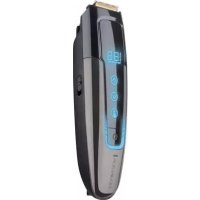
TouchTech MB4700 - Beard trimmer REMINGTON - Free user manual and instructions
Find the device manual for free TouchTech MB4700 REMINGTON in PDF.


| Product type | Beard trimmer |
| Brand | Remington |
| Model | TouchTech MB4700 |
| Power supply | Rechargeable lithium-ion battery, mains adapter, USB cable |
| Cordless runtime | Up to 50 minutes |
| Charge time (first charge) | Approximately 4 hours |
| Charge time (subsequent charges) | Approximately 2 hours |
| Length adjustment | Manual in 0.1 mm steps, with 4 memory profiles |
| Cutting range | Not specified in the manual, adjustable via cutting guide |
| Main functions | LED display, automatic density detection, travel lock, corded/cordless use, hibernation mode |
| Supplied parts | Adjustable cutting guide, main blade, charger adapter, USB cable, cleaning brush |
| Maintenance | Removable blade washable under running water (trimmer switched off and unplugged) |
| Lubrication | Sewing machine oil, after cleaning |
| Safety | Travel lock, automatic stop when idle, use under supervision for certain persons |
| Recycling | Removable battery by a professional, disposal according to regulations |
| Color | Black |
| Warranty | Not specified in the manual, consult manufacturer |
Frequently Asked Questions - TouchTech MB4700 REMINGTON
User questions about TouchTech MB4700 REMINGTON
0 question about this device. Answer the ones you know or ask your own.
Ask a new question about this device
Download the instructions for your Beard trimmer in PDF format for free! Find your manual TouchTech MB4700 - REMINGTON and take your electronic device back in hand. On this page are published all the documents necessary for the use of your device. TouchTech MB4700 by REMINGTON.
USER MANUAL TouchTech MB4700 REMINGTON
natural_image
Black Remington 1 electric toothbrush with digital display and three adjustment knobs (no text or symbols visible)MB4700

A
natural_image
Line drawing of a boat hull with visible hull, side-mounted sensors, and curved water lines (no text or symbols)
B
natural_image
Illustration of a remote control device with buttons and power button (no text or symbols)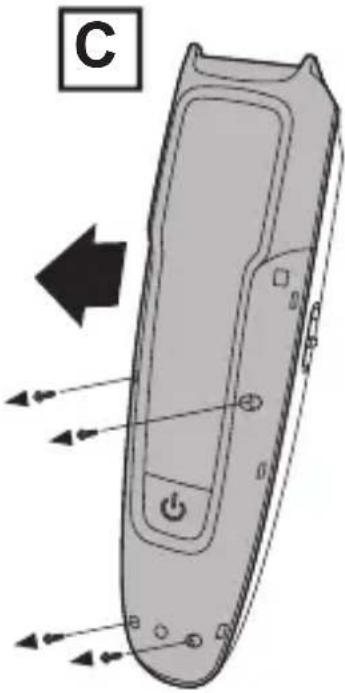
natural_image
Diagram of a remote control device with directional arrows indicating movement or force (no text or symbols present)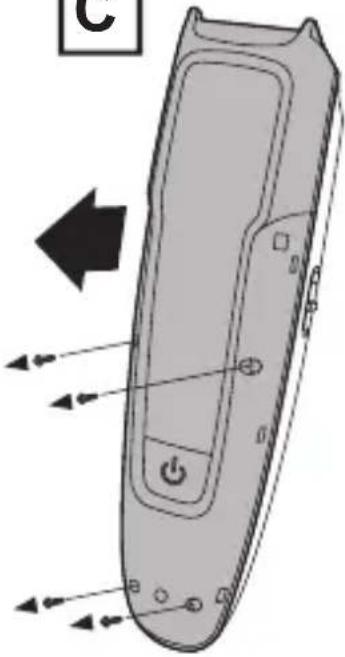
natural_image
Illustration of a remote control device with directional arrows indicating movement or force (no text or symbols)D
natural_image
Technical line drawing of a handheld device with internal components and a directional arrow (no text or symbols)E
natural_image
Diagram of a handheld electronic device with a black arrow indicating rotation or movement (no text or symbols present)F
natural_image
Technical diagram of a mobile phone internal structure showing hand positioning and assembly (no text or labels)Thank you for buying your new Remington ^® product. Please read these instructions carefully and keep them safe. Remove all packaging before use.
IMPORTANT SAFEGUARDS
- This appliance can be used by children aged from 8 years and above and persons with reduced physical, sensory or mental capabilities or lack of experience and knowledge if they have been supervised/instructed and understand the hazards involved. Children shall not play with the appliance. Cleaning and user maintenance shall not be done by children unless they are older than 8 and supervised. Keep the appliance and cable out of reach of children under 8 years.
The device is suitable for cleaning under an open water tap.
- WARNING: Detach the device from the charging adapter before cleaning it in water.
- Do not use the product with a damaged cord. A replacement can be obtained via our International Service Centres.
- This product should only be used with the charging adaptor, or the USB cable supplied.
- Do not use the appliance, charging adaptor, or any other part if it is damaged, as this may cause injury. Always replace a damaged charging adaptor with one of the original type.
- The charging adaptor contains a transformer. Do not cut off the adaptor to replace it with another plug, as this causes a hazardous situation.
- Do not immerse the charging adaptor in water or any other liquid, nor rinse it under the tap.
- This appliance should never be left unattended when plugged into a power outlet, except when charging.
- Keep the power plug and cord away from heated surfaces.
- Do not plug or unplug the appliance with wet hands.
- Do not twist or kink the cable, or wrap it round the appliance.
- This appliance is not intended for commercial or salon use.
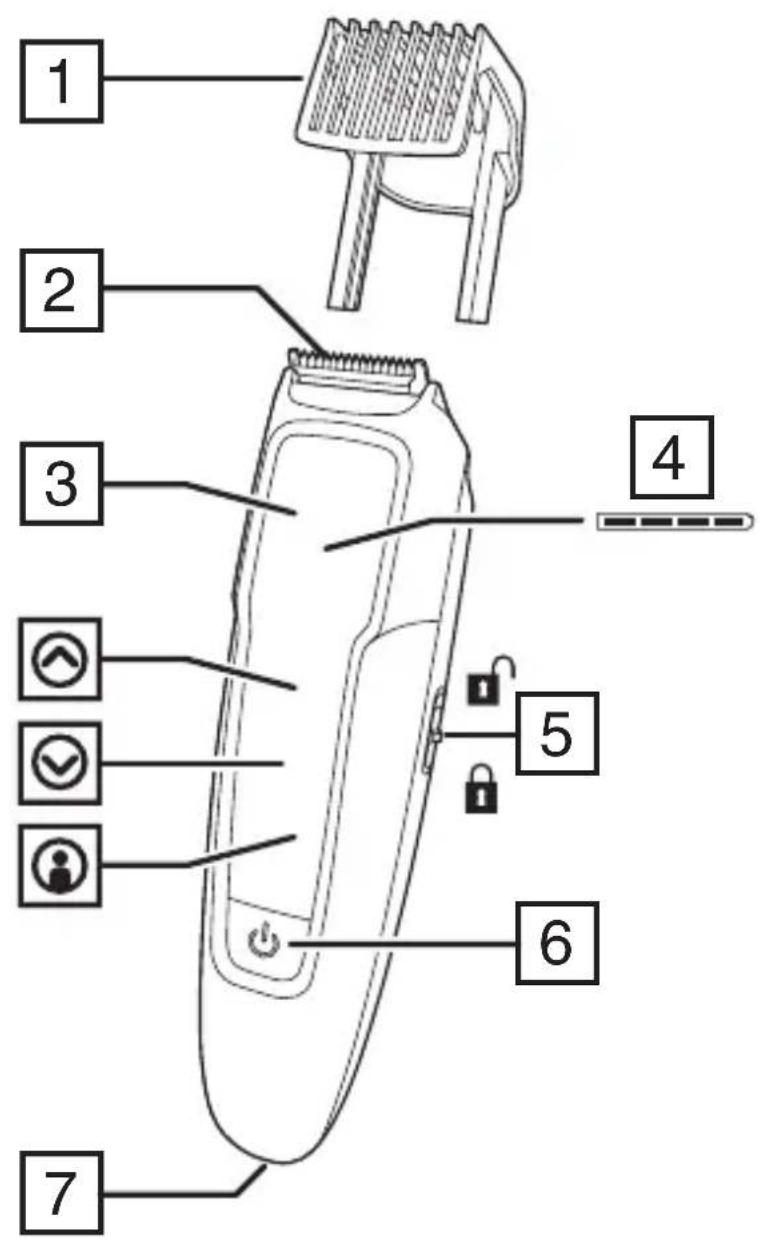
PARTS
- Adjustable beard comb
- Main blade
- Display
- Charge/profiles indicator
- Travel lock
- On/off button
- Charger connector
- Charging adapter (not shown)
- Cleaning brush (not shown)
- USB charging cable (not shown)
CHARGING
Charge the device:
• Before using for the first time.
- When only one charge indicator bar is showing.
• After the device has not been used for a long time.
1. Ensure that the travel lock is in the unlocked position and the device is not running.
2. Connect the charging adapter to the power connector and then to the mains power outlet.
3. When charging, the four charge indicator bars will light up one after the other. When charging is complete, all four indicator bars will be lit.
4. A first time charge should take approximately 4 hours. Top up charges should take approximately 2 hours.
- To preserve the life of your batteries, let them run out every 6 months then recharge for 4 hours.
NOTE: If this is the first time you have charged the device, or if it has not been charged in a long time, the display may not turn on immediately when charging.
USB CHARGING VIA PC
- Ensure that the travel lock is in the unlocked position and the device is not running
- Connect your USB cable to the USB port on the PC.
- Connect the USB cable to device.
- When charging the digital display will illuminate.
NOTE: If this is the first time you have charged the unit, or if it has not been charged in a long time, the display may not turn on immediately when charging.
CORDED/CORDLESS USE
- When fully charged, your trimmer should provide approximately 50 minutes of cordless use.
- You can also connect the charger (as if you were going to charge your trimmer) and operate your trimmer 'corded' if desired.

FITTING/REMOVING THE ADJUSTABLE BEARD COMB
- Switch your trimmer off.
- Slide the comb up and out of the guides.
- To refit the comb, slide the comb into the guides and press it all the way down until it clicks.
ADJUSTING THE CUTTING LENGTH OF YOUR TRIMMER
Your trimmer can be adjusted manually in 0.1 mm increments. It can also store and recall the last four trimming lengths used (Profiles).
ADJUSTING MANUALLY
- Use the up and down buttons ⏻ ⏻ to manually adjust the cutting length. Tap the appropriate button to move the comb up or down in 0.1 mm increments.
- Hold your finger on the button to move the comb quickly.
- The display will show the selected length setting.
Note that the length settings cannot be changed when the trimmer is running.
USING PROFILES
When you adjust the comb length and then operate your trimmer the length setting will automatically be stored in profile one. Your trimmer will store the four most recently used settings in the order of the most recently used. This allows you to recall the settings you use most often.
If all four profile locations have a setting stored and then you make a new cutting length adjustment (one that has not been previously stored) the oldest profile will be deleted and the new setting will be stored.
To recall a profile:
- Ensure that the trimmer is stopped. Tap the profiles button ⓘ.
- Tap the up and down buttons ⬇ ⬇ to select a profile. The display will show the cutting length, and 1, 2, 3 or 4 horizontal bars to represent profile 1, profile 2, etc.
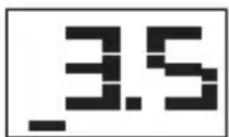
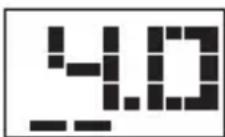

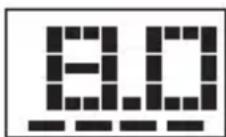
- Tap the profile button ⓘ again to select that profile.
- The comb will then move to the position stored in the selected profile.
To exit profile mode:
To exit without selecting a profile, either press the on/off button, or don't press any button for 5 seconds. Profile mode will be exited without any changes being made to the comb length setting.
SWITCHING YOUR TRIMMER ON AND OFF

WAKING UP
Providing the travel lock has not been set to the locked position, your trimmer will wake automatically when you pick it up:
• The display will come on.
- The buttons will light up.
- The comb will move to the last selected length setting.
Note: Your trimmer will go into energy saving mode if it has not been used for several days.
Use the on/off button to reactivate it.
STOPPING AND STARTING YOUR TRIMMER
To start your trimmer, press the on/off button.
To stop your trimmer, press the on/off button again.
HIBERNATE
To place your trimmer into hibernate mode, press and hold the on/off button.
• The display will go out.
- The buttons will go out.
• The comb will fully retract.
For 20 seconds, your trimmer will not respond to touch signals. However, you can activate your trimmer during this time by pressing the on/off button. After 20 seconds, picking up your trimmer will wake it up again.
AUTO OFF
If left unattended your trimmer will auto shut down after a period of time. Your trimmer will wake up automatically when picked up.
TRAVEL LOCK
To prevent your trimmer accidentally switching on during travel, storage, etc. slide the travel lock switch to the lock 🔒 position. This will deactivate the touch control features of your trimmer. To reactivate, slide the lock to the unlocked 🔒 position. The travel lock can also be set to the lock position to switch your trimmer off.
INSTRUCTIONS FOR USE
During use, your trimmer will automatically adapt its speed and cutting rate according to the hair thickness being cut.
TRIMMING YOUR BEARD
For even cutting, allow your trimmer to cut its way through the beard hair. Do not force it through quickly. If you are cutting for the first time, start with the maximum comb length setting.
THINNING OR TAPERING THE BEARD OR MOUSTACHE
- Set the adjustable comb to the desired length.
- Place the flat part of the comb against the skin. Slowly slide the comb through the hair.
- Repeat from different directions as necessary.
- If hair builds up in the trimmer comb during the trimming process, switch the unit off, remove the comb and brush off the hair.
TRIMMING YOUR SIDEBURNS
- Hold your trimmer with blade facing you.
- Start with edge of sideburn, and with the trimmer blades resting lightly against your skin, use motions towards edge of sideburn line to trim the desired locations in facial area.
- Shape as desired.
TRIMMING THE NAPE OF YOUR NECK
- Remove the adjustable comb.
- Use your fingers to lift the hair at the base of your head up off the neck. Your index finger should be covering the roots of the hairs you are lifting to prevent accidental removal by trimmer.
- Using your other hand, hold the trimmer to the base of your neck with the cutting unit facing up, and move the trimmer up the length of the neck until it touches your finger covering the hair roots at the base of your head.
- Be sure to move the unit slowly when performing this operation and to keep the hair roots at the base of your head out of the way of the trimmer.
TIPS FOR BEST RESULTS
- Your beard, moustache or sideburn hair should be dry.
- Avoid applying lotions before use.
- If you are trimming for the first time, start with the adjustable comb set to its maximum length position.
CARING FOR YOUR TRIMMER
Never rinse, wash or otherwise subject this product to liquid whilst the charger is connected.
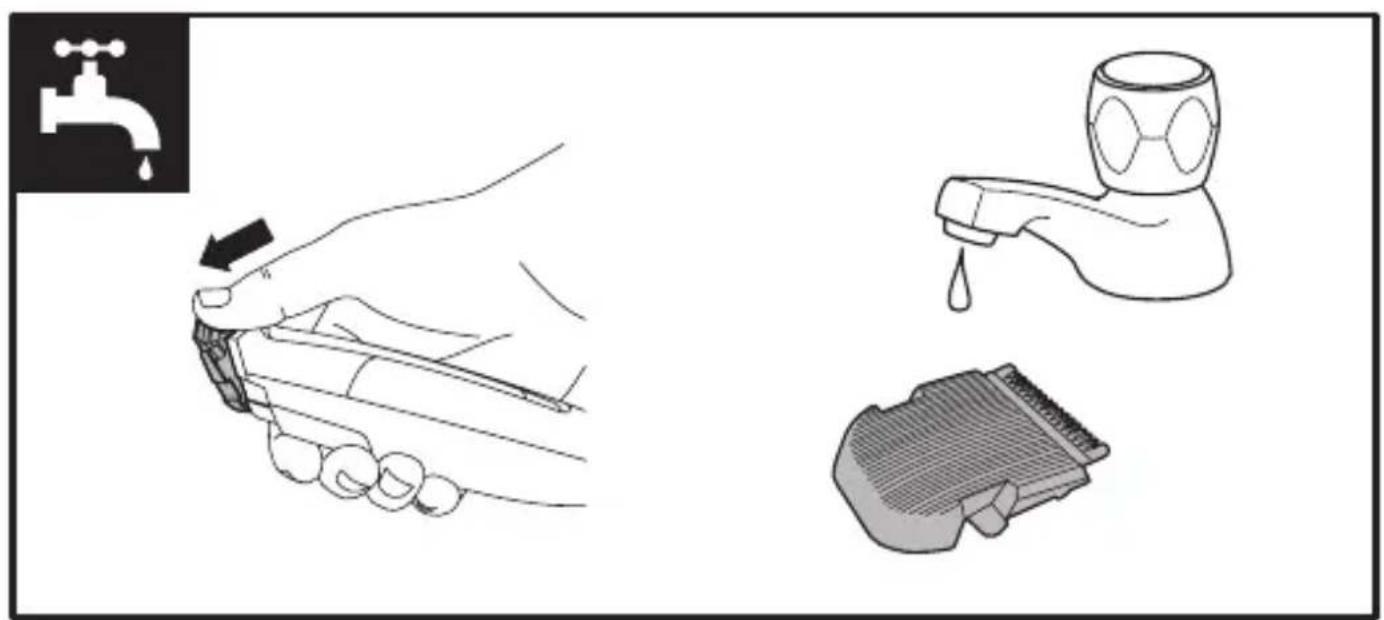
- For best results, keep trimmer running while rinsing it under the tap.
- For more thorough cleaning the blades can be easily removed to wash any hair trimmings from the blades.
- Push the top of the blade away from the trimmer body using your thumb.
- Wash, then refit the blade.
- Place a few drops of cutter or sewing machine oil onto the blades. Wipe off excess oil.
REMOVING THE RECHARGEABLE BATTERY
We strongly recommend that a professional removes the rechargeable battery. Parts of the case, and tools have sharp edges and may cause injury if not handled correctly.
- The rechargeable battery must be removed from the appliance before it is scrapped.
-
Disconnect the charging adapter before removing the battery.
-
Ensure that the battery is fully discharged. To do this, operate the trimmer until it stops.
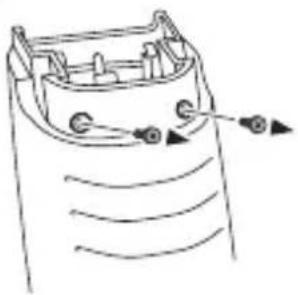
- Remove blade then remove the two screws (FIG A).
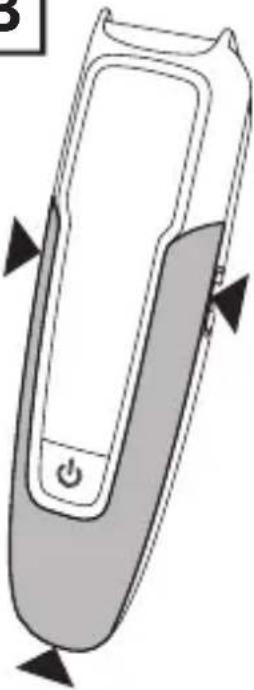
- Use an appropriate tool to prise off the front cover trim (FIG B) at the points indicated

- Remove the four screws (FIG C).
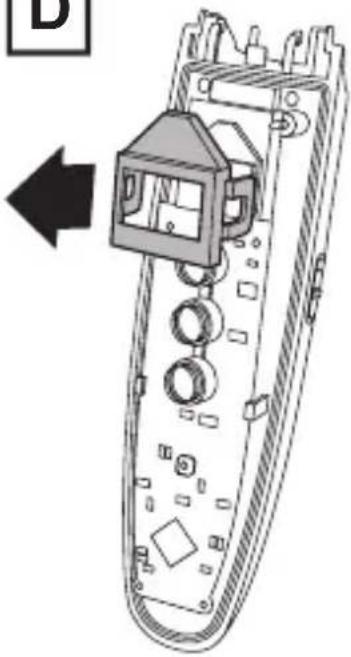
- Unclip then lift off the display cover (FIG D).
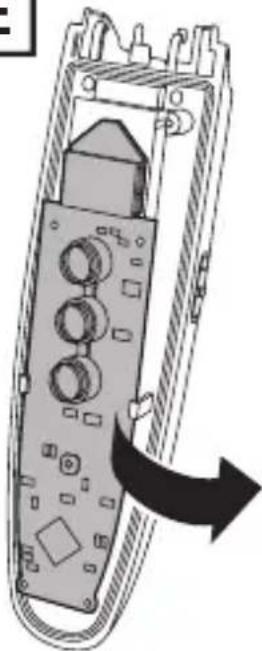
- Unclip the circuit board (FIG E) and move it aside.
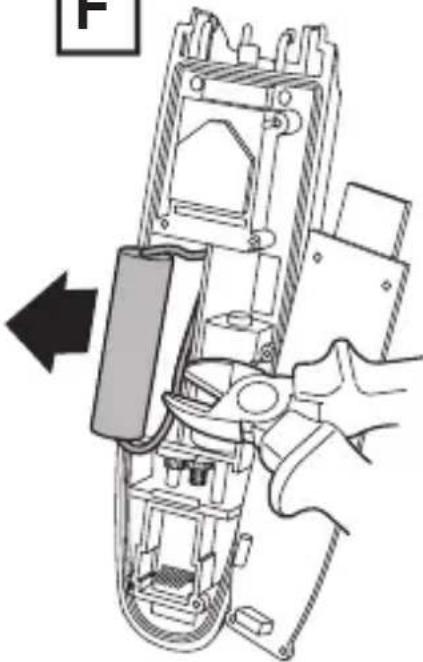
- Lift out the battery and cut the two wires (FIG F).
- The battery must be disposed of at an appropriate official recycling/collection point.
- Do not attempt to operate the trimmer once you have opened it.
RECYCLING
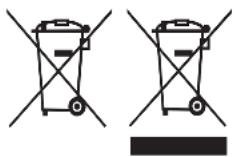
To avoid environmental and health problems due to hazardous substances, appliances and rechargeable and non-rechargeable batteries marked with one of these symbols must not be disposed of with unsorted municipal waste. Always dispose of electrical and electronic products and, where applicable, rechargeable and non-rechargeable batteries, at an appropriate official recycling/collection point.

For at forlade profittilstand:
NOTE: If this is the first time you have charged the unit, or if it has not been charged in a long time, the display may not turn on immediately when charging.
ANVÄNDNING MED SLADD/UTAN SLADD
EN IYI SONUÇLAR IÇIN IPUÇLARI
UPORABA S KABELOM/BEŽIČNA UPORABA
- Kad je potpuno pun, trimer Vam treba pružiti otprilike 50 minuta bežičnog rada.
- Također možete priključiti punjač (kao da ćete puniti trimer) i po želji, koristiti trimer s kabelom.
NAMJEŠTANJE/UKLANJANJE PODESIVOG ČEŠLJA ZA BRADU
- Isključite trimer.
- Kliznim pokretom pomaknite češalj prema gore kako biste ga izvadili iz vodilica.
- Za ponovno namještanje češlja, kliznim pokretom uvucite češalj u vodilice i pritisnite ga do kraja dok ne uskoči uz klik.
PODEŠAVANJE DUŽINE ŠIŠANJA VAŠEG TRIMERA
Trimer se ručno može podesiti na razmake od 0,1 mm. Također, moguće je spremiti i prizvati zadnje četiri dužine šišanja koje ste koristili (Profili).
RUČNO PODEŠAVANJE
- Koristite gumbe gore-dolje ⬆ ☑ za ručno podešavanje dužine šišanja. Dodirnite odgovarajući gumb kako biste pomjerili češalj gore ili dolje u razmacima od 0,1 mm.
- Držite prst na gumbu za brzo pomjeranje češlja.
- Na zaslonu će se prikazati odabrana postavka dužine.
Napominjemo da se postavka dužine ne može mijenjati kad trimer radi.
UPORABA PROFILA
Kad podesite dužinu češlja i pustite trimer da radi, postavka dužine bit će automatski spremljena kao profil broj jedan. Trimer će spremiti četiri zadnje korištene postavke, počevši od zadnje postavke koju ste koristili. To vam omogućuje da prizovete najčešće korištene postavke.
Ako su sva četiri mjesta za profile zauzeta spremljenim postavkama i onda napravite novo podešavanje dužine šišanja (jedno koje nije prethodno spremljeno), najstariji profil će biti izbrisan i spremit će se nova postavka.
Prizivanje profila:
Remington ^® is a Registered Trade Mark of Spectrum Brands, Inc., or one of its subsidiaries
VARTA Consumer Batteries GmbH & Co. KGaA, Alfred-Krupp-Str. 9, 73479 Ellwangen, Germany www.remington-europe.com