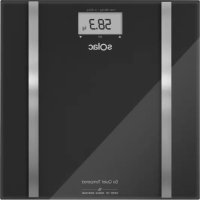
So Quiet Tempered - Scale SOLAC - Free user manual and instructions
Find the device manual for free So Quiet Tempered SOLAC in PDF.



| Product type | Impedance scale |
| Maximum capacity | 180 kg (396 lb) |
| Precision | 0.1 % |
| Body fat measurement range | 5 – 50 % |
| Body water measurement range | 15 – 90 % |
| Muscle mass measurement range | 5 – 60 % |
| Bone mass measurement range | 1 – 40 % |
| Power supply | 3V CR2032 battery |
| Number of user memories | 10 |
| Automatic shut-off | Yes, after a few seconds of inactivity |
| Usage | Household |
| Cleaning | Damp cloth with mild detergent, do not immerse |
| Safety | Do not exceed capacity; do not use if glass is broken |
| Warranty | Complies with applicable legislation (see customer service) |
Frequently Asked Questions - So Quiet Tempered SOLAC
User questions about So Quiet Tempered SOLAC
0 question about this device. Answer the ones you know or ask your own.
Ask a new question about this device
Download the instructions for your Scale in PDF format for free! Find your manual So Quiet Tempered - SOLAC and take your electronic device back in hand. On this page are published all the documents necessary for the use of your device. So Quiet Tempered by SOLAC.
USER MANUAL So Quiet Tempered SOLAC
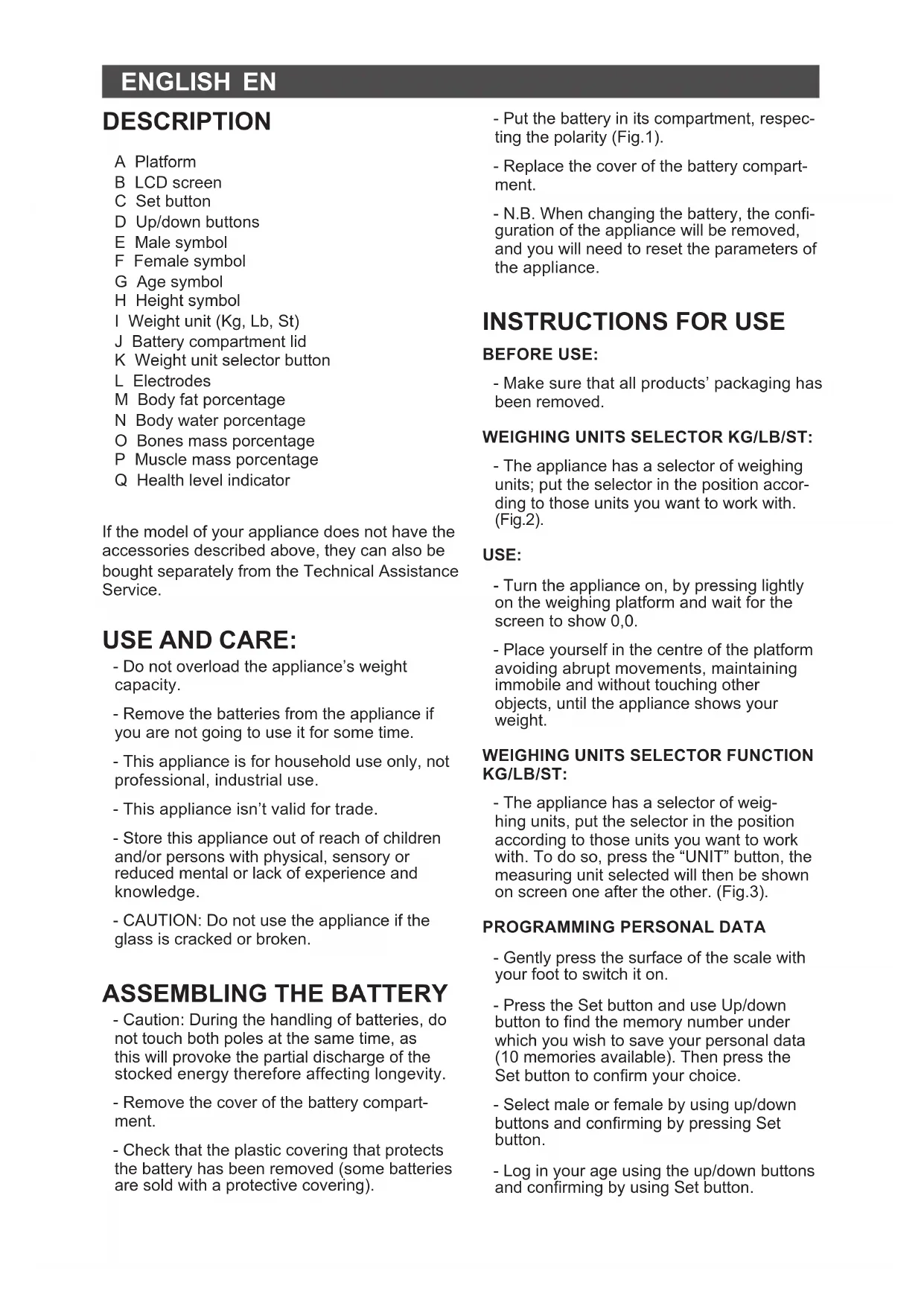
A Platform
B LCD screen
C Set button
D Up/down buttons
E Male symbol
F Female symbol
G Age symbol
H Height symbol
Weight unit (Kg, Lb, St)
J Battery compartment lid
K Weight unit selector button
L Electrodes
M Body fat percentage
N Body water percentage
O Bones mass percentage
P Muscle mass percentage
Q Health level indicator
If the model of your appliance does not have the accessories described above, they can also be bought separately from the Technical Assistance Service.
USE AND CARE:
- Do not overload the appliance's weight capacity.
- Remove the batteries from the appliance if you are not going to use it for some time.
- This appliance is for household use only, not professional, industrial use.
- This appliance isn't valid for trade.
- Store this appliance out of reach of children and/or persons with physical, sensory or reduced mental or lack of experience and knowledge.
- CAUTION: Do not use the appliance if the glass is cracked or broken.
ASSEMBLING THE BATTERY
- Caution: During the handling of batteries, do not touch both poles at the same time, as this will provoke the partial discharge of the stocked energy therefore affecting longevity.
- Remove the cover of the battery compartment.
-
Check that the plastic covering that protects the battery has been removed (some batteries are sold with a protective covering).
-
Put the battery in its compartment, respecting the polarity (Fig.1).
- Replace the cover of the battery compartment.
- N.B. When changing the battery, the configuration of the appliance will be removed, and you will need to reset the parameters of the appliance.
INSTRUCTIONS FOR USE
BEFORE USE:
- Make sure that all products' packaging has been removed.
WEIGHING UNITS SELECTOR KG/LB/ST:
- The appliance has a selector of weighing units; put the selector in the position according to those units you want to work with. (Fig.2).
USE:
- Turn the appliance on, by pressing lightly on the weighing platform and wait for the screen to show 0,0.
- Place yourself in the centre of the platform avoiding abrupt movements, maintaining immobile and without touching other objects, until the appliance shows your weight.
WEIGHING UNITS SELECTOR FUNCTION KG/LB/ST:
- The appliance has a selector of weighing units, put the selector in the position according to those units you want to work with. To do so, press the "UNIT" button, the measuring unit selected will then be shown on screen one after the other. (Fig.3).
PROGRAMMING PERSONAL DATA
- Gently press the surface of the scale with your foot to switch it on.
- Press the Set button and use Up/down button to find the memory number under which you wish to save your personal data (10 memories available). Then press the Set button to confirm your choice.
- Select male or female by using up/down buttons and confirming by pressing Set button.
- Log in your age using the up/down buttons and confirming by using Set button.
EN
- Log in your height using the up/down buttons and confirming by using Set button.
- These steps can be repeated to program the remaining 9 memories if desired.
CALCULATE PERCENTAGE BODY FAT
- This appliance has the built-in option to calculate your percentage body fat by using bioelectrical impedance techniques.
- This analysis measures the different conductivity between the muscle mass and body mass formed by fat cells using very low-intensity electrical micro current that runs through the lower members of the body.
- The percentage body weight is calculating using the procedure described above and also involves the following variables: height, age, sex and weight.
- The body fat reading can only be carried out barefoot.
SYSTEM FOR MEASURING THE PERCENTAGE OF BODY FAT, BODY WATER, MUSCLE MASS AND BONES MASS
- Gently press the surface of the scale with your foot to switch it on.
- Press the Set button and use the up/down buttons to access the memory code under which your personal data have already been saved.
- Wait a few seconds until your personal data appears on screen briefly: sex, age, height and weight unit.
- Wait for the display to show "0,0 kg" and then the scale is ready for use.
- Step onto the scale with bare feet and make sure that you are standing still with equal weight distribution. Stand on the stainless steel electrodes with both feet.
- Do not move and the measured results will be displayed sequentially (Body fat %, Body water %, Muscle mass %, Bones mass %) on the screen. The results are displayed 2 times.
- After stepping down the "Auto shutdown" system will turn it off automatically.
| % Body Fat | ||||
| Age | Low | Normal High | Very High | |
| <12 <11 11 | -20 | 20-24 >24 | ||
| 12-16 <9 9 | -19 | 19-23 >23 | ||
| 16-39 | <12 | 12-20 | 20-25 >25 | |
| 40-60 | <15 | 15-23 | 23-29 >29 | |
| >60 | <17 | 17-26 | 26-31 >31 | |
| % Body Fat | ||||
| Age | Low | Normal | High | Very High |
| <12 <13 | 13-23 | 23-27 >27 | ||
| 12-16 | <15 | 15-24 | 24-29 >29 | |
| 16-39 | <19 | 19-28 | 28-33 >33 | |
| 40-60 | <23 | 23-32 | 32-37 >37 | |
| >60 <24 | 24-35 | 35-40 >40 | ||
EN
REFERENCE TABLES OF MEASURED VALUES:
After measuring, you can use the following tables as a reference to check if your measurement is healthy:
| Age | Body Water (%) | Muscle Mass (%) | Bones Mass (%) |
| <12 56-67 25-36 15-19 | |||
| 12-16 58-69 32-44 15-19 | |||
| 16-39 55-56 38-44 16-20 | |||
| 40-60 50-60 36-42 16-20 | |||
| >60 45-60 34-40 15-19 | |||
| <12 54-65 24-34 15-19 | |||
| 12-16 54-64 28-38 15-19 | |||
| 16-39 50-60 32-38 15-19 | |||
| 40-60 45-55 30-36 15-19 | |||
| >60 40-55 29-35 14-18 | |||
- In the event of doubt, consult your doctor or pharmacist for clarification.
STAND-BY FUNCTION:
-
In order to save energy, the appliance passes to stand-by after few seconds if the user does not use it.
-
To return to normal operation simply press lightly on the weighing platform and wait for the screen to show "0,0".
ONCE YOU HAVE FINISHED USING THE APPLIANCE:
- Remove the battery from the appliance if you are not intending to use the appliance during an extended period.
SPECIAL MESSAGES:
-
The following messages can appear on the screen:
-
Err: means that the appliance's capacity has been exceeded or that there is an error in the
body fat percentage measurement.
- Lo: means that the battery has to be changed.
CLEANING
- Clean the equipment with a damp cloth with a few drops of washing-up liquid and then dry.
- Do not use solvents, or products with an acid or base pH such as bleach, or abrasive products, for cleaning the appliance.
- Never submerge the appliance in water or any other liquid or place it under running water.
SUPPLIES
- Only the following type of supplies must be used with the appliance. (Fig.4).
- Batterie type: 3V CR2032.
- These supplies are available in specialist shops.
SPECIFICATIONS:
| Measurement range | Increment | |
| Max. Loading capacity | 180 Kg (396 lb) | |
| % Body Fat 5-50% | 0,1% | |
| % Body Water 15-90% | 0,1% | |
| % Muscle Mass 5-60% | 0,1% | |
| % Bones Mass 140% | 0,1% |
DESCRIPTION
PROGRAMMATION DES DONNÉES PERSONNELLES:
FUNKCE VOLICE JEDNOTEK HMOTNOSTI KG/LB/ST:
yNOTPEBAI NOIDPbJxKA
:
-He 6nBa KaNaUTeTbT 3a TeIneH aypeda da ce HauBnwaBA.
-OTCTpaHete6aTeepnnteotypeda,aKo Hama DaTo N3NoJ3BaTe 3a DbJIO BpeMe.
-To3n ypeE npedHa3Haue HEnCTBeHO 3a 6ntOBN HyxDN, a He 3a npocnoHaJIHa IIN npomuJneHa ynoTpe6a.
-HactoIyIypeHneIPOxOJa3a TbproBcKa DeHocT.
-CbXpaHraBai Te ypea daJIeU OT DoCTbna Ha Deua N/INn Xopa C HAmaleHN 3u3ueckN,ceH3OpHn INn YMCTBeHn Bb3MOxHOCTn, INn OT TaKnBa 6e3 ONNT INo3HaHnA 3a 6opabeHe C Hero.
-BHIMAHHE!: He n3noJ3BaIte ypea, ako CTbKnTo e nyKHaTo uNn cUyneHo.
IOCTABRHE HABATEPURA
-BHIMaHHe:Дokatoбopabnte c
6aTepuHte,He nHaIte eHOBpeMeHHO NDbata NOHcA,TbKATO TOBa Ue npEdu3Bnka YactuHOTo NM pa3peKdaHe IN npRAKO 3aceHRe DJIroTpaHOCCTTA NM.
- OtctpaheTe kanaKa Ha otJeHneTo 3a6atepnaTa
-Проверетадani cte примхали пл actmacobata NeHTa Na 6aTePnTa/NITE (Hяkon 6aTePnC ce npodabat C 3aUHTHa JIeHTa). - NocTaBete 6aTeepnraTa Ha TxAxHOTo MrcTo, KaTO cna3BaTe nonHocnte. (Fig.1).
- OTCpaHete KaNaka Ha pa3nPpeJeHneTo 3a 6atepnaT/ 6atepuNTe.
-Белека:ПО Врeme Ha CMЯнота Ha 6baTepeHnTE, KOHФИгурациЯТа Ha ypeDa ue ce n3Tpne, Taka Ye She e Heo6xOДIMO da KOHФИгурпаTe HaHOBO napaMeTpIne Ha ypeDa.
HAUYH HA YNOTPEBA
3ABEJIEXKINIPEINYNOTPEBA:
- YBepete Ce, Ye n3zraNo CTe OTCTpaHnJIOn OnaKOBkata Ha ypeHa.
CENEKTOP HA N3MEPNTEJHATA EINHUNCA 3A TEJNOKG/LB/ST:
- YpeTpa3noIaracbcceKeTOp 3a eHnUTe TnerNo.HarnaceTe To3n ceKeTOp B CbOTBeTCTBue c eHnUHTe, c KOUTO NCKaTe da pa6oTu. (Fig.2).
YIOTPEBA:
-3aTeiCTBaIe ypeIa, KaTo IeKO HaTnCHeTe nnatOpMaTa 3a TerneHe. N3uKaaiTe, DOKaTO Ha ekpaHa ce noRbN 0,0.
- 3actaheB cpeataHa nIaTOpMaTa Ha KaHTapa, kaTo n36raBate pe3KN DBHXeHn. OctaHe HeNoDBNXn Hn He nnnaTe npym npedMeTn DOkato KaHTapa He noKaXe Ternoto Bn.
ФУHKUЯ ПОМЯHA HA MEPHATA EДИНULA KG/LB/ST:
- YpeDbT pa3NoIara cbc ceJIeKTop Ha n3MepnteHaTa eINHua. HarIaceTe To3n ceJIeKTop B CbOTBeTcTBne C eINHuNTe, c KOnTO uCKaTe da pa6oTu. 3a ueTaN HATNCHeTe 6yToH "UNIT", cNeI KoETo Ha ekpaHa Iue ce NOBn N36paHaTa eINHua 3a Terno. (Fig.3).
ПОГРAMИРАЕ HA ЛИЧНITE ПAPAMETРИ:
-3a 3aIeIcTBaTe TERIIINKaTa, HATNCHeTe NekO C KpaK NOBbPxHOCTTa I.
- HaTnCHete 6yToHa 3a HAcTpOuKa n
H3NoI3BaIte 6yToHInTe 3a "Rope" n "DOny",
3a Da OTKpIeTe HOMepa Ha NaMeTTa, B
KoTTO JeJaTe Da CbXpaHInTe NnHInTe
Cn DaHHN (HMa Decet NaMetn Ha BaWe
pa3nOJoxHeNe). CneT ToBA HaTnCHete
6yToHa 3a HAcTpOuKa, 3a Da NOTBbPdInTe
CBor n36Op.
-Изберетe"MbЖ"ии"xeHa"nocpeDCTBOM 6byToHte3a"rope"и"Дony".NotbvpTe nocpeDCTBOM 6byToHa 3a HacTpOiKn.
-BbBedeTe B3pactTa cn nocpeDCTBOM 6byOnHte 3a "rope" u "dony". NotBbpDeTe nocpeDCTBOM 6byToHa 3a NaCTPOkN.
-BbBedeTe BnCOunHaTa cn NocpeDCTBOM 6byOnHe 3a "rope" n "dony". NotBbpDeTe NocpeDCTBOM 6byToHa 3a NaCTpoiKn.
-Ako JeJaTe, MoKeTe Da NOBTapTe Te3N CTbKn, 3a Da nporpaMnpate 9-Te octaHaJIN NaMeTn.
ИЗЧИСЛЯBAHE ПОЛЕHTA TEJIЕCHA MA3НИHA:
- HactoIyT ypeI DaBa Bb3MOxHocT 3a I3YNCJIBAHe IPOeHTa TeJeCHa Ma3HnHa IocPeIcTBOM TexHKn Ha 6NoJKeKtpueH NmpeDaHC.
-Анлгьт ИЗИСЛЯВа pa3иката на Нювдмоct Мжду мскуннata Maca И TeLECHOTO TerILO,обауBAHO OT MaCTHNTe KNETK.То npabn TOBa NocpeTbOM MнКрOTOKOBECMHORO HNCbK INHTeH3ntET, Teuaцп NO DOHNITE KpaHNUHa Ha TЯNOTO.
-Прочьт TeleсHo TERNo CE n3uNcIyBa посpeДТВOM NO-rope OINcaHATA пpoцeДуpa. B3emAT CE B ppeDvIи CnTe прOMeHInBn BeINuHH: BnCOUHa, Bb3pact, нлИТERNo. - OnpeJenHeTo Ha TeJeCHaTa Ma3HnHa MoKe Da Ce N3BbPUn Ha 6Oco.
CNCTEMA 3A IN3UHCSJIEHNE HA TEJIECHATA MACA, CbIbPjXAHNE HA BOIDA, MYCKYJHA MACA I KOCTHO TEG:
-3aДаЗадиCTBaTe Be3HaTa,Neko HATINCHETECpak NOBbPHOCTTa.
- HaTnchTe 6yToHa 3a HacTpOKn n NocpeDCTBOM 6yToHnTe 3a "rope" n "doNy" BNe3Te B KOna Ha NaMeTTa, KbDeTo ca
cbxpaHEn nIuHnTe daHHN.
-ИЗчakайтЕняколкосекунДи,ДOKаTO
ЛИЧНTeВиданнспЯьгТнаEkpaHa:
ПОЛ,ВБЗрСТ,ВИСоУнHa ИEdиHицa 3a
ТERПО.
-Изчakайтевзнатада покaze“0,0kg".ToBa yka3Ba,уе взната e roTOBa 3aynotpe6a.
- KayeTe ce 6oc Ha Be3HaTa. YBepTe ce, ye cTe 3actaHaI/a npabnHNo Ha HeR, KaTo CTe pa3npedeNnIe Trrno To Mekdy DbaTa Kpaka, a CbIoo NcYe cTe CTbNnIN BbpXy CTomAHeHnte eEnkTKpoDn.
- He ce DBNXKeTe. Pe3yNTaTNe O T N3MepBaHeTo ige ce NOBbT eINH CLeI dpyr Ha ekpaHa (%Ma3HnHa, % BOda, % MyckylnHa Maca, % KocTHo TerNo). Pe3yNTaTNe ige ce NoBbT NocJIeDoBAteHNO DBA NbTu.
- CnEi CnI3aHe OT Be3HaTc, CnCTeMaTa 3a camOCToRTeJIHO N3KJIIOUBaHe Ha ypeJa Iue ce 3aJeIcTBa, IN ToI Iue Ce N3KJIIOUH NT camo Ce6e cn.
PEΦEPEHTHA TABIUNCA 3A CTOΗOCTΙTE HA Ι3MEPBAHETO
- Cnei n3MepBaHeto MoKe Da npOBepnte, daJIpe3yIITaNTe yKa3BAt Do6po 3dpaBe, KaTO n3NON3BaTe CneHNITE Ta6nU:
| %ТелеснаMaЗниа | ||||
| Въз pact | Ниско | Hорmaлно | Виско | Многовиско |
| <12 <11 | 11-20 20-24 >24 | |||
| 12-16 <9 | 9-19 | 19-23 >23 | ||
| 16-39 | <12 | 12-20 | 20-25 >25 | |
| 40-60 | <15 | 15-23 | 23-29 >29 | |
| >60 | <17 | 17-26 | 26-31 >31 | |
% Teleecha Ma3HnHa

| Въз pact | НИСКО | Нормално | ВИСOKO | Много ВИСOKO |
| <12 <13 | 13-23 23-27 >27 | |||
| 12-16 <1 | 5 15-24 24-29 >29 | |||
| 16-39 <1 | 9 19-28 28-33 >33 | |||
| 40-60 <2 | 3 23-32 32-37 >37 | |||
| >60 <24 | 24-35 35-40 >40 | |||
| Въз pact | Телесна ВODа (%) | Мужулна маса (%) | Костно Терло (%) |
| <12 56-67 25-36 15-19 | |||
| 12-16 58-69 32-44 15-19 | |||
| 16-39 55-56 38-44 16-20 | |||
| 40-60 50-60 36-42 16-20 | |||
| >60 45-60 34-40 15-19 | |||
| <12 54-65 24-34 15-19 | |||
| 12-16 54-64 28-38 15-19 | |||
| 16-39 50-60 32-38 15-19 | |||
| 40-60 45-55 30-36 15-19 | |||
| >60 40-55 29-35 14-18 | |||
-Bcnya,ye nMaTe Bbnpocn,MOJn o6bpHeTe ce KbM CBOr Iekap nnI npapMaueBT.
ФУHKUЯ ABTOMATNUHO 3KJIQUBAHE (STAND-BY):
- C ueI neCTeHe Ha eHepnra,ypeIbTnpemHaBa B cbCToRHe Ha n3aKbaHe (stand-by) cIeI n3TuHaHeTo HAnrKOJIco CeKHyDn,AkO Ipe3 TOBa BpeMe Notpe6nteIaT He e N3BbPUn HRAKaKBO DeIcTBne C Hero.
-3a da ce BbpeHe TB oBnuaeH pa6oTeH pexmHa ypeDa npocTo cneBa Jeko Da HaTNCHe TnATΦopMaTa 3a TerIeHe I da NoYaKaTe, DOKaTO Ha ekpaHa ce NOBN "0,0".
CJIeI INPIKJIIOUBAHE HA PABOTATA C YPeDA:
- Otrpahe 6aTePnTe OT ypea, ako He Bb3HaMePraBate Da rO n3NoI3BaTe B 6JIn3Ko 6bJe.
CNEUJIHN CbOUsEHHa:
- Ha ekpaHa MOraT da ce noBraT cJeHnTe Cbo6uEHHa:
-Err:O3nauaba,ye kanaunTeTbHa ypea e HaXbPlen HnnYe ce e nOBnla rpeuKa npn N3MepBaHeTo Ha TeNeChTa Ma3HnHa.
-Lo:O3nauaba,ue e Heo6xOJIMO da ce cmEHn 6aTepejra.
ПОЧИСТВАЕ
-Почистусяа CBлжнka Кьрna,Наноeha Cняколко KaNKи Мпшпpenapat,CлeД KOETO NOdCywete.
-3a NOUHCTBaHETO Ha ypeHa He H3N013BaIte pa3TBOpHTeHn Inpenapatn C KncEInHe nIIN OCHOBEN pHΦakTOp, KaTO 6eJIHa n a6pa3NBHN npOdykTN.
- He notanra Te ypea BbB BOa nIIN dpyra TeuHOCT, I He rO nocTabrTe IOd Teuaa BOda.
KOHCMATNB
- YpeBbT CneBa Na 6bNe n3non3BaH cAmO Cbc CneHNr BnKOHcymatNB: (Fig.4).
- BaTepeu: 3V CR2032.
-MoKTe Da 3aKyInTe TO3n BnD KOHCymtNBn B CneuaHn3npaHm MaRa3HH.
XAPAKTEPNUCTUKN
a a a a a a a a a a a a a a a a a a a a a a a a a a a
a a a a a a a a a a a a a a a a a a a a a a a a a a a a a a a a
yjolllxolalw yio jollll
aegg aai g aalell g aallg jolaoj no jngjnl jolaojgljagl jgl
jgsxg jgluaa gljll js1s1 jglss Jaaas y:jjao
4
j 1000000000000000000000000000000000000000000
a.1111000 111100
(a)aBlaLglaagjy CJIyIaIg()CJIyIaIyIaIyIaIyIaIyIaIyIaIy
.(Fig.1)
y
jglal 100 1001 1001 1001 1001 1001 1001 1001 1001 1001 1001 1001 1001 1001 1001 1001 1001
pIwJyIaJb
:JUWUg
aill jao aedllg aieill algo gao aolj ao 5t
:kg/lb/st ijgl 1000
.(Fig.2)
:JU
aalil 100000000000000000000000000000000000000
This product enjoys the recognition and protection of the legal guarantee in accordance with current legislation. To enforce your rights or interests you must go to any of our official technical assistance services.
You can find the closest one by accessing the following web link: http://solac.com
You can also request related information by contacting us by phone.
You can download this instruction manual and its updates at http://solac.com
DE) GARANTIE UND TECHNISCHER SERVICE
Big distribution society
4 Rue 13 Lot Smara, Oulfa,
Casablanca
(+212)522894021
ME) MONTENEGRO - EUROPE
Rastovac bb, 81400
Niksic
+38240217055
Unit 25 & 26, San Croy Office Park, Die Agora
Road, Croydon, Kempton Park, 1619
Johannesburg
(+27)0113925652
solac
www.solac.com
Rev:08/03/2021


- USE AND CARE:
- ASSEMBLING THE BATTERY
- INSTRUCTIONS FOR USE
- BEFORE USE:
- WEIGHING UNITS SELECTOR KG/LB/ST:
- USE:
- WEIGHING UNITS SELECTOR FUNCTION KG/LB/ST:
- PROGRAMMING PERSONAL DATA
- EN
- CALCULATE PERCENTAGE BODY FAT
- SYSTEM FOR MEASURING THE PERCENTAGE OF BODY FAT, BODY WATER, MUSCLE MASS AND BONES MASS
- REFERENCE TABLES OF MEASURED VALUES:
- STAND-BY FUNCTION:
- ONCE YOU HAVE FINISHED USING THE APPLIANCE:
- SPECIAL MESSAGES:
- CLEANING
- SUPPLIES
- DESCRIPTION
- PROGRAMMATION DES DONNÉES PERSONNELLES:
- FUNKCE VOLICE JEDNOTEK HMOTNOSTI KG/LB/ST:
- yNOTPEBAI NOIDPbJxKA
- IOCTABRHE HABATEPURA
- HAUYH HA YNOTPEBA
- 3ABEJIEXKINIPEINYNOTPEBA:
- CENEKTOP HA N3MEPNTEJHATA EINHUNCA 3A TEJNOKG/LB/ST:
- YIOTPEBA:
- ФУHKUЯ ПОМЯHA HA MEPHATA EДИНULA KG/LB/ST:
- ПОГРAMИРАЕ HA ЛИЧНITE ПAPAMETРИ:
- ИЗЧИСЛЯBAHE ПОЛЕHTA TEJIЕCHA MA3НИHA:
- CNCTEMA 3A IN3UHCSJIEHNE HA TEJIECHATA MACA, CbIbPjXAHNE HA BOIDA, MYCKYJHA MACA I KOCTHO TEG:
- PEΦEPEHTHA TABIUNCA 3A CTOΗOCTΙTE HA Ι3MEPBAHETO
- ФУHKUЯ ABTOMATNUHO 3KJIQUBAHE (STAND-BY):
- CJIeI INPIKJIIOUBAHE HA PABOTATA C YPeDA:
- CNEUJIHN CbOUsEHHa:
- ПОЧИСТВАЕ
- KOHCMATNB
- XAPAKTEPNUCTUKN
- 4
- pIwJyIaJb
- DE) GARANTIE UND TECHNISCHER SERVICE
- ME) MONTENEGRO - EUROPE
- solac
Brand : SOLAC
Model : So Quiet Tempered
Category : Scale