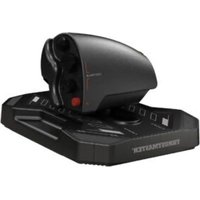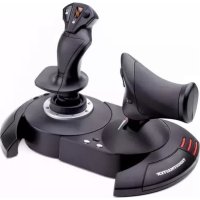
TFlight Hotas One Joystick Xbox One - Controller THRUSTMASTER - Free user manual and instructions
Find the device manual for free TFlight Hotas One Joystick Xbox One THRUSTMASTER in PDF.


| Product Type | Joystick (game controller) compatible with Xbox One and PC |
| Brand | Thrustmaster |
| Model | T.Flight Hotas One |
| Connectivity | USB, RJ12 connector for Thrustmaster Rudder pedals (sold separately) |
| Compatibility | Xbox One (games supporting Flight Stick mode) and PC (Windows 10/8.1/8/7) |
| Number of axes | 8 axes (including 3 reserved for TFRP Rudder pedals) |
| Operating modes (PC) | 4/6 axis mode (toggle button and pedals coupled) and 5/8 axis mode (independent) - toggle via GUIDE button |
| Throttle | Detachable, can be attached to the stick or used separately; fixed with Allen key |
| Rudder control | By rotating the stick or using the toggle button on the throttle; rotation can be locked |
| Stick resistance | Adjustable via wheel under the base |
| D-pad | Point of view (rear, left, right view, etc.) |
| Buttons and controls | Action buttons, VIEW, GUIDE, MENU buttons, Xbox One/PC selector |
| LED indicator | White LED in 4/6 axis mode, off in 5/8 axis mode |
| Power supply | Via USB (USB connector) |
| Care and cleaning | Clean with a dry, non-damp cloth. Do not use solvents. |
| Safety | Do not modify or open the product. Use only compatible accessories. |
| Spare parts and repairability | Contact Thrustmaster technical support. Legal warranty of conformity. |
| Warranty | 2 years in EU, 1 year elsewhere (according to legislation) - limited manufacturer warranty |
| General information | Made in China. © 2017 Guillemot Corporation S.A. |
Frequently Asked Questions - TFlight Hotas One Joystick Xbox One THRUSTMASTER
User questions about TFlight Hotas One Joystick Xbox One THRUSTMASTER
0 question about this device. Answer the ones you know or ask your own.
Ask a new question about this device
Download the instructions for your Controller in PDF format for free! Find your manual TFlight Hotas One Joystick Xbox One - THRUSTMASTER and take your electronic device back in hand. On this page are published all the documents necessary for the use of your device. TFlight Hotas One Joystick Xbox One by THRUSTMASTER.
USER MANUAL TFlight Hotas One Joystick Xbox One THRUSTMASTER
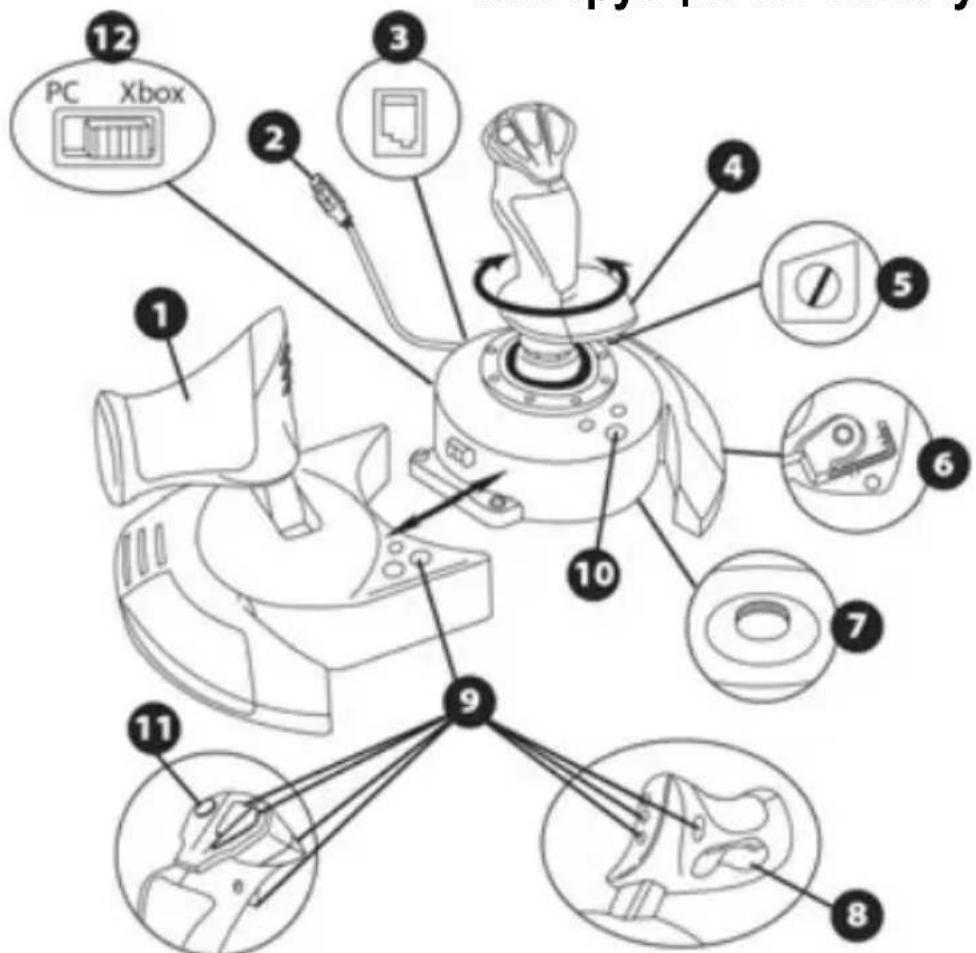
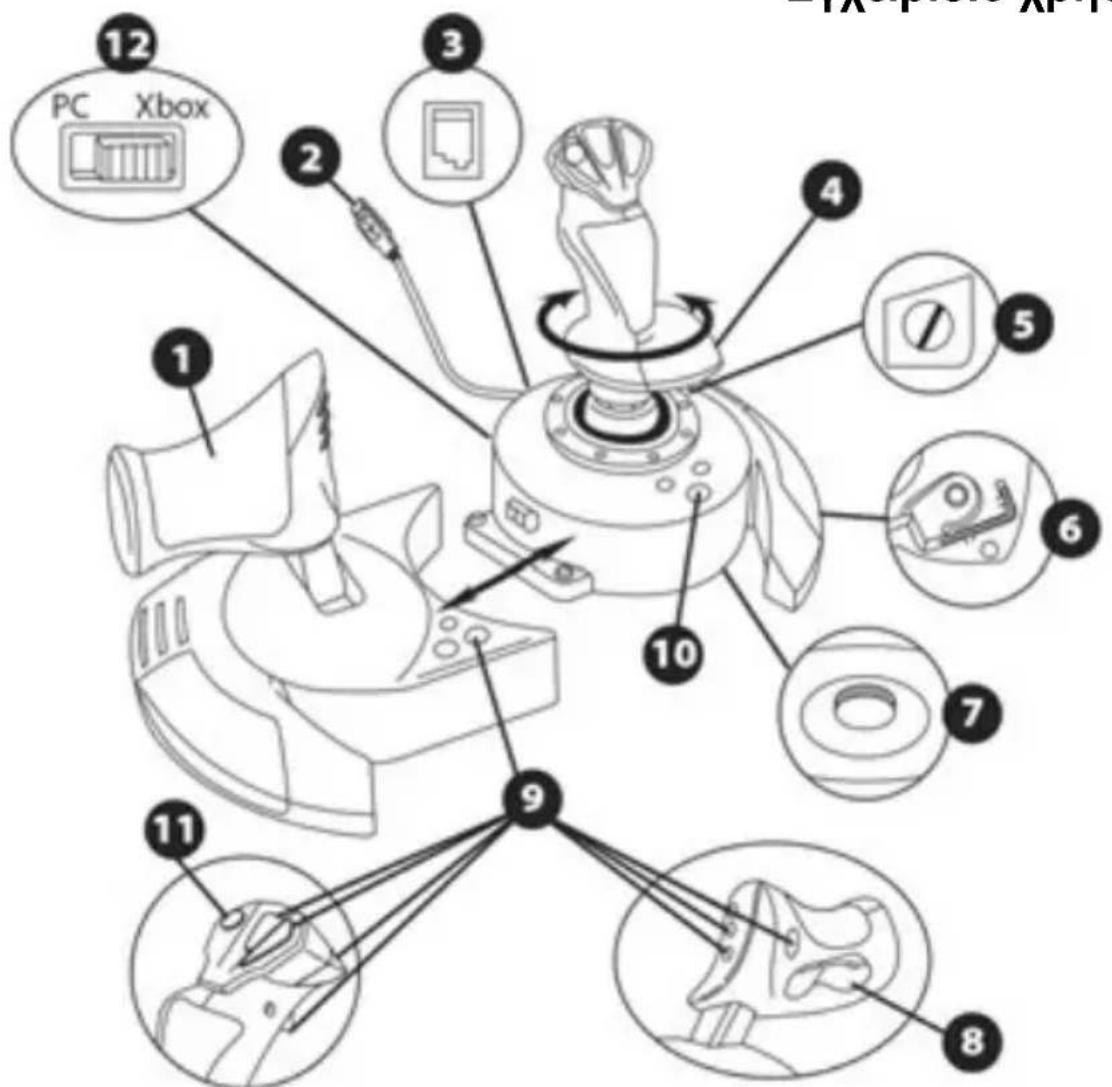
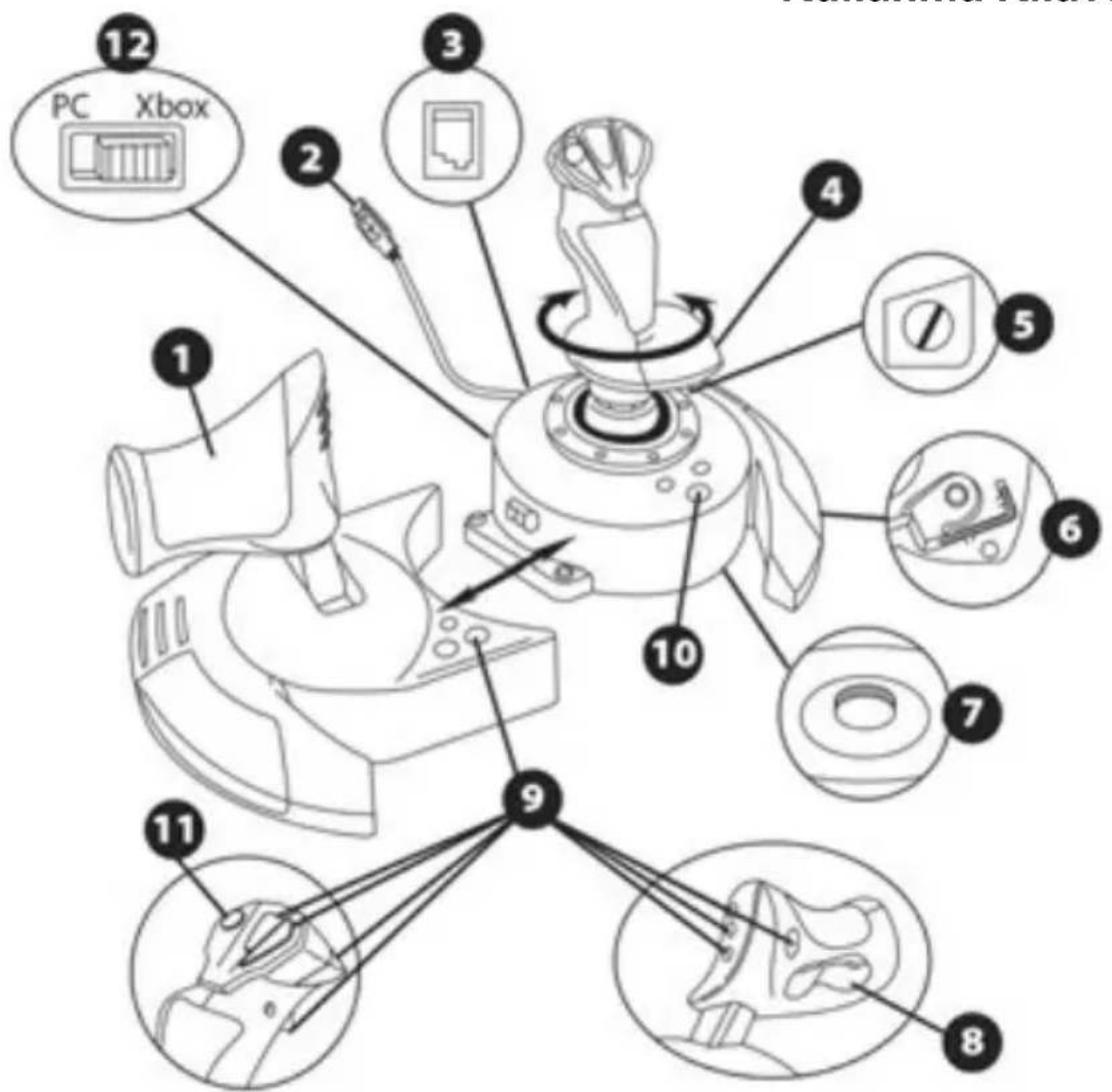
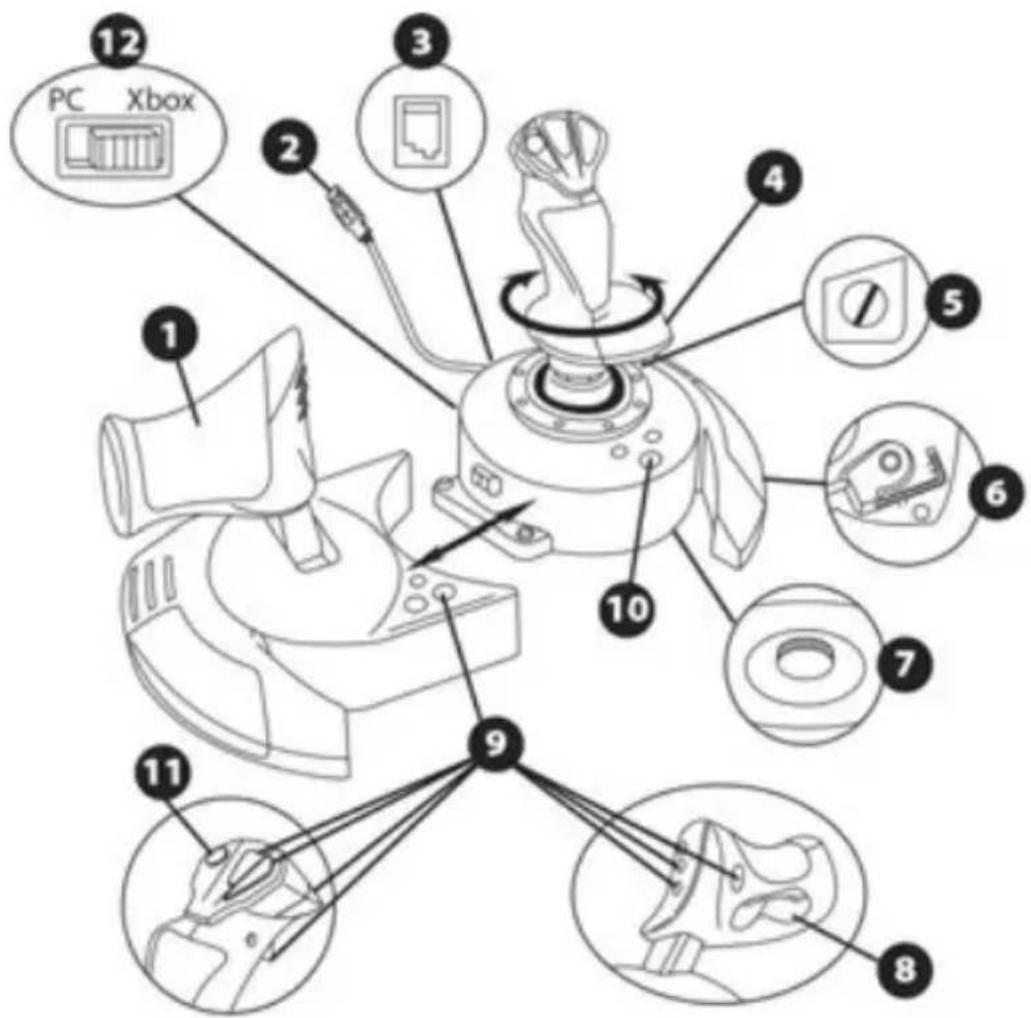
- Throttle
- USB connector
- Rudder connector: RJ12 Thrustmaster Rudder (sold separately) connector
- Rudder function via twisting handle
- Rudder locking screw on handle
-
Allen key to install or separate the throttle
-
Handle resistance adjustment dial
- Rudder via rocking button
- Action buttons
- VIEW - GUIDE - MENU buttons + LED indicator
- Multidirectional "Point Of View" hat-switch
- Xbox One/PC selector switch
GETTING TO KNOW YOUR HOTAS JOYSTICK
THROTTLE
Your joystick features a large throttle which you can use to easily control the acceleration of your aircraft.
The throttle is detachable and may be positioned in 2 different ways, either:
Detached and separated from the joystick
(to re-create authentic piloting conditions)
Attached to the joystick
(for greater stability and to take up less space).
By default, the throttle comes detached from the joystick.
To attach the throttle to the joystick:
- Turn both items upside down (the throttle and the joystick).
- Take the Allen key (6) attached underneath the base of the joystick.
- Position the throttle to the left of the joystick.
Insert the connecting tab on the left of the joystick's base into the opening on the right hand side of the throttle.
- Using the key, tighten the two Allen screws underneath the base
located on the left-hand side of the joystick's base).
- Wind up the throttle cable and thread it through the cable guide slot.
- Put the Allen key back in its place so as not to lose it.
Carry out this procedure in reverse to detach the throttle from the joystick.
ADJUSTABLE HANDLE RESISTANCE
Depending on your style of gaming, you may wish to have an ultra-sensitive joystick, which responds to the slightest touch, or you may prefer to have a firmer joystick, which offers some resistance when you move it.
Your joystick's handle resistance is adjustable, in order to adapt to all players. To adjust it, use the handle resistance adjustment dial (7) located underneath your joystick's base.
RUDDER FUNCTION
Your joystick features a rudder function, which in a plane corresponds to the pedals used by the pilot to turn the steering, allowing the plane to pivot around its vertical axis (therefore making the plane turn left or right). This rudder function is accessible on your joystick by rotating the handle to the left or right.
This rudder function is accessible in three ways:
- on your joystick by rotating the handle (4) to the left or right.
- via the rocking button (8) on the throttle.
- or via the TFRP RUDDER rudder pedals system (sold separately).
If you are only using the rocking button (or if you are not using the rudder function), you can disable the handle's rotation thanks to the locking screw (5) located on the base of the joystick. Use a flat head screwdriver to change the screw's position and thus lock/unlock the rudder function.
The T.Flight Hotas One joystick has 8 axes, including 3 axes reserved for the TFRP RUDDER rudder pedals system (sold separately). The TFRP RUDDER rudder pedals system connects directly to the joystick.
- Connect the rudder pedals system's male RJ12 connector to the female RJ12 connector (3) located at the back of the joystick.
- Connect the joystick's USB connector (2) to one of your PC's USB ports.
Important notes regarding the automatic calibration of axes:
- Always keep the rudder's axis centered when connecting the TFRP rudder pedals system to the joystick. Never put your feet on the rudder pedals.
- The pedals' 3 axes calibrate themselves automatically after a few movements and once the physical stops of the rudder's axis and of the differential brakes' 2 axes have been reached.
MULTIDIRECTIONAL "POINT OF VIEW" HAT-SWITCH
Your joystick features a "Point Of View" hat-switch (11) which, as its name indicates, allows you (in games which permit) to instantly view everything that's going on around your plane. To do so, simply go to your game's configuration menu and program the different views (rear view, left view, right view, and also external views) onto the directions of the "Point Of View" hat-switch.
Of course, you can also use the "Point Of View" hat-switch for other functions instead (firing, etc.).
XBOX ONE
INSTALLATION ON XBOX ONE
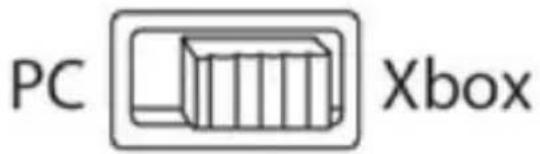
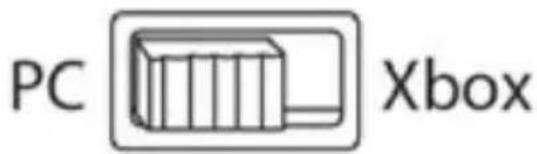
- Set the selector switch (12) to Xbox before connecting the USB cable.
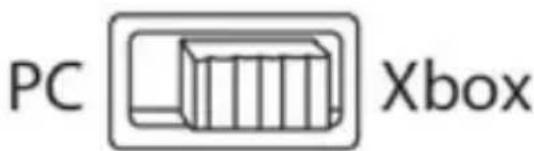
- Connect the USB connector (2) to one of your system's USB ports.
- Switch on your console.
- The joystick's LED indicator lights up in white.
- Launch a game that supports the Flight Stick mode.
You are now ready to play!
LIST OFCompatible XBOX ONE GAMES
On Xbox One, the T.Flight Hotas One:
- Is only compatible with the games that support the Flight Stick mode.
- Is recognized in games as a real joystick and not a gamepad, for better responsiveness and enhanced precision, and possibility to access the joystick's options in these games.
A list of Xbox One games compatible with the joystick is available at http://support.thrustmaster.com. Go to Joysticks / T.Flight Hotas One, then select Games Settings.
This list will be added to regularly, with the arrival of new Xbox One games compatible with T.Flight Hotas One.
PC
INSTALLATION ON PC
- Set the selector switch (12) to PC before connecting the USB cable.
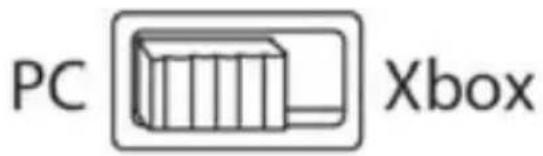
- Go to http://support.thrustmaster.com/. Click Joysticks / T.Flight Hotas One, then select Drivers. Download and install the PC driver and its customized interface for the Windows Control Panel.
- Once the PC driver is installed, connect the USB connector (2) to one of your PC's USB ports.
-
To access the Control Panel, select:
-
Start / Apps / Thrustmaster / Control Panel (in Windows® 10 / 8.1 / 8)
- Start / All Programs / Thrustmaster / Control Panel (in Windows® 7)
The Game Controllers dialog box is displayed.
The device appears onscreen with the name T.Flight Hotas One and the status OK.
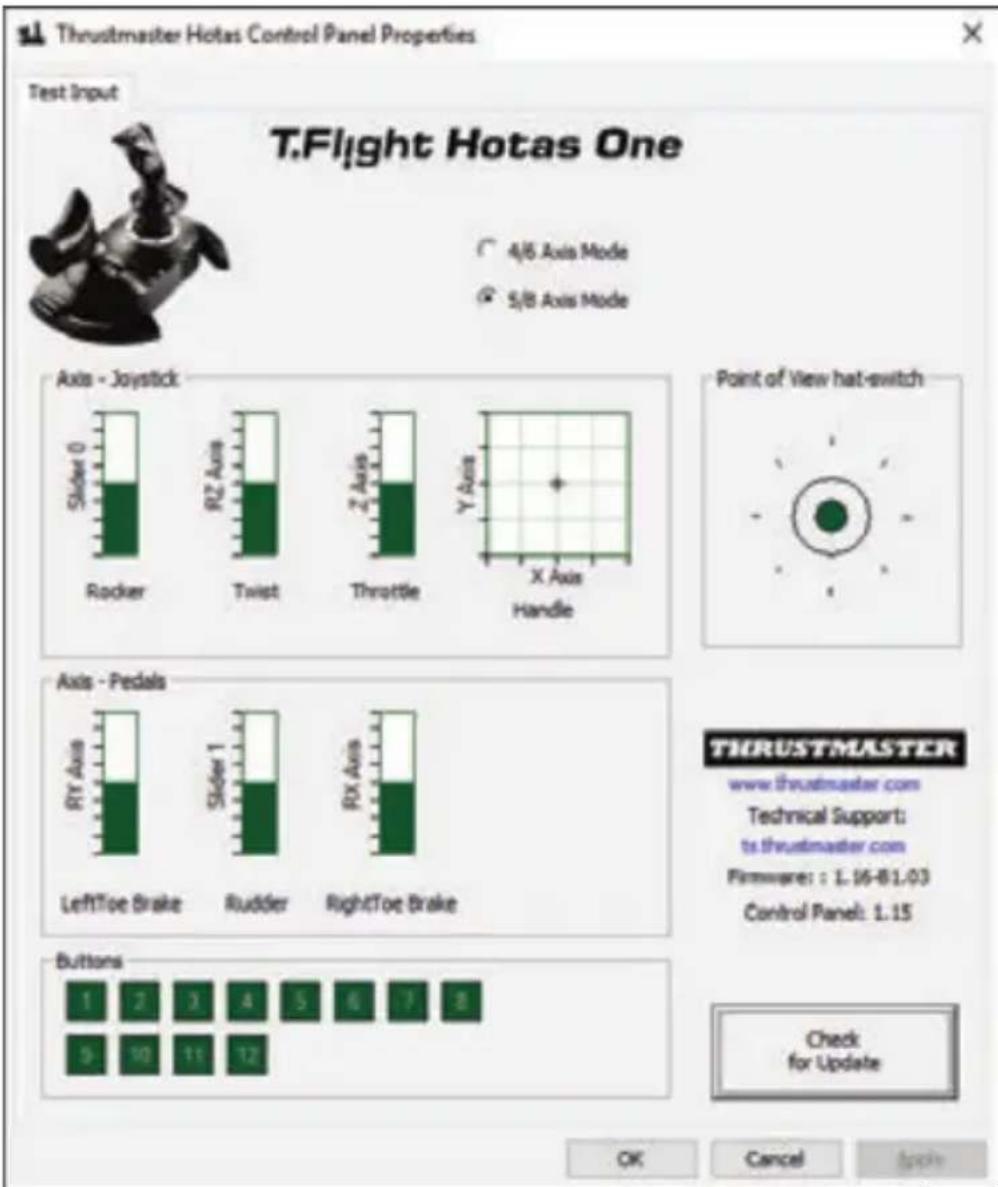
- In the Game Controllers dialog box, click Properties to test and view all functions.
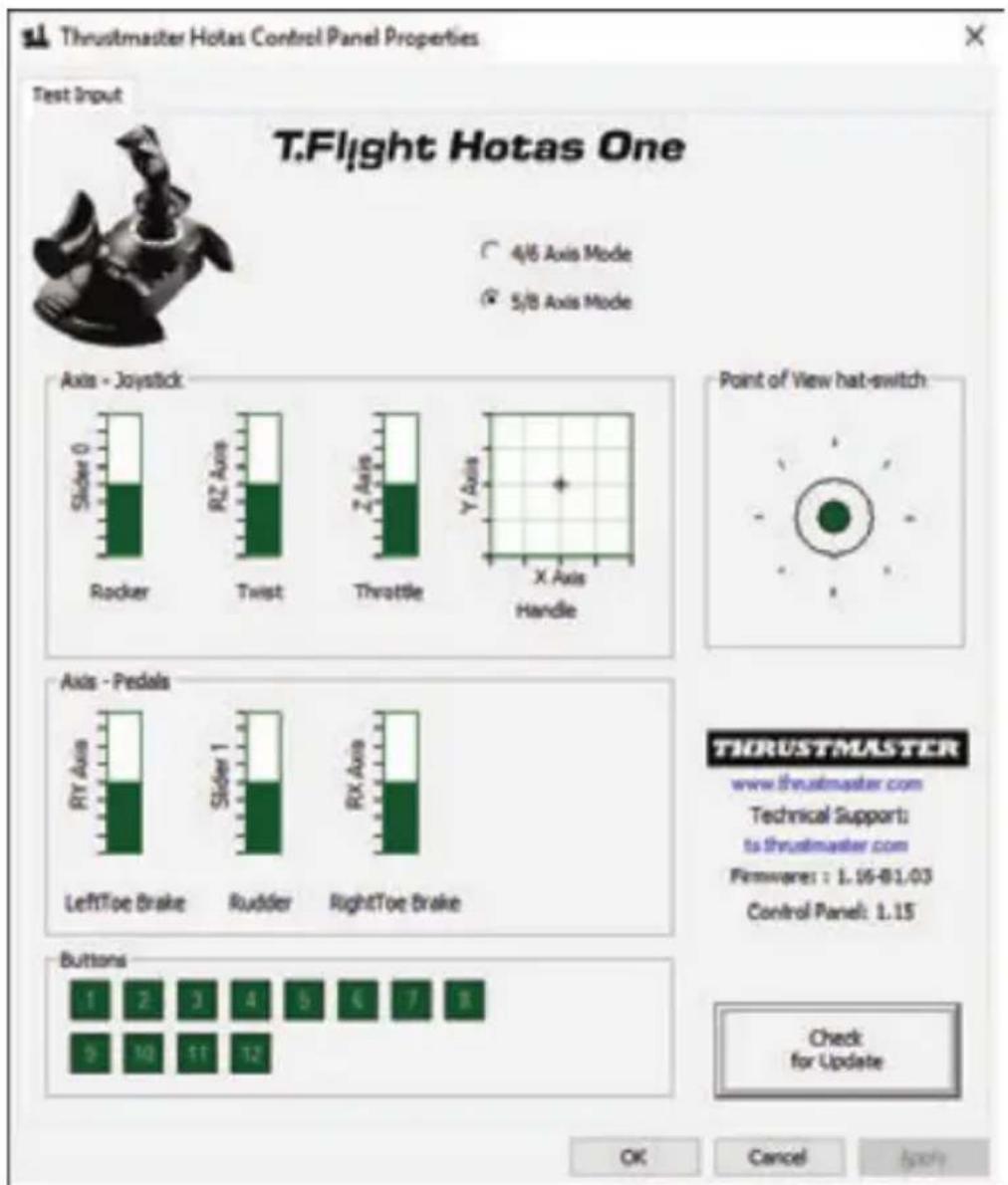
You are now ready to play!
NOTES ON PC
- On PC, in 4/6 axes mode, the throttle's rocking button and the rudder axis on the TFRP rudder pedals system (sold separately) are coupled with the handle's rotation.
The joystick's LED indicator lights up in white.
- On PC, in 5/8 axes mode, the throttle's rocking button and the rudder axis on the TFRP rudder pedals system (sold separately) become independent of the handle's rotation, thereby providing 3 additional progressive axes.
The joystick's LED indicator goes off.
To instantly switch between one mode and the other, simply press the XBOX GUIDE button.
UPDATING YOUR JOYSTICK'S FIRMWARE
The firmware included in your joystick's base can be updated to a more recent version featuring product enhancements.
To display the firmware version that your Joystick is currently using and update it if required: on PC, visit http://support.thrustmaster.com. Click Joysticks / T.Flight Hotas One, then select Firmware and follow the instructions describing the download and installation procedure.
TROUBLESHOOTING AND WARNINGS
- My joystick doesn't function correctly or appears to be improperly calibrated:
- Make sure that the selector switch (12) is set to the proper position (Xbox or PC) before connecting the USB cable to the console or PC.
- Switch off your console or your PC, disconnect your joystick, reconnect your joystick and then re-launch your game.
- When connecting your joystick: Leave the handle, rudder and throttle centered and do not move them (to avoid any calibration problems).
My joystick is too sensitive or not sensitive enough:
- Your joystick self-calibrates on its own after you have made a few movements on the different axes.
- In your game's "Options / Controller / Gamepad or Joystick" menu: Adjust the sensitivity or dead zones for your controller (if this option is available).
-
Adjust the handle resistance using the dial (7) located under your joystick's base.
-
The rudder function is too sensitive:
-
Disable the handle's rotation using the locking screw (5) located on the base of the joystick and use the rocking button for the rudder function.
HELP FILES AND FAQs (NOT INCLUDED IN THIS MANUAL)
Please visit http://support.thrustmaster.com. Click Joysticks / T.Flight Hotas One, then select Manual or FAQ.
CONSUMER WARRANTY INFORMATION
Worldwide, Guillemot Corporation S.A., whose registered office is located at Place du Granier, B.P. 97143, 35571 Chantepie, France (hereinafter "Guillemot") warrants to the consumer that this Thrustmaster product shall be free from defects in materials and workmanship, for a warranty period which corresponds to the time limit to bring an action for conformity with respect to this product. In the countries of the European Union, this corresponds to a period of two (2) years from delivery of the Thrustmaster product. In other countries, the warranty period corresponds to the time limit to bring an action for conformity with respect to the Thrustmaster product according to applicable laws of the country in which the consumer was domiciled on the date of purchase of the Thrustmaster product (if no such action exists in the corresponding country, then the warranty period shall be one (1) year from the original date of purchase of the Thrustmaster product).
Notwithstanding the above, rechargeable batteries are covered by a warranty period of six (6) months from the date of original purchase.
Should the product appear to be defective during the warranty period, immediately contact Technical Support, who will indicate the procedure to follow. If the defect is confirmed, the product must be returned to its place of purchase (or any other location indicated by Technical Support).
Within the context of this warranty, the consumer's defective product shall, at Technical Support's option, be either replaced or returned to working order. If, during the warranty period, the Thrustmaster product is subject to such reconditioning, any period of at least seven (7) days during which the product is out of use shall be added to the remaining warranty period (this period runs from the date of the consumer's request for intervention or from the date on which the product in question is made available for reconditioning, if the date on which the product is made available for reconditioning is subsequent to the date of the request for intervention). If permitted under applicable law, the full liability of Guillemot and its subsidiaries (including for consequential damages) is limited to the return to working order or the replacement of the Thrustmaster product. If permitted under applicable law, Guillemot disclaims all warranties of merchantability or fitness for a particular purpose.
This warranty shall not apply: (1) if the product has been modified, opened, altered, or has suffered damage as a result of inappropriate or abusive use, negligence, an accident, normal wear, or any other cause unrelated to a material or manufacturing defect (including, but not limited to, combining the Thrustmaster product with any unsuitable element, including in particular power supplies, rechargeable batteries, chargers, or any other elements not supplied by Guillemot for this product); (2) if the product has been used for any use other than home use, including for professional or commercial purposes (game rooms, training, competitions, for example); (3) in the event of failure to comply with the instructions provided by Technical Support; (4) to software, said software being subject to a specific warranty; (5) to consumables (elements to be replaced over the product's lifespan: disposable batteries, audio headset or headphone ear pads, for example); (6) to accessories (cables, cases, pouches, bags, wrist-straps, for example); (7) if the product was sold at public auction.
This warranty is nontransferable.
The consumer's legal rights with respect to laws applicable to the sale of consumer goods in his or her country are not affected by this warranty.
Additional warranty provisions
During the warranty period, Guillemot shall not provide, in principle, any spare parts, as Technical Support is the only party authorized to open and/or recondition any Thrustmaster product (with the exception of any reconditioning procedures which Technical Support may request that the consumer carry out, by way of written instructions - for example, due to the simplicity and the lack of confidentiality of the reconditioning process - and by providing the consumer with the required spare part(s), where applicable).
Given its innovation cycles and in order to protect its know-how and trade secrets, Guillemot shall not provide, in principle, any reconditioning notification or spare parts for any Thrustmaster product whose warranty period has expired.
In the United States of America and in Canada, this warranty is limited to the product's internal mechanism and external housing. In no event shall Guillemot or its affiliates be held liable to any third party for any consequential or incidental damages resulting from the breach of any express or implied warranties. Some States/Provinces do not allow limitation on how long an implied warranty lasts or exclusion or limitation of liability for consequential or incidental damages, so the above limitations or exclusions may not apply to you. This warranty gives you specific legal rights, and you may also have other rights which vary from State to State or Province to Province.
Liability
If permitted under applicable law, Guillemot Corporation S.A. (hereinafter "Guillemot") and its subsidiaries disclaim all liability for any damages caused by one or more of the following: (1) the product has been modified, opened or altered; (2) failure to comply with assembly instructions; (3) inappropriate or abusive use, negligence, an accident (an impact, for example); (4) normal wear; (5) the use of the product for any use other than home use, including for professional or commercial purposes (game rooms, training, competitions, for example). If permitted under applicable law, Guillemot and its subsidiaries disclaim all liability for any damages unrelated to a material or manufacturing defect with respect to the product (including, but not limited to, any damages caused directly or indirectly by any software, or by combining the Thrustmaster product with any unsuitable element, including in particular power supplies, rechargeable batteries, chargers, or any other elements not supplied by Guillemot for this product).
DECLARATION OF CONFORMITY
CANADIAN COMPLIANCE NOTICE: this Class B digital apparatus meets all requirements of the Canadian Interference-Causing Equipment Regulations.
USA COMPLIANCE NOTICE: this equipment has been tested and found to comply with the limits for a Class B digital device, pursuant to Part 15 of the FCC rules. Operation is subject to the following two conditions:
(1) This device may not cause harmful interference, and
(2) This device must accept any interference received, including interference that may cause undesired operation.
These limits are designed to provide reasonable protection against harmful interference in a residential installation. This equipment generates, uses and can radiate radio frequency energy and, if not installed and used in accordance with the instructions, may cause harmful interference to radio communications. However, there is no guarantee that interference will not occur in a particular installation. If this equipment does cause harmful interference to radio or television reception, which can be determined by turning the equipment on and off, the user is encouraged to try to correct the interference by one or more of the following measures:
-
Reorient or relocate the receiving antenna.
-
Increase the separation between the equipment and receiver.
- Connect the equipment into an outlet on a circuit different from that to which the receiver is connected.
- Consult the dealer or an experienced radio/TV technician for help.
THRUSTMASTER
TECHNICAL SUPPORT
http://support.thrustmaster.com


COPYRIGHT
© 2017 Guillemot Corporation S.A. All rights reserved. Thrustmaster® is a registered trademark of Guillemot Corporation S.A. All other trademarks are the property of their respective owners. Illustrations not binding. Contents, designs and specifications are subject to change without notice and may vary from one country to another. Made in China.
ENVIRONMENTAL PROTECTION RECOMMENDATION
In the European Union: At the end of its working life, this product should not be disposed of with standard household waste, but rather dropped off at a collection point for the disposal of Waste Electrical and Electronic Equipment (WEEE) for recycling.
This is confirmed by the symbol found on the product, user manual or packaging. Depending on their characteristics, the materials may be recycled. Through recycling and other forms of processing Waste Electrical and Electronic Equipment, you can make a significant contribution towards helping to protect the environment.
Please contact your local authorities for information on the collection point nearest you.
For all other countries: Please adhere to local recycling laws for electrical and electronic equipment.
Retain this information. Colours and decorations may vary.
Plastic fasteners and adhesives should be removed from the product before it is used.
www.thrustmaster.com
*Applicable to EU and Turkey only

T.Flight Hotas One
XBOX ONE - PC
INFORMATIONS RELATIVES A LA GARANTIE AUX CONSOMMATEURS
www.thrustmaster.com
www.thrustmaster.com
www.thrustmaster.com
www.thrustmaster.com
www.thrustmaster.com
www.thrustmaster.com
www.thrustmaster.com




T.Flight Hotas One
XBOX ONE - PK
Инструкция по заци.
TEXHNUECKNEXAPAKTEPNUKNI
- Pbyar ynpablenia
- Pa3beM USB
- Pa3bEm dny pyna HnnpabNeHnna: nnoKIOUcHnpyna HnnpaBHeHn Thrustmaster RJ12 (npno6peTaetcOtdeNbHo)
4.YnpaBneHne NOeTOM Bpaauoueinc pykoTkoI - BnHT 6IOKnpOBKn pyJHa npabJIeHna hy pkyoTke
-
WecntnrgpaHHbI KJIouy dny yctahOBKn/OTcoeDInHeHnpybIyaraynpabNeHn
-
PeryIaTOp cOpiOTnBJIeHn pyKoIaTkn
- YnpaBHeHne IoneTOM WapHnPHOKHOKoN
9.Функуноваьбье KHONK - KhoNki VIEW-GUIDE-MENU+ INdikatop
- MHorono3nUHOHHbI nepeKJIIOuHaTeJIb TOUKN 630pa
- PereklouateBbXbox One/PIK
3HAKOMCTBO CДЖОИCTИКOM HOTAS
PbIyAΓ yIeHnI
B KOMPJIeK T JxOJCTnKa BxOJIT 6oJIbIoo pyIyar ynpaBHeHna, C NOMOuI KOTOPOro yD06Ho ynpaBnTb yCKOpEnHem camOneta.
PbIur ynpablenenraeTcBemhblm I npednonaraet Dba BapnaHTa yCTaHOBKn:
OTdEJIbHOOTJXOINKa
Pn noJb3OBaHH n3deJIHem yuHTbIaTe cneJeUoJe: CBeTa n dN3aH MOryT pa3NJuA TbCBs.
IpnactNKOBbIe CTaKn N KneKyIO JeHTy CNeDyeT ChrB nepeNcNoJb3OBAHEm N3JeJIa.
www.thrustmaster.com
EAC
T.Flight Hotas One
XBOX ONE - PC
Evyειρίδιο xρήσης
TEXNIKA XAPAKTHPIETIKA
www.thrustmaster.com
^*I muo oE EE kai Toupkia
T.Flight Hotas One
XBOX ONE - PC
Kullanma Kilavuzu
TEKNIK ÖZELLİKLER
www.thrustmaster.com
www.thrustmaster.com
www.thrustmaster.com
Made in China.

:外箱

T.Flight Hotas One
XBOX ONE - PC
使用者手册
技術特性
- http://support.thrustmaster.com/或同
Joysticks/T.Flight Hotas One将格隆汉后德拉贝将实施。PC
- PC モラービフガ ヤリドリ USB フックテ(2)を PC USB フ트に連続消費。
-
该语句在该行的首行中,应该被括起来。
-
小时/Thrustmaster/Thrustmaster (Windows® 10/8.1/8)
- 书面/文本/邮件/电话/传真/电子邮件(Windows®7)
制川
iJrReIeRiEiHnRiHaDdEeHsuNlA
PC 推の説唱
JOIsStKbBakDmEeHJHcHJHcHJHcHJHcHJHcHJHcHJHcHJHcHJHcHJHcHJHcHJHcHJHcHJHcHJHcHJHcHJHcHJHcHJHcHJHcHJHcHJHcHJHcHJHcHJHcHJH
"olal y 11) "jz jz jz jz jz jz jz jz jz jz jz jz jz jz jz jz jz jz jz jz jz jz jz jz jz jz jz jz jz jz jz jz jz jz jz jz jz jz jz jz jz jz jz jz jz jz jz jz jz jz jz
XBOX ONE
XBOXONE
.USB JbS Xboxj (12) 1
USB 2 USB
jL.3
.4
J5
1
XBOX ONE
Flight Hotas One .Xbox One
1 1
Jg 1
y
http://support.thrustmaster.com Xbox One
Joysticks / T.Flight Hotas One
T.Flight Xbx QeJ Lg Wg
.Hotas One
Joysticks / T.Flight Hotas One http://support.thrustmaster.com/2
.Windows
3
4
Windows® 10 / 8.1 / 8) Start / Apps / Thrustmaster / Control Panel (Windows® 7) Start / All Programs / Thrustmaster / Control Panel (
Game Controllers.
OK T.Flight Hotas One
Properties Game Controllers 5
jz
sI yL
4/6 4
a
LLED
5/8 5/8
a a a a a a a a a a a a a a a a a a a a a a a a
[A \cdot B \cdot \lg \left( {1 + x}\right) ]
LED
XBOXGUIDERzIeabLbBnBnBnBnBnBnBnBnBnBnBnBnBnBnBnBnBnBnBnBnBnBnBnBnBnBnBnBnBnBnBnBnBnBnBnBnBnBn
i
.
Joysticks / T.Flight Hotas http://support.thrustmaster.com jFjFJFJFJFJFJFJFJFJFJFJFJFJFJFJFJFJFJFJFJFJFJFJFJFJFJFJFJFJFJFJFJFJFJFJFJFJFJFJFJFJFJFJFJFJFJFJFJFJFJFJF
i 1
J 1
Jxj (jXboxjg) 12) a 10 15
. jg j g Jg Jg Jg Jg Jg Jg Jg Jg Jg Jg Jg Jg Jg Jg Jg Jg Jg Jg Jg Jg Jg Jg Jg Jg Jg Jg Jg Jg Jg Jg Jg Jg Jg Jg Jg Jg Jg Jg Jg Jg Jg Jg Jg Jg Jg Jg Jg Jg
AaIgLoayaww Cwgl yalll Aww wlll E 1
Aolioo ngolc cLs g bpgn aoy Baaill Oyall Bg 1
Eg oogd l00000000000000000000000000000000000000000000000000000000000000000000000000000000000
4g 4g 4g 4g 4g 4g 4g 4g
()
Joysticks / T.Flight Hotas One, http://support.thrustmaster.com. FAQ Manual
Gullemot Corporation S.A.
Gullemot Corporation S.A.
Gullemot Corporation S.A.
Gullemot Corporation S.A.
Gullemot Corporation S.A.
Gullemot Corporation S.A.
Gullemot Corporation S.A.
Gullemot Corporation S.A.
Gullemot Corporation S.A.
Gullemot Corporation S.A.
Gullemot Corporation S.A.
Gullemot Corporation S.A.
Guillermot Corporation S.A.
Guillermot Corporation S.A.
Guillermot Corporation S.A.
Guillermot Corporation S.A.
Guillermot Corporation S.A.
Guillermot Corporation S.A.
Guillermot Corporation S.A.
Guillermot Corporation S.A.
Guillermot Corporation S.A.
Guillermot Corporation S.A.
Guillermot Corporation S.A.
Guillermat Corporation S.A.
Guillermot Corporation S.A.
Guillermot Corporation S.A.
Guillermot Corporation S.A.
Guillermot Corporation S.A.
Guillermot Corporation S.A.
Guillermot Corporation S.A.
Guillermot Corporation S.A.
Guillermot Corporation S.A.
Guillermot Corporation S.A.
Guillermot Corporation S.A.
Guillermot Foundation Society of America (1985) 2nd Annual Meeting of the Association of American Medical Colleges, Inc., St. Louis, MO, USA, 1985.
Guillermot Foundation Society of America (1985) 2nd Annual Meeting of the Association of American Medical Colleges, Inc., St. Louis, MO, USA, 1985.
Guillermot Foundation Society of America (1985) 2nd Annual Meeting of the Association of American Medical Colleges, Inc., St. Louis, MO, USA, 1985.
Guillermot Foundation Society of America (1976) 2nd Annual Meeting of the Association of American Medical Colleges, Inc., St. Louis, MO, USA, 1985.
Guillermot Foundation Society of America (1976) 2nd Annual Meeting of the Association of American Medical Colleges, Inc., St. Louis, MO, USA, 1985.
Guillermot Foundation Society of America (1976) 2nd Annual Meeting of the Association of AmericanMedical Colleges, Inc., St. Louis, MO, USA, 1985.
Guillermot Foundation Society of America (1976) 2nd Annual Meeting of the Association of American Medical Colleges, Inc., St. Louis, MO, USA, 1985.
Guillermot Foundation Society of America (1976) 2nd Annual Meeting of the Association of American Medical Colleges, Inc., St. Louis, MO, USA 1985.
Guillermot Foundation Society of America (1976) 2nd Annual Meeting of the Association of American Medical Colleges, Inc., St. Louis, MO, USA, 1985.
Guillermot Foundation Society of America (1976) 2nd Annual Meeting of the Association of American Medical Colleges, Inc., St. Louis, MO, USA, 1985.
Guillermot Association of American Medical Colleges (1976) 2nd Annual Meeting of the Association of American Medical Colleges, Inc., St. Louis, MO, USA, 1985.
Guillermot Association of American Medical Colleges (1976) 2nd Annual Meeting of the Association of American Medical Colleges, Inc., St. Louis, MO, USA, 1985.
Guillermot Association of American Medical Colleges (1976) 2ndAnnual Meeting of the Association of American Medical Colleges, Inc., St. Louis, MO, USA, 1985.
Guillermot Association of American Medical Colleges (1976) 2nd Annual Meeting of the Association of American Medical Colleges, Inc., St. Louis, MO, USA, 1985.
Guillermot Association of American Medical Colleges (1976) 2nd Annual Meeting of the Association of American Medical Colleges,Inc.,St.SLIGILALI (5)42000000000000000000000000000000000000000000000000000000000000000000000000000000000000000
g
www.thrustmaster.com
Lds 15