Carum - Breast Pump Ardo - Free user manual and instructions
Find the device manual for free Carum Ardo in PDF.



| Brand | Ardo |
| Model | Carum |
| Product type | Electric breast pump |
| Category | Breast pump |
| Dimensions (L x D x H) | 302 x 240 x 180 mm |
| Weight | 3 kg (without batteries) / 3.7 kg (with batteries) |
| Power supply | 100-230 VAC +/-10%, 50-60 Hz; option 12 VDC; option rechargeable Li-Ion batteries |
| Battery life | Approximately 1 hour with charged batteries |
| Main functions | Double pumping, individual adjustment of vacuum and cycle rate, stimulation and expression modes, timer, adjustable backlight, natural suction curve |
| Vacuum range in stimulation mode | 30-150 mbar (22-98 mmHg / 3-13 kPa) |
| Vacuum range in expression mode | 30-330 mbar (22-250 mmHg / 3-33 kPa) |
| Cycle range in stimulation mode | 72-120 cycles/min |
| Cycle range in expression mode | 30-60 cycles/min |
| Maintenance and cleaning | External cleaning with a damp cloth; breast pump kit washable separately; visual checks before each use |
| Safety | IP21 protection, double insulation (Class II), BF type applied part, compliant with medical standards EN 60601-1 |
| Spare parts and repairability | Power cables, holders, battery adapter; repair by qualified personnel; service life of 10 years |
| Warranty | 3 years from date of sale |
| Included accessories | Breast pump kit, bottle holder, power cable, power adapter, Carum container |
| Usage | Hospital and home, single or double pumping |
Frequently Asked Questions - Carum Ardo
User questions about Carum Ardo
0 question about this device. Answer the ones you know or ask your own.
Ask a new question about this device
Download the instructions for your Breast Pump in PDF format for free! Find your manual Carum - Ardo and take your electronic device back in hand. On this page are published all the documents necessary for the use of your device. Carum by Ardo.
USER MANUAL Carum Ardo
natural_image
Black-and-white close-up of a smiling adult gently holding a baby's face (no text or symbols visible)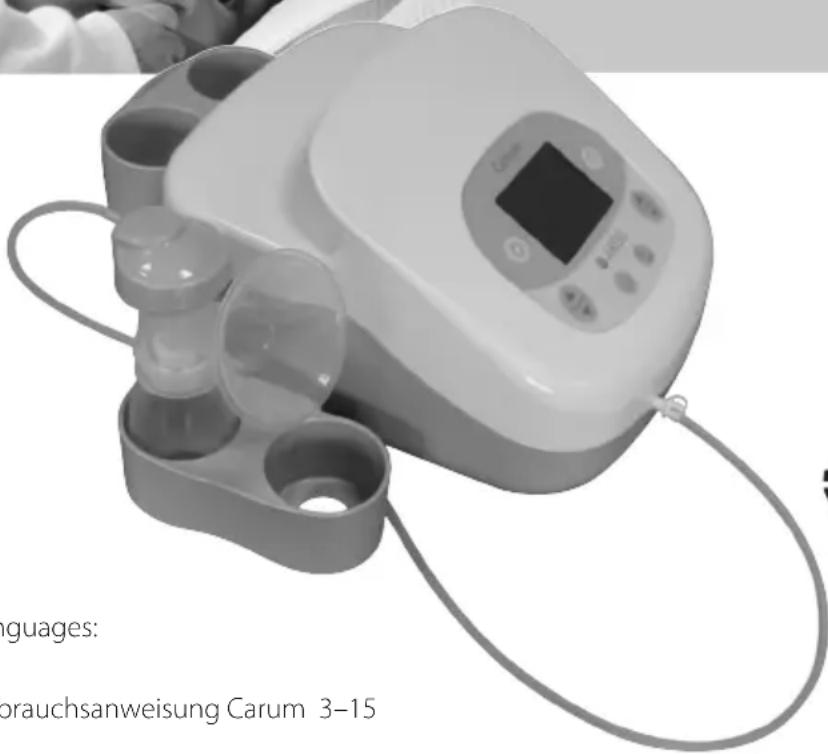

ARDO
Your Professional Way to Care
Languages:
Page:
Instructions for use Carum 16–28
natural_image
Interior view of a mechanical housing with internal components and mounting holes (no text or symbols visible)
natural_image
Cross-sectional view of a mechanical or electronic component with internal channels and labeled part 'k.' (no readable text or symbols beyond the label)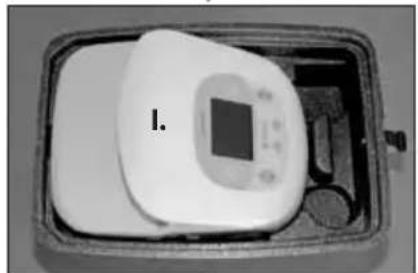
natural_image
Interior view of a rectangular device with a central display and labeled component 'I.' (no readable text or symbols on the device itself)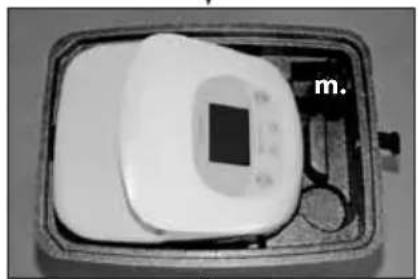
natural_image
Black-and-white photo of a medical device with a square display and labeled 'm.' (no visible text or symbols on the device itself)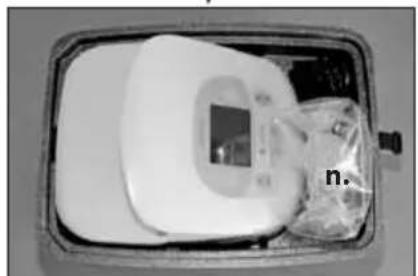
natural_image
Medical scanner device with digital display and plastic bag, no visible text or symbolsline
| x | R² | | ---- | ------ | | 0 | -10.0 | | 1 | 0.0 | | 2 | 10.0 | | 3 | -10.0 | | 4 | 0.0 | | 5 | 10.0 | | 6 | -10.0 | | 7 | 0.0 | | 8 | 10.0 | | 9 | -10.0 | | 10 | 0.0 | | 11 | 10.0 | | 12 | -10.0 | | 13 | 0.0 | | 14 | 10.0 | | 15 | -10.0 | | 16 | 0.0 | | 17 | 10.0 | | 18 | -10.0 | | 19 | 0.0 | | 20 | 10.0 | | 21 | -10.0 | | 22 | 0.0 | | 23 | 10.0 | | 24 | -10.0 | | 25 | 0.0 | | 26 | 10.0 | | 27 | -10.0 | | 28 | 0.0 | | 29 | 10.0 | | 30 | -10.0 | | 31 | 0.0 | | 32 | 10.0 | | 33 | -10.0 | | 34 | 0.0 | | 35 | 10.0 | | 36 | -10.0 | | 37 | 0.0 | | 38 | 10.0 | | 39 | -10.0 | | 40 | 0.0 | | 41 | 10.0 | | 42 | -10.0 | | 43 | 0.0 | | 44 | 10.0 | | 45 | -10.0 | | 46 | 0.0 | | 47 | 10.0 | | 48 | -10.0 | | 49 | 0.0 | | 50 | 10.0 | | 51 | -10.0 | | 52 | 0.0 | | 53 | 10.0 | | 54 | -10.0 | | 55 | 0.0 | | 56 | 10.0 | | 57 | -10.0 | | 58 | 0.0 | | 59 | 10.0 | | 60 | -10.0 | | 61 | 0.0 | | 62 | 10.0 | | 63 | -10.0 | | 64 | 0.0 | | 65 | 10.0 | | 66 | -10.0 | | 67 | 0.0 | | 68 | 10.0 | | 69 | -10.0 | | 70 | 0.0 | | 71 | 10.0 | | 72 | -10.0 | | 73 | 0.0 | | 74 | 10.0 | | 75 | -10.0 | | 76 | 0.0 | | 77 | 10.0 | | 78 | -10.0 | | 79 | 0.0 | | 80 | 10.0 | | 81 | -10.0 | | 82 | 0.0 | | 83 | 10.0 | | 84 | -10.0 | | 85 | 0.0 | | 86 | 10.0 | | 87 | -10.0 | | 88 | 0.0 | | 89 | 10.0 | | 90 | -10.0 | | 91 | 0.0 | | 92 | 10.0 | | 93 | -10.0 | | 94 | 0.0 | | 95 | 10.0 | | 96 | -10.0 | | 97 | 0.0 | | 98 | 10.0 | | 99 | -10.0 | | 100+ | -15.5% |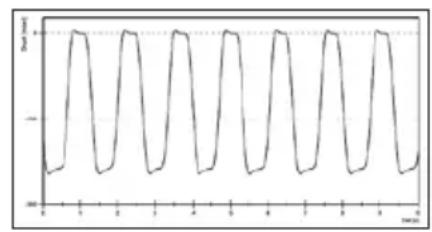
line
| Time | Value | |------|-------| | 0 | -10 | | 1 | 0 | | 2 | -10 | | 3 | 0 | | 4 | -10 | | 5 | 0 | | 6 | -10 | | 7 | 0 | | 8 | -10 | | 9 | 0 | | 10 | -10 | | 11 | 0 | | 12 | -10 | | 13 | 0 | | 14 | -10 | | 15 | 0 | | 16 | -10 | | 17 | 0 | | 18 | -10 | | 19 | 0 | | 20 | -10 | | 21 | 0 | | 22 | -10 | | 23 | 0 | | 24 | -10 | | 25 | 0 | | 26 | -10 | | 27 | 0 | | 28 | -10 | | 29 | 0 | | 30 | -10 | | 31 | 0 | | 32 | -10 | | 33 | 0 | | 34 | -10 | | 35 | 0 | | 36 | -10 | | 37 | 0 | | 38 | -10 | | 39 | 0 | | 40 | -10 | | 41 | 0 | | 42 | -10 | | 43 | 0 | | 44 | -10 | | 45 | 0 | | 46 | -10 | | 47 | 0 | | 48 | -10 | | 49 | 0 | | 50 | -10 | | 51 | 0 | | 52 | -10 | | 53 | 0 | | 54 | -10 | | 55 | 0 | | 56 | -10 | | 57 | 0 | | 58 | -10 | | 59 | 0 | | 60 | -10 | | 61 | 0 | | 62 | -10 | | 63 | 0 | | 64 | -10 | | 65 | 0 | | 66 | -10 | | 67 | 0 | | 68 | -10 | | 69 | 0 | | 70 | -10 | | 71 | 0 | | 72 | -10 | | 73 | 0 | | 74 | -10 | | 75 | 0 | | 76 | -10 | | 77 | 0 | | 78 | -10 | | 79 | 0 | | 80 | -10 | | 81 | 0 | | 82 | -10 | | 83 | 0 | | 84 | -10 | | 85 | 0 | | 86 | -10 | | 87 | 0 | | 88 | -10 | | 89 | 0 | | 90 | -10 | | 91 | 0 | | 92 | -10 | | 93 | 0 | | 94 | -10 | | 95 | 0 | | 96 | -10 | | 97 | 0 | | 98 | -10 | | 99 | 0 | | 100 | -10 |natural_image
Medical device with digital display and cups, no visible text or symbols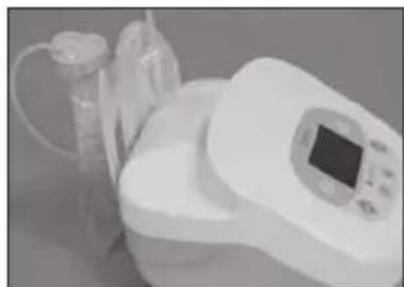
natural_image
Medical device with digital display and tubing, no visible text or symbols4.3. Bedienung
MEDICAL - GENERAL MEDICAL EQUIPMENT
AS TO ELECTRICAL SHOOK FIRE AND
Aresomere E.36001-1 (2023, C.T.BF, No 16)
(3)68420
natural_image
Black cable with a power plug and cord, labeled 'g.' (no other text or symbols)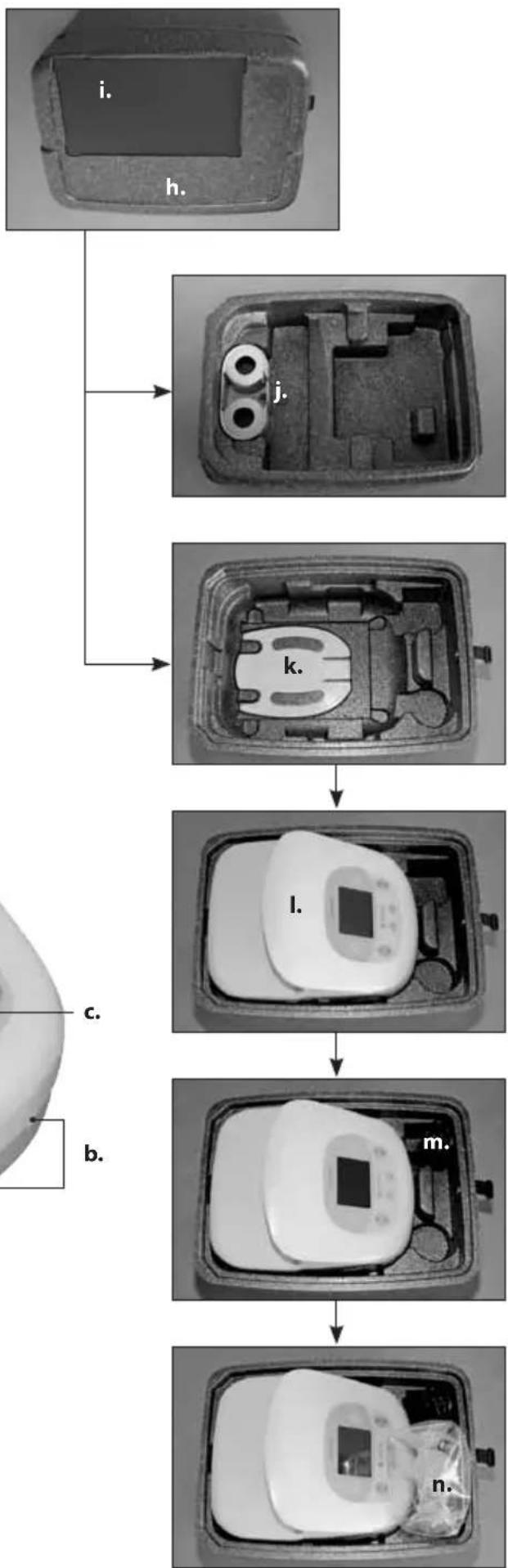
flowchart
graph TD
    A["i. Contact"] --> B["h. Contact"]
    B --> C["j. Contact"]
    C --> D["k. Contact"]
    D --> E["l. Contact"]
    E --> F["m. Contact"]
    F --> G["n. Contact"]
Congratulations on your purchase, and thank you for choosing the gentle Carum breastpump from ARDO. In these instructions you will find important and useful details which will make your Carum experience even more rewarding.
When using electrical devices it is very important to observe the following safety regulations. Please take the time carefully to read the user manual before using the Carum for the first time. Please start with Section 4 - (Start-up/Operation) – before you plug your Carum into the mains power supply, or connect to the car battery (optional cable) or start battery operation mode (optional).
TABLE OF CONTENTS
1. IMPORTANT SAFETY DETAILS 18
2. PRODUCT DESCRIPTION 19
2.1. Suckling Curve 19
3. APPLICATION FOR USE 19
3.1. Indications 19
3.2. Contra-indications 19
4. START-UP/OPERATION 20
4.1. Icons 20
4.2. Installation 21
4.2.1. Electrical connection 21
4.2.2. Connecting the PumpSet 21
4.2.3. Installing the bottle holder 21
4.2.4. Installing the EasyFreeze holder 21
4.3. Operation 22
4.3.1. Switch on / switch off 22
4.3.2. Regulation of the vacuum and display 22
4.3.3. Cycle regulation and display 22
4.3.4. Switch stimulation mode / expression mode 23
4.3.5. Using express mode, skipping stimulation mode 23
4.3.6. Timing / Time Button 23
4.3.7. Backlight 23
5. USEFUL TIPS 24
5.1. Adjusting the vacuum (intensity of suction) 24
5.2. Regulate the cycle 24
5.3. Encouraging the Let down reflex 24
5.4. Express efficiently 24
5.5. Increase the quantity of milk 24
6. ACCESSORIES 25
7. ERROR ANALYSIS / ERROR DISPLAY /
SERVICE INDICATOR 25
7.1. Further possible errors when using the unit 25
8. MAINTENANCE/CARE/CLEANING 25
8.1. Visual inspection before switch-on 26
8.2. Cleaning/disinfection 26
8.2.1. Checklist: Maintenance inspections for rentals 26
8.2.2. Checklist: Maintenance inspection for hospitals 26
9. GUARANTEE 26
10. TECHNICAL INFORMATION 27
10.1.Version 27
10.2. Technical data 27
10.3. Compliance 27
10.4. EMV Test records 27
11. TRANSPORT/STORAGE/DISPOSAL 28
11.1. Transport and storage conditions 28
11.2. Disposal 28
12. APPENDIX 185
12.1. EMV Test records 185
1. IMPORTANT SAFETY DETAILS
Carum is an electrically-operated, safe and reliable breastpump for personal use. Carum is constructed and assembled in accordance with CE guidelines, and in compliance with Security Standards EN 60601-1, EN 60601-1-2, EN ISO 10079-1, EN 60601-1-4 and EN 60601-1-6 and EN 60601-1-11. For your safety, to avoid damage to the unit and to avoid risk of electric shock, injury or fire, please observe the following safety regulations.
Safety Regulations
• After use, disconnect Carum from the mains.
- In the event of an accidental splash, or the unit falling into water - IMMEDIATELY disconnect it from the mains. Do not touch the unit until it has been disconnected.
- Disconnection from the mains is only guaranteed if the mains plug is pulled out of the socket.
- The unit is designed for indoor use only. Do not use outdoors.
- Use only the original power cord or car battery cable from ARDO.
- Do not open the unit (results in voiding of the warranty).
- Carum is not water-proof. Therefore the unit must never be immersed in water or other fluids, nor used or stored in places where it might fall into the water. Do not use while in the bath or while taking a shower.
- Keep the mains cable and all accessories away from sources of heat.
- Do not use Carum in an area where oxygen gas is in use or sprays are being applied.
- Only use a genuine ARDO PumpSet and genuine ARDO parts. See Section 4. (Start-up / Operation) and Section 8 (Maintenance/Care/Cleaning).
- Carum should only be used for the purposes detailed in Section. 2 (Application).
Battery option and car battery adapter
- The unit is designed for indoor use only. Do not use outdoors.
- If the operating time of the battery declines from fully charged to less than one hour (of charge), the battery should be changed as soon as possible, to ensure safe operation of the Carum when on battery power. See Section 8: Maintenance/Care/Cleaning.
- Do not use the Carum out in the open when operating on the car cigarette-cable.
- Caution: Ensure that the car battery delivers 12 volts.
- The unit must not be altered or changed without the express permission of the manufacturer.
- Any alteration or change to the Carum is not permitted.
- If the Carum must be altered or changed to ensure safe continued use, the appropriate studies and testing must be carried out.
- Please keep this User Manual handy for reference at all times.

2. PRODUCT DESCRIPTION
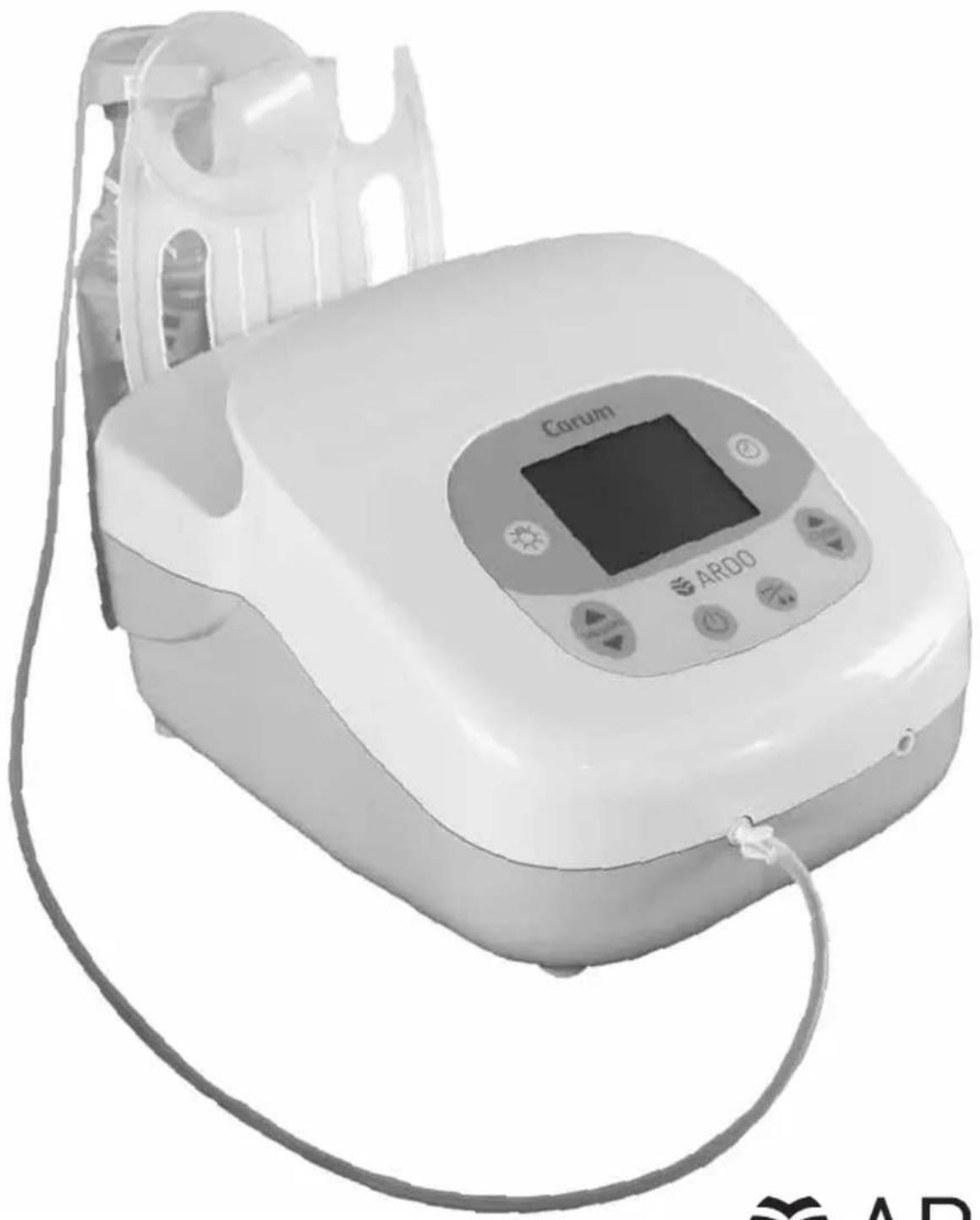
The Carum Pump System consists of the breast pump and a PumpSet (single or double pumpset).
The Carum breast pump is a quiet, user-friendly double piston pump for hospital use and for rental use.
The unit is equipped with a robust plastic housing (Quality: VO) and a simplified, logically organised keyboard with a LCD display readout.
The energy-saving electrical equipment is designed for mains- and for car battery-operation, or for (optional) battery use.
The sophisticated controls allow each mother to enjoy a comfortable and efficient pumping experience (plus a tested suckling curve) thanks to the flexible system for adjusting vacuum and cycles.
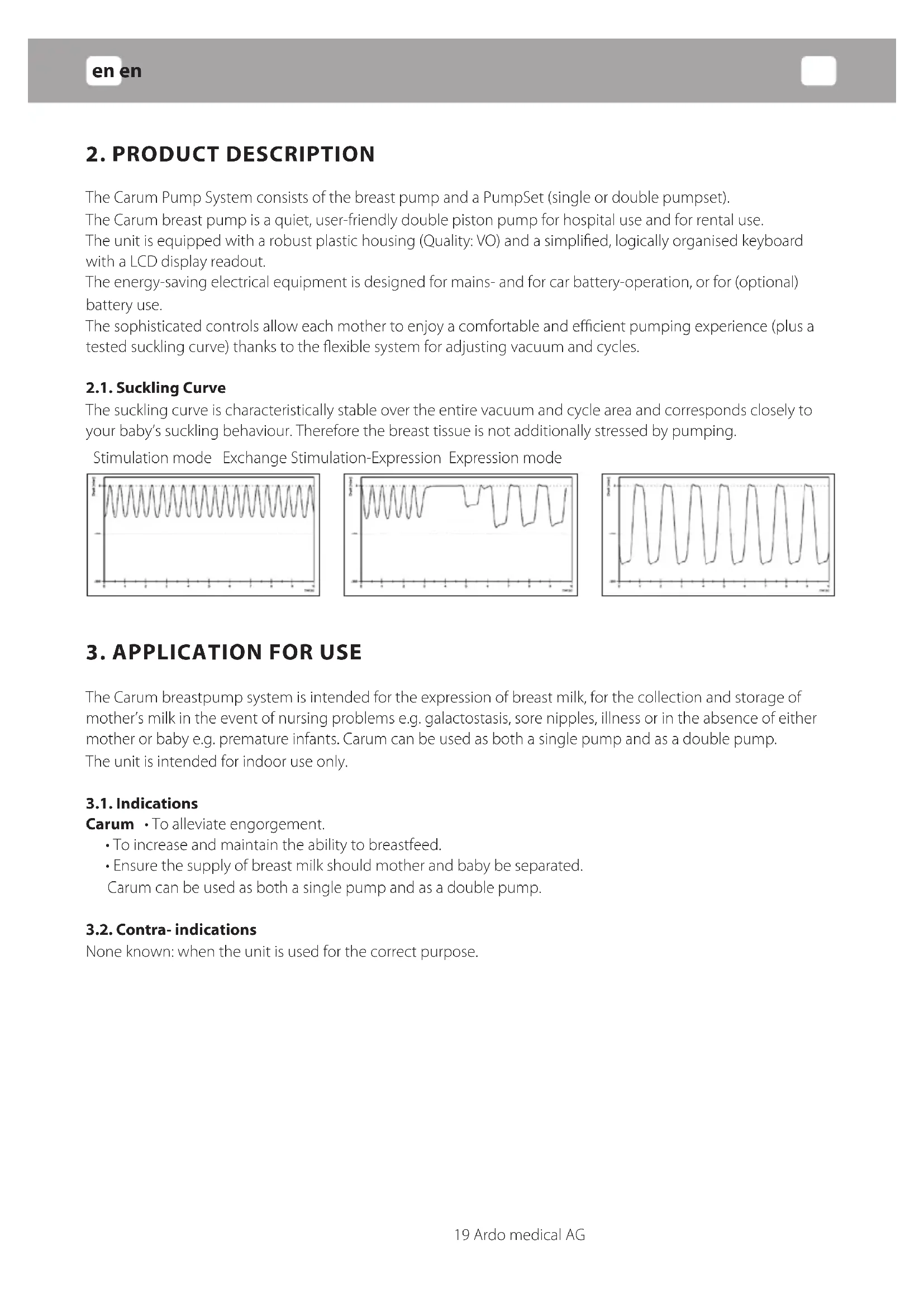
2.1. Suckling Curve
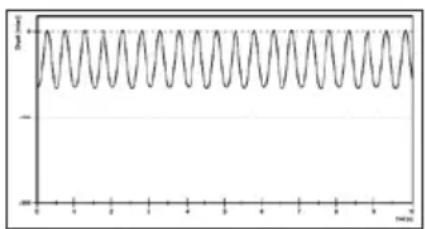
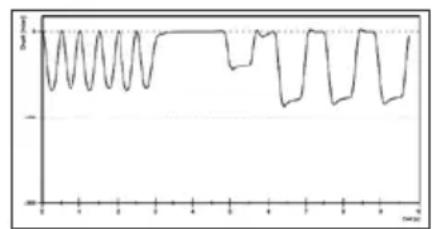
The suckling curve is characteristically stable over the entire vacuum and cycle area and corresponds closely to your baby's suckling behaviour. Therefore the breast tissue is not additionally stressed by pumping.
Stimulation mode Exchange Stimulation-Expression Expression mode
line
| x | y | | ---- | ----- | | 0 | 0 | | 1 | 1 | | 2 | 0 | | 3 | 1 | | 4 | 0 | | 5 | 1 | | 6 | 0 | | 7 | 1 | | 8 | 0 | | 9 | 1 | | 10 | 0 | | 11 | 1 | | 12 | 0 | | 13 | 1 | | 14 | 0 | | 15 | 1 | | 16 | 0 | | 17 | 1 | | 18 | 0 | | 19 | 1 | | 20 | 0 | | 21 | 1 | | 22 | 0 | | 23 | 1 | | 24 | 0 | | 25 | 1 | | 26 | 0 | | 27 | 1 | | 28 | 0 | | 29 | 1 | | 30 | 0 | | 31 | 1 | | 32 | 0 | | 33 | 1 | | 34 | 0 | | 35 | 1 | | 36 | 0 | | 37 | 1 | | 38 | 0 | | 39 | 1 | | 40 | 0 | | 41 | 1 | | 42 | 0 | | 43 | 1 | | 44 | 0 | | 45 | 1 | | 46 | 0 | | 47 | 1 | | 48 | 0 | | 49 | 1 | | 50 | 0 | | 51 | 1 | | 52 | 0 | | 53 | 1 | | 54 | 0 | | 55 | 1 | | 56 | 0 | | 57 | 1 | | 58 | 0 | | 59 | 1 | | 60 | 0 | | 61 | 1 | | 62 | 0 | | 63 | 1 | | 64 | 0 | | 65 | 1 | | 66 | 0 | | 67 | 1 | | 68 | 0 | | 69 | 1 | | 70 | 0 | | 71 | 1 | | 72 | 0 | | 73 | 1 | | 74 | 0 | | 75 | 1 | | 76 | 0 | | 77 | 1 | | 78 | 0 | | 79 | 1 | | 80 | 0 | | 81 | 1 | | 82 | 0 | | 83 | 1 | | 84 | 0 | | 85 | 1 | | 86 | 0 | | 87 | 1 | | 88 | 0 | | 89 | 1 | | 90 | 0 | | 91 | 1 | | 92 | 0 | | 93 | 1 | | 94 | 0 | | 95 | 1 | | 96 | 0 | | 97 | 1 | | 98 | 0 | | 99 | 1 | | max_2 | max_2 |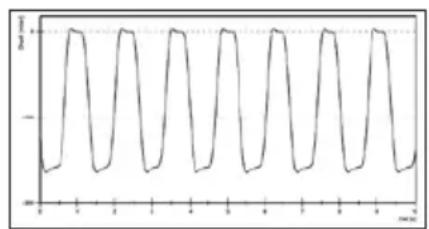
line
| Time (s) | Value | | -------- | ----- | | 0 | -1 | | 1 | 1 | | 2 | -1 | | 3 | 1 | | 4 | -1 | | 5 | 1 | | 6 | -1 | | 7 | 1 | | 8 | -1 | | 9 | 1 | | 10 | -1 | | 11 | 1 | | 12 | -1 | | 13 | 1 | | 14 | -1 | | 15 | 1 | | 16 | -1 | | 17 | 1 | | 18 | -1 | | 19 | 1 | | 20 | -1 | | 21 | 1 | | 22 | -1 | | 23 | 1 | | 24 | -1 | | 25 | 1 | | 26 | -1 | | 27 | 1 | | 28 | -1 | | 29 | 1 | | 30 | -1 | | 31 | 1 | | 32 | -1 | | 33 | 1 | | 34 | -1 | | 35 | 1 | | 36 | -1 | | 37 | 1 | | 38 | -1 | | 39 | 1 | | 40 | -1 | | 41 | 1 | | 42 | -1 | | 43 | 1 | | 44 | -1 | | 45 | 1 | | 46 | -1 | | 47 | 1 | | 48 | -1 | | 49 | 1 | | 50 | -1 | | 51 | 1 | | 52 | -1 | | 53 | 1 | | 54 | -1 | | 55 | 1 | | 56 | -1 | | 57 | 1 | | 58 | -1 | | 59 | 1 | | 60 | -1 | | 61 | 1 | | 62 | -1 | | 63 | 1 | | 64 | -1 | | 65 | 1 | | 66 | -1 | | 67 | 1 | | 68 | -1 | | 69 | 1 | | 70 | -1 | | 71 | 1 | | 72 | -1 | | 73 | 1 | | 74 | -1 | | 75 | 1 | | 76 | -1 | | 77 | 1 | | 78 | -1 | | 79 | 1 | | 80 | -1 | | 81 | 1 | | 82 | -1 | | 83 | 1 | | 84 | -1 | | 85 | 1 | | 86 | -1 | | 87 | 1 | | 88 | -1 | | 89 | 1 | | 90 | -1 | | 91 | 1 | | 92 | -1 | | 93 | 1 | | 94 | -1 | | 95 | 1 | | 96 | -1 | | 97 | 1 | | 98 | -1 | | 99 | 1 | | 100 | -1 |3. APPLICATION FOR USE
The Carum breastpump system is intended for the expression of breast milk, for the collection and storage of mother's milk in the event of nursing problems e.g. galactostasis, sore nipples, illness or in the absence of either mother or baby e.g. premature infants. Carum can be used as both a single pump and as a double pump.
The unit is intended for indoor use only.
3.1. Indications
• To increase and maintain the ability to breastfeed.
- Ensure the supply of breast milk should mother and baby be separated.
Carum can be used as both a single pump and as a double pump.
3.2. Contra-indications
None known: when the unit is used for the correct purpose.
4. START-UP / OPERATION
4.1. Icons





IP21
Li-Ion


Read the manual
Important information
"ON/OFF" switch
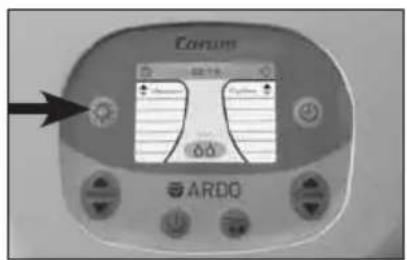
Suckle strength / Adjust the vacuum (V)
Change the cycles level / number (C)
Switch stimulation mode / express mode
Backlight change (light/dark)
Time measurement (on/stop/off)
Unit with the applied part BF
Cleaning
Single pumpset / Double pumpset (applied part)
Warning: General risk points – check the Instruction Manual
Assembling
Compliance with general guidelines: MDD 93 / 42 EWG and MDD 2009
Manufacturer
The unit is compliant with the stipulations of the WEEE 2002 / 96 / EG guidelines
Mains cable
Device of protection category II
IP 21 drip proof
Contains a lithium ion battery
Express mode
Stimulation mode
Device is recyclable
4.2. Installation

4.2.1. Electrical connection
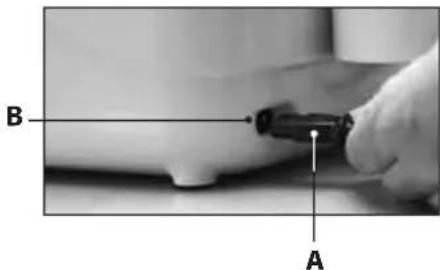
- Mains operation: Insert mains cable (A) into the Carum mains (B) input socket (Fig.1) and connect the local power plug to the mains power supply.
- Battery operation: Before using the battery for the first time, connect the unit to the mains power supply for 6 hours.
4.2.2. Connecting the PumpSet
Use of the PumpSet is detailed in the separate user manual: "ARDO PumpSet". The PumpSet is an applied part of the pump.
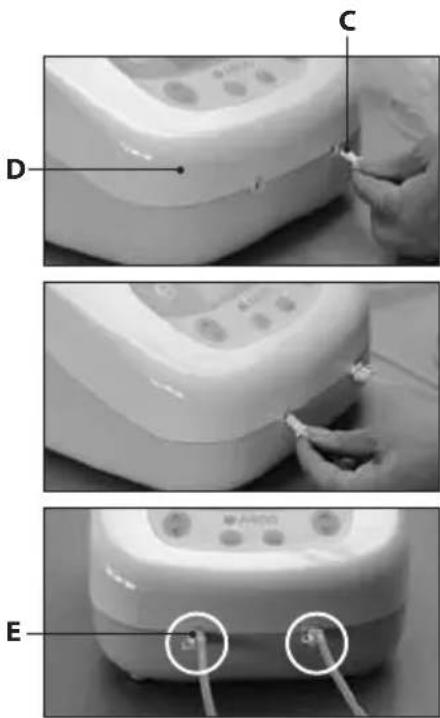
- To use the single PumpSet: Attach the tube connector (C) to the unit (D). (Fig. 2).
- To use the double PumpSet: Attach the tube connector to the unit (Fig 3).
- The second opening of the tube connector (E) remains closed – by single and double pumping.
4.2.3. Installing the bottle holder
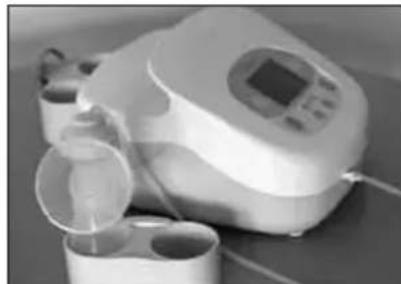
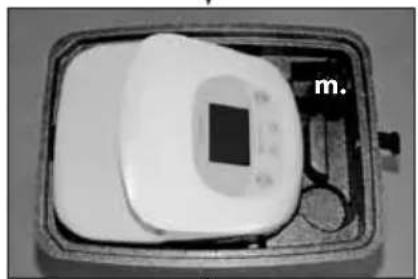
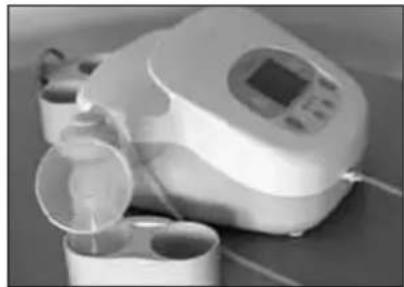
The bottle holder is used for short-term storage of the PumpSets. The bottle holder is designed to protect against accidental spilling of milk. The bottle holder can be used free-standing or be plugged into the back of the Carum
4.2.4. Installing the EasyFreeze holder
The easy freeze holder is used for short-term hang up of the PumpSet with bag. The EasyFreeze holder is designed to protect against accidental spilling of milk. The EasyFreeze holder can be plugged onto the back of the Carum instead of the bottle holder.
natural_image
Close-up of a medical or laboratory device with liquid and cups, no visible text or symbols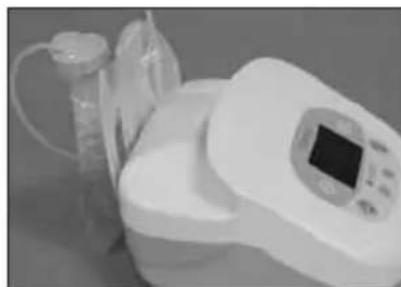
natural_image
Medical device with digital display and plastic cup, no visible text or symbols4.3. Operation
Vacuum and cycles can be adjusted independently of each other. Select the adjustment which is the most comfortable for you.
4.3.1. Switch on / switch off
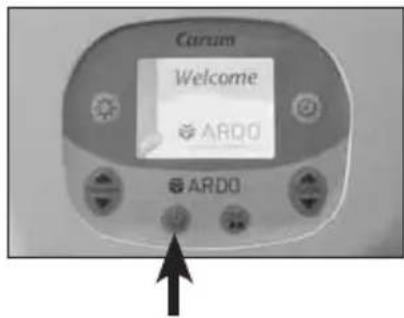
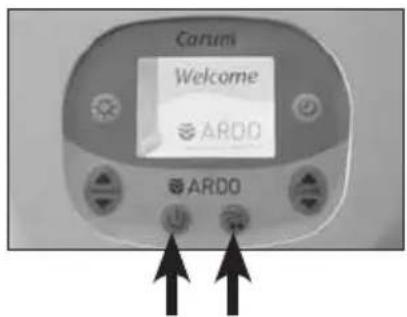
Switch on the unit by pressing the "ON/OFF" button once.
A 'welcome' page will be displayed.
When it is switched on, the breast pump is in stimulation mode (orange display). Medium vacuum and cycle level. To turn the unit off, press the "ON / OFF" button once again.
The "ON / OFF" function is the same for battery operation, mains power supply or 12vDC power supply (car battery operation).
Display mode:
The operation mode is shown on the illuminated LCD display. The display turns off when the unit is switched off.
4.3.2. Regulation of the vacuum and display
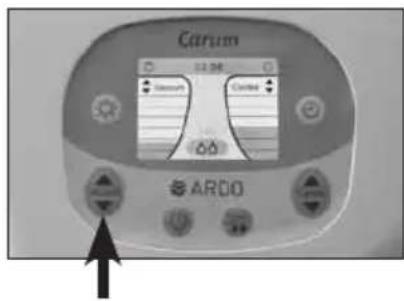
The vacuum (suction strength) can be adjusted, one level at a time, by repeatedly pressing, or by holding down the vacuum button (to the left side of the key pad). The vacuum strength can be individually regulated in both stimulation mode and expression mode.
Pressing the 'up' arrow increases the vacuum, pressing the 'down' arrow reduces the vacuum. The vacuum strength is displayed on the bar chart to the left.
4.3.3. Cycle regulation and display
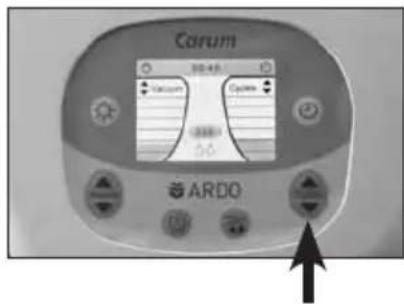
The cycles (frequency) can be adjusted, one level at a time, by repeatedly pressing, or by holding down the cycle button (to the right side of the key pad). The cycle can be individually regulated in both stimulation mode and expression mode.
Pressing the 'up' arrow increases the cycles level, pressing the 'down' arrow reduces the cycles level. The cycles level is displayed on the bar chart to the right.
4.3.4. Switch stimulation mode / expression mode
To change the stimulation mode display screen (orange display) to the express mode display screen (green display), press the 'Mode' button just to the right of the "ON / OFF" button.
The change can be made at any time by pressing the 'Mode' button. If the Carum is in stimulation mode and the 'Mode' button is not pressed, the unit will automatically change to express mode after 2 minutes. Press the 'Mode' key to return to stimulation mode.
When the mode changes, the background colour of the LCD screen changes accordingly. In addition, the symbol relevant to stimulation or expression mode will be highlighted on the LCD display.
Background colour in stimulation mode is orange.
Background colour in expression mode is green.
In each separate mode of operation, vacuum strength and cycles level can be individually adjusted.
When changing from stimulation mode to expression mode, the vacuum strength will automatically be set to 30mbar, and the cycles level to 45 cycles, from the previously set values.
When changing from express mode to stimulation mode, the vacuum strength will be set to 60mbar, and the cycles level to 90 cycles. These values also apply when the unit is switched on.
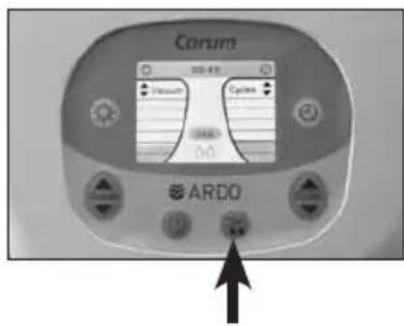
4.3.5. Using express mode, skipping stimulation mode ("Sensitive Programme")
If the 'mode' button is pressed within 2 seconds of switching on the Carum, stimulation mode is skipped. Express mode starts with an especially mild, gentle and low level vacuum of 30mbar and a cycles level of 30 cycles.
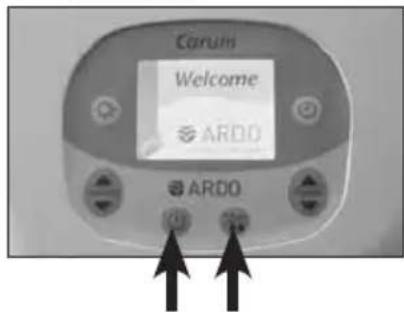
4.3.6. Timing/Time Button
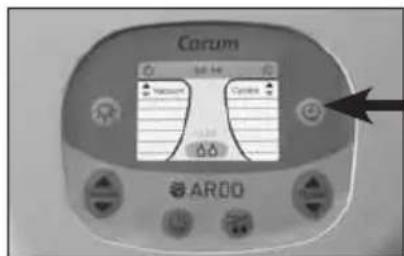
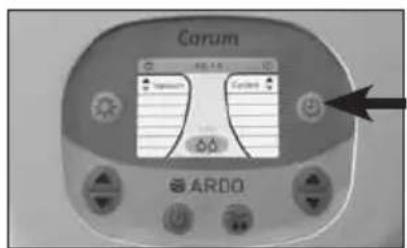
Timing starts automatically when the Carum is switched on. To stop timing, press the 'time' button. Timing will remain de-activated until re-started by pressing the 'time' button again, or until the unit is turned off. The timer will be reset to 00:00 when the 'time' button is pressed for a second time.
Press the 'time' button again to restart the timer. The timer can be switched on and off in either stimulation or express mode.
4.3.7. Backlight
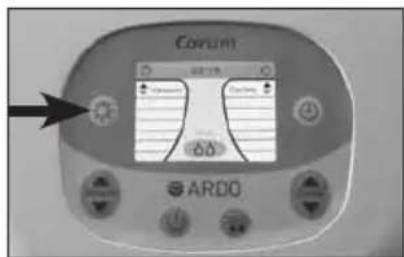
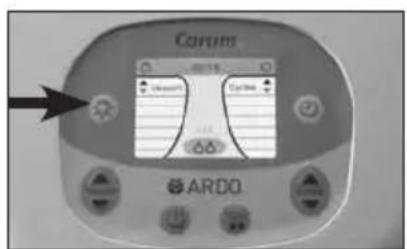
Using the Carum in a darkened room can be made more comfortable by dimming the intensity of the LCD. To reduce the intensity of the backlighting, press the 'light' button (to the left of the LDC) once.
The dim function can be turned on and off as required.
5. USEFUL TIPS

5.1. Adjusting the vacuum (intensity of suction)
Expressing milk should never be painful.
- Set the vacuum intensity at the highest level which is comfortable for you.
• Take care that the nipple is centred in the breast-shell. - Check whether the size of the breast-shell fits your nipple. (See the User Manual: "ARDO PumpSet").
- In the event that the milk is not released, try massaging the breast – this can be really effective.
Regulate the vacuum by touching the arrow keys.
- Intensify the vacuum, until you feel a very slight discomfort, and then reduce the intensity of the vacuum until pumping is comfortable.
- In the event of sore nipples or painful breasts, skip the stimulation mode. The Carum will then start in express mode with an especially mild, gentle and low level vacuum.
- It is recommended that, in pump- or stimulation mode, you adjust the suction strength each time to suit your personal comfort level. This is because the vacuum level generated is sensitive to prevailing atmospheric pressure.
5.2. Regulate the cycle
- When babies start to breast feed, they suckle with rapid sucking motions and low suction – this causes the milk to release by stimulating the milk ejection reflex.
For this reason, the Carum will automatically start in stimulation mode, i.e. with a higher cycles level and a lower vacuum strength, mimicking the baby's natural behaviour.
- Select stimulation mode, choose the level of vacuum which feels most comfortable.
- When the milk begins to flow, the baby's sucking pattern changes. The baby sucks more slowly, but more strongly. Change to express mode, and strengthen the vacuum and raise the cycles level by pressing the arrow until a comfortable pumping experience is achieved.
- If the milk flow falters, return to stimulation mode to prompt renewed milk flow.
5.3. Encouraging the Let down reflex
The milk ejection reflex may occur later when pumping than when breast feeding. The following measures may be helpful.
- Have a warm drink.
- Relax and think about your baby.
- Look at a picture of your baby.
- Apply a warmed compress to the breast before expressing (e.g. ARDO Temperature Pack).
- Warm the cone or funnel of the breast shell before applying.
5.4. Pump efficiently
- Massaging the breast while using the breastpump can boost milk production, and promote better milk flow.
5.5. Increase the quantity of milk
- Use a double pump-set.
- For the first 10 minutes, or until no more milk is flowing, use a double pump i.e. express from both breasts at once. Afterwards, switch to a single pump. Express from each breast for five minutes while massaging gently.
6. ACCESSORIES
| Mains cable Euro Art. No. 63.00.130 | |
| Mains cable UK Art. No. 63.00.131 | |
| Mains cable UL Art. No. 63.00.132 | |
| Trolley - optional Art. No. 63.00.129 | |
| Car battery adapter 12VDC - optional Art. No. 63.00.133 | |
| Bottle holder Art. No. 63.00.127 | |
| EasyFreeze holder Art. No. 63.00.128 | |
| Various pumpsets www.ardomedical.com |
7. ERROR ANALYSIS / ERROR DISPLAY / SERVICE INDICATOR
Identifiable errors or service / maintenance schedules are represented on the LCD by a warning triangle.


7.1. Further possible errors when using the unit
- Weak or absent vacuum
Disconnect the PumpSet from the unit. Partly close the connector opening with a finger to test the suction. If suction is detectable, then the pump is working. Test the PumpSet in accordance with the separate instructions, (only use the original ARDO PumpSet)
- The pump is not working / no data on the LCD display
Check the mains supply; if the unit still does not work, it is defective
Should any of these errors occur, and be confirmed, return the unit to the supplier immediately. The unit must be repaired by trained service personnel or by the manufacturer.
8. MAINTENANCE / CARE / CLEANING

The silicone pot integrated into the PumpSet constitutes a total barrier, and ensures that neither breast milk nor pathogenic agents can get into the pump unit. The unit is maintenance-free; care of the unit, and its accessories, is limited to inspection and cleaning.
The Carum breast pump can be repaired, but only by trained service personnel or by the manufacturer. For this reason, only the bottle holder, the EasyFreeze holder, the connector cable, and the car charging cable, are available for order as spare parts. See Section: Accessories / Spare Parts.
8.1. Visual inspection before switch-on
• Is the pump housing intact?
• Is the mains power unit undamaged?
• Is the accessory clean, complete and intact?
• Is the accessory correctly attached?
Ignoring these checks, or the cleaning instructions, may lead to risk of infection, electric-shock or damage to the unit.
8.2. Cleaning / disinfection

• Carum breast milk pump:
• The Carum is not waterproof. It conforms to enclosure IP (Ingress Protection) rating IP20.
Cleaning at home: As needed, wipe with a damp cloth, commercial detergent may be used.
Cleaning in the hospital: Disinfect by wiping with a non-phenol based disinfectant.
Do not put the unit into the dish-washer or into a washing-up bowl. It is not possible to clean the pump or the power unit. Attempting to do so may cause the unit to malfunction or to become contaminated – requiring suitable disposal. (See section 11: Transport/Storage/Disposal).
- Accessory PumpSet: Please read the separate User Manual, Section: Cleaning.
Important: unplug the unit from the mains connection before cleaning.
8.2.1. Checklist: Maintenance inspections for rentals
| • Visual inspection of the pump for cleanliness After every renting | |
| • Visual inspection of the pump for completeness After every renting | |
| • Visual inspection of the pump for damage After every renting | |
| • Simple operational checks of the pump (Pump runs properly, battery charged | After every renting |
| • Check of the vacuum strength – to be carried out by trained service personnel | Minimum every 2 years |
8.2.2. Checklist: Maintenance inspection for hospitals
| • Visual inspection of the pump for cleanliness Before every use | |
| • Visual inspection of the pump for damage After every use | |
| • Check of the vacuum strength – to be carried out by trained service personnel | Minimum every 2 years |
9. GUARANTEE
The Carum is guaranteed for 3 years from the date of purchase. The purchase invoice serves as proof of guarantee.
General terms and conditions
This unit is covered by the Ardo medical AG warranty in respect of materials and manufacturing defects.
The guarantee starts from the date of purchase. Defective materials will be replaced free-of-charge, during the life of the Guarantee, provided that the Guarantee has not been voided by unauthorised use or access to the unit. To ensure guarantee cover, and the flawless functioning of the unit, the instructions in the User Manual must be followed and only Ardo medical AG accessories used. The guarantee is void if the unit has been opened.
10. TECHNICAL INFORMATION
10.1.Version
| Carum with Euro mains cable Art. No. 63.00.71 Carum battery with Euro mains cable Art. No. 63.00.75 |
| Carum with UK mains cable Art. No. 63.00.72 Carum battery with UK mains cable Art. No. 63.00.76 |
| Carum with UL mains cable Art. No. 63.00.73 Carum battery with UL mains cable Art. No. 63.00.77 |
10.2. Technical data
| Pump dimensions | LxBxH = 302x240x180 mm |
| Pump weight 3 kg Weight with battery 3.7 kg | |
| Input voltage | 100 – 230 VAC +/-10% |
| DC Input | 12 VDC |
| Operating temperatures | +5 – +40 °C |
| Protection level | BF |
| Protection Category Double Insulated | Category II |
| Power cable length Length | 3 m |
| Frequency | 50–60Hz |
| Lifetime (excluding parts subject to wear and tear) | 10 years |
| Relative humidity | 10–93% |
| Air pressure | 700–1060 hPa |
| Classification in accordance with MDD93/42 | Category 2a |
Cycle and vacuum levels
| Vacuum range in stimulation mode | 30-150 mbar22-98 mmHg3-13 kPa |
| Vacuum range in expression mode | 30-330 mbar22-250 mmHg3-33 kPa |
| Permitted tolerance of the vacuum strength | +/- 5% |
| Cycle range in stimulation mode | 72–120/min. |
| Cycle range in expression mode | 30–60/min. |
| Permitted tolerance of the cycles | +/- 3 cycles |
The vacuum level generated is sensitive to prevailing atmospheric pressure. The higher the prevailing atmospheric pressure, the more intense the generated vacuum – and vice versa. The vacuum values (including tolerances) specified in the user manual are based on an atmospheric pressure of 880hPa.
10.3. Compliance
| In accordance with guidelines: MDD 93 / 42 CEE of 14.7.1993, and 2010, in respect of medical products and 2010. 2007 / 47 / CE, 2006 / 42 / CE, EN 60601-1, EN60601-1-2, EN ISO 10079-1, EN 60601-1-4, EN 60601-1-6, EN 60601-1-11 | CE0123 |

MEDICAL -GENERAL MEDICAL EQUIPMENT AS TO ELECTRICAL SHOCK FIRE AND MECHANICAL HAZARDS ONLY IN ACCORDANCE WITH ANSUAIR ES6001-1 (2005, C119, A2 10). CAMOSA-C22.2 No 6001.1 (2008, R 2011)
10.4. EMV Test records
See annex 12.1.
11. TRANSPORT / STORAGE / DISPOSAL
For the transport and storage of your Carum, we recommend using the original packaging. We further recommend separate storage for the unit is protected from UV (e.g. sunlight / halogen lamps), heat and dust.
11.1. Transport and storage conditions
Carum und Carum with optional battery
| Temperature -20 – +70°C | |
| Relative humidity 10 – 80% | |
| Air pressure 700 – 1060 hPa |
11.2. Disposal
The unit may be returned to the manufacturer, or be dismantled and recycled (as metal or plastic) in an environmentally-friendly manner, through a recycling firm specialising in electrical goods. There are no special or increased risk factors.

Manufacturer:
medical AG
Gewerbestrasse 19
6314 Unterägeri
Switzerland
Homepage: www.ardomedical.com
Email: info@ardo.ch
EXPLICATIONS
natural_image
Interior view of a mechanical housing with internal components and mounting holes (no text or symbols visible)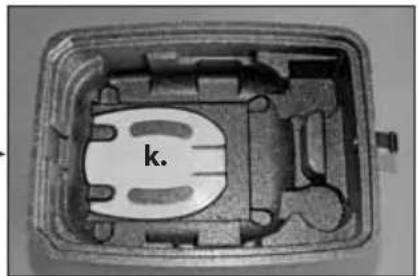
natural_image
Cross-sectional view of a mechanical or electronic component with internal channels and labeled part 'k.' (no readable text or symbols beyond the label)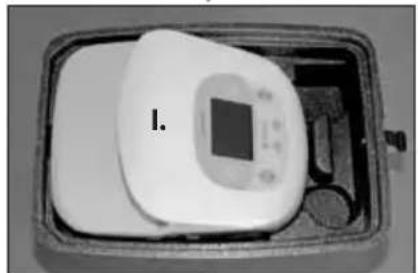
natural_image
Interior view of a rectangular device with a central display and labeled component 'I.' (no text or symbols on the device itself)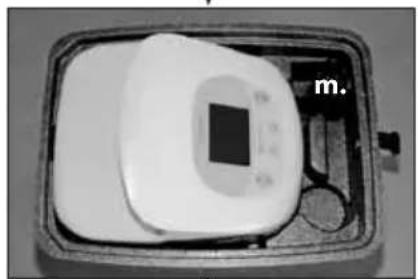
natural_image
Black-and-white photo of a medical device with a square display and a label 'm.' (no visible text or symbols on the device itself)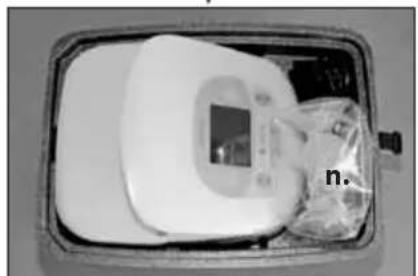
natural_image
Medical device with digital display and plastic bag, no visible text or symbols3. APPLICATIONS/INDICATIONS 32
3.1. Indications 32
3.2. Contre-indications 32
4. MISE EN SERVICE / UTILISATIONN 33
4.1. Légendes 33
4.2. Installation 34
12.1. Homologations CEM 185
1. REMARQUES IMPORTANTES CONCERNANT LA SECURITE
3. APPLICATIONS / INDICATIONS
natural_image
Medical device with digital display and cups, no visible text or symbolsnatural_image
Medical device with digital display and tubing, no visible text or symbols4.3. utilisation
10.4. Homologation CEM
natural_image
Black cable with a power plug and cord, labeled 'g.' (no other text or symbols)
natural_image
Interior view of a mechanical housing component with mounting holes and internal cavities (no text or symbols visible)
natural_image
Cross-sectional view of a mechanical or electronic component with internal channels and labeled part 'k.' (no readable text or symbols beyond the label)C.
natural_image
Interior view of a rectangular device with a central display and labeled component 'I.' (no readable text or symbols on the device itself)b.
natural_image
Black-and-white photo of a medical device with a square display and a labeled tag 'm.' (no visible text or symbols on the device itself)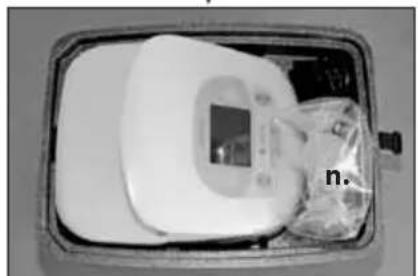
natural_image
Medical device with digital display and plastic bag, no visible text or symbolsline
| Time Point | Value | | ---------- | ----- | | 0 | 0 | | 1 | 1 | | 2 | 0 | | 3 | 1 | | 4 | 0 | | 5 | 1 | | 6 | 0 | | 7 | 1 | | 8 | 0 | | 9 | 1 | | 10 | 0 | | 11 | 1 | | 12 | 0 | | 13 | 1 | | 14 | 0 | | 15 | 1 | | 16 | 0 | | 17 | 1 | | 18 | 0 | | 19 | 1 | | 20 | 0 | | 21 | 1 | | 22 | 0 | | 23 | 1 | | 24 | 0 | | 25 | 1 | | 26 | 0 | | 27 | 1 | | 28 | 0 | | 29 | 1 | | 30 | 0 | | 31 | 1 | | 32 | 0 | | 33 | 1 | | 34 | 0 | | 35 | 1 | | 36 | 0 | | 37 | 1 | | 38 | 0 | | 39 | 1 | | 40 | 0 | | 41 | 1 | | 42 | 0 | | 43 | 1 | | 44 | 0 | | 45 | 1 | | 46 | 0 | | 47 | 1 | | 48 | 0 | | 49 | 1 | | 50 | 0 | | 51 | 1 | | 52 | 0 | | 53 | 1 | | 54 | 0 | | 55 | 1 | | 56 | 0 | | 57 | 1 | | 58 | 0 | | 59 | 1 | | 60 | 0 | | 61 | 1 | | 62 | 0 | | 63 | 1 | | 64 | 0 | | 65 | 1 | | 66 | 0 | | 67 | 1 | | 68 | 0 | | 69 | 1 | | 70 | 0 | | 71 | 1 | | 72 | 0 | | 73 | 1 | | 74 | 0 | | 75 | 1 | | 76 | 0 | | 77 | 1 | | 78 | 0 | | 79 | 1 | | 80 | 0 | | 81 | 1 | | 82 | 0 | | 83 | 1 | | 84 | 0 | | 85 | 1 | | 86 | 0 | | 87 | 1 | | 88 | 0 | | 89 | 1 | | 90 | 0 | | 91 | 1 | | 92 | 0 | | 93 | 1 | | 94 | 0 | | 95 | 1 | | 96 | 0 | | 97 | 1 | | 98 | 0 | | 99 | 1 | | Note: The data is in a single format with values separated by a step size of -1. The values are explicitly labeled as ''.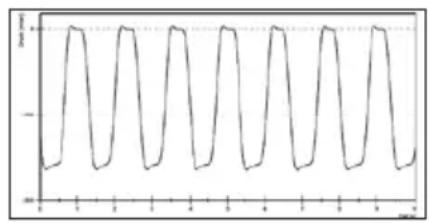
line
| x | y | | ---- | ----- | | 0 | -1.0 | | 1 | 0.0 | | 2 | -1.0 | | 3 | 0.0 | | 4 | -1.0 | | 5 | 0.0 | | 6 | -1.0 | | 7 | 0.0 | | 8 | -1.0 | | 9 | 0.0 | | 10 | -1.0 | | 11 | 0.0 | | 12 | -1.0 | | 13 | 0.0 | | 14 | -1.0 | | 15 | 0.0 | | 16 | -1.0 | | 17 | 0.0 | | 18 | -1.0 | | 19 | 0.0 | | 20 | -1.0 | | 21 | 0.0 | | 22 | -1.0 | | 23 | 0.0 | | 24 | -1.0 | | 25 | 0.0 | | 26 | -1.0 | | 27 | 0.0 | | 28 | -1.0 | | 29 | 0.0 | | 30 | -1.0 | | 31 | 0.0 | | 32 | -1.0 | | 33 | 0.0 | | 34 | -1.0 | | 35 | 0.0 | | 36 | -1.0 | | 37 | 0.0 | | 38 | -1.0 | | 39 | 0.0 | | 40 | -1.0 | | 41 | 0.0 | | 42 | -1.0 | | 43 | 0.0 | | 44 | -1.0 | | 45 | 0.0 | | 46 | -1.0 | | 47 | 0.0 | | 48 | -1.0 | | 49 | 0.0 | | 50 | -1.0 | | 51 | 0.0 | | 52 | -1.0 | | 53 | 0.0 | | 54 | -1.0 | | 55 | 0.0 | | 56 | -1.0 | | 57 | 0.0 | | 58 | -1.0 | | 59 | 0.0 | | 60 | -1.0 | | 61 | 0.0 | | 62 | -1.0 | | 63 | 0.0 | | 64 | -1.0 | | 65 | 0.0 | | 66 | -1.0 | | 67 | 0.0 | | 68 | -1.0 | | 69 | 0.0 | | 70 | -1.0 | | 71 | 0.0 | | 72 | -1.0 | | 73 | 0.0 | | 74 | -1.0 | | 75 | 0.0 | | 76 | -1.0 | | 77 | 0.0 | | 78 | -1.0 | | 79 | 0.0 | | 80 | -1.0 | | 81 | 0.0 | | 82 | -1.0 | | 83 | 0.0 | | 84 | -1.0 | | 85 | 0.0 | | 86 | -1.0 | | 87 | 0.0 | | 88 | -1.0 | | 89 | 0.0 | | 90 | -1.0 | | 91 | 0.0 | | 92 | -1.0 | | 93 | 0.0 | | 94 | -1.0 | | 95 | 0.0 | | 96 | -1.0 | | 97 | 0.0 | | 98 | -1.0 | | 99 | 0.0 | | <1 | -1.0 |natural_image
Close-up of a white electronic device with digital display and cups, no visible text or symbols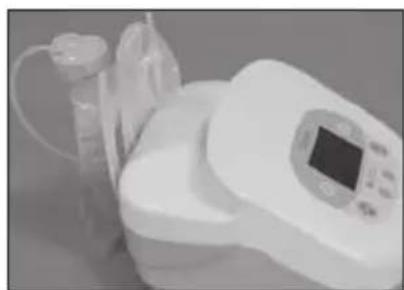
natural_image
Medical device with digital display and medical tubing (no visible text or symbols)4.3. uso

natural_image
Interior view of a mechanical housing with internal components and mounting holes (no text or symbols visible)
natural_image
Cross-sectional view of a mechanical or electronic component with internal channels and labeled part 'k.' (no readable text or symbols beyond the label)
natural_image
Interior view of a rectangular device with a central display and labeled component 'I.' (no text or symbols on the device itself)
natural_image
Black-and-white photo of a medical device with a square display and a label 'm.' (no visible text or symbols on the device itself)
natural_image
Medical device with digital display and plastic bag, no visible text or symbols2. PRODUCTBESCHRIJVING 58
2.1. Zuigcurve 58
3. TOEPASSINGEN/INDICATIES 58
3.1. Indicaties 58
3.2. Contra-indications 58
4. INGEBRUIKNEMING/BEDIENING 59
4.1. Legende 59
4.2. Installatie 60
2. PRODUCTBESCHRIJVING
natural_image
Medical device with digital display and cups, no visible text or symbolsnatural_image
Medical device with digital display and plastic cup, no visible text or symbols4.3. Bediening
natural_image
Interior view of a mechanical housing with internal components and mounting holes (no text or symbols visible)
natural_image
Cross-sectional view of a mechanical or electronic component with internal channels and labeled part 'k.' (no readable text or symbols beyond the label)
natural_image
Interior view of a rectangular device with a central display and labeled component 'I.' (no text or symbols on the device itself)
natural_image
Black-and-white photo of a medical device with a square display and a label 'm.' (no visible text or symbols on the device itself)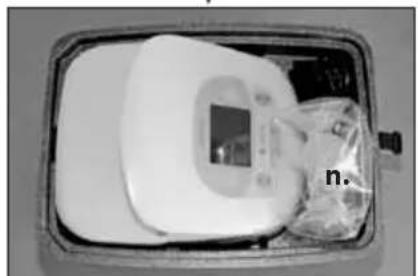
natural_image
Medical device with digital display and plastic bag, no visible text or symbolsline
| x | y | | ---- | ----- | | 0.0 | -2.0 | | 0.1 | -1.5 | | 0.2 | -1.0 | | 0.3 | -0.5 | | 0.4 | 0.0 | | 0.5 | 0.5 | | 0.6 | 1.0 | | 0.7 | 1.5 | | 0.8 | 2.0 | | 0.9 | 1.5 | | 1.0 | 1.0 | | 1.1 | 0.5 | | 1.2 | 0.0 | | 1.3 | -0.5 | | 1.4 | -1.0 | | 1.5 | -1.5 | | 1.6 | -2.0 | | 1.7 | -1.5 | | 1.8 | -1.0 | | 1.9 | -0.5 | | 2.0 | 0.0 | | 2.1 | 0.5 | | 2.2 | 1.0 | | 2.3 | 1.5 | | 2.4 | 2.0 | | 2.5 | 1.5 | | 2.6 | 1.0 | | 2.7 | 0.5 | | 2.8 | 0.0 | | 2.9 | -0.5 | | 3.0 | -1.0 | | 3.1 | -1.5 | | 3.2 | -2.0 | | 3.3 | -1.5 | | 3.4 | -1.0 | | 3.5 | -0.5 | | 3.6 | 0.0 | | 3.7 | 0.5 | | 3.8 | 1.0 | | 3.9 | 1.5 | | 4.0 | 2.0 | | 4.1 | 1.5 | | 4.2 | 1.0 | | 4.3 | 0.5 | | 4.4 | 0.0 | | 4.5 | -0.5 | | 4.6 | -1.0 | | 4.7 | -1.5 | | 4.8 | -2.0 | | 4.9 | -1.5 | | 5.0 | -1.0 | | 5.1 | -0.5 | | 5.2 | 0.0 | | 5.3 | 0.5 | | 5.4 | 1.0 | | 5.5 | 1.5 | | 5.6 | 2.0 | | 5.7 | 1.5 | | 5.8 | 1.0 | | 5.9 | 0.5 | | 6.0 | 0.0 | | ... (repeated) | ... (repeated)natural_image
Medical device with digital display and cups on a surface (no visible text or symbols)natural_image
Medical device with digital display and tubing, no visible text or symbols4.3. Manejo

5. CONSEJOS ÚTILES

3. APLICAÇÕES/INDICAÇÕES 84
3.1. Indicações 84
line
| x | y | | ---- | ----- | | 0 | -1.5 | | 1 | 0.0 | | 2 | -1.5 | | 3 | 0.0 | | 4 | -1.5 | | 5 | 0.0 | | 6 | -1.5 | | 7 | 0.0 | | 8 | -1.5 | | 9 | 0.0 | | 10 | -1.5 | | 11 | 0.0 | | 12 | -1.5 | | 13 | 0.0 | | 14 | -1.5 | | 15 | 0.0 | | 16 | -1.5 | | 17 | 0.0 | | 18 | -1.5 | | 19 | 0.0 | | 20 | -1.5 | | 21 | 0.0 | | 22 | -1.5 | | 23 | 0.0 | | 24 | -1.5 | | 25 | 0.0 | | 26 | -1.5 | | 27 | 0.0 | | 28 | -1.5 | | 29 | 0.0 | | 30 | -1.5 | | 31 | 0.0 | | 32 | -1.5 | | 33 | 0.0 | | 34 | -1.5 | | 35 | 0.0 | | 36 | -1.5 | | 37 | 0.0 | | 38 | -1.5 | | 39 | 0.0 | | 40 | -1.5 | | 41 | 0.0 | | 42 | -1.5 | | 43 | 0.0 | | 44 | -1.5 | | 45 | 0.0 | | 46 | -1.5 | | 47 | 0.0 | | 48 | -1.5 | | 49 | 0.0 | | 50 | -1.5 | | 51 | 0.0 | | 52 | -1.5 | | 53 | 0.0 | | 54 | -1.5 | | 55 | 0.0 | | 56 | -1.5 | | 57 | 0.0 | | 58 | -1.5 | | 59 | 0.0 | | 60 | -1.5 | | 61 | 0.0 | | 62 | -1.5 | | 63 | 0.0 | | 64 | -1.5 | | 65 | 0.0 | | 66 | -1.5 | | 67 | 0.0 | | 68 | -1.5 | | 69 | 0.0 | | 70 | -1.5 | | 71 | 0.0 | | 72 | -1.5 | | 73 | 0.0 | | 74 | -1.5 | | 75 | 0.0 | | 76 | -1.5 | | 77 | 0.0 | | 78 | -1.5 | | 79 | 0.0 | | 80 | -1.5 | | 81 | 0.0 | | 82 | -1.5 | | 83 | 0.0 | | 84 | -1.5 | | 85 | 0.0 | | 86 | -1.5 | | 87 | 0.0 | | 88 | -1.5 | | 89 | 0.0 | | 90 | -1.5 | | 91 | 0.0 | | 92 | -1.5 | | 93 | 0.0 | | 94 | -1.5 | | 95 | 0.0 | | 96 | -1.5 | | 97 | 0.0 | | 98 | -1.5 | | 99 | 0.0 | | <100 | -1.5 |3. APLICAÇÕES / INDICAÇÕES
natural_image
Medical device with digital display and cups on a surface (no visible text or symbols)natural_image
Medical device with a digital display and tubing, no visible text or symbols4.3. Operação
natural_image
Black cable with a power plug and cord, labeled 'g.' (no other text or symbols)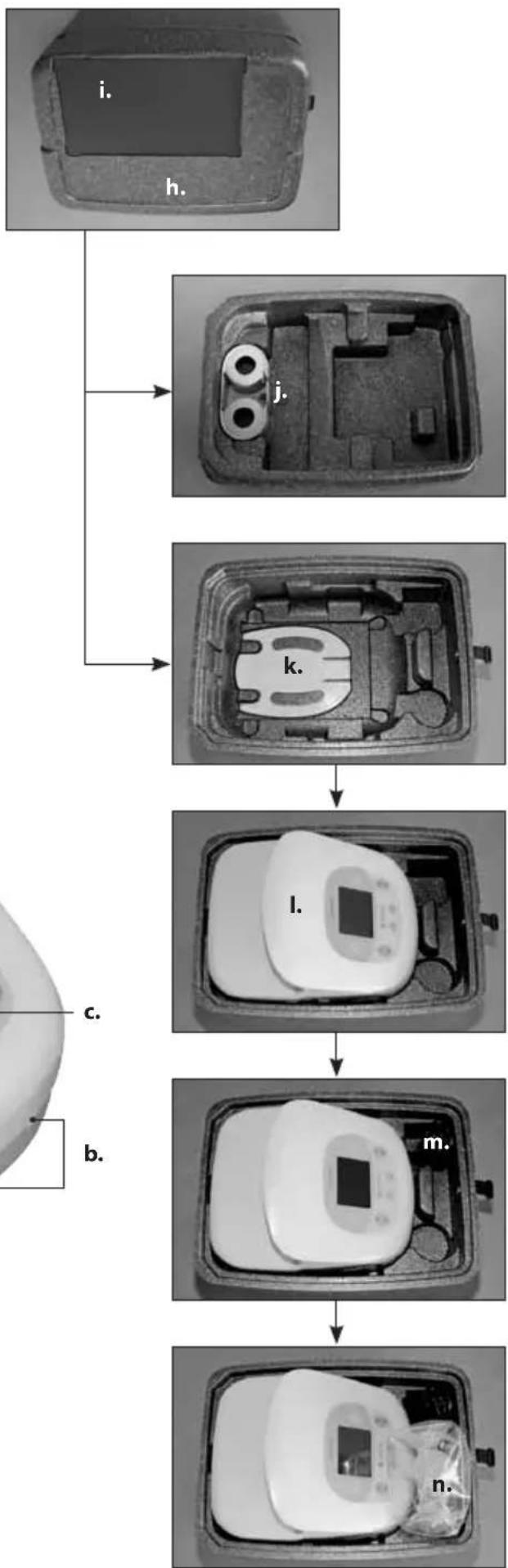
flowchart
graph TD
    A["i. Contact"] --> B["h. Contact"]
    B --> C["j. Contact"]
    C --> D["k. Contact"]
    D --> E["l. Contact"]
    E --> F["m. Contact"]
    F --> G["n. Contact"]
natural_image
Close-up of a white electronic device with digital display and cups, no visible text or symbols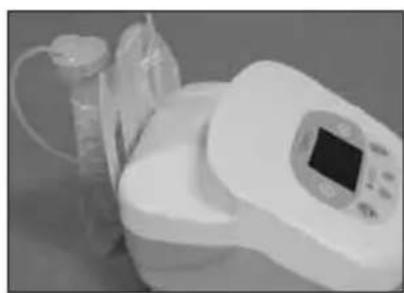
natural_image
Medical device with digital display and medical tubing (no visible text or symbols)4.3. kullanım
4.3.7. Fon aydınlatması
MEDICAL - GENERAL MEDICAL EQUIPMENT
AS TO ELECTRICAL SHOOK FIRE AND
natural_image
Black cable with a power plug and cord, labeled 'g.' (no other text or symbols)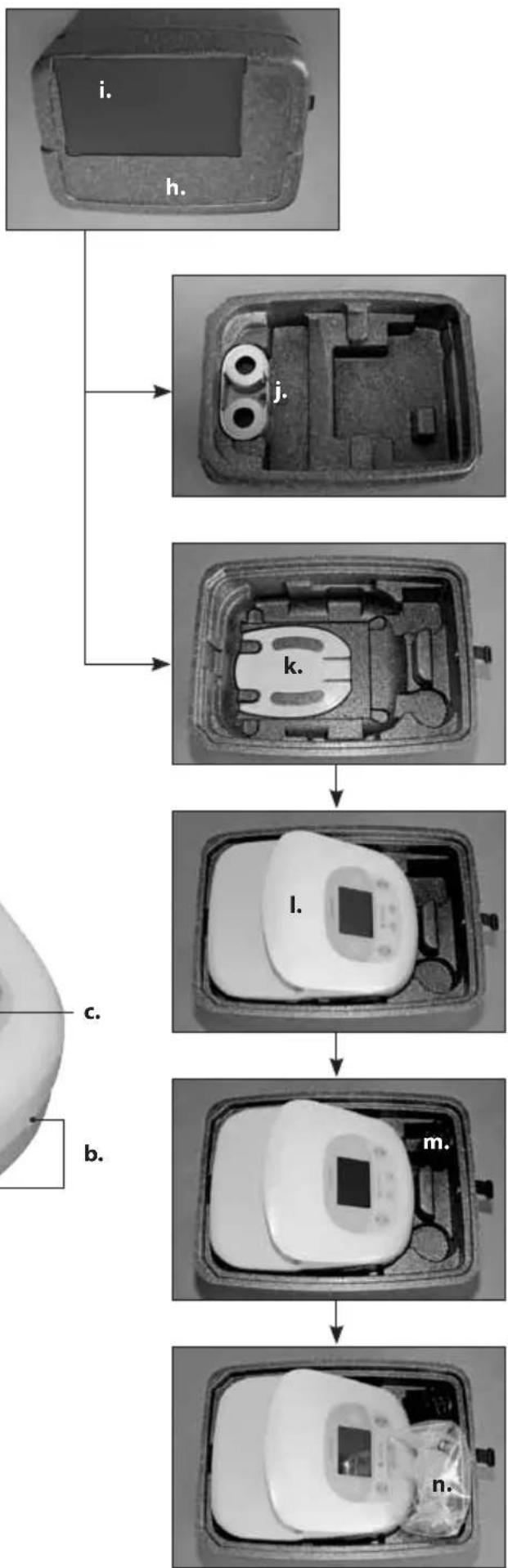
flowchart
graph TD
    A["i. Contact"] --> B["h. Contact"]
    B --> C["j. Contact"]
    C --> D["k. Contact"]
    D --> E["l. Contact"]
    E --> F["m. Contact"]
    F --> G["n. Contact"]
line
| Time | Value | |------|-------| | 0 | 0 | | 1 | 1 | | 2 | 0 | | 3 | 1 | | 4 | 0 | | 5 | 1 | | 6 | 0 | | 7 | 1 | | 8 | 0 | | 9 | 1 | | 10 | 0 | | 11 | 1 | | 12 | 0 | | 13 | 1 | | 14 | 0 | | 15 | 1 | | 16 | 0 | | 17 | 1 | | 18 | 0 | | 19 | 1 | | 20 | 0 | | 21 | 1 | | 22 | 0 | | 23 | 1 | | 24 | 0 | | 25 | 1 | | 26 | 0 | | 27 | 1 | | 28 | 0 | | 29 | 1 | | 30 | 0 | | 31 | 1 | | 32 | 0 | | 33 | 1 | | 34 | 0 | | 35 | 1 | | 36 | 0 | | 37 | 1 | | 38 | 0 | | 39 | 1 | | 40 | 0 | | 41 | 1 | | 42 | 0 | | 43 | 1 | | 44 | 0 | | 45 | 1 | | 46 | 0 | | 47 | 1 | | 48 | 0 | | 49 | 1 | | 50 | 0 | | 51 | 1 | | 52 | 0 | | 53 | 1 | | 54 | 0 | | 55 | 1 | | 56 | 0 | | 57 | 1 | | 58 | 0 | | 59 | 1 | | 60 | 0 | | 61 | 1 | | 62 | 0 | | 63 | 1 | | 64 | 0 | | 65 | 1 | | 66 | 0 | | 67 | 1 | | 68 | 0 | | 69 | 1 | | 70 | 0 | | 71 | 1 | | 72 | 0 | | 73 | 1 | | 74 | 0 | | 75 | 1 | | 76 | 0 | | 77 | 1 | | 78 | 0 | | 79 | 1 | | 80 | 0 | | 81 | 1 | | 82 | 0 | | 83 | 1 | | 84 | 0 | | 85 | 1 | | 86 | 0 | | 87 | 1 | | 88 | 0 | | 89 | 1 | | 90 | 0 | | 91 | 1 | | 92 | 0 | | 93 | 1 | | 94 | 0 | | 95 | 1 | | 96 | 0 | | 97 | 1 | | 98 | 0 | | 99 | 1 | | Note: The actual values may vary due to the random nature of the data generation. The provided values are just an example. I have left blank text for all data points. There is no actual output to extract. You would need to run the code to generate the actual output. You would need to run the code to extract the actual output. You would need to run the code to extract the actual output. You would need to run the code to extract the actual output. You would need to run the code to extract the actual output. You would need to run the code to extract the actual output. You would need to run the code to extract the actual output. You would need to run the code to extract the actual output. You would need to run the code to extract the actual output. You would need to be extracted from this image. You would not be extracted from this image in this view.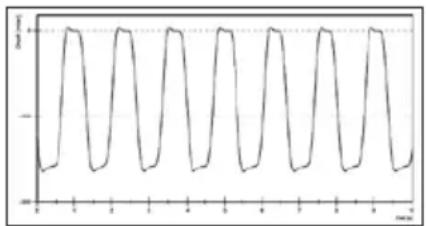
line
| Time (m) | Value | | -------- | ----- | | 0 | -1 | | 1 | 1 | | 2 | -1 | | 3 | 1 | | 4 | -1 | | 5 | 1 | | 6 | -1 | | 7 | 1 | | 8 | -1 | | 9 | 1 | | 10 | -1 | | 11 | 1 | | 12 | -1 | | 13 | 1 | | 14 | -1 | | 15 | 1 | | 16 | -1 | | 17 | 1 | | 18 | -1 | | 19 | 1 | | 20 | -1 | | 21 | 1 | | 22 | -1 | | 23 | 1 | | 24 | -1 | | 25 | 1 | | 26 | -1 | | 27 | 1 | | 28 | -1 | | 29 | 1 | | 30 | -1 | | 31 | 1 | | 32 | -1 | | 33 | 1 | | 34 | -1 | | 35 | 1 | | 36 | -1 | | 37 | 1 | | 38 | -1 | | 39 | 1 | | 40 | -1 | | 41 | 1 | | 42 | -1 | | 43 | 1 | | 44 | -1 | | 45 | 1 | | 46 | -1 | | 47 | 1 | | 48 | -1 | | 49 | 1 | | 50 | -1 | | 51 | 1 | | 52 | -1 | | 53 | 1 | | 54 | -1 | | 55 | 1 | | 56 | -1 | | 57 | 1 | | 58 | -1 | | 59 | 1 | | 60 | -1 | | 61 | 1 | | 62 | -1 | | 63 | 1 | | 64 | -1 | | 65 | 1 | | 66 | -1 | | 67 | 1 | | 68 | -1 | | 69 | 1 | | 70 | -1 | | 71 | 1 | | 72 | -1 | | 73 | 1 | | 74 | -1 | | 75 | 1 | | 76 | -1 | | 77 | 1 | | 78 | -1 | | 79 | 1 | | 80 | -1 | | 81 | 1 | | 82 | -1 | | 83 | 1 | | 84 | -1 | | 85 | 1 | | 86 | -1 | | 87 | 1 | | 88 | -1 | | 89 | 1 | | 90 | -1 | | 91 | 1 | | 92 | -1 | | 93 | 1 | | 94 | -1 | | 95 | 1 | | 96 | -1 | | 97 | 1 | | 98 | -1 | | 99 | 1 | | 100 | -1 |3. ANVENDELSE / INDKATIONER
natural_image
Close-up of a kitchen appliance with liquid being poured into cups (no visible text or symbols)4.2.4. Montering af EasyFreeze holderen
natural_image
Medical device with digital display and tubing, no visible text or symbols4.3. Betjening
natural_image
Coiled black cable with a terminal plug, labeled 'g.' (no other text or symbols)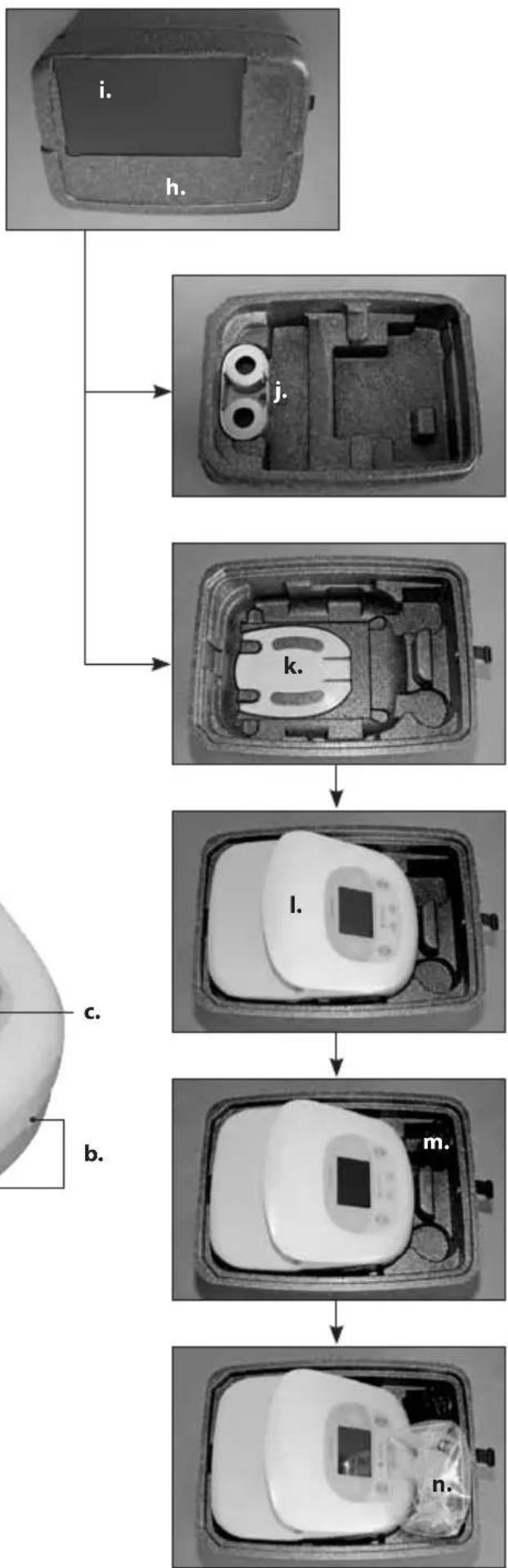
flowchart
graph TD
    A["i. Contact"] --> B["h. Contact"]
    B --> C["j. Contact"]
    C --> D["k. Contact"]
    D --> E["l. Contact"]
    E --> F["m. Contact"]
    F --> G["n. Contact"]
INNEHÅLLSFÖRTECKNING
1. VIKTIG SÄKERHETSINFORMATION 122
2. PRODUKTBESKRIVNING 123
2.1. Sugkurva 123
3. ANVÄNDNINGSOMRÅDEN/INDIKATIONER 123
3.1. Indikationer 123
3.2. Kontraindikationer 123
4. IDRIFTTAGNING / ANVÄNDNING 124
natural_image
Medical device with digital display and cups, no visible text or symbolsnatural_image
Medical device with digital display and tubing, no visible text or symbols4.3. Användning
natural_image
Black cable with a power plug and cord, labeled 'g.' (no other text or symbols)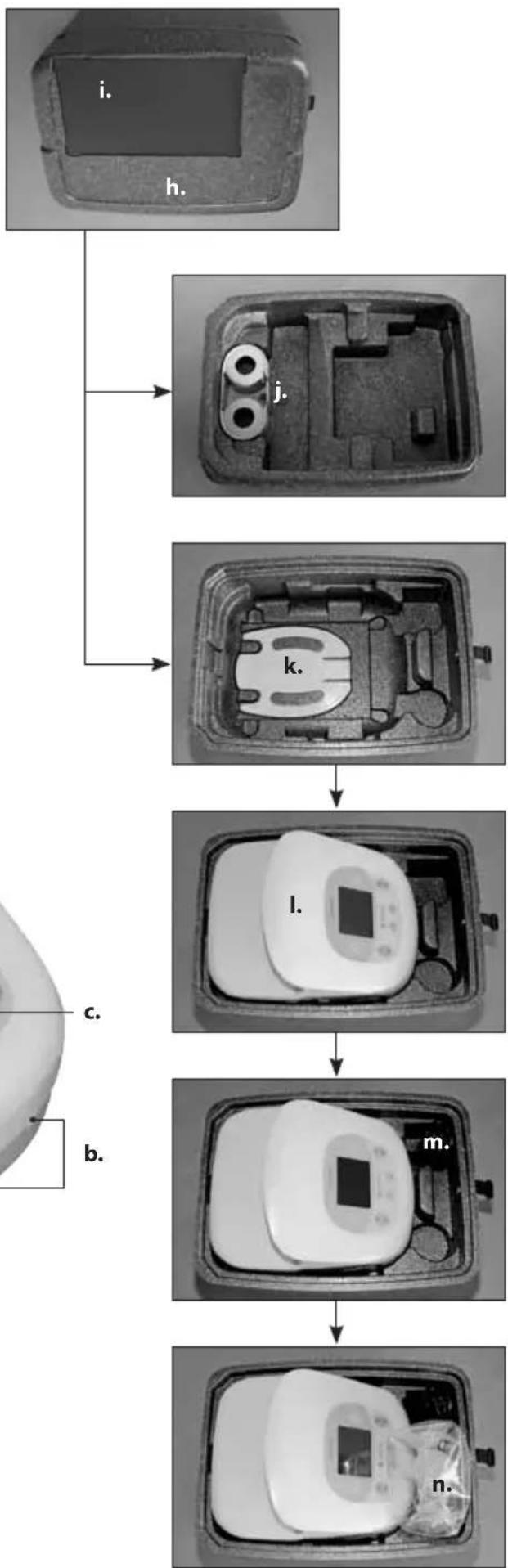
flowchart
graph TD
    A["i. Contact"] --> B["h. Contact"]
    B --> C["j. Contact"]
    C --> D["k. Contact"]
    D --> E["l. Contact"]
    E --> F["m. Contact"]
    F --> G["n. Contact"]
line
| Time | Value | |------|-------| | 0 | -1.0 | | 1 | 0.0 | | 2 | -1.0 | | 3 | 0.0 | | 4 | -1.0 | | 5 | 0.0 | | 6 | -1.0 | | 7 | 0.0 | | 8 | -1.0 | | 9 | 0.0 | | 10 | -1.0 | | 11 | 0.0 | | 12 | -1.0 | | 13 | 0.0 | | 14 | -1.0 | | 15 | 0.0 | | 16 | -1.0 | | 17 | 0.0 | | 18 | -1.0 | | 19 | 0.0 | | 20 | -1.0 | | 21 | 0.0 | | 22 | -1.0 | | 23 | 0.0 | | 24 | -1.0 | | 25 | 0.0 | | 26 | -1.0 | | 27 | 0.0 | | 28 | -1.0 | | 29 | 0.0 | | 30 | -1.0 | | 31 | 0.0 | | 32 | -1.0 | | 33 | 0.0 | | 34 | -1.0 | | 35 | 0.0 | | 36 | -1.0 | | 37 | 0.0 | | 38 | -1.0 | | 39 | 0.0 | | 40 | -1.0 | | 41 | 0.0 | | 42 | -1.0 | | 43 | 0.0 | | 44 | -1.0 | | 45 | 0.0 | | 46 | -1.0 | | 47 | 0.0 | | 48 | -1.0 | | 49 | 0.0 | | 50 | -1.0 | | 51 | 0.0 | | 52 | -1.0 | | 53 | 0.0 | | 54 | -1.0 | | 55 | 0.0 | | 56 | -1.0 | | 57 | 0.0 | | 58 | -1.0 | | 59 | 0.0 | | 60 | -1.0 | | 61 | 0.0 | | 62 | -1.0 | | 63 | 0.0 | | 64 | -1.0 | | 65 | 0.0 | | 66 | -1.0 | | 67 | 0.0 | | 68 | -1.0 | | 69 | 0.0 | | 70 | -1.0 | | 71 | 0.0 | | 72 | -1.0 | | 73 | 0.0 | | 74 | -1.0 | | 75 | 0.0 | | 76 | -1.0 | | 77 | 0.0 | | 78 | -1.0 | | 79 | 0.0 | | 80 | -1.0 | | 81 | 0.0 | | 82 | -1.0 | | 83 | 0.0 | | 84 | -1.0 | | 85 | 0.0 | | 86 | -1.0 | | 87 | 0.0 | | 88 | -1.0 | | 89 | 0.0 | | 90 | -1.0 | | 91 | 0.0 | | 92 | -1.0 | | 93 | 0.0 | | 94 | -1.0 | | 95 | 0.0 | | 96 | -1.0 | | 97 | 0.0 | | 98 | -1.0 | | 99 | 0.0 | | <5 | -1.5 |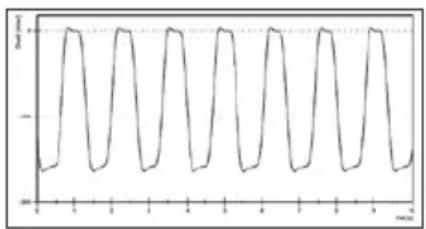
line
| x | y | | ---- | ----- | | 0.0 | -1.0 | | 0.1 | -0.8 | | 0.2 | -0.6 | | 0.3 | -0.4 | | 0.4 | -0.2 | | 0.5 | 0.0 | | 0.6 | 0.2 | | 0.7 | 0.4 | | 0.8 | 0.6 | | 0.9 | 0.8 | | 1.0 | 1.0 | | 1.1 | 0.8 | | 1.2 | 0.6 | | 1.3 | 0.4 | | 1.4 | 0.2 | | 1.5 | 0.0 | | 1.6 | -0.2 | | 1.7 | -0.4 | | 1.8 | -0.6 | | 1.9 | -0.8 | | 2.0 | -1.0 |3. BRUK / INDIKASJONER
natural_image
Medical device with digital display and cups, no visible text or symbols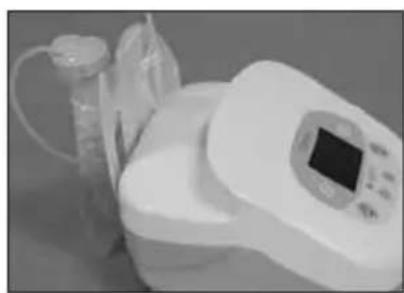
natural_image
Medical device with digital display and glass container (no visible text or symbols)4.3. Betjening
5. NYTTIGE TIPS

natural_image
Black cable with a power plug and tied cord, labeled 'g.' (no other text or symbols)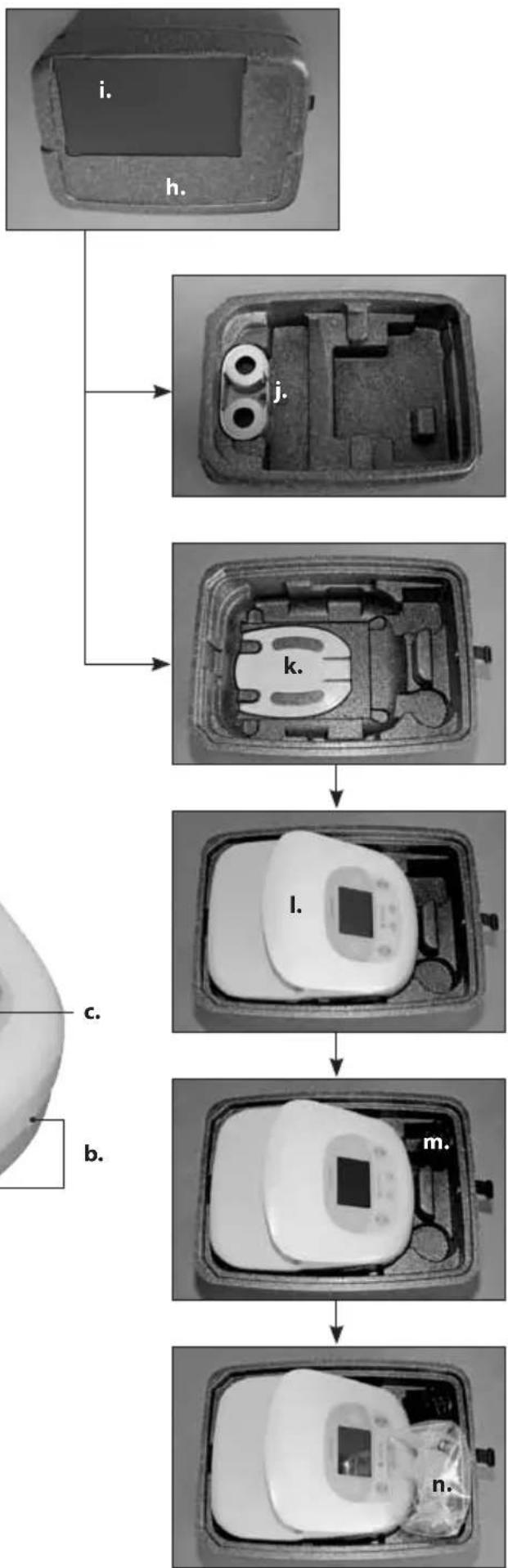
flowchart
graph TD
    A["i. Contact"] --> B["j. Contact"]
    B --> C["k. Contact"]
    C --> D["l. Contact"]
    D --> E["m. Contact"]
    E --> F["n. Contact"]
line
| x | y | | ---- | ----- | | 0.0 | 0.0 | | 0.1 | 0.8 | | 0.2 | -0.6 | | 0.3 | 0.4 | | 0.4 | -0.2 | | 0.5 | 0.9 | | 0.6 | -0.4 | | 0.7 | 0.3 | | 0.8 | -0.8 | | 0.9 | 0.7 | | 1.0 | -0.5 | | 1.1 | 0.2 | | 1.2 | -0.9 | | 1.3 | 0.6 | | 1.4 | -0.3 | | 1.5 | 0.8 | | 1.6 | -0.7 | | 1.7 | 0.4 | | 1.8 | -0.2 | | 1.9 | 0.9 | | 2.0 | -0.6 | | 2.1 | 0.3 | | 2.2 | -0.8 | | 2.3 | 0.7 | | 2.4 | -0.4 | | 2.5 | 0.2 | | 2.6 | -0.9 | | 2.7 | 0.6 | | 2.8 | -0.3 | | 2.9 | 0.8 | | 3.0 | -0.7 | | 3.1 | 0.4 | | 3.2 | -0.2 | | 3.3 | 0.9 | | 3.4 | -0.5 | | 3.5 | 0.3 | | 3.6 | -0.8 | | 3.7 | 0.7 | | 3.8 | -0.4 | | 3.9 | 0.2 | | 4.0 | -0.9 | | 4.1 | 0.6 | | 4.2 | -0.3 | | 4.3 | 0.8 | | 4.4 | -0.7 | | 4.5 | 0.4 | | 4.6 | -0.2 | | 4.7 | 0.9 | | 4.8 | -0.6 | | 4.9 | 0.3 | | 5.0 | -0.8 | | 5.1 | 0.7 | | 5.2 | -0.4 | | 5.3 | 0.2 | | 5.4 | -0.9 | | 5.5 | 0.6 | | 5.6 | -0.3 | | 5.7 | 0.8 | | 5.8 | -0.7 | | 5.9 | 0.4 | | 6.0 | -0.2 | | 6.1 | 0.9 | | 6.2 | -0.5 | | 6.3 | 0.3 | | 6.4 | -0.8 | | 6.5 | 0.7 | | 6.6 | -0.4 | | 6.7 | 0.2 | | 6.8 | -0.9 | | 6.9 | 0.6 | | 7.0 | -0.3 | | 7.1 | 0.8 | | 7.2 | -0.7 | | 7.3 | 0.4 | | 7.4 | -0.2 | | 7.5 | 0.9 | | 7.6 | -0.5 | | 7.7 | 0.3 | | 7.8 | -0.8 | | 7.9 | 0.7 | | 8.0 | -0.4 | | 8.1 | 0.2 | | 8.2 | -0.9 | | 8.3+ | |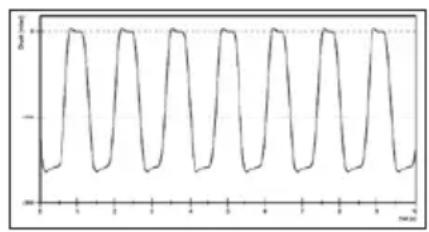
line
| x | y | | ---- | ----- | | 0.0 | -1/2 | | 0.1 | -1/2 | | 0.2 | -1/2 | | 0.3 | -1/2 | | 0.4 | -1/2 | | 0.5 | -1/2 | | 0.6 | -1/2 | | 0.7 | -1/2 | | 0.8 | -1/2 | | 0.9 | -1/2 | | 1.0 | -1/2 | | 1.1 | -1/2 | | 1.2 | -1/2 | | 1.3 | -1/2 | | 1.4 | -1/2 | | 1.5 | -1/2 | | 1.6 | -1/2 | | 1.7 | -1/2 | | 1.8 | -1/2 | | 1.9 | -1/2 | | 2.0 | -1/2 | | 2.1 | -1/2 | | 2.2 | -1/2 | | 2.3 | -1/2 | | 2.4 | -1/2 | | 2.5 | -1/2 | | 2.6 | -1/2 | | 2.7 | -1/2 | | 2.8 | -1/2 | | 2.9 | -1/2 | | 3.0 | -1/2 | | 3.1 | -1/2 | | 3.2 | -1/2 | | 3.3 | -1/2 | | 3.4 | -1/2 | | 3.5 | -1/2 | | 3.6 | -1/2 | | 3.7 | -1/2 | | 3.8 | -1/2 | | 3.9 | -1/2 | | 4.0 | -1/2 | | 4.1 | -1/2 | | 4.2 | -1/2 | | 4.3 | -1/2 | | 4.4 | -1/2 | | 4.5 | -1/2 | | 4.6 | -1/2 | | 4.7 | -1/2 | | 4.8 | -1/2 | | 4.9 | -1/2 | | 5.0 | -1/2 | | 5.1 | -1/2 | | 5.2 | -1/2 | | 5.3 | -1/2 | | 5.4 | -1/2 | | 5.5 | -1/2 | | 5.6 | -1/2 | | 5.7 | -1/2 | | 5.8 | -1/2 | | 5.9 | -1/2 | | 6.0 | -1/2 | | 6.1 | -1/2 | | 6.2 | -1/2 | | 6.3 | -1/2 | | 6.4 | -1/2 | | 6.5 | -1/2 | | 6.6 | -1/2 | | 6.7 | -1/2 | | 6.8 | -1/2 | | 6.9 | -1/2 | | 7.0 | -1/2 | | 7.1 | -1/2 | | 7.2 | -1/2 | | 7.3 | -1/2 | | 7.4 | -1/2 | | 7.5 | -1/2 | | 7.6 | -1/2 | | 7.7 | -1/2 | | 7.8 | -1/2 | | 7.9 | -1/2 | | 8.0 | -1/2 | | ... (additional values) are not provided in the code.)3. KÄYTTÖ / KÄYTTÖAIHEET
natural_image
Medical device with digital display and cups, no visible text or symbols4.2.4. EasyFreeze -telineen asennus
natural_image
Medical device with digital display and tubing, no visible text or symbols4.3. käyttö

MEDICAL - GENERAL MEDICAL EQUIPMENT
AS TO ELECTRICAL SHOOK FIRE AND
MECHANICAL HAZARDS CHE
IN ACCORDANCE WITH
ANSUAMB ES60521-1 G005 C1-99, A2-103
CAN/CSA C22 2 No 60601 1 (2008, R:2011)
natural_image
Interior view of a mechanical housing with internal components and mounting holes (no text or symbols visible)
natural_image
Cross-sectional view of a mechanical or electronic component with internal channels and labeled part 'k.' (no readable text or symbols beyond the label)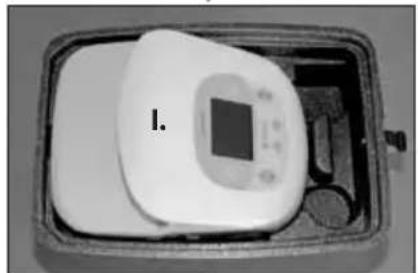
natural_image
Interior view of a rectangular device with a central display and labeled component 'I.' (no text or symbols on the device itself)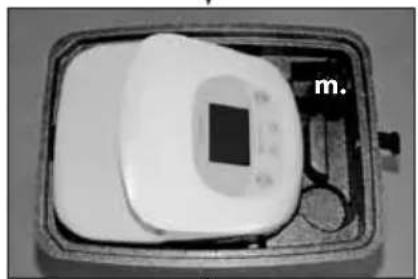
natural_image
Black-and-white photo of a medical device with a square display and a labeled tag 'm.' (no visible text or symbols on the device itself)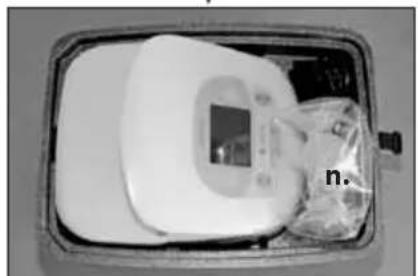
natural_image
Medical device with digital display and plastic bag, no visible text or symbolsline
| x | y | | ---- | ----- | | 0 | 0 | | 1 | 1 | | 2 | 0 | | 3 | 1 | | 4 | 0 | | 5 | 1 | | 6 | 0 | | 7 | 1 | | 8 | 0 | | 9 | 1 | | 10 | 0 | | 11 | 1 | | 12 | 0 | | 13 | 1 | | 14 | 0 | | 15 | 1 | | 16 | 0 | | 17 | 1 | | 18 | 0 | | 19 | 1 | | 20 | 0 | | 21 | 1 | | 22 | 0 | | 23 | 1 | | 24 | 0 | | 25 | 1 | | 26 | 0 | | 27 | 1 | | 28 | 0 | | 29 | 1 | | 30 | 0 | | 31 | 1 | | 32 | 0 | | 33 | 1 | | 34 | 0 | | 35 | 1 | | 36 | 0 | | 37 | 1 | | 38 | 0 | | 39 | 1 | | 40 | 0 | | 41 | 1 | | 42 | 0 | | 43 | 1 | | 44 | 0 | | 45 | 1 | | 46 | 0 | | 47 | 1 | | 48 | 0 | | 49 | 1 | | 50 | 0 | | 51 | 1 | | 52 | 0 | | 53 | 1 | | 54 | 0 | | 55 | 1 | | 56 | 0 | | 57 | 1 | | 58 | 0 | | 59 | 1 | | 60 | 0 | | 61 | 1 | | 62 | 0 | | 63 | 1 | | 64 | 0 | | 65 | 1 | | 66 | 0 | | 67 | 1 | | 68 | 0 | | 69 | 1 | | 70 | 0 | | 71 | 1 | | 72 | 0 | | 73 | 1 | | 74 | 0 | | 75 | 1 | | 76 | 0 | | 77 | 1 | | 78 | 0 | | 79 | 1 | | 80 | 0 | | 81 | 1 | | 82 | 0 | | 83 | 1 | | 84 | 0 | | 85 | 1 | | 86 | 0 | | 87 | 1 | | 88 | 0 | | 89 | 1 | | 90 | 0 | | 91 | 1 | | 92 | 0 | | 93 | 1 | | 94 | 0 | | 95 | 1 | | 96 | 0 | | 97 | 1 | | 98 | 0 | | 99 | 1 | | Note: The actual values may vary due to the random nature of the data generation. The provided values are just an example. I have left blank text for reference. You would need to run the code to generate the actual output. You would need to run the code to get the actual output as it is not available in the code. You would need to run the code to get the actual output if you want to run the code. You would need to run the code to get the actual output if you want to run the code. You would need to run the code to get the actual output if you want to run the code. You would need to run the code to get the actual output if you want to run the code. You would need to run the code to get the actual output if you want to run the code. You would need to run the code to get the actual output if you want to use the code. You would need to run the code to get the actual output if you want to run the code. You would need to run the code to get the actual output if you want to run the code. You would need to run the code to get the actual output if you want to run the code. You would need to run the code to get the actual output if you want to run the code. You would need to run the code to get the actual output if you want to be done. You would need to run the code to get the actual output if you want to be done. You would need to run the code to get the actual output if you want to be done. You would need to run the code to get the actual output if you want to be done. You would need to run the code to get the actual output if you want to be done. You would need to run the code to get the actual output if you want to be done. You would need not run out of this line. Please note that this line should be used for completeness. You would not run out of this line. Please note that this line should be used for completeness.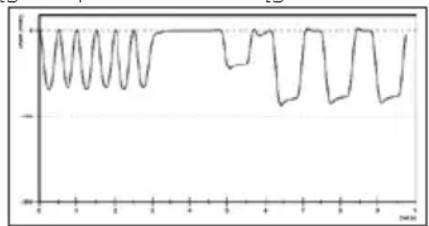
line
| Time | Value | |------|-------| | 0 | 0 | | 1 | 1 | | 2 | 0 | | 3 | 1 | | 4 | 0 | | 5 | 1 | | 6 | 0 | | 7 | 1 | | 8 | 0 | | 9 | 1 | | 10 | 0 | | 11 | 1 | | 12 | 0 | | 13 | 1 | | 14 | 0 | | 15 | 1 | | 16 | 0 | | 17 | 1 | | 18 | 0 | | 19 | 1 | | 20 | 0 | | 21 | 1 | | 22 | 0 | | 23 | 1 | | 24 | 0 | | 25 | 1 | | 26 | 0 | | 27 | 1 | | 28 | 0 | | 29 | 1 | | 30 | 0 | | 31 | 1 | | 32 | 0 | | 33 | 1 | | 34 | 0 | | 35 | 1 | | 36 | 0 | | 37 | 1 | | 38 | 0 | | 39 | 1 | | 40 | 0 | | 41 | 1 | | 42 | 0 | | 43 | 1 | | 44 | 0 | | 45 | 1 | | 46 | 0 | | 47 | 1 | | 48 | 0 | | 49 | 1 | | 50 | 0 | | 51 | 1 | | 52 | 0 | | 53 | 1 | | 54 | 0 | | 55 | 1 | | 56 | 0 | | 57 | 1 | | 58 | 0 | | 59 | 1 | | 60 | 0 | | 61 | 1 | | 62 | 0 | | 63 | 1 | | 64 | 0 | | 65 | 1 | | 66 | 0 | | 67 | 1 | | 68 | 0 | | 69 | 1 | | 70 | 0 | | 71 | 1 | | 72 | 0 | | 73 | 1 | | 74 | 0 | | 75 | 1 | | 76 | 0 | | 77 | 1 | | 78 | 0 | | 79 | 1 | | 80 | 0 | | 81 | 1 | | 82 | 0 | | 83 | 1 | | 84 | 0 | | 85 | 1 | | 86 | 0 | | 87 | 1 | | 88 | 0 | | 89 | 1 | | 90 | 0 | | 91 | 1 | | 92 | 0 | | 93 | 1 | | 94 | 0 | | 95 | 1 | | 96 | 0 | | 97 | 1 | | 98 | 0 | | 99 | 1 | | Note: The actual values may vary due to the random nature of the data generation. The provided values are just an example. I have left blank text for all data points. There is no actual output to extract. You would need to run the code to generate the actual output. Please note that the actual output is empty. You would need to run the code to get the actual output as it is not possible. You would need to run the code to get the actual output if you want to run the code. You would need to run the code to get the actual output if you want to run the code. You would need to run the code to get the actual output if you want to run the code. You would need to run the code to get the actual output if you want to run the code. You would need to run the code to get the actual output if you want to run the code. You would need to run the code to get the actual output if you want to run the codes. You would need to run the code to get the actual output if you want to run the codes. You would need to run the code to get the actual output if you want to run the codes. You would need to run the code to get the actual output if you want to run the codes. You would need to run the code to get the actual output if you want to run the codes. You would need to run the code to get the actual output if you want to run the code. You would need to run the code to get the actual output if you want to run the codes. You would need to run the code to get the actual output if you want to run the codes. You would need to run the code to get the actual output if you want to run the codes. You would need to run the code to get the actual output if you want to run the code. You would need to run the code to get the actual output if you want to run the code. You would need to run the code to get the actual output if you want to run the codes. You would need to run the code to get the actual output if you want to run the codes. You would need to run the code to get the actual output if you want to run the code. You would need to run the code to get the actual output if you want to run the codes. You would need to run the code to get the actual output if you want to run the code. You would need to run the code to get the actual output if you want to run the codes. You would need to run the code to get the actual output if you want to run the codes. You would need to run the code to get the actual output if you want to run the code. You would need to run the code to get the actual output if you want to run the code. You would need to run the code to get the actual output if you want to run the code. You would need to run the code to get the actual output if you want to run the codes. You would need to run the code to get the actual output if you want to run the code. You would need to run the code to get the actual output if you want to run the codes. You would need to run the code to get the actual output if you want to run the code. You would need to run the code to get the actual output if you want to run the code. You would need to run the code to get the actual output if you want to run the codes. You would need to run the code to get the actual output if you want to run the code. You would need to run the code to get the actual output if you want to run the code. You would need to run the code to get the actual output if you want to run the code. You would need to run the code to get the actual output if you want to run the code. You would need to run the code to get the actual output if you want to run the CODE. You would not use this way, but it's not a line graph (e.g., bar, line). The chart is a type of line graph (line graph) and uses a single line color (blue) and has a color on top of each line (green, red, blue). The chart is divided into four sections based on line style: horizontal, vertical, horizontal, and vertical lines respectively. The vertical lines represent horizontal lines, vertical lines represent vertical lines, horizontal lines represent vertical lines, and vertical lines represent horizontal lines. The horizontal lines represent vertical lines, vertical lines represent horizontal lines, horizontal lines represent vertical lines, and vertical lines represent horizontal lines. The vertical lines represent vertical lines, vertical lines represent horizontal lines, horizontal lines represent vertical lines, and vertical lines represent horizontal lines. The vertical lines represent horizontal lines, vertical lines represent vertical lines, horizontal lines represent vertical lines, and vertical lines represent horizontal lines. The vertical lines represent vertical lines, vertical lines represent horizontal lines, horizontal lines represent vertical lines, and vertical lines represent horizontal lines. The vertical lines represent horizontal lines, vertical lines represent vertical lines, horizontal lines represent vertical lines, and vertical lines represent horizontal lines. The vertical lines represent horizontal lines, vertical lines represent vertical lines, horizontal lines represent vertical lines, and vertical lines represent horizontal lines. The vertical lines represent horizontal lines, vertical lines represent vertical lines, horizontal lines represent vertical lines, and vertical lines represent horizontal lines. The vertical lines represent horizontal lines, vertical lines represent vertical lines, horizontal lines represent vertical lines, and vertical lines represent horizontal lines. The vertical lines represent horizontal lines; vertical lines represent vertical lines; horizontal lines represent vertical lines; and vertical lines represent horizontal lines; vertical lines represent vertical lines; and vertical lines represent horizontal lines; vertical lines represent horizontal lines; vertical lines represent vertical lines; and vertical lines represent horizontal lines; vertical lines represent vertical lines; and vertical lines represent horizontal lines; vertical lines represent horizontal lines; vertical lines represent vertical lines; and vertical lines represent horizontal lines; vertical lines represent vertical lines; and vertical lines represent horizontal lines; vertical lines represent horizontal lines; vertical lines represent vertical lines; and vertical lines represent horizontal lines; vertical lines represent horizontal lines; vertical lines represent vertical lines; and vertical lines represent horizontal lines; vertical lines represent vertical lines; and vertical lines represent horizontal lines; vertical lines represent horizontal lines; vertical lines represent vertical lines; and vertical lines represent horizontal lines; vertical lines represent horizontal lines; vertical lines represent vertical lines; and vertical lines represent horizontal lines; vertical lines represent horizontal lines; vertical lines represent vertical lines; and vertical lines represent horizontal lines; vertical lines represent vertical lines; and vertical lines represent horizontal lines; vertical lines represent horizontal lines; vertical lines represent vertical lines; and vertical lines represent horizontal lines; vertical lines represent horizontal lines; vertical lines represent vertical bars; and vertical line represents horizontal bars; and vertical line represents horizontal bars; and vertical line represents horizontal bars; and vertical line represents horizontal bars; and vertical line represents horizontal bars; and vertical line represents horizontal bars; and vertical line represents horizontal bars; and vertical line represents horizontal bars; and vertical line represents horizontal bars; and vertical line represents horizontal bars; and vertical line represents horizontal bars; and vertical line represents horizontal bars; and vertical line represents horizontal bars; and vertical line represents horizontal bars; and vertical line represents horizontal bars; The chart is divided into sections by a line color: black for one line, blue for another, green for three, and red for four. The chart is divided into sections by a line color: black for one line, blue for two, green for three, and red for four. The chart is divided into sections by a line color: black for one line, blue for two, green for three, and red for four. The chart is divided into sections by a line color: black for one line, blue for two, green for three, and red for four. The chart is divided into sections by a line color: black for one line, blue for two, green for three, and red for four. The chart includes a legend at bottom.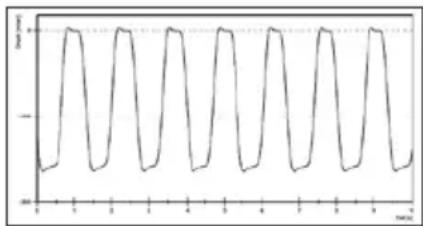
line
| x | y | | ---- | ----- | | 0 | -1.0 | | 1 | 0.0 | | 2 | 1.0 | | 3 | -1.0 | | 4 | 0.0 | | 5 | 1.0 | | 6 | -1.0 | | 7 | 0.0 | | 8 | 1.0 | | 9 | -1.0 | | 10 | 0.0 | | 11 | 1.0 | | 12 | -1.0 | | 13 | 0.0 | | 14 | 1.0 | | 15 | -1.0 | | 16 | 0.0 | | 17 | 1.0 | | 18 | -1.0 | | 19 | 0.0 | | 20 | 1.0 | | 21 | -1.0 | | 22 | 0.0 | | 23 | 1.0 | | 24 | -1.0 | | 25 | 0.0 | | 26 | 1.0 | | 27 | -1.0 | | 28 | 0.0 | | 29 | 1.0 | | 30 | -1.0 | | 31 | 0.0 | | 32 | 1.0 | | 33 | -1.0 | | 34 | 0.0 | | 35 | 1.0 | | 36 | -1.0 | | 37 | 0.0 | | 38 | 1.0 | | 39 | -1.0 | | 40 | 0.0 | | 41 | 1.0 | | 42 | -1.0 | | 43 | 0.0 | | 44 | 1.0 | | 45 | -1.0 | | 46 | 0.0 | | 47 | 1.0 | | 48 | -1.0 | | 49 | 0.0 | | 50 | 1.0 | | 51 | -1.0 | | 52 | 0.0 | | 53 | 1.0 | | 54 | -1.0 | | 55 | 0.0 | | 56 | 1.0 | | 57 | -1.0 | | 58 | 0.0 | | 59 | 1.0 | | 60 | -1.0 | | 61 | 0.0 | | 62 | 1.0 | | 63 | -1.0 | | 64 | 0.0 | | 65 | 1.0 | | 66 | -1.0 | | 67 | 0.0 | | 68 | 1.0 | | 69 | -1.0 | | 70 | 0.0 | | 71 | 1.0 | | 72 | -1.0 | | 73 | 0.0 | | 74 | 1.0 | | 75 | -1.0 | | 76 | 0.0 | | 77 | 1.0 | | 78 | -1.0 | | 79 | 0.0 | | 80 | 1.0 | | 81 | -1.0 | | 82 | 0.0 | | 83 | 1.0 | | 84 | -1.0 | | 85 | 0.0 | | 86 | 1.0 | | 87 | -1.0 | | 88 | 0.0 | | 89 | 1.0 | | 90 | -1.0 | | 91 | 0.0 | | 92 | 1.0 | | 93 | -1.0 | | 94 | 0.0 | | 95 | 1.0 | | 96 | -1.0 | | 97 | 0.0 | | 98 | 1.0 | | 99 | -1.0 | |-1
-2
3. ZAKRES STOSOWANIA / WSKAZANIA
natural_image
Medical device with digital display and cups, no visible text or symbolsnatural_image
Medical device with digital display and tubing, no visible text or symbols4.3. Obsługa

Producent: medical AG
Gewerbestrasse 19
6314 Unterägeri
Switzerland
natural_image
Coiled black cable with a terminal power plug, labeled 'g.' (no other text or symbols)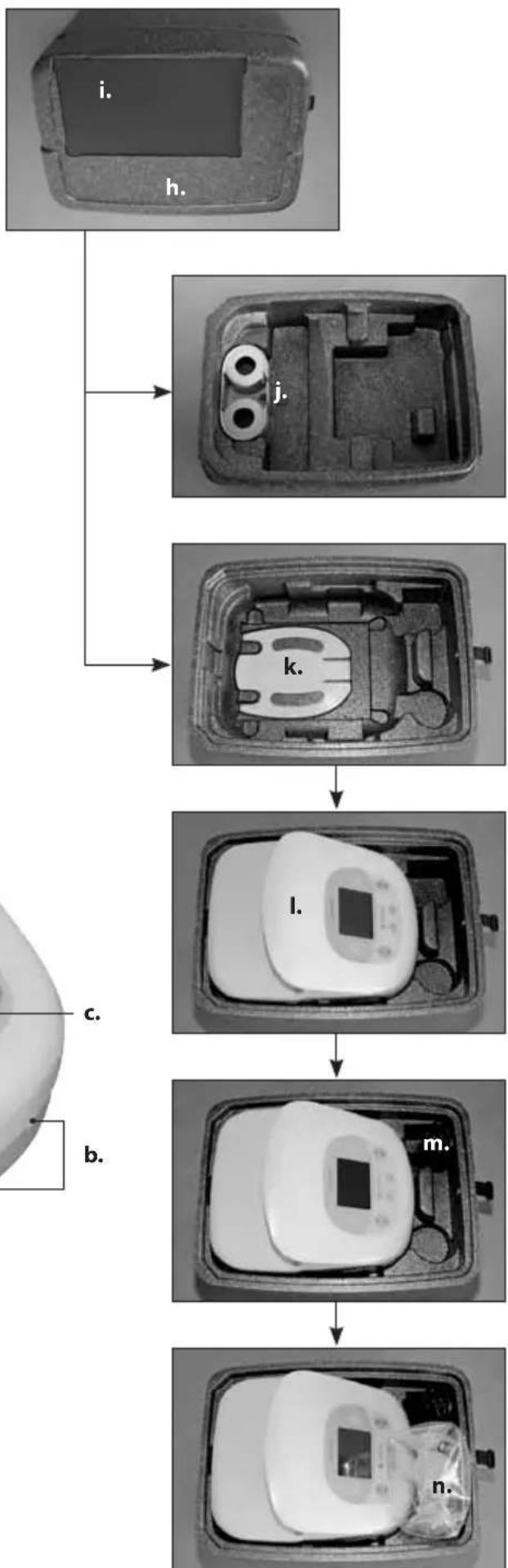
flowchart
graph TD
    A["i. Contact"] --> B["j. Contact"]
    B --> C["k. Contact"]
    C --> D["l. Contact"]
    D --> E["m. Contact"]
    E --> F["n. Contact"]
natural_image
Black-and-white photo of a kitchen appliance with digital display and cups (no visible text or symbols)natural_image
Medical device with digital display and medical tubing (no visible text or symbols)4.3. Χρήση

| TEST REPORTIEC / EN 60601-1-2Part 1-2: Electromagnetic Compatibility Requirements and Tests | ||
| Report reference No: | E1541-05-1* | |
| Tested by: | B. Belegu |  |
| Approved by management: | Dr. F. Stuck | |
| Date of issue: | 26 April 2011 | |
| Number of pages: | 1 page | |
| Testing laboratory: | QUINEL AG | SSTS Schweizerischer Prüfstellendenst Service Susse d'essai Servizio di prova in Svizzera Swiss testing service |
| Address: | Grundstr. 2 CH-6343 Rotkreuz | |
| Testing location: | Rotkreuz Tel. 041-799 47 04 | |
| Applicant's Name: | Ardo Medical AG, Mr. Christian Waser | |
| Address: | Gewerbestrasse 19, CH-6314 Unterägeri | |
| Manufacturer: | Ardo Medical AG | |
| Address: | Gewerbestrasse 19, CH-6314 Unterägeri | |
| Test specification: | ||
| Standards: | IEC 60601-1-2:2007, EN 60601-1-2:2007 | |
| Test procedure: | Type testing for Swiss and EU legal requirements | |
| Procedure deviation: | None | |
| Non-standard test method: | None | |
| Test-specification: | The used test setup fulfils the specification described in the relevant standards | |
| Test item description: | Breast Pump | |
| Trademark: | Ardo | |
| Model and/or type reference: | Carum | |
| Ratings: | 100V-240V AC, 50Hz-60Hz | |
| Date of receipt of the test item(s): | 06 April 2011 | |
| Summary of testing: | Passed | |
Applied standards:
| Title | Standard (up dated) |
| RF disturbances | CISPR 22:2008, EN 55022:2010 |
| RF conducted disturbances | IEC 61000-4-6:2008, EN 61000-4-6:2009 |
| Radiated electromagnetic field | IEC61000-4-3:2006+A1:2007+A2:2010, EN 61000-4-3:2006+A1:2008+A2:2010 |
| Power frequency magnetic field | IEC 61000-4-8:2009, EN 61000-4-8:2010 |
| Electrical fast transient burst | IEC 61000-4-4:2004+A1:2010, EN 61000-4-4:2004+A1:2010 |
| Electrostatic discharge | IEC 61000-4-2:2008, EN 61000-4-2:2009 |
| Surge | IEC 61000-4-5:2005, EN 61000-4-5:2006 |
| Voltage dips - interruptions | IEC 61000-4-11:2004, EN 61000-4-11:2004 |
| Harmonic current emissions | IEC 61000-3-2:2005+A1:2008+A2:2009, EN 61000-3-2:2006+A1:2009+A2:2009 |
| Voltage fluctuations and flicker | IEC 61000-3-3:2008, EN 61000-3-3:2008 |
Acceptance criteria/operating conditions:
During and after the test the apparatus should show no damage or loss of information and should function according to specifications.
This Test Report is, together with the Test Report E1541-05a-11 and E1541-05b-11, valid for the following types: Carum 1, Carum 2
| TEST REPORTIEC / EN 60601-1-2Part 1-2: Electromagnetic Compatibility Requirements and Tests | ||
| Report reference No: | E1541-05-1* | |
| Tested by: | B. Belegu |  |
| Approved by management: | Dr. F. Stuck | |
| Date of issue: | 26 April 2011 | |
| Number of pages: | 1 page | |
| Testing laboratory: | QUINEL AG | SSTS Schweizerischer PrüftstellendienstService Suisse d'essaiServizio di prova in SvizzeraSwiss testing service |
| Address: | Grundstr. 2 CH-6343 Rotkreuz | |
| Testing location: | Rotkreuz Tel. 041-799 47 04 | |
| Applicant's Name: | Ardo Medical AG, Mr. Christian Waser | |
| Address: | Gewerbestrasse 19, CH-6314 Unterägeri | |
| Manufacturer: | Ardo Medical AG | |
| Address: | Gewerbestrasse 19, CH-6314 Unterägeri | |
| Test specification: | ||
| Standards: | IEC 60601-1-2:2007, EN 60601-1-2:2007 | |
| Test procedure: | Type testing for Swiss and EU legal requirements | |
| Procedure deviation: | None | |
| Non-standard test method: | None | |
| Test-specification: | The used test setup fulfils the specification described in the relevant standards | |
| Test item description: | Breast Pump | |
| Trademark: | Ardo | |
| Model and/or type reference: | Carum | |
| Ratings: | 100V-240V AC, 50Hz-60Hz | |
| Date of receipt of the test item(s): | 06 April 2011 | |
| Summary of testing: | Passed | |
Applied standards:
| Title | Standard (up dated) |
| RF disturbances | CISPR 22:2008, EN 55022:2010 |
| RF conducted disturbances | IEC 61000-4-6:2008, EN 61000-4-6:2009 |
| Radiated electromagnetic field | IEC61000-4-3:2006+A1:2007+A2:2010, EN 61000-4-3:2006+A1:2008+A2:2010 |
| Power frequency magnetic field | IEC 61000-4-8:2009, EN 61000-4-8:2010 |
| Electrical fast transient burst | IEC 61000-4-4:2004+A1:2010, EN 61000-4-4:2004+A1:2010 |
| Electrostatic discharge | IEC 61000-4-2:2008, EN 61000-4-2:2009 |
| Surge | IEC 61000-4-5:2005, EN 61000-4-5:2006 |
| Voltage dips - interruptions | IEC 61000-4-11:2004, EN 61000-4-11:2004 |
| Harmonic current emissions | IEC 61000-3-2:2005+A1:2008+A2:2009, EN 61000-3-2:2006+A1:2009+A2:2009 |
| Voltage fluctuations and flicker | IEC 61000-3-3:2008, EN 61000-3-3:2008 |
Acceptance criteria/operating conditions:
During and after the test the apparatus should show no damage or loss of information and should function according to specifications.
This Test Report is, together with the Test Report E1541-05a-11 and E1541-05b-11, valid for the following types: Carum 1, Carum 2
natural_image
Medical device labeled 'Carum' with AROO branding, shown in grayscale (no readable text beyond branding)
ARDO
Ardo medical AG
Gewerbestrasse 19
6314 Unterägeri
Switzerland
T +41(0)41 754 70 70
F +41(0)41 754 70 71
info@ardo.ch
www.ardomedical.com

- Bedienung
- TABLE OF CONTENTS
- IMPORTANT SAFETY DETAILS 18
- PRODUCT DESCRIPTION 19
- APPLICATION FOR USE 19
- START-UP/OPERATION 20
- USEFUL TIPS 24
- ACCESSORIES 25
- ERROR ANALYSIS / ERROR DISPLAY /
- SERVICE INDICATOR 25
- MAINTENANCE/CARE/CLEANING 25
- GUARANTEE 26
- TECHNICAL INFORMATION 27
- TRANSPORT/STORAGE/DISPOSAL 28
- APPENDIX 185
- IMPORTANT SAFETY DETAILS
- Safety Regulations
- Battery option and car battery adapter
- PRODUCT DESCRIPTION
- Suckling Curve
- APPLICATION FOR USE
- Indications
- Contra-indications
- START-UP / OPERATION
- Icons
- IP21
- Li-Ion
- Installation
- Electrical connection
- Connecting the PumpSet
- Installing the bottle holder
- Installing the EasyFreeze holder
- Operation
- Switch on / switch off
- Regulation of the vacuum and display
- Cycle regulation and display
- Switch stimulation mode / expression mode
- Background colour in stimulation mode is orange.
- Background colour in expression mode is green.
- Using express mode, skipping stimulation mode ("Sensitive Programme")
- Timing/Time Button
- Backlight
- USEFUL TIPS
- Adjusting the vacuum (intensity of suction)
- Expressing milk should never be painful.
- Regulate the vacuum by touching the arrow keys.
- Regulate the cycle
- Encouraging the Let down reflex
- Pump efficiently
- Increase the quantity of milk
- ACCESSORIES
- ERROR ANALYSIS / ERROR DISPLAY / SERVICE INDICATOR
- Further possible errors when using the unit
- MAINTENANCE / CARE / CLEANING
- Visual inspection before switch-on
- Cleaning / disinfection
- Important: unplug the unit from the mains connection before cleaning.
- Checklist: Maintenance inspections for rentals
- Checklist: Maintenance inspection for hospitals
- GUARANTEE
- General terms and conditions
- TECHNICAL INFORMATION
- EMV Test records
- TRANSPORT / STORAGE / DISPOSAL
- Transport and storage conditions
- Disposal
- EXPLICATIONS
- APPLICATIONS/INDICATIONS 32
- MISE EN SERVICE / UTILISATIONN 33
- REMARQUES IMPORTANTES CONCERNANT LA SECURITE
- APPLICATIONS / INDICATIONS
- utilisation
- Homologation CEM
- uso
- PRODUCTBESCHRIJVING 58
- TOEPASSINGEN/INDICATIES 58
- INGEBRUIKNEMING/BEDIENING 59
- PRODUCTBESCHRIJVING
- Bediening
- Manejo
- CONSEJOS ÚTILES
- APLICAÇÕES/INDICAÇÕES 84
- APLICAÇÕES / INDICAÇÕES
- Operação
- kullanım
- Fon aydınlatması
- ANVENDELSE / INDKATIONER
- Montering af EasyFreeze holderen
- Betjening
- INNEHÅLLSFÖRTECKNING
- VIKTIG SÄKERHETSINFORMATION 122
- PRODUKTBESKRIVNING 123
- ANVÄNDNINGSOMRÅDEN/INDIKATIONER 123
- IDRIFTTAGNING / ANVÄNDNING 124
- Användning
- BRUK / INDIKASJONER
- NYTTIGE TIPS
- KÄYTTÖ / KÄYTTÖAIHEET
- EasyFreeze -telineen asennus
- käyttö
- ZAKRES STOSOWANIA / WSKAZANIA
- Obsługa
- Χρήση
- Acceptance criteria/operating conditions:
- ARDO
Brand : Ardo
Model : Carum
Category : Breast Pump