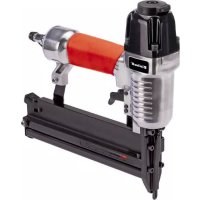
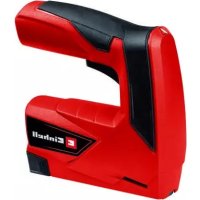
DTA 252 - Electric stapler EINHELL - Free user manual and instructions
Find the device manual for free DTA 252 EINHELL in PDF.



| Brand | Einhell |
| Model | DTA 252 |
| Product type | Pneumatic stapler |
| Weight | approx. 1.5 kg |
| Max. permitted operating pressure | 8.3 bars |
| Recommended pressure | 6.3 bars |
| Air consumption | approx. 0.66 l/stroke |
| Staple width | 5.7 mm |
| Staple length | 13 - 40 mm |
| Nail length | 10 - 50 mm |
| Recommended hose diameter | 9 mm |
| Sound pressure level | 83.5 dB(A) |
| Sound power level | 96.5 dB(A) |
| Vibration emission value | 2.5 m/s² |
| Power supply | Compressed air |
| Main functions | Pneumatic stapling and nailing, automatic mode, continuous depth adjustment |
| Maintenance | Regular lubrication with special oil, cleaning after use |
| Safety | Trigger safety mechanism, wearing of safety goggles and hearing protection mandatory |
| Spare parts | Available from after-sales service |
| Warranty | 24 months |
Frequently Asked Questions - DTA 252 EINHELL
User questions about DTA 252 EINHELL
0 question about this device. Answer the ones you know or ask your own.
Ask a new question about this device
Download the instructions for your Electric stapler in PDF format for free! Find your manual DTA 252 - EINHELL and take your electronic device back in hand. On this page are published all the documents necessary for the use of your device. DTA 252 by EINHELL.
USER MANUAL DTA 252 EINHELL
GB Original operating instructions Pneumatic Stapler/Nailer
SLO Originalna navodila za uporabo Sponkač na stisnjeni zrak (pnevmatski)
- Safety regulations
- Layout and items supplied
- Proper use
- Technical data
- Before starting the equipment
- Replacing the power cable
- Disposal and recycling
- Storage
- Excluded from the guarantee are:
GB

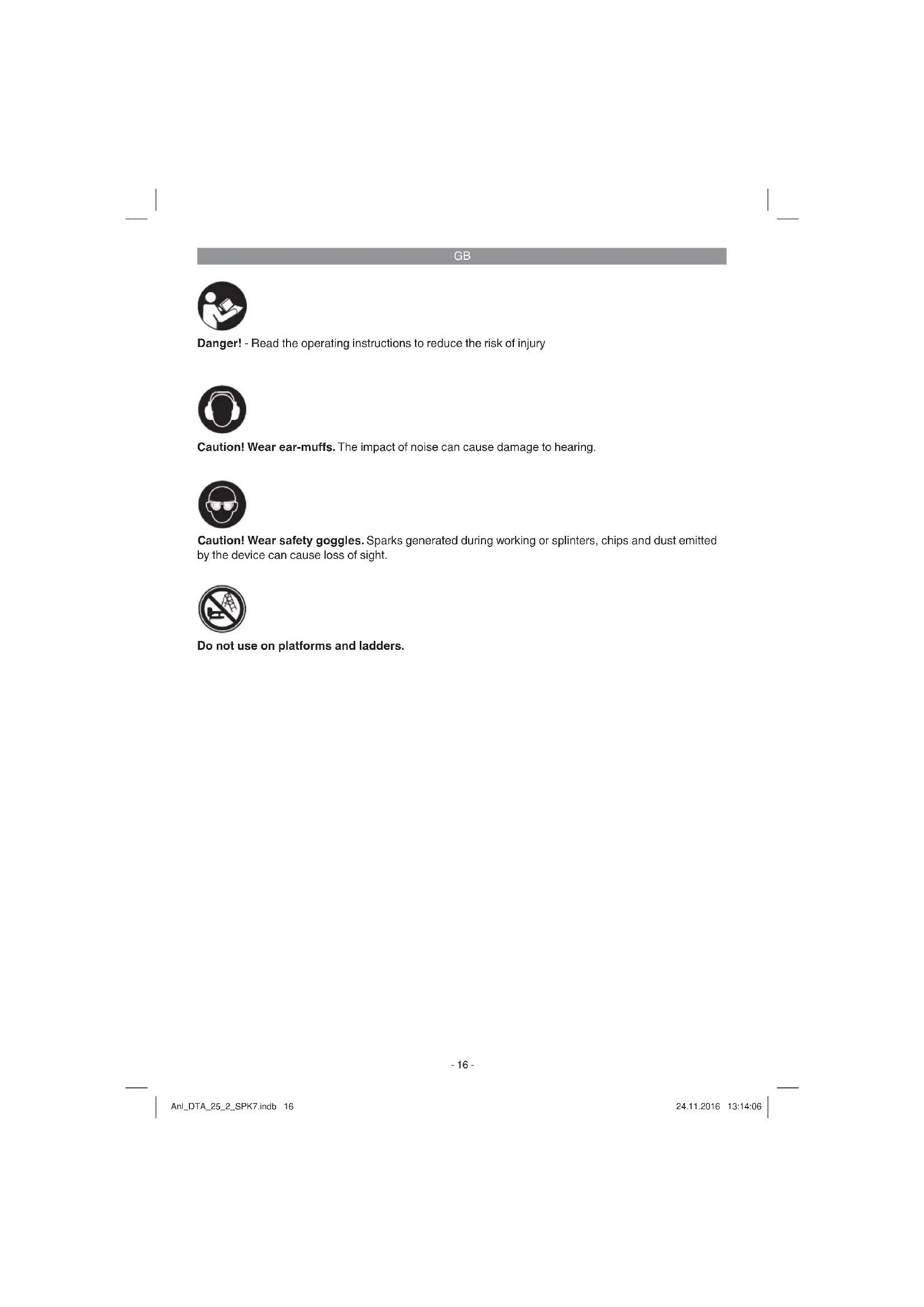
Danger! - Read the operating instructions to reduce the risk of injury

Caution! Wear ear-muffs. The impact of noise can cause damage to hearing.

Caution! Wear safety goggles. Sparks generated during working or splinters, chips and dust emitted by the device can cause loss of sight.

Do not use on platforms and ladders.
GB
Danger!
When using the equipment, a few safety precautions must be observed to avoid injuries and damage. Please read the complete operating instructions and safety regulations with due care. Keep this manual in a safe place, so that the information is available at all times. If you give the equipment to any other person, hand over these operating instructions and safety regulations as well. We cannot accept any liability for damage or accidents which arise due to a failure to follow these instructions and the safety instructions.
1. Safety regulations
Danger!
Read all safety regulations and instructions.
Any errors made in following the safety regulations and instructions may result in an electric shock, fire and/or serious injury.
Keep all safety regulations and instructions in a safe place for future use.
Protect yourself and your environment from accidents by taking the appropriate precautionary measures.
- Do not use the stapler for a purpose for which it is not designed.
- Keep air tools safe from children.
- Never use the equipment when you are not rested or distracted.
- Connect the compressed air using a quicklock coupling only.
Staplers may only be connected to lines/ hoses which do not allow the maximum permitted pressure of the equipment to be exceeded by more than 10% . A pressure regulator (pressure reducer) with a downstream pressure control valve must be fitted to the compressed air hose if the pressure is higher.
The operating pressure must be adjusted by a pressure reducer. - When using a pneumatically operated stapler/nailer, only use the pressure required for the specific operation to prevent an unnecessarily high noise level, excessive wear and consequential faults.
-
Never use oxygen or combustible gases as a power source. Danger of fire and explosion.
Always disconnect the equipment from the compressed air source before tackling faults or starting any maintenance work. -
Use only genuine spare parts. Repairs may only be carried out by an authorized agent of the manufacturer or by an alternative specialist in accordance with the specifications contained in the operating instructions.
- Wear the necessary protective clothing when working with the stapler, in particular safety goggles and protective gloves.
- Do not exceed the maximum air pressure of 8 bar.
- Do not direct the connected and loaded nailer at other people.
Do not remove the earthing contact device. - Never leave the equipment unattended when loaded.
- Never use the equipment if defective.
- Only use the types of staples/nails specified in the technical data.
The equipment must always be depressurized after disconnection. - Never use the equipment without staples/nails.
- Never point an operational stapler directly at yourself or at any other person.
- Whilst working with the stapler, hold it in such a way that your head and body cannot be injured in case of kickback caused by disruption of the power supply or by hard areas of the workpiece.
- Never trigger the stapler into the open air. This is important to avoid the hazards of free-flying staples and of overloading the appliance.
For the purposes of transportation, the stapler must be disconnected from the compressed-air system, especially if you are using a ladder or are adopting an unusual posture.
In the workplace, carry the stapler only by its handle and ensure that the trigger is inactivated.
Make allowance for the workplace conditions. Staples can potentially go straight through thin workpieces or they can slide off workpieces when working on corners and edges, thus putting persons at risk. - For you own personal safety, always use suitable protective equipment such as, for example, hearing and eye protection.
- Check that the trigger catch functions correctly every time before you use the equipment. You are allowed to start using the equipment only if the device functions perfectly.
GB
This equipment is not suitable for the following work:
If changing from one stapling point to another involves moving about on platforms, steps, ladders or any other structures similar to ladders such as, e.g. roof battens.
Sealing of boxes or crates.
Fitting of transportation braces, e.g. to vehicles and wagons
Do not lose this safety information.
Residual risks
Even if you use this tool in accordance with instructions, certain residual risks cannot be eliminated. The following hazards may arise in connection with the equipment's construction and layout:
- Risk of pinching.
- Risk of injury from staples.
- Damage to hearing, if no suitable ear protection is applied.
- Health damage caused by hand-arm vibrations, if the equipment is not properly guided and maintained.
2. Layout and items supplied
2.1 Layout (Fig. 1/8)
A Trigger lever
B Compressed air connection
C Magazine lever
D Magazine cover
E Magazine
F Level indicator
G Depth setting
H Trigger catch
1 Cover plate (external)
J Cover plate (Internal)
K Swivel air-outlet
2.2 Items supplied
Please check that the article is complete as specified in the scope of delivery. If parts are missing, please contact our service center or the sales outlet where you made your purchase at the latest within 5 working days after purchasing the product and upon presentation of a valid bill of purchase. Also, refer to the warranty table in the service information at the end of the operating instructions.
- Open the packaging and take out the equipment with care.
- Remove the packaging material and any
packaging and/or transportation braces (if available).
Check to see if all items are supplied.
- Inspect the equipment and accessories for transport damage.
If possible, please keep the packaging until the end of the guarantee period.
Danger!
The equipment and packaging material are not toys. Do not let children play with plastic bags, foils or small parts. There is a danger of swallowing or suffocating!
Special compressed air oil
Allen key, 3 mm
Allen key, 4 mm
Pneumatic Stapler/Nailer
Original operating instructions
Safetyinstructions
3. Proper use
The stapler is a pneumatically operated tool designed for versatile use.
This equipment is designed for driving finishing nails and staples into wood and similar materials. Only use the types of nails/staples described in the "Technical data" section or illustrated on the information sign on the magazine. Never use any other nails/staples. Never use on hard surfaces such as stone, metal, etc., either.
The equipment may only be used for the tasks it is designed to handle. Any other use is deemed to be a case of misuse. The user/operator and not the manufacturer will be liable for any damage or injuries of any kind caused as a result of this. Please note that our equipment has not been designed for use in commercial, trade or industrial applications. Our warranty will be voided if the equipment is used in commercial, trade or industrial businesses or for equivalent purposes.
Only allow repairs and services to be carried out by authorized professional repair shops.
Remember.
If the inner diameter of the hose is insufficient and the length of the hose too long, this will result in a loss of power on the equipment.
GB
4. Technical data
Max. permitted operating pressure 8.3 bar
Recommended pressure range 6.3 bar
Air consumptioap prox. 0.66 l/shot
Staple width 5.7 mm
Staple length 13 - 40 mm
Nail length 10 - 50 mm
Recommended hose diameter .... Diameter 9 mm
Weight approx. 1,5 kg
Sound and vibration
Sound and vibration values were measured in accordance with EN 12549, EN ISO 4871.
LpA sound pressure level 83.5 dB(A) KpA uncertainty .2.5 dB L_WA sound power level 96.5 dB(A) K_WA uncertainty .2.5 dB
Wear ear-muff s.
The impact of noise can cause damage to hearing.
Total vibration values (vector sum of three directions) determined in accordance with ISO 8662-11-1999, EN 12096.
Vibration emission value ah = 2.5m / s^2 K uncertainty = 26.8%
These values for noise emissions are equipment-based characteristic values and do not reflect the noise generated at the place of use. The noise generated at the place of use will depend, for example, on the work area, the workpiece, workpiece support and the number of stapling/nailing operations.
The value given for vibration is an equipment-based characteristic value and does not represent the impact on the hand and arm system when the equipment is used. The impact on the hand and arm system when the equipment is used will depend, for example, on the force of the grip, the pressing force, the direction in which you are working, the air pressure setting, the workpiece and the workpiece support.
Keep the noise emissions and vibrations to a minimum.
Only use appliances which are in perfect working order.
Service and clean the appliance regularly.
- Adapt your working style to suit the appliance.
Do not overload the appliance. - Have the appliance serviced whenever necessary.
- Switch the appliance off when it is not in use.
- Wear protective gloves.
Caution!
Residual risks
Even if you use this electric power tool in accordance with instructions, certain residual risks cannot be rules out. The following hazards may arise in connection with the equipment's construction and layout:
- Lung damage if no suitable protective dust mask is used.
- Damage to hearing if no suitable ear protection is used.
- Health damage caused by hand-arm vibrations if the equipment is used over a prolonged period or is not properly guided and maintained.
Compressed air quality:
Purifi ed and with oil mist.
Air supply:
Via a conditioning unit with fiiter pressure reducer and mist oiler connected to a compressed air source.
Recommended capacity of the compressor: Compressor with a capacity of approx. 250 l/min, which is the equivalent of engine power of approx. 2.2 kW
Remember:
Wear the necessary protective clothing when working with the stapler, in particular safety goggles.
Pay attention to the safety regulations.
5. Before starting the equipment
Each time before starting work, check that the trigger catch functions perfectly and that all screws and nuts are securely fastened.
- Never tamper with the stapler.
- Never dismantle or block any parts of the stapler such as, e.g. a trigger catch.
- Never carry out any "emergency repairs" with unsuitable means.
- Proper stapler maintenance is required at
GB
regular intervals in accordance with the information supplied by the manufacturer.
Take precautions to prevent anything which would weaken or damage the equipment, e.g. from
a) striking or engraving,
b) modifi cations which are prohibited by the man- nufacturer.
c) guiding on templates made of hard material, e.g. steel,
d) pushing across the floor,
e) using as a hammer,
f) any kinds of acts of violence.
5.1 Checking the trigger catch
Check the trigger catch (Fig. 1/Item H) each time before use. The trigger catch must move freely without catching. The spring on the trigger catch must return the trigger catch to the released initial position. Never use the equipment if the trigger catch is not working.
- Disconnect the equipment from the air supply.
- Remove the staples/nails from the magazine (Fig. 1/Item E).
- Check that the trigger and the trigger catch can move up and down freely.
- Connect the equipment to the air supply.
- Press the trigger catch against the workpiece without pressing the trigger. The equipment should not operate. Never use the equipment if it operates without the trigger being pressed. Risk of injury.
- Remove the equipment from the workpiece. The trigger catch must return to the released initial position. Press the trigger. The equipment should not operate. Never use the equipment if it operates. Risk of injury.
- Press the trigger and press the trigger catch against the workpiece. The equipment operates.
- Press the trigger catch against the workpiece and press the trigger; the equipment operates.
5.2 Loading staples and nails
- When you fill the magazine (Fig. 1/Item E), make sure that you hold the equipment in such a way that the muzzle is pointed neither at you or anyone else.
To fill the magazine, press the magazine lever (Fig. 1 / Item C) and slide back the magazine cover (Fig. 1 / Item D) as far as it will go. -
Insert the staples as shown in (Fig. 3) or the nails as shown in (Fig. 4).
-
Do not insert more than one complete stick of staples/nails, otherwise the magazine will be overfilled and you will not be able to close it again. Slide the magazine cover forward again until it snaps into place.
The level indicator (Fig. 5 / Item F) shows the number of loaded staples / nails if less than 50 are loaded.
6. Operation
6.1 Operation/Operating pressure
- Connect the pneumatic stapler/nailer to the compressed air connection (Fig. 1 / Item B).
- Set the swivel air outlet (Fig. 1 / Item K) to the desired position.
Before starting the stapler, switch on the compressor and set the operating pressure on the pressure reducer to 4 bar.
The knurled screw (Fig. 6 / Item G) for precision adjustment must be approximately in the middle position between Item 1 and 2. To do so, turn open the knurled screw three revolutions, starting from Position 1. - For the purpose of setting the operating pressure it is advisable to use a test workpiece which is similar in structure and material thickness to the workpieces to be joined.
- To staple/nail, place the pneumatic stapler/ nailer against the workpiece and pull the trigger lever (Fig. 1 / Item A) once and release it again after each shot.
If the nail or the staple goes in too deep, reduce the operating pressure on the pressure reducer by 0.5 bar.
If the nail or the staple does not go in deep enough or projects, increase the operating pressure on the pressure reducer by 0.5 bar. - Place the stapler/nailer against the test workpiece again and fire.
Depending on results, keep changing the operating pressure in 0.5 bar increments until the depth that the staples or nails are driven in is roughly correct. For precision adjustment (Para. 6.2), use the knurled screw. - The equipment also has an automatic mode. If you keep the trigger lever pressed, the staples/nails will be shot automatically when the pneumatic stapler/nailer is placed against the workpiece.
- To prevent faults, make sure that you do not staple at the same point twice.
GB
Important:
If a staple or nail becomes jammed in the feed shaft, always immediately depressurize the equipment fi rst (remove the compressed air supply hose), open the magazine shaft and only then remove the cover plates (Fig. 8 / Item I/J) by undoing the screws with the supplied Allen keys (Fig. 2 / Item N) (Fig. 7/8). Remove the jammed staples, clean the shaft if necessary, and close again in reverse order.
6.2 Precision adjustment
The equipment has a depth setting adjuster (Fig. 6 / Item G) in the form of a knurled screw.
If you screw it downwards (Fig. 6 / Item 1), the staples/nails will be shot in deeper.
If you want to reduce the depth that the staples/nails are shot in, you have to screw the knurled screw upwards (Fig. 6 / Item 2).
Important: To prevent triggering unintentionally, the depth setting must never be pulled back by hand in normal operation.
7. Replacing the power cable
Important: Disconnect the equipment from the compressed air system each time before starting to carry out maintenance and cleaning work.
Compliance with the maintenance instructions given here will ensure that this quality product has a long service life and offers failure-free operation. Before starting work each time, check that the magazine is securely fastened (Fig. 1/Item E). Clean the equipment thoroughly immediately after you have finished the work.
To ensure that your stapler offers lasting perfect service, it requires regular lubrication. Use only special tool oil for this purpose.
There are two possible means of lubrication:
1. By mist oiler
A complete conditioning unit contains a mist oiler and is fitted to the compressor.
2. By hand
If your system has neither a conditioning unit or a line oiler, 3-5 drops of oil have to be applied to the compressed air connection each time before the air tool is started up. If the air tool is not used for several days, apply 5-10 drops of oil to the compressed air connection before switching on.
Store your air tool in a dry room only.
7.1 Cleaning
- Keep all safety devices, air vents and the motor housing free of dirt and dust as far as possible. Wipe the equipment with a clean cloth or blow it with compressed air at low pressure.
We recommend that you clean the device immediately each time you have finished using it.
Clean the equipment regularly with a moist cloth and some soft soap. Do not use cleaning agents or solvents; these could attack the plastic parts of the equipment. Ensure that no water can seep into the device. The ingress of water into an electric tool increases the risk of an electric shock.
7.2 Maintenance
There are no parts inside the equipment which require additional maintenance.
7.3 Ordering replacement parts:
Please quote the following data when ordering replacement parts:
Type of machine
Article number of the machine
Identification number of the machine
- Replacement part number of the part required
For our latest prices and information please go to www.isc-gmbh.info
GB
8. Disposal and recycling
The equipment is supplied in packaging to prevent it from being damaged in transit. The raw materials in this packaging can be reused or recycled. The equipment and its accessories are made of various types of material, such as metal and plastic. Never place defective equipment in your household refuse. The equipment should be taken to a suitable collection center for proper disposal. If you do not know the whereabouts of such a collection point, you should ask in your local council offices.
9. Storage
Store the equipment and accessories in a dark and dry place at above freezing temperature. The ideal storage temperature is between 5 and 30^ . Store the electric tool in its original packaging.
10. Excluded from the guarantee are:
Wear parts
- Damage caused by inadmissible operating pressure.
- Damage caused by compressed air which has not been conditioned.
- Damage caused by improper use or unauthorized intervention.
GB
Service information
We have competent service partners in all countries named on the guarantee certificate whose contact details can also be found on the guarantee certificate. These partners will help you with all service requests such as repairs, spare and wearing part orders or the purchase of consumables.
Please note that the following parts of this product are subject to normal or natural wear and that the following parts are therefore also required for use as consumables.
| Category Example | |
| Wear parts* Pressure springs | |
| Consumables* Nails, staples | |
| Missing parts |
- Not necessarily included in the scope of delivery!
In the effect of defects or faults, please register the problem on the internet at www.isc-gmbh.info. Please ensure that you provide a precise description of the problem and answer the following questions in all cases:
Did the equipment work at all or was it defective from the beginning?
Did you notice anything (symptom or defect) prior to the failure?
- What malfunction does the equipment have in your opinion (main symptom)?
Describe this malfunction.
GB
Warranty certificate
Dear Customer,
All of our products undergo strict quality checks to ensure that they reach you in perfect condition. In the unlikely event that your device develops a fault, please contact our service department at the address shown on this guarantee card. You can also contact us by telephone using the service number shown. Please note the following terms under which guarantee claims can be made:
- These guarantee terms apply to consumers only, i.e. natural persons intending to use this product neither for their commercial activities nor for any other self-employed activities. These warranty terms regulate additional warranty services, which the manufacturer mentioned below promises to buyers of its new products in addition to their statutory rights of guarantee. Your statutory guarantee claims are not affected by this guarantee. Our guarantee is free of charge to you.
- The warranty services cover only defects due to material or manufacturing faults on a product which you have bought from the manufacturer mentioned below and are limited to either the rectification of said defects on the product or the replacement of the product, whichever we prefer. Please note that our devices are not designed for use in commercial, trade or professional applications. A guarantee contract will not be created if the device has been used by commercial, trade or industrial business or has been exposed to similar stresses during the guarantee period.
-
The following are not covered by our guarantee:
-
Damage to the device caused by a failure to follow the assembly instructions or due to incorrect installation, a failure to follow the operating instructions (for example connecting it to an incorrect mains voltage or current type) or a failure to follow the maintenance and safety instructions or by exposing the device to abnormal environmental conditions or by lack of care and maintenance.
- Damage to the device caused by abuse or incorrect use (for example overloading the device or the use or unapproved tools or accessories), ingress of foreign bodies into the device (such as sand, stones or dust, transport damage), the use of force or damage caused by external forces (for example by dropping it).
-
Damage to the device or parts of the device caused by normal or natural wear or tear or by normal use of the device.
-
The guarantee is valid for a period of 24 months starting from the purchase date of the device. Guarantee claims should be submitted before the end of the guarantee period within two weeks of the defect being noticed. No guarantee claims will be accepted after the end of the guarantee period. The original guarantee period remains applicable to the device even if repairs are carried out or parts are replaced. In such cases, the work performed or parts fitted will not result in an extension of the guarantee period, and no new guarantee will become active for the work performed or parts fitted. This also applies if an on-site service is used.
-
To make a claim under the guarantee, please register the defective device at: www.isc-gmbh.info. Please keep your bill of purchase or other proof of purchase for the new device. Devices that are returned without proof of purchase or without a rating plate shall not be covered by the guarantee, because appropriate identification will not be possible. If the defect is covered by our guarantee, then the item in question will either be repaired immediately and returned to you or we will send you a new replacement.
Of course, we are also happy offer a chargeable repair service for any defects which are not covered by the scope of this guarantee or for units which are no longer covered. To take advantage of this service, please send the device to our service address.
Also refer to the restrictions of this warranty concerning wear parts, consumables and missing parts as set out in the service information in these operating instructions.
F
Sommaire
Chere cliente, cher client,
Der fi ndes to former for smoring:
H oukeun devival katadlambda yia tic akolouthec epyaoies:
Otaua an eva oneio epyaiaocto aaloo yivetai meo wkaawiw,okalacnnapoowkataokewuw,wnwC.
TgKλεισμο Kβωτιων n aToeNkωv
TmTvToOnoTeTOnaOphiAeWuEtaOpac n.x. oxmuata kai bayovia
Na fuλaEte kaλ auTe tic Obnyies xpno,
YnoaIIOevoikvduvo
Akoukai oepiTTwn oowtnc kai kavovikcx npncautouTnAektpiokO epyaieiou, uioaivta naVtu unoaeinoevoi kivduovoi. O akolooei kivduovoi mtapouiaotouv avaoy me to eiooc kataokecu kai to voTvlo autouTO nAektpiokO epyaieiou:
Evnpwon yia to epbic
GB explains the following conformity according to EU directives and norms for the following product
Notified Body No.:
Prc:No
2000/14/EC_2005/88/EC
Annex V
Annex VI
Noise: measured LAA = dB(A) ; guaranteed LAA = dB(A)
P = KW; L/0 = cm
Notified Body:
2012/46/EU
Emission No.:
Standard references: EN 792-13
Subject to change without notice
Archive-File/Record: NAPR003997
Documents registrar: Siegfried Roider
Wiesenweg 22, D-94405 Landau/Isar
EH 11/2016 (02)

- GB
- Danger!
- Safety regulations
- Residual risks
- Layout and items supplied
- Layout (Fig. 1/8)
- Items supplied
- Proper use
- Remember.
- Technical data
- Sound and vibration
- Wear ear-muff s.
- Keep the noise emissions and vibrations to a minimum.
- Caution!
- Compressed air quality:
- Air supply:
- Remember:
- Before starting the equipment
- Checking the trigger catch
- Loading staples and nails
- Operation
- Operation/Operating pressure
- Important:
- Precision adjustment
- Replacing the power cable
- By mist oiler
- By hand
- Cleaning
- Maintenance
- Ordering replacement parts:
- Disposal and recycling
- Storage
- Excluded from the guarantee are:
- Service information
- Warranty certificate
- Dear Customer,
- F
- Sommaire
- YnoaIIOevoikvduvo
- Evnpwon yia to epbic
- Standard references: EN 792-13
Brand : EINHELL
Model : DTA 252
Category : Electric stapler