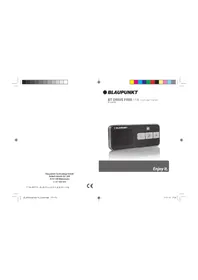
BT Drive Free 114 - Built-in kit BLAUPUNKT - Free user manual and instructions
Find the device manual for free BT Drive Free 114 BLAUPUNKT in PDF.

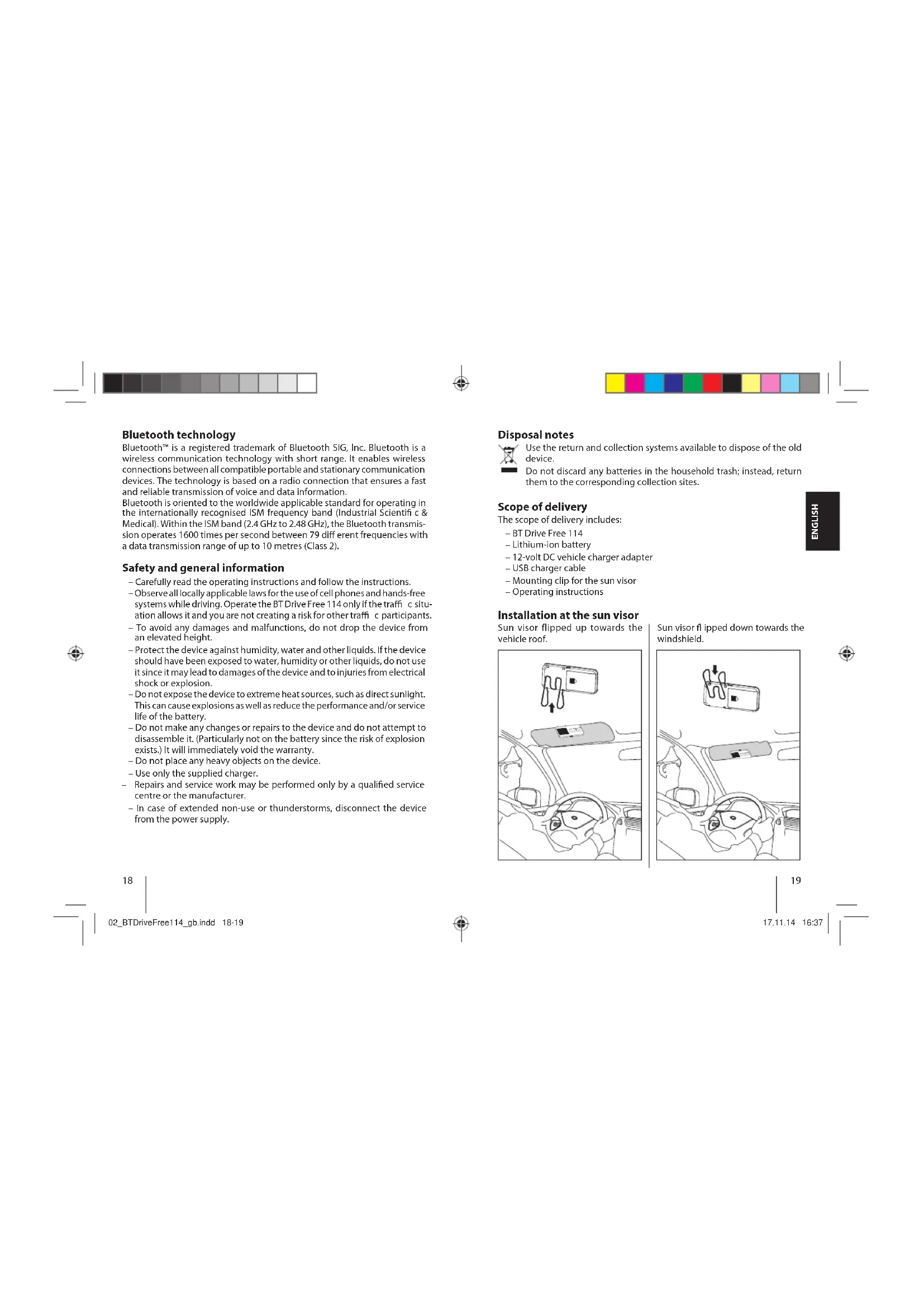


Frequently Asked Questions - BT Drive Free 114 BLAUPUNKT
User questions about BT Drive Free 114 BLAUPUNKT
0 question about this device. Answer the ones you know or ask your own.
Ask a new question about this device
Download the instructions for your Built-in kit in PDF format for free! Find your manual BT Drive Free 114 - BLAUPUNKT and take your electronic device back in hand. On this page are published all the documents necessary for the use of your device. BT Drive Free 114 by BLAUPUNKT.
USER MANUAL BT Drive Free 114 BLAUPUNKT
Installation and Sonnenblende
BT Drive Free 114. 17
Bluetooth technology. 18
Safety and general information 18
Disposal notes 19
Scope of delivery 19
Installation at the sun visor. 19
Inserting the battery 20
Battery information 30
Battery information 20
Clustering the best.. 31
Charging the battery. 21
Overview 33
Overview 22
Switching on/off 33
Switching on/off 22
Registoring (pairing) and connecting with the cell phone 23
Registering (pairing) and connecting with the cell phone 23 Multi-connection function 25
Establishing a connection with two cell phones 25
Using the BT Drive Free 114. 26
Resetting the BT Drive Free 114 28
Light indicators and signal tones 28
Fault removal 29
Declaration of conformity 29
Warranty 29
Technical data. 30
BT Drive Free 114
This wireless Bluetooth hands-free system was developed specifically for users who want to use their cell phone while driving. The multi-connection function allows the simultaneous use of the BT Drive Free 114 with two cell phones. Its improved microphone system and DSP technology for echo cancelling and noise suppression achieve an excellent hand-free quality.
Bluetooth technology
Bluetooth™ is a registered trademark of Bluetooth SIG, Inc. Bluetooth is a wireless communication technology with short range. It enables wireless connections between all compatible portable and stationary communication devices. The technology is based on a radio connection that ensures a fast and reliable transmission of voice and data information.
Bluetooth is oriented to the worldwide applicable standard for operating in the internationally recognised ISM frequency band (Industrial Scientific & Medical). Within the ISM band (2.4 GHz to 2.48 GHz), the Bluetooth transmission operates 1600 times per second between 79 different frequencies with a data transmission range of up to 10 metres (Class 2).
Safety and general information
- Carefully read the operating instructions and follow the instructions.
- Observe all locally applicable laws for the use of cell phones and hands-free systems while driving. Operate the BT Drive Free 114 only if the traffic c situation allows it and you are not creating a risk for other traffic c participants.
- To avoid any damages and malfunctions, do not drop the device from an elevated height.
- Protect the device against humidity, water and other liquids. If the device should have been exposed to water, humidity or other liquids, do not use it since it may lead to damages of the device and to injuries from electrical shock or explosion.
- Do not expose the device to extreme heat sources, such as direct sunlight. This can cause explosions as well as reduce the performance and/or service life of the battery.
- Do not make any changes or repairs to the device and do not attempt to disassemble it. (Particularly not on the battery since the risk of explosion exists.) It will immediately void the warranty.
- Do not place any heavy objects on the device.
- Use only the supplied charger.
- Repairs and service work may be performed only by a qualified service centre or the manufacturer.
- In case of extended non-use or thunderstorms, disconnect the device from the power supply.


Disposal notes

Use the return and collection systems available to dispose of the old device.
Do not discard any batteries in the household trash; instead, return them to the corresponding collection sites.
Scope of delivery
The scope of delivery includes:
BT Drive Free 114
Lithium-ion battery
-12-volt DC vehicle charger adapter
USB charger cable
Mounting clip for the sun visor
-Operating instructions
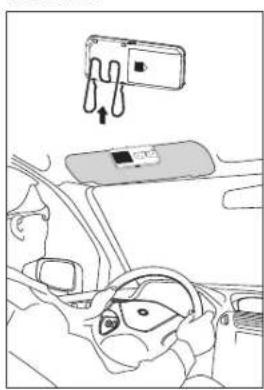
Installation at the sun visor
Sun visor flipped up towards the vehicle roof.
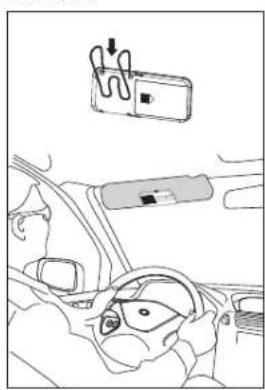
Sun visor flipped down towards the windshield.

Inserting the battery
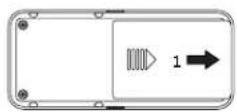
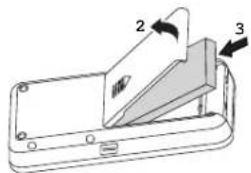
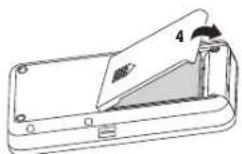
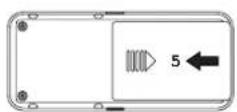

Battery information
The device is equipped with a lithium-ion battery. The battery is compatible with the Nokia battery BL-5B. The full performance of a new battery is not achieved until after two or three complete charging-discharging cycles. The battery can be charged and discharged several hundred times, but it loses its capacity over time.
Disconnect the BT Drive Free 114 from the power supply as soon as the battery is fully charged, since overcharging would reduce the service life of the battery. A charged battery loses its capacity if it is not used.
Important: Ensure that the battery is fully charged if you do not use the device for a longer period of time. To avoid a complete discharge of the battery, the BT Drive Free 114 should be charged at least every 3 months.

ENGLISH
Charging the battery
The BT Drive Free 114 is operated with a rechargeable battery. Charge the battery completely before its first use. Read the section "Battery information" before starting the charging process.
You have to remove the BT Drive Free 114 from the sun visor for the charging procedure. Connect the BT Drive Free 114 with the vehicle charging adapter via the USB cable. Insert the vehicle charging adapter into the cigarette lighter of the vehicle. The BT Drive Free 114 can also be charged with the USB cable connected to the computer.
Note: As soon as the charger is connected, the BT Drive Free 114 switches off
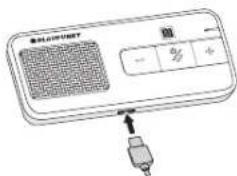
During the charging process, the MF button lights red. After the battery is fully charged, the MF button lights blue. The charging process of the battery lasts approx. 3 hours. Disconnect the BT Drive Free 114 from the charger after it has been charged.
A completely charged battery supports a talk time of up to 15 hours and a standby time of up to 500 hours. If the charge state of the battery becomes low, the MF button flashes red every 3 seconds and you hear a warning beep every 60 seconds.
Note: if connected to an iPhone, the icon on the display of the iPhone shows the battery status of the BT Drive Free 114.



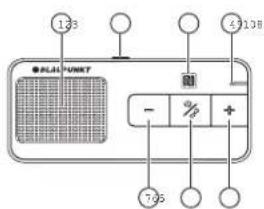
Overview
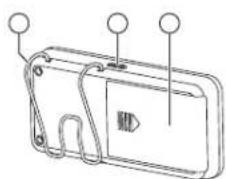
① Loudspeaker
MODE button
③ NFC sensor
Microphone
⑤ Increase volume (+)
MF button (Illuminated multifunction button)
Decrease volume (-)
Mounting clip for the sun visor
Charging socket (micro USB port)
Battery compartment
Switching on/off
Switching on
To switch the unit on, press the MF button for approx. 3 seconds until you hear a high-pitched signal tone and the MF button lights blue. Afterwards, the MF button lights blue and the device is switched on.
Note: After switching on, the BT Drive Free 114 automatically connects with the last connected cell phone.
Switching off
To switch the unit off, press the MF button for approx. 3 seconds until you hear a low-pitched signal tone and the MF button lights red. Afterwards, the device is switched off.
Registering (pairing) and connecting with the cell phone
Before you can use the BT Drive Free 114, you must register and connect it with a Bluetooth-ready cell phone. Registering is a one-time process and required only for the first connection with the cell phone. The BT Drive Free 114 can be registered with up to eight cell phones and be connected simultaneously with two cell phones.
NFC smart pairing
The NFC smart pairing procedure is available for BT Drive Free 114 to make the pairing much simply and quickly.
Please ensure that your mobile phone's OS version is Android 4.1, Windows 8, Blackberry 7.0 or upper. The NFC sensor usually locates at the back of phone
- Please enable the NFC function in the setting menu of your phone first.
Unlock your phone's screen to enable NFC detection, and touch the NFC sensor area of BT Drive Free 114 to the back side of mobile phone. The mobile phone will emit tone prompt if detect the speaker closing, and the BT Drive Free 114 will turn on and enter pairing mode automatically.
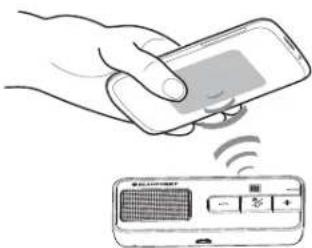
- Confirm the pairing request on the phone screen, then pairing will complete. Otherwise, please follow the general steps to complete pairing procedure.



General procedure
- Hold the BT Drive Free 114 within range of a Bluetooth-ready cell phone; the distance should not exceed a metre.
- The BT Drive Free 114 must be switched off.
-
Press the MF button for approx. 6 seconds until you hear a low-pitched signal tone and the MF button intermittently flashes red and blue. The device is in registration mode.
-
Activate the Bluetooth function of the cell phone and start the search for Bluetooth devices. (For further details, please read the operating instructions of your cell phone).
-
From the list of devices found, select the "BT DF 114".
If required, enter the PIN code "0000" and confirm the entry. If the pairing process was successful, you hear a signal tone and the MF button lights blue for 3 seconds. (Note: The PIN code is preprogrammed and cannot be changed.) - After registering, the BT Drive Free 114 automatically connects with the cell phone. For some cell phones, you have to manually confi rm the connection. Next, the BT Drive Free 114 changes to standby mode and the MF button fl ashes blue every 3 seconds.
Note: If the registering is not completed within 2 minutes, the BT Drive Free 114 switches off again. In this case, repeat the registering.
Multi-connection function
The multi-connection function allows the simultaneous use of the BT Drive Free 114 with two cell phones. This is advantageous for users with a personal and a business cell phone.
Establishing a connection with two cell phones
There are several options of connecting the BT Drive Free 114 with already registered cell phones.
Automatic connection
When switching on the BT Drive Free 114, a connection is automatically established with the two most recently connected cell phones.
Establishing a connection via the BT Drive Free 114
To manually establish a connection between the BT Drive Free 114 and the two most recently connected cell phones, press the MF button. The BT Drive Free 114 fi rst connects itself with the most recently connected cell phone. Then it connects itself with the next most recently connected cell phone.
- Establishing a connection via the cell phone
If the cell phone is not one of the two most recently connected cell phones with the BT Drive Free 114, you have to establish the connection via the Bluetooth menu of the cell phone. After successful connection, you can establish another connection with a second cell phone. This allows you to determine the sequence of connections.
If two cell phones are connected with the BT Drive Free 114, the cell phone connected first is the first device and the other one the second device. Another connection can be established only after first disconnecting one of the two cell phones. The cell phone which is still connected afterwards becomes the first device in the sequence.
Note that voice dialing is available only for the first device and the operation for redialling the last number differs for the first and the second device. The other functions are executed the same way using the BT Drive Free 114 as a connection with only one cell phone.

Using the BT Drive Free 114
After successfully completing the registration and charging the battery, the following functions can be executed:
Making a call
Voice dialing\*
To activate voice dialing, briefly press the MF button. You hear several signal tones. After the signal tone, speak the voice command. After the voice command has been recognized, the cell phone dials the number associated with it.
Note: If two cell phones are connected with the BT Drive Free 114, the voice commands are directed only to the cell phone connected fi rst.
- Redialling the last number*
Press the MF button twice. You hear a signal tone and the number dialled last is being redialled.
Note: If two cell phones are connected with the BT Drive Free 114, hold the "..." button pressed for 2 seconds to dial the last number of the cell phone connected last.
- Call origination via cell phone
Select the desired number as usual via the cell phone. The call is automatically transferred to the BT Drive Free 114.
Answering a call
To answer an incoming call, briefly press the MF button.
Ending a call
Briefly press the MF button to end a call.
Rejecting a call*
To reject a call, hold the MF button pressed until you hear a signal tone.
Adjusting the volume
During a phone call, adjust the volume with the buttons "+" and ".". Muting the microphone
To mute the microphone during a call, briefly press the MODE button. The MF button fl ashes red every 10 seconds and you hear two signal tones. Press the MODE button again to cancel the muting.
Transferring a call
To transfer a call from the BT Drive Free 114 to the cell phone, press the MODE button for approx. 3 seconds. Repeat the step to transfer the call back to the BT Drive Free 114.

Note: With some cell phones, the connection is disconnected if you transfer the call to the cell phone. To transfer the call back to the BT Drive Free 114, you have to press the MF button instead of the MODE button.
Managing calls*
You can answer and manage two calls on one of the connected cell phones via the BT Drive Free 114.
| You receive a call during an active call | |
| Hold the active call and answer the incoming call. | Press the MF button for 2 seconds. |
| End the active call and answer the incoming call. | Briefly press the MF button. |
| Continue the active call and reject the incoming call. | Press the MF button twice. |
| You are conducting two calls, an active one and one on hold | |
| Change between the active call and the one on hold. | Press the MF button for 2 seconds. |
| End the active call and answer the call on hold. | Briefly press the MF button. |
| Continue the active call and end the call on hold. | Press the MF button twice. |
| Continue the active call and answer the call on hold. | Press the "+" button for 2 seconds |
Note: You do not have the option of managing several calls from two connected cell phones at the same time. When you receive a call on one cell phone while a call is active on the other cell phone, the active call is being ended when you answer the incoming call by briefly pressing the MF button.
Audio streaming
The BT Drive Free 114 supports the A2DP function. With an audio streaming connection, you can playback the music titles stored on the cell phone via the BT Drive Free 114. In case of a call, the music playback is interrupted and continued again after the call.

Resetting the BT Drive Free 114
The BT Drive Free 114 can be registered with up to eight cell phones. You can delete the registration list and reset the hands-free system to the factory settings.
- The BT Drive Free 114 must be switched on and no connection may exist to a cell phone.
- Press and hold down the "+" and "-" buttons simultaneously for approx. 10 seconds until the MF button intermittently flashes lights red and blue.
If the registration list was deleted, the MF button stops flashing intermittently. - After the next switch-on, the BT Drive Free 114 is in registration mode.
Light indicators and signal tones
| Device status MF button Signal tones | ||
| Switching on Lights | blue for 3 seconds 1 high-pitched | sound |
| Switching off Lights | red for 3 seconds 1 low-pitched | sound |
| Registration mode | Flashes red and blue alternately | |
| Standby mode without connection | Flashes blue once every 3 seconds | |
| Standby mode with connection | Lights blue every 3 seconds | |
| Incoming call Flashes | blue | |
| Active call Flashes | blue once every 2 seconds | |
| Mute Flashes red once every 10 seconds 2 tones every 10 seconds | ||
| Low battery | Flashes red once every 3 seconds | 5 tones every 60 seconds |
| Battery is charging | Lights red.Lights blue after the battery is fully charged. | |
28 29
02_BTDriveFree114_gb.indd 28-29



Fault removal
If a connection between the BT Drive Free 114 and a cell phone cannot be established, observe the following:
- Ensure that the battery is charged.
Ensure that the Bluetooth function of the cell phone is activated. You find more detailed information in the operating instructions of the cell phone. Check whether the BT Drive Free 114 is connected with the cell phone. - Ensure that the distance between the BT Drive Free 114 and a registered cell phone is less than 10 metres and that no obstacles are between the two devices. Obstacles can interfere with the transmission or reduce the range.
If none of these measures is successful, please contact the service department of your distributor.
The BT Drive Free 114 meets the Bluetooth specification v4.0. The flawless function between the BT Drive Free 114 and Bluetooth-ready cell phones from different manufacturers and of different types cannot be guaranteed since it depends on the compatibility.
Declaration of conformity
The Blaupunkt Technology GmbH declares that this product complies with the basic requirements and the other relevant regulations of the directive 1999/5/EC. The declaration of conformity can be found on the Internet under www.blaupunkt.com.
Warranty
We provide a manufacturer's warranty for products bought within the European Union. For devices purchased outside the European Union, the warranty terms issued by our respective responsible domestic agency are valid. The warranty terms can be called up from www.blaupunkt.com.
17.11.14 16:37
Technical data
| Bluetooth specifcation Version 4.0 | |
| Supported Bluetooth profi les HSP | (Headset Profi le), HFP (Hands-Free Profi le) and A2DP (Advanced Audio Distribution Profi le) |
| Frequency range 2.4 to 2.48 GHz ISM band | |
| Bluetooth range Up to 10 metres (Class 2) | |
| Dimensions 107 (L) x 48 (W) x 15 (H) mm | |
| Weight approx. 60 g | |
| Battery charging time | approx. 3 hours |
| Talk time | up to 15 hours |
| Standby time | up to 500 hours |
| Battery type | Lithium-ion, 3.7 V, 500 mAh, rechargeable, replaceable (compatible with Nokia battery BL-SB) |
| Charger | 5 V - 6 V DC, 300 mA |
Table des matieres

m = 1 ;
BKnIOyBaHe/N3KIOyBaHe
BknoyBaHe
3a BKNHOBAHE 3aBpXe MT-6yTOHa MATHCAT 3a 3ceKHyDn,doKATO yyeTe BNCOK 3yKOB CnHAN H M F-6yTOhT CBETHE B CnHbO.CneTobA M F-6yTOhT MNA CnHBO YNCTDOCTBO E BKNHOHO.
Ykaahane: Cncl BKNKUHaeBO TBrive Drive 114ce CBbP3a ABToMATNHO CnocNEHINCBp3AHMOBNIENTEfeOho.
N3KIOU4BaHe
3aMKNIOUBAHe 3aDpBxTe MF-6yTOHa HATNCHAT 3a 3 cekyHn, DOKATO CYETe Hmcb k3bkyOB CnHn Mf-6yTOhT CBtHe B cepBeHo. CnE TOBA yctpoi CTBOTo CE MKNIOU8A.
CABOBaHe (Pairing) n Cbbp3BaHe c Mo6nJeH Tepeoh
Ppei Da pnpctbntte KbM n3non3bahe Ha BT Drive Free 114, TpH6Ba da ro CboBIOTE N CBpbXeTe C MOBINEN TEFOH C Bluteoth. CBOBAHETO e EDHKoPATeH PPOUC E N3NCKBa cmo npn PbPBO TO CbP3BaHc C MOBUNHNA TENEFOH. BT Drive Free 114 Moke Da ce CDBO C do OCEM MOBUNH N TENEFOHA N da e CbP3aH C da MOBUNH N TENEFOHa EHNOBPEMENHO.
NFCcMapr cDBOBAhe
Pnueepyata,NFC mapt dcboBahe"pe npdIa3a 3B Dt Free Free114,3a da HANPAOBBOHETMOHOPENO-NECHO N6b30.
Ybepete ce,ce Bepneta Ha OpeaHOnHa CTcTeMa Ha Baunma MoBIneH Tenefoe H Android 4.1,Windows 8,Blackberry 7.0 mno No-BvcoKa.CehOpbT hNFC o6kKnHeo Ce HAMPA h TaPb6a He TenefoHa.
-MoJa, mIbPoA ktnBuaipateFyHkuTnA FNC B MeHToC hAcTpoKnHa Baunu TepeoH.
OTKIOHETe ekpana Ha Baun HTeoOH, 3a da No3BONITE OTKPNBaHe HA NFC, nOKOCHeTE 30HATA Ha CEH3Opa HA NFC hA BT Drive Free 114 KbM Tpb6aHa MObUNnT ETeoOH. MoBUNnT RTeoEH Oue N3dape 3Byko8 CHTAH, AOK TOKPIE INKIOHAAHO tROBOPINH, A BT Drive Free 114 ue Ce BKNIOHm Iue BNEe ABTOMATNHO B PEXMM HA CDBOBAHe.

MdVaJIq
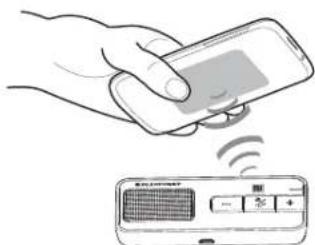
-NotBpTe 3aBkTa 3a CBOBAHe Ha eKpaHa HA TepeOHa, cneJ KoToC cBOAHEto 3a Bpum. B npTBeH cnyaM, moJc NeBaiTe 6oUte CTbN a3MbPbWA He npocUpyta No cBOBAHe.
162 163
12_BTDriveFree114 bg.indd 162-163

17.11.14 16:57



06ua npoueypa
-Држгь BT Drive Free 114 b ралуca на мдгоста на мбшлен телонс cBluetooth; pashconhtnoMoKeToMaJa eMACMMym 1 Метр.
- BT Drive Free 114 Tp86Ba da e n3KnHoueHo.
-3aDpBxTe MF-6yTOHa HATCNAT 3a npn6n.6 cKyHnD,doKATO yCte 38yKOB nH M-6yTOhTb 3aOHe DA mRnA nepNOdNHO B cepBeHO CINHO. YCTPOHBO E PEXHM HA CBOBAHE.
-AktnBnBapIte dyNkhUaBluTee hA moBuHnH TeneΦOn CTapTnPaIte TbpceHe Ha Bluetooth-ycTePcTBa (3a Ta3n pOpChETe BpbKOBoDCTBO 3a paBoTa haMoBuHnT eTeneΦOn)
-ИЗбетеоTсиькaСнамерпустponТБaNTDF114
BbBeTe Ako e HeoXoIMIO INH KOJ "000" nNotBpDeTe BBeKdHaTeO KarTo npOeCBt Ha cDBoBARe H cYeNeH, ue yyeTe 3yKBo CnHAn Mf-6yTOhCBTn 3cKyHmBn B CnHb. (3aBeneKk:PiN KoJB e nporpaMnpa npEbpAInHO h N Me Moke da Ce pONMeH).
-CnE CBOBAHETO BTRive Free 114ce Cbpb3a ABOTAMTHOc MOHNH TeneoPH. PnH KNOMBOHINTEPOHTOPABHO pHuO Na NotbPdnte BpKATA.CnE TOBA TBRTive Free 114npemHabaBPekm Stand-by M F-6yTOHbT MRA HA BCEK3 CEKNHc HNo
YkaaHHe: Ako CBOBAHcTo He MoKe Da Ce 3aBpUu BpaMKeTc H2 MmHTn, BT Drive Free 114 ce NkUbA. B TaKb Cnyau NoBTOpe CBOBaHcTo.
ФункuarTa MyIbCByp3BaHe
YHyKmIaMyIbCbP3BaHEDaBb3MOKHOCTa eHOBpEmeHO non3BaHe HbDTrVeFRe 114 cdaMoEHNTepeoHa. TOb a non3Ho 3a notpe6tten c edn mueH en dHIN cyKe6EH MoUHN TEpeOH.
YcTaHOBaHe Ha Bp3Ka C Dba Mo6uHn TeneoHa
MATE NOBUE BV3MOHXOHTN 3a CBp3BaHe hA BT Drive I14 cBeue CBOEHO MOINH TENEFOH.
- ABTomuHcBp3BaHe
PmBKNIOBAHEToBTDriveFree114yCTaHOBAIbAOTMAUHO Bp3ka CdbTaNOCEHDOBcpa3nMo6VIIHNA TeneOHa.
YctanobBahe Ha Bp3ka 4pe3 BT Drive Free 114
3a yda tchohobite pbrhno bprkma Mekdy BT Drive Free 114 mbda noctedn Cbcbpaanoe Mobmnn Teneofoha, HATNCHETe MF-sytohy. BT Drive Free
114 ce cbp3ba HAI-NaHepd c nocNedHO cbp3hAn MObHN TepeΦo CnE ToTa ce cbp3a c npneOnedHO cbp3AH MObHN TepeΦo.
164 165
12_BTDriveFree114 bg.indd 164-165
- YCTAHOBBAHc Hb3Ka 4pe3 MO6mHnTeneoH
Korato MoobHHH TeneOH He e nocnHnH IIN nppeonncnHnHCBp3aH CB Drive Free 114 MoobHN TepeOH, Tph6ba Da yctahOBnTEBb3kata p3e3 Bluetooth-MeHtOHaMoobHHNTepeOH.CnEyCneHIOcBp3BaHe Mokete da yctahOBnDEpyr Bp3Ba C bTOPi MOobHN TEpeOH.ToTOna HauHHMOxETe Da onpeDBeNTe NocnoBdAteBnHOCTa H aCBp3BAHnTA.
AkoDbMoBnHmTenefoha ca Cbbp3aHn CB DtiveFree114,mbpBnATcBp3aHnMoBnHmTepeFOe nPbBTOyCTPOINCTBO,ApyrBaBP3kaMOke DaCeYctAHOBnEBA,KORAToBp3kataKbM eHNOTbATA MoBnHmTepeFOe cpeKbcHe. MoBnHmTepeFOeKOtoCneD TOBaCEOue Cbbp3aH,BnocNcEoBATEHIOCTCTaNaMbPtoyCTPOINCTBO.
O6bPHTe BHMHMe,YeIaIACOBOTo I3bIpaHcE HAIIMUcMoA 3a IIbPBOToY cTpOCTBO IN OcNcyKBAHeTO 3a NOBtPOHO HABIpHa H NocPeHNH NoHcE p a3aMnHo 3a IIbPoTe H bTOPOr Y cTpOCTBO. DpyrntiΦyHKuIN CteMbPbWAT Upe3 BT Drive Free 114 no Cbua HauH, KAKTO np Bp3ka CAmC eDHH MOBInen TefeNo
M3non3BaHe Ha BT Drive Free 114
Korato cBaOaBaHetae 3aBzPnno yCneHn i AkymyntopbTe 3apeHEn, MoKeJa de CeObuCeCTBnBAT CLEHNHTe yFHKUN:
Hynipane Ha BT Drive Free 114
BT Drive Free 114 MOxhe ma c da CBOU C do oecm MOBUNHn Tenefoha. Moxete da n3TPHE cncbka cbc CBOEHN yCTPOCTBA n Da bPHTe pa3ROBOPHOy UcPOCTBO CBO6OHDn Pbue" ha ZABODKNE HATCPOKNI.
- BT Drive Free 114 Tnp8bna da e BknioueH no he Tnp8bna da cbIueCTbyBa btp3ka KbM MoBuiHen teleΦOH.
3aBpXte EeHOBpeMeHHo HATiCHATn 60n-3a n6n-10 cEChyHdi, dOKATO MF-6yTbTbZ bMMHeO CcEBPeHO HcNBo.
-KaTATO CnIcBkbT cBcDBoEHNy UCTPOINCTBa eN3TpN, MF-6yTOHbT pIeCTBa DA MIRIA CMEHARK Nc. - CnED CnEDBAOTO BKNIOVABe BT Drive Free 114 ce HAMipa B POKIM HA cDBOBAAbe.
CBETINHHH INHINKauN IN 3BYKOHNURHaHIN
All following FCC statements are valid for the Industry Canada Standard (ICC) as well.
General
Interference Warning: (according to FCC part 15.19)
This device complies with Part 15 of the FCC Rules. Operation is subject to the following two conditions:
(1) this device may not cause harmful interference, and
(2) this device must accept any interference received, including interference that may cause undesired operation
Caution: (pertaining to FCC part 15.21)
Modifications not expressly approved by this company could void the user's authority to operate the equipment.
© 2012 All rights reserved by Blaupunkt. This material may be reproduced,
copied or distributed for personal use only
iPhone is a trademark of Apple Inc., registered in the U.S. and other countries.
171170
17.11.14 16:57