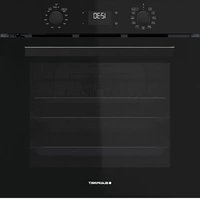
5B40P0260 - Oven BLAUPUNKT - Free user manual and instructions
Find the device manual for free 5B40P0260 BLAUPUNKT in PDF.


| Product type | Built-in oven |
| Brand | Blaupunkt |
| Model | 5B40P0260 |
| Electrical supply | 230 V / 50-60 Hz |
| Maximum power | 3.3 kW (adjustable in Hi/Lo mode) |
| Cooking functions | Natural convection, Fan heat, Pizza, Eco fan heat, Grill, Turbo grill, Large piece cooking, Automatic bread, Automatic pastries, Rising |
| Cleaning | Automatic by pyrolysis, Smart Clean (steam) |
| Lighting | Halogen G9, 25 W, 230 V |
| Oven volume | 70 liters (approximate) |
| Door | Removable with double glazing |
| Door lock | Yes, automatic during pyrolysis |
| Included accessories | Metal grid, drip tray, baking tray, telescopic rails (depending on model) |
| Interior material | Easy-clean enamel |
| Dimensions (H x W x D) | 59.5 x 59.5 x 56 cm (approximate) |
| Net weight | Approximately 35 kg |
| Number of levels | 5 |
| Adjustable energy consumption | Hi (>3 kW) or Lo (<2.9 kW) |
| Child safety | Automatic door lock during pyrolysis mode |
Frequently Asked Questions - 5B40P0260 BLAUPUNKT
User questions about 5B40P0260 BLAUPUNKT
0 question about this device. Answer the ones you know or ask your own.
Ask a new question about this device
Download the instructions for your Oven in PDF format for free! Find your manual 5B40P0260 - BLAUPUNKT and take your electronic device back in hand. On this page are published all the documents necessary for the use of your device. 5B40P0260 by BLAUPUNKT.
USER MANUAL 5B40P0260 BLAUPUNKT
THANK YOU FOR BUYING OUR PRODUCT.

Before using the appliance carefully read the Safety Instruction.
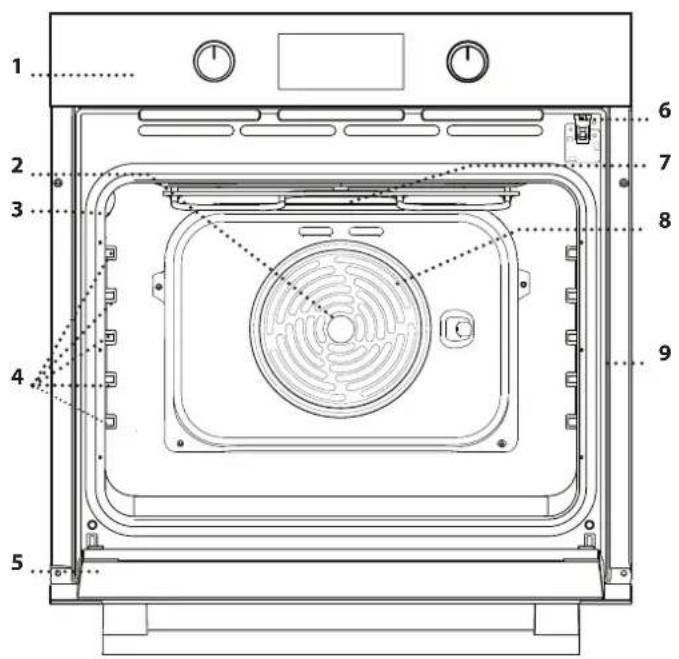
PRODUCT DESCRIPTION
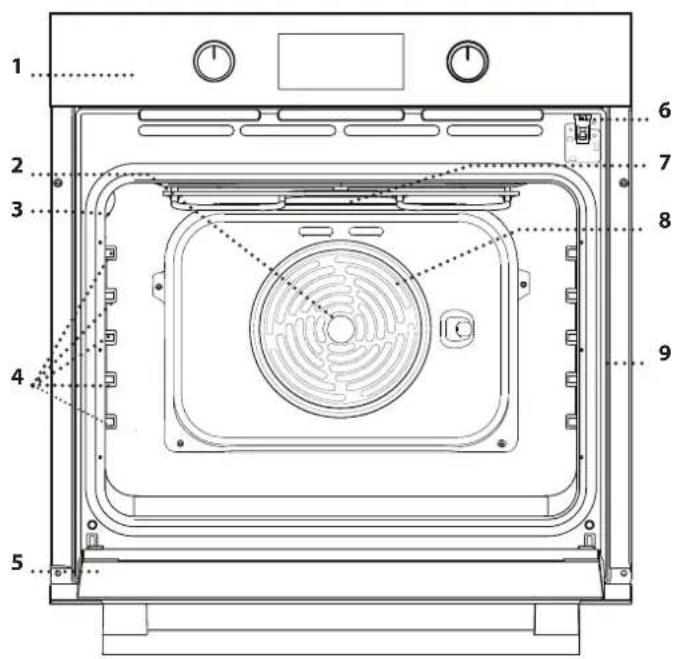
- Control panel
- Fan
- Lamp
- Shelf guides (the level is indicated on the wall of the cooking compartment)
- Door
- Door lock (locks the door while automatic cleaning is in progress and afterwards)
- Top heating element/grill
- Circular heating element (not visible)
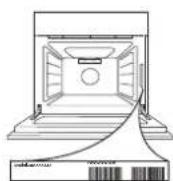
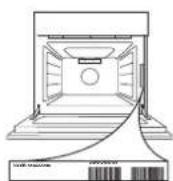
- Identification plate (do not remove)
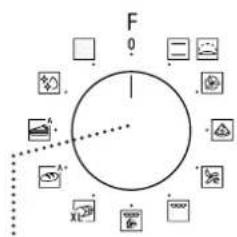
CONTROL PANEL DESCRIPTION
flowchart
graph TD
    A["Start"] --> B{Decision}
    B -->|Yes| C["Action 1"]
    B -->|No| D["Action 2"]
    C --> E["End"]
    D --> E
    style A fill:#f9f,stroke:#333
    style E fill:#bbf,stroke:#333
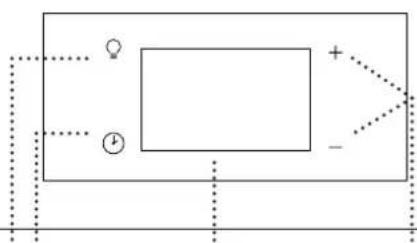
13245
natural_image
Pure electrical circuit lines without any symbols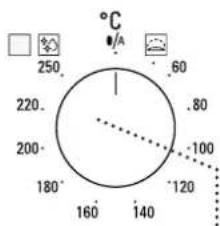
6
1. SELECTION KNOB
For switching the oven on by selecting a function. Turn to the 0 position to switch the oven off.
2. LIGHT
With the oven switched on, press ⚠ to turn the oven compartment lamp on or off.
3. SETTING THE TIME
For accessing the cooking time settings, delayed start and timer. For displaying the time when the oven is off.
4. DISPLAY
5. ADJUSTMENT BUTTONS
For changing the cooking time settings.
6. THERMOSTAT KNOB
Turn to select the temperature you require when activating manual functions.
Please note: Type of knob may vary from model type. If the knobs are push-activated, push down on the center of the knob to release it from seating.
ACCESSORIES
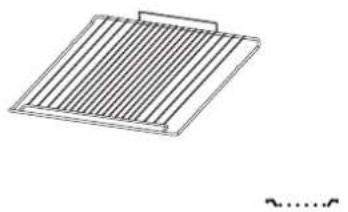
Use to cook food or as a support for pans, cake tins and other ovenproof items of cookware.
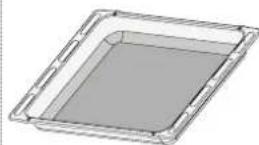

Use as an oven tray for cooking meat, fish, vegetables, focaccia, etc. or position underneath the wire shelf to collect cooking juices.
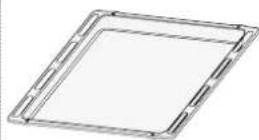

Use for cooking all bread and pastry products, but also for roasts, fish en papillotte, etc.
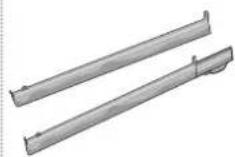
To facilitate inserting or removing accessories.
* Available only on certain models
The number and the type of accessories may vary depending on which model is purchased.
Other accessories can be purchased separately from the After-sales Service.
INSERTING THE WIRE SHELF AND OTHER ACCESSORIES
Insert the wire shelf onto the level you require by holding it tilted slightly upwards and resting the raised rear side (pointing upwards) down first.
Then slide it horizontally along the runners as far as possible.
Other accessories, like the baking tray, are to be inserted horizontally, letting them slide on the runners.
SLIDING SHELVES AND SHELF GUIDES
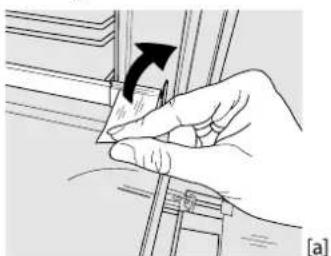
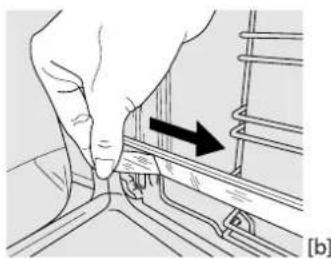
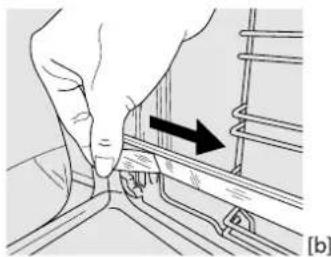
Before using the oven remove the protective tape [a] and then remove the protective foil [b] from the sliding runners.
natural_image
Illustration of a hand holding a tool with an arrow indicating rotation (no text or symbols present)。
natural_image
Illustration of a hand turning a component with an arrow indicating direction (no text or symbols)-
REMOVING THE SLIDING RUNNERS [c]
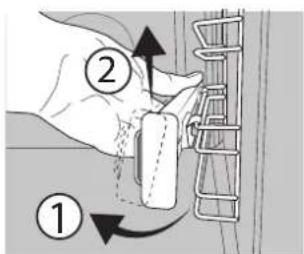
Pull the lower part of the sliding runner to uncouple the lower hooks (1) and pull the the sliding runners upwards, removing them from the upper hooks (2).
REFITTING THE SLIDING RUNNERS [d]
Hook the upper hooks on the shelf guides (1) then press the lower part of the sliding runners against the shelf guides, until the lower hooks are clicking (2).
![① ② [c] [d]](/content/2026/04/732511/images/3c62ae8f2ddd7e2795494a86c085e587945920e49daeebe927f915350a78d3e1.jpg)
REMOVING AND REFITTING THE SHELF GUIDES
- To remove the shelf guides, firmly grip the external part of the guide, and pull it towards you to extract the support and the two internal pins from the lodging.
- To reposition the shelf guides, position them near the cavity and initially insert the two pins into their lodgings. Next, position the external part near its lodging, insert the support, and firmly press towards the wall of the cavity to make sure the shelf guide is properly secured.
FUNCTIONS

CONVENTIONAL
For cooking any kind of dish on one shelf only.

RISING
For helping sweet or savoury dough to rise effectively. Turn the thermostat knob to the icon to activate this function.

FORCED AIR
For cooking different foods that require the same cooking temperature on several shelves (maximum three) at the same time. This function can be used to cook different foods without odours being transferred from one food to another.

PIZZA
For baking different types and sizes of pizza and bread. It is a good idea to swap the position of the baking trays halfway through cooking.

ECO FORCED AIR
For cooking roasts and stuffed roasting joints on a single shelf. Food is prevented from drying out excessively by gentle, intermittent air circulation.
When this ECO function is in use, the light will remain switched off during cooking but can be switched on again by pressing ☐.

GRILL
For grilling steaks, kebabs and sausages, cooking vegetables au gratin or toasting bread.
When grilling meat, we recommend using a dripping pan to collect the cooking juices: position the pan on any of the levels below the wire shelf and add 200 ml of drinking water.

TURBO GRILL
For roasting large joints of meat (legs, roast beef, chicken). We recommend using a dripping pan to collect the cooking juices: position the pan on any of the levels below the wire shelf and add 200 ml of drinking water.
FIRST TIME USE
1. SETTING THE TIME
You will need to set the time when you switch on the appliance for the first time: Press ⏻ until the Ⓞcon and the two digits for the hour start flashing on the display.
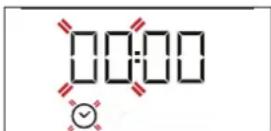
Use +r to set the hour and press to confirm. The two digits for the minutes will start flashing. Use + or to set the minutes and press to confirm.
Please note: When the Ⓞcon is flashing, for example following lengthy power outages, you will need to reset the time.

MAXI COOKING
For cooking large joints of meat (above 2.5kg).
We recommend turning the meat over during cooking to ensure that both sides brown evenly. We also recommend basting the joint every so often to prevent it from drying out excessively.

BREAD AUTO
This function automatically selects the ideal temperature and baking time for bread. For best results, carefully follow the recipe. Activate the function when the oven is cold. Thermostat knob needs to remain in 0/A position as the temperature is set automatically by the function.

PASTRY AUTO
This function automatically selects the ideal temperature and baking time for cakes. Activate the function when the oven is cold. Thermostat knob needs to remain in position as the temperature is set automatically by the function.
FLEXI CLEAN PACK

SMARTCLEAN
The action of the steam released during this special low-temperature cleaning cycle allows dirt and food residues to be removed with ease. To activate the "Smart Clean" cleaning function pour 100-120ml of drinking water into the bottom of the oven then turn the selection knob and the thermostat knob to the icon. It is best to use the function for 35'. The position of the icon does not correspond to the temperature reached during the cleaning.

AUTOMATIC CLEANING - PYRO
For eliminating cooking spatters using a cycle at very high temperature. To activate this function move thermostat knob to □.
The position of the icon does not correspond to the real temperature reached during the cleaning cycle.
2. SET THE POWER CONSUMPTION
By default the oven is programmed to work at a power higher than 3kW (Hi). To operate the oven at a power that is compatible with a domestic power supply less than 2,9 kW (Lo), you will need to change the settings.
To go to the change menu, turn the selection knob to ☐, then turn it back to ☐
Press and hold and for five seconds immediately afterwards.
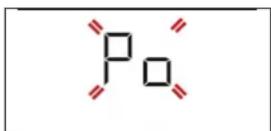
Use + to change the setting, then press and hold ① for at least two seconds to confirm.
3. HEAT THE OVEN
A new oven may release odours that have been left behind during manufacturing: this is completely normal.
Before starting to cook food, we therefore recommend heating the oven with it empty in order to remove any possible odours.
DAILY USE
1. SELECT A FUNCTION
To select a function, turn the selection knob to the symbol for the function you require: the display will light up and an audible signal will sound.
On
2. ACTIVATE A FUNCTION
MANUAL
To start the function you have selected, turn the thermostat knob to set the temperature you require.
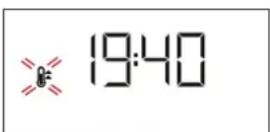
Please note: During cooking you can change the function by turning the selection knob or adjust the temperature by turning the thermostat knob. The function will not start if the thermostat knob will be on ⚪/A position. You can set the cooking time, cooking end time (only if you set a cooking time) and a timer.
RISING
To start the "Rising" function, turn the thermostat knob to Rising position (40 deg) and put function knob in Conventional position; if the oven is set to a different temperature, the function will not start.
Please note: You can set the cooking time, cooking end time (only if you set a cooking time) and a timer.
3. PREHEATING AND RESIDUAL HEAT
Once the function starts, an audible signal and a flashing icon ⏻ on the display indicate that the preheating phase has been activated.
At the end of this phase, an audible signal and the fixed icon ≈ on the display will indicate that the oven has reached the set temperature: at this point, place the food inside and proceed with cooking.
Please note: Placing the food in the oven before preheating has finished may have an adverse effect on the final cooking result.
After cooking and with the function deactivated, the icon ⏻ may continue to remain visible on the display even after the cooling fan has switched off to indicate that there is residual heat in the compartment.
Remove any protective cardboard or transparent film from the oven and remove any accessories from inside it.
Heat the oven to 250 °C for about one hour. The oven must be empty during this time.
Please note: It is advisable to air the room after using the appliance for the first time.
Please note: The time after which the icon switches off varies because it depends on a series of factors such as ambient temperature and function used. In any case, the product should be considered to be off when the pointer on the selection knob is at "0".
4. PROGRAMMING COOKING
You will need to select a function before you can start programming cooking.
DURATION
Keep pressing Ⓤ until the icon and "00:00" start flashing on the display.
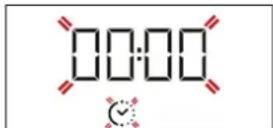
Use + or — to set the cooking time you require, then press ⏻ to confirm. Activate the function by turning the thermostat knob to the temperature you require: an audible signal will sound and the display will indicate that cooking is complete.
Please note: To cancel the cooking time you have set, keep pressing ⏻ until the ⏻ icon starts flashing on the display, then use → to reset the cooking time to "00:00". This cooking time includes a preheating phase.
PROGRAMMING THE END COOKING TIME/DELAYED START
After a cooking time has been set, starting the function can be delayed by programming its end time: press ⏻ until the 📄on and the current time start flashing on the display.
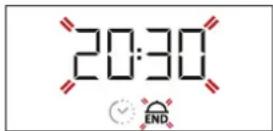
Use or to set the time you want cooking to end and press to confirm. ctivate the function by turning the thermostat knob to the temperature you require: the function will remain paused until it starts automatically after the period of time that has been calculated in order for cooking to finish at the time you have set.
Please note: To cancel the setting, switch the oven off by turning the selection knob to the 0 position.
Delay to start functionality is not available for Grill and Turbo Grill functions.
END OF COOKING
An audible signal will sound and the display will indicate that the function has finished.
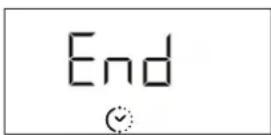
Turn the selection knob to select a different function or to 0 to switch the oven off.
Please note: If the timer is active, the display will show "END" alternately with the remaining time.
5. SETTING THE TIMER
This option does not interrupt or program cooking but allows you to use the display as a timer, either during while a function is active or when the oven is off.
Keep pressing ⏻ until the Ⓓ and "00:00" icon and "00:00" start flashing on the display.
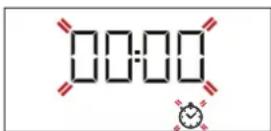
Use + or — to set the time you require and press ⏻ to confirm. An audible signal will sound once the timer has finished counting down the selected time.
Notes: To cancel the timer, keep pressing until the icon starts flashing, then use to reset the time to "00:00".
6. AUTOMATIC CLEANING FUNCTION - PYRO
Do not touch the oven during the Pyro cycle. Keep children and animals away from the oven during and after (until the room has finished airing) running the Pyro cycle.
Remove all accessories - including shelf guides - from the oven before activating the function. If the oven is installed below a hob, make sure that all the burners or electric hotplates are switched off while running the selfcleaning cycle.
For optimum cleaning results, remove the worst soiling with a damp sponge before using the Pyro function.
Avoid activating the pyro cycle cleaning in the presence of limescale residues.
We recommend only running the Pyro function if the appliance contains heavy soiling or gives off bad odours during cooking.
To activate the automatic cleaning function, turn the selection knob and the thermostat knob to the □ icon. The function will be activated automatically, the door locked and the light inside the oven switched off: The display will show the time remaining to the end, alternating with "Pyro".
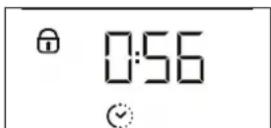

Once the cycle has been completed, the door remains locked until the temperature inside the oven has returned to a safe level. Air the room during and after running the Pyro cycle.
NOTES
- Do not cover the inside of the oven with aluminium foil.
- Never drag pots or pans across the bottom of the oven as this could damage the enamel coating.
- Do not place heavy weights on the door and do not hold on to the door.
COOKING TABLE
| RECIPE FUNCTION PREHEAT TEMPERATURE (°C) DURATION (Min) LEVEL AND ACCESSORIES | ||||
| Yes 170 30 - 50 | 2 | |||
| Leavened cakes | Yes 160 30 - 50 | 2 | ||
| Yes 160 40 - 60 | 4 1 | |||
| Filled cake(cheese cake, strudel, fruit pie) | Yes 160 - 200 35 - 90 | 2 | ||
| Yes 160 - 200 40 - 90 | 4 2 | |||
| Biscuits / tartlets | Yes 160 25 - 35 | 3 | ||
| Yes 160 25 - 35 | 3 | |||
| Yes 150 35 - 45 | 4 2 | |||
| Choux buns | Yes 180 - 210 30 - 40 | 3 | ||
| Yes 180 - 200 35 - 45 | 4 2 | |||
| Yes 180 - 200 35 - 45 | 5 3 1 | |||
| Meringues | Yes 90 150 - 200 | 3 | ||
| Yes 90 140 - 200 | 4 2 | |||
| Yes 90 140 - 200 | 5 3 1 | |||
| Pizza / Focaccia | Yes 190 - 250 15 - 50 | 1/2 | ||
| Yes 190 - 250 20 - 50 | 4 2 | |||
| Frozen pizza | Yes 250 10 - 20 | 3 | ||
| Yes 250 10 - 20 | 4 2 | |||
| Salty cakes(vegetable pie, quiche) | Yes 180 - 200 40 - 55 | 3 | ||
| Yes 180 - 200 45 - 60 | 4 2 | |||
| Yes 180 - 200 45 - 60 | 5 3 1 | |||
| Vols-au-vents / puff pastry crackers | Yes 190 - 200 20 - 30 | 3 | ||
| Yes 180 - 190 20 - 40 | 4 2 | |||
| Yes 180 - 190 20 - 40 | 5 3 1 | |||
| Lasagne / baked pasta /canneloni / flans | Yes 190 - 200 45 - 65 | 2 | ||
| Lamb / veal / beef / meat 1 kg | Yes 190 - 200 | 80 - 110 | 3 | |
| Roast pork with crackling 2 kg | Yes 180 - 190 | 110 - 150 | 3 | |
| Chicken / rabbit / duck 1 kg | Yes 200 - 230 | 50 - 100 | 2 | |
| Turkey / goose 3 kg | - 190 - 200 | 100 - 160 | 2 | |
| Baked fish / en papillote(fillets, whole) | Yes 170 - 190 30 - 45 | 2 | ||
| ACCESSORIES | Wire shelf | Baking dish on the wire shelf | Baking tray/Drip tray or baking dish on the wire shelf | Drip tray / Baking tray | Drip tray / Baking tray with 200 ml of water | |
| FUNCTIONS | Conventional | Forced air | Pizza | Grill | Turbo grill | Eco forced air |
| RECIPE FUNCTION PREHEAT TEMPERATURE (°C) DURATION (Min) LEVEL AND ACCESSORIES | |||||
| Stuffed vegetables(tomatoes, courgettes, aubergines) | Yes 180 - 200 50 - 70 | 3 | |||
| Toasted bread 5' 250 2 - 6 | 5 | ||||
| Fish fillets / slices - 230 - 250 | 15 - 30* | 4 | 3 | ||
| Sausages / kebabs / spare ribs / hamburgers | - | 250 | 15 - 30 * | 5 | |
| Roast chicken 1-1.3 kg | Yes | 200 - 220 | 55 - 70 ** | 2 | |
| Roast beef rare 1 kg | Yes | 200 - 210 | 35 - 50 ** | 3 | |
| Leg of lamb / knuckle | Yes | 200 - 210 | 60 - 90 ** | 3 | |
| Roast potatoes | Yes 200 - 210 35 - 55 | 2 | |||
| Vegetable gratin | - 200 - 210 25 - 55 | 3 | |||
| Meat and potatoes | Yes | 190 - 200 | 45 - 100 *** | 4 | |
| Fish and vegetables | Yes | 180 | 30 - 50 *** | 4 | |
| Lasagne and meat | Yes | 200 | 50 - 100 *** | 4 | |
| Complete meal: fruit tart (level 5) / lasagne (level 3) / meat (level 1) | Yes 180 - 190 | 40 - 120 *** | 5 | ||
| Roast meat / stuffed roasting joints | - | 170 - 180 | 100 - 150 | 3 | |
* Turn food halfway through cooking
** Turn food two thirds of the way through cooking (if necessary).
*** Estimated length of time: dishes can be removed from the oven at different times depending on personal preference.
| ACCESSORIES |  Wire shelf Wire shelf |  Baking dish on the wire shelf Baking dish on the wire shelf |  Baking tray/Drip tray or baking dish on the wire shelf Baking tray/Drip tray or baking dish on the wire shelf |  Drip tray / Baking tray Drip tray / Baking tray |  Drip tray / Baking tray with 200 ml of water Drip tray / Baking tray with 200 ml of water | |
| FUNCTIONS |  Conventional Conventional |  Forced air Forced air |  Pizza Pizza |  Grill Grill |  Turbo grill Turbo grill |  Eco forced air Eco forced air |
Wire shelf
Baking dish on the wire shelf
Baking tray/Drip tray or baking dish on the wire shelf
Drip tray / Baking tray
Drip tray / Baking tray with 200 ml of water
Conventional
Forced air
Pizza
Grill
Turbo grill
Eco forced air
CLEANING AND MAINTENANCE
Make sure that the oven has cooled down before carrying out any maintenance or cleaning.
Do not use steam cleaners.
Do not use wire wool, abrasive scourers or abrasive/corrosive cleaning agents, as these could damage the surfaces of the appliance.
Wear protective gloves.
The oven must be disconnected from the mains before carrying out any kind of maintenance work.
EXTERIOR SURFACES
Clean the surfaces with a damp microfibre cloth. If they are very dirty, add a few drops of pH-neutral detergent. Finish off with a dry cloth.
Do not use corrosive or abrasive detergents. If any of these products inadvertently comes into contact with the surfaces of the appliance, clean immediately with a damp microfibre cloth.
INTERIOR SURFACES
• After every use, leave the oven to cool and then clean it, preferably while it is still warm, to remove any deposits or stains caused by food residues. To dry any condensation that has formed as a result of cooking foods with a high water content, leave the oven to cool completely and then wipe it with a cloth or sponge.
- If there is stubborn dirt on the interior surfaces, we recommend running the automatic cleaning function for optimal cleaning results. Avoid activating the pyrolitic cycle cleaning in the presence of limescale residues. Before activating, perform limescale cleaning as described above.
- The door can be easily removed and refitted to facilitate cleaning of the glass.
- Clean the glass in the door with a suitable liquid detergent.
ACCESSORIES
Soak the accessories in a washing-up liquid solution after use, handling them with oven gloves if they are still hot. Food residues can be removed using a washing-up brush or a sponge.
REMOVING AND REFITTING THE DOOR
- To remove the door, open it fully and lower the catches until they are in the unlock position.
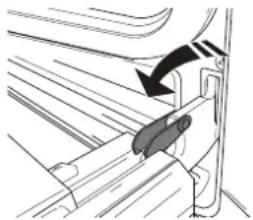
natural_image
Diagram of a mechanical component with an arrow indicating direction (no text or symbols present)- Close the door as much as you can.
Take a firm hold of the door with both hands – do not hold it by the handle.
Simply remove the door by continuing to close it while pulling it upwards (a) at the same time until it is released from its seating (b).
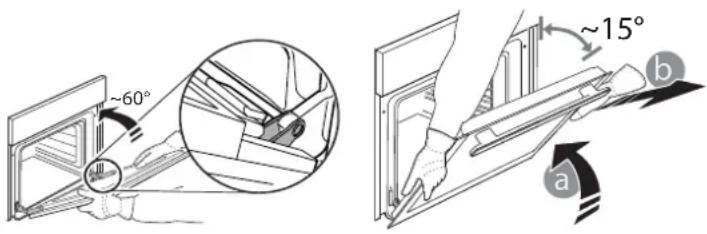
Put the door to one side, resting it on a soft surface.
- Refit the door by moving it towards the oven, aligning the hooks of the hinges with their seating and securing the upper part onto its seating.
- Lower the door and then open it fully. Lower the catches into their original position: make sure that you lower them down completely.
- Try closing the door and check to make sure that it lines up with the control panel. If it does not, repeat the steps above.
REPLACING THE LAMP
- Disconnect the oven from the power supply.
- Unscrew the cover from the light, replace the bulb and screw the cover back on the light.
- Reconnect the oven to the power supply.
Please note: Use 25 W/230 V type G9, T300 °C halogen lamps. The bulb used in the product is specifically designed for domestic appliances and is not suitable for general room lighting within the home (EC Regulation 244/2009).
Light bulbs are available from our After-sales Service. - Do not handle bulbs with your bare hands as your fingerprints could damage them. Do not use the oven until the light cover has been refitted.
CLEANING OF THE DOOR GLASS
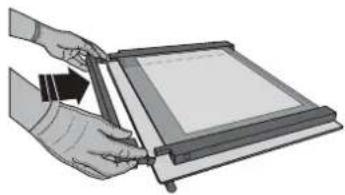
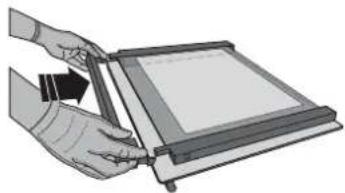
- After removing the door and resting it on a soft surface with the handle downwards, simultaneously press the two retaining clips and remove the upper edge of the door by pulling it towards you.
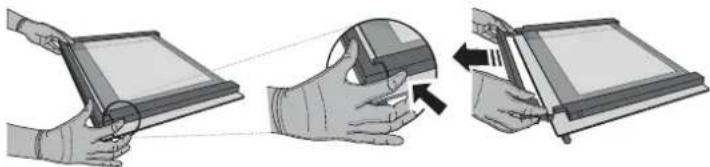
natural_image
Illustration of three-step hand tool application: holding a tablet, adjusting a face mask, and opening a device (no text or symbols present)- Lift and firmly hold the inner glass with both hands, remove it and place it on a soft surface before cleaning it.
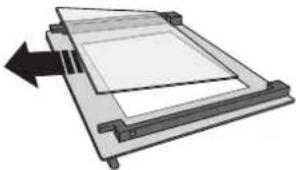
natural_image
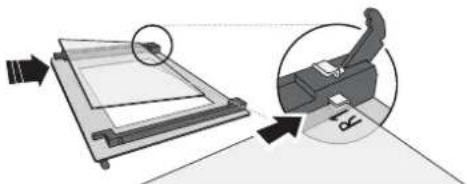
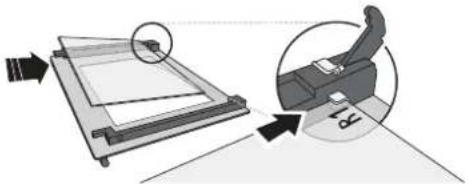
Diagram of a mechanical component with a rectangular frame and an arrow indicating direction (no text or symbols)- Refit the intermediate pane (marked with "1R") before refitting the inside pane: To position the panes of glass correctly, make sure that the "R" mark can be seen in the left-hand corner. First insert the long side of the glass marked "R" into the support seats, then lower it into position. Repeat this procedure for both panes of glass.
natural_image
Diagram showing a mechanical assembly with an inset close-up of a device (no text or symbols present)- Refit the upper edge: A click will indicate correct positioning. Make sure the seal is secure before refitting the door.
natural_image
Illustration of hands using a tablet to interact with a screen (no text or symbols visible)TROUBLESHOOTING
| PROBLEM POSSIBLE CAUSE SOLUTION | ||
| The oven is not working. | Power cut.Disconnection from the mains. | Check for the presence of mains electrical power and whether the oven is connected to the electricity supply.Turn off the oven and restart it to see if the fault persists. |
| The display shows the letter “F” followed by a number or letter. | Oven failure. | Contact you nearest Client After-sales Service Centre and state the number following the letter “F”. |
| The display is showing the message “Hot” and the selected function will not start. | Temperature too high. | Allow the oven to cool down before activating the function. Select a different function. |
| The display shows unclear text and appears to be broken. | Another language set. | Contact your nearest Client After-sales Service Center. |
SUPPORT
When contacting our Service Centre, please state the codes provided on your product's identification plate.
DANKE, DASS SIE SICH FÜR UNSER PRODUKT ENTSCHIEDEN HABEN.

natural_image
Pure electrical circuit lines without any symbols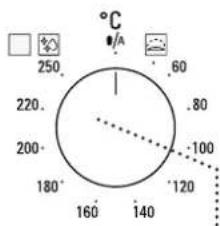
6
1. AUSWAHLKNOPF
natural_image
Simple line drawing of a rectangular plate with horizontal slats (no text or symbols)natural_image
3D rendering of a rectangular tray with a gray interior and a small bracket on the right (no text or symbols)natural_image
Simple line drawing of a square frame with a small curved bracket on the right side (no text or symbols)natural_image
Two metallic cylindrical metal rods with flanged ends, shown in side view (no text or symbols)natural_image
Illustration of a hand holding a small object with an arrow indicating upward motion (no text or symbols present)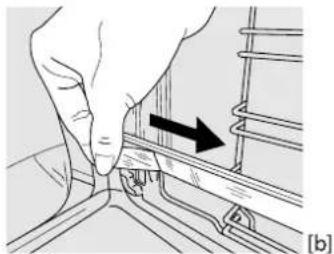
natural_image
Hand pressing a component on a rail track, showing a black arrow indicating direction (no text or symbols present)ENTFERNEN DER BACKAUSZÜGE [c]
natural_image
Diagram of a car seatbelt mechanism with an arrow indicating direction (no text or symbols present)natural_image
Illustration of three-step hand tool application: adding a cable to a screen, adjusting the mask, and removing a clip (no text or symbols)natural_image
Diagram of a mechanical or electronic component with layered structure and directional arrow (no text or symbols)natural_image
Diagram showing a mechanical device with an inset close-up of its internal components (no text or symbols present)natural_image
Illustration of hands using a tablet to interact with a screen (no text or symbols visible)LÖSEN VON PROBLEMEN
natural_image
Pure electrical circuit lines without any symbols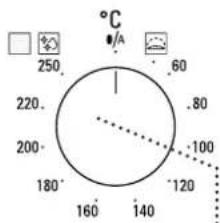
6
1. BOUTON DE SÉLECTION
natural_image
Simple line drawing of a rectangular grid or panel with a handle, no text or symbols present.natural_image
3D rendering of a square container with a gray interior and a small bracket on the right (no text or symbols)natural_image
Simple line drawing of a square frame with a small separate outline (no text or symbols)natural_image
Illustration of a hand holding a small object with an arrow indicating direction (no text or symbols present)
natural_image
Close-up of a hand pressing down on a mechanical component with an arrow indicating direction (no text or symbols)ENLÈVEMENT DES PATINS COULISSANTS [c]
ENLEVER ET REPLACER LES SUPPORTS DE GRILLE
natural_image
Diagram of a vehicle's seatbelt mechanism with a black arrow indicating direction (no text or symbols)natural_image
Illustration of three-step hand manipulation process: holding a tablet, adjusting a face mask, and adjusting a slide (no text or symbols)natural_image
Diagram of a mechanical assembly with a rectangular frame and an arrow indicating direction (no text or symbols)natural_image
Diagram showing a mechanical device with an inset close-up of its internal components (no text or symbols present)natural_image
Illustration of hands using a tablet to interact with a device (no text or symbols visible)GUIDE DE DÉPANNAGE
natural_image
Pure electrical circuit lines without any symbols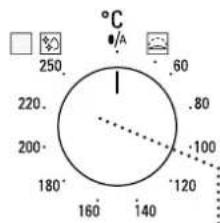
6
1. SELECTIEKNOP
ROOSTER DRUIPPLAAT * BAKPLAAT * SCHUIFRAILS *
natural_image
Simple line drawing of a rectangular grid with horizontal lines, no text or symbols present.natural_image
3D rendering of a rectangular tray with a gray interior and a separate curved line on the right side (no text or symbols)natural_image
Simple line drawing of a square frame with a small curved line on the right side (no text or symbols)natural_image
Hand holding a small object with an arrow indicating rotation, no visible text or symbols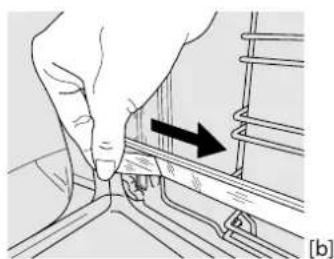
natural_image
Hand pressing a component into a rail track, showing a black arrow indicating direction (no text or symbols present)DE SCHUIFRAIL VERWIJDEREN [c]
![① ② [c] [d]](/content/2026/04/732511/images/897ba9c0af45b0c9b578bcaf977a7ab875072584705ba5d697d3a8d86f72c6b9.jpg)
DE ROOSTERGELEIDERS VERWIJDEREN EN TERUGPLAATSEN
Soak the accessories in a washing-up liquid solution after use, handling them with oven gloves if they are still hot. Food residues can be removed using a washing-up brush or a sponge.
natural_image
Mechanical assembly diagram showing a bracket with a directional arrow indicating motion (no text or symbols present)natural_image
Illustration of three-step robotic manipulation process: hand holding tablet, head with magnifying glass, and screen with tool (no text or symbols)natural_image
Diagram of a mechanical or electronic component with layered structure and directional arrow (no text or symbols)natural_image
Diagram showing a printer with a magnified view of its cover and base, no text or symbols presentnatural_image
Illustration of hands using a tablet device to interact with a screen (no text or symbols visible)PROBLEEMOPLOSSING
natural_image
Pure electrical circuit lines without any symbols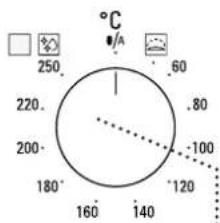
6
natural_image
Illustration of a hand holding a tool with an arrow indicating rotation (no text or symbols present)-
natural_image
Hand pressing a component on a rail track, showing a black arrow indicating direction (no text or symbols present)广力云智慧零售收银系统
![① ② [c] [d]](/content/2026/04/732511/images/ef4d923e31dca4da2279763e55d263cd06831e2151b6a52bf294542357da594b.jpg)
RIMUOVERE E RIMONTARE LE GRIGLIE LATERALI
natural_image
Diagram of a mechanical component with an arrow indicating direction (no text or symbols present)natural_image
Illustration of three-step hands using a device to interact (no text or symbols present)natural_image
Diagram of a mechanical device with a rectangular frame and an arrow indicating left motion (no text or symbols)natural_image
Diagram showing a printer or scanner interacting with a screen, with an inset close-up of the device (no text or symbols present)natural_image
Illustration of hands using a tablet to interact with a screen (no text or symbols visible)natural_image
Pure electrical circuit lines without any symbols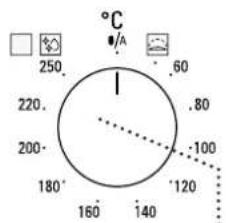
6
1. SELECTOR
natural_image
Simple line drawing of a rectangular grid or panel with horizontal lines, no text or symbols present.natural_image
3D rendering of a rectangular tray with a gray interior and a separate U-shaped bracket (no text or symbols)natural_image
Simple line drawing of a square frame with a small curved line on the right side (no text or symbols)natural_image
Hand holding a small object with an arrow indicating rotation (no text or symbols)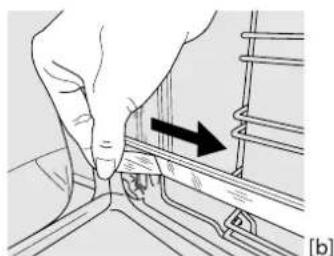
natural_image
Hand pressing a button on a mechanical component, showing a black arrow indicating direction (no text or symbols present)EXTRAER LAS GUÍAS DESLIZANTES [c]
![(c) [d] ① ②](/content/2026/04/732511/images/389f5de07e20f16142e60a52c6ed69438998bce35970ecaaef61663bfa5a78af.jpg)
CÓMO EXTRAER Y VOLVER A COLOCAR LAS GUÍAS PARA ESTANTES
natural_image
Diagram of a mechanical component with an arrow indicating direction (no text or symbols present)natural_image
Pure electrical circuit lines without any symbols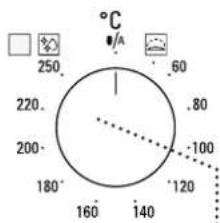
6
1. BOTÃO SELETOR
natural_image
Illustration of a hand holding a small object with an arrow indicating rotation (no text or symbols present)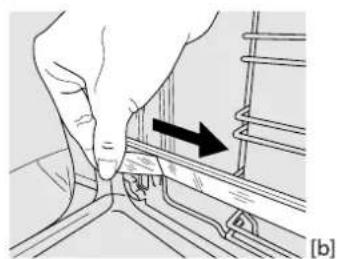
natural_image
Hand pressing a button on a rail track, with an arrow indicating direction (no text or symbols present)REMOVER E REPOR AS GUIAS DE NÍVEL
natural_image
Diagram of a car seatbelt mechanism with an arrow indicating direction (no text or symbols present)natural_image
Illustration showing three-step steps of a device manipulation process, with hands holding a tablet and interacting with a device (no text or symbols present)natural_image
Diagram of a mechanical device with a rectangular frame and an arrow indicating left motion (no text or symbols)natural_image
Diagram showing a mechanical assembly with an arrow indicating direction and a magnified inset of a device (no text or symbols present)natural_image
Illustration of hands holding a tablet device with an arrow indicating the process (no text or symbols present)natural_image
Technical illustration of a metal frame and two separate mechanical components (no text or symbols)Upotrebljava se za pečenje kruha i peciva, ali i pečenki, ribe u ovitku itd.
natural_image
Two technical diagrams showing hand positioning and tool application on a mechanical component, labeled (a) and (b), with no visible text or symbols.UKLANJANJE KLIZNIH VODILICA [c]
Povucite donji dio klizne vodilice da biste odvojili donje kuke (1) i klizne vodilice povucite prema gore skidajući ih s gornjih kuka (2).
PONOVNO POSTAVLJANJE KLIZNIH VODILICA [d]
Zakvačite gornje kuke na vodilice rešetki (1) pa zatim pritisnite donji dio kliznih vodilica na vodilice rešetki sve dok donje kuke ne kliknu (2).
![Diagram illustrating two steps of a mechanical or electrical component handling, labeled ① and ② with directional arrows and section marker [c] [d]](/content/2026/04/732511/images/6b92be51452ed4bba647a985f225c9b2db67ce3798d0da07aba5f4fda32dbb33.jpg)
UKLANJANJE I PONOVNO POSTAVLJANJE VODILICA REŠETKI
- Vodilice rešetki skinite tako da čvrsto uhvatite vanjski dio vodilice i povučete je prema sebi da biste potporu i dva interna zatika izvukli iz ležišta.
- Ponovno ih postavite tako da ih postavite blizu unutrašnjosti i najprije umetnete dva zatika u njihova ležišta. Zatim vanjski dio postavite u blizinu njegovog ležišta, umetnete nosač i čvrsto ga pritisnete prema stijenci unutrašnjosti da biste provjerili je li vodilica rešetke dobro učvršćena.
FUNKCIJE

KONVENCIONALNO
SMARTCLEAN (PAMETNO ČIŠCENJEI)
Djelovanje pare otpuštene tijekom ovog posebnog ciklusa čišćenja na niskoj temperaturi omogućuje lako otklanjanje prljavštine i ostataka hrane. Ako želite uključiti funkciju pametnog čišćenja „Smart Clean“, ulijte 100 – 120 ml pitke vode na dno pećnice i zatim okrenite gumb za odabir i gumb termostata u položaj ikone 📄. Najbolje bi bilo da funkciju uključite na 35'. Položaj ikone ne odgovara temperaturi koja se doseže tijekom čišćenja.

AUTOMATSKO ČIŠĆENJE – PIROLITIČKO
natural_image
Diagram of a car seatbelt mechanism with an arrow indicating direction (no text or symbols present)natural_image
Illustration showing three-step steps of a hand holding a tablet, with no visible text or symbolsnatural_image
Diagram of a mechanical or electronic component with a rectangular frame and an arrow indicating direction (no text or symbols)- Ponovno postavite srednju staklenu plohu (označeni slovom "1R") prije postavljanja unutarnje staklene plohe: Kako biste pravilno postavili staklene plohe provjerite može li se oznaka "R" vidjeti u lijevom kutu. Najprije umetnite dugu stranu stakla označenu slovom "R" u potporna ležišta, pa je zatim spustite u položaj. Ponovite postupak za obje staklene plohe.
natural_image
Diagram showing a printer with an arrow pointing to its screen, and a close-up of the printer's side view (no text or symbols present)natural_image
Illustration of hands using a tablet device to interact with a screen (no text or symbols visible)RJEŠAVANJE PROBLEMA
| PROBLEM MOGUĆI UZROK RJEŠENJE | ||
| Pećnica ne radi. | Nestalo je struje.Došlo je do isključenja iz mreže. | Provjerite ima li struje u mreži i je li pećnica ukopčana u struju.Isključite i ponovno uključite pećnicu kako biste provjerili javlja li se kvar i dalje. |
| Na zaslonu se prikazuje slovo „F“ iza kojeg slijedi broj ili slovo. | Kvar pećnice. | Obratite se najbližem postprodajnom servisu za korisnike i navedite broj iza kojeg slijedi slovo „F“. |
| Na zaslonu se prikazuje poruka “Hot” (Vruće) i odabrana se funkcija ne pokreće. | Previsoka temperatura. | Pustite da se pećnica ohladi prije uključivanja funkcije. Odaberite drugu funkciju. |
| Tekst na zaslonu nije jasan i čini se da je u kvaru. | Postavljen je neki drugi jezik. | Obratite se najbližem postprodajnom servisnom centru. |
KORISNIČKA PODRŠKA
Kada se obraćate našem servisnom centru navedite kodove navedene na identifikacijskoj pločici proizvoda.
PRODUKTBESKRIVELSE
natural_image
Pure electrical circuit lines without any symbols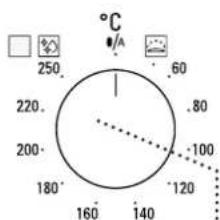
6
1. VÄELGEKNAP
natural_image
Illustration of a hand holding a tool with an arrow indicating rotation (no text or symbols present)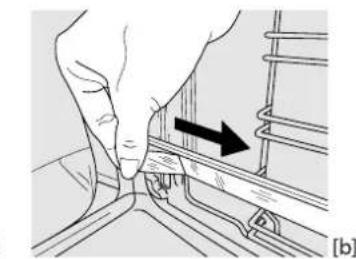
natural_image
Illustration of a hand pressing down on a mechanical component with an arrow indicating direction (no text or symbols present)UDTAGNING AF GLIDESKINNERNE [c]
![① ② [c] [d]](/content/2026/04/732511/images/93d55b940112e0a841a7eb63c2068cd7ccb8e0af2f504a195d0f81e4d73f7d4e.jpg)
FJERN OG ISÆT SKINNERNE
natural_image
Diagram of a mechanical component with an arrow indicating direction (no text or symbols present)natural_image
Illustration of three-step hands operating a device with a magnified view showing the process (no text or symbols)natural_image
Diagram of a mechanical assembly with a rectangular frame and directional arrow (no text or symbols)natural_image
Diagram showing a mechanical device with an inset close-up of a person's arm and foot, no text or symbols present.natural_image
Illustration of hands using a device to press or adjust a sheet of paper (no text or symbols visible)FEJLFINDING
natural_image
Pure electrical circuit lines without any symbols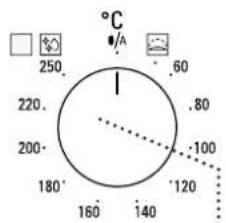
6
1. VALIKUNUPP
natural_image
Simple line drawing of a rectangular grid or panel with horizontal lines, no text or symbols present.natural_image
3D rendering of a rectangular tray with a shaded interior and a separate curved line on the right side (no text or symbols)natural_image
Simple line drawing of a square frame with a small curved bracket on the right side (no text or symbols)natural_image
Illustration of a hand holding a small object with an arrow indicating rotation (no text or symbols)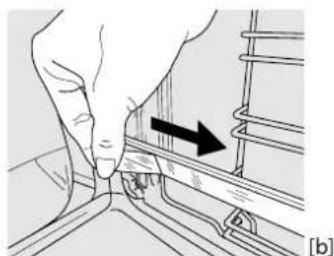
natural_image
Hand pressing a component into a rail track, showing a black arrow indicating direction (no text or symbols present)LIUGSIINIDE EEMALDAMINE [c]
![[c] [d] ① ②](/content/2026/04/732511/images/4ec32f5386e4f385436d6ec679edc5372411b6bad59ba07d5075507a585d6f00.jpg)
RIIULISIINIDE EEMALDAMINE JA TAGASI PAIGALDAMINE
natural_image
Diagram of a car seatbelt mechanism with an arrow indicating direction (no text or symbols present)natural_image
Illustration showing three-step steps of a hand holding a tablet, with no visible text or symbolsnatural_image
Diagram of a mechanical or electronic component with layered structure and directional arrow (no text or symbols)natural_image
Diagram showing a mechanical assembly with a slide and a chair, no text or symbols presentnatural_image
Illustration of hands using a tablet to interact with a screen (no text or symbols visible)RIKKEOTSING
KIITOS, ETTÄ OSTIT TUOTTEEMME.

natural_image
Pure electrical circuit lines without any symbols
6
1. VALINTANUPPI
natural_image
Simple line drawing of a rectangular plate with horizontal slats (no text or symbols)natural_image
3D rendering of a rectangular tray with a shaded interior and a separate U-shaped bracket (no text or symbols)natural_image
Simple line drawing of a square frame with a small curved line on the right side (no text or symbols)natural_image
Illustration of a hand holding a small object with an arrow indicating direction (no text or symbols present)
natural_image
Illustration of a hand adjusting a mechanical component with an arrow indicating direction (no text or symbols present)LIUKUKISKOJEN POISTAMINEN [c]
HYLLYKKÖOHJAIMIEN IRROTUS JA TAKAISIN ASETUS
natural_image
Diagram of a mechanical component with an arrow indicating direction (no text or symbols present)natural_image
Illustration showing three-step steps of a hand holding a tablet, with arrows indicating the process (no text or symbols present)natural_image
Diagram of a mechanical assembly with a rectangular frame and an arrow indicating direction (no text or symbols)natural_image
Diagram showing a mechanical assembly with an inset close-up of a device, no text or symbols presentnatural_image
Illustration of hands holding a tablet device with a scroll wheel (no text or symbols visible)VIANMÄÄRITYS
natural_image
Pure electrical circuit lines without any symbols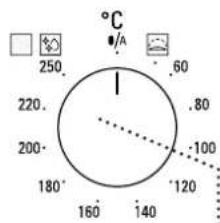
6
1. ATLASES SLĘDZIS
natural_image
Simple line drawing of a rectangular grid with horizontal lines, no text or symbols present.natural_image
3D rendering of a rectangular tray with a gray interior and a separate U-shaped bracket (no text or symbols)natural_image
Simple line drawing of a square frame with a small curved bracket on the right side (no text or symbols)natural_image
Illustration of a hand holding a small object with an arrow indicating rotation (no text or symbols present)
natural_image
Hand pressing a button on a mechanical component with an arrow indicating direction (no text or symbols)SLÍDOŠO SLIEČU IZNEMŠANA [c]
PLAUKTU STIPRINĀJUMU IZNEMŠANA UN ATKĀRTOTA IEVIETOŠANA
natural_image
Diagram of a car door handle with an arrow indicating direction (no text or symbols)natural_image
Illustration showing three-step steps of a hand holding a tablet, with no visible text or symbolsnatural_image
Diagram of a mechanical or electronic component with a rectangular frame and an arrow indicating direction (no text or symbols)natural_image
Diagram showing a mechanical assembly with a slide and a chair, no text or symbols presentnatural_image
Illustration of hands using a tablet to interact with a screen (no text or symbols visible)PROBLÉMU NOVĚRŠANA
natural_image
Pure electrical circuit lines without any symbols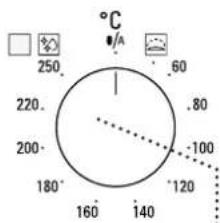
6
1. PASIRINKIMO RANKENËLË
natural_image
Simple line drawing of a rectangular grid-like structure with no text or symbolsnatural_image
3D rendering of a rectangular tray with a shaded interior and a separate corner bracket (no text or symbols)natural_image
Simple line drawing of a square frame with a small separate line below (no text or symbols)natural_image
Illustration of a hand holding a small object with an arrow indicating rotation (no text or symbols)
natural_image
Close-up of hands adjusting a mechanical component with an arrow indicating direction (no text or symbols)SLANKIOJANČIŲ GROTELIŲ IŠĖMIMAS [c]
SKERSINIŲ GROTELIŲ IŠĖMIMAS IR ĮSTATYMAS
natural_image
Diagram of a mechanical component with an arrow indicating direction (no text or symbols present)- Uždarykite dureles.
natural_image
Illustration of three-step hand manipulation process: holding a tablet, adjusting the mask, and adjusting the screen (no text or symbols)natural_image
Diagram of a mechanical assembly with a rectangular frame and an arrow indicating direction (no text or symbols)natural_image
Diagram showing a printer with a magnified view of its paper and a printer's side panel, no text or symbols present.natural_image
Illustration of hands using a tablet to interact with a screen (no text or symbols visible)TRIKČIŲ ŠALINIMAS
natural_image
Pure electrical circuit lines without any symbols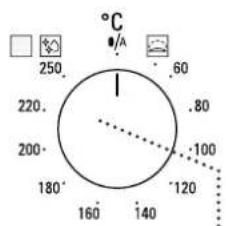
6
1. POKRETŁO WYBORU
natural_image
Simple line drawing of a rectangular grid with horizontal lines, no text or symbols present.natural_image
3D rendering of a rectangular tray with a shaded interior and a separate U-shaped outline on the right (no text or symbols)natural_image
Simple line drawing of a square frame with a small protrusion on the right side (no text or symbols)natural_image
Two metallic cylindrical metal bars with flanges, shown side by side (no text or symbols)natural_image
Hand holding a tool with an arrow indicating direction (no text or symbols present)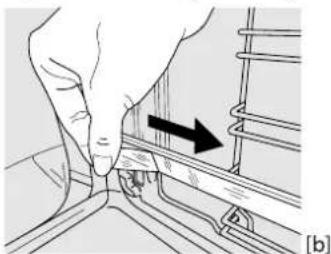
natural_image
Illustration of a hand pressing down on a rail track with an arrow indicating direction (no text or symbols)DEMONTAŻ PROWADNIC WYSUWANYCH [c]
PONOWNY MONTAŻ PROWADNIC WYSUWANYCH [d]
![① ② [c] [d]](/content/2026/04/732511/images/0aca3957ebc5573be6db0d14408285b3568616f6fa9e5c9dff5d69e96809b5b1.jpg)
WYJMOWANIE I PONOWNY MONTAŻ PROWADNIC PÓŁEK
FLEXI CLEAN PACK (PAKIET FLEXI CLEAN)

SMARTCLEAN
natural_image
Diagram of a car seatbelt mechanism with an arrow indicating direction (no text or symbols present)natural_image
Illustration of three-step robotic manipulation process: hand holding tablet, hand pressing a device, and hand holding screen (no text or symbols)natural_image
Diagram of a mechanical device with a rectangular frame and an arrow indicating direction (no text or symbols)natural_image
Diagram showing a mechanical device with an inset close-up of its component, no text or symbols presentnatural_image
Illustration of hands using a tool to interact with a tablet device (no text or symbols visible)ROZWIĄZYWANIE PROBLEMÓW
natural_image
Pure electrical circuit lines without any symbols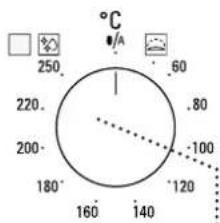
6
1. IZBIRNI GUMB
natural_image
Simple line drawing of a rectangular plate with horizontal slats (no text or symbols)natural_image
3D rendering of a rectangular tray with a gray interior and a separate curved line on the right side (no text or symbols)natural_image
Pure geometric diagram of a square frame with a small curved line below (no text or symbols)natural_image
Two metallic cylindrical metal bars with flanges, shown side by side (no text or symbols)natural_image
Illustration of a hand holding a tool with an arrow indicating rotation (no text or symbols present)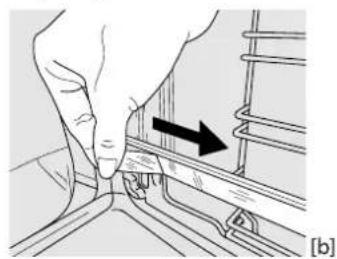
natural_image
Hand pressing a button on a rail track, showing a black arrow indicating direction (no text or symbols present)DEMONTAŽA DRSNIH VODIL [c]
ODSTRANJEVANJE IN PONOVNO VSTAVLJANJE VODIL
-
Če želite odstraniti vodila za pekače, čvrsto primite zunanji del vodila in ga potegnite proti sebi, tako da iz lukenj izvlečete nosilec in dva notranja zatiča.
-
Če želite vodila za pekače ponovno vstaviti, jih postavite blizu vdolbine in najprej v ustrezni luknji vstavite dva zatiča. Nato blizu ustrezne luknje postavite zunanji del, vstavite nosilec in močno pritisnite proti steni vdolbine tako, da se prepričate, da je vodilo pravilno pritrjeno.
FUNKCIJE

OBIČAJNA PRIPRAVA HRANE
natural_image
Diagram of a mechanical component with an arrow indicating direction (no text or symbols present)- Vrata zaprite, kolikor je mogoče.
natural_image
Illustration showing three-step steps of a hand holding a tablet, with no visible text or symbols.natural_image
Diagram of a mechanical assembly with a rectangular frame and an arrow indicating direction (no text or symbols)natural_image
Diagram showing a mechanical device with an inset close-up of a hand operating a workpiece (no text or symbols present)- Ponovno namestite zgornji rob: će zaslišite klik, to pomeni, da se je rob pravilno zaskočil. Prepričajte se, da je tesnilo na pravem mestu, preden namestite vrata.
natural_image
Illustration of hands using a tool to cut or spread a printed document (no text or symbols visible)ODPRAVLJANJE TEŽAV
natural_image
Pure electrical circuit lines without any symbols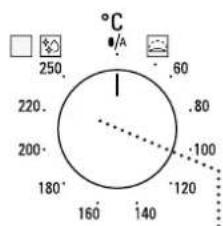
6
1. VÄLJARRATT
natural_image
Simple line drawing of a rectangular grid or panel with a top bracket (no text or symbols)natural_image
3D rendering of a rectangular tray with a gray inner area and a separate U-shaped outline on the right (no text or symbols)natural_image
Pure geometric diagram of a square frame with a small curved line below (no text or symbols)natural_image
Illustration of a hand holding a tool with an arrow indicating rotation (no text or symbols present)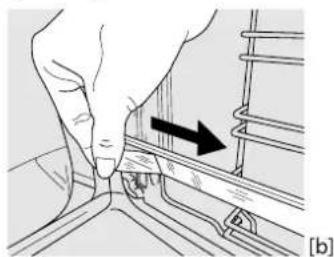
natural_image
Illustration of a hand turning a component with an arrow indicating direction (no text or symbols)TA BORT UTDRAGSSKENORNA [c]
![[c] [d] ① ②](/content/2026/04/732511/images/d80a10a16f3d684eeab18f03214386de914e68c7dcc14aee00c0de806cce4d92.jpg)
TA BORT OCH SÄTTA TILLBAKA SIDOSTEGARNA
natural_image
Diagram of a mechanical component with an arrow indicating direction (no text or symbols present)natural_image
Illustration showing three-step steps of a hand holding a tablet, with no visible text or symbolsnatural_image
Diagram of a mechanical or electronic component with a rectangular frame and directional arrow (no text or symbols)natural_image
Diagram showing a mechanical assembly with an arrow indicating direction and a magnified inset of a device (no text or symbols present)natural_image
Illustration of hands using a tool to interact with a tablet device (no text or symbols visible)FELSÖKNING
natural_image
Close-up of blue fabric with a medical device labeled 'BLAUPUKT' inserted into a pocket (no other text or symbols visible)