BT Drive Free 414 - Built-in kit BLAUPUNKT - Free user manual and instructions
Find the device manual for free BT Drive Free 414 BLAUPUNKT in PDF.



User questions about BT Drive Free 414 BLAUPUNKT
0 question about this device. Answer the ones you know or ask your own.
Ask a new question about this device
Download the instructions for your Built-in kit in PDF format for free! Find your manual BT Drive Free 414 - BLAUPUNKT and take your electronic device back in hand. On this page are published all the documents necessary for the use of your device. BT Drive Free 414 by BLAUPUNKT.
USER MANUAL BT Drive Free 414 BLAUPUNKT
natural_image
Color gradient bar transitioning from dark gray to white, no text or symbols present

BLAUPUNKT
BT DRIVE FREE 414 1 021 404 414 001 BT CAR KIT
natural_image
Black Blaupart device with circular vent and handle (no visible text or symbols)BT Drive Free 414....3
natural_image
Diagram showing a mechanical component with an inset close-up of its circular feature (no text or symbols)


Übersicht
text_image
2.024.06.7natural_image
Line drawing of a mechanical component with a central shaft and circular base (no text or symbols)DEUTSCH
text_image
NFC-Sensor8
01 BTDriveFree414 de.indd 8-9


DEUTSCH
BT Drive Free 414....16
Bluetooth technology....17
Safety and general information 17
Disposal notes 18
Scope of delivery 18
Installation on the steering wheel 18
Overview 19 Battery information 10
Battery information....19 Charging the battery....20
Charging the battery....20 Switching on/off 21
Registering (pairing) and connecting with the cell phone 21
Multi-connection function....23
Establishing a connection with two cell phones 23
Using the BT Drive Free 414....24
Resetting the BT Drive Free 414 26
Light indicators and signal tones 26
Fault removal 27
Declaration of conformity 27
Warranty 27
Technical data....28
BT Drive Free 414
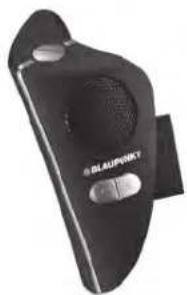
This wireless Bluetooth hands-free system was developed specifically for users who want to use their cell phone while driving. The BT Drive Free 414 is conveniently attached to the steering wheel. The multi-connection function allows the simultaneous use of the BT Drive Free 414 with two cell phones. Its improved microphone system and DSP technology for echo cancelling and noise suppression achieve an excellent hand-free quality.
Bluetooth technology
Bluetooth ^™ is a registered trademark of Bluetooth SIG, Inc. Bluetooth is a wireless communication technology with short range. It enables wireless connections between all compatible portable and stationary communication devices. The technology is based on a radio connection that ensures a fast and reliable transmission of voice and data information.
Bluetooth is oriented to the worldwide applicable standard for operating in the internationally recognised ISM frequency band (Industrial Scientific & Medical). Within the ISM band (2.4 GHz to 2.48 GHz), the Bluetooth transmission operates 1600 times per second between 79 different frequencies with a data transmission range of up to 10 metres (Class 2).
Safety and general information
- Carefully read the operating instructions and follow the instructions.
- Observe all locally applicable laws for the use of cell phones and hands-free systems while driving. Operate the BT Drive Free 414 only if the traffic situation allows it and you are not creating a risk for other traffic participants.
- To avoid any damages and malfunctions, do not drop the device from an elevated height.
- Protect the device against humidity, water and other liquids. If the device should have been exposed to water, humidity or other liquids, do not use it since it may lead to damages of the device and to injuries from electrical shock or explosion.
- Do not expose the device to extreme heat sources, such as direct sunlight. This can cause explosions as well as reduce the performance and/or service life of the battery.
- Do not make any changes or repairs to the device and do not attempt to disassemble it. (Particularly not on the battery since the risk of explosion exists.) It will immediately void the warranty.
- Do not place any heavy objects on the device.
- Use only the supplied charger.
- Repairs and service work may be performed only by a qualified service centre or the manufacturer.
- In case of extended non-use or thunderstorms, disconnect the device from the power supply.

Disposal notes

Use the return and collection systems available to dispose of the old device.
Scope of delivery
The scope of delivery includes:
- BT Drive Free 414
- 12-volt DC vehicle charger adapter
- USB charger cable
- Operating instructions
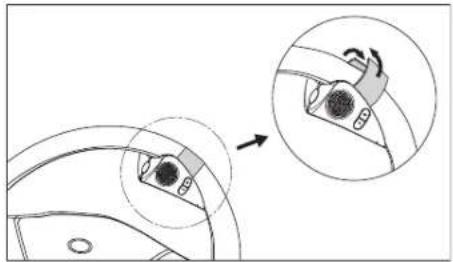
Installation on the steering wheel
Fasten the BT Drive Free 414 to the steering wheel using the Velcro strap. Firmly pull the Velcro strap together so that the device will not loosen while driving. Attach the BT Drive Free 414 to the inside circle of the steering wheel and select a position so that it does not interfere with steering the vehicle.
Warning: The BT Drive Free 414 may not be positioned within the deployment area of an air bag.
natural_image
Diagram showing a mechanical component with an inset close-up view of a circular feature (no text or symbols)18 19
02 BTDriveFree414 gb.indd 18-19


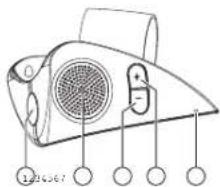
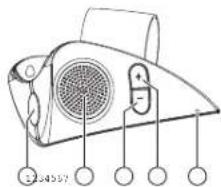
Overview
text_image
22.64557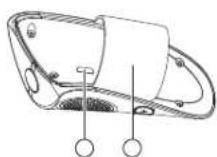
ENGLISH
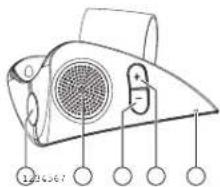
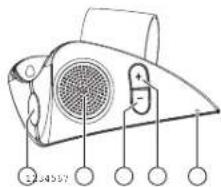
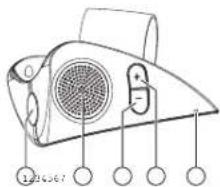
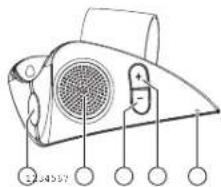
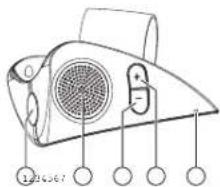
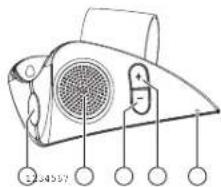
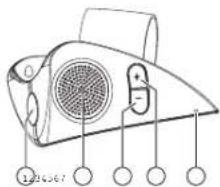
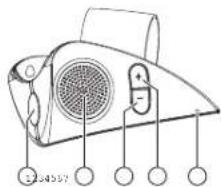
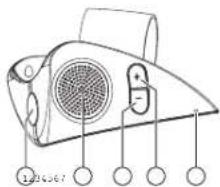
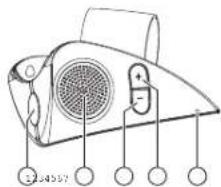
① MF button (illuminated multifunction button)
② Loudspeaker
③ Decrease volume (−)
④ Increase volume (+)
⑤ Microphone
⑥ Charging socket (micro USB port)
⑦ Velcro strap for fastening to the steering wheel
Battery information
The device is equipped with an integrated lithium-polymer battery. The battery cannot be replaced. Do not attempt to remove the battery from the device since it would damage the device. The full performance of a new battery is not achieved until after two or three complete charging-discharging cycles. The battery can be charged and discharged several hundred times, but it looses its capacity over time.
Disconnect the BT Drive Free 414 from the power supply as soon as the battery is fully charged, since overcharging would reduce the service life of the battery. A charged battery looses its capacity if it is not used.
Important: Ensure that the battery is fully charged if you do not use the device for a longer period of time. To avoid a complete discharge of the battery, the BT Drive Free 414 should be charged at least every 2 months.
19.11.14 11:42

Charging the battery
The BT Drive Free 414 is operated with a rechargeable battery. Charge the battery completely before its first use. Read the section "Battery information" before starting the charging process.
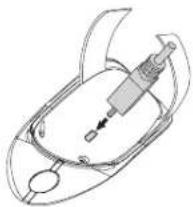
You have to remove the BT Drive Free 414 from the steering wheel for the charging procedure. The charging socket is located at the side of the housing that rests against the steering wheel. Connect the BT Drive Free 414 with the vehicle charging adapter via the USB cable. Insert the vehicle charging adapter into the cigarette lighter of the vehicle. The BT Drive Free 414 can also be charged with the USB cable connected to the computer.
Note: As soon as the charger is connected, the BT Drive Free 414 switches off.
natural_image
Line drawing of a mechanical device with no visible text or symbolsDuring the charging process, the MF button lights red. After the battery is fully charged, the MF button lights blue. The charging process of the battery lasts approx. 3 hours. Disconnect the BT Drive Free 414 from the charger after it has been charged.
A completely charged battery supports a talk time of up to 7 hours and a standby time of up to 300 hours. If the charge state of the battery becomes low, the MF button flashes red every 3 seconds and you hear a warning beep every 60 seconds.
20
02 BTDriveFree414 gb.indd 20-21


Switching on/off
Switching on
To switch the unit on, press the MF button for approx. 3 seconds until you hear a high-pitched signal tone and the MF button lights blue. Afterwards, the MF button lights blue and the device is switched on.
Switching off
To switch the unit off, press the MF button for approx. 3 seconds until you hear a low-pitched signal tone and the MF button lights red. Afterwards, the device is switched off.

Registering (pairing) and connecting with the cell phone
Before you can use the BT Drive Free 414, you must register and connect it with a Bluetooth-ready cell phone. Registering is a one-time process and required only for the first connection with the cell phone. The BT Drive Free 414 can be registered with up to eight cell phones and be connected simultaneously with two cell phones.
NFC smart pairing
The NFC smart pairing procedure is available for BT Drive Free 414 to make the pairing much simply and quickly.
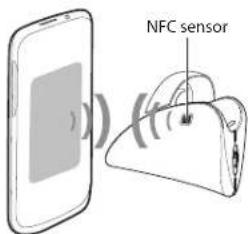
Please ensure that your mobile phone's OS version is Android 4.1, Windows 8, Blackberry 7.0 or upper. The NFC sensor usually locates at the back of phone.
- Please enable the NFC function in the setting menu of your phone first. - Unlock your phone's screen to enable NFC detection, and touch the NFC sensor area of BT Drive Free 414 to the back side of mobile phone. The mobile phone will emit tone prompt if detect the speaker closing, and the BT Drive Free 414 will turn on and enter pairing mode automatically.
text_image
NFC sensor21
19.11.14 11:42

- Confirm the pairing request on the phone screen, then pairing will complete. Otherwise, please follow the general steps to complete pairing procedure.
General procedure
- Hold the BT Drive Free 414 within range of a Bluetooth-ready cell phone; the distance should not exceed a metre.
- The BT Drive Free 414 must be switched off.
- Press the MF button for approx. 6 seconds until you hear a low-pitched signal tone and the MF button intermittently fl ashes red and blue. The device is in registration mode.
- Activate the Bluetooth function of the cell phone and start the search for Bluetooth devices. (For further details, please read the operating instructions of your cell phone).
- From the list of devices found, select the "BT DF 414".
- If required, enter the PIN code "0000" and confirm the entry. If the pairing process was successful, you hear a signal tone and the MF button lights blue for 3 seconds. (Note: The PIN code is preprogrammed and cannot be changed.)
- After registering, the BT Drive Free 414 automatically connects with the cell phone. For some cell phones, you have to manually confirm the connection. Next, the BT Drive Free 414 changes to standby mode and the MF button fl ashes blue every 3 seconds.
Note: If the registering is not completed within 2 minutes, the BT Drive Free 414 switches off again. In this case, repeat the registering.


Multi-connection function
The multi-connection function allows the simultaneous use of the BT Drive Free 414 with two cell phones. This is advantageous for users with a personal and a business cell phone.
Establishing a connection with two cell phones
There are several options of connecting the BT Drive Free 414 with already registered cell phones.
- Automatic connection
When switching on the BT Drive Free 414, a connection is automatically established with the two most recently connected cell phones.
- Establishing a connection via the BT Drive Free 414
To manually establish a connection between the BT Drive Free 414 and the two most recently connected cell phones, press the MF button. The BT Drive Free 414 first connects itself with the most recently connected cell phone. Then it connects itself with the next most recently connected one.
- Establishing a connection via the cell phone
If the cell phone is not one of the two most recently connected cell phones with the BT Drive Free 414, you have to establish the connection via the Bluetooth menu of the cell phone. After successful connection, you can establish another connection with a second cell phone. This allows you to determine the sequence of connections.
If two cell phones are connected with the BT Drive Free 414, the cell phone connected fi rst is the fi rst device and the other one the second device. Another connection can be established only after fi rst disconnecting one of the two cell phones. The cell phone which is still connected afterwards becomes the fi rst device in the sequence.
Note that voice dialing is available only for the first device and the operation for redialling the last number differs for the first and the second device. The other functions are executed the same way using the BT Drive Free 414 as a connection with only one cell phone.
22 23
02 BTDriveFree414 gb.indd 22-23

19.11.14 11:42



Using the BT Drive Free 414
After successfully completing the registration and charging the battery, the following functions can be executed:
Making a call
- Voice dialing\*
To activate voice dialing, briefly press the MF button. You hear several signal tones. After the signal tone, speak the voice command. After the voice command has been recognized, the cell phone dials the number associated with it.
Note: If two cell phones are connected with the BT Drive Free 414, the voice commands are directed only to the cell phone connected first.
- Redialling the last number\*
Press the MF button twice. You hear a signal tone and the number dialled last is being redialled.
Note: If two cell phones are connected with the BT Drive Free 414, hold the "-" button pressed for 2 seconds to dial the last number of the cell phone connected last.
- Call origination via cell phone
Select the desired number as usual via the cell phone. The call is automatically transferred to the BT Drive Free 414.
Answering a call
To answer an incoming call, briefly press the MF button.
Ending a call
Briefly press the MF button to end a call.
Rejecting a call\*
To reject a call, hold the MF button pressed until you hear a signal tone.
Adjusting the volume
During a phone call, adjust the volume with the buttons "+" and "-"
Muting the microphone
To mute the microphone during a call, press the "-" button for 3 seconds. The MF button flashes red every 10 seconds and you hear two signal tones. Press the "-" button again for 3 seconds to cancel mute.
Transferring a call
To transfer a call from the BT Drive Free 414 to the cell phone, press the buttons "+" and "-" at the same time. Repeat the step to transfer the call back to the BT Drive Free 414.
Note: With some cell phones, the connection is disconnected if you transfer the call to the cell phone. To transfer the call back to the BT Drive Free 414, you have to press the MF button instead of the buttons "+" and "-"
Managing calls\*
You can answer and manage two calls on one of the connected cell phones via the BT Drive Free 414.
| You receive a call during an active call | |
| Hold the active call and answer the incoming call. | Press the MF button for 2 seconds. |
| End the active call and answer the incoming call. | Briefly press the MF button. |
| Continue the active call and reject the incoming call. | Press the MF button twice. |
| You are conducting two calls, an active one and one on hold | |
| Change between the active call and the one on hold. | Press the MF button for 2 seconds. |
| End the active call and answer the call on hold. | Briefly press the MF button. |
| Continue the active call and end the call on hold. | Press the MF button twice. |
| Continue the active call and answer the call on hold. | Briefly press the "+" button |
Note: You do not have the option of managing several calls from two connected cell phones at the same time. When you receive a call on one cell phone while a call is active on the other cell phone, the active call is being ended when you answer the incoming call by briefly pressing the MF button.
Audio streaming
The BT Drive Free 414 supports the A2DP function. With an audio streaming connection, you can playback the music titles stored on the cell phone via the BT Drive Free 414. In case of a call, the music playback is interrupted and continued again after the call.
* The cell phone must support this function. You find the pertinent information in the operating instructions of the cell phone.

Resetting the BT Drive Free 414
The BT Drive Free 414 can be registered with up to eight cell phones. You can delete the registration list and reset the hands-free system to the factory settings.
- The BT Drive Free 414 must be switched on and no connection may exist to a cell phone.
- Press and hold down the "+" and "-" buttons simultaneously for approx. 10 seconds until the MF button intermittently flashes lights red and blue.
- If the registration list was deleted, the MF button stops flashing intermittently.
- After the next switch-on, the BT Drive Free 414 is in registration mode.
Light indicators and signal tones
| Device status MF button Signal tones | ||
| Switching on Lights | blue for 3 seconds 1 high-pitched | sound |
| Switching off Lights | red for 3 seconds 1 low-pitched | sound |
| Registration mode Flashes red and blue alternately | ||
| Standby mode without connection | Flashes blue once every 3 seconds | |
| Standby mode with connection | Lights blue every 3 seconds | |
| Incoming call Flashes blue | ||
| Active call Flashes blue once every 2 seconds | ||
| Mute Flashes red once every 10 seconds 2 tones every | 10 seconds | |
| Low battery | Flashes red once every 3 seconds | 5 tones every 60 seconds |
| Battery is charging | Lights red. Lights blue after the battery is fully charged. | |
26 27
02 BTDriveFree414 gb.indd 26-27


Fault removal
If a connection between the BT Drive Free 414 and a cell phone cannot be established, observe the following:
– Ensure that the battery is charged.
– Ensure that the Bluetooth function of the cell phone is activated. You find more detailed information in the operating instructions of the cell phone.
– Check whether the BT Drive Free 414 is connected with the cell phone.
- Ensure that the distance between the BT Drive Free 414 and a registered cell phone is less than 10 metres and that no obstacles are between the two devices. Obstacles can interfere with the transmission or reduce the range.
– If none of these measures is successful, please contact the service department of your distributor.
- The BT Drive Free 414 meets the Bluetooth specification v4.0. The flawless function between the BT Drive Free 414 and Bluetooth-ready cell phones from different manufacturers and of different types cannot be guaranteed since it depends on the compatibility.
Declaration of conformity
The Blaupunkt Technology GmbH declares that this product complies with the basic requirements and the other relevant regulations of the directive 1999/5/EC. The declaration of conformity can be found on the Internet under www.blaupunkt.com.
Warranty
We provide a manufacturer's warranty for products bought within the European Union. For devices purchased outside the European Union, the warranty terms issued by our respective responsible domestic agency are valid. The warranty terms can be called up from www.blaupunkt.com.
19.11.14 11:42

Technical data
| Bluetooth speci cation Version 4.0 | |
| Supported Bluetooth profi les HSP | (Headset Profi le), HFP (Hands-Free Profi le) and AZDP (Advanced Audio Distribution Profi le) |
| Frequency range 2.4 to 2.48 GHz ISM band | |
| Bluetooth range Up to 10 metres (Class 2) | |
| Dimensions 46 (L) x 36 (W) x 95 (H) mm | |
| Weight approx. 40 g | |
| Battery charging time | approx. 3 hours |
| Talk time | up to 7 hours |
| Standby time | up to 300 hours |
| Battery type | Lithium-polymer, 3.7 V, 160 mAh,rechargeable, non-replaceable |
| Charger | 5 V - 6 V DC, 300 mA |


Table des matières
natural_image
Diagram showing a mechanical component with an inset close-up of its circular feature (no text or symbols)


Vue d'ensemble
text_image
2.016.06.7natural_image
Diagram of a mechanical device with a central shaft and circular base (no text or symbols)FRANCIALS

BT Drive Free 414....42
natural_image
Diagram showing a mechanical component with an inset close-up view of its internal structure (no text or symbols)44 45
04 BTDriveFree414 es.indd 44-45


Vista de conjunto
text_image
22.64557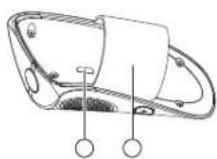
natural_image
Line drawing of a mechanical component with no visible text or symbolstext_image
Sensor NFC19.11.14 11:45

natural_image
Diagram showing a mechanical component with an inset close-up of a circular feature (no text or symbols)PORTUGUÊS




Visão geral
text_image
2.016.06.7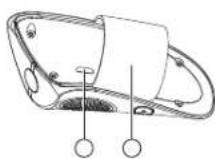
natural_image
Line drawing of a mechanical device with no visible text or symbolstext_image
Sensor NFCBT Drive Free 414....68
Tecnologia Bluetooth....69
natural_image
Diagram showing a mechanical component with an arrow indicating motion, no text or symbols present70 71
06 BTDriveFree414 it.indd 70-71


Panoramica
text_image
22.64557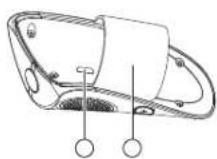
natural_image
Line drawing of a mechanical component with no visible text or symbolsnatural_image
Diagram showing a mechanical component with an inset close-up of its circular feature (no text or symbols)NEDERLANDS
19.11.14 11:50



Overzicht
text_image
2.016.06.7natural_image
Line drawing of a mechanical device with no visible text or symbolsBT Drive Free 414....94
natural_image
Diagram showing a mechanical component with an inset close-up of its internal structure (no text or symbols)96 97
08 BTDriveFree414 sf.indd 96-97


SUOMI
Yleiskatsaus
text_image
32.54557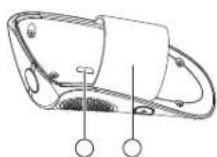
natural_image
Technical line drawing of a mechanical component with no visible text or symbolsnatural_image
Diagram showing a mechanical component with an inset close-up view of a circular feature (no text or symbols)

19.11.14 11:53



Budowa ogólna
text_image
2.024.06.7natural_image
Line drawing of a mechanical component with a central shaft and circular base (no text or symbols)POLSKI
natural_image
Diagram showing a device with a magnified inset view of its internal components (no text or symbols)122 1|23
10 BTDriveFree414 hu.indd 122-123


Áttekintés
text_image
32.54557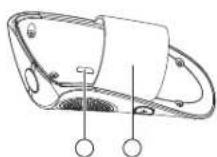
natural_image
Line drawing of a mechanical device with internal components and a central shaft (no text or symbols)natural_image
Diagram showing a device with a magnified inset view of its internal components (no text or symbols)ROMANANA




Vedere de ansamblu
text_image
2.036.06.7natural_image
Line drawing of a mechanical device with no visible text or symbols
text_image
Senzor NFCnatural_image
Diagram showing a mechanical component with an arrow indicating motion, no text or symbols present148 149
12 BTDriveFree414 bg.indd 148-149


Описание
text_image
22.64557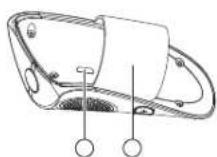
natural_image
Line drawing of a mechanical device with a handle and internal components (no text or symbols)All following FCC statements are valid for the Industry Canada Standard (IC) as well.
General
Interference Warning: (according to FCC part 15.19)
This device complies with Part 15 of the FCC Rules. Operation is subject to the following two conditions:
(1) this device may not cause harmful interference, and
(2) this device must accept any interference received, including interference that may cause undesired operation
Caution: (pertaining to FCC part 15.21)
Modifi cations not expressly approved by this company could void the user's authority to operate the equipment.
Запазено право за изменения!
12 BTDriveFree414 bg.indd 158-159
159158
19.11.14 12:01