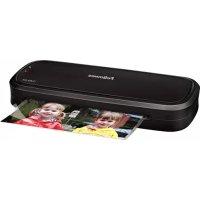
L80 A4 - Laminating machine FELLOWES - Free user manual and instructions
Find the device manual for free L80 A4 FELLOWES in PDF.



Frequently Asked Questions - L80 A4 FELLOWES
User questions about L80 A4 FELLOWES
0 question about this device. Answer the ones you know or ask your own.
Ask a new question about this device
Download the instructions for your Laminating machine in PDF format for free! Find your manual L80 A4 - FELLOWES and take your electronic device back in hand. On this page are published all the documents necessary for the use of your device. L80 A4 by FELLOWES.
USER MANUAL L80 A4 FELLOWES
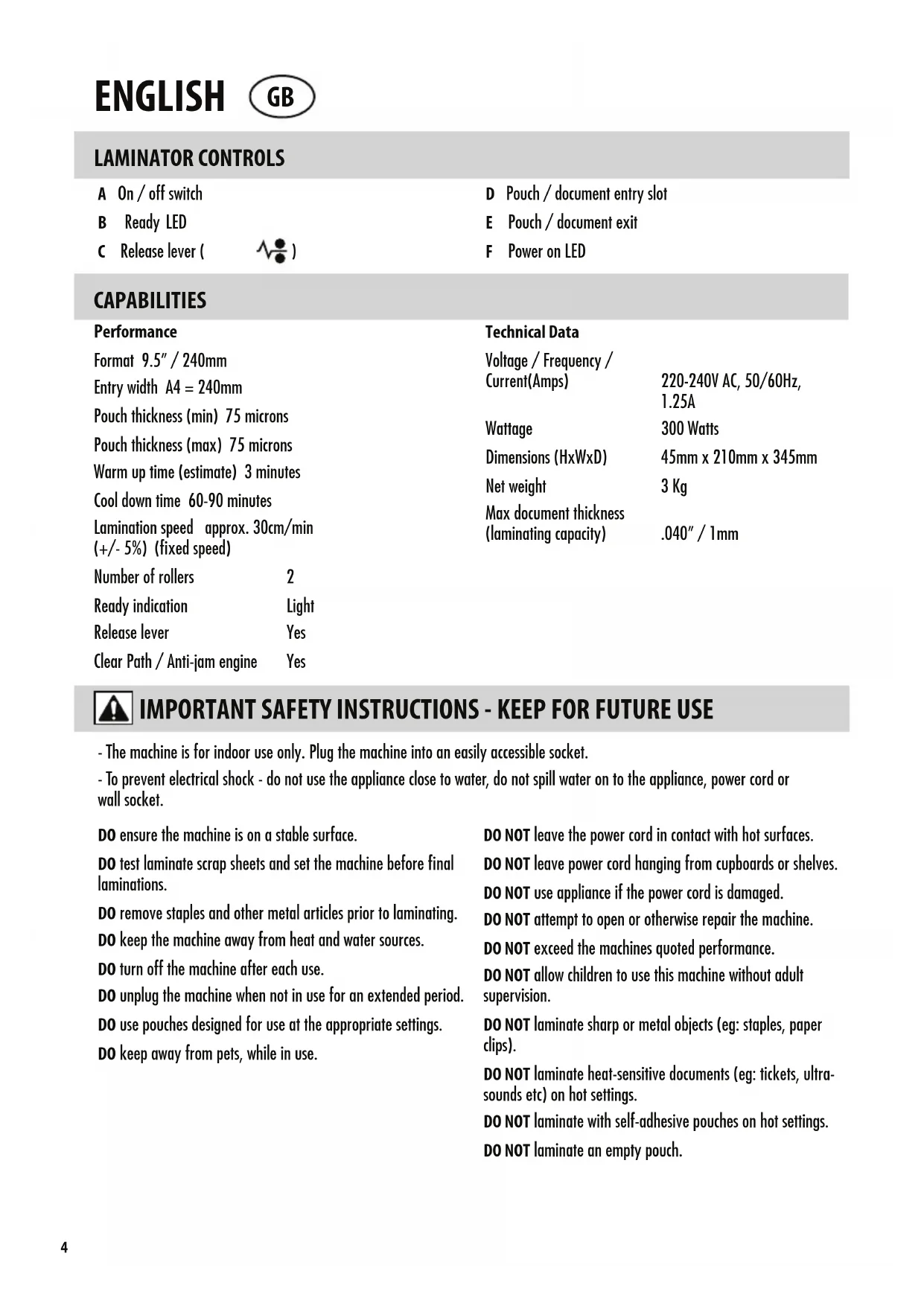
E Pouch / document exit
F Power on LED
CAPABILITIES
| Performance | Technical Data | ||
| Format 9.5" / 240mm | Voltage / Frequency / Current(Amps) | 220-240V AC, 50/60Hz, 1.25A | |
| Entry width A4 = 240mm | |||
| Pouch thickness (min) 75 microns | Wattage | 300 Watts | |
| Pouch thickness (max) 75 microns | Dimensions (HxWxD) | 45mm x 210mm x 345mm | |
| Warm up time (estimate) 3 minutes | Net weight | 3 Kg | |
| Cool down time 60-90 minutes | Max document thickness (laminating capacity) | .040" / 1mm | |
| Lamination speed approx. 30cm/min (+/- 5%) (fixed speed) | |||
| Number of rollers | 2 | ||
| Ready indication | Light | ||
| Release lever | Yes | ||
| Clear Path / Anti-jam engine | Yes | ||

IMPORTANT SAFETY INSTRUCTIONS - KEEP FOR FUTURE USE
- The machine is for indoor use only. Plug the machine into an easily accessible socket.
- To prevent electrical shock - do not use the appliance close to water, do not spill water on to the appliance, power cord or wall socket.
DO ensure the machine is on a stable surface.
DO test laminate scrap sheets and set the machine before final laminations.
DO remove staples and other metal articles prior to laminating.
DO keep the machine away from heat and water sources.
DO turn off the machine after each use.
DO unplug the machine when not in use for an extended period.
DO use pouches designed for use at the appropriate settings.
DO keep away from pets, while in use.
DO NOT leave the power cord in contact with hot surfaces.
DO NOT leave power cord hanging from cupboards or shelves.
DO NOT use appliance if the power cord is damaged.
DO NOT attempt to open or otherwise repair the machine.
DO NOT exceed the machines quoted performance.
DO NOT allow children to use this machine without adult supervision.
DO NOT laminate sharp or metal objects (eg: staples, paper clips).
DO NOT laminate heat-sensitive documents (eg: tickets, ultra-sounds etc) on hot settings.
DO NOT laminate with self-adhesive pouches on hot settings.
DO NOT laminate an empty pouch.
FEATURES & TIPS

'Release' function
To remove or re-align a pouch during lamination, activate the release lever located on the back of the machine. The pouch can only be removed from the entry slot when the lever is activated.
Auto Shut Off
After 30 minutes the machine will automatically go in to Auto Shut Off mode. The Power LED will flash red for 5 minutes and then turn off. The ready LED will turn off. To continue using the machine press the ON/OFF switch. The machine will reset itself.
- For best results, use Fellowes® brand pouches: 75 micron.
This machine does not need a carrier to laminate. It is a carrier-free mechanism.
Always put the item to be laminated into the appropriate sized pouch.
Always test laminate with a similar size and thickness before final process. - Prepare pouch and item for lamination. Place item within pouch centred and touching the leading sealed edge. Ensure the pouch is not too large for the item.
If required, trim excess material from around the item after lamination and cooling.
SETTING UP THE LAMINATOR
- Ensure the machine is on a stable surface.
-
Check there is enough clear space (min 50cm) behind the machine to allow items to pass through freely.
-
Plug the machine into an easily accessible socket.
HOW TO LAMINATE
- Switch the power on (located at the side of the machine).
- The red 'Power on' lamp will light up. The machine is now heating up.
- When the machine is ready, the green 'Ready' lamp will remain on.
-
Place the document into the open pouch. Ensure the document is centred against the sealed edge. Use the appropriate pouch size for the document.
-
Ensure the pouch enters the machine sealed edge first. Keep the pouch straight and central within the slot, not on an angle. Use the entry markings as a guide.
- Upon exit, the laminated pouch may be hot and soft. To prevent jamming remove the pouch immediately. Place pouch on to a flat surface to cool. Take care when handling a hot pouch.
- To release a pouch during lamination, activate the release lever located on the back of the machine. Gently pull pouch out of machine.
NEED HELP?
Let our experts help you with a solution.
Customer Service... www.fellowes.com
Always call Fellowes before contacting your place of purchase, see the rear cover for contact details.
Consider registering your machine at www.fellowes.com/register to receive updates and additional information.
TROUBLESHOOTING
| Problem Possible cause Solution | ||
| No 'power on' lamp (red LED) Machine not switched on Switch on machine at the side and at the wall socket | ||
| No 'ready' lamp after a long period (green LED) | Machine is in a hot or humid area Move the | machine to a cooler and dry area |
| The Power LED is flashing red and the Luminator has gone in to Auto Shut Off mode | Press the ON/OFF switch. The machine will reset itself | |
| The ready lamp (green) and the Power LED (red) have turned off | The luminator is in Auto Shut Off mode | Press the ON/OFF switch. The machine will reset itself |
| Pouch does not completely seal the item Item may be too thick to laminate | Maximum document thickness equals 0.040" / 1mm | |
| Pouch has waves or bubbles Pouch thickness may be incorrect Laminator accepts 75 mic on pouches | ||
| Pouch is lost in the machine Pouch is jammed | Press release lever and pull out the item by hand | |
| Jamming | Pouch was used 'open end' first | |
| Pouch was not centred on entry | ||
| Pouch was not straight upon entry | ||
| Empty pouch was used | ||
| Pouch is damaged after lamination Damaged rollers or adhesive on rollers | Pass cleaning sheets through the machine to test and clean rollers | |
STORAGE & CLEANING
Switch off the machine at the wall. Allow the machine to cool. The outside of the machine can be cleaned with a damp cloth. Do not use solvents or flammable materials to polish the machine. Cleaning sheets can be purchased for use with the machine. When the machine is warm - run the sheets through the machine to clean any residue off the rollers. For optimum performance, it is recommended that cleaning sheets are used with the machine regularly. (Cleaning sheet order code #5320604).
PRODUCT REGISTRATION / WORLDWIDE WARRANTY
Thank you for purchasing a Fellowes product. Please visit www.fellowes.com/register to register your product and benefit from product news, feedback and offers. Product details can be found listed on the rating plate positioned on the rear side or underside of the machine. Fellowes warrants all parts of the laminator to be free of defects in material and workmanship for 1 year from the date of purchase by the original consumer. If any part is found to be defective during warranty period, your sole and exclusive remedy will be repair or replacement, at Fellowes' option and expense, of the defective part. This warranty does not apply in cases of abuse, mishandling or unauthorised repair. Any implied warranty, including that of merchantability or fitness for particular purpose, is hereby limited in duration to the appropriate warranty period set forth above. In no event shall Fellowes be liable for any consequential damages attributable to this product. This warranty gives you specific legal rights. You may have other legal rights that vary from this warranty. The duration, terms and conditions of this warranty are valid worldwide, except where different limitations, restrictions or conditions may be required by local law. For more details or to obtain services under this warranty, please contact Fellowes or your dealer.
Australia Residents Only:
Our goods come with guarantees that cannot be excluded under the Australian Consumer Law. You are entitled to a replacement or refund for a major failure and for compensation for any other reasonably foreseeable loss or damage. You are also entitled to have the goods repaired or replaced if the goods fail to be of acceptable quality and the failure does not amount to a major failure. The benefits under Fellowes' Warranty are in addition to other rights and remedies under a law in relation to the machine.
W.E.E.E.
This product is classified as Electrical and Electronic Equipment. Should the time come for you to dispose of this product please ensure that you do so in accordance with the European Waste of Electrical and Electronic Equipment (WEEE) Directive and in compliance with local laws relating to this directive.
For more information on the WEEE Directive please visit www.fellowes.com/WEEE
COMMANDES DE LA PLASTIFIEUSE
45mm x 210mm x 345mm
Waga netto
3 kg
B INHdNKaTOp roTOBHOCTN
C PbIaIocB6oxKeHHa

D OTeBpCTne InnaIpaun naKeTa/ DOKyMeHTa
E OTBepTne BbIXOda naKaTea/DOkymeHTa
F INdikatop nTaHn
TEXHNUECKNE BO3MOXHOCTN
Pa6oue xapaKTepeNCTnKu
ΦopMaT 240MM/9,5
BxOHaA uHnHa A4=240MM
ToIuHa naketa (MnH.) 75 MmKpO
ToIunHa naketa (MaKc.) 75 MmKpOH
BpemHaRpeBa (npHmepHo) 3 MnHytbi
Bpemoxnaxkden 60-90MmhyT
Ckopoocb
IamHnpoBaHn np6n.30cm/MnH
HnDnKaunrI rTOBHOCTn CBeTobOu CNHa
PbIarocbo6oxdeHn
Функця
npedotbpaaenea3amatna Da
TexHmueckne daHHbIe
Hannnne nntanna /yactota/
CUNa ToKa (AMnepbI) 220-240B
220—240B
nepemehhoro toka,
50/60ΓU,1,25A
MoUHocTb 300BaTT
Pa3Mepbl (BxUxΓ) 45 MM x 210 MM x 345 MM
Macca HeTTo 3Kr
MaKc.ToIuHa DoKymeHtA
(napameTpbI naMnHinpoBaHna)
1MM/0,04甲玛

BAKHBIE INHCTPYKUINIIO TEXHNIK E30NACHOCTN — COXPAHHTb IJIY NCIIOJIb3OBAHNA B DAJIbHEIMJEI PA5OTE
- UcpoiCTBa npedHa3HaueHO ToIbKO IaIg 3KcPiYatauIN B NOMEueHInx. BkIouTe yctpoiCTBO B IerkoDocTyHyO p03ETky.
-Bo n36eJHnne npaKeHnna 3NeKtpueckm TOKOM He noJIb3yIteCb yCTpoiCBOM B HenOpceIcTBeHHoB 6n30ctu OT Bobl, a TaKke n36eraTne InonaHaHnBaObl Ha yCTpoiCTBO, UHyp PNTaHnN B HAcTeHHU OPO3eKy.
YCTAHOBNTE yCTPOBCTBO Ha yCTOuHBOI NOBepxHocTN.
PPOBEPAIte KaueCTBO JAMMHINPOBaHnHa YeepHOBbIX JInCTax, HAcTpaINBaIte yCTpOcHTBO IpeE IIOcNeHIM (YNCTOBbIM) 3TaIOM JAMMHINPOBaHn.
YDAJIATECKo6bI INpyrHeMeTaJIINueckNe DeTaJIIN nepeJHaJaIOM JAMMHINPOBaHn.
XPAHNTYcTPOIcTB0OTDeIbHOOTNCTOuHKnOBTeNaBlaRn.
BbIKIOAHTE yCTPOIcTBO nOcNE 3aEBPeHnpa6oTbI.
OTKJIOUAYTE yCTPOIcTB0 OT 3NeKTpocTeH BO BpeM JNTeJIbHOrnpoCTOJ.
NcNOJb3yIe NaKeTbI, COOTBeTCTByIOUne yCTaHOBNeHHbIM pa6OuM npaMeTpam.
NCKIIOHTNE npCytCTBNE DOMaUNHX KMBOTbIX B HENOCpeCTBeHHo6JIIO30n OT paOtaUeero yctpoiCTBa.
HEOnyckaTe KOHTaTkaUHpyaNtAHnA CToPaueNoBepxHocTbI0.
HEOnyckaTe CBucaHnUHypa NtTaHnCo UkaΦOB NnoLOK.
HEKcnpnyatnpyteYCTpoiCTBO C NOBpeKdHeHbIM HHypOM NtTaHnA.
HE nbITaTecb CamOCToTeNbHO BCKpbIBaTb NIN peMOHTnpoBaTb yCTpOCTBO.
HE noBepraTe yCTPOIcTBO HArpy3KaM, npeBbIaIOuIM XapaKTePcTnK, yKa3aHhbIe B erO CneuKaun.
HE pa3pewaIte IeTAM N0lb30BaTbCryyCTpOcTBOM 6e3 npuCMOTpa B3pOcJIbIX.
HE naHnHyte octpble mTaJIuYeCKne npEIMetbI (HaNPmep, cKo6bl, cKpeKN dJa 6yMar).
HE naHnHyTe DOKymeHTbl, YBCTBtEnbHble K TeNIOBOMy BO3JeCTBnIO (HAnPIMeP, 6INeTb, peHTREHOBCKe CHIMKN T.D.) B pexIMax BbICOKoPa6Oey TemNepaTypbl.
HE nCIOB3yIe CaMOKNeIOUneCnAKeTbIBpeXIMax BbICOKoI pa6Oeu TempepaTybl.
HE lamHHpyTe IyctbIe naKeTbI.
ФУнкции IN PEKOMEHДALCИN

Bicim 9,5^ /240mm
Giris genisligi A4 = 240mm
Kaplama kalinligi (min.) 75 mikron
Kaplama kalinligi (maks.) 75 mikron
UnpnHa BxOda A4=240mm
ДeбелинаHa
ФОЛNOTO(MNH.)75 MANKPOHa
ДeбелинаHa
ΦoIIOTo (MaKc.) 75 MmKpOHa
BpeMe Ha 3aqrpaBaHe
(πριδύπιηιτελη) 3
BpeMe Ha oxlaJxDaHe 60-90 MmHyTu
CkopocHa
JAMINHpaHe npu6n.30 cm/min
(+ / - 5%) (20 尼 尼 尼 尼 尼 尼 尼 尼 尼 尼 尼 尼 尼 尼 尼 尼 尼 尼 尼 尼 尼
ckopoct)
Брй Валове 2
Hnka3a rTOBHOCT CBeTINHHA
0cbo60xdaBaAIOCT Da
Igndko npemnHaBaHe / yctpoiCTBO npoTMB 3aDpBCTBaHe Da
TexHnueckn daHHN
Bontax / Yectota /
Tok (amn.) 220-240 V AC, 50/60 Hz, 1.25 A
KohcymmpaHa
MOUHOCT 300BaTa
Pa3Mepn
(BxUx) 45mm×210mm
× 345 mm
HeTHO Tero 3Kg
MaKcImaHa De6eMHa Ha DOKyMeHtA
(KanaaunTeHa lamHnpahe) 040" / 1mm

BAXHN HCHTPYKUIM 3A B30PACHOCT - 3APA3ETE IIN 3A BbDEU A YNOTPEBA
- MaunHata e npedHa3NaueHa cAmo 3a ynoTpe6a Ha 3aKpnto. BkIooTe uenceHa MaunHata B necho Doctbnae eJeKTpuuecka po3eTa.
3a da npedotbpaTte enektpnueckn ydap, He n3non3BaTe ypeDa B 6nn3ocT do BOda, He pa3nBaTe BOa Bbpxy ypeDa, enektpnueckna Ka6en nn CTENHATA po3eTKa.
YBEPETE CE, Ye MaunHaTa e Bbpyx Cta6nHa noBbpxHocT.
HANPABETE Tect 6paKaYBaHN IINCTOBe N HAcTpoTe MaunHaTa PpeN OOKHnATEJIHOTo NaMnHnpaHe.
OTCTPAHETE TEN 6oN I npTn MeTaHn YacTn IpEe NamaHHpaHe.
IIA3ETMaWHaTa OITN3TOUHnIHa TOnJIHa I BOJa.
M3KJIIOYBAIteMaunHaTaCneBcKayynoTpe6a.
N3KJIIOUBAIte MaUNHaTa OIeNCena, KOraTo He Ce N3PON3Ba IpoDJIbIXITeJIHO BpeMe.
M3N0JI3BAIte foIIO, npEHa3HaueHo 3a yNoTpe6a npn noJxOJaUN HaCTpOKN.
IIA3ETMaHHaTa OT DOMaHn KINBOTHN, KOrTo e B Ipouec Ha n3I0JI3BaHe.
HE octabTne eeneKtpnueckna Ka6eB KOHTaKT c rOpeuIN NOBbpxHOCTN.
HE octabnTe eneKtpueckna Ka6eJa Ba BnCn OT uKafoBe nn pafoBe.
HE n3noB3BaIte ypeJa, aKo cInOBnT Ka6e e noBpeJeH.
HE npaBeTe onnTn da otBaprTe nn da peMOHTnpaTe MaunHaTa.
HE NaBnBaBaTe 0603NaHeHTo BpeMe 3a pa60Ta Ha MaunHaTa.
HE no3B0JIaBaiTe Ha Deca Da n3nO3BaT MaunHaTa 6e3 HaD3Op.
HE lamHHpaIte ocTpNIIM MetaHn npedMeTu (HaNP. TeN 6oN, KlaMepu).
HE lamHHpaIte TOnNoyBCTBnTeHNn DOKymeHTn (Hanp. 6nneTn, yItpa3ByKOBn N3CleBaHN) B pexkIM Ha TOnNo lamHHpaHe.
HE lamHHnpaTe CbC caMO3aJIeNBAUo FOJIIO B peKIM Ha TOnILO lamHHpaHe.
HE naMnHnpaTe npa3Ho foJno.
XAPAKTEPNUCTUKN N CbBETN

HACTPOIBAHE HA JAMNHATOPA
- Поберете дамmaшнота e поставна Вьрху сабини. повьрховс.
-
Поберета ДдИ ИмАДОCTАБИЗПОСТРАНСТВО 3д МАИИHAТА (МИH.50сM),зд могтДOKУМЕHTIte Дд пЕМИHAВAT CB06OДнO.
-
BkIIOUeTe IeIeCeJa Ha MaIINHaTb IeCHO IOCTbIIHa eIeKTPuYecka pO3eTKa.
KAK CE JAMUNHNA
- BkIIOUeTe eNEKtpo3aXpaHbAHeTo (HaMnpa ce B CTPaHnUHaTa YaCT Ha MaUNHaTa).
- YepBeHata NaMna 3a BKJIOyeHO eNEKtpo3axpaHbaHe ue CBeTHe. Cera MaunHaTa 3anOyBa da 3arpBA.
- Korato MaunHata e roToBa, 3eHeHaTa JAmNa 3a CbCToHne Ha roTOBHOCT OCTaBa CBETHaT.
- NocTabeTe DOKymeHTa B OTBopeHOTo FOJIO.N.YBepeTe Ce, Ye DOKymeHTbTe eUeHTpnpaH cnpaMo CneneHnKpaI.N3non3BaTep NoXoJrpu pa3Mep FOJIO 3a DOKymeHTa.
-
yBepete ce, ye fOJIIMO TO BIM3a B MaunHata OTKbM CJIeHnna KpaI. IpbXte fOJIIMO To N3NbHaTO U cEHTPnpaHO B OTBOPa, He KbM bIInTe. IV3No13BaIte MapKnOpOBKaTa Ha BXoJa 3a opHeHTnp.
-
Ha n3xoJa lamHHpaHTo foJno MoKe Da e ropeuio Meko. 3a da npedotbpaTne 3aDpBcTBaHe,OTCTpaHete He3a6abHO fOJnOto. IocTabete foJInOt Bbpx ypaBHa IOBbpxHoCT, 3a da ce oxlaan. BHIMABaIte, Korato 6opabnte c ropeufo fOJno.
- 3a da ocbooJte foJnoTo no BpeMe Ha naMHnHaPe, aKTHBupaiTe OCBOOxJaBaunia JocT, pa3noJoxeH Ha 3aHaTa CTpaHa Ha MaunHaTa. BHMaTeHIO u3BaJeTe foJnoTo ot MaunHaTa.
IMATE HUKDA OT NOMOUI?
Haunte ekneptn moat da BN nomorhat da peunte npo6nema.
06cnykBaHe Ha KIneHTn... www.fellowes.com
BnHa nOcBueCTBaBae KOHTaKT Fellowes, npEi Da ce CbbpKte C MAcTTo, OTKbTe Oe KynHn IpOdykTa, BxKTe 3aHaHata o6noKka 3a daHHn 3a KOHTaKT.
Mozete da perictpate MaunHaTa cHa www.fellowes.com/register, 3a da nonyabaTe akTuAn3auu N DonblHnTeHa HOpMaua.
OTCTPAHRAHE HA HEN3IIPABHOCTN
| ПюбLEM Вьзможна ручина Peшени | ||
| Ная сbeltлиа за вклочение посторизханове (черваLED сbeltлиа) | Машина нае вклочениа | Вклочete Машина на OT Страимената чAST и КБМ Стэнны розетka |
| След nbльг поcod OT врeme лампата за сьст阳县 наrotobносте CBETBA (Зелега LED сbeltлиа) | Машина нае наима в горец улвалжно поемениe | Премесные машина на NO-празхладно и сухо място |
| Черваиматсbeltлиа за зхсановeto мига,а сbelt阳县от за сьст阳县 на rotobност (Зелег) e n3ra当然是 | Ламинатов te пөрөнал в рөхим „Астоматуcho ИЗлоча" | Нат生态系统а за вклочане/Изклочане (ON/OFF).Машина за се рectorыра |
| Сbelt阳县от за сьст阳县 на rotobнost (Зелег) и сbelt阳县от за зхсановeto (черва) ca n3ra当然是 | Машинатов te в рөхим „Астоматуcho ИЗлоча" | Нат生态系统а за вклочане/Изклочане (ON/OFF).Машина за се рectorыра |
| ФолноTo He xermetида наллно дokumente | Дokumente Т може д e сърдег тоглma Debeлиа за лamниранe | Мaksumална Debeлиа на дokumente Трава д e 0.040" / 1mm |
| ФолноTo Има Гькимл mexуrchета | Дeбенината на Фолно може д e павлиа | Машинатов приема Фолно с Debeлиа 75 мікрona |
| ФолноTo He n3лиза OT машина Фолно e zadрte | Teho | Задуства对接е освобождавашия посту Издрайты дokumente рьчho |
| Задьствае | ФолноTo epөрөрарно пөр Зашина оTKым оТborенья краï | |
| ФолноTo He e ceentprupaно на вхда | ||
| ФолноTo He e bilo n3пьhalto на вхда | ||
| Изралзвано e праимо Фолно | ||
| ФолноTo e поvere doно се徴 ламинаре | Валовete с поvere doно лимь вьрх тях e паллало пеллino | Пөрakалte поислави пистоve пөр Зашина, за дэлрбате и поистоve bailовete |
CbXPAHEHNE IN NOUNCCTBAHE
M3KIOHOTe MaunHATA OT CTHHATA PO3EKA. 3UOKAHTe, IOKATO MAUNHATA CE OXNAH. BbHHTA YACT HA MAUNHATA MOJE DA 6bJe NOUCTHa CBnAAHO napye nIaT. He 3N013BAHTe pa3TBOPHTe HIN 3aANAMM MATEPNAH, 3a Da NOpInpate MaunHATA. Morat da 6bDat 3aKynEnH NoOHTBaUN NICTOBE, KOITo da 6bDa 3N013BAHN CMAUNHATA. Korato MaunHATA e 3aRpna, pKeapaiTe NCTOBe Tpe3 MaunHATA, 3a Da NoOHTTE EBEHTyALH NOATbU, NOpENHAN NO BANOBe. 3a NOCTRAHE Ha ONTMALHN pe3yNTaC nePepOpBvBA NoCHTaBauNTe NICTOBe da 6bDat 3N013BAHN peOBOHO. (KOd 3a NOpBvBAHe Ha NoOCTBaUN NICTOBe #5320604).
PEHCTPAUHA IPODyKT / CBETOBHA TAPAHU
Bnroapm B, ne 3aknynte npdykHa Fellowes. Mon, nocetete www.fellowes.com/register, 3a da perncptpate Cb0r npodykt n da ce B3non3BaTe ot 13BecTna 3a npodykTte, ot3BUN ofeptn. NpO6ha HhOpmaun 3a npOyka TMOE da bde OTKPATA Bbpy Ta6enKATA cOCHOBH DAHN, NOCTBeH a HA 3aHATA nn DOnA CTpaH a MaunHata. Fellowes rapaHTnpa, ye BCNU KAAcTH Na lamNHATOPa CA h3paObeH NCAyeCTBEHO OT h3npaBH MATEpHaN I daba 1-roHnHa rapaHn 3a TAX OT DaTATA Ha NOKyNk, HbpeH a O pboHauHnne Norpe6tEN. Ako hKoT a OACTTE Dae DeEeKTo N BPEMe HA rapaHnOHnNE nepNO, eINHCTBHe N 3KNKUHTeH PpeHme HA npO6nema e peMOHT NN 3AmHA HeepKTNa TAO pueHKa Hefowes 3a HeHa CMeTK. Ta3n rapaHnE He BAxN Bcluay H zIoynope6a, HnpeBAHnHa yNtpe6a Nm Hepa3peH e peMOHT. BcKa KocBeHraPauHua, BKIOUHTeNo 3a TbPROCKo KaeeCTBO INrOhoCT 3a onpeDeneH a CE, e ORpanuHc Do onpeDeneHra paHnOHe npOe, noCooH no-ope. Fellowes e ocBo6oDeHa OT BcKaKbA OTTOBOPHOCT 3a cnuyAHN NobPeDN HA To3 npOyoKT. TapaHnTA BA DABA ONpeDeneH zAKOHn Ppaba. MoKe da IMate dpyrn 3aKOHH npaba, KOITce Pa3nnMABat OT Ta3n rapaHua. IpoDbXkUTHeHOCTTa N ObuNTe YCLOBn HA TzANrpaHua Ca BAJNDHN HABKbDE No CBeta,OCBEN KbTeO MeCTHJT 3aKOH NIKCBKaPaNNuHcPOKOB, OrpanuHcHn HUYCNOB. 3a NOBEe HNphiopMaun 3n 3a da 6bJeTe 0cbNyHexe CbIaNCHO rapaHnRTa, MOJI, CbBpXeTe ce c Fellowes INN CbC BoB dmtp.
W.E.E.E.
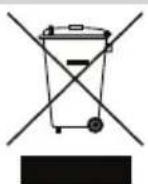
To3n npOyKT eKlaacnФmUpaH kato eneKtpuuecko n eneKtpoHNO o6OpYBaHe. Korato doJe BpeMe da n3XbPnTe npOyKTA, MoJIa, yBepete ce, ye N3BbpWbATE TOBA B Cb0tBeTCTBne C dIpeKTMBA tA OTHcHO OTNaDbuOT eneKtpuuecko n eneKtpoHNO o6OpYBaHe (OEEO) m B CbTlACme C MeCTHOTO 3aKOHOdAteCTBO, CbBp3aHO CTaN DIneKTPMBA.
3a noBee uHOpMaun 3a DupeKtmbata OEO, moN, nocetete www.fellowes.com/WEEE
COMENZI LAMINATOR
A Comutator pornire/oprine
B LED aparat pregatit
C Maner de eliberare ( )
VAŽNE SIGURNOSNE UPUTE - SACUVAJTE IH ZA BUDUCU UPORABU
- Ovaj je stroj namijenjen samo za korištenje u zatvorenom prostoru. Ukopćajte stroj u utićnicu na lakо dostupnom mestreu.
- Za sprječavanje elektricnog udara urežaj nemojtve upotreblavati u blizini vode. Urežaj, kabel napajanja ni zidnu uticnicu ne polijevajte vodom.
OBAVEZNO postavite stroj na stabilnu podlogu.
VAŽNA BEZBEDNOSNA UPUTSTVA - SACUVATI ZA BUDUCU UPOTREBU
a>2g1s1s1s1s1s1s1s1s1s1s1s1s1s1s1s1s1s1s1s1s1s1s1s1s1s1s1s1s1s1s1s1s1s1s1s1s1s1s
J 1 Jie Lao g a> 20 a1111111
12 = 12
JJIggl aalil alal Jgdo 51
aiaai Jgsyagllg aaiwll gllg 1c
JJS JLsXlLoXeWf. agj;
.8
()
fLoaX1 aJgai gai jai 1"
.5
cJ .aclig jLw a.1eill 2gJ gK 5, 6, 7, 8, 9, 10, 11, 12, 13, 14, 15, 16, 17, 18, 19, 20, 21, 22, 23, 24, 25, 26, 27, 28, 29, 30, 31, 32, 33, 34, 35, 36, 37, 38, 39, 40, 41, 42, 43, 44, 45, 46, 47, 48, 49, 50, 51, 52, 53, 54, 55, 56, 57, 58, 59, 60, 61, 62, 63, 64, 65, 66, 67, 68, 69,
.9
13 13
.6
J 1 J 1 J 1 J 1 J 1 J 1 J 1 J 1 J 1 J 1 J 1 J 1 J 1 J 1 J 1 J 1 J 1 J 1 J 1 J 1 J 1 J 1 J 1 J 1 J 1 J 1 J 1 J 1 J 1 J 1
10
iiill j 51 .2gial l gll y iinwgl aag>logl pssui w. aolil aol3i sic jSao
.7
fclwol aJy
JLg! g LcLwogogg Lglg
www.fellowes.com ...
JLJU JUsaI JusuI JusuI JusuI JusuI JusuI JusuI JusuI JusuI JusuI JusuI JusuI JusuI JusuI JusuI JusuI JusuI JusuI JusuI JusuI JusuI JusuI JusuI JusuI JusuI JusuI Jusuu I
Lolal Loglglw www.fellowes.com/register 1c lji.
| "العربية الحرفية" "العربية الحرفية" "العربية الحرفية" "العربية الحرفية" "العربية الحرفية" "العربية الحرفية" "العربية الحرفية" "العربية الحرفية" "العربية الحرفية" "العربية الحرفية" "العربية الحرفية" "العربية الحرفية" "العربية الحerva" "العربية الحرفية" "العربية الحerva" "العربية الحerva" "العربية الحerva" "العربية الحerva" "العربية الحerva" "العربية الحerva" "العربية الحerva" "العربية الحerva" "العربية الحerva" "العربية الحerva" "العربية الحerva" "العربية الحerva" "العربية الحerva" "العربية الحerva" "العربية الحerva" | |||
| "العربية الحرفية" "العربية الحerva" "العربية الحerva" "الع-ieزة" "الع-ieزة" "الع-ieزة" "الع-ieزة" "الع-ieزة" "الع-ieزة" "الع-ieزة" "الع-ieزة" "الع-ieزة" "الع-ieزate" "الع-ieزate" "الع-ieزate" "الع-ieزate" "الع-ieزate" "الع-ieزate" "الع-ieزate" "الع-ieزate" "الع-ieزate" "الع-ieزate" "الع-ieزate" "الع-ieزate" "الع-ieزate" "الع-ieزate" "الع-ieزate" | |||
| "العربية الحerva" "الع-ieزة" "الع-ieزate" "الع-ieزate" "الع-ieزate" "الع-ieزate" "الع-ieزate" "الع-ieزate" "الع-ieزate" "الع-ieزate" "الع-ieزate" "الع-ieزate" "الع-ieزate" "الع-ieزate" "الع-ieزate" | |||
| "ALIAM" "ALIAM" "ALIAM" "ALIAM" "ALIAM" "ALIAM" "ALIAM" "ALIAM" "ALIAM" "ALIAM" "ALIAM" "ALIAM" "ALIAM" "ALIAM" "ALIAM" "ALIAM" "ALIAM" "ALIAM" "ALIAM" "ALIAM" "ALIAM" | |||
| "ALIAM" "ALIAM" "ALIAM" "ALIAM" "ALIAM" "ALIAM" "ALIAM" "ALIAM" "ALIAM" "ALIAM" "ALIAM" "ALIAM" "ALIAM" "ALIAM" "ALIAM" "ALIAM" "ALIAM" "ALIAM" "ALIIAM" "ALIIAM" "ALIIAM" "ALIIAM" "ALIIAM" "ALIIAM" "ALIIAM" "ALIIAM" "ALIIAM" "ALIIAM" "ALIIAM" "ALIIAM" "ALIIAM" "ALIIAM" "ALIIAM" "ALIIAM" "ALIIAM" "ALIIAM" "ALIIAM" "ALIIAM" "ALIKA" "ALIKA" "ALIKA" "ALIKA" "ALIKA" "ALIKA" "ALIKA" "ALIKA" "ALIKA" "ALIKA" "ALIKA" "ALIKA" "ALIKA" "ALIKA" "ALIKA" "ALIKA" "ALIKA" "ALIKA" "ALIKA" "ALIKA" "ALI KA" "ALIKA" "ALIKA" "ALIKA" "ALIKA" "ALIKA" "ALIKA" "ALIKA" "ALIKA" "ALIKA" "ALIKA" "ALIKA" "ALIKA" "ALIKA" "ALIKA" "ALIKA" "ALIKA" "ALIKA" "ALIKA" "ALIKA" "ALIΚA" "ALIΚA" "ALIΚA" "ALIΚA" "ALIΚA" "ALIΚA" "ALIΚA" "ALIΚA" "ALIΚA" "ALIΚA" "ALIΚA" "ALIΚA" "ALIΚA" "ALIΚA" "ALIΚA" "ALIΚA" "ALIΚA" "ALIIAKA" "ALIIAKA" "ALIIAKA" "ALIIAKA" "ALIIAKA" "ALIIAKA" "ALIIAKA" "ALIIAKA" "ALIIAKA" "ALIIAKA" "ALIIAKA" "ALIIAKA" "ALIIAKA" "ALIIAKA" "ALIIAKA" "ALIIAKA" "ALIIAKA" "AlIIAKA" "ALIIAKA" "ALIIAKA" "ALIIAKA" "ALIIAKA" "ALIIAKA" "ALIIAKA" "ALIIAKA" "ALIIAKA" "ALIIAKA" "ALIIAKA" "ALIIAKA" "ALIIAKA" "ALIIAKA" "ALIIAKA" "ALIIAKA" "ALIIAKA” | |||
| "ALIKA" "ALIKA" "ALIKA" "ALIKA" "ALIKA" "ALIKA" "ALIKA" "ALIKA" "ALIKA" "ALIKA" "ALIKA" "ALIKA" "ALIKA" "ALIKA" "ALIKA" "ALIKA" "ALIKA" "ALIKA" "ALIKA" "ALIKA" “ALIKA” | |||
| "ALIKA" "ALIKA" "ALIKA" "ALIKA" "ALIKA" "ALIKA" "ALIKA" "ALIKA" "ALIKA" "ALIKA" "ALIKA" "ALIKA" "ALIKA" "ALIKA" "ALIKA" "ALIKA" "ALIKA" "ALIKA" "ALIIAKA" "ALIIAKA" "ALIIAKA" "ALIIAKA" "ALIIAKA" "ALIIAKA" "ALIIAKA" "ALIIAKA" "ALIIAKA" "ALIIAKA" "ALIIAKA" "ALIIAKA" "ALIIAKA" "ALIIAKA" "ALIIAKA" "ALIIAKA" "ALIKA" | |||
| "ALIKA" "ALIKA" "ALIKA" "ALIKA" "ALIKA" "ALIKA" "ALIKA" "ALIKA" "ALIKA" "ALIKA" "ALIKA" "ALIKA" "ALIKA" "ALIKA" "ALIKA" "ALIKA" "ALIKA" "ALIKA" "ALI KA" "ALIKA" | |||
| "ALIKA" "ALIKA" "ALIKA" "ALIKA" "ALIKA" "ALIKA" "ALIKA" "ALIKA" "ALIKA" "ALIKA" "ALIKA" "ALIKA" "ALIKA" "ALIKA" "ALIKA" "ALIKA" "ALIKA" "ALIIAKA" "ALIIAKA" "ALIIOKA" "ALIIAKA" "ALIIOKA" "ALIIOKA" "ALIIOKA" "ALIIOKA" "ALIIOKA" "ALIIOKA" "ALIIOKA" "ALIIOKA" "ALIIOKA" "ALIIOKA" "ALIIOKA" "ALIIOKA" "ALIIOKA" "ALIIOKA" "ALIIOKA" "ALIIOKA" "ALIIOKA" " ALIIOKA" "ALIIOKA" "ALIIOKA" "ALIIOKA" "ALIIOKA" "ALIIOKA" "ALIIOKA" "ALIIOKA" "ALIIOKA" "ALIIOKA" "ALIIOKA" "ALIIOKA" "ALIIOKA" "ALIIOKA" "ALIIOKA" "ALIIOKA" "ALIIOKA' |
1
aIJI aIJI gai i 2. ai Ia Ia Ia Ia JIg JIg JIg JIg JIg JIg JIg JIg JIg JIg JIg JIg JIg JIg JIg JIg JIg JIg JIg JIg JIg JIg JIg JIg JIg JIg JIg JIg JIg JIg JIg JIg JIg JIg
Jolc /
www.fellowes.com/WEEE 110000000000000000000000000000000000000000000000000000
n
| ###/### | D | ###/### | A |
| ###/### | E | ### LED | B |
| (DITN) | F | (▲●) | C |
nni niin
JINININNNTANWUOWDNNNNNNNNNN
wnn nnnnn nn nn nn nnnn 19pn
75:Fellows
n nn .nn n nn nn nn nn nn nn nn nn nn nn nn nn nn nn nn nn nn nn nn nn nn nn nn nn nn nn nn nn nn nn nn nn nn nn nn nn nn nn nn nn nn nn nn nn nn nn nn nn nn nn nn nn nn nn nn nn nn nn nn nn nn nn nn nn nn nn nn nn nn nn nn nn nn nn nn nn nn nn nn nn nn nn nn nn nn nn nn nn nn nn nn nn nn nn nn nn nn nn nn nn.
Tn nn nnnnnnnnnnnnnnnnnnnnnnnnnnnnnnnnnnnnnnnnnnnnnnnnnnnnnnnnnnnnnnnnnnnnnnnnnnnnnnnnnnnnnnnnnnnnnnnnnnnnnnnnnnnnnnnnnnn
T 1
079nn nn. nnnn nn nn nn nn nn nn nn nn nn nn nn nn nn nn nn nn nn nn nn nn nn nn nn nn nn nn nn nn nn nn nn nn nn nn nn nn nn nn nn nn nn nn nn nn nn nn nn nn nn nn nn nn nn nn nn nn nn nn nn nn nn nn nn nn nn nn nn nn nn nn nn nn nn nn nn nn nn nn nn nn nn nn nn nn nn nn nn nn nn nn nn nn nn nn nn nn nn nn nn nn
n nn nnnnnnnnnnnnnnnnnnnnnnnnnnnnnnnnnnnnnnnnnnnnnnnnnnnnnnnnnnnnnnnnnnnnnnnnnnnnnnnnnnnnnnnnnnnnnnnnnnnnnnnnnnnnn
nnn
Wn nn nnnn nn nn nn nn nn nn nn nn nn nn nn nn nn nn nn nn nn nn nn nn nn nn nn nn nn nn nn nn nn nn nn nn nn nn nn nn nn nn nn nn nn nn nn nn nn nn nn nn nn nn nn nn nn nn nn nn nn nn nn nn nn nn nn nn nn nn nn nn nn nn nn nn nn nn nn nn nn nn nn nn nn nn nn nn nn nn nn nn nn nn nn nn nn nn nn nn nn nn nn nn
100101N 12
30
5
ann by yin yw on nnwnywnn 09nn

Auto Shut Off
nynnnn npnn
.3
.
2
y
111 111 111 111 111 111 111 111 111 111 111
yynn,ynnnnynnnynnnnynnnnynnnnynnnnynnnnynnnnynnnnynnnnynnnnynnnnynnnnynnnnynnnnynnnnynnnnynnnnynnnnynnnnynnnnynnnnynnnnynnnnynnnnynnnnynnnnynnnnynnnnynnnnynnnnynnnnynnnnynnnnynnnnyn
n nn n nn nn nn nn nn nn nn nn nn nn nn nn nn nn nn nn nn nn nn nn nn nn nn nn nn nn nn nn nn nn nn nn nn nn nn nn nn nn nn nn nn nn nn nn nn nn nn nn nn nn nn nn nn nn nn nn nn nn nn nn nn nn nn nn nn nn nn nn nn nn nn nn nn nn nn nn nn nn nn nn nn nn nn nn nn nn nn nn nn nn nn nn nn nn nn nn nn nn
.8 .wann nn nn nnnn nn nn .4
.5
.9 6
7
.10
?nnyy
n
www.fellowes.com
Fellows nnnn nn
www.fellowes.com/register
nyynn9
| הכלה | ||
| הכלה | | ( ) |
| | | |
| | | |
| | | |
| | | |
| | | |
| | | |
| | | |
| | | |
| | | |
| | | |
| | | |
| | | |
| | | |
| | | |
| | | |
| | | |
| | | |
| | | |
| | | 1/2 |
| | | 0.40 |
| | | 75 |
| | | 75 |
| | | 75 |
| | | 75 |
| | | 75 |
| | | 75 |
| | | 75 |
| | | 75 |
| | | 75 |
| | | 75 1/2 |
| | | 75 |
| | | 75 |
| | | 75 |
| | | 75 |
| | | 75 |
| | | 75 |
| | | 75 |
| | | 75 |
| | | 75/2 |
| | | 75/2 |
| | | 75/2 |
| | | 75/2 |
| | | 75/2 |
| | | 75/2 |
| | | 75/2 |
| | | 75/2 |
| | |
NON
5320604
nniynn / nn
Fellows n nn nn nn nn nn nn nn nn nn nn nn nn nn nn nn nn nn nn nn nn nn nn nn nn nn nn nn nn nn nn nn nn nn nn nn nn nn nn nn nn nn nn nn nn nn nn nn nn nn nn nn nn nn nn nn nn nn nn nn nn nn nn nn nn nn nn nn nn nn nn nn nn nn nn nn nn nn nn nn nn nn nn nn nn nn nn nn nn nn nn nn nn nn nn nn nn nn nn nn nn aan anan anan anan anan anan anan anan anan anan anan anan anan anan anan anan anan anan anan anan anan anan anan anan anan anan anan anan anan anan anan anan anan anan anan anan anan anan anan anan anan anan anan anan anan anan anan anan anan anan anan anannn annnnnnnnnnnnnnnnnnnnnnnnnnnnnnnnnnnnnnnnnnnnnnnnnnnnnnnnnnnnnnnnnnnnnnnnnnnnnnnnnnnnnnnnnnnnnnnnnnnnnnnnnnnnnnnnnnnnnnnnnnnnnnnnnnnnnnnnnnnn
.W.E.E.E
WEE (Waste Electrical And Electronic Equipment (WEEE) Directive)
Jn nn nnnn nn nnnn
www.fellowsinternational.com/WEEE, WEEE
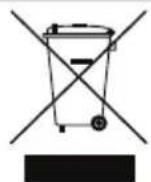

CUSTOMER SERVICE & SUPPORT
www.fellowes.com
Europe Freephone: 00800-1810-1810
Benelux: +31-(0)-13-458-0580
Declaration of Conformity
Fellowes Ltd.
Unit 2 Ontario Drive, New Rossington, Doncaster, DN11 0BF, England declares that the product model L-80-A4 conforms with the requirements of the Restriction of Hazardous Substances Directive (2011/65/EU), the Low Voltage Directive (2014/35/EU), the Electromagnetic Compatibility Directive (2014/30/EU), the WEEE directive (2012/19/EU), and below harmonized European EN Standards.
Safety: EN60950-1: 2006/A2:2013
EMC Standard: EN55014-1:2006+A1:2009+A2:2011
EN55014-2:1997+A1:2001+
EN61000-3-2:2014
EN61000-3-3:2013
A2:2008
John Fellowes
Year Affixed: 16
Itasca, Illinois, USA
July 1, 2016