SECALARM120 - Surveillance Camera KONIG - Free user manual and instructions
Find the device manual for free SECALARM120 KONIG in PDF.



| Product type | Multifunction wireless alarm system |
| Brand | Konig |
| Model | SEC-ALARM120 |
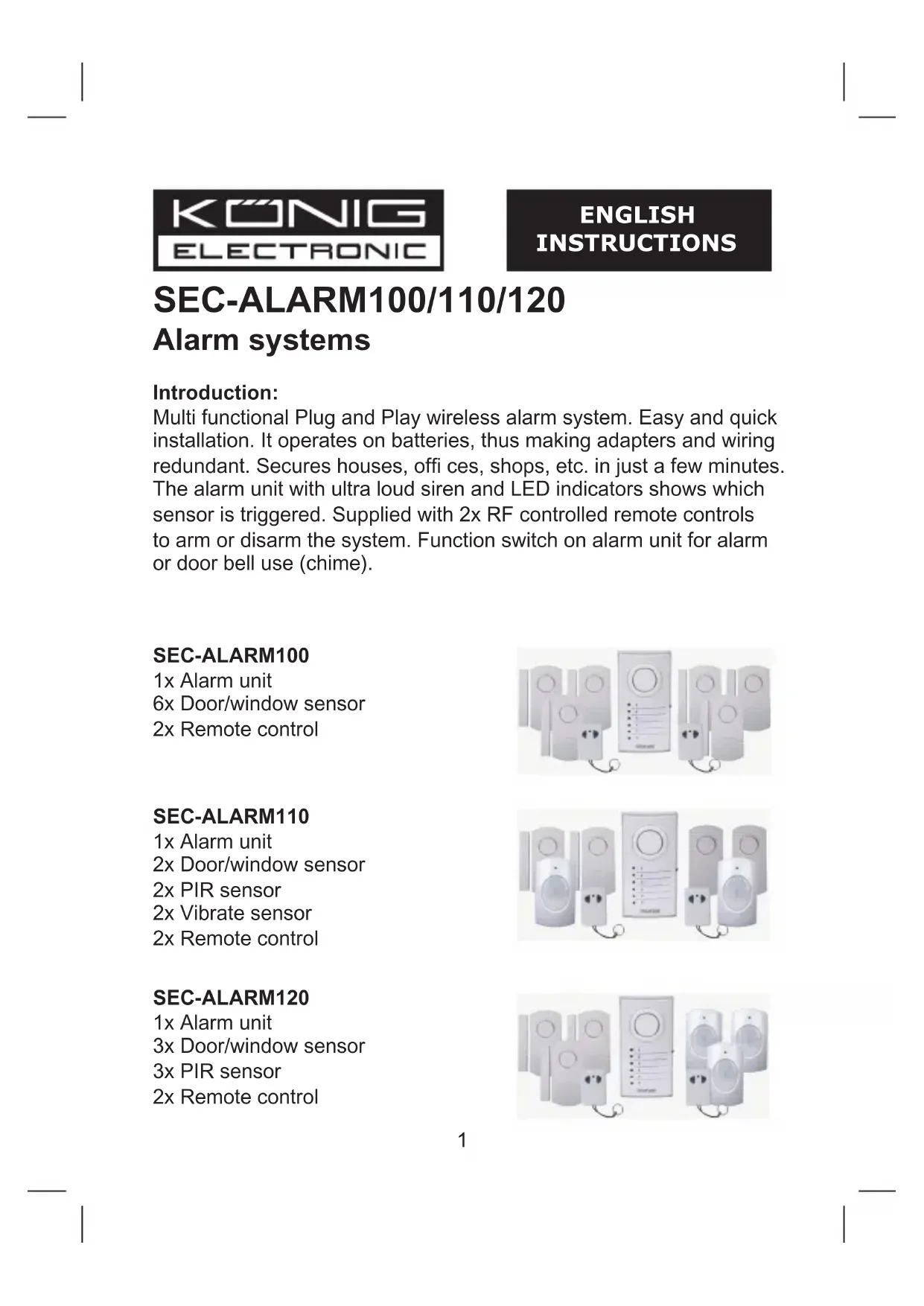
| Pack contents | 1 alarm unit, 3 door/window sensors, 3 PIR sensors, 2 remote controls |
| Alarm unit power supply | 4.5 V DC (3 AA batteries, not included) |
| Door/window sensor power supply | 4.5 V DC (3 LR44 batteries, included) |
| PIR sensor power supply | 4.5 V DC (3 AA batteries, not included) |
| Remote control power supply | 12 V DC (3 LR44 batteries, included) |
| Alarm unit siren | 100 dB at 0.5 m |
| Sensor siren | 95 dB at 0.5 m |
| Sensor range (open area) | Up to 60 m |
| Remote control range (open area) | Up to 30 m |
| Operating frequency | 433 MHz ±250 kHz |
| Entry/exit delay | 20 to 25 seconds |
| Alarm unit dimensions | 5.7 (L) x 3.9 (W) x 10.9 (H) cm |
| Door/window sensor dimensions | 6 (L) x 1 (W) x 9.9 (H) cm |
| PIR sensor dimensions | 6 (L) x 5 (W) x 9.8 (H) cm |
| Remote control dimensions | 3.5 (L) x 1.3 (W) x 5.2 (H) cm |
| Main functions | 100 dB siren alarm, chime, individual sensor LED indicators, remote disarm/arm |
| Maintenance | Clean with a dry cloth. Do not use solvents. |
| Safety instructions | Do not expose to water or moisture. |
| Warranty | Warranty void if modified or used incorrectly. |
Frequently Asked Questions - SECALARM120 KONIG
User questions about SECALARM120 KONIG
0 question about this device. Answer the ones you know or ask your own.
Ask a new question about this device
Download the instructions for your Surveillance Camera in PDF format for free! Find your manual SECALARM120 - KONIG and take your electronic device back in hand. On this page are published all the documents necessary for the use of your device. SECALARM120 by KONIG.
USER MANUAL SECALARM120 KONIG
SEC-ALARM100/110/120 Alarm systems
Introduction:
Multi functional Plug and Play wireless alarm system. Easy and quick installation. It operates on batteries, thus making adapters and wiring redundant. Secures houses, offies, shops, etc. in just a few minutes. The alarm unit with ultra loud siren and LED indicators shows which sensor is triggered. Supplied with 2x RF controlled remote controls to arm or disarm the system. Function switch on alarm unit for alarm or door bell use (chime).
SEC-ALARM100
1x Alarm unit
6x Door/ window sensor
2x Remote control
SEC-ALARM110
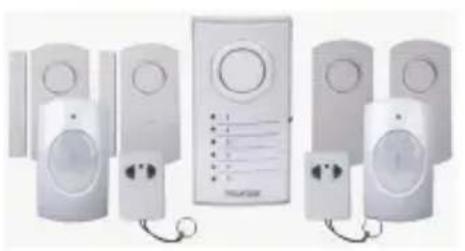
1x Alarm unit
2x Door/ window sensor
2x PIR sensor
2x Vibrate sensor
2x Remote control
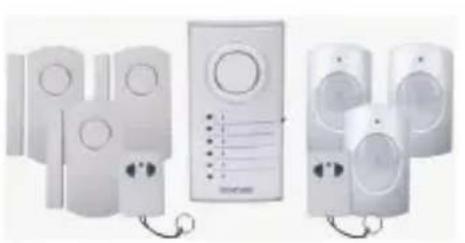
SEC-ALARM120
1x Alarm unit
3x Door/ window sensor
3x PIR sensor
2x Remote control

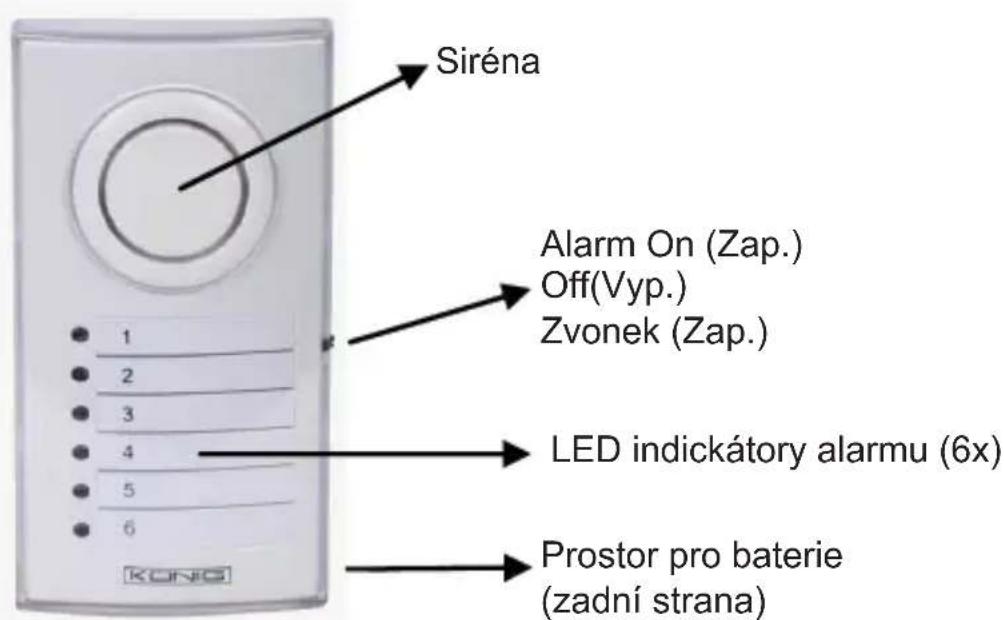
Description alarm unit (SEC-ALARM100/110/120):
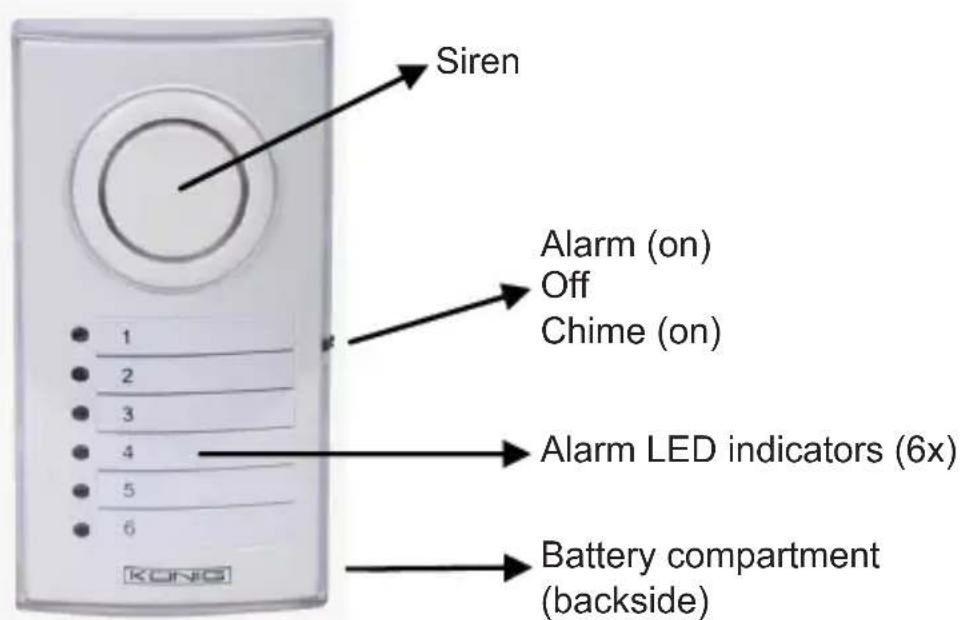
Figure 1
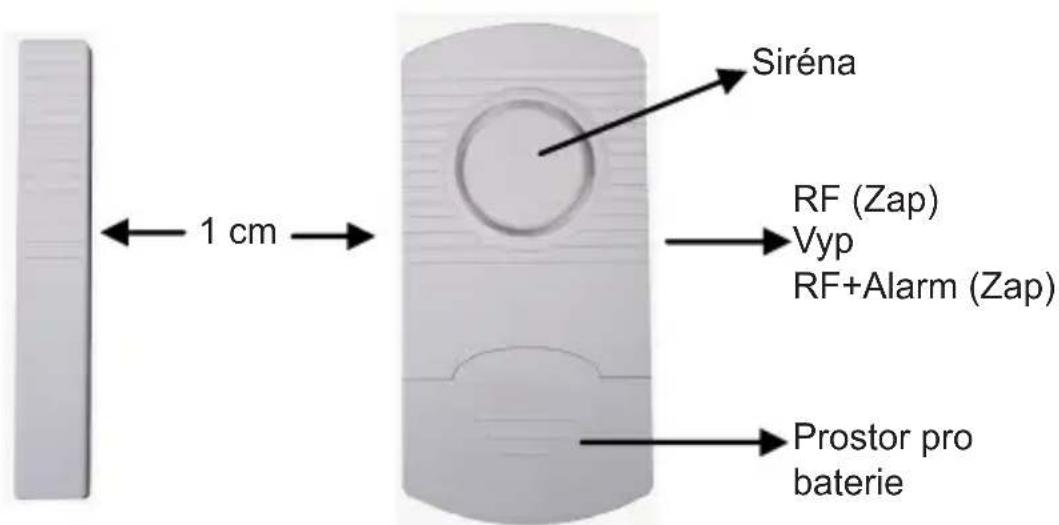
Description door/window sensor (SEC-ALARM100/110/120):

Figure 2
Description PIR sensor (SEC-ALARM110/120):
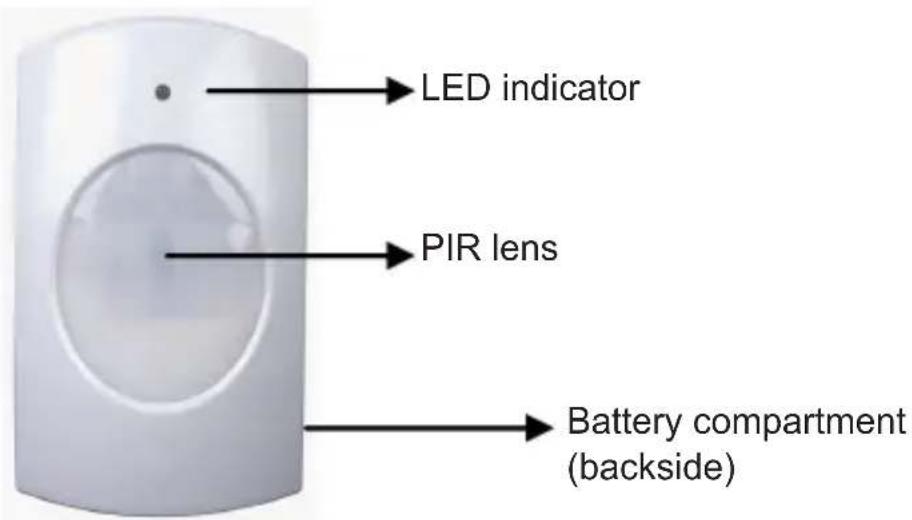
Figure 3
Description vibrate sensor (SEC-ALARM110):

Figure 4
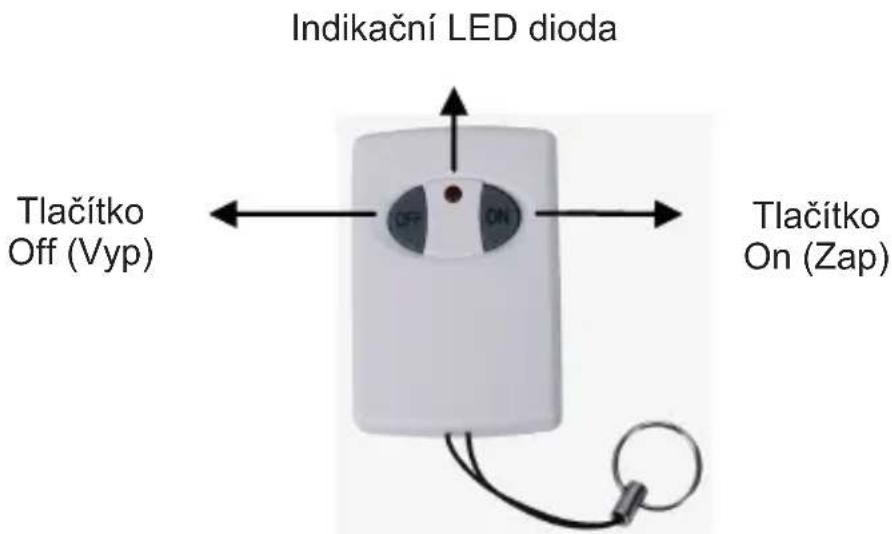
Description remote control (SEC-ALARM100/110/120):
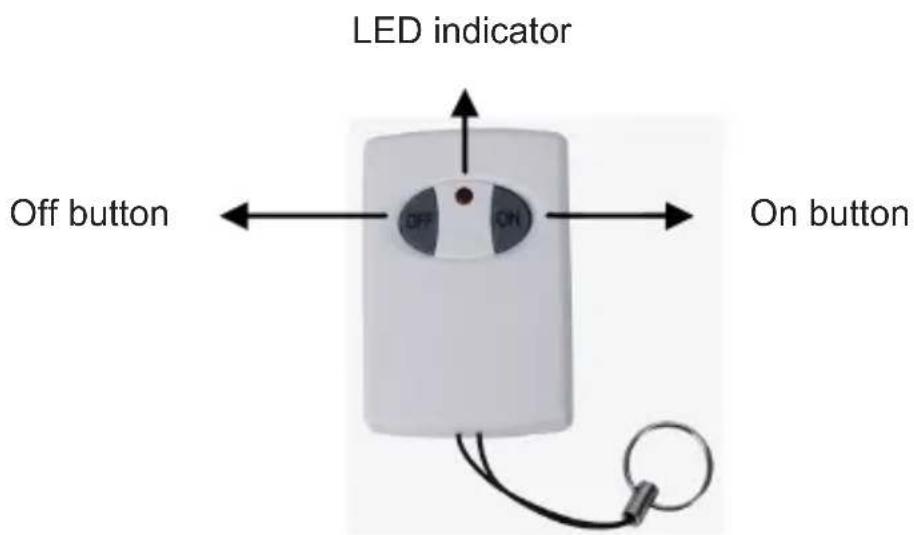
Figure 5
Installation SEC-ALARM100
- Insert, according the diagram inside the battery compartment, (backside) the batteries for the alarm unit (3x AA).
- Install the door/window sensor with the adhesive tape to doors and windows. Note: maximum 1 cm distance between magnetic contact and sensor (see fi gure 2). Switch on the sensor to RF or RF+ALARM. If switched to RF+ALARM, the sensor will send, when triggered, a signal to the alarm unit and the siren of the sensor itself will also sound. In this case the siren of the sensor and the alarm unit will both sound.
- Remove the transparent front cover of the alarm unit to write down the position of the sensors corresponding with the numbered LED. (e.g. sensor 1 = front door, 2= kitchen window, etc.).
-
Install the alarm unit to a location. The distance between the alarm unit and the most far away door/window sensor may not exceed 60m (open area)*
-
Switch on the alarm unit to ALARM or CHIME function. If switched to CHIME, the alarm unit will sound like a door bell when a door or window is opened. Switched to ALARM generates a 100 dB loud siren. When the alarm unit is switched on, the alarm is not armed (active) yet. Push the ON button on the remote control to arm the alarm and OFF to disarm. The delay time for entering and leaving the protected area is between 20~25 seconds.
-
It's recommended to test the alarm system for correct operation with first use and every 3 months.
Procedure:
a) Switch the alarm unit on to ALARM or CHIME (for testing recommended).
b) Push the ON button on the remote control to arm the alarm.
c) Wait for 20~25 seconds (delay time).
d) Open every door or window one by one and check if the corresponding LED lights up and the CHIME sounds.
e) Disarm the alarm if everything operates correct.
f) The alarm system is ready to use.
Note:
1) the alarm unit will give a conformation tone when armed or disarmed. The tone for CHIME is different as for ALARM.
2) If a sensor does not need to be switched on, it's possible to switch off every sensor individually with the on/off switch. In this case the sensor is no part of the alarm system anymore when armed.
3) A sensor switched to RF+ALARM will always give an alarm sound on the sensor itself, unless the alarm unit is armed or disarmed.
4) When a sensor is triggered and the siren of the alarm unit sounds, it needs to be switched off with on/off switch of the alarm unit. After that the alarm unit can be switched on again. When the alarm keeps on going after arming the system, check if every door or window is closed properly.
Installation SEC-ALARM110
- Insert, according the diagram inside the battery compartment, (backside) the batteries for the alarm unit (3xAA).
- Install the door/window sensor with the adhesive tape to doors and windows. Note: maximum 1cm distance between magnetic contact and sensor (see fi gure 2). Switch on the sensor to RF or RF+ALARM. If switched to RF+ALARM, the sensor will send, when triggered, a signal to the alarm unit and the siren of the sensor itself will also sound. In this case the siren of the sensor and the alarm unit will both sound.
- Install the vibration sensor with the adhesive tape to windows (on the glass). Switch on the sensor to RF or RF+ALARM. If switched to RF+ALARM, the sensor will send, when triggered, a signal to the alarm unit and the siren of the sensor itself will also sound. In this case the siren of the sensor and the alarm unit will both sound. Note: the vibrate sensor is very sensitive. The slightest vibration will trigger the sensor. It's not recommend to install the vibrate sensor on windows near to doors. Slamming doors will trigger the sensor.
- Insert, according the diagram inside the battery compartment, (backside) the batteries for PIR sensor (3xAAA). The PIR sensor needs to warm up for 30 40 seconds for first use. In this period it can not detect motion. Install the PIR sensor at a height of 1 1.5m for best performance. Do not install the PIR sensor into direct sunlight, facing towards windows, objects that move easily and heat or cold source.
- Remove the transparent front cover of the alarm unit to write down the position of the sensors corresponding with the numbered LED. (e.g. sensor 1 = front door, 2 = kitchen window, etc.).
-
Install the alarm unit to a location. The distance between the alarm unit and the most far away sensor may not exceed 60m (open area)*
-
Switch on the alarm unit to ALARM or CHIME function. If switched to CHIME, the alarm unit will sound like a door bell when a door or window is opened. Switched to ALARM generates a 100dB loud siren. When the alarm unit is switched on, the alarm is not armed (active) yet. Push the ON button on the remote control to arm the alarm and OFF to disarm. The delay time for entering and leaving the protected area is between 20~25 seconds.
-
It's recommended to test the alarm system for correct operation with first use and every 3 months.
Procedure:
a) Switch on the alarm unit to ALARM or CHIME (for testing recommend).
b) Push the ON button on the remote control to arm the alarm.
c) Wait for 20~25 seconds (delay time).
d) For testing door/window sensor, open every door or window one by one and check if the corresponding LED lights up and the CHIME sounds.
e) For testing PIR sensor, move around the PIR sensor and check if the corresponding LED lights up and the CHIME sounds. Note: the LED indicator on the PIR sensor lights up also.
f) For testing vibrate sensor, hit carefully on the window and check if the corresponding LED lights up and the CHIME sounds.
g) Disarm the alarm if everything operates correct.
The alarm system is ready to use.
Note:
1) the alarm unit will give a conformation tone when armed or disarmed. The tone for CHIME is different as for ALARM.
2) If a sensor does not need to be switched on, it's possible to switch off every sensor individually with the on/off switch. In this case the sensor is no part of the alarm system anymore when armed (except PIR sensor).
3) A sensor switched to RF+ALARM will always give an alarm sound on the sensor itself, unless the alarm unit is armed or disarmed.
4) When a sensor is triggered and the siren of the alarm unit sounds, it needs to be switched off with on/off switch of the alarm unit. After that the alarm unit can be switched on again. When the alarm keeps on going after arming the system, check if every sensor is installed properly.
Installation SEC-ALARM120
- Insert, according the diagram inside the battery compartment, (backside) the batteries for the alarm unit (3xAA).
- Install the door/window sensor with the adhesive tape to doors and windows. Note: maximum 1cm distance between magnetic contact and sensor (see fi gure 2). Switch on the sensor to RF or RF+ALARM. If switched to RF+ALARM, the sensor will send, when triggered, a signal to the alarm unit and the siren of the sensor itself will also sound. In this case the siren of the sensor and the alarm unit will both sound.
- Insert, according the diagram inside the battery compartment, (backside) the batteries for PIR sensor (3xAAA). The PIR sensor needs to warm up for 30 40 seconds for first use. In this period it can not detect motion. Install the PIR sensor at a height of 1 1.5m for best performance. Do not install the PIR sensor into direct sunlight, facing towards windows, objects that move easily and heat or cold source.
- Remove the transparent front cover of the alarm unit to write down the position of the sensors corresponding with the numbered LED. (e.g. sensor 1 = front door, 2 = kitchen window, etc.).
-
Install the alarm unit to a location. The distance between the alarm unit and the most far away sensor may not exceed 60m (open area)*
-
Switch on the alarm unit to ALARM or CHIME function. If switched to CHIME, the alarm unit will sound like a door bell when a door or window is opened. Switched to ALARM generates a 100dB loud siren. When the alarm unit is switched on, the alarm is not armed (active) yet. Push the ON button on the remote control to arm the alarm and OFF to disarm. The delay time for entering and leaving the protected area is between 20~25 seconds.
-
It's recommended to test the alarm system for correct operation with first use and every 3 months.
Procedure:
a) Switch on the alarm unit to ALARM or CHIME (for testing recommend).
b) Push the ON button on the remote control to arm the alarm.
c) Wait for 20~25 seconds (delay time).
d) For testing door/window sensor, open every door or window one by one and check if the corresponding LED lights up and the CHIME sounds.
e) For testing PIR sensor, move around the PIR sensor and check if the corresponding LED lights up and the CHIME sounds. Note: the LED indicator on the PIR sensor lights up also.
f) Disarm the alarm if everything operates correct.
g) The alarm system is ready to use.
Note:
1) the alarm unit will give a conformation tone when armed or disarmed. The tone for CHIME is different as for ALARM.
2) If a sensor does not need to be switched on, it's possible to switch off every sensor individually with the on/off switch. In this case the sensor is no part of the alarm system anymore when armed (except PIR sensor).
3) A sensor switched to RF+ALARM will always give an alarm sound on the sensor itself, unless the alarm unit is armed or disarmed.
4) When a sensor is triggered and the siren of the alarm unit sounds, it needs to be switched off with on/off switch of the alarm unit. After that the alarm unit can be switched on again. When the alarm keeps on going after arming the system, check if every sensor is installed properly.
Specifications:
Alarm unit (figure 1):
- Power: 4.5 VDC (3x battery AA, not included)
- Standby current: < 1.5 mA
- Chime current: <90 mA
- Alarm current: <130 mA
- Alarm volume: 100 dB (0.5m)
- Chime volume: 90 dB (0.5m)
- Switch: alarm/chime/off
LED indicator: 6
Frequency: 433 MHz ±250 kHz - Dimensions: 5.7( W) × 3.9( D) × 10.9( H) cm
- Delay time: 20 25sec .
Door/window sensor (figure 2):
- Power: 4.5 VDC (3x battery LR44, included)
- Standby current: < 10 A
Transmission current: < 6mA - Working distance: +/- 60 m (open area)*
- Alarm volume: 95 dB (0.5m)
- Switch: RF + alarm/RF/off
Frequency: 433 MHz ±250 kHz - Dimensions with magnet contact: 6(W) × 1(D) × 9.9(H)cm
PIR sensor (figure 3):
- Power: 4.5 VDC (3x battery AA, not included)
- Standby current: <100μA
Transmission current: <5mA - Working distance: +/- 60 m (open area)*
- Detecting range: 5 8 ~m
-
Detecting angle: 100^ (horizontal) / 80^ (vertical)
-
Installation height: 1.5m (recommended)
Frequency: 433 MHz ±250 kHz - Dimensions: 6(W) × 5(D) × 9.8(H)cm
Vibrate sensor (figure 4):
- Power: 4.5 VDC (3x battery LR44, included)
- Standby current: < 10 A
Transmission current: <6mA - Working distance: +/- 60m (open area)*
Frequency: 433 MHz ±250 kHz - Alarm volume: 95 dB (0.5m)
- Dimensions: 4.8( W) × 1( D) × 9.9( H) cm
Remote control (figure 5):
- Power: 12 VDC (3x battery LR44, included)
- Standby current: 0
Transmission current: < 10mA - Working distance: +/- 30m (open area)*
- Buttons: on/off
- LED indicator: 1
Frequency: 433 MHz ±250 kHz -
Dimensions: 3.5( W) × 1.3( D) × 5.2( H) cm
-
Working distance of remote control and sensors can vary due to environmental circumstances.
Safety precautions:
Do not expose the product to water or moisture.
Maintenance:
Clean only with a dry cloth. Do not use cleaning solvents or abrasives.
Warranty:
No guarantee or liability can be accepted for any changes and modifications of the product or damage caused due to incorrect use of this product.
General:
Designs and specific cations are subject to change without notice. All logos brands and product names are trademarks or registered trademarks of their respective holders and are hereby recognized as such. We are not responsible for damage and/or burglary due to incorrect operation of this product.

Attention:
This product is marked with this symbol. It means that used electrical and electronic products should not be mixed with general household waste. There is a separate collections system for these products.
Declaration of conformity
We,
Nedis B.V.
De Tweeling 28
Declare that product:
Name: Konig Electronic
Model: SEC-ALARM100, 110, 120
Description: Wireless alarm system
Is in conformity with the following standards
Art. 3.1(a): EN 50371:2002, EN 60950-1:2006/A11:2009
Art. 3.1(b): EN 301 489-1/-3
Art. 3.2: EN 300 220-1/-2
Following the provisions of the R&TTE 1999/5/EC directive.
s-Hertogenbosch, 01-11-2011
Installation SEC-ALARM100
Installation SEC-ALARM110
Installation SEC-ALARM120
Name: Konig Electronic
Modell: SEC-ALARM100, 110, 120
Installation SEC-ALARM100
Installation SEC-ALARM110
Installation SEC-ALARM120
Popis poplachovych Jednotek (SEC-ALARM100/110/120):
Obr. 1
Popis senzoru na dvebre/okna (SEC-ALARM100/110/120):
Obr. 2
Popis pohybového senzoru PIR (SEC-ALARM110/120):

Obr. 3
Popis snímače vibraci (SEC-ALARM110):
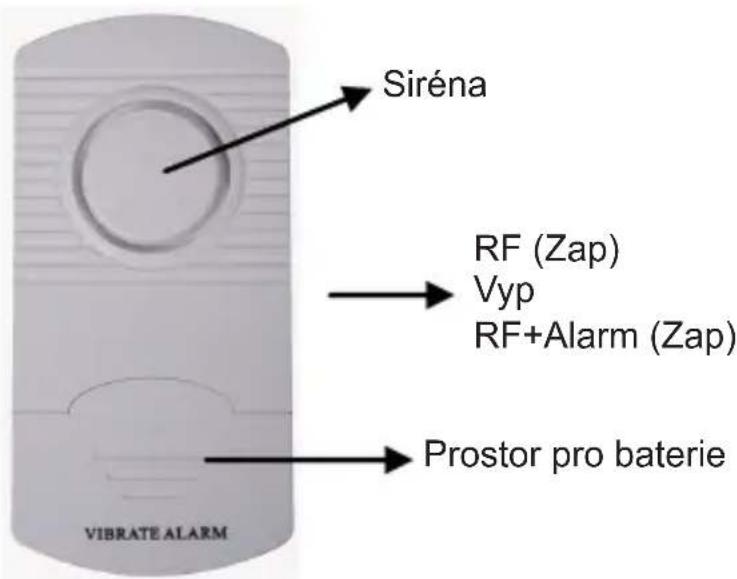
Obr. 4
Popis dalkovych ovladaču (SEC-ALARM100/110/120):
Obr. 5
Instalace Jednotky SEC-ALARM100
Instalace SEC-ALARM120
Model: SEC-ALARM100/110/120
SEC-ALARM100/110/120
Sistema de alarmã
Introducere:
Description: Wireless Alarm System