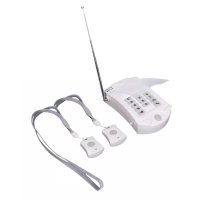
SECAED10 - Surveillance Camera KONIG - Free user manual and instructions
Find the device manual for free SECAED10 KONIG in PDF.

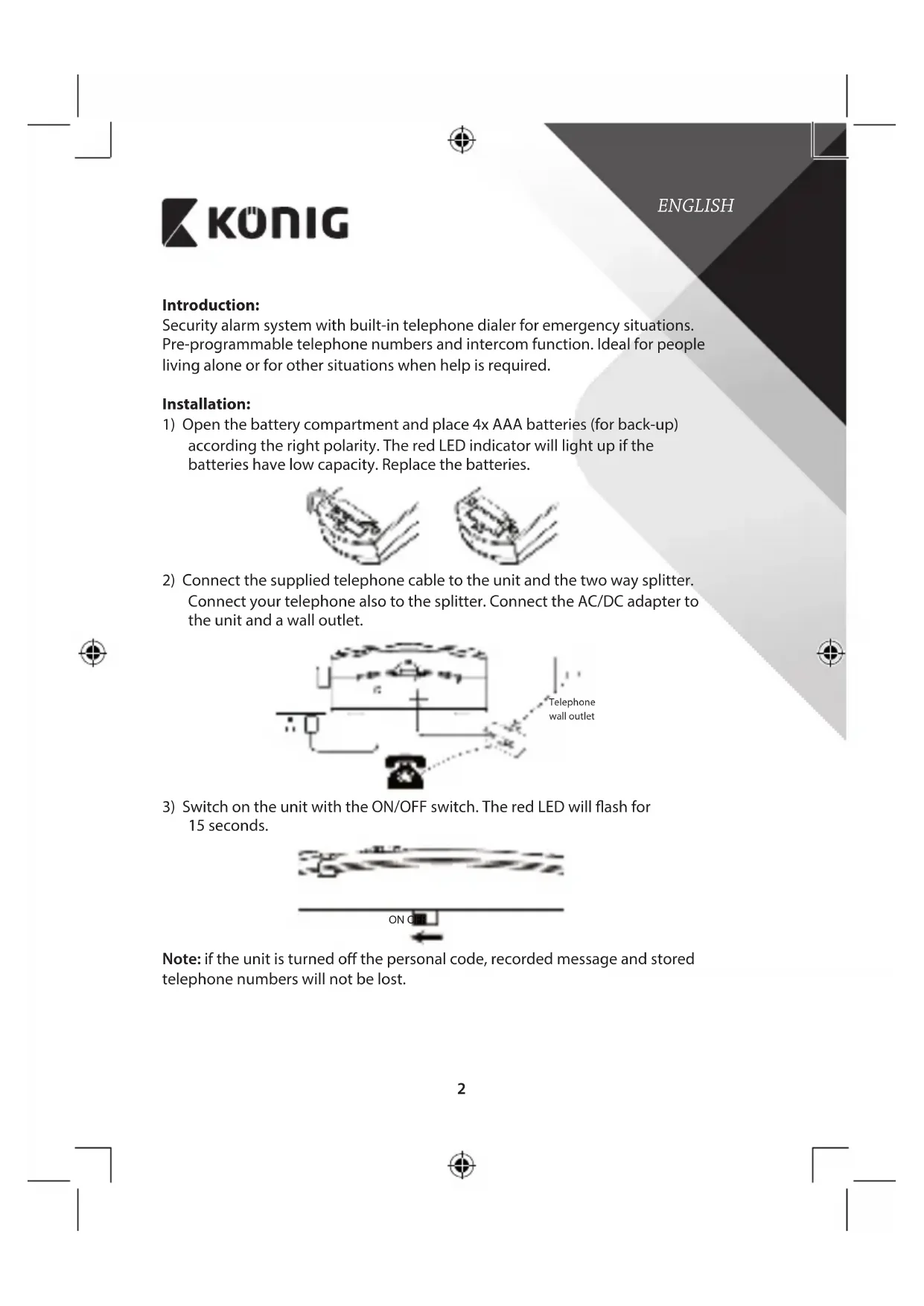


| Product Type | Security alarm system with built-in telephone dialer |
| Brand | König |
| Model | SECAED10 |
| Main power supply | 6 V DC mains adapter (included) |
| Backup power supply | 4 AAA batteries (not included) |
| Remote control power supply | A23S battery (included) |
| Remote control range | Up to 60 meters |
| Microphone range | Up to 3 meters |
| Number of storable numbers | 3 phone numbers |
| Message recording duration | 10 seconds |
| Emergency dialing duration | 45 seconds per attempt, up to 5 cycles |
| Intercom function | Yes, activation by numeric key on the receiver |
| Hands-free mode | Yes |
| LED indicator | Red: flashing during startup, steady when batteries low |
| Maintenance | Clean with a dry cloth. Do not use solvents or abrasive products. |
| Safety | Do not open the device. Disconnect if a problem occurs. Avoid water and humidity. |
| Warranty | Warranty not applicable in case of modification or incorrect use. |
| General information | Complies with European directives. Documentation available on request. |
Frequently Asked Questions - SECAED10 KONIG
User questions about SECAED10 KONIG
0 question about this device. Answer the ones you know or ask your own.
Ask a new question about this device
Download the instructions for your Surveillance Camera in PDF format for free! Find your manual SECAED10 - KONIG and take your electronic device back in hand. On this page are published all the documents necessary for the use of your device. SECAED10 by KONIG.
USER MANUAL SECAED10 KONIG
MANUAL DE USO (p. 22)
NÁVOD (s. 74)
MANUAL (p. 26)
ROKASGRÄMATA (Ipp. 78)
HASZNÁLATI ÚTMUTATÓ (0. 30)
NAUDOJIMO VADOVAS (82 p.)
KÄYTTÖOHJE (s. 34)
PRIRUČNIK (str. 86)
Telephone Dialer with panic button


KÖNIG
ENGLISH
Introduction:
Security alarm system with built-in telephone dialer for emergency situations. Pre-programmable telephone numbers and intercom function. Ideal for people living alone or for other situations when help is required.
Installation:
1) Open the battery compartment and place 4x AAA batteries (for back-up) according to the right polarity. The red LED indicator will light up if the batteries have low capacity. Replace the batteries.

2) Connect the supplied telephone cable to the unit and the two way splitter. Connect your telephone also to the splitter. Connect the AC/DC adapter to the unit and a wall outlet.

3) Switch on the unit with the ON/OFF switch. The red LED will flash for 15 seconds.
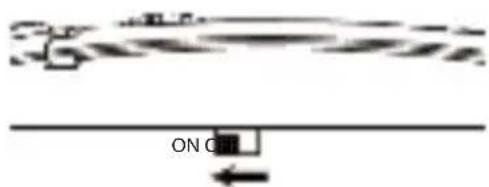
Note: if the unit is turned off the personal code, recorded message and stored telephone numbers will not be lost.

KÖNIG
ENGLISH
Storing telephone numbers:
Store up to 3 telephone numbers, after finishing above process.
Inform the people whose telephone number is programmed and explain that if an emergency call is received they can open two-way communication (intercom) by pressing one of the numeric keys on their telephone.
Follow below procedure for storing telephone numbers.
1st set:

2nd set:

3rd set:

Note: for a PABX/PBX system add a "9" before the area code
Message recording:
To record a message, press both / and button.
The red LED indicator lights up. The recording time is 10 seconds.
Press ▶ to playback the recorded message.
Emergency situation:
In case of emergency, push the panic button on the unit or remote control. The unit will dial the 3 programmed telephone numbers for a period of 45 seconds.

![graph TD A --> B["Output Box with Circular Symbol"]](/content/2026/02/393827/images/055b2fd4a8983a2fa8a91e73e825598341a8d9d01bbaf556158ad57dab32378e.jpg)
-
If the receiver does not answer the phone, the unit will continue to dial the 3 programmed numbers 5 times and then return to standby mode.
-
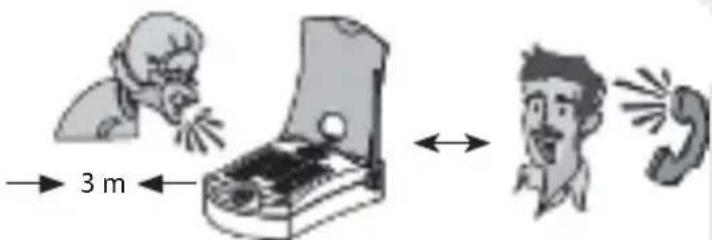
When the receiver answers the phone, they will hear the recorded message. The receiver can activate the intercom function and listen into the callers property by pushing one of numeric keys on the telephone.
-
The unit can be used hands free now and it's possible to communicate. The maximum range of the microphone is 3 metres.

KÖNIG
ENGLISH
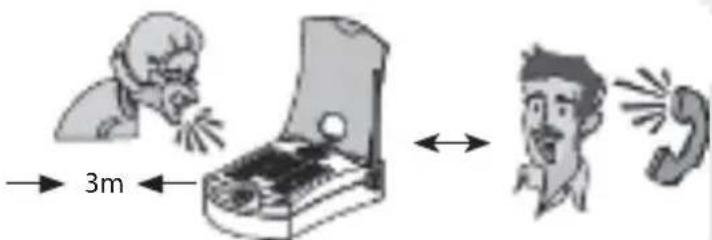
Note: if the caller is out of range of the microphone, the receiver will probably not hear the caller. But because the caller pushed the panic button, something happened and help is required.
- Once the intercom function is activated, the receiver will hear 3 beeps after 45 seconds.
This gives the opportunity to extend the call with 45 seconds. Just push one of the numeric keys to extend the call.
- Once the conversation is over the unit will return to standby mode.
Note: the unit will continue to dial the programmed telephone numbers if the intercom function is not activated by pushing one of the numeric keys on the telephone of the receiver.
Specifications:
Range remote control/panic button: Up to 60m
Range microphone: Up to 3m
Power: 6V DC adapter (included)
Power remote control: A23S battery (included)

KÖNIG
ENGLISH
Safety precautions:
To reduce risk of electric shock, this product should ONLY be opened by an authorized technician when service is required.
Disconnect the product from mains and other equipment if a problem should occur.
Do not expose the product to water or moisture.
Maintenance:
Clean the product only with a dry cloth.
Do not use cleaning solvents or abrasives.
Warranty:
No guarantee or liability can be accepted for any changes and modifications of the product or damage caused due to incorrect use of this product.
General:
Designs and specifications are subject to change without notice. All logos, brands and product names are trademarks or registered trademarks of their respective holders and are hereby recognized as such.
Keep this manual and packaging for future reference.
Attention:

This product is marked with this symbol. It means that used electrical and electronic products should not be mixed with general household waste. There is a separate collections system for these products.
This product has been manufactured and supplied in compliance with all relevant regulations and directives, valid for all member states of the European Union. It also complies to all applicable specifications and regulations in the country of sales.
Formal documentation is available upon request. This includes, but is not limited to: Declaration of Conformity (and product identity), Material Safety Data Sheet, product test report.
Please contact our customer service desk for support:
via website: http://www.nedis.com/en-us/contact/contact-form.htm
via e-mail: service@nedis.com
via telephone: +31 (0)73-5993965 (during office hours)
NEDIS B.V., De Tweeling 28, 5215 MC 's-Hertogenbosch, THE NETHERLANDS

KÖNIG
DEUTSCH
Einfuhrung:
![graph TD A --> B["Output Box with Circle"]](/content/2026/02/393827/images/b9c8498e28b81fef63251e2e6959652bf5b346b021366ff46b5b9cd91f54b527.jpg)
![graph TD A --> B["Terminal Box with Circled Symbol"]](/content/2026/02/393827/images/8bce8628aa906a7d7c49a0923af1fdd90911a33d0e4f55b49e21388f1a6b275c.jpg)
![graph TD A --> B["Output Box with Gear Symbol"]](/content/2026/02/393827/images/0d5f200e441fbe752eae2dee9e6ef58eeaa7a9421531d8935aa7b825ef02d905.jpg)
![graph TD A --> B["Output Box with Circle"]](/content/2026/02/393827/images/fa774d5d28cfc95800499637ddb75a000799ba07aef7f81c373adc08c3d4de2e.jpg)
![graph TD A --> B["Output Box with Circular Symbol"]](/content/2026/02/393827/images/2dd25fa82fda580a3a50cbae57a48559fdd6de2116812c081a27e1cc72dc41af.jpg)
![graph TD A --> B["Output Box with Circled Symbol"]](/content/2026/02/393827/images/de3d4ff567153919f57728431e2c00f57dd6e9de71ea79940061d149230e7bf6.jpg)
![graph TD A --> B["Output Box with Circle"]](/content/2026/02/393827/images/edf43a741196599ebfd2edc9aedbbc3a652ec1c13dbf51309ea7a1af3bc90471.jpg)
![graph TD A --> B["Output Box with Circular Symbol"]](/content/2026/02/393827/images/5ea06fa2c578df8e1bb4560c287d3189f11e175f67b88899bc479eeb0e5534f6.jpg)
![graph TD A --> B["Output Box with Circular Symbol"]](/content/2026/02/393827/images/9391143a9c4703356db43b584651e166a20663da6c015102e5eba893690dbf23.jpg)
![graph LR A --> B["Output Box with Circular Symbol"]](/content/2026/02/393827/images/a58c64ffbb511ba67a5dda1ef55c6be81f64d17fa44ce059a0e0618e275e8085.jpg)
![graph TD A --> B["Output Box with Circular Symbol"]](/content/2026/02/393827/images/5f9ae25d2b67b0b944b1d4c19bc611b5d9e50cc7a8bc09ea3eedb6c47d6651a4.jpg)

![graph TD A --> B["Output Box with Circular Symbol"]](/content/2026/02/393827/images/e8dd547f56dd1800a8e3e1695b8ce1acdb1faf24d5af9801b20ee2e2c6d26f13.jpg)
![graph TD A --> B["Output Box with Circular Symbol"]](/content/2026/02/393827/images/4e25401fe526fb7e94d94a00b2851267a5ba085535893f118ba14cd714760281.jpg)
![graph TD A --> B["Terminal Box with Circled Symbol"]](/content/2026/02/393827/images/394d9212834e46e157de28733609dfa9dd9d716d78a460209ddecb03d5c40172.jpg)
![graph TD A --> B["Output Box with Circular Symbol"]](/content/2026/02/393827/images/3f1c477f6d0882db1e0abe3484045fa8c308a441ef221c18f228caf75daadfd0.jpg)
![graph TD A --> B["Output Box with Circular Symbol"]](/content/2026/02/393827/images/a8d7031dfd95ddffe7bf43a7d8427282779eea3b4f85fd4067fb962b7f3c1725.jpg)
![graph TD A --> B["Output Box with Circular Symbol"]](/content/2026/02/393827/images/a5647e524c05347810503d1f71c5c105e373c55c8ac1c8959159969ecf1aadda.jpg)
![graph TD A --> B["Output Box with Circular Symbol"]](/content/2026/02/393827/images/91a38c58dd8ed6bc178a3d2341d26754399e0a14cb847fe370861b22bce4afc5.jpg)
![graph TD A --> B["Output Box with Gear Symbol"]](/content/2026/02/393827/images/0030263c56eb81201bbd593cf0fd7b3937be33a1d0fe569c12767677644faace.jpg)
![graph TD A --> B["Output Box with Circular Symbol"]](/content/2026/02/393827/images/34858a903922fa29509ed849279be1c5fff97a530a2d1a4115034e3ddcab551d.jpg)
- Ako primatelj ne odgovori na poziv, jedinica naziva 3 programirana telefonska broja 5 puta i vraća se u standby način rada.
- Kada primatelj odgovori na poziv, čuje snimljenu poruku. Primatelj može aktivirat funkciju portafona i slušati zvukove u prostorijama pozivatelja pritiskom numeričke tipke na telefonu.
- Jedinica se sada može koristiti bez držanja slušalice i komunicirati. Najveći opseg mikrofona je 3 metra.

KÖNIG
HRVATSKI
![graph TD A --> B["Terminal Device"]](/content/2026/02/393827/images/af5e65bdcfb5c382dd0e2bdda02eb01ea9523a2c9dc2b13b0447d1df813ba023.jpg)
![graph TD A --> B["Output Box with Circled Symbol"]](/content/2026/02/393827/images/6fb7c1f0cad4ed54339d0dfeb0668b48fce2c53d431bf9e5f7c25d00c5da72b1.jpg)
![graph TD A --> B["Output Box with Circular Symbol"]](/content/2026/02/393827/images/53f315ac013f9fc1eaf2d1456f1249399b731a934b9ff0f404d40fc3b100758e.jpg)




Brand : KONIG
Model : SECAED10
Category : Surveillance Camera