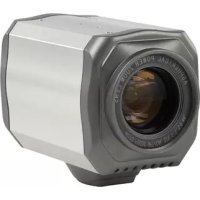
SECCAM800 - Surveillance Camera KONIG - Free user manual and instructions
Find the device manual for free SECCAM800 KONIG in PDF.



| Product type | CCTV surveillance camera |
| Brand | Konig Security |
| Model | SECCAM800 (SEC-CAM800) |
| Sensor | CCD 1/4" Sony |
| Resolution | 420 TV lines |
| Lens | 3.9 mm ~ 97.2 mm (x27 optical zoom) |
| Digital zoom | x27 (adjustable x22 or x27) |
| Day/night function | Yes, automatic color/B&W switching |
| Minimum illumination | 0.8 Lux |
| Electronic shutter | 1/50 ~ 1/100,000 s (auto) |
| White balance | Automatic (ON/OFF) |
| Backlight compensation | Auto Back Light Compensation (ON/OFF) |
| Power supply | 12 VDC, 400 mA |
| Video output | BNC, < 1.2 Vp-p / 75 Ω |
| Control | RS485 (Pelco D/P, 9600 baud) |
| Approximate dimensions | 130 x 70 x 60 mm (estimated) |
| Approximate weight | 400 g (estimated) |
| Operating temperature | -20 °C to 50 °C |
| Signal/noise ratio | > 48 dB |
| Maintenance | Clean with a dry cloth, no solvents |
| Safety | Do not open, risk of electric shock |
| Warranty | Not valid in case of modification or incorrect use |
| Standards | EN55013, EN55020 (EMC) |
Frequently Asked Questions - SECCAM800 KONIG
User questions about SECCAM800 KONIG
0 question about this device. Answer the ones you know or ask your own.
Ask a new question about this device
Download the instructions for your Surveillance Camera in PDF format for free! Find your manual SECCAM800 - KONIG and take your electronic device back in hand. On this page are published all the documents necessary for the use of your device. SECCAM800 by KONIG.
USER MANUAL SECCAM800 KONIG
Professional CCTV colour camera with 27x digital zoom and day and night function. During daytime the camera offers perfect color images and automatic during nighttime B/W images. Digital zoom and auto focus guarantees always a sharp picture. Digital menu for set-up.
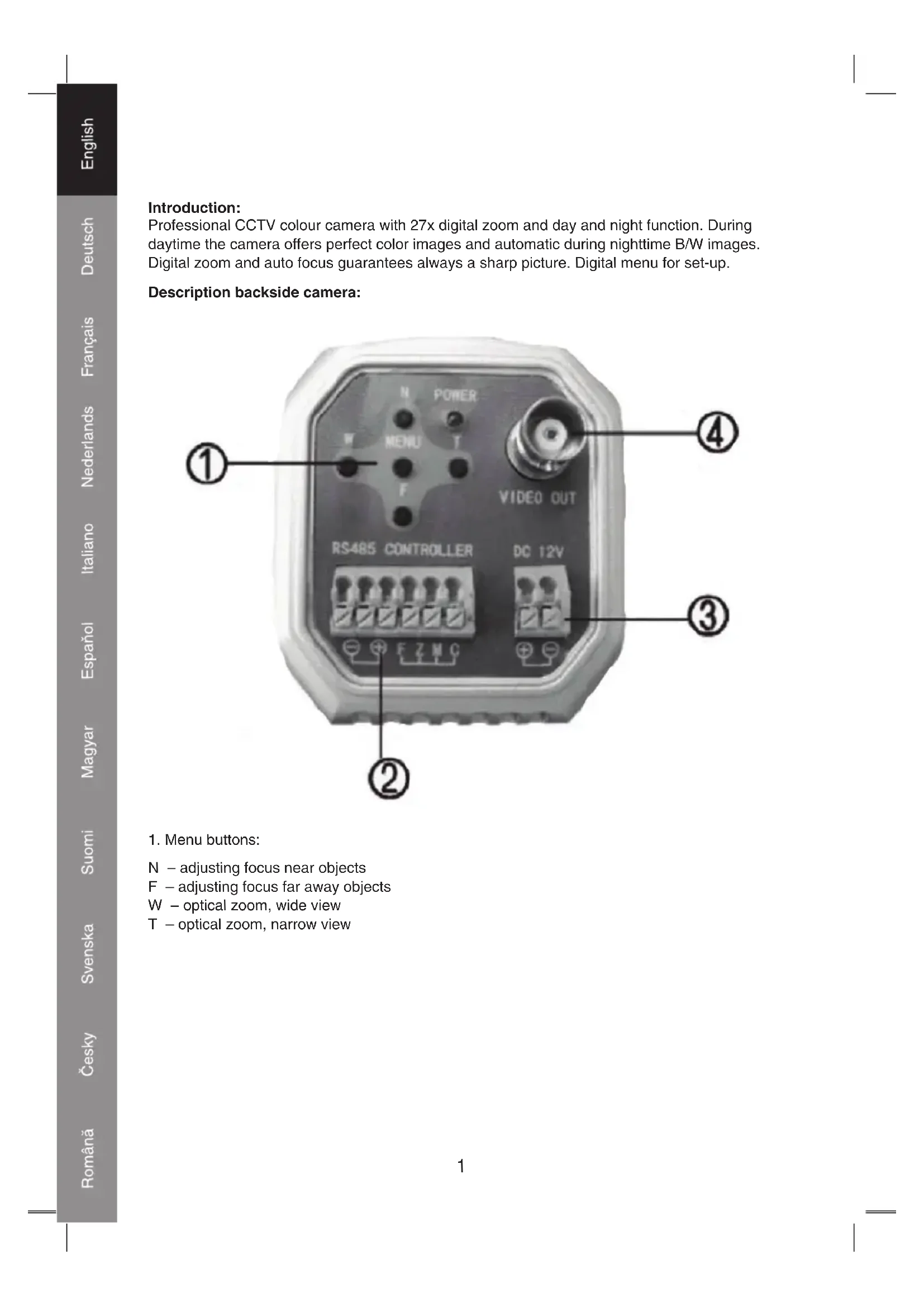
Description backside camera:
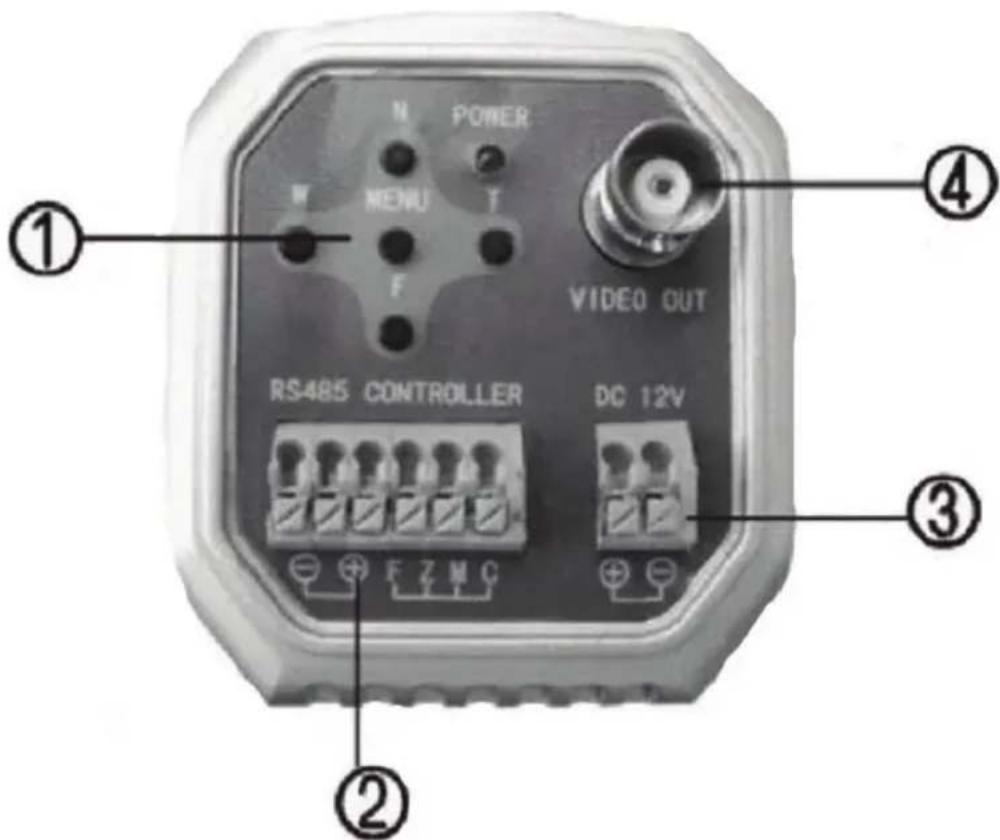
1. Menu buttons:
N - adjusting focus near objects
F - adjusting focus far away objects
W - optical zoom, wide view
T - optical zoom, narrow view
- Terminal connectors:
RS485-
RS485+
F-Focus
Z-Zoom
M-Menu
C-Com
- 12VDC, 400mA terminal connectors
- BNC video output, <1.2Vp-p/75 Ohm
Connections:
- Connect a 12V AC/DC adapter to the power connectors (3).
- Connect the video (coax) cable to the BNC video output (4) and a monitor or recorder.
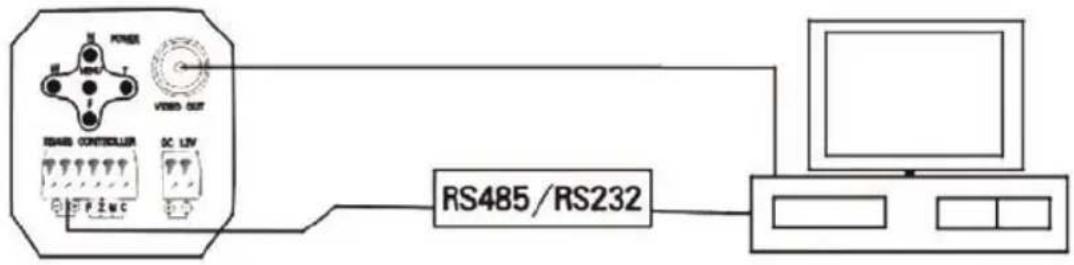
- RS485: connect the RS485 connection with DVR or Keyboard for communication, to control the lens and menu.
Menu control:
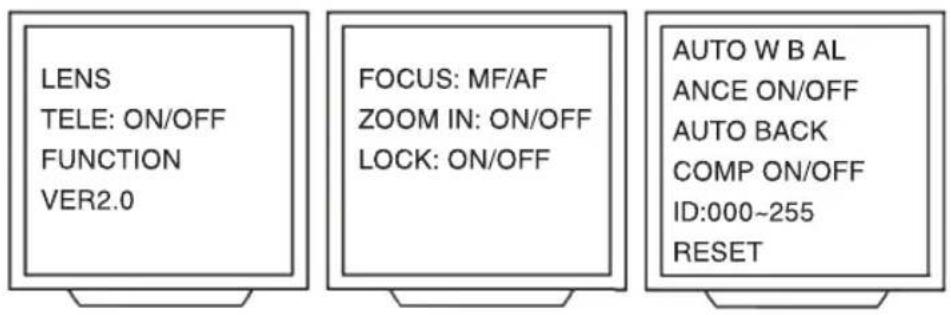
- Push the menu button to enter the menu.
- Use the W and T button to navigate in the menu.
- LENS: push the N button to enter the settings.
- FOCUS: push the N button to select MF (manual focus) or AF (auto focus).
- Push the W button to select ZOOM IND. Push the N button to select ON (zoom value is displayed in the picture) or OFF (zoom value is not displayed in the picture)
- Push the W button to select LOCK. Push the N button to select ON. REMARK: using the lock function will lock all buttons for further use. It's not recommended to lock the buttons. Push the N and menu button to unlock.
- Push the menu button to return to the main menu.
- Push the W button to select TELE. Push the N button to select On (27x Zoom) or Off (22x Zoom).
- Push the W button to select FUNCTION. Push the N button to enter the settings.
- Push the N button to select AUTO (white) BALANCE On or Off. Light has different colour temperatures; the eye tends to compensate for this so we are seeing, natural colours in most lighting conditions. When set the camera to ON, the camera automatically adjusts the white balance to match the true colour of the subject.
- Push the W button to select AUTO BACK (light) COMP (ensation).
Push the N button to select AUTO (white) BALANCE On or Off.
When switched to On, backlight compensation is video gain to correct the exposure of subjects that are in front of a bright light source. - Push the W button to select the ID. Push the N button to increase the number. Push the F button to decrease the number. The function of ID is to have a unique number per camera when more as one camera is in use.
- Push the W button to select RESET. Pushing the N button will reset the camera to factory settings. REMARK: the use of the RESET function will erase all personal settings.
ZOOM SPEED
Select zoom speed of camera.
ZOOM START
Select minimum zoom interval.
ZOOM STOP
Select maximum zoom interval.
START TIME
Select zoom starting position.
STOP TIME
Select zoom stop position.
INITIAL SET-UP
Restore the default of the camera, recover the motor position. No need to cut off the power after modifying the ID, you can update the internal ID by recovering this function.
FOCUS SENSE
Select the focus sensitivity of camera.
OSD MODE
3 OSD display options.
IR CUT
Not available on this version.
SHUTTER
AUTO (1/50--1/10.000 optional).
DAY/NIGHT
Support to adjust single colour, B&W, auto colour to B&W.
Specifications:
Pickup Device: 1/4" Sony CCD
Resolution: 420 lines
Lens: 3.9mm~97.2mm
Gain Control: automatic
BLC: On/Off
Illumination: 0.8 Lux
Electronic Shuttor: 1/50~1/100.000sec
S/N Ratio: >48dB
Operation Temperature: -20^ 50^
Sync. System: Internal
Line method: + / - 5VDC + / - 12VDC
Bus method: RS485
Bus protocol: Pelco D&P
Baud rate: 9600
Video Output: <1.2Vp-p/75 Ohm
Power input: 12VDC, 400mA
Declaration of conformity
We,
Nedis B.V.
De Tweeling 28
Declare that product:
Is in conformity with the following standards
EMC: EN55013:2001+A1:2003+A2:2006, CISPR13:2001+A1:2003+A2:2006, Emissions
EN55020:2002+A1:2003+A2:2005,C CISPR20:2002+A1:2002+A2:2004, IMMUNITY
Following the provisions of the EMC 89/336/EC directive.
's-Hertogenbosch, 02-11-2007

Mrs. J. Gilad
Purchase Director
Safety precautions:

CAUTION RISK OF ELECTRIC SHOCK DO NOT OPEN

To reduce risk of electric shock, this product should ONLY be opened by an authorized technician when service is required. Disconnect the product from mains and other
equipment if a problem should occur. Do not expose the product to water or moisture.
Maintenance:
Clean only with a dry cloth. Do not use cleaning solvents or abrasives.
Warranty:
No guarantee or liability can be accepted for any changes and modifications of the product or damage caused due to incorrect use of this product.
General:
Designs and specifications are subject to change without notice.
All logos brands and product names are trademarks or registered trademarks of their respective holders and are hereby recognized as such.

Attention:
This product is marked with this symbol. It means that used electrical and electronic products should not be mixed with general household waste. There is a separate collections system for these products.
Copyright ©

KONIG
SECURITY
SEC-CAM800
CCTV 27x
ZOOMKAMERA

MANUAL
MODE D'EMPLOI
MANUALE
HASZNÁLATI UTMUTATÓ
BRUKSANVISNING
MANUAL DE UTILIZARE
ANLEITUNG
GEBRUKSAANWIJZING
MANUAL DE USO
KÄYTTOOHJE
NAVOD KPOUZITI
Einführung:
OSD MODE (OSD-MODUS)
DAY/NIGHT (DAG/NATT)
Selectati oradepornirezoom.
ORA DE OPRIRE
Selectati or de oprire zoom.
SETÄRINITIALE
BLC: On/Off (Pornit/Oprit)
Illumare: 0,8 Lux
Obturator electronic: 1 / 50 1 / 100.000 sec