Webtalker 5000 - Phone TOPCOM - Free user manual and instructions
Find the device manual for free Webtalker 5000 TOPCOM in PDF.


User questions about Webtalker 5000 TOPCOM
0 question about this device. Answer the ones you know or ask your own.
Ask a new question about this device
Download the instructions for your Phone in PDF format for free! Find your manual Webtalker 5000 - TOPCOM and take your electronic device back in hand. On this page are published all the documents necessary for the use of your device. Webtalker 5000 by TOPCOM.
USER MANUAL Webtalker 5000 TOPCOM
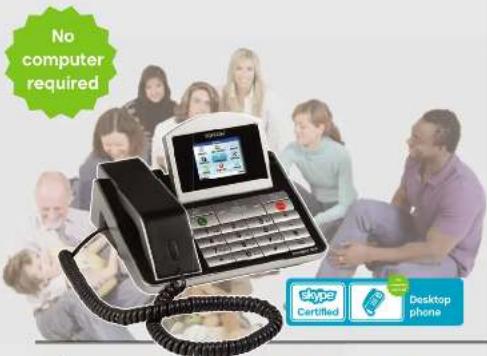
Desktop phone with Skype
INSTALLATION GUIDE
FREE INTERNET CALLS WITHOUT USING YOUR PC
C
Webt@lker 5000 with Skype
UK The features described in this manual are published with reservation to modifications
NL. Di in dae handisledig beschrenw mogelikhkction werden gesublcaed onder waershoud van wijzigingen.
FR Les possibilites dérivées dans ce manuel seront publiées sous réserve de modifications
DE Die in das Bedenblattierung arrechlehenen Mochigkeiten, werden wertberhavioren Änderungen publiziert.
ES Las caracteristicas descrires en este manjul乾坤 ser obelco de futuras modificaciones.
SE Funktiona i donna trucaarvising publicas med reservation for andingar
DKVorhabdleros reten fil andringer af da specifizatio, der er beskravl idernne braangsraming.
NO Funksjoner beskrevet I derme manusien kan endres uten naernere informasion.
SF Tassai ohjekirjassa julkaisssut tiedot vovat muitua iman ennakkolmotista.
It le carateristiche descrite n presente manuale vengono publicale con riserva di modifica.
PT Ascharacteristicadescantaesneetoanaluso publicadasobreserva de改动acion.
PL Do podlaczenia do publicanej analogowe sieci telefunicnnej
Installation Guide
1 Before initial use 4
1.1 Intended Purpose 4
1.2 Safety advice 4
1.3 Package content: 4
2 Product description 5
3 Alphanumeric keypad 6
4 Hardware installation 6
5 Setting up the phone 6
5.1 Language selection 6
5.2 Accept the Skype agreement 7
5.3 Country setting 7
5.4 Set the time and date 7
5.5 Sign in to Skype 8
5.5.1 Log in with an existing account 8
5.5.2 Create a new account 10
6 Main Display 12
7 Main Menu 13
8 Contacts 8.1 Add Contacts 14
8.1.1 Add a Skype contact 14
8.1.2 Add a SkypeOut number 15
8.1.3 Search a Skype contact 17
9 9.1 Call a Skype Contact 19
9.2 Dial SkypeOut number 19
10Receive a call 20
11 Cleaning 20
12 Disposal of the device (environment) 20
13 Topcom warranty 21
13.1 Warranty period 21
13.2 Warranty handling 21
13.3 Warranty exclusions 21
This product is in compliance with the essential requirements and other relevant provisions of the directive 89/336EEC. This is confirmed by the CE-mark.
The Declaration of conformity can be found on:
http://www.topcom.net/cdeclarations.php

1 BEFORE INITIAL USE
Thank you for purchasing this Topcom telephone.
1.1 Intended Purpose
This phone provides you a more convenient way to make free calls over the Internet. The phone is fully compatible with SKYPE®.

Please make sure you have a working Internet connection.
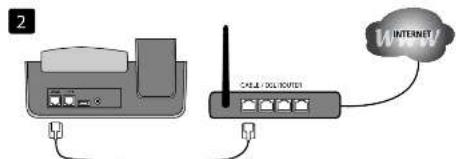
Topcom recommends connecting the Webt@Iker 5000 to an available port from a router.
1.2 Safety advice
- Always read the safety instructions carefully.
- Keep this User Manual for future reference.
- Keep this equipment away from humidity.
- Lay this equipment on a reliable flat surface before setting it up
-
If any of the following situation arises, get the equipment checked by a service technician:
-
The equipment has been exposed to moisture.
- The equipment has been dropped and damaged.
-
The equipment has obvious sign of breakage.
-
Do not place the basic unit in a damp room at a distance of less than 1.5m from a water source. Keep water away from the telephone.
- Do not use the telephone in environments where there is a risk of explosions.
- Maintain the telephone in an environment-friendly manner.

Skype does not allow emergency calls. Such calls should be made with a traditional telephone or a mobile phone.
1.3 Package content:
- 1 x Webt@Iker 5000
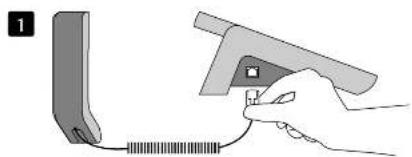
- 1 x Handset with curl cord
- 1 x Ethernet cable
- Installation guide
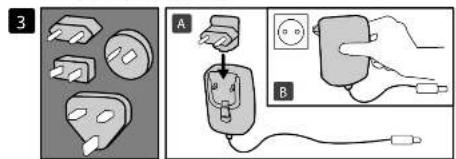
- Power adapter with 4 interchangeable country plugs
2 PRODUCT DESCRIPTION
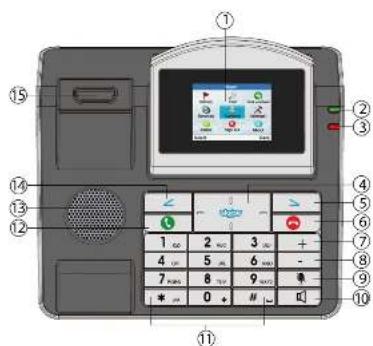
(See folded cover page)
- Adjustable display
- Green power LED
- Red Message indication LED
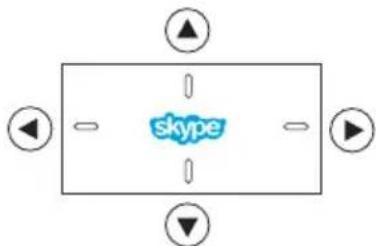
- Navigation key (up / down / left right
- Right soft key

-
Press this key to apply the function in the lower right display.
-
On hook button (end call)
- Volume up button
- Volume down button
- Mute button

-
Disable the microphone
-
Speaker button

-
Enable/disable the hands free function
-
Alphanumeric keypad
-
Off hook button (start call)
-
Hands free speaker
-
Left soft key

-
Press this key to apply the function in the lower left display.
-
Hook switch
-
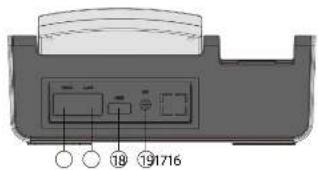
WAN - Ethernet connection
-
To connect to a broad band Router (or Ethernet Modem)
-
LAN - connection
- To connect to a computer or other network device
- USB - connection: not used
-
Power Jack
-
To connect the power adapter (5V DC / 2A)
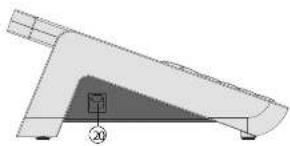
20.RJ9 - connection
- To connect the curl cord of the handset
3 ALPHANUMERIC KEYPAD
Please look at the table below when using the alphanumeric keypad.
While entering usernames, passwords,... you can press the *key to toggle between
Numerical (123), Lower Case (abc) and Upper Case (ABC) characters.
| 123 Lower Case (abc) Upper Case (ABC) | ||
| 1 | ..,?!-_@ 1 | ..,?!-_@ 1 |
| 2 | a b c 2 | ABC 2 |
| 3 | d e f 3 | DEF 3 |
| 4 | g h l 4 | G H l 4 |
| 5 | j k l 5 | J K L 5 |
| 6 | m n o 6 | M N O 6 |
| 7 | p q r s 7 | P Q R S 7 |
| 8 | t u v 8 | T U V 8 |
| 9 | w x y z 9 | W X Y Z 9 |
| 0 [SPACE] 0 + | ||
| * Toggle between : Numerical / Lower Case / Upper Case | ||
| # Special character selection | ||
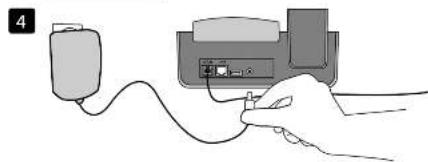
4 HARDWARE INSTALLATION
Connect the Webt@lker 5000 according to the illustration (See folded cover page).
5 SETTING UP THE PHONE
When the phone is powered up for the first time, you need to go through the following steps first:
5.1 Language selection
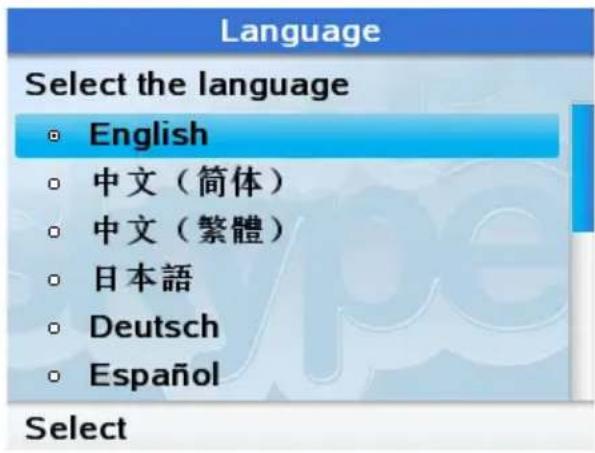
- Use or to choose your
language.
- Press to select.
5.2 Accept the Skype agreement
Agreement
I have read and accept Skype's terms and conditions at www.skype.com/eula, www.skype.com/tos and the privacy statement at www.skype.com/privacy.
Accept
Decline
- Scroll down to read the full agreement by pressing
- Press to accept the Agreement.
5.3 Country setting
Country code
| Select the country | |
| ○ Bahrain | +973 |
| ○ Bangladesh | +880 |
| ○ Barbados | +1246 |
| ○ Belarus | +375 |
| ○ Belgium | +32 |
| ○ Belize | +501 |
| OK | Bac |
- Use the alphanumeric keypad to enter the first letter of your country.
Use to select your country. - Press to confirm.
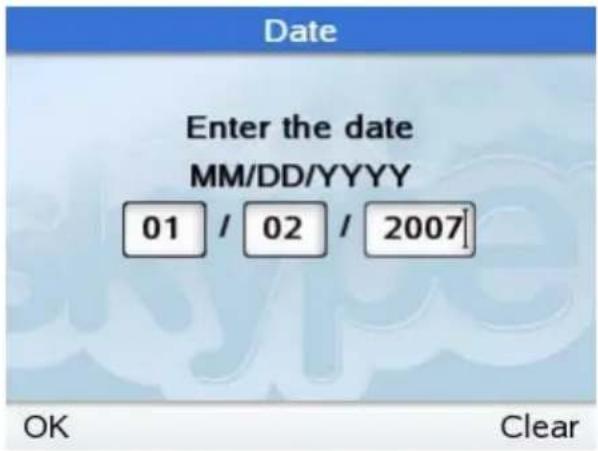
5.4 Set the time and date
Time
Enter time
hh:mm
14 : 00
- Enter the hour and the minutes using the alphanumeric keypad.
- Press to clear.
Press to confirm.
OK
Clear
-
Enter the month (MM), date (DD) and year (YYYY) by using the alphanumeric keypad.
-
Press to clear.
Press to confirm.
5.5 Sign in to Skype
You can configure your Webt@Iker 5000 with an existing Skype account or you can create a new one.
If you need to create a new account you need to define a unique Skype user name and a password. Jump to section 5.5.2 to create this new account.
5.5.1 Log in with an existing account
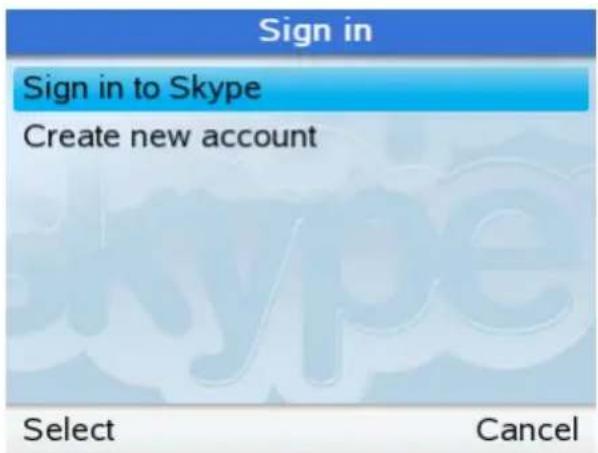
Use or to select "Sign Skype" if you already have a SKYPE account.
- Press to select.
-
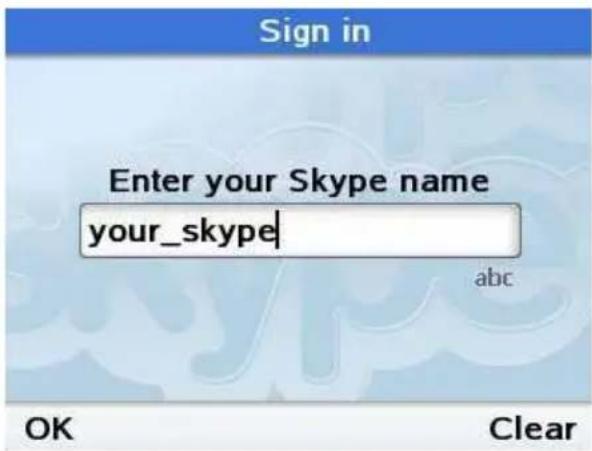
Enter your Skype account name using the alphanumeric keypad.
-
Press to continue.

See Chapter 3 for switching between Lower Case, Upper Case and Numerical characters.
-
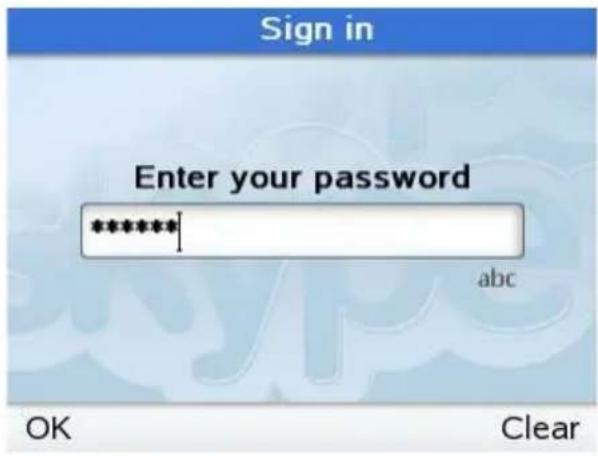
Enter your Skype account password using the alphanumeric keypad.
-
Press to continue.
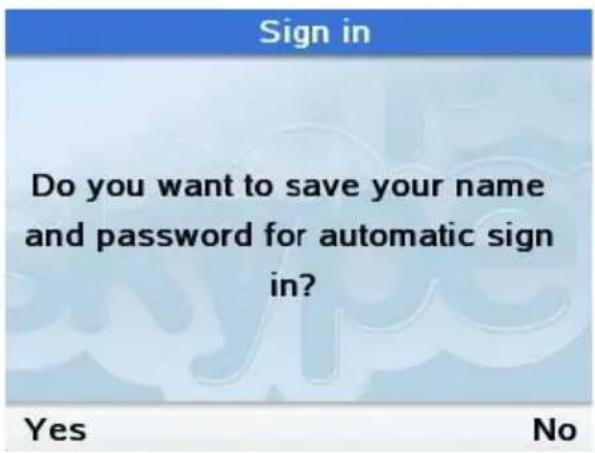
- Press to save the user name and password in the phone.

This means that the phone will automatically sign into this account if you power off and then re-start the phone.
If you enter the wrong user name or password you will be prompted to re-enter them.

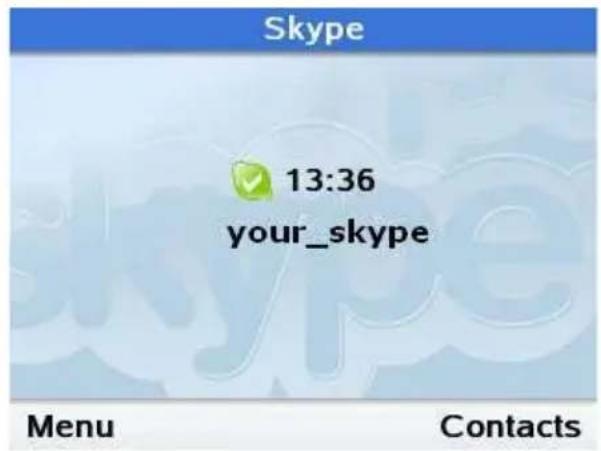
Your Webt@Iker 5000 is now ready for using Skype.
5.5.2 Create a new account
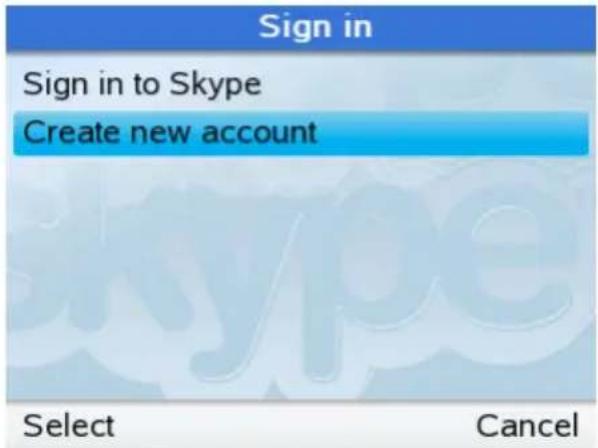
- Us or to select "Creat account".
- Press to select.
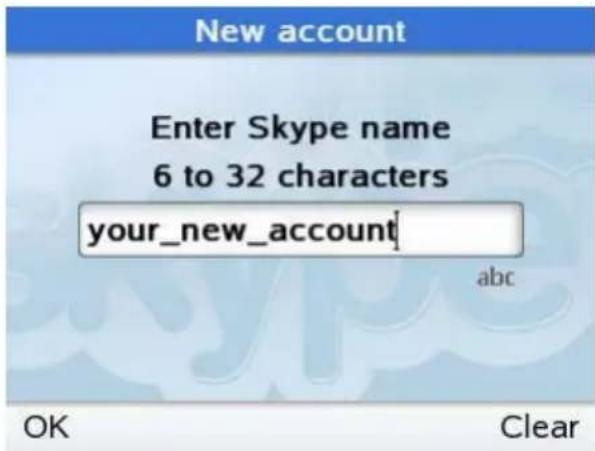
- Enter a unique Skype name using the alphanumeric keypad.
- Press to continue.

See Chapter 3 for switching between Lower Case, Upper Case and Numerical characters.
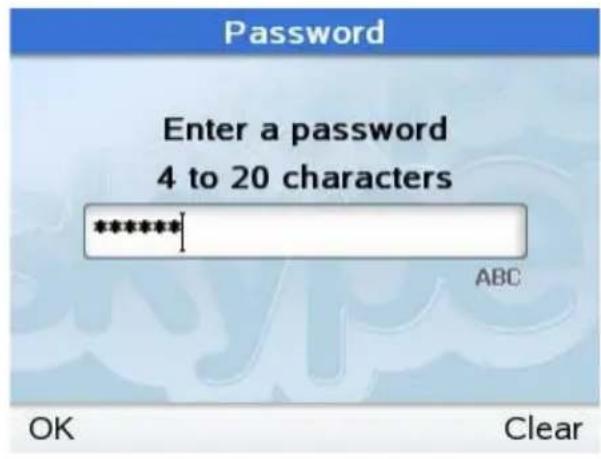
- Enter a SKYPE account password using alphanumeric keypad.
- Press to continue.
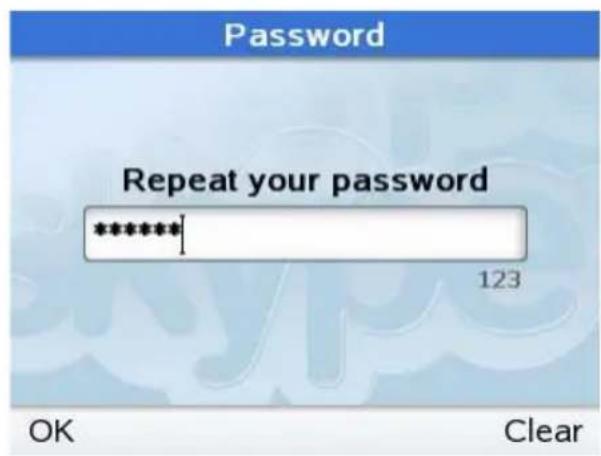
- Repeat your SKYPE account password.
- Press to continue.

Write down your Skype username and password and keep it in a secret place!
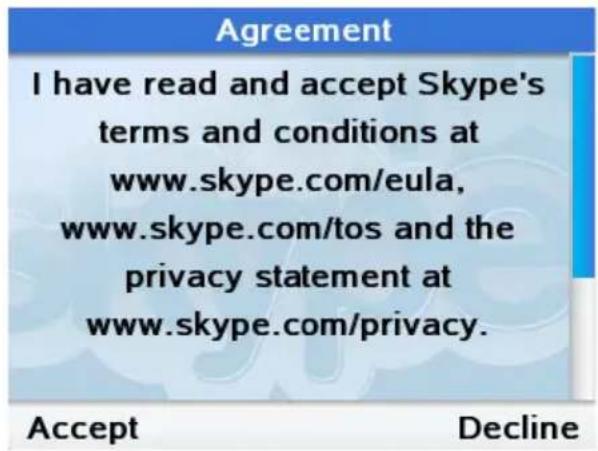
- Scroll down to read the full agreement by pressing
- Press to accept.
The new account will be created.
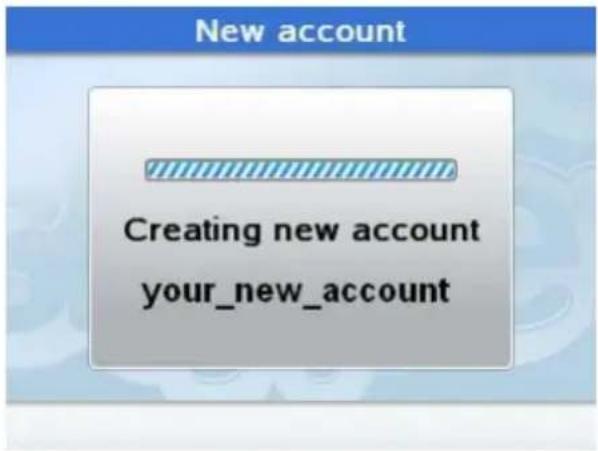
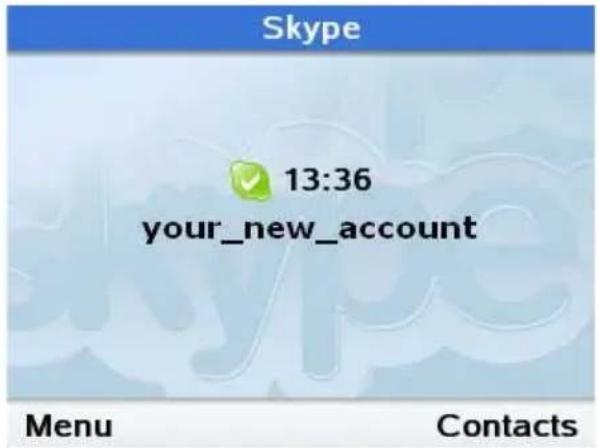
Your Webt@Iker 5000 is now ready for using Skype.

In case the user name is already in use or invalid, you need to try another Skype name.
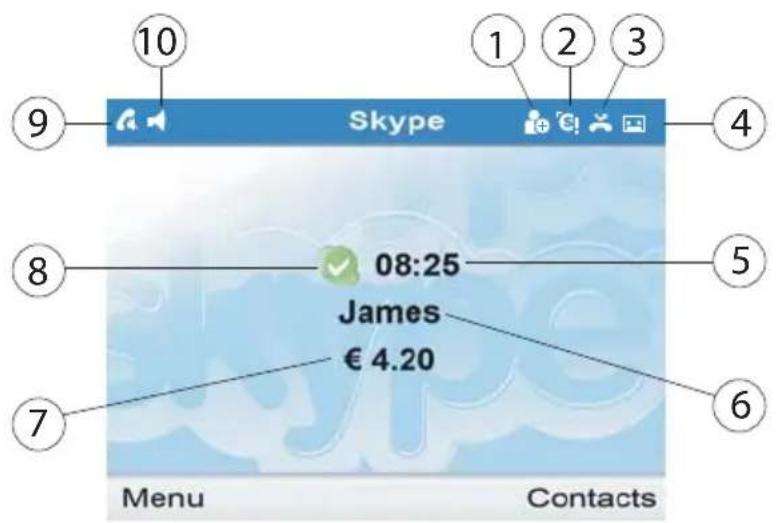
6 MAIN DISPLAY
- Authorization Request
- Skype credit is close to expiry
- Missed calls icon
- New voice mail icon
- Clock
- Your Skype name
- SkypeOut credit
- Online status icon
- Muted microphone icon
- Handsfree mode icon
7 MAIN MENU
- Press to enter the main menu of the Webt@lker 5000.
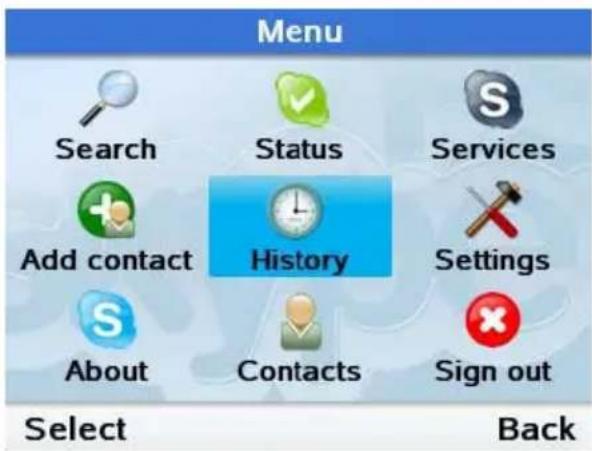
Use l , or option you want to enter.
- Press to select.
| Menu Function | |
| Search Status | Search for Skype usersChange your Skype status (Offline, Online, Skype Me, Away, Not Available, Do Not Disturb, Invisible) |
| Services | Displays information about your Skype credit balance, your SkypeIn account and your Skype Voicemail.Add Skype users or SkypeOut numbers to your contact list.View your missed calls, incoming and outgoing calls, voicemail and contact requestsChange Time and Date, Tones, Network settings, Call divert, Display properties, etc.Read the full user guide on the CD for more information. |
| Add contact History | About Contacts Sign Out |
| Settings | |
| About Contacts | Browse your skype contactsSign out |
8 CONTACTS
Your Skype Contacts are stored into your Skype account.
When you login with an existing Skype account, all your contacts will be automatically downloaded in the contact list. You have the possibility to add new Skype contacts or SkypeOut numbers.
8.1 Add Contacts
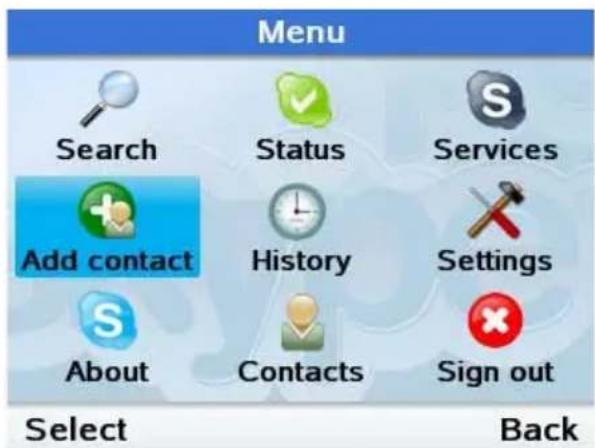
- Press to enter the main menu.
Use or to move "Add Contacts". - Press to select.
8.1.1 Add a Skype contact
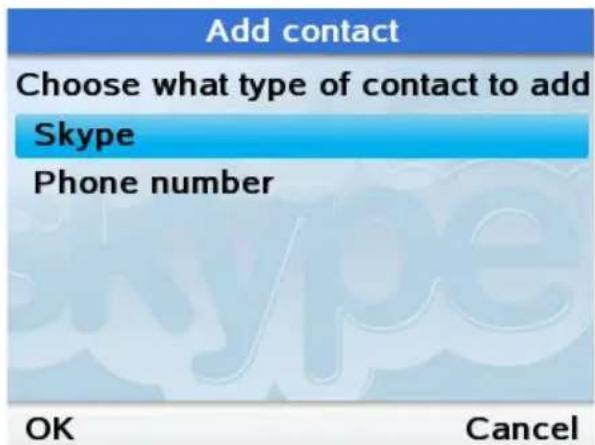
- Use to select "Skype".
- Press to continue.
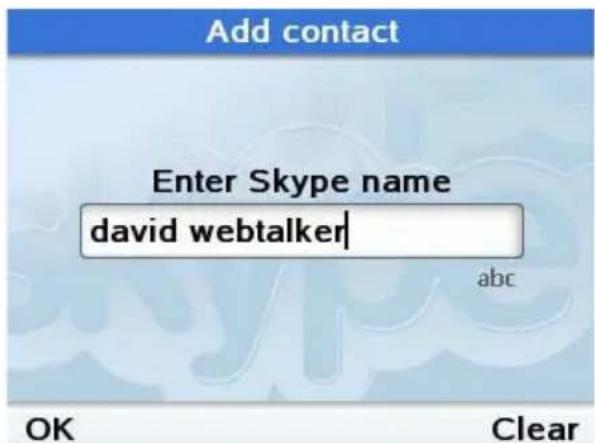
- Enter the Skype name of the user you want to add using the alphanumeric keypad.
- Press to continue.
Skype will search for the user. If the user is not found, you will have to retry.
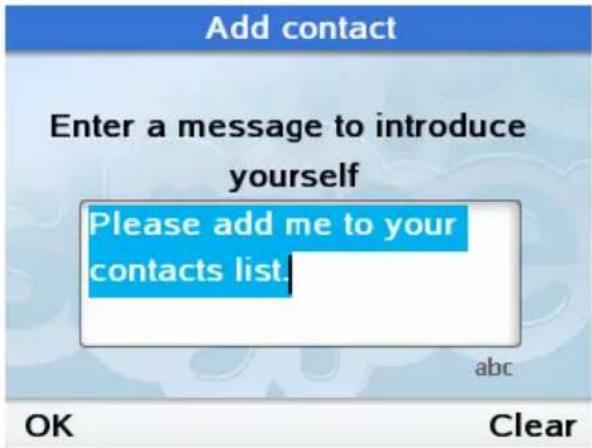
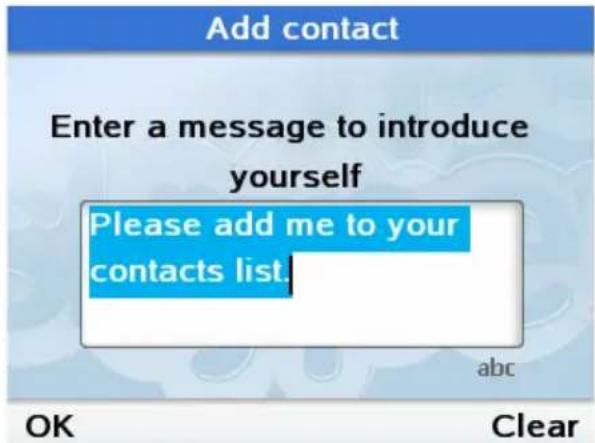
- Enter an introduction message.
Press to confirm.
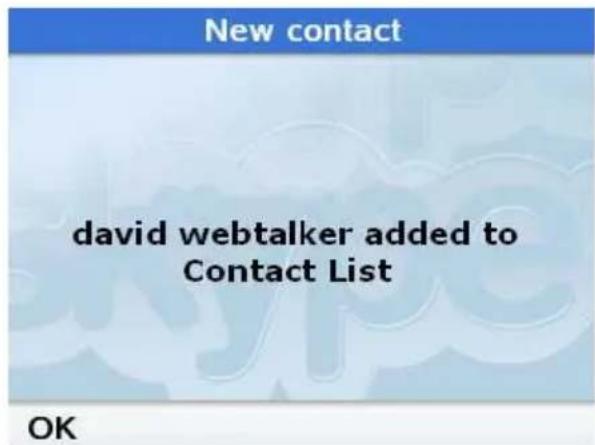
- Press to confirm.

As soon as the contact has accepted your request, you can see his status in your contact list.
8.1.2 Add a SkypeOut number
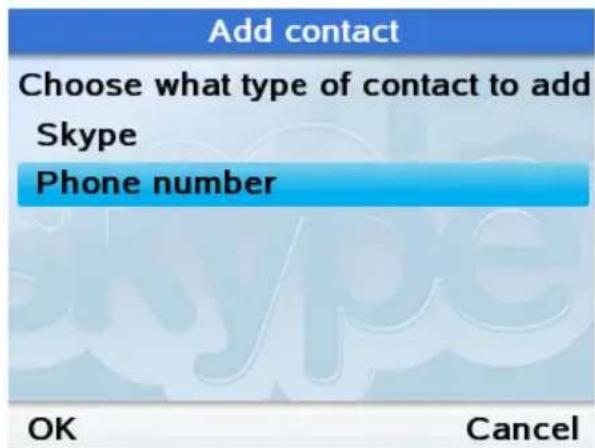
- Us or to select "Phone number".
- Press to continue.
SkypeOut contact
Enter full phone number

123
OK
Clear
-
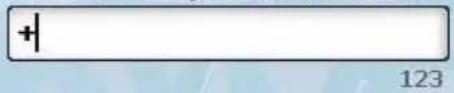
Enter the number starting with "+" and the country code.
-
Press
to continue.
- Press
to clear.

“+” is dialled by press and hold ‘0’ for more then 2 seconds.
SkypeOut contact
Enter contact's name
david
abc
OK
Clear
New contact
-
The name and number have been added to your Skype contact list.
-
Press
to confirm.
8.1.3 Search a Skype contact
If you are not fully sure about the Skype username, you can search for a Skype contact by entering the name or Email address of the Skype user.
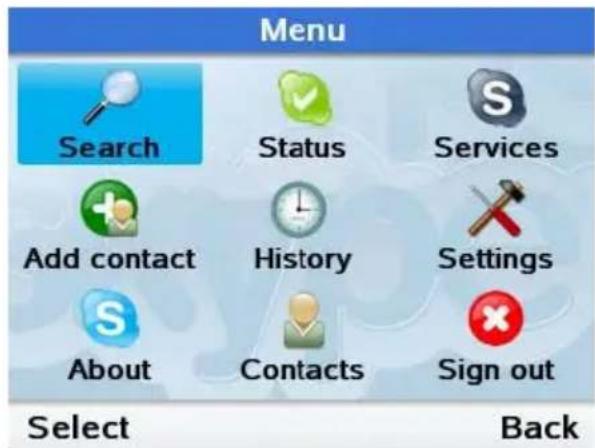
- Press to enter the main menu.
Use or move "Search" - Press to select.
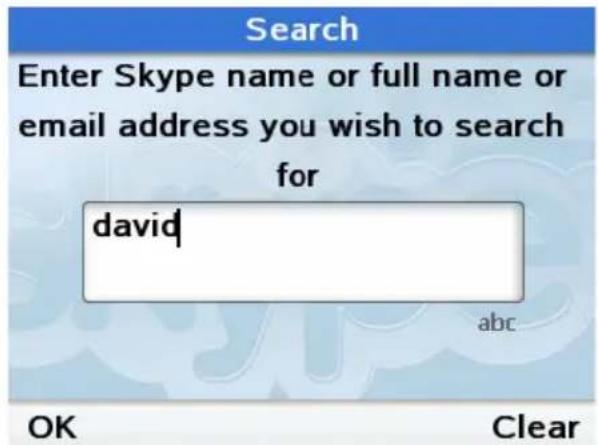
- Enter the name or Email address of the user you want to add using the alphanumeric keypad.
- Press to continue.

Skype will search and find all Skype users with this name.
If more than one match is found, use to select the right contact person.
- Press to enter the options.
Options
Add to contacts
View profile
all
Search again
Select
Back
Add contact
Enter a message to introduce yourself
Please add me to your contacts list.
abc
OK
Clear
New contact
david added to Contact List
OK

As soon as the contact has accepted your request, you can see his status in your contact list.
Us
contacts".
Press

to
select
"Add to
continue.
- Enter an introduction message.
Press
to
confirm.
- Press
to
confirm.
9 C A L L S
9.1 Call a Skype Contact
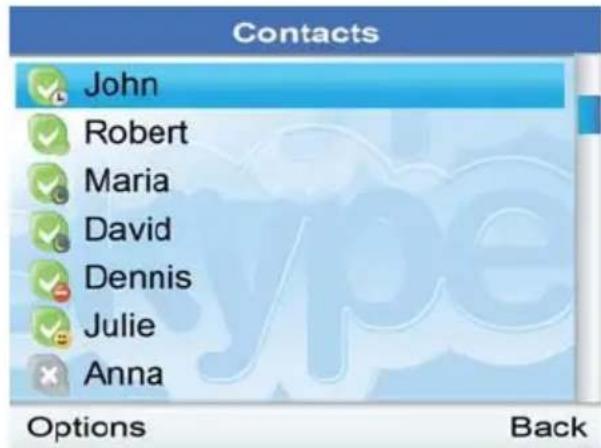
From the main display, press to open the contact list or enter the menu and choose Contacts.
- A list off all your Skype and SkypeOut contacts will appear.
to select the
- Lift the handset and press

If you do not lift the handset, the phone will automatically go to hands-free mode.
The call will be established.
Hang up the handset or press to end the call.
9.2 Dial SkypeOut number
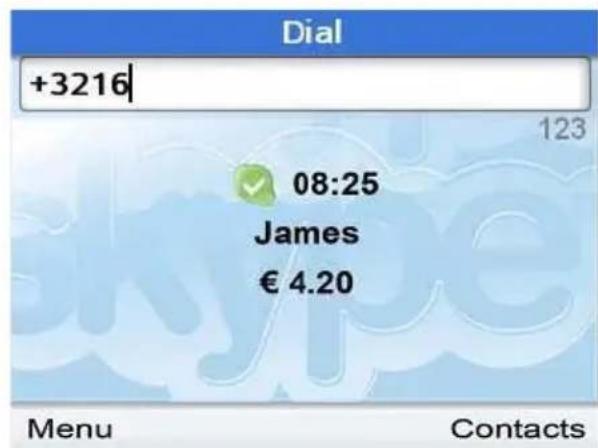
- Dial the SkypeOut number starting with + Country code followed by the rest of the number.

Dial + by press and hold '0' for more then 2 seconds.
If you want to make a call in your own country, just dial the number without your country code. (This will only work if you have selected your country code during the installation wizard)
- Lift the handset and press


If you do not lift the handset, the phone will automatically go to hands-free mode.
- Press or hang up the handset to terminate the call.
10 RECEIVE A CALL
When a call comes in, the phone will start ringing. On the display you can see the name or number of the caller.
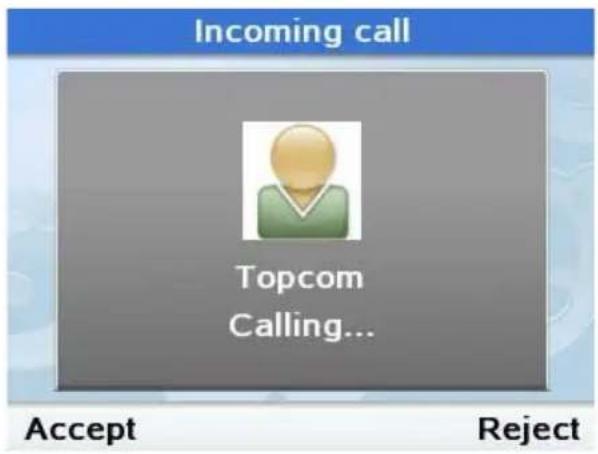
- Pickup the handset or press to accept the call in hands-free mode.
Hang up the handset or press to end the call.
11 CLEANING
Clean the telephone with a slightly damp cloth or with an anti-static cloth. Never use cleaning agents or abrasive solvents.
12 DISPOSAL OF THE DEVICE (ENVIRONMENT)

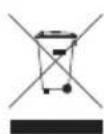
At the end of the product lifecycle, you should not throw this product into the normal household garbage but bring the product to a collection point for the recycling of electrical and electronic equipments. The symbol on the product, user guide and/or box indicate this.
Some of the product materials can be re-used if you bring them to a recycling point. By re-using some parts or raw materials from used products you make an important contribution to the protection of the environment. Please contact your local authorities in case you need more information on the collection points in your area.
13 TOPCOM WARRANTY
13.1 Warranty period
The Topcom units have a 24-month warranty period. The warranty period starts on the day the new unit is purchased.
Consumables or defects causing a negligible effect on operation or value of the equipment are not covered.
The warranty has to be proven by presentation of the original purchase receipt, on which the date of purchase and the unit-model are indicated.
13.2 Warranty handling
A faulty unit needs to be returned to a Topcom service centre including a valid purchase note.
If the unit develops a fault during the warranty period, Topcom or its officially appointed service centre will repair any defects caused by material or manufacturing faults free of charge.
Topcom will at its discretion fulfill its warranty obligations by either repairing or exchanging the faulty units or parts of the faulty units. In case of replacement, colour and model can be different from the original purchased unit.
The initial purchase date shall determine the start of the warranty period. The warranty period is not extended if the unit is exchanged or repaired by Topcom or its appointed service centres.
13.3 Warranty exclusions
Damage or defects caused by incorrect treatment or operation and damage resulting from use of non-original parts or accessories not recommended by Topcom are not covered by the warranty.
The warranty does not cover damage caused by outside factors, such as lightning, water and fire, nor any damage caused during transportation.
No warranty can be claimed if the serial number on the units has been changed, removed or rendered illegible.
Installategids
2 PRODUCTBESCHRIJVING
I have read and accept Skype's terms and conditions at www.skype.com/eula, www.skype.com/tos and the privacy statement at www.skype.com/privacy.
Accept
Decline
Repeat your password

OK
Clear
I have read and accept Skype's
terms and conditions at
www.skype.com/eula,
www.skype.com/tos and the
privacy statement at
www.skype.com/privacy.
Accept
Decline
Enter full phone number

OK
Clear
david[+32....] added to Contact List
OK
Enter a message to introduce yourself
Please add me to your contacts list.
abc
OK
Clear
New contact
david added to Contact List
OK
Gebruik

om "Toevgn. aan
contacten"(Add to contacts) te selectoren.
Druk op
omverdertegaan.
http://www.topcom.net/cdeclarations.php
1 AVANT LA PREMIÈRE UTILISATION
I have read and accept Skype's terms and conditions at www.skype.com/eula, www.skype.com/tos and the privacy statement at www.skype.com/privacy.
Accept
Decline
Enter full phone number

OK
Clear
Enter contact's name
david
abc
OK
Clear
New contact
david[+32....] added to Contact List
OK
Enter a message to introduce yourself
Please add me to your contacts list.
abc
OK
Clear
New contact
david added to Contact List
OK

http://www.topcom.net/cdeclarations.php
I have read and accept Skype's terms and conditions at www.skype.com/eula, www.skype.com/tos and the privacy statement at www.skype.com/privacy.
Accept
Decline
Do you want to save your name and password for automatic sign in?
Yes
No
Repeat your password

123
OK
Clear
I have read and accept Skype's terms and conditions at
www.skype.com/eula,
www.skype.com/tos and the
privacy statement at
www.skype.com/privacy.
Accept
Decline
Creating new account
your_new_account
Enter a message to introduce yourself
Please add me to your contacts list.
abc
OK
Clear
New contact
david webtalker added to Contact List

Choose what type of contact to add Skype
Phone number
Enter full phone number
OK
Clear
Enter contact's name
david
david[+32....] added to Contact List
Enter Skype name or full name or email address you wish to search for
david
David Webtalker david.webtalker
Options
Back
http://www.topcom.net/cdeclarations.php
I have read and accept Skype's terms and conditions at www.skype.com/eula, www.skype.com/tos and the privacy statement at www.skype.com/privacy.
Accept
Decline
Creating new account
your_new_account
Skype

13:36
your_new_account
Menu
Contacts
Enter full phone number

OK
Clear
Enter contact's name
david
abc
OK
Clear
New contact
Enter a message to introduce yourself
Please add me to your contacts list.
abc
OK
Clear
New contact
david added to Contact List
OK

http://www.topcom.net/cdeclarations.php
1 FÖRE FÖRSTA ANVÄNDNING
5.5 Logga in i Skype
Do you want to save your name and password for automatic sign in?
Repeat your password

OK
Clear
I have read and accept Skype's
terms and conditions at
www.skype.com/eula,
www.skype.com/tos and the
privacy statement at
www.skype.com/privacy.
Accept
Decline
Enter a message to introduce yourself
Please add me to your contacts list.
abc
OK
Clear
New contact
david webtalker added to Contact List
OK
Choose what type of contact to add
Skype
Phone number
Anvand erer foratt markera
"Telefonnummer" (Phone number).
10 TA EMOT ETT SAMTAL
http://www.topcom.net/cdeclarations.php
1 INDEN FØRSTE IBRUGTAGNING
Tak, fordi du har koot denne Topcom-telefon.
1.1 Formal
I have read and accept Skype's terms and conditions at www.skype.com/eula, www.skype.com/tos and the privacy statement at www.skype.com/privacy.
Accept
Decline
5.3 Indstilling at land
Country code
Select the country
Bahrain +973
Bangladesh +880
- Barbados +1246
Belarus +375
- Belgium +32
- Belize +501
OK
Back
- Brug det alfanumeriske tastatur til at indtaste dit lands forste bogstav.
Benyt for fremhaeve dit land.
Tryk pà for at bekraefte.
Tryk pa for at fortsaete.

- Brug ⑥ller for at fremhaeve "Telefonnummer" (Phone number).
Tryk pa for at fortsaete.
SkypeOut contact
Enter full phone number

OK
Clear
Enter contact's name
david
abc
david[+32.....] added to Contact List
OK
Tryk pa for at fortsaete.
http://www.topcom.net/cdeclaration.php
1 FØR FØRSTE GANGS BRUK
I have read and accept Skype's terms and conditions at www.skype.com/eula, www.skype.com/tos and the privacy statement at www.skype.com/privacy.
Accept
Decline
Repeat your password

123
OK
Clear
I have read and accept Skype's
terms and conditions at
www.skype.com/eula,
www.skype.com/tos and the
privacy statement at
www.skype.com/privacy.
Accept
Decline
Enter a message to introduce yourself
Please add me to your contacts list.
abc
OK
Clear
New contact
david webtalker added to Contact List
OK
Choose what type of contact to add
Skype
Phone number
OK
Cancel
Bruk ①ller for a "Sok" (Search).
12 AVHENDING AV PRODUKTET (MILJØ)
http://www.topcom.net/cdeclarations.php
1 ENNEN ENSIMMAISTÄ KÄYTTOA
-
Handsfree-kaiutin
-
Vasen soft key -nappain

I have read and accept Skype's terms and conditions at www.skype.com/eula, www.skype.com/tos and the privacy statement at www.skype.com/privacy.
Accept
Decline
Enter a message to introduce yourself
Please add me to your contacts list.
abc
OK
Clear
New contact
david added to Contact List
OK

http://www.topcom.net/cdeclaration.php
1 PRIMA DI UTILIZZARE L'APPARECCHIO
I have read and accept Skype's terms and conditions at www.skype.com/eula, www.skype.com/tos and the privacy statement at www.skype.com/privacy.
Accept
Decline
Do you want to save your name and password for automatic sign in?
Yes
No
Repeat your password

OK
Clear
I have read and accept Skype's
terms and conditions at
www.skype.com/eula,
www.skype.com/tos and the
privacy statement at
www.skype.com/privacy.
Accept
Decline
Enter a message to introduce yourself
Please add me to your contacts list.
abc
OK
Clear
New contact
david webtalker added to Contact List
OK
Choose what type of contact to add
Skype
Phone number
OK
Cancel
Enter full phone number

OK
Clear
Enter contact's name
david
abc
david[+32....] added to Contact List
Enter a message to introduce yourself
Please add me to your contacts list.
abc
OK
Clear
New contact
david added to Contact List
OK
Utilizzar

0
per
selectionare
6 Ecrã Principal 202
7 Menu Principal 203
http://www.topcom.net/cdeclarations.php
1 ANTES DA PRIMEIRA UTILIZACAO
I have read and accept Skype's terms and conditions at www.skype.com/eula, www.skype.com/tos and the privacy statement at www.skype.com/privacy.
Accept
Decline
Signing in your_skype
Cancel
Skype

13:36
your_skype
Menu
Contacts
Enter full phone number

123
OK
Clear
Enter contact's name
david
abc
OK
Clear
New contact
http://www.topcom.net/cdeclarations.php
I have read and accept Skype's terms and conditions at www.skype.com/eula, www.skype.com/tos and the privacy statement at www.skype.com/privacy.
Accept
Decline
Do you want to save your name and password for automatic sign in?
Yes
No

Repeat your password

OK
Clear

I have read and accept Skype's
terms and conditions at
www.skype.com/eula,
www.skype.com/tos and the
privacy statement at
www.skype.com/privacy.
Accept
Decline
Enter a message to introduce yourself
Please add me to your contacts list.
abc
OK
Clear
david webtalker added to Contact List
Wcisinij
Choose what type of contact to add
Skype
Phone number
- Przy pomocy
Lab wybierz
"Numer Telefonu" (Phone number).
OK
Cancel
Wcisnij
aby kontynuowa.
SkypeOut contact
Enter full phone number

OK
Clear
Enter contact's name
david
abc
david[+32....] added to Contact List
OK