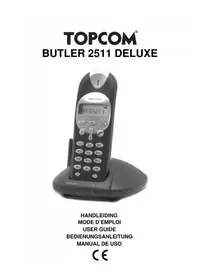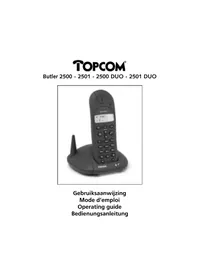
Butler 2500 DUO - Phone TOPCOM - Free user manual and instructions
Find the device manual for free Butler 2500 DUO TOPCOM in PDF.



User questions about Butler 2500 DUO TOPCOM
0 question about this device. Answer the ones you know or ask your own.
Ask a new question about this device
Download the instructions for your Phone in PDF format for free! Find your manual Butler 2500 DUO - TOPCOM and take your electronic device back in hand. On this page are published all the documents necessary for the use of your device. Butler 2500 DUO by TOPCOM.
USER MANUAL Butler 2500 DUO TOPCOM
DECLARATION OF CONFORMITY
We, TTS Nv, Graunmeer 17, 3001 Heverlee, Belgium, declare that our product is
Product name: TOPCOM
Model type: Butler 2500/Butler 2500 DUO
is in conformity with the essential requirements of the R&TTE directive 1999/5/EC and carries the CE mark accordingly.
Supplementary information
The product complies with the requirements of:
TBR37
EN60950
EN301489-6
TBR6
TBR10
Date: 03/01/2003
Place: Heverlee, Belgium
Name: Verheyden Geert
Function: Technical Director

European contact: TTS Nv, R&D department, Research Park, Grauwwmoer 17,3001
Heverlee, Belgium. Tel: +32 16 398920 Fax: +32 16 398939
GB The features described in this manual are published with reservation to modifications.
Touse 'Caller ID' (display caller), this service has to be activated on your phone line. Normally you need a separate subscription from your telephone company to activate this function.
If you don't have the Caller ID function on your phone line, the incoming telephone numbers will NOT be shown on the display of your telephone.
!! Important !!
5.1 Outgoing calls 11
5.1.1 Making a phone call 11
5.1.2 Call setup with dial preparation 11
5.2 Incoming calls 11
5.3 Last number redial 12
5.4 Programming memory numbers 12
5.5 Calling a memory number
5.6 Mute function
5.7 Setting the volume
5.8 Paging
5.9 Out of range warning
5.10 Flash button (R)
5.10.1 Setting the Flash time
5.11 Setting the ring volume
6 CALLER-ID FUNCTION (CLIP)
6.1 New calls 15
6.2 Consulting the Call list 15
6.3 Calling a number from the Call list 15
6.4 Erasing a number from the Call list 15
TOPCOM
Butler 2500/2500 DUO
7. CALL TRANSFER AND INTERCOM BETWEEN TWO HANDSETS (ONLY B2500 DUO) 16
7.1. Call transfer during an external call 16
7.2. Internal call (intercom) 16
8. TOPCOM WARRANTY 17
9. TROUBLESHOOTING 18
10. TECHNICAL DATA 19
TOPCOM
Butler 2500/2500 DUO
Safety Instructions
- Only use the charger plug supplied. Do not use other chargers, as this may damage the battery cells.
- Only insert rechargeable batteries of the same type. Never use ordinary, non-rechargeable batteries. Insert rechargeable batteries so they connect to the right poles (indicated in the battery compartment of the handset).
- Do not touch the charger and plug contacts with sharp or metal objects.
- The operation of some medical devices may be affected.
- The handset may cause an unpleasant buzzing sound in hearing aids.
- Do not place the basic unit in a damp room or at a distance of less than 1.5m away from a water source. Keep water away from the handset.
- Do not use the telephone in environments where there is a risk of explosions.
- Dispose of the batteries and maintain the telephone in an environment-friendly manner.
- As this telephone cannot be used in case of a power cut, you should use a mains-independent telephone for emergency calls, e.g. a mobile phone.
Cleaning
Clean the telephone with a slightly damp cloth or with an anti-static cloth. Never use cleaning agents or abrasive solvents.
TOPCOM
Butler 2500/2500 DUO
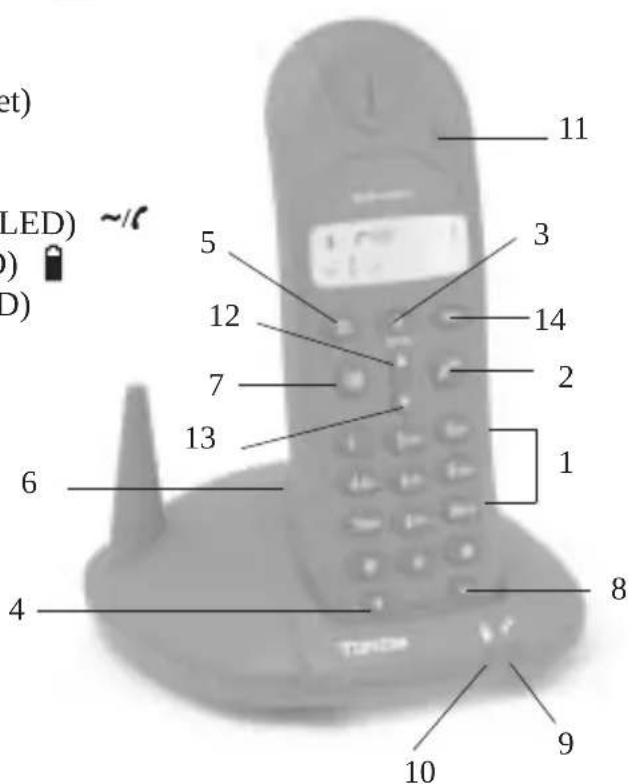
1. BUTTONS
1 Numerical buttons
2 Line button
3 Redial / Pause button /P
4 Flash R/ Call log button
5 Memory button
6 Paging button (to retrieve the handset)
7 M ute button @/C
8 INT button Int
9 Line/power indicator (LED)
10 Charge indicator (LED)
11 Handset indicator (LED)
12 Up Button
13 Down Button
14 Volume button
TOPCOM
Butler 2500/2500 DUO
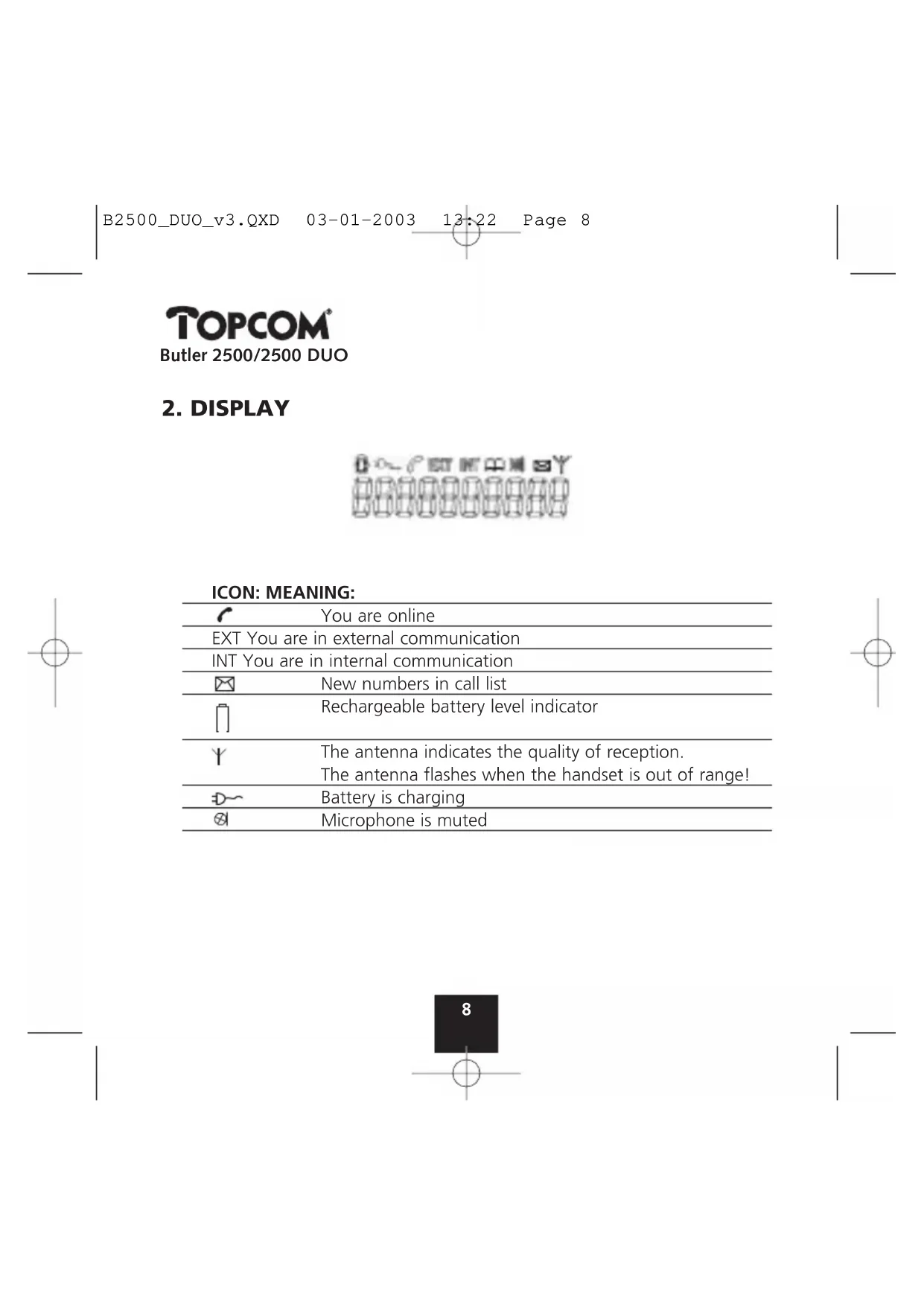
2. DISPLAY
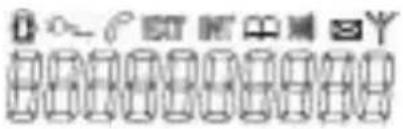
ICON: MEANING:
| You are online | |
| EXT You are in external communication | |
| INT You are in internal communication | |
| New numbers in call list | |
| Rechargeable battery level indicator | |
| The antenna indicates the quality of reception. The antenna flashes when the handset is out of range! | |
| Battery is charging | |
| Microphone is muted |
TOPCOM Butler 2500/2500 DUO
3. INSTALLATION
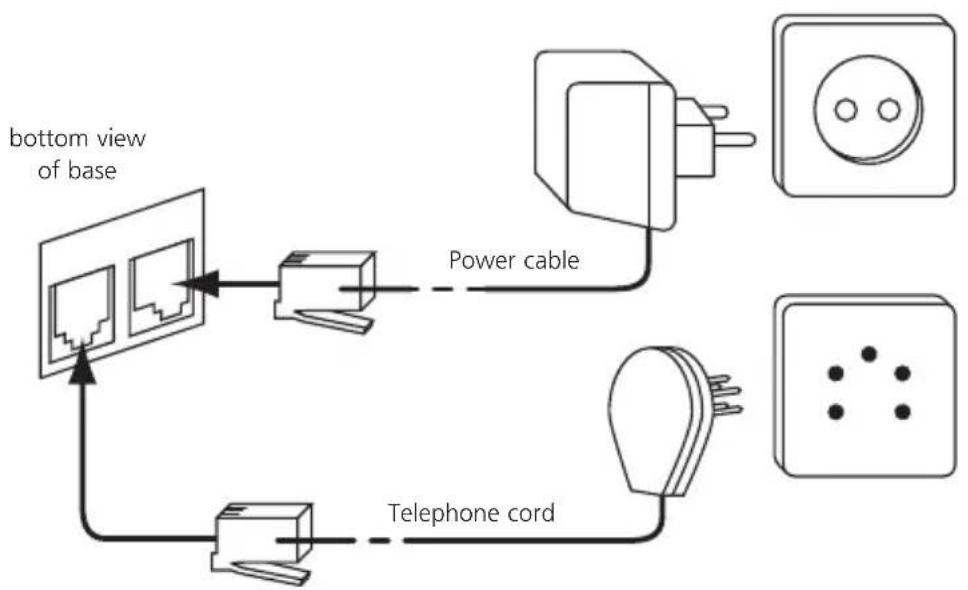
- Plug one end of the phone cable into the phone unit and the other end into the telephone line wall socket.
- Connect the small plug of the AC adaptor to the phone and the other end of the adapter cable to the electric socket.
- Insert 2 rechargeable batteries (AAA) inside the battery compartment of the handset.
Put the handset on the base unit. The red Charge LED will burn.
TOPCOM
Butler 2500/2500 DUO
Charge the handset for a period of 24 hours before using the handset for the first time. To extend the battery life time, recharge the batteries completely from time to time. As soon as the handset emits a warning tone or when the battery icon is empty, you have to put it back on the base unit.
4. BATTERY EMPTY INDICATION
When the battery is empty, the handset no longer carries out operations. When a battery is completely empty and you have put the handset on the base unit for a short period of time, the Battery symbol will appear to be fully charged but this is actually not the case. The battery capacity will decrease rapidly. We advise you to put the handset on the base unit for the entire night so that it can be recharged thoroughly.
- Full battery [ ]
- Empty battery [ ]
When you are in the middle of a conversation and the battery is almost empty, the handset will emit a warning signal. Place the handset on the base unit to charge.
TOPCOM Butler 2500/2500 DUO
5. OPERATION TELEPHONE
5.1 Outgoing calls
5.1.1 Making a phone call
- Press the Line button. You will hear the dial tone.
- Enter the desired telephone number.
- P r e s s the Line button when you want to terminate the call.
5.1.2 Call setup with dial preparation
- Enter the desired telephone number. An incorrect number can be corrected by means of the Mute button When you haven't pressed a button for 60 seconds, the number you've already entered will disappear and the handset returns to standby mode.
- P r ess the Line button . The number will be dialled automatically.
- P r e s s the Line button when you want to terminate the call.
5.2 Incoming calls
- When a call comes in, the handset and base will start to ring. The EXT symbol and the handset indicator LED will blink.
- Press the Line button to answer the incoming call.
- When you pick up the handset from the base unit you are immediately connected to the caller. You do not need to press the Line button
TOPCOM
Butler 2500/2500 DUO
5.3 Last number redial
- Press the Line button
- Press the Redial button The last number (with max. 20 digits) will be dialled automatically.
- Press the Line button when you want to terminate the call.
5.4 Programming memory numbers
You can program 10 indirect numbers (of max. 20 digits) in the phone's memory.
- Press the Memory button, followed by memory location (0-9).
- Enter the telephone number you wish to save on this memory location.
- Press the Memory button. You will hear a confirmation tone.
Remarks :
- If you wish to insert a pause, press the Redial/Pause button on the location where you want a pause
5.5 Calling a memory number
- Press the Line button.
- Press the Memory button, followed by the number of the memory location (0-9).
The memory number will be dialled automatically. - Press the Line button when you want to terminate the call.
TOPCOM Butler 2500/2500 DUO
5.6 Mute function
It is possible to deactivate the microphone during a conversation. Now you can speak openly without being heard by your correspondent.
- Press the Mute button during a conversation. The microphone will be deactivated. The MUTE symbol appears on the display.
- Press the Mute button again when you want to continue the conversation.
5.7 Setting the volume
During a conversation you can set the volume by pressing the Volume button. You can set the volume alternatively in Hi, Medium and Low.
5.8 Paging
When you press the Paging button on the base unit, the handset emits a ringing signal for 30 seconds. This signal helps you find a lost handset. Press any key to stop the ringing on a handset.
5.9 Out of range warning
When the handset is out of the working range of the base unit during a conversation, the unit will emit a warning signal to warn the user that he has to move closer towards the base unit.
TOPCOM
Butler 2500/2500 DUO
5.10 Flash button (R)
When you press the R button, also called flash or recall, the unit generates a line interruption (of 100 ms or 250 ms). It gives you the possibility to use the special services of your telephone provider and/or to transfer calls when you have a telephone exchange.
5.10.1 Setting the Flash time
Set the switch on the bottom of the base in the desired position!
5.11 Setting the ring volume
Press the volume button a few times in standby until the desired handset ring volume is heard.
Remark: The Base ring volume cannot be set!
6. CALLER-ID FUNCTION (CLIP)
The Butler 2500 displays the telephone numbers of incoming calls. This function is only possible if you are subscribed to a telephone operator that provides this service. Contact your telephone provider for more information. When you receive a call, the numbers are saved in a Call list. This list can hold 10 telephone numbers (each of max. 10 digits). If the number is longer than 10 digits, only the last 10 digits are shown and stored!
TOPCOM Butler 2500/2500 DUO
6.1 New calls
When you've received a new unanswered call, the CLIP symbol appears on the display.
6.2 Consulting the Call list
When you consult the Call list, you will notice that the list always starts with the last call received.
- Press the Call Log button or the Up or Down button.
- Use the Up and Down buttons to scroll through the list. The Up key will skip backwards to the previous record, the Down key will skip forward to the next record.
- Y ou can leave the Call list by pressing the R button.
6.3 Calling a number from the Call list
- Scroll through the Call list until the desired number is shown on the display.
- P r ess the Line button . The number will be dialled automatically.
6.4 Erasing a number from the Call list
- Scroll through the Call list until the desired number is shown on the display.
- P r e s s the Mute button to erase the number.
TOPCOM
Butler 2500/2500 DUO
7. CALL TRANSFER AND INTERCOM BETWEEN TWO HANDSETS (ONLY B2500 DUO !!!)
!!! These functions only work on the DUO version of the Butler 2500 !!!
7.1. Call transfer during an external call
-
During an external call, press the INT key.
-
The other handset will start to ring for 30 s. If the other handset doesn't take the call, the external call will be switched back.
-
When the other handset takes the line you can talk internally. If you hang up, the external line will be connected with the other handset.
-
Or press the INT key again to return to the external call.
-
Press the Line button to end the call.
7.2. Internal call (intercom)
- In standby press the INT key.
- The other handset will start to ring 30s. You can stop the ringing by pressing the INT key again.
- If the other handset answers the call by pressing the Line button, you can talk internally.
- Press the Line button to end the call.
TOPCOM Butler 2500/2500 DUO
8. TOPCOM WARRANTY
- This equipment comes with a 24-month warranty. The warranty will be honoured on presentation of the original bill or receipt, provided the date of purchase and the unit type are indicated.
- During the time of the warranty Topcom will repair free of charge any defects caused by material or manufacturing faults. Topcom will at its own discretion fulfil its warranty obligations by either repairing or exchanging the faulty equipment.
- Any warranty claims will be invalidated as a result of intervention by the buyer or unqualified third parties.
- Damage caused by inexpert treatment or operation, and damage resulting from the use of non-original parts or accessories not recommended by Topcom is not covered by the warranty.
- The warranty does not cover damage caused by outside factors, such as lightning, water and fire, nor does it apply if the unit numbers on the equipment have been changed, removed or rendered illegible.
Note: Please do not forget to enclose your receipt if you return the equipment.
TOPCOM
Butler 2500/2500 DUO
9. TROUBLESHOOTING
Problem Possible cause Solution
| No Display Batteries not charged Check the position of the batteries Recharge the batteries |
| No dialling tone Telephone cable not Check the connection properly connected of the telephone cable |
| Volume of conversation Adjust the volume during partner too low the conversation by pressing the volume key |
| Handset ringer volume Adjust the ringer volume too low during standby by pressing the volume key |
TOPCOM
Butler 2500/2500 DUO
10. TECHNICAL DATA
Range: max. 300 m in open space
max. 50m in buildings
Dialling options:DTMF(tone)
Batteries: 2 × 1.2V , 550 mAh AAA Type NiMH
rechargeable
Max. standby time: approx. 400 hours
Max. talk time: 17 hours
Ambient temperature: +5^ C to +45^ C
Permitted relative air humidity: 25 to 85%
Power supply base adapter: 220/230V, 50 Hz
TOPCOM
Butler 2500/2500 DUO
1 TOETSEN 23
2. DISPLAY 24
3 I NSTALLATIE 25
4 LEGEBATTERIJ-INDICATIE
5 WERKING TELEFOON
Icône: Signification:
type NiMH rechargeable
B2500_DUO_v3.QXD 03-01-2003 13:23 Page 53
TOPCOM
Butler 2500/2500 DUO
TOPCOM
Butler 2500/2500 DUO
1 T ASTEN 57
2. DISPLAY 58
3. INSTALLATION 59
4. BATTERIE LEER-ANZEIGE 60
5.BETRIEB TELEFON 61
5.1 Telefonieren 61
B2500_DUO_v3.QXD 03-01-2003 13:23 Page 71
TOPCOM
Butler 2500/2500 DUO
TOPCOM
Butler 2500/2500 DUO
- TECLAS 75
- PANTALLA 76
- INSTALLACION 77
- INDICADOR DE CARGA BAJA DE BATERIA 78
- USO DEL TELEFONO 79
it's nice t@lking to you
www.topcom.net