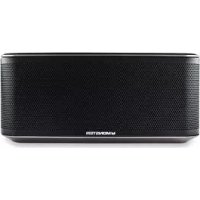
Micro - Speaker MONSTER - Free user manual and instructions
Find the device manual for free Micro MONSTER in PDF.



| Product Type | Bluetooth Wireless Speaker |
| Brand | Monster |
| Model | Micro (ClarityHD Micro) |
| Dimensions (L x H x D) | 181 x 81 x 39 mm |
| Weight | 390 g |
| Power Supply | 5V 2A power adapter, rechargeable lithium-ion battery |
| Wireless Connectivity | Bluetooth 2.0 or higher |
| Main Functions | Wireless speaker, hands-free kit, voice command (25 commands), play/pause, next/previous track, volume +/- |
| Audio Input | 3.5 mm jack for external source |
| USB Port | Micro USB for charging |
| Battery | Lithium-ion, non-user-replaceable, charged to approximately 30% at purchase |
| LED Indicator | Charging (flashing blue), full battery (solid blue or off), low battery (solid red), almost empty battery (flashing red) |
| Maintenance and Cleaning | Do not expose to water or humidity. Clean with a dry cloth. |
| Safety | Follow temperature guidelines (0-45°C). Do not expose to heat sources, liquids or objects containing liquids. Recycle the battery at end of life. |
| Spare Parts and Repairability | Removable front/rear grilles available as optional. Battery not user-replaceable. Reset possible via button. |
| Warranty | 1 year (North America, South America, Asia) / 2 years (Europe) |
Frequently Asked Questions - Micro MONSTER
User questions about Micro MONSTER
0 question about this device. Answer the ones you know or ask your own.
Ask a new question about this device
Download the instructions for your Speaker in PDF format for free! Find your manual Micro - MONSTER and take your electronic device back in hand. On this page are published all the documents necessary for the use of your device. Micro by MONSTER.
USER MANUAL Micro MONSTER
Instructions and Warranty Information
Models: 133257-00 MSP CLY MICRO BK WV133255-00 MSP CLY MICRO VH VAV
Table of Contents
ENGLISH
Package Contents 2
Micro Features and Controls 3
Compatibility and Safety 4
Compatibility 4
Safety 4
LED Indicator 5
General Specifications Table 5
Operation 6
Turning the Micro On 6
Multifunction Button 6
Voice Commands. 6
Connecting via Bluetooth Wireless Technology 7
Connecting by Cable to MP3 Player 7
Listen to Music 8
Speakerphone Function 8
Charging 9
Replacing Front And Back Grilles 9
Voice Command Menu 10
Main Menu 10
Settings Menu 11
Trigger Settings Menu. 12
Call Menu. 12
Troubleshooting 13
Limited Warranty for Consumers 14
Package Contents
ENGLISH
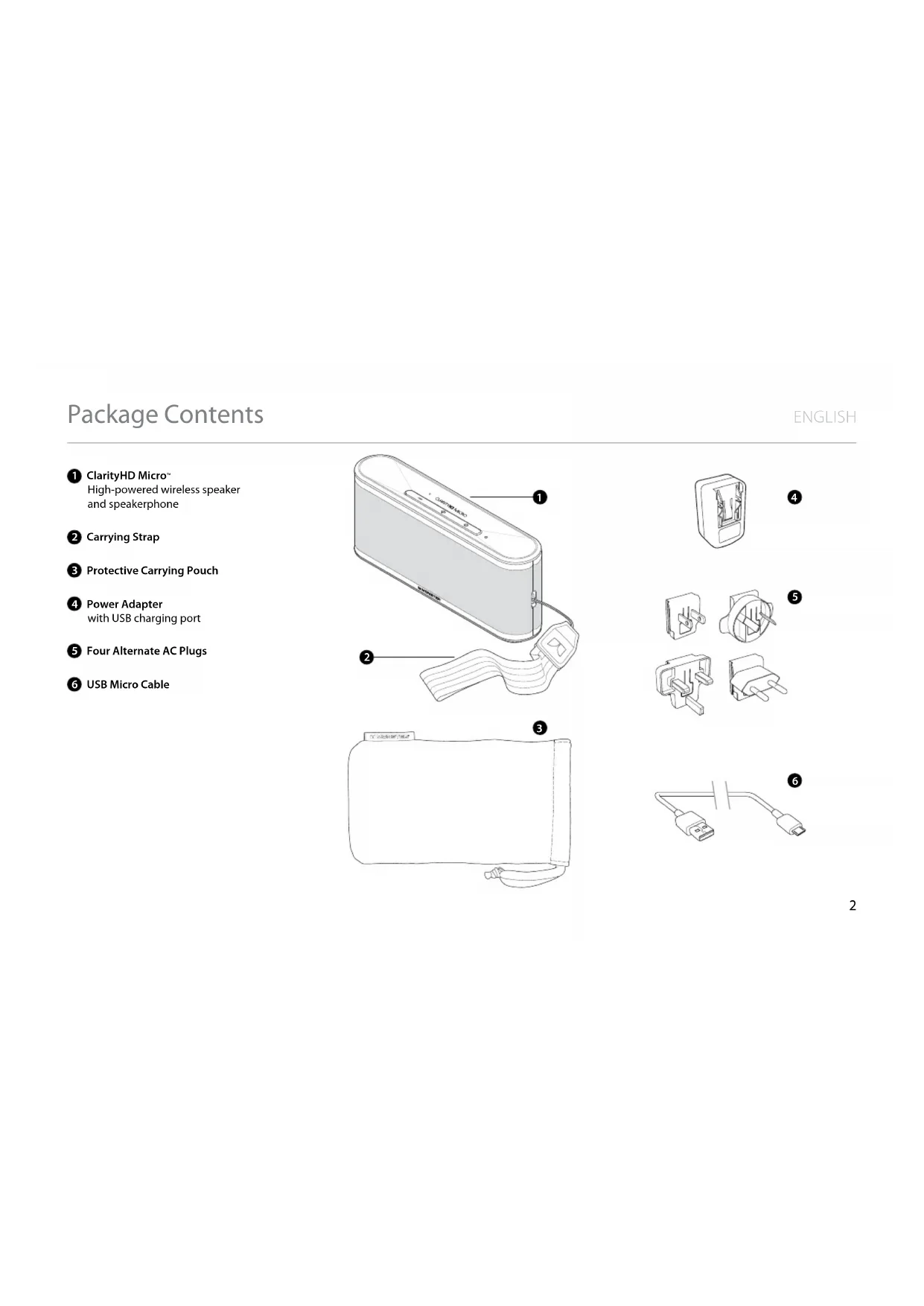
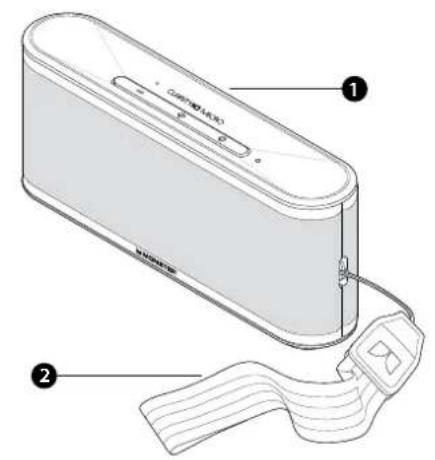
ClarityHD Micro High-powered wireless speaker and speakerphone
2 Carrying Strap
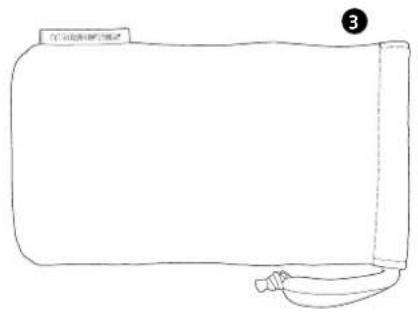
3 Protective Carrying Pouch
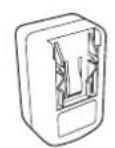
4 Power Adapter with USB charging port
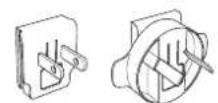
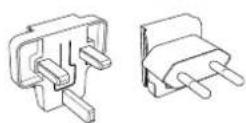
5 Four Alternate AC Plugs
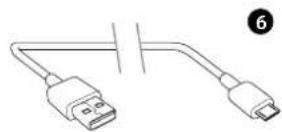
USB Micro Cable
4
5
Micro Features and Controls
ENGLISH
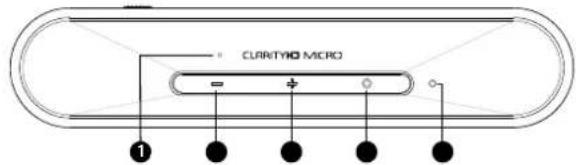
Top
1 Built-in microphone
For voice commands/ speakerphone use
Volume down button
Decreases volume when pressed
3 Volume up button
Increases volume when pressed
4 Multifunction button
Activates voice command, pairing mode, and other functions
5 LED Indicator light
Indicates mode and function of Micro
6 Removable front and rear grilles
Optional grilles available at MonsterProducts.com/products/ clarityhdmicro
7 USB port
Connect to power adapter with USB micro cable to charge Micro
8 Line in jack
Connect MP3 player external speaker to Monster Micro with 3.5mm cable
9 Power switch
Turns Micro ON/OFF
10 Recessed reset button
Use paper clip to press in the event of a system lockup
Power switch must be ON to reset Micro
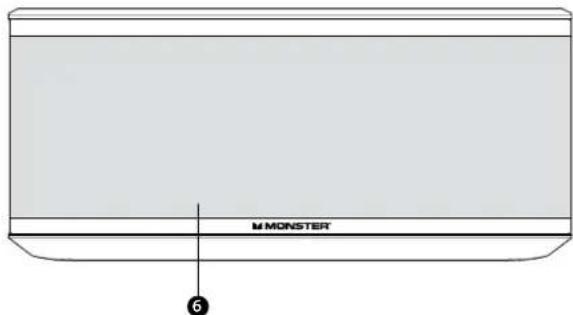
Front
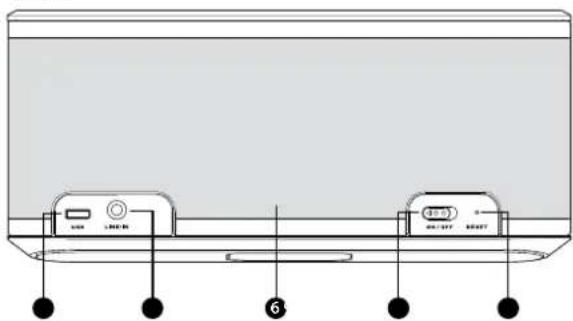
Back
COMPATIBILITY
Wireless
Devices with Bluetooth® 2.0 wireless technology or above (See General Specifications for profiles), such as Bluetooth wireless technology equipped computers, and most Bluetooth wireless technology equipped smartphones and MP3 players.
Wired
Devices with a standard 3.5mm headphone output port via 3.5mm minijack cable (not included).
SAFETY
Do not leave the product exposed to a heat source or high temperatures.
Do not remove or attempt to remove the non-user-replaceable battery. When disposing of the product, take it to a waste electronics service.
The apparatus shall not be exposed to dripping or splashing and that no objects filled with liquids, such as vases, shall be placed on the apparatus.
Batteries (battery pack or batteries installed) shall not be exposed to excessive heat such as sunshine, fire, or the like.
Caution: Danger of explosion if battery is incorrectly replaced. Batteries must be recycled or disposed of properly.

Correct Disposal of this product. This marking indicates that this product should not be disposed with other household
wastes throughout the EU. To prevent harm to the environment or human health from uncontrolled waste disposal, recycle it responsibly to promote the sustainable reuse of material resources. To return your used device, please use the return and collection systems or contact the retailer where the product was purchased. They can take this product for environmental safe recycling.
FCC ID:RJE173209-00
This device complies with Part 15 of FCC Rules. Operation is subject to the following two conditions: (1) This device may not cause harmful interference, and (2) This device must accept any interference received, including interference that may cause undesired operation. Changes or modification not expressly approved by the party responsible for Compliance could void the user's authority to operate the equipment. Connecting of peripherals requires the use of grounded shielded signal cables. The socket-outlet shall be installed near the equipment and shall be easily accessible.
Note
This equipment has been tested and found to comply with the limits for a Class B digital device, pursuant to Part 15 of the FCC Rules. These limits are designed to provide reasonable protection against harmful interference in a residential installation. This equipment generates, uses and can radiate radio frequency energy and, if not installed and used in accordance with the instructions, may cause harmful interference to radio communications. However, there is no guarantee that interference will not occur in a particular installation. If this equipment does cause harmful interference to radio or television reception, which can be determined by turning the equipment off and on, the user is encouraged to try to correct the interference by one or more of the following measures:
Reorient or relocate the receiving antenna.
- Increase the separation between the equipment and receiver.
- Connect the equipment into an outlet on a circuit different from that to which the receiver is connected.
- Consult the dealer or an experienced radio/TV technician for help.
Compatibility and Safety (continued)
ENGLISH
Caution
Changes or modifications not expressly approved by the party responsible for compliance could void the user's (or your) authority to operate the equipment.
Avoid storage in extreme heat or cold. Avoid exposure to liquids, temperature extremes and high humidity. The product's working temperature range is 0 - 45^ (32 - 113^)
Industry Canada
This device complies with Industry Canada licence-exempt RSS standard(s). Operation is subject to the following two conditions: (1) this device may not cause interference, and (2) this device must accept any interference, including interference that may cause undesired operation of the device.
Under Industry Canada regulations, this radio transmitter may only operate using an antenna of a type and maximum (or lesser) gain approved for the transmitter by Industry Canada. To reduce potential radio interference to other users, the antenna type and its gain should be so chosen that the equivalent isotropically radiated power (e.i.r.p.) is not more than that necessary for successful communication.
LED INDICATOR
There is an LED light on the top of the Monster Micro, just to the right of the Multi-Function button. Below are what the LED's various displays indicate.
Battery Mode:
Charging Indicator Lights
Battery Low-Solid Red
Battery Very Low- Flashing Red
Battery Charging-Flashing Blue
Fully Charged-LED Off (power OFF), Solid Blue (Power ON)
| GENERAL SPECIFICATIONS | |
| AC Adapter 5V 2A | |
| Dimensions Width 1 | Height 81mm Depth 39mm |
| Weight 390 g | |
TURNING THE MICRO ON
Note: The Micro comes with a lithium-ion battery that is approximately 30% charged. For best results, fully charge the Micro before use.
Power Switch
The Power Switch is located on the back of the Micro. Slide the switch to the ON position to turn on the Micro.
When the Micro is turned on, it automatically defaults to voice recognition mode and searches for the last Bluetooth device to which it was paired.
MULTIFUNCTION BUTTON
Use the Multifunction button to enable voice control, set up Bluetooth pairing, play/pause music, and other functions. The Multifunction button will execute different commands depending what mode it is in and how long you hold the button down.
Short Press—Press and release
Double Press—Press twice and release
Long Press—Press and hold down for three (3) seconds and release
VOICE COMMANDS
The voice control system understands approximately 25 predetermined commands. Commands must be given exactly as they appear on pages 10-12, word for word.
Follow these steps to activate voice commands:
- Slide the switch to the ON position to turn on the Micro.
- By default, the Micro is not in voice command mode when you turn it on. Press and hold Volume Up and Volume Down buttons simultaneously to enable voice command features.
- After the Micro connects to your device, Micro will say, "Your device is connected".
- Say the trigger words, "Hello Monster Micro".
- The Micro will respond with the prompt "Say a command".
- For a reminder list of commands, respond with, "What can I say?"
CONNECTING VIA BLUETOOTH® WIRELESS TECHNOLOGY
If you are pairing the Micro and a Bluetooth wireless technology enabled device for the first time, follow these steps:
- Press and hold down the Multifunction button.
- Enable Bluetooth wireless technology on device.
- Select "Monster Micro" on your Bluetooth wireless enabled device.
When the Micro is turned on, it automatically searches for the last Bluetooth enabled device to which it was paired.
Note: Older Bluetooth 2.0 devices require a password. For Bluetooth 2.1 devices use 0000 as password.
Note: You can also pair the Micro with a Bluetooth device using voice commands. See page 10 for instructions.
CONNECTING BY CABLE TO MP3 PLAYER
Note: To prevent system error, turn off voice control while connecting via cable.
Micro can play music from an MP3 player, laptop, or other external music source that does not have wireless capability. Follow these steps to play:
- Connect the music source to Micro using a 3.5mm mini-jack cable (not included). Plug one end into the music source and the other end into the Line In jack on the back of Micro.
- Micro automatically searches for the last Bluetooth device paired to it. You must disconnect the Bluetooth device that was last paired to the Micro to allow MP3 player music to play on Micro.
Operation (continued)
ENGLISH
LISTEN TO MUSIC
Play/Pause
Multifunction Button—Short press
Increase Volume
Volume Up Button—Long press
Decrease Volume
Volume Down Button—Long press
Next Track
Volume Up Button-Short press
Previous Track
Volume Down Button-Short press
Disconnect Bluetooth Connected Devices
Multifunction Button—Long press
When connected via Bluetooth wireless technology, control the music from your device.
SPEAKERPHONE FUNCTION
Micro also functions as a wireless speakerphone and includes a built-in microphone.
Incoming Call
Answer Call, Pause Music Multifunction Button-Short press
Reject Call Multifunction Button—Long press
During Call
Hang Up,Resume Music Multifunction Button-Short press
Toggle Between Mobile Device and Micro Multifunction Button—Long press
Answer 3rd Party Call/Put Original Call on Hold Multifunction Button—Double press
Mute Microphone
Volume Up and Volume Down Buttons—Short press both buttons simultaneously
Unmute Microphone
Volume Up or Volume Down Button—Short press
Increase Volume, Unmute Microphone Volume Up Button—Long press
Decrease Volume, Unmute Microphone Volume Down Button—Long press
CHARGING
Monster Micro comes with a lithium-ion battery. For best results, fully charge the Micro before use.
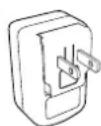
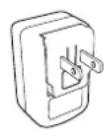
To charge, connect the USB micro cable to the power adapter. Four sets of plug prongs are included for worldwide use. Connect appropriate prongs to adapter and connect to USB cable Monster Micro.
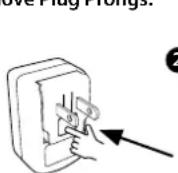
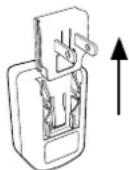
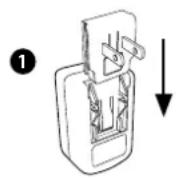
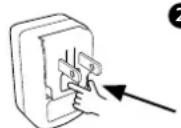
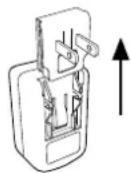
To install plug prongs, slide the appropriate prongs over the adapter until it clicks in the locked position. To remove plug prongs, press the tab in the center of the plug prongs and slide up.
Charging Indicator Lights
Battery Low-Solid Red
Battery Very Low-Flashing Red
Battery Charging—Flashing Blue
Fully Charged-LED Off (Power OFF), Solid Blue (Power ON)
Caution
Battery is not user replaceable. Danger of explosion if battery is incorrectly replaced. Batteries must be recycled or disposed of properly.
Install Plug Prongs:
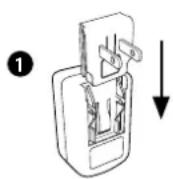
2
Remove Plug Prongs:
1
2
REPLACING FRONT AND BACK GRILLES
A selection of replacement grilles is available at MonsterProducts.com/products/clarityhdmicro
Both front and back grilles are attached to the Micro with magnets. To remove grille, pull up from one end and the grille will detach. Set replacement grille on to the Micro and the magnets will pull it into place.
| MAIN MENU Always say the trigger word “Hello Monster Micro”. Micro will answer with “Say a Command”, then state the command you want. | |||
| “Pair Mode” * | “Check Battery” | “Cancel” | |
| Activates pairing mode | Indicates Micro battery level | Cancels previous command | |
| “Am I Connected?” | “Redial” * | “What Can I Say” | |
| Indicates connection status | Redials the last dialed number | Complete list of Main Menu voice commands | |
| “Phone Command” | “Call Back” * | “Settings Menu” | |
| Activates voice command feature on phone | Calls back the last person who called you | Takes you to Settings Menu (see page 11) | |
| “Call Voice Mail” * | |||
| Calls voice mail | |||
* After stating certain menu commands, the Micro will ask you to verify your selection and prompt you to speak a Yes or No response before executing the command.
Voice Command Menu (continued)
ENGLISH
| SETTINGS MENU | |||
| "Say a Command Prompt" * | "Voice Control Help" | ||
| Activates/deactivates Micro Voice Prompt function | Provides helpful tips for using voice recognition technology | Disables Voice Control. Re-enable by following steps on page 6 | |
| "Incoming Call Announcement" * | "Cancel" | "Hands-Free Trigger" | |
| Activates/deactivates incoming caller ID name | Exits Settings Menu and returns to Main Menu | Takes you to Trigger Settings (see page 12) | |
| "What Can I Say?" | |||
| Micro recites complete list of Settings Menu commands | |||
* After stating certain menu commands, the Micro will ask you to verify your selection and prompt you to speak a Yes or No response before executing the command.
Voice Command Menu (continued)
ENGLISH
| TRIGGER SETTINGS MENU | |||
| "Trigger Always On" | "Trigger Off" | ||
| Sets Micro to listen for Trigger Word at all times | Sets Micro to never listen for Trigger Word | ||
| "Battery Saving Trigger" | "Cancel" | ||
| Sets Micro to listen for Trigger Word for two minutes before going into standby mode | Exits Trigger Settings Menu and returns to Main Menu | ||
| CALL MENU After Micro announces the incoming call | ||
| "Answer" | "Ignore" | |
| Answers incoming call | Rejects incoming call | |
Troubleshooting
ENGLISH
| SYMPTOM REMEDY | ||
| TROUBLESHOOTING | Micro does not power up | • Make sure lithium-ion battery is charged up • If using power adapter, make sure all connections are firm |
| Bluetooth* device paired, but no music plays | • Turn volume up to maximum level on both Micro and Bluetooth device | |
| Bluetooth signal is weak or drops out | • Move Micro and Bluetooth device closer together—pairing range is approximately 30 feet and can be impaired by multiple walls • Turn off Micro and Bluetooth device and reconnect | |
| MP3 player is connected via 3.5mm cable, but no music plays | • Make sure that Micro is not paired to a Bluetooth device—a Bluetooth connection overrides a device connected by cable | |
| Micro is in speakerphone mode, but no sound comes out | • Confirm that your Bluetooth device supports all profiles | |
| Micro does not respond to either voice or button commands | • Use paper clip to press recessed reset button on back of Micro while speaker is turned on | |
Limited Warranty for Consumers
ENGLISH
Monster, LLC, 7251 West Lake Mead Blvd., Las Vegas, NV 89128, USA, [PLEASE NOTE THAT MONSTER DOES NOT ACCEPT PRODUCTS SHIPPED TO THIS ADDRESS—FOLLOW INSTRUCTIONS IN "HOW TO MAKE A CLAIM" BELOW] (415) 840-2000 ("Monster") extends You this Limited Warranty. Statutory or common law may provide You with additional rights or remedies, which shall not be affected by this Limited Warranty.
DEFINITIONS
"Adequate Use" means personal use of the Product (i) for private (as opposed to commercial) purposes, (ii) in conformance with all applicable law, code or regulations (including without limitation building and/or electrical codes), (iii) in accordance with manufacturer recommendations and/or instructions in the materials and documentation that accompany the Product, and (iv) if applicable, with proper electrical grounding.
"Authorized Dealer" means any distributor, reseller or retailer that (i) was duly authorized to do business and permitted to sell You the Product under the laws of the jurisdiction where You bought the Product, (ii) purchased the Product directly from Monster or from a party with a contractual relationship with Monster and in
accordance with the authorized terms and conditions of such agreement, and (iii) sold You the Product new and in its original packaging.
"Formal Warranty Claim" means a claim made in accordance with the section "Formal Warranty Claims" herein.
"Product" means a Product (i) that is listed in the Specifications Table below, (ii) that You bought from an Authorized Dealer new and in its original packaging, and (iii) whose serial number, if any, has not been removed, altered, or defaced.
"Product Defect" or "Defective Product" means an inadequacy of the Product that existed at the time when You received the Product from an Authorized Dealer and that causes a failure of the Product to perform in accordance with Monster's documentation accompanying the Product, unless such failure has been caused completely or partly by (a) any use other than Adequate Use, (b) transportation, neglect, misuse or abuse by anyone other than Monster's employees; (c) alteration, tampering or modification of the product by anyone other than a Monster employee; (d) accident (other than a malfunction that would otherwise qualify as a Product Defect); (e) maintenance or service of the Product by anyone other than a Monster employee; (f) exposure of the Product
to heat, bright light, sun, liquids, sand or other contaminants; or (g) acts outside the control of Monster, including without limitation acts of God, fire, storms, earthquake or flood.
"Warranty Period" means the time period during which Monster must have received Your Formal Warranty Claim. The different Warranty Periods related to Product Defects are defined in the Specifications Table below. The Warranty Period commences on the date when You purchased or received (whichever occurs later) the Product from an Authorized Dealer as evidenced by the Authorized Dealer's invoice, sales receipt or packing slip. If You do not have written proof of the date of purchase or receipt, then the Warranty Period commences three (3) months after the date when the Product left Monster or its factory as evidenced by Monster's records. The Warranty Period ends after the time defined in the Specifications Table has expired or after You have transferred ownership of the Product, whichever occurs earlier. Also, You must call Monster and obtain a Return Authorization Number (as described under "How to Make a Claim") within two (2) months after You discover a Product Defect (or should have discovered it, if such Product Defect was obvious).
Limited Warranty for Consumers (continued)
ENGLISH
"You" means the first individual person that purchased the Product in its original packaging from an Authorized Dealer. This Limited Warranty does not apply to persons or entities that bought the Product (i) in used or unpackaged form, (ii) for resale, lease or other commercial use, or (iii) from someone other than an Authorized Dealer.
SCOPE OF THIS LIMITED WARRANTY
PRODUCTS. If a Product contained a Product Defect when You bought it from an Authorized Dealer, and Monster receives a Formal Warranty Claim from You (i) within two (2) months after You discover such Product Defect (or should have discovered it, if such Product Defect was obvious) and (ii) before the end of the Warranty Period for Product Defects applicable to the Defective Product, then Monster will provide You with one of the following remedies: Monster will (1) repair or, at Monster's sole discretion, replace the Defective Product, or (2) refund to You the purchase price You paid to Monster or the Authorized Dealer for the Defective Product if repair or replacement is not commercially practicable or cannot be timely made. NOTE: TO THE FULLEST EXTENT PERMITTED BY APPLICABLE LAW, MONSTER DOES NOT ASSUME ANY LIABILITY FOR ANY INCIDENTAL, CONSEQUENTIAL OR INDIRECT DAMAGES UNDER THIS LIMITED WARRANTY.
GENERAL PROVISIONS
CHOICE OF LAW/JURISDICTION. This Limited Warranty and any disputes arising out of or in connection with this Limited Warranty ("Disputes") shall be governed by the laws of the jurisdiction where You bought the Product.
OTHER RIGHTS. THIS LIMITED WARRANTY GIVES YOU SPECIFIC LEGAL RIGHTS, AND YOU MAY ALSO HAVE OTHER RIGHTS, WHICH VARY FROM JURISDICTION TO JURISDICTION, AND WHICH SHALL NOT BE AFFECTED BY THIS LIMITED WARRANTY.* THIS WARRANTY EXTENDS ONLY TO YOU AND CANNOT BE TRANSFERRED OR ASSIGNED. If any provision of this Limited Warranty is unlawful, void or unenforceable, that provision shall be deemed severable and shall not affect any remaining provisions. In case of any inconsistency between the English and other versions of this Limited Warranty, the English version shall prevail.
REGISTRATION. Please register Your Product at www.MonsterProducts.com. Failure to register will not diminish Your warranty rights.
SPECIFICATIONS TABLE
| Product Model Warranty Period for Product | |
| Product that accompanies this warranty statement | One (1) year for product sold in North America, South America and Asia Two (2) years for product sold in Europe |
FORMAL WARRANTY CLAIM
HOW TO MAKE A CLAIM. In the event of a Product Defect, You must follow these instructions: (1) Call Monster within two (2) months after You discover a Product Defect (or should have discovered it, if such Product Defect was obvious); (2) Give a detailed explanation of how the damage occurred; (3) Obtain a Return Authorization Number; (4) Return the Product, shipping prepaid by You (to be refunded if You are entitled to a remedy under the Scope of this Limited Warranty), to Monster for verification of damage, along with a copy of Your original sales receipt or proof of purchase (invoice or packing slip) for such Product, the completed claim form, and printed Return Authorization Number on the outside of the return package (the claim form will include instructions for return).
Limited Warranty for Consumers (continued)
ENGLISH
TELEPHONE NUMBERS. If You bought the Product in the United States (1-877-800-8989), Latin America (Mexico 011-882-800-8989), or Asia Pacific (China 400-820-8973), contact Monster, LLC via postal service at 455 Valley Drive, Brisbane, CA 94005 (PLEASE NOTE THAT MONSTER DOES NOT ACCEPT PRODUCTS SHIPPED TO THIS ADDRESS - FOLLOW INSTRUCTIONS IN "HOW TO MAKE A CLAIM" ABOVE). If You bought the Product in Australia, contact Monster's agent, Convoy International Pty Ltd (02 9700 0111), Unit 7, 1801 Botany Rd, Banksmeadow, NSW 2019 Australia. If You bought the Product anywhere else, contact Monster Technology International Ltd., Ballymaley Business Park, Gort Road, Ennis, Co. Clare, Ireland. You can use one of the following telephone numbers: Canada 866-348-4171, Ireland 353 65 68 69 354, Austria 0800296482, Belgium 0800-79201, Czech Republic 800-142471, Denmark 8088-2128, Finland 800-112768, France 0800-918201, Germany 0800-1819388, Greece 00800-353-12008, Italy 800-871-479, Netherlands 0800-0228919, Norway 800-10906, Russia 810-800-20051353, Spain 900-982-909, Sweden 020-792650, Switzerland 0800834659, United Kingdom 0800-0569520.
FURTHER PROCEEDINGS. Monster will determine whether a Product Defect existed. Monster may, at its discretion, direct You to obtain a repair
estimate at a service center. If a repair estimate is required, You will be instructed on how to properly submit the estimate and the resulting invoice to Monster for payment. Any fees for repairs may be negotiated by Monster.
TIMING. If You bring a Formal Warranty Claim and fully comply with all terms and conditions of this Limited Warranty, Monster will use its best efforts to provide You with a remedy within thirty (30) days after receipt of Your Formal Warranty Claim (if You reside in the United States—forty-five (45) days if You reside elsewhere), unless obstacles outside Monster's control delay the process.
- Our goods come with guarantees that cannot be excluded under the Australian Consumer Law. You are entitled to a replacement or refund for a major failure and compensation for any other reasonably foreseeable loss or damage. You are also entitled to have the goods repaired or replaced if the goods fail to be of acceptable quality and the failure does not amount to a major failure.
Ver.121912—GLOBAL ©2013 Monster, LLC
Table des matieres
FRANÇAIS
Vers.071311—DE ©2013 Monster, LLC
Inhoudsopgave
NEDERLANDS
Versied.d.071311-VS/EU ©2013 Monster, LLC
Indices
ITALIANO
MonsterProducts.com/products/
clarityhdmicro
7 Porta USB
Per ricaricare Micro collegare
He octablaIte n3dene y nctouHnKOB tenna n He noDbepraIte erO BInaHnIO BbICOKNX Tempeatyp.
He n3BnekaIte Hn BbTaIeTcB n3BNeYb
6aTapeo, He npEHa3HaueHHyD IJRA 3aMeHbI
nonb3OBeTaTeEN. Ecn Bbl peWnte n36abNTbcra
OT n3dJeNn, o6paTtEcB cHTp no yTuInn3aunn
3NeKtPOHbIX pN6OpOB.
I36eraaTe nonadannn Kanenb nnn 6pb3r Ha yCTPOINCTBO, a TaKKe HE NOMEuaTe Ha Hero npEpmTbI, HAnONHeHHbIe XNkOcTBIO, HApnpMep, Ba3bl.
BaTApen (BO BHeuHnX 6NoKax NmY uCTaHOBneHHbIe B KOMNNEKeT) He DoJXbI NoDBepraTbcr 4pe3MepHOMy HArpeBy, HAnpIMep NpD JeCTBnEM CONHeHOrO CBeTa, NpAmEHn NnA hAnOrnHbIX NCTOCHIKOB TcNJa.
BHHMaHHe: CyueCTBye TOnaCHOctb B3pbBa npn HnnpabInbHOJ 3ame He. BToPunHa nepepa6OTKa INy yTINI3aUNa 6aTaapei DOJXHa Ipn3BOUHTbcr NaIeKAsmO6pa3OM.
HaIeKaaAayytnn3aunn3denn. 3Ta MapKnpoBka O3HauaeT, YTO BO BCEx CtpaHax EC ytnnn3aunna DAnHoro n3denn He DoJnKHa IpnO3BoDnTbCn Dpyrnnm 6bIbOMm OTXoAMn. YTo6bl npedOTbpaTntb HaHeceHMe BpeDa OKpykAoUe cnpeE nn 3doPobNIOIIOeN IN3-3a HekOHTrPOINpyEmoR bIb6pocM Mycopa, OTBeTCTBeHHO OTHOCITcB KYtINn3aunn N3denn, TEM CaMbIM CnOco6CTByA 3KOJOnuYeCKn 6eONacHO nepepa6OTke IN NOBTOHPOMN cNObn3OBaHnO MaTePuaNBbIX pcycpOB. YTo6bl BePHyTb YcTroPCTBO, 6blBWee B INcNoIb3OBaHnN, BOCNoB3yNTecCb CNTeMoN Bo3Bpata N3denn Nn NIObPaTNC T KTOPROBMy PneCTabTEnU, yKOTporo 6blno npno6peTeHo yctPCTBO. B CBOO OuepeB OH No3a6OTnTCg Oero 3KOJOnrHuCeKN 6eONacHOy Tynn3aunn.
CobmeCTnMoCTb n 6e3oNaChOcTb (npoDoJxKeHne)
PYCCKNI
CBeTOBbIe HnDnKaTOpbI 3apJa aKKyMnyJToPa
Hn3kynypoBeNb 3apraaakkymnyTopa INndkaTOp CBETNTc HnpepbIBhblm KpaCHbIM CBEtOM
Oueh Hn3Kn ypoBeH 3apJa akkymyIToPa- INdNkATOP MraTeKpaChbIM LbetOM
AkkymyIaTOp 3apJxHaTeC--HnKAtOp MInFaET CINHM LBeTOM
- AkkyMnyAToP nonHocTbIO 3apJKeH - HnIrkatOp He CBETnTc (npn BbIKIOUeHOM NtAHm - OFF), CBETnTc HENpepbIBHBm CINHM UBETOM (pN BKIIIOUeHOM NtAHm - ON)
| obuHE TExHmUeCKHe XAPAKTEPNCIKN | |
| БлOk пitaMu перемногToka | 5В2A |
| РазМеры ШирINA 181 MM ВыICOTA 81 MM ТолICIиNA 39 MM | |
| Bec 390 r | |
BKNIOUOHEHNE AKYCTNUECKOCHCNUCTEMblMICRO
PpmeHne: AkcTnecka CNTema Micro NOCTBnEeTc cNtH-NOHHbM AKKyMnATOpOM, 3apKeHHbIM pImepHO Ha 30% .IJa DOCTKHeHNA LyuNX pe3yNbTaOB nepe nObl3ObaHnEM dHaAMKa Micro noNHOCTbO 3apAHTe ee.
BbIKIOyateJIb NITaHnA
BbIKIOuATEnb NITAHN paCnOLOKeH Ha 3aJHei CTOpOHe aKcYCTUeCKo CnCTEmb Micro. DnA BKNIOUeHEN NITAHN aKcYCTUeCKo CnCTEmb Micro nepEdBnHBe Te bIKIOuATeNb B nOLOKeHne ON (BKJI)..
Пи ВКIOUHeHIMIITaHINaAkyCTuYeCKa
CnCTemaMiroNoYMOLJIaHINoABTOMaTNUeCKN
yCTaHaBNIbAeTCB PexmMpaNO3HaBaHINaRTOLOCa
I npOnB3OuNT NIOCK NocLJeHrO yCTpoICTBa
BluTeoth",cKOTOpBIM OHa 6bIna COnpJKeHa.
MHOROΦYHKUHOHAJIbHAR KHONKA
MHorofoyHKUHOHaBHaK Honka npedHa3HaueHa
dIra BkIOuOHeH rONOCOBoro ynpaBHeHHA,
HAcTPOiKn cOnpJKeHHbIX yCTpoIcTB Bluetooth,
BOcPOn3BeDEHH/YcTAHOBKN Ha nay3y
My3bIK N BbINONHeHH dpyrNx fYHKU.
MHOrofoyHKUHOHaBHa KJIaBNsA 6yDeT
BbIOHNrTa pa3JIuHbIe KOAmHdbI B 3aBNCIMOCTN
OTTO,BKaKOM pexKIMe OHa HaxOHTCn
n HAckOBo DOJIro Bbl 6ydeTe ydepKnBaTb
ee B HaxaTOM NOJOKeHH.
KopoTkoe HaxaTne-HaxaTb n OTnyCTnTb
Двовhoe haxaTne-HaxaTb DBaJbIbI n OtnyCTnTb
HnntbHoe HaxaTne-HaxaTb u yepKnaBaTb B TeueHHe Tpex (3) cekyHn n NOTOM OTNCTnB
TOJOCOBbie KOMAHDbI
CnCTema rONOCOBO ynpaBHeHna IOHmHaet
pIIMePHo 25 npedapntEnbHO yCTaHOBeHHx
KOMaHd. KomaHdb IOnJHb IOnaBaTbc
B TOHocn TaK KaOHn Yka3aHb Ha CTpaHncaX
177-179 -CNOB B CNOBO.
ДяakTnBaunI rONOCBbIX KOMaHb BbINONHTe cnedyounie warr:
1.ДЯВКЛIOUЕHINNITaHINaAkyCTuYeCKOc CNTeMbI Micro nepeBnHbTe BbIKLIOuAteNb B NOJoxKeHne ON (BKJI.).
2. No ymoJauHIO nOcne BkIoueHn akyCTnuecka cnTeMa Micro He haoDntcB Pexmme roIOOCbIX KOMaHD, IJIa BkIoueHn FyHKuINr roIOOCbIX KOMaHD haxMITE OJHOBPemHo Hn UyepKBaIte KHONK YBeNueHn N yEmhBHeHn rPOMKoCTn.
3. Nocne noknoueHnakyctnuecko cnCTembl Micro K Bawaemy yctpoiYCTbHa dnCnnee Micro oTo6pa3ntc coo6eHne «Your device is connected»
4. Понинеспе napolyз Anycka «Hello Monster Micro» («Приет, Monster Micro»).
5.AkyctnueckanCCTemaMicrocpa3ykeOTBETNT Saya command》(Ppoun3heCteKOMAHdy)
6.ДЯTORO,TO6bI NOJUYNTB HANOMHHAHE CNCKA KOMAH,OTBEbTe:“What can I say?" (4TOaMORYcKa3aTb?)
ПОДКЛЮЧЕНСИСПОЛБ3OBAHHEMTEXHOLOTNIBECПPOBODHOCB7N BLUETOOTH
PnnpBOM cponpaeHnn akcytecko nCCTembl Micro n yctpoNCTBa C noDpeKkoB Bluetooth bInonHnTe cndyoune warr:
- HaxMMTe u dyepKmbaTe MHOROfoYHKUHOHaJIbHyIO KhoNky.
- BkIIOUHTe Bluetooth Ha yCTpoiCTBE.
- B cnncke haindeHbix yctpoictB Bluetooth Bbl6epnte «Monster Micro»
PnBKnOueHnAkyctNuecka CNTema Micro BbIIOHReT ABTOMaTneCKn NONCK nocndHero yCtpoiCTBa Bluetooth, c KOTOpbIM OHa 6blna copjKeHa.
PpmeaHne:B60leeCTapbixyctpoiCTBaxBluetooth2.0Tpe6yeTcyaKa3aTbnapoIb.InpaYcTPOICTBBluetooth2.1BkaueCTBe npoIaNcnoIb3yIte 0000.
PnmeaHne:C NOMOsbIO rOIOOCbIX KOMaHd MoKHO TaKKe yCTaHOBNTc COpRAKeHne AkyTnecko CnCTembl Micro c yctpoiCTBOM Bluetooth.CM.NHCTpyKuHN Ha Ctp.177.
ПОДКЛIOUЧЕНЕ K MP3-ПLEEPY C NOMOUIKABEJIЯ
PnmeaHne: TOrTO, YTo6bI 36eKaTb BO3HKnHOBHeN CNTEmHO OoN6Kn, npi IOKnIOeHN C NOMOsbK Ka6JIb BbIKIOHTe RONOCBOE ynpaBJNEH.
C nOMOsbIy akycntuecko cnCTembl Micro MOKHO BOCPON3BODnTb My3blKaJIbHbIe npon3BeDEHn c MP3-npeepo, HOYt6yKOB ININHBx BHeHNx MY3blKaJIbHbIX NCTOHNKO, HE OCHAUHHbx FyHKuEe 6ecnpoBDHO CBaN.ДЯ BOCPON3BDEHn BInONHnTe CNeDyUOuJe DeNCTBn:
- NpoknouHTe My3bKaIbHbI INCTOuHHK K akyCTnuecko CNTeMe Micro c NOMOsbIO Ka6eJIa C MHNH-DKeKOM 3.5 MM (B KOMNJIeKT NOCTABKN He BxOaNT). BCTaBte OINH KOHeU Ka6eJIa B My3bKaIbHbI INCTOuHHK, ApyroK KOHeU-B THe3do Line In (InNeHbIb BXoJ) Ha 3aDHeI naHEII akCTnuecko CNTeMeMiicro.
2.Akyctnuecka Cntema Micro abTomatneckn BbIIOHNIT NOnCK NocleHero yCTpoiCTBa BluTooth, kOTOpoe 6blIO C Hei cOpJxKeHo. Jnra TORO, TTO6bl MP3-nEEP MOR BOCpOIm3BOoHtB My3bikAbHbIe npON3BeDeneHn AkyCTnuecko CNTeMe Micro, Heo6XoIMo OTCoeINHTb NocleHnee yCTpoIcTB BluTooth, KOTOpoe 6blIO cOpJxKeHo C CNTeMoN Micro.
ПОСЛУШИBAHAЕ MY3bIKI
Bocnpoun3BeDHeNe/nay3a
MhorofoyHKUHOHaJIbHnKHOIIKa-KopoTKe Haxatne
YBENHb ypoBeHb rpoMkoCTn
KhoNka yBEnuHEnHa yPoBHr rPOMKOCTn-- DnntenbHoe Haxatne
ymehbwntbypoBehb rpoMkoCTn
KhONka yMeHbWeHHaYPOBHa rPOMKOcTn-- DInTeNbHoe HaxaTne
Cnedyoua dopokka
KhoNka yBEnuHEny npOBn rPOMKocTN-KopoTKe HaxaTne
Ppebidyuaa dopoxka
KhONka yMeHbWeHHaYpOBHrPOMKOCTn— KOpOTKe Haxatne
OToeHNHtB yctpoiCTBa, NOkNIOUeHHbIe c nomoublo Bluetooth
MHorofoyHKUHOHaJIbHaJ KHOJa- DnTeNbHoe HaxaTne
PnnoKJIuOeHmCNCNoB3OBaHNEM texHOrnn 6ecnpoBDH CBA3n Bluetooth npabTne npouecCOM BOCpOn3BeEHH My3bIKN CO CBOero yCTpoMCTBa.
TPOMKARCBRA3b
Akyctnueckaa CnCTema Micro moKet TaKke pa6oTaTb KaK cnKepfoH (rpmKaB CBA3b), IMeETCA BCTpoEHbMkPofoH.
BxOJaun 3BOHOK
OTBeNTb Ha BbI3OB, PnHOCTaHOBHTb BOCIpON3BeDeHne My3bikalbHOrO
PpOu3BvEHHa
MhorofoHKUHOHaJIbHnKKnKa-KopoTKe Hkatae
C6pocuTb 3BOHOK
MhorofoyHKUHOHaJIbHaK HONKa- DnTEnbHoe HaKaTne
Bo Bpempa3roBopa
Ipekpatntb Teleohnhpa3roBop, Bo3o6HOBTb Bocnpn3BeHne
My3bikalbHOROpn3BedeHIN MHorofoHKUHOHaJIbHAKONKa
KopoTKe HaxaTne
IpeKIOUeHne MeKdy Mo6NbHbIM yCTpOCTBOM n AkyctMueckoCnCTEmoM Micro MHOFOyHKUHOHaNbHa KHOJa- IInTeJIbHoe HaKaTne
OTBeHTb Ha 3BOHOK OT TpeTbero a6oHETa/ nepeBecTI npeDbIyucn Bbl3OB B pexm UydepKaHnA
MhorofoyHKUHOHaJIbHaK HONKa- DBOHoe HaKaTne
BbIKIOHTb MUKpOoh
KhONk yBeneHn uymeHbWeHn rPOMKOCTn— KpATKe HaxaTne ONDOBpeMeHHo Ha o6e KHONK
BKJIOHTb MUKPOOH
KhONka yBEnuHEnn uNm yMeHbWeHn yPoBnHa rpoMkOcTn-KopOTKoe HaxaTne
YBENHHTb yPOBeH bPOMKoCTn, BKNIOHTb MKNPOOH
KhoNka yBeneHn yPbHra rPOMKOCTn-- DmTeNbHoe HaxaTne
ymeHbIIMtb ypoBeHb rpoMkoCTn, BkIOHTb MUKPOoOH
KhONka yMeHbWeHHaYpOBHraPOMKOCTn-- DInTeNbHOe HaxaTne
3APRAKA
Monster Micro noctabnreTc B KOMnkeTe C JNTHeBO-NOHbIM AkKymyIaTOpom.ДЯ DOCTNKeHrHaNNyUxNpe3yNbTaTOB npeD INCNoJIb3OBAHmE AkcyTneCKoI cnTeMbl Micro NOHOCtBu 3apAInTe AkKymyIaTOp.
Дя осуцьгеля зардк поdkючite Ka6eBJ cpa3bemOM USB miro K 6noky nitaHn. B komплесгпpeDyCMOTpeHbl YetbIpe Hacadkn DЯ WTeNcEhBOH BnKN, NO3B0JIHOUne IcNoJb3OaBaT yCTpoiCTBO npakTNUeCKN B lIO6o TOnke ZemHoroша. ПОdkючite COOTBeTCTByUOuYIOH hAcADky K 6noky nHTAHn IN OdkJOHte Ka6eBJ USB K akyctUeCeKoi CnCTeme Monster Micro.
Длл NOKLOHIN K 6NOKY NITAHN BCTaBbTe
В HERO COOTBETCTBYOUII WTEKEP DO UENUKA,
В NOLOXEHNE ΦKKCAUIN. Длг OTKLOHENr O T
6NOKA NITAHN HAKMITE HA KHONKY B cHTpe
WTEKEPA n OTCOEHNHTe erO OT 6NOKA.
CBeToBbIe HnDnKaTOpbl 3apyaakymyIaTopa
Hn3kynypoBeNb 3apdaakkymnyTopa INndkaTOp CBeNTcR HeNpepbIBhbIM KpaCHbIM LBeTOM
OuEnb Hn3Km yPoBeH 3apra da aKKyMnyTopa—HnDnKaTOp MnRaET KpaChbIM LCBetOM
AkkymyIaTOp 3apJxaeTc—HnMkAtOp MmFaeT CnHm UBeTOM
- AkkymnyTop noHocbto 3apxKeH - Hndkatop He CBETCTa (pN BIKIOeHHOM nTaHn-OFF),CBETCTa HENpepbIBHbIM CnHm UBeTOM (npBKNIOeHHOM nTaHn-ON)
PpeynpexdneHn
AkkymyIaTOp He npedHa3NaueH dIa 3aMeHbI
NoIb3OBATEmE. Ipn HnepaBnBHOJ 3aMeHe
aKKMyIaTOp CsuCECTByET OnACnOCTb
BO3NKnHOBeHNBbIBA. BToPnHa nepepa60Ka
nnYtINn3auu AKKMyIaTOpOB DoJIKbI
npOn3BOoNTbCn HaDnEkaUIM O6pa3OM.
YCTAHOBNTbTbIpCteBOB BUNK:
2

BbHyTb Wtbpn CeTeBOB BNKn:
2
3AMEHA INPEPEDH N 3AHEI PEwETOK
Bb6paTb peWetKn Ha 3aMeHy MoXHO Ha
CTpaHnue Be6-caTa MonsterProducts.com/
products/clarityhdmicro
N nepeHn, n 3aHn peWetKn KpEtnTcna H akyCTnecko CNTeMe Micro c NOMOJIbMaHTNOB. IIN TORO, YTObI CHrTb peWetKy,NOTAHNTe ee C ONDHO KOHua, n peWetKa CHMmTeC. YctahOBIne HObyIO peWetKy HA Kopnyc acyCTnecko CNTeMe bMicro, n MaHNTb npTnHYt ee Ha MeTO.
7251 West Lake Mead Blvd., Las Vegas,
MonsterProducts.com/products/ clarityhdmicro
7 USB端口
MonsterProducts.com/products/ clarityhdmicro
USB端口
MonsterProducts.com/products/clarityhdmicro
Monster Technology International, Ltd
7251 West Lake Mead Blvd. Las Vegas, NV 89128
Moender Technology International, Ltd.
Ballymaley, Business Park • Gort Road, Ennis, Co. Clare, Ireland
"Monster," the Monster logo, ClarityHID Micro, ClarityD Micro logo, the RoHS logo. Because the Music Meters, the product and packaging are trademarks or registered trademark of Monster, Inc. or its subsidiaries in the United States or other countries. Product may vary from image shown. The Bluetooth® world mark and logos are registered trademarks owned by the Bluetooth SIG, Inc. and any use of such marks by Monster, LLC is under license. CSR, qpt-X and their logos are trademarks owned or owned by CSR plc or one of its group companies.