
MLB7-1030 - Lighting MONSTER - Free user manual and instructions
Find the device manual for free MLB7-1030 MONSTER in PDF.


| Product Type | Bluetooth Multi-color LED Light Bar |
| Brand | Monster |
| Model | MLB7-1030 |
| Power Supply | USB 5V (requires 1A adapter, not included) |
| Power Consumption | 1.5W |
| Cable Length | 5 ft (1.5 m) |
| Remote Control Type | Infrared (IR) with CR2025 battery (3V) |
| Color Modes | Multi-color, Flash, Strobe, Fade, Smooth |
| White Light Modes | Cool, Soft, Warm |
| Dimming | Yes, adjustable brightness via remote or app |
| Bluetooth Control | Yes, via Monster Basics Light Control app |
| Multi-Light Control | Yes, control multiple bars via app |
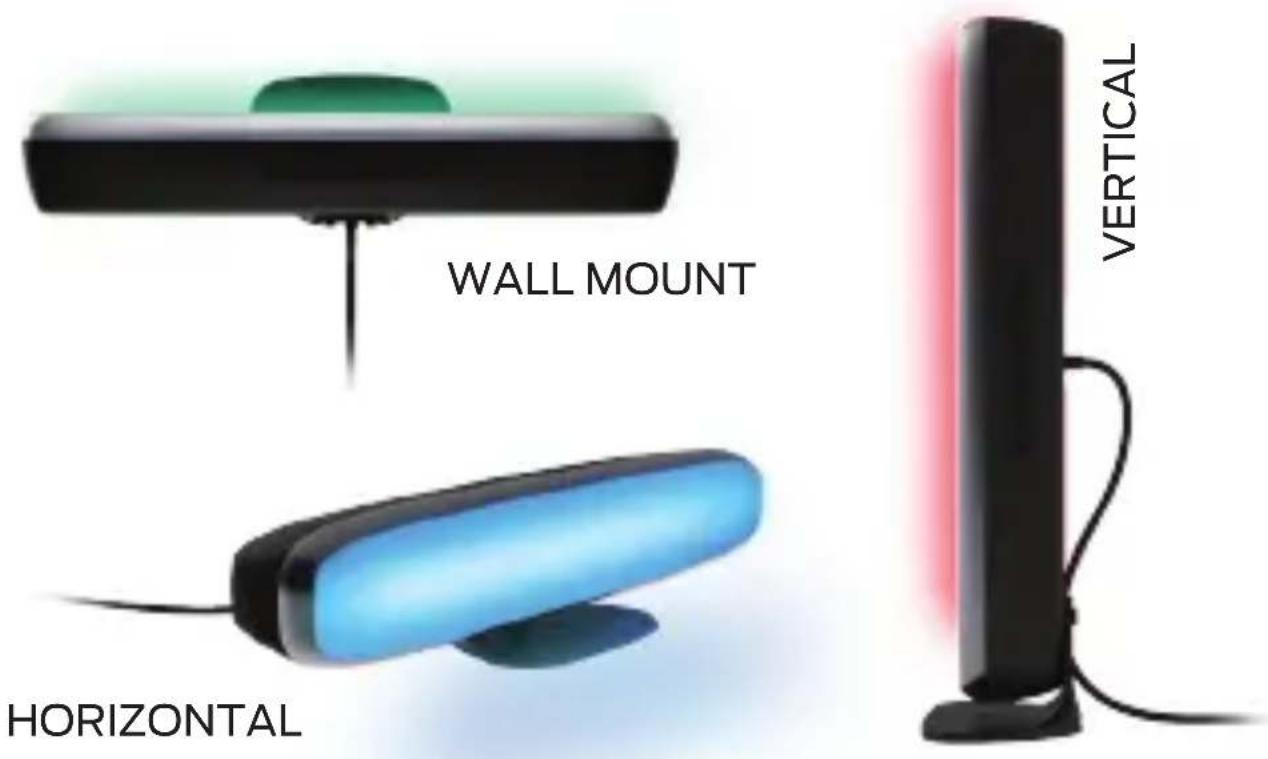
| Mounting Options | Horizontal, vertical, or wall-mounted using multi-position base |
| Included Accessories | IR remote, multi-position base, mounting screws (x2), adhesive tape, user manual |
| Cleaning | Use clean, soft cloth; no corrosive cleaners |
| Safety | Do not drop, puncture, disassemble; avoid liquids and open flames |
| Warranty | 1 Year Limited |
| Certification | FCC Part 15 compliant |
Frequently Asked Questions - MLB7-1030 MONSTER
User questions about MLB7-1030 MONSTER
0 question about this device. Answer the ones you know or ask your own.
Ask a new question about this device
Download the instructions for your Lighting in PDF format for free! Find your manual MLB7-1030 - MONSTER and take your electronic device back in hand. On this page are published all the documents necessary for the use of your device. MLB7-1030 by MONSTER.
USER MANUAL MLB7-1030 MONSTER
This Bluetooth®Multi-color LED Light Bar is easy to install, easy to use, and is ideal for adding controllable ambient lighting to any room.
Features
- Multi-color and dimmable LED lighting effects
- Included color-selector remote with positionable IR receiver
- Bluetooth® app controlled
- Multi-position base for various horizontal, vertical, or wall mounting orientations
- Conveniently plugs into any 5V USB power source (not included)
- Plug and play
• Control multiple light bars simultaneously through the app
What's Included
- Bluetooth® Multi-color LED Light Bar
- IR Remote Control
- Multi-position Base
- Base Attachment Screws x2
- Base and IR Receiver Adhesive
- User Manual x1 pc
Safety Instructions
Please read and understand all instructions before using this product. If damage is caused by failure to follow the instructions, this warranty is null and void.
- Keep these instructions.
- Do not drop, puncture, or disassemble this product.
- Do not expose this product to dripping or splashing of drinks or liquids of any kind.
- Avoid long exposure to direct sunlight, which may cause damage.
- Do not expose this product to open flames.
- Do not use the product in a strong magnetic field.
- Use a clean, soft cloth to clean. Do not use any corrosive cleaners/oils to clean.
- Do not attempt to repair the device or open the unit as this will void the warranty.
Specifications
• LED Light Bar (USB): 5V
- output: 1.5W
- cable length: 5ft
- remote control: 3V
(1 x 3V battery, type CR2025)
Get Started
1 Determine where and in what orientation you would like to use your Bluetooth® Multi-color LED Light Bar
2 Pass the USB power cord and IR receiver through the opening in the multi-position base

natural_image
Mechanical assembly diagram showing a lever mechanism with a red arrow indicating motion direction (no text or symbols)3 For horizontal or wall mounted orientations, attach the base in the center of the light bar using the two included screws. For vertical orientation, route cord through the cord channel and attach the base at the end of the light bar.
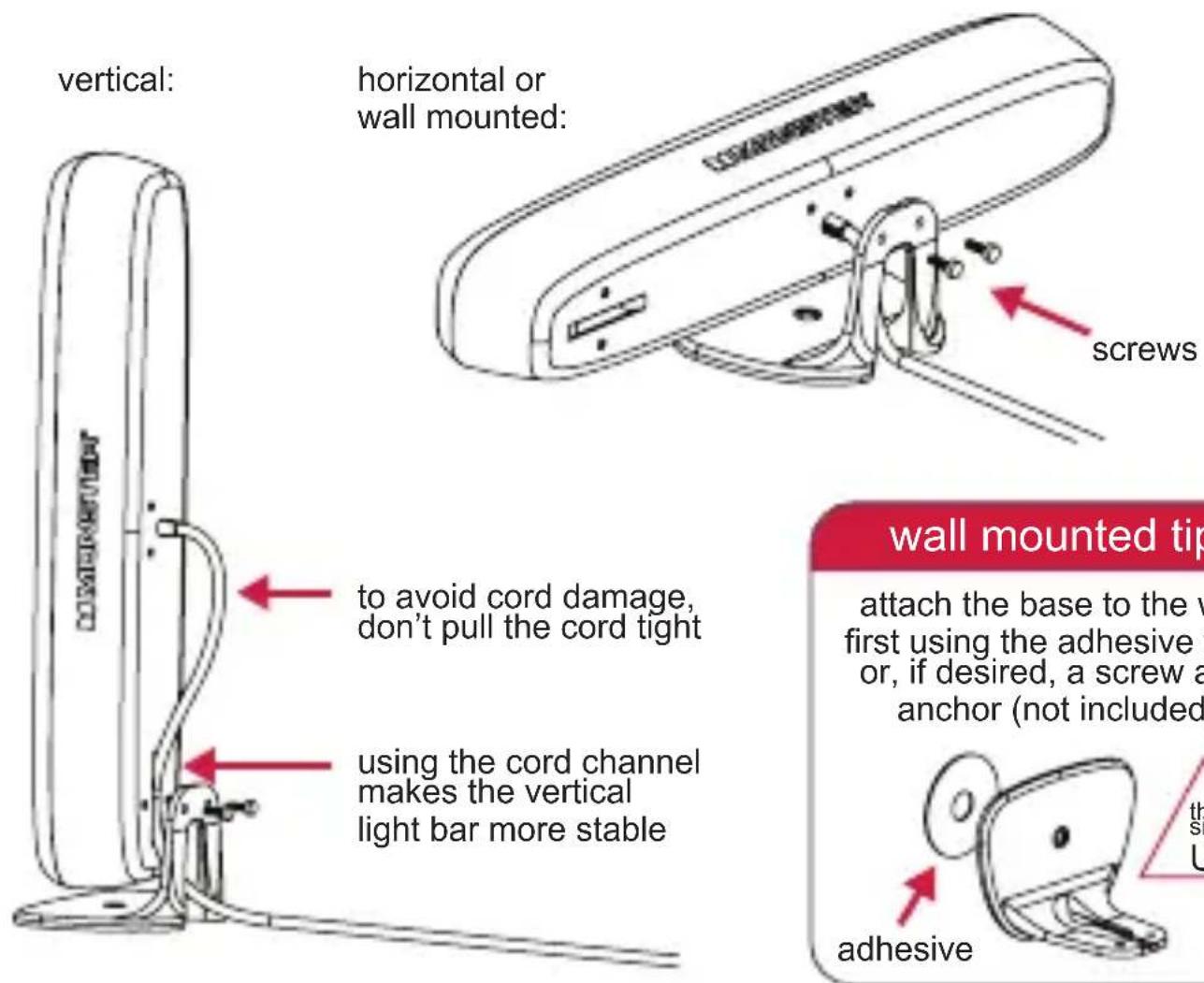
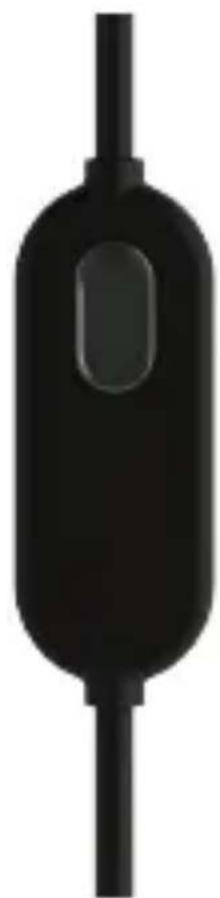
4 Position the IR receiver in a location where it can receive signal from the IR remote. Secure the receiver using the included adhesive tape if desired.
5 Remove the tab from the battery compartment of the remote control
6 Connect the USB cable to a powered USB port or wall charger (1A adapter required – not included)
MONSTER®

natural_image
Black adjustable desk lamp with a blue-lit shade and a colorful remote control unit nearby (no visible text or symbols)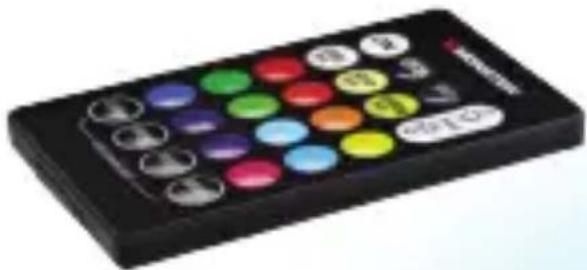
natural_image
Black remote control device with a grid of colorful circular buttons (no visible text or symbols)Controls, at a Glance

natural_image
Black electronic component with a vertical shaft and rounded body, resembling a stylized battery or connector (no text or symbols visible)IR Remote IR Receiver (in-line)
| 1 | ON/OFF | Turn the product on and off |
| 2 | MULTI-WHITE SELECTORS | Select from cool, soft, or warm white |
| 3 | MULTI-COLOR SELECTORS | Change the color to match your mood |
| 4 | FLASH | Flash color-changing mode |
| 5 | STROBE | Strobe color-changing mode |
| 6 | FADE | Fade color-changing mode |
| 7 | SMOOTH | Smooth color-changing mode |
| 8 | RESET | Reset to default settings |
| 9 | DIMMER BUTTONS | Adjust the brightness/intensity |
IR Remote Operation
1 Turn on the LED Light Bar by pushing the ON button on the remote control
2 Select the desired color of the desired effect by pushing the corresponding button on the remote control
3 Set the desired brightness using the buttons to increase/decrease the intensity of color
4 Push the OFF button to turn off the LED Light
Changing the remote control battery:
Note: The battery for the remote control has already been installed. Remove the battery pull tab to operate.
1 The battery compartment is located on the narrow side of the remote control
2 Remove the empty battery and insert a 3V battery, type CR2025, with the positive terminal pointing upwards
3 Place the battery compartment back in the remote control so it locks in place
Bluetooth® App Operation

natural_image
Abstract logo with black semicircles and the word 'BASICS' below, set against a rainbow gradient background (no additional text or symbols)1 Download the free Monster Basics Light Control app

2 Enable Bluetooth® connectivity on your device. Open the Monster Basics Light Control app and locate your Monster LED Light Bar in the equipment section. Select the device in the list to connect.
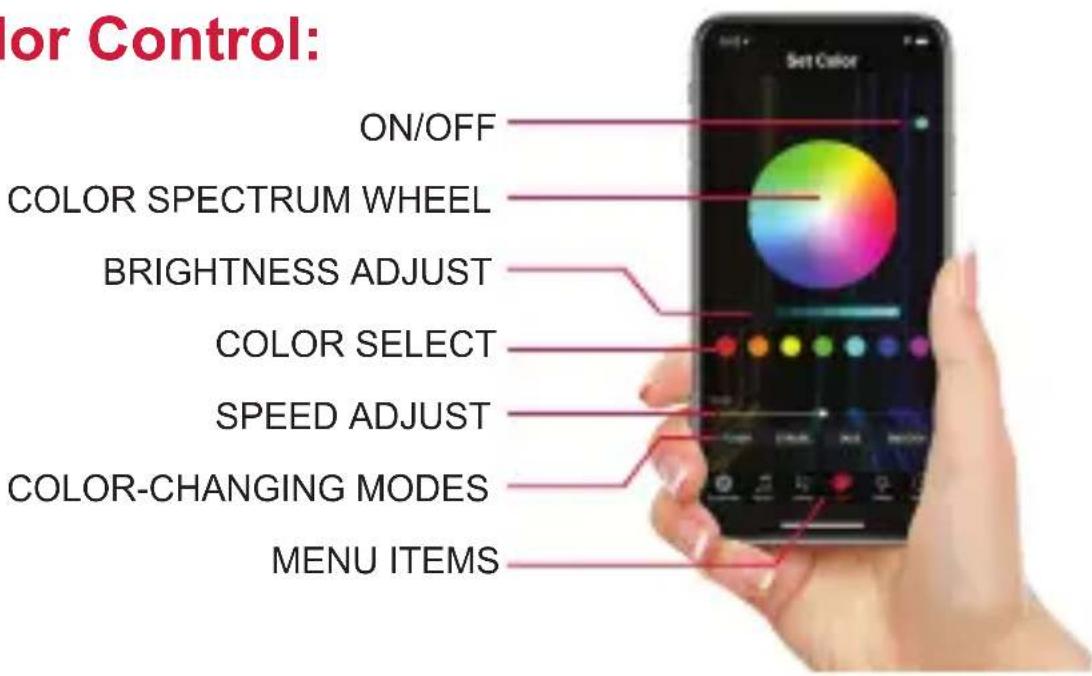
3 Once connected, you can now control color, brightness, color-changing modes and speeds, music reactive, and on/off scheduling
NOTE: Your LED Light Bar must be connected to power and your phone must be Bluetooth enabled and within range to operate
Color Control:
Notice
FCC Statement
This device complies with Part 15 of the FCC Rules. Operation is subject to following two conditions: (1) this device may not cause harmful interference, and (2) this device must accept any interference received, including interference that may cause undesired operation.
Warning
Changes or modifications not expressly approved by the party responsible for compliance could void the user's warranty or authority to operate the equipment.
Customer Service

1 Year Limited Warranty

866-246-2008
Brand : MONSTER
Model : MLB7-1030
Category : Lighting