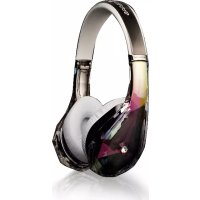
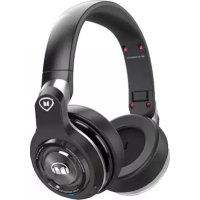
Beats by Dr Dre Studio - Earphones MONSTER - Free user manual and instructions
Find the device manual for free Beats by Dr Dre Studio MONSTER in PDF.


User questions about Beats by Dr Dre Studio MONSTER
0 question about this device. Answer the ones you know or ask your own.
Ask a new question about this device
Download the instructions for your Earphones in PDF format for free! Find your manual Beats by Dr Dre Studio - MONSTER and take your electronic device back in hand. On this page are published all the documents necessary for the use of your device. Beats by Dr Dre Studio by MONSTER.
USER MANUAL Beats by Dr Dre Studio MONSTER
natural_image
Red circular logo with a stylized lowercase 'b' in the center, set against a black background (no text or symbols)beats by dr.dre™

MONSTER®
manual and warranty
▲ Important Performance and Safety Tips for your Headphones
Listen Responsibly
To avoid hearing damage, make sure that the volume on your music player is turned down before connecting your headphones. After placing headphones in your ears, gradually turn up the volume until you reach a comfortable listening level.
Noise levels are measured in decibels (dB), exposure to any noise at or above 85 dB can cause gradual hearing loss.
Monitor your use; hearing loss is a function of loudness versus time. The louder it is, the less time you can be exposed to it. The softer it is, the more time you can listen to it. Refer to the chart* on the following page.
This decibel (dB) table compares some common sounds and shows how they rank in potential harm to hearing.
| SOUND NOISE LEVEL | (dB) | EFFECT |
| Whisper 30 Very quiet | ||
| Quiet Office 50-60 Comfortable hearing | levels are under 60 dB | |
| Vacuum Cleaner, Hair Dryer | 70 Intrusive; interferes with telephone conversations | |
| Food Blender 85-90 85 dB | Is the level at | which hearing damage (8 hrs.) begins |
| Garbage Truck, Cement Mixer | 100 No more than 15 minutes of unprotected exposure recommended for sounds between 90-100 dB | |
| Power Saw, Drill/ Jackhammer | 110 Regular exposure to sound over 100 dB of more than 1 minute risks permanent hearing loss | |
| Rock Concerts (varies) 11 | 0-140 Threshold of pain begins around 125dB | |
*Chart Information obtained from http://www.nldcc.nl.gov/health/education/teachers/common_sounds.csp
"...a typical person can safely listen to an iPod for 4.6 hours per day at 70% volume."
"...knowing the levels one is listening to music at, and for how long is extremely important."
From http://www.coc.ca/health/story/2006/10/19/musc-eaiphonas.html
Get the most out of your equipment and enjoy great audio performance even at safe levels. Our headphones will allow you to hear more details at lower volume levels than ever before.
Physiology of the Ear and Hearing

text_image
Maxillo Insect Auditory Comp Tympanic Membrane Spines Cochlear Marrow Cochliss Inhibitor To Nasal & ThroatFor additional information on what loud noses do to your ear and chart reference http://www.dbeord.org/hear/hecr.photloud-music
Use Responsibly
Do not use headphones when it's unsafe to do so - while operating a vehicle, crossing streets, or during any activity or in an environment where your full attention to your surroundings is required.
It's dangerous to drive while wearing headphones, and in many places, illegal because it decreases your chances of hearing life-saving sounds outside of your vehicle, such as another car's horn and emergency vehicle sirens.
Please avoid wearing your headphones while driving. Use one of Monster's FM transmitters to listen to your mobile media devices instead.
Learn how to establish a safe listening level and review other important safety guidelines from the Consumer Electronics Association at www.ce.org.
Important information on how to prevent Noise-Induced Hearing Loss (NIHL) and a comprehensive list of which noises can cause damage can be found on the Deafness Research Foundation's website, www.drf.org http://www.drf.org.
Connect
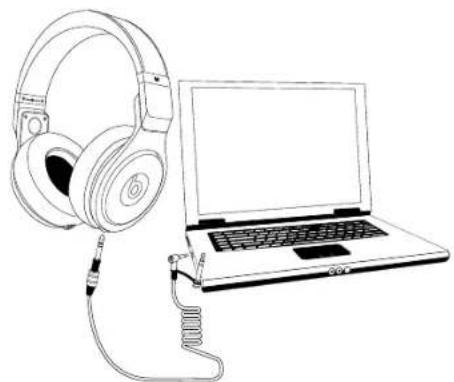
To connect your Beats® Pro headphones, plug the straight 1/8-inch connector (the end furthest from the coiled section of cable) into the port at the bottom of the earcup of your choice and then twist it to lock it in. Both earcup sides serve as an input, so pick the side that is most comfortable for you.
Plug the right-angle 1/8-inch connector into the audio output port on your audio gear.
natural_image
Line drawing of a pair of headphones next to a laptop (no text or symbols)
1/4-inch adaptor: If your audio gear uses a 1/4-inch (6.3 mm) output port, use the included 1/4-inch adaptor which is tethered to the 1/8-inch right-angle connector.

Please note that the adaptor and 1/8-inch jack are threaded. To avoid stripping the treads, gently screw on the adaptor without forcing. It should screw on easily and will stop spinning when it's fully installed.
Listen
Turn down the volume on your music player or gear before putting on Beats™ Pro headphones.
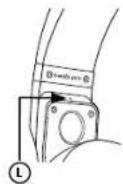
Note the "L" and "R" markings above the inside of each earcup. "L" is for the left ear. "R" is for the right ear.
Flip
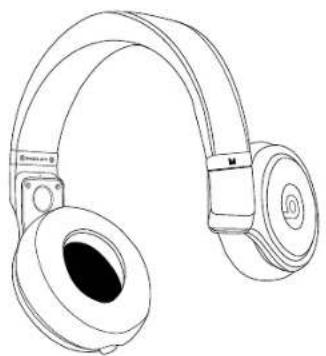
Beats" Pro feature spinning hinges above both earcups that give you the ability to simply flip up the earcups to listen to house noise through one ear without having to remove your headphones. To use the flip-up earcups, first make sure the earcups are over the correct ears. Grasp the outside of the earcup and rotate it backwards. You will feel multiple catch points while flipping. Leave the earcup in the catch point that is most comfortable for you. If the earcup does not flip backwards, but flips forward, your headphones are reversed.
natural_image
Line drawing of a pair of outdoor headphones (no text or symbols)Fold
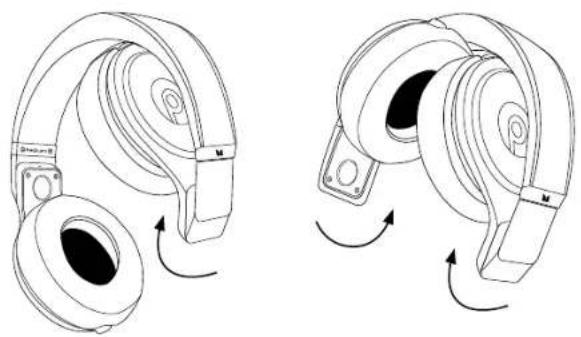
To store Beats® Pro, remove your headphone cable. Using the same spinning hinges mentioned in the previous section, spin one side inward, then the other, until both earcups are completely folded into the headband, as shown.
natural_image
Line drawings of two types of headphones with rotating buttons, showing front and side views (no text or symbols)Team Up
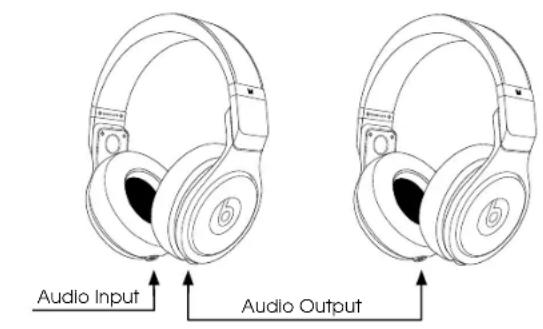
Dual Input/Output Cable Ports: Beats™ Pro feature a proprietary system for daisy chaining your headphones with multiple headphones. When you connect your Beats Pro to your audio gear or music player, the unused port on the opposite earcup serves as an audio output port, and will relay the audio signal from your audio gear or music player.
To use, connect your Beats Pro to an audio source, as directed in the Connect section. Then simply plug the cable from a second pair of headphones into the un-used port on the opposite earcup. If the second pair of headphones are also Beats Pro, you can continue to add headphones to create a daisy chain.
text_image
Audio Input Audio OutputNote: No switching is needed. The Dual/Input Output functionality works automatically and is not dependent on which of the two Beats® Pro ports, left or right, is connected to your audio gear's output port. Either side can work as an input or output.
Cleaning and Removing Earcup Cushions
Though they feature an anti-bacterial treatment, for sanitary reasons and to prolong the life of your earcup cushions, you should clean them regularly, especially after professional use where you may have perspired heavily.
Regular light cleaning: Using a slightly dampened (but never wet to the point that any accidental dripping may occur) cloth, paper towel or disinfectant wipe, gently clean off the vinyl part of the earcup cushions. To complete cleaning, you may wish to use a dry cloth to pat away any moisture left over.

Never get the speaker or electronics inside of your Beats Pro wet. Water or cleaning solvents can do irreparable damage to the electronics inside your headphones. The Beats Pro warranty does not cover such damage.
Earcup removal for replacement or atypical cleaning: The earcup cushions on your Beats Pro are made to be removed for the purpose of replacing damaged cushions. You may also need to remove the cushions if atypical, heavy cleaning needs to be done. You may also follow these directions in case of accidental cushion removal. Constant removal of the cushions is not recommended and should not be necessary.
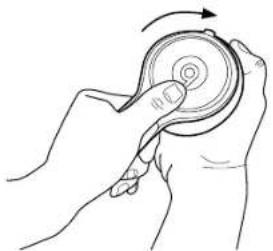
Cushion removal: With the headphones upside down, grasp the headband over the earcup that needs to have the cushion removed. For extra support, press your thumb firmly on the red "b" logo. With your other hand, grip the earcup cushion and turn it clockwise. The cushion will twist off. Repeat on the other earcup if necessary.
natural_image
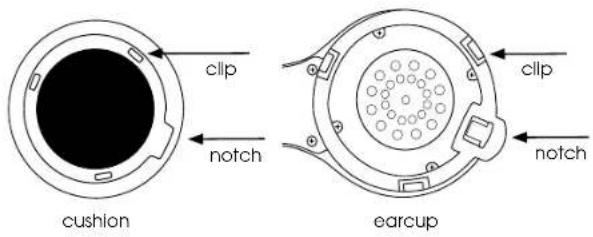
Line drawing of a hand holding a circular object with a spiral pattern, no text or symbols presentCushion reattachment: Special attention needs to be paid to alignment of the three clips on the inside of the cushion and the earcup as well as the notch on the bottom of the cushion. It will be extremely helpful to examine the three clips inside of the cushion and on the earcup and note how they fit together before reattaching the cushions.
text_image
clip notch cushion earcup clip notchGrip the headband and cushion as described in the removal section. Aligning the clips on the cushion and the earcup, place the cushion firmly against the earcup with the notch on the bottom of the cushion to the left of the headphone cable port. With your thumb firmly pressed against the "b" logo, simultaneously press the cushion and earcup into each other and twist the cushion counter clockwise. The cushion should be attached firmly, with all three clips engaged.

natural_image
Line drawing of a hand holding a circular object with an arrow indicating rotation (no text or symbols)Heavy Cleaning: Heavy cleaning may be necessary after heavy use. To clean the cushions by hand, fill a bowl or sink with cold water. Add a very small amount of dish washing or laundry soap and gently cleanse the pads. Rinse with clean water. Place the cushions on a dish towel with the pads facing up. Fold the towel over the top of the cushions and press down to squeeze out any excess water in the foam padding. Air dry completely before reattaching.
The cushions can also be machine washed, though hand washing is recommended. Wash on a gentle cycle with cold water. Dry as described above. Do not machine dry.

Though Beats Pro ear cushions are designed to be machine washable, machine washing will decrease the life span of the cushions.
Care and Storage
Keeping Beats™ Pro headphones clean is essential for safe, hygienic use.
When not in use, always store your Beats Pro headphones in the protective case provided.
Keep case closed, and store in a clean, dry environment.
Avoid storage in extreme heat or cold.
Avoid exposure to liquids, temperature extremes and high humidity.

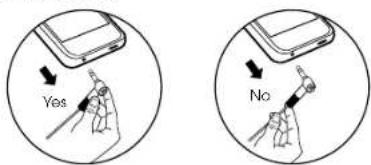
Never pull on the cable to disconnect Beats Pro headphones from your music player. Grasp the plug at the end of the cable and pull to disconnect.
text_image
Yes NoSound Check
For the best iPod ^® or iPhone ^TM listening experience with Beats ^TM Pro, activate iTunes ^® Sound Check. Sound Check standardizes the volume of all the songs in your music library. Beats is specially designed to provide a powerful but safe listening experience with Sound Check activated. Learn more about iTunes Sound Check at http://docs.info.apple.com/article.html?artnum=61655
LIMITED WARRANTY FOR CONSUMERS
Monster, LLC., 7251 West Lake Mead Blvd., Los Vegas, NV 89128, USA. (PLEASE NOTE THAT MONSTER DOES NOT ACCEPT PRODUCTS SHIPPED TO THIS ADDRESS - FOLLOW INSTRUCTIONS IN "HOW TO MAKE A CLAIM" BELOW) (415) 840-2000 ("Monster") extends You this Limited Warranty. Statutory or common law may provide You with additional rights or remedies, which shall not be affected by this Limited Warranty.
DEFINITIONS
"Adequate Use" means use of the Product (i) within a home or dwelling, (ii) for private (as opposed to commercial) purposes, (iii) in accordance with all applicable local, state or federal law, code or regulations (including without limitation building and/or electrical codes). (iv) In accordance with manufacturer recommendations and/or instructions in the materials and documentation that accompany the Product, and (v) if applicable, with proper electrical grounding.
"Authorized Dealer" means any distributor reseller or retailer that (I) was duly authorized to do business in the jurisdiction where it sold the Product to You, (II) was permitted to sell You the Product under the laws of the jurisdiction where You bought the Product, and (III) sold You the Product new and in its original packaging.
"Formal Warranty Claim" means a claim made in accordance with the section "Formal Warranty Claims" herein.
"Product" means a Product (i) that is listed in the Specifications Table below, (ii) that You bought from an Authorized Dealer new and in its original packaging, and (iii) whose serial number, if any, has not been removed, altered, or defaced.
"Product Defect" means an inadequacy of the Product that existed at the time when You received the Product from an Authorized Dealer and that causes a failure of the Product to perform in accordance with Monster's documentation accompanying the Product, unless such failure has been caused completely or partly by (a) any use other than Adequate Use, (b) transportation, neglect, misuse or abuse by anyone other than Monster's employees; (c) alteration, tampering or modification of the product by anyone other than a Monster employee; (d) accident (other than a malfunction that would otherwise qualify as a Product Defect); (e) maintenance or service of the Product by anyone other than a Monster employee; (f) exposure of the Product to heat, bright light, sun, liquids, sand or other contaminants; or (g) acts outside the control of Monster, including without limitation acts of God, tire, storms, earthquake or flood.
"Warranty Period" means the time period during which Monster must have received Your Formal Warranty Claim. The different Warranty Periods related to Product Defects are defined in the
Specifications Table below. The Warranty Period commences on the date when You purchased or received (whichever occurs later) the Product from an Authorized Dealer as evidenced by the Authorized Dealer's Invoice, sales receipt or packing slip. If You do not have written proof of the date of purchase or receipt, then the Warranty Period commences three (3) months after the date when the Product left Monster's or its factory as evidenced by Monster's records. The Warranty Period ends after the time defined in the Specifications Table has expired or after You have transferred ownership of the Product, whichever occurs earlier. Also, You must call Monster and obtain a Return Authorization Number (as described under "How to Make a Claim") within two (2) months after You discover a Product Detect (or should have discovered it, if such Product Detect was obvious).
"You" means the first individual person that purchased the Product in its original packaging from an Authorized Dealer. This Limited Warranty does not apply to persons or entities that bought the Product (I) in used or unpackaged form, (II) for resale, lease or other commercial use, or (III) from someone other than an Authorized Dealer.
SCOPE OF THIS LIMITED WARRANTY
PRODUCTS. If a Product contained a Product Defect when you bought it from an Authorized Dealer and Monster receives a Formal Warranty Claim from You within two (2) months after You discover such Product Defect (or should have discovered it, if such Product Defect was obvious) and before the end of the Warranty Period for Product Defects applicable to the affected Product, then Monster will provide You with one of the following remedies: Monster will (1) repair or, of Monster's sole discretion, replace the Product, or (2) refund to You the purchase price You paid to the Authorized Dealer for the affected Product if repair or replacement is not commercially practicable or cannot be timely made. NOTE: MONSTER DOES NOT ASSUME ANY LIABILITY FOR ANY INCIDENTAL, CONSEQUENTIAL OR INDIRECT DAMAGES UNDER THIS LIMITED WARRANTY.
GENERAL PROVISIONS
CHOICE OF LAW/JURISDICTION. This Limited Warranty and any disputes arising out of or in connection with this Limited Warranty ("Disputes") shall be governed by the laws of the State of California, USA, excluding conflicts of law principles and excluding the Convention for the International Sale of Goods. The courts located in the State of California, USA shall have exclusive jurisdiction over any Disputes.
OTHER RIGHTS. THIS LIMITED WARRANTY GIVES YOU SPECIFIC LEGAL RIGHTS, AND YOU MAY ALSO HAVE OTHER RIGHTS. WHICH VARY FROM STATE TO STATE AND JURISDICTION TO JURISDICTION, AND WHICH SHALL NOT BE AFFECTED BY THIS LIMITED WARRANTY. THIS WARRANTY EXTends ONLY TO YOU AND CANNOT BE TRANSFERRED OR ASSIGNED. If any provision of this Limited Warranty is unlawful, void or uninforcedable, that provision shall be deemed severable and shall not affect any remaining provisions. In case of any inconsistency between the English and other versions of this Limited Warranty, the English version shall prevail.
REGISTRATION. Please register Your Product at www.beatsbydre.com/register. Failure to register will not diminish Your warranty rights.
SPECIFICATIONS TABLE
| Product Model Warranty Period for Product | |
| MH BTS-P OE BK One (1) year | |
| MH BTS-P OE WH One (1) year |
FORMAL WARRANTY CLAIM
HOW TO MAKE A CLAIM. In the event damage has occurred to Products, You must follow these instructions: (1) Call Monster within two (2) months after You discover a Product Defect (or should have discovered it, if such Product Defect was obvious); (2) Give a detailed explanation of how the damage occurred; (3) Clain a Return Authorization Number; (4) Upon receipt of a claim form (which may be sent to You after You filed Your Formal Warranty Claim), fill out the claim form entirely; (5) Return the Products, shipping prepaid by You (to be refunded if You are entitled to a remedy under the Scope of this Limited Warranty), to Monster for verification of damage, along with a copy of Your original sales receipts and proof of purchase (UPC label or packing slip) for such Products, the completed claim form, and printed Return Authorization Number on the outside of the return package (the claim form will include instructions for return).
TELEPHONE NUMBERS. United States, Asia Pacific and Latin America: 1 877 800-8989 or 415-840-2000. Canada 866-348-4171, Ireland 353 65 68 69 354, Austria 0800-296-482. Belgium 0800-79201, Czech Republic 800-142471, Denmark 8088-2128, Finland 800-112768, France 0800-918201, Germany 0800-1819358, Groocco 000-800-353-12008, Italy 800-871-479, Netherlands 0800-0228919, Norway 800-10506, Russia 810-800-20051353, Spain 900-982-909, Sweden 020-792650, Switzerland 0800-834659, United Kingdom 0800-0569520
FURTHER PROCEEDINGS. Monster will determine whether a Product Defect existed. Monster may, at its discretion, direct You to obtain a repair estimate of a service center. If a repair estimate is required, You will be instructed on how to properly submit the estimate and the resulting invoice to Monster for payment. Any fees for repairs may be negotiated by Monster.
TIMING. If You bring a Formal Warranty Claim and fully comply with all terms and conditions of this Limited Warranty, Monster will use its best efforts to provide You with a remedy within thirty (30) days after receipt of Your Formal Warranty Claim (If You reside in the United States - forty-five (45) days if You reside elsewhere), unless obstacles outside Monster's control delay the process.
Ver.062706 - US ©2010 Monster, LLC
Register Your Beats Today
beatsbydrdre.com/register

MONSTER
©2010 Monster, LLC
"Monster," the Monster logo, the product and packaging are trademarks or registered trademarks of Monster Cable Products, Inc. or its subsidiaries in the United States or other countries. "Dr. Dre", "Beats" "Beats by Dr. Dre," and the "B" logo are trademarks of Beats Electronics, LLC. iPod and iPhone are trademarks of Apple, Inc. registered in the U.S. and other countries. Apple is not responsible for the operation of this device or its compliance with safety and regulatory standards. Product may vary from images shown. This product is patent pending.