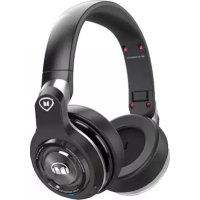
Elements Wireless OverEar - Earphones MONSTER - Free user manual and instructions
Find the device manual for free Elements Wireless OverEar MONSTER in PDF.



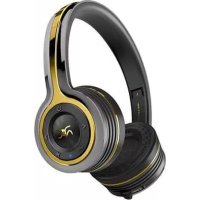
| Product Type | Wireless over-ear headphone |
| Brand | Monster |
| Model | Elements Wireless OverEar |
| Connectivity | Bluetooth, 3.5mm audio input |
| Touch pad | Touch control surface on the right earcup |
| Multifunction button | On/off, sync, mute |
| Microphone | Built-in |
| Battery life | Up to 20 hours (music playback or conversation) |
| Charging time | Approximately 2 hours for a full charge |
| Battery type | Rechargeable lithium-ion |
| Weight | Approximately 250 g |
| Dimensions | Not specified in the manual |
| Cleaning | Wipe with a soft cloth dampened with soapy water |
| Operating temperature | 0–45 °C |
| Use without battery | Possible via 3.5mm audio cable (wired mode) |
| Break-in | Recommended 8 to 20 hours for optimal sound |
| Warranty | 1 year (Americas, Asia-Pacific) / 2 years (Europe) |
| Compliance | FCC, IC, CE, WEEE directive |
Frequently Asked Questions - Elements Wireless OverEar MONSTER
User questions about Elements Wireless OverEar MONSTER
0 question about this device. Answer the ones you know or ask your own.
Ask a new question about this device
Download the instructions for your Earphones in PDF format for free! Find your manual Elements Wireless OverEar - MONSTER and take your electronic device back in hand. On this page are published all the documents necessary for the use of your device. Elements Wireless OverEar by MONSTER.
USER MANUAL Elements Wireless OverEar MONSTER
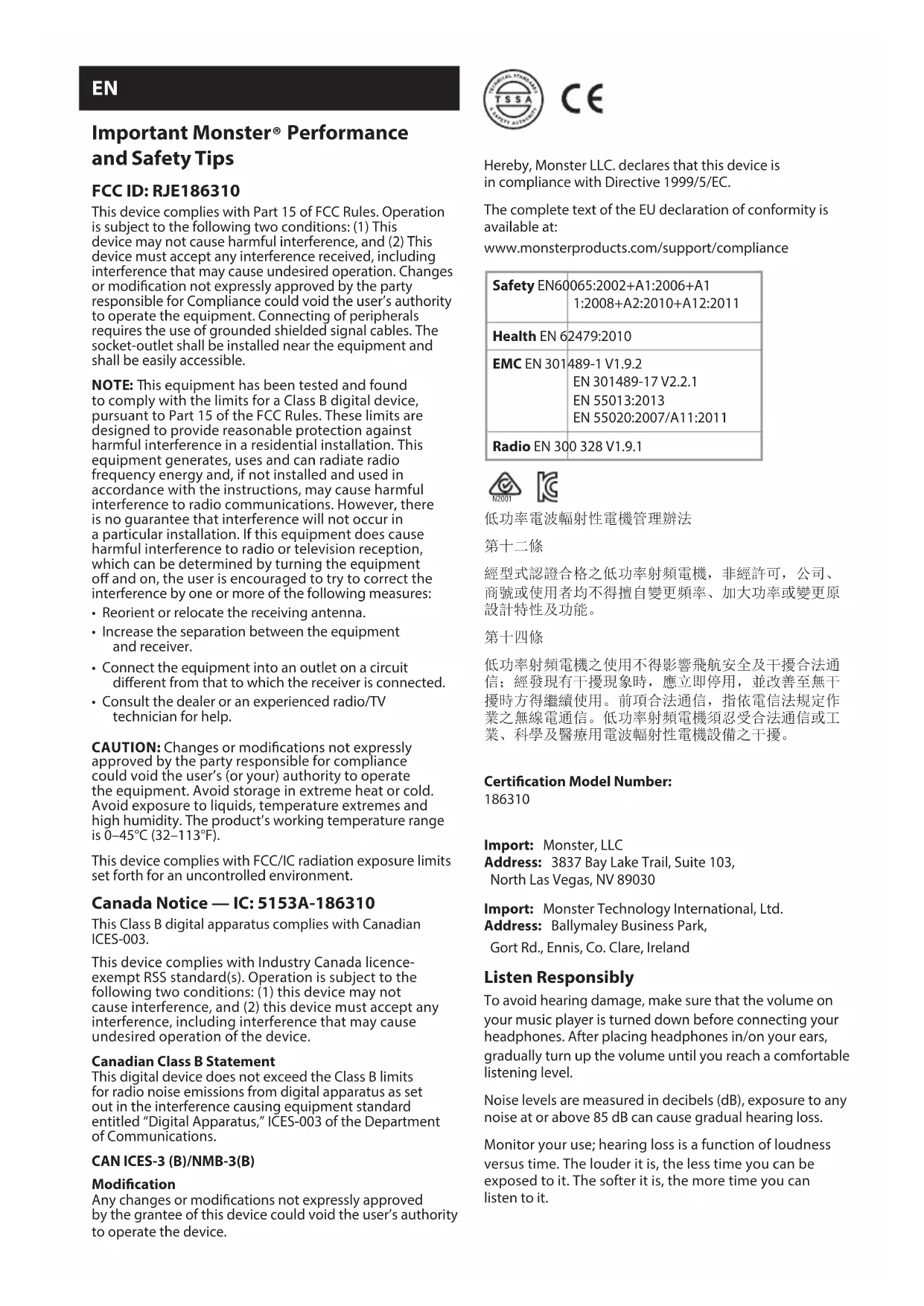
EN
Important Monster® Performance and Safety Tips
FCC ID: RJE186310
This device complies with Part 15 of FCC Rules. Operation is subject to the following two conditions: (1) This device may not cause harmful interference, and (2) This device must accept any interference received, including interference that may cause undesired operation. Changes or modification not expressly approved by the party responsible for Compliance could void the user's authority to operate the equipment. Connecting of peripherals requires the use of grounded shielded signal cables. The socket-outlet shall be installed near the equipment and shall be easily accessible.
NOTE: This equipment has been tested and found to comply with the limits for a Class B digital device, pursuant to Part 15 of the FCC Rules. These limits are designed to provide reasonable protection against harmful interference in a residential installation. This equipment generates, uses and can radiate radio frequency energy and, if not installed and used in accordance with the instructions, may cause harmful interference to radio communications. However, there is no guarantee that interference will not occur in a particular installation. If this equipment does cause harmful interference to radio or television reception, which can be determined by turning the equipment off and on, the user is encouraged to try to correct the interference by one or more of the following measures:
- Reorient or relocate the receiving antenna.
- Increase the separation between the equipment and receiver.
- Connect the equipment into an outlet on a circuit different from that to which the receiver is connected.
- Consult the dealer or an experienced radio/TV technician for help.
CAUTION: Changes or modifications not expressly approved by the party responsible for compliance could void the user's (or your) authority to operate the equipment. Avoid storage in extreme heat or cold. Avoid exposure to liquids, temperature extremes and high humidity. The product's working temperature range is 0–45°C (32–113°F).
This device complies with FCC/IC radiation exposure limits set forth for an uncontrolled environment.
Canada Notice — IC: 5153A-186310
This Class B digital apparatus complies with Canadian ICES-003.
This device complies with Industry Canada licence-exempt RSS standard(s). Operation is subject to the following two conditions: (1) this device may not cause interference, and (2) this device must accept any interference, including interference that may cause undesired operation of the device.
Canadian Class B Statement
This digital device does not exceed the Class B limits for radio noise emissions from digital apparatus as set out in the interference causing equipment standard entitled "Digital Apparatus," ICES-003 of the Department of Communications.
CAN ICES-3 (B)/NMB-3(B)
Modification
Any changes or modifications not expressly approved by the grantee of this device could void the user's authority to operate the device.

C€
Hereby, Monster LLC. declares that this device is in compliance with Directive 1999/5/EC.
The complete text of the EU declaration of conformity is available at:
www.monsterproducts.com/support/compliance
| Safety EN60 | 065:2002+A1:2006+A11:2008+A2:2010+A12:2011 |
| Health EN 6 | 2479:2010 |
| EMC EN 301 | 489-1 V1.9.2EN 301489-17 V2.2.1EN 55013:2013EN 55020:2007/A11:2011 |
| Radio EN 300 | 328 V1.9.1 |


低功率電波輻射性電機管理辦法
第十二條
Certification Model Number:
186310
Import: Monster, LLC
Address: 3837 Bay Lake Trail, Suite 103,
North Las Vegas, NV 89030
Import: Monster Technology International, Ltd.
Address: Ballymaley Business Park,
Gort Rd., Ennis, Co. Clare, Ireland
Listen Responsibly
To avoid hearing damage, make sure that the volume on your music player is turned down before connecting your headphones. After placing headphones in/on your ears, gradually turn up the volume until you reach a comfortable listening level.
Noise levels are measured in decibels (dB), exposure to any noise at or above 85 dB can cause gradual hearing loss.
Monitor your use; hearing loss is a function of loudness versus time. The louder it is, the less time you can be exposed to it. The softer it is, the more time you can listen to it.
This decibel (dB) table compares some common sounds and shows how they rank in potential harm to hearing.
| SOUND NOISE | LEVEL (dB) | EFFECT |
| Whisper 30 Very quiet | ||
| Quiet Office 50–60 Comfortable | hearing levels are under 60 dB | |
| Vacuum Cleaner, Hair Dryer | 70 Intrusive; interferes with telephone conversations | |
| Food Blender 85–90 85 dB is the level at which hearing damage (8 hrs.) begins | ||
| Garbage Truck, Cement Mixer | 100 No more than 15 minutes of unprotected exposure recommended for sounds between 90–100 dB | |
| Power Saw, Drill/ Jackhammer | 110 Regular exposure to sound over 100 dB of more than 1 minute risks permanent hearing loss | |
| Rock Concerts (varies) | 110–140 Threshold of pain begins around 125 dB | |
Chart information obtained from www.nidcd.nih.gov/health/education/teachers/pages/common_sounds.aspx
Get the most out of your equipment and enjoy great audio performance even at safe levels. Our headphones will allow you to hear more details at lower volume levels than ever before.
Learn how to establish a safe listening level and review other important safety guidelines from the Consumer Electronics Association at www.ce.org. Important information on how to prevent Noise-Induced Hearing Loss (NIHL) and a comprehensive list of which noises can cause damage can be found on the Deafness Research Foundation's website, www.drf.org.
Physiology of the Ear and Hearing
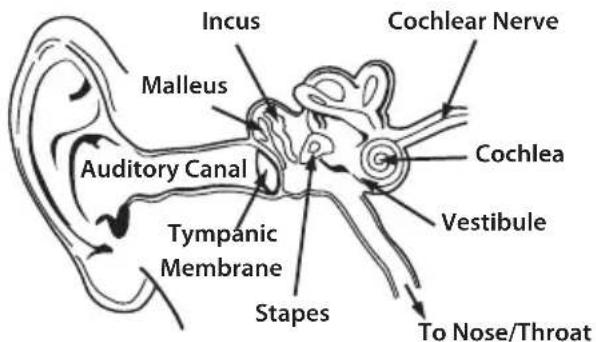
For additional information on what loud noises do to your ear and more on protecting the ear, reference www.abelard.org/hear/hear.php#loud-music
Use Responsibly
Do not use headphones when it's unsafe to do so—while operating a vehicle, riding a bike, crossing streets, or during any activity or in an environment where your full attention to your surroundings is required.
It's dangerous to drive while wearing headphones, and in many places, illegal because it decreases your chances of hearing life-saving sounds outside of your vehicle, such as another car's horn and emergency vehicle sirens.
Please avoid wearing your headphones while driving. Use one of Monster's FM transmitters to listen to your mobile media devices through your car stereo instead.
Cleaning
Wipe earcups with a soft cloth dampened with a mild soap solution.
Using Finger Tip Controls
The surface of the right ear cup is a touch sensitive control surface. The center section (the logo) serves as a play/pause control. Tap once for play/pause also for answer/end.
Swipe motion on the touch pad works as a volume control. Swipe up for more volume, swipe down for less volume. Tap action anywhere on the touch pad works as track forward/track back control. Tap two times for the next track. Tap three times for the previous track.
Key Features and Parts
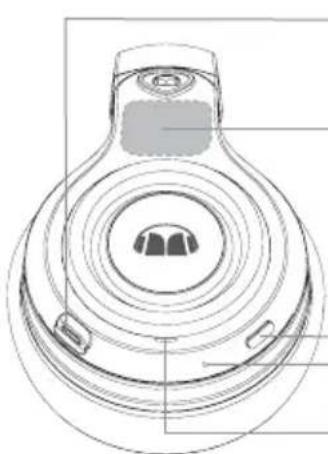
The headset contains the following parts:
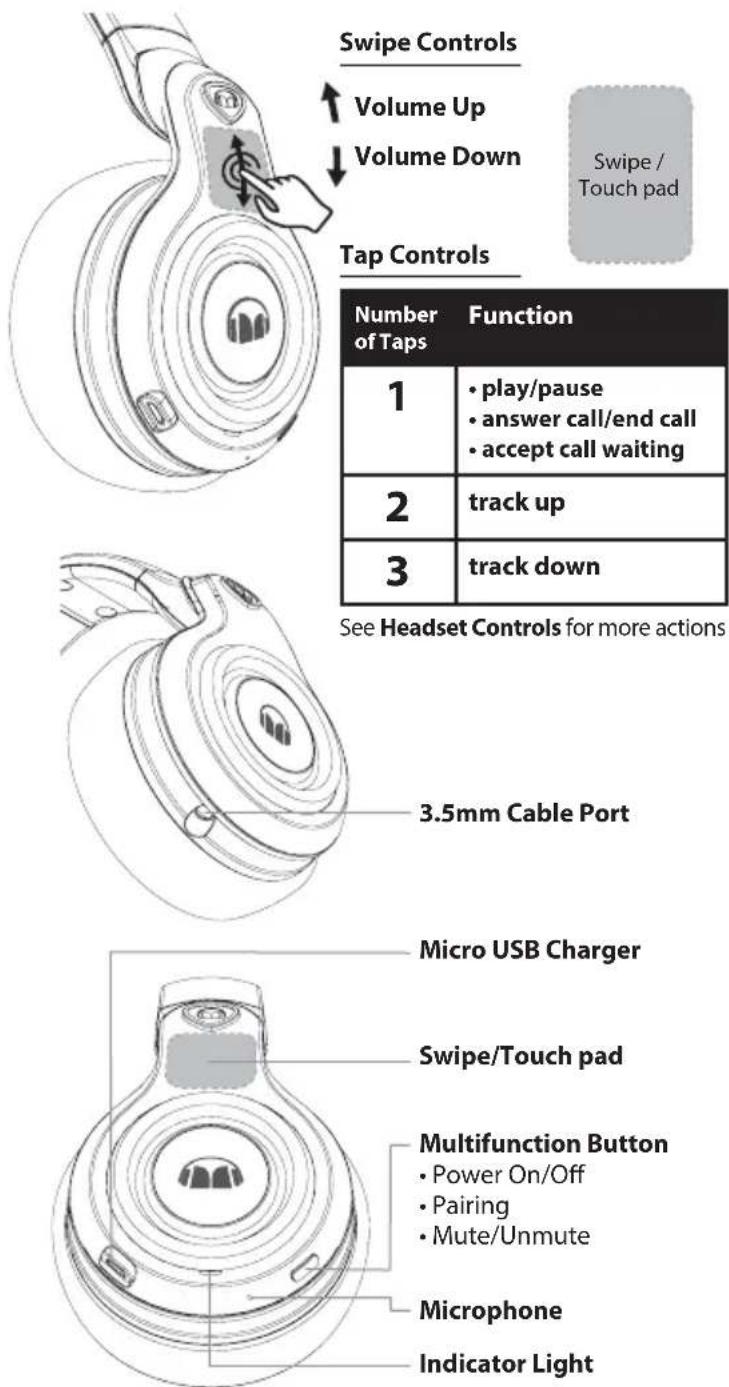
Power/Charging
Before using the headset wirelessly, you need to charge the battery and pair the headset with a compatible device.
The package includes a Micro USB cable that can be connected to your computer or other device made for USB charging. You can use a standard USB compatible charging device that plugs directly into a wall socket, or you can plug the USB cable directly into a laptop or PC. Plug the Micro USB end of the included USB cable into the USB micro port charger connector under the right earcup of the headphone. Plug the other end into a USB port on your computer or other devices made for USB charging. The indicator light will be red while charging. Once fully charged, the LED will be off. Charge time is 2 hours on an empty battery. The fully charged battery has power for up to 20 hours talking and/or music time. In this mode you can listen to your headphones via Bluetooth wireless communication or through the 3.5mm audio in.
Pairing
- Ensure that your phone or music player is switched on.
- To pair the headset if it has not been previously paired with a device, switch on the headset, it will enter the pairing mode automatically and the blue and red indicator light starts to flash quickly. The headset is ready to pair with your device.
- To pair the headset if it has been previously paired with another device, ensure that the headset is switched off, and press and hold the multifunction key (for about five seconds) until the blue and red indicator light starts to flash quickly.
- Activate the Bluetooth feature on your phone or music player, and set it to search for Bluetooth devices.
- Select "Monster Elements Over Ear" from the list of found devices on your phone or music player.
- If necessary, enter passcode 0000 to pair and connect the headset to your device.
Using Elements Over-Ear Without Battery Power
If your Elements Over-Ear headphone is not charged, Bluetooth wireless communication will not be available.
No Batteries Required
You can use your Elements Over-Ear headphone as a wired headphone to save batteries or if your batteries are not charged. Simply connect one end of the cable to the bottom of the earcup and the other to your wireless capable or wired MP3 player. By inserting an audio cable in this way, Elements Over-Ear wireless functionality is automatically disabled.
Disconnect the Headphone
To disconnect the headset from your device, switch off the headset, or disconnect it in the Bluetooth menu of your device.
Reconnect the Headphone
To connect the headset to the phone or music player that you last used with it, switch on the headset or make the connection in the Bluetooth menu of your device.
Listen to Music
To listen to music, connect the headset to a compatible
Headset Controls
| ACTION ON TOUCH PAD | FUNCTION |
| Hold for 2 sec. | voice dial when no call is in progress |
| tap x1 | answer call/end call |
| Hold for 2 sec. | reject call |
| *tap x1 | accept call waiting |
| *tap x2 | accept call on hold |
| *Hold for 2 sec. | reject call waiting |
| *Hold for 2 sec. | switch call between phone and headset |
| Hold Touch Pad and Multifunction button for 2 sec. | redial |
| *Double press Multifunction Button | mute/unmute microphone |
\*Action during call.
music player that supports A2DP Bluetooth profile. The available music functions depend on your music player.
To play a song, select the song in the music player and press the play/pause key on the Elements Over-Ear Headset. To pause or resume playing a song, press the play/pause key.
If you receive or make a call while listening to music, the music is paused until the call ends.
GUIDE TO INDICATOR LIGHTS
| INDICATOR LIGHT DESCRIPTION | |
| Red flash x2 Connectable | |
| Blue and red alternate flash | Connectable/Discoverable |
| Blue flash x1 · Connected | Outgoing Call EstablishIncoming Call EstablishActive CallTWC Call WaitingActive Call no SCOStraming A2DP |
| Red flash x1 · TWC Call On HoldTWC Multi Party Call | |
Headphones "Break-in"
Break-in time for headphones? We're kidding, right? No we're not. Like any high performance product, whether it's cars or headphones, they're mechanical devices that settle in after use. Your new headphones will sound incredible out of the box, but will "mellow" out after use and sound even better. We recommend playing them for 8 hours.
After 20 hours of playing, they should be fully broken in. Enjoy.
Battery
If applicable, battery must be recycled or disposed of properly.

Information to consumers in application of EU WEEE Directive 96/2002
This product is subject to European Union regulations that promote the re-use and recycling of used electrical and electronic equipment. This product required the extraction and use of natural resources and may contain hazardous substances. The symbol above, on the product or on its packaging, indicates that this product must not be disposed of with your other household waste. Instead, it is your responsibility to dispose of your waste equipment by handing it over to a designated collection point for the recycling of waste electrical and electronic equipment. The separate collection and recycling of your waste equipment at the time of disposal will help to conserve natural resources and ensure that it is recycled in a manner that protects human health and the environment. For more information about where you can drop off your waste equipment for recycling, please contact your local city office, your household waste disposal service, or the store from which you purchased the product. For more information about Monster products, please visit us at: www.MonsterProducts.com.
Monster® Service
Have a Problem with Your Headphones? Our Customer Service Team is here for you.
Please don't return headphones to your retailer, CALL our customer service center, 1-877-800-8989 for United States or Latin America, or visit us at www.MonsterProducts.com/service/. For Canadian, European, and Asian Pacific customer service numbers, please see the "Telephone Numbers" section in the following "Limited Warranty for Consumers". Our team of experts will assist you with all questions and technical difficulties.
We stand behind our products. Monster ^® headphones deliver the best in sound, quality, and design.
Thank you for your purchase. Visit MonsterProducts.com/headphones to order headphone replacement parts, accessories, and cables.
Download the complete manual at:
www.MonsterProducts.com
LIMITED WARRANTY FOR CONSUMERS
Monster, LLC, 3837 Bay Lake Trail, Suite 103, North Las Vegas, NV 89030, USA, [PLEASE NOTE THAT MONSTER DOES NOT ACCEPT PRODUCTS SHIPPED TO THIS ADDRESS—FOLLOW INSTRUCTIONS IN "HOW TO MAKE A CLAIM" BELOW] (415) 840-2000 ("Monster") extends You this Limited Warranty. Statutory or common law may provide You with additional rights or remedies, which shall not be affected by this Limited Warranty.
DEFINITIONS
"Adequate Use" means personal use of the Product (i) for private (as opposed to commercial) purposes, (ii) in conformance with all applicable law, code or regulations (including without limitation building and/or electrical codes), (iii) in accordance with manufacturer recommendations and/or instructions in the materials and documentation that accompany the Product, and (iv) if applicable, with proper electrical grounding.
"Authorized Dealer" means any distributor, reseller or retailer that (i) was duly authorized to do business and permitted to sell You the Product under the laws of the jurisdiction where You bought the Product, (ii) purchased the Product directly from Monster or from a party with a contractual relationship with Monster and in accordance with the authorized terms and conditions of such agreement, and (iii) sold You the Product new and in its original packaging.
"Formal Warranty Claim" means a claim made in accordance with the section
"Formal Warranty Claims" herein.
"Product" means a Product (i) that is listed in the Specifications Table below, (ii) that You bought from an Authorized Dealer new and in its original packaging, and (iii) whose serial number, if any, has not been removed, altered, or defaced.
"Product Defect" or "Defective Product" means an inadequacy of the Product that existed at the time when You received the Product from an Authorized Dealer and that causes a failure of the Product to perform in accordance with Monster's documentation accompanying the Product, unless such failure has been caused completely or partly by (a) any use other than Adequate Use, (b) transportation, neglect, misuse or abuse by anyone other than Monster's employees; (c) alteration, tampering or modification of the product by anyone other than a Monster employee; (d) accident (other than a malfunction that would otherwise qualify as a Product Defect); (e) maintenance or service of the Product by anyone other than a Monster employee; (f) exposure of the Product to heat, bright light, sun, liquids, sand or other contaminants; or (g) acts outside the control of Monster, including without limitation acts of God, fire, storms, earthquake or flood.
"Warranty Period" means the time period during which Monster must have received Your Formal Warranty Claim. The different Warranty Periods related to Product Defects are defined in the Specifications Table below. The Warranty Period commences on the date when You purchased or received (whichever occurs later) the Product from an Authorized Dealer as evidenced by the Authorized Dealer's invoice, sales receipt or packing slip. If You do not have written proof of the date of purchase or receipt, then the Warranty Period commences three (3) months after the date when the Product left Monster or its factory as evidenced by Monster's records. The Warranty Period ends after the time defined in the Specifications Table has expired or after You have transferred ownership of the Product, whichever occurs earlier. Also, You must call Monster and obtain a Return Authorization Number (as described under "How to Make a Claim") within two (2) months after You discover a Product Defect (or should have discovered it, if such Product Defect was obvious).
"You" means the first individual person that purchased the Product in its original packaging from an Authorized Dealer. This Limited Warranty does not apply to persons or entities that bought the Product (i) in used or unpackaged form, (ii) for resale, lease or other commercial use, or (iii) from someone other than an Authorized Dealer.
SCOPE OF THIS LIMITED WARRANTY
PRODUCTS. If a Product contained a Product Defect when You bought it from an Authorized Dealer, and Monster receives a Formal Warranty Claim from You (i) within two (2) months after You discover such Product Defect (or should have discovered it, if such Product Defect was obvious) and (ii) before the end of the Warranty Period for Product Defects applicable to the Defective Product, then Monster will provide You with one of the following remedies: Monster will (1) repair or, at Monster's sole discretion, replace the Defective Product, or (2) refund to You the purchase price You paid to Monster or the Authorized Dealer for the Defective Product if repair or replacement is not commercially practicable or cannot be timely made. NOTE: TO THE FULLEST EXTENT PERMITTED BY APPLICABLE LAW, MONSTER DOES NOT ASSUME ANY LIABILITY FOR ANY INCIDENTAL, CONSEQUENTIAL OR INDIRECT DAMAGES UNDER THIS LIMITED WARRANTY.
GENERAL PROVISIONS
CHOICE OF LAW/JURISDICTION. This Limited Warranty and any disputes arising out of or in connection with this Limited Warranty ("Disputes") shall be governed by the laws of the jurisdiction where You bought the Product.
OTHER RIGHTS. THIS LIMITED WARRANTY GIVES YOU SPECIFIC LEGAL RIGHTS, AND YOU MAY ALSO HAVE OTHER RIGHTS, WHICH VARY FROM JURISDICTION TO JURISDICTION, AND WHICH SHALL NOT BE AFFECTED BY THIS LIMITED WARRANTY.* THIS WARRANTY EXTENDS ONLY TO YOU AND CANNOT BE TRANSFERRED OR ASSIGNED. If any provision of this Limited Warranty is unlawful, void or unenforceable, that provision shall be deemed severable and shall not affect any remaining provisions. In case of any inconsistency between the English and other versions of this Limited Warranty, the English version shall prevail.
REGISTRATION. Please register Your Product at www.MonsterProducts.com. Failure to register will not diminish Your warranty rights.
SPECIFICATIONS TABLE
| Product Model Warranty Period for headphone | |
| Product that accompanies this warranty statement | One (1) year for product sold in North America, South America and Asia PacificTwo (2) years for product sold in Europe |
FORMAL WARRANTY CLAIM
HOW TO MAKE A CLAIM. In the event of a Product Defect, You must follow these instructions: (1) Call Monster within two (2) months after You discover a Product Defect (or should have discovered it, if such Product Defect was obvious); (2) Give a detailed explanation of how the damage occurred; (3) Obtain a Return Authorization Number; (4) Return the Product, shipping prepaid by You (to be refunded if You are entitled to a remedy under the Scope of this Limited Warranty), to Monster for verification of damage, along with a copy of Your original sales receipt or proof of purchase (invoice or packing slip) for such Product, the completed claim form, and printed Return Authorization Number on the outside of the return package (the claim form
will include instructions for return).
TELEPHONE NUMBERS. If You bought the Product in the United States
(1-877-800-8989), Latin America (Mexico 011-882-800-8989), or Asia Pacific
(China 400-820-8973), contact Monster, LLC via postal service at 455 Valley
Drive, Brisbane, CA 94005 (PLEASE NOTE THAT MONSTER DOES NOT ACCEPT
PRODUCTS SHIPPED TO THIS ADDRESS - FOLLOW INSTRUCTIONS IN
"HOW TO MAKE A CLAIM" ABOVE). If You bought the Product in Australia,
contact Monster's agent, Convoy International Pty Ltd (02 9700 0111), Unit 7, 1801 Botany Rd, Banksmeadow, NSW 2019 Australia. If You bought the Product anywhere else, contact Monster Technology International Ltd., Ballymaley Business Park, Gort Road, Ennis, Co. Clare, Ireland. You can use one of the following telephone numbers:
United States 1-877-800-8989
Canada 866-348-4171
Mexico 011-882-800-8989
China 400-820-8973
Ireland 353 65 68 69 354
Austria 0800296482
Belgium 0800-79201
Denmark 8088-2128
Finland 800-112768
France 0800-918201
Germany 0800-1819388
Greece 00800-353-12008
Italy 800-871-479
Netherlands 0800-0228919
Norway 800-10906
Russia 810-800-20051353
Spain 900-982-909
Sweden 020-792650
Switzerland 0800834659
Czech Republic 800-142471
United Kingdom 0800-0569520
FURTHER PROCEEDINGS. Monster will determine whether a Product Defect existed. Monster may, at its discretion, direct You to obtain a repair estimate at a service center. If a repair estimate is required, You will be instructed on how to properly submit the estimate and the resulting invoice to Monster for payment. Any fees for repairs may be negotiated by Monster.
TIMING. If You bring a Formal Warranty Claim and fully comply with all terms and conditions of this Limited Warranty, Monster will use its best efforts to provide You with a remedy within thirty (30) days after receipt of Your Formal Warranty Claim (if You reside in the United States - forty-five (45) days if You reside elsewhere), unless obstacles outside Monster's control delay the process.
* Our goods come with guarantees that cannot be excluded under the Australian Consumer Law. You are entitled to a replacement or refund for a major failure and compensation for any other reasonably foreseeable loss or damage. You are also entitled to have the goods repaired or replaced if the goods fail to be of acceptable quality and the failure does not amount to a major failure.
Heed all warnings
Keep and follow all instructions.
DO NOT use this apparatus near water
Clean only with dry cloth
DO NOT disassemble or replace the battery. If you suspect there is something wrong with the battery, please carry the unit to the service center for help. CAUTION: RISK OF EXPLOSION IF BATTRY IS REPLACED BY AN UNCORRECT TYPE. DISPOSE OF USED BATTERIES ACCORDING TO THE INSTRUCTIONS The battery should not be disposed together with other waste. The battery has to be disposed at an authorized place for recycling of electrical and electronic appliances.
By collecting and recycling waste, you help save natural resources, and make sure the product is disposed in an environmental friendly and healthy way. Unplug this apparatus during lightning storms or when unused for long periods of time. DO NOT install near any heat sources such as radiators, heat registers, stoves, or other apparatus (including amplifiers) that produce heat Only use accessories specified by the manufacturer. Refer all servicing to qualified service personnel. Servicing is required when the apparatus has been damaged in any way, such as liquid has been spilled or objects have fallen into the apparatus, the apparatus has been exposed to rain or moisture, does not operate normally, or has been dropped.
FR
www.monsterproducts.com/support/compliance
| Sécurité EN | 60065:2002+A1:2006+A11:2008+A2:2010+A12:2011 |
| Santé EN 62 | 479:2010 |
| CEM EN 301 | 489-1 V1.9.2EN 301489-17 V2.2.1EN 55013:2013EN 55020:2007/A11:2011 |
| Radio EN 300 | 328 V1.9.1 |


Adresse : 3837 Bay Lake Trail, Suite 103, North Las Vegas, NV 89030
Importateur : Monster Technology International, Ltd.
Adresse : Ballymaley Business Park, Gort Rd., Ennis, Co. Clare, Ireland
www.monsterproducts.com/support/compliance
| Sicherheit EN60065:2002+A1:2006+A11:2008+A2:2010+A12:2011 |
| Gesundheit EN 62479:2010 |
| EMV EN 301489-1 V1.9.2EN 301489-17 V2.2.1EN 55013:2013EN 55020:2007/A11:2011 |
| Funk EN 300 328 V1.9.1 |


Adresse Monster, LLC
importieren: 3837 Bay Lake Trail, Suite 103,
North Las Vegas, NV 89030
Adresse Monster Technology International, Ltd.
importieren: Ballymaley Business Park, Gort Rd., Ennis, Co. Clare, Ireland
natural_image
Technical line drawing of a mechanical component with a hand pressing a button (no text or symbols)Ver.121912 - GLOBAL ©2016 Monster, LLC
ES
www.monsterproducts.com/support/compliance
| Seguridad EN | 60065:2002+A1:2006+A11:2008+A2:2010+A12:2011 |
| Salud EN 62479 | 2010 |
| CEM EN 301489 | -1 V1.9.2EN 301489-17 V2.2.1EN 55013:2013EN 55020:2007/A11:2011 |
| Radio EN 300 | 328 V1.9.1 |


natural_image
Technical line drawing of a mechanical component with a hand pressing a button (no text or symbols)natural_image
Technical line drawing of a mechanical component with concentric circular features and mounting holes (no text or symbols)©2003-2016 Monster, LLC
IT
www.monsterproducts.com/support/compliance
| Sicurezza EN60065:2002+A1:2006+A11:2008+A2:2010+A12:2011 |
| Salute EN 62479:2010 |
| EMC EN 301489-1 V1.9.2EN 301489-17 V2.2.1EN 55013:2013EN 55020:2007/A11:2011 |
| Radio EN 300 328 V1.9.1 |


Indirizzo: Ballymaley Business Park, Gort Rd., Ennis, Co. Clare, Ireland
natural_image
Technical line drawing of a mechanical component with a hand pressing a button (no text or symbols)©2003-2016 Monster, LLC
PT
www.monsterproducts.com/support/compliance
| Segurança EN | 60065:2002+A1:2006+A11:2008+A2:2010+A12:2011 |
| Saúde EN 62479:2010 | |
| EMC EN 301489-1 V1.9.2EN 301489-17 V2.2.1EN 55013:2013EN 55020:2007/A11:2011 | |
| Rádio EN 300328 V1.9.1 | |


Morada: Ballymaley Business Park, Gort Rd., Ennis, Co. Clare, Ireland
A informação do quadro em www.nidcd.nih.gov/health/education/teachers/pages/common_sounds.aspx
©2003-2016 Monster, LLC
ZH\_CN
Monster 重要性能和安全提示
www.monsterproducts.com/support/compliance
Jù cǐ, guàiwù LLC. Shēngmíng cǐ shèbèi shì
fúhé zhǐ lìng wǔ shísān fēn zhī èrqiān yī shí sì/ EU.
Fúhé ōuméng shēngmíng de quánwén, qǐng fǎngwèn:
Www.Monsterproducts.Com/support/compliance
| 安全 | EN60065:2002+A1:2006+A11:2008+A2:2010+A12:2011 |
| 健康 | EN 62479:2010 |
| 电磁兼容性 | EN 301489-1 V1.9.2EN 301489-17 V2.2.1EN 55013:2013EN 55020:2007/A11:2011 |
| 无线电 | EN 300 328 V1.9.1 |


认证型号:
186310
进口:Monster, LLC
地址:3837 Bay Lake Trail, Suite 103,
North Las Vegas, NV 89030
进口:Monster Technology International, Ltd.
地址: Ballymaley Business Park,
Gort Rd., Ennis, Co. Clare, Ireland
为您的听力负责
图表信息从如下网站获得:www.nidcd.nih.gov/health/education/teachers/
pages/common_sounds.aspx
natural_image
Technical line drawing of a mechanical component with a hand pressing a button (no text or symbols)滑动控制
音量增大
音量降低
轻触控制
www.monsterproducts.com/support/compliance
李全 Ballymaley Business Park, Gort Rd., Ennis, Co. Clare, Ireland
청취 시 주의 사항
www.monsterproducts.com/support/compliance
住所 Ballymaley Business Park, Gort Rd., Ennis, Co. Clare, Ireland
周囲に配慮しましょう
natural_image
Technical line drawing of a mechanical component with a hand pressing a button (no text or symbols)スワイプコントロール
音量を上げる
音量を下げる
タップコントロール
natural_image
Technical line drawing of a mechanical component with concentric circular features (no text or symbols)3.5mmケーブルポート
natural_image
Technical line drawing of a mechanical component with concentric rings and mounting holes (no text or symbols)*Action during call.
ヘッドホンの接続解除

- EN
- Important Monster® Performance and Safety Tips
- FCC ID: RJE186310
- Canada Notice — IC: 5153A-186310
- Canadian Class B Statement
- CAN ICES-3 (B)/NMB-3(B)
- Modification
- C€
- 第十二條
- Certification Model Number:
- Listen Responsibly
- Use Responsibly
- Cleaning
- Using Finger Tip Controls
- Key Features and Parts
- Power/Charging
- Pairing
- Using Elements Over-Ear Without Battery Power
- No Batteries Required
- Disconnect the Headphone
- Reconnect the Headphone
- Listen to Music
- \*Action during call.
- GUIDE TO INDICATOR LIGHTS
- Headphones "Break-in"
- Battery
- Information to consumers in application of EU WEEE Directive 96/2002
- Monster® Service
- Have a Problem with Your Headphones? Our Customer Service Team is here for you.
- Download the complete manual at:
- LIMITED WARRANTY FOR CONSUMERS
- DEFINITIONS
- SCOPE OF THIS LIMITED WARRANTY
- GENERAL PROVISIONS
- FORMAL WARRANTY CLAIM
- FR
- ES
- IT
- PT
- ZH\_CN
- Monster 重要性能和安全提示
- 为您的听力负责
- 청취 시 주의 사항
- 周囲に配慮しましょう
Brand : MONSTER
Model : Elements Wireless OverEar
Category : Earphones