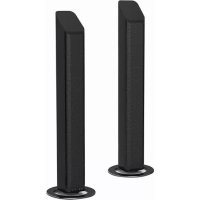
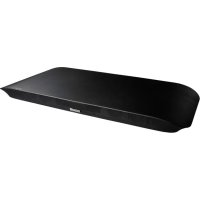
MXSPTS1000 - Soundbar MAXELL - Free user manual and instructions
Find the device manual for free MXSPTS1000 MAXELL in PDF.



| Product Type | Soundbar |
| Brand | MAXELL |
| Model | MXSPTS1000 |
| Dimensions (L x D x H) | 904 x 60 x 60 mm |
| Power Supply | AC 220-240 V ~ 50/60 Hz |
| Power Consumption | 30 W |
| Output Power | 20 W RMS x 2 |
| Frequency Response | 40 Hz – 20 kHz |
| Speaker Impedance | 8 Ω |
| AUX Input Sensitivity | 700 mV |
| Bluetooth Connectivity | Yes, range approx. 8 m |
| Audio Inputs | AUX (3.5 mm), Optical |
| Preset Sound Modes | Flat, Movie, Music |
| Remote Control | Infrared, CR2025 battery, range 6 m |
| Main Functions | Standby/On, Mute, source selection, volume adjustment, auto standby |
| Care and Cleaning | Clean with a dry, clean cloth |
| Safety | Do not open, do not expose to moisture, disconnect before cleaning |
| Spare Parts | CR2025 battery for remote control (replacement) |
| Reparability | No user-serviceable parts – contact a professional |
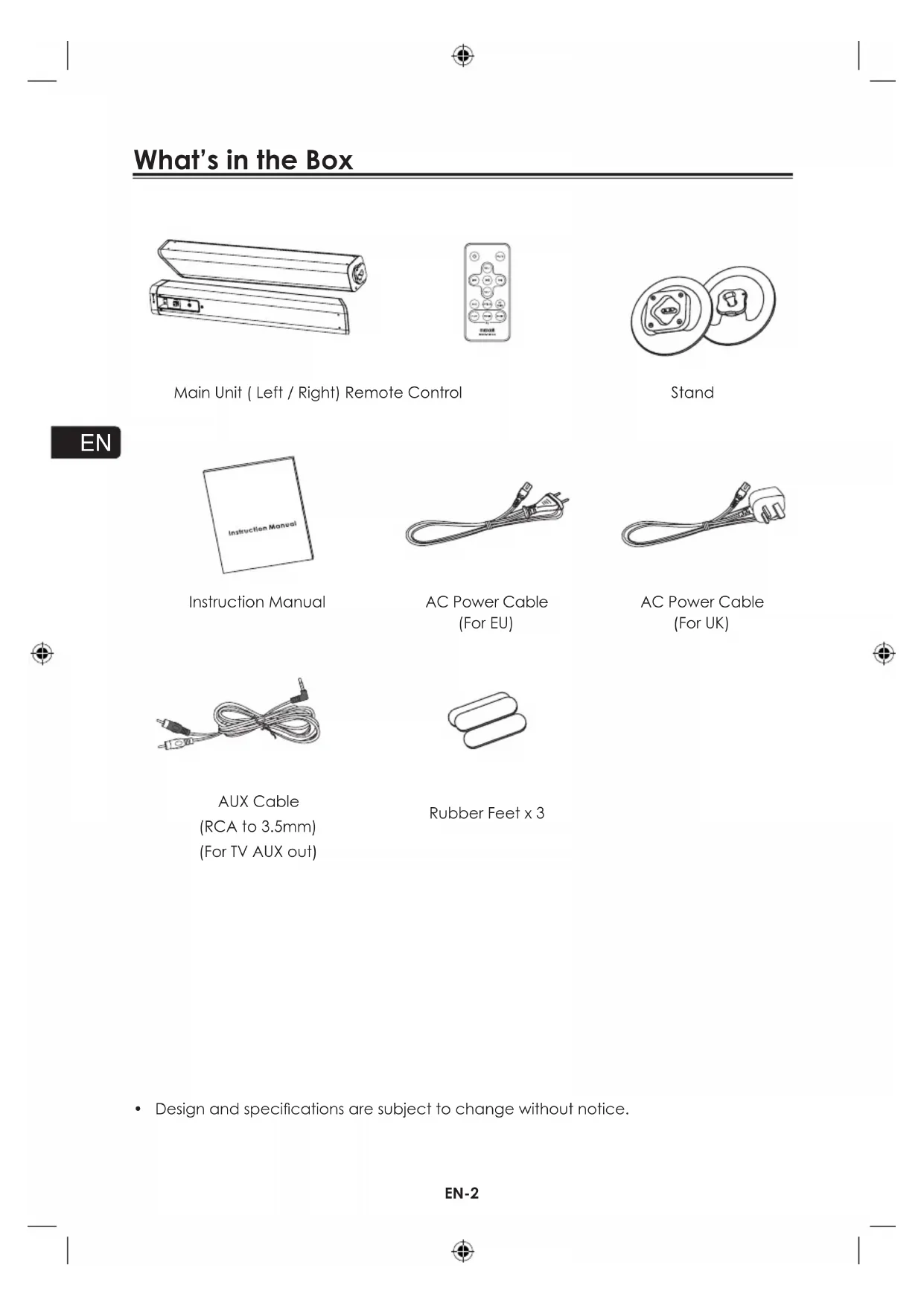
| Included Accessories | Remote control, stands, AUX RCA-3.5mm cable, EU/UK power cables, rubber feet |
Frequently Asked Questions - MXSPTS1000 MAXELL
If auto standby is activated (15 minutes without signal), turn the device back on.
User questions about MXSPTS1000 MAXELL
0 question about this device. Answer the ones you know or ask your own.
Ask a new question about this device
Download the instructions for your Soundbar in PDF format for free! Find your manual MXSPTS1000 - MAXELL and take your electronic device back in hand. On this page are published all the documents necessary for the use of your device. MXSPTS1000 by MAXELL.
USER MANUAL MXSPTS1000 MAXELL
DIGITAL SPLIT SOUNDBAR
MXSP-TS1000
V1.0


Contents
What's in the Box 2
Important Safety Instructions 3
Identifying the Parts 6
Main Unit 6
Remote Control 7
Getting Started. 7
Prepare the Remote Control. 7
To Replace the Remote Control Battery 8
Placement and Instalment 8
Connections 10
Use the AUX Socket 10
Use the OPTICAL Socket 11
Connect to Power 11
Connect to a Bluetooth Device 12
General Operation 13
Standby/ON 13
Mute Sound 13
Select Modes 13
Adjust the Volume 13
Select a Preset Sound Effect 14
Troubleshooting 15
Specifications 16
What's in the Box
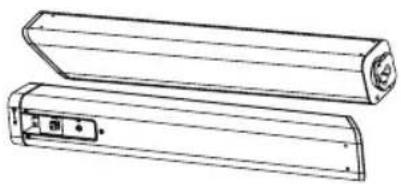
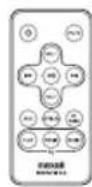
Main Unit ( Left / Right) Remote Control
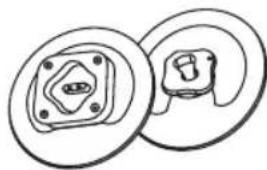
Stand
EN
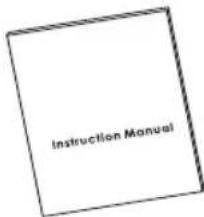
Instruction Manual
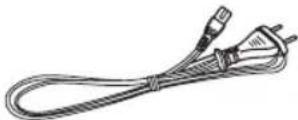
AC Power Cable (For EU)
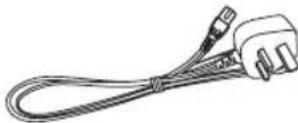
AC Power Cable (For UK)

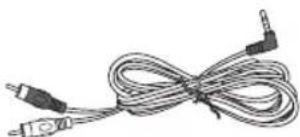
AUX Cable
(RCA to 3.5mm)
(For TV AUX out)
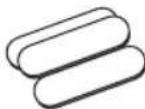
Rubber Feet x 3
- Design and specifications are subject to change without notice.
EN-2

Important Safety Instructions

WARNING
RISK OF ELECTRIC SHOCK
DO NOT OPEN

CAUTION: TO REDUCE THE RISK OF ELECTRIC SHOCK,DO NOT REMOVE COVER (OR BACK). NO USER-SERVICEABLE PARTS INSIDE.REFER SERVICING TO QUALIFIED SERVICE PERSONNEL.

The lightning flash with arrowhead symbol, within an equilateral triangle, is intended to alert the user to the presence of uninsulated "dangerous voltage" within the product's enclosure that may be of sufficient magnitude as to constitute a risk of electric shock to persons.

The exclamation point within an equilateral triangle is intended to alert the user to the presence of important operating and maintenance (servicing) instructions in the literature accompanying the apparatus.
Reading the user's manual
- The contents of this user's manual may be modified without any prior notification.
The appearance and specifications may be partially modified without any prior notification.
Maxell shall not be responsible for any injury caused by fire, earthquake or a third party, as well as any injury that occur due to intentional or accidental mishandling or improper use by the customer.
Maxell shall not be held responsible for any damages that may occur due to employment of a usage method not designated in this user's manual.
Maxell shall not be held responsible for any damages that may occur due to malfunctioning of this Soundbar resulting from the use of this Product together with other devices. - This Soundbar is not intended for use in facilities and equipment which may affect human lives, including medical equipment,
nuclear devices, aerospace equipment and transport equipment, as well in facilities and equipment which require a high degree of reliability.
Maxell shall not be held responsible for any accident resulting in personal injury or death or any fire accident that may occur due to failure of this Product when this Product is used in the control systems of those facilities and equipment described above.
| Warning! | Indicates that 'there is a possibility of causing death or serious physical injury if this Product is erroneously handled'. |
| Caution! | Indicates that 'there is a possibility of causing physical injury*1 or occurrence of physical damage*2 if this Product is erroneously handled'. |
1: Serious physical injury implies injuries such as loss of eyesight or injury, burns, electric shock, bone fracture or poisoning that have subsequent complications and which require hospitalization or long term hospital visit for medical treatment.
2: Physical injury implies injury, burns and electric shock which do not require hospitalization or long-term hospital visit for medical treatment.
| △ | △This symbol shows that the user needs to exercise caution while handling this Product to prevent fire, explosion and heating. The specific caution to be taken is written inside the symbol. |
| ⊗ | ⊗This symbol implies restriction of an action while handling this. Product. The specific restriction is written inside or near the symbol. |
| ● | ●This symbol implies compulsion of an action based on the instructions. The specific compulsion is written inside or near the symbol. |
Warning
To reduce the risk of electric shock, do not expose this apparatus to moisture.
Warning
The battery (battery or batteries or battery pack) must not be exposed to excessive heat such as sunshine, fire, etc.
Important Safety Instructions
| Warning! | |
| Do not repair, modify or disassemble. It may cause fire, electric shock or injury. The Company shall not be responsible for any physical damage caused by repairing, modification or disassembly. Also, any repairing of a fault caused by repairing, modification or disassembly by the user will be charged, even if it happens during the warranty period. | Don't |
| Keep the Remote Control out of reach of children. They may accidentally swallow the battery and cause choking and damage the stomach. The cord may entangle around the child's body and cause suffocation. If any accident occurs by any chance, please consult a doctor immediately. | Don't |
| Do not use in a rainy or snowy place, by the waterside or in the bathroom. It may cause fire or electric shock. | Don't |
| Do not use if it is thundering. It may cause fire or electric shock. | Don't |
| Do not keep a flower vase, flowerpot, cup, or any container containing medicine, cosmetics or water, near the Soundbar. They may break and get into the Soundbar and cause fire or electric shock. | Don't |
| Do not insert any kind of metal or easily combustible object through the aperture. It may cause fire or electric shock. | Don't |
| Do not block any ventilation openings. It may get heated and cause fire. Install in accordance with the manufacturer's instructions. | Don't |
| Caution! | |
| Do not keep in a shaky place. Don't | Don't |
| The Soundbar may fall and get damaged. | Don't |
| Do not keep in a place where steam or moisture may be present. | Don't |
| It may cause fire or accident. | |
| Do not keep in a place which is directly hit by cold air, or a place which is extremely cold. | Don't |
| Dew may fall and cause short circuit or burnout. | |
| Do not listen in high volume continuously for a long time. | Don't |
| Do not listen in high volume, which causes ringing in the ears, continuously for a long time. It may damage hearing. | |
| Do not raise the volume excessively from the beginning. | Don't |
| Sudden high volume may damage hearing. Minimize the volume before playing. | |
| Do not keep in an excessively hot place. | Don't |
| sush as radiators, heaters, stoves, or other apparatus (including amplifiers) that produce heat. | |
| The surface of the device or parts may get damaged, and may also cause fire. Do not keep especially in a closed car in summer, and in a place where sunlight directly falls or near a stove. This may cause leakage of battery fluid. | |
| Do not use in sandy beaches and sandy soil where sand can easily enter, or in dusty locations. | Don't |
| It may cause burnout, fire or accident. | |
| Do not cover or wrap with a cloth or futon. | Don't |
| Heat may get generated and deform the Product, or Product may catch fire. | |
| Do not keep a cathode-ray tube near it. | Don't |
| Spots may appear because of it. | |
| Ensure to refer the user's manual to connect to an external device. | Caution! |
| Connect to an external device after carefully reading this user's manual and the user's manual of the external device, as well as after turning off the power. | |
| Do not plug or unplug the power plug with wet hands. | Don't |
| It may cause electric shock. | |
| Insert the power plug completely and firmly into the outlet socket. | Don't |
| If the power plug is not inserted properly, fire may occur due to electric shock or dust deposition. | |
| Turn off power when repairing or if not going to be used for a long time, and remove the power plug. | Caution! |
| Hot adhering to this may cause electric shock or physical damage. | |
Important Safety Instructions
Safety
1 Read these instructions.
2 Keep these instructions.
3 Heed all warnings.
4 Follow all instructions.
5 Only use this product indoor.
6 Clean only with a dry cloth.
7 Protect the power cord from being walked on or pinched particularly at plugs, convenience receptacles and the point where it exit from the apparatus.
8 Only use attachments/accessories specified by the manufacturer.
9 Use only with a cart, stand, or table specified or approved for use by the TV manufacturer. When a cart is used, use caution when moving the cart/ Soundbar combination to avoid injury from tip-over.
13 Please DO NOT allow children to push, pull, or climb on the television connected to this equipment as it may cause TV to tip over, possibly resulting in persnal injury or death. For added safety and stability, be sure to secure the television using a suitable anti-tip device.

10 DO NOT ATTEMPT TO SERVICE THIS PRODUCT Servicing is required when the Soundbar has been damaged in any way, such as power-supply cord or plug is damaged, liquid has been spilled or objects have fallen into the apparatus, the apparatus has been exposed to rain or moisture, does not operate normally, or has been dropped.
11 This is CLASS II Soundbar with no insulation and no protective earth grounding provided.
12 The AC plug is used as the disconnect device, therefore the AC plug must remain readily accessible at all times.
Identifying the Parts
Main Unit
EN
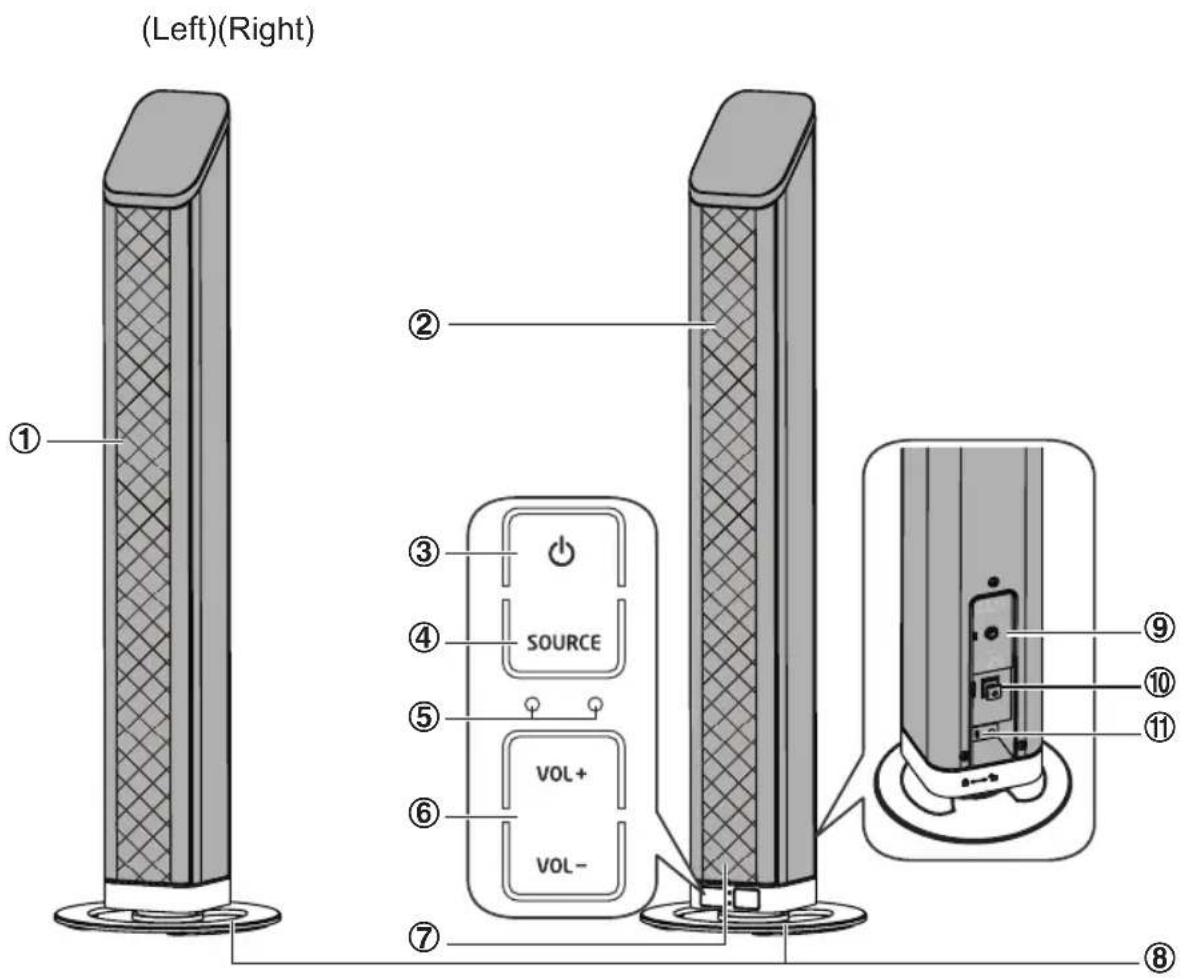
1 Left Speaker
2 Right Speaker
3
Turn on this unit or switch to Power standby mode.
4 SOURCE
Select a source.
5 LED Indicators
6 VOL+/VOL-
Adjust sound volume level.
7 Remote Control Sensor
8 Stand
9 AUX Socket Standard 3.5mm audio input jack.
10 OPTICAL Socket
Opticial input jack.
11 AC~Power Plug
Connect a power cord.
Identifying the Parts
Remote Control
1
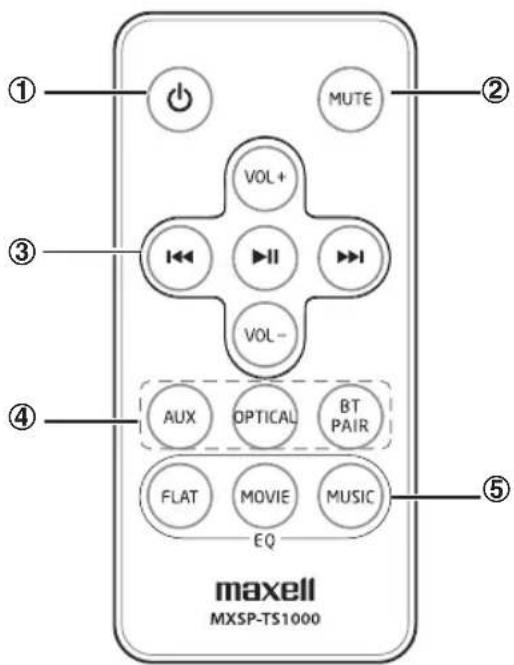
Turn on or Turn off the unit.
2 MUTE
Mute or resume sound from the unit.
3 VOL+/VOL-
Adjust sound volume level.
144/
In Bluetooth mode, skip to previous/next audio file.
11
In Bluetooth mode, start or pause playback.
4 Source buttons
Directly switch to AUX, Optical and BT (Bluetooth) modes.
Press and hold the BT PAIR button Enable Bluetooth pairing mode in BT mode.
5 EQ buttons
Select a preset sound effect: flat, movie, music.
Getting Started
Prepare the Remote Control
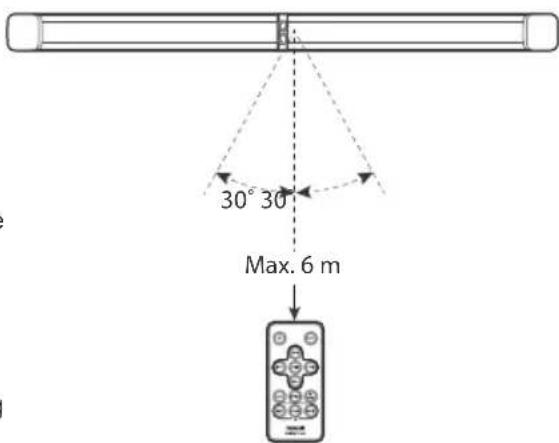
The Remote Control allows the unit to be operated from a distance.
- Even if the Remote Control is operated within the effective range (6m), remote control operation may be impossible if there are any obstacles between the unit and the remote control.
If the Remote Control is operated near other products which generate infrared rays, or if other remote control devices using infra-red rays are used near the unit, it may operate incorrectly. Conversely, the other pr
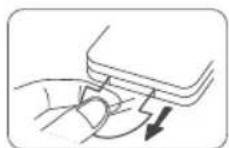
For First-time use:
The unit has a pre-installed lithium CR2025 battery. Remove the protective tab to activate the remote control battery.
Getting Started
To Replace the Remote Control Battery
(A): Press down the flip on the left.
(B): Pull out the battery tray and remove the old battery.
(C): Place a new CR2025 battery into the battery tray with correct polarity (+/-) as indicated.
(D): Insert the tray back into the slot.
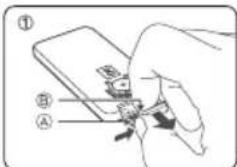
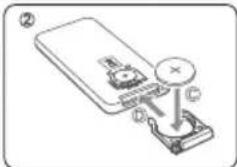
Precautions Concerning Batteries
- When the Remote Control is not to be used for a long time (more than a month), remove the battery from the Remote Control to prevent it from leaking.
- If the batteries leak, wipe away the leakage inside the battery compartment and replace the batteries with new ones.
- Do not use any batteries other than those specified.
- Do not heat or disassemble batteries.
Never throw them in fire or water.
- Do not carry or store batteries with other metallic objects. Doing so could cause batteries to short circuit, leak or explode.
- Never recharge a battery unless it is confirmed to be a rechargeable type.
EN
Placement and Instalment
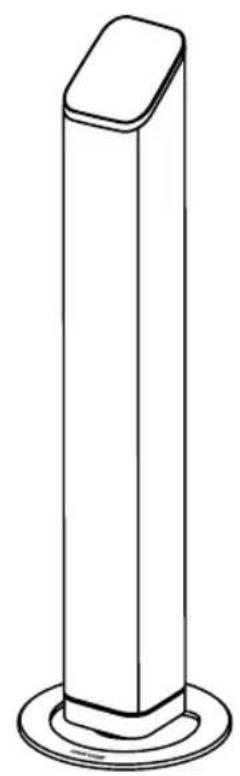
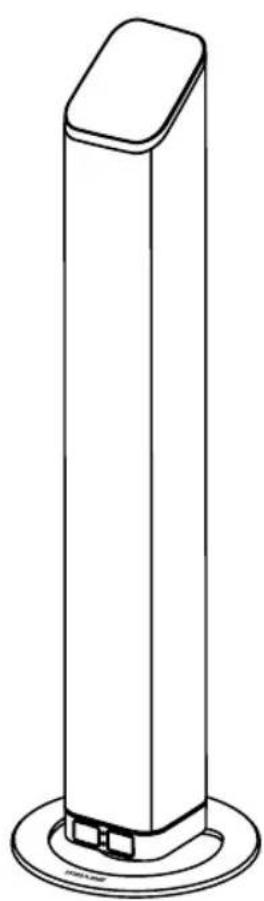
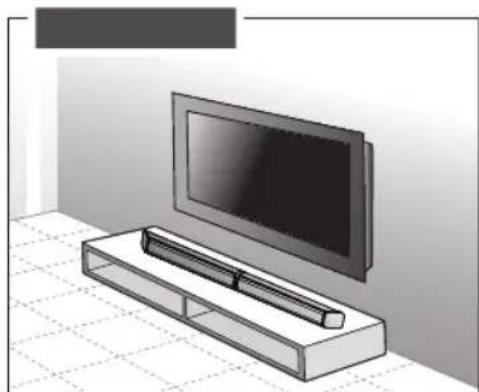
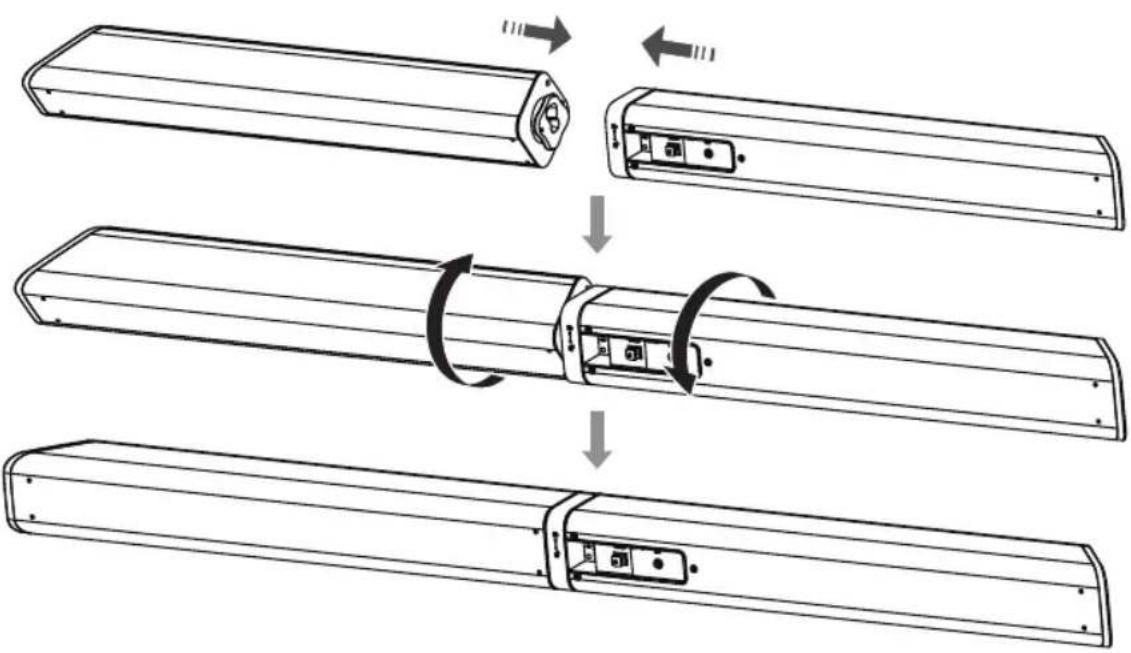
As the unit can be used either a single sound bar or a 2-piece tower speakers.
- Placement
- You are suggested putting the unit with below options:
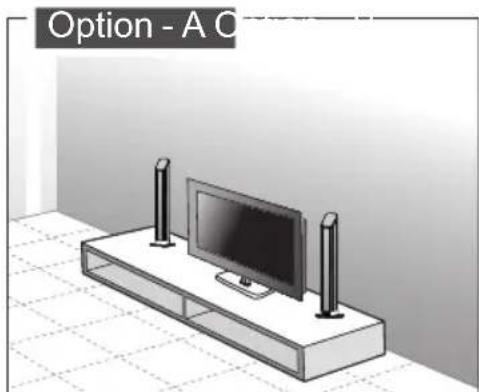
Getting Started
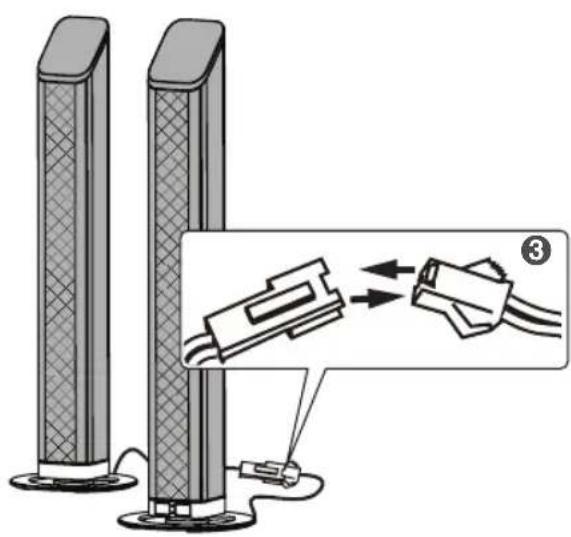
- Stand Instalment (if using option-A)
Main Unit (Left)
Main Unit (Right)
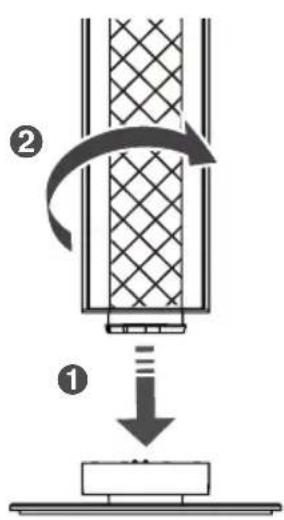
Stand (Left)
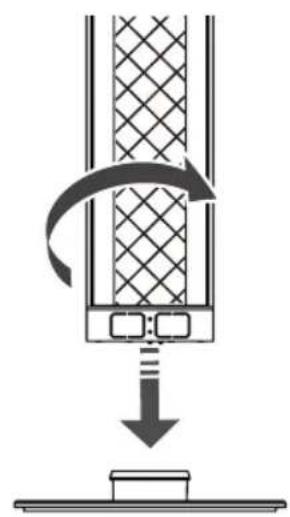
Stand (Right)
EN
Horizontal Instalment
Getting Started
-
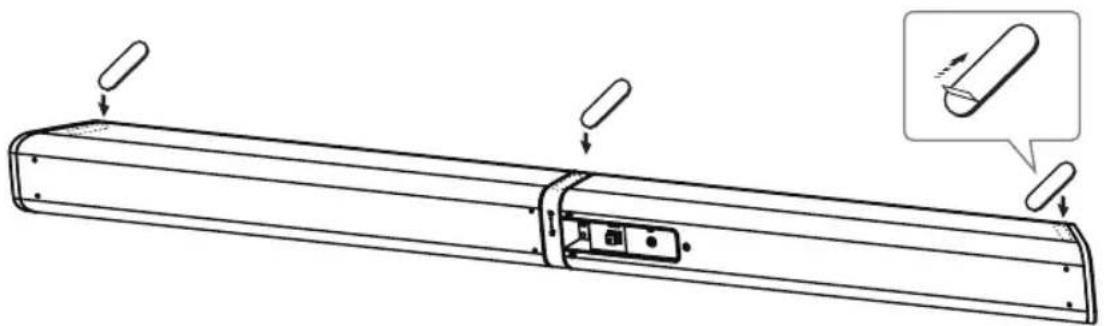
Instalment the Rubber Feet (if using option-B)
-
You can extend the height of the unit.
Note: Ensure the surface is clean prior to sticking the rubber foot to the bottom of the unit.
- Turn the unit upside down.
- Remove the backing paper from the rubber foot.
- Stick the rubber foot to the bottom of the unit as shown in the illustration below.
EN
Connections
Use the AUX Socket
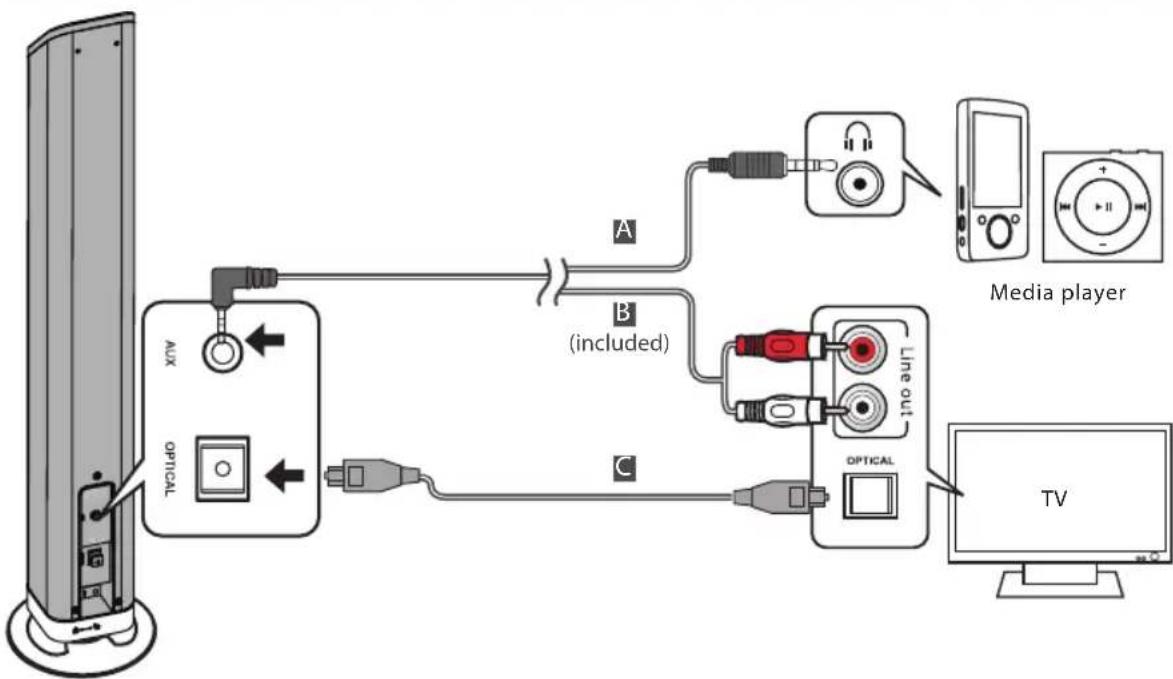
A. Use a 3.5mm to 3.5mm audio cable to connect the media player headphone socket to the AUX socket on the unit.
B. Use a RCA to 3.5mm audio cable (included) to connect the TV's audio output sockets to the AUX socket on the unit.
Connections
Use the OPTICAL Socket
C. Remove the protective cap of the OPTICAL socket, then connect an OPTICAL cable to the TV's OPTICAL OUT socket and the OPTICAL socket on the unit.
Connect to Power
Caution:
Risk of product damage!
- Ensure that the AC outlet voltage corresponds to the voltage printed on the back or the underside of the unit.
- Risk of electric shock! To unplug the AC power, always pull the plug from the socket. Never pull the cord.
- Ensure the correct power cord is used.
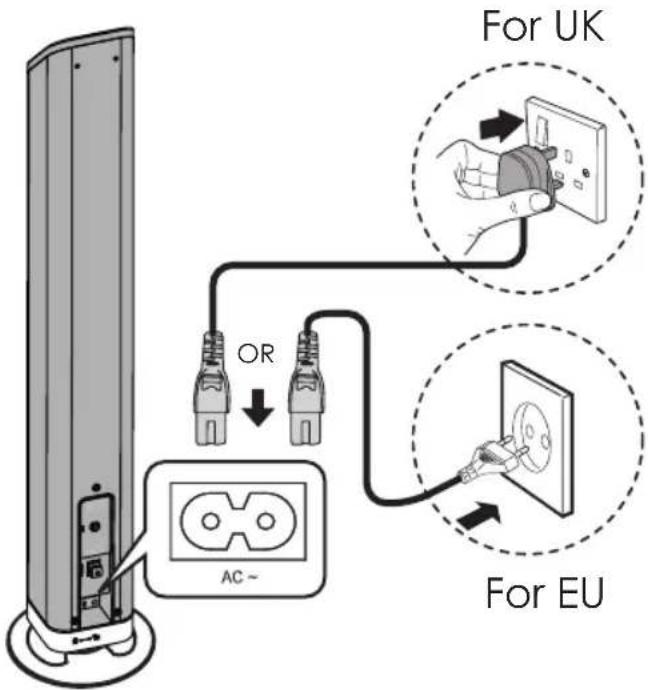
Connect the AC power cord to:
- the AC~ socket on this unit.
- the wall socket. (British 3 pin plug to 3-hole socket or European 2 pin plug to 2-hole socket)
Connections
Connect to a Bluetooth Devices
You can listen to music from a Bluetooth - enabled device via this player.
Pair the Bluetooth-enabled devices
The first time you connect your device to this player, you need to pair your device to this player.
Note:
- The operational range between this player and a Bluetooth device is approximately 8m (26 ft).
- Before you connect a Bluetooth device to this unit, familiarize yourself with the Bluetooth capabilities of the device.
- Compatibility with all Bluetooth devices is not guaranteed.
- Any obstacle between this unit and a Bluetooth device can reduce the operational range.
- Keep this player away from any other electronic device that may cause interference.
1 During ON mode, press the SOURCE button repeatedly on the unit or the BT PAIR button on the remote control to select Bluetooth mode. The Blue indicator will flash slowly.
2 The system has entered pairing mode.
- Or press and hold the BT PAIR button on the remote control to be searchable. The Blue indicator will flash fast.
3 Activate your Bluetooth device and select the search mode. "MXSP-TS1000" will appear on your Bluetooth device list.
4 Select "MXSP-TS1000" in the pairing list. The Blue indicator will light up solidly while the pairing succeeds.
- To disconnect the Bluetooth function, switch to another function on the unit or disable the function from your Bluetooth device. The Blue indicator will flash slowly.
Tips:
1 Enter "0000" for the password if necessary.
2 If there is an existing connection, press and hold the BT PAIR button on the remote control to re-activate the pairing mode, the connection will be interrupted. The Blue indicator will flash slowly.
3 If no other Bluetooth device pairs with this player within two minutes, the player will recover its previous connection.
4 The player will also be disconnected when your device is moved beyond the operational range.
5 If you want to reconnect your device to this player, place it within the operational range.
6 If the device is moved beyond the operational range, when it is brought back, please check if the device is still connected to the player.
7 If the connection is lost, follow the instructions above to pair your device to the player again.
Connections
Listen to music from Bluetooth device
- If the connected Bluetooth device supports Advanced Audio Distribution
Profile (A2DP), you can listen to the music stored on the device through the player.
-
If the device also supports Audio Video Remote Control Profile (AVRCP), you can use the player's remote control to play music stored on the device.
-
Pair your device with the player.
- Play music via your device (if it supports A2DP).
-
Use supplied remote control to control play (if it supports AVRCP).
-
To play/pause the music, press the button on the remote control.
- To skip a track, press the 1 1 buttons on the remote control.
General Operation
Standby/ON
When you first connect the main unit to the mains socket, the main unit will be in Standby mode.
- Press the button on the unit or on the remote control to switch the unit ON.
- Press the button again on the remote control or on the unit to switch the unit back to STANDBY mode. The status indicator will light up Red.
- Disconnect the mains plug from the mains socket if you want to switch the unit OFF completely.
- When there have no audio signal input or the signal from Aux is too low, the Auto-Off function will be activated. If the situation occurs for 15 minutes, the Soundbar will switch to standby mode automatically.
Mute Sound
- Press the MUTE button on the remote control to mute. Press this button again or press the VOL+ / VOL- buttons on the unit or on the remote control to resume normal listening. The light indicator on the unit will blink sound resumes.
Select Modes
Press the SOURCE button repeatedly on the unit or press the AUX, OPTICAL, BT/PAIR buttons on the remote control to select the desired mode.
- In AUX mode: the status indicator lights up Green.
- In OPTICAL mode: the status indicator lights up Orange.
- In Bluetooth mode: the status indicator lights up Blue.
General Operation
Adjust the Volume
- Press the VOL+ / VOL- buttons on the unit or on the remote control to adjust the volume.
While adjusting the volume, the status indicator flashes quickly. - While the volume level reaches its maximum level, if you press the VOL+ button again, the status indicator flashes once. While the volume level reaches its minimum level, if you press the VOL- button again, the status indicator flashes once.
Select a Preset Sound Effect
EN
- While playing, press the FLAT, MOVIE and MUSIC button on the remote control to select desired preset equalizers: MOVIE (recommended for viewing movies), MUSIC (recommended for listening to music), FLAT (EQ mode off).
Tip: If there is no sound come out of the soundbar and the indicator light flash fast. Make sure the digital audio setting of your source player (e.g. DVD player, game player, TV) is setted to PCM output.
Troubleshooting
To keep the warranty valid, never try to repair the system yourself. If you encounter problems when using this unit, check the following points before requesting for service. Warranty void if case is opened.
| Symptom Likely | Cause What to do | |
| No sound. Speaker not connected to active AC power | Triggered auto-off function | ·Verify that speaker is connected and that the circuit is on. |
| Power not switched on | ·Switch on power and verify that power LED is on. | |
| Suddenly No sound | Triggered auto-off function | ·Turn the volume up of the source, e.g TV, mp3 player, etc, and readjust the sound of the unit to trigger auto-on function. ·See No Sound symptom above. |
| No sound, speaker is connected to working AC power but sound won't come on | Cannot trigger auto-on function | ·Increase the volume of the source input signal. |
| Speaker power cable is faulty or improperly connected | ·Re-seat the power cable at both ends. ·Substitute a known-good power cable. | |
| Improper connections | ·Double check the Input/Output cable connection. | |
| No sound. Speaker comes on | Faulty cables and connections | ·Disconnect and re-seat signal cables. ·Make sure cables are plugged completely. ·Replace suspected cable with a known-good cable. |
| Noise or hiss heard at output | Faulty Cables and connections | ·Disconnect and re-seat signal cables. ·Make sure cables are plugged completely. ·Replace suspected cable with a known-good cable. |
| Noisy source device • Disconnect | ·Connect the devices that are connected to your speaker one at a time. If the noise goes away, the problem is with the source or the connecting cable. | |
| Hum or Buzz that increases or decreases when more than one source are inputting single to the Soundbar at the same time | Interference internally • Disconnect or mute the other channels to solve the problem. | |
| Faulty cable between source equipment and unit | ·Substitute a known-good cable for the suspected faulty cable. | |
| Remote control does not work | No/Low battery power • Remove the transparent film at the bottom of Remote control. ·Insert/Replace remote control battery with a CR2025 battery. (see P.8) | |
| The Soundbar does not respond to the remote control | No/Low signal from remote control to the unit | ·Reduce the distance between the Remote control and the unit. ·Aim the Remote control directly at the sensor on the front of the unit. |
| The unit responds but no sound | ·Before you press any function button, first select the correct source. ·See Troubleshooting [No Sound] Symptom. | |
Specifications
Soundbar
Power Supply AC 220-240V\~ 50/60Hz
Output Power 20Wrms x 2
Power Consumption 30W
Frequency Response 40Hz - 20000Hz
Total harmonic distortion. 1% (1kHz, 1W)
Audio input sensitivity (AUX) 700mV
Dimension:
Horizontal installing(L x W x H) 60 x 904 x 60mm
Stand installing(LxWxH) 60x60x467mm
Stand Diameter 0128mm
Speakers Impedance 8Ω
Remote Control
Distance 6m
Angle 60
Table des matieres
Installation vertical (L x W x H) 60 x 60 x467mm
Diametre du socle 0128mm
C. Remove the protective cap of the OPTICAL socket, then connect an OPTICAL cable to the TV's OPTICAL OUT socket and the OPTICAL socket on the unit.
Distorsione armonica totale. 1% (1kHz, 1W)
Distortion Harmonica Total 1% (1kHz, 1W)
Anvanda OPTICAL-uttaget
Total harmonisk distortion. 1% (1kHz, 1W)
Ljudingang konsliget (AUX). 700mV
Matt:
Horisontell montering (L x B x H) 60 x 904 x 60mm
Stativmontering (LxBxH) 60 x 60 x467mm
Stativdiameter. 0128mm
Högtalarimpedans 8Ω
Fjarrkontroll
Avsland. 6m
Vinkel. 60
Obsah
Co se najdete v baleni 2
Dulezite bezpecnostnipokyny. 3

- MXSP-TS1000
- Contents
- What's in the Box
- Important Safety Instructions
- WARNING
- Reading the user's manual
- Safety
- Identifying the Parts
- Main Unit
- EN
- Remote Control
- Getting Started
- Prepare the Remote Control
- For First-time use:
- To Replace the Remote Control Battery
- Precautions Concerning Batteries
- Placement and Instalment
- - Placement
- Connections
- Use the AUX Socket
- Use the OPTICAL Socket
- Connect to Power
- Caution:
- Connect the AC power cord to:
- Connect to a Bluetooth Devices
- Pair the Bluetooth-enabled devices
- Note:
- Tips:
- Listen to music from Bluetooth device
- General Operation
- Standby/ON
- Mute Sound
- Select Modes
- Adjust the Volume
- Select a Preset Sound Effect
- Troubleshooting
- Specifications
- Soundbar
- Table des matieres
- Anvanda OPTICAL-uttaget
- Fjarrkontroll
- Obsah
Brand : MAXELL
Model : MXSPTS1000
Category : Soundbar