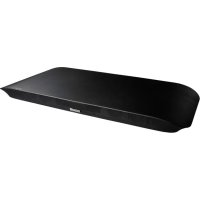
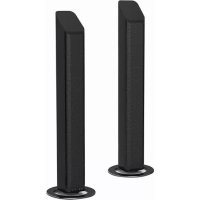
USER MANUAL MXSB252BT MAXELL
natural_image
Simple line drawing of a rectangular object with a label 'MAXI' on its side (no other text or symbols)
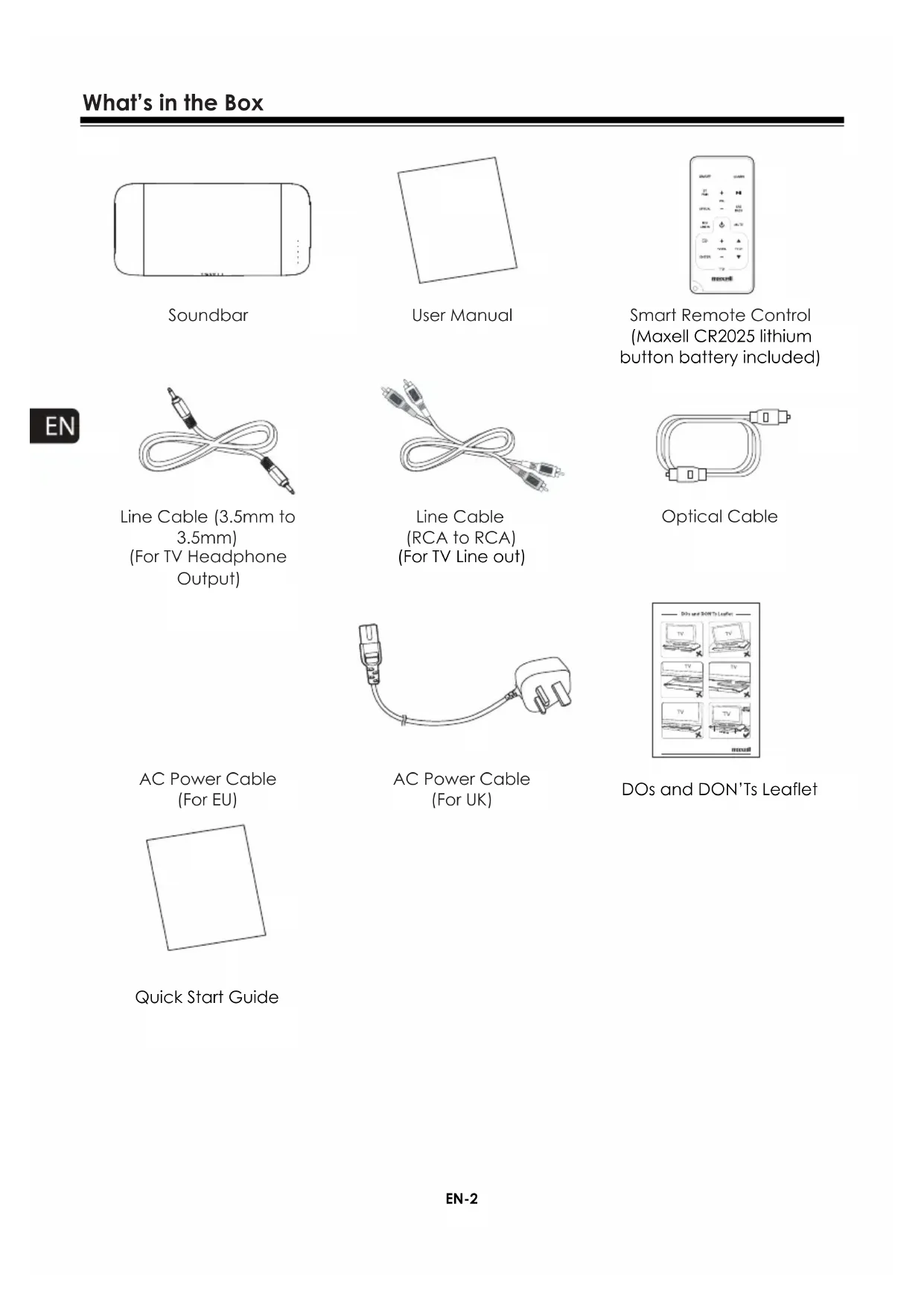
What's in the Box....2
Important Safety Instructions....3
Identifying the Parts ....6
Main Unit: Top View 6
Rear View 6
Smart Remote Control....6
Getting Started....7
Prepare the Smart Remote Control ....7
Precautions Concerning Batteries....7
Connections......8
Place TV on top....8
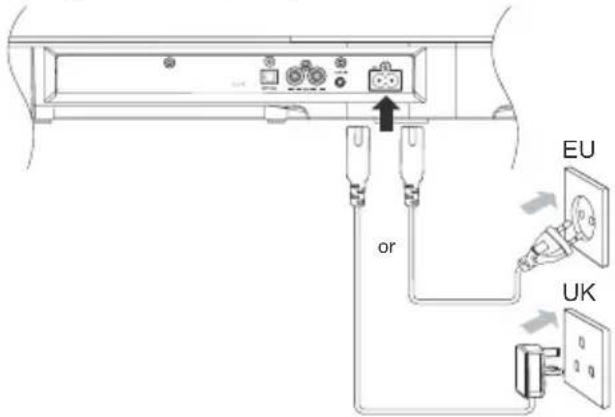
Connect to Power 8
Connect to TV 8
Connect to an External Audio Device 9
Connect to a Bluetooth Device....10
Basic Operations ....11
Turn On/Off....11
Select Sources....11
Adjust Volume Level....11
Mute Sound 12
Bass Boost....12
Select SRS Sound 12
Program Smart Remote Control to Control TV....12
Troubleshooting 13
Specifications....14

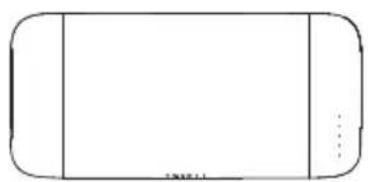
natural_image
Simple line drawing of a rounded rectangular shape with no text, numbers, or symbols
Soundbar

natural_image
Empty square outline with no text, numbers, or symbols
User Manual
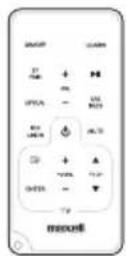
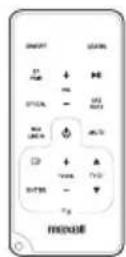
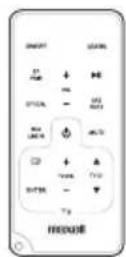
Smart Remote Control (Maxell CR2025 lithium button battery included)
natural_image
Line drawing of a USB cable with two connectors (no text or symbols)
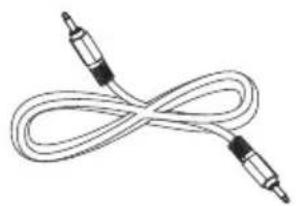
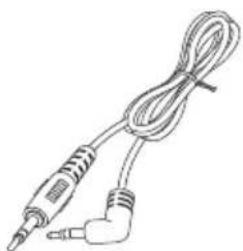
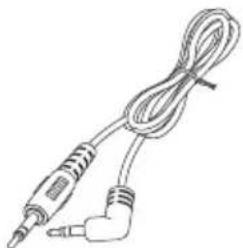
Line Cable (3.5mm to 3.5mm)
(For TV Headphone Output)
natural_image
Line drawing of a double-up cable with two connectors (no text or symbols)
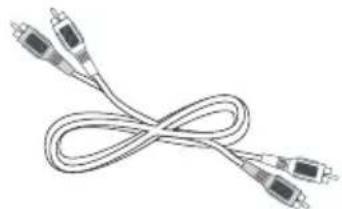
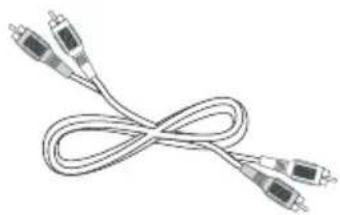
Line Cable
(RCA to RCA)
(For TV Line out)
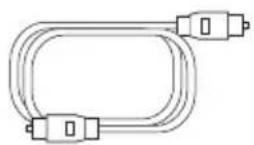
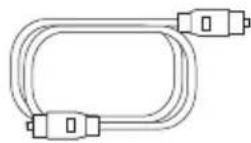
Optical Cable
natural_image
Line drawing of a cable with two connected components (no text or symbols)
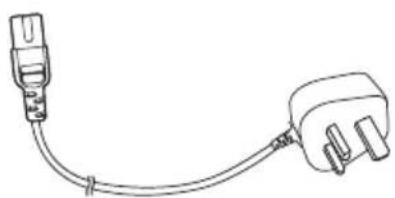
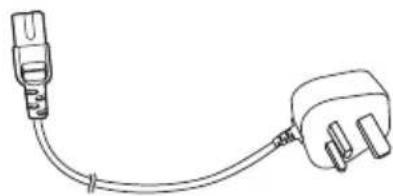
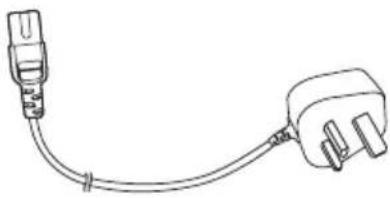
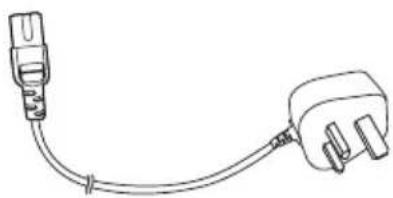
AC Power Cable (For UK)
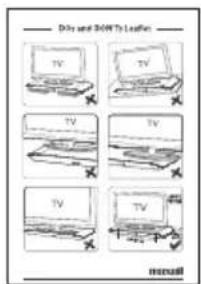
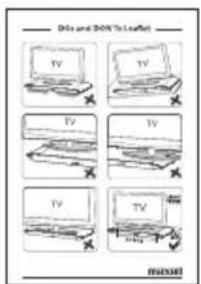
DOs and DON'Ts Leaflet
AC Power Cable (For EU)

natural_image
Simple geometric shape: a black square outline on white background (no text or symbols)
Quick Start Guide
WARNING
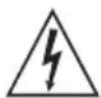
RISK OF ELECTRIC SHOCK
DO NOT OPEN
CAUTION: TO REDUCE THE RISK OF ELECTRIC SHOCK, DO NOT REMOVE COVER (OR BACK). NO USER-SERVICEABLE PARTS INSIDE. REFER SERVICING TO QUALIFIED SERVICE PERSONNEL.
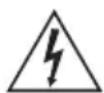
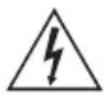
The lightning flash with arrowhead symbol, within an equilateral triangle, is intended to alert the user to the presence of uninsulated “dangerous voltage” within the product’s enclosure that may be of sufficient magnitude as to constitute a risk of electric shock to persons.

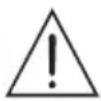
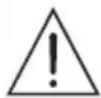
The exclamation point within an equilateral triangle is intended to alert the user to the presence of important operating and maintenance (servicing) instructions in the literature accompanying the apparatus.
Reading the user's manual
- The contents of this user's manual may be modified without any prior notification.
- The appearance and specifications may be partially modified without any prior notification.
- Maxell shall not be responsible for any injury caused by fire, earthquake or a third party, or any injury that occurs due to intentional or accidental mishandling or improper use by the customer.
- Maxell shall not be held responsible for any damages that may occur due to employment of a usage method not designated in this User Manual.
- Maxell shall not be held responsible for any damages that may occur due to malfunctioning of the Soundbar resulting from the use of the Soundbar together with other devices.
- This Soundbar is not intended for use in facilities or with equipment which may affect human lives, including medical equipment, nuclear devices, aerospace equipment and transport equipment, as well in facilities or with equipment which require a high degree of reliability.
- Maxell shall not be held responsible for any accident resulting in personal injury or death or any fire accident that may occur due to failure of this Soundbar when it is used in the control systems of the facilities and the equipment described above.
*1: Serious physical injury implies injuries such as loss of eyesight or injury, burns, electric shock, bone fracture or poisoning that have subsequent complications and which require hospitalisation or long term hospital visit for medical treatment.
*2: Physical injury implies injury, burns and electric shock which do not require hospitalization or long-term hospital visit for medical treatment.
 | This symbol shows that the user needs to exercise caution while handling this Product to prevent fire, explosion and heating. The specific caution to be taken is written inside the symbol. |
 | This symbol implies restriction of an action while handling this Product. The specific restriction is written inside or near the symbol. |
 | This symbol implies compulsion of an action based on the instructions. The specific compulsion is written inside or near the symbol. |
Warning
To reduce the risk of electric shock, do not expose this apparatus to moisture.
Warning
The battery must not be exposed to excessive heat such as direct sunlight, fire, etc.
Do not repair, modify or disassemble.
It may cause fire, electric shock or injury. Maxell shall not be responsible for any physical damage caused by repairing, modification or disassembly. Also, the cost of any repairing of a fault caused by repairing, modification or disassembly by the user will be charged to the user, even if it happens during the warranty period.

Keep the Remote Control out of reach of children. They may accidentally swallow the battery and cause choking or damage to the stomach. The cord may entangle around the child's body and cause suffocation. If any accident occurs by any chance, please consult a doctor immediately.

Do not use in a rainy or snowy place, near water, or in the bathroom. It may cause fire or electric shock.

Do not use if it is thundering.
It may cause fire or electric shock.

Do not keep a flower vase, flowerpot, cup, or any container containing medicine, cosmetics or water, near the Soundbar. They may break and get into the Sound Bar and cause fire or electric shock.

Do not insert any kind of metal or easily combustible object through the vents. It may cause fire or electric shock.

Do not block any ventilation openings. It may overheat and cause a fire. Install in accordance with the manufacturer's instructions.

Do not put more than 50kg on top of this Soundbar.
It may damage the Sound Bar.

Don't

Caution!
Do not install on an unstable surface.
The Sound Bar may fall and get damaged

Don't
Do not install in an area where steam or moisture may be present.
It may cause fire or accident.

Don't
Do not keep in a place which is directly hit by cold air, or a place which is extremely cold. Dew may develop and cause short circuit or burnout.

Don't
Do not listen at a high volume continuously for a long period of time. This causes ringing in the ears and may damage hearing.

Don't
Do not raise the volume excessively from the beginning.
Sudden high volume may damage hearing.
Minimize the volume before playing.

Don't
Do not keep in an excessively hot places. Such as radiators, heaters, stoves, or other apparatus (including amplifiers) that produce heat.

Don't
The surface of the device or parts may get damaged, and may also cause fire. Do not keep especially in a closed car in summer, in direct sunlight, or near a stove. This may cause leakage of battery fluid.

Don't
Do not use on sandy beaches and sandy soil where sand can easily enter, or in dusty locations. It may cause burnout, fire or accident.

Don't
Do not cover with a cloth or any type of cover. Heat may generate and deform the Soundbar or it may catch fire.

Don't
Do not position a cathode-ray tube TV set. Spots may appear on the TV because of it.

Caution!
Ensure to refer to the User's Manual to connect to an external device.
Connect to an external device after carefully reading this user's manual and the user's manual of the external device, as well as after turning off the power to all devices

Don't
Do not plug or unplug the power plug with wet hands.

Don't
It may cause electric shock.
Insert the power plug completely and firmly into the outlet socket.
If the power plug is not inserted properly, fire may occur due to electric shock or dust deposition.

Caution!
Turn off power if not going to be used for a long time, and remove the power plug.
Not adhering to this may cause electric shock Or physical damage.
Safety
1 Read these instructions.
2 Keep these instructions.
3 Heed all warnings.
4 Follow all instructions.
5 Only use this product indoors.
6 Clean only with a dry cloth.
7 Protect the power cord from being walked on or pinched.
8 Only use attachment/ accessories specified by the manufacturer.
9 Use only with a cart, stand, or table specified or approved for use by the TV Manufacturer. When a cart is used, use caution when moving the cart / Sound Bar combination to avoid injury from tip-over.

10 DO NOT ATTEMPT TO SERVICE THIS PRODUCT. Servicing is required when the Sound Bar has been damaged in any way, such as the power-supply cord or plug is damaged, liquid has been spilled on or objects have fallen into the Sound Bar, or the Sound Bar has been exposed to rain or moisture, does not operate normally, or has been dropped.
11 This is a CLASS II Sound Bar with no insulation and no protective earth grounding provided
12 The AC plug is used as the main disconnect device, therefore the AC plug must remain readily accessible at all times.
13 Please DO NOT allow children to push, pull, or climb on a television connected to this equipment as it may cause TV to tip over, possibly resulting in personal injury or death. For added safety and stability, be sure to secure the television using a suitable anti-tip device.
Main Unit: Top View
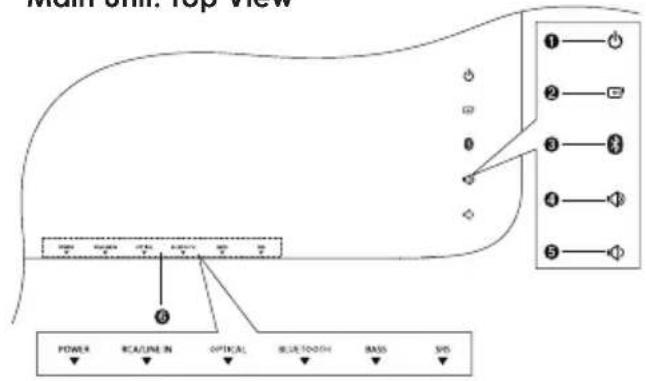
1 POWER
- Turn on this unit or switch to Power standby mode.
- Select a source.
3 BEUETOOTH/PAIR
- Select Bluetooth Pairing Mode and
- Pair the speaker while in PAIRING mode.
4 VOLUME CONTROL - UP
- Increase sound volume level.
5 VOLUME CONTROL - DOWN
- Decrease sound volume level.
6 Light indicators
Rear View
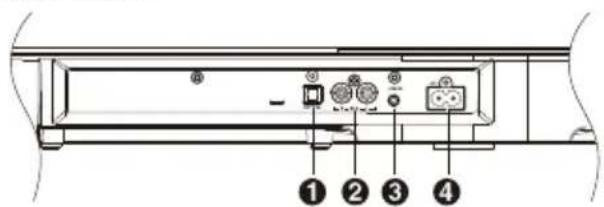
1 OPTICAL Terminal
- 1 Optical input jack.
2 RCA Terminals
- Standard RCA audio input jacks, Red / White
3 LINE IN Terminals
- Standard 3.5mm audio input jack
4 AC\~ Power Plug
- Connect the AC power cord
Remote Control
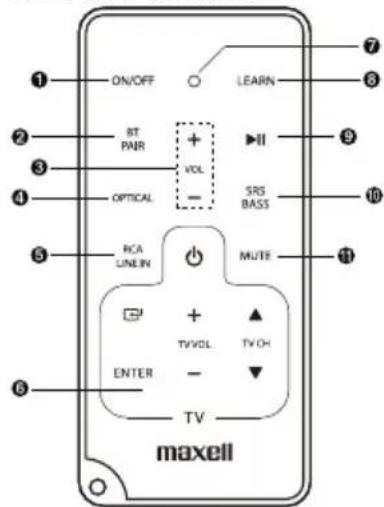
1 ON/OFF
- Turn on or turn off the unit.
2 BLUETOOTH / PAIR
- Select Bluetooth mode
- Pair unit when in Bluetooth mode
3 VOL +/- (Volume)
- Adjust sound volume level
4 Optical
- Select OPTICAL INPUT as the audio source.
5 RCA/LINE IN
- Select RCA or LINE IN Source input.
6 TV Learning Zone
- Store some TV Remote Control functions onto the Smart Remote Control.
(see P.12 for detail)
7 LEARNING INDICATION LIGHT.
- On: Learning mode activated
- Off: Learning mode inactivated (see P.12 for detail)
8 LEARN
- Activate learning mode to setup commands from the TV remote control, to control some TV functions.
9 PAUSE/PLAY
- Pause/resume playback in BT mode.
10 SRS / BASS
- Select Bass boost level OFF/1/2 or SRS WOW HD effect.
11 MUTE
- Mute or resume sound from the unit.
Prepare the Smart Remote Control
The Smart Remote Control provided allows the unit to be operated from a distance.
- Even if the Smart Remote Control is operated within the effective range(6m), remote control operation may be impossible if there are any obstacles between the unit and the remote control.
- If the Smart Remote Control is operated near other products which generate infrared rays, or if other remote control devices using infrared rays are used near the unit, it may operate incorrectly. Conversely, the other products may operate incorrectly.
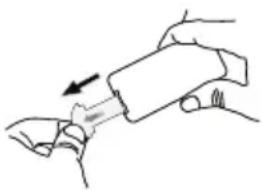
For First-time use:
The unit has a pre-installed lithium CR2025
battery. Remove the
protective tab to
activate the remote
control battery
natural_image
Illustration of a hand holding a cylindrical object with an arrow indicating motion (no text or symbols)
To Replace the Smart Remote Control Battery:
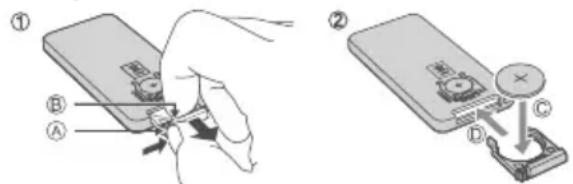
(A): Press down the tab on the left.
(B): Pull out the battery tray and remove the old battery.
(C): Place a new CR2025 battery into the battery tray with correct polarity (+/-) as indicated.
(D) : Insert the tray back into the slot.
Precautions Concerning Batteries
- When the Smart Remote Control is not to be used for a long time (more than a month), remove the battery from the Smart Remote Control to prevent it from leafing.
- If the batteries leak, wipe away the leakage inside the battery compartment and replace the batteries with new ones.
- Do not use any batteries other than those Specified.
- Do not heat or disassemble batteries. Never throw them in fire or water.
- Do not carry or store batteries with other metallic objects. Doing so could cause batteries to short circuit, leak or explode.
- Never recharge a battery unless it is confirmed to be a rechargeable type.
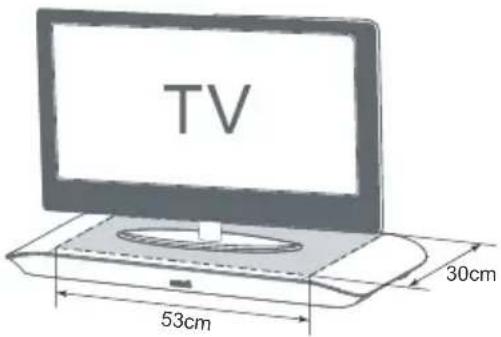
Place TV on top
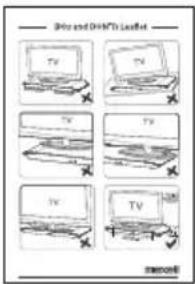
The Maxell MXSB-252BT Sound Bar is designed for use with TV's that do not exceed 50kg, and have a base no wider than 30cm and a depth no deeper than 53cm. The MXSB-252BT is suitable for most 42" TV's. However, DO NOT place a cathode ray tube (CRT) TV on this system. This system is not designed for use with this type of TV. Please read the provided Dos and DON'Ts Leaflet for proper installation position of the unit

Warning:
Please turn down the volume of the TV or other audio source before connecting.
Loud sound might be suddenly produced.
Connect to Power
Caution:
Risk of product damage!
- Ensure that the AC outlet voltage corresponds to the voltage printed on the back or the underside of the unit.
- Risk of electric shock! To unplug the AC power, always pull the plug from the socket. Never pull the cord.
- Ensure the correct power cord is used.
Connect the AC power cord to:
- the AC\~ socket on this unit.
- the wall socket.(British 3 pin plug to 3-hole socket or European 2 pin plug to 2-hole socket)
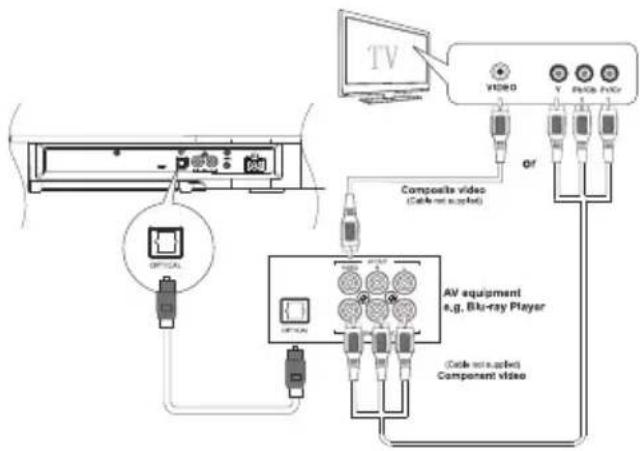
Connect using OPTICAL IN socket
a) Connect the Optical output of the source device to the input of the speaker. This connection is for the audio (or sound) only.
b) Connect the Video output of the AV equipment to the Video input of the TV via either:
1) Component connection (Green, Blue, Red) (cable not supplied); or
2) Composite connection (Yellow), (cable not supplied).
Using RCA IN socket
For audio devices that do not offer an Optical output, please follow the set up below.
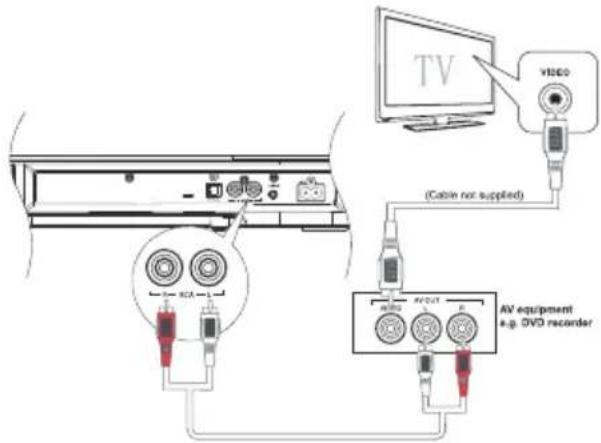
a) Connect Composite Video output of the AV equipment e.g. DVD recorder to Composite Video input on the TV.
b) Connect Audio L-R output of the AV equipment to the LINE IN or RCA input onto the unit.
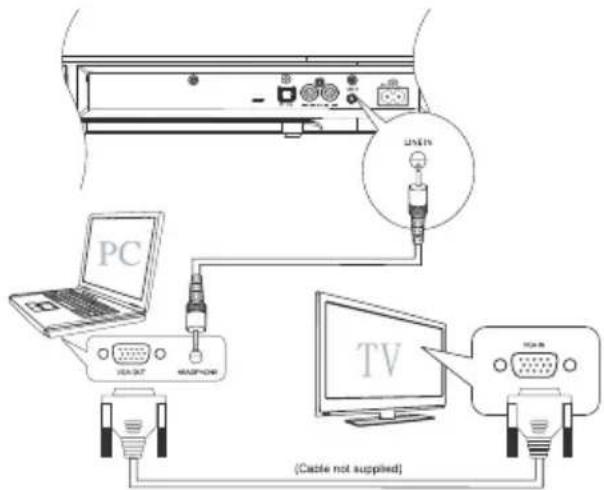
Using Line-IN socket
You can listen to the sound of the TV program by connecting to the Soundbar via LINE-IN cable.
Note:
You can also connect to your PC with LINE-IN cable in the setup shown below.
Connect to an External Audio Device
You can connect to your audio devices, e.g. CD player, to enjoy purely music, via the following connections.
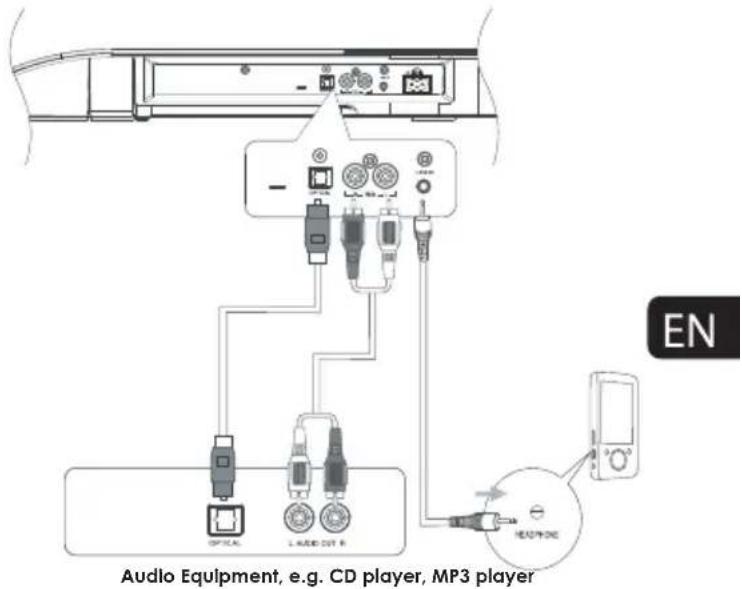
This unit features an auto-on/off function, (RCA/LINE-IN inputs only).
When there is no input (or sound) detected by the Soundbar for a couple of minutes the Soundbar automatically goes into standby mode. When the input has been restored, the Soundbar will automatically turn on after a few seconds.
Warning:
If the volume of the TV or an external device via RCA or LINE IN is too low, the auto-off function will be triggered. When this situation occurs for 2.5 minutes, LED source light will flash slowly on the unit for the next 30 seconds, after which the unit will switch to standby mode. Please turn up the volume of the input source (e.g. TV or MP3 player, etc. not the Soundbar) slowly, until it returns to normal mode.
To avoid the auto-off being triggered unintentionally, pre-set the source volume higher and adjust the Soundbar volume to a comfortable level.
Note:
You might hear the sound over-lapping from both the TV and the Soundbar while following some of the suggested connections. To avoid this, turn the volume of the TV down to 0 (zero) or mute it.
Connect to a Bluetooth Device
You can listen to music from a Bluetooth-enabled device via this player.
Pair the Bluetooth-enabled devices
The first time you connect your device to this player, you need to pair your device to this player.
Note:
- The operational range between this player and a Bluetooth device is approximately 8m (26 ft).
- Before you connect a Bluetooth device to this unit, familiarize yourself with the Bluetooth capabilities of the device.
- Compatibility with all Bluetooth devices is not guaranteed.
- Any obstacle between this unit and a Bluetooth device can reduce the operational range.
-
Keep this player away from any other electronic device that may cause interference.
-
Turn on the Bluetooth function on your device.
-
Press the "BT" button on the touch panel or remote control. The Bluetooth LED will begin to flash slowly. The Sound Bar is now in "search" mode.
-
Device name "MXSB-252BT" will appear on your device's pairing list.
-
Select "MXSB-252BT" from the list on your device.
-
Your device will automatically pair with Soundbar. If the pairing is successful, the Bluetooth LED on the Sound Bar will stay ON solid (for 5 seconds) and your device will show "connected" or "paired".
-
To disconnect the connection, turn off the Bluetooth function on your device or switch the Soundbar input to another source.
Tip to connect to a second device:
- If a connection already exists, press and hold "PAIR" button on the remote control or ⚙ on top of the speaker for 3 seconds. This will reactivate the pairing mode and the current connection will be interrupted. (Blue LED will flash rapidly on Sound Bar) A second device can now be paired with the Sound Bar (see pairing instructions).
- If there is no other Bluetooth device paired with this speaker in two minutes, the speaker will recover the previous connection.
- The speaker will also be disconnected when your device is moved beyond the operational range.
- If you want to reconnect your device to this speaker system, place it within the operational range.
- If the device is moved beyond the operational range, when it is brought back, please check to see that the device is still connected with the speaker.
- If they are connected, the Bluetooth LED will be ON (solid blue).
- If the connection is lost, Bluetooth LED will flash slowly (search mode). Follow the previous instructions to pair your device to the speaker system again.
Listen to music from Bluetooth device
- If the connected Bluetooth device supports the Advanced Audio Distribution Profile (A2DP), you can listen to the music stored on the device through the Soundbar.
- If the device also supports Audio Video Remote Control Profile(AVRCP) profile, you can use the speaker's remote control to play music stored on the device.
- Pair your device with the player.
- Start to play music via your device (if it supports A2DP)
- Use the supplied remote control to control playback (if it supports AVRCP)
- To pause/resume play, press the ▶button.
Turn On/Off
When an audio signal is applied to the RCA or LINE-IN inputs, the unit will turn on automatically after 5 seconds. Make sure the input audio sound is at an intermediate volume level to trigger the auto-on function.
Turning the System ON/OFF
Either,
1) Press the button on the unit; or
2) Press the ON/OFF button on the remote control.
Note:
When turning the system on, the system will continue in the mode it was last used in.
Note:
Be sure to unplug the power cord from the outlet when the system is not in use for an extended period of time.
POWER light indicator:
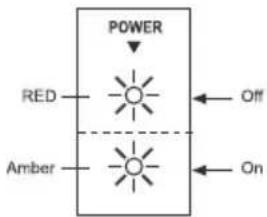
The unit will switch to standby mode when the audio cables are disconnected or when you turn off TV/external device after several minutes.
Select Sources Optical
Either:
1) Press Optical button on the remote control; or
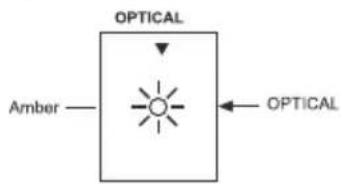
2) Button on the unit will allow you to select the Optical Input as the audio source.
OPTICAL light indicator:
RCA/LINE IN
Either:
1) Press RCA/LINE IN button on the remote control; or
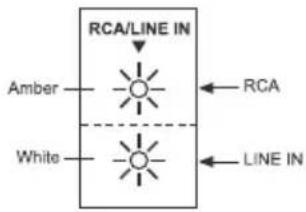
2) ☐ button on the unit will allow you to select RCA or LINE IN source.
RCA/LINE IN light indicator:
BLUETOOTH CONNECTION
1) Press BT button on the remote control or BT button on the touch panel
2) Blue LED flashes slow
3) Turn ON the BT function for the device to be paired with this unit.
4) Device name "MXSB-252BT" will appear on the device list.
5) Select "MXSB-252BT" from your device and begin the pairing process.
6) The Blue LED will stay ON when the pairing is successful.
BLUETOOTH light indicator:
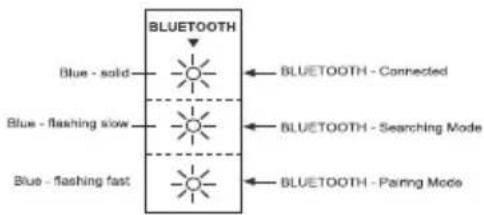
flowchart
graph TD
    A["BLUE-FLASHING"] --> B["BLUE - solid"]
    A --> C["BLUE - FLASHING slow"]
    A --> D["BLUE - FLASHING fast"]
    B --> E["BLUETOOTH"]
    C --> F["BLUETOOTH - Connected"]
    C --> G["BLUETOOTH - Searching Mode"]
    D --> H["BLUETOOTH - Pairing Mode"]
Adjust Volume Level
Either,
1) Press the VOL +/- button on the remote control; or
2) Press ✕ button on the unit,
to increase or decrease the volume level.
If the unit is connected to the TV headphone jack, you can control the Volume Level of the Soundbar using the TV remote control
Mute Sound
Press the MUTE button on the remote control to mute. Press this button again or VOL+/VOL- buttons on the remote control or on the unit to resume the sound. The light indicator on the unit will blink until sound resumes.
Bass Boost
Press the BASS button on the remote control to turn on the bass. Press this button again to switch to level 2 or to turn it off.
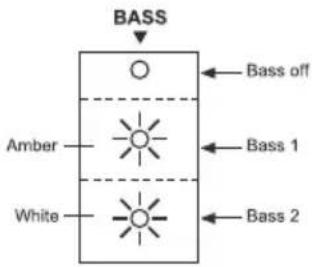
Select SRS Sound
Press and hold the SRS/BASS button on the remote control for 3 seconds to select SRS WOW HD effect.
Press and hold this button again for 3 seconds to cancel the effect.
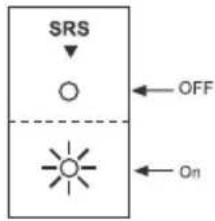
Program Smart Remote Control to Control TV
You can store a total of up to seven of your most frequently used TV functions in the TV learning zone of the Smart Remote Control. This feature enables you to use only one remote control to operate the unit together with your TV.
The remote control codes of a TV are stored in the Smart Remote Control. The available preset buttons are ON/OFF, FUNCTION, ENTER, TV VOL+/VOL-, TV CH+/CH-.
NOTE:
During the learning process, the normal remote control functions are disabled.
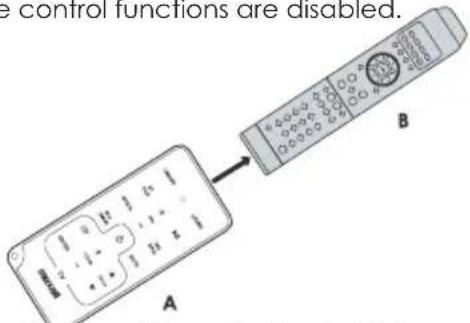
-
Place the Smart Remote Control (A) within a 1 to 2 inch distance from the TV remote control (B), pointer to pointer as shown above.
-
Press and hold the LEARN button for 2 seconds to activate the learning mode. A red indicator on the Smart Remote Control (A) will light up.
-
Press one of the TV learning zone buttons on the Smart Remote Control (A), the red indicator flashes
-
Press the button on the TV remote control (B) that is to be stored on the Smart Remote Control (A).
When the code is received successfully, the red indicator will flash quickly 3 times. If the code is not successfully received, the red indicator will keep on flashing
-
Repeat steps 3-4 to program more functions onto the Smart Remote Control(A).
-
Press the LEARN button to save the setting and to exit the learning mode. Red indicator will turn off immediately
To keep the warranty valid, never try to repair the system yourself. If you encounter problems when using this unit, check the following points before requesting assistance.
Warranty may be void if the case is opened.
| Symptom | Likely Cause | What to do |
| No sound | Speaker not connected to active AC power | ·Verify that speaker is connected and that the circuit is on. |
| Power not switched on | ·Switch on power and verify that power LED is on. |
| Suddenly No sound | Triggered auto-off function | ·Turn the volume up of the source, e.g TV, mp3 player, etc, and readjust the sound of the unit to trigger auto-on function.·See No Sound symptom above. |
| No sound, speaker is connected to working AC power but sound won't come on | Cannot trigger auto-on function | ·Increase the volume of the source input signal. |
| Speaker power cable is faulty or improperly connected | ·Re-attach the power cable at both ends.·Substitute a known-working power cable. |
| Improper connections | ·Double check the Input / Output cable connections. |
| No sound. Speaker comes on | Faulty cables and connections | ·Disconnect and re-attach signal cables.·Make sure cables are plugged completely.·Replace suspected cable with a known-good cable. |
| Noise or hiss heard at output | Faulty Cables and connections | ·Disconnect and re-attach signal cables.·Make sure cables are plugged completely.·Replace suspected cable with a known-good cable. |
| Noisy source device | ·Disconnect the devices that are connected to your speaker one at a time. If the noise goes away, the problem is with the source or the connecting cable. |
| Hum or Buzz that increases or decreases when more than one source are inputting signal to the Soundbar at the same time | Interference internally | ·Disconnect or mute the other channels to solve the problem. |
| Faulty cable between source equipment and unit | ·Substitute a known-good cable for the suspected faulty cable. |
| Smart Remote control does not work | No/Low battery power | ·Pull tab at the bottom of Smart Remote control.·Insert/Replace remote control battery with a CR2025 battery. (see P.7) |
| The Soundbar does not respond to the remote control | No/Low signal from remote control to the unit | ·Reduce the distance between the Smart Remote control and the unit.·Aim the Smart Remote control directly at the sensor on the front of the unit. |
| The unit responds but no sound | ·Before you press any function button,·See Troubleshooting [No Sound] Symptom. |
| The Soundbar does not power on automatically when an audio signal is applied. | The auto-on feature applies only to the RCA/LINE-IN inputs. If the OPTICAL input is being used the auto-on feature is not available. | ·Make sure either the RCA input or the LINE-IN input is being used.·Make sure the volume level of the source device is at a medium to high level. |
General
Power Requirements.... AC 220-240V\~50/60Hz
Output Power:
Front Speakers.... 10W x 4
Woofer ....30W
Total Harmonic Distortion 1%(1kHz, 1W)
Audio Input Sensitivity/Impedance LINE: 600mV/47kΩ
Frequency Response 40Hz - 20kHz
Unit Dimensions (W x H x D)....720 x 54 x 340 mm
NET Weight 3.4kg
Speaker
Front
Impedance....3 Ω
Rated Power 10W
Woofer
Impedance....6 Ω
Rated Power 30W
Remote
Distance 6 m
Angle 30°
Digital Sampling frequency 48kHz
Digital (optical) signal format....PCM
- Design and Specifications are subject to change without notice
natural_image
Simple line drawing of a rounded rectangle with vertical lines and a small dot on the right side (no text or symbols)
Barre de son

natural_image
Empty white square with a thin black border (no text or symbols)
natural_image
Line drawing of a straight cord with two metallic connectors (no text or symbols)
natural_image
Line drawing of a double-up cable with two connectors (no text or symbols)
natural_image
Line drawing of a power plug with cable, no text or symbols present
natural_image
Empty white square with a thin black border (no text or symbols)
1 Borne OPTIQUE
The unit has a pre-installed lithium CR2025 battery.
natural_image
Simple line drawing of a rounded rectangle with no text, numbers, or symbols
Soundleiste

natural_image
Empty white square with a thin black border (no text or symbols)
Benutzerhandbuch
natural_image
Line drawing of a cord with two connectors (no text or symbols)
natural_image
Line drawing of a double-up cable with two connectors (no text or symbols)
natural_image
Line drawing of an electrical outlet with a plug and cable (no text or symbols)
natural_image
Empty white square with a thin black border (no text or symbols)
1 OPTIK-Buchse
natural_image
Illustration of a hand holding a cylindrical object with an arrow indicating direction (no text or symbols)
natural_image
Simple line drawing of a rounded rectangle with no text, numbers, or symbols
Soundbar

natural_image
Empty white square with a thin black border (no text or symbols)
natural_image
Line drawing of a soldering iron with coiled cable and terminal connector (no text or symbols)
natural_image
Line drawing of a double-up cable with two connectors (no text or symbols)
natural_image
Line drawing of a plug and socket connected by a cable (no text or symbols)
natural_image
Empty white square with a thin black border (no text or symbols)
Guida rapida
ATTENZIONE
RISCHIO DI SHOCK ELETTRICO
NON APRIRE
ATTENZIONE: AL FINE DI RIDURRE I RISCHI DI SCOSSE ELETTRICHE, NON TOGLIERE IL COPERCHIO (NÉ IL PANNELLO POSTERIORE) L'UTILIZZATORE NON PUÒ RIPARARE NESSUN PEZZO. LE RIPARAZIONI VANNO AFFIDATE A PERSONALE QUALIFICATO.
1 POWER
1 Terminale OPTICAL
natural_image
Illustration of a hand holding a cylindrical object with an arrow indicating direction (no text or symbols)
natural_image
Simple line drawing of a rounded rectangular shape with no text, numbers, or symbols
Soundbar

natural_image
Empty white square with a thin black border (no text or symbols)
Használati utasítás
natural_image
Line drawing of a soldering iron with coiled cable and terminal connector (no text or symbols)
natural_image
Line drawing of a double-up Ethernet cable with two connectors (no text or symbols)
Kábel (RCA-RCA) (TV kimenethez)
Optikai kábel
natural_image
Line drawing of a power plug with cable, no text or symbols present
natural_image
Empty white square with a thin black border (no text or symbols)
natural_image
Illustration of a hand holding a tool with an arrow indicating direction (no text or symbols)
natural_image
Simple line drawing of a rounded rectangle with no text, numbers, or symbols
Barra de Sonido

natural_image
Empty white square with a thin black border (no text or symbols)
Manual del usuario
natural_image
Line drawing of a cable with two connectors (no text or symbols)
natural_image
Line drawing of a double-up cable with two connectors (no text or symbols)
natural_image
Line drawing of a power plug with terminal connector (no text or symbols)
natural_image
Empty white square with a thin black border (no text or symbols)
1 Terminal ÓPTICA
natural_image
Illustration of a hand holding a cylindrical object with an arrow indicating direction (no text or symbols)
natural_image
Simple line drawing of a rounded rectangle with vertical divisions and a small dot on the right side (no text or symbols)
MXSB-252BT Sound Bar

natural_image
Empty white square with a thin black border (no text or symbols)
Manual do usuário
natural_image
Line drawing of a soldering iron with coiled cable and terminal plug (no text or symbols)
natural_image
Line drawing of a double-up cable with two connectors (no text or symbols)
natural_image
Empty square outline with no text, numbers, or symbols
Quick Start Guide
natural_image
Line drawing of a cable with two connected components (no text or symbols)
1 POWER
1 Terminal ÓPTICO
- 1 entrada óptica.
2 Terminais RCA
Conectar usando o soquete OPTICAL IN
a) Conecte a saída de vídeo composto do equipamento de AV, por exemplo, gravador de DVD, à entrada de vídeo composto da TV.
b) Conecte a saída de áudio L-R do equipamento de AV à entrada LINE IN ou RCA da unidade.
Usar o soquete Line-IN
natural_image
Simple line drawing of a rounded rectangle with no text, numbers, or symbols
Soundbar

natural_image
Empty white square with a thin black border (no text or symbols)
Käyttöopas
natural_image
Line drawing of a soldering iron with coiled cable and terminal connector (no text or symbols)
natural_image
Line drawing of a double-up Ethernet cable with two connectors (no text or symbols)
natural_image
Line drawing of a cable and plug connection (no text or symbols)
natural_image
Empty white square with a thin black border (no text or symbols)
Pikaopas
VAROITUS
SÄHKÖISKURISKI
ÄLÄ AVAA

VAROITUS: SÄHKÖISKUVAARAN VÄLTTÄMISEKSI ÄLÄ POISTA KANTTA (EIKÄ TAKAPANEELIA), KÄYTTÄJÄ EI SAA KORJATA MITÄÄN OSISTA. KORJAUKSET ON ANNETTAVA AMMATTILAISTEN TEHTÄVÄKSI.
1 OPTICAL-liitin
natural_image
Illustration of a hand holding a cylindrical object with an arrow indicating direction (no text or symbols)
natural_image
Simple line drawing of a rounded rectangle with no text, numbers, or symbols
Soundbar

natural_image
Empty white square with a thin black border (no text or symbols)
Bruksanvisning
Intelligent fjärrkontroll (Maxell CR2025, inklusive litium knappcellsbatterier)
natural_image
Line drawing of a soldering iron with coiled cable and terminal connector (no text or symbols)
natural_image
Line drawing of a double-up cable with two connectors (no text or symbols)
natural_image
Line drawing of a power plug with terminal connector (no text or symbols)
natural_image
Empty white square with a thin black border (no text or symbols)
Snabbguide

WARNING
RISK FÖR ELSTÖTAR
ÖPPNA EJ

VARNING AVLÄGSNA INTE HÖLJET (ELLER DEN BAKRE PANELEN) FÖR ATT REDUCERA RISKERNA FÖR ELEKTRISKA STÖTAR. ANVÄNDAREN FÅR INTE REPARERA NÅGON DEL REPARATIONER SKALL ÖVERLÅTAS TILL KVALIFICERAD PERSONAL.
3 BETETOOTH-KOPPLING
natural_image
Illustration of a hand holding a device with an arrow indicating motion (no text or symbols)
Val av SRS ljud
Total harmonisk distorsion 1%(1 kHz, 45 W)
natural_image
Simple line drawing of a rounded rectangular shape with no text, numbers, or symbols
Soundbar

natural_image
Empty white square with a thin black border (no text or symbols)
Návod k obsluze
natural_image
Line drawing of a black-and-white electrical plug with coiled cable and terminal connectors (no text or symbols)
Kabel
(3,5 mm - 3,5 mm)
(pro výstup na sluchátka TV)
natural_image
Line drawing of a double-up cable with two connectors (no text or symbols)
Kabel
(RCA - RCA)
(pro výstup TV)
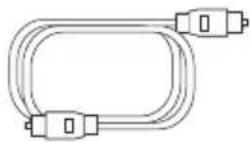
Optický kabel
natural_image
Line drawing of a cable with two connected components (no text or symbols)
Napájecí kabel CA
(pro VB)
natural_image
Empty white square with a thin black border (no text or symbols)
Stručný návod
VAROVÁNÍ
NEBEZPEČÍ ÚRAZU ELEKTRICKÝ
M PROUDEM NEOTEVÍRAT
POZOR: ZA ÚČELEM SNÍŽENÍ RIZIKA ÚRAZU ELEKTRICKÝM PROUDEM NESNÍMEJTE KRYT (ANI ZADNÍ PANEL), UŽIVATEL NENÍ OPRÁVNĚN K OPRAVĚ JAKÉKOLIV ČÁSTI. OPRAVY JE NUTNO SVĚŘIT KVALIFIKOVANÝM PRACOVNÍKŮM.
1 POWER
1 Optická přípojka
natural_image
Illustration of a hand holding a rectangular object with an arrow indicating direction (no text or symbols)
CZ
natural_image
Simple line drawing of a rounded rectangle with vertical divisions and a small dot at the bottom (no text or symbols)
Panel dźwiękowy

natural_image
Empty white square with a thin black border (no text or symbols)
Instrukcja obstugi
natural_image
Line drawing of a soldering iron with coiled cable and terminal connector (no text or symbols)
natural_image
Line drawing of a double-up Ethernet cable with two connectors (no text or symbols)
natural_image
Line drawing of a cable with two connected components (no text or symbols)
natural_image
Empty white square with a thin black border (no text or symbols)
1 POWER
1 Terminal OPTICAL
natural_image
Illustration of a hand holding a rectangular object with an arrow indicating motion (no text or symbols)
natural_image
Simple line drawing of a rounded rectangle with no text, numbers, or symbols
Soundbar

natural_image
Empty white square with a thin black border (no text or symbols)
Gebruikshandleiding
Intelligente
afstandsbediening
(Maxell CR2025, lithium
knoopcelbatterij
inbegrepen)
natural_image
Line drawing of a soldering iron with coiled cable and terminal connector (no text or symbols)
natural_image
Line drawing of a double-up cable with two connectors (no text or symbols)
natural_image
Line drawing of a power plug with a cable, no text or symbols present
Wisselstroom
voedingskabel
(voor EU)
Wisselstroom
voedingskabel
(voor VK)
natural_image
Empty white square with a thin black border (no text or symbols)
1 VERMOGEN
natural_image
Illustration of a hand holding a wrist with a finger pointing to the wrist area (no text or symbols)
Aansluiting via de ingang OPTICAL IN
NL