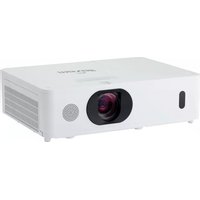
MP-EW5002 - Video projector MAXELL - Free user manual and instructions
Find the device manual for free MP-EW5002 MAXELL in PDF.


Pick your language and provide your email: we'll send you a specifically translated version.
| Product Type | Video Projector |
| Brand | Maxell |
| Model | MP-EW5002 |
| Display Technology | LCD |
| Native Resolution | WXGA (1280 x 800) |
| Brightness | 5000 Lumens |
| Contrast Ratio | 5000:1 |
| Lamp Life (Normal Mode) | 3000 Hours |
| Lamp Life (Eco Mode) | 5000 Hours |
| Keystone Correction | Manual Vertical (±30°) |
| Zoom | Manual (1.2x) |
| Focus | Manual |
| Built-in Speaker | Mono, 10W |
| Input Ports | HDMI x2, VGA, USB, Composite, Audio In |
| Output Ports | Audio Out, VGA |
| Power Consumption | 350W (Max) |
| Dimensions (W x D x H) | 380 x 280 x 120 mm |
| Weight | 4.5 kg |
| Cleaning | Use a soft cloth, avoid solvents. Clean air filter every 500 hours. |
| Safety | Place on stable surface; allow proper ventilation; do not look into lens. |
| Spare Parts | Replacement lamp (model: MAXELL ML-EW5002L), air filter |
| Reparability | Lamp and filter user-replaceable. For other issues, contact Maxell support. |
Frequently Asked Questions - MP-EW5002 MAXELL
How do I clean the air filter on my Maxell MP-EW5002?
Turn off the projector and unplug it. Locate the filter cover on the side. Remove the filter and gently vacuum or wash it with mild soap and water. Let it dry completely before reinstalling. Clean every 500 hours of use.
How do I replace the lamp on the MP-EW5002?
Disconnect power and let the lamp cool. Open the lamp door on the bottom. Loosen the screws securing the lamp module, lift it out, and insert the new lamp (model MAXELL ML-EW5002L). Tighten screws and close the door. Reset the lamp timer in the menu.
How can I connect my laptop to the projector?
Use an HDMI or VGA cable to connect from your laptop to the projector. Select the corresponding input source (HDMI1, HDMI2, or VGA) using the remote or projector panel. If using VGA, you may also need an audio cable.
How do I adjust the focus or zoom on the projector?
Use the focus ring located on the lens to sharpen the image. Use the zoom ring to adjust image size. Turn clockwise or counterclockwise until desired clarity and size are achieved.
How do I set up the screen size and keystone correction?
Place the projector at the desired distance from the screen. Use the manual zoom to adjust size. Then press the keystone buttons on the remote or projector to adjust vertical keystone (±30°) until the image is rectangular.
What should I do if the projector shows no image?
Check that the power cable is plugged in and the power light is on. Verify the input source is correctly selected. Ensure the connected device is outputting a signal and the cable is secure. If the lamp indicator is red, the lamp may need replacement.
How do I use the remote control?
Insert two AAA batteries with correct polarity. Point the remote at the front or rear IR receiver. Use buttons for power, source selection, menu navigation, volume, and keystone. Replace batteries if range decreases.
What is the recommended maintenance schedule for this projector?
Clean the air filter every 500 hours. Replace the lamp after 3000 hours in normal mode or 5000 hours in eco mode. Periodically inspect cables and vents for dust buildup. Schedule a professional cleaning every 2 years.
Can I play 4K content on the MP-EW5002?
The projector has a native WXGA (1280x800) resolution. It can accept 4K signals (up to 3840x2160) via HDMI but will downscale them to its native resolution for display. The image will be clear but not true 4K.
What does the overheating warning mean and how to fix it?
The projector will shut down if internal temperature exceeds safe limits. This is often due to blocked vents or a dirty filter. Turn off the projector, unplug it, and clean the air filter and ensure at least 20 inches clearance around the unit. Restart after cooling.
User questions about MP-EW5002 MAXELL
0 question about this device. Answer the ones you know or ask your own.
Ask a new question about this device
No questions yet. Be the first to ask one.
Download the instructions for your Video projector in PDF format for free! Find your manual MP-EW5002 - MAXELL and take your electronic device back in hand. On this page are published all the documents necessary for the use of your device. MP-EW5002 by MAXELL.
USER MANUAL MP-EW5002 MAXELL


Manual assistant
Powered by Anthropic
Waiting for your message
Product information
Brand : MAXELL
Model : MP-EW5002
Category : Video projector