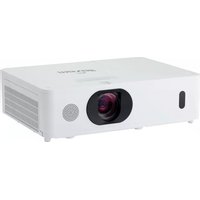
MC-WU8701B - Video projector MAXELL - Free user manual and instructions
Find the device manual for free MC-WU8701B MAXELL in PDF.


Pick your language and provide your email: we'll send you a specifically translated version.
| Product Type | Video Projector |
| Brand | Maxell |
| Model | MC-WU8701B |
| Display Technology | DLP |
| Resolution | WUXGA (1920 x 1200) |
| Brightness | 8700 lumens |
| Contrast Ratio | 3000:1 |
| Light Source | Laser (rated 20,000 hours) |
| Lens | Motorized zoom and focus |
| Dimensions (W x D x H) | 500 x 400 x 200 mm |
| Weight | 15 kg |
| Power Consumption | 800 W (typical) |
| Inputs | HDMI, VGA, USB, LAN, RS-232 |
| Features | Edge blending, geometric correction, scheduled maintenance |
| Maintenance | Filter cleaning every 500 hours; laser module considered maintenance-free |
| Safety | Overheat protection, laser safety Class 1 |
| Spare Parts | Laser light source module, air filters, remote control |
| General Information | User manual available for free download on notice-facile.com |
Frequently Asked Questions - MC-WU8701B MAXELL
What is the resolution of the Maxell MC-WU8701B?
The Maxell MC-WU8701B projector features a native WUXGA resolution of 1920 x 1200 pixels, providing crisp and detailed images suitable for professional presentations and large venues.
How do I replace the lamp?
This projector uses a laser light source, which does not require lamp replacement. The laser module is rated for approximately 20,000 hours of use and should be serviced by a qualified technician if it fails.
Can I connect my laptop via HDMI?
Yes, the MC-WU8701B is equipped with multiple HDMI inputs. Simply connect your laptop using a standard HDMI cable, and select the corresponding input source from the projector menu.
What is the recommended projection distance for a 100-inch screen?
The projection distance depends on the lens model. For the standard motorized lens, a 100-inch diagonal image typically requires a distance of approximately 3 to 5 meters. Check the lens throw ratio specification for exact numbers.
How do I clean the air filter?
The air filter should be cleaned every 500 hours of use. Turn off and unplug the projector, open the filter cover, remove the filter, and gently clean it with a vacuum cleaner or wash it with mild soap and water. Allow it to dry completely before reinstalling.
Is this projector suitable for outdoor use?
The MC-WU8701B is designed for indoor use in professional environments. Outdoor use may be possible under a sheltered area, but it is not weatherproof. Avoid exposure to rain, dust, and extreme temperatures.
How often should I replace the laser light source?
The laser light source is rated for 20,000 hours of typical operation. Under normal usage, this can last many years. When it eventually dims, contact a service center for replacement, as it requires professional installation.
Does it support 3D projection?
Yes, the projector supports 3D projection via HDMI, using frame sequential or side-by-side formats. You will need compatible 3D glasses and a 3D source device.
How do I perform geometric correction?
Geometric correction (keystone and corner adjustment) can be accessed through the on-screen menu. Navigate to Settings > Installation > Geometry Correction and use the remote control or buttons to adjust the image shape.
Where can I find the latest firmware updates?
Firmware updates are available on the official Maxell support website. You can download the update file to a USB drive and install it via the projector's system menu under 'Firmware Update'.
User questions about MC-WU8701B MAXELL
0 question about this device. Answer the ones you know or ask your own.
Ask a new question about this device
No questions yet. Be the first to ask one.
Download the instructions for your Video projector in PDF format for free! Find your manual MC-WU8701B - MAXELL and take your electronic device back in hand. On this page are published all the documents necessary for the use of your device. MC-WU8701B by MAXELL.
USER MANUAL MC-WU8701B MAXELL


Manual assistant
Powered by Anthropic
Waiting for your message
Product information
Brand : MAXELL
Model : MC-WU8701B
Category : Video projector