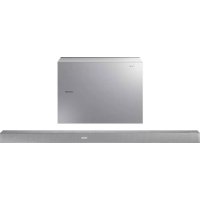
HWK651 - Loudspeaker SAMSUNG - Free user manual and instructions
Find the device manual for free HWK651 SAMSUNG in PDF.



| Product Type | Soundbar with wireless subwoofer |
| Brand | Samsung |
| Model | HWK651 |
| Main unit dimensions | 1010.5 x 54.0 x 87.5 mm (W x H x D) |
| Main unit weight | 2.6 kg |
| Subwoofer dimensions | 452.0 x 335.0 x 154.0 mm |
| Subwoofer weight | 6.8 kg |
| Total output power | 340 W (30 W x 6 + 160 W subwoofer) |
| Power supply | 24 V DC power adapter, AC power cord |
| Standby power consumption | ≤ 2.8 W (all network ports enabled) |
| Audio inputs | 1 x digital optical (DIGITAL AUDIO IN), 1 x analog (AUX IN), 1 x HDMI IN, 1 x HDMI OUT (TV-ARC) |
| Wireless connectivity | Bluetooth 2.1 + EDR, Wi-Fi (via Samsung Multiroom app), TV SoundConnect |
| Sound modes | STANDARD, MUSIC, CLEAR VOICE, SPORTS, MOVIE, NIGHT |
| Special features | 2.1 channel surround sound, dynamic range control (DRC), bass/treble/subwoofer level adjustment, Audio Sync, Anynet+, Auto Power Link, Bluetooth Power On, Network Standby On |
| Compatible apps | Samsung Multiroom (iOS and Android) |
| Wall mounting | Possible (mounting bracket included, screws not supplied) |
| Included accessories | Remote control with CR2032 battery, 2 power cords, AC/DC adapter, optical cable, wall mounting guide, 2 mounting screws, 2 wall brackets |
| Maintenance and cleaning | Clean with a soft dry cloth. Do not use chemicals. Unplug before cleaning. |
| Safety | Do not expose to moisture or heat. Keep batteries out of reach of children. Unplug during lightning storms. |
| Repairability | No user-serviceable parts. Contact qualified after-sales service. |
Frequently Asked Questions - HWK651 SAMSUNG
User questions about HWK651 SAMSUNG
0 question about this device. Answer the ones you know or ask your own.
Ask a new question about this device
Download the instructions for your Loudspeaker in PDF format for free! Find your manual HWK651 - SAMSUNG and take your electronic device back in hand. On this page are published all the documents necessary for the use of your device. HWK651 by SAMSUNG.
USER MANUAL HWK651 SAMSUNG
Thank you for purchasing this Samsung product. To receive more complete service, please register your product at www.samsung.com/register
SAFETY INFORMATION
Safety WarningS
TO REDUCE THE RISK OF ELECTRIC SHOCK, DO NOT REMOVE THE COVER (OR BACK).
NO USER-SERVICEABLE PARTS ARE INSIDE. REFER SERVICING TO QUALIFIED SERVICE PERSONNEL.
| CaUtiOnriSK Of eLeCtriC SHOCK.DO nOt OPen. | This symbol indicates that high voltage is present inside. It is dangerous to make any kind of contact with any internal part of this product. | |||
| This symbol indicates that important literature concerning operation and maintenance has been included with this product. |
 | Class II product : This symbol indicates that it does not require a safety connection to electrical earth (ground). |
 | AC voltage : This symbol indicates that the rated voltage marked with the symbol is AC voltage. |
 | DC voltage : This symbol indicates that the rated voltage marked with the symbol is DC voltage. |
 | Caution, Consult instructions for use : This symbol instructs the user to consult the user manual for further safety related information. |
Warning : To reduce the risk of fire or electric shock, do not expose this appliance to rain or moisture.
CaUtiOn : TO PREVENT ELECTRIC SHOCK, MATCH WIDE BLADE OF PLUG TO WIDE SLOT, FULLY INSERT.
- This apparatus shall always be connected to a AC outlet with a protective grounding connection.
- To disconnect the apparatus from the mains, the plug must be pulled out from the mains socket, therefore the mains plug shall be readily operable.
CaUtiOn
- Do not expose this apparatus to dripping or splashing. Do not put objects filled with liquids, such as vases on the apparatus.
- To turn this apparatus off completely, you must pull the power plug out of the wall socket. Consequently, the power plug must be easily and readily accessible at all times.
PreCaUtiOnS
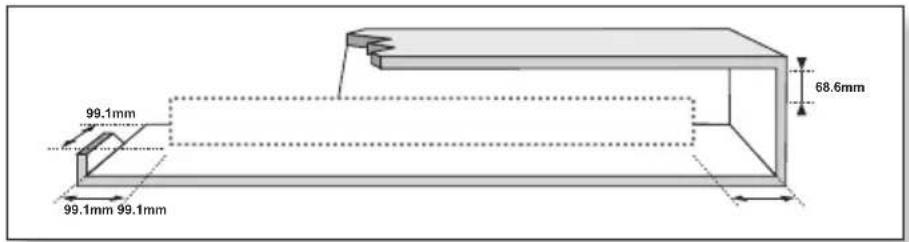
Ensure that the AC power supply in your house complies with the power requirements listed on the identification sticker located on the back of your product. Install your product horizontally, on a suitable base (furniture), with enough space around it for ventilation (7\~10 cm). Make sure the ventilation slots are not covered. Do not place the unit on amplifiers or other equipment which may become hot. This unit is designed for continuous use. To fully turn off the unit, disconnect the AC plug from the wall outlet. Unplug the unit if you intend to leave it unused for a long period of time.
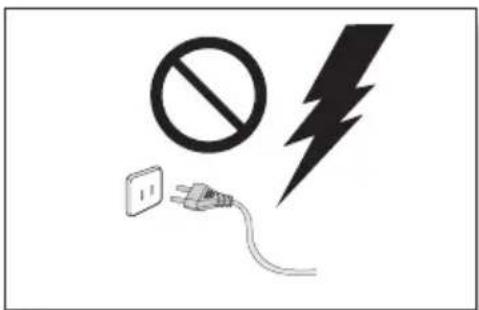
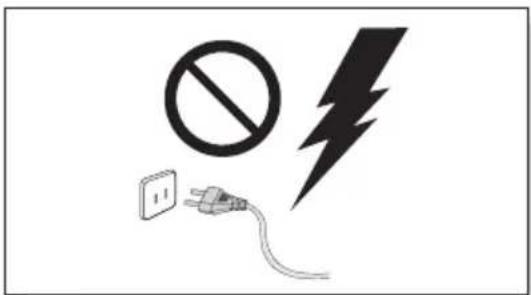
During thunderstorms, disconnect the AC plug from the wall outlet. Voltage peaks due to lightning could damage the unit.
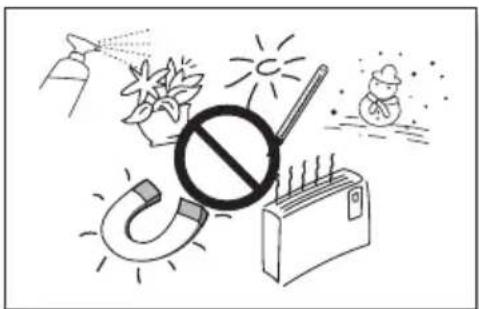
natural_image
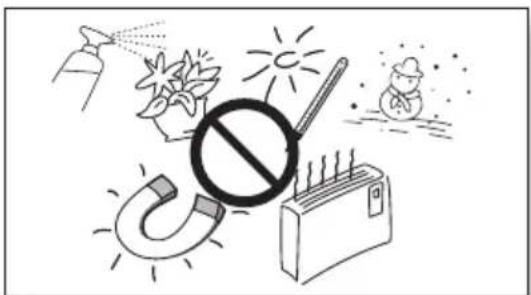
Illustration of a prohibition sign over a globe, sun, and household items (no text or symbols)Protect the product from moisture (i.e. vases), and excess heat (e.g. a fireplace) or equipment creating strong magnetic or electric fields. Disconnect the power cable from the AC supply if the unit malfunctions. Your product is not intended for industrial use. It is for personal use only. Condensation may occur if your product has been stored in cold temperatures. If transporting the unit during the winter, wait approximately 2 hours until the unit has reached room temperature before using.
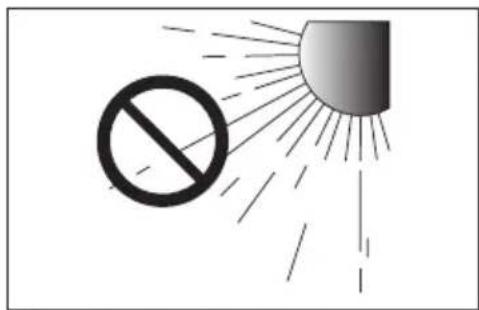
Do not expose the unit to direct sunlight or other heat sources. This could lead to overheating and cause the unit to malfunction.
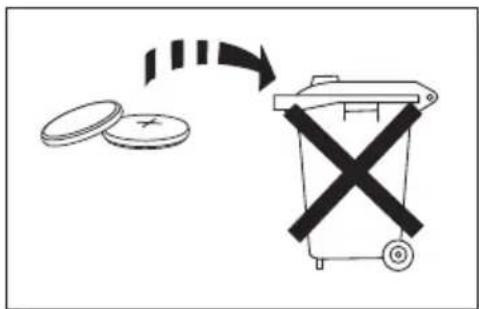
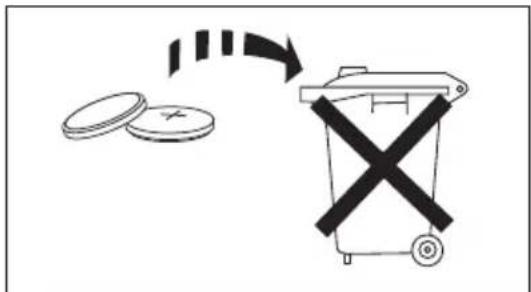
The batteries used with this product contain chemicals that are harmful to the environment. Do not dispose of batteries in the general household trash. Do not dispose of batteries in a fire. Do not short circuit, disassemble, or overheat the batteries. There is a danger of explosion if the battery is incorrectly replaced. Replace only with the same or equivalent type.

WARNING: DO NOT INGEST BATTERY. CHEMICAL BURN HAZARD. The remote control supplied with this product contains a coin/button cell battery. If the coin/button cell battery is swallowed, it can cause severe internal burns in just 2 hours and can lead to death. Keep new and used batteries away from children. If the battery compartment does not close securely, stop using the product and keep it
away from children. If you think batteries might have been swallowed or placed inside any part of the body, seek immediate medical attention.
CONTENTS
2 GETTING STARTED
2 Safety Information
5 What's Included
6 DESCRIPTIONS
6 Front / Right Side Panel
7 Rear / Bottom Panel
8 Remote Control
11 INSTALLATION
11 Installing the Soundbar
11 Installing the Wall Mount
15 Detaching the Soundbar from the Wall
16 CONNECTIONS
16 Connecting the Subwoofer
18 Connecting to a TV
18 Connecting to a TV Using a Digital Optical Cable
19 Connecting to a TV Using an HDMI (Digital) Cable
19 TV SoundConnect
21 Connecting to External Devices
21 Optical or Analogue Audio Cable
22 HDMI Cable
23 FUNCTIONS
23 Input Mode
24 Bluetooth
27 Using the Multiroom App
29 Using the Network Standby On Function
30 Software Update
32 TROUBLESHOOTING
32 Troubleshooting
33 APPENDIX
33 Specifications
- Figures and illustrations in this User Manual are provided for reference only and may differ from actual product appearance.
- An administration fee may be charged if either
(a) an engineer is called out at your request and there is no defect with the product (i.e. where the user manual has not been read).
(b) you bring the unit to a repair centre and there is no defect with the product (i.e. where the user manual has not been read). - You will be informed of the administration fee amount before a technician visits.
WHAT'S INCLUDED
BEFORE READING THE USER'S MANUAL
Note the following terms before reading the user manual.
▶Icons used in this manual
| Icon Term Definition | ||
 | Caution | Indicates a situation where a function does not operate or settings may be cancelled. |
 | Note | Indicates tips or instructions on the page that help you operate a function. |
Check for the supplied accessories shown below.
Remote Control / Lithium Battery (3V : CR2032)
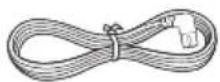
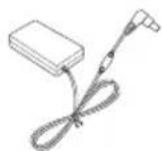
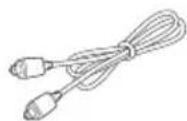
Power Cord : 2 EA AC/DC Adapter Optical Cable



Wall Mount Guide Holder-Screw : 2 EA Screw : 2 EA
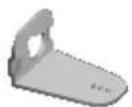
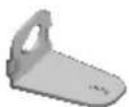
Bracket-Wall Mount L Bracket-Wall Mount R

- The appearance of the accessories may differ slightly from the illustrations above.
- Micro USB to USB adapter and HDMI cables are sold separately. To purchase, contact a Samsung Service Centre or Samsung Customer Care.
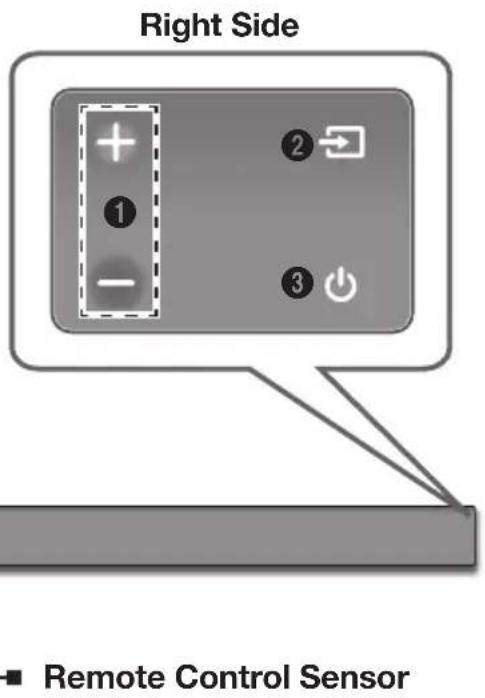
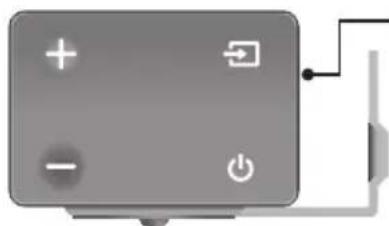
Controls the volume level.
The numeric value of the volume level appears in the front panel display.
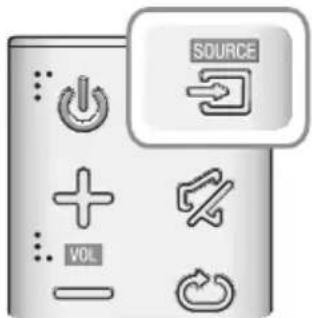
② (Source) Button
Selects the D.IN, AUX, HDMI, BT, or TV input.
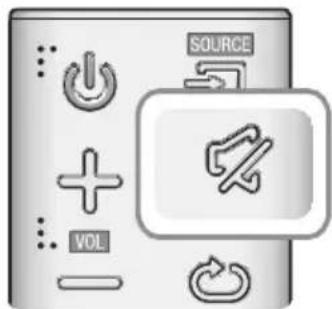
- While the unit is powered on, pressing the button for more than 3 seconds sets the button to act as the (Mute) button. To cancel the (Mute) button setup, press the button for more than 3 seconds again.
③ (Power) Button
Turns the power on and off.
Displays the current mode.

- When you plug in the AC cord, the power button will begin working in 4 to 6 seconds.
- When you turn on this unit, there will be a 4 to 5 second delay before it produces sound.
- If you want to enjoy sound only from the Soundbar, you must turn off the TV's speakers in the Audio Setup menu of your TV. Refer to the owner's manual supplied with your TV.
REAR / BOTTOM PANEL
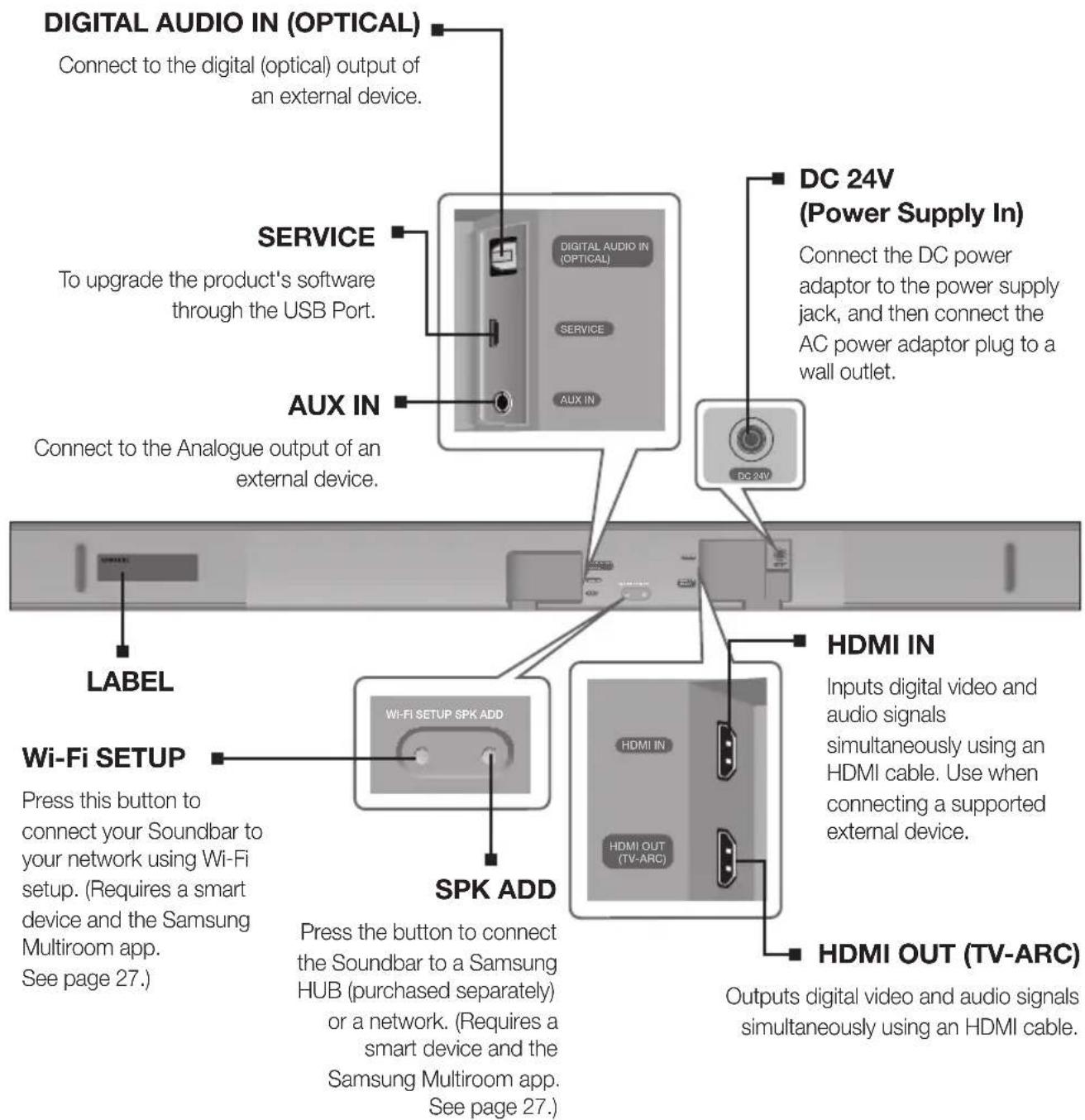

- When disconnecting the power cable of the AC power adaptor from a wall outlet, pull the plug. Do not pull the cable.
- Do not connect this unit or other components to an AC outlet until all connections between components are complete.
- Make sure to rest the AC/DC Adapter flat on a table or the floor. If you place the AC/DC Adapter so that it is hanging with the AC cord input facing upwards, water or other foreign substances could enter the Adapter and cause the Adapter to malfunction.
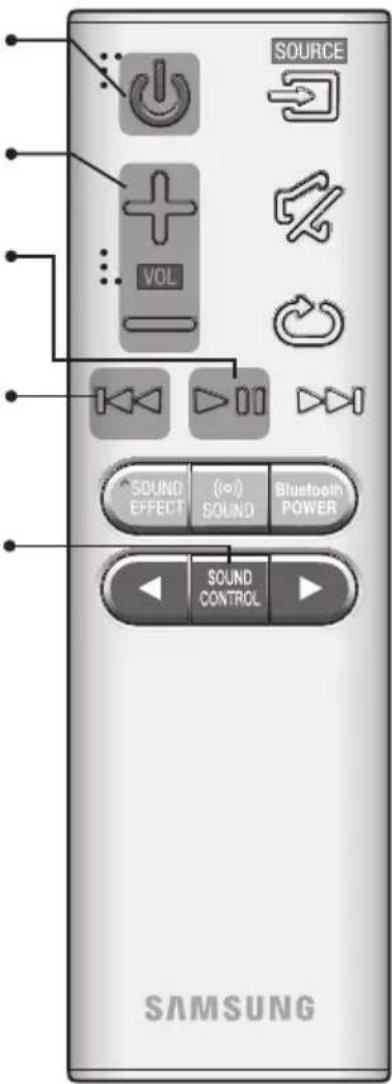
REMOTE CONTROL
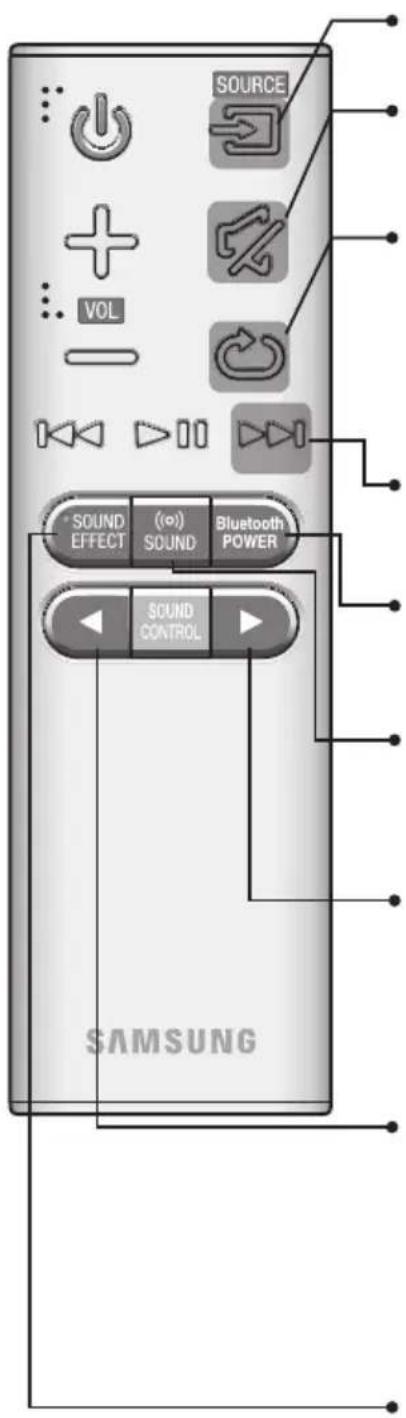
SOURCE
Press to select a source connected to the Soundbar.
Mute
You can turn the volume down to 0 with the push of a button. Press again to restore the sound to the previous volume level.
Repeat
The Repeat function is available only when playing back music from Songs on phone or DMS of Samsung Multiroom app.
OFF - REPEAT : Cancels Repeat Playback.
TRACK - REPEAT : Plays a track repeatedly.
ALL - REPEAT : Plays all tracks repeatedly.
Skip Forward
If there is more than one file on the device you are playing, and you press the ▶ button, the next file is selected.
Bluetooth POWER
Press the Bluetooth POWER button on the remote to turn the Bluetooth POWER On function on and off. See pages 20 and 25 for details.
((o)) SOUND
Surround Sound adds depth and spaciousness to the sound. Pressing the ((o)) SOUND button repeatedly cycles through the Surround Sound settings : ON - SURROUND SOUND, OFF - SURROUND SOUND
Press and hold the ▶ button for about 5 seconds to turn the Anynet+ function on or off.
OFF - ANYNET+, ON - ANYNET+
The Anynet+ function lets you control the Soundbar with the remote from an Anynet+ compatible Samsung TV. The Soundbar must be connected to the TV via an HDMI cable.
Press and hold the ◀ button for about 5 seconds to turn the Auto Power Link function on or off.
OFF - POWER LINK, ON - POWER LINK
* Auto Power Link Synchronizes the Soundbar to a connected Optical source via the Optical jack so it turns on automatically when you turn on your TV. (See page 18) Auto Power Link function is only available in the D.IN mode.
SOUND EFFECT
You can select from 6 sound modes - STANDARD (Original Sound), MUSIC, CLEAR VOICE, SPORTS, MOVIE, and NIGHT - depending on the content you want to listen to.
Select the STANDARD mode if you want to enjoy the original sound.
\* DRC (Dynamic Range Control)
Lets you apply dynamic range control to Dolby Digital. Press and hold the SOUND EFFECT button for about 5 seconds in STANDBY mode to turn the DRC (Dynamic Range Control) function on or off.
Power
Turns the Soundbar on and off.
Volume
Adjusts the volume level of the unit.
Play / Pause
Press the ▶II button to pause a file temporarily. Press the ▶II button again to play the selected file.
Skip Back
If there is more than one file on the device you are playing, and you press the ◀◀ button, the previous file is selected.
SOUND CONTROL
Press to select TREBLE, BASS, SUBWOOFER LEVEL or AUDIO SYNC.
Then, use the ◀, ▶ buttons to adjust the TREBLE or BASS volume from -3 \~ +3, SUBWOOFER LEVEL volume from -12, -6 \~ +6. Press and hold the SOUND CONTROL button for about 5 seconds to adjust the sound for each frequency band. 150Hz, 300Hz, 600Hz, 1.2KHz, 2.5KHz, 5KHz, and 10KHz are selectable and each can be adjusted to a setting between -6 \~ +6.
If the Soundbar is connected to a digital TV and the video appears out of sync with the audio, press the SOUND CONTROL button to sync the audio with the video. Use the ◀, ▶ buttons to set the audio delay between 0 ms \~ 300 ms. In TV mode, and BT mode, the Audio Sync function may not available.

- Operate the TV using the TV's remote control.
▶Controlling the Soundbar using Your TV Remote Control
- Press and hold the ((o)) SOUND button for more than 5 seconds while the Soundbar is turned on.
- "ON - TV REMOTE" appears on the Soundbar's display.
- In the TV's menu, set the TV speaker to external speaker.

- Not available if the TV ARC function or HDMI mode is in use.
- All buttons are not available except the VOL +/- and the ✗ buttons in this function.
- TV menus differ by manufacturer and model. Refer to the TV's user manual for further information.
• Manufacturers supporting this function:
- VIZIO, LG, Sony, Sharp, PHILIPS, PANASONIC, TOSHIBA, GRUNDIG, Hisense, RCA
- This function may not be compatible with your TV's remote depending on the remote control's manufacturer.
- To turn off this function, press the) SOUND button for 5 seconds.
"OFF - TV REMOTE" appears on the Soundbar's display.
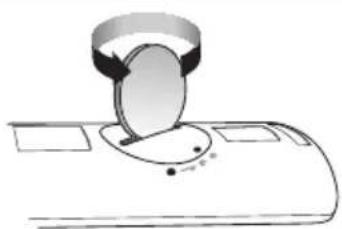
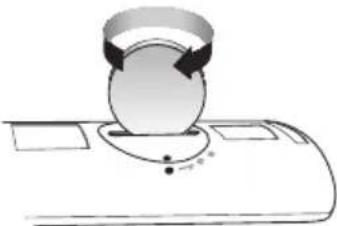
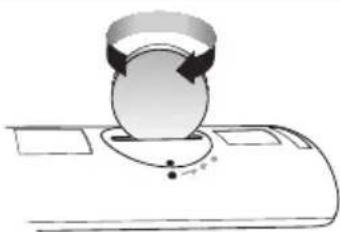
INSTALLING THE BATTERY IN THE REMOTE CONTROL
natural_image
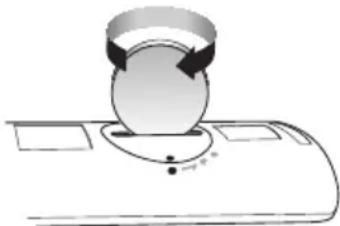
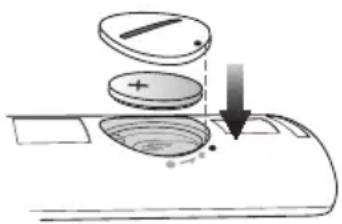
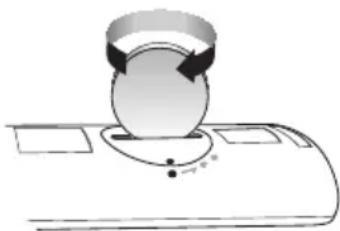
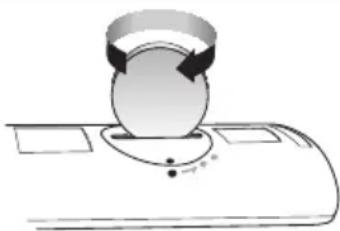
Diagram of a mechanical device with a circular component inserted into a slot (no text or symbols)- Use a suitable coin to turn the remote control's battery cover counterclockwise to remove it as shown in the figure above.
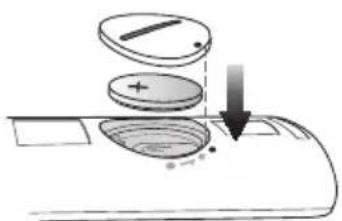
- Insert a 3V lithium battery. Keep the positive (+) pole facing up when inserting the battery. Put the battery cover on and align the '•' marks side by side as shown in the figure above.
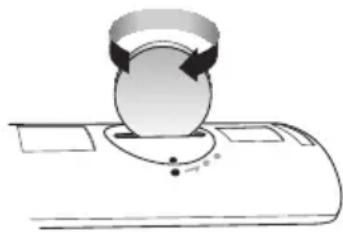
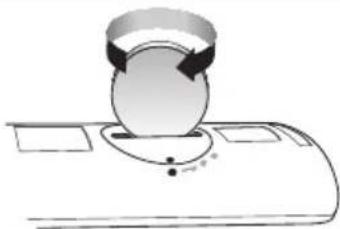
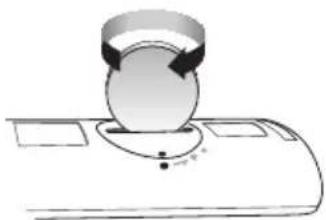
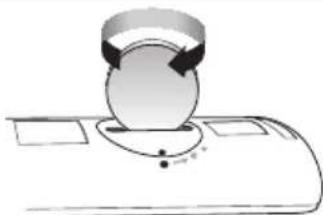
natural_image
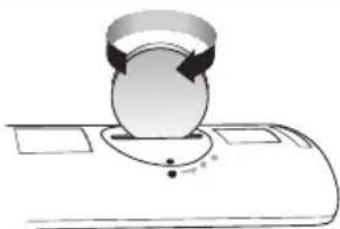
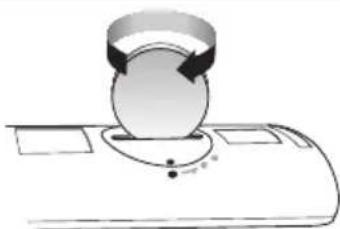
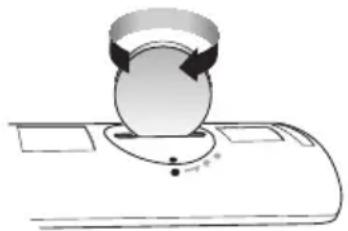
Diagram of a mechanical device with a circular component and directional arrows, no text or symbols present.- Use a suitable coin to turn the remote control battery cover clockwise as far as it will go to fix it in place.
INSTALLING THE SOUNDBAR
INSTALLING THE WALL MOUNT
▶ Installation Precautions
• Install on a vertical wall only.
- For the installation, avoid a location with high temperature or humidity, or a wall that cannot sustain the weight of the set.
- Check the strength of the wall. If the wall is not strong enough to support the unit, reinforce the wall or install the unit on a different wall that can support the unit's weight.
- Purchase and use the fixing screws or anchors appropriate for the kind of wall you have (plaster board, iron board, wood, etc.). If possible, fix the support screws into wall studs.
● Purchase wall mounting screws according to the type and thickness of the wall you will mount the Soundbar on.
-Diameter: M5
-Length: 35 mm or longer recommended.
- Connect cables from the unit to external devices before you install it on the wall.
- Make sure the unit is turned off and unplugged before you install it. Otherwise, it may cause an electric shock.
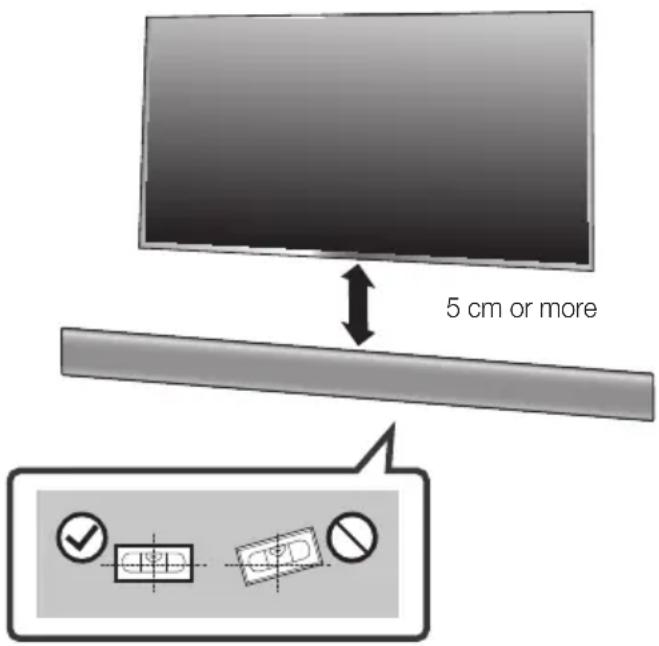
- Place the Wall Mount Guide against the wall surface.
• The Wall Mount Guide must be level.
- If the TV is mounted on the wall, install the Soundbar at least 5 cm below the TV.
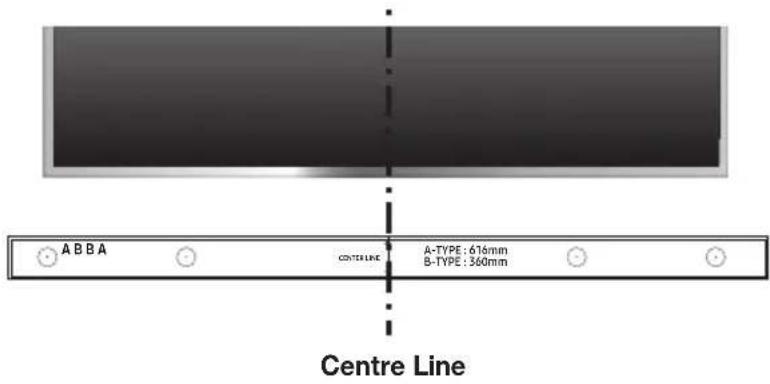
- Align the Paper Template's Centre Line with the centre of your TV (if you are mounting the Soundbar below your TV), and then fix the Wall Mount Guide to the wall using tape.

- If you are not mounting below a TV, place the Centre Line in the centre of the installation area.
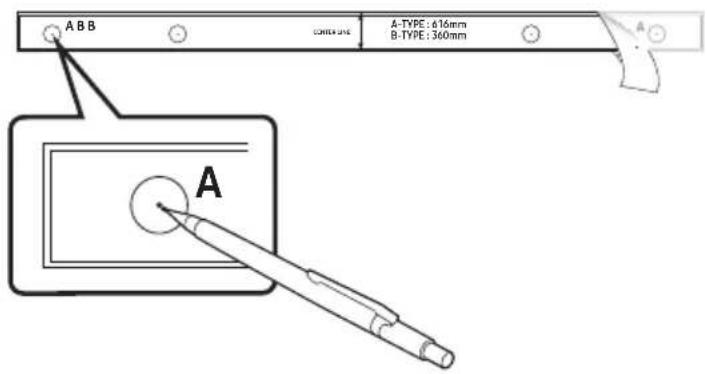
-
Push a pen tip or sharpened pencil tip through the centre of the A-TYPE images on each end of the Guide to mark the holes for the supporting screws, and then remove the Wall Mount Guide.
-
Using an appropriately sized drill bit, drill a hole in the wall at each marking.

- If the markings do not correspond to the positions of studs, make sure you insert appropriate anchors or mollies into the holes before you insert the support screws. If you use anchors or mollies, make sure the holes you drill are large enough for the anchors or mollies you use.
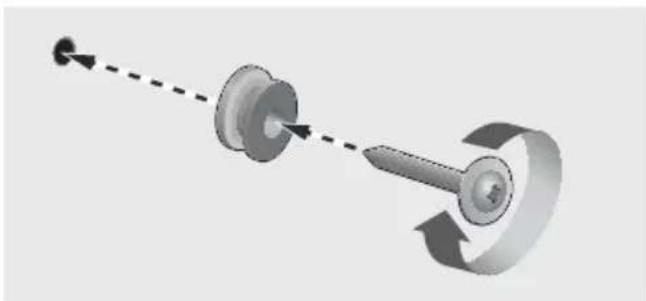
natural_image
Diagram of a mechanical component with a lever and curved arrow indicating motion (no text or symbols)ENG
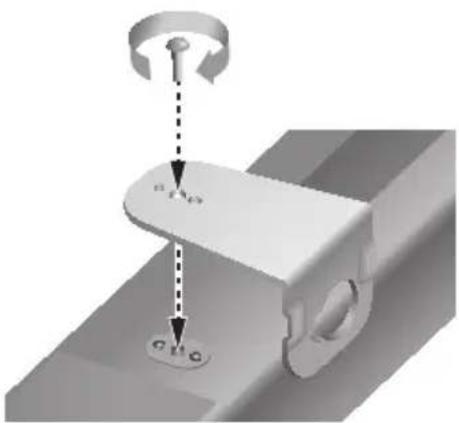
- Push a screw (not supplied) through each Holder-Screw, and then screw each screw firmly into a support screw hole.
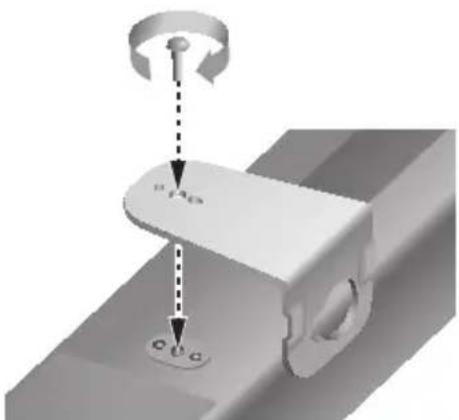
- Use the two Screws (M4 x L12) to attach both Bracket-Wall Mount L and R to the Soundbar's bottom. For a proper fit, make sure to align the bumps on the Soundbar to the holes on the brackets.

natural_image
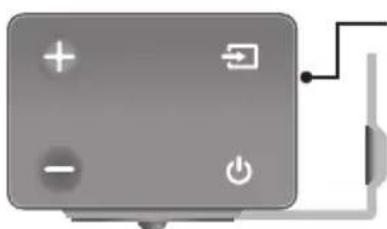
Gray rectangular device with control buttons and a power button, connected to a vertical line (no text or symbols visible)Rear side of Soundbar
Right end of Soundbar
- When assembling, make sure the hanger part of Bracket-Wall Mounts faces backwards.

natural_image
Pure electrical circuit lines without any symbolsWall Mount LWall Mount R
- The left and right mounts are different shapes. Make sure to position them correctly.
flowchart
graph TD
    A["Component 1: Linear assembly with dashed lines indicating alignment"] --> B["Component 2: Reformed assembly with arrows indicating movement"]
    B --> C["Assembly of two parts: one with a camera icon, the other with a mouse icon"]
    C --> D["Final assembly with circular icons for each part"]
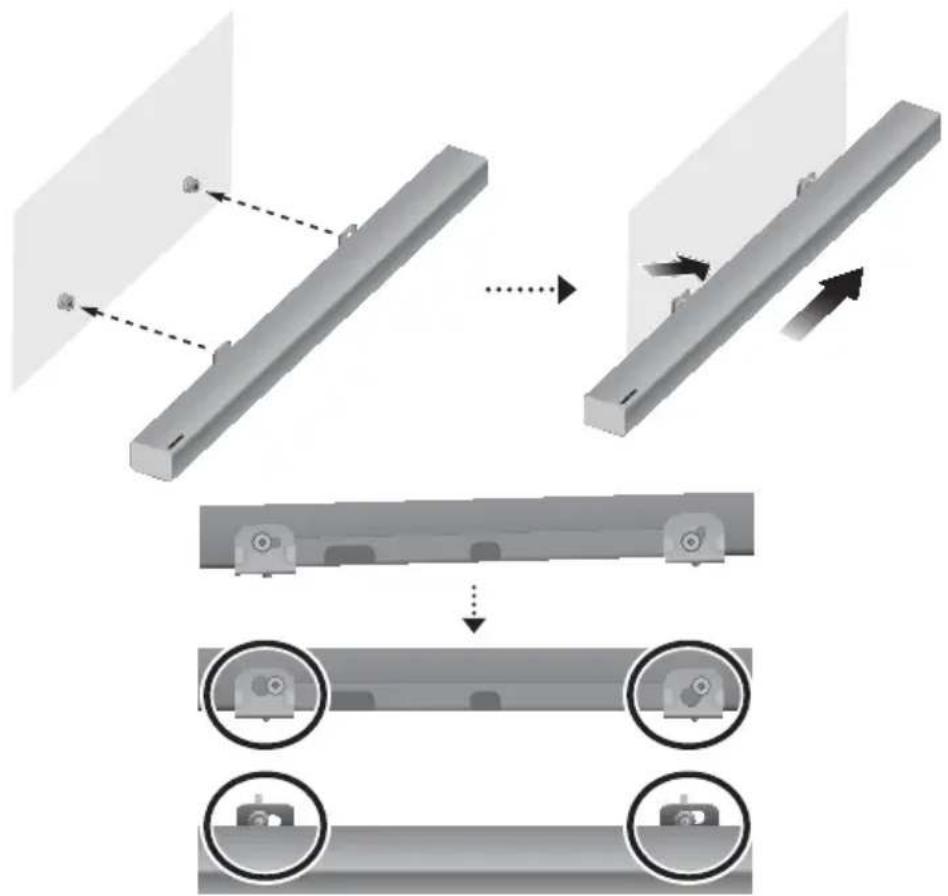
- Install the Soundbar with the attached Bracket-Wall Mounts by hanging the Bracket-Wall Mounts on the Holder-Screws on the wall.

- Slightly tilt the Soundbar to insert both Holder-Screw heads into Bracket-Wall Mount holes. Push the Soundbar in the direction of the arrow to make sure both sides are firmly fixed.
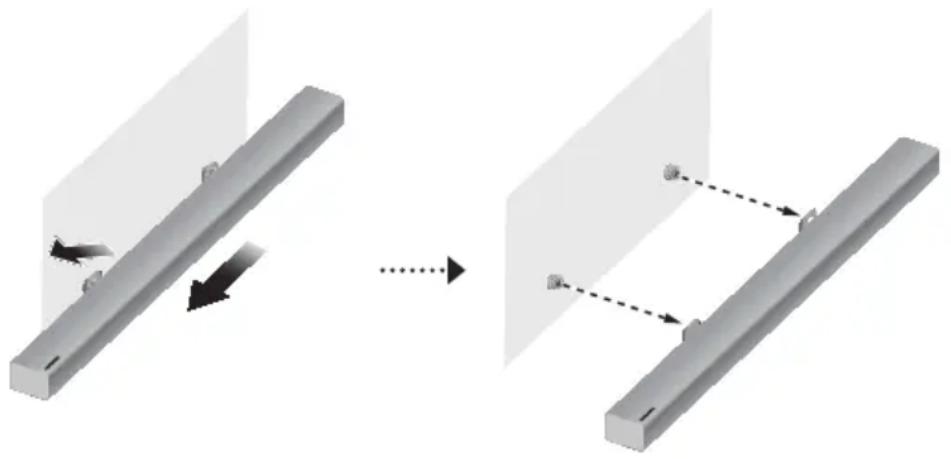
DetaCHing tHe SOUnDBar frOM tHe WaLL
- To separate the Soundbar from the wall mount, push it in the direction of the arrow, and then pull it away from the wall as shown.
natural_image
Diagram showing a mechanical assembly before and after transformation, with no visible text or symbols
- Do not hang onto the installed unit and avoid striking or dropping the unit.
- Secure the unit firmly to the wall so that it does not fall off. If the unit falls off, it may cause an injury or damage the product.
- When the unit is installed on a wall, please make sure that children do not pull any of the connecting cables, as this may cause it to fall.
- For the optimal performance of a wall mount installation, install the speaker system at least 5 cm below the TV, if the TV is mounted on the wall.
- For your safety, if you do not mount the unit on the wall, install it on a secure, flat surface where it is unlikely to fall.

- Do not connect the power cord of this product or your TV to a wall outlet until all connections between components are complete.
- Before moving or installing this product, be sure to turn off the power and disconnect the power cord.
CONNECTING THE SUBWOOFER
COnneCting tO tHe SUBWOOfer aUtOMatiCaLLy
The Subwoofer's linking ID is preset at the factory and the main unit and subwoofer should link (connect wirelessly) automatically when the main unit and subwoofer are turned on.
- When the subwoofer is completely connected, the blue LED Link Indicator on the subwoofer stops blinking and glows continuously.
COnneCting tO tHe SUBWOOfer ManUaLLy
If the blue LED light does not stop blinking when the main unit and subwoofer are turned on, please set the ID by following the steps below.

- Important: Before you begin, put the battery into the remote. See page 10 for instructions.
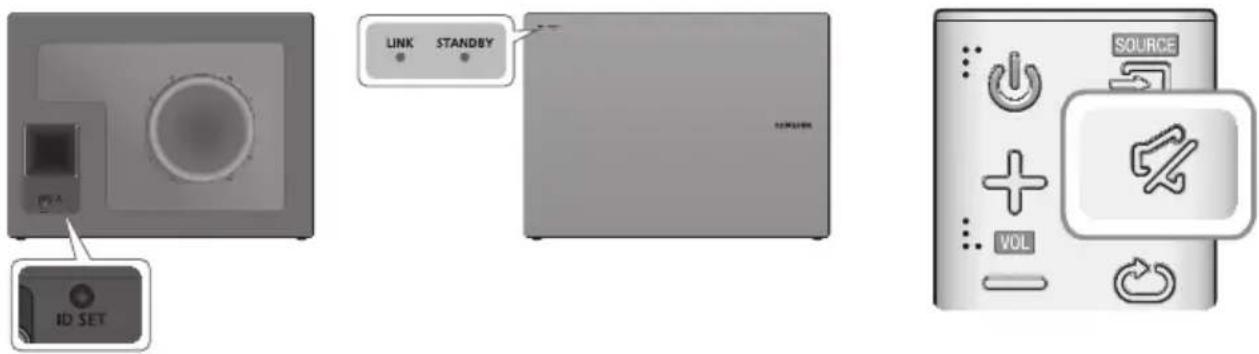
- Plug the power cords of the main unit and subwoofer into an AC wall outlet.
- Press the iD Set button on the back of the subwoofer with a small, pointed object for 5 seconds.
- The STANDBY indicator turns off and the LINK indicator (Blue LED) blinks quickly.
- While the main unit is powered off (in STANDBY mode), press and hold the ⚫ (Mute) on the remote control for 5 seconds.
- The iD Set message appears on the Soundbar's display.
- To finalise the link, turn the main unit's power on while the subwoofer's Blue LED blinks.
• The main unit and the subwoofer should now be linked (connected).
- The LINK indicator (Blue LED) on the subwoofer should be glowing continuously and not blinking.
- If the LINK indicator is not solid blue, the linking process has failed. Turn off the main unit and start again from Step 2.
• You can enjoy better sound from the wireless subwoofer by selecting a Sound Effect. (See page 8)

- Before moving or installing the product, be sure to turn off the power and disconnect the power cord.
- If the main unit is powered off, the wireless subwoofer will in standby mode and the STANDBY LED on the front will blink Red directly. (no blue LED).
- If you use a device that uses the same frequency (2.4GHz) as the Soundbar near the Soundbar, interference may cause some sound interruption.
- The maximum transmission distance of the wireless signal between the main unit and subwoofer is about 10 meters, but may vary depending on your operating environment. If a steel-concrete or metallic wall is between the main unit and the wireless subwoofer, the system may not operate at all, because the wireless signal cannot penetrate metal.
- If the main unit doesn't make a wireless connection, follow steps 1-5 on the previous page to re-set the connection between the main unit and wireless subwoofer.

- The wireless receiving antenna is built into the wireless subwoofer. Keep the unit away from water and moisture.
- For optimal listening performance, make sure that the area around the wireless subwoofer location is clear of any obstructions.
LED INDICATOR LAMP STATUS ON SUBWOOFER
| LED Status | Description Resolution | ||
| Red On | Standby (with the Soundbar main unit turned off) | Check the power supply to the Soundbar main unit | |
| Connection failed | Connect again (refer to the instructions on manual connection in the user manual) | ||
| Blue | On | Successfully connected (normal operation) | - |
| Blinking | Standby (with the Soundbar main unit turned off) | Check the power supply to the Soundbar main unit | |
| Connection failed | Connect again (refer to the instructions on manual connection in the user manual) | ||
| Red and blue Blinking Malfunction | Contact the service center. | ||
CONNECTING TO A TV

- Important: Before you begin, put the battery into the remote. See page 10 for instructions.
CONNECTING TO A TV USING A DIGITAL OPTICAL CABLE
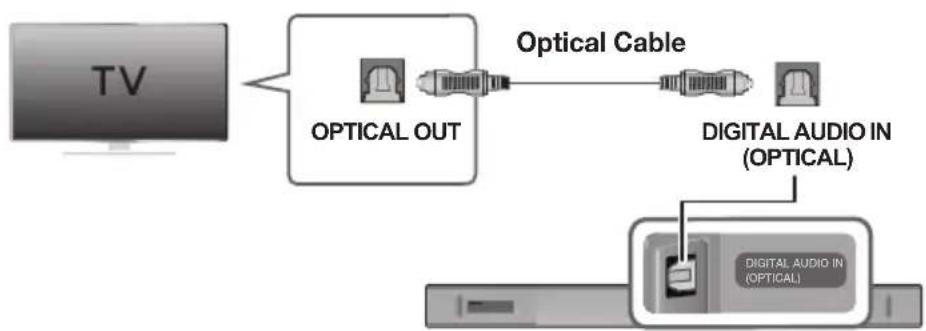
flowchart
graph LR
    TV["TV"] --> OpticalCable["Optical Cable"]
    OpticalCable --> OpticalOUT["OPTICAL OUT"]
    OpticalCable --> DigitalAudioIn["Digital Audio In (OPTICAL)"]
    DigitalAudioIn --> DigitalAudioInIn["Digital Audio In (OPTICAL)"]
- Connect the DIGITAL AUDIO IN (OPTICAL) jack on the Soundbar to the OPTICAL OUT jack of the TV with a digital optical cable.
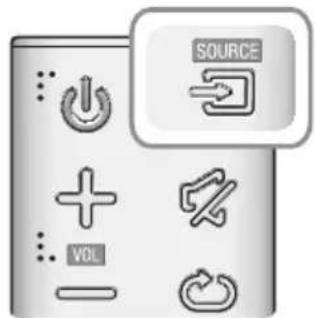
- Press the → button on the right side of the Soundbar or the SOURCE button on the remote control to select the D.IN mode.
▶ Auto Power Link
If you have connected the main unit to a TV with a digital optical cable, you can set the Auto Power function ON to have the Soundbar turn on automatically when you turn the TV on.
- Connect the Soundbar and a TV with a digital optical cable.
- Press the ➕ button on the main unit's right side or the SOURCE button on the remote control to select the D.IN mode.
- Press the ◀ button on the remote control for 5 seconds to turn Auto Power Link on or off.

• Auto Power Link is set to ON by default.
- Depending on the connected device, Auto Power Link may not function.
CONNECTING TO A TV USING AN HDMI (DIGITAL) CABLE
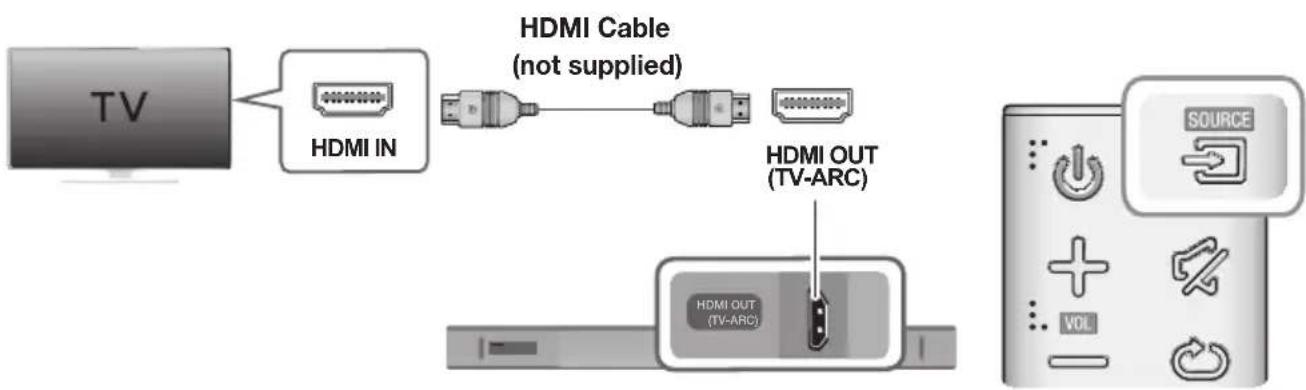
flowchart
graph LR
    TV["TV"] --> HDMI_IN["HDMI IN"]
    HDMI_IN --> HDMI_Cable["HDMI Cable (not supplied)"]
    HDMI_Cable --> HDMI_OUT["HDMI OUT (TV-ARC)"]
    HDMI_OUT --> HDMI_OUTOUT["HDMI OUT (TV-ARC)"]
    HDMI_OUTOUT --> SOURCE["SOURCE"]
    SOURCE --> VOL["VOL"]
- Connect an HDMI cable (not supplied) from the HDMI OUT (TV-ARC) jack on the bottom of the product to the HDMI IN jack on your TV.
- Press the → button on the right side of the Soundbar or the SOURCE button on the remote control to select the D.IN mode.

- HDMI is an interface that enables the digital transmission of video and audio data with just a single connector.
- If the TV provides an ARC port, connect the HDMI cable to the HDMI IN (ARC) port.
- We recommend you use a coreless HDMI cable if possible. If you use a cored HDMI cable, use one whose diameter is less than 14 mm.
• Anynet+ must be turned on.
- This function is not available if the HDMI cable does not support ARC.
TV SOUNDCONNECT
You can enjoy TV sound through your Soundbar when it is connected to a Samsung TV that supports the TV SoundConnect function.

- Turn on the TV and Soundbar.
- Press the ➕ button on the main unit's right side or the SOURCE button on the remote control to select the TV mode.
- On the TV, a message asking whether to enable the TV SoundConnect function appears.
- Select
using the TV's remote control to finish connecting the TV and Soundbar.

- If the TV SoundConnect linking process fails, navigate to SoundConnect in the TV's Sound menu, select Add New Device, and set Add New Device to ON. Then, try again.
- Switching the Soundbar's mode from TV to another mode automatically terminates TV SoundConnect.
- To connect the Soundbar to another TV, the existing connection must be terminated.
- To terminate the existing connection, press and hold the button on the remote for 5 seconds or switch to another mode. To connect to the other TV, follow Steps 1 through 4 above.

- The TV SoundConnect (SoundShare) function is supported by some Samsung TVs released from 2012 on. Check whether your TV supports the TV SoundConnect (SoundShare) function before you begin. (For further information, refer to the TV's user manual.).
- If your Samsung TV was released before 2014, check the SoundShare setting menu.
- If the distance between the TV and Soundbar exceeds 10 meters, the connection may not be stable or the audio may stutter. If this occurs, relocate the TV or Soundbar so that they are within operational range, and then re-establish the TV SoundConnect connection.
• TV SoundConnect Operational Ranges:
-Recommended pairing range: within 2 meters.
-Recommended operational range: within 10 meters. - The Play/Pause, Next, and Prev buttons on the Soundbar or Soundbar's remote do not control the TV.
▶ Using the Bluetooth POWER On function
The Bluetooth POWER On function is available after you have successfully connected the Soundbar to a Bluetooth compatible TV using TV SoundConnect. When the Bluetooth POWER On function is ON, turning the connected TV on or off will turn the Soundbar's power on and off as well.
- Connect the TV to your Soundbar using the TV SoundConnect function.
- Press the Bluetooth POWER button on the Soundbar remote. ON - BLUETOOTH POWER appears on the Soundbar's display.
• ON - BLUETOOTH POWER : The Soundbar turns on and off when you turn the TV on or off.
• OFF - BLUETOOTH POWER : The Soundbar only turns off when you turn the TV off.

- This function is supported by some Samsung TVs released from 2013 on.
CONNECTING TO EXTERNAL DEVICES
OPTICAL OR ANALOGUE AUDIO CABLE
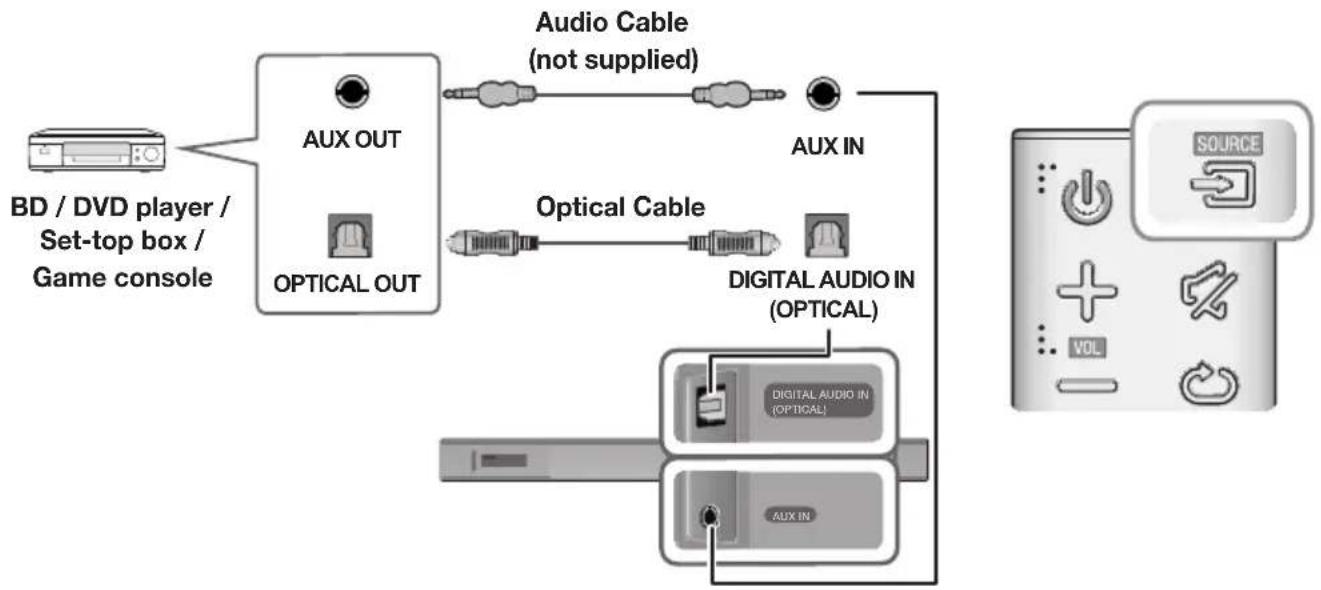
This unit comes equipped with one digital optical in jack and one analogue audio (AUX) in jack, giving you two ways to connect it to external devices.
flowchart
graph TD
    A["BD / DVD player / Set-top box / Game console"] --> B["AUX OUT"]
    B --> C["Optical Cable (not supplied)"]
    C --> D["AUX IN"]
    D --> E["DIGITAL AUDIO IN (OPTICAL)"]
    E --> F["DIGITAL AUDIO IN (OPTICAL)"]
    F --> G["AUX IN"]
    G --> H["SOURCE"]
▶ AUX Cable
-
Connect AUX IN (Audio) on the main unit to the AUDIO OUT jack of the Source Device using an audio cable.
-
Press the → button on the right side of the Soundbar or the SOURCE button on the remote control to select the AUX mode.
▶Optical Cable
-
Connect DIGITAL AUDIO IN (OPTICAL) on the main unit to the OPTICAL OUT jack of the Source Device using a digital optical cable.
-
Press the → button on the right side of the Soundbar or the SOURCE button on the remote control to select the D.IN mode.
HDMI CABLE
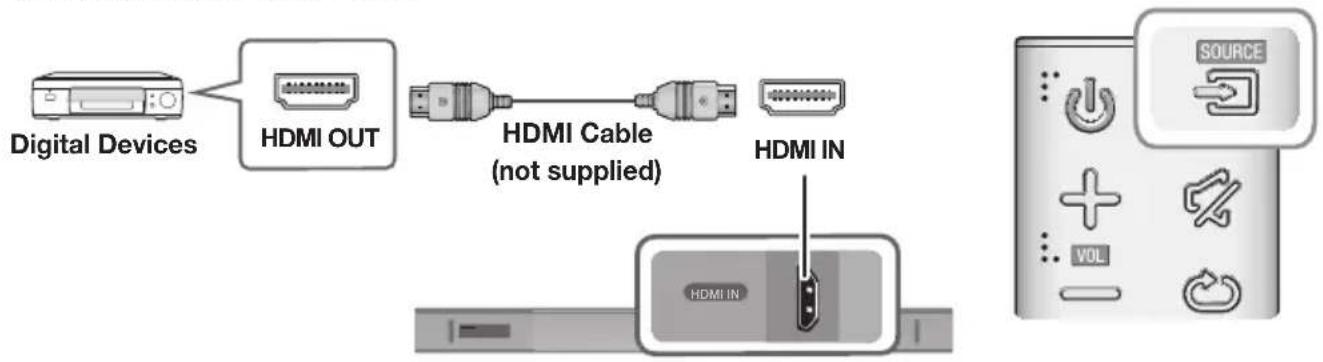
HDMI is the standard digital interface for connecting to TVs, projectors, DVD players, Blu-ray players, set top boxes, and more.
HDMI prevents any degradation to the signal due to conversion to analogue and maintains the video and audio quality of the original digital source.
flowchart
graph LR
    A["Digital Devices"] --> B["HDMI OUT"]
    B --> C["HDMI Cable (not supplied)"]
    C --> D["HDMI IN"]
    D --> E["HDMI IN"]
    E --> F["SOURCE"]
-
Connect an HDMI cable (not supplied) from the HDMI IN jack on the bottom of the product to the HDMI OUT jack on your digital device.
-
Press the ➕ button on the right side of the Soundbar or the SOURCE button on the remote control to select the HDMI mode.
INPUT MODE
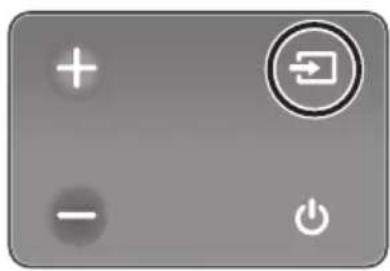
Press the button on the main unit's you want.
right side or the SOURCE button on the remote control to select the mode
natural_image
Gray rectangular button with control icons including plus, minus, refresh arrow, and power symbol (no text or numbers)Right end of Soundbar
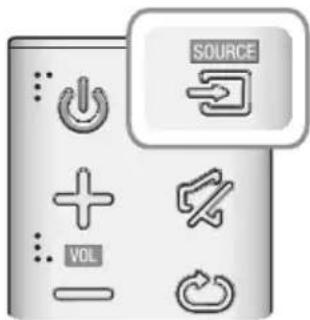
| Input mode Display | |
| Optical Digital inputARC (HDMI OUT) input | D.IN |
| AUX input | AUX |
| HDMI input | HDMI |
| BLUETOOTH mode | BT |
| TV SoundConnect | TV |
The unit turns off automatically in the following situations.
• D.IN / HDMI / BT / TV Mode
-If there is no audio signal for 5 minutes.
- AUX Mode
-If the AUX cable is disconnected for 5 minutes.
- If there is no KEY input for 8 hours when the AUX cable is connected. (Auto Power Down function can be turned off only in that case.)
To turn off Auto Power Down function, while in AUX mode, press and hold the ▶II button for 5 seconds.
ON - AUTO POWER DOWN / OFF - AUTO POWER DOWN appears on the display.
BLUETOOTH
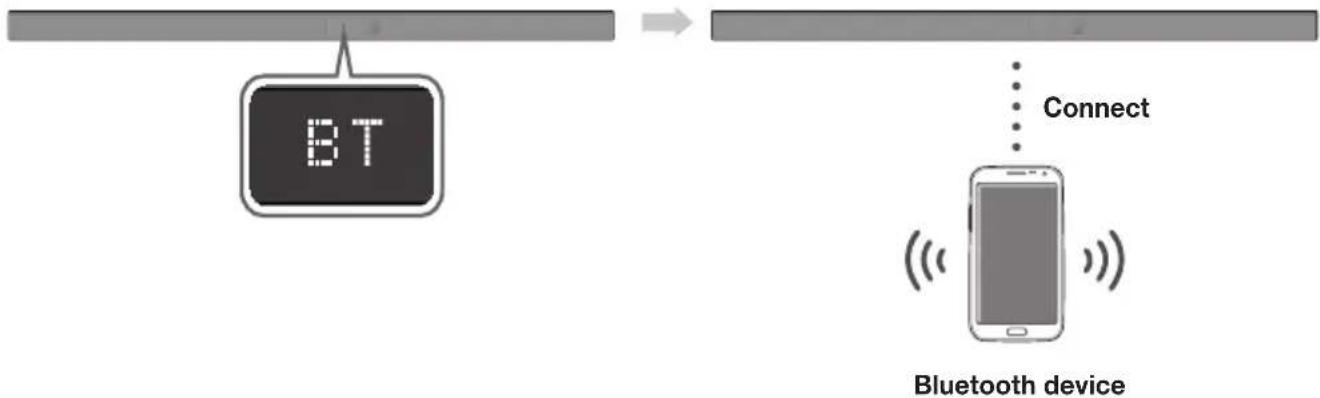
You can connect a Bluetooth device to the Soundbar and enjoy music with stereo sound, all without wires!
TO CONNECT THE SOUNDBAR TO A BLUETOOTH DEVICE
Check if the Bluetooth device supports the Bluetooth compliant stereo headset function.
flowchart
graph LR
    A["BT Signal"] --> B["Mobile Device"]
    B --> C["Connect"]
    C --> D["Bluetooth Device"]
- Press the → button on the main unit's right side or the SOURCE button on the remote control to select the BT mode.
• You will see BT READY on the front display of the Soundbar.
-
Select the Bluetooth menu on the Bluetooth device you want to connect. (Refer to the Bluetooth device's user manual.)
-
Select "[AV] Samsung Soundbar Kxxx" from the list.
-
When the Soundbar is connected to the Bluetooth device, it will display [Bluetooth device name] → BT on the front display.
- The device name can only be displayed in English. An underline " _ " will be displayed if the name is not in English.
-
If the Bluetooth device has failed to pair with the Soundbar, delete the previous "[AV] Samsung Soundbar Kxxx" found by the Bluetooth device and have it search for the Soundbar again.
-
Play music on the connected device.
• You can listen to the music playing on the connected Bluetooth device over the Soundbar.
- In BT mode, the Play / Pause / Next / Prev functions are not available. However, these functions are available on Bluetooth devices supporting AVRCP.

- If asked for a PIN code when connecting a Bluetooth device, enter <0000>.
- Only one Bluetooth device can be paired at a time.
- The Bluetooth connection will be terminated when you turn the Soundbar off.
- The Soundbar may not perform Bluetooth search or connection correctly under the following circumstances:
-If there is a strong electrical field around the Soundbar.
- If several Bluetooth devices are simultaneously paired with the Soundbar.
- If the Bluetooth device is turned off, not in place, or malfunctions.
- Note that such devices as microwave ovens, wireless LAN adaptors, fluorescent lights, and gas stoves use the same frequency range as the Bluetooth device, which can cause electric interference.
• The Soundbar supports SBC data (44.1kHz, 48kHz).
- Connect only to a Bluetooth device that supports the A2DP (AV) function.
- You cannot connect the Soundbar to a Bluetooth device that supports only the HF (Hands Free) function.
- Once you have paired the Soundbar to a Bluetooth device, selecting "[AV] Samsung Soundbar Kxxx" from the device's scanned devices list will automatically change the Soundbar to BT mode.
- Available only if the Soundbar is listed among the Bluetooth device's paired devices. (The Bluetooth device and the Soundbar must have been previously paired at least once.)
- Soundbar will appear in the Bluetooth device's searched devices list only when the Soundbar is displaying BT READY.
- In the TV SoundConnect mode, the Soundbar cannot be paired to another Bluetooth device.
BLUETOOTH POWER ON (BLUETOOTH POWER)
If a previously paired Bluetooth device tries to pair with the Soundbar when the Bluetooth POWER On function is on and the Soundbar is turned off, the Soundbar turns on automatically.
- Press the Bluetooth POWER button on the remote while the Soundbar is turned on.
- ON - BLUETOOTH POWER appears on the Soundbar's display.
TO DISCONNECT THE BLUETOOTH DEVICE FROM A SOUNDBAR
You can disconnect a Bluetooth device from the Soundbar. For instructions, see the Bluetooth device's user manual.
• The Soundbar will be disconnected.
- When the Soundbar is disconnected from the Bluetooth device, the Soundbar will display BT DISCONNECTED on the front display.
TO DISCONNECT THE SOUNDBAR FROM A BLUETOOTH DEVICE
Press the SOURCE button on the remote control or the button on the product's right side to switch from BT to another mode or turn off the Soundbar.
- The connected Bluetooth device will wait a certain amount of time for a response from the Soundbar before terminating the connection. (Disconnection time may differ, depending on the Bluetooth device)

- In Bluetooth connection mode, the Bluetooth connection will be lost if the distance between the Soundbar and the Bluetooth device exceeds 10 meters.
- The Soundbar automatically turns off after 5 minutes in the Ready state.
▶More about Bluetooth
Bluetooth is a technology that enables Bluetooth-compliant devices to interconnect easily with each other using a short wireless connection.
- A Bluetooth device may cause noise or malfunction, depending on usage, if:
- A part of your body is in contact with the receiving/transmitting system of the Bluetooth device or the Soundbar.
- It is subject to electrical variation from obstructions caused by a wall, corner, or office partition.
- It is exposed to electrical interference from same frequency-band devices including medical equipment, microwave ovens, and wireless LANs.
- Pair the Soundbar with the Bluetooth device while they are close together.
- The further the distance between the Soundbar and Bluetooth device, the worse the quality is. If the distance exceeds the Bluetooth operational range, the connection is lost.
- In poor reception areas, the Bluetooth connection may not work properly.
- The Bluetooth connection only works when it is close to the unit. The connection will be automatically cut off if the Bluetooth device is out of range. Even within range, the sound quality may be degraded by obstacles such as walls or doors.
- This wireless device may cause electric interference during its operation.
USING THE MULTIROOM APP
The Samsung Multiroom app lets you connect the Soundbar to a smart device, your network, and the Internet. Once the Soundbar is connected to a smart device that has the Multiroom App installed, you can also connect the Soundbar and multiple Samsung Multiroom devices together wirelessly and play audio through them.
BEFORE YOU BEGIN
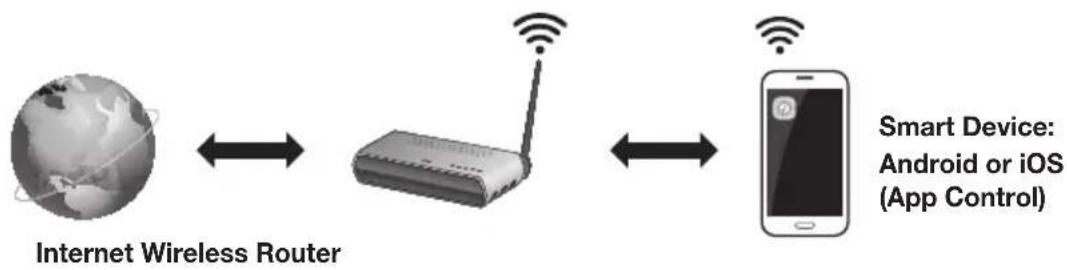
▶ Communication Basics
flowchart
graph LR
    A["Internet Wireless Router"] <--> B["Router"]
    B <--> C["Smart Device: Android or iOS (App Control)"]
Requirements:
- A Wireless Router and a Smart Device.
- The wireless router must be connected to the Internet.
- The smart device must be connected to the router via a Wi-Fi connection.
INSTALLING THE SAMSUNG MULTIROOM APP
To use the Soundbar with the Samsung Multiroom App, you must download and then install the Samsung Multiroom App on your smart device. You can download the app from Google Play or the App Store. With the Samsung Multiroom App installed, you can play music on your Soundbar that is stored on your smart device, located on other connected devices, provided by other content providers, or streamed from Internet radio stations.
▶Android or iOS
Download the Samsung Multiroom app from Google Play or the App Store of your smart device.
* Market search : Samsung Multiroom

or

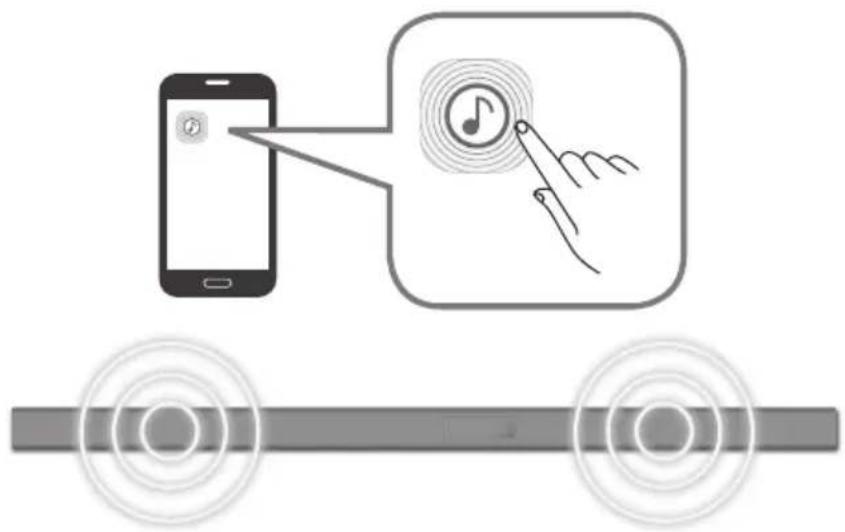
▶ Launching the Samsung Multiroom App
To launch the Samsung Multiroom app, tap the Multiroom app icon on your smart device.
CONNECTING THE SOUNDBAR TO YOUR NETWORK
On your smart device, select the Samsung Multiroom app. Follow the directions on your smart device's screen. You can use the following music sources with the Samsung Multiroom app.
- Music files stored in your mobile phone, various music sources, and Internet radio.
![[AV] Samsung Soundbar Kxxx Music in mobile phone My Phone Internet radio Music service ALBUMS Album A Album B Album C Album D Album E More ARTISTS](/content/2026/02/375518/images/e437e8268bec91a27f4cd8f04aaac26faf4540e92027f20fe2cdc931dd9c05f8.jpg)
USING THE NETWORK STANDBY ON FUNCTION
The Network Standby On function becomes available if a wireless connection has been properly established between a smart device and the Soundbar. This function turns on the Soundbar automatically when a smart device attempts to connect to the Soundbar via Bluetooth or Wi-Fi. If you turn the Soundbar on via a Bluetooth connection, its input mode is set to BT automatically. To turn the Soundbar on via Wi-Fi, you must have the Samsung Multiroom App installed on your smart device.
- Connect the smart device to your Soundbar.
- Turn the Network Standby On function on by pressing the ▶▶I button on the Soundbar remote for more than 5 seconds. You can turn the function off by pressing the ▶▶I button again for more than 5 seconds.

- Network Standby On is available only if the Soundbar is listed among the smart device's paired devices. (The Smart device and the Soundbar must have been previously paired at least once.)
- Soundbar will appear in the smart device's searched devices list only when the Soundbar is displaying [BT READY] or [WiFi READY].
- In the TV SoundConnect mode, the Soundbar cannot be paired to another smart device.
- If the Network Standby On function did not work:
-The Network Standby On is set to Off. Set it to ON.
- The Wi-Fi connection to the Soundbar will be terminated if the Soundbar's power cord is disconnected or the power is cut off. If the power is cut off, turn on the Soundbar and reconnect it.
- If the Network Standby is set to Off, the Soundbar cannot be turned on by Bluetooth connection.
SOFTWARE UPDATE
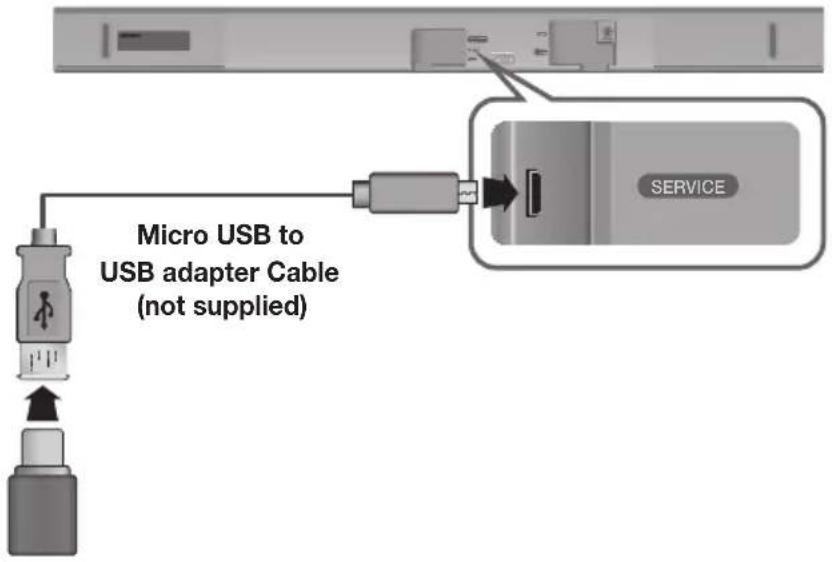
UPDATING WITH USB
Samsung may offer updates for the Soundbar's system firmware in the future.
If an update is offered, you can update the firmware by connecting a USB device with the firmware update stored on it to the USB port on your Soundbar.
Note that if there are multiple update files, you must load them onto the USB device singly and use them to update the firmware one file at a time.
Please visit samsung.com or contact the Samsung call centre to receive more information about downloading update files.
▶ Updating Procedure
- Connect a Micro USB to USB adapter cable with a male USB 2.0 Micro USB plug (Type B) on one end and a standard female 2.0 USB jack (Type A) on the other end to the micro USB jack on your Soundbar.

- The Micro USB to USB adapter cable is sold separately. To purchase, contact a Samsung Service Centre or Samsung Customer Care.
- Follow the steps below to download the product software:
Go to the Samsung website at (samsung.com/sec) → search for the model name - select the customer support option (the option name is subject to change) - Save the downloaded software to a USB stick and select "Extract to the folder name" to unzip the folder.
- Turn off the Soundbar and connect the USB stick containing the software update to the female port on a Micro USB adapter cable.
- Turn on the Soundbar. Within 3 minutes, UPDATE is displayed and updating begins.
- After the update is complete, the Soundbar turns off and on again.
▶If UPDATE was not displayed
- Turn off the Soundbar, connect the USB storage device that contains update files to the Soundbar's USB port.
- Disconnect the power cord, reconnect it, and then turn on the Soundbar.

- Insert a USB device containing the firmware update into the USB port on the main unit.
- Updating firmware may not work properly if audio files supported by the Soundbar are stored in the USB storage device.
- Do not disconnect the power or remove the USB device while updates are being applied. The main unit will turn off automatically after completing the firmware update.
- After update is completed, the user setup in Soundbar is initialised. We recommend you write down your settings so that you can easily reset them after the update. Note that updating firmware resets the subwoofer connection too.
If the connection to the subwoofer is not re-established automatically after the update, refer to page 16. If the software update fails, check that the USB stick is not defective.
• Mac OS users should use MS-DOS (FAT) as the USB format.
- Depending on the manufacturer, some USB devices may not be supported.
AUTO UPDATE
If the Soundbar is connected to the Internet, it will automatically check for the latest firmware and update when new firmware becomes available, even if it is turned off.

- The Soundbar is configured to run Auto Update by default.
- To use the Auto Update function, the Soundbar must be connected to the Internet.
- The Wi-Fi connection to the Soundbar will be terminated if its power cord is disconnected or the power is cut off. If the power is cut off, turn on the Soundbar and reconnect it.
TROUBLESHOOTING
Before requesting service, please check the following.
| The unit will not turn on. | |
| • Is the power cord plugged into the outlet? | → Connect the power plug to the outlet. |
| A function does not work when the button is pressed. | |
| • Is there static electricity in the air? | → Disconnect the power plug and connect it again. |
| Sound is not produced. | |
| Is the Mute function on?Is the volume set to minimum? | → Press the(Mute) button to cancel the Mute function.→ Adjust the volume. |
| The remote control does not work. | |
| Are the batteries drained?Is the distance between the remote control and main unit too far? | → Replace with new batteries.→ Move closer to the unit. |
| The TV SoundConnect (TV pairing) failed. | |
| Does your TV support TV SoundConnect?Is your TV firmware the latest version?Does an error occur when connecting? | → TV SoundConnect is supported by some Samsun TVs released from 2012 on. Check your TV to see if it supports TV SoundConnect.→ Update your TV with the latest firmware.→ Contact the Samsung Call Centre.→ Reset TV SoundConnect and connect again.To reset the TV SoundConnect connection, press and hold the ▶II button for 5 seconds. |
| The red LED on the subwoofer blinks and the subwoofer is not producing sound. | |
| • Your subwoofer may not be connected to the main unit of the product. | → Try to connect your subwoofer again.(See Page 16) |
| Soundbar is not turned on by Bluetooth or Multiroom App. | |
| Check the Network Standby option is OFF. | → If it's true, BT and Wifi functions are not allowed in power off state. Press and hold the ▶▶I button for 5 seconds to turn on the Network Standby in power on state. |
SPECIFICATIONS
| GENERAL | Weight | Main Unit | 2.6 kg |
| Subwoofer (PS-WK650, PS-WK651) | 6.8 kg | ||
| Dimensions(W x H x D) | Main Unit | 1010.5 x 54.0 x 87.5 mm | |
| Subwoofer (PS-WK650, PS-WK651) | 452.0 x 335.0 x 154.0 mm | ||
| Operating Temperature Range | +5°C to +35°C | ||
| Operating Humidity Range | 10 % to 75 % | ||
| AMPLIFIER | Rated Output Power | Main Unit | 30W x 6, 6 ohm, THD≤10% |
| Subwoofer (PS-WK650, PS-WK651) | 160W, 3 ohm, THD≤10% | ||
* Design, specifications and App screen are subject to change without prior notice.
* Nominal specification
Samsung Electronics Co., Ltd reserves the right to change the specifications without notice.
-Weight and dimensions are approximate.
- For more information about the power supply and power consumption, refer to the label attached to the product.
※ Precaution : The product will restart automatically if you turn on/off Wi-Fi/Ethernet.
| Overall Standby Power Consumption (W)(All the network ports are “ON” condition) | 2.8W | |
| Wi-Fi/Ethernet Port deactivation method | Press Wi-Fi SETUP button on the product for 30 seconds or press the ▶▶I button on the Soundbar remote for more than 5 seconds to turn Wi-Fi/Ethernet On / Off. | |
| Bluetooth Port deactivation method | Press SPK ADD button on the product for 30 seconds or press the ▶▶I button on the Soundbar remote for more than 5 seconds to turn Bluetooth On / Off. | |
※ Open Source Licence Notice
- For further information on Open Sources used in this product, please visit the website: http://opensource.samsung.com

Spotify® Licence
- The Spotify Software is subject to third party licences found here: www.spotify.com/connect/third-party-licenses.
- For more information about Spotify Connect, please visit www.spotify.com/connect
LICENCES

Manufactured under licence from Dolby Laboratories. Dolby, Dolby Audio and the double-D symbol are trademarks of Dolby Laboratories.


For DTS patents, see http://patents.dts.com. Manufactured under licence from DTS Licensing Limited. DTS, the Symbol, & DTS and the Symbol together are registered trademarks, and DTS 2.0 Channel is a trademark of DTS, Inc. © DTS, Inc. All Rights Reserved.
HDMI
The terms HDMI and HDMI High-Definition Multimedia Interface, and the HDMI Logo are trademarks or registered trademarks of HDMI Licensing LLC in the United States and other countries.
Wireless Models (including the frequency of 5.15GHz-5.35GHz)
Hereby, Samsung Electronics, declares that this equipment is in compliance with the essential requirements and other relevant provisions of Directive 1999/5/EC.
The original Declaration of Conformity may be found at http://www.samsung.com, go to Support > Search Product Support and enter the model name.
This equipment may be operated in all EU countries.
This equipment may only be used indoors.

Wireless Models (excluding the frequency of 5.15GHz-5.35GHz)
Hereby, Samsung Electronics, declares that this equipment is in compliance with the essential requirements and other relevant provisions of Directive 1999/5/EC.
The original Declaration of Conformity may be found at http://www.samsung.com, go to Support > Search Product Support and enter the model name.
This equipment may be operated in all EU countries.

Contact SAMSUNG WORLD WIDE
If you have any questions or comments relating to Samsung products, please contact the SAMSUNG customer care Centre.
| Country | Contact Centre | Web Site |
| ■Europe | ||
| U.K 0330 SAMSUNG (7267864) www.samsung.com/uk/support | ||
| EIRE 0818 7171 | 00 www.samsung.com/ie/support | |
| GERMANY | 0180 6 SAMSUNG bzw.0180 6 7267864*(0,20 €/Anruf aus dem dt. Festnetz, aus dem Mobilfunk max. 0,60 €/Anruf) | www.samsung.com/de/support |
| FRANCE 01 48 63 00 00 www.samsung.com/fr/support | ||
| ITALIA 800-SAMSUNG (800.7267864) www.samsung.com/it/support | ||
| SPAIN 3490217 | 2678 www.samsung.com/es/support | |
| PORTUGAL 808 | 20 7267 www.samsung.com/pt/support | |
| LUXEMBURG | 261 03 710 | www.samsung.com/be_fr/support |
| NETHERLANDS | 0900-SAMSUNG (0900-7267864)(€ 0,10/Min) | www.samsung.com/nl/support |
| BELGIUM | 02-201-24-18 | www.samsung.com/be/support(Dutch)www.samsung.com/be_fr/support (French) |
| NORWAY | 815 56480 | www.samsung.com/no/support |
| DENMARK | 70 70 19 70 | www.samsung.com/dk/support |
| FINLAND | 030-6227 515 www.samsung.com/fi/support | |
| SWEDEN | 0771 726 7864 (0771-SAMSUNG) | www.samsung.com/se/support |
| POLAND | 801-172-678* lub +48 22 607-93-33 * *(koszt połączeria weclug taryfy operatora) | www.samsung.com/pl/support |
| HUNGARY | 0680SAMSUNG (0680-726-786)0680PREMIUM (0680-773-648) | www.samsung.com/hu/support |
| Country Contact Centre | Web Site | |
| AUSTRIA | 0800-SAMSUNG (0800-7267864) [Only for Premium HA] 0800-366661 [Only for Dealers] 0810-112233 | www.samsung.com/at/support |
| SWITZERLAND | 0800 726 78 64 (0800-SAMSUNG) | www.samsung.com/ch/support (German) www.samsung.com/ch_fr/ support (French) |
| CZECH | 800 - SAMSUNG (800-726786) | www.samsung.com/cz/support |
| SLOVAKIA | 0800 - SAMSUNG (0800-726 786) | www.samsung.com/sk/support |
| CROATIA | 072 726 786 www.samsung.com/hr/support | |
| BOSNIA | 055 233 999 www.samsung.com/support | |
| MONTENEGRO | 020 405 888 www.samsung.com/support | |
| SLOVENIA | 080 697 267 (brezplačna številka) www.samsung.com/si | |
| SERBIA | 011 321 6899 www.samsung.com/rs/support | |
| BULGARIA | *3000 Цена в мрежата 0800 111 31 , Безплатна телефонна линия | www.samsung.com/bg/support |
| ROMANIA | *8000 (apel in retea) 08008-726-78-64 (08008-SAMSUNG) Apel GRATUIT | www.samsung.com/ro/support |
| CYPRUS 8009 | 4000 only from landline, toll free | www.samsung.com/gr/support |
| GREECE | 80111-SAMSUNG (80111 726 7864) only from land line (+30) 210 6897691 from mobile and land line | |
| LITHUANIA | 8-800-77777 | www.samsung.com/lt/support |
| LATVIA | 8000-7267 | www.samsung.com/lv/support |
| ESTONIA | 800-7267 | www.samsung.com/ee/support |
[Correct disposal of batteries in this product]
(Applicable in countries with separate collection systems)
This marking on the battery, manual or packaging indicates that the batteries in this product should not be disposed of with other household waste at the end of their working life. Where marked, the chemical symbols Hg, Cd or Pb indicate that the battery contains mercury, cadmium or lead above the reference levels in EC Directive 2006/66. If batteries are not properly disposed of, these substances can cause harm to human health or the environment.
To protect natural resources and to promote material reuse, please separate batteries from other types of waste and recycle them through your local, free battery return system.
Correct Disposal of This Product (Waste Electrical & Electronic Equipment)
(Applicable in countries with separate collection systems)
This marking on the product, accessories or literature indicates that the product and its electronic accessories (e.g. charger, headset, USB cable) should not be disposed of with other household waste at the end of their working life. To prevent possible harm to the environment or human health from uncontrolled waste disposal, please separate these items from other types of waste and recycle them responsibly to promote the sustainable reuse of material resources.
Household users should contact either the retailer where they purchased this product, or their local government office, for details of where and how they can take these items for environmentally safe recycling.
Business users should contact their supplier and check the terms and conditions of the purchase contract. This product and its electronic accessories should not be mixed with other commercial wastes for disposal.
For information on Samsung's environmental commitments and product specific regulatory obligations e.g. REACH visit: samsung.com/uk/aboutsamsung/samsungelectronics/corporate citizenship/data_corner.html
natural_image
Illustration of a prohibition symbol over a magnet, sun, and cartoon character (no text or symbols)natural_image
Diagram of a mechanical or electronic component with a circular component inserted, showing no text or symbols.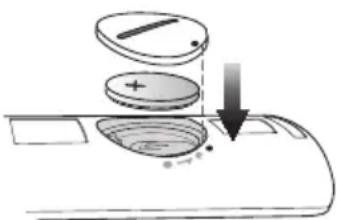
natural_image
Diagram of a mechanical or electrical component with a circular component and directional arrows, no visible text or symbols.natural_image
Diagram of a mechanical assembly with a lever and gear, showing motion direction (no text or symbols)BUL
natural_image
3D mechanical assembly diagram showing a lever and pivot point (no text or symbols)natural_image
Gray control panel with function buttons and a power switch (no text or symbols)Задна страна на Soundbar
natural_image
Simple grayscale illustration of a rectangular object with two small circular features on top, no text or symbols present.flowchart
graph TD
    A["Component 1: Linear assembly with dashed lines indicating alignment"] --> B["Component 2: Disassembly with solid lines and arrows indicating movement"]
    B --> C["Final assembled part with circular insets showing mechanical components"]
natural_image
Diagram showing a structural change from a beam with motion arrows to a final beam with dashed connection points (no text or symbols)
СВЪРЗВАНЕ НА SOUNDBAR КЪМ МРЕЖАТА ВИ
Manufactured under licence from Dolby Laboratories. Dolby, Dolby Audio and the double-D symbol are trademarks of Dolby Laboratories.

dts
2.0 Channel
CRO
Osigurajte da napajanje izmjeničnom strujom u vašem domaćinstvu odgovara identifikacijskoj naljepnici koja se nalazi na poleđini proizvoda. Proizvod postavite vodoravno na prikladnu površinu (namještaj) s dovoljno prostora za ventilaciju 7\~10 cm. Pobrinite se da ventilacijski otvori ne budu prekriveni. Ne postavljajte jedinicu na pojačala ili drugu opremu koja se grije. Ova jedinica dizajnirana je za neprekidnu uporabu. Za potpuno isključivanje jedinicu izvucite strujni utikač iz zidne utičnice. Ako ne namjeravate upotrebljavati jedinicu dulje vrijeme, izvucite utikač.
Za vrijeme olujnog nevremena izvucite utikač za napajanje izmjeničnom strujom iz zidne utičnice. Vršni naponi zbog munja mogu oštetiti uređaj.
natural_image
Illustration of various symbols including a prohibition sign, sun, magnet, and cartoon characters (no text or labels)Ne izlažite uređaj izravnoj sunčevoj svjetlosti ili drugim izvorima topline. To može dovesti do pregrijavanja i kvara uređaja.
Baterije korištene s ovim proizvodom sadržavaju kemikalije koje su štetne za okoliš. Ne odlazite baterije s otpadom kućanstva. Baterije nemojte bacati u vatru. Nemojte kratko spajati, rastavljati, ili pregrijavati baterije. U slučaju zamjene neodgovarajućim baterijama postoji opasnost od eksplozije. Baterije mijenjajte samo baterijama iste ili ekvivalentne vrste.

UPOZORENJE, NE GUTATI BATERIJU, OPASNOST OD KEMIJSKE OPEKLINE
[Isporučene uz daljinski upravljač] Ovaj proizvod sadrži bateriju u obliku novčića/gumba.
Ako progutate tu bateriju u obliku novčića/gumba, može uzrokovati teške unutarnje opekline u samo
Odabire ulaze D.IN, AUX, HDMI, BT ili TV.
- Kada je uređaj uključen, pritiskanjem i držanjem gumba duže od 3 sekunde gumb se postavlja za obavljanje funkcije (lsključi zvuk). Da biste otkazali postavljanje gumba (lsključi zvuk), ponovo pritisnite i držite gumb duže od 3 sekunde.
③ (ta uključivanje) Gumb
natural_image
Diagram of a mechanical component with a circular component and curved base, no visible text or symbols- Da biste uklonili poklopac baterije daljinskog upravljača, kovanicu umetnite u utor na poklopcu i okrećite je ulijevo kako je prikazano iznad, a zatim poklopac uklonite.
- Umetnite litijsku bateriju od 3 V. Prilikom umetanja baterije pozitivan pol (+) mora biti usmjeren prema gore. Vratite poklopac za bateriju i poravnajte oznake '•' jednu uz drugu kako je prikazano iznad.
natural_image
Diagram of a mechanical device with a rotating disk and base, showing no text or symbols.natural_image
Diagram of a mechanical assembly with two components and directional arrows, no text or symbols presentCRO
- Gurnite vijak (nije priloženo) kroz svaki Vijak držača, a zatim čvrsto zategnite svaki vijak u otvor potpornog vijka.
natural_image
Mechanical assembly diagram showing a clamping mechanism with labeled components (no text or symbols present)- Upotrijebite dva Vijak (M4 x L12) za pričvršćivanje zidni nosač L i D na dno uređaja Soundbar. Za ispravno postavljanje obavezno osigurajte da su udubine na uređaju Soundbar u ravnini s otvorima na nosaču.

natural_image
Gray rectangular device with control buttons and a power button, connected to a vertical line (no text or symbols visible)Stražnja strana uređaja Soundbar
natural_image
Pure electrical circuit lines without any symbolsflowchart
graph TD
    A["Component 1: Linear assembly with dashed lines indicating alignment"] --> B["Component 2: Disassembly with solid lines and arrows indicating movement"]
    B --> C["Final assembled part with circular insets showing mechanical components"]
- Montirajte Soundbar s pričvršćenim zidni nosač tako da objesite zidni nosač na Vijak držača na zidu.

- Lagano nakosite Soundbar da biste umetnuli glave obaju Vijak držača u otvore zidni nosač. Gurnite Soundbar u smjeru strelice kako biste osigurali da su obje strane čvrsto pričvršćene.
natural_image
Diagram showing a mechanical assembly before and after transformation, with no visible text or symbols
- Ne vješajte ništa na montiranu jedinicu i spriječite njezino izlaganje udarcima ili padanje.
- Dobro pričvrstite jedinicu na zid kako ne bi pala. Ako jedinica padne, može izazvati ozljede ili oštećenje proizvoda.
- Nakon montaže jedinice na zid, osigurajte da dijete ne može povući niti jedan od spojnih kabela, jer bi jedinica mogla pasti.
- Za najkvalitetniji učinak montaže zidnog nosača instalirajte sustav zvučnika najmanje 5 cm ispod TV uređaja ako je TV montiran na zid.
- Ako jedinicu ne montirate na zid, zbog vlastite sigurnosti montirajte je na sigurnu ravnu površinu s koje ne može pasti.

- Nemojte priključivati kabel za napajanje ovog proizvoda ili televizora u zidnu utičnicu dok međusobno ne povežete sve komponente.
- Prije premještanja ili postavljanja proizvoda provjerite je li napajanje isključeno, a kabel za napajanje isključen iz utičnice.
SPAJANJE SUBWOOFERA
auToMaTSKo poVeziVanje Sa SuBWooferoM
ID povezivanja za subwoofer unaprijed je tvornički određen te bi se glavna jedinica i subwoofer trebali automatski umrežiti (bežično povezati) kad su glavna jedinica i subwoofer uključeni.
- Kabele za napajanje glavnog uređaja i subwoofera uključite u zidnu utičnicu izmjenične struje.
- Malim šiliatim predmetom pritisnite i zadržite gumb iD SeT na poleđini subwoofera 5 sekunde.
- Indikator STANDBY se iskliučuje, a indikator LINK (plava LED lampica) brzo trepti.
-
Spojite priključak DIGITAL AUDIO IN (OPTICAL) na uređaju Soundbar u priključak OPTICAL OUT televizora pomoću digitalnog optičkog kabela.
-
Pritisnite gumb → na desnoj strani uređaja Soundbar ili gumb SOURCE na daljinskom upravljaču za odabir načina D.IN.
▶ Auto Power Link
Ako glavnu jedinicu s televizorom povežete putem digitalnog optičkog kabela, postavite funkciju Automatsko napajanje na UKLJUČENO da bi se Soundbar automatski uključivao kada uključite televizor.
-
Spojite Soundbar i televizor pomoću digitalnog optičkog kabela.
-
Pritisnite gumb → na desnoj strani glavne jedinice ili gumb SOURCE na daljinskom upravljaču za odabir načina D.IN.
-
Pritisnite gumb ◀ na daljinskom upravljaču na 5 sekundi da biste uključili ili isključili Auto Power Link (automatsko povezivanje napajanja).

• Auto Power Link postavljeno je na ON prema zadanim postavkama.
POVEZIVANJE UREĐAJA SOUNDBAR S MREŽOM
Na pametnom uređaju odaberite aplikaciju Samsung Multiroom. Slijedite upute na zaslonu pametnog uređaja.
Uz aplikaciju Samsung Multiroom na raspolaganju su vam sljedeće funkcije.
Manufactured under licence from Dolby Laboratories. Dolby, Dolby Audio and the double-D symbol are trademarks of Dolby Laboratories.


natural_image
Illustration of a prohibition symbol over a globe, sun, and cartoon characters (no text or symbols)natural_image
Diagram of a mechanical or electronic component with a circular component inserted into a curved slot (no text or symbols visible)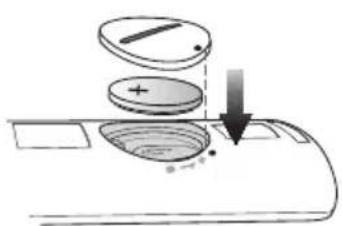
natural_image
Diagram of a mechanical device with a rotating disk and directional arrows, no text or symbols present.INSTALACE PŘÍSTROJE SOUNDBAR
INSTALACE DRŽÁKU NA ZEĐ
natural_image
Diagram of a mechanical assembly with two components and directional arrows, no text or symbols presentCZE
natural_image
Mechanical assembly diagram showing a clamping mechanism with labeled components (no text or symbols present)natural_image
Gray rectangular device with control buttons and a power button, connected to a vertical line (no text or symbols)natural_image
Pure electrical circuit lines without any symbolsflowchart
graph TD
    A["Component 1: Linear assembly with dashed lines indicating alignment"] --> B["Component 2: Disassembly with solid lines and arrows indicating movement"]
    B --> C["Final assembled part with circular insets showing mechanical components"]
natural_image
Diagram showing a mechanical assembly before and after transformation, with no visible text or symbols
PŘIPOJENÍ PŘÍSTROJE SOUNDBAR K SÍTI
Manufactured under licence from Dolby Laboratories. Dolby, Dolby Audio and the double-D symbol are trademarks of Dolby Laboratories.

dts
2.0 Channel
natural_image
Diagram showing a prohibition symbol emitting light rays toward a sun, with no text or labels present.natural_image
Illustration of various symbols and objects including a prohibition sign, sun, magnet, and document (no text or labels)natural_image
Diagram of a mechanical or electrical component with a circular component inserted into a housing (no text or symbols visible)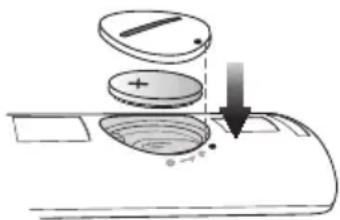
natural_image
Diagram of a mechanical or electrical component with a circular component and directional arrows, no visible text or symbols.natural_image
Diagram of a mechanical linkage or lever mechanism with directional arrows indicating motion (no text or symbols)natural_image
3D mechanical assembly diagram showing a lever and pivot point (no text or symbols)natural_image
Gray control panel with function buttons and a power button (no text or symbols)natural_image
Pure diagram of three rectangular objects with internal shapes, no text or symbols presentflowchart
graph TD
    A["Component 1: Linear assembly with dashed lines indicating alignment"] --> B["Component 2: Disassembly with solid lines and arrows indicating movement"]
    B --> C["Final assembled component with circular insets showing mechanical parts"]
natural_image
Diagram showing a mechanical assembly before and after transformation, with no visible text or symbols.
natural_image
Gray rectangular button with control icons including plus, minus, refresh arrow, and power symbol (no text or numbers)ANSCHLIESSEN DER SOUNDBAR AN IHR NETZWERK
Manufactured under licence from Dolby Laboratories. Dolby, Dolby Audio and the double-D symbol are trademarks of Dolby Laboratories.

dts
2.0 Channel
EST
natural_image
Illustration of a prohibition symbol over a globe, sun, and household items (no text or symbols)natural_image
Diagram of a mechanical component with a circular component inserted into a base, showing no text or symbols.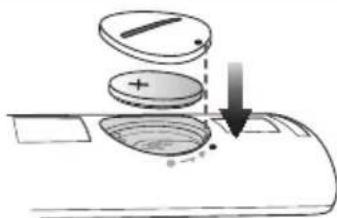
natural_image
Diagram of a mechanical device with a circular component and directional arrows, no visible text or symbolsnatural_image
Diagram of a mechanical component with a lever and curved arrow indicating motion (no text or symbols)
natural_image
3D mechanical assembly diagram showing a lever and pivot point (no text or symbols)natural_image
Simple grayscale illustration of three rectangular objects with cloud-like shapes on top, no text or symbols present.Seinakinnitus LSeinakinnitus R
flowchart
graph TD
    A["Component 1: Linear assembly with dashed lines indicating alignment"] --> B["Component 2: Disassembly with solid lines and arrows indicating movement"]
    B --> C["Final assembled part with circular insets showing mechanical components"]
- Paigaldage Soundbar koos selle külge kinnitatud Seinakinnituskronsteini, riputades Seinakinnituskronsteini seinal olevatele Hoidikkruvi.

- Kallutage veidi heliriba, et sisestada mölema Hoidikkruvi pea Seinakinnituskronsteini aukudesse. Lükake Soundbari noole suunas, et kontrollida, kas mölemad küljed on tugevasti kinni.
soundbaRi eeMaLdaMine seinaLt
natural_image
Diagram showing a structural change from a beam to a vertical plate with dashed connection points (no text or symbols)
SOUNDBARI ÜHENDAMINE OMA VÖRKU
www.spotify.com/connect/third-party-licenses.
- Lisateavet Spotify Connecti kohta vt veebisaidilt www.spotify.com/connect.
LITSENTSID

DOLBY
AUDIO
Manufactured under licence from Dolby Laboratories. Dolby, Dolby Audio and the double-D symbol are trademarks of Dolby Laboratories.


2.0 Channel
FRA
natural_image
Illustration of various symbols including a prohibition sign, sun, magnet, and cartoon characters (no text or labels)③ Bouton (Alimentation)
natural_image
Diagram of a mechanical component with a circular component inserted into a housing (no text or symbols)natural_image
Diagram of a mechanical device with a rotating disk and directional arrows, no text or symbols present.natural_image
Diagram of a mechanical assembly with two components and directional arrows, no text or symbols presentFRA
natural_image
3D mechanical assembly diagram showing a lever and base mount (no text or symbols)natural_image
Gray electronic device with control buttons and power indicator (no text or symbols)natural_image
Simple line drawing of a rectangular object with two small circular features on top (no text or symbols)Fixation murale GFixation murale D
flowchart
graph TD
    A["Component 1: Linear assembly with dashed lines indicating alignment"] --> B["Component 2: Reformed assembly with solid lines indicating assembly"]
    B --> C["Assembly of two parts with circular insets showing mechanical components"]
natural_image
Diagram showing a mechanical assembly before and after transformation, with no visible text or symbols.
flowchart
graph LR
    TV["TV"] --> HDMI_IN["HDMI IN"]
    HDMI_IN --> Cable_HDMI["Câble HDMI (non fourni)"]
    Cable_HDMI --> HDMI_OUT["TV-ARC"]
    HDMI_OUT --> HDMI_OUTOUT["HDMI OUT (TV-ARC)"]
    HDMI_OUTOUT --> SOURCE["SOURCE"]
    SOURCE --> OUTPUT["+ -"]
    OUTPUT --> VOLT["VOL"]
natural_image
Gray rectangular button with control icons including plus, minus, refresh arrow, and power symbol (no text or numbers)CONNEXION DE LA SOUNDBAR À VOTRE RÉSEAU
Manufactured under licence from Dolby Laboratories. Dolby, Dolby Audio and the double-D symbol are trademarks of Dolby Laboratories.


2.0 Channel
natural_image
Illustration of various symbols including a prohibition sign, sun, magnet, and money (no text or labels)natural_image
Diagram of a mechanical or electrical component with a circular component and curved base, no visible text or symbols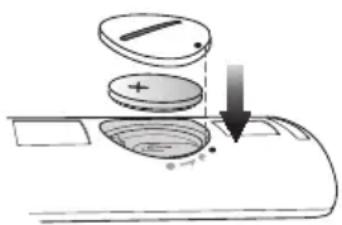
natural_image
Diagram of a mechanical component with a circular component and directional arrows, no text or symbols present.natural_image
Diagram of a mechanical component with a shaft and housing, showing motion direction (no text or symbols)GRE
natural_image
3D mechanical assembly diagram showing a lever and pivot point (no text or symbols)natural_image
Gray control panel with plus, minus, and power button icons connected to a switch (no text or symbols)natural_image
Simple grayscale illustration of a horizontal beam with two circular supports and three vertical supports (no text or symbols)flowchart
graph TD
    A["Component 1: Linear assembly with dashed lines indicating alignment"] --> B["Component 2: Disassembly with arrows indicating movement"]
    B --> C["Final assembled component with circular insets showing mechanical parts"]
natural_image
Diagram showing a mechanical assembly before and after transformation, with no visible text or symbols
Manufactured under licence from Dolby Laboratories. Dolby, Dolby Audio and the double-D symbol are trademarks of Dolby Laboratories.


natural_image
Illustration of weather-related symbols including a prohibition sign, sun, magnet, and cartoon characters (no text or labels)natural_image
Diagram of a mechanical component with a circular component inserted into a curved base (no text or symbols)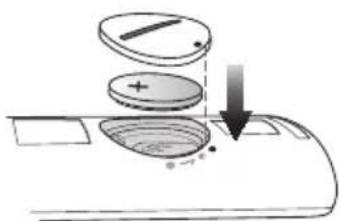
natural_image
Diagram of a mechanical or electrical component with rotating arms and a central circular component (no text or symbols)natural_image
Mechanical assembly diagram showing a shaft and housing with directional arrows indicating motion (no text or symbols)natural_image
Mechanical assembly diagram showing a lever and pivot point (no text or symbols)natural_image
Simple grayscale illustration of three rounded rectangular objects with leaf-like shapes on top, no text or symbols present.Fali konzol balFali konzol jobb
flowchart
graph TD
    A["Component 1: Linear assembly with dashed lines indicating alignment"] --> B["Component 2: Reformed assembly with arrows indicating direction"]
    B --> C["Assembly of two parts: one with a camera icon, the other with a mouse icon"]
    C --> D["Final assembly with circular icons for each part"]
natural_image
Diagram showing a structural change from a beam with an arrow to a vertical beam with dashed connection points (no text or symbols)
A SOUNDBAR CSATLAKOZTATÁSA A HÁLÓZATHOZ
Manufactured under licence from Dolby Laboratories. Dolby, Dolby Audio and the double-D symbol are trademarks of Dolby Laboratories.

dts
2.0 Channel
ITA
natural_image
Illustration of a prohibition symbol over a globe, sun, and snowy weather (no text or symbols)natural_image
Diagram showing a prohibition symbol emitting radiating light rays toward a shaded surface (no text or labels)natural_image
Diagram of a mechanical component with a circular top and curved base, no visible text or symbols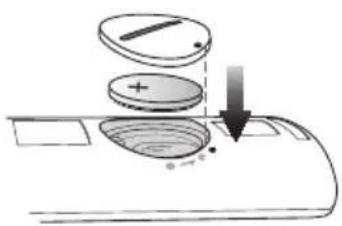
natural_image
Diagram of a mechanical device with a rotating disk and directional arrows, no text or symbols presentnatural_image
Diagram of a mechanical assembly with two components and directional arrows, no text or symbols presentITA
natural_image
3D mechanical assembly diagram showing a lever and pivot point (no text or symbols)natural_image
Gray control panel with plus, minus, and power button icons (no text or labels)natural_image
Simple grayscale illustration of a rectangular object with two circular features on top, no text or symbols present.flowchart
graph TD
    A["Component 1: Linear assembly with dashed lines indicating alignment"] --> B["Component 2: Disassembly with solid lines and arrows indicating movement"]
    B --> C["Final assembled component with circular insets showing internal components"]
natural_image
Diagram showing a structural change from a beam with an arrow to a vertical beam with dashed connection points (no text or symbols)ITA

flowchart
graph LR
    TV["TV"] --> HDMI_IN["HDMI IN"]
    HDMI_IN --> HDMI_OUT["HDMI OUT (TV-ARC)"]
    HDMI_OUT --> SOURCE["SOURCE"]
    Cavo["Havo HDMI (non fornito)"] --> HDMI_OUT

natural_image
Gray button interface with plus, minus, and power control icons (no text or numbers)Manufactured under licence from Dolby Laboratories. Dolby, Dolby Audio and the double-D symbol are trademarks of Dolby Laboratories.

dts
2.0 Channel
natural_image
Illustration of a prohibition symbol over a globe, sun, and snowy scene (no text or symbols)natural_image
Diagram of a mechanical component with a circular top and curved base, no visible text or symbols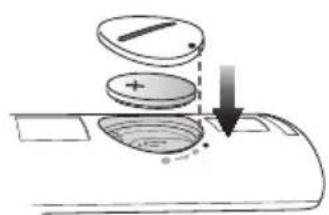
natural_image
Diagram of a mechanical device with a circular component and directional arrows, no visible text or symbolsnatural_image
Diagram of a mechanical component with a shaft and housing, showing motion direction (no text or symbols)
natural_image
3D mechanical assembly diagram showing a lever and pivot point (no text or symbols)natural_image
Gray control panel with plus, minus, and power button symbols (no readable text or labels)natural_image
Pure electrical circuit lines without any symbolsflowchart
graph TD
    A["Component 1: Linear assembly with dashed lines indicating alignment"] --> B["Component 2: Reformed assembly with solid lines indicating assembly"]
    B --> C["Assembly of two parts with circular insets showing close-ups of mechanical components"]
natural_image
Diagram showing a structural change from a beam to a vertical plate with dashed connection points (no text or symbols)LAT

natural_image
Gray rectangular button with control icons including plus, minus, refresh arrow, and power symbol (no text or numbers)Soundbar labā mala
SISTEMAS SOUNDBAR SAVIENOJUMA AR TIKLU IZVEIDOŠANA
Manufactured under licence from Dolby Laboratories. Dolby, Dolby Audio and the double-D symbol are trademarks of Dolby Laboratories.


2.0 Channel
natural_image
Illustration of various symbols and objects including a prohibition sign, sun, magnet, and cartoon characters (no text or labels)natural_image
Diagram of a mechanical component with a circular component inserted into a base, showing no text or symbols.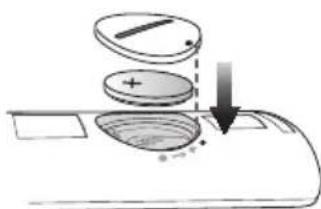
natural_image
Diagram of a mechanical component with a circular component and directional arrows, no text or symbols present.natural_image
Diagram of a mechanical assembly with two components and directional arrows, no text or symbols presentL
natural_image
3D mechanical assembly diagram showing a lever and pivot point (no text or symbols)natural_image
Simple grayscale illustration of three rectangular objects with rounded tops, no text or symbols present.flowchart
graph TD
    A["Component 1: Linear assembly with dashed lines indicating alignment"] --> B["Component 2: Disassembly with solid lines and arrows indicating movement"]
    B --> C["Final assembled part with circular insets showing mechanical components"]
natural_image
Diagram showing a mechanical assembly before and after transformation, with no visible text or symbols.
natural_image
Gray rectangular button with control icons including plus, minus, refresh arrow, and power symbol (no text or numbers)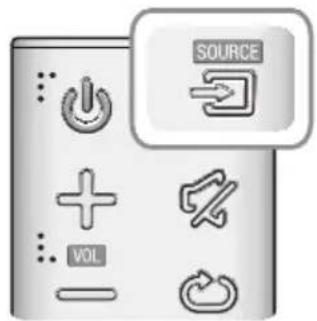
„SOUNDBAR“ GARSIAKALBIO PRIJUNGIMAS PRIE TINKLO
Manufactured under licence from Dolby Laboratories. Dolby, Dolby Audio and the double-D symbol are trademarks of Dolby Laboratories.


2.0 Channel
natural_image
Illustration of weather-related symbols including a prohibition sign, sun, magnet, and document (no text or labels)natural_image
Diagram showing a prohibition symbol emitting radiating light rays toward a shaded surface (no text or labels)natural_image
Diagram of a mechanical component with a circular component inserted into a slot, showing no text or symbols.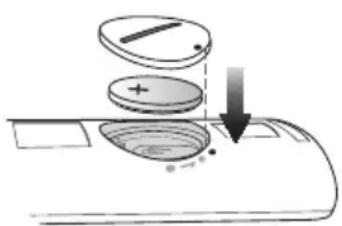
natural_image
Diagram of a mechanical device with a rotating disk and directional arrows, no text or symbols present.natural_image
Diagram of a mechanical component with directional arrows indicating motion or force (no text or symbols)POL
natural_image
3D mechanical assembly diagram showing a lever and base mount (no text or symbols)natural_image
Gray control panel with four function buttons (no text or symbols visible)natural_image
Simple grayscale illustration of a rectangular object with two circular features on top, no text or symbols present.flowchart
graph TD
    A["Component 1: Linear assembly with dashed lines indicating alignment"] --> B["Component 2: Disassembly with solid lines and arrows indicating movement"]
    B --> C["Final assembly: two circular components on a beam with one end marked"]
    style A fill:#f9f,stroke:#333
    style B fill:#ccf,stroke:#333
    style C fill:#cfc,stroke:#333
natural_image
Diagram showing a mechanical assembly before and after transformation, with no visible text or symbols.
PODŁĄCZANIE LISTWY SOUNDBAR DO SIECI
Manufactured under licence from Dolby Laboratories. Dolby, Dolby Audio and the double-D symbol are trademarks of Dolby Laboratories.

dts
2.0 Channel
natural_image
Illustration of various symbols and objects including a prohibition sign, magnet, and cartoon elements (no text or labels)natural_image
Diagram showing a prohibition symbol and a spray bottle emitting light rays (no text or labels)natural_image
Diagram of a mechanical component with a circular component and curved base (no text or symbols)natural_image
Diagram of a mechanical device with a rotating disk and directional arrows, no text or symbols present.natural_image
Diagram of a mechanical linkage or lever mechanism with directional arrows indicating motion (no text or symbols)natural_image
Mechanical assembly diagram showing a lever and pivot point (no text or symbols)natural_image
Gray control panel with function buttons and a power button, connected to a light bulb (no text or symbols visible)natural_image
Simple grayscale illustration of three rectangular objects with circular patterns on a horizontal line (no text or symbols)Suport de perete drept
Suport de perete stâng
flowchart
graph TD
    A["Component 1: Linear assembly with dashed lines indicating alignment"] --> B["Component 2: Reformed assembly with solid lines indicating assembly"]
    B --> C["Assembly of two parts with circular insets showing close-ups of mechanical components"]
natural_image
Diagram showing a mechanical assembly before and after transformation, with no visible text or symbols.
flowchart
graph LR
    TV["TV"] -->|HDMI IN| Cable["Cable HDMI (nu sunt furnizate)"]
    Cable -->|HDMI OUT (TV-ARC)| Stream["Stream"]
    Stream -->|HDMI OUT (TV-ARC)| Source["SOURCE"]
natural_image
Gray rectangular button with control icons including plus, minus, refresh arrow, and power symbol (no text or numbers)| Mod intrare Afişaj | |
| Intrarea digitală opticăIntrare ARC (HDMI OUT) | D.IN |
| Intrare AUX AUX | |
| Intrarea HDMI HDMI | |
| Modul BLUETOOTH BT | |
| TV SoundConnect TV |
FUNCtIA AUTO POwER DOWN
CONECTAREA SISTEMULUI SOUNDBAR ÎN RETEA
Manufactured under licence from Dolby Laboratories. Dolby, Dolby Audio and the double-D symbol are trademarks of Dolby Laboratories.


2.0 Channel
Osigurajte da AC mrežni napon u vašem domu bude u skladu sa nalepnicom na zadnjoj ploči proizvoda. Proizvod instalirajte horizontalno, na odgovarajućoj podlozi (nameštaj), tako da oko njega ima dovoljno prostora za ventilaciju 7\~10 cm. Uverite se da otvori za ventilaciju nisu pokriveni. Ne stavljajte uređaj na pojačala ili drugu opremu koja može da se zagreje. Ovaj uređaj je namenjen za stalnu upotrebu. Da biste u potpunosti isključili uređaj, isključite AC priključak iz zidne utičnice. Isključite uređaj ako ne nameravate da ga koristite u dužem vremenskom periodu.
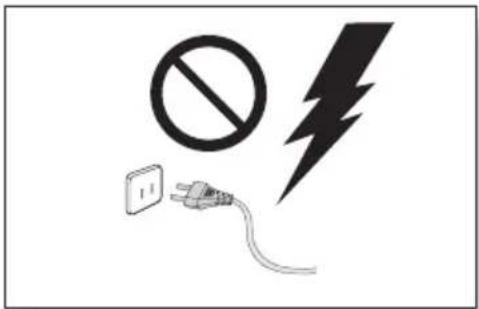
Za vreme grmljavine izvucite mrežni utikač iz utičnice. Pikovi napona zbog grmljavine mogu oštetiti uređaj.
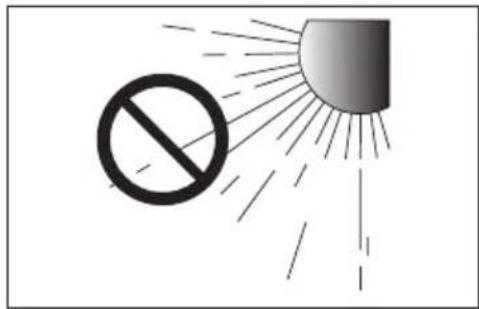
Ne izlažite uređaj direktnom sunčevom zračenju ili drugim izvorima toplote. To može da dovede do pregrevanja i kvara uređaja.
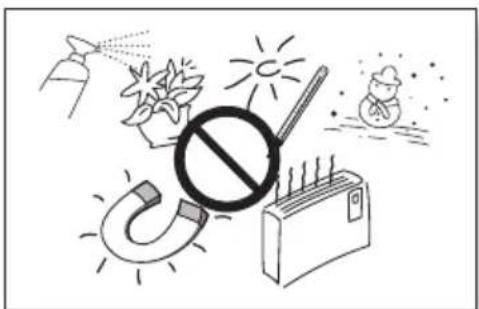
natural_image
Illustration of various symbols including a prohibition sign, sun, thermometer, and money bag (no text or labels)Baterije koje se koriste sa ovim proizvodom sadrže hemikalije koje su štetne po okolinu. Ne stavljajte baterije u kućni otpad. Nemojte odlagati baterije u vatru. Nemojte kratkospajati, rastavljati niti previše zagrevati baterije. U slučaju nepravilne zamene baterija postoji opasnost od eksplozije. Baterije zamenite isključivo novim baterijama istog tipa.

UPOZORENJE, NE GUTATI BATERIJU, OPASNOST OD HEMIJSKIH OPEKOTINA,
[Daljinski upravljač isporučen uz] Ovaj proizvod sadrži dugmetastu bateriju.
Ako se dugmetasta baterija proguta, ona može izazvati ozbiljne unutrašnje opekotine za samo 2 sata što može dovesti do smrti. Nove i korišćene baterije držite van domašaja dece. Ako se odeljak za
bateriju ne zatvara čvrsto, prekinite da koristite proizvod i držite ga van domašaja dece. Ako mislite da su baterije možda progutane ili da se nalaze unutar bilo kog dela tela, potražite hitnu medicinsku pomoć.
SADRŽAJI
2 POČETAK
2 Sigurnosne informacije
5 Sta sadrži pakovanje
6 OPISI
6 Prednja / Desna tabla
7 Zadnja / Donja ploča
8 Daljinski upravljač
11 INSTALACIJA
11 Instaliranje Soundbar uređaja
11 Instaliranje zidne konzole
15 Skidanje uređaja Soundbar sa zida
16 POVEZIVANJA
natural_image
Diagram of a mechanical component with a circular component inserted into a base, showing no text or symbols.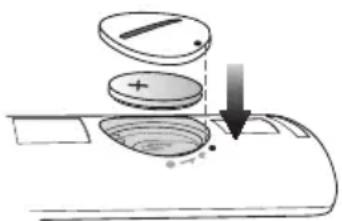
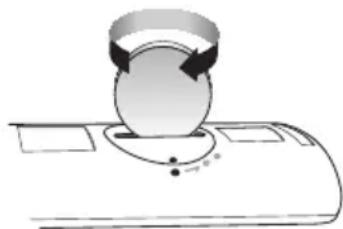
natural_image
Diagram of a mechanical device with a rotating disk and directional arrows, no text or symbols present-
Upotrebite novčić da okrenete poklopac odeljka za baterije daljinskog upravljača u smeru suprotnom od kretanja kazaljki sata da biste ga uklonili, kao što je prikazano na gornjoj slici.
-
Umetnite litijumsku bateriju od 3 V. Prilikom umetanja baterije držite pozitivan (+) pol tako da bude okrenut nagore. Stavite poklopac baterije i poravnajte oznake '•' jednu pored druge, kao što je prikazano na gornjoj slici.
-
Upotrebite novčić da okrenete poklopac odeljka za baterije u smeru kretanja kazaljki sata do kraja, kako biste ga pričvrstili.
INSTALIRANJE SOUNDBAR UREĐAJA
INSTALIRANJE ZIDNE KONZOLE
▶Mere predostrožnosti za instaliranje
natural_image
Diagram of a mechanical assembly with a lever and gear, showing motion direction (no text or symbols)natural_image
3D mechanical assembly diagram showing a lever and base mount (no text or symbols)- Pomoću dva Zavrtanj (M4 x L12) pričvrstite Levi nosač za montažu na zid i desni za donji deo uređaja Soundbar. U cilju pravilne montaže, obavezno poravnajte izbočine na uređaju Soundbar sa otvorima na nosačima.

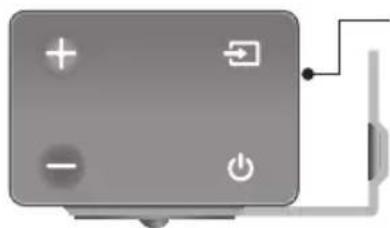
natural_image
Gray control panel with four function buttons (no text or symbols visible)Zadnja strana uređaja Soundbar
natural_image
Simple line drawing of a rectangular object with two circular features on top, no text or symbols present.Desni nosač za zid
Levi nosač za zid
- Levi i desni nosač su različitog oblika. Pozicionirajte ih pravilno.
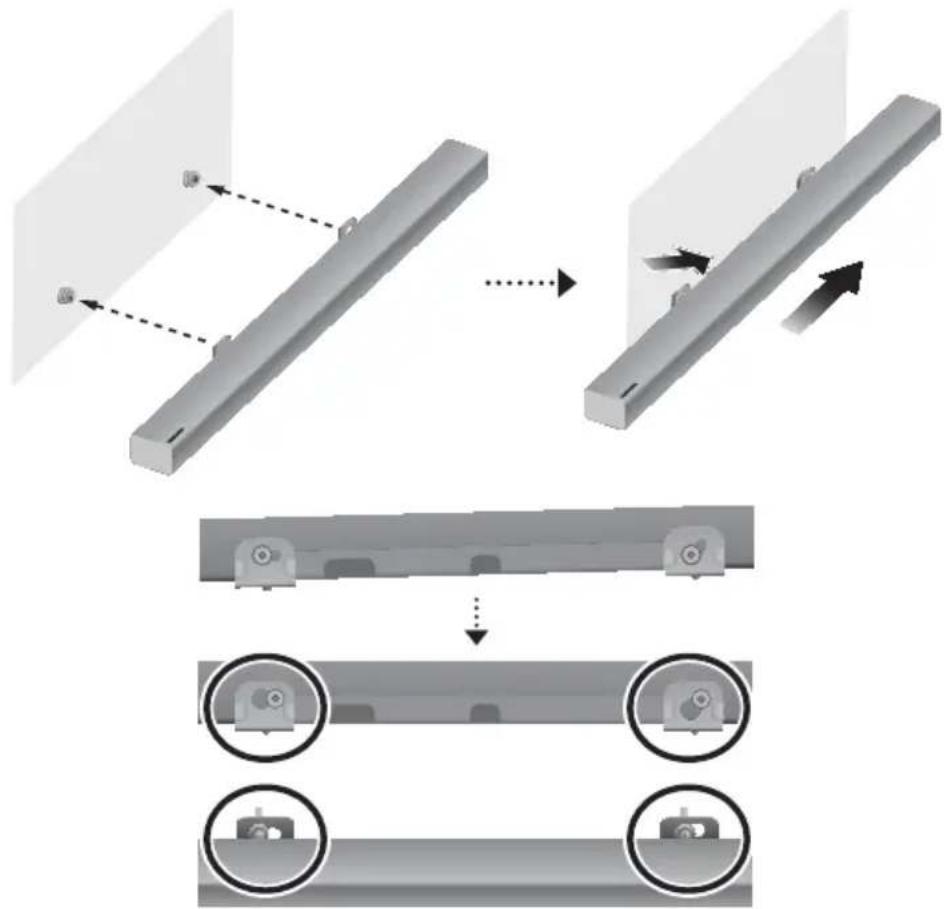
flowchart
graph TD
    A["Component 1: Linear assembly with dashed lines indicating alignment"] --> B["Component 2: Reformed assembly with solid lines indicating assembly"]
    B --> C["Assembly of two parts: one with a circular arrow pointing to the second, and another with a circular arrow pointing to the third"]
- Postavite uređaj Soundbar sa pričvršćenim Nosača za montažu na zid tako što ćete okačiti Nosača za montažu na zid na Zavrtanj držača na zidu.

- Malo nagnite uređaj Soundbar da biste stavili glave oba Zavrtanj držača u otvore na Nosača za montažu na zid. Gurnite uređaj Soundbar u smeru strelice da biste proverili da li su obe strane dobro pričvršćene.
SKiDanje uređaja SounDBar Sa ziDa
- Da biste odvojili uređaj Soundbar od nosača za zid, gurnite ga u smeru strelice, a zatim povucite od zida kao što je prikazano.
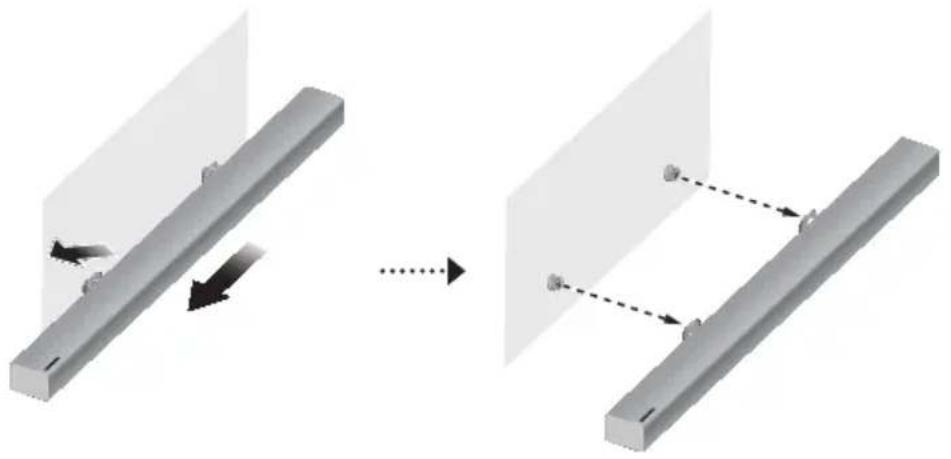
natural_image
Diagram showing a mechanical assembly before and after transformation, with no visible text or symbols
- Kablove za napajanje glavnog uređaja i subwoofer zvučnika priključite u AC zidnu utičnicu.
- Malim šiljatim predmetom pritisnite taster iD SeT na zadnjoj strani subwoofera i držite ga pritisnutim 5 sekundi.
- Indikator STANDBY je isključen, a indikator LINK (plava LED dioda) brzo treperi.
- Dok je glavni uređaj isključen (u modu STANDBY), pritisnite taster (lsklj. zvuk) na daljinskom upravljaču i držite ga pritisnutim 5 sekundi.
- Na displeju Soundbar uređaja se pojavljuje poruka iD SeT.
-
Da biste završili povezivanje, uključite napajanje glavnog uređaja dok plava LED dioda subwoofer zvučnika treperi.
-
Glavni uredaj i subwoofer su sada povezani (konektovani).
- Indikator veze (plava LED lampica) na sabvuferu treba neprekidno da svetli, a ne da treperi.
- Ako plavi indikator veze ne svetli neprekidno, povezivanje nije uspešno. Isključite glavni uređaj i ponovo počnite od koraka 2.
- Možete uživati u boljem zvuku sa bežičnog subwoofer zvučnika ako izaberete efekat zvuka. (Pogledajte stranu 8.)

- Pre nego što pomerite ili instalirate ovaj proizvod, proverite da li je isključeno napajanje i iskopčajte kabl za napajanje.
- Ako je glavni uređaj isključen, bežični sabvufer će biti u režimu pripravnosti, a crveni STANDBY LED indikator na prednjem delu će odmah početi da trepće. (Nema plavog LED indikatora.)
- Ako koristite uređaj koji koristi istu frekvenciju (2,4GHz) kao i Soundbar uređaj u blizini Soundbar uređaja, smetnje mogu izazvati određeno prekidanje zvuka.
- Domet prenosa radio talasa je oko 10 m, ali to može da varira u zavisnosti od vaše radne sredine. Ako se između glavne jedinice i bežičnog prijemnog modula nalazi armirani ili metalni zid, sistem možda uopšte neće funkcionisati zato što radio talasi ne mogu da prodru kroz metal.
- Ako glavni uređaj ne uspostavi bežičnu vezu, pratite korake od 1 do 5 na prethodnoj strani da biste ponovo podesili vezu između glavnog uređaja i bežičnog subwoofer zvučnika.

- U bežični subwoofer zvučnik ugrađena je bežična prijemna antena. Držite uređaj dalje od vode i vlage.
- Da obezbedite optimalno slušanje, pobrinite se da prostor oko lokacije bežičnog subwoofer zvučnika bude čist, bez ikakvih prepreka.
STATUS LED INDIKATORSKE LAMPICE NA NISKOTONCU
| LED Status | Opis Razrešenje | ||
| Crvena Uključena | Stanje pripravnosti (sa glavnom jedinicom uređaja Soundbar isključenom) | Proverite napajanje glavne jedinice uređaja Soundbar | |
| Veza nije uspostavljena | Povežite ponovo (pogledajte uputstva za ručno povezivanje u korisničkom uputstvu) | ||
| Plava | Uključena Uspešno povezano (normalan rad) - | ||
| Treperi | Stanje pripravnosti (sa glavnom jedinicom uređaja Soundbar isključenom) | Proverite napajanje glavne jedinice uređaja Soundbar | |
| Veza nije uspostavljena | Povežite ponovo (pogledajte uputstva za ručno povezivanje u korisničkom uputstvu) | ||
| Crvena i plava Treperi Kvar Obratite se korisničkom centru. | |||
POVEZIVANJE SA TV UREĐAJEM

- Važno: pre nego što počnete, stavite baterije u daljinski upravljač. Uputstva se nalaze na str. 10.
POVEZIVANJE SA TELEVIZOROM POMOĆU DIGITALNOG OPTIČKOG KABLA
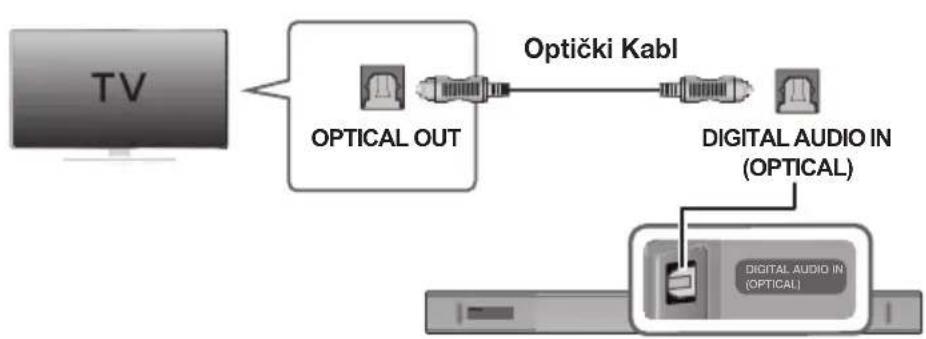
flowchart
graph LR
    TV["TV"] -->|Optical OUT| OpticalOut["Optical OUT"]
    OpticalOut -->|Optički Kabl| DigitalAudioIn["Digital Audio IN (OPTICAL)"]
    DigitalAudioIn -->|Optical| DigitalAudioInIn["Digital Audio IN (OPTICAL)"]
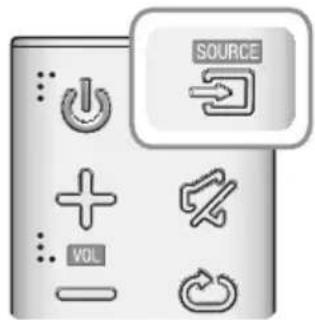
- Povežite konektor DIGITAL AUDIO IN (OPTICAL) na uređaju Soundbar sa konektorom OPTICAL OUT na televizoru koristeći digitalni optički kabl.
- Pritisnite dugme → na desnoj strani uređaja Soundbar ili dugme SOURCE na daljinskom upravljaču da biste izabrali režim D.IN.
▶ Auto Power Link
Ako ste glavni uređaj povezali sa televizorom pomoću digitalnog optičkog kabla, podesite funkciju automatskog uključivanja na ON (Uključeno) da bi se Soundbar uređaj automatski uključio kada uključite televizor.
- Povežite uređaj Soundbar sa televizorom koristeći digitalni optički kabl.
- Pritisnite dugme → na desnoj strani uređaja Soundbar ili dugme SOURCE na daljinskom upravljaču da biste izabrali režim D.IN.
- Pritisnite dugme ◀ na daljinskom upravljaču 5 sekundi da biste uključili ili isključili funkciju Auto Power Link.

natural_image
Gray rectangular button with control icons including plus, minus, refresh arrow, and power symbol (no text or numbers)| Mod ulaza Displej | |
| Optički digitalni ulazARC (HDMI IZLAZ) ulaz | D.IN |
| AUX ulaz | AUX |
| HDMI ulaz | HDMI |
| BLUETOOTH režim | BT |
| TV SoundConnect | TV |
FUNKCIJA AUTO POWER DOWN
POVEZIVANJE SOUNDBAR UREĐAJA SA MREŽOM
Na vašem pametnom uređaju izaberite aplikaciju Samsung Multiroom. Pratite uputstva na ekranu vašeg pametnog uređaja.
Manufactured under licence from Dolby Laboratories. Dolby, Dolby Audio and the double-D symbol are trademarks of Dolby Laboratories.

dts
2.0 Channel
Za DTS patente, pogledajte http://patents.dts.com. Proizvedeno pod licencom kompanije DTS Licensing Limited. DTS, simbol, kao i DTS i simbol zajedno su registrovani zaštitni znaci, a DTS 2.0 Channel je zaštitni znak kompanije DTS, Inc. © DTS, Inc. Sva prava zadržana.
HDMI
Pojmovi HDMI, High-Definition Multimedia Interface i HDMI logotip su zaštitni znaci ili registrovani zaštitni znaci kompanije HDMI Licensing LLC u Sjedinjenim Američkim Državama i drugim zemljama.
Bežični modeli (uključujući frekvenciju 5.15 GHz – 5.35 GHz)
Samsung Electronics ovim izjavljuje da je ova oprema usaglašena sa suštinskim zahtevima i drugim relevantnim odredbama direktive 1999/5/EC.
Zvaničnu Izjavu o usaglašenosti možete naći na adresi http://www.samsung.com. Idite na Podrška > Traži podršku za proizvod i unesite naziv modela.
natural_image
Illustration of various symbols including a prohibition sign, sun, magnet, and a money bag (no text or labels)natural_image
Diagram of a mechanical or electronic component with a circular component and a curved base, no visible text or symbols.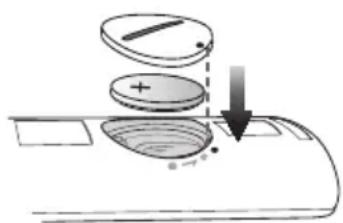
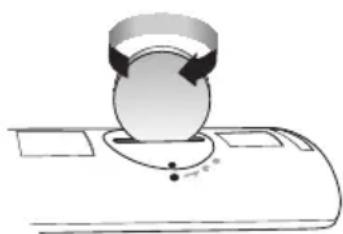
natural_image
Diagram of a mechanical device with a circular component and directional arrows, no visible text or symbols-
Použite vhodnú mincu, aby ste otočili kryt priečinka na batérie dial'kového ovládania proti smeru otáčania hodinových ručičiek a mohli ho odpojit' tak, ako je zobrazené na vyššie uvedenom obrázku.
-
Vložte 3V lítiovú batériu. Pri vkladaní batérie sa uistite, že kladný (+) pól smeruje nahor. Umiestnite kryt batérie a zarovnajte značky '•' vedl'a seba podl'a znázornenia na obrázku.
-
Kryt priečinka na batérie dial'kového ovládania upevnite na svojom mieste otáčaním vhodnou mincou až do krajnej polohy.
INŠTALÁCIA ZARIADENIA SOUNDBAR
INŠTALÁC IA STENOVEJ MONTÁŽNEJ SÚPRAVY
natural_image
Diagram of a mechanical assembly with a lever and gear, showing motion direction (no text or symbols)natural_image
3D mechanical assembly diagram showing a lever and base mount (no text or symbols)natural_image
Simple grayscale illustration of three rectangular objects with abstract internal patterns, no text or symbols present.flowchart
graph TD
    A["Component 1: Linear assembly with dashed lines indicating alignment"] --> B["Component 2: Disassembly with solid lines and arrows indicating movement"]
    B --> C["Final assembled component with circular insets showing mechanical parts"]
natural_image
Diagram showing a structural change from a beam with directional arrows to a final beam with dashed connection points (no text or symbols)
PRIPOJENIE ZARIADENIA SOUNDBAR K SIETI
Manufactured under licence from Dolby Laboratories. Dolby, Dolby Audio and the double-D symbol are trademarks of Dolby Laboratories.


2.0 Channel
natural_image
Illustration of a prohibition symbol over a magnet, sun, and cartoon character (no text or symbols)① Gumb +/ (Glasnost)
HRBTNA/SPODNJA PLOŠČA
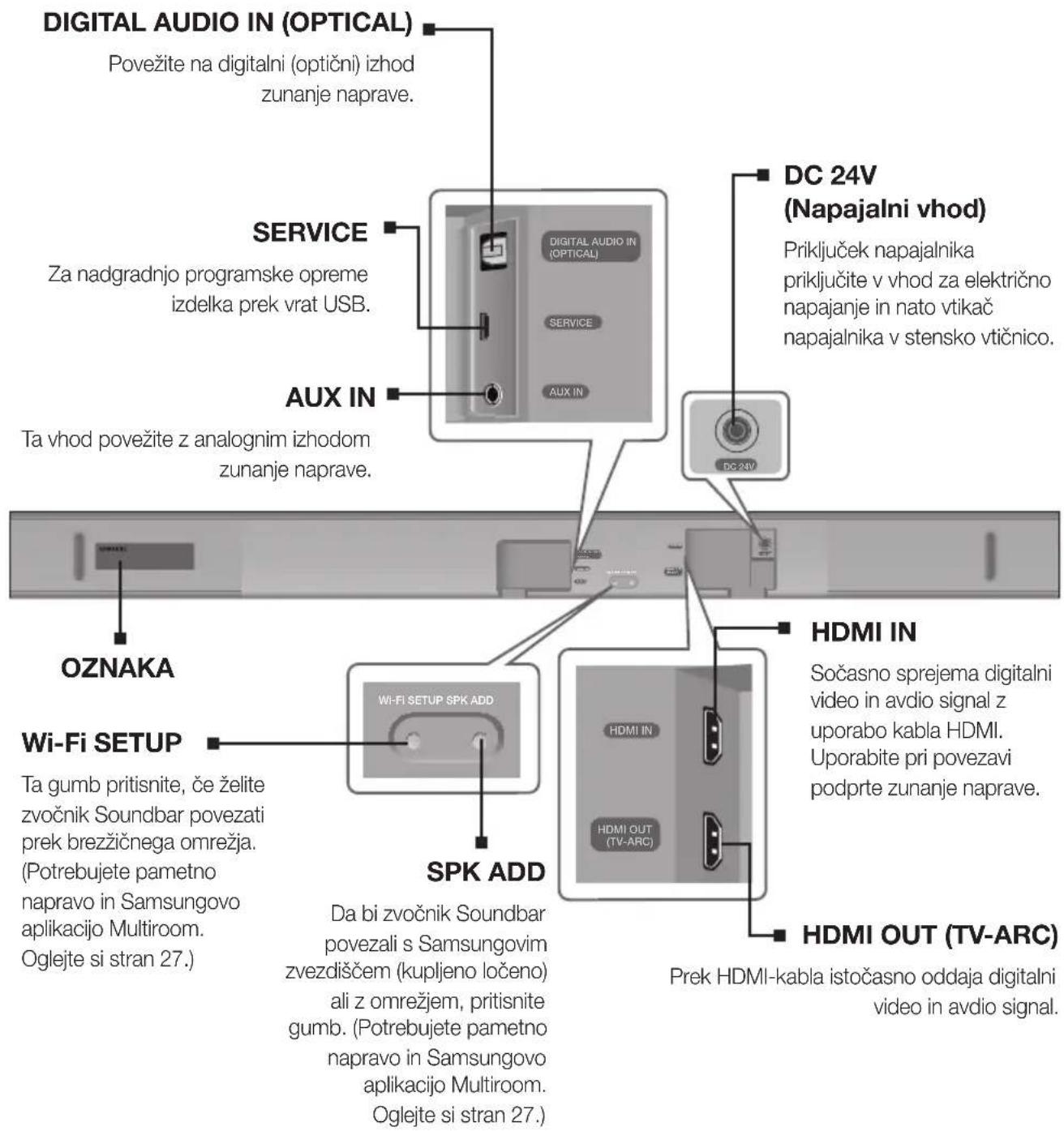
natural_image
Diagram of a mechanical component with a circular component inserted into a curved base (no text or symbols)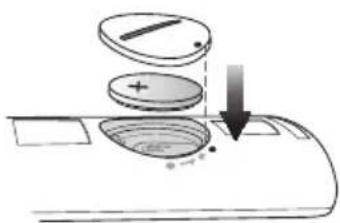
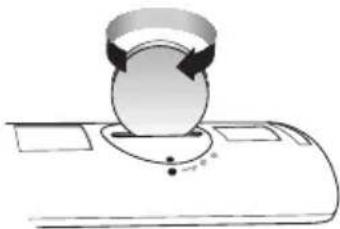
natural_image
Diagram of a mechanical or electrical component with circular components and directional arrows, no visible text or symbolsnatural_image
Diagram of a mechanical component with directional arrows indicating motion or force (no text or symbols)SLV
- Vijak (ni priložen) potisnite skozi Vijak nosilca in nato oba vijaka čvrsto privijte v luknjo podpornega vijaka.
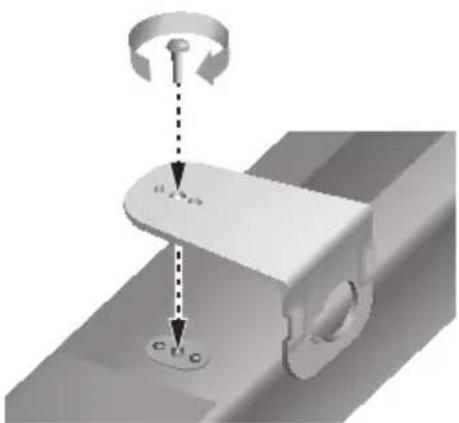
natural_image
3D mechanical assembly diagram showing a lever and pivot point (no text or symbols)- Uporabite dva Vijak (M4 x L12), da privijete oba Stenskega nosilca L in D na spodnji del zvočnika Soundbar. Za ustrezno prileganje se prepričajte, da poravnate izbokline na zvočniku Soundbar z luknjami na nosilcih.

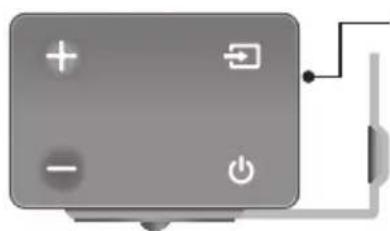
natural_image
Gray control panel with four function buttons (no text or symbols visible)Zadnja stran zvočnika Soundbar
natural_image
Pure electrical circuit lines without any symbolsStensko držalo LStensko držalo D
- Levo in desno držalo sta različnih oblik. Prepričajte se, da ste ju pravilno obrnili.
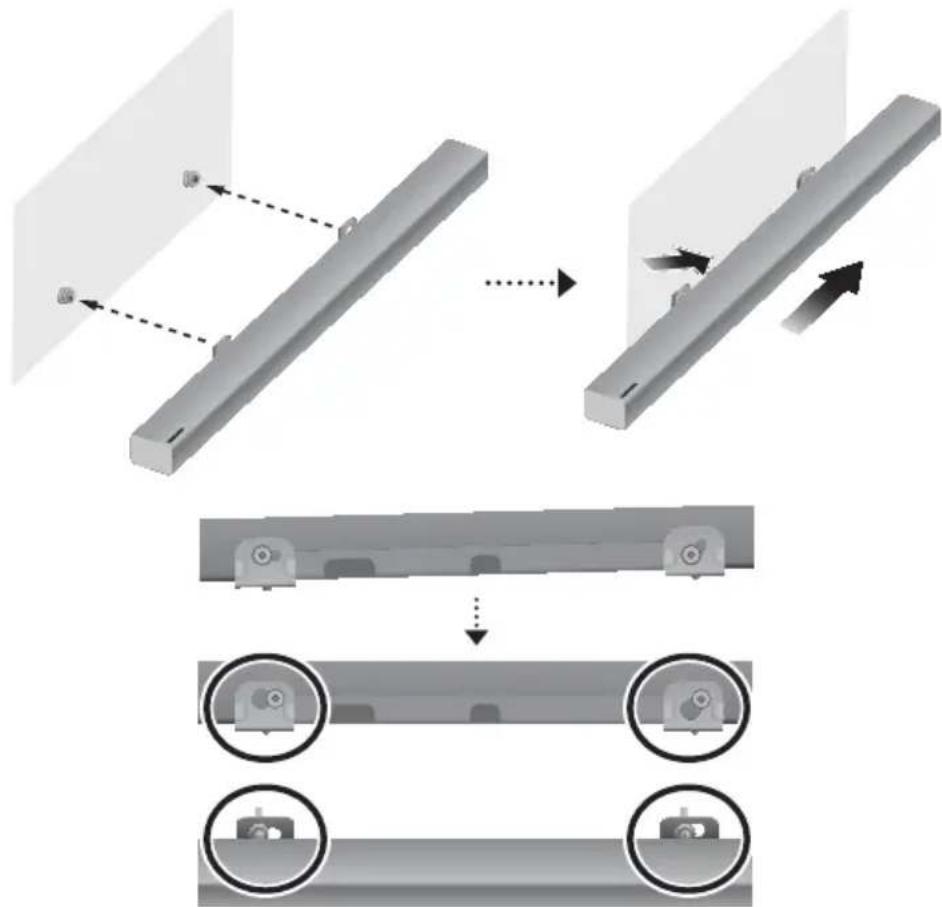
flowchart
graph TD
    A["Component 1: Linear assembly with dashed lines indicating alignment"] --> B["Component 2: Disassembly with solid lines and arrows indicating movement"]
    B --> C["Final assembly: two circular components on a beam with one end marked"]
    style A fill:#f9f,stroke:#333
    style B fill:#ccf,stroke:#333
    style C fill:#cfc,stroke:#333
- Zvočnik Soundbar namestite s priloženim Stenskega nosilca, tako da stenski nosilec obesite na Vijak nosilca na steni.

- Zvočnik Soundbar rahlo nagnite, da vstavite obe glavi Vijak nosilca v luknji Stenskega nosilca. Zvočnik Soundbar potisnite v smeri puščice, da zagotovite, da sta obe strani čvrsto pritrjeni.
oDstranJEVanJE zVoČniKa soUnDBar s stEnE
natural_image
Diagram showing a mechanical assembly before and after transformation, with no visible text or symbols.
POVEZAVA ZVOČNIKA SOUNDBAR Z OMREŽJEM
Na pametni napravi izberite aplikacijo Samsung Multiroom. Sledite navodilom na zaslonu pametne naprave.
V aplikaciji Samsung Multiroom so na voljo spodnje funkcije.
Manufactured under licence from Dolby Laboratories. Dolby, Dolby Audio and the double-D symbol are trademarks of Dolby Laboratories.

dts
2.0 Channel
Patente za tehnologijo DTS najdete na http://patents.dts.com. Izdelano po licenci DTS Licensing Limited. Ime & oznaka DTS, navedena skupaj ali ločeno, sta registrirani blagovni znamki, DTS 2.0 Channel pa je blagovna znamka družbe DTS, Inc. © DTS, Inc. Vse pravice pridržane.
HDMI

- SAFETY INFORMATION
- Safety WarningS
- CaUtiOn
- PreCaUtiOnS
- CONTENTS
- GETTING STARTED
- DESCRIPTIONS
- INSTALLATION
- CONNECTIONS
- FUNCTIONS
- TROUBLESHOOTING
- APPENDIX
- WHAT'S INCLUDED
- BEFORE READING THE USER'S MANUAL
- ▶Icons used in this manual
- ② (Source) Button
- ③ (Power) Button
- REAR / BOTTOM PANEL
- REMOTE CONTROL
- SOURCE
- Mute
- Repeat
- Skip Forward
- Bluetooth POWER
- ((o)) SOUND
- OFF - ANYNET+, ON - ANYNET+
- OFF - POWER LINK, ON - POWER LINK
- SOUND EFFECT
- \* DRC (Dynamic Range Control)
- Power
- Volume
- Play / Pause
- Skip Back
- SOUND CONTROL
- ▶Controlling the Soundbar using Your TV Remote Control
- INSTALLING THE BATTERY IN THE REMOTE CONTROL
- INSTALLING THE SOUNDBAR
- INSTALLING THE WALL MOUNT
- ▶ Installation Precautions
- Right end of Soundbar
- DetaCHing tHe SOUnDBar frOM tHe WaLL
- CONNECTING THE SUBWOOFER
- COnneCting tO tHe SUBWOOfer aUtOMatiCaLLy
- COnneCting tO tHe SUBWOOfer ManUaLLy
- CONNECTING TO A TV
- CONNECTING TO A TV USING A DIGITAL OPTICAL CABLE
- ▶ Auto Power Link
- CONNECTING TO A TV USING AN HDMI (DIGITAL) CABLE
- TV SOUNDCONNECT
- ▶ Using the Bluetooth POWER On function
- CONNECTING TO EXTERNAL DEVICES
- OPTICAL OR ANALOGUE AUDIO CABLE
- ▶ AUX Cable
- ▶Optical Cable
- HDMI CABLE
- INPUT MODE
- BLUETOOTH
- TO CONNECT THE SOUNDBAR TO A BLUETOOTH DEVICE
- BLUETOOTH POWER ON (BLUETOOTH POWER)
- TO DISCONNECT THE BLUETOOTH DEVICE FROM A SOUNDBAR
- TO DISCONNECT THE SOUNDBAR FROM A BLUETOOTH DEVICE
- ▶More about Bluetooth
- USING THE MULTIROOM APP
- BEFORE YOU BEGIN
- Requirements:
- INSTALLING THE SAMSUNG MULTIROOM APP
- ▶Android or iOS
- ▶ Launching the Samsung Multiroom App
- CONNECTING THE SOUNDBAR TO YOUR NETWORK
- USING THE NETWORK STANDBY ON FUNCTION
- SOFTWARE UPDATE
- UPDATING WITH USB
- ▶ Updating Procedure
- ▶If UPDATE was not displayed
- AUTO UPDATE
- TROUBLESHOOTING
- SPECIFICATIONS
- ※ Open Source Licence Notice
- Spotify® Licence
- LICENCES
- HDMI
- Wireless Models (including the frequency of 5.15GHz-5.35GHz)
- Wireless Models (excluding the frequency of 5.15GHz-5.35GHz)
- Contact SAMSUNG WORLD WIDE
- [Correct disposal of batteries in this product]
- (Applicable in countries with separate collection systems)
- Correct Disposal of This Product (Waste Electrical & Electronic Equipment)
- СВЪРЗВАНЕ НА SOUNDBAR КЪМ МРЕЖАТА ВИ
- ③ (ta uključivanje) Gumb
- SPAJANJE SUBWOOFERA
- auToMaTSKo poVeziVanje Sa SuBWooferoM
- POVEZIVANJE UREĐAJA SOUNDBAR S MREŽOM
- INSTALACE PŘÍSTROJE SOUNDBAR
- INSTALACE DRŽÁKU NA ZEĐ
- PŘIPOJENÍ PŘÍSTROJE SOUNDBAR K SÍTI
- ANSCHLIESSEN DER SOUNDBAR AN IHR NETZWERK
- soundbaRi eeMaLdaMine seinaLt
- SOUNDBARI ÜHENDAMINE OMA VÖRKU
- LITSENTSID
- ③ Bouton (Alimentation)
- CONNEXION DE LA SOUNDBAR À VOTRE RÉSEAU
- A SOUNDBAR CSATLAKOZTATÁSA A HÁLÓZATHOZ
- SISTEMAS SOUNDBAR SAVIENOJUMA AR TIKLU IZVEIDOŠANA
- „SOUNDBAR“ GARSIAKALBIO PRIJUNGIMAS PRIE TINKLO
- PODŁĄCZANIE LISTWY SOUNDBAR DO SIECI
- FUNCtIA AUTO POwER DOWN
- CONECTAREA SISTEMULUI SOUNDBAR ÎN RETEA
- SADRŽAJI
- POČETAK
- OPISI
- INSTALACIJA
- POVEZIVANJA
- INSTALIRANJE SOUNDBAR UREĐAJA
- INSTALIRANJE ZIDNE KONZOLE
- ▶Mere predostrožnosti za instaliranje
- SKiDanje uređaja SounDBar Sa ziDa
- POVEZIVANJE SA TV UREĐAJEM
- POVEZIVANJE SA TELEVIZOROM POMOĆU DIGITALNOG OPTIČKOG KABLA
- FUNKCIJA AUTO POWER DOWN
- POVEZIVANJE SOUNDBAR UREĐAJA SA MREŽOM
- Bežični modeli (uključujući frekvenciju 5.15 GHz – 5.35 GHz)
- INŠTALÁCIA ZARIADENIA SOUNDBAR
- INŠTALÁC IA STENOVEJ MONTÁŽNEJ SÚPRAVY
- PRIPOJENIE ZARIADENIA SOUNDBAR K SIETI
- ① Gumb +/ (Glasnost)
- HRBTNA/SPODNJA PLOŠČA
- oDstranJEVanJE zVoČniKa soUnDBar s stEnE
- POVEZAVA ZVOČNIKA SOUNDBAR Z OMREŽJEM
Brand : SAMSUNG
Model : HWK651
Category : Loudspeaker