6688 - Cd player/recorder ELTA - Free user manual and instructions
Find the device manual for free 6688 ELTA in PDF.



User questions about 6688 ELTA
0 question about this device. Answer the ones you know or ask your own.
Ask a new question about this device
Download the instructions for your Cd player/recorder in PDF format for free! Find your manual 6688 - ELTA and take your electronic device back in hand. On this page are published all the documents necessary for the use of your device. 6688 by ELTA.
USER MANUAL 6688 ELTA
[Repars] hirwose hir, die in
Gebau 1
Beware of small pieces and batteries, do not swallow them. It may be hazardous to your health and lead into suffocation. Please, Make sure to keep small devices and batteries out of the reach of children.

Important advice regarding hearing protection Caution: You care for your hearing, and so do we.
Therefore, use caution while using this appliance. Our recommendation: Avoid high volumes.
Children should be supervised while using headphones; make sure that the appliance is not set to high volume.
Caution!
High volumes may cause irreparable damage to children's ears.

NEVER let allow anyone, especially children, to put objects into the holes, slots or openings on this devise. This may lead into death due to electric shock. The device must only be opened by a qualified assistant.

Only use the appliance for its intended purpose.
This device may only be used in housings and business premises.

Please keep this instruction manual for further reference

Instructions on environment protection
Do not dispose of this product in the usual household garbage at the end of its life cycle; hand it over at a collection point for the recycling of electrical and electronic appliances. The symbol on the product, the instructions for use or the packing will inform about the methods for disposal.
The materials are recyclable as mentioned in its marking. By recycling, material recycling or other forms of re-utilization of old appliances, you are making an important contribution to protect our environment.
Please inquire at the community administration for the authorized disposal location.

Do not obstruct the ventilation of the device. Make sure, that no curtains, newspapers, furniture or any other type of object are blocking the ventilation system of the apparatus. The ventilation system must be clear of objects at all times! Overhealing may lead into serious damage of the device and reduce its performance and lifespan.

Heat and warmth
Do not expose the appliance to direct sunlight. Make sure that the appliance is not subject to direct heat sources such as heaters or open fire. Make sure that the ventilation slots of the appliance are not covered.

Moisture and cleaning
This appliance is not waterproof. Do not immerse player in water. Do not allow player to come in contact with water. If water gets inside the player it may cause serious damage. Do not use cleaning agents that contain alcohol, ammoniac, benzene or abrasives as these could damage the player. For cleaning, use a soft, moistened cloth.

Professional recycling
Batteries and packaging should not be disposed of in the trash. Batteries must be handed over to a collection centre for used batteries. Separating disposable packaging materials is ecologically friendly.
SAFETY INSTRUCTIONS
- READ INSTRUCTIONS - All the safety and operating instructions should be read before the unit is operated.
- RETAIN INSTRUCTIONS - The safety and operating instruction should be retained for future reference.
- HEED WARNINGS - All warnings on the unit and in the operating instructions should be adhered to.
- FOLLOW INSTRUCTIONS - All operating instructions should be followed.
- WATER AND MOISTURE- The appliance should not be used near water, for example, near a bathtub, washbowl, kitchen sink, laundry tub, swimming pool or in a wet basement.
- VENTILATION - Openings in the device serve its proper ventilation, are necessary for the operation and prevent overheating. The unit should be situated so that its location or position does not interfere with its proper ventilation. Do not place on bed, sofa, rug or similar surface that may block the ventilation openings, in a built-in installation, such as a bookcase or cabinet that may impede the flow of air through the ventilation openings.
- HEAT - The unit should be situated away from heat sources such as radiators, stoves, or other appliances (including amplifiers) that produce heat.
- POWER SOURCE - The unit should be connected to power supply only of the type described in the operating instructions or as marked on the unit.
- POWER CORD PROTECTION - Power supply cords should be routed so that they are not likely to be walked on or pinched by items placed upon or against them.
- NON-USE - During longer periods of non-use please disconnect from mains power supply and antenna.
- OBJECT AND LIQUID ENTRY - Care should be taken so that objects do not fall and liquids are not spilled into the enclosure through openings.
- DAMAGE REQUIRING SERVICE - The unit should be serviced by qualified service personnel when:
a. The power-supply cord or plug has been damaged.
b. Objects have fallen into, or liquid has been spilled into the unit enclosure.
c. The unit has been exposed to rain or moisture.
d. The appliance has been dropped, or the enclosure damaged. Only use controls and adjustments as specified in the manual.
e. The unit does not appear to operate normally.
f. The device displays serious changes in its performance
13. SERVICING - The user should not attempt to service the unit beyond that described in the user operating instructions. All other servicing should be referred to qualified service personnel.
14. CLEANING - Disconnect from mains power supply before cleaning. Do not use liquid or spray cleaners, only use a damp cloth. Follow the care and maintenance instructions in this manual.
15. LIGHTNING - During lightning and longer periods of non-use please disconnect from mains power supply and antenna.
16. SAFETY CHECK - After servicing the unit ask the customer service for a safety check.
17. OVERLOAD - To avoid fire and electric shock do not overload wall outlets and convenience receptacles.
18. ELECTROSTATIC DISCHARGE - Disconnect from mains power supply and remove batteries if unit malfunctions. Reconnect after a short time.
CAUTION
THIS CD PLAYER IS A CLASS I LASER PRODUCT. HOWEVER, THIS CD PLAYER USES A VISIBLE / INAVAILABLE LASER BEAM, WHICH COULD CAUSE HAZARDOUS RADIATION EXPOSURE. BE SURE TO OPERATE THE CD PLAYER CORRECTLY AS INSTRUCTED.
INVISIBLE LASER RADIATION WHEN COVER IS OPEN OR THE SECURITY INTERLOCK
DEFEATED. DO NOT EXPOSE TO BEAM!
DO NOT TOUCH THE LASER LENS.
USE OF CONTROLS OR ADJUSTMENTS OR PERFORMANCE OF PROCEDURES OTHER THAN THOSE SPECIFIED HEREIN MAY RESULT IN HAZARDOUS RADIATION EXPOSURE.
TO REDUCE THE RISK OF FIRE OR ELECTRIC SHOCK AND ANNOYING INTERFERENCE USE ONLY THE RECOMMENDED ACCESSORIES.
SETTING A SAFE VOLUME LEVEL
- If you continually listen to loud music, your hearing gradually adapts to it and gives you the impression that the volume is lower.
What seems normal to you can actually be damaging.
To protect yourself from this, set the volume to a low level. - Increase the volume slowly, until you can hear clearly and without problems.
- Damage to your hearing can be extensive and cannot be reversed.
If you notice a hearing problem, please consult a doctor.
FURTHER INFORMATION
If the device will be used for long periods of time, it will become warm. This is absolutely normal.
- Always close the CD-door to keep the CD drive free from dust. When cleaning, wipe the CD drive compartment with a soft, dry cloth.
- The mechanic parts of the unit contain self-lubricating bearings. Do not oil or lubricate!
- Operate the unit under moderate climate conditions only
Not suitable for children under three years.
CONDENSATION
Condensation may occur when moving the device from a cold to a warm environment. If there is moisture inside the player, it may not operate properly.
Please turn on the power supply and wait about one hour for the moisture to evaporate.
Protect the device from rain and moisture, sand, dust and extreme heat (e.g. in a parked vehicle in summer) and from direct sunlight.
MOVING OF THE DEVICE
- Remove the CD before moving the device.
It is suggested to remove the CD and to turn off the device for periods of non use.
SETTING UP LOCATION OF THE DEVICE
- Avoid vibrations, impact or tilted surfaces as the internal parts may be seriously damaged.
- Do not place heavy objects on the player.
- Never place the player on amplifiers or other devices, which can become hot.
UNPACKING
- Take out carefully the device from the packing and remove all packing materials.
- Keep the packing for further use, if the device must be returned to the customer service.
If you want to dispose the packing material, adhere to the disposal regulations. - Carefully remove the laser lens protection from the CD drive.
POWER SUPPLY
Whenever possible, connect the unit to the mains power supply to conserve battery lifetime. Disconnect the mains plug before inserting the batteries.
BATTERY OPERATION (BATTERIES NOT INCLUDED)
Open the battery compartment and insert 6 batteries type LR-14, UM-2 or C (preferably Alkaline). Please observe correct polarities which are marked with "+" and "-" in the battery compartment.
For battery operation disconnect the small mains plug at the rear of the unit
When connecting the mains cord the unit is automatically set to mains operation.
BATTERY SAFETY PRECAUTIONS
- Keep balleries away from children and pels.
- Never throw batteries into the fire. Do not expose batteries to fire or other heat sources.
- Battery disposal: exhausted batteries must be properly disposed of and recycled in compliance with all applicable laws. For detailed information contact your local municipality's waste authority.
- Do not mix new and exhausted batteries.
- Do not mix different battery types, such as Alkaline and zinc/carbon. Only use batteries of the same type.
- Remove the batteries when the device will not be used for extended periods of time to prevent damage due to rusted or corroded batteries.
MAINS OPERATION
- Connect the mains power cable to an AC 230V-50Hz wall outlet.
- Operate the unit only with power supply that corresponds with the specifications on the type label.
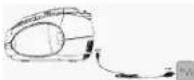
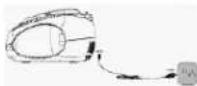
- Insert the smaller plug of the power cord into the AC~jack at the rear. Make sure the plug is completely inserted.
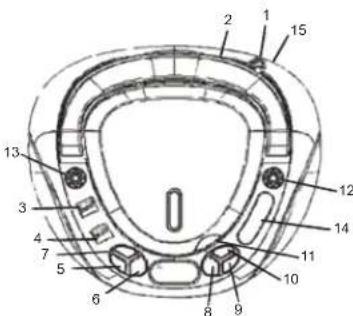
LOCATION OF CONTROLS
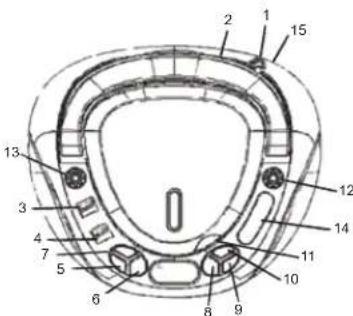
Top View
- Telescopic antenna
- Handle
- Band selector AM/FM Select radios reception between AM and FM
- Function selector CD / RADIO / OFF Select between CD and radio mode; turn the unit off
- SKIP- Return to beginning of tracks; skip to previous track and rewind
-
STOP
-
REPEAT
Select repeat modes - PLAY/PAUSE
- SKIP+
Skip to next track and fast forward
10.PROGRAM
Track sequence - Door CD drive
- TUNING control
- VOLUME MIN/MAX control
- Dial scale
- AC - mains power jack
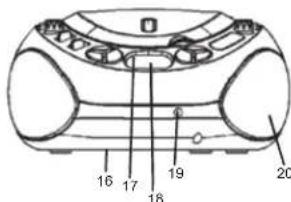
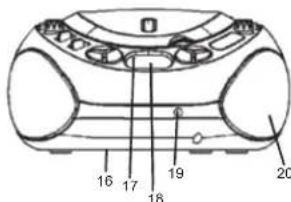
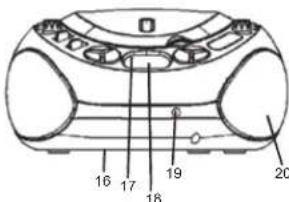
Front View
- Battery compartment (bottom of the unit)
- POWER indicator
18.LCD display - Earphones jack
- Speakers
BASIC OPERATION
On/Off
To avoid unnecessary power consumption, please set function selector to OFF position when the unit is not in use. In ON mode the POWER indicator turns red.
- Select the desired mode with the function selector: RADIO, CD or OFF.
- Set the desired volume with VOLUME MIN / MAX.
- Set the function selector to OFF position to turn off the unit.
On the front of the unit you have an earphones jack for private listening (earphones not supplied). Connect the earphones with a 3.5mm stereo jack. Upon connection the speakers are automatically muted.
RADIO
Recommendations for better reception
FM: Fully extend the telescopic antenna. If the reception signal is too strong (e.g. near a station),
shorten the telescopic antenna.
AM: The unit has a built-in AM antenna; change the position of the unit if reception is poor.
Radio Operation
- Set the function selector to RADIO position.
- Select the desired frequency band with the band selector; FM or AM.
- Tune into your favorite radio station with TUNING control.
- Set the desired volume with VOLUME MIN/MAX.
- Set the function selector to OFF position to turn off the unit.
CD Playback
The CD-player can only read Audio CDs. Do not attempt to play MP3 CD, Data CD or VCD / DVD
discs.
1. Set the function selector to CD position. The display shows - - ^ for a short moment.
2. Open the CD compartment manually with the recessed grip.
3. Insert a CD with the label up and close the CD compartment again manually. At first the total number of tracks is displayed for a moment, afterwards the display changes to 01 and playback starts automatically. The corresponding track number is displayed.
4. In case playback does not start (depending on the disc), please press PLAY / PAUSE to start playback of the first track manually.
5. Press PLAY / PAUSE to pause playback; press again to continue playback. In pause mode flashes.
6. Press STOP to stop playback; the display again shows the total number of tracks.
Notes: CD playback is also stopped when:
a. opening the CD compartment;
b. sliding the function selector to RADIO or OFF positions;
c. all tracks on the CD have been played.
Fast Forward And Rewind
Press and hold SKIP+ or SKIP- to access fast forward or rewind functions through the track to search for a certain position. The volume is decreased.
Program Playback
Up to 20 tracks can be programmed in your desired sequence; any track can be programmed more than once.
- Before programming, please press STOP and MODE. The display shows P01 and PROGRAM, 00 and PROGRAM flash on the display.
- Select the first desired track with SKIP + or SKIP -
- Save the track with PROGRAM. 00 and PROGRAM flash on the display. Now select the next track.
- Repeat steps 2 and 3 to program further tracks, the maximum number of tracks is 20.
- Press PLAY / PAUSE to start playback of the tracks in your desired sequence.
In program mode the track number and are displayed and PROGRAM flashes.
Delete Program
Follow these steps to delete the program:
1. Open the CD compartment
2. Set the function selector to RADIO or OFF positions.
3. Press STOP.
Repeat Modes
Several repeat modes are available on the unit; press REPEAT to access and select.
1. Press REPEAT once to repeat the current track. The display shows REPEAT besides track number and
2. Press REPEAT twice to repeat the disc in its original sequence. The display shows ALL REPEAT besides track number and
3. Press REPEAT again to return to normal playback mode. The display shows again track number and
4. You may also use the repeat function during program playback. In program mode press REPEAT once to repeat the current track or press REPEAT twice to repeat the complete program. The display shows besides track number and flashing PROGRAM also REPEAT or ALL REPEAT.


HANDLING AND CLEANING OF DISCS
Handling of cd's
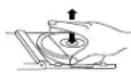
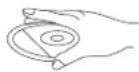
- Remove the CD from its cover.
- Do not touch on the surfaces.
Do not attach stickers on CD's and do not write on them.
Do not bend CD's
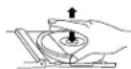
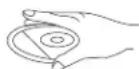

Storage
- Always store CD's in their cover.
- Do not subject to direct sunlight, high temperatures, humidity or dust.
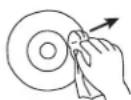
Cleaning CD's
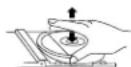
Clean CD's with a soft cloth.
Clean CD's from the centre to the edge.
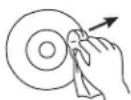
FROM THE CENTRE TO THE EDGE
CORRECT

INCORRECT
TROUBLESHOOTING
If you experience any problem with this system, review the list below before you contact the customer service.
WARNING: Never open the device. Always refer service or maintenance to authorized customer service personnel.
| SYMPTOM | POSSIBLE CAUSE | SOLUTION |
| GENERAL | ||
| No sound | Volume is set too low. | Adjust the volume. |
| Batteries exhausted. | Change the batteries. | |
| Batteries inserted incorrectly. | Observe polarity. | |
| Mains cable not connected. | Connect mains cable correctly. | |
| RADIO | ||
| Poor reception | Weak signal. | Adjust antenna: FM: Telescopic antenna. AM: adjust unit. |
| Interferences by other appliances (TV sets, VCRs, computers, etc.). | Keep distance to other appliances. |
| CD CD skips | CD dirty or damaged. | Replace or clean the disc. |
| Display | No CD inserted. CD is dirty or damaged. Condensation in laser lens. | Insert a CD, CD-R or CD-RW. Replace or clean the CD. Wait until the laser lens is completely dry (approx. 1 hour). Finalize the CD-R/RW. |
| CD-R / RW is empty or not finalized. |
SPECIFICATIONS
General
Power Supply AC 230V ~ 50Hz
DC 9V (6 batteries type LR14 / U122 / C, 1.5V)
(batteries not supplied)
Power Consumption 11Watt
Frequency range AM 525 - 1615kHz
FM87.5-108MHz
Audio
Speaker impedance 8 Ohm
Dimensions approx 239 x 205 x 121 mm
Weight approx 1,4 kg
SUBJECT TO CHANGE WITHOUT PRIOR NOTICE.
MODELL 6688
RADIO STÉRÉO DESIGN AVEC LECTEUR CD
MANUELD'UTILISATION
INSTRUCTIONS RELATIVES À LA SECURITÉ
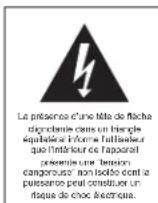
ATTENTION
RISQUE DE CHOC ELECTRIQUE NE PAS OUIVER
ATTENANCE: INV. NO. KELLOULL, LL
ISQUEE DE CHOC ELECTRICNE, PAB
RETIRETE CAPOT (OU L'ARRÊRE)
LINTICULER / APAPPELE/ILN
CONTENT AUCHE SEINE POUCHANT
ETRÉS PARNÉP PAR L'UTILISATUR.
CONPER LES RÉPARATIONS À UN
SUVIVALO DE MANNANÉC QUALITE.

evidence, or casual guess that theulcently magnified compera
constitut in risco de quocions enclinaas as perones.
PRECAUCION
RIESGO DE CHOQUE ELECTRICO
NO AB0H
PICALGAUCION:PARA/LEUCIRLL
SGO DE CHOLES ELECTRICS, NO. 10874 CUBERTA INLAMNEDE
ATRAS, ENCL INTERIOR NOTIAY
PARTES QUE PLEUDAN SERINTENVAS O RERANAS BRC EL
HET APPARAAT VERPLAATSEN
CD CALARLI SIK TASARIMLI STEREO RADYO
KULLANIM KILAVUZU
EMNIYET TALIMATLARI
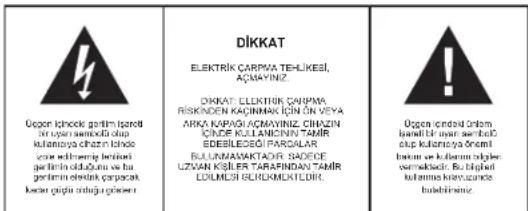
HARYCY BYLGYLER

MANUAL CU INSTRUCTIUNI
INSTRUCTIUNI DE SIGURANTA
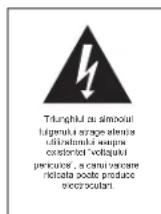
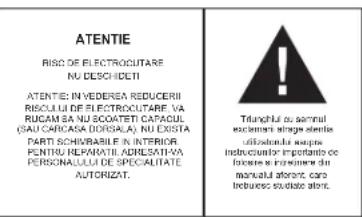
INFORMATII SUPLIMENTARE

Aveti grijia de componentele de dimensionali mici si baterii, nu le inghitti. Eie pot fi extrem de penculoaso putand afectand grav sanatalea si sulocandu-va. Va rugam sa pastrati acste componente si baterille除去 del accessul copilor.

07/2017/CE/LBC/C
08/2017/CE/LBC/C
09/2017/CE/LBC/C
09/2017/CE/LBC/C
09/2017/CE/LBC/C
09/2017/CE/LBC/C
09/2017/CE/LBC/C
09/2017/CE/LBC/C
09/2017/CE/LBC/C
09/2017/CE/LB/SAC
DAJIbHEHWAIHHΦOPMAUHA

OctepaTaeBHebOuHINDeTAnIeBatape,HeHnTaeTInx.3oMoKcBbIbOnAHO DnA Bauero 10OpobBn NOBnEh yUbe. TPOAnyIe PnMHTe MPeBt, HTO6bI MaHneBuNpHbOu Hbataep XpaHNHbC H HeDocTyHOMdTeT MeCte
BaxkhIbe peKoMeHdAaIin OTHocTeJIbHO 3auNTbI cnyXa BHNAMHe:
Bb6epexetcB0nCny,MbTOke.
TOMOTy 6BbTe octOpoxhbln pR noIb3oBaHN daHbIM pRbOpOM. Haua poKoMaHdJaH: NabieraBt BoOnshuPROMcKTH.
DnTdoXnHbHAXoHTbcBnIOI pIMCMOTPMn IINCIOJI3OBAHHaHAYUHKOByEeNTc,TO yCTPOCTBO HcYTAHOBNEHO BA BICOKN yPOBEHB POMKOTN. BHMANHe!
Bolbua rpoMkoCTMOKET npHnHTb HEnonpaHmbl yuepe6 cnyxpyet.

HIKKOrDA HIOI3aONJIe HNKOMY,OCO6bHNO DcTAM,BCABNTBIPpMdtB BOTBepCTHHNUIEHN 3TOPOIN60pa.3TO MOKET pNBEcTN K CMEPTN BCNECTNB NoPAKeHHN3NEKTPnHEcKN TOKM. OTKPbBaTb pN6Op MOKET TONLKBaNNPHIMPOAHHHN NMOUHKN.

INcNb3y3e 30T nPn6oBTOK NO npE2H3AueHHIO. 3OTn Pn6O MoKET ICNcN3oBAtC KTOK B6TOBtBx INH ODFCNBx NOMeEHXRA.
XoAnyctnae,coxApaHnTE 37y INCTpyKUIOI DnAaBHeNHEPOI HcONBO3OBAHINBA KauCTe CTRPABOHNHA.
Hctpykuu no 3aunTe Okpykaoue Cpebl
Ye HtIaM3NpyTae dAanHbR np6pB o KIohBe cpoKa cnKbB MBeCte C o bHaUMy 6b10BaMyTOxOdaAM; npeJDAeIro Eo NIKYc6OpaD IaHnpePabOTKn AnTKPTckCNX INsNkETKPOhHNy TcPOrTb. CmOBH aHnpOyTe, NHCPTPKuIN no NcNOBtobSAHIO INytnAOkua coDEPAxT hINFOPMAUHO cOnOCoE ToYNtuaAIAU
MATEpnaIbnoIbnEneKatIepeBa6OBe, KAK yKa3HaHO MaRkpOBAe. BIAIpoAJaRpeBa6OBeBtO, STOBPHOMYNcNOb8aHNOIeMATEpnaIbON ININbIM CnOc0aB8yTNIIHauzauCtApSbN pRb6oBPeBbBcOByCBAHbN BkPbAD BaaHHTy OKykaHouw.cpeDb.
PONKAYIyNTa,3YHNAI BPODCKOAI ADMHNICPATaunPi PACNONOKHEM CAHQIOHNHOPABAAHbX NPYHKOTB YTNH3AaLI.

He npenrTCTayIte BEHTHNIUINPbIbOpa. 56EaITeL, YTO CNTcEMy BEHTHNIUINPbIbOpa He aakpIbAIOB TAAABBBC, FA3GtB, M06Bn IIN pIPOIMOTI KIOBDOIpyTOI THNCA. CNTcEMA BENTHNIUINPOCTAOHHO DIOKHA BbIc BcBODHOI Pepepepe MOKET PBNIECTK K cepuehHM NOBpEXdHmRnPbIbOpa HCHMHTI ero pONsBODITeHIOCTb IN cPCK Czykbl.

Tenno n BnaXhoCTb
He no3aepraRte npi6bop BOa3eCTBnIO prrmaBHcONHbIHy uYb6dTeB, cTTO np6bop He no3aepraRte BOa3eCTBnIO hctOHTNHKn HnAHPmO, oOBpBRaTeNII INN OTKpIHorO IN. YOCDToBepTEc, YTO BEHTNIAQUMHIIh OTBepCTNa pni6bOp He 3AKbUy

Bnara n ouhctka
DnHnnI np6bpe H DoHOENPONHcMaBMy I H norpykaiTe npeep B oOy. He Oynckaite KOHTAKTNEeep C BOO. EcnB NOA nonaet BHYtpneep, 3TO MOKET NOBneBcepe3hHeNobpekEnHry. He nCOnb3yIte MoIOUme cpeCTBa, codEpaKaunie A1KORoJIb, AMMnK, EAOHNl ANpABAAHBeBE CEueCTBa, NOOCIOYH OH MOrT JNOBPeDIT IIIEEP. DIn OHcCTKNIOH3yTECb MIRKO, YBNXKHHHON TKAHb.

IpopeccnoHaBna nepepa6oTka
Batapei H yNtOKbA HE NOJIKHbY TYNINNPOBATsC BMECTe C OTOXAMM. Batapei DNOJHKhNepeDABATcBueHTOc60NAONIOBAAHbIXbBATae,OTaENHeH
Odnopao3b0xynakoboohyix MaTeepnaoB JaIReTcA 6eBapdHm IINr OkpyKaIOUeI cpeDn.
YKA3AHNIO TEXHNIKBE3ONACHOCTN
1.BHIMMATEJIbHO IPOOHTITE IHCTPYKUIN -BCE YK33AHHN NO TEXKHKE 6E0NACHOTNI pyKOBODCTBO NO KcnnpytauIMdoHNbIbIpoOHTAHbIdo HauaHa NCNOHB0AHnycTPOJCTBA.
2. COXAHPAHITEHPCYKUN-YYAK3AJI NO TEKHIN6E6OANACHOTN H KYPOKOBCTBO NO 3KcnpyataaHONKHHbTbCoxPAHEnI Jnra cnpAknBbSdyumen
3. OGBAUAIANTB BHMAMHE HA NEPYNJPEKDEHIN - BCE PNEPJPNEXHN H A KOPYNCE YCUTPOCTBA IN B PXYBOBDCTO NO EKCNPLATAAAN DQNKHb BuTHPNHTBTO BO BHMAMINE.
4.CNEYIHTEHCHTPKUNM-BBINONHARE BCE HANCAHHBE HCHTPKUMNO 3KCNNYATAUHN
5 BAOI N BFAI -YCTPOICTBO HE DNOXHO IONOINIO3OBATCBAO3E BO3D, HANPMEP, BO3NE BAHHb, paOKOBHNbMbIaBnBnHaK, KXYOHHO PAOKOBHNb, EMKOTCN B DO0N, PnABATEBnHORO 6acceHeA INB C BYOP NOIaJIe.
6. BEHTINIUR - OTBEPTRN B KOPYCE YCTPOJTBa CNYKAT JINBEHNTINIMU; OH NIEOxIDMbIbI InI HOPMAHBOH POBTb YCTPOHCTA, TAK KNPEDOTBPAAUOH O nERpePB. YCTPOCTBO DOnIKHO BtBp PACONIOXeK ToMBAOp3AM, QTOBbI eR MeCTONONOXHe He npENTCTBOBANO IIO GOBNAPHBOH BOHTINIAu. He pACIONIARAE YCTPOCTBOHa XpOBAti, DmBaHo, KOReI MIn DpyTKI NOObHS NIOBEXPHOCTA, IM I BAkX MECTAX KKHXHBNAONKA INI INKdF, rE nOtoK 0BDyKa Upe3 OTBEPTRN BEHTINIAUM BGDet ATPdyDHE.
7. BbICOKAR TEMENPATYPA- yCTPOIACBO JOINKHO paoHONATB OJIAI OT HcOHTHKOB TENNA, TAKIX KAK PAADATOPBo OTONNEHHK, KYOHXHE NIIHTB, INN DpyNX yCTPOIcTB (BKNOVAY CYNINNTEN), KOTOPBE PNOSSBD 60500e KOJIIECTO TENNA.
8. ITOUHMK 3NEKTPONTAHAHR -YCTPOCTBOIOLXHO6bTBIOKINHOHO TONKko K TAKOMY ITOHKNIITAHNAI, TNI KOTOPORO OIMCAH B POKOBQCTBE NO AOKCIIUYATAUNI, NIKo YK3A3AH HA KOPNYCE YCTPOCTBA.
3JUHYPNTAHINH- SHYP 3NFTPOITAHINI DNJIHNK HSHTAN TAKM BOM30,TOB6I ERO HE 93AD8AHI HOAMR,HE NEPDEKIMAN PNDJEMATMNOCTABNNHBMN HA HERO PRN DQN.
19. NEPEPbIBBb PA BAOLE-ecnIyctpoRcTBo HE nCIOJIbEyETcIINTeHbHOB BpEMe, CNEyET OTKIOJUHTbE OEt OTOCTNHOITaTHNIA HAIHTEHNA.
11.PNEMMTbIaXnKIOCTm-CnepyTnoa6oTbTHcO TOM,TObIbHaYctpOCTbHO He nadaH 032HbHIOOMETbA.8OEOOTBIOEeHIOIOIOHOXIOKT
12. EMOH'T NOBPEKDEHNI -YCTPOICTBOIOEJIPTePMOHTy,BbIIOJIHREbIM KBAIINDIOIOBPOAHIIIMNEPCOAIOL,ECIN:
a. NopexdeHbI hyp nnnn nnka 3neKtponTuHa
b. Bhytpk Kopnyca yctopctothe nonann pnpemdtBn nn kdoctb. c.Yc0tpctaoaepnoocpoeaeepnepnoepnoepnepnep
d. YcptroBCTb 60 bo npOeHO, nI6o 6bln noPbEXekrE BOKpNC. IocNt3yTe TOnJIbTe HACTPOBKn H pRyPiNPOBKn, KOTOpRe 6bln yka3aHb D BAHOM PYKOBQCTBE.
e. YCTPOECTBO He dYHKUHOHDyET HOPMaHbHO
f. YcTpoIcTBo DEMOHCTPnPpyET 3HaHTeJIbHbIe I3MeHeHHB CBOeI pOIN3BOUHTeJIbHOCTN.
13. TEXOGCNYKBAHME - nonb0aBteB he Donkhen bIbTaBC6cNyKBaBtDaHHeO tpoiCTBO CbIeBoToro, YTO yka3aHO B HAcToRsiE MpyoKoDBTeNo KcKnpyatauM.Bce DpyrIn Bdu 6cbNyKBAHnD OAnXHbIeKsCBaINHdUPOBaHbMnEpecoHONAH
14. YNCTKA-NepelTAMK, KAKYCHNTBbYCTPORCTBO,OTCGDHNHTAEBOIOTCNTHHINAHNIETHEHCNOPLSYTNEI DAREYCHNTKJXMDKHEI NAP30PONLbHEMOOUINE CPECDCTBA.NCNOPLSYTNEI DARETTOFIOBKNBAHXNYBOCTSOI.CNDEyTe COOTIECTBXYDMIKYAKAANHM,IK3IOKOHBMIBDAHOMPYOKOBIDCTBO
15. rPO3A - 0a epema rpo3a, a taKae B neBdoDnIeHoro nepebBa b eKnpyataum yctpo3BaC, cneJey ot KIOHOATy erO tNCHIOHAeNtroptonTahm n HENTHH.
16. IPOBEPKA BEsONACHOCTN yTOPOCTBA -nocpe mEmoTHaO6cNHyBAHRA yTOPOCTBA, nonpOte cNy6y pAbotbC nKoNYATENMIP oNepBETy BeosonAChOTy yTOPOCTBA.
17. NEPEPY3KA - BO Ia6bKaHAnOIOHcNIOKApI INIopAeHHnIeIKPTOPOKOM,HEIPODyVXAEJTOOMADUHIOH CetB JIEKTODTIMAHY.
18. 3EKTOCTATHECKN PA3PRA - eCNY TcPOTCTBO HEyHIOHOHPYET HOPMALHO, OTOeO2HINHe YCPTOBTO E NCTOHNIKA NITAHNA INBNEKTE BATAPEHH. Chee3 He6oIbwo IPOMEKTKOT BPEMHN NOJKNHOHTIE 3EKNTOPTAMHHE CH08.
BHIMAHNE
DAHbI INPOITbIBATEBb KOMIAKT-3NCKOB BBLRETCaIA3EPbHbIM YCTPOVICTOB KNACCA I. INPOITbIBATEBb NCIOIN3YET IA3EPbHbI IVB DUNMOFO HEBDIMIMO CIEKTPA, KOTOPbIMOJE BbITb BPEHbIM DII 3IOPOBBJI PIPPMOM BO3DEJCTBIM.NCIOIN3YVE TPOINITbIBATEBb TOIbKO TAK, KAK YKA3AHOB B3OTM PYKOBQCTBE.
HEBIVIMMOE JIA3EPHOE IJNHYEHNI PIPOTKPTIOI KPBILIKE NINHECNIPABHOI 3AUITHOEN BLOKIOPOBE. HE NOBEBPRAITECB BO3DEJECTBNI YUAI! HEPIKAKAIETCB K INH3EJA3EPA.
NCIOB3OBAHNE HACTPOEK INPENYINPOBOK CNOCSOM.OTIMNHIMOT YKA3AHHO B DAHHOM PYKOBOCTBE MOKET CTATb PIPINHOI OBJYEHNIAEPM
JYMEHbUeHHN PCKA BO3HKHOBEHNI POXAPA NIN NOPAXEHNI 3IEKTPOTOKOM.NI INB03HKNHOBEHNI HEKJIATEJBbIX NOMEX,NCIOJIb3yTE TOJIbKOPEMOHEOBAOHHHIE AKECECCYAPBI.


YCTAHOBKA BE3ONACHOYO YPOBH「POMKOCTN
EcnI BnIOCTSOHNO CHUYAIE TPOMKOY MYAUYI, BAA CNJY NOCTSOHNO ADHNIPTYCKTCA TAKYM DYOPBBO 38VyK, y INBC COUADTA RNEHHTTNHE, ITO YDPOBBb FMOKOTK HN3KHN
To: YoTo BAM KAKETCAH NOMAHIM.Ha CAMOM DENE MOKET 6BHT BPeDHIM FOR CNYXA. To:TObHAAUITHTHCBOI CNYX.YCTAOHOTME HINKUM YPOAEBHMOMKOCT
I OCTeNEHNO yBENHINBAte rPOMKoCTb Do TEs npok, nOKA BBy He 6yDeTe CbHauTb OTHTNHO I 663 3ATPVDHNHE.
- NOBpeXeHHe cnyxa MoKcET 6bItb 3HaHTeJIbHbIM Hc06paTUMbIM
- Ecnn Bbl 3amTnH,HTO y BAC BO3HKnI npoBnEMbI CO CNYXOM, IpOKOHcyIbTyIpyTeCb y Bpaa.
DONOHHTENbHAR NHΦOPMAUN
ENC yCTPROB HCNON3-3ETCR DNNITNEBOE BPEM, OHO CTAHOBITCR TENTHIM; 3TO ABCCIOHTHO HOPMAH BAEJHEINE.
Bceraaakpbaaie kpbkxry pnoiaoKOMNAKT-DIKCKOB,TOb6bI H EROe h nonadana nIbI. NCTKY pnoiaoKOMNAKT-DIKCKOB CNEyET BbIOHNNATC NMOUHO MRTKOK, cyXO BEOU
MaMeHHeNKeMCEKOMHOENTBtYbTcPOrTCTBa CHa6XeHbI CaMOcMA3bBAOuIMCnR NOUINHHkAMn HuiHero He CMa4bIaIe!
- NcnoB3ynte yCTPOCTBO TONbKO B HOPMAJIbHbIX KINMATHECKNX YCNOBHX.
He donke HcnoBbOaTbCdTeMbM mnae Tpex Net.
KOHNEHCALN
Pnpe npneocnpbopaH3XoJNOHOKpykaouoe cpdbB TennyIO MOKet npnoiOHTN KOndcnaIe. EcnH BnyTp nIeepa cokinnacb bna, aTO MOKeT npnbctn K Hnnpabnblho er opaobe.
Pnokaynta, ortoedinHite npbopot ot NCTOHNkna nIOdoKdnte OKoNo caca, noka Bnara He hncaprt.
HeNbEpaBraTe Inp60B 03DcBTHIOOdoKgI INBAAHOCTIO,IOCKa,INBb,INBcKOHIXTEMNEPArTp (HAP,8 npnApoKBaHOM ATOBMOINENETOMNPbIMxCOUHEVbIXpYvEi
NEPEMEUEHNEYCTPOICTBA
PbI BCTAEB UTENCENE 3NEKPTONHTAHN B YCTPOINCTBO, OHO ATOMATMueckNI PEPEXOHTB P EKHM paBtoTbOT COT ENI ANKTPOTNHTAHN.
MEPbI IPEDOCTOPOXHOCTN PNI O6PAUHEHN C BATAPEIKAMN
BcEaBbaIOnHJIte YK3AaHNpNm3BOJNTeIb 6aTaapeek NO HX NCHONL3OBAHIO IN MepAM PnEOCTOPOKHOCTN.
XpaHnTe 6aTapeKe B MeCTe, HEOCTyHOM DnA DeTeu N DoMaunHXx XNBOTHbIX.
HKnKOrHa 6bOcAeBbTaPeKnB OROh. He NpOaepraTe BbTaPeKn BO3dEeTbNO ORN INIpyTNX HcTOHKnOB TnHa.
YtHnA3HJb 6BapaeKHe Hb 6BAPeKHe D0xHb 6BbD0xHb 6BpO
YTHnA3HJb4Hb Hnpepe60TAHN B COOTBETCTBM C BOCMN PIMPKHEHMBAI PBBOBMBAI
HOPBMBAI. B0EIE NIOPOBHyHnFOPMAHNO MOKHO NIOYyHb QT MGEHTHX MYHUNPAIHBHX
CNYK6
-He cmeunbaTe HOBbIe npasprxehHbIe 6aTapeKm.
- He CmEuaBae Bate BapKein p3aHbX TINOB, HANPIMeR 1IIONcHbE u INIKKOBBeIyOTOnbHbe. IINOpNb3yTe BateBapKein Tohko ODOHOro TNO.
IbAeKeAteBtapeRcH Ma cYTPOCTBa,ecnO Hoo He bSy TcNHO3OBaBcRrTneBHe BpEMA -TOb6yHo HIOBPeDItbYcPOTChTeoKpABMbM BtapeRcKM
PABOTA YCTPOINCTBA
BCTABTBINIKYIHHpya3NkTPONTAHHnB HACTEHHYO p33ETKY (230B 50 Tg)
- NcnoB3yTe ToNkoTOTNCTOHHNHTAHNA,napaMetpI KOTOPo COOTBCTCYTO CNEUdMkaUM, ykaaAHHO HA6Pke YCTPOINCTBA.
Bctabte Manb tncenb Unhpya 3nckponrna H T3e0 AC-pacnojokhoHn Ha aadneH cach npnyca yctpoctBa. Y6beIe, Yo BnA hctaBna H noTHo.
PACNONOKEHNE KHOJOK YNPABJIENHA

BnCbepxy
1.Teneckonuecka aHTehHa
2.Pyika
3. NepekhoHateb danaaohor AM/EM
Bulson 2017-03-24 1:46 PM
4. 豹耶凯河泰尼 法尼康尼 CD/RADIO/OFF
Bb6oppekmaCD-neeepaannn
paannonpneMHnka;BbIKIOeHHe
YCTPOINCTBA
- SKIP-
Boaepat K Hauany DopoKHK; Boaepat K npdeIyuue npoKke N NpepeMoTkaH33d
6. STOP
- REPEAT
Bb6op pexmOB noBTopa
8. PLAY/PAUSE
9. SKIP+
NepexonHa cneanyuDoooxky
DQGMOTKA)BUPDG
10.PROGRAM
NocpoBbATEBtHcTb 80CnPO3eEeHnA DDOPEK
11.Kobuuka npBora kOMnAKT-nCKOB
12.Pyika hactpokn TUNING
13. PeriyRTop rpmOCTH VOLUME MIN / MAX
14. Ulkana yactot
15. THe3aDnAeNektponntanHrAC-
Vedere frontala
- OTeck nna 6aTaapeck (Chn3y)
17.ндкаторптань POWER
18.KK-dncnne - He3no nna HayunkoB
20.ΓροΜΚΟτΟΒροπΤΑΝ
BKJIOUeyH N BbIKIOUeyHNE
BKnIOueHnE/ BbIKIOueHne
Bo n366khuHnE hNtHHeo paXOa 3eHepn, yctAHanBnAtey fynKHOHANHn nepeKnOuAten b n noJokHeM OFF, eCn yctPoTbHe aNcnoBlyeTc. Korga yctPoTbBO hXoDHTcB n noJokHeM BKJ (ON), INHikKatop nITAHn POWER ROPt KPacbHM cEBOTm.
1.CnmoiBIO nepeKNIQUaTeHyHKIaM Bb6epnTe JeNaeMaBly peKIM paBoTb: RADIO, CD INN OFF.
2. YcBolatoHKeJMaIybpOeJIrPoRmIOCTCHcNOMOUIIOpeYnIATOPaVOLUME MIN/MAX. 3. HbOByLbKIOHUYcPcTcHNO, oepbHIeNEpNeIOHApTeDhkyINbN aONoXeHH OFF
Ha nepeHne naneHn yctpoHCTBa ectb h3do nlaHayuHKnOB , dna npMaTHOR npocnyuHBAHHa (hauuHKnHBe XbOyT B KOMNKeT).PnooCoHNHTe HauuHKnC nOMOsBtepeo paBaema,3.5 MM.Pnp noKIOUChHn HauuHKnOB, rpoMKOOBOpNTeIN ABTOMaTHueckn OTknHOAOTc.
PADIHO
PekomeHdaun no ynyuweHHIO npneMa paDnOCHHaJa
FM: NOHOCTBO BHTTITNE TEOKENHIOECKUYA HENTHH. ECNI CTHNPIHNA CHNIKKOM CNTBNNH (HNHPMNE, IN-3a TORO YTO NEPEPAOAAT CHTNHIA PRADOM), YMHENLTTE DNNH AHTHHB.
AM: yctpoCTBO IMeET CPTboeHNOy fpePHTOBYAO AM AHTENHOY IAMEHITE NOIOJEKHEI yctpoCTBA BnOpcTbCTBc, cnci CNHIT CNIMUK CIaJIb6h.
Paobota padno
1.YCTAHOBNTe nepeeknKHTaTeNb FyHKmB noonKeHne RADI.
2.YCTAHOBHTe XeNaembI dHaana3OH C nOMOsbIO nepeKnIOyateTEna Dnana3HOB: FM nn AM.
3. HacptoeTecb Ha JKeNaemVIO paHIOCTaHIO C nomouhio perynraTopa TUNING.
4.YCTaHOBUTeKenaeMvO FOMKOCTbC NOMOHpeDVNTOPA VOLUME MIN/MAX
5. YTObbl BbIKHnHTb yCTPOINCTBO, NOBEPHNTe nepeKNIHOATen b fyHKmB nONOKeHne OFF.
Bocnpon3BeDHeN KOMnakT-DnCKOB
JaanHH CDn-neeep Moekoc BOPNOBDOHTs ToIko Aydo ANOKMNT-DIOKHe Hne taitaeB CBOPON3BDOTHa NH EHM DNKPS MCI. Dato, CNI INDOKN VCD /DVD.
1.YctAHOBITe NEPKHKHTaENPfKnHg ⅡNOIOXeHNe CD. Ha IINCINB H8 HETOKOPE BVPMA BbCETNTNCC"--".
2. OTKpoTe KpbIwky npMbOda KOMNaKT DNCKOB BpyHyIO.
3. BactBeTKeKmNtcknBnKTeKnBnBepx, n ChOBa BpyyHyoAaoPoiTe OTEcKnIa KMOAKT-DINCKOB.ChauHa, h KeHToOpoe BpEmBa IbCBeITnC4 o6eue KOnHcyTcBO DPOOxEK HAnDcke, NoCte Heo HaNCTee BbCBeITnC4 01>, n CIOBpOeKbHHeHnATCnABOMtHnEckn. HAnDcPteB6Dyt OTO6pKaTbcHOMep COOTBeTCTyUOeUoDPoxKn
4.Ecni BOCPONK3BDEHNE He HAHHTC8A TOMATHECKI (3TO 3ABMCHT OT DnCKA) HAXMMTE KHOKNKY PLAY / PAUSE, YTO6bI HAYTHB BCOPONK3BIEHNE IEPBOB DOROPKKB BYPYHQ.
5. 4to6blcenaTb nay3y Bocnpn0aedeneHH, haxMNTE KhoNky PLAY / PAUSE; 4to6blpnoDHTB Bocnpn0aedeneHH, haxMNTE tTy KHe KhoNky eue pa3. B pexkme na3b, hiaCnneee 6dyet mnrB.
6. 40b6bl octahobnBt BocnpHBeDHeMe, HaxmNte KhoNkY STOP: Ha dncnnee CHOA 08oBp3a91t cIoueO KoNHeCTBO DApoxKek.
Пчмсчну:ВocpoP3a3eHNeI KOMNAKT-DINCA 此KOC octaHbAIBNaBcTaC, KOrda:a.OTKpBaETcOtckJnI KOMNAKT-DINCKOB;


RU 129.
b. nepKIOHOTATEB YKTHNIOI KOBPOBAAHTC BTO NONOJIHEH RADI NNI OFF; C. BCGJOPOKX KOMBAKT-JIcCKA BIIHN BCIOPTPABEJIHb
NepexoHaApryyIOpoxk
B Pexmme BCPOHs3eDnHry, HAXMITE hONKY SKIP- nNn SKIP+, ChTo6bI nepeTnHa cneDyooJy nnn pnddyuOydoDopOKy.
- HaxoJdacB e BXeMHc BocPOnBHSeDHeHn, na3yIb nOCTHOBNK, Bb6PeITe DOPoxKY c NOMOuIKo HNONK SKIP- INN SKIP+, u HAHTeBocPOnBHSeDHeHn, HAKB KHOKNY PLAY / PAUSE.
- HaxMMaTe Ha KHONKY SKIP+, ZbOuI nePnHn HA cNdyUyOuKy/CNdyUyOuYnDE DOPOKK, NOKA HA DcNnne He BuBpETHTC HOMER, YQeMaEOMD OPOOKK.
- HaxMMTe KhoNky SKIP- oINH pa3, YTO6bI BepHyTbcR K Haany TeKyuenn DopoxxkN.
- Haxmae Ha KhoKy SKIP-, cyb BepHybcn npebdyuennpebnuyum Dopoxkam
NepemOTka Ha3aD N Bnepe
Hakmite c ydepkAnHM KNOKy SKIP+ INN SKIP-,YTOb6blBnONHTb dyHKUHO NpePOMTKB BnepEIN HnHa3d. 4TO NO3BOJrT bIbpaTb onpeDeJIeHHyIO nO3uHnHO HdoPOKke. YpOBHeB 38ka pI th Aton YMcbHbAaCTc.
PporpaMMpyeMoE BocnpOn3BeDeHHe
2 Do 20 dpokke MKOT Byt BtAanporaMmPBOBauBb A kEaemO noCnEOaTaeHIOCTN; IIO6yio DPOKKc MOHO BHECTN 8 CINCOBC OBCP3BDEeHN 6oene OE OHORPA3A.
- Пекуnpогамрованин,Нармите Конки STOPИ MODE. Ддспспee 北сетерТСРОП 09I IN PROGRAM, 00I IN PROGRAM6dYT MIRAT.
- Bb6pHrNE pIeYIOX XJIaEMyO DOPOKXY C IOMOULI KHOIOK SKIP+ h SKIP-
3.BcHcHTe HOpE r 30N DOPOKkB nAMATb, HxKAB hONKY PROGRAM.Ha - HcNIIee 6bETMIRATb O N PROGRAM.TeneP bB6pHrNE bTOpyoDOKxy.
4.「IIOBPTOPNE IaH2N 3,INI BHEBCENB IN BIMATB OCTAINbHX DOPOKEK, MAXMCMNHOB KOJIYNECTEO BDOPEK-20 - Haxnmtte hknky PLAY/PAUSE, YTObIh NaHb TaocpnBaTeBeHe nOdoPoeK BycTahOBeHNOB BamNocpDoBaTeBHOCTN.B pexkme nporpaMmpoaHaHn HA dnCnpeo OTObPaKaTaCn HOMe pOdoKoKn N SHAcV ▪, cnoBOPROGRAM 6ydet MInrA.

YdaneHne nporpaMMbI
YTO6bI ydaHNTb nporpAMMy, bInonHnTe cneDyioune deNCTBnA:
1. OTKPOIte OTCEK DnR KOMNAKT-DNKCKOB
2.YctaHOBHTe nepeKIOUATEIb FyHKuB B noJoxKeHne RADIO nN OFF
3. HaxMMTe KhoNkY STOP
Pexnmbi NOBTopa
JaHoey yctpoIbTe HMeNkIO kEPMMOB nOBToP;OT6bBuBbPaTbOdMHnH pEKMHO BnTOPA,NCmNtayte KNOHY REPEAT.
- Hachnitter KhoNky REPEAT OHIN pa3, Tc0b6 bI noptBITykuO doxopoxy H aOncnne, KpOme Homape DOPOXKIN I ▶, BuCBETTCr cNoBo REPEAT.
- HauKMMTE KHOKNY REPEAT,BA p3aa, TcO6bI NOBTOPTB BcE DpOxKIN DnCKA BIX O6BHNO NocNdoBATEbHOCTn.Ha DCnCnEE, KpOME HOMePA DOPOXKN I, BVICETATCR CnoBa ALL REPEAT.
- Haksmtte kHonky REPEAT e qua 3pa, 03bBepyHbTBC B HopmabHbN pekHM BCPOPN38EDnHa. Ha cIcneee CHOBA BCBETRTBC HOME DOPOKHN 已
4.Фуншимов�ьгдддддддддддддддддддддддддддддддддддддддддддддддддддддддддддддддддддддддддддддддддддддддддддддддддддд <|im_start|>assistant 3.Дзлрмпоггггггггггггггггггg 6.Дзлрмпогггггg 7.Дзлрмпогггg 8.Дзлрмпоггg 9.Дзлрмпоггg 10.Дзлрмпогg 11.Дзлрмпогg 12.Дзлрмпогg 13.Дзлрмпогg 14.Дзлрмпогg 15.Дзлрмпогg 16.Дзлрмпогg 17.Дзлрмпогg 18.Дзлрмпогg 19.Дзлрмпогg 20.Дзлрмпогg 21.Дзлрмпогg 22.Дзлрмпогg 23.Дзлрмпогg 24.Дзлрмпогg 25.Дзлрмпогg 26.Дзлрмпогg 27.Дзлрмпогg 28.Дзлрмпогg 29.Дзлрмпогg 30.Дзлрмпогg 31.Дзлрмпогg 32.Дзлрмпогg 33.Дзлрмпогg 34.Дзлрмпогg 35.Дзлрмпогg 36.Дзлрмпогg 37.Дзлрmngg 38.Дзлрmngg 39.Дзлрmngg 40.Дзлрmngg 41.Дзлрmngg 42.Дзлрmngg 43.Дзлрmngg 44.Дзлрmngg 45.Дзлрmngg 46.Дзлрmngg 47.Дзлрmngg 48.Дзлрmngg 49.Дзлрmngg 50.Дзлрmngg 51.Дзлрmngg 52.Дзлрmngg 53.Дзлрmngg 54.Дзлрmngg 55.Дзлрmngg 56.Дзлрmngg 57.Дзлрmngg 58.Дзлрmngg 59.Дзлрmngg 60.Дзлрmngg 61.Дзлрmngg 62.Дзлрmngg 63.Дзлрmngg 64.Дзлрmngg 65.Дзлрmngg 66.Дзлрmngg 67.Дзлрmngg 68.Дзлрmngg 69.Дзлрmngg 70.Дзлрmngg 71.Дзлрmngg 72.Дзлрmngg 73.Дзлрmngg 74.Дзлрmngg 75.Дзлрmngg 76.Дзлрmngg 77.Дзлрmngg 78.Дзлрmngg 79.Дзлрmngg 80.Дзлрmngg 81.Дзлрmngg 82.Дзлрmngg 83.Дзлрmngg 84.Дзлрmngg 85.Дзлрmngg 86.Дзлрmngg


3aŋpapmamnoBHHnI CNKoC BocnpBBeDHeHn. Ha cHnnne, kpoMe Homepa DopoxkN HAIOUOJI CIOBA PROGRAM, TAKe BCbSOTCTT CIOBA REPET REH NMI ALL REPET.
OBPAUHEHNE C DNCAMN INX YNCTKA
KaOobpaataBcCcd-dnckamn
BbHbTe dncK n3 cyTnpa.
He npkacauTecb K NOBepxHOCTAM
He haknBaaTe 3TKeTKn Ha dNCKn H He NUNNTe Ha HNX.
He crnbaihe CD-dnckn.
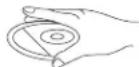

XpaHeHne
Bcerda xpaHnTe CD-dnckn Bux dytnpax.
He NIO DEPAI RINCKBNO3DJECTBNIO PRRMIX COJNEHbX LUYeH, BICOKHX TEMNepaTpy, BANKHOCTN INI NIIIN
HcTka CD-dnckOB
PpOtpaTe CD-dmckn MAnKo TpaNoHko
PpOtnpaTc CD-dnckn oT ceHTpa K kpaHO.
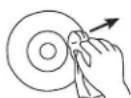
OT LJEHTPA K KPAIO
PABINbHO

HENPABINbHO
YCTPAHEHNE HENCPPABHOCTEIN
EnCn cnHnncnck cakaa nno 6npnebnc npocpebte nyhKtI, nepehnicHe HNKe,do TOK, KACBnBaTcBcO tONeNO paoBe cNoNvntenMn.
PNEyPExEHNHe: Hkoeda He omKpbBaume npubop. Bceda oBpaauimeck
nepcnoany aemopuzo6aHnoo biopo oocnykuaaH no noeody pemohma unu oocnykuaa.
PbKOBOCTBO3A yNOTPE6A
HNCPTPYKUNN 3A B6E30NACHOCT
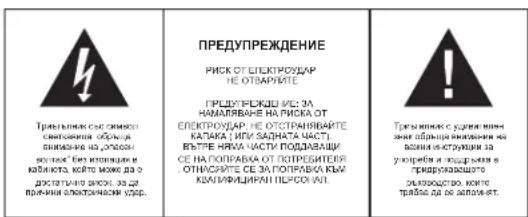
DONbJIHHTeJIHA INHΦOPMALIA

BHHMABAHTE 3a MANKI YACTN N BATEPHN,He NT BPTTAE. MoKE Da ce OKAKe ONAO 3a 3aPABETO H N DA DOBOE Do 3aDyUbaHae. MoIN NaTe MaKHN ypeDN i BATEPHN M3BbN O6cBA HA Dua.

BaxhencbBeT OTHacnCe Do 3aunHa cnyxa
PpeynpeKdHHe:
Bne ce pcknte 3a Bauy HnCbHIO.
3aTOBa 6bTeBHNMaTeHn, KOrato HsNo13BaTe To3n ypeD.
Hawata npenopbka: N36yBaTe BnCOK 3ByK.
Eueta tpa 6a de habmoaba, korato nnoanba cnywankia; ypepe te e ypeda He nactpoen Hn ciin3yck.
PpeynpexdHne!
Bucokn 38y moke da npnn Hennnpabma Bpea Ha detckn cnyx.

HNIKOTA He nozOBnRABaTe HA NIKOgo OocBEO Ho Ha deMa, Da NoCTaRT PnpdMetmB 0TbOpN, UeHTaTHInu HIN bXoDBe Oha To NsYe Tpe. DMOU MOnZ da DoBeE Do CMbPT OT eNEkTOpApD. Yepda TpBBa DA ce TbBapc cAmO t KBAHnDfMvPAH nPceOHan.

Hnon3aaye ypeda cmo 3a npedHa3nHeHaTa ynoTpe6a.
To3n ypeM MoKe Da ce H3non3Ba cAmO X Doma nn OfncA.


NaTe ToBa pBkoBOcTBo 3a 6bdeu ynotpe6a.
Hnctpykun 3a ona3BaHe Ha OKoJHaTa CpeDa
He HxhBpIaRnpe npOyDkTa B O6HKnOBeHTe N OmaDaaHOnTbAaLcNed KpaA Hxna3HHeHn MyKbIa; npEJaAte ro 0 C5bPateheny Nytk 3a pEeknKpHne H a ENEkpTrnckn K n eEeKToHN ypeKn. CmBoNa ha npOyDkTa, INcHpyKuHne 3a NytopeKa Hn oAnokBkKa tae IHCOPMparat 3a MeTOHnHa HxKaBpJHnre.
MatepHnAte ca roDnHa 3a peuKnIpaHae, KaKTo e CnOMeHtO B MapKoPbKaTAty. Che3 peuKnIpaHae nIpyrHΦpOM Ha NoBtPOHa yNoTpeBa HcSTAp HyeDnBIOHNACHTe 3a ZaHIna Hn PnpODoHATA cpcDa.
Mon 3a nntaTe MeCTHata ynpaba 3a OToPn3npaHO MxTO 3a HxBbPnHe.

He npenpeyae BENTHNAIaHTA Ha yepda. Yapepe Tae che npetda, BECTHNI, MeBEN mHn Dpyr npdMeTn He bknopat BENTHNAIOHATA cNCTEMHa H anapata. BeNTHIAIOHATA cNCTEMA TpRbBa Da moKe Da kyHIOIOHn no BCKHO BPEme! IPrpEBAHETO MKe Da doBeDe Da cepno3Ha Nopepa Ha yepda N da HAMAn HerOBOTO kyHIOIOHAPAE N XHBOT.

TpeuHa TOnnHa
He HanaarE ypeDa h npraK cIbHueBa CBeTnHa. YBepete ce, ye ypeDa He e 1NHOxKeH H aDpEeTHn HToTnHHn H3ToHnHn Kato pAdnTopr nH orBh. YBepete ce, Ye BEHTKnauOHnTE OTBOPn HA ypeDa h ca3kPrtn

Bnara n nouchBaHe
TOny yeped he enPpOMoKaem! He notanaihe bBb Oda. He n03oRaBae KOtAKc B oda.AKO bNBe3a OBy pEya,TOBA MOKeJ a npnHnn CepHOHa RpeJa. HnON3BaTe NOuCTBaun MATEpHAnH, KOIO CTbIbPkat anKOKo, amOHAr, 6eHNIN paarpaKaau cSCTaKn Tb KaTo TE MoRat da Noaepdrt yepda. 3a NoNCTBaHe mNOr3BaTe MEK, BlaXnO naphe.

PpoepocnoHaHNopeuKnnpaHe
Batepim Hn OIakOBH HtpBaBA Da cna 3xAepnB T BooiHTe OTNAdu. Batepim Tpr6Ba
da Cne pnpBaBAT B cbHpateen npykT 3a N3noanbaHn Batepim. OTdienHe HaedokhpiTHn OAKOBH e Dope 3a ekONOHHTA ATA cepa.
YINTBAHE 3A BE3ONACTHOCT
- PPOETEYIbTBAHEO -BcHnHnHcykui3a6B30NaCTHOCTN yHnTOpe6BaT6BaDA 6bJITPOPHTENnpdiJa cpeBaoTc cypeJa.
2.ANA3ETE IHCTPYKUNITE -HNCTPYKUNITE 3a 6beonactHOHTNIOPTeBa Tp8a da bDAT cIxpaehenA 3a 6bdeaa cnpaba.
3.CNEUJAFHINI PNPYDLEPKEDEHIN -TPrbSAa da ce cnaabat BCNKHn pnpynpkdeHNIHCANH bpxy ypeda n TESN bynTBAHETO aynTPOEBA.
4.CNEBBAITE MHCTPYKUNTE -Tpa6ba da ce cna3Bar BcHKn HcHCTpykun 3a ynotpe6a. - BOA IN BNAFA - Yepa He 6n TpB8An Da C8 n30N38a 6n30 Do BOA, HAPIMEP 6n30 Do duYka6Ha, yMMBAHNIK, KxHEncKa MNBk, OKPNTa nepaHNA, PnyBEN BaceHH NmMOKPO anHTpe.
BEHTNIAUH -OTbpyrte B ypea c Hapabene 3A HeoBba EaeDkHa BHTNIAUH. Te Ca HEOxodmm 3a da pnpaaatpeyraon o nprrpaaee. Ypea TpaBaa da nocetba TaKHe HeTOBO MeTOcHAnOxJdeHne HnnoNoXeHne Da h nepehna CboBDHOto My BHTNIIpaHe (OxNAkaHe). He NOCTABYRE ypeya bIpxy nero, dINBAH, Odaeno IIO NoDbHa NOBpBxAOCt. KOTAO SHMora da 3aXpYe BHTNIAUHOHMe MY OTBOPN, KAKO h BA3OpBENH nOcTpaHCTBa KaTO GbNIOTeKa HnH ukaPd, KOITOn CNIPAT CBOBDHnRA pntOK HA Bb3Qyx pce3 BEHTNIAUHOHHTE OTBOPR. - TONNHA - Ypda Tpr6ba da e paanrtoxhen danhe ot natoohnHa tonnha kato panahtopri, neuHn npyTa texHnka, (BKNIOHTENHO yCNBaTe), KOHTo MORaT da HbIbBaT TONNHA.
- INTOCHIK HA EHEPIY - Ypea TPABa Da Ce CBpKte KbI MSTHOHN HA EHEPIA CAMO OT THNA, NOOCENH yBnTBAHETAO y aNtOpE6a NIN KAKTO eOTSEBAHAn BpLxy Hero.
9.3AUXTAAH3AXPAHBAUINATKAGEI-3AXPAHBAUINATEKAEBNTPB6BaJbBHTMCTAHNTANIOHtAKBbAHMH,ye Da He Ce HAcTBnBAT npx XoDeHe NIn npOsbBAtOT HeaQ CNOKENH BpXyN IND TOxR.
H. NOYPTOP6A -Ito BpeMe Ha bJtnn nepIOuHa NHeyntoPeHa H ypeLa, MoNla nKIOHcTe ro 0eEKeTPO3aXpAHBaHHTeO aHHTeHa. -
INPEIJA3BAHE OT 3AMbPCBAHINI TEHYCCHOT -Tpa6ba da ce BHIMABA pe3 OTaBOPHe NT yapa Da he HNJIATB tBuHNi PnpeMetn INI TEHYCCHOT.
-
N3NCKBAHNAI PNPPEMOHT - Ypea Tpa6ba da bde peMOHTnpaH cAmoOT CneuHaHNO
a. 3axpaHbauuT ka6en nnn uencen e nopehen.
6. BbB bTpeuHocTtHa ypeDa ca nonaHaHn BbHUnn npedMeTuN TeuHOCT.
B. Ypea e 6n n3noxKeH Ha dIbKd nn Anara.
r. Ypeda e 6n13nyckan, hniO n6bKb4a e nopeBdena. Hn0n5Baite camo KOHTPONITE HnactPOHKeTAE, KAKTO e yka3ao B notPe6bNcKOTo pkbOKOBCTo.
A. YpEDA He DeiCTBa No HOpMaIeH NaHH
e. Ypda noka3Ba cepno3Hn OTKIOHeHHr OTHopMaJIHaTc pa6ota.
13. PEMOHT -Ponbaaunypeyahe TpRBea da ce onHTBa da ro npnpaen nHactbnnnnpnoepdne HncnaH B pKoBDCTbTOA yntpeBa.BcNKn CNOHNPEMOHTn TpRBa da ce M3bpuBnat OtnceuINHO BOUYENPAOBOTHIN.
14. NOVICTBAHE -Ин�иючete yapda ot eIeKTPWcEXTOx aakpaHBe npdE NOVICTBAHe. He IaON3BaJIte TeuHm IIN aeEOZHOII NIOUCTBaII INpeNaPaT, a cAmO MEKA, BAnkaHa KbPJa. CnDjaBJIte YkaAaHnAa 3a NOVICTBAHe nIpoDpLbKka OIKoCABH T03I NapHpNHk.
15. 3AUNITA O TbHINNo - No ephe Ma HpTMOeBTHNb Bpyr NsTnH nepmno HA HeynortpeGa, MOH KAnKOBaRte VcDgA oEtOeKNTeCKTOXo AaBxHHBeA hNHTeHa
16. IPOBEPKIA 3A CIVHYPOCT - Cnep demoHT HA ypeDA, NOMOTERE cHykHTENITE OT cEpBN3A da HAPRTB IPOBEPKIA 3A cHrypHOT HA ypeDA.
17. IPETOBAPBAHE - 3a La m6b8hete OAnCHOTcOt BtBnIaMneHABAAHe eNIEKTHPueckNeYdAp He npETOBAPBAITE KOKTAKHTNEIe nPAK3NOHTENITE B KOTIOE EKIKPOV YpeDa.
18. PA3TOBAPBAHE OT ENEKTOPOCTATUHHO HANPEXEHME- NAKIOHOTe eNkTOPO3aXpAHBaHTo I HAbaTe 6bAtePmTe, Ako ypeDa he KaTo TpRbGa.CneI kPATKO BPOMe OTHoBO NOCTABTe 6bAtePmTe IN KNOHOTe 0E1KTOPO3aXpAHBaHTo.
BHIMAHNE
DAHNNI PNOITPBATEB N KOMNAKT-DNCKOB BBLRTCBAEEPHBIM YCTPOVICTBOM KNACCA I. INPONPTbABETB N CNOINETY AIEEPHBII IVB DINOIMO H EEBDIMOTO CNEKTPA, KOTOPB MOKET BblTB BPEHbIM JI 3IOPOBBBIPNPIPMOM BO3DEJCTBM.NTOINB3YVE PNOITPBATEB TOIko TAK, KAK YKA3AHO B 3TOM PYKOBDCBTBE.
HEBNIJMOOEIA3EPHOE N3IYEHNE IPIOTKPTbIOTOKPbIJKHEINHECNIPABHOI 3AIHTHO BLOIKPOBE. HE NOBEBPAITECB BO3DEJECTMBIOIYAAI HE INPKACAIECB KIIH3EIA3PEPA
NCIOB3OBAHIE HACTPOEK INEVTNIPOBOK CTOCOSOM.OTINMHBMOT YKA3AHHO B DAHHOM PYKOBQCTBE MOXET CTATb PUNIHNO OBJYEHNA3EPOM.
JINMYEHbIEHNEI PCKA BO3NHKHOBEHNI POKAPA NIM IIOPAKEHNI 3JEKTPOKOTOKN, INB OBOHKHOHEHNI HEXEATEJIbHbIX NOMEX,NCIOJIb3yITE TOJIbKOPEKOMEHIOBAHHIE AKECECCYAPbl.

HACTPOIKA HA BE3ONACHO HNBO HA 3BYKA
IpnpoJbJHKeJIeHO CHUaHE HA CINHa MyaKBa CInyA Bn NcOTeHKeHO CE HAcPToRA KBM TORA IMATE YCEuHAEHO, 36YBEKcE HIOCTATyHO CINHe.
Toba KOeto BNI CE TSTBPO HMAHMO MOKE BCSIOHOCTa epeHO. 3aJa npoeIOBPTATIe TBA, HACTOBTe, EVAKAp HAICIO HAO
- YBENHETe HNBOTo HA 3ByKa 6aBHO, DOKATO yBaTe RcHO n 6e 3 npo5nEM.
- YbpekdaheTo Ha cnyxa MoKe da e rOJaMo n He e nonpaBmo
Ako 3abeneKNTe cnyoB npo6nEM, KOHCynTnpaNTe ce c nekap.
DONTHENTHA HOPMAUNA
Akyepa c e npnIbNpOeBnH Bpe, toe ce aonnn. Toba e a6coiHOT HOPMNNHO
Bharrn 3aBpAe BpAeNTKATA Hn DcKa 3a npeDnAeTNE DNk DaPBAWn OHanpaBuBaN. Korato NoCTBeTA, 3aBpCAeOte TneLEHmEto Hn DCKe DnBAe C meKa CyXb KIbNA.
MxHauHHuHTHeaHTHaHypeMaHtMe bCtBaTcN CaMoOo6Ma3BaUeIe Ce nareepi. He omacBaeHte I He o6Ma3BaHTe
PaBOTeC ypeDa cAmo npn CpeHNo KINMaTHuHn ycNOBn
He noxdopmao 3a deua nnp roHH.
KOHDEH3AUIN
KOHEN3AJIaMOXe DA CE NOYNH, KORAI pEmECTBATE ypeDA OT CYDHeA KbM TOnNA cpeA.AKO IIMBA NBARN BnPbBa, Toba MOXe DA HApEBDn HpAoTMyA.
Mon, Bknohe Te ypea H 34aKaaiTe okono qac, 3a da ce n3napn Bnarata.
NaneeTe ypeDe aBjxHbA nBnA, pRcK, npx i nPekOMePA TOniMHa (Hapr. B npKpHap AtonoMoI np3 I NTO) o NTAPKTH CnHNEBA CEBTNHA.
MECTEHE HA YCTPOINCTBOTO
- N3BaJdaIe KOMNAKT DnCKA npedn da MeCTNTe yCTPOINCTBOTO.
- PpenopbHae ca da H3aakdape KOMPTDICKAHa da hAnkHIOHae TcPOHCTBOTo, KOATO He ce HnOJIaee.
HAMPAHE HA MRCTO HA YPEDA
IaBBAIE BbAPALIMNAHAPAHNHEIN HAIKANTHOHNOBXHOCTN,THKATO BbTPELHNTME KOMPOHHTN MORAT CEOPMOHO DA CE PONPDA
He noctabraIte TeKx npedMeTn bIpxy nneIbpa
Hnkora He noctabraTe nneBpa 6n30 do ycnBATEEN nn npy npen, KOnto Ce HapraBt.
PA30JAKOBAHE
BHNMATEHNO N3BaTeDeYcTPOiRcTOBOtO OTIaIKoBkatau MxMAHHeTe OT Hero AChNK OAnKoBb.HNMA TATEINH.
3- 3anaete onakokata 3a 6bdeaa ynoptpe6a, ako yctpoiCTBOTO Tp6ba da ce bhpie 3a peMOHT nnipopoepa.
AkoJekaete DaIINXbPnITe OAnokBkata,NaBaBte Hape6BeTe 3aOnaBaHe Ha OKoHnTaTcpeA.
BHMMATEHOBANETAHa naepHnTE neu B yctpoCTBOTo Ha KOMNAKT DnCKA.
ENKTP03AXPAHBAHE
ПИЗ bIbIMOHOCT BKNIOUaRte yepda KbM IaHOBTO cIeKPO3axpAHBaHcA, 3a da yduIbIKTe JXBXOTA hBaSEtprn. IaNkOuYaeToI rIaTHAOBTO zoXaHPaHRe pndi NoctBaRRhA hBaSEtprn.

ENCTBNE C BATEPNN (BATEPNNTE HE CE DOCTABRT)
OToBapTe 6aTePnHTo oTdeneHne n noCTABe 6 6aTePn Tn LR-14,UM-2 mC (3a
npEIOHOHTANE ANKAIHN)CNA38AITE NOIARPHOTHTE,KOITCAO3HAAHING C“+”M“B BATEPNIHO TOOTOEJHE
3a da aadaeCTBAte yepeda CatepeHnite, MekniHote MaKINMA uencen 3a rnaBHOto aaxpaHahe Ha rpb6a Hya ppe
PnCBp3BaHaeHaKaBena 3a rIbHOeNtPO3aXpaHbaHe ypeDa ABOMTINHO Ce BKNIOBa H a eNKTNOCTBO.
PPEINAA3HMEPKINPNPABOTACBATEPN
BnHarn cna3BaIte yka3aHnraTa 3a 6e3oNaChOCT Ha npOn3bOuNTeHa 6aTeepnnte.
-ДрбхтБаTePbHnTe Ha MeCTa HeNoCTbHn 3a DeuA N DOMAUHn Pp6mUN
HnKOrHa HxBxPnIe BatePnIe B orh. He 3nIaraiTe batePnIe Ha orh nnDpynn TOpNIIHHMTOHNNH
IaBbPnHBe H aBtePnHt: HatoeHHe BatePnn TpeBaJa ce XaBbPnH t peKmNpH a CbOETCTBE cDeTBAuTHaSAOKH. 3aNoepoHa HhFOpMaHc eOBpHTe K bM XaHHHATA cYkBa HA MocTHATA dMHNCTPAUH.
He CMECBaHTEOBHN3TOUeHN6ATEPNN
- He CMEBAAIte pa3NHNHTHNOBE BATEPH, KATO HAPPMPEK ANKAHIN UHHKOBO/BrJNEPOHIN. HANOPAIE BHTNHAT BATEPHO TcUHNI BMD.
OtctpnaHbBte BatepePHTe KOTaI yEpa HMA da Ce no13a 38 TaBbFepnOH oT BpeM, 38 da npTeDPBATHe NOBpeB a Eytsurat O pKkAcania NHN KOPOPAHAn Batepe
ENCTBNE C EJNEKTPHECTBO
CbPkeTe rnaa3xpaHbaau Ka6eI Km CTHeH KOHTAKT AC 2308-50Xu.
BKHINHHTeYpDgamaKbMnEhKp3aXpaHBAeOTOrAepHIO HNAcNECNIKAUHTHe ATbTKTA.
BknHOTe MAnKIna uenCn e naKaBa eNaOzauHc-NA HbPaHa y npEya. YpePeTe ce ye KOnTAkTa e noctaaHd6pe
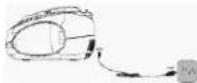
PA3NIOKHEHNE HA KOHTPOJNTE
H3rneD otrpe
1.TeneckonnHa aHTeha
2. DpBxx
3.CenekTop 3a Hectota AM /FM
3a m600 mexy AM y FM noemahe
Ф.ФУнштейchen celenkop CD/RADIO/ OFF
3a 3660 MPKJY PJKHM Pajno INN CD; Nauknoybae
- SKIP
3a BpBuaHne KbM HnAanOTo Ha NceH; 3a PpeCKaHaNe KbM pReXoHa nPeHn BpBuaHne Haaad. -
STOP
-
REPEAT
3a n3bnpahe pexmHa HOBTOpeHne
8. PLAY/PAUSE
9. SKIP+
3a IpeKAnHe Na cIeBuaa NeceHn INPbBpTaHO HApE
10.PROGRAM
3a nporpamiparna H naopeiHocCTTa H ncehJI
11.Boatnyka 3a CD
12. TUNING KOHTOOL
13. VOLUME MIN/MAX KOHTPO
14.Ckana 3a Ha6npaHe
15.AC\~k3aeneKtpo3axpaHbahe
H3rnnnOtnpe
16.БaTePmHNOOTdJIeCHnE(HaIbHToHa
ypeda)
17. POWER HAMKATOP
18 LCD display
10.26
19. JKak 3a cnywankn
20. ToHKoONH
OCHOBHn yHKm
BKNIOVAH/IMKIOVBAHe
3a Da nI6beHene HEnyHka KOHCymaHa HA eHepnra. Noctanehe DHyHKuOHaJIHHc eIeKToP Ha noIooKeHne OFF KOrato ypeDa He ce noI3Ba. Pp neekm BKnKeHe, POWER INdkaTopa CBeTaB ueBHeNo.
- 1a6epetc kJIeJIANPAI pEKIM cFyHKUONHJIINBc eNEtKOp: RADI, CD uH OFF. 2. HApTroPHe HA XJNJIHATA CINHa H A38NyC vVOLUME MIN/MAX.
- HacrpoTe cyHKmHOaHnHc eKeKToT ha noLoXeHHe OFF 3a nKIOuBaH He ypeDa.
Ha npedhata cTpaH a hypea e Jkai 3a cnuyanikn 3a cnuyahene (cnuyaniknthe ce noctaB). Cbpxketc cnuyaniknte c 3.5 MM ctepeo jak. Pm Cbpybahe h A cnuyaniknte toHKONOHTE abotMAHIO ce IAKHOBAAT.
PADIHO
PpenopbKn 3a no-do6po npneMaHe
FM: P3aTeHene Dokpai TeneKCNKHTAHTHe. AxO npEmannia CnHAn e npKaneHO cHHe ( HANB, p6bMnCt do CTaHUN). ChbCeTae TeneKCNKHTAHTHe.
AM: YpeJa Ima BrpaIeHa AM anTeHa; npomHeTe NoIooKeHIno H ayeJa, ao npimMaHTo He e do6po.
DaeCTBHe Ha paAnoTo
- Hactpoitte fynKunohannn ceneKTop h noJoxKeHne RADI.
- 136epete xenahata yecToTa cbc ceneKtopa 3a yecToTa: FM nn AM.
- HacrpoTe Ha zenHaHata paTNO cTAnuC TUNING konTpona.
- HactpoTe XeHaHata Cnna Ha 3Byka c VOLUME MIN/MAX
- HactpoTe cyHKUHOHnHa cEKeTOp Ha noLoXeHHe OFF 3a nKIOuBaHe Ha ypeDa
CDПнeBek
CD-ycyptoBTOMOE da Yete cmoa aydo CD.He ce onitbaite da nyckate MNT CD,CDc dannn nn VCD / DVD JIKCKOE.
-
HachpotheyfnHKHOHANHNE CENEKTOP HA NOJXeHNHe CD. DnCnner noKa3Ba
-
OTBOPeTe OTdeneHnETo 3a CD pbHrO ype3 MxCTOTO Ha BpaTnKata.
- Noctabete CD e tKtBae Harape n 3atbopete CD ot dIeHneto IOHO BpHIO. PpBbOauHNo 6poJI ha NcHNTe Ce IaHINABA 3a MoHENT, cNed ToBA dAmpnien Poka3Ba 01 一 nPiE6eka Ce BkINHOBA aOMATuHO. N3IbIHRA ce CbOTBTHNA HOpE.
4.BcnyaHneIeNnEkeGbHe3oNHOBtAMOTHHO(B3ABNNMOCTOJNCKA) HATCHOTEPAY/PAUSE,ZBAKIKOHOTyPbHOHpMIRATAENCE. - NaTHICHTE PLAY/PAUSE 3a bemehno Cnmpahe Ha nneHek; HATCHIE THOH0 3a Da Nbctahohitne nneHek. B pexim Ha naay nape cebetba >
- Hattichene STOP 3a cnkpahe Ha nneBbKa; dncnne OTHOB NOKA3Ba 6bnr 5poi Ha neChte.
3a6eneekn: CD nnebeka e cnpn cbpo koraTo
a. ce otbapr CD otDeneHneHneTo;
b.ФyHKUHOHANHnCeNEKTOpe nnb3He Ha nONoKeHne RADIOnn OFF;
c. BcHn neCHHa KOMnKaT nCKa Ca b3npoN3BeHeH / npocnyaHm.


PexkHa npcekaaHe
B pexmHa nIeBek HauChote SKIP- mH M S KIP+, 3a Ja IpeckOnHe Ha npDxOHa Hn CnEbnua PecbH.
- 3a6epete necehta nha nneke, cnpte nnnn HATNCHE Tny3a, HATNCHE SIKP- ninn SiNK+ nyn CHTe nneke kato HATNCHE PLAYPAUSE.
- HauchtencheeSKIP+nekoikokpattho3a da nperebptnte cnebaunite necnH,doKATO HOMepa Hxjekahata nceeh cnciHue
- Hatachte SKIP- eHOKpatHo 3a da nycHeTe cneBaauTa neceH.
- Hatnche SKIP- Hexonkokpatno 3a da npebbptnte Ha npedxna neceH
bIp3o Hanpei HnHa3a
Hattchene H aDpBkTe SKIP+ iNn SKIP-3a da kAnbRpey dFeKuHJrTa 3a b6p3o npBbPrTae HapEni HnHa3d, 3a da Hamepei onpeDehna NecEH. CunNtA h 3yaCe c HamaHARs.
PneBek Ha nporpama
D0 ne 2e nepa morat da ce nprrampat B kena h aB nocnedeobateHOCT; nceH MOKe da cpe nprrampat noene to e anm
1. PnpI nprrpamipnA, HATHCTE STOP I MODE. DznnBnKoNkBaP01 n PROGRAM, 00 n PROGRAM npmRaHa h dnncnne
2.Изберете nbрвахжеланacneceh c SKIP+inn SKIP-
3. 3ana3eTe neceHt c PROMAG.00 n PROMAG npemHbT ha dnCnneB. Cera nSBepe tncBaauata neceH.
1. PoTobepete 2 n 3, a3 da nporpamipate octaHnnte nechM, maxcmmHnH 6po8 e 20.
5. Hatchete PLAY/ PAUSE, 3a da nycheTe pneBek H neChHte B xenahata nocedobatienHOCT. B nporpamHHe peKIM HOMepa H neceHTa H ce nok33abT H ekpaHa N PROGRAMn rpemrBa.
H3tpnBaHeHa nporpma
CnepBaTe cneHnTe CTbKnK, 3a da n3tpnTe nporpaMa
1. OTBopete CD otDeneHneTo
2. HacptpoTe cyHKUHOHaHnHa ceneKTop Ha nonoKeHne RADIOn Off
3. Hatnche STOP
PexmmHa noBTopeHne
Ypeia paoiopana c HnKIOIO peKHMHa nB noTOpENHe; HATNCHETe REPEAT 3a da nA kAnTHINPate mI aHepepe.
1. HantCHETE REPEAT EOKHOPATHO 3a noTOpeHne HA neCEHTA B MOmEHTA. Dimnien NOKaBA REPEAT DO HOmePA HA neCHTA ▶
2. Hattichete REPEAT DbykpaTHa 3a noSTOpEHHe Ha dKcA B oPmHnHATA nocedobatenHOCT.Dncner nok3aBa ALL REPEAT Do HomepaHa neceHTA
3. HatncheTE REPEAT OTHNO, 3a Da Ce bHyPte HA HOpMaIeN PnEi6K pExHM. DInncner Nokagaa OTHO HOBOMA HA NceHITA
4. MoKETe CbIooJa HIOIN3ATE FyHKUH3A 3a NOBTOpeHNE 8n BPeHMe NPORAMPHNIIIE6K. BnporPAmEH PEXMH NATHCtE REPEAT EHNOKPATHO aNoTOpENHE Ha neCEHTA B McOMeHTA INH NaTHCtE REPEAT DaYkPaTHo 3a NoBTOpeHNE Ha nIaTe IPOpMa. DcJIeNae NOK3AHe He cAmO HOMeHa Ha neCEHTA, Ho CbIoo npEMHBA PROGRAM, KaTko I REPEAT IIIN ALL REPEAT.
XBAUAHENIOHCTBAHEHAUNCKOBETE
Pa6oTa C KOMnKaT DnCKOBe
OTcTpaHeteKOMNaKT DNCKa OT ONaKObKaTa.
He dokebairene noBbpxHOCTnTe.
He 3aenbaTte CTnkepn Hne nHwete Bbpxy KOMnakT dNcKa.
He npereBaIte KOMnakT DnCKOBeTe

CbxpaHne
BHHaHcXpaHbAaTeKOMnKT DnCKOBeTe BOnaKOBkTa H
He n3naraIte Ha dIpeKTHa cIbHcBa cBcTIInHe, BmCOK TeMnepaTpy, BNar a npax.
NouchBaHe Ha KOMnak DnCKoBe
POnuCTBaIeKOMNaKT DnCKOBeTe C MeKa Kb.pna.
NouchBaIeOTueHbpaKbM Kpa.
OTUHEHTbPAKbMKPAR
PABUNHO

HENPABUNHO
OTCTPAHRAHE HA IPOSEMI
AKMATEPNOBEMeTAE3aCtCTEOMe,NTpeHnAeTe CNsCKaT oTPOBEMeNOTDyI npEn da Ce CbKpBeTcO TcDNa 3KnHnTcKO b607k8aKe
NPEDYNIPEZDEHME: Hukoza ne omeauphe ypeda. 3a cepeuz unu noodpbykka uhaazu ce o6bjuatame Km omopuaapau cepeuzen npochanai.
| СИМПТOM | Възмохна ПИЧИНА | PELUSEHIME |
| ОБSUH Яма заук | Силалata Ha zayka e Habstpoeha Ha ниско hyво. Батерпente са Источени. Батерпente са поставен нелрарынino. Кабелentе sa eльсктpoхахрахвано He ca Бъknючени. | Hастpoite силалata Ha zayka. Смение sbatерпente. СъблковадITE поларноctite на sbatерпente. Вьknючete кабелпente sa eльсктpoхахрахвано правлино. |
DC 9B (6 6aTeepn TnLR14/UM-2/C,
(6aTePmTE He ce DocTabr)
Eheprokohcymua 11 Bata
Ycctoteh 06xBAT AM 525-1615kXu
FM87.5-108MXu
Aydno
CbnpotnBneHne Ha ToHKoJOnH 8 OM
Pa3Mepn np6nnteHNo.239 x 205 x 121 mm
Tero npn6nn3ntenNo.1,4 kg
IODJIEXH HAPINPOMRAHE3IPEDBAPNTENHO PPEYNPPEXDEHNE.