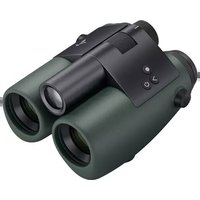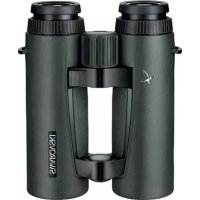
EL Range 10x42 W B - Binoculars Swarovski - Free user manual and instructions
Find the device manual for free EL Range 10x42 W B Swarovski in PDF.


User questions about EL Range 10x42 W B Swarovski
0 question about this device. Answer the ones you know or ask your own.
Ask a new question about this device
Download the instructions for your Binoculars in PDF format for free! Find your manual EL Range 10x42 W B - Swarovski and take your electronic device back in hand. On this page are published all the documents necessary for the use of your device. EL Range 10x42 W B by Swarovski.
USER MANUAL EL Range 10x42 W B Swarovski
text_image
Labeled diagram of binoculars and optical components with numbered parts for identificationnatural_image
Illustration of binoculars with a prohibition symbol (no text or labels)natural_image
Illustration of a person reacting to a chemical reaction with a light bulb and sun (no text or symbols)natural_image
Simple line drawing of a person walking with a crossed-out circle and a magnifying glass (no text or symbols)natural_image
Diagram of mechanical components with no visible text or symbolsnatural_image
Illustration of a hand holding binoculars with a magnified inset showing the lens (no text or symbols)natural_image
Illustration of two binoculars with one emitting a circular arrow (no text or symbols)natural_image
Diagram of a mechanical device with two circular components and directional arrows indicating motion (no text or symbols)natural_image
Diagram of a dual-lens optical system with rotating lenses and a central lens (no text or symbols)natural_image
Illustration of two hands holding binoculars with a circular dial and directional arrow (no text or symbols)text_image
O 8450M ∠835°natural_image
Diagram of a mechanical device with three circular components and an arrow indicating direction (no text or symbols)6.2. Zubehör
natural_image
Line drawing of a camera lens with no text or symbolsnatural_image
Technical line drawing of a mechanical assembly with three circular components and a central cylindrical component (no text or symbols)natural_image
Diagram of mechanical components with rotating arrows indicating motion (no text or symbols)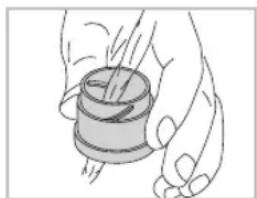
natural_image
Illustration of a hand holding a cylindrical object with a spool, no text or symbols presentWe are very pleased that you have decided to purchase this product from SWAROVSKI OPTIK. If you have any questions, please consult your specialist dealer or contact us directly at WWW.SWAROVSKI OPTIK.COM.
1. Overview
text_image
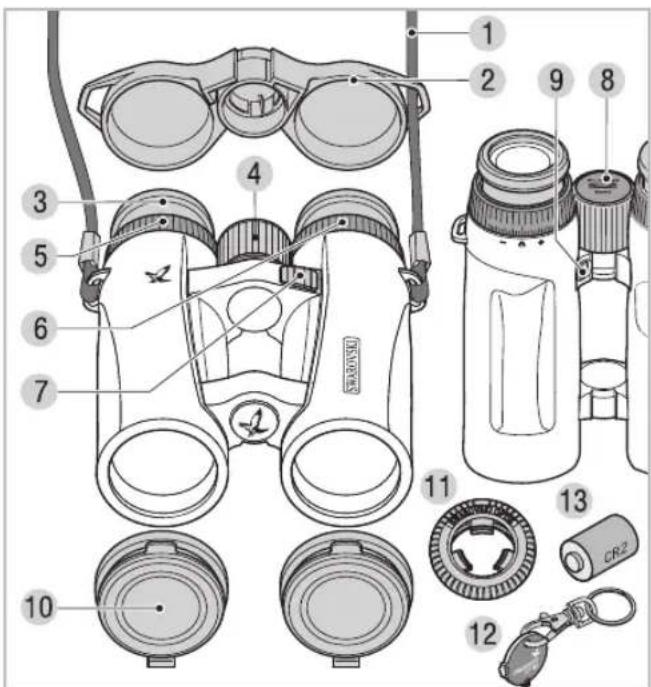
Labeled diagram of binoculars and optical components with numbered parts for identification1 Comfort carrying strap
2 Eyepiece cover
3 Twist-in eyecup
4 Focusing wheel
5 Dioptric adjustment ring, right
6 Dioptric adjustment ring, left
7 Measurement button
8 Battery compartment cover
9 Mode button
10 Objective lens cover
11 Snap Shot Adapter
12 Coin opener
13 Spare battery
Please find our current product accessories at WWW.SWAROVSKIOPTIK.COM.
WEEE/ElektroG
This symbol indicates that this product must not be disposed of as household waste under the WEEE Directive (Waste Electrical and Electronic Equipment Directive) and national laws.
This product must be returned to a dedicated collection site. You can obtain information about collection sites for waste equipment from your local authorities or from an authorised site for the disposal of waste electrical and electronic equipment.
Disposing of this product correctly helps to protect the environment and prevents potential damage to both the environment and human health which could occur if the products are not handled correctly.
2. For your safety!
2.1. WARNING!
The product meets the requirements of a Class 1 laser pursuant to the applicable standards EN 60825-1, IEC 60825-1, FDA 21 CFR 1040.10 and 1040.11 respectively except for deviations pursuant to Laser Notice No. 50, dated June 24, 2007. As such, the instrument is safe for eyes and can be used for any application, but must not be aimed at people directly.
2.2. General information
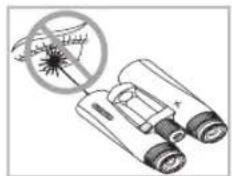
Under no circumstances should the housing be opened by unauthorized personnel!
natural_image
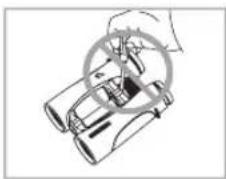
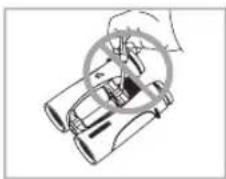
Illustration of binoculars with a prohibition symbol (no text or labels)Never point the instrument at people from close distances!
EN E
natural_image
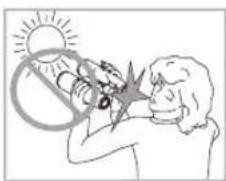
Illustration of a person reacting to a chemical reaction with a light bulb and sun (no text or symbols)Never look directly at the sun with the binoculars! This will damage your eyes!
natural_image
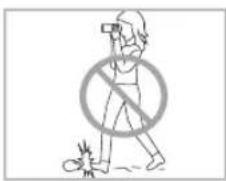
Simple line drawing of a person walking with a crossed-out circle and a small object nearby (no text or symbols)Never look through the binoculars when walking, you could encounter obstacles!
natural_image
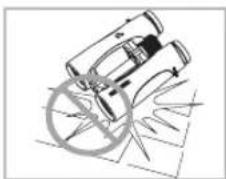
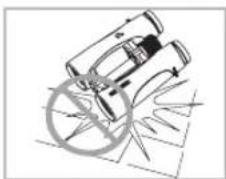
Diagram of two cylindrical objects with a circular ring and intersecting lines, no text or symbols presentPlease protect your binoculars from jolts and jars.
natural_image
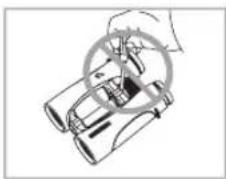
Illustration of a hand holding binoculars with a magnified inset showing the lens (no text or symbols)Repairs should be carried out by authorized service facilities only.
3. Getting started
The battery is already inserted into the battery compartment. The binoculars are ready for immediate use. Before switching on the instrument, please make the following settings:
3.1. Adjusting the twist-in eyecups
In principle, you can choose between four different setting positions that provide varying distances between your eye and the lens. You can set the optimal distance according to your personal preference.
natural_image
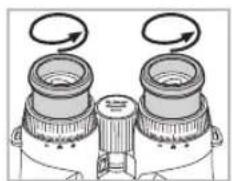
Illustration of two binoculars with motion arrows indicating rotation (no text or symbols)Pos. A: Initial position without spectacles: Twist out the eyecups anticlockwise to the full extent.
natural_image
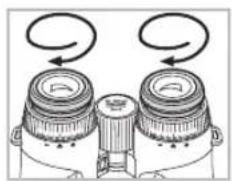
Diagram of a mechanical device with two circular components and directional arrows indicating motion (no text or symbols)Pos. B: Initial position with spectacles: Twist in the eyecups clockwise until they stop.
natural_image
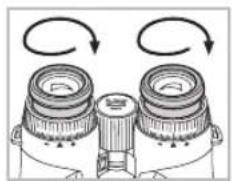
Diagram of a mechanical device with two circular components and rotational arrows indicating motion (no text or symbols)Pos. C and D: Alternative positions or interim adjustment stages for spectacle wearers and non-spectacle wearers.
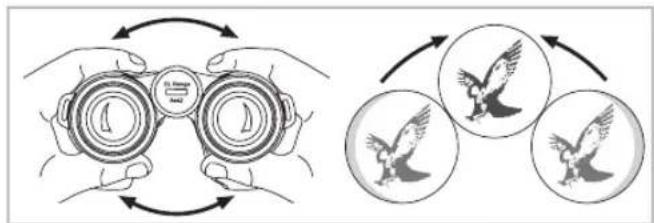
3.2. Adjusting the interpupillary distance
To see a single round image, adjust the separation between the two halves of the binoculars until the irritating shadows disappear.
flowchart
graph TD
    A["Open Binoculars"] --> B{Bip flying}
    B --> C["Final Bird flying"]
    C --> D["End"]
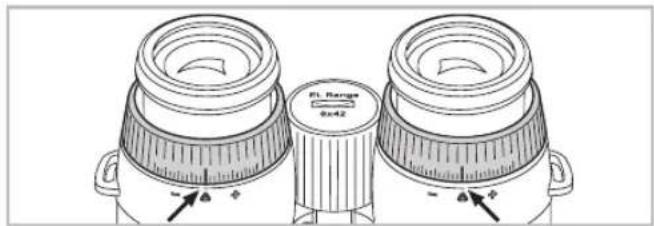
3.3. Use with equal acuity of both eyes
a. Pull out the left and right dioptric adjustment ring and turn it until the long bar on the dioptric scale is in line with the small triangle underneath the ring.

text_image
PL Range 0x42b. Once you have finished, push the dioptric adjustment rings back in.
3.4. Dioptric compensation
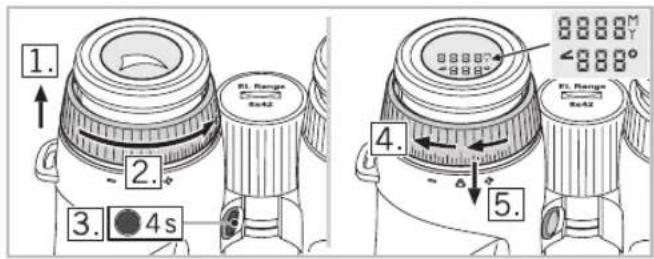
To achieve optimal image quality, it is necessary to correct any varying visual acuity between the left and right eye.
text_image
1. 2. 3. 4s EL Range 5x42 EL Range 5x42 4. 5.- First pull out the left dioptric adjustment ring.
- Turn the dioptric adjustment ring anticlockwise until it stops.
- Hold down the mode button for 4 seconds. This takes you to the dioptric compensation adjustment mode (display remains illuminated for 30 seconds). To exit this mode early, press the measurement button or mode button again.
-
Now look through the left eyepiece at the display with your left eye and slowly turn the dioptric adjustment ring clockwise until the display comes into clear focus.
-
Once you have finished, push the dioptric adjustment ring back in.
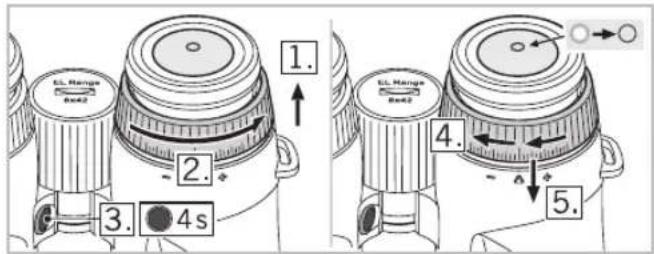
- Repeat steps 1 to 5 with the right dioptric adjustment ring to optimally adjust the focus for the right eye (aiming mark).
text_image
1. 2. 3. 4s 4. 5. EL Range Box2 EL Range Box2NOTE:
Setting the twist-in eyecups and eye relief precisely helps to ensure maximum viewing comfort for the display (see chapter 3.1. and 3.2.).
TIP:
The aiming mark and range indication can be set comfortably even without a target. Place the binoculars on a table upright or look at a nearby dark object. Adjusting each dioptric position separately allows you to achieve optimum sharpness because your eye is not distracted by a target under observation.
3.5. Adjusting the focus
natural_image
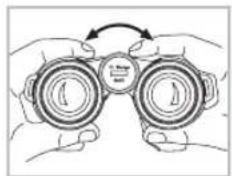
Illustration of two hands holding binoculars with a circular dial and arrow indicating rotation (no text or symbols)To adjust your object focus from the shortest focusing distance (see Technical Data Sheet) to infinity, simply turn the focusing wheel. In the infinity position, the wide bar on the focusing wheel points upward.
EN
4. Operation
4.1. Single measurement
text_image
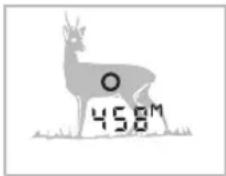
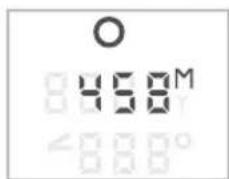
O 458mBriefly pressing the measurement button causes the aiming mark to appear. Once the button is released, the measured range is shown on the display. For optical safety reasons, another measurement cannot be
taken until after approx. 2 seconds have elapsed. During this safety pause, a continuous series of minus symbols appears on the display. The measurement is in progress.
4.2. Scan Mode
text_image
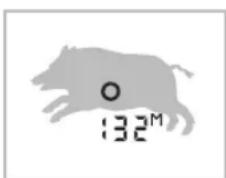
132MScan Mode is used to continually measure the range of moving targets. The instrument switches to Scan Mode automatically if the measurement button is held down for over 3 seconds. In Scan Mode, measure-
ments will be taken continually until the measurement button is released (max. 120 seconds). The maximum range of Scan Mode is approx. 1,000 m.
If the measurement button is not pressed for 5 seconds, the display turns off automatically.
5. Menu navigation
5.1. Display
text_image
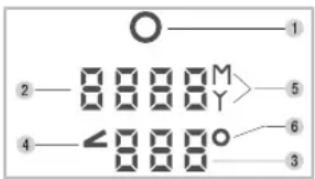
O 1 2 M 5 4 ∠ 6 3- Aiming mark
- Display of the measured range in yards or metres (4-digit).
-
Measured angle in degrees or corrected shooting distance
-
Angle symbol
- Display in yards (Y) or metres (M)
- Degree symbol (°)
5.2. Additional functions and programmes
The following programmes (P) are available:
P1 Individual brightness settings
P2 Information shown on lower display row:
- Angle in degrees
- P2 off (lower display row off)
- Corrected ballistic shooting distance (angle-dependent)
P3 Toggle metres/yards
P4 Automatic brightness adjustment (on/off)
Factory settings:
- P1: Level 3
- P2: Off
- P3: Metre
- P4: On
Selecting the programmes:
Hold down the mode button for 2 seconds. This takes you to the main menu: Now use the measurement button to make the programme setting you require.
To switch to the next menu item, press the mode button briefly. If you do not press any button within 5 seconds, the menu will close automatically and and return to the measurement mode. Your settings are saved automatically.
See the Technical Data Sheet for more menu navigation information.
NOTE:
Your settings are still retained even after replacing the battery.
EN
5.3. Brightness setting display (P1, P4)
In P1 – individual brightness setting – first select the appropriate display brightness level for you. There are 5 brightness levels to choose from.
In P4, turn the automatic brightness adjustment on or off.
- On: The binocular automatically adjusts the display brightness based on the brightness level you have chosen.
- Off: The display is constantly illuminated at the brightness level you have chosen.
5.4. Angle program (P2)
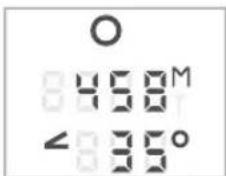
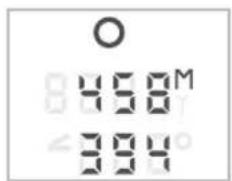
For each distance measured, you can also display the angle of the binoculars to the object under observation. This angular position means that the corrected shooting distance can also be displayed.
Adjusting the measured angle
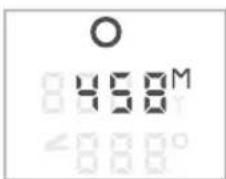
On the lower row of the display, you can show either:
- The angle
• Or no additional information
• Or the corrected shooting distance.
text_image
O 8450M ∠835°Display showing measured angle
text_image
O 458M ∠8 8 8 0°Display not showing measured angle
text_image
O 458M 394Display showing corrected shooting distance
SWAROAIM (corrected ballistic shooting distance)
When shooting at an angle (up or down), the force and effect of gravity is less than with a horizontal shot. This results in a flatter trajectory and a shifting of the point of impact.
For a detailed description, visit WWW.SWAROVSKIOPTIK.COM.
5.5. Yard / metre setting (P3)
The binoculars can display the measured distance in yards or metres. To switch between these two units briefly press the measurement button on menu P3. The unit chosen here also applies for the corrected ballistic shooting distance.
6. Accessories
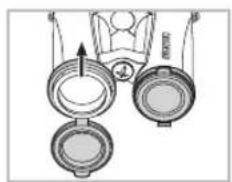
6.1. Assembly instructions for objective lens cover
natural_image
Diagram of three circular objects with an arrow pointing to one (no text or symbols)6.2. Accessories
For detailed information about accessories, visit WWW.SWAROVSKIOPTIK.COM.
EN
7. General Information
7.1. Range
The following factors have an impact on the maximum measurement range:
| Range higher Range lower | ||
| Colour of target | Light Dark | |
| Surface | Shiny Matt | |
| Angle to target | At right angle Acute | |
| Size of object | Large Small | |
| Sunlight | Little (cloudy) | A lot (bright sunshine) |
| Atmospheric conditions | Clear Misty | |
| Object structure | Plane (e.g. wall) Variable | (e.g. bush, tree) |
7.2. Serial number
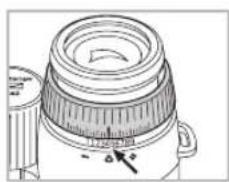
natural_image
Technical line drawing of a mechanical device with a lid and handle (no text or symbols)The serial number of your binoculars is located beneath the right dioptric adjustment ring. To read it, pull out the dioptric adjustment ring.
7.3. Replacing the battery
Check how much charge is left in the battery. A flashing aiming mark when the instrument is switched on indicates a low battery. From the time the low battery indicator first starts flashing, there is sufficient power for around 100 more measurements.
Replacing the battery
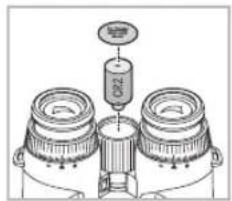
natural_image
Technical diagram of a mechanical assembly with three cylindrical components and a central spring-like component (no text or labels)- Use the coin opener to open battery compartment cover in the focusing wheel. Remove the dead battery.
- Insert a new CR 2 battery, making sure that the poles are correctly aligned (see markings inside com-
partment). Use leak-proof batteries only.
Warning: Do not use rechargeable batteries!
• Finally, screw the battery cover back on.
Batteries Directive
Batteries must not be disposed of as household waste and you are legally obliged to return used batteries. Local facilities exist for returning used batteries free of charge (e.g. in retail outlets or at communal collection points). Batteries are labelled with a crossed-out wheeled bin and the chemical symbol of the harmful substance they contain: "Cd" for cadmium, "Hg" for mercury and "Pb" for lead.
Please help us to protect the environment.
EN
7.4. Troubleshooting and display information
| Problem Probable Cause Remedy | ||
| The field of view is shaded at the periphery (vignetted). | The eyecups have not been adjusted correctly for use with or without spectacles. | Spectacle wearers need to twist the eye-cups right in to the stop position. When using without spec-tacles, the eyecups need twisting out to the required position (see chapter 3.1.). |
| The display shows “----” for the distance measured. | 1. The measurement range has been exceeded.2. The object is not reflective enough.3. Target out of focus. | 1. See chapter 4.2. See chapter 7.1.3. See chapter 3.5. |
| The display shows “co” for the distance measured (clean optic). | 1. The distance to the target is shorter than the minimum measurement range.2. The objective lens is dirty. | 1. See Technical Data Sheet.2. Clean the objective lens. |
| The aiming mark flashes when the instrument is switched on. | The battery is low. There is sufficient power for around 100 more measurements. Replace the battery or briefly warm the current one. | |
| Display, aiming mark and target are not all in focus at same time. | Dioptric adjustment is not optimal. | See chapter 3.4. |
| “Err” appears on the display | Electronic fault Press the measurement button again. On repeated occurrence of “Err”, please contact SWARVSKI OPTIK customer service. | |
8. Maintenance and care
8.1. Lens-cleaning cloth
You can clean high sensitive lens surfaces with the enclosed special microfibre cloth. It is suitable for objective lens, ocular lens and spectacles.
Please keep the cloth clean, as dirt can damage the lens surface. If the cloth becomes soiled it can be washed in lukewarm soapy water and left to dry. Please only use for cleaning lens surfaces!
8.2. Cleaning
We have designed all elements and surfaces to require little care.
To ensure the long-lasting optical brilliance of your binoculars, you should keep the glass surfaces free of dirt, oil and grease. When cleaning the lenses, first remove larger particles with an optical lens brush. For the subsequent thorough cleaning we recommend breathing onto the lens surface to form a coat of condensation and then cleaning it with a soft, moist cloth.
The housing is best cleansed with a soft, moist cloth (don't use the lens-cleaning cloth).
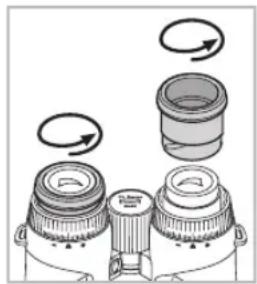
natural_image
Diagram of a mechanical component with rotating parts and directional arrows (no text or symbols)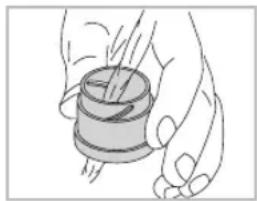
natural_image
Illustration of a hand holding a spool of material, no text or symbols presentIn the event of hard-to-remove dirt (e.g. sand) the eye cups can be unscrewed and cleaned easily.
EN
8.3. Storage
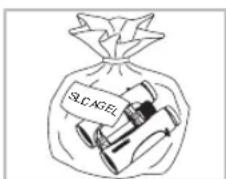
You should keep your binoculars in their bag in a dry, well ventilated place.
text_image
SLC AGELIf the instrument is wet, it must be dried prior to storage.
In tropical regions or regions with a high humidity the best place to store the instrument in is an air-tight receptacle along with a moisture-absorbing agent (e.g. silica gel).
9. Contents
EL Range
2x batteries (CR2)
Eyepiece cover
Objective lens cover
Comfort carrying strap
Snap Shot Adapter
Coin opener
Lens-cleaning cloth
Field Bag
Instruction manual, Technical Data Sheet
Quick Guide
EL Range DVD
10. Conformity
The device conforms to Directives 2002/95/EC on the restriction of the use of certain hazardous substances in electrical and electronic equipment, 2002/96/EC on waste electrical and electronic equipment (WEEE) and 2004/108/EC on electromagnetic compatibility.
FCC Compliance Statement
This equipment has been tested and found to comply with the limits for a Class B digital device, pursuant to part 15 of the
FCC Rules. These limits are designed to provide reasonable protection against harmful interference in a residential installation. This equipment generates, uses and can radiate radio frequency energy and, if not installed and used in accordance with the instructions, may cause harmful interference to radio communications. However, there is no guarantee that interference will not occur in a particular installation. If this equipment does cause harmful interference to radio or television reception, which can be determined by turning the equipment off and on, the user is encouraged to try to correct the interference by one or more of the following measures:
• Reorient or relocate the receiving antenna.
- Increase the separation between the equipment ceiver.
- Consult the dealer or an experienced radio/TV technician for help.
SWAROVSKI OPTIK KG is not responsible for any radio or television interference caused by unauthorized modifications of this equipment or the substitution or attachment of connecting cables and equipment other than those specified by SWAROVSKI OPTIK KG. The correction of interference caused by such unauthorized modification, substitution or attachment is the responsibility of the user.
SWAROVSKI OPTIK patents USA
• US 7,924,515 B2
patents pending:
• US 2009/0303457 A1
• US 2011/0051117 A1
• US 2011/0164242 A1
• US 2011/0128619 A1
- Swaroaim
All data are typical values.
We reserve the right to make changes regarding design and delivery.
We accept no liability for printing errors.
BA-697-01, 08/2012
E
text_image
Labeled diagram of binoculars and optical components with numbered parts for identificationtext_image
Safety warning illustration showing a binoculars with a no-detection symbol and a warning symbol.natural_image
Illustration of a person lighting a sun with a lightning bolt, no text or symbols presentnatural_image
Simple line drawing of a person holding a phone with a prohibition symbol (no text or labels)natural_image
Illustration of binoculars with a circular overlay and diagonal lines, no text or symbols presentnatural_image
Illustration of a hand using binoculars to measure optical measurement (no text or symbols present)natural_image
Illustration of two binoculars with one emitting a circular arrow (no text or symbols)natural_image
Diagram of a dual-lens optical device with two lenses and directional arrows indicating rotation (no text or symbols)natural_image
Diagram of a dual-lens optical device with rotating arrows indicating rotation (no text or symbols)flowchart
graph TD
    A["Open Binoculars"] --> B{Recovery Cycle}
    B --> C["Bird Population Recovery"]
    C --> D["Final Closed Population"]
natural_image
Illustration of hands holding binoculars with an arrow indicating rotation (no text or symbols)text_image
O 8450M ∠835°text_image
O 450M -888°natural_image
Diagram of a mechanical device with three circular components and an arrow indicating direction (no text or symbols)6.2. Accessoires
natural_image
Technical line drawing of a camera lens with no visible text or symbolsnatural_image
Technical diagram of a mechanical assembly with three cylindrical components and a central spring-like component (no text or labels)natural_image
Diagram of a mechanical component with rotating parts and arrows indicating motion (no text or symbols)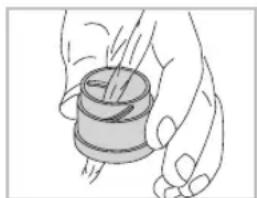
natural_image
Illustration of a hand holding a cylindrical object with a spool, no text or symbols presenttext_image
Labeled diagram of binoculars and optical components with numbered parts for identificationnatural_image
Illustration of binoculars with a prohibition symbol (no text or labels)natural_image
Illustration of a person reacting to a chemical reaction with a light bulb and flame (no text or symbols)natural_image
Simple line drawing of a person walking with a crossed-out circle and a small object nearby (no text or symbols)natural_image
Diagram of a mechanical device with rotating components and intersecting lines (no text or symbols)natural_image
Illustration of a hand operating a binoculars with a magnified view of the lens (no text or symbols)natural_image
Illustration of two binoculars with one emitting a circular arrow (no text or symbols)natural_image
Diagram of a mechanical device with two circular components and directional arrows indicating motion (no text or symbols)natural_image
Diagram of a mechanical device with two lenses and rotating arrows, no text or symbols presentflowchart
graph TD
    A["Start"] --> B["Biooculars"]
    B --> C{Recovery}
    C --> D["Bird Icon"]
    D --> E["Bird Icon with Emboss"]
    E --> F["Bird Icon with Emboss"]
    F --> G["Bird Icon with Emboss"]
    G --> H["Bird Icon with Emboss"]
    H --> I["Bird Icon with Emboss"]
    I --> J["Bird Icon with Emboss"]
    J --> K["Bird Icon with Emboss"]
    K --> L["Bird Icon with Emboss"]
    L --> M["Bird Icon with Emboss"]
    M --> N["Bird Icon with Emboss"]
    N --> O["Bird Icon with Emboss"]
    O --> P["Bird Icon with Emboss"]
    P --> Q["Bird Icon with Emboss"]
    Q --> R["Bird Icon with Emboss"]
    R --> S["Bird Icon with Emboss"]
    S --> T["Bird Icon with Emboss"]
    T --> U["Bird Icon with Emboss"]
    U --> V["Bird Icon with Emboss"]
    V --> W["Bird Icon with Emboss"]
    W --> X["Bird Icon with Emboss"]
    X --> Y["Bird Icon with Emboss"]
    Y --> Z["Bird Icon with Emboss"]
text_image
FL Range 0x42natural_image
Illustration of two hands holding binoculars with an arrow indicating rotation (no text or symbols)text_image
O 458M ∠35°natural_image
Diagram of a mechanical device with three circular components and an arrow indicating direction (no text or symbols)6.2. Accessori
natural_image
Technical line drawing of a camera lens with no visible text or symbolsnatural_image
Technical diagram of a mechanical assembly with three circular components and a central cylindrical component (no text or labels)natural_image
Diagram of three mechanical components with rotating arrows indicating motion (no text or symbols)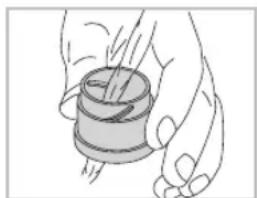
natural_image
Illustration of a hand holding a cylindrical object with a spool, no text or symbols presenttext_image
Labeled diagram of binoculars and optical components with numbered parts for identificationnatural_image
Illustration of binoculars with a prohibition symbol (no text or labels)natural_image
Illustration of a person reacting to a chemical reaction with a light bulb and flame (no text or symbols)natural_image
Simple line drawing of a person walking with a crossed-out circle and a small object nearby (no text or symbols)natural_image
Diagram of a mechanical device with rotating components and intersecting lines (no text or symbols)natural_image
Illustration of a hand operating a binoculars with a magnified view of the lens (no text or symbols)natural_image
Illustration of two binoculars with directional arrows indicating rotation (no text or symbols)natural_image
Diagram of a mechanical device with two circular components and directional arrows indicating motion (no text or symbols)natural_image
Diagram of a mechanical device with two rotating components and a central shaft, showing rotational motion arrows (no text or symbols)text_image
1. 2. 3. 4s EL Range 8x42 8888" 888" EL Range 8x42 4. 5.natural_image
Illustration of two hands holding binoculars with a curved arrow indicating rotation (no text or symbols)text_image
O 8450M ∠835°text_image
O 450M -888°natural_image
Diagram of a mechanical device with three circular components and an arrow indicating direction (no text or symbols)6.2. Accesorio
natural_image
Line drawing of a camera lens with no visible text or symbolsnatural_image
Technical diagram of a mechanical assembly with three cylindrical components and a central spring-like component (no text or labels)natural_image
Diagram of mechanical components with rotating arrows indicating motion (no text or symbols)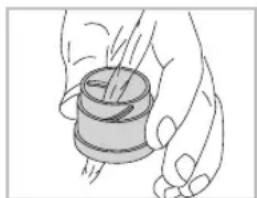
natural_image
Illustration of a hand holding a cylindrical object with a string, no text or symbols presenttext_image
Labeled diagram of binoculars and optical components with numbered parts for identification1 Comfortdraagriem
8 Batterijvakdeksel
2 Oculairbeschermkap
9 Modustoets
3 Draaidoppen
natural_image
Illustration of binoculars with a prohibition symbol (no text or labels)natural_image
Illustration of a person reacting to a chemical reaction with a light bulb and flame (no text or symbols)natural_image
Simple line drawing of a person walking with a crossed-out circle and a small object nearby (no text or symbols)natural_image
Diagram of a mechanical device with rotating components and intersecting lines (no text or symbols)natural_image
Illustration of a hand operating a binoculars with a magnified view of the lens (no text or symbols)natural_image
Illustration of two binoculars with one emitting a circular arrow (no text or symbols)natural_image
Diagram of a mechanical device with two circular components and directional arrows indicating motion (no text or symbols)natural_image
Diagram of a mechanical device with two lenses and rotating arrows, no text or symbols presentnatural_image
Illustration of two hands holding binoculars with a circular dial and arrow indicating rotation (no text or symbols)text_image
O 8450M ∠835°text_image
O 450M -888°natural_image
Diagram of a mechanical device with three circular components and an upward arrow indicating motion (no text or symbols)6.2. Toebehoren
natural_image
Line drawing of a camera lens with no text or symbolsnatural_image
Technical diagram of a mechanical assembly with three cylindrical components and a central cylindrical component (no text or labels)natural_image
Diagram of mechanical components with rotating arrows indicating motion (no text or symbols)
natural_image
Illustration of a hand holding a cylindrical object with a spool, no text or symbols presenttext_image
Labeled diagram of binoculars and optical components with numbered parts for identificationnatural_image
Illustration of binoculars with a prohibition symbol (no text or labels)natural_image
Illustration of a person reacting to a chemical reaction with a light bulb and sun (no text or symbols)natural_image
Simple line drawing of a person walking with a crossed-out circle and a magnifying glass (no text or symbols)Titta aldrig genom instrumentet medan du gar! Du kan missa nagot hinder!
natural_image
Diagram of a mechanical device with rotating components and intersecting lines (no text or symbols)Skydda ditt instrument mot stotar.
natural_image
Illustration of a hand holding binoculars with a magnified inset showing the lens (no text or symbols)Endast auktoriserade verkstader far utfora nodvandiga reparationer.
natural_image
Illustration of two binoculars with one emitting a circular arrow (no text or symbols)natural_image
Diagram of a dual-lens optical device with two lenses and directional arrows indicating rotation (no text or symbols)natural_image
Diagram of a mechanical device with two lenses and rotating arrows indicating rotation (no text or symbols)natural_image
Illustration of two bird surveillance goggles with a bird flying around them, showing rotational motion (no text or symbols)text_image
FL Range 0x42natural_image
Illustration of two hands holding binoculars with a circular dial and arrow indicating rotation (no text or symbols)text_image
O 1 2 0 0 0 0 M Y > 5 4 - 0 0 0 0 o 6 3text_image
O 8458M ∠835°text_image
O 458M -8000°natural_image
Diagram of a mechanical device with three circular components and an arrow indicating direction (no text or symbols)6.2. Tillbehör
natural_image
Line drawing of a mechanical device with a lid and handle (no text or symbols)natural_image
Technical diagram of a mechanical assembly with three cylindrical components and a central spring-like component (no text or labels)natural_image
Diagram of mechanical components with rotating arrows indicating motion (no text or symbols)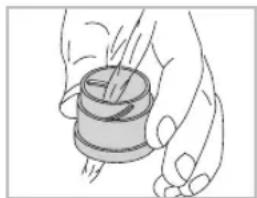
natural_image
Illustration of a hand holding a cylindrical object with a pointer, no text or symbols presenttext_image
Labeled diagram of binoculars and optical components with numbered parts for identification1 Mukava kantohihna
8 Paristokotelon kansi
2 Okulaarisuojus
9 Tilapainike
natural_image
Illustration of binoculars with a prohibition symbol (no text or labels)natural_image
Illustration of a person shouting with a protractor and sun symbol (no text or symbols present)natural_image
Simple line drawing of a person walking with a cross symbol (no text or labels)natural_image
Diagram of a mechanical device with rotating components and intersecting lines (no text or symbols)natural_image
Illustration of a hand holding binoculars with a magnified inset showing the lens (no text or symbols)natural_image
Illustration of two binoculars with one emitting a circular arrow (no text or symbols)natural_image
Diagram of a dual-lens optical device with rotating heads and light paths (no text or symbols)natural_image
Diagram of a mechanical device with two lenses and rotating arrows, no text or symbols presentnatural_image
Illustration of two bird surveillance goggles with a bird flying around them, showing rotational motion (no text or symbols)text_image
FL Range 0x42natural_image
Illustration of hands holding binoculars with a curved arrow indicating rotation (no text or symbols)text_image
O 458M ∠35°natural_image
Diagram of three circular objects with an arrow pointing to one (no text or symbols)6.2. Lisävarusteet
natural_image
Technical line drawing of a camera lens assembly (no text or symbols)natural_image
Technical line drawing of a mechanical assembly with three cylindrical components and a central cylindrical component (no text or symbols)natural_image
Diagram of a mechanical device with rotating components and curved arrows indicating motion (no text or symbols)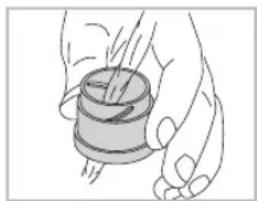
natural_image
Illustration of a hand holding a spool of paper with a needle inserted (no text or symbols)text_image
Labeled diagram of binoculars and optical components with numbered parts for identificationnatural_image
Illustration of binoculars with a prohibition symbol (no text or labels)natural_image
Illustration of a person reacting to a chemical reaction with a light bulb and flame (no text or symbols)natural_image
Simple line drawing of a person walking with a crossed-out circle and a magnifying glass (no text or symbols)natural_image
Diagram of two cylindrical objects with a circular ring and intersecting lines, no text or symbols presentBeskyt apparatet mod stod.
natural_image
Illustration of a hand holding binoculars with a magnified inset showing the lens (no text or symbols)Reparationer ma kun foretages af autoriserede varksteder.
natural_image
Illustration of two binoculars with one emitting a circular arrow (no text or symbols)natural_image
Diagram of a dual-lens optical device with two lenses and directional arrows indicating rotation (no text or labels)natural_image
Diagram of a mechanical device with two lenses and rotating arrows, no text or symbols presentPos. C og D: Alternative positioner og mellempositioner for personer med og uden briller.
text_image
FL Range 0x42text_image
1. 2. 3. 4s Ft Range 8x42 8888° 8888° Ft Range 8x42 4. 5.natural_image
Illustration of two hands holding binoculars with a circular dial and arrow indicating rotation (no text or symbols)text_image
O 8 450M ∠8 35°Display visning med vinkelmåling
text_image
O 450M 8.88° 8.88°natural_image
Diagram of a mechanical device with three circular components and an arrow indicating direction (no text or symbols)6.2. Tilbehør
natural_image
Technical line drawing of a mechanical device with no visible text or symbolsnatural_image
Technical diagram of a mechanical assembly with three cylindrical components and a central spring-like component (no text or labels)natural_image
Diagram of a mechanical device with rotating components and curved arrows indicating motion (no text or symbols)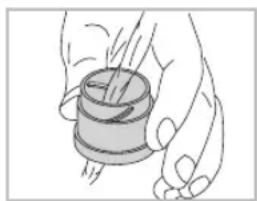
natural_image
Illustration of a hand holding a cylindrical object with a spool, no text or symbols presenttext_image
Labeled diagram of binoculars and optical components with numbered parts for identificationtext_image
Safety warning illustration showing a binoculars with a no-detection symbol and a warning symbol.natural_image
Illustration of a person lighting a sun with a protractor, no text or symbols presentnatural_image
Simple line drawing of a person walking with a cross symbol (no text or labels)natural_image
Diagram of a mechanical device with rotating components and intersecting lines (no text or symbols)natural_image
Illustration of a hand holding binoculars with a magnified inset showing the lens (no text or symbols)natural_image
Illustration of two binoculars with one emitting a circular arrow (no text or symbols)natural_image
Diagram of a mechanical device with two circular components and directional arrows indicating motion (no text or symbols)natural_image
Diagram of a dual-lens optical device with rotating arrows indicating rotation (no text or symbols)flowchart
graph TD
    A["Open Binoculars"] --> B{Recovery Cycle}
    B --> C["Bird Population Recovery"]
    C --> D["Final Closed Population"]
text_image
FL Range 0x42natural_image
Illustration of two hands holding binoculars with an arrow indicating rotational motion (no text or symbols)text_image
O 8450M ∠835°text_image
O 458M 0°natural_image
Diagram of a mechanical device with three circular components and an arrow indicating direction (no text or symbols)6.2. Аксессуары
natural_image
Technical line drawing of a thermoshealer with no visible text or symbolsnatural_image
Technical line drawing of a mechanical assembly with three lenses and a central component (no text or symbols)natural_image
Diagram of a mechanical device with rotating components and curved arrows indicating motion (no text or symbols)
natural_image
Illustration of a hand holding a cylindrical object with a spool, no text or symbols presentWith this SWAROVSKI OPTIK product, you purchased a high-quality product, which comes with a worldwide warranty of 10 years on the binoculars and 2 years on the electronics from the date of purchase according to the following terms and conditions by SWAROVSKI OPTIK:
If defects in material and/or workmanship appear, we will take over material costs for the entire warranty period. We reserve the right in such instances to repair or replace the instrument or the defective part at our discretion. During the first five years we will take over the costs for materials and work.
This guarantee in no way limits the statutory warranty obligations.
In the event that the range of products is changed, we reserve the right to repair defective instruments or to replace them with those of equal value.
On account of the functional principle and the special manner of construction of optronic instruments the following special condition applies: Insofar as is functionally necessary, all instruments are supplied ready to operate with brand-name batteries either already inserted or enclosed separately. We can assume no liability for these batteries. The warranty conditions of the respective manufacturers apply and it is they who decide on warranty matters – especially regarding damage due to spent batteries.
We undertake no liability for repairs carried out by a repair shop which has not been authorized by us, nor for damages caused by improper use, nor for direct or indirect damages brought about by defects on the instrument. In addition, all parts are excluded from the warranty which are subject to natural wear, such as eye cups, carry straps, cases, armouring, etc.
This warranty is valid only when this warranty/service document has been duly dated, stamped and signed by the authorized dealer on the day of purchase.
In a warranty case and as well for service and/or repair work please present the instrument to your authorized SWAROVSKI OPTIK dealer together with this warranty/service document or send it, delivery-free, directly to our address. Instruments sent without the warranty/service document enclosed will be repaired and the costs charged to the customer. The return shipment of the instrument, insured (means of transport at our discretion), is free of charge in the case of repairs covered under warranty, otherwise charged to the customer. For shipments to foreign countries any foreign customs duties or fiscal charges are charged to the recipient.
This warranty is given by SWAROVSKI OPTIK KG, Absam, Austria. The place of jurisdiction is Innsbruck; Austrian law applies.
Insofar as other guarantees/warranties (whether legally prescribed or voluntary) are pledged in individual countries, these must be fulfilled by the respective importer or authorized dealer. SWAROVSKI OPTIK KG, Absam, Austria can therefore accept liability only when a legal obligation exists to do so.
Remarks for the United States of America:
For warranty services all products purchased in the United States, our only warranty authorized service is through SWAROVSKI OPTIK North America. For further information please call 1-800-426-3089.