Z8i - Binoculars Swarovski - Free user manual and instructions
Find the device manual for free Z8i Swarovski in PDF.


| Product type | Riflescope |
| Brand | Swarovski Optik |
| Model | Z8i |
| Magnification | Variable (adjustment ring over 160°, with CLICKONE notch) |
| Diopter adjustment | Adjustment ring (range depends on model) |
| Elevation adjustment | Top turret with clicks, zero point adjustment possible |
| Windage adjustment | Side turret with clicks |
| Parallax | Correction via dedicated turret (50 m to ∞, notch at 100 m) |
| Reticle focal plane | Second focal plane (constant size) |
| Reticle illumination | Yes, OFF/DAY/NIGHT selector, brightness adjustment +/- with memory and auto-off |
| SWAROLIGHT function | Tilt sensor (Z8i+ models): deactivates illumination if tilt >70° vertical or >30° lateral |
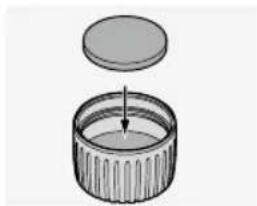
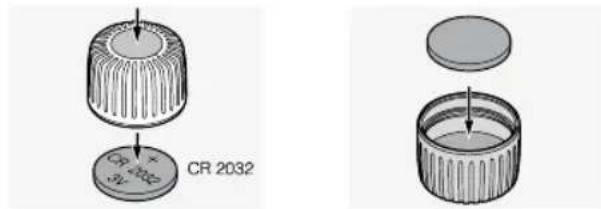
| Power supply | CR 2032 button cell in compartment under cover |
| Waterproofness | Up to 0.4 bar (4 m depth) |
| Gas filling | Inert gas (via threaded hole under side turret) |
| Mounting | SWAROVSKI OPTIK rail or rings (max torque 200 Ncm) |
| Compatible accessories | TL+ lever, BTF turret, PBR ring, threaded caps, protective covers |
| Cleaning | Microfiber cloth, optical brush, no abrasive products |
| Storage | Dry, well-ventilated, and dark place |
| Warranty | Worldwide (see website) |
| Repairs | Only by SWAROVSKI OPTIK Absam or North America |
Frequently Asked Questions - Z8i Swarovski
User questions about Z8i Swarovski
0 question about this device. Answer the ones you know or ask your own.
Ask a new question about this device
Download the instructions for your Binoculars in PDF format for free! Find your manual Z8i - Swarovski and take your electronic device back in hand. On this page are published all the documents necessary for the use of your device. Z8i by Swarovski.
USER MANUAL Z8i Swarovski
2. BEDIENUNG
natural_image
Technical line drawing of a mechanical component with rotational arrows indicating motion (no text or symbols)natural_image
Technical diagram of a mechanical component with directional arrows indicating motion (no text or symbols)natural_image
Diagram of a mechanical component with rotating parts and directional arrows indicating motion (no text or symbols)natural_image
Anatomical diagram of a biological structure with labeled parts (no text or symbols present)natural_image
Diagram of a mechanical device with rotating components and a handle, showing no text or symbols.natural_image
Mechanical diagram showing a rotating roller and a flanged roller assembly (no text or symbols)Batterie
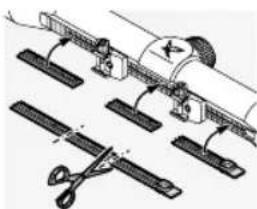
2.8 ABDECKUNG SWAROVSKI OPTIK RAIL (NUR BEI SR AUSFÜHRUNG)
natural_image
Technical illustration of mechanical assembly with clamps and a cutting tool (no text or symbols)natural_image
Technical diagram showing a circular target and a mechanical component with rotational arrows (no text or symbols)natural_image
Technical diagram showing a circular target and a mechanical component with rotational motion (no text or symbols)natural_image
Technical illustration of a mechanical component with concentric circles and rotational arrows (no text or symbols)natural_image
Technical illustration of a mechanical component with concentric circles and rotational arrows (no text or symbols)natural_image
Technical line drawing of a mechanical component with no visible text or symbolsnatural_image
Diagram of a rifle scope with targeting device and arrow indicating direction (no text or symbols)5.2 WARNHINWEIS
natural_image
Abstract line drawing of a rocket launching with a circular target symbol (no text or labels)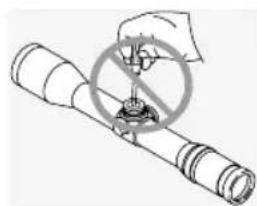
natural_image
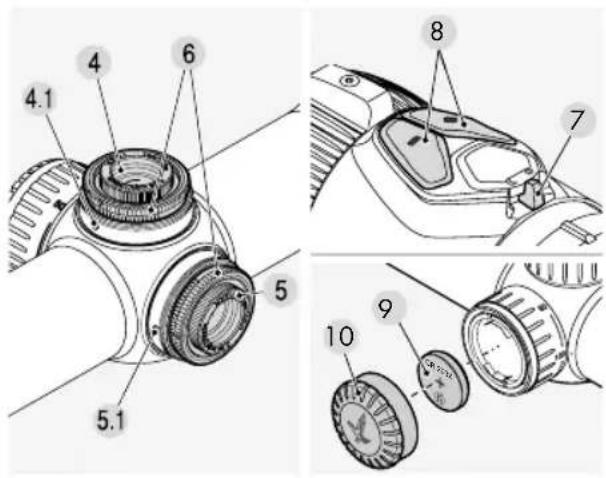
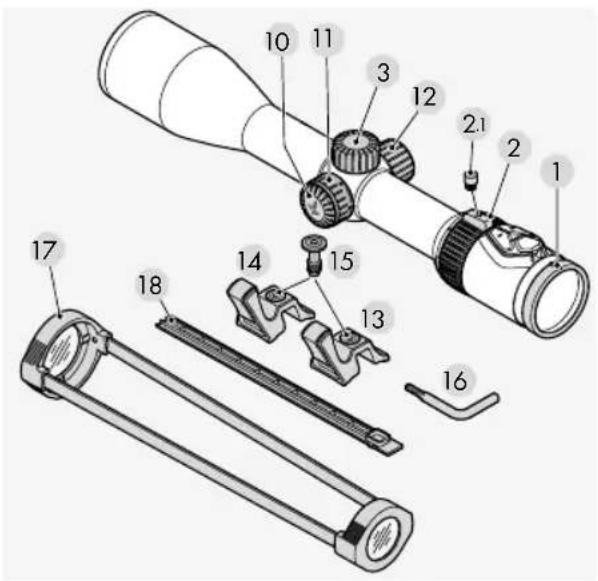
Illustration of a hand holding a circular object with a crosshair overlay, no text or symbols present1 Diopter adjustment
2 Magnification adjustment ring
2.1 Cover screw
3 Screw-on cap
4 Elevation adjustment
4.1 Index pin
5 Windage adjustment
5.1 Index pin
6 Knurled ring
7 OFF/DAY/NIGHT switch
8 Brightness control for reticle illumination
9 Battery for reticle illumination (button cell CR 2032)
10 Battery cover
11 Parallax turret (depending on the model)
12 Replacement battery cover
13 & 14 TL+ throw lever (black and orange, (depending on the model))
15 Screw
16 Torx wrench
17 Transparent scope covers
18 SWAROVSKI OPTIK rail cover (depending on the model)
2. OPERATION
2.1 ADJUSTING THE FOCUS
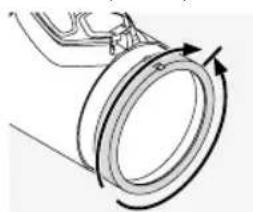
Turn the diopter adjustment ring until the reticle is in focus to your eye.
natural_image
Diagram of a mechanical component with rotational arrows indicating motion (no text or symbols)First, turn the diopter adjustment ring fully to the left (counter-clockwise) and then to the right until the reticle is in sharp focus. The adjustment range depends on the individual model.
You can find more information in the enclosed technical data sheet.
2.2 CHANGING THE MAGNIFICATION
natural_image
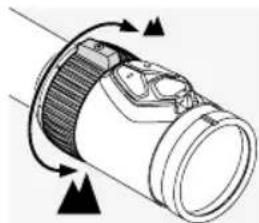
Diagram of a mechanical component with directional arrows indicating motion or force (no text or symbols)Turn the magnification adjustment ring through up to 160° to obtain the required magnification. The adjustment is continuous. The scale on the adjustment ring makes it easy to see the
setting. The soft ribbed cover of the adjustment ring has a small protrusion to make orientation easier. Depending on the model the magnification adjustment ring provides a catch at 1x magnification (CLICKONE), which makes you aware that you are entering the VIEWPLUS area.
2.3 INSTALLATION OF THE TL+ THROW LEVER

2.4 THE RETICLE IN THE SECOND IMAGE PLANE (EYEPIECE IMAGE PLANE)
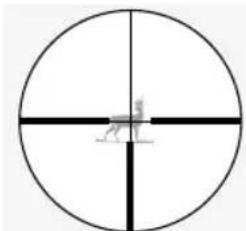
If you increase the magnification, the reticle remains the same size. The size of the image changes, but not the size of the reticle.
Even at high magnification, only a thin area of the target is covered. The reticle can only be used for estimating the distance to a limited extent.
natural_image
Simple circular diagram with intersecting lines and a small figure at the center (no text or symbols)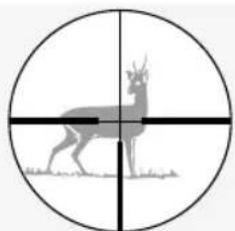
natural_image
Silhouette of a deer with antlers inside a circular target (no text or symbols)2.5 PARALLAX
Your rifle scope is set to be parallax-free at a target distance of 100 m (100 yd). This means that at a distance of 100 m (100 yd), the target and the reticle are in exactly the same plane.
Please note that for shots at distances longer or shorter than 100 m (100 yd), you must look through
the center of the scope. This will help to prevent the shifting of the impact point as a result of parallax errors.
natural_image
Mechanical component diagram showing rotational motion with arrows indicating direction (no text or symbols)Using the parallax turret, you can adjust the focus for every target distance and prevent aiming errors caused by parallax.
a) Quick adjustment
The target distances from 50 m (50 yd) to ∞ are engraved on the parallax turret. Turn the parallax turret until the distance you want is aligned with the index pin. The parallax turret also has a catch at 100 m (100 yd). This allows you to feel this setting, in particular at twilight.
b) Precision adjustment
Set the magnification to the highest level and turn the parallax turret until the image is as sharp as possible. Now move your eye backwards and forwards within the range of the exit pupil. If, while you are doing this, the reticle moves in relation to the image, correct the distance setting until it is no longer possible to see any difference between the movement of the reticle and the movement of the image.
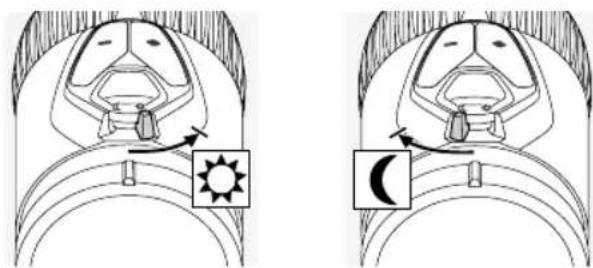
First, choose either day (symbol) or night (symbol) illumination by turning the switch to the appropriate position.
natural_image
Illustration of two insect head diagrams showing eye anatomy with sun and moon symbols (no text or labels)2. Brightness adjustment
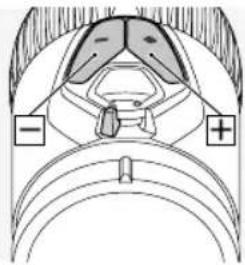
You can now adjust the brightness in the mode you have selected using the +/- buttons. To reach
natural_image
Anatomical diagram of a biological structure with labeled parts (no text or symbols present)the ideal level of brightness quickly, you can press and hold one of the buttons (long pulse). To make precision adjustments, press either of the buttons once (single pulse).
3. Switching off the illumination
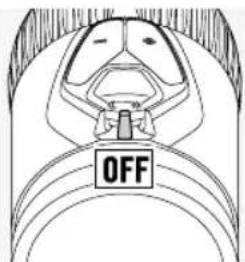
Turn the OFF/DAY/NIGHT switch to the central position.
4. Memory function
When you turn the illumination on again, the most recent brightness setting for DAY or NIGHT mode will be automatically restored.
5. Automatic shut-off function
If you do not adjust the brightness for 3 hours during the day or 5 hours at night, the reticle illumination will shut off automatically.
6. SWAROLIGHT
The Z8i+ models are fitted with an intelligent tilt sensor which senses whether or not the rifle scope is in a shooting position and sends this information to the illumination unit. The scope switches off if the tilt angle is greater than 70° (upwards or downwards), for example, if you stand the rifle up vertically.
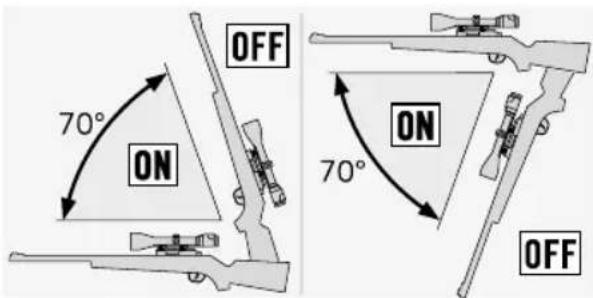
The scope also switches off if the lateral tilt is greater than 30^ (if you rest the rifle on your legs, for example).
When you return the rifle to the shooting position, the illumination automatically switches on.

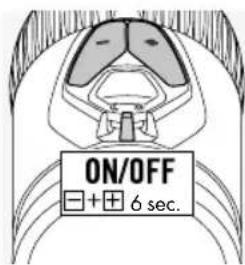
You can deactivate the SWAROLIGHT function by turning the OFF/DAY/NIGHT switch to the central position and pressing the +/- buttons at the same time for 6 seconds. The light will flash twice to confirm
that the function is deactivated. You can reactivate the SWAROLIGHT by repeating this step.
7. Switchable reticle (depending on the model)
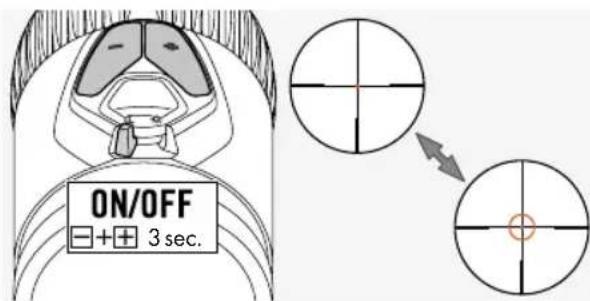
Turn the OFF/DAY/NIGHT switch to the DAY or NIGHT position to switch on the illuminated ring of the FLEXCHANGE 4A-IF reticle. The reticle illumination is now activated. Press the +/- buttons at the same time for 3 seconds to switch on the illuminated ring. Repeat this step to switch the ring off again.
8. Battery power indicator
If the illuminated reticle starts to flash, this means that you will soon need to change the battery. The battery will continue to operate for a few hours, depending on the brightness setting and the ambient temperature.
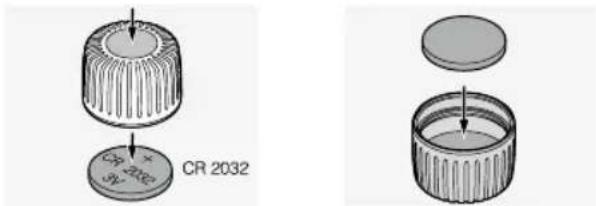
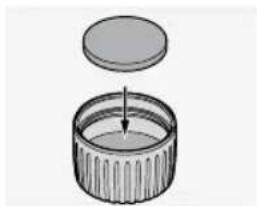
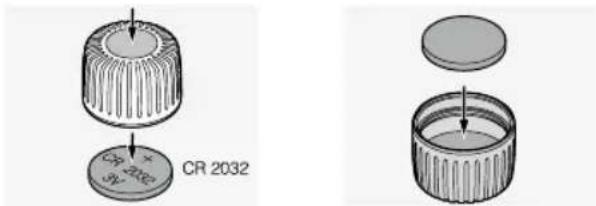
9. Changing the battery
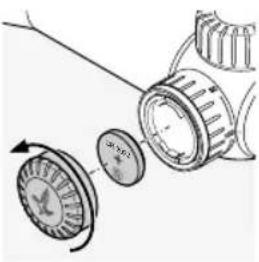
natural_image
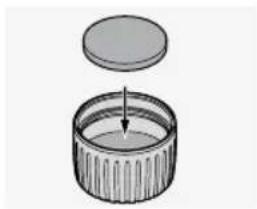
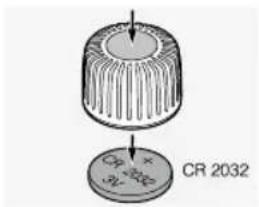
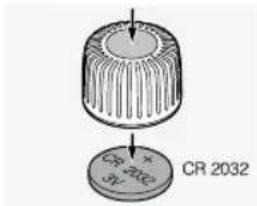
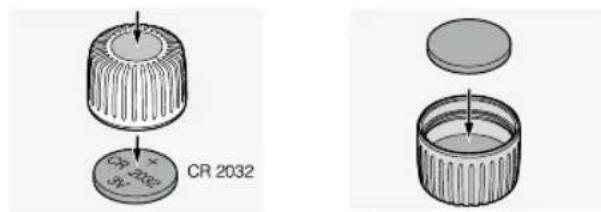
Mechanical diagram showing a rotating component with a curved arrow indicating rotation (no text or symbols)- Switch off the reticle illumination.
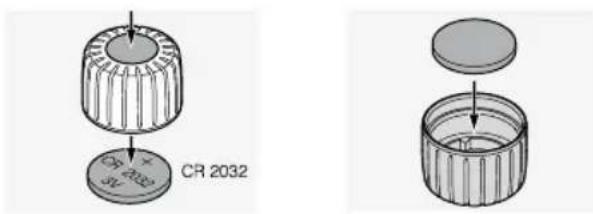
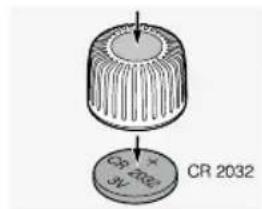
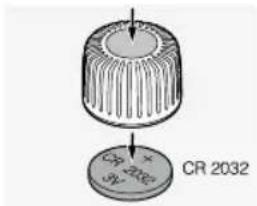
- Unscrew the battery cover by turning it counterclockwise.
- Remove the old battery.
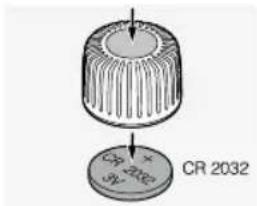
- When you insert the new battery (CR 2032), make
sure that the side marked "+" is facing upwards.
- Screw the battery cover back on.
Batteries
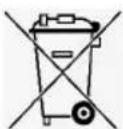
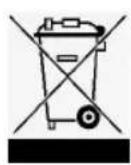
Batteries must not be disposed of in household waste. For this reason, you are obliged by law to return used batteries. You can dispose of them locally
(for example, at your retailer or at a waste recycling center) free of charge. Batteries are marked with the symbol of a crossed-out wheeled waste container as well as the chemical symbol for the hazardous substance they contain: "Cd" for cadmium, "Hg" for mercury, and "Pb" for lead. Please help us to protect our environment from damaging pollutants.
Note:
When you change the battery, the stored brightness setting is lost. When you turn the illumination unit on again, it will return to the medium brightness setting in DAY mode.
- Battery operating time
See the enclosed technical data sheet.
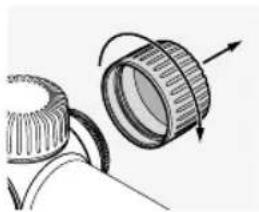
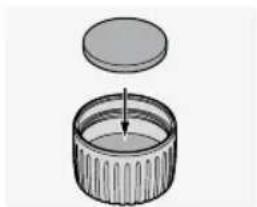
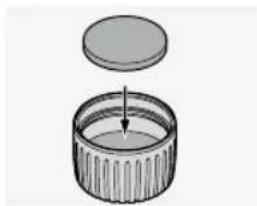
Removing the spare battery container
natural_image
Diagram of a mechanical component with rotating parts and directional arrows (no text or symbols)Battery
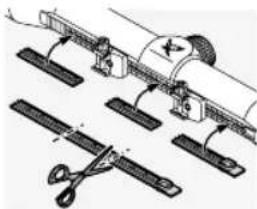
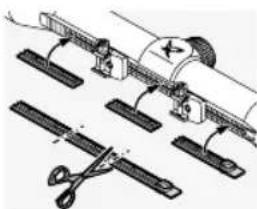
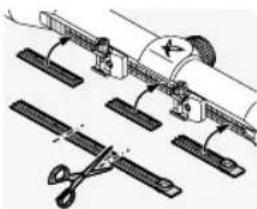
2.8 SWAROVSKI OPTIK RAIL COVER (SR VERSION ONLY)
natural_image
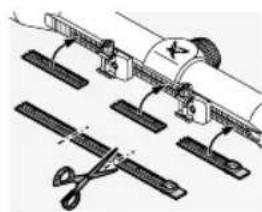
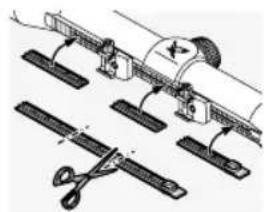
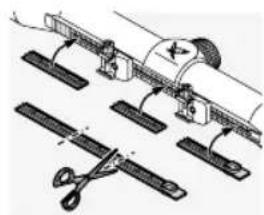
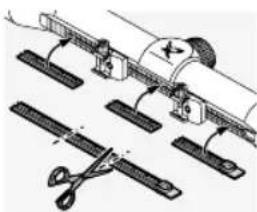
Technical illustration of mechanical assembly with tools and components (no text or symbols)The cover provided can be used to protect the exposed areas of the rail. You can cut it to the required size and press it into the rail using your fingers.
3. SIGHTING IN THE SCOPE
3.1 BASIC ADJUSTMENT
To ensure that the scope and rifle work together perfectly, you should always have the scope mounted by a competent gunsmith.
The reticle has been factory-set to the mechanical middle position. Before starting the mounting process, you can check that the reticle is in the correct position. To do this, remove the screw-on caps from the top and side turrets.
Turn the outer knurled ring of the top or side turret clockwise until it reaches the stop. Then turn the knurled ring counter-clockwise until it reaches the stop and count the number of clicks as you do so. Divide the number of clicks in half and this will give you the exact middle position. Repeat this step for the second turret.
Note:
When you mount the scope on the rifle, please make sure that you set the eye relief correctly (see the technical data sheet).
3.2 ADJUSTING THE SCOPE ON THE RIFLE
If the point of impact of the bullet deviates from the aiming point, you can correct this easily and accurately by adjusting the top and side turrets.
The middle point of the reticle will always stay in the center of the field of view.
Preparing for sighting in:
Before sighting in, make sure that the following parameters have the correct settings:
- Parallax
- Diopter adjustment
- High magnification
To make the adjustments, remove the screw-on caps from the top and side turrets.
If the shot is low
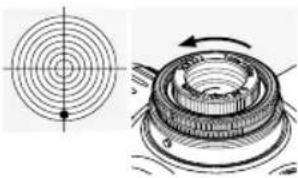
natural_image
Technical diagram showing a circular cross-section and a mechanical component with rotational arrows (no text or labels)Turn the outer knurled ring on the top turret in the direction of H (counter-clockwise).
If the shot is high
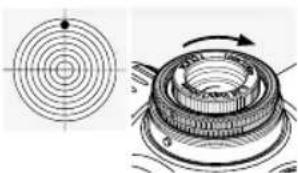
natural_image
Technical diagram showing a circular component with concentric rings and a mechanical assembly with rotating components (no text or labels)Turn the outer knurled ring on the top turret in the opposite direction to H (clockwise).
If the shot is to the left
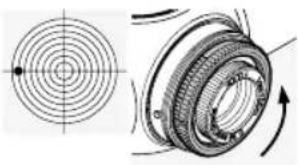
natural_image
Technical illustration of a mechanical component with concentric circles and rotational arrows (no text or symbols)Turn the outer knurled ring on the side turret in the direction of R (counter-clockwise).
If the shot is to the right
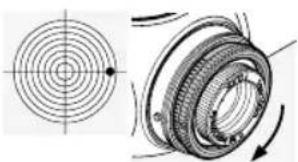
natural_image
Technical illustration of a mechanical component with concentric circles and rotational arrows (no text or symbols)Turn the outer knurled ring on the side turret in the opposite direction to R (clockwise).
You can find the impact point correction per click in the enclosed technical data sheet or in the information engraved on the top or side turret of your rifle scope.
3.3 ZERO POINT ADJUSTMENT
After you have adjusted the scope on the rifle, you can make this basic adjustment. The scale is engraved on the knurled ring of the top or side turret.
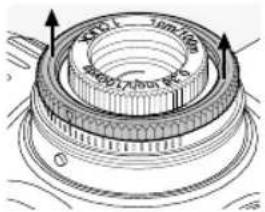
- Lift the outer knurled ring and keep it in this raised position while turning it. It will not remain in the raised position of its own accord.
When you turn the knurled ring in this position, the reticle will not be adjusted.
- Turn the knurled ring until the zero point of the scale is aligned with the index pin (molded metal pin) on the scope.
- When you let go of the knurled ring, it can once again be used to adjust the reticle. Your individual aiming point setting is now the zero point.
3.4 HINTS ON MOUNTING SCOPES
Many different sophisticated scope mounts are currently available on the market. These can be used to mount your scope securely on your rifle. By using the right tools and applying the correct amount of force, you can achieve the necessary stability and precision.
Please read the installation instructions provided by the mount manufacturer carefully. They will contain detailed information about the right tools to use and hints on installing the mount correctly.
Some examples of the instructions include:
- Depending on the type of mount (please read the manufacturer's recommendations), when you
fit the mount base, it may be helpful to remove the finish from the contact surfaces, degrease them, and then coat them with a suitable adhesive before bolting them together.
• To ensure that the mount is perfectly centered, you can, if necessary, lap the rings, for example.
- Degrease the clamping surfaces and the insides of the rings and apply a suitable adhesive to at least the lower halves of the rings to ensure complete stability.
- Please take particular care when adjusting the reticle.
- Eyerelief: You will find the correct eye relief for the scope in the technical data. Together with the personal measurements and preferences of the user, this will give you the best possible field of view in a comfortable shooting position.
- Torque: Tighten the screws on the rings alternately to a maximum torque of 200 Ncm (17.7 inch pounds). This will ensure that the body of the scope is not subjected to unnecessary stress and that it is mounted without tension and with high precision. We recommend using a torque wrench to ensure that you apply the correct amount of force. You must under no circumstances tighten the rings more firmly in order to avoid using adhesive on the lower half of the rings.
As an alternative to ring mounts, SWAROVSKI OPTIK supplies its own innovative mounting rail. The SWAROVSKI OPTIK rail grips the upper part of the mount in its teeth and guarantees total stability. It can also be fitted quickly and easily, without the need for adhesives or drilling.
If the right tools and the correct amount of force are used and the manufacturer's instructions are followed carefully, the rifle scope should require little adjustment during sighting in.
Make best use of the individual components to ensure that your combination of firearm, mount, and scope are assembled with the highest precision.
SWAROVSKI OPTIK cannot guarantee that the information given here is correct, up-to-date or complete.
3.5 BTF - BALLISTIC TURRET FLEX
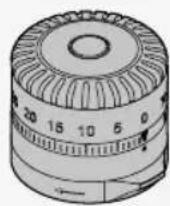
The ballistic turret flex (BTF) can be configured separately and enables you to stay on target at the required distances. If it is used as a top turret, it can compensate for bullet drop. When used as a side turret, it is ideal for windage adjustment or for estimating the lead distance. The BTF can be fitted without tools and can be combined with any available reticle.
3.6 PBR - PERSONALIZED BALLISTIC RING
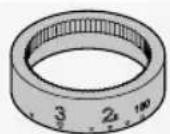
The personalized ballistic ring (PBR) is a tailor-made accessory for the BTF which offers high levels of customization at the hunting distances that are relevant to you.
This special accessory is engraved for the BTF on the basis of the personal data that you enter in the SWAROVSKI OPTIK ballistic program and it is adapted to the ammunition you have selected.

BALLISTICPROGRAMS. SWAROVSKIOPTIK.COM
4. CARE AND MAINTENANCE
4.1 CLEANING CLOTH
Using this special microfiber cloth you can clean even the most sensitive glass surfaces. It is ideal for objective lenses, eyepieces, and eyeglasses. Please keep the cloth clean, as dirt can damage the lens surface. If the cloth is dirty, you can wash it in lukewarm soapy water and let it air dry. Please use it only for cleaning glass surfaces.
4.2 CLEANING
We have designed all the components and surfaces of the scope to be easy to clean.
To ensure the long-lasting optical brilliance of your scope, you should keep the glass surfaces free from dirt, oil, and grease.
To clean the lens, first brush off large particles of dirt with an optical lens brush. Then breathe gently on the lens and polish it with the cleaning cloth to remove any remaining dirt. We recommend that you clean the metal parts with a soft, clean cloth.
4.3 USING INSECT REPELLENTS
The active agent DEET (insect repellent) may - depending on the concentration - damage both synthetic materials and varnished surfaces. In particular, in cases where the product is newly applied and still damp on skin or hands which then come into contact with the surface.
As an alternative, insect repellents based on ICARIDIN can be used.
4.4 STORAGE
You should store your scope in a well-ventilated, dry, and dark location. If your scope is wet, you must dry it before putting it away.
5. SAFETY RECOMMENDATIONS
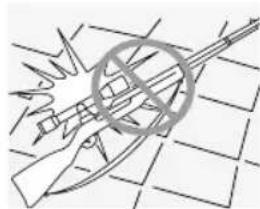
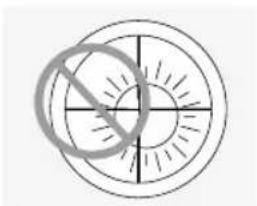
5.1 WARNING!
natural_image
Simple circular diagram with intersecting lines and a diagonal line, no text or symbols present.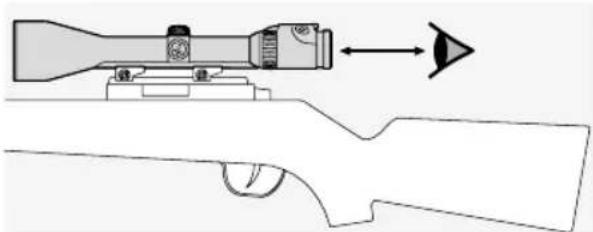
natural_image
Diagram of a rifle scope with targeting and arrow, no text or symbols present5.2 WARNING
When you select a magnification level smaller than 1 on your rifle scope the target appears smaller when looking through the rifle scope than it is in reality. This means that the target is displayed in a reduced size and in reality, is closer than appears when looking through the rifle scope. It is essential that this is factored in when shooting!
5.3 GENERAL INFORMATION

natural_image
Illustration of a rifle with a target and explosion symbol (no text or labels)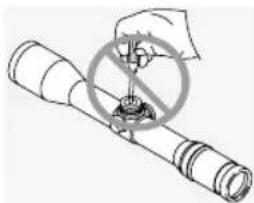
natural_image
Diagram of a mechanical device with a circular component and a diagonal line, no text or symbols presentRepairs and servicing must only be carried out by SWAROVSKI OPTIK Absam (Austria) or SWAROVSKI OPTIK North America, otherwise your warranty will be void.
5.4 WATERTIGHTNESS
The combination of the high-quality seals in our scopes and the care we take in manufacturing them ensures that they are watertight up to a pressure of 0.4 bar or a depth of 4 m (13 yd). The scope remains watertight even if the screwon cap is removed. However, you should still treat your scope and in particular, the turrets with care.
The scope is filled with inert gas through the screw hole under the side turret. Please do not loosen the sealing screw on the underside of the scope.
6. COMPLIANCE
More information about compliance can be found at: https://swarop.tk/z8i_compliance
WEEE/ElektroG
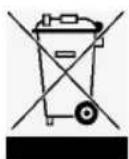
This symbol indicates that this product must not be disposed of as household waste under the WEEE Directive (Waste Electrical and Electronic Equipment Directive) and national laws. This product must be returned to a dedicated collection site. You can obtain information about collection sites for waste equipment from your local authorities or from an authorized site for the disposal of waste electrical and electronic equipment. Disposing of this product correctly helps to protect the environment and prevents potential damage to both the environment and human health which could occur if the products are not handled correctly.
WARRANTY
This product from SWAROVSKI OPTIK is a high-quality instrument for which we grant worldwide warranty and goodwill services. For more information, please visit: https://swarop.tk/riflescopes_warranty


WARNING WARNI
BUTTON/COIN CELL BATTERIES ARE HAZARDOUS AND MUST BE KEPT OUT OF REACH OF CHILDREN AT ALL TIMES, WHETHER THE BATTERY IS NEW OR USED. THESE BATTERIES CAN CAUSE SEVERE OR FATAL INJURIES IN 2 HOURS OR LESS IF SWALLOWED OR PLACED INSIDE ANY PART OF THE BODY. IF YOU SUSPECT A BUTTON/COIN CELL BATTERY HAS BEEN SWALLOWED OR PLACED INSIDE ANY PART OF THE BODY, SEEK MEDICAL ATTENTION IMMEDIATELY OR CONTACT:
POISON INFORMATION CENTRE AUSTRALIA 13 11 26 NATIONAL INGESTION HOTLINE UNITED STATES 1-(800) 498-8666 FOR 24/7 FAST, EXPERT ADVISE
All the specifications given are typical values.
We reserve the right to make charges regarding design and delivery. We accept no liability for printing errors.
MERCI D'AVOIR CHOISI CE PRODUIT DE LA MAISON SWAROVSKI OPTIK. POUR TOUTE QUESTION ADRESSEZ-VOUS A VOTRE DETAILLANT OU CONTACTEZ-NOUS DIRECTEMENT SUR SWAROVSKIOPTIK.COM.
1. VUE D'ENSEMBLE
2. FONCTIONNEMENT
2.1 REGLAGE DE LA MISE AU POINT
natural_image
Diagram of a mechanical component with rotational arrows indicating motion (no text or symbols)natural_image
Diagram of a cylindrical device with internal components and directional arrows indicating motion (no text or symbols)natural_image
Mechanical component diagram showing a rotary knob with arrows indicating motion (no text or symbols)natural_image
Diagram of a mechanical or biological structure with an arrow and a sun icon, no readable text or symbols present.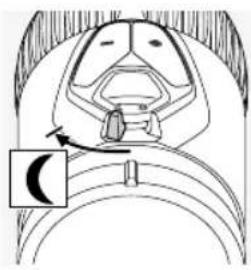
natural_image
Anatomical diagram of a biological structure with a labeled arrow pointing to a specific region (no text or symbols present)natural_image
Anatomical line drawing of a biological structure with labeled parts (no text or symbols present)natural_image
Mechanical diagram showing a gear and rotor assembly with rotational arrows (no text or symbols)natural_image
Diagram of a mechanical component with rotating parts and directional arrows (no text or symbols)Pile
natural_image
Illustration of a cylindrical container with an open lid and an arrow pointing to its interior (no text or symbols)2.8 PROTECTION POUR RAIL DE MONTAGE SWAROVSKI OPTIK (VERSION SR UNIQUEMENT)
natural_image
Technical illustration of mechanical assembly with clamps and gears (no text or symbols)natural_image
Technical diagram showing a circular cross-section and a mechanical component with rotational arrows (no text or labels)natural_image
Technical illustration of a mechanical component with concentric circles and rotational arrow (no text or symbols)natural_image
Technical illustration of a mechanical component with concentric circles and a rotating ring (no text or symbols)natural_image
Technical illustration of a mechanical component with concentric circles and rotational arrows (no text or symbols)natural_image
Diagram of a rifle scope with targeting scope and scope target (no text or symbols)5.2 AVERTISSEMENT
natural_image
Illustration of a gun with a crossed scope and explosion effect, no text or symbols present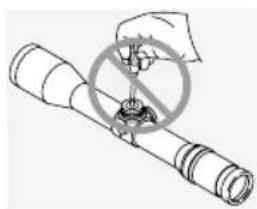
natural_image
Illustration of a hand holding a circular object with a crosshair overlay, no text or symbols present2. FUNZIONAMENTO
2.1 MESSA A FUOCO DELL'IMMAGINE
natural_image
Diagram of a mechanical component with arrows indicating motion direction (no text or symbols)natural_image
Diagram of a cylindrical mechanical component with internal components and directional arrows indicating flow or movement (no text or symbols)natural_image
Two circular diagrams showing a deer silhouette with crosshairs, one in the left and one in the right, both without any text or symbols.2.5 PARALLASSE
natural_image
Mechanical component diagram showing a rotating knob with arrows indicating motion (no text or symbols)natural_image
Diagram of a mechanical or biological structure with an arrow and a sun icon, no readable text or symbols present.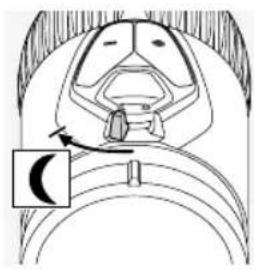
natural_image
Anatomical line drawing of a biological structure with a labeled arrow pointing to a specific region (no text or symbols present)natural_image
Anatomical diagram of a biological structure with labeled regions (− and +), no readable text or symbols present.natural_image
Diagram of a mechanical component with rotating parts and a curved arrow indicating rotation (no text or symbols)natural_image
Diagram of a mechanical component with rotating parts and directional arrows (no text or symbols)Batteria
natural_image
Illustration of a cylindrical container with a lid and an arrow pointing to it (no text or symbols)2.8 COPERTURA GUIDA D'ATTACCO SWAROVSKI OPTIK (SOLO VERSIONE SR)
natural_image
Technical illustration of mechanical assembly with clamps and a tool (no text or symbols)natural_image
Technical diagram showing a circular target and a mechanical component with rotational arrows (no text or labels)natural_image
Technical diagram showing a circular component with concentric rings and a rotating mechanical component (no text or symbols)natural_image
Technical illustration of a mechanical component with concentric circles and rotational arrows (no text or symbols)natural_image
Technical illustration of a mechanical component with concentric circles and rotational arrows (no text or symbols)natural_image
Simple circular diagram with concentric rings and radial lines, no text or symbols present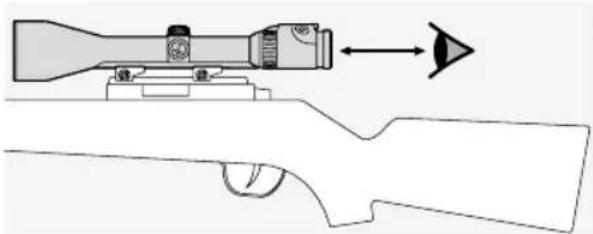
natural_image
Diagram of a rifle scope with targeting device and arrow indicating direction (no text or symbols)5.2 AVVERTENZA
natural_image
Illustration of a hand holding a rifle with a circular emblem, set against a grid background (no text or symbols)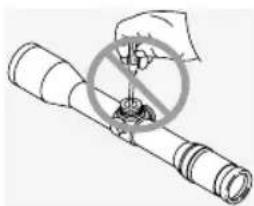
natural_image
Illustration of a hand holding a circular object with a crosshair overlay, no text or symbols presenthttps://swarop.tk/z8i_compliance
Direttiva RAEE
2. UTILIZACIÓN
2.1 AJUSTE DEL ENFOQUE
natural_image
Diagram of a mechanical component with rotational arrows indicating motion (no text or symbols)natural_image
Diagram of a cylindrical device with internal components and directional arrows indicating flow or movement (no text or symbols)natural_image
Two circular diagrams showing a deer silhouette with crosshairs, one in the left and one in the right, both without any text or symbols.2.5 PARALAJE
natural_image
Diagram of a mechanical component with rotational arrows indicating motion (no text or symbols)natural_image
Diagram of a mechanical or biological structure with an arrow and a sun icon, no readable text or symbols present.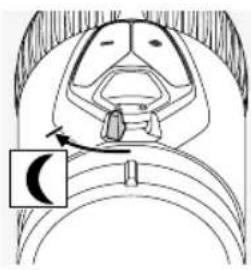
natural_image
Anatomical diagram of a biological structure with a labeled arrow pointing to a specific region (no text or symbols present)natural_image
Anatomical diagram of a biological structure with labeled parts (no text or symbols present)natural_image
Mechanical diagram showing a rotating component with a shaft and flange, no text or symbols presentnatural_image
Diagram of a mechanical component with rotational arrows indicating motion (no text or symbols)Batería
natural_image
Illustration of a cylindrical container with an open lid and an arrow pointing to its interior (no text or symbols)natural_image
Technical illustration of mechanical assembly with clamps and tools (no text or symbols)natural_image
Technical diagram showing a circular cross-section and a mechanical component with rotational arrows (no text or labels)natural_image
Technical diagram showing a circular cross-section and a mechanical component with rotational flow arrows (no text or labels)natural_image
Technical illustration of a mechanical bearing assembly showing concentric circles and rotating components (no text or symbols)natural_image
Technical illustration of a mechanical component with concentric circles and rotational arrows (no text or symbols)natural_image
Diagram of a rifle scope with targeting device and arrow indicating direction (no text or symbols)5.2 ADVERTENCIA
natural_image
Illustration of a rifle with a target symbol around it, no text or symbols present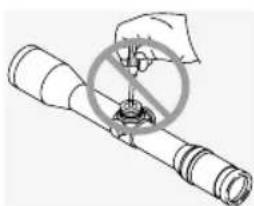
natural_image
Diagram of a mechanical device with a circular component and intersecting lines (no text or symbols)2. BEDIENING
2.1 INSTELLEN VAN DE BEELDSCHERPTE
natural_image
Diagram of a mechanical component with rotational arrows indicating motion (no text or symbols)natural_image
Diagram of a mechanical component with directional arrows indicating motion or force (no text or symbols)natural_image
Two circular diagrams showing a deer silhouette with crosshairs, one in the left and one in the right, both without any text or symbols.2.5 PARALLAX
natural_image
Mechanical component diagram showing a rotating assembly with arrows indicating motion (no text or symbols)natural_image
Illustration of two insect anatomical structures with directional arrows indicating movement or rotation (no text or symbols)2. Lichtsterkteregeling
natural_image
Anatomical diagram of a biological structure with labeled parts (no text or symbols present)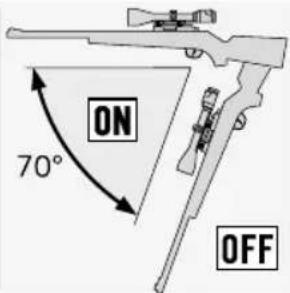
natural_image
Diagram of a mechanical component with rotating parts and directional arrows (no text or symbols)Batterij
2.8 SWAROVSKI OPTIK AFDEKKING MONTAGERAIL (ALLEEN BIJ SR-UITVOERING)
natural_image
Technical illustration of mechanical assembly with clamping tools (no text or symbols)natural_image
Technical diagram showing concentric circular patterns and a mechanical component with rotational arrows (no text or symbols)natural_image
Technical diagram showing a circular component with concentric rings and a mechanical assembly with rotating components (no text or labels)natural_image
Technical illustration of a mechanical component with concentric circles and rotational arrows (no text or symbols)natural_image
Technical illustration of a mechanical component with concentric circles and rotational arrows (no text or symbols)natural_image
Simple circular diagram with intersecting lines and a diagonal line, no text or symbols present.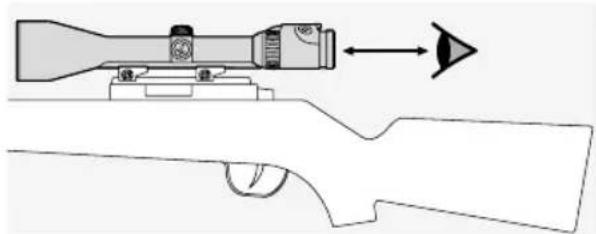
natural_image
Diagram of a rifle scope with targeting device and arrow indicating direction (no text or symbols)5.2 WAARSCHUWING
natural_image
Abstract line drawing of a rocket launching with a starburst, crossed by a string (no text or symbols)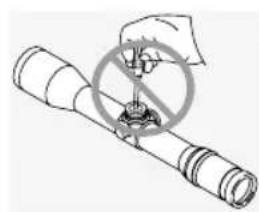
natural_image
Illustration of a hand using a prohibition symbol to measure a device (no text or symbols present)2. ANVÄNDNING
natural_image
Diagram of a mechanical component with rotational arrows indicating motion (no text or symbols)natural_image
Diagram of a cylindrical device with internal components and directional arrows indicating flow or movement (no text or symbols)natural_image
Simple circular diagram with intersecting lines and a small human figure at the center (no text or symbols)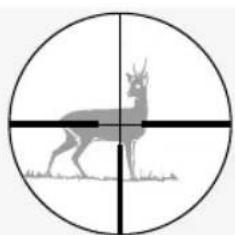
natural_image
Silhouette of a deer with antlers inside a circle, intersected by two perpendicular lines (no text or symbols)2.5 PARALLAX
natural_image
Diagram of a mechanical component with rotational arrows indicating motion (no text or symbols)natural_image
Diagram of a biological structure with a highlighted region and an arrow pointing to a specific area (no text or symbols present)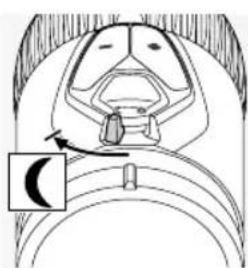
natural_image
Anatomical diagram of a biological structure with a labeled arrow and a circular inset (no text or symbols present)natural_image
Anatomical line drawing of a biological structure with labeled parts (no text or symbols present)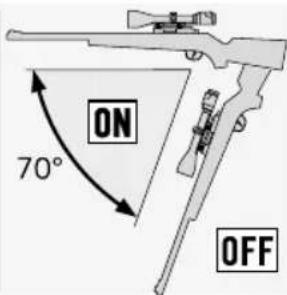
natural_image
Diagram of a mechanical device with rotating components and a central gear (no text or symbols)natural_image
Diagram of a mechanical component with rotating parts and directional arrows (no text or symbols)Batteri
2.8 SWAROVSKI OPTIK RAIL-SKYDDET (ENDAST SR-UTFÖRANDE)
natural_image
Technical illustration of mechanical assembly with rollers and a tool (no text or symbols)natural_image
Technical diagram showing a circular cross-section and a mechanical component with rotational flow arrows (no text or labels)natural_image
Technical diagram showing a circular component with concentric rings and a mechanical assembly with rotating components (no text or labels)natural_image
Technical illustration of a mechanical component with concentric circles and rotational arrows (no text or symbols)natural_image
Technical illustration of a mechanical component with concentric circles and rotational arrows (no text or symbols)natural_image
Circular diagram with concentric rings and radial lines, no text or symbols present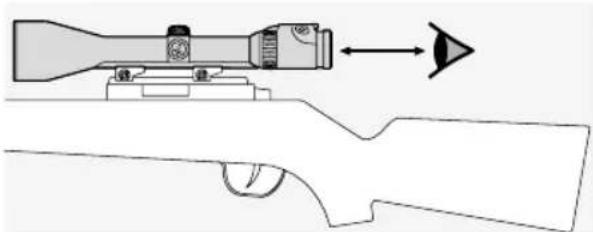
natural_image
Diagram of a rifle scope with targeting device and arrow indicating direction (no text or symbols)5.2 VARNINGSANVISNINGAR
natural_image
Diagram of a hand holding a tool with a circular target symbol, set against a grid background (no text or labels)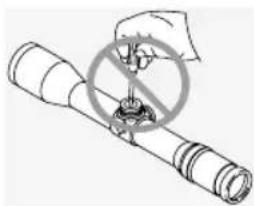
natural_image
Illustration of a hand using a tool to cut through a circular component with a diagonal line (no text or symbols)2. KÄYTTÖ
2.1 TARKENNUKSEN SÄÄTÖ
natural_image
Diagram of a mechanical component with rotational arrows indicating motion (no text or symbols)natural_image
Diagram of a cylindrical device with internal components and directional arrows indicating motion (no text or symbols)natural_image
Simple circular diagram with intersecting lines and a small figure at the center (no text or symbols)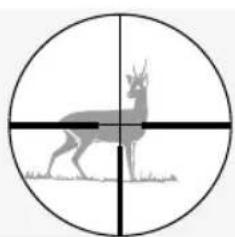
natural_image
Silhouette of a deer with antlers inside a circular target (no text or symbols)2.5 PARALLAKSI
natural_image
Diagram of a mechanical component with rotating parts and directional arrows (no text or symbols)natural_image
Diagram of a biological structure with a highlighted region and an arrow pointing to a star-like symbol (no text or labels present)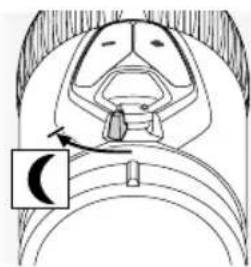
natural_image
Anatomical diagram of a biological structure with a labeled arrow pointing to a specific region (no text or symbols present)2. Kirkkauden säätö
natural_image
Anatomical diagram of a biological structure with labeled parts (no text or symbols present)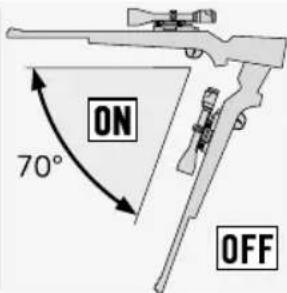
natural_image
Illustration of a mechanical device with rotating components and a handle (no text or symbols)natural_image
Diagram of a mechanical component with rotating parts and directional arrows (no text or symbols)Paristo
natural_image
Illustration of a cylindrical container with an open lid and an arrow pointing to the interior (no text or symbols)2.8 SWAROVSKI OPTIK -KISKOSUOJUS (VAIN SR-VERSIO)
natural_image
Technical illustration of mechanical assembly with clamps and a tool (no text or symbols)natural_image
Technical diagram showing a circular cross-section and a mechanical component with rotational arrows (no text or labels)natural_image
Technical illustration of a mechanical component with concentric circles and rotational arrows (no text or symbols)natural_image
Technical illustration of a mechanical component with concentric circles and rotational arrows (no text or symbols)natural_image
Technical illustration of a mechanical component with concentric circles and a rotating shaft (no text or symbols)natural_image
Technical line drawing of a mechanical component with concentric rings and directional arrows (no text or symbols)5.2 VAROITUS
natural_image
Abstract line drawing of intersecting lines and a central circular symbol on a grid background (no text or symbols)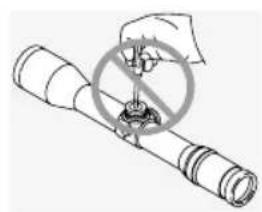
natural_image
Illustration of a hand using a device to stop a device with a circular symbol (no text or symbols present)2. BETJENING
2.1 INDSTILLING AF BILLEDSKARPHEDEN
natural_image
Diagram of a mechanical component with rotational arrows indicating motion (no text or symbols)natural_image
Diagram of a cylindrical device with internal components and directional arrows indicating motion (no text or symbols)natural_image
Simple circular diagram with intersecting lines and a small figure inside, no text or symbols present.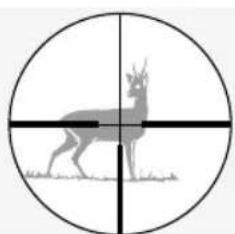
natural_image
Silhouette of a deer with antlers inside a circular target (no text or symbols)2.5 PARALLAKSE
natural_image
Diagram of a mechanical component with directional arrows indicating motion or flow (no text or symbols)natural_image
Diagram of an insect head with a sun symbol and arrow pointing to the anatomical structure (no text or labels)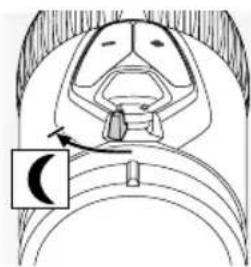
natural_image
Anatomical diagram of a biological structure with a labeled arrow pointing to a specific region (no text or symbols present)natural_image
Anatomical line drawing of a biological structure with labeled parts (no text or symbols present)natural_image
Diagram of a mechanical device with rotating components and a central component (no text or symbols)natural_image
Diagram of a mechanical component with rotating parts and directional arrows (no text or symbols)Batteri
natural_image
Illustration of a cylindrical container with an open lid and an arrow pointing to the interior (no text or symbols)2.8 SWAROVSKI OPTIK SKINNEAFSKÄRMNING (KUN SR VERSION)
natural_image
Technical illustration of mechanical assembly with clamps and gears (no text or symbols)natural_image
Technical diagram showing a circular cross-section and a mechanical component with rotational arrows (no text or labels)natural_image
Technical diagram showing a circular cross-section and a mechanical component with rotational arrows (no text or labels)natural_image
Technical illustration of a mechanical component with concentric circles and rotational arrows (no text or symbols)natural_image
Technical illustration of a mechanical component with concentric circles and a rotating shaft (no text or symbols)natural_image
Technical line drawing of a mechanical component with concentric rings and directional arrows (no text or symbols)5.2 ADVARSEL
natural_image
Abstract geometric diagram with intersecting lines and a central circle (no text or symbols)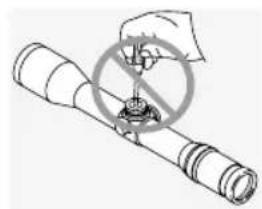
natural_image
Diagram of a mechanical device with a crossed-out ring and a hand holding a tool (no text or symbols)natural_image
Diagram of a mechanical component with rotational arrows indicating motion (no text or symbols)natural_image
Diagram of a cylindrical device with internal components and directional arrows indicating motion (no text or symbols)natural_image
Two circular diagrams showing a deer silhouette in cross-section and its corresponding deer silhouette with a crosshairs, both without any text or symbols.2.5 ОТСТРОЙКА ОТ ПАРАЛЛАКСА
natural_image
Diagram of a mechanical component with rotational arrows indicating motion (no text or symbols)natural_image
Diagram of a mechanical or electrical component with a sun symbol and arrow indicating direction (no text or labels)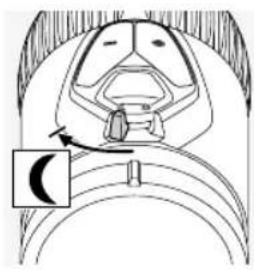
natural_image
Anatomical diagram of a biological structure with a labeled arrow pointing to a specific region (no text or symbols present)natural_image
Anatomical diagram of a biological structure with labeled parts (no text or symbols present)natural_image
Diagram of a mechanical device with rotating components and a dial (no text or symbols)natural_image
Diagram of a mechanical component with rotational arrows indicating motion (no text or symbols)Батарея
natural_image
Technical illustration of mechanical assembly with clamps and brackets (no text or symbols)natural_image
Technical diagram showing a circular cross-section and a mechanical component with rotational arrows (no text or labels)natural_image
Technical diagram showing a circular cross-section and a mechanical component with rotational arrows (no text or labels)natural_image
Mechanical diagram showing concentric circular components and a rotating mechanical component with rotational arrows (no text or labels)natural_image
Technical illustration of a mechanical component with concentric circles and rotational arrows (no text or symbols)5.2 ПРЕДУПРЕЖДЕНИЕ
natural_image
Diagram of a flashlight with a prohibition symbol (no text or labels)