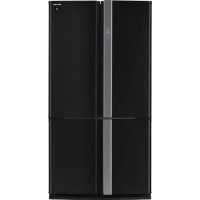
SJFP760VBK - Refrigerator SHARP - Free user manual and instructions
Find the device manual for free SJFP760VBK SHARP in PDF.



| Brand | Sharp |
| Model | SJFP760VBK |
| Product type | French door refrigerator-freezer |
| Refrigerant | R600a (isobutane) – flammable |
| Insulating gas | Cyclopentane |
| Power supply | 220-240 V ~ 50 Hz |
| Technologies | Plasmacluster ionizer, coldest zone indicator, automatic defrost |
| Special functions | Energy saving, holiday mode, quick freeze, child lock, door alarm |
| Refrigerator temperature setting | 0°C to 6°C (in 1°C or 0.5°C steps) |
| Freezer temperature setting | -13°C to -21°C (in 1°C or 0.5°C steps) |
| Lighting | LED (replacement by authorized technician) |
| Refrigerator shelves | 2 glass shelves (approximately 3 kg each) |
| Freezer drawers | 3 small + 2 large |
| Door bins | 3 + 1 left bottle bin + 1 right + 1 functional bin |
| Vegetable crisper | 1 highly airtight drawer with sliding lid |
| Fruit compartment | 1 specific compartment |
| Ice making | 2 trays with ice bucket (do not use the bucket to make ice) |
| Defrost | Automatic |
| Maintenance | Clean with warm soapy water; do not use solvents or abrasives |
| Safety | Flammable refrigerant – do not puncture the circuit, do not use electrical appliances inside, do not store flammable substances |
| Removable accessories | Shelves, drawers, bins, egg tray, bottle separator |
| Country of manufacture | Thailand |
Frequently Asked Questions - SJFP760VBK SHARP
User questions about SJFP760VBK SHARP
0 question about this device. Answer the ones you know or ask your own.
Ask a new question about this device
Download the instructions for your Refrigerator in PDF format for free! Find your manual SJFP760VBK - SHARP and take your electronic device back in hand. On this page are published all the documents necessary for the use of your device. SJFP760VBK by SHARP.
USER MANUAL SJFP760VBK SHARP
Device of this mark is a trademark of Sharp Corporation. Plasmacluster is a registered trademark or a trademark of Sharp Corporation.
Thank you very much for buying this SHARP product. Before using your SHARP refrigerator, please read this operation manual to ensure that you gain the maximum benefit from it.
- This refrigerator is for household only, with ambient temperature between +5^ and +43^ .
The refrigerator should not be subjected to temperatures of -10^ or below for a long period of time.
WARNING CAUTION
This refrigerator contains flammable refrigerant (R600a: isobutane) and insulation blowing gas (cyclopentane).
Observe the following rules to prevent ignition and explosion.
The refrigeration system behind and inside the refrigerator contains refrigerant. Do not allow any sharp objects to come into contact with the refrigeration system.
Do not use mechanical devices or other means to accelerate the defrosting process. (This refrigerator has adopted automatic defrosting system.)
Do not use electric appliances inside the refrigerator.
Use only the specified parts for the refrigerator compartment light.
Do not block the openings on the circumference of the refrigerator.
Do not use flammable sprays, such as spray paint near the refrigerator. It may cause explosion or fire.
If the refrigeration system should get punctured, do not touch the wall outlet and do not use open flames. Open the window and air out the room. Then ask a service agent approved by SHARP for servicing.
This refrigerator should be disposed appropriately. Take the refrigerator to a recycling plant for flammable refrigerant and insulation blowing gases.
Do not store highly volatile and flammable materials such as ether, petrol, propane gas, aerosol cans, adhesive agents and pure alcohol etc.
These materials are liable to explode.
Dust deposited on the power plug may cause fire. Wipe it off carefully.
Do not attempt to change or modify this refrigerator. This may result in fire, electric shock or injury.
Ensure that the refrigerator presents no danger to children while being stored for disposal. (e.g. remove the magnetic door seals to prevent child entrapment.)
- Do not touch the compressor unit or its peripheral parts, as they become extremely hot during operation and the metal edges may cause injury.
Do not touch foods or metal containers in the freezer compartment with your wet hands. This may cause frostbite.
Do not use an extension cord or adapter plug.
Do not place bottled and canned drinks in the freezer as they may crack when frozen.
- Make sure that the power cord has not been damaged during installation or moving. If the power plug or cord is loose, do not insert the power plug. There is a risk of electric shock or fire.
Disconnect from the mains electricity supply by removing the mains plug from the electricity supply socket. Do not remove by pulling the mains lead. This may cause electric shock or fire.
Should the flexible supply cord be damaged, it must be replaced by service agent approved by SHARP as a special cord is required.
In case of gas leak, ventilate the area by opening a window, etc. Do not touch the refrigerator or the power outlet.
Do not place objects containing liquid or unsteady objects on top of refrigerator.
This refrigerator is not intended for use by persons (including children) with reduced physical, sensory or mental capabilities, or lack of experience and knowledge, unless they have been given supervision or instruction concerning use of the refrigerator by a person responsible for their safety. Young children should be supervised to ensure that they do not play with the refrigerator.
Information on Disposal for Users (private households)
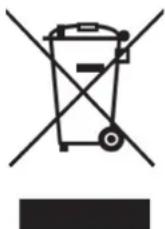
Attention:
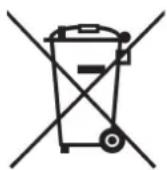
Your product is marked with this symbol. It means that used electrical and electronic products should not be mixed with general household waste. There is a separate collection system for these products.
1. In the European Union
Attention: If you want to dispose of this equipment, please do not use the ordinary dust bin! Used electrical and electronic equipment must be treated separately and in accordance with legislation that requires proper treatment, recovery and recycling of used electrical and electronic equipment.
Following the implementation by member states private households within the EU states may return their used electrical and electronic equipment to designated collection facilities free of charge. In some countries your local retailer may also take back your old product free of charge if you purchase a similar new one.
*) Please contact your local authority for further details.
If your used electrical or electronic equipment has batteries or accumulators, please dispose of these separately beforehand according to local requirements.
By disposing of this product correctly you will help ensure that the waste undergoes the necessary treatment, recovery and recycling and thus prevent potential negative effects on the environment and human health which could otherwise arise due to inappropriate waste handling.
2. In other Countries outside the EU
If you wish to discard this product, please contact your local authorities and ask for the correct method of disposal.
For Switzerland: Used electrical or electronic equipment can be returned free of charge to the dealer, even if you don't purchase a new product. Further collection facilities are listed on the homepage of www.swico.ch or www.sens.ch.
GB
WARNING
Do not install the refrigerator in a damp or wet location as this may cause damage to the insulation and a leakage. Condensation may also build on the outer cabinet and cause rust.
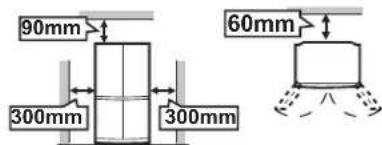
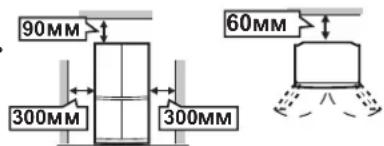
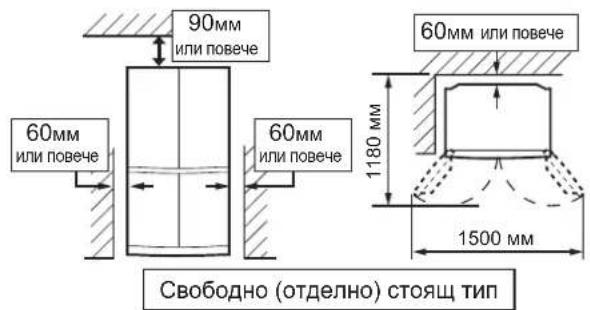
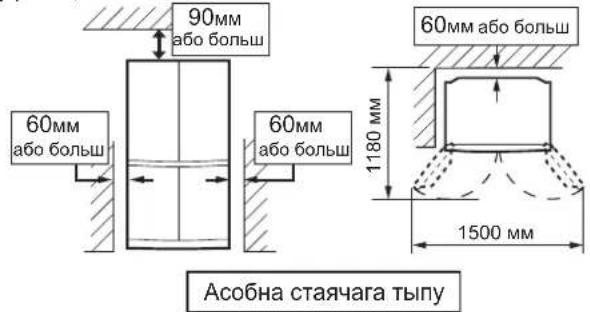
1 Keep adequate ventilation space around the refrigerator. The figure shows the minimum required space for installing the refrigerator. The measurement condition of power consumption is conducted under a different space dimension. By keeping greater space, the refrigerator may be operated under a less amount of power consumption. If using the refrigerator in the smaller space dimension than the below figure, it may cause the temperature rise in the unit, loud noise and failure.
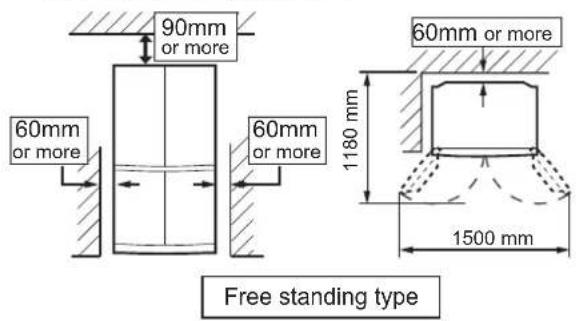
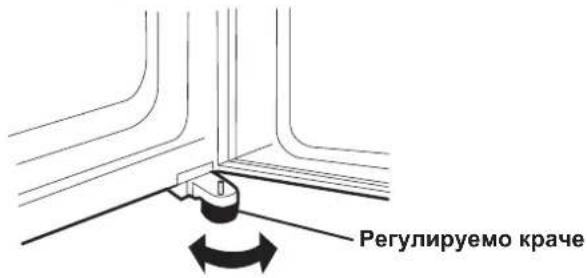
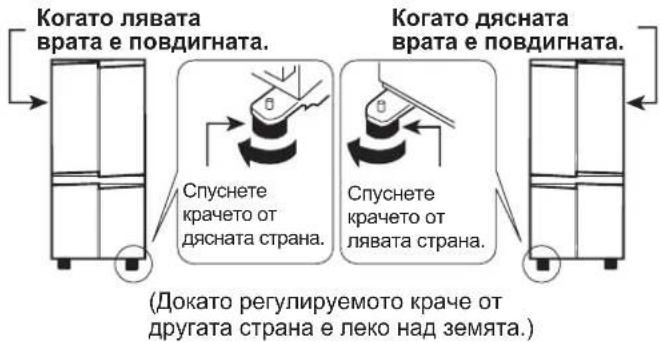
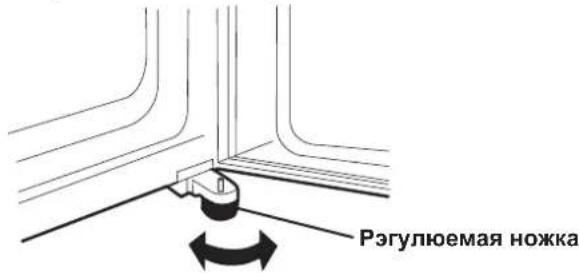
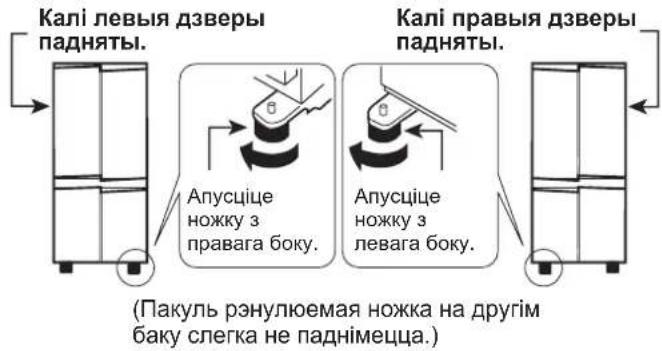
2 Use the two front adjustable feet, to ensure that the refrigerator is positioned firmly and flat on the floor.
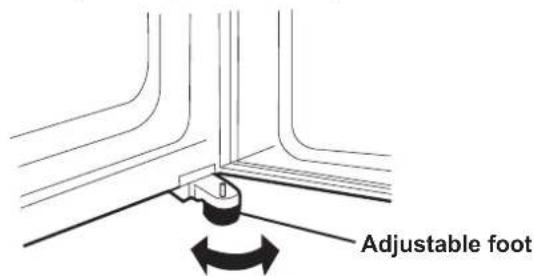
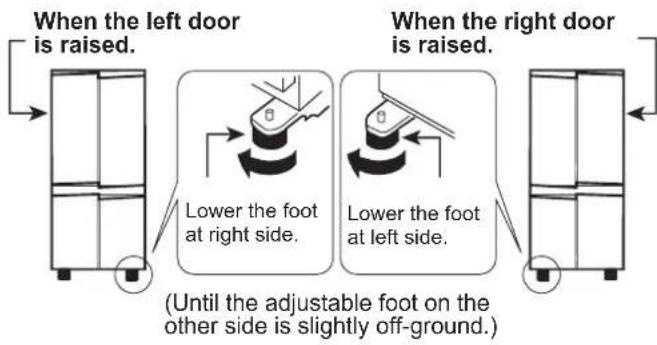
3 When right and left doors are not properly aligned, adjust using the adjustable feet.
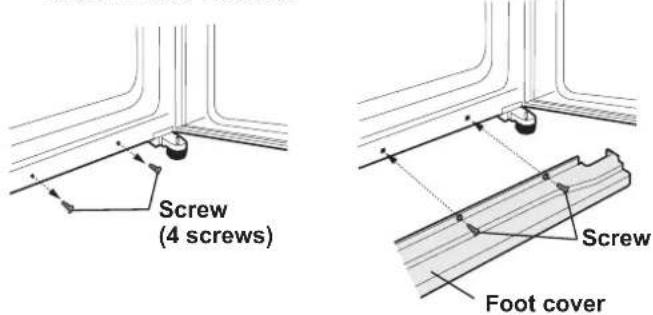
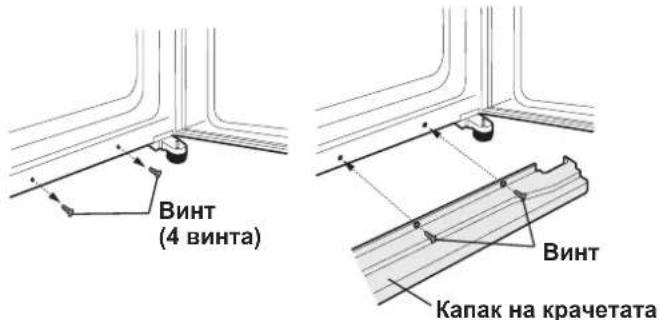
4 Remove the 4 screws of the cabinet lower part, and then set the foot cover (supplied inside the refrigerator compartment) with removed 4 screws.
NOTE
Position your refrigerator so that the plug is accessible.
Keep your refrigerator out of direct sunlight.
Do not place next to heat generating appliance.
Do not place directly on the ground. Provide suitable stand.
To insert the power plug when the door is opened, door alarm sounds but it is not abnormal. This sound stops when closing the door.
Before using your refrigerator
Clean the inside parts with a cloth soaked in warm water. If soapy water is used, wipe it off thoroughly with water.
INDICATOR OF TEMPERATURE
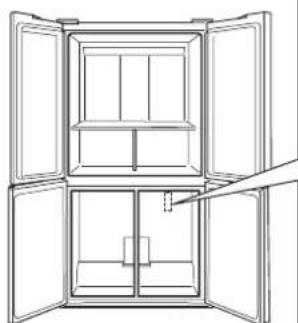
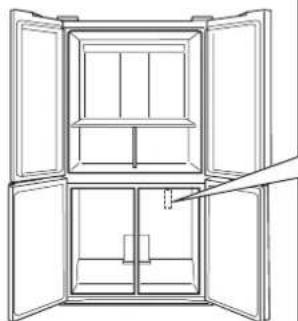
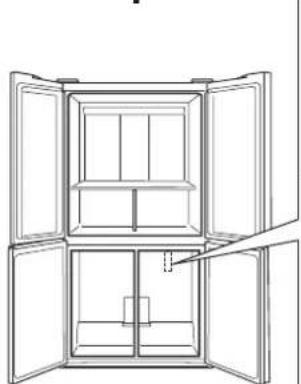
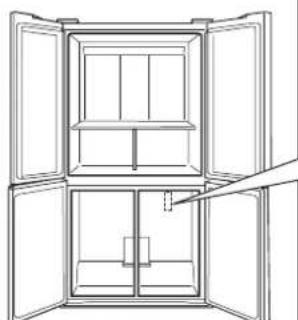
This refrigerator is provided with an indicator of temperature in the refrigerator compartment to allow you to control the average temperature in the coldest zone.
Coldest zone
The symbol indicates the coldest zone in the refrigerator compartment. (The door pocket positioned at the same height isn't the coldest zone.)
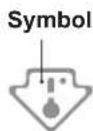
Checking the temperature in the coldest zone
You can carry out regular checks to ensure the temperature in the coldest zone is correct and, if necessary, adjust the refrigerator temp. control.
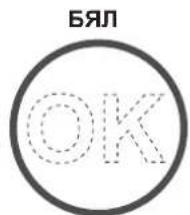
To maintain a correct temperature inside the appliance, check that the indicator of temperature is always BLUE.
If the indicator of temperature turns WHITE, the temperature is too high; in this case, increase the refrigerator temp. control setting and wait for 6 hours before checking the indicator of temperature again.


Correct setting Temperature too high, adjust the refrigerator temp. control.
NOTE
The internal temperature of the refrigerator depends on various factors such as the ambient temperature of the room, the amount of food stored and the frequency of door opening. When fresh food has been introduced or the door has been left open for some time, it is normal for the indicator of temperature to turn WHITE.
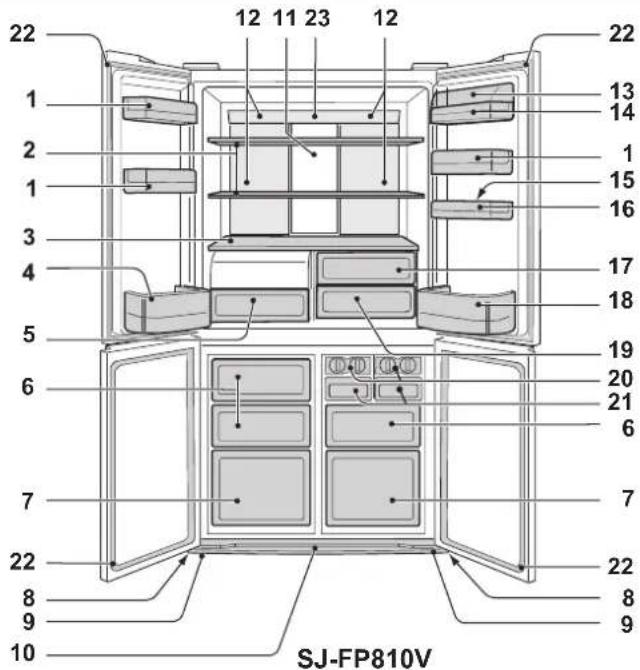
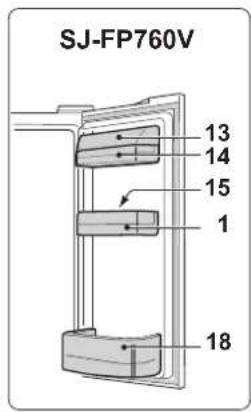
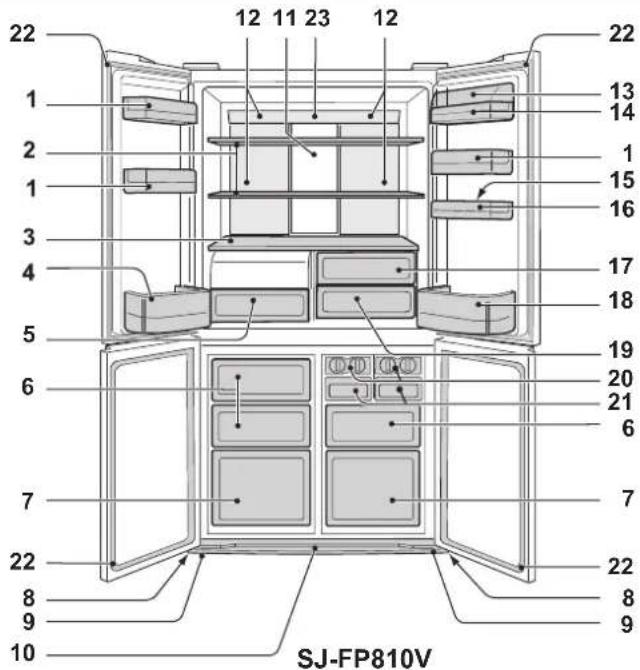
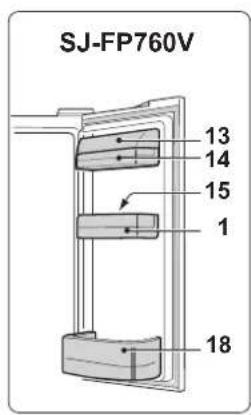
DESCRIPTION
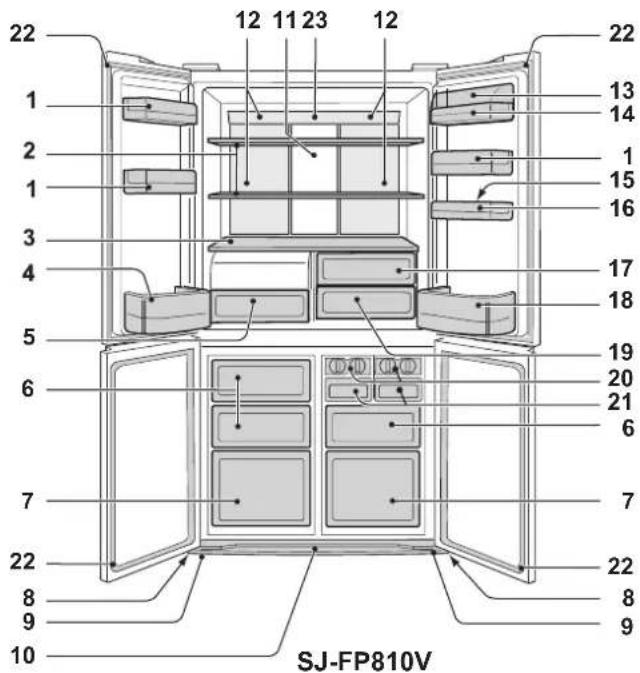
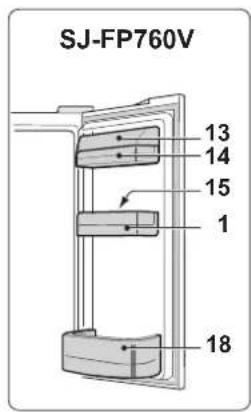
Door pockets (B pcs.)
Refrigerator shelves (2 pcs.)
Shelf3.
Bottle pocket (left)4.
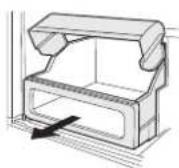
Highly sealed vegetable crisper5.
The cover of the Vegetable crisper opens as the case is pulled.
Freezer cases (small) 6 pcs.)
Freezer cases (large) 2 pcs.)
Casters @ pcs.)
Adjustable feet (2 pcs.)
Foot cover10.
Aluminum panel11.
The panel is cooled from the rear, thus indirectly cools the refrigerator compartment. In this way, food is refrigerated gently, without exposing to the cold air flow.
Light12.
Utility pocket cover13.
Utility pocket14.
Egg holder15.
Egg pocket16.
-
Fruit case
-
Bottle pocket (right)
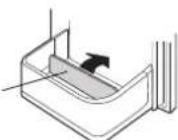
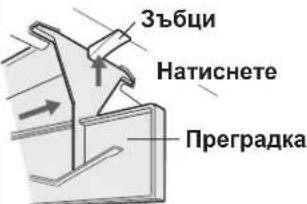
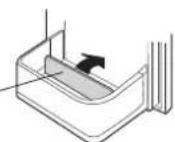
To store large-size bottles, move the partition all the way back.
Partition
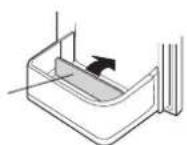
Fresh case19.
-
Ice cube maker (2 pcs.)
-
Do not over fill the tray; otherwise the ice cubes will be joined together when frozen.
-
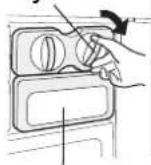
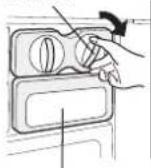
When the ice cubes are made, turn the lever clockwise to empty the ice into the Ice cube box.
-
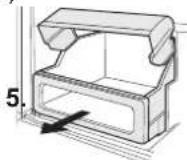
Ice cube box (2 pcs.)
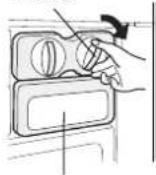
Lever
ice cube box
To prevent damage to the Ice cube box, do not make ice in the Ice cube box or pour oil into it.
- Magnetic door seals (4 pcs.)
- Eco sign
When the refrigerator door is left open, the lamp will slowly change its color from blue to orange. This shows the temperature in the refrigerator is rising.
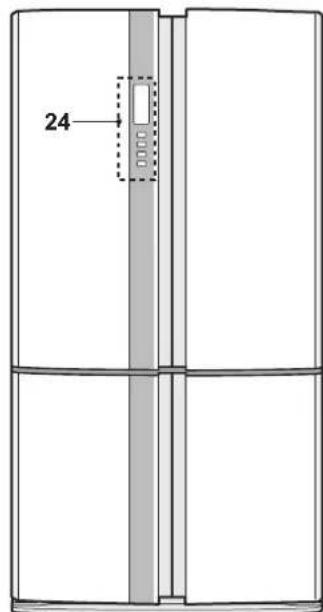
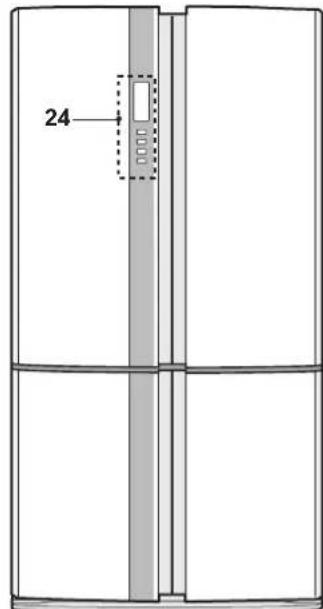
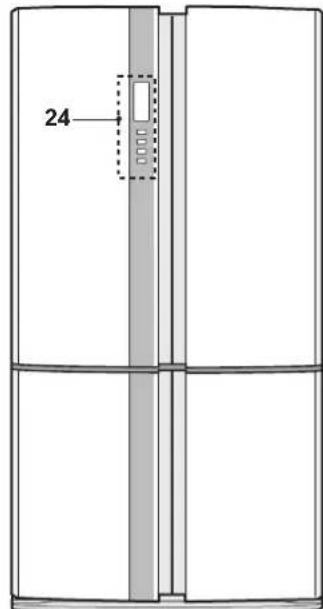
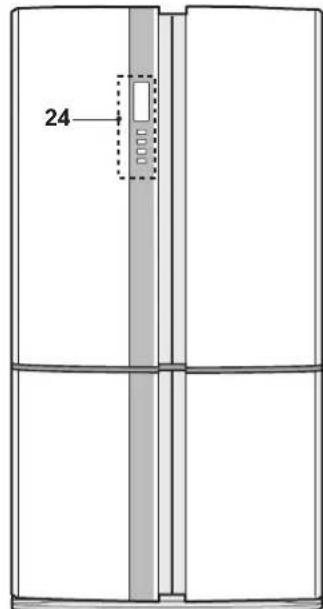
- Control panel
Deodorizing unit
Deodorizing catalyst is installed on the routes of cold air. No operation and cleaning are required.
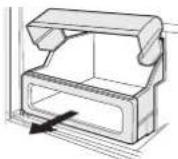
More food can be stored by taking out the internal accessories with duly cooling.
How to remove
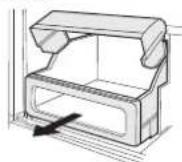
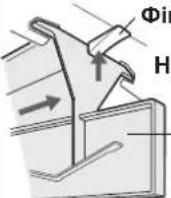
To remove the partition, pull it to the front with pushing the claw.
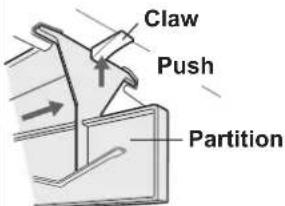
How to set
Insert the four projections into the upper parts.
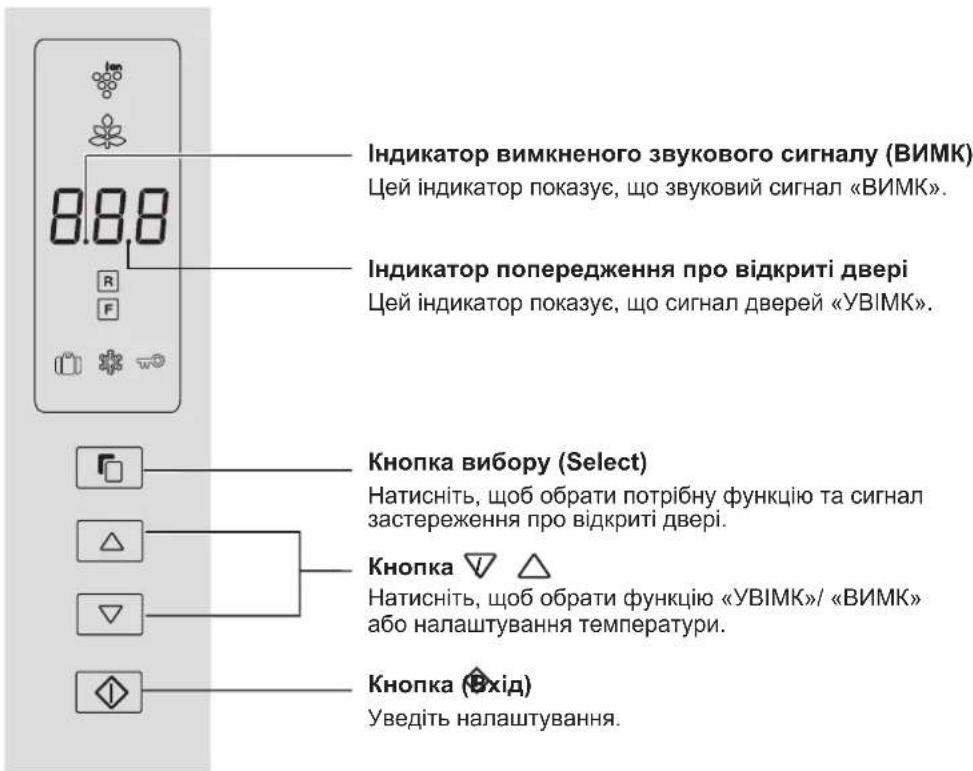
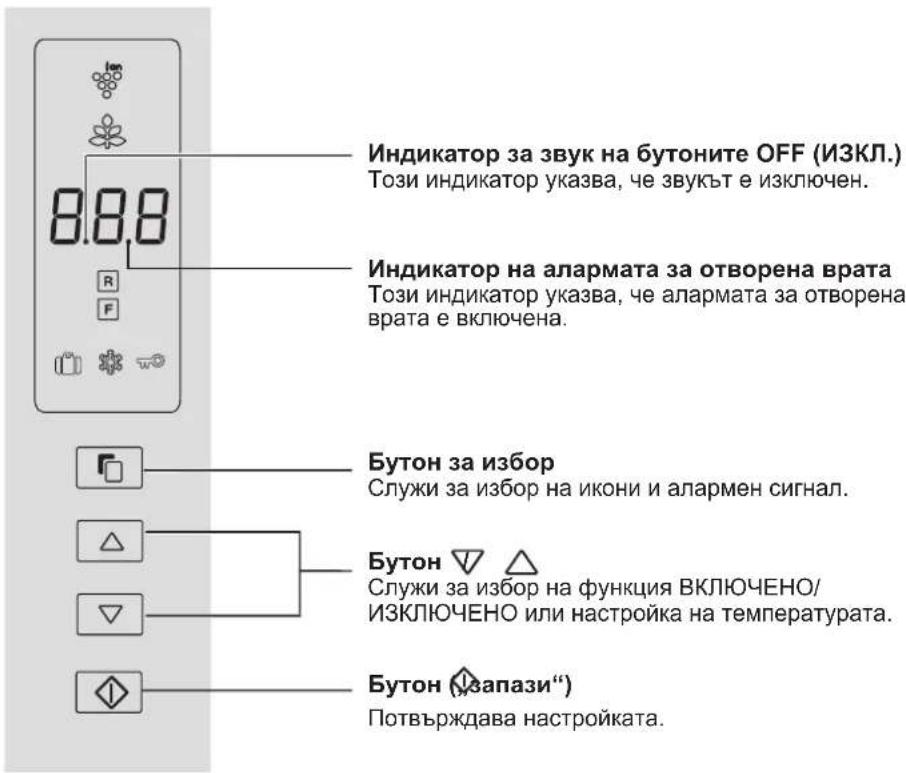
Control panel
GB
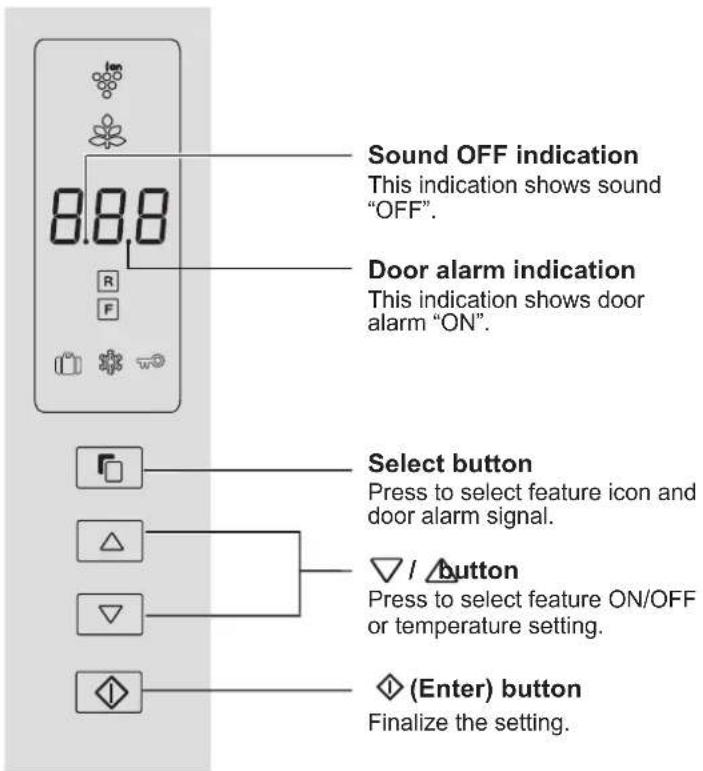
Feature icons
Icons of features in operation are displayed.

Plasmacluster

Energy saving Freeze

Vacation mode

Express Freezing

Child lock
Controlling temperature icons

Refrigerator compartment

Apartment
NOTE
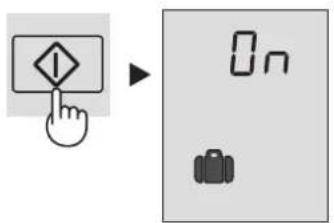
Features start automatically like right figure when inserting the power plug. (At first, only Door alarm is "ON").
When there is no operation for approx. 1 minute the display automatically return to the standby display. Additionally, the display will be turned off when there is no operation for 1 minute.
When either of the button is pressed, the icons are blink once and show the standby display. When the refrigerator stops with power failure, the display shows similarly as before having a power failure at the time of re-power distribution.
However, when it has a power failure
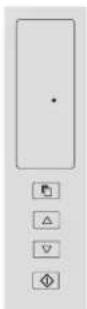
Sound ON/OFF
At first, the sound is set "ON".
Use this feature when you want to switch the sound of button
operation to "ON" or "OFF".
To set sound "OFF"
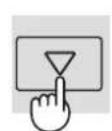
Press the button and button simultaneously and continuously for 3 seconds or more.

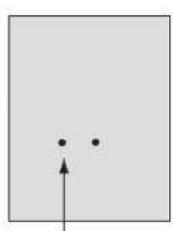
Beep beep beep
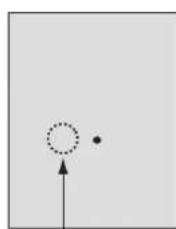
It shows the sound "OFF".
To set sound "ON"
Press the button and button simultaneously and continuously for 3 seconds or more again.
Beep beep beep
The indication will disappear.
OPERATION

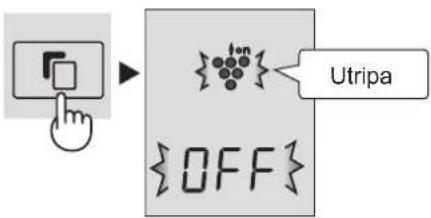
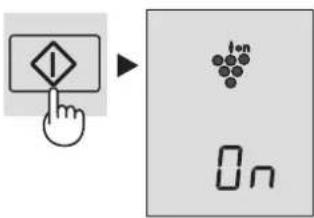
Plasmacluster
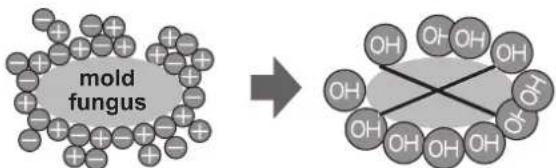
The ionizer inside your refrigerator releases clusters of ions, which are collective masses of positive and negative ions, into the refrigerator compartment.
These ion clusters inactivate airborne mold fungus.
To start operation
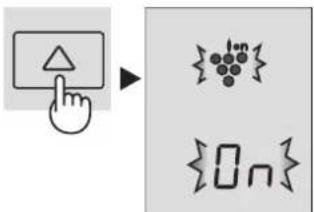
1 Select "Plasmacluster icon".
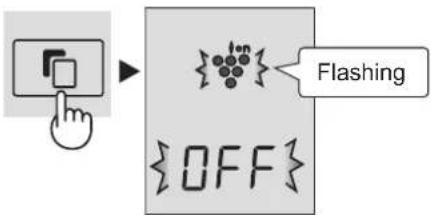
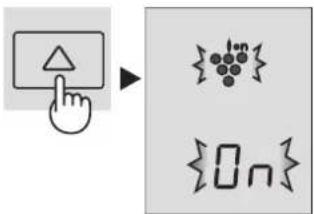
2 Select "ON".
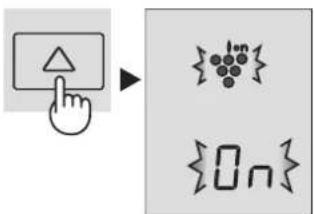
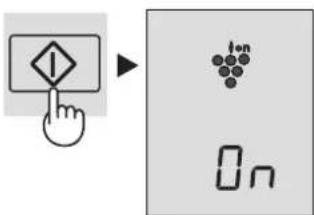
③ Finalize the setting.
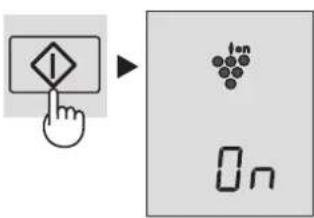
To cancel operation
It is the same method as starting operation. Select "OFF" in step 2.
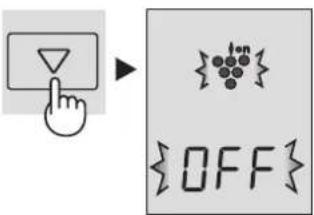
NOTE
- There may be a slight odor in the refrigerator. This is the smell of ozone generated by the ionizer. The amount of ozone is minimal, and quickly decomposes in the refrigerator.

Energy Saving
Use this feature when you want to switch the appliance to energy-saving operation.
To start operation
① Select "Energy saving" icon.
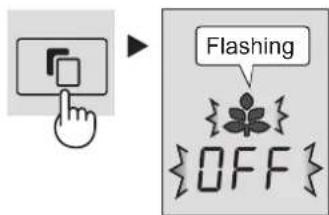
② Select "ON".
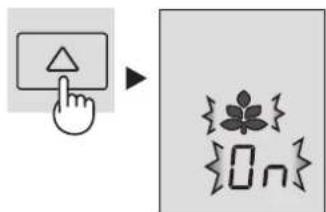
③ Finalize the setting.
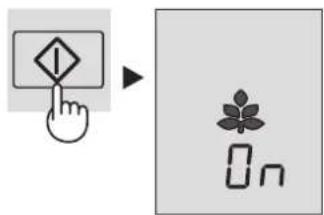
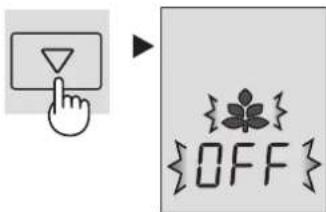
To cancel operation
It is the same method as starting operation. Select "OFF" in step 2.
NOTE
While this feature is operating, the inside temperature of the refrigerator and freezer compartment will be higher than the preset temperature by about 1^ (refrigerator) and about 2^ (freezer). This is the guide under the condition of the preset temperature 3^ (refrigerator) and -18^ (freezer). The display of preset temperature will not be changed.
The efficiency of power saving depends on the usage environment (controlling temperature, ambient temperature, frequency of opening or closing the door, amount of food). Cancel this feature when you feel the beverages are not cooled enough or ice making takes time.

Vacation mode
Use this feature when going on a trip or leaving the house for a long time.
To start operation
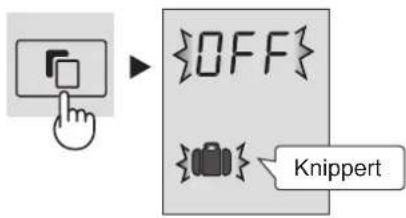
① Select "Vacation mode" icon.
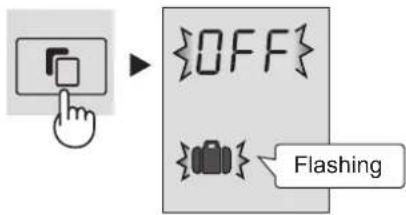
② Select "ON".
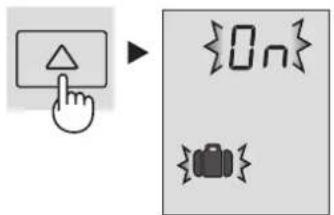
③ Finalize the setting.
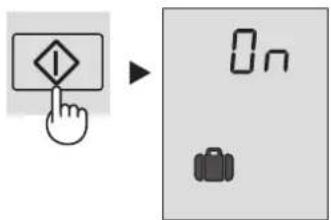
To cancel operation
It is the same method as starting operation. Select "OFF" in step 2.
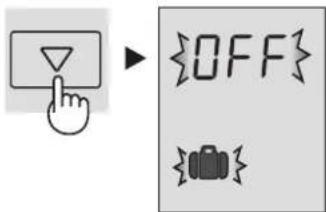
NOTE
The temperature inside the refrigerator compartment will be adjusted to about 10^ Food storage period in the refrigerator compartment becomes approx.1/2-1/3 of normal operation. Please utilize only when there is no perishable food. Temperature of refrigerator compartment cannot be modified. · (^10C is indicated on the display.)

Express Freezing
High-quality frozen foods can be made using this feature and is convenient for home-freezing.
To start operation
① Select "Express freezing" icon.
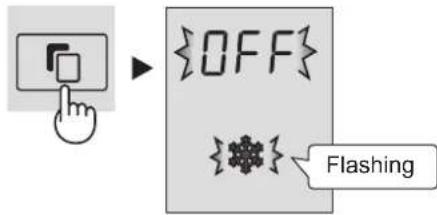
② Select "ON".
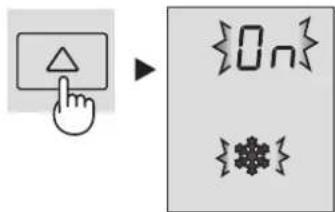
③ Finalize the setting.
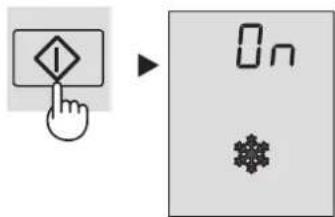
To cancel operation
It is the same method as starting operation. Select "OFF" in step 2.
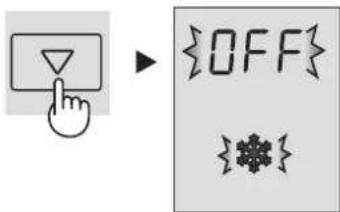
NOTE
Express Freezing ends automatically in about 2 hours. (The icon will disappear.)
Large foods cannot be frozen in a single operation.
Express Freezing may require more than 2 hours in the case operation overlaps with defrosting as operation is started after defrosting is completed.
Avoid opening the door as much as possible during operation of this feature.
GB

Child Lock
Button operation of the control panel will be locked. Use this feature to prevent the panel from being used unintentionally by children or someone.
To start operation
① Select "Child lock" icon.
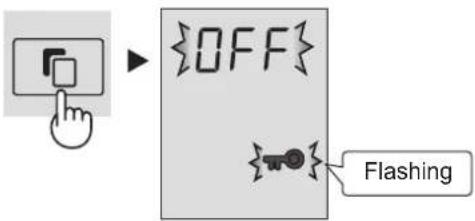
② Select "ON".
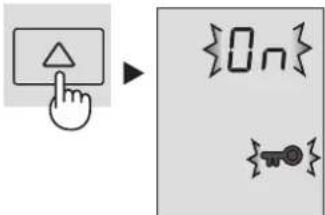
③ Finalize the setting.
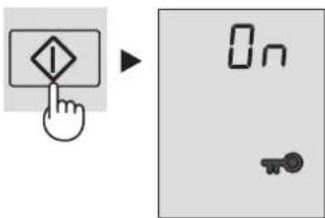
To cancel operation
It is the same method as starting operation. Select "OFF" in step 2.
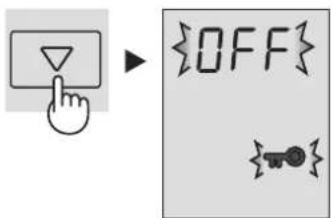
Door Alarm
At first, door alarm is set "ON".
When the refrigerator door is left open, the door alarm will sound.
The door alarm will sound in 1 minute after opening the door and again after 1 minute (once in each case).
If the door is left open for approx. 3 minutes, the alarm will sound continuously.
To cancel operation
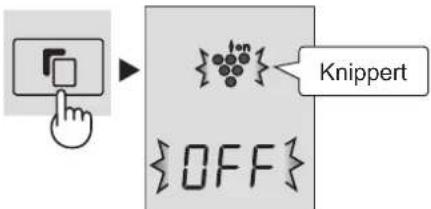
1 Select the door alarm indication like the below figure.
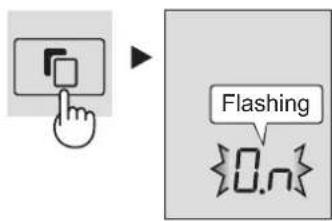
② Select“OFF”.
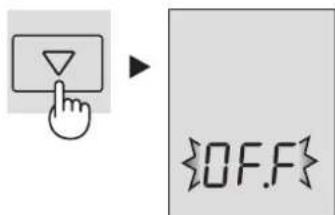
③ Finalize the setting.
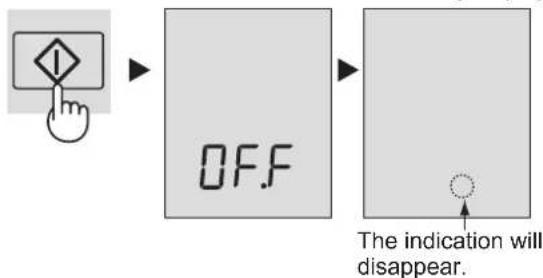
To start operation
It is the same method as canceling operation. Select "ON" in step 2.
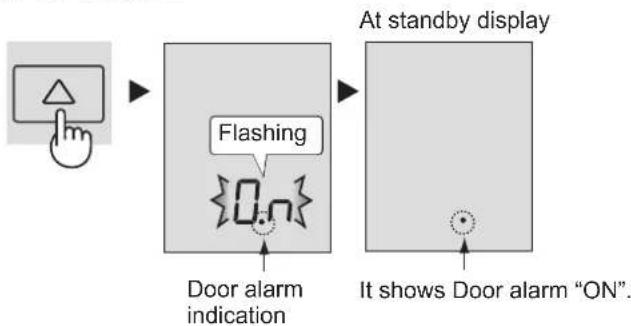
The refrigerator controls its temperature automatically. However, if needed, adjust the temperature as follows.
Refrigerator compartment
Adjustable between 0^ and 6^ in steps of 1^ .
1 Select Ron.
The display shows the current preset temperature.
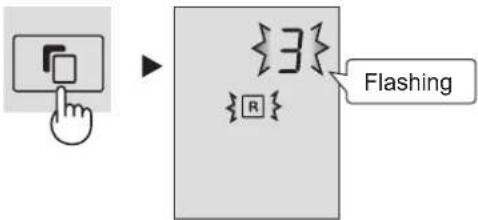
2 Set the temperature.
[△:increase, decrease]
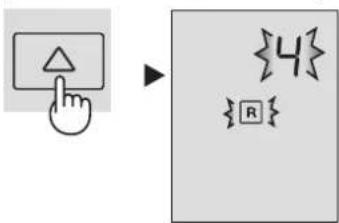
③ Finalize the setting.
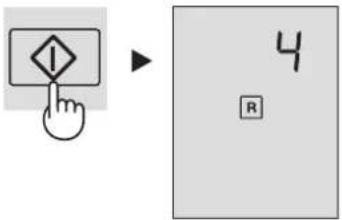
Freezer compartment
Adjustable between -13^ and -21^ in steps of 1^ .
1 Select con.
The display shows the current preset temperature.
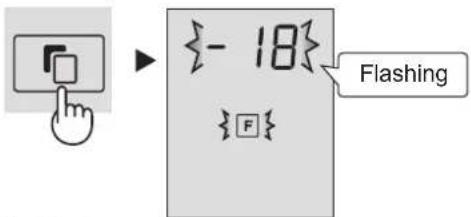
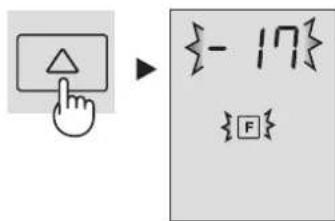
2 Set the temperature.
[△:increase, decrease]
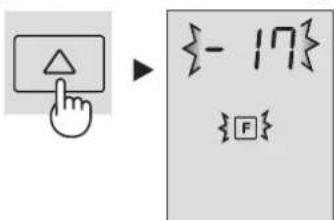
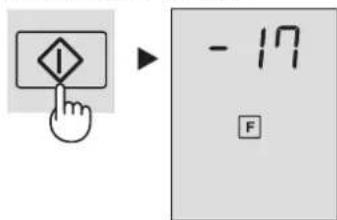
③ Finalize the setting.
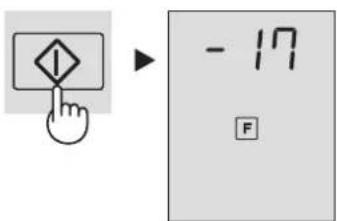
Advanced Setting of Freezer / Refrigerator compartment
The temperature of freezer compartment and refrigerator compartment can be adjusted in steps of 0.5^ by following steps 1 to 3 below.
Refrigerator compartment
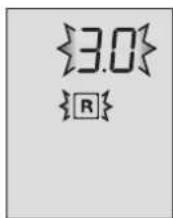
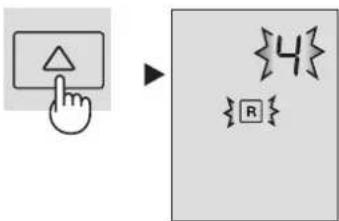
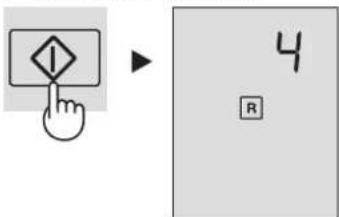
- Select R icon.
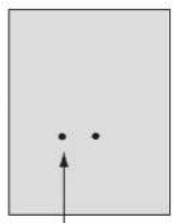
- Press button continuously for 3 seconds or more. The current preset temperature on the display will be changed to 3.0^ . (The display will be indicated like right figure.)
- Adjust the temperature in the same way as steps 2 to 3 above.
Follow steps 1 to 2 again if you want to adjust the temperature in steps of 1^ .
Freezer compartment
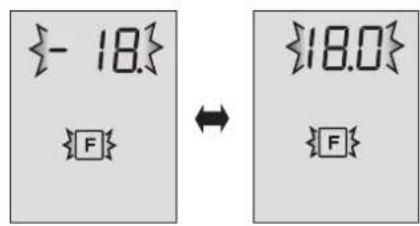
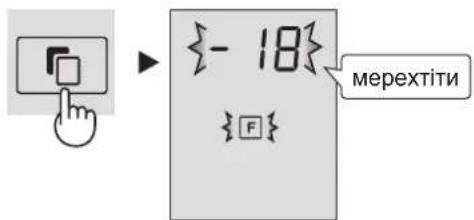
- Select F icon.
- Press button continuously for 3 seconds or more. The current preset temperature on the display will be changed to -18.0 °C. (The display will be indicated alternately like right figure.)
- Adjust the temperature in the same way as steps 2 to 3 above. Follow steps 1 to 2 again if you want to adjust the temperature in steps of 1^
Beep beep beep
Beep beep beep
STORING FOOD
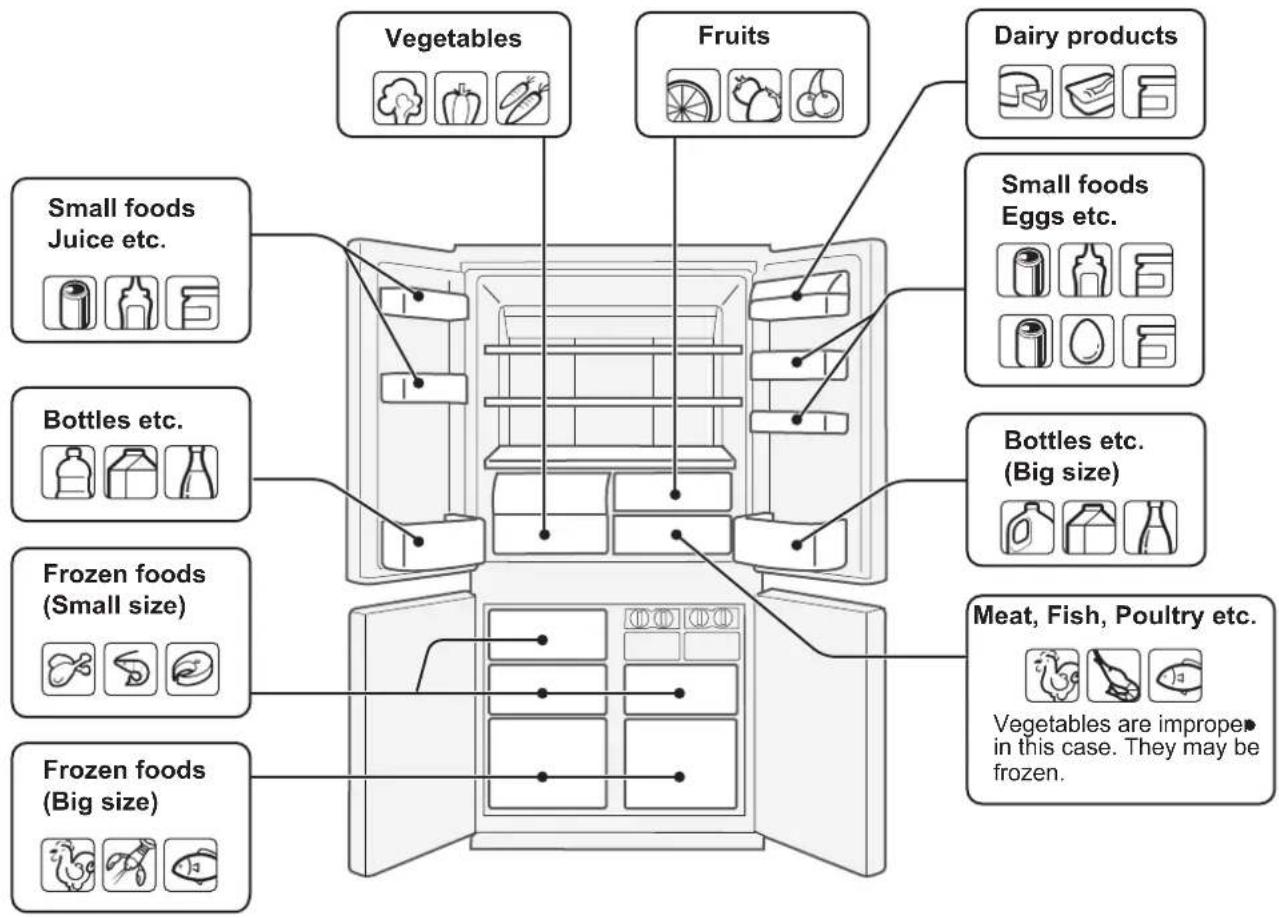
Refrigeration reduces the rate of food spoilage.
To maximize the shelf life of perishable food products, ensure that the food is of the freshest possible quality.
The following is a general guide to help promote longer food storage.
Fruit / Vegetables
To minimize moisture loss, fruit and vegetables should be loosely enclosed in a plastic material e.g. wrap, bags (do not seal) and place in the vegetable crisper or the fruit case. If you store a lot of vegetables, dew may form. This has no effect on the operation or the performance. Use a dry cloth to remove the dew.
Dairy Products & Eggs
Most dairy products have a use by date on the outer packaging which informs the recommended temperature and shelf life of the product.
Eggs should be stored in the Egg holder.
Meats / Fish / Poultry
Place on a plate or dish and cover with paper or plastic wrap. For larger cuts of meat, fish, or poultry, place to the rear of the shelves.
Ensure all cooked food is wrapped securely or placed in an airtight container.
NOTE
Evenly place the food on the shelves to allow the cooling air to circulate efficiently.
Hot foods should be cooled before - storing. Storing hot foods increases the temperature in the unit and increases the risk of food spoilage.
Do not block the outlet and inlet of the cool air circulating circuit with foods or containers; otherwise the foods will not be evenly cooled throughout the refrigerator.
Keep the door securely closed.
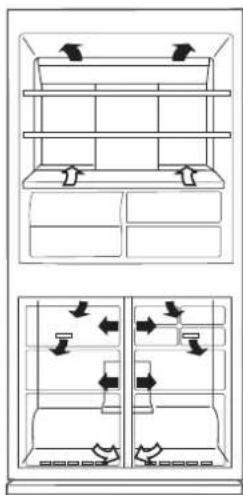

Do not place food directly in front of cold air outlet. This may lead to the food freezing.
For best freezing
Quality of foods should be fresh.
Freeze small quantities of food at a time to freeze them - quickly.
Food should be properly sealed, sealed tightly or covered.
Evenly place the food in the freezer.
Label bags or containers to keep an inventory of freezing food.
CARE AND CLEANING
GB
WARNING
Unplug the refrigerator first to prevent electric shock. Do not splash water directly on the outer cabinet or the interior. This may lead to rusting and deterioration of the electrical insulation.
IMPORTANT
To prevent cracking on inside surfaces and plastic components, follow these tips.
Wipe any food oils adhered to plastic components. Some household chemicals may cause damage, so use only diluted washing-up liquid (soapy water). If undiluted detergent is used or soapy water is not wiped off thoroughly, cracking of plastic parts can result.
1 Remove the accessories e.g. shelves from the cabinet and door. Wash them in warm soapy dishwashing water; rinse in clean water and dry.
2 Clean the inside with a cloth soaked in warm soapy dishwashing water. Then, use cold water to wipe off soapy water.
Wipe the exterior with a soft cloth each time it is soiled.
4 Clean the Magnetic door seal with a toothbrush and warm soapy dishwashing water.
5 Wipe the control panel with the dry cloth.
NOTE
To prevent damage to your refrigerator, do not use heavy duty - cleansers or solvents (lacquer, paint, polishing powder, benzine, boiled water, etc.).
If the power supply is disconnected, please wait for at least 5 minutes before re-connecting power.
The glass shelves weigh approximately 3kg each. Hold firmly when removing from the cabinet or carrying.
Do not drop objects inside the refrigerator or strike the inner wall. This may cause the inner surface to crack.
Defrosting
Defrosting is fully automatic due to a unique energy saving system.
When the compartment light is blown
Contact the service agent approved by SHARP to request a replacement compartment light. The compartment light is not to be removed other than by qualified service personnel.
When transporting
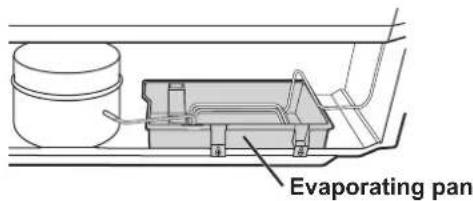
- Wipe up water in the evaporating pan. Before wiping up the water, wait more than 1 hour after pulling out the plug because refrigeration cycle equipment is extremely hot. (The evaporating pan is located on the rear of the product.)
The casters allow the refrigerator to move back and forth.
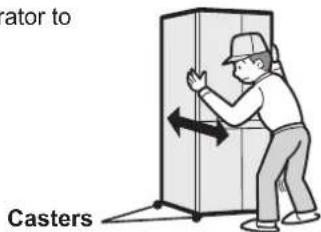
- Carry the refrigerator by holding the handles located on the rear and bottom.
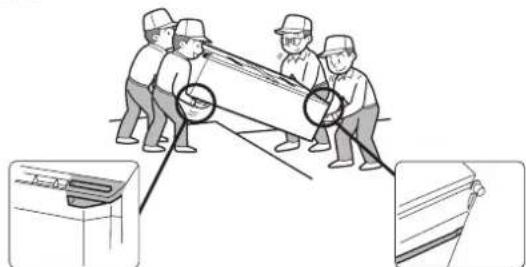
Switching off your refrigerator
If you switch your refrigerator off when you are going away for an extended period, remove all food, clean the interior thoroughly. Remove the power cord plug from the power socket and leave all doors open.
Tips for saving energy
Keep the ventilation space as much as possible around the refrigerator.
- Keep your refrigerator out of direct sunlight, and do not place next to heat generating appliance.
- Open your refrigerator door as briefly as possible. Hot foods should be cooled before storing.
- Place the food evenly on the shelves to allow the cooling air to circulate efficiently.
The amount of power consumption of this model is measured according to the international standard of the refrigerator performance under the following conditions.
All accessories in the freezer compartment are taken out as indicated on the figure.
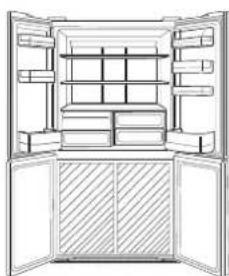
Space dimensions.
BEFORE YOU CALL FOR SERVICE
Before you call for service, check the following points.
| Problem Solution | |
| The outside of the cabinet is hot when touched. | It is normal. The hot pipe is in the cabinet in order to prevent dew generation. |
| When there is refrigerator noise. | It is normal for the refrigerator to produce the following sounds. • Loud noise produced by the compressor when operation starts --- Sound becomes quieter after a while. • Loud noise produced once a day by the compressor --- Operating sound produced immediately after automatic defrost operation. • Sound of flowing fluid (gurgling sound, fizzing sound) --- Sound of refrigerant flowing in pipes (sound may become louder from time to time). • Cracking or crunching sound, squeaking sound --- Sound produced by expansion and contraction of inner walls and internal parts during cooling. |
| Frosting or dew generation occurs inside or outside the refrigerator. | This may occur in one of the following cases. Use a wet cloth for wiping frost and a dry cloth for wiping dew. When the ambient humidity is high. When the door is frequently opened and closed. When foods containing plenty of moisture is stored. (Wrapping is required.) |
| Foods in the refrigerator compartment freeze. | Is the refrigerator operated for a long time with refrigerator temp. control set at 0°C? Is the refrigerator operated for a long time with freezer temp. control set at -21°C? Low ambient temperatures may cause placed foods to freeze even if the refrigerator temp. control is set to 6°C. |
| It smells in the compartment. | Wrapping is required for the foods with strong smell. Deodorizing unit cannot remove all of the smell. |
IF YOU STILL REQUIRE SERVICE
Refer to your nearest service agent approved by SHARP.
1 Selecteer "Plasmacluster icoon".
② Selecteer“AAN”.
Druk hierop om de instelling te bevestigen.
① Selecteer “Vakantiestand” icoon.
② Selecteer“AAN”.
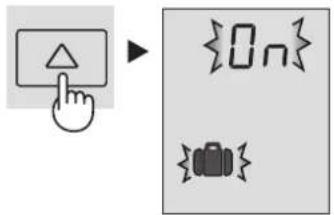
Druk hierop om de instelling te bevestigen.
- Vyrobnik I ded (2 ks)
Police chladnicky (2 ks)
Polica3.
Priehradka na f'ase (I'ava)4.
Vysoko tesna priehradka na zeleninu5.
Kryt zasuvky na zeleninu sa otvori po vtyiahnuti priehradky.
Priestor mraznicky (maly) 8 ks)
Priestor mraznicky (vel'ka) 22 ks
Kolieska 81 ks)
Nastavite'na pata (ks)
Kryt podstavca10.
Hliníkovy panel11.
Panel je chladeny zozadu, cim sa priestor chladnicky chladi nepriamo. Tymto sposobom sa potraviny chladia mierne bez toho, aby boli vystavené prudeniu chladneho vzduchu.
Svetlo12.
Lai skanu "IZSLEGTU"
Nospiediet vienlaikus pogu un pogu uz 3 sekundem vai ilgak.

Lai skanu "IESLEGTU"
VéRéiz nospiediet pogu un pogu viélaikus uz 3 sekundém.
Radjums izzudis.
DARBIBA

1 Izberite ikono Plasmacluster.
② Izberite ON(VKLOP).
③ Nastavitev zaklučite.

HaTo BnOka TemnepaTpa, HanaTuTepeyIaTOp TemnepaTpy.
PIMITKA
BHytpiunHr TemnepaTpy Mop03nIbHOi KaMepu 3aIeXnTb BID· 6araTbox pKaTOpIB, HapnPKnAd, TemnepaTpyn PpIMiueHHN, KIKKoCTi npOyKTb Y Hi Ta cactOnb BIDkPbBaHH N Dbept. Picna po3TaWByBaHH B XoJIoNDnHKy CBIXN npOyKTb a6o· BiDKNBaHH Ha NeBnY cac DBeepur IHINKATOp TemnpaTpyn 3mHioc CbI KoIp Ha BILNI - ce HopMaIbHo.
ONMC
Дерни BiDcikn (Bwrt.)
Ponuix xoJouNbHoi KaMepn 22 wT.)
Ponm3.
Bidiniennna nnnawok (nibe)4.
KoHTeHep nOBOuIB y BAKyyMHiy naKOBuI 5.
Kpnwka OBOeBoro KOHTeHepa BIDKPnBaETbcra, KONN BNTrIyETbcra RIK.
Mop03nJIbHI kamepni (maji) 83 wT.)
Mop03nJIbHI kamepN (BeJINKI) 72 wT.)
Ponikn 81 wT.)
Hixk, zo perynIOIb8 9.
DekopaTnBna naHb10.
AnkomihicBa naHenb11.
PanaHb oxoJOnOxkyeTbc 33aNy, onOcepeKOBaHO oxoJOnOxyuChn B TaKni cnocio xonoJnIbHe BiDIneHHra. TaKIM YINOM npOdykTN OxonoJxOHTbc NOCTynoBO, He notpanJnOCHN iD dIO XonoDHoro nOTOKy nobITpr.
OcbitIeHHra12.
Kpwnka doaTkoBoro BidinienHn13.
DdaTkoBe BiDiJIeHn14.
Piictabka dnnr aeueb15.
BidaineHHnA JnAeCb16.
KoHTeHep dnn aPpykTrib17.
- BldineHHn nnnwok (npabe)
PpO3MiueHHBENIKN XnIaWOK nTpi6HO BIDcHyTN BCI neperopokn Ha3a.
Nperopokn
- BiDJIeHnIa CBIXnx npOdyKTIb
20.ПДондЯ BnroTOBHeHЯNbOdy(2wT.)
He nepenobHouTe nIDOH, 60 npu 3amopoxybaHHi KybHKn 3nnHyTbcra.
KoNn Ky6nKn IbOdy roTOBI, NOBOPOTom pyKn 3a rOuHHNKOBIO CTPIIKOHO Bnpy3ITb IiD B KOHTeHep dIg Ky6nKiB IbOdy.
- KoHTeHep dIy Ky6NkIB IbOdy (2 wT.) 06 He NIOKOJNTN KOHTeHep dIy K6NkIB IbOdy, He rOtYnTe B HbOMy IiD i He 3aINBATN B HbOTo MACNo.
Puyka
KoHTeHepIy KyoBkIB IbOdy
- Marhitni yuilbHOaiv DBepaT (4 wt.)
- Eko-iHdkaTop
KIO DBepi XOIOINbHnka 3aIIININCb BIKPNTMn, IHNkATOp NOCTyNOBO 3MIHOE KOIp i3 CnHbOro Ha NOMapAHueBn. Lc O3Haue, IO TeMnepaTpya B XOIOINbHnky NiDBNHyETBCr.
- NaHelen KepyBaHHa
De3oDopyuOa cnCTema
De3oOpuyOHa peOBOHa po3TaUOBaHa Ha 7nXy, kIM pyxAcTbCxaONoHne nobITpy. He notpe6ye o6cnyroByaHHra Ta OunueneHH.
Kaio 3BilbHnTH XOIOuINbHnK BiD oDaTkoBOro npuaIaI,TO B HbOMy MOxHa po3MictHTN 6iIbwe npOdyKTIB,3abe3neuyuOn iX HanexKHe OXOIOJKeHH.
K3HATN
Ioo3Hnpeperopokny,HaTNCHTb
Ha pikcatop,Ta yTPMHyOHNoRBO
HaTHCNHYOTMy NONOKeHH,NOTAHITb
neroperopokny Ha cebe.
KcATOp
A BCTaHOBHT Ha MicHe BCTaBTE YoTupn BuCTyIn y BepxH i na3n.

Панель керваимпя
yMOBHI no3HaueHHaФункii
Dani noka3aHI no3HaCKn dIra HaraBHHx yHKui.


CnCTema iohiauii Ta ouhieneHH NOBITPra Plasmacluster
Ehepro36epexehnMop03bHeBidineHH
Pexim BiDnyctKu
Wbndke 3amopoxyBaHH
Блokувань BiДдTei
IHHaTopn KOHTpOIO TemepaTpy
R XoJIoAnIbHe BiDiJIeHnHa

PIMITKA
Nicn iiknoeHHa oektpomepexi
fHKu3anyckAOBcABOMATUHO,AK
noka3aHO Ha manIOHky npabopyC. (CnoaTky
BIMKHeHn TINbKn CnHAn DBepen YBIMK).
KaIO pOtrorA Pnp6m3HO 1 XBNHn Hne
BKOHyEcTBcXoDHa DIA, DNcNNe ABTOMATUHO
nepeXODHTy pEXM OUYBaHH. KpIM TORO,
kIO npOTAROM 1 XBUNHn HE BIKOHyeTbcra
KOHa DIA, DNcNne BUMKAcEbCBA.
KaIO HAtnCHyTN Ody 3 KHONOK, IHNDaKATOpn
6bnMHyOBtOHN pa3 I dnCnnne nepeJe B
peXMM OUYBaHH. PnBIDHOBNEHI poBOTNI
xoJOnNbHBnKA nicra abapIHoro
BiKNIOueHH eHEPRONocAHHH DaCNNe
6ynde NOKa3yBatn Ti K daHI, 00 6yIuNo Do bIKIOueHH
KaIO BMKHeHH CTpyM BiOByNOc nIac po
WBnKOrO 3AmOPoxyBaHH, ToDI daHIn peXMM
BiHOBtCBNCnIOHOBBeHH eHEproCNOxNB
<ДиСпг
peKIMy
OчКИМУHЯ>
BcTaHOBIb noTpi6Hy TempepaTy. [△:36iNbHTN, 3MeHHTN]
③ YBeDITb HanaaHTyBaHHa.
Mopo3nJIbHe BiDiJIeHHe
TemnepaTypa peryIIOeTbcmAix-13oC i-21oC 3 iHTepBaIOM 1oC.
① O6epitb no3HaKy F
Ha dncnnei 6yde BiOobpaKeHO noToUHe 3HaueHnnonepaHbBO BCTaHOBNeHOI Tempepatypn.
BcTaHObitb notpi6Hy tempepatypy. [36iNbHTN,MeHHTN]
③ YBeIDITb HanaaHTyBaHHa.
IodatkobihahauTybaHHdJI MOp03nJbHoro /XoIoAnJbHoro BiDJIeHHa
Iicra BnKoHaHHa 1-3,OncaHnx HxKHe,Bu MoXeTe 3MiHOBAtu Tempeatpy B MOpO3NbHOMy Ta OCHOBHomy BiDJIneHHi XoJIOUHBnka 3 iHTepBaIOM 0,5^
XoIOnJIbHe BiIaIeHH
IotpriHm3ByKOBn CnHnA
1.Obepitb no3naKy R
2. Hatncit Ta ytpmyte HATNCHYTOKHNky npotrom 3cekynd a60 troxnoDBwe. Notoyhe nonepeHbO BCTAHOBNEHe 3aueHHaTmnepaTyHa nCnne6yde 3miHOBATnca Do 3,0oC.(DcnnneuBnraDatme, kNokaaho Ha mJIIOHKny npabOpuy.)
3. HanaTnyTe TemnepaType, BnKoHaBwn II 2-3, kO nCaHo BnIe.
BnKoHaTe 1-23HOBy, uOb HanaTObyBaTN TempeaTyP 3IHTepBaJOM 1^
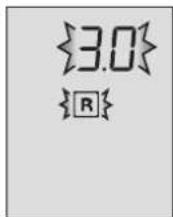
Mopo3nIbHe BidaineHHa
IotppiHm 3ByKOBn CnHnA
1.Obepitb no3HaKy F
2. HatncHbTa ytpmyte HaTNCHYTOK HONKY npOTyROM 3 ckyHd a0 ToxN DOwe. IToOHTe NOpepaHbO BCTaHOBJIe He 3HaueHHa TEmpepaTyPi Ha DcPiEi 6yde 3MHOBATnC4o-18,0°C.(DcPiEe6IImaTMHe,RAOKoKa3aHOHaMaHIOHKpApOBpy.)
3. HanaTuTe Tempeatpy, BkoHabuN 2-3, kOncaHO Buue. BkoHaTe 1-2 3HOBy, uo6 HanaTuBOyBaTu Tempeatpy 3 iHTepBaIOM 1°C.

3БЕPIГАння ПОДУKTIB
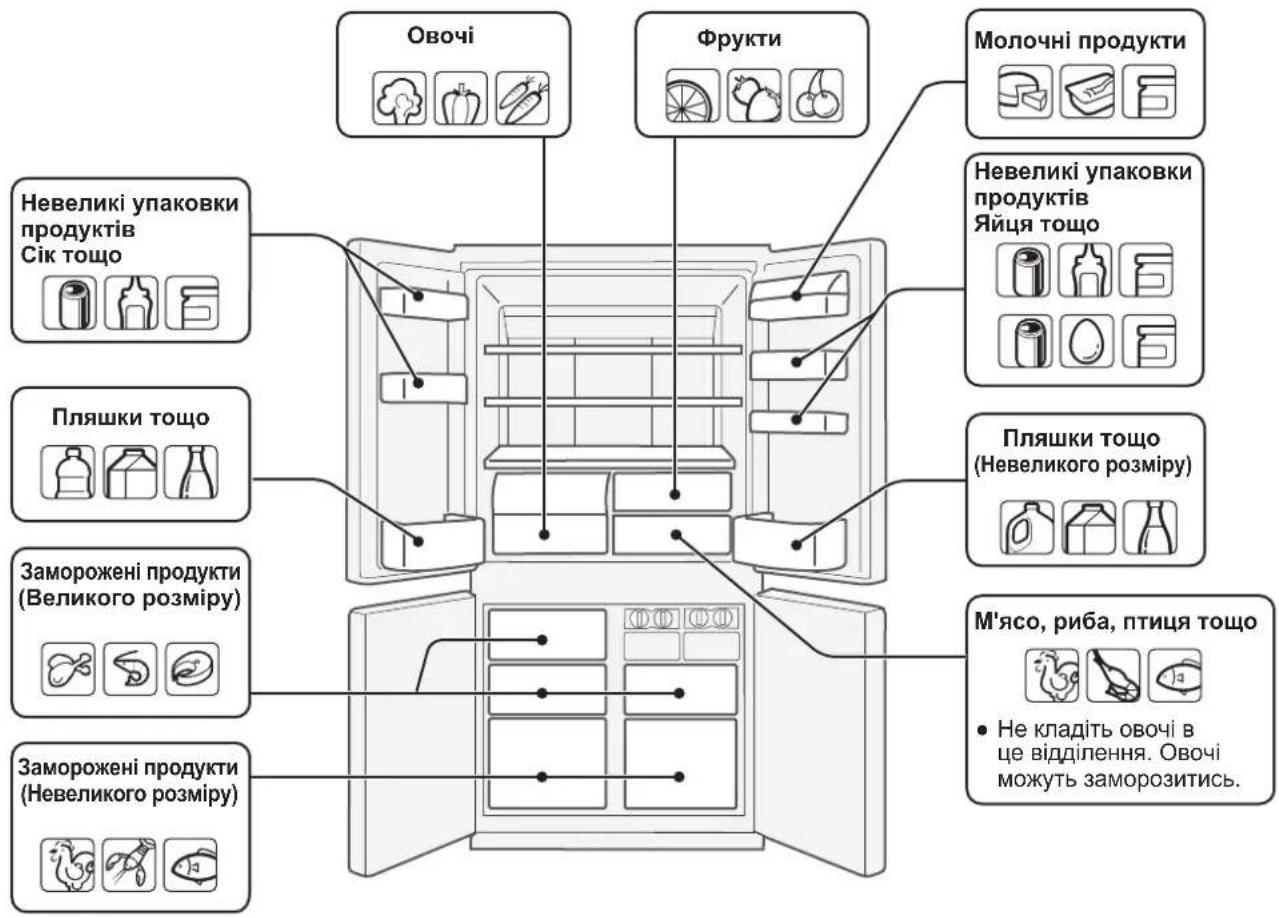
OxonoJxehn ynoBInbHIOe npoec ncyBaHH npdykTIB.
PdoBxNt TepmH 36epirAHn npdykTIB, kki WBnKO
ncyTOcb Ha noPiXi XoOnDInbHnKa, MoKH a ODHMMCnOCOBOM -KnadTb npdyKTn Ha 36epirAHn y hainCBixKiOMy cTaHi.
HnKHe HABODaTbc 3araIbHI peKOMeHaiaIu oDo 36epirAHn npdykTIB.
ΦpyKTH/ObOci
Uo6 3MeHunB BpTaBONr, ppyKtn Ta OBOci CnID BinbHO po3MCTnTu PnactNKOBi yNAKOuBi, HapnKnad, NOKnactn B ueNoPahOBI nakeTn abo 3aBepHyN y nnBky (ane He repMeTnHo) Ta po3TaWyBatN BOKeTHepeI dny OBOcIB afo p4kTie.
KsO 36epiratn 6araTo OBOuIB, To Ha Hx MoKe 3'ABNTcR poca. LHe He BnnaBae Ha po60Tu n EKcnIyatauiHi kocti xoIOaHbHka. BnkOpntOByTe cyxy raHupky dIn yCyHeHHr pocn.
Molouhni npoduktn Ta myca
Ha ynaKoBci 6iNbOcTi MONOChN npOdykTIB e iHOpMaia npTo TepMn npDAtHOCTi, a TaKOx Tempeatpy i TepMn 36epiraHH B XONODINbHNky.
Jnua 36epiraTe Ha niDCTabci Dnra reCb.
M'aco/Pu6a/PTnca
PoknaTb Ha tapinky a6o 6nIO o n hakpnte 6ymaroo a6o - ceiophaHOBOI pibKOIO.
Benni umatkn m'ra, np6n a6o nTu pi03miuye B rnn6nHi - nouui.
Yci roTobI npOyKtn Do6pe 3anaKoByTe a6o KnaDiItb, 00 He · nponyckae nobitpr.
NPMMITKA
PIBHomipHO po3miuye Te npOyKTn . Ha noJIuX, 0o6 3a6e3neHTn MOxNtBCTb UnpKynI xOnoHoro nobITp863 nepeuKoD.
「rapyni npodyktn oxoloknyte nepeid 36epirahnM.36piriHnraTnpaynx npodykTB 36ilblye temnepaty B kamei i pnsK ncyBaHn npodykTB. He 6nokyte bynckhi i BinnyckHI oTBOPn xoNoHO rnoBITP, uO cIpyLHe y BiDineHHx Ta KOHTeHepax, IHaKJWe npodykTN He 6dytB pIBHomipHO oxoNoKyBaTncB XoNoDInhNHy. TpmaTe DBepaTa HaNiHo 3aMKHeHIMN.
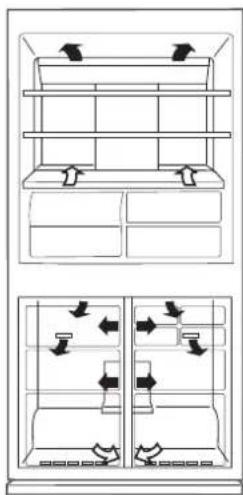


He KnaIitb npOyKTH 6e3nocepEnHbo nepeBnynckHM OTBOPOM XoNOHOro nobITpy. LcMOxke npN3BeCTn Do ix 3amOpoxyBaHHra.

BiDknIooHnXoNoDnBnKa
KuO Bn BiKnHouaTe XOnoDnBnHK Ha TpNbAnn nepioD, 3BiNbHiB NOro BiYcix npOyKTiB i peTbHO NOMnTe. BiEhnaIe TuHyp KInBneHHra BiMpeXki i ZanWte Bci DBepuTa BiKpnTmN.
Popadn ⅢoDo eHepro36epeXeHHa
aannaaTe ykomora 5inbwe BinbHoro npoctopy HABKONO XOIOUNBnka DnI NOKpaueHHYMOB BEHTNIAJI.
BCTAHOBHIOHTe XOJODINbHK TaKIM YNHOM, 06Ha HbORo He NOTpanJIIO npIme COHryHe CBIINO, Ta NOdaJI BiD npICrpoIB, 00 r'ehepyIOb TENNO.
HamaraIeTcckOpOTnTIO MiHIMy yac, KOJI DBepi XOJIOINbHnKa 3aJIuWaiOtbcra BiDKpNTmM.
OxonoJkyIte rapaI npOyKTn nepeT NIM, kN NOMICTHTN IX B XONOJIbHNIK.
BIBHOMIPHO po3MIuYte npOdyKTn Ha noJIuX, 106 DaTn MOKNIbICTb XoIOdHOMy NOBITPO uRpkUHOBaTn 6e3 nepeWkoJ.
EheprocnoxnBaHHaHO daoHIO moDeI BmipocTbcB BiINObIDHO do mixhapoDnHex cTaHdaptIB zoOdo NOKa3HNKIB pO60TN XONODINbHnKa npN BnKOHaHHI BkA3AHX daJI yMOB.
Yce npnlaBnHrTO i3 MOpO3nIbHOro BiDIneHHRA NOKa3aHO Ha MaNIOHKy.
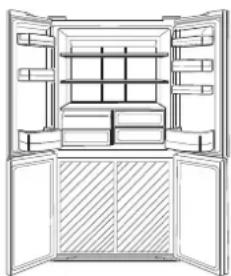
Bntpmyhotbca Bka3aHnppomixkBiNbHoronpoctopy.
TINM 3ATENEFOHBATN DO CEPBICHORO CEHTPY
Ipeed TmM, k3BepHyTnC4o cepBnCHoi Cnyk6n, nepeBipTe HacTynHe:
| Празукtnу y xolodnilbniу kamepi 3amep3aioTb. | Легдурацу ex xolodnilbniу kamepi y konduя bary kamepi 3amep3aioTb. |
| Зразукtnу y xolodnilbniу kamepi 3amep3aioTb. | Чи рацю ex xolodnilbniу kwestrayom trpbanloro уacy 3 PerugЯTopom Tempepatуriyxoxoindboho' kamepi, BCTaHOBJIeHIM Ha -21°C?Чи рацю ex xolodnilbniu kwestrayom trpbanloro уacy 3 PerugЯTopom Tempepatуriyxoxoindboho' kamepi, BCTaHOBJIeHOM Ha -21°C? |
| Зразукtnу y xolodnilbniу kamepi 3amep3aioTb. | Дзоздурацу 3бері ratу вунakовци. |
| Зразукtnу y xolodnilbniu kamepi 3amep3aioTb. | Дзоздурацу 3бері ratу вунakовци. |
| Зразукtnу y xolodnilbniu kamepi 3amep3aioTb. | Дзоздурацу 3бері ratу вунakовци. |
| Зразукtnу y xolobniiu kamepi 3amep3aioTb. | Дзоздурацу 3бері ratу вунakовци. |
| Зразукtnу y xolodnilbniu kamepi 3amep3aioTb. | Дзоздурацу 3бері ratу вунakовци. |
| Зразукtnу y xelndciy. Празукtnу 3 miuchim 3a | Талхом т'reба 3бері ratу вунakовци. |
YKUO BAM BCE X TAKI NOTPIBHE CEPBICHE OBCNYROBYAHH
3BepHitbcn Da no Hai6bnxkyo areHTa 3 o6cnyroBybAHn Bpu6ib SHARP.
UA
PPEyPExKDEHNE B
XnaHnKbT cBbPka 3anaHm XnaHneH areHT (R600a: n3oByTaH) n pa3neHbaU areHT (uKNloneHTaH). Cna3BaTe cNeHNte npabnla, 3a da npedOTbpaTnte 3anaIbHe n ekcnlonpahe.
OxnaIteJHaTa CnCTema O3aI N BbTpBe XnaIINHka CbIbPxa XnaIIneH areHT. Na3eTe OxnaIteJHaTa CnCTema OT KOHTAKT C OCTpN PpeDMETN.
He n3non3baIte MexaHnUHn IIN npytn cpeIcTba, 3a da yckopnte pa3mpa3raBaHeTo. (XnaDnHnKbT pa3noIara cbc cnCTema 3a aBTOMaTuHo pa3mpa3raBaHe)
He n3non3BaIte eJekTpueeckn ypeDn BbTpE B xnaIInHka.
H3noJI3BaIte cAmO cneuaHNO nocOeHNTe 3a XnaIInHO .
OTJeJIeHne JAMNI.
He 6nokpaIte OTbOpTe NO nepupepna Ta Ha XnaDnHnKa. He n3no3BaIte 3anaNIMC npEIOBE, HApnPmep 6oR, B 6n3OCT Do xnaDnHnKa. Toba MoKe Da npuHHn EKcPiOn3nA nnNoXap.
Ako ce nonyu npo6nB B OXlaIaIeTEnHaTa CnCTema, He · nnaTe eJeKtpnueckn KOnTaKT N He H3NoI3BaIte OTkPNT nIaMbK. OTbOpTe npO3opeua n npOBetpeTe NoMeUeHHeTo. CbpxTe Ce cbc cepBn3, Odo6peH ot SHARP.
XnaJnHKnbT pr6Ba da ce n3XbBpIn NO cBoTBeTHnHa NaH. 3aHeceTe XnaJnHnka B 3aBOD 3a peuKnnpaHe Ha 3anaNIMn XnaJnHn areHTn pa3neHbaun areHTn.
He cxbxpanhaBte CnHIO JeTnNBu 3anaNIMMaTePnAni KaTo eTp,6eH3nH, npOnaH (ra3), aXe3nBn, uNCT Cnpt T.H. Te3n MaTePnAni ca B3pNUBOONacn.
b6paTnT ce no ueCena npax moKe da npuHn noXap. N36bpweTe ro BHMATEHNO.
He ce onntbai Te da MoiNphiuipaTe XlaIINHka. ToBa MoKe Da npUHHn NOKap, TOKOB ydap nn HapaHbaHe.
Bepete Ce, Ye XnadinHnKbT He npedctabnaBa onachoc3a Deuca, KOrato CbunrT Ce cbxpanraBa, npen Da 6bde N3BO3e KaTO OTnAdk. (HaNP. CBaIeTe MaHHTHOTo yNtBTHHe Ha Bpata, 3a Da npedotbpatnte 3akneuBahe Ha Deua)
MAHNE
He NnnaTe KOMnPecopa HnN YactNTe OKOJ NO Hero, TbN KaTO Ce HAropeaBaT MHO T No BpeMe Ha pa6ota N MoKe da ce HapaHnTe Ha MetaHnTe pboBe.
He nnnnTe xpaHnTe nn MeTaNnTe CbDoBe BvB FpN3epa C MOKPN Pbue. ToBa MoKe Da npuHn H3Mp3BaHe.
He n3no3BaIte yDbJIknteIN uIeNcEN-aIanTePn.
He cIaIaIe HAnITKn B 6yTNIKn N B KyTN BbB φpI3epa, TbN, KATO TE MoRAT Da Ce CuyIPT, KORATo 3ampb3HaT.
Bepete ce, ye 3axpanBaunr T Hyp He e nobpehen no Bpeme Ha MOHTaX IIN npemecTbaHe. Ako UencenbT IIN 3axpanBaunr T Hyp ca pa3xna6EHn He BKJIOuBaIte uencena B KOHTaK Ta. NMa pNCK OT TKOB ydap!
13KJIOUeTe ypeDa OT eNEKTpHueckaTa MpeKa, KaTO n3BaJnte ⅢeCenaOT KOHTaKa. He n3BaXdAte UeIeCena, DbPnauKn KaBcna. Toba MoKe Da npuHHn TKOB yap uNn noxap.
Ako 3axpaHbauT Ka6eI ce NOBpeI, ToI Tp8Ba da ce CMeHn OT cepBn3, OIO6peH OT SHARP, TbN KaTO ce N3nCKBa CneuaJen Ka6eI.
Pn n3TnueHa ra3 OTbopeTe npo3opeua, 3a da npoBeTpne. He nnaiTe XnaDnHnka nnu enceea.
He nocTaeBnTe npEmeTN, cBbPkaUN TeHOC Tnn HectaBnHNn npEmeTN Bbpx XnaDnHnKa.
JaHnHbT He e npEHa3Hauehen 3a n3non3BaHe OT Nua (BKn. Deca) C HamaIeHN cN3uYeCKn, CEH3OpHN nn YMCTBeHN cNoC6HOCTn, INN C HeIOCTaTBHO ONIT N 3HaHn, OCBeH aKo 6bDat NOJ Ha6NIODeHne I NOnyUAT cbOTBETHIne IHCTpykUnn.
HOpmaun 3a nXbPnHeTo 3a notpe6nte (aactn domaknHctba)

BHMAHNE:
Ha BaSeTo n3dJIe
HMa MapKIPAH TO3N
CmB0J. TOba O3HaUBa,
Ye yNoTpe6BaHHTe
eJEKTPnueckn
eJEKTPoHNu N3dJIeNHe
Tp6Ba Da ce CmecBaT
cObUte 6ntOBu
OTnAbTu. CbIeCTByBa
OTdJIHa CnCTema 3a
CbIpuHe Ha Te3n
n3dJIInr.
1.BEbponeckncab03
BHMaHHe: Ako XeNaTe Da n3XBbPnIte TOBa o6OpyDbaHe, MoJr He n3POn3BaIte O6uKHOBeHITe KOHTeHepn 3a CmT!
YnOTpe6BaHInTe eNEKtpueeckn ypei n eNEKtpoHNo 0bOpyDbaHe Tp8Ba Da ce TpeTnpaT OTeHNO N B CbOtBeTcTBne Cbc 3aKHOaTeNCTBOTO, KOeTo N3NCBA npaBnHa npepaotKa, pereHepaunia N peuKnipahe Ha ynoTpe6BaHInTe eNEKtpueeckn ypei n eNEKtpoHNo 0bOpyDbaHe.
CneB VbBexKaHTo OT CtpaHnTe-HeKn, YactHnTe DomaknHCTBa Ha TepHTOpnraHa
EbponecknBcH03MOraTdaBbPhATynOTpe6BaHNTe eNEKtpoypeN n ENEKTPoHNO oOpdyBaHe Ha onpeDeJeHnTE 3a TOBA MeCTa 6e3PiAtHO. B HAKON cTpaHMeCTHnRT bProBeU, OT KOROTO CTe 3akynnnnOBOpdyBaHTo, MoKe da B3eMe 6e3PiAtHO cTapna ypeI, aKO KyInTe NIOobEn HOB.
*) MoJr cBbpxKeTe ce C MeCTHIne Bnactn 3a noboepe npdo6hoctn.
Ako eneKtpoypednte nnn eneKtpoHHOTO o6OpyDbaHe mMat 6aTePNn nn akyMyNaTOpN,MOJ npEpaNTeHNO rN 3XBpJIeTe OTdENHO B CbOTBcTCTBne C MeCTHnTE N3NCKBaHn.
C npabnHOTo n3XbPnIHe Ha ToBa n3dJIeNne Bne rapaHTnpaTe, ye OTNaIbIuIte Iue npemHaT Heo6xOIMATA npepa60Ka, pereHepauN i peunKIIpaIe N IO TO3N HauIN NpeoTbPaTaBAte NOTeHuaHNTe OTPuataENn Bb3DeIcTBna Bbpx OkONHaT cpea N OBEwKOTO 3dpabe, KOnTO 6bxa Bb3HKnHann Hnue B pe3yIaT Ha HnepaBnHOTo TpeTpapHe HA OTNaIbIuIte.
2.BdpyrnctpaHn3BbH EC
Ako XeIaTe Da n3XbPnTe ToBa n3dJeHe, MoJr CBbPxKeTe Ce C MeCTHHe BNaCTu N nonTaTKe KaKbB e npabINHnT Naun Hn Ha n3XbPnHe.
3a ⅢBéuüapnir: YIOTpe6BaHInTe eJIeKtpOpyeNi n EJIeKTPoHNO oBOpyDbaHe MOraT da c Ce BbPHaT 6e3nlaTHo B mara3nHa, OT KOITc a 3akynHe, DOpN I Da He 3akynTe HOBO n3dJeNe. OSe DeNa 3a OTnAbu ca n3bpoEHn Ha φmpeHaTa CtpaHnca Ha www.swico.ch nnNww.Sens.ch.
MOHTAX
PNEyPExKdEHN
He cnaarTe XnadnHnka Ha BnaxHo HmMOKpo MxCTO, TbKATO TOBA MOKe Da NOBpeDn N3oJaunrTa N da npuHH TeU. OTbH Na Kopnyca MoKe Da ce o6pa3yBa KOHDeH3, KOIT Da npuHHn Pbxkda.
1 Octabete DoctaTbHNO npoctpaHCTBO 3a BeHTnlaucn OKOIO XnaDnIHnka.
Ha npyata e nocoyeHO MNHmAlnHOTo npoctpaHCTBO, KOETO Tp8bda da ce cna3Ba npu HnctaInpaHe Ha XnadnnHka. EhepronoTpe6neHneto ce n3HCnBa CbINaCHO dpyr pa3Mepn. Ako OCTabNTe NO-rotJMo NPOCTpaHCTBO, XJaDnIHKnBt - Ie KOHCympa No-MaIKo TOK. Ako XnadnnHkts CE mIOON3Ba B pOcTpaHCTBO c pa3Mepn, NO-MANK OT NOCOeyHte Ha nypata, TOBA MOKe Da DOBeDe Do nperpahe Ha arperata, BnCOKO HnBO Ha Wym INOBpeDa.
HnBeInpaTe XnaIINHka Ype3 DBeTe npeHN perynpyem Kpaeta.
3 Korato Dnchata N IaBata Bpata He ca nOpaBHeH, HNBennpaTe Ype3 perynpyeMoTO Kpaue.
OTBnIe YETnPte BNHTO DOnHATA YAcT Ha KOpnyca n CNE TOBA MOHTnpaTe C TEx KAnaKa Ha KpaYeTa (KoTo 1e HamePte B XnAaNnHTo OTDenHe)
3ABEJIEXKA
IocTabeTe XnaJINHnKa TaKa, Ye IeNceIbTa Da 6bJe DoocTbneH.
Piase Te XnaJINHnKa OT npKa CbHcYeBa CBETnHa.
He cnaarte ypeDa do n3ToCHNu Ha TOnnHa.
He cnaarte ypeDa HAnpavo Ha 3emrTa. Ocnypete NoDxOyMa oCHOBA.
Ako BknOuHte UeNCeLa B KOHTaKPa Tnp OTBopeHa BpaTa, ce BKNUBy aIapMata 3a OTBopeHa BpaTa -TOBa e HopMaJIHO. AIapMaTa CNIPA PnI 3aTbApRe Ha BpaTa.
PpeN BkJIIOUyBaHe Ha XlaIaHJHnKa
Noctete BbtpweHnTe qactn C Kbpna, HanoeHa C TOnna BODA. Ako n30n3BaTe canyHeHa BOda, n36bpweTe uateHo C BODa.
TEMNEPATYPEH NHДNKATOP
XnaHnHKbT pa3noIara c Tempepatye HnDnKaTO B XnaDnHOTO OTDeHeHne, KOITo n03BOJRA da KOHTpOpate cpeHaTa TEMepaTypa B haN-CTydeHaTa 30Ha.
Ha-CTyDena 30Ha
CIMBOJbYka3BaHa-CTyDeHATA 30Ha B XJaDnHOTO OTJeHHe.(NocTabkata Ha BpaTata,KOaTO Ce HAmpaHa CbUaTa BnCOuHnHa,He BnI3aBHa-CTyDeHATA 30Ha.)

CMBOJ
ПюверkaHa TemпepатураВийстуденьта 30нa
PepOBHO npOBepBaIte Tempeatpata B haN-cTydeHaTa 30Ha
nPi HeoBXOIMOCTe perynnpaTe TepMOCTaHa XnaDInNHka.
3a Da noDbpxate npabnnHata Temepatypa B ypeia,
npOBepBaIte daIe TMnepeATpyHnT INdkaTOp e
BHNr CNH.AKO TempepatpyHnT INdkaTOp CTane B5JI,
TEMepaTpaTae TBbpDe BnCOKA;B TO3n CnyaH 3aJaTe NOBnCOKa CTeneH Ha TepMOCTATA Ha XnaDInNHka N3uKaAte 6
yaca, npEIN OTHOBO Da npOBepTE TempeatpyHn INdkaTOp.

PpabnHa HacToika
Temnepaypatae TBbpde Bucoka, HacptpoTe TepMOCTaHa XnaDnHnKa.
3ABEJIENKKA
Bbtpseunhata TemnepaTpaHa XnaadnHnka 3abncn O paaNCHn
akTopn KaTo CtaaHata TemnepaTpa, KOJIueCTBOTo XpHa N
YeCTOTATA Ha OTbapHe Ha BpTaTa.
Korato e npnbpaHa npraHa XpHa NIn BpTaTa e ocTabeHa
OTbOpena N3BeCTHO BpeMe, e HopMaJHo TemnepaTpyHnrt
HHdkatop Da cTahe BnI.
ONUCAHNE
Noctabkn Ha Bpata (B 6p.)
Apomatn3aTopbTe MOHTnpaH Ha NbTa Ha CTydeHn Bb3dyx. He n3NCKBa ynpabLeHne n NOuNCtBaHe.
Mоже да освобODиTe място 3a оше xpaHa Bхладиннka kato n3BaДNTe BbTppeHHTe akcecoapn.
N3BaXdaHe 3a da otctpaHnTe npepraData, N3TeTne Ta HanpeD Ype3 HATnCKaHe Ha 3b6uTe.
NoCTABHe BkapaiTe YetnpTe N3daTnHn B roPHnte YaCTn.
KoHTpOJIeH nAHeJ
IkoHKn Ha pa3nHnTe cyHKuNN
Ioka3BaT Ce IKOHInTe Ha aKTHBHNTE yHKUIN.

HOnHaTOp "Plasmacluster"

1 3a6pcneue HaayHacb BeHTbIJIaIHaH npactOpb BaKoXanaa3iNbHika.
3a6cneue HaryHacb BeHTbIaBnHaH npactOpbl
Bakon xana3iNbHka. YMObb BbIMr3HH CnaxkbBaHH
MaryTHacpi npabO3raCa npbl po3hIX namepax npactOpbl.
Ppb 60lbw an pactOpbl xaIa3IbHik MoKa cnaKbBaCb
MeH u MarThacci.
Kani npbl ekcnnyataubi xanaiaibHika BbIKapbictoyBaecuza
MeHuaar npactopla rta MoKa npbBeCuJa nabBl3HH
T3MnepaTybl y xanaa3IbHkiy, y3HkHeHHa Wmy i nepa6oay pa6oce.
2 3 danamorai D8B8OX npa3Hix p3rnyIHOeMbIX HOXak, yctahabiie xaanda3iibnik Ha naDIOe Y TpbBaIaN i poYha rapb3aHTanbHa nazi.
3 BbpaHabaB npaByIO I neByIO 3Bepb MoxHa 3 daamora p3ryIIOeMbIX HOKAK.
3dmbiue 4 wpy6b y hixn yactcbk kopnyca, a 3aTbIM yctalnoue hakbyky dna HOXAK (nactayyraeua yHytbp xana3ibha Kamepb) 3 danamorai 4 3hrtbix wpybay.
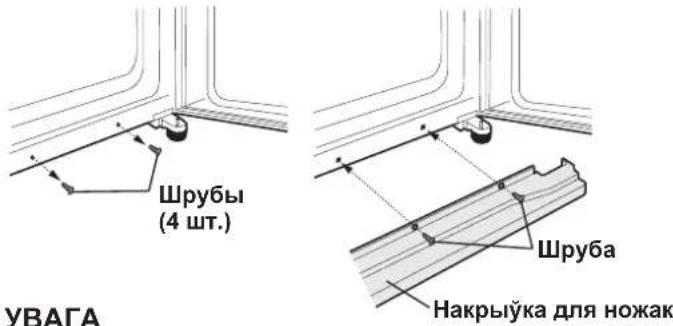
Pnuc yctaneyki xana3iNbHk, caybue, ka6 pa3eTka 3actaBnacra JfKaadctynha.
Pa3muae xanaad3inbHik daneka ad npambyx cohehblix npamrhy.
He cyaue yro no6b4 zenplareHepbipyuBmi npblanaDi. He yctahaayibaiae xana3iNbHik Henapc3dHa Ha 3aMnI. 3a6cnueymyyctOInIbHyo anopy.
Kani Bb naKnIOuAeue xana3IbHik da cinKaBaHHa 3 aHyIHeHbIMi 3BpbMa, nayeuca ryKaBb ciHan. EHaKnIOUbua npbl 3akpuiD3Bprn.
NepaBbIkapbIcTaHHem XaJa3iNbHika
Ybcuiye HytpaHbIy cactki CmouaHa y cenna Ba3e TkaHHa. IpbblbikapictaHH MblbHaBaDbI 3MbInCeRe BJIiKaKoJbKacUO YbCTaBaDbI.
IHdIkATAP T3MnEPATypbl
T3bI xana3iNbHK Mae iHdbikatap T3MnepaTypbI y xana3iNbHai KamepbI, kI da3BaJre KaHTpaJIBaCb cAp3dHIO T3MnepaTyPy y camai XanoDHa 30He.
Cama xalodna 30Ha
T3bI cIMBaI yKa3Bae Ha camyO xaIoNDhyo 3OH y xanaIzIbHaN kamebpI. (I3BpaHra naniUka, pa3MeuHaHa Ha Toi CamaN BblbHi, He 3'aynreua caMaXaIoDHa 3Ona.)

CIMBAJ
Ppabepka TAmpepatpybI y camaa xaIoJHaN 3OHe
BbMoKaae p3rIyraPn npabpaCb i, npbl Hea6xOHaacui,
kapKzipabaucb Tmnepatpy y cama xanoHa 30He.
Ka6 naTpbimlinae npabibHyTO Tmnepatpy yHytpbl
xaJad3iNbHika, caBuIe, ka6 IHbikatap Tmnepatpy 6bly
3aycEbl CIHI. Kani iHbikatap Tmnepatpy CTahOBiuca
BEJIbIM, rTa naka3Baep Ha 3aHaTb BAICOKYIO Tmnepatpy.
YrTbIM BvIIaNky Nabniue 3NaUHHe Tmnepatpy 3
danaMora nCt3MbI TmnepatypHara KaHTPOJIO XanaJa3InbHika
i naqakaiue 6 Ra3in da NaYTopHaan ppabepi k Idbikatapa
Tmnepatpybl.

CIHI
Ppabinbna yctaneyka

6ENbl
TAmnepatypa 3aHaTa BBICOKA, 3MaHlue HanaKti TAmnpaTpbl.
YBATA
YHytpaHrTaMnepaTpyxana3inbHika 3aneKbUc ad po3hBx·
ФakTapay, TAKIX, RA TMnepaTpy y NaMaUKaHHI, KOJIbKaCUB
3axabaHbX npadykTay i cAteTbI aDyHeHHN D3Bp3i.
Kani Bblnaki n yi xana3inbHK CBexbI XapObo IpaNykbI abo .
d3BepbI 3actablanice adKpbTbIMI Ha npauRy HeKATopara hacy,
3blyaHa IHbikatap TaMnpaTpyc tAnOBiuca 6ebim.
ANICAHHE
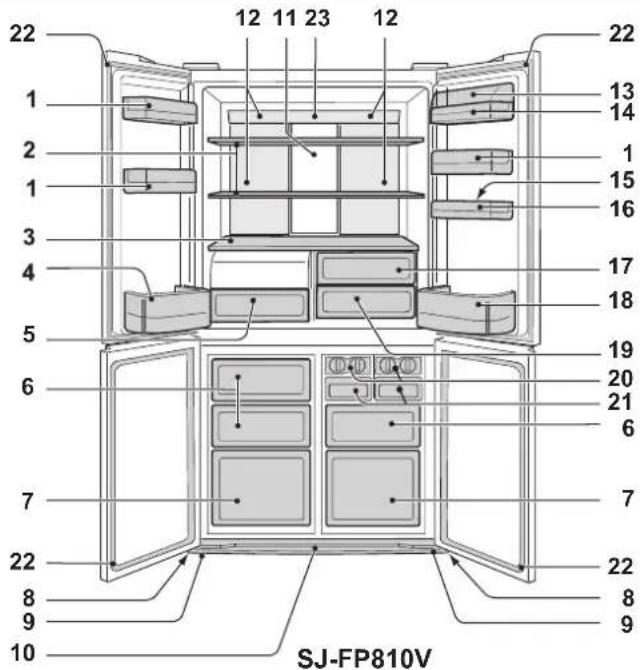
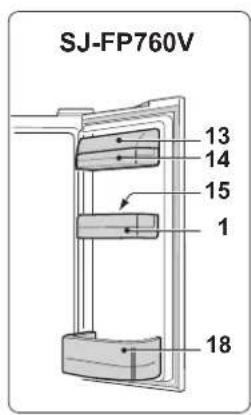
D3BpaHbnaJIyKi(Wt.)
Paniqa xanaa3inbHaN KaMepb2 (2 wT.)
Paniua3.
Paniika dny 6yt3neK (neBa)4.
I6pa 3aNaYataHbI KaHT3Hep Ira rapoHiHbI
HaKpbIyKa aDyBHReuca npbl BbIaRBaHHi KaHT3nHepa.
CkpbHka Mapa3inbHa KaMepbi (ManeHbki) 83 wT.)
HaKpbIyKa IJIa HOXaK10.
AnomimieBa nHa1b11.
PAn3b acTydxKaeUca 3 Tblny, TbIM cMbIM yckOCHA axanodkBAHOby xanaD3iINbHyIO kamepy. TaikyIHAM, npadyKtBxapuabaHn AxanoDKBAIOua akypaTHa,6e3 npamora KaHTaKty 3 NblHn XaNOHara NaBeTpa.
JaMaNa12.
Hakpbiyka 3aKpBITaJy3nKi13.
3akpbita yuaika 14.
Paniua dnia reek15.
Kiw3Nb dIy ReK16.
KaHTənHep nra caaBihb17.
- Paniya dny 6ytanek (npaba)
Ipa3MaWuHnHeCTaHdapTHbIX 6yTneK, npocTa nepamrciue pa33raJIbHik.
Pa3a3raIbHik
- KaHTənHep-axaJanaXaJIbHik
20.ФорmaДЯнлед3яньху6ikay(2wt.)
He Hanibaiue 3aHaTa Mhora BaDbl yΦopMy dIy Kybiay, iHaKu y 3aMapoXaHbIM CTAHe RaHbCKnEua.
Kani kybiki JNy ratoBbl, naBpHicepbUar na ra3iHHa nCtpnCbI, Ka6kybiki ynaji kapobKy.
PbIar
Kapobka dna
JeI3aHbIX Ky6iKaY
- Kapo6ka Дялпедяньх Кбikay (2 wT.)
Ka6 npadyuxiniuB naawkoDjaHne KApO6Ki Iny Ky6iKaY JnEy, He pa6iue neH enacp3Ha y e i He yIbAunce y are anen.
- Marhitthia 3aicckanbHiki dna 3Bpa(4 wt.)
- 3ka-3HaK
PbI aKpbTbIX d3Bpax xanaD3iNbHika, nMaNaKa naBOJbHa 3MeHiCb CBoI KOJIep: 3 CIHra Ha naMpaHauCABbl. Ta a3Hauae, wTO TmpePaTypa yHyTpbl XanaD3iNbHika naBnIyBaueua.
- NaHəJIb KIPAbaHHa
D3aTapaTap
ДэзатаразустоюньиHaшлaxypyxaxanodharanaBetpa; MyHe natapbyeцakipabahnhei ybICTka.
Moxha zaxoyBaCb 60nbWyIO KoIbKacUb npadykTay npbl HaIeXHbIM acTydk3HHi, daCTaYbbl yHyTpahBIA npbICTacabaHHI.
A KBbIaIiB
Kaδ daCTaε aπd3aJIeHHe,
YKbBaIe r3TbI pXbIM, Kani Bbl aIaIaIaIaIXaeIe 3 Domy Ha doyri Yac.
Pauatak anepaui
In Europe represented by
SHARP ELECTRONICS EUROPE LTD.
4 Furzeground Way, Stockley Park, Uxbridge, Middlesex, UB11 1EZ, U.K.
Printed in Thailand
- WARNING CAUTION
- Information on Disposal for Users (private households)
- Attention:
- In the European Union
- In other Countries outside the EU
- WARNING
- NOTE
- Before using your refrigerator
- INDICATOR OF TEMPERATURE
- Coldest zone
- Checking the temperature in the coldest zone
- DESCRIPTION
- Deodorizing unit
- More food can be stored by taking out the internal accessories with duly cooling.
- Control panel
- Feature icons
- Controlling temperature icons
- Sound ON/OFF
- To set sound "OFF"
- To set sound "ON"
- OPERATION
- Plasmacluster
- To start operation
- To cancel operation
- Energy Saving
- Vacation mode
- Express Freezing
- Child Lock
- Door Alarm
- Refrigerator compartment
- Freezer compartment
- Advanced Setting of Freezer / Refrigerator compartment
- STORING FOOD
- Fruit / Vegetables
- Dairy Products & Eggs
- Meats / Fish / Poultry
- For best freezing
- CARE AND CLEANING
- IMPORTANT
- Defrosting
- When the compartment light is blown
- When transporting
- Switching off your refrigerator
- Tips for saving energy
- BEFORE YOU CALL FOR SERVICE
- IF YOU STILL REQUIRE SERVICE
- Lai skanu "IZSLEGTU"
- Lai skanu "IESLEGTU"
- DARBIBA
- PIMITKA
- ONMC
- De3oDopyuOa cnCTema
- Панель керваимпя
- yMOBHI no3HaueHHaФункii
- IHHaTopn KOHTpOIO TemepaTpy
- Mopo3nJIbHe BiDiJIeHHe
- IodatkobihahauTybaHHdJI MOp03nJbHoro /XoIoAnJbHoro BiDJIeHHa
- XoIOnJIbHe BiIaIeHH
- Mopo3nIbHe BidaineHHa
- 3БЕPIГАння ПОДУKTIB
- ΦpyKTH/ObOci
- Molouhni npoduktn Ta myca
- M'aco/Pu6a/PTnca
- NPMMITKA
- BiDknIooHnXoNoDnBnKa
- Popadn ⅢoDo eHepro36epeXeHHa
- EheprocnoxnBaHHaHO daoHIO moDeI BmipocTbcB BiINObIDHO do mixhapoDnHex cTaHdaptIB zoOdo NOKa3HNKIB pO60TN XONODINbHnKa npN BnKOHaHHI BkA3AHX daJI yMOB.
- TINM 3ATENEFOHBATN DO CEPBICHORO CEHTPY
- YKUO BAM BCE X TAKI NOTPIBHE CEPBICHE OBCNYROBYAHH
- PPEyPExKDEHNE B
- MAHNE
- HOpmaun 3a nXbPnHeTo 3a notpe6nte (aactn domaknHctba)
- BHMAHNE:
- 1.BEbponeckncab03
- 2.BdpyrnctpaHn3BbH EC
- MOHTAX
- PNEyPExKdEHN
- 3ABEJIEXKA
- PpeN BkJIIOUyBaHe Ha XlaIaHJHnKa
- TEMNEPATYPEH NHДNKATOP
- Ha-CTyDena 30Ha
- ПюверkaHa TemпepатураВийстуденьта 30нa
- 3ABEJIENKKA
- akTopn KaTo CtaaHata TemnepaTpa, KOJIueCTBOTo XpHa N
- ONUCAHNE
- Mоже да освобODиTe място 3a оше xpaHa Bхладиннka kato n3BaДNTe BbTppeHHTe akcecoapn.
- KoHTpOJIeH nAHeJ
- IkoHKn Ha pa3nHnTe cyHKuNN
- NepaBbIkapbIcTaHHem XaJa3iNbHika
- IHdIkATAP T3MnEPATypbl
- Cama xalodna 30Ha
- Ppabepka TAmpepatpybI y camaa xaIoJHaN 3OHe
- YBATA
- ANICAHHE
- D3aTapaTap
- Moxha zaxoyBaCb 60nbWyIO KoIbKacUb npadykTay npbl HaIeXHbIM acTydk3HHi, daCTaYbbl yHyTpahBIA npbICTacabaHHI.
- Pauatak anepaui
Brand : SHARP
Model : SJFP760VBK
Category : Refrigerator