SECDVRPEN11 - Voice recorder KONIG - Free user manual and instructions
Find the device manual for free SECDVRPEN11 KONIG in PDF.



User questions about SECDVRPEN11 KONIG
0 question about this device. Answer the ones you know or ask your own.
Ask a new question about this device
Download the instructions for your Voice recorder in PDF format for free! Find your manual SECDVRPEN11 - KONIG and take your electronic device back in hand. On this page are published all the documents necessary for the use of your device. SECDVRPEN11 by KONIG.
USER MANUAL SECDVRPEN11 KONIG
MANUAL (p. 2)
CAMERA PEN
MODE D'EMPLOI (p. 8)
STYLO CAMERA
MANUALE (p. 14)
PENNA CON TELECAMERA
MANUAL (p. 20)
CÁMARA CANETA
MANUAL DE USO (p. 17)
BOLIGRAFO CON CÁMARA
HASZNÁLATI UTMUTATO (o. 23.) KAMERÁS TOLL
BRUKSANVISNING (s. 29) PENNKAMERA
MANUAL DE UTILIZARE (p. 35)
PIX CU CAMERA
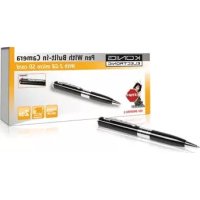
- Very small and compact digital video recorder with built-in colour camera and microphone.
- Designed as a pen and ideal to use as a spy or hidden camera.
Built-in rechargeable battery. - Can be connected to a PC or notebook with the USB cable for data transfer and charging.
Supports Micro SD card.
Description:
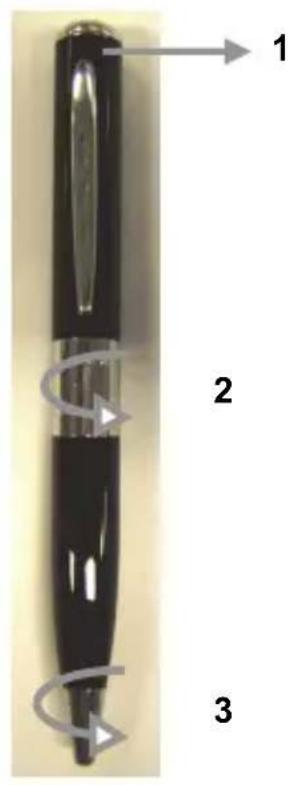
- Camera lens
- Turn to access the Micro SD card and USB connection
- Turn to open the ballpoint pen
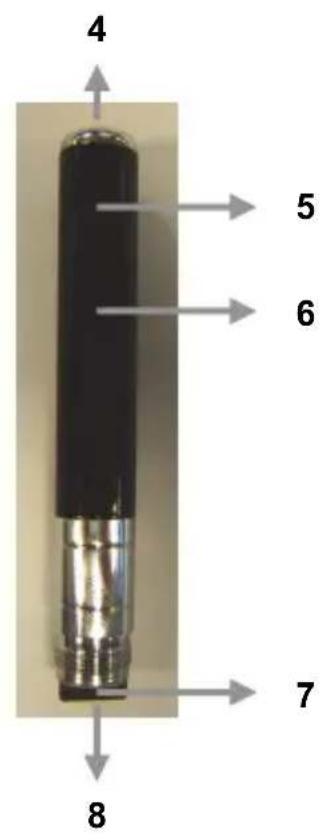
- ON/OFF button and operation
- LED indicator
- Reset button / Microphone
- Micro SD card reader
- USB connection
OPERATION:
1. ON/OFF:
Hold the ON/OFF button until the red LED indicator stays lit.
2. PHOTO FUNCTION:
Turn on the camera until the red LED indicator stays lit. Press the ON/OFF button once to take a picture. (It only takes one picture and the LED indicator does not flash).
3.VIDEO FUNCTION:
Turn on the camera until the red LED indicator stays lit. Press the ON/OFF button once to enter into video mode. The red LED indicator will keep flashing, it means the camera is recording a video. Press the ON/OFF button again, the camera will stop recording and the video file will be saved.
4. CONNECT TO A COMPUTER OR NOTEBOOK:
Open the pen to access the USB connection. Connect the pen to a computer or notebook with the supplied USB cable. Open the folder to view the files. The photo and video files are stored in the folder: _REC\100MEDIA. When the pen is exchanging data with the computer or notebook, the LED indicator is flashing.
5. SET THE TIME/DATE/YEAR:
If you want to include the year, date and time with the photos and videos, please follow the instructions below:
A) Connect the pen with the computer or notebook
B) Open the folder to view files (root directory)
C) Right click with mouse and select NEW in the pop up window
D) Select TEXT DOCUMENT and open the TEXT DOCUMENT (in the folder)
E) Enter as follows: yyyy.mm.dd
F) Click FILE (left top corner of TEXT DOCUMENT) and choose option SAVE.
G) The file is saved in the root directory and the photos and videos are now marked with year, date and time.
6. CHARGE:
Open the pen to access the USB connection. Connect the pen to a computer or notebook with the supplied USB cable. The LED indicator will slowly light up in red and green. When the LED indicator blinks bright red, the battery is fully charged.
7. POWER SAVING MODE:
If the ON/OFF/OPERATION button is not pushed within 25 seconds, the camera will turn off to save battery capacity.
8. GENERAL:
When there is no storage capacity left, the LED indicator will blink red and blue to indicate to change the Micro SD card or copy the files to your hard disk drive of your computer or notebook. The pen will save the last data and shut down automatically.
Specifications:
Resolution: 1280960 AVI
- Resolution photo mode: 1280960 JPEG
- File size: >30 MB (minute)
Memory: Micro SD, up to max 8 GB
- Battery: Lithium-ion battery
- Charging time: ± 3 hours (via USB, 5 V)
- Operating time: ± 50 minutes
Weight: 30 g
Dimensions: 13.3× 144mm
Safety precautions:
Do not expose the product to water or moisture.
Maintenance:
Clean only with a dry cloth. Do not use cleaning solvents or abrasives.
Warranty:
No guarantee or liability can be accepted for any changes and modifications of the product or damage caused due to incorrect use of this product.
General:
- Designs and specifications are subject to change without notice.
- All logos brands and product names are trademarks or registered trademarks of their respective holders and are hereby recognized as such.
- This manual was produced with care. However, no rights can be derived. König Electronic can not accept liability for any errors in this manual or their consequences.
- Keep this manual and packaging for future reference.
Attention:

This product is marked with this symbol. It means that used electrical and electronic products should not be mixed with general household waste. There is a separate collections system for these products.
This product has been manufactured and supplied in compliance with all relevant regulations and directives, valid for all member states of the European Union. It also complies with all applicable specifications and regulations in the country of sales.
Formal documentation is available upon request. This includes, but is not limited to: Declaration of Conformity (and product identity), Material Safety Data Sheet and product test report.
Please contact our customer service desk for support:
via website: http://www.nedis.com/en-us/contact/contact-form.htm
via e-mail: service@nedis.com
via telephone: +31 (0)73-5993965 (during office hours)
NEDIS B.V., De Tweeling 28, 5215 MC 's-Hertogenbosch, THE NETHERLANDS
DEUTSCH
Einleitung:
5. INDSTIL TID/DATO/AR:
YdepKbAte KhoNky ON/OFF, noka He 3arOpntc KpaChbI CBeToDIOHbI INDkaTOp.
2.ФУHКЦЯФOTΟΡΑΦИРОBAHAHA:
BkIIOHTe KaMepy, YTO6bI 3arOpencr KpaChbI CBTeODnOHDhINHdNKaTOp. HaxMMTe KhoNky ON/OFF OAnH pa3, YTO6bI CdeNaTb CHIMOK. (Co3daetc TOnbKO OAnH CHIMOK IN CBTeODnOHDhINHdNKaTOp He MInraet).
3.ФУHKUЯВИDEO:
BknHcyKeMepy, YTo6bI 3aOpencra KpaChbI CBeToNDnHbI INDnKaTOp. HaxMnte KhONky ON/OFF OINH pa3 dIy BXoDa B peKIM BnDeo. KpaChbI INDnKaTOp 6yDet MIRatb; 3TO 3NaHT, YTO KaMepa BblOnHReT 3aNcBnDeo. HaxMnte KhONky ON/OFF eue pa3, KaMepa OCTaHOBT 3aNNCb IN BnDeo 6yDet coXpaHeNo.
4. NOДКЛЮЧЕНЕ K KOMПьОТЕРУ ИИ HOYТБУКУ:
OTKpoTe pyky dIydoCTyna K pa3bemy USB. IOnkIIOUHTe pyky K KOMNbIoTepy HIn HoYToKy C NOMOsbIO npINaRaemoro Ka6enr USB. OTKpoTe nanky dIy npocMoTpa qaiNoB. FOTO IN BnDeofoaHbI xpaHraTcB CneDyUoSei panKe: _REC\100MEDI.A.EcIn pyka 6mEHNBaETcA DAHHbIMC KOMNbIoTEpOM HIn HoYToKyOM, CBTeODINOHDhN HNDKaTOp 6ydet MMRatb.
5. HACTPOIKA BPEMEH/ДАТыl/ГОДA:
EcnBbXOTHe, YTO6bHaΦOTo N BnDeo OTO6paKancra RoD, DaTa N BpeMa, BblOnHnTe yKa3aHHbIe HNKe DeiCTBnI:
A) IopKnHouTe pyK KOMnIbIOtepy nIu HOyT6ky
5) OTKpoTe nanky dny npocmotpa paJIOB (kopHeo KaTajor)
B) Haxmte npabyo KhoNkyMbIuN Bb6epnte BpackpbbaioemcOKhe nyHKT CO3ATb
T) Bb6epnTe TECTOBbl DOKUMEHT n oTkpoIe TEKCTOBbl DOKUMEHT (Bnanke)
Д)ВБeДиTe Дату В седуншем ФормATE: rrrr.MM.ДД
E) HaxmTe ΦAII (B JEBOM BepxHem yrJy TEKCTOBOTO DOKUMEHTA) N BBi6epnte COXPAHHTb.
K)ФaII 6yIeT coXpaHEn B KOpHeBOM KaTAlOre; fOTO IN BnDeo TeNepb 6yIyT CoIepKaTb rO, DaTy n Bpemr.
6.3APRAKKA:
OtkpoTe pyky dnia doctyna Ka3bemy USB. POnkHouTe pyky K KombIOTepy HIn HoY6ky c nomoIbIO npnlaeraMoro Ka6eNA USB. CBeToDIOdHbIN INdNkaTOp 6yJeT MeJNeHHO 3aRopatcbc KpaChbIM N 3eJIeHbIM. Ecln CBeToDIOdHbIN INdNkaTOp MInrae T KpaChbIM, 3HaHT aKKMyJrTOp PONHOCTbIO pa3pRAKeH.
7.3HEPROCEPEPAIOUPEKIM:
Ecnn KhoNka ON/OFF/3KcPnyATAUHr He HaxaT B TeueHne 25 cekyH, kamepa OTKnIOHTcB UeJx 3KOHOOMN 3apra da aKKyMylrTopa.
8.ObuNe noLoXeHna:
Ecn MeCTo Ha KapTe 3aKOHnIIOcb, INdNkATOp HauHET MIRaTb KpaChbIM N CINHM, O6O3Haay, YTO Heo6xOIMO 3aMeHnTB KapTy nAmrtn micro SD nIn cKOnnPoBaTb faiNbHa JecTKm DnCK KombTope a nn HoYt6yka. UcTpoIcTBO COxpaHNT nocJeDnHe DaHHbIe I OTKnIOHTCra ABTomatUneckn.
Cneunpkaua:
- Pa3peuHne:
1280*960
AVI
- Pa3peWeHne foTopeKIma:
1280*960 JPEG
- Pa3mep faaIIa:
30 M6 (MnHyTa)
-Памгтб:
Micro SD,do 8 GB
- Batape:
JIHTHn-NOHHbI aKKyMylTOp
Bpem3apn:
±3yaca(noUSB,5B)
BpeMa pa60TbI:
±50MnHyT
Bec:
30r
- Ra6apuTbI:
山13,3x144MM
Mepb6e3oNaCHOCTN:
He donyckaTe Bo3deIcTBnB BoDbln BnaH.
Texnueckoe o6cnyxnbHne:
OuHsTaB ToIbKO cyXoT KaHbIO. He npOn3BOJTe OUcTky, nCNoJIb3yra paCTbOpTeJI nn a6pa3nBBI.
TapaHTy:
B cnlyuae n3MeHeHnI MoDnΦnKaun yCtpoCTBa IIN B cnyae, NOBpeKdEHNy yCtpoiCTBa BCneDCTBnE erO HEnpaBnIbHOrO IcNoJIb3OBaHHra rapaHTnI IIN O6BaTeJIbCTBa He DeIcTByIOT.
06uine noIoxeHnra:
-ДиЗaIH nTexHnueckne xapaKTePncTnKm MOryT 6bITb n3MeHeHb 6e3 npEiBapNTbHorO yBeDOMJIeHn.
- Bce IIOrOToHbI 6peHDoB n Ha3BaHnI npOdyKTOB YBnIyOTcTobApHbIMn 3HaKaMn IIN 3apeInCTpnpoBAHHbIMn TOPROBbIMn MapkAmn IX COOTBETCTByUx IN BlaJeJIbCeB IN CNeIOBaTeNbHO IIpuN3HaIoTc TaKOBbIMn.
- ΘTO pyKOBODCTBO CO3daHO C CO6HIODeHNEM 3aKOHOdaTeNbCTBa. Tem He MeHee, OHO He HaJeIeT HnKaKIMn npabAMn. Konig Electronic He HeceT OTBETCTBeHHOCTN 3a BO3MOXHbIe OUn6Kn B DaHHOM pyKOBODCTBE INI INX NocJIeDCTBnJ.
XpaHnTe 3TO pyKOBOcTBO u ynaKOBky dIaIbHeuero nCNoJIb3OBAHnI.
BHHMaHHe:

ДаньиnpodуктOTMeueH3Tm CnMBOJOM.3TOO3Haayet,HTO3TN3JIeKtpuYeCKneIIN 3NeKTPoHHbIeN3dEINH He DOJXHbICMeUHbAteBcRcCObbyHbIMDOMaUHIMNOTxOdaM.NIЯ 3Tnx npodukToB cyuEcTByET OTDeNbHra CnCTema c6opaaOTxOdoB.
Данhoeи3дениьылnoи3roTOBNeHOи NOCTaBNeHO B COOTBeTCTBIM CO BCEMn IPmMeHIMbIMNIOLOXeHnAIMN INIpeKTHBaMn, DeiCTByUOuIMn DЯ BCex CTpaH-JIeHOB Ebponeckoro Co03a. OHO TaKKe COOTBeTCTByET BcEM HOpMaMn IN PaBUNaMn, DeiCTByUOuIMB CtPaHe npOdaJxN.
OΦnuaHna DOKymeHTaun npedocabTcno 3anpocy. 3Ta DOkymeHTaun BKIOUaET (HO He orpaHnBaetcA Tm): JeIapauu cooTBcTcBn (nN3denn), nacnpT 6e3onachoctn, OTET no npOBepke npodykta.
IynoyuHn noomou obpatntecb Hauy cnyk6y noDepKKn KIneHTOB:
Череше Веб-сан: http://www.nedis.com/en-us/contact/contact-form.htm
no 3JIeKtPOnHNoTte: service@nedis.com
no TelefoHy: +31 (0)73-5993965 (B pa6oue yacbl)
NEDIS B.V., De Tweeling 28, 5215 MC 's-Hertogenbosch, THE NETHERLANDS (HIDEPNAHdbI)