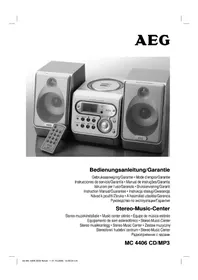
MC 4433 CD - Hi-fi system AEG - Free user manual and instructions
Find the device manual for free MC 4433 CD AEG in PDF.



| Product type | Hi-fi system |
| Brand | AEG |
| Model | MC 4433 CD |
| Output power | 2 x 30 W PMPO |
| Power supply voltage | 230 V, 50 Hz |
| Power consumption | 18 W |
| Net weight | 3.9 kg |
| Protection class | II |
| FM range | 87.5 – 108.0 MHz |
| MW range | 522 – 1620 kHz |
| Supported audio formats | CD audio, CD-R, CD-RW, MP3 |
| Audio inputs | AUX IN (3.5 mm), USB port, FM antenna |
| Audio outputs | Headphone jack (3.5 mm), Speakers (terminal connectors) |
| CD functions | Play/Pause, Stop, Next/Previous track, Fast forward/Rewind, Repeat, Random play, Programming |
| Preset equalizer | Flat, Classic, Rock, Pop, Jazz |
| Remote control | Infrared, range 5 m, AAA batteries (not included) |
| Display | LCD screen with backlight |
| Mounting | Wall or stand mounting (included) |
| Cleaning | Slightly damp cloth, unplug before |
| Safety | Class 1 laser, auto stop after programmed playback |
| Warranty | Refer to the included warranty certificate |
Frequently Asked Questions - MC 4433 CD AEG
User questions about MC 4433 CD AEG
0 question about this device. Answer the ones you know or ask your own.
Ask a new question about this device
Download the instructions for your Hi-fi system in PDF format for free! Find your manual MC 4433 CD - AEG and take your electronic device back in hand. On this page are published all the documents necessary for the use of your device. MC 4433 CD by AEG.
USER MANUAL MC 4433 CD AEG
natural_image
Product lineup of AEG audio equipment including monitor, keyboard, and control unit (no visible text or labels)Deutsch
Inhalt
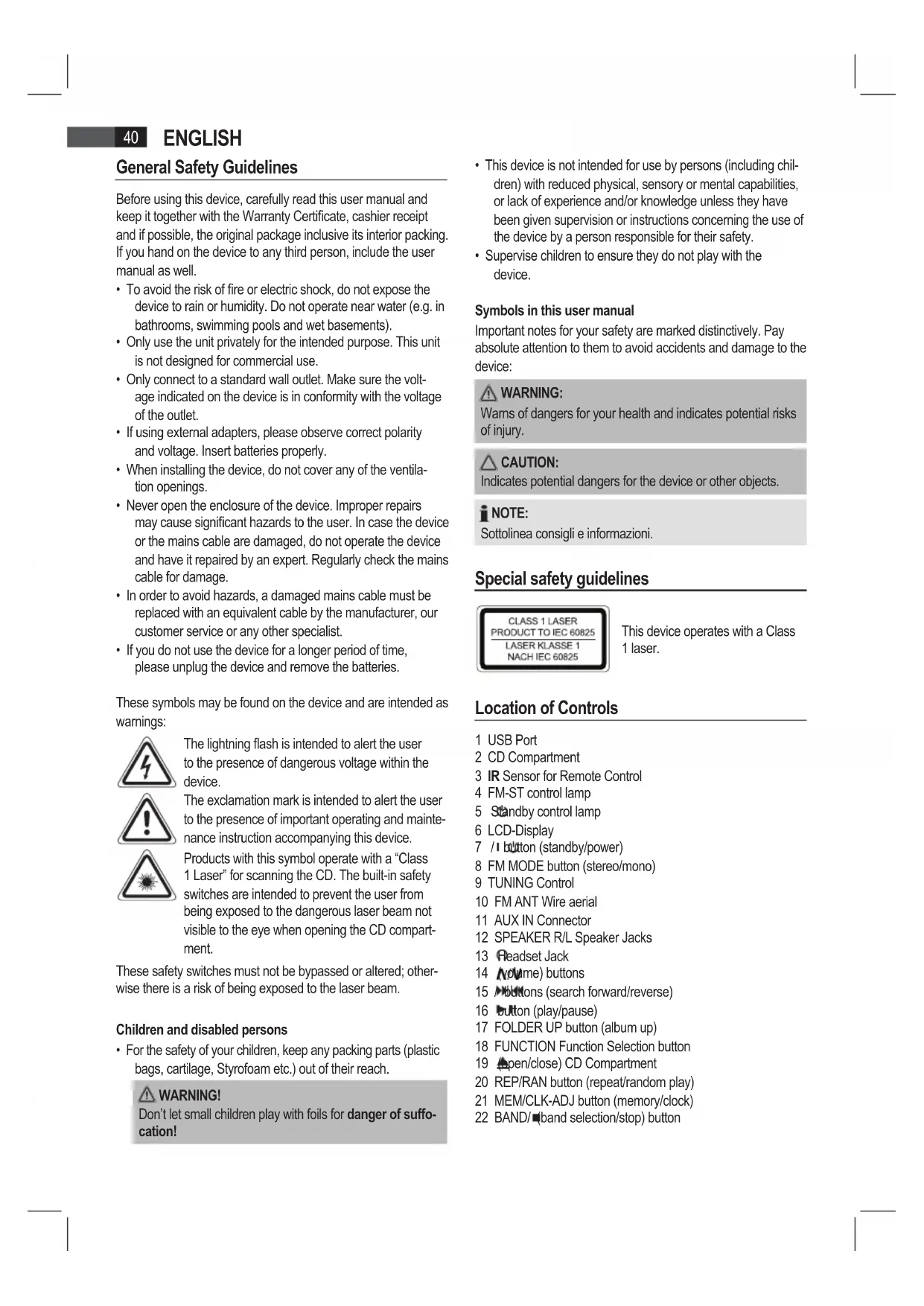
Location of Controls
text_image
1 2 3 4 5 6 7 8 9 10 11 12 U/O FUNCTION +10 +10 +10 VOL- VOL+ VOL- VOL- VOL- VOL- VOL- VOL- VOL- VOL- VOL- VOL- VOL- VOL- VOL- VOL- VOL- VOL- VOL- VOL- VOL- VOL- VOL- VOL- VOL- VOL- VOL- VOL- VOL- VOL- VOL- VOL- VOL- VOL- VOL- VOL- WELL WELL WELL WELL WELL WELL WELL WELL WELL WELL WELL WELL WELL WELL WELL WELL WELL WELL WELL WELL WELL WELL WELL WELL WELL WELL WELL WELL WELL WELL WELL WELL WELL WELL RUSTANnatural_image
Diagram of three views of a computer monitor with labeled connectors (no text or symbols present)natural_image
Diagram showing two views of a computer monitor with internal layout and mounting base (no text or labels)natural_image
Three views of a flat-screen TV or audio device showing internal components and cable connectors (no text or symbols visible)natural_image
Diagram showing two views of a computer monitor with labeled components and mounting points (no text or symbols present)natural_image
Line drawing of three views of a flat-screen TV with labeled connectors (no text or symbols present)natural_image
Technical diagram showing two views of a computer monitor front panel with labeled components and mounting base (no text or symbols present)Installation/Introduction
Program playback in desired sequence.
natural_image
Diagram of three views of a flat-screen TV unit with labeled connectors (no text or symbols present)natural_image
Diagram showing two views of a computer monitor front panel with labeled components and mounting base (no text or symbols present)natural_image
Diagram of three views of a computer monitor with labeled ports and connectors (no text or symbols present)natural_image
Technical line drawing of a monitor front panel showing internal layout and mounting points (no text or symbols)natural_image
Diagram of three views of a computer monitor showing internal components and connectors (no text or labels)natural_image
Diagram showing two views of a computer monitor front panel with internal layout and mounting base (no text or labels)General Safety Guidelines
Before using this device, carefully read this user manual and keep it together with the Warranty Certificate, cashier receipt and if possible, the original package inclusive its interior packing. If you hand on the device to any third person, include the user manual as well.
- To avoid the risk of fire or electric shock, do not expose the device to rain or humidity. Do not operate near water (e.g. in bathrooms, swimming pools and wet basements).
- Only use the unit privately for the intended purpose. This unit is not designed for commercial use.
- Only connect to a standard wall outlet. Make sure the voltage indicated on the device is in conformity with the voltage of the outlet.
- If using external adapters, please observe correct polarity and voltage. Insert batteries properly.
- When installing the device, do not cover any of the ventilation openings.
- Never open the enclosure of the device. Improper repairs may cause significant hazards to the user. In case the device or the mains cable are damaged, do not operate the device and have it repaired by an expert. Regularly check the mains cable for damage.
- In order to avoid hazards, a damaged mains cable must be replaced with an equivalent cable by the manufacturer, our customer service or any other specialist.
- If you do not use the device for a longer period of time, please unplug the device and remove the batteries.
These symbols may be found on the device and are intended as warnings:
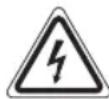
The lightning flash is intended to alert the user to the presence of dangerous voltage within the device.

The exclamation mark is intended to alert the user to the presence of important operating and maintenance instruction accompanying this device.

Products with this symbol operate with a "Class 1 Laser" for scanning the CD. The built-in safety switches are intended to prevent the user from being exposed to the dangerous laser beam not visible to the eye when opening the CD compartment.
These safety switches must not be bypassed or altered; otherwise there is a risk of being exposed to the laser beam.
Children and disabled persons
- For the safety of your children, keep any packing parts (plastic bags, cartilage, Styrofoam etc.) out of their reach.

WARNING!
Don't let small children play with foils for danger of suffocation!
- This device is not intended for use by persons (including children) with reduced physical, sensory or mental capabilities, or lack of experience and/or knowledge unless they have been given supervision or instructions concerning the use of the device by a person responsible for their safety.
- Supervise children to ensure they do not play with the device.
Symbols in this user manual
Important notes for your safety are marked distinctively. Pay absolute attention to them to avoid accidents and damage to the device:

WARNING:
Wams of dangers for your health and indicates potential risks of injury.

CAUTION:
Indicates potential dangers for the device or other objects.

NOTE:
Special safety guidelines
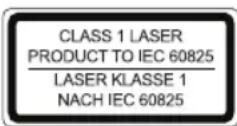
This device operates with a Class 1 laser.
Location of Controls
1 USB Port
2 CD Compartment
3 IR Sensor for Remote Control
4 FM-ST control lamp
5 Standby control lamp
6 LCD-Display
7 /1 button (standby/power)
8 FM MODE button (stereo/mono)
9 TUNING Control
10 FM ANT Wire aerial
11 AUX IN Connector
12 SPEAKER R/L Speaker Jacks
13 Headset Jack
14 (volume) buttons
15 ▶buttons (search forward/reverse)
16 button (play/pause)
17 FOLDER UP button (album up)
18 FUNCTION Function Selection button
19 (open/close) CD Compartment
20 REP/RAN button (repeat/random play)
21 MEM/CLK-ADJ button (memory/clock)
22 BAND/■(band selection/stop) button
Remote control
1 MEM/CLK-ADJ button (memory/clock)
2 FUNCTION (function selection button)
3 (play/pause) button
4 button (search forward)
5 FOLDER / buttons (album up/down)
6 +10/-10 buttons
7 VOL+/- (volume) buttons
8 REP/RAN button (repeat/random play)
9 PRESET EQ button
10 BAND (stop/band selection) button
11 (search back)
12 V button
Wall mounting
natural_image
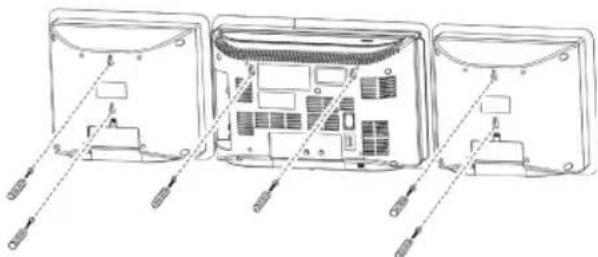
Diagram of three views of a computer monitor showing internal components and cable connectors (no text or labels)- Align the drilling template horizontally and mark the drill holes for the wall mounting.
- Drill the mounting holes (diameter 6 mm).
- Insert plastic dowels into the holes.
- Tighten the mounting screws until they protrude by around 4 mm from the wall.
- Mount the unit and both speakers onto the screws.
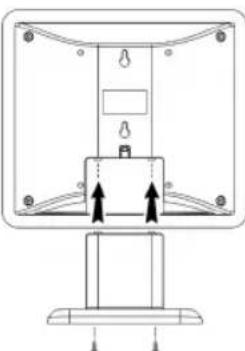
Mounting the support stand
natural_image
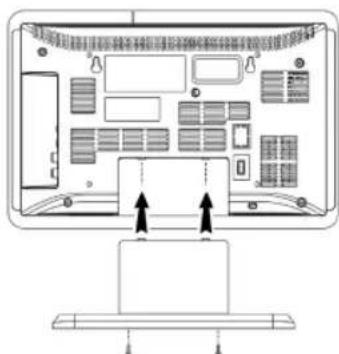
Diagram of a computer monitor rear panel with ventilation slots and indicator lights (no text or labels)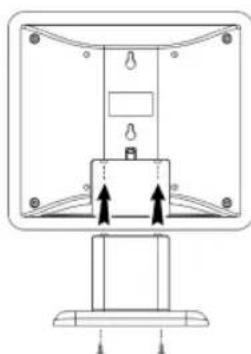
natural_image
Technical line drawing of a mechanical assembly with mounting base and internal components (no text or symbols)- Attach the unit and the speakers to the supplied support stands and fasten using the correct screws.
Installation/Introduction
- Read the manual thoroughly before operating the device!
- Choose an appropriate location for the device and speakers. Suitable locations are dry, even and anti-slip surfaces on which you may operate the device easily.
• Make sure there is proper ventilation for the device!
- Connect the speakers on the right side of the unit to "SPEAKER R and L" (12).
- Remove, if necessary, the protection sheet from the display.
Power supply
- Connect the mains plug to a standard outlet, 230 V, 50 Hz.
• Make sure the voltage is in conformity with the rating plate. - In case of power interruptions all clock and station settings will be lost.
Setting the clock (during standby mode)
- Press the MEM/CLK-ADJ button (21/1). The display will show "12 H".
- Use the 🔊 buttons (15/4/11) to select between 24-hour and 12-hour display setting. Confirm with MEM/CLK-ADJ.
NOTE: The 12-hour setting will result in the following display PM = afternoon.
- Use 🔍 buttons to set the hours. Confirm with MEM/CLK-ADJ.
- Use ▶buttons to set the minutes.
- Press MEM/CLK-ADJ again in order to save the time settings.
Batteries of remote control (Batteries not included)
- Open the cover of the battery compartment on the rear side of the remote control.
- Insert 2 x R03 "AAA" 1.5V batteries. Please observe correct polarity (see bottom of battery compartment)!
- If you do not use the remote control for a longer period of time, please remove the batteries in order to avoid "leakage" of battery acid.
CAUTION:
- Different battery types or new and used batteries must not be used together.
- Do not dispose of batteries with your household trash. Please hand over at authorized collection points or return to your dealer.
WARNING:
Do not expose batteries to heat or direct sunlight. Never throw batteries into fire. Danger of explosion!
Transport securing device of CD compartment
- Turn on the device, please press the /1 button (7/12).
- Open the CD compartment (2), by pressing the (open/close) button (19). The CD door opens upwards.
- Remove, if present, the transport securing device from the CD player before starting operation.
- Press button again to close the CD compartment.
General operation
i NOTE:
Some buttons you will find on both the device and the remote control. Buttons with the same name result in the same functions.
1/7(7/12)
Press I /button to switch the device into standby mode (display will show the time). Press this button again to turn on the device.
Λ/V Volume (14/7)
Adjust to your preferred volume level. The display will show "V" and a number. This will equal to the set volume of "V 30" or "V 00".
headphone jack (13)
When listening via headphones, please use headphones with a 3.5 mm stereo jack plug which you will connect to the headphone jack. The speakers will be deactivated.
Infrared remote control
Wireless operation from a distance of up to 5 meters. If this range gets less, please change the batteries. Make sure there are no obstacles between the remote control and the sensor (3) on the device during operation.
USB port (1)
This device has been designed in accordance with the latest USB state of the art technology. Due to the large variety of different USB memory tools on the market it is not possible to provide complete compatibility with all USB storage devices. In some rare cases there might occur, for that reason, errors when playing USB storage devices. That is not a malfunction of this device.
- Turn on the device, please press the 🎯 button (7/12).
- Use the FUNCTION button (18/2) to select USB mode. The display will show "●".
- Please connect a USB storage device.
- Please press (16/3) to start playback of the music files.
Please refer to chapter "Playing CDs/MP3" for operation.

CAUTION:
Before removing the USB storage device, switch the unit to radio mode using the FUNCTION button.
i NOTE:
- The USB port does not support USB extension cables.
- The USB port has not been designed for direct connection to a PC.
- Prior to connecting a USB storage device, please refer to its user manual.
AUX IN jack
Connecting analogue players. Through this jack, you can play-back other devices like MP3 players, CD players etc through the unit's speakers.
- Please connect the external device via 3.5 mm plug jack to the AUX IN jack (11).
- Now use FUNCTION button (18/2) to select AUX mode.
- Via the speakers you will listen to the audio of the external device; use VOLUME N(WDL +/-) buttons (14/7) to adjust the volume. The CD buttons are not active.
- For further functions please refer to the user manual of the external audio device.
i NOTE:
Set the volume of the external device to a proper audible level.
Listening to the radio
- Press the FUNCTION button (18/2) until "FM or MW" appears on the display.
- Press /BAND button (22/10) to select between FM and MW.
- Use the TUNING Control (9) to tune in the desired station.
- The FM.ST control lamp (4) will light up when the selected station is received with stereo quality. If reception is too poor and the station experiences static, the control lamp will flicker. Try to improve reception by rotating and unwinding/winding up the antenna (10). For FM stations you may use FM MODE button (8) to switch between MONO and STEREO reception. In case of poor reception we recommend switching to MONO mode.
- An aerial is integrated into the unit for receiving AM stations. The unit can be tuned to the radio transmitter by turning and adjusting its position. In this frequency band, programs are broadcast in mono only.
$$ \mathrm{VHF} = \mathrm{FM}, \text { Medium Wave } = \mathrm{MW} (\text { Mono }) $$
Playing CDs/MP3
This is how to play a CD
- Repeatedly press FUNCTION button (18/2) until the display shows "CD".
- Press (open/close) button (19) to open the CD compartment (2). The CD door will lift up.
-
Place an audio CD with the label side facing to the front on the spindle in the center, so that the CD locks mechanically. Then close the CD door by pressing the button again.
-
AUDIO CD:
"CD", and the number of tracks appear on the display. To play back the CD, press the button (16/3). The CD will be played back, beginning with the first track. The current title will be shown on the display together with the symbol.
CD in MP3 format:
"CD", together with the total number of tracks is shown on the display (e.g. 126). Press the ▶ button to play back the CD. The CD will be played back, beginning with the first track of the first folder. The current title, the ▶ symbol and "MP3" will be shown on the display. You can select the required folder by the FOLDER ▼ or FOLDER ▶ buttons (5 on the RC).
i NOTE:
You can also select the next folder by pressing the FOLDER UP button (17 on the device).
- To remove a CD, please press BAND button (22) (10 on the remote), open the CD compartment with ▲open/close button and carefully lift the CD.
Always keep the CD door closed.
i NOTE:
- If a disc has been inserted upside down or if there is no disc in the compartment, “——”, and “no” (no disc) appear on the display.
- Playback of CDs created by the user cannot be guaranteed due to the variety of available software and CD media equipments.
Description of CD buttons
▶ II (16/3)
Using this button, you can briefly pause playback. The display will show a blinking symbol. Pressing the button again will resume playback from the previous point.
(15/4/11)
During playback of audio CD or CD in MP3 format: With the ▶ button you may skip to the next or next but one track, etc. Press and hold this button to quickly search music.
You may operate the button as followed: Press 1 x = Starts current track again from the beginning. Press 2 x = Skips back to previous track. Press 3 x = Plays track prior to that, etc. Press and hold this button to quickly search music.
■/BAND (22/10)
Stop CD playback.
During radio mode: Switch between FM and MW.
PRESET EQ (9 on the remote)
(Preset equalizer function). There are different sound modes available (FLA (FLAT), CLS (CLASSIC), roc (ROCK), POP, JAS (JAZZ)).
FM MODE ST/MO (8)
During FM radio mode: Switch between STEREO and MONO.
REP/RAN (20/8)
Press 1x: (REP flashes) The current track will be repeated entirely.
Press 2x: (REP lights up) The complete CD will be repeated entirely.
Press 3x: The display will show "RAN" and the number of the track that will be played first. All tracks will be played consecutively in random order.
Press 4x: All functions will be canceled. Normal playback will be continued.
Only for CDs in MP3 format
Press 1x: The current track will be repeated continuously (REP flashes).
Press 2x: The selected folder of the MP3 CD will be repeated continuously (the display will show FOLDER). Use FOLDER▲▼buttons (5 on the remote) to select the individual folders.
i NOTE:
The FOLDER UP button (17 on the device) also allows you to select the next folder.
Press 3x: The entire CD will be repeated continuously (REP is on).
Press 4x: The display will show "RAN" and the number of the track that will be played first. All tracks will be played consecutively in random order.
Press 5x: The function will be deactivated and the CD will be played in normal mode.
+10/-10 buttons (6 on the remote)
By this buttons, you can skip 10 titles forward or back (if there are more than 10 titles on the CD).
FOLDER UP (17) / FOLDER ▲ (5 on the remote)
CD in MP3 format:
Press these buttons during playback to switch one folder up or down. The display shortly shows a message, e.g. FOLDER 004, Then the system automatically starts playback of the MP3 CD. When pressing the buttons during stop mode, the message will also shortly be shown in the display. Then press▶to start playback.
MEM/CLK-ADJ (21/1)
Allows you to set the time and programmed playback.
Program Playback
Program playback in desired sequence.
- Press AND button (22/10).
- Press MEM/CLK-ADJ button (21/1). The display will show "P01" ("memory position") and MEM. Use the ▶buttons (15/4/11) to select the desired track and press MEM/CLK-ADJ button again. The display will change to memory position P02.
- Use the ▶buttons to select the next track and press MEM/CLK-ADJ again. Repeat the steps until you have selected all tracks.
i NOTE:
- When playing CDs in MP3 format you may use the FOLDER UP (17) / FOLDER▲ Buttons (5 on the remote) to select individual folders. The first track number of the respective folders will be displayed.
-
If the storage capacity of the title to be programmed has been reached, “--” appears in the display.
-
Press the button (16/3). Playback starts. The display will show the first selected track number. Also use this button to temporarily stop playback.
- Press □AND button once to stop playback. The memory will be kept.
- To play the memory again, first press MEM/CLK-ADJ button once followed by ▶ II
- To delete the program, press the BAND button 2x. MEM will disappear from the display.
The device will stop automatically after all stored tracks have been played. The program sequence will be kept in the memory until you switch to another mode, remove the CD from the compartment or switch off the device.
It is possible to combine program playback with the REPEAT function. After programming and starting playback, please press REP/RAN button (20/8) up to three times; the functions can be applied as described under "REP/RAN".
Playback of music files in MP3 format
This device allows the playback of music files in MP3 format. The device furthermore supports the common CD types: CD, CD-RW, and CD-R.
Your device can play MP3 CDs. These are compressed CDs that can store up to 200 tracks. Your device automatically recognizes MP3 discs (the display will show total number of tracks and folders). Please refer to chapter "Playing CD/MP3" for playback of such CDs. You may program tracks as already described under "Program playback".
Please note:
There are many burning and compressing methods, as well as differences in quality of CDs and burnt CDs.
Furthermore, the music industry does not apply fixed standards (copy protection).
For that reason there might, in rare cases, occur problems when playing CDs and MP3 discs. That is not a malfunction of this device.
Cleaning and maintenance
- Disconnect the mains plug before cleaning.
- You may wipe off external stains, using a slightly damp cloth without any additives.
Technical Specifications
Model: MC 4433 CD
Voltage supply: 230 V, 50 Hz
Output power: 2 x 30 W PMPO
Power consumption: 18 W
Protection class: II
Net weight: 3.9 kg
Radio:
Frequency ranges: VHF/FM 87.5 \~ 108.0 MHz
MW/AM 522 \~ 1620 KHz
Specifications are subject to change!
This device complies with all current CE directives, such as electromagnetic compatibility and low voltage directive and is manufactured according to the latest safety regulations.
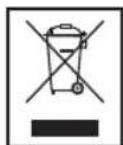
Meaning of the "Wheelie Bin" Symbol
Take care of our environment, do not dispose of electrical appliances via the household waste.
Dispose of obsolete or defective electrical appliances via municipal collection points.
Please help to avoid potential environmental and health impacts through improper waste disposal.
You contribute to recycling and other forms of utilization of old electric and electronic appliances.
Your municipality provides you with information about collecting points.
natural_image
Line drawing of three views of a TV rear panel showing internal components and cable connectors (no text or symbols)natural_image
Technical line drawing of a monitor rear panel showing internal layout and mounting points (no text or symbols)Przycisk MEM/CLK-ADJ (21/1)
natural_image
Line drawing of three views of a computer monitor with labeled ports and connectors (no text or symbols present)natural_image
Diagram showing two views of a computer monitor with internal layout and mounting points (no text or labels)natural_image
Line drawing of three views of a computer monitor with labeled ports and connectors (no text or symbols present)natural_image
Diagram of an open computer monitor showing internal components and a base-mounted stand (no text or labels)