
EIS82453 - Hob ELECTROLUX - Free user manual and instructions
Find the device manual for free EIS82453 ELECTROLUX in PDF.



| Product type | Induction hob |
| Brand | ELECTROLUX |
| Model | EIS82453 |
| Total power | 7.35 kW |
| Power supply | 220-240 V / 400 V 2N, 50 Hz |
| Number of cooking zones | 4 |
| Technology | Induction |
| Cooking zones (diameters) | Front left: 125-210 mm, Rear left: 125-210 mm, Front center: 125-145 mm, Rear right: 205-240 mm |
| Zone power (nominal) | Front left: 2300 W, Rear left: 2300 W, Front center: 1400 W, Rear right: 2300 W |
| PowerBoost | Yes (up to 3600 W on rear right zone) |
| Main functions | PowerBoost, SenseBoil, Bridge, Hob²Hood, Timer, Pause, Power management |
| Display | Touch control panel with digital display |
| Child safety | Yes (child safety device) |
| Key lock | Yes |
| Pan detection | Yes |
| Automatic safety shut-off | Yes |
| Residual heat indicator | Yes (3 levels) |
| Hob-to-hood connection (Hob²Hood) | Yes (infrared) |
| Cleaning | Ceramic surface, use a scraper and a special product |
| Surface material | Ceramic glass |
| Installation | Built-in |
| Power cable | H05V2V2-F (90°C min) |
| Connection | Single-phase or two-phase depending on configuration |
| Energy efficiency class | 187.7 Wh/kg (according to IEC/EN 60350-2) |
Frequently Asked Questions - EIS82453 ELECTROLUX
User questions about EIS82453 ELECTROLUX
0 question about this device. Answer the ones you know or ask your own.
Ask a new question about this device
Download the instructions for your Hob in PDF format for free! Find your manual EIS82453 - ELECTROLUX and take your electronic device back in hand. On this page are published all the documents necessary for the use of your device. EIS82453 by ELECTROLUX.
USER MANUAL EIS82453 ELECTROLUX
How to install your Electrolux Induction Hob - Worktop installation

4. PRODUCT DESCRIPTION
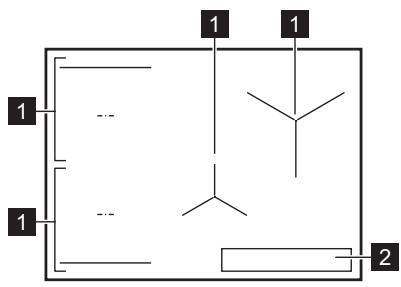
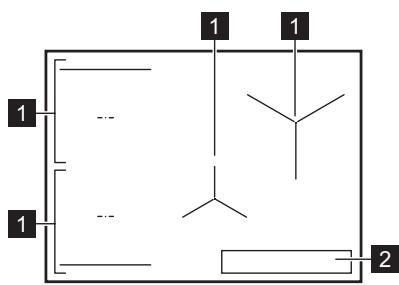
4.1 Cooking surface layout
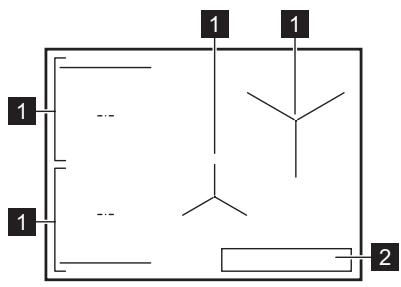
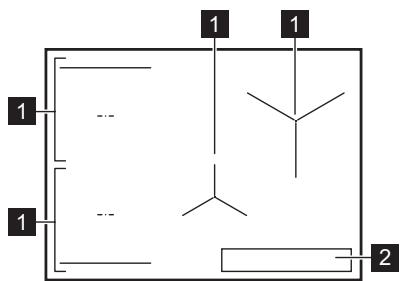
1 Induction cooking zone 2 Control panel

To install your Electrolux Induction Hob, follow the installation instructions, typing the full name shown in the figure below.

YouTube
www.youtube.com/electrolux
www.youtube.com/aeg
How to install your Electrolux Induction Hob - Worktop installation

4. DEVICE DESCRIPTION
4.1 Cooking surface layout
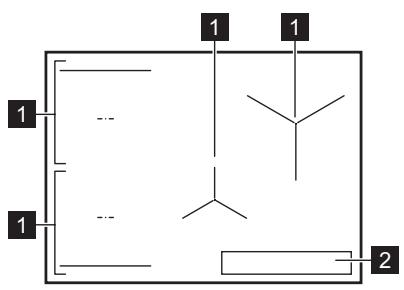
1 Induction cooking zone 2 Control panel

For detailed information on the dimensions of the cooking zones, see "Technical data".
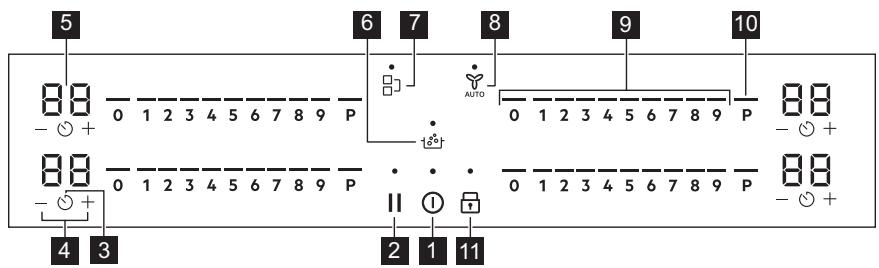
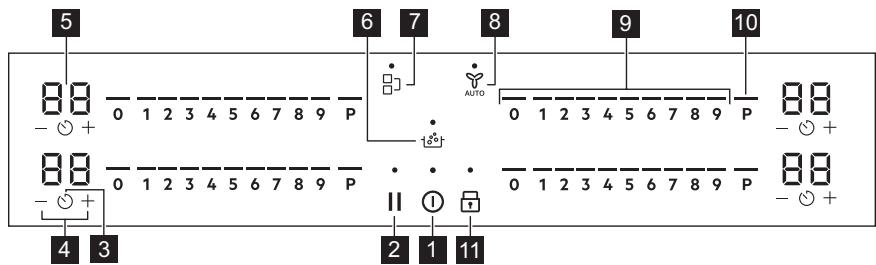
4.2 Control panel layout
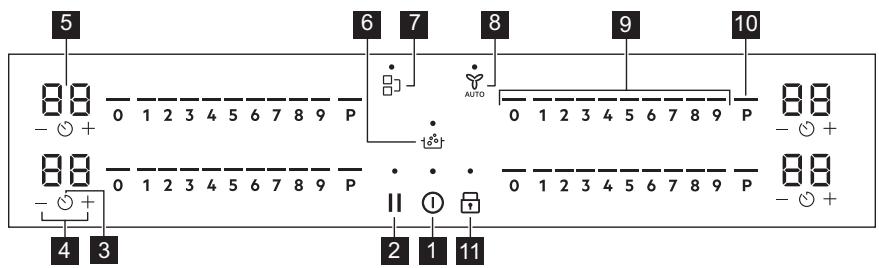
Use the sensor fields to operate the device. The display, indicators, and acoustic signals show which functions are active.
6. SAFETY INSTRUCTIONS FOR USE

WARNING!
See chapter "Safety".
6.1 Activation and Deactivation
Press and hold ① to activate or deactivate the plate.
6.2 Opening the Lid
This function shows the presence of the cookware on the plate and deactivates the heating zone if the cookware is not opened during heating.
If you place the cookware on the heating zone, before you select the heating level, the indicator on the control panel will appear.
If you remove the cookware from the activated heating zone and leave it aside temporarily, the indicator on the corresponding control lamp will start to blink. If you do not place the cookware back on the activated heating zone within 120 seconds, the heating zone will deactivate automatically.
To resume heating, place the cookware back on the heating zone within the set time.
6.3 Using the Heating Zones
Place the cookware on the selected heating zone. The induction heating zones automatically adapt to the size of the cookware base.
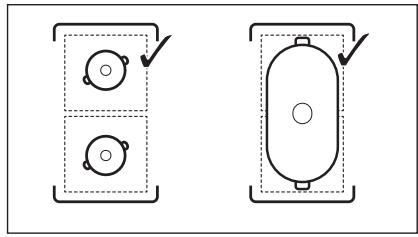
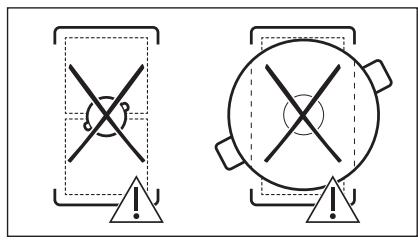
You can cook with large cookware on two heating zones simultaneously, using the Bridge function. The cookware must cover the center of both zones, but must not extend beyond the marking. If the cookware is placed between the two centers, the Bridge function will be activated.
6.4 Settings for Heating
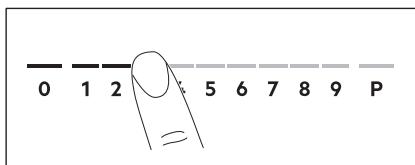
- Press the heating level on the control panel. The indicators on the control panel will show the selected heating level.
- To deactivate the cooking zone, press 0.
6.5 PowerBoost
This function provides additional power to the induction cooking zone. The function can be activated for the induction cooking zone for a limited period of time. Afterwards, the induction cooking zone automatically switches back to the highest setting for cooking.

See chapter "Technical Information".
To activate the function for the cooking zone: touch P.
To deactivate the function: change the heat setting.
6.6 OptiHeat Control (3-step residual heat indicator)

WARNING!
If the indicators are lit, there is a risk of burns from residual heat.
The induction cooking zones produce the heat necessary for the cooking process, directed to the bottom of the cookware. The cookware is heated by the heat of the cooking zones.
The indicators appear when the cooking zone is hot. They show the level of residual heat for the cooking zones that you are using at the moment:
- continued cooking,
- keeping warm,
- residual heat.
6.10 Menu structure
The basic structure of the menu is shown in the table below.
User settings
To exit the menu: press ①.
OffSound Control
You can activate/deactivate the sound signals in the menu > User settings.

See "Menu structure".
When the sound signals are disabled, you can still hear the sound signals when:
Press ① briefly, - press an inactive symbol.
The activation/deactivation of the heating zone is deactivated, the activation of the hob does not set any heating level or fan speed,
place a pot or leave a pot (pan, pot, etc.) on the control panel for more than 10 seconds. A sound signal sounds and is deactivated. Remove the object or clean the control panel. - The hob becomes very hot (e.g. when the temperature in the pan is boiling over). Leave the cooking zone to cool down before using the hob again. Do not deactivate the cooking zone and do not increase the heating level. After a certain time, the hob is deactivated.
The relationship between the heating level and the time after which the hob is deactivated:
| Насторики за зато- пляне | Плотьт се Deaktni- Вира след |
| 1 - 2 | 6 час |
| 3 - 4 | 5 час |
| 5 | 4 час |
| 6 - 9 | 1,5 час |
7.2 Pause
This function activates all cooking zones that work at the highest setting of the hob.
When the function is active, ① can be pressed. All other control symbols are deactivated.
- Do not use: Ugamma, CTomaha, emaJInpaHa CTomaha, HepbXdaema CTomaha, MHOROcnoHObIbHO (with a legal marking from the manufacturer). Do not use aluminum, copper, ceramics, porcelain.
The cookware is suitable for induction cooking if:
The water boils very quickly on a zone set to the highest heating setting. The magnet sticks firmly to the cookware.
Cookware sizes
The induction cooking zones automatically adapt to the size of the cookware. The efficiency of the cooking zone depends on the diameter of the cookware. Cookware with a smaller diameter than the minimum recommended will only receive part of
the power generated by the cooking zone.
- For safety and optimal cooking results, do not use cookware that is larger than specified in the "Specification of cooking zones". Avoid using cookware close to the control panel during cooking. This may affect the functioning of the control panel or accidentally activate the functions of the hob.
See "Technical characteristics".
8.2 Operating noises
If you hear:
- buzzing: the cookware is made of different materials (sandwich construction); whistling: you are using a cooking zone with a high power level, and the cookware is not made of different materials (sandwich construction).
- humming: you are using a high power level;
- clicking: electrical switching;
hissing, whirring: the fan is running.
Use the appliance normally and it will not show any faults.
8.3 Eco Timer
To save energy, the heating element of the cooking zone is deactivated during the timer signal for processing the remaining time. The difference in operating time depends on the heating level and the cooking time setting.
8.4 Simplified cooking guide
The relationship between the heating level and the energy consumption of the zone is not linear. When you increase the heating level, it is not proportional to the increase in energy consumption. This means that the cooking zone with a medium heating level uses less than half of the total energy.
i
The data in the tables are for orientation only.
| Hасторки за Затонл�е | Изэнзваши, за за: | Враеме (Mин) | Преторыки |
| 1 | Повдьржайтс сrotвената xрана то- пла. | при нео- бходи- мост | Проставete калak вьрух rotварскney сыd. |
| 1 - 2 | Сос „Холанда", разtonete: масло, шокалд, лесатин. | 5 - 25 | От bраеме на bраеме разбьрваши. |
| 2 | За Втврдявано: пухкову омлели, пес- чени яйца. | 10 - 40 | Готвато с поставен калak. |
| 2 - 3 | За Bavарень на орizu и ястся с млько, праз cottonл�ны на ratови ястny. | 25 - 50 | Добавete пою два пьтуни поевочему teч- ност, оTKOLКOTO e орizuzt, по среда- та на ratвенeto сmedete мльчине блида. |
| 3 - 4 | Зelenчуни, риба r месо на пара. | 20 - 45 | Добавete Няковко сученп льжши вoda. Праверete к olчессытOTO вoda по bраеме на поцеса. |
| Hасторки за затоллamede | Изменberryte , за дa: | Врeme (Mин) | Прелорыки |
| 4 - 5 | Картофи и дугни зеленчуни на пара. | 20 - 60 | Покрийские Дьното на готварскя сбдс 1-2 см вoda. Правераяпейно на вodату по Врeme на пюцеса.Дръжтеба калaka на готварскя сбд. |
| 4 - 5 | Говende на по-rogLEMи кolyочевахрана, яхни и суни. | 60 - 150 | До 3 л т教职工 спостс CBSTавки. |
| 6 - 7 | Лесо залъжвае:шицел (фиме),телшко кордан Бльо, кotлети, кфотета, наdenиca, дрб, маслоно-брашени замъжka, яиca, палачини, понични. | при нео-бхODи-MоCT | Оьberгete, korato e Neobхомmo. |
| 7 - 8 | С们но пьжende, karтоф.kioфтета,фиме-Mиньон, ст教职工. | 5 - 15 | Оьberгete, korato e Neobхомmo. |
| 9 | Калвае на вoda, говende на мakаронец Иделя, залъжвае на месо (гулаш, заушно), пьжende на karтофи. | ||
| P | Калвае на поlemи кolyочева вoda. PowerBoost e aktivbanan. |
8.5 Tips for Hob²Hood
When you control the hob function:
- Place the pan on the hob before turning on the light. Do not place hot pans on the hob. Do not cover the control panel of the hob. Do not interrupt the signal between the hob and the hood (for example, with a hand, a pot handle, or a pan). See the figure.
The hood shown in the figure is for illustration purposes only.
i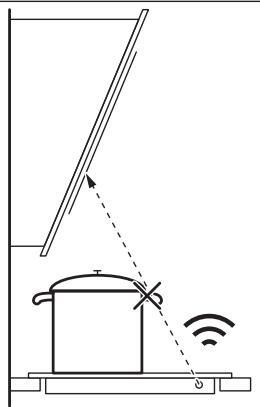
Remote-controlled devices can block the signal. Do not use such devices near the hob while Hob²Hood is on.
Hoods for cooking with Hob²Hood function
To find the full range of hoods that work with this function, see our consumer catalog. Electrolux hoods that work with this function must have the AUTO symbol.

WARNING!
See chapter "Safety".
9.1 General information
- Clean after each use. Use only clean cloths. Abrasive cleaners or scrapers on the surface will not damage the appliance. - Use special cleaning products intended for the surface of the hob. Use a scraper designed for glass surfaces. Use the scraper only as an auxiliary tool for cleaning the glass, following the standard cleaning procedure.

WARNING!
Do not use knives or other sharp metal instruments to clean the glass surface.
11. TECHNICAL DATA
11.1 Data table
Model EIS82453
Type 62 D4A 01 AA
Power 7.35 kW
Serial No.
ELECTROLUX
Product code (PNC) 949 599 294 00
220 - 240 V / 400 V 2N, 50 Hz
How to install your Electrolux Induction Hob - Worktop installation

4. PRODUCT DESCRIPTION
How to install your Electrolux Induction Hob - Worktop installation

4. PRODUCT DESCRIPTION
4.1 Cooking surface layout
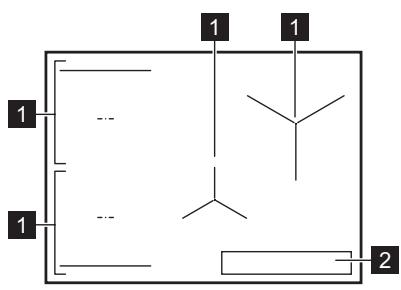
1 Induction cooking zone 2 Control panel

For detailed information on the sizes of the cooking zones, refer to the chapter "Technical data".
4.2 Control panel layout
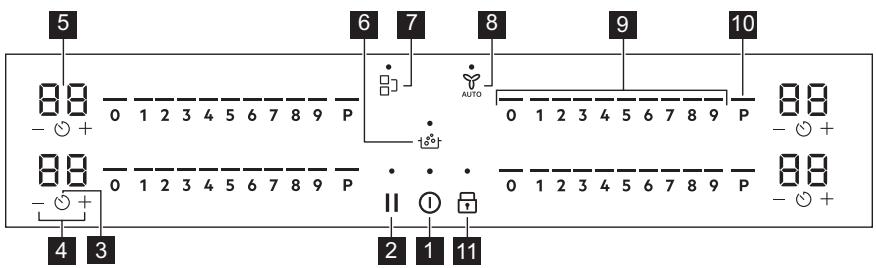
Use the sensor fields to operate the appliance. The displays, indicators and sounds tell you which functions are in operation.
| Polje senzo-ra | Funkcija | Opis | |
| 1 | ① | Uključeno / Isključeno | Za uključivanje i isključivanje urežaja. |
| 2 | II | Pauza | Za uključivanje i isključivanje funkcjë. |
| 3 | ◎ | Tajmer | Za postavljanje funkcjë. |
| 4 | +/- | - | Za povećanje ili smanjenje vremena. |
| 5 | - | Zaslon tajmera | Za prikaz vremena u minutama. |
| 6 | ◎° | SenseBoil® | SenseBoil®. Za automatisko podešavanje temperature vode takо da ne vrije kada dosegne točku vretenja. |
| 7 | ■ | Bridge | Za uključivanje i isključivanje funkcjë. |
| 8 | AUTO | Hob²Hood | Za uključivanje i isključivanje ručnog načina rada funkci-je. |
| 9 | - | Kontrolna traka | Za postavljanje stipnjia kuhanja. |
| 10 | P | PowerBoost | Za uključivanje funkcjë. |
| 11 | Blokiranje / Urežaj za zašitù djece | Za zakljucavanje/otključavanje upravljäčke ploće. |
4.3 Display indicators
| Indicator | Opis |
| E + brojka | Došlo je do kvara. |
| E/ E/ E | OptiHeat Control (3-stupanjski indicator preostale topline): nastavak kuhanja / odžava-nje topline / zaostala toplina. |
5. BEFORE FIRST USE

WARNING!
6. DAILY USE

WARNING!
Welcome to Electrolux! Thank you for choosing our appliance.

Get usage advice, brochures, trouble shooter, service and repair information: www.electrolux.com/support
Subject to change without notice.
CONTENTS
1. SAFETY INFORMATION. 92 2. SAFETY INSTRUCTIONS 94 3. INSTALLATION 96 4. PRODUCT DESCRIPTION. 98 5. BEFORE FIRST USE 100 6. DAILY USE 100 7. ADDITIONAL FUNCTIONS 104 8. HINTS AND TIPS 106 9. CARE AND CLEANING. 108 10. TROUBLESHOOTING. 108 11. TECHNICAL DATA 110 12. ENERGY EFFICIENCY 111 13. ENVIRONMENTAL CONCERNS 112
1. SAFETY INFORMATION
Before the installation and use of the appliance, carefully read the supplied instructions. The manufacturer is not responsible for any injuries or damage that are the result of incorrect installation or usage. Always keep the instructions in a safe and accessible location for future reference.
1.1 Children and vulnerable people safety
- This appliance can be used by children aged from 8 years and above and persons with reduced physical, sensory or mental capabilities or lack of experience and knowledge if they have been given supervision or instruction concerning the use of the appliance in a safe way and understand the hazards involved. Children of less than 8 years of age and persons with very extensive and complex disabilities shall be kept away from the appliance unless continuously supervised.
- Children should be supervised to ensure that they do not play with the appliance.
- Keep all packaging away from children and dispose of it appropriately.
- WARNING: The appliance and its accessible parts become hot during use. Keep children and pets away from the appliance when in use and when cooling down.
- If the appliance has a child safety device, it should be activated.
- Children shall not carry out cleaning and user maintenance of the appliance without supervision.
1.2 General Safety
- This appliance is for cooking purposes only.
- This appliance is designed for single household domestic use in an indoor environment.
- This appliance may be used in offices, hotel guest rooms, bed & breakfast guest rooms, farm guest houses and other similar accommodation where such use does not exceed (average) domestic usage levels.
- WARNING: The appliance and its accessible parts become hot during use. Care should be taken to avoid touching heating elements. WARNING: Unattended cooking on a hob with fat or oil can be dangerous and may result in fire.
- Smoke is an indication of overheating. Never use water to extinguish the cooking fire. Switch off the appliance and cover flames with e.g. a fire blanket or lid.
- WARNING: The appliance must not be supplied through an external switching device, such as a timer, or connected to a circuit that is regularly switched on and off by a utility.
- CAUTION: The cooking process has to be supervised (even the automatic cooking functions). A short term cooking process has to be supervised continuously. WARNING: Danger of fire: Do not store items on the cooking surfaces.
- Metallic objects such as knives, forks, spoons and lids should not be placed on the hob surface since they can get hot.
- Do not use the appliance before installing it in the built-in structure.
- Do not use a steam cleaner to clean the appliance.
- After use, switch off the hob element by its control and do not rely on the pan detector.
- If the glass ceramic surface / glass surface is cracked, switch off the appliance and unplug it from the mains. In case the appliance is connected to the mains directly using junction box, remove the fuse to disconnect the appliance from power supply. In either case contact the Authorised Service Centre.
- If the supply cord is damaged, it must be replaced by the manufacturer, an authorized Service or similarly qualified persons in order to avoid a hazard.
- WARNING: Use only hob guards designed by the manufacturer of the cooking appliance or indicated by the manufacturer of the appliance in the instructions for use as suitable or hob guards incorporated in the appliance. The use of inappropriate guards can cause accidents.
2. SAFETY INSTRUCTIONS
2.1 Installation

WARNING!
Only a qualified person must install this appliance.

WARNING!
Risk of injury or damage to the appliance.
- Remove all the packaging.
- Do not install or use a damaged appliance.
- Follow the installation instructions supplied with the appliance.
- Keep the minimum distance from other appliances and units.
Always take care when moving the appliance as it is heavy. Always use safety gloves and enclosed footwear. - Seal the cut surfaces of the cabinet with a sealant to prevent moisture from causing swelling. - Protect the bottom of the appliance from steam and moisture. - Do not install the appliance next to a door or under a window. This prevents hot cookware from falling from the appliance when the door or the window is opened. Each appliance has cooling fans on the bottom. - If the appliance is installed above a drawer:
- Do not store any small pieces or sheets of paper that could be pulled in, as they can damage the cooling fans or impair the cooling system.
- Keep a distance of minimum 2 cm between the bottom of the appliance and parts stored in the drawer.
- Remove any separator panels installed in the cabinet below the appliance.
2.2 Electrical Connection

WARNING!
Risk of fire and electric shock.
- All electrical connections should be made by a qualified electrician. The appliance must be earthed.
- Before carrying out any operation make sure that the appliance is disconnected from the power supply.
- Make sure that the parameters on the rating plate are compatible with the electrical ratings of the mains power supply.
- Make sure the appliance is installed correctly. Loose and incorrect electricity mains cable or plug (if applicable) can make the terminal become too hot.
- Use the correct electricity mains cable.
- Do not let the electricity mains cable tangle. Make sure that a shock protection is installed.
- Use the strain relief clamp on the cable. Make sure the mains cable or plug (if applicable) does not touch the hot appliance or hot cookware, when you connect the appliance to a socket.
- Do not use multi-plug adapters and extension cables.
- Make sure not to cause damage to the mains plug (if applicable) or to the mains cable. Contact our Authorised Service Centre or an electrician to change a damaged mains cable.
- The shock protection of live and insulated parts must be fastened in such a way that it cannot be removed without tools.
- Connect the mains plug to the mains socket only at the end of the installation. Make sure that there is access to the mains plug after the installation.
If the mains socket is loose, do not connect the mains plug. - Do not pull the mains cable to disconnect the appliance. Always pull the mains plug. - Use only correct isolation devices: line protecting cut-outs, fuses (screw type fuses removed from the holder), earth leakage trips and contactors. - The electrical installation must have an isolation device which lets you disconnect the appliance from the mains at all poles. The isolation device must have a contact opening width of minimum 3 mm. - If the E3 code appears on the screen, immediately disconnect the hob and check if the electrical connection and the mains voltage are correct.
2.3 Use

WARNING!
Risk of injury, burns and electric shock.
- Do not change the specification of this appliance.
- Remove all the packaging, labelling and protective film (if applicable) before first use. Make sure that the ventilation openings are not blocked.
- Do not let the appliance stay unattended during operation.
- Set the cooking zone to "off" after each use.
- Do not put cutlery or saucepan lids on the cooking zones. They can become hot.
- Do not operate the appliance with wet hands or when it has contact with water.
- Do not use the appliance as a work surface or as a storage surface.
- If the surface of the appliance is cracked, disconnect immediately the appliance from the power supply. This to prevent an electrical shock.
- Users with a pacemaker must keep a minimum distance of 30 cm from the induction cooking zones when the appliance is in operation.
- When you place food into hot oil, it may splash.
- Do not use aluminum foil or other materials between the cooking surface and the cookware, unless otherwise
specified by the manufacturer of this appliance.
- Use only accessories recommended for this appliance by the manufacturer.

WARNING!
Risk of fire and explosion.
- Fats and oil when heated can release flammable vapours. Keep flames or heated objects away from fats and oils when you cook with them.
- The vapours that very hot oil releases can cause spontaneous combustion. Used oil, that can contain food remnants, can cause fire at a lower temperature than oil used for the first time.
- Do not put flammable products or items that are wet with flammable products in, near or on the appliance.

WARNING!
Risk of damage to the appliance.
- Do not keep hot cookware on the control panel.
- Do not put a hot pan cover on the glass surface of the hob.
- Do not let cookware boil dry.
- Be careful not to let objects or cookware fall on the appliance. The surface can be damaged.
- Do not activate the cooking zones with empty cookware or without cookware.
- Cookware made of cast iron or with a damaged bottom can cause scratches on the glass / glass ceramic. Always lift these objects up when you have to move them on the cooking surface.
2.4 Care and cleaning
Clean the appliance regularly to prevent the deterioration of the surface material.
3. INSTALLATION

WARNING!
Refer to Safety chapters.
- Switch off the appliance and let it cool down before cleaning.
- Do not use water spray and steam to clean the appliance.
- Clean the appliance with a moist soft cloth. Use only neutral detergents. Do not use abrasive products, abrasive cleaning pads, solvents or metal objects, unless otherwise specified.
2.5 Service
To repair the appliance contact the Authorised Service Centre. Use original spare parts only. - Concerning the lamp(s) inside this product and spare part lamps sold separately: These lamps are intended to withstand extreme physical conditions in household appliances, such as temperature, vibration, humidity, or are intended to signal information about the operational status of the appliance. They are not intended to be used in other applications and are not suitable for household room illumination.
2.6 Disposal

WARNING!
Risk of injury or suffocation.
- Contact your local authority for information on how to dispose of the appliance.
- Disconnect the appliance from the mains supply.
- Cut off the mains electrical cable close to the appliance and dispose of it.
3.1 Before the installation
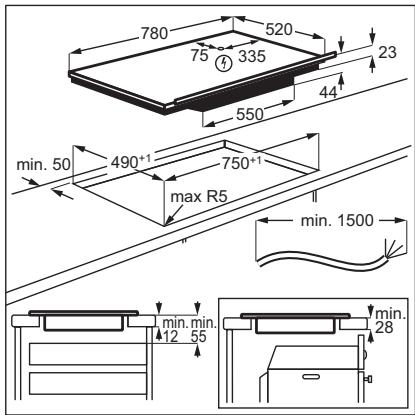
Before you install the hob, write down the information below from the rating plate. The rating plate is on the bottom of the hob.
Serial number
3.2 Built-in hobs
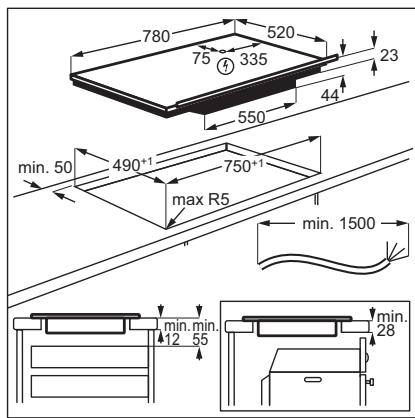
Only use the built-in hobs after you assemble the hob into correct built-in units and work surfaces that align to the standards.
3.3 Connection cable
- The hob is supplied with a connection cable.
- To replace the damaged mains cable, use the cable type: H05V2V2-F which withstands a temperature of 90°C or higher. A single wire must have a minimal cross section in accordance with the table below. Speak to your local Service Centre. The connection cable may only be replaced by a qualified electrician.
WARNING!
All electrical connections must be made by a qualified electrician.
CAUTION!
Connections via contact plugs are forbidden.
CAUTION!
Do not drill or solder the wire ends. It is forbidden.
CAUTION!
Do not connect the cable without cable end sleeve.
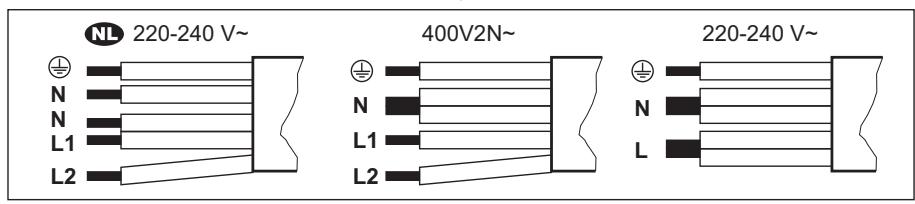
One-phase connection
- Remove the cable end sleeve from black, brown and blue wires.
- Remove a part of the insulation of the brown, black and blue cable ends.
- Connect the ends of black and brown cables.
- Apply a new wire end sleeve on the shared wire's end (special tool required).
- Connect the ends of two blue cables.
- Apply a new wire end sleeve on the shared wire's end (special tool required).
Two-phase connection
- Remove the cable end sleeve from blue wires.
- Remove a part of the insulation of the blue cable ends.
- Connect the ends of two blue cables.
- Apply a new end wire sleeve on the shared wire's end (special tool required).
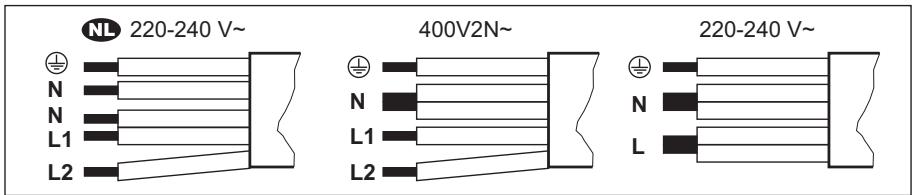
| NL 220 - 240 V~ | Two-phase connection: 400 V2N~ | One-phase connection: 220 - 240 V~ | |||
| 5x1,5 mm² | 5x1,5 mm² or 4x2,5 mm² | 5x1,5 mm² or 3x4 mm² | |||
| ½ | Green - yellow | ½ | Green - yellow | ½ | Green - yellow |
| N | Blue and blue | N | Blue and blue | N | Blue and blue |
| L1 | Black | L1 | Black | L | Black and brown |
| L2 | Brown | L2 | Brown | ||
3.4 Assembly
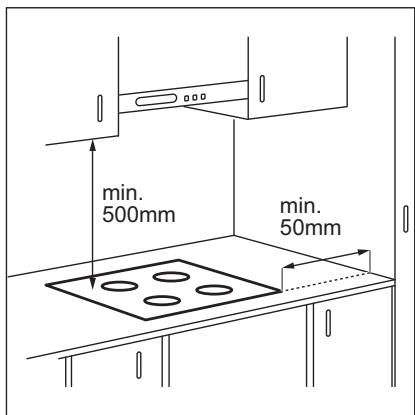
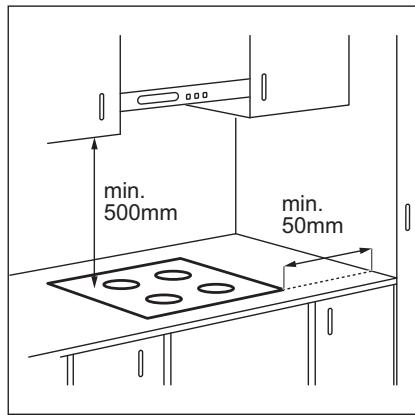
If you install the hob under a hood, please see the installation instructions of the hood for the minimum distance between the appliances.
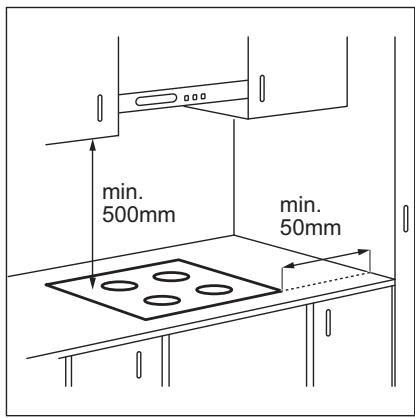
If the appliance is installed above a drawer, the hob ventilation can warm up the items stored in the drawer during the cooking process.
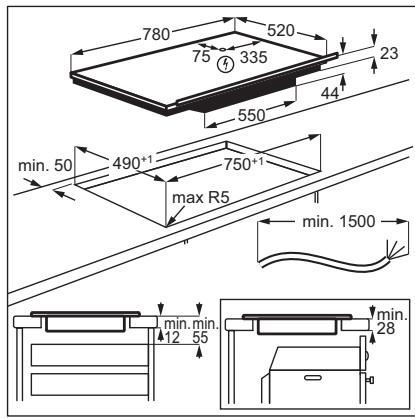
Find the video tutorial "How to install your Electrolux Induction Hob - Worktop installation" by typing out the full name indicated in the graphic below.

www.youtube.com/electrolux www.youtube.com/aeg
How to install your Electrolux Induction Hob - Worktop installation

4. PRODUCT DESCRIPTION
4.1 Cooking surface layout
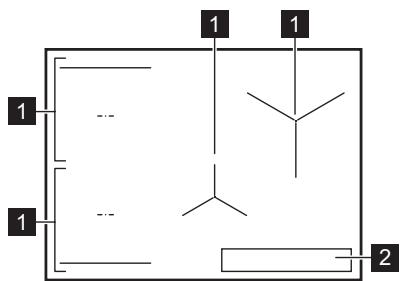
1 Induction cooking zone 2 Control panel
i
For detailed information on the sizes of the cooking zones refer to "Technical data".
4.2 Control panel layout
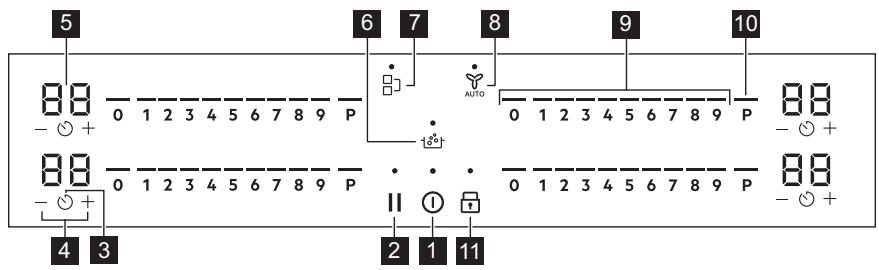
Use the sensor fields to operate the appliance. The displays, indicators and sounds tell which functions operate.
| Sensor field | Function | Description | |
| 1 | ① | On / Off | To activate and deactivate the appliance. |
| 2 | II | Pause | To activate and deactivate the function. |
| 3 | ○ | Timer | To set the function. |
| 4 | +/- | - | To increase or decrease the time. |
| 5 | - | Timer display | To show the time in minutes. |
| 6 | ○○ | SenseBoil® | SenseBoil®. To automatically adjust the temperature of water so that it does not boil over once it reaches the boiling point. |
| 7 | ■ | Bridge | To activate and deactivate the function. |
| 8 | AUTO | Hob²Hood | To activate and deactivate the manual mode of the function. |
| 9 | - | Control bar | To set a heat setting. |
| 10 | P | PowerBoost | To activate the function. |
| 11 | ○ | Lock / Child Safety Device | To lock / unlock the control panel. |
4.3 Display indicators
| Indicator | Description |
| E + digit | There is a malfunction. |
| / / / | OptiHeat Control (3 step Residual heat indicator): continue cooking / keep warm / resid-ual heat. |
5. BEFORE FIRST USE

WARNING!
Refer to Safety chapters.
5.1 Power limitation
Power limitation defines how much power is used by the hob in total, within the limits of the house installation fuses.
The hob is set to its highest possible power level by default.
To decrease or increase the power level:
- Enter the menu: press and hold ① for 3 seconds. Then, press and hold
- Press on the front timer until P appears.
- Press - / + on the front timer to set the power level.
- Press ① to exit.
Power levels
Refer to "Technical data" chapter.

CAUTION!
Make sure that the selected power fits the house installation fuses.

CAUTION!
If the power level is lower than or equal to 2000 W you cannot activate SenseBoil®.
P73—7350W P15—1500W P20—2000W P25—2500W P30—3000W P35—3500W P40—4000W P45—4500W P50—5000W P60—6000W
6. DAILY USE

WARNING!
Refer to Safety chapters.
6.1 Activating and deactivating
Press and hold ① to activate or deactivate the hob.
6.2 Pot detection
This feature indicates the presence of cookware on the hob and deactivates the cooking zones if no cookware is detected during a cooking session.
If you put cookware on a cooking zone before you select a heat setting, the indicator above 0 on the control bar appears.
If you remove cookware from an activated cooking zone and set it aside temporarily, the indicators above the corresponding control bar will start blinking. If you do not place the
cookware back on the activated cooking zone within 120 seconds, the cooking zone will automatically deactivate.
To resume cooking, make sure to put the cookware back on the cooking zones within the indicated timeout.
6.3 Using the cooking zones
Place the cookware in the centre of the selected zone. Induction cooking zones adapt to the dimension of the bottom of the cookware automatically.
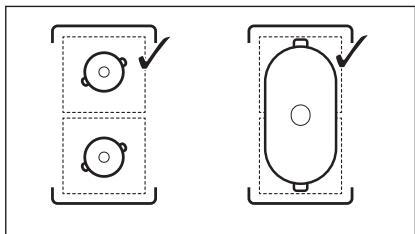
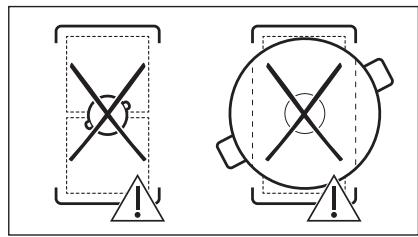
You can cook with large cookware placed on two cooking zones at the same time using Bridge function. The cookware must cover the centres of both zones but not go beyond the area marking. If the cookware is located between the two centres, Bridge function will not be activated.
6.4 Heat setting
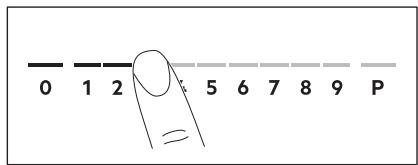
- Press the desired heat setting on the control bar.
The indicators above the control bar appear up to the selected heat setting level. 2. To deactivate a cooking zone, press 0.
6.5 PowerBoost
This function makes more power available to the induction cooking zones. The function can be activated for the induction cooking zone only for a limited period of time. After this time the induction cooking zone automatically sets back to the highest heat setting.
i
Refer to "Technical data" chapter.
To activate the function for a cooking zone: touch P.
To deactivate the function: change the heat setting.
6.6 OptiHeat Control (3 step Residual heat indicator)

WARNING!
As long as the indicator is visible, there is a risk of burns from residual heat.
The induction cooking zones produce the heat necessary for the cooking process directly in the bottom of the cookware. The glass ceramic is heated by the heat of the cookware.
The indicators appear when a cooking zone is hot. They show the level of the residual heat for the cooking zones you are currently using:
- continue cooking,
- -keepwarm,
- residual heat.
The indicator may also appear:
for the neighbouring cooking zones even if you are not using them, - when hot cookware is placed on cold cooking zone, - when the hob is deactivated but the cooking zone is still hot.
The indicator disappears when the cooking zone has cooled down.
6.7 Timer options
Count Down Timer
Use this function to specify how long a cooking zone should operate during a single cooking session.
Set the heat setting for the selected cooking zone and then set the function.
- Press 00 appears on the timer display.
- Press + or - to set the time (00-99 minutes).
- Press to start the timer or wait 3 seconds. The timer begins to count down.
To change the time: select the cooking zone with © and press + or -.
To deactivate the function: select the cooking zone with © and press —. The remaining time counts back to 00.
The timer finishes counting down, a signal sounds and 00 blinks. The cooking zone deactivates. Press any symbol to stop the signal and blinking.
Minute Minder
You can use this function when the hob is activated but the cooking zones do not operate. The heat setting shows 00.
- Press ©
- Press + or - to set the time.
The timer finishes counting down, a signal sounds and 00 blinks. Press any symbol to stop the signal and blinking.
To deactivate the function: press © and —. The remaining time counts back to 00.
6.8 Power management
If multiple zones are active and the consumed power exceeds the limitation of the power supply, this function divides the available power between all cooking zones. The hob controls heat settings to protect the fuses of the house installation.
If the hob reaches the limit of maximum available power (refer to the rating plate), the power of the cooking zones will be automatically reduced. - The heat setting of the cooking zone selected first is always prioritised. The remaining power will be divided between the other cooking zones according to the order of selection. - For cooking zones that have a reduced power, the control bar blinks and shows the maximum possible heat settings. - Wait until the display stops flashing or reduce the heat setting of the cooking zone selected last. The cooking zones will continue operating with the reduced heat setting. Change the heat settings of the cooking zones manually, if necessary.
6.9 SenseBoil®
The function automatically adjusts the temperature of water so that it does not boil over once it reaches the boiling point.
If there is any residual heat on the cooking zone you want to use, an acoustic signal sounds and the function does not start.
The function does not work with non-stick cookware.
CAUTION!
Do not use the function with empty cookware.
Do not leave the hob unattended while the function is operating.
- Place pots filled with 1 - 5 l of cold water on the available cooking zones for which you want to start the function. If you place one pot on only one cooking zone the function starts automatically.
- Touch ① to activate the hob.
- Touch the symbol to activate the function.
A blinking indicator above P appears for each cooking zone on which you can presently use the function. 4. Touch anywhere on the slider of the chosen cooking zone.
The function starts.
Once the function starts the indicators above the slider appear and the animation starts running.
If you do not place a pot on any of the cooking zones within 5 seconds, the function deactivates automatically.
When the function reaches the boiling point, the hob emits an acoustic signal and the heat setting automatically changes to a default simmering level.
To deactivate the function before the boiling point has been reached, touch or 0.
To deactivate the function after the boiling point has been reached, touch the slider and adjust the heat setting manually.
If you activate Pause or remove the pot, the function deactivates.
If you set a Count Down Timer on one of the cooking zones and the set time runs out before the boiling point is reached, the function deactivates automatically.
Hints and tips:
- The function is best suited for boiling water and cooking potatoes.
- The function may not work properly for kettles and stovetop espresso pots.
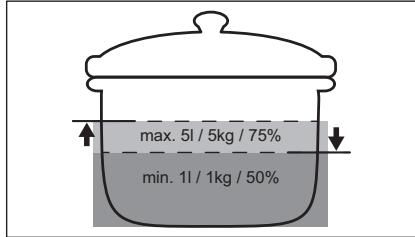
- Fill between half to three quarters of the pot with cold tap water, leaving 4 cm from the rim of the pot empty. Do not use less than 1 l or more than 5 l of water. Make sure the total weight of the water (or the water and potatoes) ranges between 1-5 kg.
To achieve the best results, cook only whole, unpeeled, medium-sized potatoes. Make sure you do not pack potatoes too tightly. - During the heat up phase, avoid energetic stirring of other pots and parallel cooking processes (such as frying or boiling) on other cooking zones. - Avoid producing external vibrations (e.g. from using a blender or placing a mobile phone next to the hob) when the function is running. Depending on the type of food and cookware, you can adjust the heat setting after the boiling point has been reached.
- Add salt once the boiling point has been reached. Use a lid to save energy.
6.10 Menu structure
The table shows the basic menu structure.
User settings
| Sym-bol | Setting | Possible options |
| b | Sound | On / Off (--) |
| P | Power limitation | 15 - 73 |
| H | Hood mode | 0 - 6 |
| E | Alarm / error histo-ry | The list of recent alarms / errors. |
To enter user settings: press and hold ① for 3 seconds. Then, press and hold ⑦. The settings appear on the timer of the left cooking zones.
Navigating the menu: the menu consists of the setting symbol and a value. The symbol appears on the rear timer and the value appears on the front timer. To navigate between the settings press on the front timer. To change the setting value press + or - on the front timer.
To exit the menu: press ①.
OffSound Control
You can activate / deactivate the sounds in the Menu > User settings.
i
Refer to "Menu structure".
When the sounds are off you can still hear the sound when:
- you touch ①, the timer comes down, you press an inactive symbol.
7. ADDITIONAL FUNCTIONS
7.1 Automatic Switch Off
The function deactivates the hob automatically if:
- all of the cooking zones are deactivated,
- you do not set any heat setting or fan speed setting after the activation of the hob.
- you spill something or put something on the control panel for more than 10 seconds (a pan, a cloth, etc.). A signal sounds and the hob deactivates. Remove the object or clean the control panel.
- the appliance gets too hot (e.g. when a saucepan boils dry). Let the cooking zone cool down before you use the hob again.
- you do not deactivate a cooking zone or change the heat setting. After some time, the hob deactivates.
The relation between the heat setting and the time after which the appliance deactivates:
| Heat setting | The hob deactivates after |
| 1 - 2 | 6 hours |
| 3 - 4 | 5 hours |
| 5 | 4 hours |
| 6 - 9 | 1.5 hours |
7.2 Pause
This function sets all operating cooking zones to the lowest heat setting.
When the function operates, ① and Ⅱ can be used. All other symbols on the control panels are locked.
The function does not stop the timer functions.
- To activate the function: press II. The heat setting is lowered to 1.
- To deactivate the function: press II. The previous heat setting appears.
7.3 Lock
You can lock the control panel while the hob operates. It prevents an accidental change of the heat setting.
Set the heat setting first.
To activate the function: press
To deactivate the function: press again.
i
The function deactivates as you deactivate the hob.
7.4 Child Safety Device
This function prevents an accidental operation of the hob.
To activate the function: press ① . Do not set any heat setting. Press and hold for 3 seconds, until the indicator above the symbol appears. Deactivate the hob with ① .
i
The function stays active when you deactivate the hob. The indicator above is on.
To deactivate the function: press ① . Do not set any heat setting. Press and hold for 3 seconds, until the indicator above the symbol disappears. Deactivate the hob with ① .
Cooking with the function activated: press ① , then press for 3 seconds, until the indicator above the symbol disappears. You can operate the hob. When you deactivate the hob with ① the function operates again.
7.5 Bridge
i
The function operates when the pot covers the centres of the two zones. For more information on the correct placement of cookware refer to "Using the cooking zones". The function does not work while SenseBoil® operates.
This function connects two left side cooking zones and they operate as one.
First set the heat setting for one of the left side cooking zones.
To activate the function: touch. To set or change the heat setting touch one of the control sensors.
To deactivate the function: touch.1. The cooking zones operate independently.
7.6 Hob²Hood
It is an advanced automatic function which connects the hob to a special hood. Both the hob and the hood have an infrared signal communicator. Speed of the fan is defined automatically on basis of mode setting and temperature of the hottest cookware on the hob. You can also operate the fan from the hob manually.
For most of the hoods the remote system is originally deactivated. Activate it before you use the function. For more information refer to hood user manual.
Operating the function automatically
To operate the function automatically set the automatic mode to H1 – H6. The hob is originally set to H5. The hood reacts whenever you operate the hob. The hob recognizes temperature of the cookware automatically and adjusts the speed of the fan.
Automatic modes
| Automat- ic light | Boiling1) | Frying2) | |
| H0 | Off | Off | Off |
| H1 | On | Off | Off |
| \( H_2 \)3) | On | Fan speed 1 | Fan speed 1 |
| H3 | On | Off | Fan speed 1 |
| H4 | On | Fan speed 1 | Fan speed 1 |
| H5 | On | Fan speed 1 | Fan speed 2 |
| H6 | On | Fan speed 2 | Fan speed 3 |
1) The hob detects the boiling process and activates fan speed in accordance with automatic mode. 2) The hob detects the frying process and activates fan speed in accordance with automatic mode. 3) This mode activates the fan and the light and does not rely on the temperature.
Changing the automatic mode
- Deactivate the hob.
- Press ① for 3 seconds. The display comes on and goes off.
- Press for 3 seconds.
- Press a few times until H comes on.
- Press + of the timer to select an automatic mode.
To operate the hood directly on the hood panel deactivate the automatic mode of the function.
i
When you finish cooking and deactivate the hob, the hood fan may still operate for a certain period of time. After that time, the system deactivates the fan automatically and prevents you from accidentally activating the fan for the next 30 seconds.
Operating the fan speed manually
You can also operate the function manually. To do that, press AUTO when the hob is active. This deactivates automatic operation of the function and allows you to change the fan speed manually. When you press AUTO, you raise the fan speed by one. When you reach an intensive level and press AUTO again, you will set fan speed to 0, which deactivates the hood fan. To start the fan again with fan speed 1, press AUTO.
i
To activate automatic operation of the function, deactivate the hob and activate it again.
Activating the light
You can set the hob to activate the light automatically whenever you activate the hob. To do so, set the automatic mode to H1 - H6.
i
The light on the hood deactivates 2 minutes after deactivating the hob.
8. HINTS AND TIPS

WARNING!
Refer to Safety chapters.
8.1 Cookware
i
For induction cooking zones a strong electro-magnetic field creates the heat in the cookware very quickly.
Use the induction cooking zones with suitable cookware.
- To prevent overheating and improve the performance of the zones, the cookware must be as thick and flat as possible.
- Ensure cookware bases are clean and dry before placing on the hob surface. Always be careful not to slide or rub the cookware on the edges and corners of the glass as it may chip or damage the glass surface.
Cookware material
- Correct: cast iron, steel, enamelled steel, stainless steel, multi-layer bottom (with a correct marking from a manufacturer). Not correct: aluminium, copper, brass, glass, ceramic, porcelain.
Cookware is suitable for an induction hob if:
Water boils very quickly on a zone set to the highest heat setting. - A magnet pulls on to the bottom of the cookware.
Cookware dimensions
- Induction cooking zones adapt to the dimension of the bottom of the cookware automatically.
- The cooking zone efficiency is related to the diameter of the cookware. The cookware with a diameter smaller than the minimum receives only a part of the power generated by the cooking zone.
- For both safety reasons and optimal cooking results, do not use cookware larger than indicated in "Cooking zones specification". Avoid keeping cookware close to the control panel during the cooking session. This might impact the functioning of the control panel or accidentally activate hob functions.
i
Refer to "Technical data".
8.2 Noises during operation
If you can hear:
- crack noise: cookware is made of different materials (a sandwich construction).
whistle sound: you use a cooking zone with a high power level and the cookware is made of different materials (a sandwich construction). humming: you use a high power level. - clicking: electric switching occurs. - hissing, buzzing: the fan operates.
The noises are normal and do not indicate any malfunction.
8.3 Öko Timer (Eco Timer)
To save energy, the heater of the cooking zone deactivates before the countdown timer sounds. The difference in the operation time
depends on the heat setting level and the length of the cooking operation.
8.4 Simplified cooking guide
The correlation between the heat setting of a zone and its consumption of power is not linear. When you increase the heat setting, it is not proportional to the increase of the consumption of power. It means that a cooking zone with the medium heat setting uses less than a half of its power.
i
The data in the table is for guidance only.
| Heat setting | Use to: | Time (min) | Hints |
| 1 | Keep cooked food warm. | as neces-sary | Put a lid on the cookware. |
| 1 - 2 | Hollandaise sauce; melt: butter, choco-late, gelatine. | 5 - 25 | Mix from time to time. |
| 2 | Solidify: fluffy omelettes, baked eggs. | 10 - 40 | Cook with a lid on. |
| 2 - 3 | Simmer rice and milk-based dishes, heat up ready-cooked meals. | 25 - 50 | Add at least twice as much liquid as rice, mix milk dishes halfway through the procedure. |
| 3 - 4 | Stew vegetables, fish, meat. | 20 - 45 | Add a few tablespoons of water. Check the water amount during the process. |
| 4 - 5 | Steam potatoes and other vegetables. | 20 - 60 | Cover the bottom of the pot with 1-2 cm of water. Check the water level during the process. Keep the lid on the pot. |
| 4 - 5 | Cook larger quantities of food, stews and soups. | 60 - 150 | Up to 3 l of liquid plus ingredients. |
| 6 - 7 | Gentle fry: scallope, veal cordon bleu, cutlets, rissoles, sausages, liver, roux, eggs, pancakes, doughnuts. | as neces-sary | Turn over when needed. |
| 7 - 8 | Heavy fry, hash browns, loin steaks, steaks. | 5 - 15 | Turn over when needed. |
| 9 | Boil water, cook pasta, sear meat (goulash, pot roast), deep-fry chips. | ||
| P | Boil large quantities of water. PowerBoost is activated. | ||
8.5 Hints and tips for Hob²Hood
When you operate the hob with the function:
- Protect the hood panel from direct sunlight.
- Do not spot halogen light on the hood panel.
- Do not cover the hob control panel.
- Do not interrupt the signal between the hob and the hood (e.g. with the hand, a
cookware handle or a tall pot). See the picture.
The hood pictured below is for illustration purposes only.
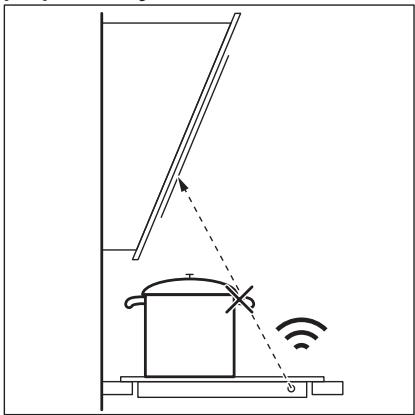

Other remotely controlled appliances may block the signal. Do not use any such appliances near to the hob while Hob²Hood is on.
Cooker hoods with the Hob²Hood function: To find the full range of cooker hoods which work with this function, refer to our consumer website. The Electrolux cooker hoods that work with this function must have the symbol AUTO.
9. CARE AND CLEANING

WARNING!
Refer to Safety chapters.
9.1 General information
Clean the hob after each use. Always use cookware with a clean base. - Scratches or dark stains on the surface have no effect on how the hob operates. - Use a special cleaning agent suitable for the surface of the hob. Always use a scraper recommended for hobs with a glass surface. Use the scraper only as an additional tool for cleaning the glass after the standard cleaning procedure.

WARNING!
Do not use knives or any other sharp, metal tools to clean the glass surface.
10. TROUBLESHOOTING

WARNING!
Refer to Safety chapters.
9.2 Cleaning the hob
- Remove immediately: melted plastic, plastic foil, salt, sugar and food with sugar, otherwise, the dirt can cause damage to the hob. Take care to avoid burns. Use a special hob scraper on the glass surface at an acute angle and move the blade on the surface.
- Remove when the hob is sufficiently cool: limescale rings, water rings, fat stains, shiny metallic discoloration. Clean the hob with a moist cloth and a non-abrasive detergent. After cleaning, wipe the hob dry with a soft cloth.
- Remove shiny metallic discoloration: use a solution of water with vinegar and clean the glass surface with a cloth.
10.1 What to do if...
| Problem | Possible cause | Remedy |
| You cannot activate or operate the hob. | The hob is not connected to an elec-trical supply or it is connected incor-rectly. | Check if the hob is correctly connected to the electrical supply. |
| The fuse is blown. | Make sure that the fuse is the cause of the malfunction. If the fuse is blown again and again, contact a qualified electrician. | |
| You did not set the heat setting for 60 seconds. | Activate the hob again and set the heat setting in less than 60 seconds. | |
| You touched 2 or more sensor fields at the same time. | Touch only one sensor field. | |
| Pause operates. | Refer to "Pause". | |
| There is water or fat stains on the control panel. | Clean the control panel. | |
| You can hear a constant beep noise. | The electrical connection is incor-rect. | Disconnect the hob from the electrical supply. Ask a qualified electrician to check the installation. |
| You cannot select the maximum heat setting for one of the cook-ing zones. | The other zones consume the maxi-mum available power. Your hob works properly. | Reduce the heat setting of the other cooking zones connected to the same phase. Refer to "Power management". |
| An acoustic signal sounds and the hob deactivates. An acoustic signal sounds when the hob is deactivated. | You put something on one or more sensor fields. | Remove the object from the sensor fields. |
| The hob deactivates. | You put something on the sensor field ①. | Remove the object from the sensor field. |
| Residual heat indicator does not come on. | The zone is not hot because it oper-ated only for a short time or the sen-sor is damaged. | If the zone operated sufficiently long to be hot, speak to an Authorised Service Centre. |
| Hob²Hood does not work. | You covered the control panel. | Remove the object from the control panel. |
| You use a very tall pot which blocks the signal. | Use a smaller pot, change the cooking zone or operate the hood manually. | |
| The control panel becomes hot to the touch. | The cookware is too large or you put it too close to the control panel. | Put large cookware on the rear zones, if possible. |
| There is no sound when you touch the panel sensor fields. | The sounds are deactivated. | Activate the sounds. Refer to "Daily use". |
| The indicator above the symbol comes on. | Child Safety Device or Lock oper-ates. | Refer to "Child Safety Device" and "Lock". |
| The control bar blinks. | There is no cookware on the zone or the zone is not fully covered. | Put cookware on the zone so that it fully covers the cooking zone. |
| The cookware is unsuitable. | Use cookware suitable for induction hobs. Refer to "Hints and tips". | |
| The diameter of the bottom of the cookware is too small for the zone. | Use cookware with correct dimensions. Refer to "Technical data". | |
| F and I appear simultaneously. | The power is too low due to unsuitable cookware or an empty pot. | Use the appropriate type of cookware. Refer to "Hints and Tips" and "Technical Data". Do not activate any zone with an emp-y pot on it. |
| F and I appear simultaneously. | The pot is empty or contains some liquid other than water, e.g. oil. | Avoid using the function with liquids other than water. |
| F and I appear simultaneously. | There is too much or too little water in the pot. You boiled some food other than water and potatoes. The boiling point was moved in time and SenseBoil® could not work properly. | Only boil water and potatoes with the use of SenseBoil®. Refer to "Hints and Tips". |
| You hear a beep sound, the indi-cators above 0° blink and SenseBoil® does not start. | None of the cooking zones is ready to be used with SenseBoil®. There is some residual heat on the cooking zones you want to choose or they are still in use. | Finish your previous cooking activities and choose a free cooking zone with-out any residual heat. |
| SenseBoil® does not work. | The power level of the hob is too low. | Set the power level to a higher value. Make sure that the selected power fits the house installation fuses. Refer to "Before first use" > "Power limitation". |
| E and a number come on. | There is an error in the hob. | Deactivate the hob and activate it again after 30 seconds. If E comes on again, disconnect the hob from the electrical supply. After 30 seconds, connect the hob again. If the problem continues, speak to an Authorised Service Centre. |
10.2 If you cannot find a solution...
If you cannot find a solution to the problem yourself, contact your dealer or an Authorised Service Centre. Give the data from the rating plate. Make sure, you operated the hob correctly. If not the servicing by a service
technician or dealer will not be free of charge, also during the warranty period. The information about guarantee period and Authorised Service Centres are in the guarantee booklet.
11. TECHNICAL DATA
11.1 Rating plate
Model EIS82453
Typ 62 D4A 01 AA
PNC 94959929400
220 - 240 V / 400 V 2N, 50 Hz
11.2 Cooking zones specification
| Cooking zone | Nominal power (maximum heat setting) [W] | PowerBoost [W] | PowerBoost maximum dura- tion [min] | Cookware diameter [mm] |
| Left front | 2300 | 3200 | 10 | 125 - 210 |
| Left rear | 2300 | 3200 | 10 | 125 - 210 |
| Middle front | 1400 | 2500 | 4 | 125 - 145 |
| Right rear | 2300 | 3600 | 10 | 205 - 240 |
The power of the cooking zones can be different in some small range from the data in the table. It changes with the material and dimensions of the cookware.
For optimal cooking results use cookware no larger than the diameter in the table.
12. ENERGY EFFICIENCY
12.1 Product Information
| Model identification | EIS82453 | |
| Type of hob | Built-In Hob | |
| Number of cooking zones | 4 | |
| Heating technology | Induction | |
| Diameter of circular cooking zones (Ø) | Middle front | 14.5 cm |
| Right rear | 24.0 cm | |
| Length (L) and width (W) of non circular cooking zone | Left front | L 22.3 cm |
| W 21.8 cm | ||
| Length (L) and width (W) of non circular cooking zone | Left rear | L 22.3 cm |
| W 21.8 cm | ||
| Energy consumption per cooking zone (EC electric cooking) | Left front | 189.1 Wh/kg |
| Left rear | 189.1 Wh/kg | |
| Middle front | 187.5 Wh/kg | |
| Right rear | 185.2 Wh/kg | |
| Energy consumption of the hob (EC electric hob) | 187.7 Wh/kg | |
IEC / EN 60350-2 - Household electric cooking appliances - Part 2: Hobs - Methods for measuring performance.
The energy measurements referring to the cooking area are identified by the markings of the respective cooking zones.
12.2 Energy saving
You can save energy during everyday cooking if you follow the hints below.
- When you heat up water, use only the amount you need. If it is possible, always put the lids on the cookware.
- Put the cookware directly in the centre of the cooking zone.
- Use the residual heat to keep the food warm or to melt it.
13. ENVIRONMENTAL CONCERNS
Recycle materials with the symbol . Put the packaging in relevant containers to recycle it. Help protect the environment and human health by recycling waste of electrical and electronic appliances. Do not dispose of
appliances marked with the symbol with the household waste. Return the product to your local recycling facility or contact your municipal office.
How to install your Electrolux Induction Hob - Worktop installation

4. PRODUCT DESCRIPTION
4.1 Cooking surface layout
How to install your Electrolux Induction Hob - Worktop installation

4. DESCRIPTION DE L'APPAREIL
How to install your Electrolux Induction Hob - Worktop installation


YouTube
www.youtube.com/electrolux www.youtube.com/aeg
How to install your Electrolux Induction Hob - Worktop installation

If the device is not working properly, check the power supply and connections, and refer to the troubleshooting section.
For proper operation, ensure that the device is placed on a stable surface, away from direct sunlight and moisture, and that the ventilation openings are not blocked.
The device should be cleaned regularly with a soft, dry cloth.
The device comes with a power adapter, a user manual, and a warranty card.
If you encounter any issues, please contact customer support.
The device is designed for indoor use only and should not be exposed to rain or extreme temperatures.
For technical specifications, see the table below:
The device operates on a voltage of 100-240V AC, 50/60Hz, and consumes a maximum power of 10W. It has a standby power consumption of less than 0.5W. The device is compliant with CE and RoHS standards.
The device should be disposed of in accordance with local regulations for electronic waste.
For further assistance, please visit our website or contact our support team.
| 3066666666 | f# |
| 1 - 2 | 6 lssssdo |
| 3 - 4 | 5 lssssdo |
| 5 | 4 lssssdo |
| 6 - 9 | 1,5 lssssdo |
7.2 38y6b
JU 8y6300 y300 m56g3m6u, 6md2mo3 Oy6300 do60dysmy 8y6300du 3o60060000y6300.
6mcooU83 56560s 8yosmdu, ① 1 20odmoos 8oadmyo60ymo 0j60u. 8doom30u 3560960 6luoymo y30cmu 6b3u ooadmm oo8mm30moos.
1. 566600u8uuu60666666
0003000000001 Uo06y003000u 3s00000000000001- oo.
2. 50000000000000000000
- 0050006000003000000000000000
7.3 gddmm330
0305 080admoosoo 080mm3mon 080mgo 3660001yogou 3660molu oogamolu qomlu. 000 083005 080gog 083005080mno 080gogouo 080b30300 083molu.
| 330m20000000000000000000000000000000000000000000000000000000000000000000000000000000000000000000000000000 | 1) | 2) | |
| H6 | 50000000 | 305000000000000000000000000000000000000000000000000000000000000000000000000000000000000000000000000000 | |
| m600u | m600u | ||
| uohgjxgjxgjxgjxgjxgjxgjxgjxgjxgjxgjxgjxgjxgjxgjxgjxgjxgjxgjxgjxgjxgjxgjxgjxgjxgjxgjxgjxgjxgjxgjxgjxgjxgjx | |||
1) Do not use the device in a manner not specified in this manual. 2) The device should be used only for its intended purpose. 3) Do not operate the device in an explosive atmosphere or in the presence of flammable gases or vapors.
The device should be installed and used in accordance with the instructions provided in this manual.
The device is designed for use in industrial environments. It should be installed and operated by qualified personnel. The device must be properly grounded and connected to a suitable power supply.
The device should be connected to a power source that matches the voltage and frequency specified on the rating label. The device must be installed in a location that is free from excessive vibration and moisture.
The device is designed for continuous operation, with a maximum operating temperature of 70°C. The operating voltage range is 9-36 V DC.
8.2 Connection diagram
Power supply:
Terminal 1: 12-24 V DC (positive). Terminal 2: Ground (negative). The device is protected against reverse polarity and overvoltage. The power consumption is 5 W maximum. The device has an internal fuse.
The device must be installed in a dry and ventilated location.
8.3 Timer (optional)
The timer allows the device to be turned on and off automatically at set intervals. The timer can be programmed using the buttons on the front panel.
8.4 Maintenance and cleaning
The device should be cleaned with a soft, dry cloth. Do not use any solvents or abrasive cleaners. If the device is not used for a long time, disconnect it from the power supply and store it in a dry place.
The device must be serviced by qualified personnel only.
| 1 | \( \begin{array}{lll} {\mathrm{{2005}}\mathrm{{63}}\mathrm{{64}}\mathrm{{65}}\mathrm{{66}}\mathrm{{67}}\mathrm{{68}}\mathrm{{69}}} & & \\ {\mathrm{{2005}}\mathrm{{63}}\mathrm{{64}}\mathrm{{65}}\mathrm{{66}}\mathrm{{67}}\mathrm{{68}}\mathrm{{69}}} & & \\ {\mathrm{{2005}}\mathrm{{63}}\mathrm{{64}}\mathrm{{65}}\mathrm{{66}}\mathrm{{67}}\mathrm{{68}} \end{array} \) | \( \begin{array}{lll} {\mathrm{{2005}}\mathrm{{63}}\mathrm{{64}}\mathrm{{65}}\mathrm{{66}}\mathrm{{67}}\mathrm{{68}} \end{array} \) | \( \begin{array}{lll} {\mathrm{{2005}}\mathrm{{63}}\mathrm{{64}}\mathrm{{65}}\mathrm{{66}}\mathrm{{67}} \end{array} \) |
| 1 | \( \begin{array}{lll} {\mathrm{{2005}}\mathrm{{63}}\mathrm{{64}}\mathrm{{65}}\mathrm{{66}}\mathrm{{67}}\mathrm{{68}}\mathrm{{69}}} & & \\ {\mathrm{{2005}}\mathrm{{63}}\mathrm{{64}}\mathrm{{65}}\mathrm{{66}} \end{array} \) | \( \begin{array}{lll} {\mathrm{{2005}}\mathrm{{63}}\mathrm{{64}}\mathrm{{65}}\mathrm{{66}} \end{array} \) | \( \begin{array}{lll} {\mathrm{{2005}}\mathrm{{63}}\mathrm{{64}}\mathrm{{65}}\mathrm{{66}} \end{array} \) |
| 1 - 2 | \( \begin{array}{lll} {\mathrm{{2005}}\mathrm{{63}}\mathrm{{64}}\mathrm{{65}}\mathrm{{66}} \end{array} \) | 5 - 25 | \( \begin{array}{lll} {\mathrm{{2005}}\mathrm{{63}}\mathrm{{64}}\mathrm{{65}}\mathrm{{66}} \end{array} \) |
| 2 | \( \begin{array}{lll} {\mathrm{{2005}}\mathrm{{63}}\mathrm{{64}}\mathrm{{65}}\mathrm{{66}} \end{array} \) | 10 - 40 | \( \begin{array}{lll} {\mathrm{{2005}}\mathrm{{63}}\mathrm{{64}}\mathrm{{65}}\mathrm{{66}} \end{array} \) |
| 2 - 3 | \( \begin{array}{lll} {\mathrm{{2005}}\mathrm{{63}}\mathrm{{64}}\mathrm{{65}} \end{array} \) | 25 - 50 | \( \begin{array}{lll} {\mathrm{{2005}}\mathrm{{63}}\mathrm{{64}}\mathrm{{65}} \end{array} \) |
| \( \begin{array}{lll} {\mathrm{{2005}}\mathrm{{63}}\mathrm{{64}}\mathrm{{65}} \end{array} \) | \( \begin{array}{lll} {\mathrm{{2005}}\mathrm{{63}}\mathrm{{64}}\mathrm{{65}} \end{array} \) | \( \begin{array}{lll} {\mathrm{{2005}}\mathrm{{63}}\mathrm{{64}}\mathrm{{65}} \end{array} \) | |
| \( \begin{array}{lll} {\mathrm{{2005}}\mathrm{{63}}\mathrm{{64}}\mathrm{{65}} \end{array} \) | \( \begin{array}{lll} \text{20-45} & & \\ {\mathrm{{2005}}\mathrm{{63}}\mathrm{{64}}\mathrm{{65}} \end{array} \) | \( \begin{array}{lll} {\mathrm{{2005}}\mathrm{{63}}\mathrm{{64}}\mathrm{{65}} \end{array} \) | |
| 3 - 4 | \( \begin{array}{lll} {\mathrm{{2005}}\mathrm{{63}}\mathrm{{64}}\mathrm{{65}} \end{array} \) | 20 - 45 | \( \begin{array}{lll} {\mathrm{{2005}}\mathrm{{63}}\mathrm{{64}}\mathrm{{65}} \end{array} \) |
| \( \begin{array}{lll} {\mathrm{{2005}}\mathrm{{63}}\mathrm{{64}} \end{array} \) | \( \begin{array}{lll} {\mathrm{{2005}}\mathrm{{63}}\mathrm{{64}} \end{array} \) | \( \begin{array}{lll} {\mathrm{{2005}}\mathrm{{63}}\mathrm{{64}} \end{array} \) | |
| 4 - 5 | \( \begin{array}{lll} {\mathrm{{2005}}\mathrm{{63}}\mathrm{{64}} \end{array} \) | 20 - 60 | \( \begin{array}{lll} {\mathrm{{2005}}\mathrm{{63}}\mathrm{{64}} \end{array} \) |
| \( \begin{array}{lll} {\mathrm{{2005}}\mathrm{{63}} \end{array} \) | \( \begin{array}{lll} {\mathrm{{2005}}\mathrm{{63}} \end{array} \) | \( \begin{array}{lll} {\mathrm{{2005}}\mathrm{{63}} \end{array} \) | |
| \( \begin{array}{lll} {\mathrm{{2005}}\mathrm{{63}} \end{array} \) | \( \begin{array}{lll} {\mathrm{{2005}}\mathrm{{63}} \end{array} \) | \( \begin{array}{lll} {\mathrm{{2005}}\mathrm{{63}} \end}{\text{2005}} \end{array} \) | |
| 1086763594 | 3086763594 | 2006 | 2006 |
| 3086763594 | 3086763594 | (50) | (50) |
| 4-5 | 3086763594 | 60 - 150 | 3086763594 |
| 6-7 | 3086763594: 3086763594, 3086763594, 3086763594, 3086763594, 3086763594, 3086763594, 3086763594, 3086763594, 3086763594, 306763594, 3086763594, 3086763594, 3086763594, 3086763594, 3086763594, 3086763594, 3086763594, 308676. | 3086763594 | 3086763594 |
| 7-8 | 3086763594: 3086763594, 3086763594, 3086763594, 3086763594, 3086763594, 3086763594, 3086763594, 306763594, 3085300 | 5 - 15 | 3086763594 |
| 9 | 3086763594: 3086763594, 3086763594, 3086763594, 3086763594, 3086763594, 3086763594, 3086763594, 3000300 | 3086763594 | 3086763594 |
| P | 3086763594: 3086763594, 3086763594, 3086763594, 3086763594, 3086763594, 3086763594, 3086763594, 3090300 | PowerBoost 3086763594 | 3086763594 |
Gyym36mo3 mOgmo: 0oCo56 3ouoosu, 3ouooymo gmm80 ooomn, oJno os oumol o032mo Uofo, 0o5ssaoaog 0o0b30380 fhydsouodmns fmyol co6o56 oamofomu. amoocogcoo3mou oamosu. aomoy60fmyol Uoossymo uogb030 ydou 60cos3o6602 dub30mo yonb01 36060000 cos sdmds300360 60cos3662 aasaaagao fagou uusdshousu aogahogou gagoo: aouu, yomou mojoo, 6oou mojoo, 8o5030 moombougmo. yng. 3550mo gafodobgoun Ucmo Gommon o ssssbsbmo uogbou uayysdmo. afo5cou agoogfynou 3550mo Ucmo Gommon gddhmo. aamboomn 860536g mnm56 8yogmnyo ymo aagomdo: aodmyo5oo daonfo yymou blu6no h36oo yjdo5oo ydyou 8oc3o.
10. 36mgoaol ydaogb3ns

gogogogogg
abomgmo yluogmboymgdol 03gdo.
10.1 65 y5003000m o...
| 36mmdggds | guddmm d06y60 | 3ddmss |
| jy60hungho3s 5d ydg3c0s | jy60u u6u u6ng60y60u 5b | yduymdgo, mnd jy60 co5u |
| 306 ydh60ds. | u6u u6ng60u6ng60y60u 5b | yduymu5u5 u6ng60 u6u |
| yduymu5b. | dng60y60u. | |
| 36mdmgo | 36mdmgo | 36mdmgo |
| 36mdmgo | 36mdmgo | |
| 36mdmgo | 36mdmgo | |
| 36mdmgo | 36mdmgo | |
| 36mdmgo | 36mdmgo | |
| 36mdmgo | 36mdmgo | |
| 36mdmgo | 36mdmgo | |
| 36mdmgo | 36MDMGO | |
| 36mdmgo | 36mdmgo | |
| 36mdmgo | 36mdmgo | |
| 36mdmgo | 36mdmgo | |
| 36mdmgo | 36mdmgo | |
| 36mdmgo | 36mdmgo | |
| 36mdmgo | 36mdmgo | |
| 36mdmgo | ||
| 36mdmgo | ||
| 36mdmgo | ||
| 36mdmgo | ||
| 36mdmgo | ||
| 36mdmgo | ||
| 36mdmgo | ||
| 36mdmgo | ||
| 36mdmgo | ||
| 36mdmgo | ||
| 36mdmgo | 36mdmgo | |
| 36mdmgo | 36mdmgo | |
| 36mdmgo | 36mdmgo | |
| 36mdmgo | 36mdmgo | |
| 36mdmgo | 36mdmgo | |
| 36mdmgo | 36mdmgo | |
| 36mdmgo | ||
| 36mdmgo | ||
| 36mdmgo | ||
| 36mdmgo | ||
| 36mdmgo | ||
| 36mdmgo | ||
| 36mdmgo | ||
| 36mdmgo | ||
| 36mdmgo | ||
| 36mdmgo | ||
| 36mdmgo | 36mdmgo | |
| 36mdmgo | 36mdmgo | |
| 36mdmgo | 36mdmgo | |
| 36mdmgo | 36mdmgo | |
| 36mdmgo | 36mdmgo | |
| 36mdmgo | 36mdmgo | |
| 36mdmgo. | 36mdmgo | |
| 36mdmgo. | 36mdmgo | |
| 36mdmgo. | 36mdmgo | |
| 36mdmgo. | 36mdmgo | |
| 36mdmgo. | 36mdmgo | |
| 36mdmgo. | 36mdmgo | |
| 36mdmgo. | 36MDMGO | |
| 36mdmgo. | 36MDMGO | |
| 36mdmgo. | 36MDMGO | |
| 36mdmgo. | 36MDMGO | |
| 36mdmgo. | 36MDMGO | |
| 36mdmgo. | 36MDMGO | |
| 36mdmgo. | 36MDMGO | |
| 36mmol/mol | 2g | 2g |
| 2g | 2g | |
| 2g | 2g | 2g |
| 1g | 1g | 1g |
| 2g | 2g | 1g |
| 2g | ||
10.2 36m0yj0u ydm8b36u 85u 336 3mymmoo...
Omy 36mmommool uodmgo3bmoI g6lu oos30 30m 3mmmmoo, oovy3ofoomoo oJg35u OommoU 5v 3gmno6ooyum Uoh30u B566u. oovogoo OJf5ooymo Om566dou oomgo8ooyo slwyo Om566d2o. oovy6ooyo, mmd 563mo Ummo ooy300. ov 0f50y
amolubuyou s yomgou uymolou ofo3mnu 5000no, ju amduoy s ofoy yosum, u030 gns600u amjogoo 3ghomco. 05cmds wos60om 3ghomcou cos 3gmooymo uom30u 05gmo 2U8o0 ooonoymo os865om 6mnyo.
11. 0j6o3ymo a5o3o
11.1 j6665ymo 3u3m68o
omogoeisEIS82453
30 62 D4A 01 AA
650g7.35 33
UoM.#
ELECTROLUX
29400
220-2403/40032N,5036
7.35 330
C∈
11.2 Cleaning and maintenance instructions
| uδδδδδδu δmδδδδδu δmδδδδδu | δmδδδδδu uδδδδδδu (δsμδδδδδu δsμδδδδδu 3δsμδδδδδu) [3δ] | PowerBoost [3δ] | PowerBoost δsμδδδδδu δsμδδδδδu [δω] | uδδδδδδu δmδmδm δmδmδm [δω] |
| δmδδδδδu δmδδδδδu | 2300 | 3200 | 10 | 125 - 210 |
| δmδδδδδu δmδδδδδu | 2300 | 3200 | 10 | 125 - 210 |
| δmδδδδδu | 1400 | 2500 | 4 | 125 - 145 |
| δmδδδδδu δmδδδδδu | 2300 | 3600 | 10 | 205 - 240 |
Before cleaning or maintenance, disconnect the appliance from the power supply. Do not use steam cleaners or high-pressure cleaners.
Before cleaning, ensure that the appliance has cooled down completely.
12. Troubleshooting
12.1 What to do if...
| davomol ovo50000000000000000000000000000000000000000000000000000000000000000000000000000000000000000000000000000 | EIS82453 |
| lubnymogol ogo30 | |
| uugamol amluadobogogombo m5000lu oomg6mds | |
| ssomodol ogo1000000000000000000000000000000000000000000000000000000000000000000000000000000000000000000000000000 | |
| uugamol amluadobogogombo fmoovombo m5000lu oomg6mdo (O) | 14.5 U# 24.0 U# |
| uugamol amluadobogogombo fmoovombo m500lu ogmdo (L) c## l##g6b (W) | L 22.3 U# W 21.8 U# |
| uugamol amluadobogogombo fmoovombo m50lu ogmdo (L) c## l##g6b (W) | L 22.3 U# W 21.8 U# |
| uugamol amluadobogogombo fmoovombo m50lu ogmdo (EC electric cooking) | 189.1 3000/38 189.1 3000/38 187.5 3000/38 185.2 3000/38 |
IEC/EN60350-2 standard measurement
If the appliance does not work, check the power supply and the circuit breaker.
12.2 Replacing the lamp
How to install your Electrolux Induction Hob - Worktop installation


WARNING!
The appliance must not be installed behind a decorative door.
- Remove all packaging and protective films. Do not install the appliance if it is damaged. Do not install the appliance near heat sources or open flames. Keep a minimum distance between the hob and the walls. The hob must not be installed above a refrigerator, washing machine, or dishwasher. Do not use the hob if the glass surface is cracked or broken. Do not touch the hot surface of the hob. Do not place objects on the hob. When the hob is in use, keep children away from it.
- If the hob is installed above an oven:
Do not place any objects or utensils on the hob that could obstruct the air inlet or outlet, as this may cause overheating or damage.
Leave a gap of at least 2 cm between the underside of the hob and any objects stored below.
Remove any protective film from the underside of the hob before installation.
2.2 Electrical connection

WARNING!
Disconnect the appliance from the power supply before making any electrical connections.
CAUTION
Do not use the cable if it is damaged. The cable is very strong.

Remove
Remove the cable from the socket.
Disconnect
- Remove the cable from the black, brown, and blue wires.
- Take a marker and mark the wires of the brown, black, and blue cables.
- Remove the black and brown cable wires.
- Remove the cable from the socket and the connector (see figure).
- Remove the wires of the blue cable.
- Remove the cable from the socket and the connector (see figure).
Disconnect
- Remove the cable from the blue wires.
- Take a marker and mark the wires of the blue cable.
- Eki KeK Ka6eBbDIn YWtApbH XaNFaHbI3.
- Φρδιρ cβMhBih γMbHa 6eπicijreH cβM coHbI MyΦTaCbIH KOJdaHbHb3 (apHaBb KypaJI KaKεT).
| NL 220 - 240 B~ | Ек φаазалык косьлым: 400 B2N~ | Бір φаазалык косьлыm: 220 - 240 B~ | |||
| 5x1,5 MM² | 5x1,5 MM² hemece 4x2,5 MM² | 5x1,5 MM² or 3x4 MM² | |||
| ½ | Жасьл - capы | ½ | Жасьл - capы | ½ | Жасьл - capы |
| N | Көк жэне көк | N | Көк жэне көк | N | Көк жэне көк |
| L1 | Кара | L1 | Кара | L | Кара жэне коньр |
| L2 | Коньр | L2 | Коньр | ||
3.4 Kypactbipy
KypblfblblyaayaTapTkblTbHaactbHa OPHaTaCaHbI3,KypblfblnapdbHa apacbHaFaBIMNH.KaBlkTBkTbOpHaTy HcaynapbHaH KapaHbI3.
KypblfTapTnabH yCTiHe opHaTbIca, neWtIH jEeIeTeKiWi TaFam Nicipy 6apbcHda TapTnadaFb3aTAPdbjXbIbITyblMmKiH.
TemeHderi cI36aba KepcetinreH ToIbIK aTaydbI tepy apKblb «Electrolux INdYkUINbIK PNTaCbIH OPhATy eDiCi - Kymbc YCTeJIHe OPhATy» BInDeO KylbIFbIH KapaHbI3.

YouTube
www.youtube.com/electrolux www.youtube.com/aeg
How to install your Electrolux Induction Hob - Worktop installation

4. BYиbIM CINATTAMACbi
4.1 Θ3ipney 6etinH opHanacybI
1 INdkyuJbIK nicipy aMafty 2 Backapy TaKTacbl
i
Ticipy aImaKTapbIbHbI eJIWeMdepi TpaJIbToJIbIK aKnapaT any yUiH «TexnKaJIbIK DepeKTeP» TaPaybIH KapaJIbI3.
4.2 Baçkapy nāhejīnH opHañacybI
The sensor strips are used once. The indicators and signal lights show the functional status of the device.
| Сенистор Лык эрIC | Фунreichа Косулы / Θширuti | Сидастамсы | |
| 1 | ① | Kосулы / Θширuti | Курсынfliesы iccke Косу жэne сэндіру. |
| 2 | II | Кidирic | Фунreichаны iccke Косады жэne сэндірedi. |
| 3 | ◎ | Таймер | Фунreichаны орнау. |
| 4 | +/- | - | Уakсытсы көбeyтuroreme hemece aзai'tуfa aphanfahn. |
| 5 | - | Таймер бийнебeti | Уakсытсы минут SFоьынша керсетurore aphanfahn. |
| 6 | ☆ | SenseBoil® | SenseBoil®. Сydын Tempepaтуарын кайнay tempepaтуарыnaх яжтkende ТБIM кайнал кетпейтіндій etin abTomattsi Tjurde pettey ушін. |
| 7 | ■ | Bridge | Фунreichаны iccke Косады жэne сэндірedi. |
| 8 | AUTO | Hob' Hood | Фунreichаны колmenбасару рекимін iccke Косуfa жэne сэндіруге aphanfahn. |
| 9 | - | Басару панelli | Кызу napametriи орнауfa aphanfahn. |
| 10 | P | PowerBoost | Фунreichаны косуfa aphanfahn. |
| 11 | Курсытay / Бала kayincia'diri Курсынfliesы | Басару панelliin Күрсayлды/Күрсayын afытады. |
There is a risk of injury from moving parts.
The operating instructions must be followed for the operation process. The required safety measures must be observed.
The indicators on the display show the current operating status. They are used to monitor the operation process and to indicate any malfunctions.
- Operating instructions:
- - Cleaning,
- Maintenance.
The following functions are available on the indicator:
If the indicator is not working, the operation process can be monitored by the signal lights on the control panel. The indicator is not required for operation.
Minute counter
If a malfunction occurs, the error code is displayed on the indicator. This function helps to identify the error among all operation processes. The error code is displayed to protect the device from damage.
- If the indicator is not working (check the technical equipment), the operation process can be monitored by the signal lights. The first step of the operation process is displayed. The error code is displayed between the operation processes. The operation processes are controlled by the control panel and the maximum operating parameters are displayed.
The display shows the current operating parameters of the selected operation process. The operation process is performed with the displayed parameters. If necessary, the operating parameters can be changed manually.
6.9 SenseBoil®
The function automatically adjusts the temperature to the desired temperature setting.
The preset temperature function is used to set the temperature of the water in the tank. The function is performed by pressing the button.
PRESET
The function is set to the preset temperature.
The function is turned on, and the water is heated to the preset temperature.
- Fill the tank with cold water up to the 1-5 liter mark, then press the function button. If the water temperature is not suitable, the function will automatically turn off.
- To turn on the function, press the button. 3. To turn off the function, press the button again.
At the set time, the function will automatically turn on and the water will be heated to the preset temperature.
The indicator will light up.
- The preset temperature is indicated by the indicator light. The function is turned on. After the function is turned on, the indicator lights up and the water is heated.
If you do not press any buttons within 5 seconds, the function will automatically turn off.
When the function is turned on, the water temperature will be displayed on the screen. The function will automatically turn off when the water reaches the set temperature.
To turn off the function, press the button again.
After the function is turned on, to turn it off, press the button and set the temperature parameter again.
If the hob is connected to the mains, it must be switched off.
If the hob is not connected to the mains, the safety thermostat may have tripped. In this case, the hob will not operate until it has cooled down.
Troubleshooting:
-The function of the hob is to heat pans. This function is performed by the heating elements. If the pan is not suitable or is not placed correctly, the hob will not heat. Do not use pans with a rough base. The pan (or pan and contents) should weigh between 1-5 kg.
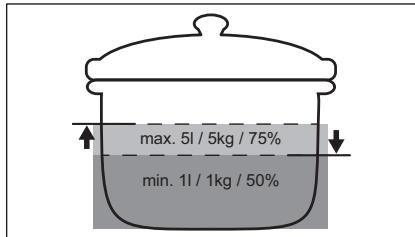
- For best results, use only clean, dry pans with a flat base. Do not place pans on the hob when they are still wet.
When using the hob, do not place pans on the hob that are not suitable for induction cooking (e.g., copper or glass). -The function of the hob is to heat the pan directly. Do not use the hob without a pan. The hob will not operate if the pan is not suitable or if the pan is too small. Do not use the hob if the pan is not placed correctly. Do not use the hob if the pan is not suitable for induction cooking.
6.10 Cleaning and care
The hob should be cleaned regularly.
Setting the parameters
| Таньа | Параметр | Муемки онц�лар |
| b | Дыбыс | Косуны / Θшірүл (-) |
| P | Куатшектeyi | 15 - 73 |
| H | Тутін тартусы разхимi | 0 - 6 |
| E | Дасыл / Катe Журналы | Сонгы дамылардын / Кателердин тizimi. |
To set the parameters: press and hold the button for 3 seconds. Then press and hold the button. The parameters can be set in the order shown.
To change the parameter: the parameter is selected and then changed. The value can be increased or decreased. To change the parameter, press and hold the button. To change the parameter, press and hold the + or - button.
How to install your Electrolux Induction Hob - Worktop installation

4. DESCRIPTION OF THE PRODUCT
How to install your Electrolux Induction Hob - Worktop installation

4. PRODUCT DESCRIPTION
4.1 Hob surface plan
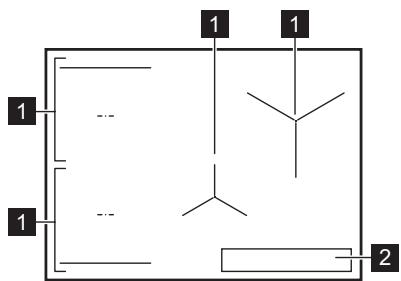
1 Induction hob 2 Control panel
i
This appliance can be used by children aged from 8 years and above and persons with reduced physical, sensory or mental capabilities or lack of experience and knowledge if they have been given supervision or instruction concerning use of the appliance in a safe way and understand the hazards involved.
- Children shall not play with the appliance.
- Keep the appliance and its cord out of reach of children less than 8 years.
- WARNING: Accessible parts may become hot during use. Keep children and vulnerable people away from the appliance when it is in use or when it is cooling down.
- If the appliance has a child safety device, it should be activated.
- Children must not clean or maintain the appliance without supervision.
1.2 Safety instructions
- This appliance is intended for domestic use. It is designed for cooking food. It is intended for indoor use in household conditions.
- The appliance can be used in staff kitchen areas in shops, offices and other working environments, farm houses, by clients in hotels, motels and other residential type environments, bed and breakfast type environments.
- WARNING: Accessible parts may become hot during use. Young children should be kept away.
- WARNING: Cooking with oil or fat without supervision can be dangerous and may lead to fire. The temperature is an indicator for overheating. Never use water to extinguish a fire caused by cooking oil. Switch off the appliance and cover the flame with e.g. a fire blanket or a lid.
- WARNING: The appliance must not be placed in a built-in structure without prior approval for installation, as
for example a timer that is connected to the mains when the appliance is in operation, must be installed by a qualified person.
WARNING! The hotplate surface must be switched off (using the automatic hotplate functions. Short hotplate processes must be constantly supervised. - WARNING: Danger of fire: Do not place objects on the hotplate surfaces. - Metal objects, such as knives, forks, spoons and lids, should not be left on the hotplate surface as they can become hot. - Do not use the appliance before mounting it into the built-in structure. Do not use a cleaning steam device for cleaning the appliance. - After use, switch off the hotplate surface using the appropriate control and do not rely on the sensor for detection. - If the glass-ceramic / glass surface is cracked, switch off the appliance to avoid the possibility of electric shock. In case the appliance is connected to the mains via a junction box, remove the fuse to disconnect the appliance from the mains. In any case, contact the authorized service center. - If the power supply cord is damaged, it must be replaced by the manufacturer, its authorized service or similarly qualified persons to avoid a hazard. - WARNING: Use only hotplate surface guards designed by the manufacturer of the appliance for hotplate surfaces or indicated in the instructions for use as suitable guards for hotplate surfaces. Use of inappropriate guards for hotplate surfaces can cause accidents.
2. SAFETY INSTRUCTIONS
2.1 Mounting

WARNING!
The appliance must be mounted only by a qualified person.

WARNING!
Danger of injury or damage to the appliance.
Remove the packaging. - Do not mount or use a damaged appliance. Follow the mounting instructions supplied with the appliance. Keep the minimum distance from other appliances and units. - Always be careful when moving the appliance because it is heavy. Always wear safety gloves and enclosed footwear. Secure the surfaces of the plinth with protective material to prevent moisture from causing deformation. Protect the bottom of the appliance from steam and moisture. Do not mount the appliance near doors or under windows. This will prevent hot cookware falling from the appliance when doors or windows are opened. - Every appliance has cooling fans for the bottom. If the appliance is installed above a drawer:
Do not store small objects or paper that could be drawn in, as they can damage the cooling fans or impair the cooling system.
- Keep a distance of at least 2 cm between the bottom of the appliance and the parts stored in the drawer.
- Remove the plinth divider mounted in the plinth under the appliance.
The induction rings are active while the appliance is operating.
When placing food in hot oil, it may splatter. Do not use aluminum foil or other materials between the heating surface and the cookware, unless specified by the manufacturer of this appliance. Use only accessories recommended for this appliance by the manufacturer.

WARNING!
Risk of fire and explosion.
- During heating, the oil may ignite. Keep flammable objects away from the oil. Cook with the oil. The use of oil at high temperatures may cause spontaneous combustion.
- Used oil that may contain food residues can cause a fire at the set temperature. Do not place flammable liquids or objects near the appliance or in its vicinity.

WARNING!
Risk of burns from the appliance.
Do not place cookware on the control panel. Do not place the lid of the cookware on the glass surface of the cooking zone. Do not leave cookware unattended. Be careful not to drop objects on the appliance. The surface may break. Do not use the cooking zones with empty cookware or without cookware. - Cookware made of cast iron or with a rough base may scratch the glass/ceramic surface. Always lift these items when moving them.
When placing them on the cooking surface.
2.4 Cleaning and Maintenance
- Clean the appliance regularly to prevent damage to the surface material. Unplug the appliance and let it cool before cleaning. Do not use steam cleaners for cleaning the appliance. - Clean the appliance with a damp cloth. Use only neutral detergents. Do not use abrasive products, abrasive sponges for cleaning, solvents, or metal objects, unless specified in the manual.
2.5 Service
To repair the appliance, contact an authorized service center. Use only original spare parts. In case of a fault, the lights inside this product and the spare lights
This appliance is intended for household use, as it is designed for cooking, baking, and grilling, and is intended for giving signals and for the working condition of the appliance. It is not intended for other uses and is not suitable for lighting rooms in the home.
2.6 Disposal
WARNING!
Risk of injury or damage.
- Contact your local authorities to obtain information on how to dispose of the appliance.
- Unplug the appliance from the power supply.
- Cut the power cord close to the appliance and remove it.
3. INSTALLATION
WARNING!
See the chapter on safety instructions.
3.1 Before installation
Before installing the cooking surface, read the information regarding specifications. The specifications are located on the bottom of the appliance.
Serial number (S.N.)
3.2 Built-in cooking surface
Use the appliance only if it has been previously built into suitable built-in elements and on work surfaces that meet the standards.
3.3 Cable connection
The cable for connection must be replaced. To replace the damaged power cord, use the following cable type: H05V2V2-F which withstands temperatures up to 90°C or higher. The cross-section must have a minimum cross-section in accordance with the table below. Contact your local service center. The connection cable may only be replaced by a qualified electrician.
WARNING!
All electrical connections must be made by a qualified electrician.

CAUTION!
Connection via contact plugs is prohibited.

CAUTION!
Do not pull or strain the cable ends. This is prohibited.

CAUTION!
Do not connect the cable without the plug.
Basic connection
- 1. Remove the plug from the black, brown, and blue wires. 2. Strip the insulation from the ends of the black, brown, and blue wires.
- Connect the ends of the black and blue wires.
- Place a new plug on the end of the connected cable (a special tool is required).
- Connect the ends of the two blue cables.
- Place the new gasket for the end of the connection cable (a special tool is needed).
Two-phase connection
1. Remove the end of the cable from the blue terminal. 2. Strip the insulation from the ends of the blue cable. 3. Connect the ends of the two blue cables. 4. Place the new gasket for the end of the connection cable (a special tool is needed).
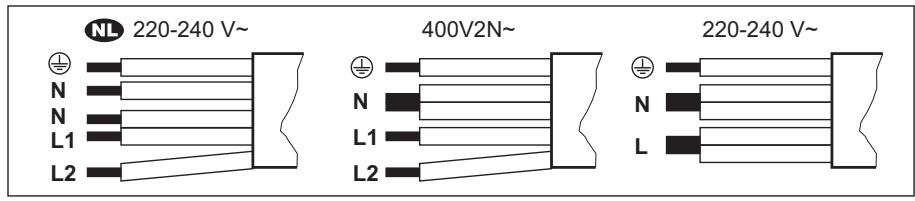
| NL 220 - 240 V~ | Двофазно поврзувалье: 400 V2N~ | Еднофазно поврзуваьe: 220 - 240 V~ | |||
| 5x1,5 MM² | 5x1,5 MM²尤其是4x2,5 MM² | 5x1,5 MM²尤其是3x4 MM² | |||
| ½ | Зелena - жолta | ½ | Зелena - жолta | ½ | Зелena - жолta |
| N | Сина и сина | N | Сина и сина | N | Сина и сина |
| L1 | Zipna | L1 | Zipna | L | Zipna и кafeевa |
| L2 | Кafeевa | L2 | Кafeевa | ||
3.4 Installation
If the appliance is installed above a drawer, please follow the installation instructions for the drawer to ensure minimum distance between the appliance and the drawer.
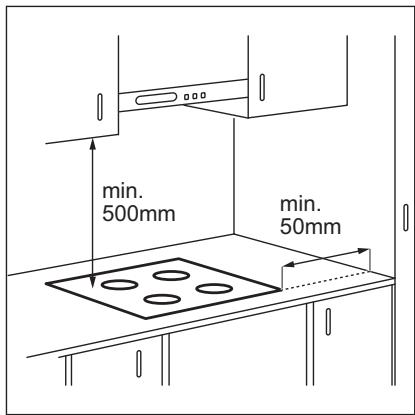
If the appliance is installed above an oven, the ventilation of the surface for cooking may be blocked by objects that are stored in the oven during the cooking process.
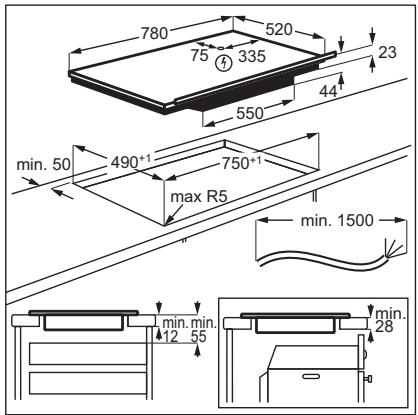
Find the video instruction "How to install your Electrolux Induction Hob - Worktop installation" by entering the exact name shown in the picture.

YouTube
www.youtube.com/electrolux
www.youtube.com/aeg
How to install your Electrolux Induction Hob - Worktop installation

4. PRODUCT DESCRIPTION
4.1 Cooking surface layout
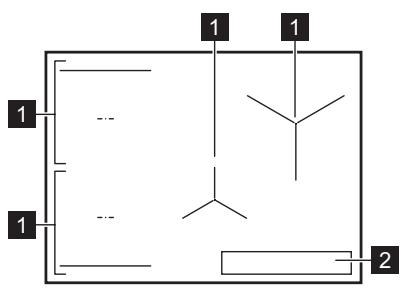
1. Introduction 2. Control panel

For more information about the printer settings, see "Technical data".
4.2 Control panel layout
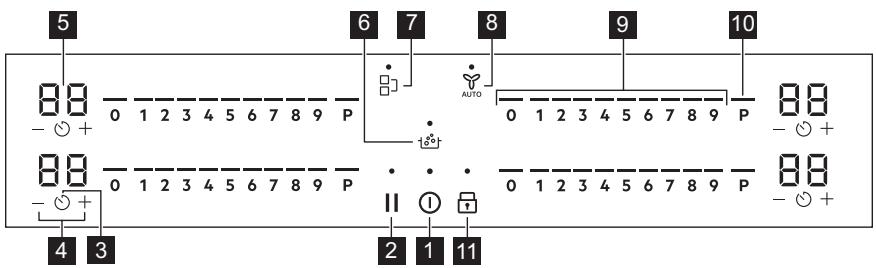
Operate the device using the sensor keys. The displays, indicators, and sounds show the functions working.
| Сенистор ско пole | Функциja | Опис | |
| 1 | ① | Вълухи / Иълухи | 3a вълухуваье и在其ълухуваье на anaparot. |
| 2 | II | Палза | 3a вълухуваье и在其ълухуваье на Функциjaда. |
| 3 | ◎ | Тajмер | 3a поставваье на Функциjaда. |
| 4 | +/- | - | 3a згелемваье пли hamалуваье на ВрemeTo. |
| 5 | - | Екpan на тajмерот | 3a п riskаможваье на ВрemeTo BO минут. |
| 6 | ® | SenseBoil® | SenseBoil®. Функциjaда grabоматски ѳ п风险管理ява temпегатура на ворота за то не пreakице OTКако ке ja достигнешточкatingа на Вриende. |
| Сенистор Скоб нole | Функуда | Опис | |
| 7 | 1 | Bridge | 3a влесувашие и在其点点头 на脚下 сима. Функуда. |
| 8 | AUTO | Hob'2Hood | 3a влесувашие и在其点点头 на рачниот рожим на脚下 сима. Функуда. |
| 9 | - | Контуна лentesа | 3a постов��ашие на поставka 3a щачина на топлина. |
| 10 | P | PowerBoost | 3a влесувашие на脚下сима. |
| 11 | 1 | Зak再说вашие / Урета 6e3бедност на.Deca | 3a за再说вашие / олесувашие на kontrPORнога на табla. |
4.3 Display indicators
| Показател | Опис |
| E+6poj | Има.Deф ekт. |
| E/ E/ | OptiHeat Control (Показно сBVЕТно за п reproстанда толпина во 3 чекори): пroduлжни со ratveье / подграваль / п reproстанда толпина. |
5. BEFORE FIRST USE

WARNING!
See the chapter on safety instructions.
5.1 Setting the length
Setting the length defines how much energy is consumed in total for heating, within the limits of the installation instructions for the cooker.
The heating plate is standardly set at the highest level of the cooker.
To find or change the power level:
- Enter the menu: press and hold ① for 3 seconds. Then, press and hold
- Press the minus timer button until the display shows P.
- Press the -/+ on the front timer to set the power level of the cooker.
4. Press and hold the button to set the device.
See the chapter "Technical Information".

WARNING!
Make sure the selected power level matches the fuse rating in the electrical panel.

WARNING!
If the voltage of the device is higher than 2000 W, you cannot connect SenseBoil®.
P73-7.350W P15—1.500 W P20—2.000W P25—2.500W P30—3.000W P35—3.500W P40—4.000W P45—4.500W P50—5.000W P60—6.000W
6. DAILY USE

RECOMMENDATION!
See the chapter on safety precautions.
6.1 Activation and Deactivation
Press and hold the ① button to turn the cooking zone on or off.
6.2 Opening the Lid
This function indicates the presence of cooking zones on the cooking surface and deactivates the zones if they are not opened during cooking.
If you place the cooking zones on the ring before selecting a heat setting, the indicator on the control panel will flash.
The alarm will sound when the ring is switched on. Temporarily place the pan on the hob, and the indicator on the control will start to flash. If you do not return the pan for the alarm on the switched-on ring within 120 seconds, the ring will switch off automatically.
To continue with the cooking, press to return the pans for the alarm on the rings within the specified time.
6.3 Using the rings
Place the pan for cooking directly in the center of the selected ring.
The induction rings are automatically applied to the dimensions of the bottom of the pan for cooking.
You can cook in a large pan on two rings simultaneously using the Bridge function. The pan for cooking must cover the centers of both rings but must not extend beyond the marked area. If the pan for cooking is placed between the two centers, the Bridge function will not be activated.
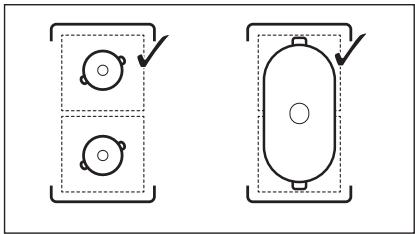
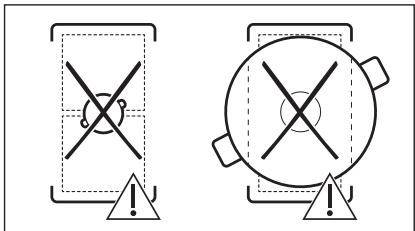
6.4 Heat settings
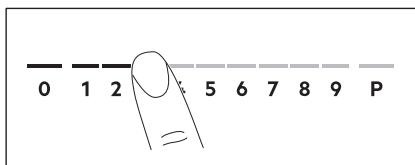
- Press the heat setting for the control panel. The indicator lights above the control panel will show the selected heat setting level.
- To switch off the ring, press 0.
6.5 PowerBoost
The function provides more power for the induction rings. The function can be activated for the induction ring only for a certain time. After that, the induction ring automatically returns to the highest setting.
You will find the technical information
To activate the function for the ring: press P. It switches on.
To switch off the function: change the heat setting.
6.6 OptiHeat Control (3-step residual heat indicator)

WARNING!
If the indicator lights are on, there is a risk of burns from residual heat.
The induction cooking zones produce the heat needed for the cooking process directly in the bottom of the cookware. The glass ceramic is heated by the heat of the cookware.
The indicators appear when the cooking zone is hot. The indicators show the level of residual heat for the cooking zones you are currently using:
- continue cooking,
- keep warm,
- residual heat.
The indicator may also appear:
for the neighboring cooking zones, even if you are not using them, when hot cookware is placed on the cooking zone, when the cooking area is switched off, but the cooking zone is still hot.
The indicator disappears when the cooking zone is cool.
6.7 Timer options
Countdown timer
Use this function to specify how long a single cooking zone should operate during a cooking session.
Set the heat setting for the selected cooking zone, then set the function.
- Press the + or - button to set the timer. 2. Press the + or - button to set the time (00-99 minutes). 3. Press the button to start the timer and wait for 3 seconds. The timer will start counting down.
To change the time: select the timer with the button and press the + or - button.
To turn off the function: select the timer with the button and press the - button. The remaining time will count down to 00.
The timer finishes with the countdown, the signal sounds and the timer turns off. Press any button to stop the signal and the countdown.
MINUTE MINDER
You can use this function when the hob is turned on and when the zones are not in use. The display for the timer shows 00.
6.10 Structure of the menu
The table shows the basic structure of the menu.
User settings
| Симбо л | Посtabka | Можни орци |
| b | Звк | Вкneys / Искneys (-) |
All zones are off, do not set any temperature setting or set the speed of the
ventilator when the hob is turned on.
If you do not press anything on the control panel for more than 10 seconds (e.g. a pan is placed, etc.), the signal sounds and the hob turns off. Remove the pan or clean the control panel. The appliance becomes standby (e.g. when a pan is placed empty). Leave the hob to cool down before using the hob again. Do not turn off the hob and do not change the temperature setting. After a certain time, the hob turns off.
The relationship between the temperature setting and the time after which the hob turns off:
How to install your Electrolux Induction Hob - Worktop installation

4. DESCRIPTION OF THE APPLIANCE
1.1 Safety of children and persons with limited abilities
This appliance can be used by children aged eight and over and persons with reduced physical, sensory or mental capabilities or lack of experience and knowledge only if they are supervised by a person responsible for their safety, or after receiving instructions that allow them to safely operate the appliance and give them an understanding of the dangers associated with its use. Children under 8 years of age and persons with severe and complex disabilities must not be near the appliance without constant supervision.
Children must be supervised to ensure they do not play with the appliance. Keep all packaging materials out of reach of children and dispose of them properly. WARNING! The appliance and its exposed parts become hot during use. Do not allow children or pets near the appliance during use or while it is still cooling down.
- If the appliance is equipped with a child safety device, it should be activated. Cleaning and user maintenance of the appliance must not be performed by children without supervision.
- 1.2 General safety
4. APPLIANCE DESCRIPTION

The induction cooking zone is set to the maximum permissible power.
Decreasing or increasing the power level:
1. Switch on: Press and hold ① for 3 seconds. Then press and hold 2. Press and hold on the front panel until P appears. 3. Press /+ on the front panel to set the power level.
4. Press ① to confirm. Power level
See the chapter "Technical data"
WARNING
Make sure that the selected power level matches the rating of the circuit breaker installed in the household electrical system.
The selected power level corresponds to the rating of the circuit breakers installed in the household electrical panel.
If the power level is below 2000 W, it is impossible to activate the SenseBoil® program.
If a sound signal is heard, the function start does not occur.
This function does not work with cookware with a non-stick coating.

WARNING
Do not use these functions with simple cookware.
Do not leave the hob unattended while this function is in operation.
- Place the pot with 1-5 liters of water on the burners for which you need to enable this function. If you place the pot on only one burner, this function turns on automatically.
- Touch to enable the boiling function.
- Touch to disable the function.
The burners on which this function can currently be used will be marked with a symbol.
- Touch any area on the slider of the selected burner.
The function starts executing.
6.10 Menu structure
The table shows the basic menu structure.
User settings
The heating level ratio, after which the burner switches off:
seconds, until the indicator above the symbol goes out. Switch off the hotplate using ①.
Preparation with the function switched on: Press ① and hold for 3 seconds until the indicator above the symbol disappears. The hotplate can be used. When the hotplate is switched on with ①, the function works again.
7.5 Bridge
i
The function works when a pan covers the centers of two cooking zones. Additional information on the correct placement of pans can be found in the section "Using the cooking zones". When working with the SenseBoil® function, it is not activated.
This function is intended for the simultaneous use of two left cooking zones, which then work as one cooking zone.
First, set the heating level for one of the left cooking zones.
Switching on the function: Touch 1. To set or change the heating level, touch one of the sensor buttons.
Switching off the function: Touch
Touch J. The cooking zones operate independently of each other.
7.6 Hob²Hood
This is a modern function with automatic control that connects the hotplate to the extractor hood. Both the hotplate and the extractor hood maintain the connection via infrared ports. The fan speed is set automatically depending on the operating mode settings and the temperature of the pan itself on the hotplate. The fan can also be controlled manually.
i
By default, the extractor hood remote control system is disabled. Before using the function, enable it. For additional information, see the user manual for the extractor hood.
AUTOMATIC OPERATION OF FUNCTIONS IN AUTOMATIC MODE Set the automatic mode value 1-6. The default setting is mode 5, which is recommended. The extractor hood regulates the speed at each switching on of the recommended mode. The recommended mode regulates the rotation speed of the fan, automatically maintaining the temperature of the air flow.
Automatic modes
8.4 Simplified preparation guide
The relationship between the heating level setting and the energy consumption of the hob is not linear. When the heating level increases, the electricity consumption increases not in the same proportion. This means that at the average level
of heating, the hob consumes less than half of its nominal power.
i
8.5 Instructions and recommendations for using the extractor hood
When using the extractor hood with the hob:
- Ensure protection of the extractor hood panel from direct sunlight. Do not place halogen lamps on the extractor hood panel.
Do not cover the control panel of the extractor hood. Do not block the space between the extractor hood and the hob (for example, with hands, hands with wet dishes, or high pans). See figure.
The image of the extractor hood is shown below only as an example.
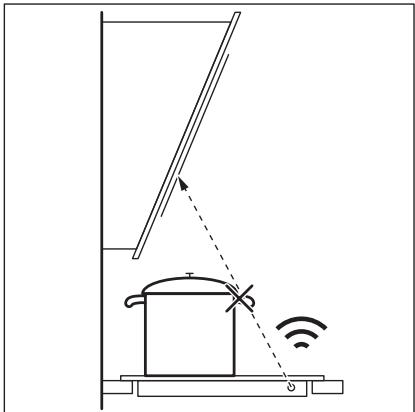
i
The use of other devices with remote control may lead to signal blocking. Do not use such devices near the extractor hood during the operation of the extractor hood.
Extractor hoods supporting the function of the extractor hood
For a complete list of models that support this function, please visit our website. Electrolux hobs that support this function must have the AUTO symbol.
9. CARE AND CLEANING

WARNING!
See chapter Safety information.
9.1 Cleaning information
Clean the hob after each use. Always make sure that the cookware is clean. Stains or dark spots on the surface do not affect the operation of the hob. Use a special cleaner designed for cleaning hobs. - Use only a scraper intended for glass-ceramic hobs. Use the scraper only as an additional tool after performing standard glass cleaning.

WARNING!
Do not use knives or other sharp metal instruments to clean the glass surface.
9.2 Cleaning the hob
- Remove the following soiling immediately: melted plastic, aluminum foil, sugar and food containing sugar. Otherwise, these soiling may cause damage to the hob surface. Be careful not to burn yourself. Place the special scraper at an acute angle to the glass surface and slide it over the surface.
- Remove the following soiling only when the hob surface is
sufficiently cool: limescale, water rings, grease stains, stains with metallic sheen. Clean the hob surface with a damp cloth and a mild detergent. After cleaning, wipe the hob dry with a soft cloth.
To remove stains with metallic sheen that change the original color of the surface: wipe the glass surface with a cloth moistened in a solution of water and vinegar.
10. TROUBLESHOOTING

WARNING!
Cm. rIaBbI, coeepkaune CbepeHnno TeXnke 6e3oNaChOCTn.
10.1 What to do if...
10.2 If the problem cannot be solved...
If you cannot fix the problem yourself, contact the store where you purchased the device or an authorized service center. Provide the information indicated on the technical data plate. Make sure the device
was operated correctly. In case of incorrect operation of the device, technical service provided by service center specialists or the seller will be paid, even if the warranty period has not yet expired. Information about the warranty period and authorized service centers is given in the warranty certificate.
11. TECHNICAL DATA
11.1 Table with technical data
Model EIS82453
Type 62 D4A 01 AA
Induction 7.35 kW
Serial number
ELECTROLUX
Made in: Germany
7.35 kW
C∈
11.2 CneunФнкаця конфорok
Pnuctyn MpexHOM yTtKaCyHaKOH UHCTanaIJe.
Ako je 3nHa yTuHnHa Za naababa, HEmoJTe da npNKbuyjete MpeXHN yTuKaU. He ByuNTe Ka6I 3a HanajaJIbe KaKo 6nCTe NCKJbUyHIn ypehaj. Ka6I NCKJbUyHTe TaKO 7TO hETe H3ByHn YtNkau n3 yTtNHNJIe. Kopncntte camo ncpabHe paCTabHe npeknlaue: 3aHTnThe npekndaue, ocirpyaue (ocirpyaue ca haBojem tpeba ckHyTu ca Hocau), ayTomatCke 3aHTnThe npekndaue N KOHTaKTope. Y eNeKtpnHoj IHcTaIaIuJn Mopa nocTojATn paCTaBnI pKeNJaU KoJn Bam OMOryhaba Da IckbYuHte CBe Pa3e HanajaHa ypehaja. Pa3MaK n3MeHy KOHTaKaTa Ha paCTaBHom IpeKnDaUy Mopa da N3HOcN HajMaHe 3 mm. Ako ce E3 kód nojabn ha ekpaHy, oImax nCKbYuHTe pIooy 3a KyBaHe n npOBepnte da JI cy eJIeKtprHn Be3a n rJaBn HanoH nCnpabHn.
2.3 ynoptpe6a

yN03OPEHbE!
Ioctoj np3nk oJ noBpe,oneKOTnHa n cTpyjHOr ydapa.
Hemojte da MeBaTe cneuФkaunjy OboI ypehaja. - YKJIOHNTe CBO nakOBaHbe, HajiENHnIe I 3aWTHTHy fOJIny (aKO je nMa) npe npBor KOpuShHeBa. Bodnte paunha da oTbOpn 3a BeHTnlaunjhe 6ydu 3anyuHeH. He octabajte ypehaj 6e3 na3opa TOKOM pada. IOnecnte30Hy3a KyBaHbHeHa "NCKJbUyeHO"NaKOH CBAke yNoTpe6e. Hemojte ctabbata npnbop 3a jeeno nnnnoknonje uepnna ha 30he 3a kybahe. OHHMOry noCTATN BpeIN. Hemojte pykOBaTu ypehajem kaJa cy Bam MOKpe pyke nn KaJa je OH y KOHTaKTy ca BOJOM. Hemojte Kopnctntuypehaj kao paHy noBpHunny nnn npocstop 3a oDnarahe. Ako je noBpHnHa ypehaja hanykna, oJmax ra nckbuynte n3 3nHe yTuHnCe.To cnpeyaba cTpyjHn yap. Kopncnucn ca nejcmejkepm Mopajy da odpkaabajy pactojahe od hajmahe 30 cm
OД ИДУКИОПИХ 3Она 3a КУВаБe KaДaуpeиaj ради.
- Kaça CTaBHTe xpaHy y BpyHe yIbe, MoKe Da npChe. Hemojte KopncntnAnyumnjuymcky fOnjy nI npTre Maepnjae n3mehy nobprsinhe 3a KyBaHe n nocyHa 3a KyBaHe, ocIM aKo npOn3Bohaj ypehaja Hnje dpyraHJe Habeo. Kopuncte camo npnbop kojn poun3bohay npenopyyje 3a obaj ypehaj.

YIIO3OPEHbE!
How to install your Electrolux Induction Hob - Worktop installation

4.ОПИС ПОНЗВОДА
4.1 ŠeMa noBpUnHe 3a KyBaHbE
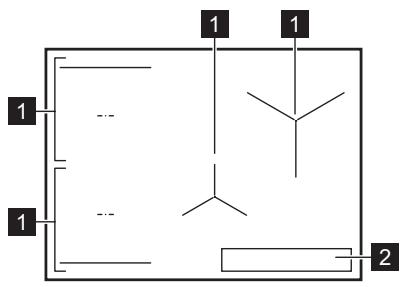
1 IHykCnOHa 30Ha 3a KyBaHe 2 KomaHnHa Ta6na

3a DeTaBnije HNΦopMaunje O BeJIuHnHaMa 3OHa 3a KyBaHe nOrIeJaTe OeJbak, "TexHnKn IOnaU".
4.2 Control panel appearance
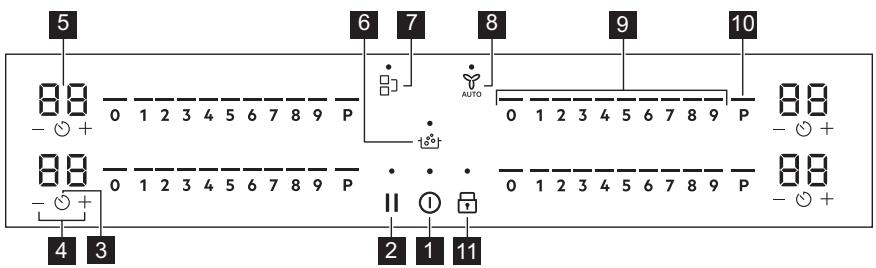
Use the sensor controls to operate the appliance. The displays, indicators and sound signals show which functions are active.
2. SAFETY INSTRUCTIONS
2.1 Installation

WARNING!
This appliance may only be installed by a qualified person.

WARNING!

4. PRODUCT DESCRIPTION
4.1 Cooking surface layout
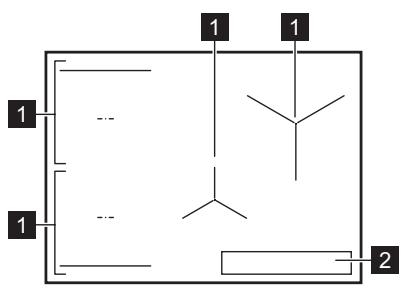
1 Induction cooking zone 2 Control panel


4. PRODUCT DESCRIPTION

4. PRODUCT DESCRIPTION
Keep the appliance away from children.
Do not hold the cookware by the control panel.
Do not place the lid of the pan on the hot surface. Do not allow the cookware to boil dry. Be careful not to drop objects or cookware on the hob. The surface may be damaged. Do not switch on the hob if the cookware is empty or missing. Cookware with a dented or damaged base may damage the glass-ceramic hob. Always lift the cookware when moving it on the hob.
2.4 Cleaning and maintenance
Regularly clean the appliance to prevent damage to the surface material. - Before cleaning, switch off the appliance and let it cool down. Do not use steam cleaners or high-pressure cleaners for cleaning the appliance. Wipe the appliance with a damp cloth. Use only neutral cleaning agents. Do not use abrasive agents, abrasive sponges for cleaning, solvents, or metal objects unless otherwise specified.
2.5 Service
For repairs, contact an authorized service center.
3. INSTALLATION

WARNING
Read the chapter with safety information.
3.1 Before installation
Before installing the hob, note the following information from the rating plate. The rating plate is located at the bottom of the hob.
Serial number
Use only original spare parts.
Regarding the lamps: inside the product and spare lamps, sold separately: These lamps are intended for use in household appliances with extreme conditions, such as temperature, vibration, humidity, or are intended to signal information about the operating status of the appliance. They are not intended for use for other purposes and are not suitable for household room illumination.
2.6 Commissioning

WARNING!
Danger of injury due to electric shock.
- For information on proper commissioning of the device, contact local authorities. Connect the device to the electrical network. Insert the power plug near the device and turn it on.
This product complies with the safety requirements of the relevant technical regulations for the use of certain hazardous substances in electrical and electronic equipment (Resolution of the Cabinet of Ministers of Ukraine No. 9139 of 10 June 2017).
3.2 Built-in heating surfaces
Built-in heating surfaces may only be operated with proper installation in cabinets and on work surfaces that strictly comply with standards.
3.3 Connection cable
The heating surface is equipped with a connection cable to protect the cable from damage. Use the cable type:
H05V2V2-F, which can withstand temperatures of 90°C and above. The cable must have a minimum cross-section according to the table below. Contact your local service center. The connection cable must be replaced by a qualified electrician.

WARNING
All connections to the electrical network must be made by a qualified electrician.

CAUTION
Connecting the connection cable is prohibited.

CAUTION
Do not check or connect the cable against the current. This is prohibited.

ATTENTION
Do not connect the cable without the cable connector.
Single-phase connection
- Remove the cable connector from the black, brown, and blue wires.
- Remove a part of the insulation from the ends of the black, brown, and blue cables.
- Connect the black and brown cables together.
- Install a new cable connector onto the blue cable (special tool required).
- Connect the two blue cables together.
- Install a new cable connector onto the blue cable (special tool required).
Three-phase connection
- Remove the cable connector from the blue wires.
- Remove a part of the insulation from the ends of the blue cables.
- Connect the two blue cables together.
- Install a new cable connector onto the blue cable (special tool required).
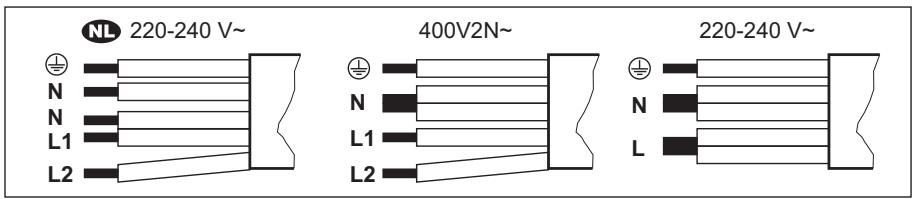
How to install your Electrolux Induction Hob - Worktop installation

4. ONIC BIVPOB
4.1 OshaeHnBaBapInbHoI nobepxHi
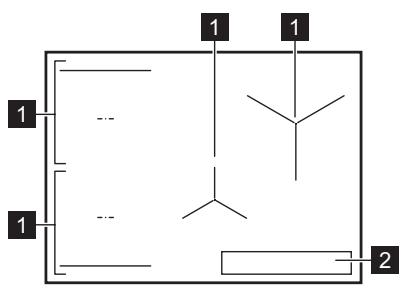
1IHykuiHa3OHaHarpiBaHHa 2 PanaHJI KepyBaHHa

6.1 YbIMKHeHH Ta BmMKHeHH
HaTnCHiB i yTpMnyIe ①, uo6 yBIMKHyTu a60 BmKHyTu BapuNbHY NOBepxHIO.
6.2 BnBnEnnnoocdy
Lz yHKzIg Bk3aye Ha hAByHbIcTB nocdy Ha BapnIbHi IOBepxHi Ta BmNkae 30HN roTyBaHH, kIO pIic Yac npOecy roTyBaHH He BnBJeHO nocdy.
JaKIO BV NocTabnN Nocyd Ha 3OHy roTyBaHnI nepei BnBopom CTyneHn HarpiBy, Ha cekTopi KepyBaHHa 3'ABNTbcra IHnKaTOp HnD 0.
JaKo BV TmUcAoBO npu6epTe nocyd 3 yBIMKHeHOi 3OHN rOTyBaHHn, iHnkaTOpn HaD BiINOBiHm CekTopOM KepyBaHHn NOHyTb 6JIImaTn. JaKo BV He NoCTaBnTE nocyd Ha3aHa aKTNUBOBAHy 3OHy rOTyBaHHn npotrrom 120 ckyHd, 3OHa rOTyBaHHn ABTMaTHO BIMKHETbcR.
IiO6n BiINHOBNTn rOTyBaHHn, He 3a6yDbTe 3HOBy NOCTaBHTn NocuHa 3OHy rOTyBaHHn B Mekxaz3a3NaueHOro Yacy.
6.3 KopncTyBaHHa 3OHaMn roTyBaHHa
IocTaBTe nocyd y ceHTp o6paHoi 30HN. IHykuiHi 30HN HarpiBaHHa ABTomaTuHOpnpCTOCOBYIObCdo pO3mipy DHa nocdy.
3a donomoroi yHKuii Bridge moKha roTyBaTu y BEnIKOMy nocyuDi, po3MiueHOMy Ha DBOX 30hax HarpiBaHHn OndHouacHO.
IocydMaHakpnbatn ceHtpn 06030H,ane He BxOHTN 3a No3HaUKN 30HN. JaKIO nocyd po3TaOBOHAHO MIX DbOMa CEHTPamn, yHKcijr Bridge He aKTINByETbcra.
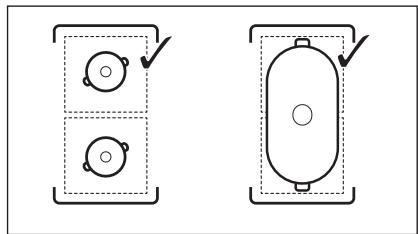
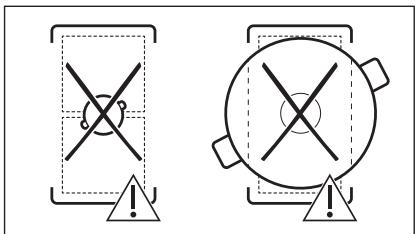
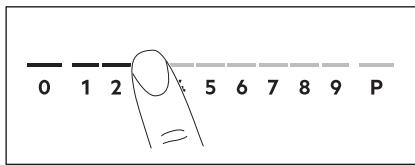
- The heating level indicator on the control panel. The indicators on the control panel correspond to the selected heating level.
- To switch off the cooking zone, press 0.
6.5 PowerBoost
The PowerBoost function makes the cooking zone more powerful. The function can be switched on for one cooking zone only for a limited period of time. After this period, the cooking zone automatically switches back to the highest heating level.
See section "Technical data"
To switch on the function for a cooking zone: touch the key.
Switching off the function: change the heating level.
6.6 OptiHeat Control (3-step residual heat indicator)
The 3-step residual heat indicator shows the level of residual heat.
The heat for the cooking process is generated by the induction zones directly in the bottom of the cookware. The cookware is heated by the heat of the cookware.
The indicators appear when the heating zone is hot. They show the level of residual heat in the heating zones that are used for cooking:
- to continue cooking,
- Temperature indicator.
The indicator may also appear:
For induction heating zones, you do not use the hob when the cookware is on the cold heating zone, when the variable surface is lowered, but the heating zone is still hot.
The indicator shows when the heating zone is cold.
6.7 Setting the timer
6.10 Menu structure
The table shows the basic menu structure.
User settings
10.2 If you cannot find the solution...
If you cannot solve the problem, contact the dealer where you purchased the appliance, or the technical support service. Provide the information from the technical data table. Make sure you have used the variable surface correctly.
If you have not used the appliance correctly, the master or repairer will charge even during the warranty period. Information about the warranty period and authorized service centers is given in the warranty booklet.
11. TECHNICAL DATA
11.1 Technical data table
Model EIS82453
Type 62 D4A 01 AA
Serial number
ELECTROLUX
Product number (PNC) 94959929400
220-240V/400V 2N, 50Hz
Manufactured in: Germany
7.35 kW

11.2 Cooking zones
| 3онa roтуваньn | Hominahьna no- t胶囊(MacC. ctynihb harpiban- н.) [Вт] | PowerBoost [Вт] | PowerBoost maksimьнabha trpvbanicTB [XB] | Дiametр поуд [MM] |
| Передnia пibe | 2300 | 3200 | 10 | 125 - 210 |
| Задnia пibe | 2300 | 3200 | 10 | 125 - 210 |
| Середnia поедnia | 1400 | 2500 | 4 | 125 - 145 |
| Задnia права | 2300 | 3600 | 10 | 205 - 240 |
The power of the cooking zones may differ from the values shown in the table. It changes depending on the material and size of the cookware.
For optimal cooking results, use cookware whose diameter is not larger than that indicated in the table.
12. ENERGY EFFICIENCY
12.1 Product information
| IdentuφikaTOP mondieli | EIS82453 | |
| Тип вареньои поерхни | Вбухова на вареньи по- верхни | |
| КількICTь зон дlya rotyванna | 4 | |
| Текhalorigia niidirpiyu | Иndу龟яя | |
| Дiametр круглих зон дlya rotyванna (Ø) | Середnia поедnia | 14.5 cm |
| Задnia права | 24.0 cm | |
| Довжina (Д) taширина (Ш) некуглой зони дlya ro- туванna | Передnia liba | Д 22.3 cm |
| Ш 21.8 cm | ||
| Довжina (Д) taширина (Ш) некуглой зони дlya ro- туванna | Задnia liba | Д 22.3 cm |
| Ш 21.8 cm | ||
| Сnéожав<nηе点点头儿 тува<nηе ( EC electric cooking) | Передnia liba | 189.1 Bt•iod/kr |
| Задnia liba | 189.1 Bt•iod/kr | |
| Середnia пedingуя | 187.5 Bt•iod/kr | |
| Задnia пара | 185.2 Bt•iod/kr | |
| Сnéожав<nηе点点头儿 тува<nηе ( EC electric hob) | 187.7 Bt•iod/kr | |
IEC / EN 60350-2 - Household electric cooking appliances - Part 2: Hobs - Methods for measuring performance.
The energy consumption indicator associated with the cooking zone is marked with the symbols of the corresponding heating zones.
12.2 Energy saving
Iotpmyuocnb HabeDeHnx HnKye npaI, BmOxte 36epiratn eHepriu niJ vacUoJeHHoro roTyBaHHra.
- PiiirpiBaIOuN BDOy, HAnBaIe IINe neTPOpiHnO6'EM. JAKIO MOKINBO, HAKPUNBaIte NocyD KPNUKOIO.
- P03miuYte nocSy 6e3nOcepeHbO B ceHTpi 3OnH harpibaHHa. BnKOpncToByIte 3aIIuKOBe TepNo IJI npITpIMMaHnC TcPABN TepIOo a60 po3TOnPiBOHaHH npOdyKTiB.
13. OXOPOHA IOBKINJIЯ
3daBaIte Ha noBToPHy nepepo6ky MaTepiAIn, POnHaueHb BiDnOBiDnM CmBBOJOM BnKnJaTe yNaKOBky y BiDnOBiHi KOHTeHepn IpnBTOpHHOc CnpOBHN. DOnOMoXiTb 3axNCTNTn HABKOJIuNHc cepEOBNUSe Ta 3dOpOB' iHUN JIOJe i 3a6e3NeuHTn BTOpHNY nepepo6ky eJeKTPnuHnx i eJeKTPoHnx npuiAib.He
BKNiDaIe npnIaI, nO3HaueHi BiIIOBiHIM CmBONOM ,pa3OM 3 iHUM DOMaUHIM CMIITAM. NObepHITb npOdyKT do 3aBOy i3 BTOPINHOI nepepo6kN y BauiM icuEBOcTi a6o 3BePHTc8o MiCzebNx MyHicnPabHnx OprAHIB BlaIaI.
.
…………
.
…………
…………
…
…………
··
…………
electrolux.com
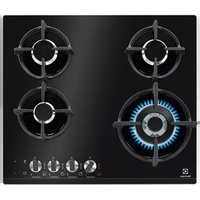
- PRODUCT DESCRIPTION
- COOKING SURFACE LAYOUT
- YOUTUBE
- DEVICE DESCRIPTION
- CONTROL PANEL LAYOUT
- SAFETY INSTRUCTIONS FOR USE
- WARNING
- ACTIVATION AND DEACTIVATION
- OPENING THE LID
- USING THE HEATING ZONES
- SETTINGS FOR HEATING
- POWERBOOST
- OPTIHEAT CONTROL (3-STEP RESIDUAL HEAT INDICATOR)
- MENU STRUCTURE
- OFFSOUND CONTROL
- THE RELATIONSHIP BETWEEN THE HEATING LEVEL AND THE TIME AFTER WHICH THE HOB IS DEACTIVATED
- PAUSE
- THE COOKWARE IS SUITABLE FOR INDUCTION COOKING IF
- COOKWARE SIZES
- OPERATING NOISES
- IF YOU HEAR
- ECO TIMER
- SIMPLIFIED COOKING GUIDE
- TIPS FOR HOB²HOOD
- HOODS FOR COOKING WITH HOB²HOOD FUNCTION
- GENERAL INFORMATION
- TECHNICAL DATA
- DATA TABLE
- DISPLAY INDICATORS
- BEFORE FIRST USE
- DAILY USE
- WELCOME TO ELECTROLUX! THANK YOU FOR CHOOSING OUR APPLIANCE
- CONTENTS
- SAFETY INFORMATION
- CHILDREN AND VULNERABLE PEOPLE SAFETY
- GENERAL SAFETY
- SAFETY INSTRUCTIONS
- INSTALLATION
- ELECTRICAL CONNECTION
- USE
- CARE AND CLEANING
- SERVICE
- DISPOSAL
- BEFORE THE INSTALLATION
- BUILT-IN HOBS
- CONNECTION CABLE
- CAUTION
- ONE-PHASE CONNECTION
- TWO-PHASE CONNECTION
- ASSEMBLY
- POWER LIMITATION
- ACTIVATING AND DEACTIVATING
- POT DETECTION
- USING THE COOKING ZONES
- HEAT SETTING
- OPTIHEAT CONTROL (3 STEP RESIDUAL HEAT INDICATOR)
- TIMER OPTIONS
- COUNT DOWN TIMER
- MINUTE MINDER
- POWER MANAGEMENT
- SENSEBOIL®
- ADDITIONAL FUNCTIONS
- AUTOMATIC SWITCH OFF
- THE FUNCTION DEACTIVATES THE HOB AUTOMATICALLY IF
- THE RELATION BETWEEN THE HEAT SETTING AND THE TIME AFTER WHICH THE APPLIANCE DEACTIVATES
- LOCK
- CHILD SAFETY DEVICE
- BRIDGE
- HOB²HOOD
- OPERATING THE FUNCTION AUTOMATICALLY
- CHANGING THE AUTOMATIC MODE
- OPERATING THE FAN SPEED MANUALLY
- ACTIVATING THE LIGHT
- HINTS AND TIPS
- COOKWARE
- COOKWARE MATERIAL
- COOKWARE DIMENSIONS
- NOISES DURING OPERATION
- IF YOU CAN HEAR
- ÖKO TIMER (ECO TIMER)
- HINTS AND TIPS FOR HOB²HOOD
- TROUBLESHOOTING
- CLEANING THE HOB
- WHAT TO DO IF
- IF YOU CANNOT FIND A SOLUTION
- RATING PLATE
- COOKING ZONES SPECIFICATION
- ENERGY EFFICIENCY
- PRODUCT INFORMATION
- ENERGY SAVING
- ENVIRONMENTAL CONCERNS
- DESCRIPTION DE L'APPAREIL
- FOR TECHNICAL SPECIFICATIONS, SEE THE TABLE BELOW
- Y6B
- U8UUU
- GDDMM
- CONNECTION DIAGRAM
- TIMER (OPTIONAL)
- MAINTENANCE AND CLEANING
- MGOAOL YDAOGB3NS
- GOGOGOGOGG
- Y5003000M O
- M0YJ0U YDM8B36U 85U 336 3MYMMOO
- J6O3YMO A5O3O
- J6665YMO 3U3M68O
- CLEANING AND MAINTENANCE INSTRUCTIONS
- REPLACING THE LAMP
- REMOVE
- DISCONNECT
- KYPACTBIPY
- BYИBIM CINATTAMACBI
- Θ3IPNEY 6ETINH OPHANACYBI
- BAÇKAPY NĀHEJĪNH OPHAÑACYBI
- MINUTE COUNTER
- PRESET
- CLEANING AND CARE
- DESCRIPTION OF THE PRODUCT
- HOB SURFACE PLAN
- MOUNTING
- CLEANING AND MAINTENANCE
- BEFORE INSTALLATION
- BUILT-IN COOKING SURFACE
- CABLE CONNECTION
- BASIC CONNECTION
- SETTING THE LENGTH
- TO FIND OR CHANGE THE POWER LEVEL
- PRESS AND HOLD THE BUTTON TO SET THE DEVICE
- RECOMMENDATION
- USING THE RINGS
- HEAT SETTINGS
- COUNTDOWN TIMER
- STRUCTURE OF THE MENU
- THE RELATIONSHIP BETWEEN THE TEMPERATURE SETTING AND THE TIME AFTER WHICH THE HOB TURNS OFF
- DESCRIPTION OF THE APPLIANCE
- SAFETY OF CHILDREN AND PERSONS WITH LIMITED ABILITIES
- THE INDUCTION COOKING ZONE IS SET TO THE MAXIMUM PERMISSIBLE POWER
- SWITCH ON: PRESS AND HOLD ① FOR 3 SECONDS. THEN PRESS AND HOLD 2. PRESS AND HOLD ON THE FRONT PANEL UNTIL P APPEARS. 3. PRESS /+ ON THE FRONT PANEL TO SET THE POWER LEVEL
- SEE THE CHAPTER "TECHNICAL DATA
- MAKE SURE THAT THE SELECTED POWER LEVEL MATCHES THE RATING OF THE CIRCUIT BREAKER INSTALLED IN THE HOUSEHOLD ELECTRICAL SYSTEM
- I
- SWITCHING OFF THE FUNCTION: TOUCH
- AUTOMATIC MODES
- SIMPLIFIED PREPARATION GUIDE
- INSTRUCTIONS AND RECOMMENDATIONS FOR USING THE EXTRACTOR HOOD
- EXTRACTOR HOODS SUPPORTING THE FUNCTION OF THE EXTRACTOR HOOD
- CLEANING INFORMATION
- IF THE PROBLEM CANNOT BE SOLVED
- TABLE WITH TECHNICAL DATA
- CNEUNФНКАЦЯ КОНФОРOK
- YNOPTPE6A
- YN03OPEHBE
- YIIO3OPEHBE
- ОПИС ПОНЗВОДА
- ŠEMA NOBPUNHE 3A KYBAHBE
- CONTROL PANEL APPEARANCE
- COMMISSIONING
- BUILT-IN HEATING SURFACES
- ATTENTION
- SINGLE-PHASE CONNECTION
- THREE-PHASE CONNECTION
- ONIC BIVPOB
- OSHAEHNBABAPINBHOI NOBEPXHI
- YBIMKHEHH TA BMMKHEHH
- BNBNENNNOOCDY
- KOPNCTYBAHHA 3OHAMN ROTYBAHHA
- SETTING THE TIMER
- IF YOU CANNOT FIND THE SOLUTION
- TECHNICAL DATA TABLE
- COOKING ZONES
- OXOPOHA IOBKINJIЯ
Brand : ELECTROLUX
Model : EIS82453
Category : Hob