LfNTL 1500 - Dictionary LEXIBOOK - Free user manual and instructions
Find the device manual for free LfNTL 1500 LEXIBOOK in PDF.



| Product Type | Multilingual electronic translator (dictionary) |
| Brand | LEXIBOOK |
| Model | LfNTL 1500 |
| Available Languages | 15 languages: French, English, German, Spanish, Italian, Portuguese, Dutch, Swedish, Norwegian, Danish, Finnish, Polish, Hungarian, Turkish, Greek |
| Lexical Capacity | 5,000 words or expressions per language, 150 phrases per language spread over 10 themes |
| Main Functions | Word-by-word translation, phrase translation, games (Hangman, Word Scramble), euro conversion, calculator, clock |
| Dimensions | 97.5 mm (W) × 60.5 mm (D) × 13.5 mm (H) |
| Weight | 55 g (including battery) |
| Power Supply | 1 CR2032 battery |
| Battery Life | Automatic shut-off after 2 minutes of inactivity |
| Display | Contrast-adjustable LCD screen |
| Maintenance and Cleaning | Wipe with a soft, dry, clean cloth. Do not use detergent or solvent. |
| Safety | Do not expose to direct sunlight, extreme temperatures, humidity or dust. Do not drop. Do not open the casing. |
| Spare Parts and Repairability | Replaceable CR2032 battery. Possible reset via reset hole. 1-year warranty. Technical support: 0892 23 27 26 (€0.34 incl. VAT/min). |
| General Information | Manual available in several languages. Recycling: used electronic device must not be disposed of with household waste. |
Frequently Asked Questions - LfNTL 1500 LEXIBOOK
User questions about LfNTL 1500 LEXIBOOK
0 question about this device. Answer the ones you know or ask your own.
Ask a new question about this device
Download the instructions for your Dictionary in PDF format for free! Find your manual LfNTL 1500 - LEXIBOOK and take your electronic device back in hand. On this page are published all the documents necessary for the use of your device. LfNTL 1500 by LEXIBOOK.
USER MANUAL LfNTL 1500 LEXIBOOK
Thank you for purchasing the Lexibook® NTL1500 15-Language Euro-Translator (English-French-German-Spanish-Italian-Portuguese-Dutch-Swedish-Norwegian-Danish-Finnish-Polish-Hungarian-Turkish-Greek). This product has been designed to enable you to translate any combination of 15 languages. 5,000 words are available in each language and 150 conversational phrases have been grouped into 10 different categories for easy access.
Opening and closing the unit
To open the unit, press the front centre button to release the catch. To close, gently push the lid down.
2. Key Guide
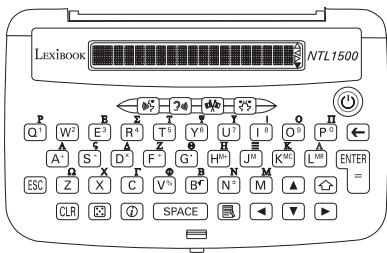
ON/OFF. Turns the translator on and off.
SOURCE. Selects the SOURCE language (the language you wish to translate from).
TARGET. Selects the TARGET language (the language you wish to translate to).
TRANSLATOR. Selects the mode for translating words
PHRASE. Selects the mode for translating phrases.
BACKSPACE. Deletes a typed character.
ENTER ENTER Translates the typed word or selected phrase. Or confirms option shown on the screen. Or acts as Calculates answer in calculator mode.
SHIFT. To type a capital letter and accented characters. To access 2nd functions.
ESC ESCAPE. To go back to previous screen.
CLRCLEAR.Clears the display to Enter a word. Return to previous menu option. CE/C in Calculator and Currency Converter mode.
Starts Game mode.
⑥ HELP key. Displays list of Help topics.
SPACE Type a space.
MENu. Displays a list of menu options; Display Language, Currency, Calculator or Clock
Scrol1 display up or searches for preceding words.
Scrollos display down or searches for following words.
- Moves cursor to left. Scrolls long words to right.
Note: and moves display to beginning of word / phrase.
- Moves cursor to right. Scrols long words to left.
Note: and moves display to end of word / phrase
Q1 to P0. Types numbers in Calculator and currency modes.
Types a decimal point.
A S^- D F^- Add, subtract, multiply, divide.
H+ JM Kc L MR Memory: M+, M-, M Clear and M Recall.
V ^串 B ^+ Percentage, Square root, Plus/Minus sign.
3. Getting Started
Before you start using your Lexbook® NTL1500, please carefully remove the protective battery tab located at the rear of the unit. The unit should switch on when you remove this tab. You can also press to switch the unit on, after the battery tab has been removed.
In the unlikely event that your unit does not switch on, you may need to reset it.
3.1 Switching on
Press the key to turn the unit on.
Press the () key again to switch the unit off.
To save battery life, the unit will automatically turn itself off after approximately 2 minutes of inactivity.
3.2 Contrast control
The LCD contrast can be adjusted whenever the Enter a word screen is shown. Press to decrease contrast or to increase contrast.
3.3 Function modes
To select the desired mode, press 4 , 5 , 6 , 7 or 8 for other functions.
3.4 Display language
Press the key to show the DISPLAY LANGUAGE option. Press ENTER to confirm. Press the or keys to select your desired language. Press ENTER to confirm.
3.5 Capital or accented letters
To type a character with an accent, press and hold key then press once the desired letter to type its capital. Then press same letter repeatedly until the desired accented character is displayed e.g. Press + for an A then A again for an a.
3.6 On-Screen help
If you require help at any time, press to display a list of help topics. Scroll through the list then press ENTER when desired topic is displayed. The help message will automatically scroll across the screen. To pause the scrolling press SPACE. To continue scrolling press SPACE again. Press ESC to return to the help topic list or CLR to quit help mode.
4. Translator
4.1 Select Source language
To select the language from which you want to translate, press (CLR) until the screen shows Enter a word and then press the _S^* key repeatedly until you see the desired language name.
4.2 Select Target language
To select the language which you wish to translate to, press until the screen shows Enter a word and then press the key repeatedly until you see the desired language name.
4.3 Word Translator
Type your word and press ENTER or key to see the translation. If the word is not available in the list, the nearest alphabetical match is displayed. Press or keys to see following and preceding words. When you see the word you want, press ENTER to translate.
4.4 Finding phrases that contain the translated word
Once you have translated a word you can press key to search for any phrases in the current source language which contain the typed word. Press or to view the translation. Press or to scroll through the list if there are more than one phrase containing the word.
4.5 Phrase Translation
Press the key. Press ENTER to select CATEGORIES. Press key until you see the desired category. Press ENTER to confirm. Press key until you see the desired phrase. Press ENTER or to translate.
Category list
-
BUSINESS
-
HOSPITAL/DENTIST/DOCTOR/POLICE
-
RESTAURANT
-
ENTERTAINMENT
3.HOTEL/ACCOMMODATION
8.BANK/POST OFFICE/TELEPHONE
-
IN TOWN
-
AIRPORT/PASSPORT DESK
-
TRAVELLING AROUND
-
GENERAL PHRASES
5. Games
5.1 Hangman game
- Press the key to display HANGMAN and press ENTER to confirm. Press the key to select language then ENTER to confirm.
- Choose your desired word length using the and keys. Press ENTER to confirm.
- Type a letter you think is in the word. Try to find the word before your lives run out.
- To quit and reveal the answer, press the SPACE key. At the end of the game, the correct answer is displayed then press to view its translation in the current target language. Press
repeatedly to see translation into other languages. Press ENTER to start a new game or ESC to quit.
5.2 Jumble Game
- Press the key, then to select JUMBLE and ENTER to confirm.
- Press the key to select language then ENTER to confirm.
- Choose your desired word length using the and arrow keys. Press ENTER to confirm.
- A jumbled word appears. Type your guess for the correct word and press ENTER to see if you are right.
- To quit and reveal the answer, press the SPACE key. At the end of the game, the correct answer is displayed then press to view its translation in the current target language. Press repeatedly to see translation into other languages. Press ENTER to start a new game or ESC to quit.
6. Other functions
6.1 Euro conversion
Press the key and then key once to display the
CURRENCY option.
Press ENTER to confirm. Select the desired currencies using and keys.
Use the number keys to enter the amount you want to convert. Press key to see the answer.
To view current rate, press . Press to go back to conversion screen.
If you need to enter a rate, press to access rate setting screen. Type rate in then press ENTER to record. Press to go back to conversion screen and type amount. Pres again to view result.
(Refer to appendix 1 to view Euroland currency list with exact Euro rates).
6.2 Calculator
Press the key and then key twice to display the CALCULATOR option.
Press ENTER to confirm. Use the number keys and function keys to perform calculations.
6.3 Clock
Press the key and then key three times to display the CLOCK option. Press ENTER to confirm. The time is displayed. Press key to view the date (and key to view the time again).
To change the time / date, press 山 and at the same time. Hour format is displayed (12H or 24H). Press ENTER to confirm or to change format. Press ENTER to confirm.
Time setting is displayed. Type current time and use or keys to toggle from AM to PM. Press ENTER to confirm. Date setting is displayed. Type current date and press to confirm.
7. Reset
In the unlikely event that your unit should cease to function or stop operating you can reset it by inserting a blunt instrument, such as paper clip, into the hole marked RESET at the rear of the unit. Press gently and then release. If this does not work take out the batteries, count to 10 and re-insert them, presuming that they are a good set and are not exhausted.
8. Battery
The unit is powered by 1 CR2032 battery. If the display becomes too dim to read properly, this is an indication that the batteries should be replaced as soon as possible.
- Undo the screw on the back of the unit's battery door and then remove it.
- Take out the battery, noting the polarity, and then replace with a new one making sure the polarity is correct.
- Replace the battery door and it's screw.
- Press and adjust the display contrast as necessary.
DO NOT dispose of the old batteries by throwing into a fire. They may explode and cause serious injury. ALWAYS dispose of batteries carefully.
9. Care and safety
- Keep the unit away from direct sunlight, high or low temperature, magnetic fields, static electricity, humidity and dust.
- Do not drop the unit.
- Do not use detergent, liquid cleaners or solvents to clean the unit. Wipe the unit with a clean, soft dry cloth.
- Do not twist or bend the unit.
- Do not attempt to dismantle the unit. There are no user-serviceable parts inside and any attempt to do so will render the warranty void.
10. Warranty
This product is covered by our comprehensive 1-year warranty. In the case of any fault please return the unit to the address below for replacement or repair. A copy of your sales receipt must be included as proof of purchase.
This warranty does not cover faults occurring through misuse, damage or abuse. This does not affect your statutory rights.
Damage to LCD displays through misuse also voids the warranty.
If you wish to register your product for our extended 3-year warranty programme please enclose a cheque payable to Lexibook® UK Limited for the total sum of £5.00, along with your full name and address details. You will be registered and an extended warranty certificate will be sent to you.
Lexibook® UK Limited
Lexibook UK Ltd
Unit 10 Petersfield Industrial Estate
Bedford Road, Petersfield
Hampshire, GU32 3QA
United Kingdom
Fax after sales service : + (44) 1420 477929
24HR Freephone help line: 0808 100 3015
Email: helpuk@lexibook.co.uk
Web: http://www.lexibook.com
Specifications
Dimensions: 97 (L) x 60 (W) x 11(H)
Weight: 55 grams (including batteries)
Specifications are subject to change without notice.
Environmental Protection
Unwanted electrical appliances can be recycled and should not be discarded along with regular household waste! Please actively support the conservation of resources and help protect the environment by returning this appliance to a collection centre (if available).