
JL2000 - Dictionary LEXIBOOK - Free user manual and instructions
Find the device manual for free JL2000 LEXIBOOK in PDF.


| Product type | Educational game console |
| Brand | LEXIBOOK |
| Model | JL2000 |
| Power supply | 3 AAA/LR03 alkaline batteries |
| Screen | LCD with antistatic screen protector |
| Main functions | 100 built-in games, built-in speaker, volume control, A/B/Directional buttons |
| Auto power off | After 3 minutes of inactivity |
| Safety | Epilepsy warning, not suitable for children under 36 months |
| Warranty | 2 years |
| Maintenance and cleaning | Slightly damp cloth, avoid detergents, moisture and heat |
| Package contents | 1 game console, 1 instruction manual |
| Consumer service | 0892 23 27 26 (€0.34/min incl. VAT) |
| Environmental information | Device is recyclable, do not dispose of with household waste |
Frequently Asked Questions - JL2000 LEXIBOOK
User questions about JL2000 LEXIBOOK
0 question about this device. Answer the ones you know or ask your own.
Ask a new question about this device
Download the instructions for your Dictionary in PDF format for free! Find your manual JL2000 - LEXIBOOK and take your electronic device back in hand. On this page are published all the documents necessary for the use of your device. JL2000 by LEXIBOOK.
USER MANUAL JL2000 LEXIBOOK
AAA/LR03 de 1,5 V = = (non fournies).
PRESENTATION DU PRODUIT
WARNING: All packaging materials, such as tape, plastic sheets, wire ties and tags are not part of this toy and should be discarded for your child's safety.
BATTERY INFORMATION
The « Cyber Console® Center » game console operates with 3 × 1.5V —— AAA/LR03 type batteries (not included).
Ask an adult to help you to find and install the correct batteries. Only the specified batteries must be used with this product.
- Open the battery compartment cover located at the back of the unit using a screwdriver.
- Install the 3 x LR03/AAA batteries according to the polarity indicated at the bottom of the battery compartment, and as per the diagram shown opposite.
- Close back the battery compartment and tighten the screw.
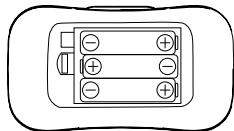
Non-rechargeable batteries are not to be recharged. Rechargeable batteries are to be removed from the toy before being charged. Rechargeable batteries are only to be charged under adult supervision. Different types of batteries or new and used batteries are not to be mixed. Only batteries of the same or equivalent type as recommended are to be used. Batteries are to be inserted with the correct polarity. Exhausted batteries are to be removed from the toy. The supply terminals are not to be short circuited. Do not throw batteries into a fire. Remove the batteries if you are not going to use the game for a long period of time.
WARNING: Mal-function or loss of memory may be caused by strong frequency interference or electrostatic discharge. Should any abnormal function occur, press the RESET button or remove the batteries and insert them again.
PRODUCT FEATURES
NOTE: Before starting up the game, remove the plastic label on the LCD screen display.
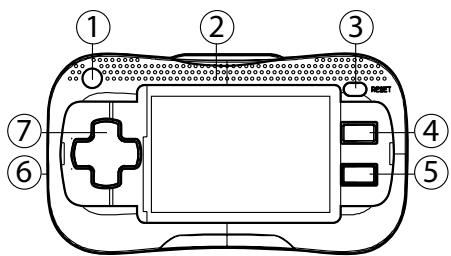
- ON/OFF key: Press this key to turn the game on and off. The unit turns off automatically after 3 minutes of inactivity.
- Integrated speaker
- RESET key: Press this key to go back to the game selection screen or to reset the unit in case of mal-function.
- A key
5.Bkey - Volume wheel
- Direction keys
GAME LIST
| 01 | Space Castle | 37 | Build up Road | 73 | Bingo Zap |
| 02 | Magic Diamond | 38 | Crazy Hit | 74 | Push the Ball |
| 03 | Star Ally | 39 | Ball Mania | 75 | Racing Boat |
| 04 | Mr. Onion | 40 | Delivery Man | 76 | Rainbow |
| 05 | Paint Master | 41 | Excel Racing | 77 | Right Spot |
| 06 | Jewel Master | 42 | Fish Quiz | 78 | Risker |
| 07 | Push the Box | 43 | Flying | 79 | Road Bumper |
| 08 | Monkey N Fox | 44 | Freak Number | 80 | Road Star |
| 09 | Aero Engine | 45 | Garden Maze | 81 | Runner Car |
| 10 | Animal Pool | 46 | Gear Race | 82 | Sea War |
| 11 | Ball Claw | 47 | Golden Arrow | 83 | Speedy Way-X |
| 12 | Sky Mission | 48 | Basketball | 84 | Spin Ball |
| 13 | Balloon Man | 49 | Move Fun | 85 | Submarine War |
| 14 | Block Out | 50 | Grass Cutter | 86 | Super Surfing |
| 15 | Bean's Adventure | 51 | Happy Diamond | 87 | Towers |
| 16 | Big Racing | 52 | Igloo Land | 88 | Track And Field |
| 17 | Bump Car | 53 | Insect Chase | 89 | Truck Race |
| 18 | Beat the bird | 54 | Jumping Ball | 90 | Ultra Doggy |
| 19 | Catch the Egg | 55 | Last Cobra | 91 | Under the Sea |
| 20 | Challenge 100 | 56 | Lonely Island | 92 | Valiant Rescue |
| 21 | Conquer South Pole | 57 | Loop Tennis | 93 | Magic Bubble |
| 22 | Dangerous Zone | 58 | Lucky Lawn Mower | 94 | VR Racing |
| 23 | Dragon Fire | 59 | Matching Tiles | 95 | Worm Catch |
| 24 | Dump Lorry Race | 60 | Motor Rally | 96 | Zero Tiger |
| 25 | Dart Champion | 61 | Ocean Quest | 97 | Delta Fighter |
| 26 | Birdie Nest | 62 | Awake Baby | 98 | Fast Race |
| 27 | GP Race | 63 | Ogreish Flower | 99 | Eifland |
| 28 | Hard Win | 64 | Pathfinder | 100 | Fire Fighter |
| 29 | Go bang | 65 | Texas Hold'em | ||
| 30 | Fancy match | 66 | Pet Shop | ||
| 31 | Fish Catcher | 67 | Pinball Track | ||
| 32 | Bolt Fighter | 68 | Slot Machine | ||
| 33 | Block Flying | 69 | Transportation | ||
| 34 | Bubble Factory | 70 | The Night | ||
| 35 | Bounce | 71 | Pool Pro | ||
| 36 | Bubble Blaster | 72 | Bingo |
EPILEPSY WARNING
Read before you or your children use video games. Some people are prone to epileptic seizures or losses of consciousness as a result of seeing certain flickering lights or objects often present in daily life. These people are at risk from seizures when they watch certain television images or play certain video games. Such incidents can happen even if the person has no previous medical history of epilepsy. If you or a member of your family has ever displayed symptoms linked with epilepsy (seizures or loss of consciousness) while watching flickering lights or images, consult your doctor before use.
Parents are advised to supervise their children while playing video games. If you or your child shows any of the following symptoms: dizziness, vision problems, eye or muscle tenseness, loss of consciousness, involuntary movements or seizures, cease playing immediately and consult your doctor.
Precautions to take in any case while using a video game
- When you use a video game which can be connected to a TV screen, stand or sit relatively far from the TV screen and as far as the connection cable allows it.
- Use preferably video games which have a small screen. Avoid playing video games if you are tired or lack some sleep.
- Make sure to play in room which is well lit.
- While playing video games, take 10 to 15 minute breaks every hour.
MAINTENANCE AND WARRANTY
Only use a soft, slightly damp cloth to clean the unit. Do not use detergent. Do not to expose the unit to direct sunlight or any other heat source. Do not immerse the unit in water. Do not dismantle or drop the unit. Do not try to twist or bend the unit.
NOTE: please keep this instruction manual, it contains important information.
This product is covered by our 2-year warranty. For any claim under the warranty or after sale service, please contact your distributor and present a valid proof of purchase. Our warranty covers any manufacturing material and workmanship defect, with the exception of any deterioration arising from the non-observation of the instruction manual or from any careless action implemented on this item (such as dismantling, exposition to heat and humidity, etc.). It is recommended to keep the packaging for any further reference. Not suitable for children under 36 months old, as it contains small detachable elements which could be swallowed.
In a bid to keep improving our services, we could implement modification on the colours and the details of the product shown on the packaging.
Reference: JL2000
Designed and developed in Europe - Made in China
©2009 LEXIBOOK®
Lexibook UK Ltd,
Unit 10 Petersfield Industrial Estate,
Bedford Road, Petersfield,
Hampshire, GU32 3QA,
United Kingdom.
Helpline: 0808 1003015.
www.lexibook.com

Environmental Protection
Unwanted electrical appliances can be recycled and should not be discarded along with regular household waste! Please actively support the conservation of resources and help protect the environment by returning this appliance to a collection centre (if available).

CONTENIDO DEL EMBALAJE
Lexibook Ibérica S.L.
WAARSCHUWING VOOR EPILEPSIE
Oi et\n\nOi e\n\nOi e\n\nOi e\n\nOi e\n\nOi e\n\nOi e\n\nOi e\n\nOi e\n\nOi e\n\nOi e\n\nOi e\n\nOi e\n\nOi e\n\nOi e\n\nOi e\n\nOi e\n\nOi e\n\nOi e\n\nOi e\n\nOi e\n\nOi c\n\nOi c\n\nOi c\n\nOi c\n\nOi c\n\nOi c\n\nOi c\n\nOi c\n\nOi c\n\nOi c\n\nOi c\n\nOi c\n\nOi c\n\nOi c\n\nOi c\n\nOi c\n\nOi c\n\nOi c\n\nOi c\n\nOi c\n\nOi CIOVATIOI OIOVATIOI OIOVATIOI OIOVATIOI OIOVATIOI OIOVATIOI OIOVATIOI OIOVATIOI OIOVATIOI OIOVATIOI OIOVATIOI OIOVATIOI OIOVATIOI OIOVATIOI OIOVATIOI OIOVATIOI OIOVATIOI OIOVATAOU TOW MTOU TOW MTOU TOW MTOU TOW MTOU TOW MTOU TOW MTOU TOW MTOU TOW MTOU TOW MTOU TOW MTOU TOW MTOU TOW MTOU TOW MTOU TOW MTOU TOW MTOU TOW MTOU TOW MTOU TOW MTOU TOW MTOU TOW MTOU TOW MToU TOW MToU TOW MToU TOW MToU TOW MToU TOW MToU TOW MToU TOW MToU TOW MToU TOW MToU TOW MToU TOW MToU TOW MToU TOW MToU TOW MToU TOW MToU TOW MToU TOW MToU TOW MToU TOW MToU TOW MTOU TOW MToU TOW MToU TOW MToU TOW MToU TOW MToU TOW MToU TOW MToU TOW MToU TOW MToU TOW MToU TOW MToU TOW MToU TOW MToU TOW MToU TOW MToU TOW MToU TOW MToU TOW MToU TOW MTOU TOW MTOU TOW MToU TOW MToU TOW MToU TOW MToU TOW MToU TOW MToU TOW MToU TOW MToU TOW MToU TOW MToU TOW MToU TOW MToU TOW MToU TOW MToU TOW MToU TOW MToU TOW MToU TOW M To U
IPOEIOIOHEH: Iaxupc tsapemuocstn auvtnta n aeKpOaTAtkcs EKKevwaeic e tnpoei va npokaleouov kakf aeioupyia n aBnio ngnuinjc. Av tuxov kati d E aeoupyei Kavovika, tataote to pAnktpo RESET n apaipeotic Tt mpatapie c kai totoTejntote tic gava.
Napouoiaon tou naixviidiou
SHMEIOH: PIVN EKIVHOETO TPOAVXVIDI, aqapiapeoT NTVIATAOTK IETKETA TAVW OTNV 0oovn LCD.
Kwokosavapopac:JL2000
©2009 LEXIBOOK®
www.lexibook.com

YtodeiEigic yia nTn pOoTaOia toupeipalavovtos
Oi Maiez, naxtipkoe, ouokueie elvai Mouia uukai Ka uovitae Dey Evoy Bc0n ooi kaiot aotoppuiatot Oa BeAou loiv vaoacapakoeoue vaueu uao tnpoetnepeo eepalokaiov Eevpy ot nptoatao Tu vupunuauu Ka uou TepkaiovmoTpoapobioaTu nKoueiur utti unctnepeo avokuaikauon -Eepov untopayou.

JL2000IM0109
Brand : LEXIBOOK
Model : JL2000
Category : Dictionary