
HD-LBU3 - External hard drive BUFFALO - Free user manual and instructions
Find the device manual for free HD-LBU3 BUFFALO in PDF.



User questions about HD-LBU3 BUFFALO
0 question about this device. Answer the ones you know or ask your own.
Ask a new question about this device
Download the instructions for your External hard drive in PDF format for free! Find your manual HD-LBU3 - BUFFALO and take your electronic device back in hand. On this page are published all the documents necessary for the use of your device. HD-LBU3 by BUFFALO.
USER MANUAL HD-LBU3 BUFFALO
This manual describes typical formatting procedures for external hard drives. Note that not all hard drives support all of the operating systems or format types discussed.
Table of Contents
What is Formatting? 2
Format Types....2
Formatting Notes ...... 3
Formatting in NTFS....4
Format Procedure 4
Formatting with Mac OS Extended Format....6
Mac OS X 10.5 and later ....6
Mac OS X 10.4....8
What is Formatting?
Formatting is an operation that enables a hard disk to be used on your computer. This product comes formatted with FAT32 and is plug and play for Windows, Mac OS 9, and Mac OS X 10.4 and later.
Format Types
There are several different format types, each compatible with different operating systems.

Some products may require formatting with a specific format type. Refer to the manual supplied with the product to select the most suitable format.
NTFS format
NTFS formatting is compatible with Windows 7, Vista, XP, 2000, and Server 2003. Mac OS X can read this format but not write to it. It can handle files larger than 4 GB.
FAT32 format
This is a format that enables use in both Windows and Mac OS, but it does not allow use of files that are 4 GB or larger in size.
Mac OS Extended format
This is a format for the Macintosh only. It allows use of files that are 4 GB or larger in size. Windows doesn't support this format.
| NTFS file system | FAT32 file system | Mac OS Extended format | |
| Windows 7/Vista/XP/2000/Server 2003 | ◎ | ○ | × |
| Mac OS X 10.5 and later | △ | ○ | ◎ |
| Mac OS X 10.4 | △ | ○ | ◎ |
◎ : Both reading and writing are supported.
○ : Both reading and writing are supported (cannot handle files larger than 4 GB).
△ : Only reading is supported. Writing is not supported.
× : Not supported. (Hard drive is not recognized.)
Formatting Notes
● Never unplug, reset, or turn off the computer during the formatting process.
This could result in damage to the disk or other problems. Proper operation cannot be guaranteed if the format process was interrupted.
● Formatting will erase all data on the hard disk. Before formatting, back up any data.
The user is responsible for any data lost due to formatting of the hard disk.
Don't format the wrong drive! Check the driveletter and partition name carefully. If you format the wrong drive, all data on it will be lost.
Next
The formatting procedure varies depending on how the drive will be used. Refer to the pages below.
- Formatting with NTFS or FAT32 P 4
- Formatting with Mac OS Extended Format ······ P 6
Formatting in NTFS
Follow the procedure below to format your drive with NTFS.
- Format the hard drive using a Windows computer. If the hard drive is formatted using a Macintosh, the hard drive may not be formatted properly, or the formatting process may take an extremely long amount of time.
- Use the supplied DiskFormatterLite software to perform the formatting process. If the Windows format function (Disk Management) is used to format the hard drive, the hard drive may not be formatted, or the hard drive may not be recognized properly.
- If formatted in the FAT32 file system, the maximum file size that can be saved is 4GB. (This is a limitation of the FAT32 file system.)
Perform the formatting process using a Windows computer. Use the supplied DiskFormatterLite software to format the hard drive. Install DiskFormatterLite before performing the procedure below. This section shows the reformatting procedure from the product default state.
Format Procedure
Note: Performing the format procedure below will erase all data on the external hard drive. Before formatting, please back up any important data on the drive.
1 Connect the drive to be formatted to your computer.
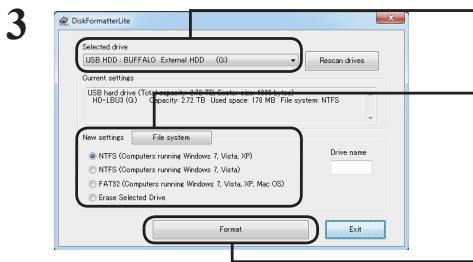
2 Select [start]-[All program]-[BUFFALO]-[DiskFormatterLite]-[DiskFormatterLite].
① Check that the correct drive to be formatted is displayed here.
② Select a filesystem for the format. See the table below for more information on the available filesystems.
To set the name (volume label) for the drive, enter the desired name in "Drive name".
③ Click [Format].
text_image
DiskFormatterLite Selected drive USB HDD: BUFFALO: External HDD (0) Current settings USB hard drive (Total Computer 1.5 MB / Auto System NTFS system) HD-LSB3 (G): Capacity 3.72 TB Used space 176 MB File system NTFS New settings File system NTFS (Computers running Windows 7, Vista XP) NTFS (Computers running Windows 7, Vista) FAT32 (Computers running Windows 7, Vista XP, Mac OS) Erase Selected Drive Drive name Format Exit| NTFS (Computers running Windows 7, Vista, or XP) | NTFS formatting is recommended for Windows 7, Vista, and Windows XP computers. This format is not recommended for use with computers running Mac OS.• Sector sizeModels with 3 TB or or more : 4096 bytesModels with 2 TB or or less : 512 bytes• Partition style: MBR• File system: NTFS |
| NTFS (Computers running Windows 7 or Vista)This option is only available when a 3 TB or larger drive is connected to Windows 7 or Vista. | Windows 7 and Vista allow drives to be formatted with a single NTFS partition larger than 2 TB. These large formatted partitions will not be recognized by Windows XP or Mac OS computers.Sector size: 512 bytesPartition style: GPTFile system: NTFS |
| FAT32(Computers running Windows 7, Vista, or XP, or Mac OS) | Drives formatted with the FAT32 filesystem are compatible with most operating systems. Note that this filesystem does not support files that are 4 GB or larger in size.Sector size:Models with 3 TB or or more : 4096 bytesModels with 2 TB or or less : 512 bytesPartition style: MBRFile system: FAT32 |
| Erase Selected Drive | This changes the drive to an unformatted state.Sector size: 512 bytesPartition style: NoneFile system: None |
4
text_image
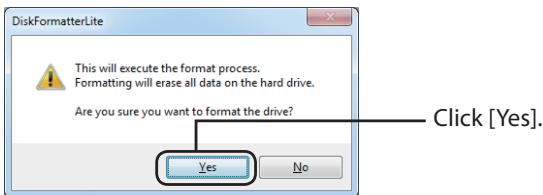
DiskFormatterLite This will execute the format process. Formatting will erase all data on the hard drive. Are you sure you want to format the drive? Yes No Click [Yes].The format may take several minutes to complete. Wait until the screen below is displayed.
5
text_image
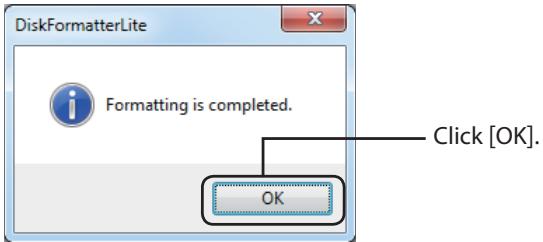
DiskFormatterLite Formatting is completed. Click [OK]. OKFormatting with Mac OS Extended Format
This describes the procedure for formatting this product with the Mac OS Extended format. The procedure varies depending on the Mac OS version. Refer to the procedure for the version you are using.
- Windows computers don't support Mac OS Extended format. To use the drive with Windows computers, use a different format instead, such as NTFS or FAT32.
- Some drives don't support multiple partitions. If yours is one of them, use only a single partition on the drive.
- For more details on Mac OS Extended, consult your Mac OS Help.
Mac OS X 10.5 and later
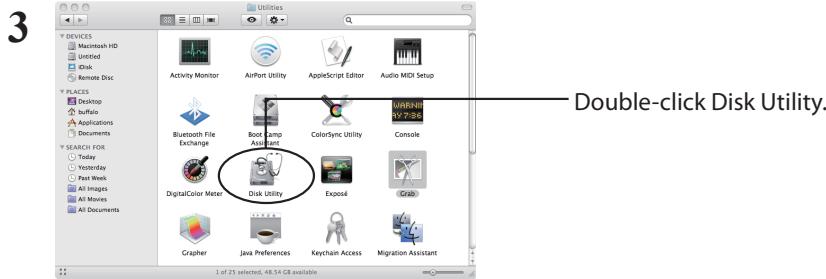
1 Double-click the startup volume icon (such as "Macintosh HD") on the Desktop.
2 Open the [Utilities] folder contained in the [Applications] folder.
text_image
3 DEVICES Macintosh HD Unlnted Disk Remote Disc PLACES Desktop Buffalo Applications Documents SEARCH FOR Today Yesterday Past Week All Images All Movies All Documents Activity Monitor AirPort Utility AppleScript Editor Audio MDI Setup Bluetooth File Exchange Boot Camp Assistant ColorSync Utility Console DigitalColor Meter Disk Utility Exposé Craze Grapher Java Preferences Keychain Access Migration Assistant Double-click Disk Utility. 1 of 25 selected, 48.54 GB available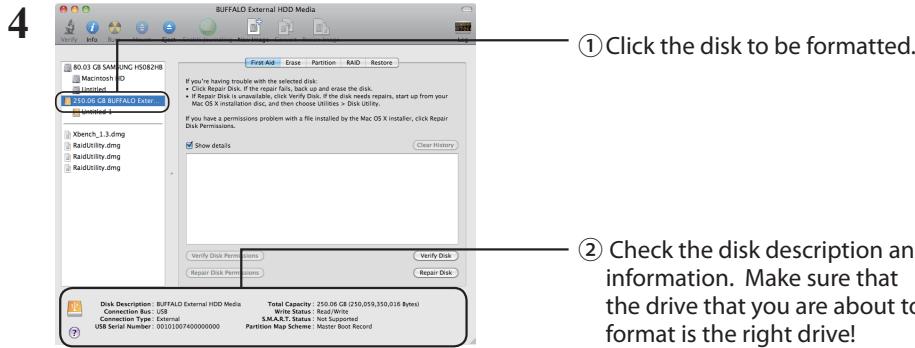
text_image
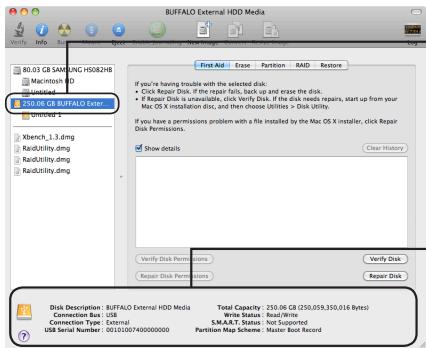
①Click the disk to be formatted. ② Check the disk description and information. Make sure that the drive that you are about to format is the right drive!Go to Next Page
5
text_image
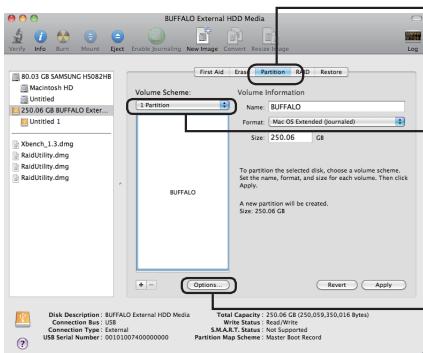
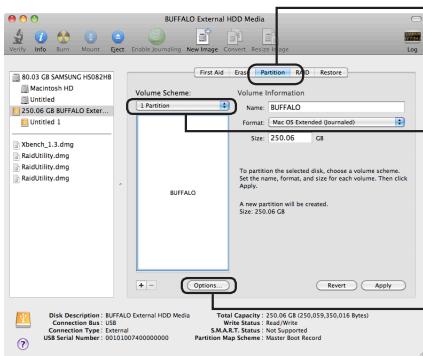
BUFFALO External HDD Media 80.03 GB SAMSUNG H5082HB Macintosh HD Untitled 250.06 GB BUFFALO Ext... Untitled 1 Xbench_1_3.dmg RadUtility.dmg RadUtility.dmg RadUtility.dmg First Aid Entity Partition: H508 Restore Volume Scheme: 1 Partition Volume Information Name: BUFFALO Format: Mac OS Extended (journalled) Size: 250.06 GB To partition the selected disk, choose a volume scheme. Set the name, format, and size for each volume. Then click Apply. A new partition will be created. Size: 250.06 GB Buffalo Options... Revart Apply Disk Description: BUFFALO External HDD Media Connection Box: USB Connection Type: External USB Serial Number: 0015107400000000 Total Capacity: 250.06 GB (250,059,350,016 Bytes) Write Status: Read/Write S.M.A.R.T. Status: Not Supported Partition Map Scheme: Master Boot Record① Click [Partition].
②Select [1 Partition].
Select the number of partitions that you want to create on the drive.
③ Click [Options].
6
text_image
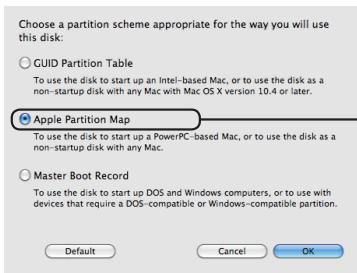
Choose a partition scheme appropriate for the way you will use this disk: ○ GUID Partition Table To use the disk to start up an Intel-based Mac, or to use the disk as a non-startup disk with any Mac with Mac OS X version 10.4 or later. ● Apple Partition Map To use the disk to start up a PowerPC-based Mac, or to use the disk as a non-startup disk with any Mac. ○ Master Boot Record To use the disk to start up DOS and Windows computers, or to use with devices that require a DOS-compatible or Windows-compatible partition. Default Cancel OKClick [Apple Partition Map].
7
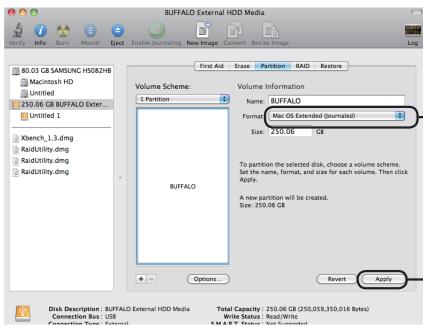
text_image
BUFFALD External HDD Media 80.03 GB SAMSUNG H5082HB Macintosh HD Untitled 250.06 GB BUFFALD Exter... Untitled 1 Xbench_1_3.dmg RadiUtility.dmg RadiUtility.dmg RaidUtility.dmg RaidUtility.dmg Volume Scheme: 1 Partition Volume Information Name: BUFFALO Format: Mac OS Extended (journaled) Size: 250.06 GB To partition the selected disk, choose a volume scheme. Set the name, format, and size for each volume. Then click Apply. A new partition will be created. Size: 250.06 GB Revert Apply Disk Description: BUFFALD External HDD Media Total Capacity: 250.06 GB (250.09,350.016 Bytes) Connection Bus: USB Write Status: Read/Write USB & W: Status: New Founding Log① Select [Mac OS Extended (Journaled)].
② Click [Apply].
8
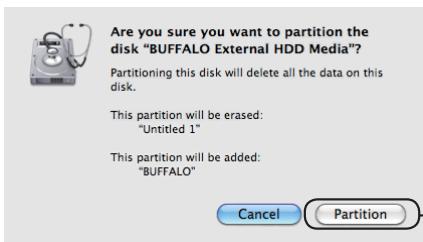
text_image
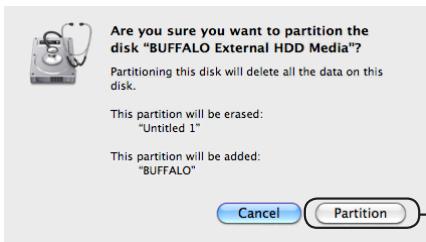
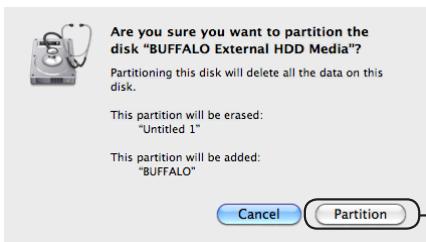
Are you sure you want to partition the disk "BUFFALO External HDD Media"? Partitioning this disk will delete all the data on this disk. This partition will be erased: "Untitled 1" This partition will be added: "BUFFALO" Cancel PartitionClick [Partition].
This completes the formatting process for this product. Exit the Disk Utility.
If "Do you want to use Volume_name to back up with Time Machine?" is displayed, you may click [Use as Backup Disk] and Time Machine will use the drive for backup. If you don't want to use it as a dedicated backup drive, click [Cancel].
1 On the desktop, double-click the as "Macintosh HD").

icon for the volume to be formatted (such
2 In the Applications folder, open Utilities.
3
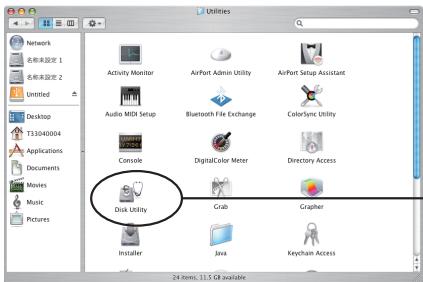
text_image
Network 名称未设定 1 名称未设定 2 Untitled Desktop T33040004 Applications Documents Movies Music Pictures Activity Monitor AirPort Admin Utility AirPort Setup Assistant Audio MiOS Setup Bluetooth File Exchange ColorSync Utility Console DigitalColor Meter Directory Access Disk Utility Grab Grapher Installer Java Keychain Access 24 items, 11.5 GB availableDouble-click Disk Utility.
4
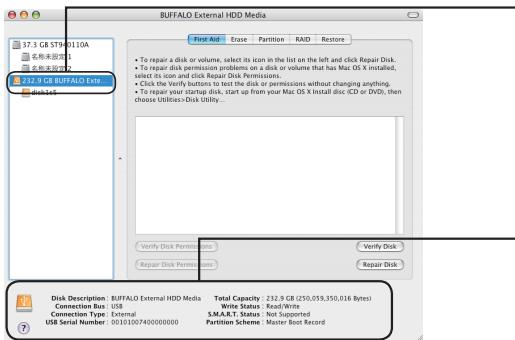
text_image
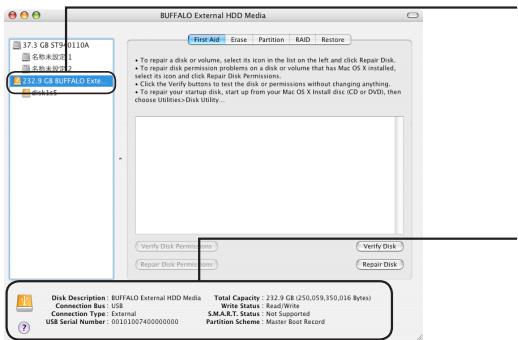
BUFFALD External HDD Media 17.3 GB ST9-0110A 名称未显示 名称未显示 212.9 GB BUFFALD Exts disk16 First Aid Erase Partition RAID Restore • To repair a disk or volume, select its icon in the list on the left and click Repair Disk. • To repair disk permission problems on a disk or volume that has Mac OS X installed, select its icon and click Repair Disk Permissions. • Click the Verify buttons to test the disk or permissions without changing anything. • To repair your startup disk, start up from your Mac OS X Install disc (CD or DVD), then choose Utilities Disk Utility... Verify Disk Permissions Repair Disk Permissions Verify Disk Repair Disk Disk Description: BUFFALD External HDD Media Connection Box: USB Connection Type: External USB Serial Number: 0010100740000000 Total Capacity: 212.9 GB (250,059,350,016 Bytes) Write Status: Read/Write S.M.A.R.T. Status: Not Supported Partition Scheme: Master Boot Record① Click the disk to be formatted.
② Check the information for the disk to be formatted. Make sure that this is the correct drive that you want to format!
5
text_image
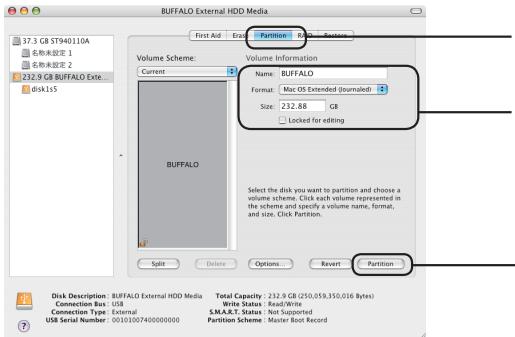
BUFFALD External HDD Media First Aid Break Partition Volume Scheme: Current Volume Information Name: BUFFALD Format: Mac OS Extended (Unmailed) Size: 232.88 GB Locked for editing BUFFALO Select the disk you want to partition and choose a volume scheme. Click each volume represented in the scheme and specify a volume name, format, and size. Click Partition. Split Delete Options Revert Partition Disk Description: BUFFALD External HDD Media Total Capacity: 232.9 GB (250,059,350,016 Bytes) Connection Bus: USB Write Status: Read/Write Connection Type: External E.M.A.R.T. Status: Not Supported USB Serial Number: 00101007400000000 Partition Scheme: Master Boot Record① Click [Partition].
② Set the volume information. Normally, select [Mac OS Extended (Journaled)] for the format.
③ Click [Create Partition].
When the volume information cannot be set (Mac OS X 10.4 and later only):
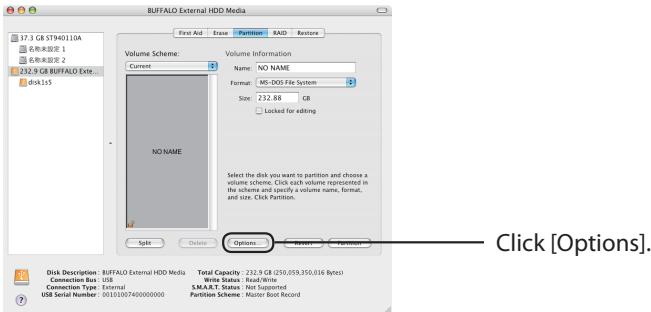
Use the procedure below to change the partition scheme to Apple Partition Map.
1
text_image
BUFFALO External HDD Media Volume Scheme: Current Volume Information Name: NO NAME Format: MS-DOS File System Size: 232.88 GB Locked for editing NO NAME Select the disk you want to partition and choose a volume scheme. Click each volume represented in the scheme and specify a volume name, format, and size. Click Partition. Options... Disk Description: BUFFALO External HDD Media Connection Bus: USB Connection Type: External USB Serial Number: 0015100740000000 Total Capacity: 232.9 GB (250,059,350,016 bytes) Write Status: Read/Write S.M.A.T. Status: Not Supported Partition Scheme: Master Back Record Click [Options].2 Select [Apple Partition Map].
![BUFFALO HD-LBU3 - Select [Apple Partition Map]. - 1](/content/2020/04/176701/images/b1af7c42e6ee5fec6f8c1d677dbcac80044f2341ac454d1037f5fff8fbbf15f3.jpg)
text_image
Choose a partition scheme appropriate for the way you will use this disk: GUID Partition Table To use the disk to start up an Intel-based Macintosh computer Apple Partition Map To use the disk to start up a PowerPC-based Macintosh computer or to use the disk as a non-startup disk with any Mac Master Boot Record To use the disk to start up DOS and Windows computers, or to use with devices that require a DOS-compatible or Windows-compatible partition Default Cancel OK ①Select [Apple Partition Map]. ② Click [OK].6
![BUFFALO HD-LBU3 - Select [Apple Partition Map]. - 2](/content/2020/04/176701/images/a5bda7e88b3b06c8d9c191ebacef624f54e23d693b1cab61bf7ab59164848d48.jpg)
text_image
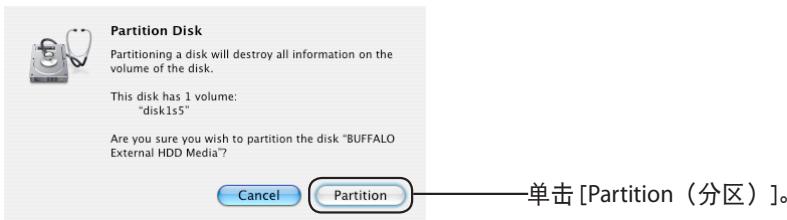
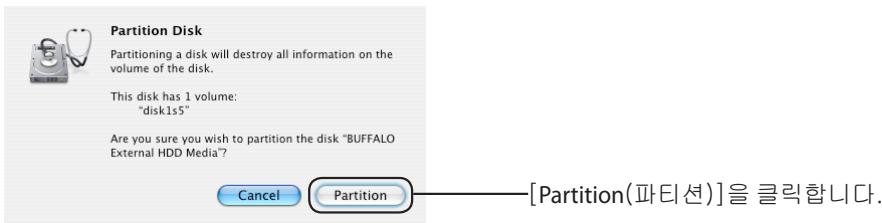
Partition Disk Partitioning a disk will destroy all information on the volume of the disk. This disk has 1 volume: "disk1s5" Are you sure you wish to partition the disk "BUFFALO External HDD Media"? Cancel Partition Click [Partition].This completes the formatting process for this product. Exit the Disk Utility.
text_image
DiskFormatterLite Selected drive USB HDD - BUFFALO External HDD (G) Rescan drives Current settings USB hard drive (Total capacity: 272 TB, Sector size: 40MB bytes) HD-LBUB (U) Capacity: 272 TB Used space 176 MB File system NTFS New settings File system NTFS (Computers running Windows Z, Vista, XP) NTFS (Computers running Windows Z, Vista) FAT32 (Computers running Windows Z, Vista, XP, Mac OS) Erase Selected Drive Drive name Format Exittext_image
DiskFormatterLite This will execute the format process. Formatting will erase all data on the hard drive. Are you sure you want to format the drive? Yes Notext_image
DiskFormatterLite Formatting is completed. OKtext_image
BUFFALO External HDD Media 80.03 GB SAMSUNG HS082HB Macintosh HD Unlimited 250.06 GB BUFFALO Extar... Untitled 1 Xbench_1_3.dmg Radutility.dmg Radutility.dmg Powltunity.dmg Volume Scheme: ↓ Partition Volume Information Name: BUFFALO Format: Mac OS Extended (Journalised) Size: 250.06 GB To partition the selected disk, choose a volume scheme. Set the name, format, and size for each volume. Then click Apply. A new partition will be created. Size: 250.06 GB Options... Revnt Apply Disk Description: BUFFALO External HDD Media Connection Bus: USB Connection Type: External USB Serial Number: 0010100740000000 Total Capacity: 250.06 GB (250,059,350,016 Bytes) Write Status: Read/Write S.M.A.R.T. Status: Not Supported Partition Map Scheme: Master Boot Recordtext_image
Choose a partition scheme appropriate for the way you will use this disk: ○ GUID Partition Table To use the disk to start up an Intel-based Mac, or to use the disk as a non-startup disk with any Mac with Mac OS X version 10.4 or later. ○ Apple Partition Map To use the disk to start up a PowerPC-based Mac, or to use the disk as a non-startup disk with any Mac. ○ Master Boot Record To use the disk to start up DOS and Windows computers, or to use with devices that require a DOS-compatible or Windows-compatible partition. Default Cancel OKtext_image
BUFFALO External HDD Media 80.03 GB SAMSUNG HS082HB Macintosh HD Untitled 250.06 GB BUFFALO Exter... Untitled 1 Xbench_1_3.dmg RadUtility.dmg RadUtility.dmg RadUtility.dmg Volume Scheme: 1 Partition Volume Information Name: BUFFALO Format: Mac OS Extended (journalled) Size: 250.06 GB To partition the selected disk, choose a volume scheme. Set the name, format, and size for each volume. Then click Apply. A new partition will be created. Size: 250.06 GB Options Revert Apply Disk Description: BUFFALO External HDD Media Total Capacity: 250.06 GB (250.059,350.016 Bytes) Connection Bus: USB Connection Type: External Write Status: Read/Write S.M & T Status: Not Completedtext_image
Are you sure you want to partition the disk "BUFFALO External HDD Media"? Partitioning this disk will delete all the data on this disk. This partition will be erased: "Untitled 1" This partition will be added: "BUFFALO" Cancel Partitiontext_image
37.3 GB ST9-0110A 名称未显示 名称未显示 272.9 GB BUFFALO Extel Disk15 BuffALO External HDD Media First Aid Erase Partition RAID Restore • To repair a disk or volume, select its icon in the list on the left and click Repair Disk. • To repair disk permission problems on a disk or volume that has Mac OS X install, select its icon and click Repair Disk Permissions. • Click the verify buttons to test the disk or permissions without changing anything. • To repair your startup disk, start up from your Mac OS X Install disc (CD or DVD), then choose utilities+Disk Utility... Verify Disk Permissions Repair Disk Permissions Verify Disk Repair Disk Disk Description: BUFFALO External HDD Media Total Capacity: 232.9 GB (250,059,350,036 Bytes) Connection Bus: USB Write Status: Read/Write Connection Type: External S.M.A.R.T. Status: Not Supported USB Serial Number: 0010100740000000 Partition Scheme: Master Boot Recordtext_image
BUFFALO External HDD Media First Aid Eraak Partition 17.3 GB ST940110A 名称未设置 1 名称未设置 2 232.9 GB BUFFALO Exte... disk1s Volume Scheme: Current Volume Information Name: BUFFALO Format: Mac OS Extended (journalled) Size: 232.88 GB Locked for editing BUFFALO Select the disk you want to partition and choose a volume scheme. Click each volume represented in the scheme and specify a volume name, format, and size. Click Partition. Split Delete Options... Revert Partition Disk Description: BUFFALO External HDD Media Connection Bus: USB Connection Type: External USB Serial Number: 00101007400000000 Total Capacity: 232.9 GB (250,059,350,016 Bytes) Write Status: Read/Write S.M.A.R.T. Status: Not Supported Partition Scheme: Master Boot Recordtext_image
BUFFALO External HDD Media First Aid Erase Partition RAD Restore Volume Scheme: Current Name: NO NAME Format: MS-DOS File System Size: 232.88 GB Locked for editing NO NAME Select the disk you want to partition and choose a volume scheme. Click each volume represented in the scheme and specify a volume name, format, and size. Click Partition. Split Delete Options Browse... Partition Disk Description: BUFFALO External HDD Media Total Capacity: 232.9 GB (250,059,350,016 Bytes) Connection Bus: USB Write Status: Read/Write Connection Type: External S.M.A.R.T. Status: Not Supported USB Serial Number: 00101007400000000 Partition Scheme: Master Best RecordChoose a partition scheme appropriate for the way you will use this disk:
○ GUID Partition Table
To use the disk to start up an Intel-based Macintosh computer
Apple Partition Map
To use the disk to start up a PowerPC-based Macintosh computer or to use the disk as a non-startup disk with any Mac
Master Boot Record
To use the disk to start up DOS and Windows computers, or to use with devices that require a DOS-compatible or Windows-compatible partition
Default
Cancel
OK
Partitioning a disk will destroy all information on the volume of the disk.
This disk has 1 volume: "disk1s5"
Are you sure you wish to partition the disk "BUFFALO External HDD Media"?
Cancel
Partition
text_image
DiskFormatterLite Selected drive USB HDD: BUFFALO: External HDD: (G) Rexian drives Current settings USB hard drive (Total: 122 TB, Sector size NTFS bytes) RS-LB30 (0) Capacity: 275 TB. Used space 176 MB File system NTFS New settings File system NTFS (Computers running Windows 7, Vista, XP) NTFS (Computers running Windows 7, Vista) FAT22 (Computers running Windows 7, Vista, XP, Mac OS) Erase Selected Drive Drive name Format Exittext_image
DiskFormatterLite This will execute the format process. Formatting will erase all data on the hard drive. Are you sure you want to format the drive? Yes No Haga clic en [Yes (Sí)].text_image
DiskFormatterLite Formatting is completed. Haga clic en [OK (Aceptar)]. OKtext_image
DEVICES Macintosh HD United Disk Remote Disc PLACES Desktop Buffalo Applications Documents SEARCH FOR Today Yesterday Past Week All Images All Movies All Documents Activities Monitor AirPort Utility AppleScript Editor Audio MIDI Setup Bluetooth File Exchange Boot Lamp Assist ColorSync Utility Console DigitalColor Meter Disk Utility Exposé Grapher Java Preferences Keychain Access Migration Assistanttext_image
BUFFALO External HDD Media 80.03 GB SAMSUNG H50&2HB Macintosh HD Unfired 250.06 GB BUFFALO Exter... Unfired 1 Xbench_1_3.dmg Radutility.dmg Radutility.dmg Radutility.dmg Volume Scheme: ↓ Partition Volume Information Name: BUFFALO Format: Mac OS Extended (Journaled) Size: 250.06 GB To partition the selected disk, choose a volume scheme. Set the name, format, and size for each volume. Then click Apply. A new partition will be created. Size: 250.06 GB Options Revnt Apply Disk Description: BUFFALO External HDD Media Connection Bus: USB Connection Type: External USB Serial Number: 0010100740000000 Total Capacity: 250.06 GB (250.059,350,016 Bytes) Write Status: Read/Write S.M.A.R.T. Status: Not Supported Partition Map Scheme: Master Boot Recordtext_image
Choose a partition scheme appropriate for the way you will use this disk: ○ GUID Partition Table To use the disk to start up an Intel-based Mac, or to use the disk as a non-startup disk with any Mac with Mac OS X version 10.4 or later. ● Apple Partition Map To use the disk to start up a PowerPC-based Mac, or to use the disk as a non-startup disk with any Mac. ○ Master Boot Record To use the disk to start up DOS and Windows computers, or to use with devices that require a DOS-compatible or Windows-compatible partition. Default Cancel OKtext_image
BUFFALO External HDD Media 80.03 GB SAMSUNG H5082m8 Macintosh HD Unvisited 250.06 GB BUFFALO Enter... Untitled 1 Xbench_1_3.dmg RadiUtility.dmg RadiUtility.dmg RadiUtility.dmg Volume Scheme: 1 Partition Volume Information Name: BUFFALO Format: Mac OS Extended (journained) Size: 250.06 GB To partition the selected disk, choose a volume scheme. Set the name, format, and size for each volume. Then click Apply. A new partition will be created. Size: 250.06 GB Options... Revert Apply Disk Description: BUFFALO External HDD Media Total Capacity: 250.06 GB (250.059,350.016 Bytes) Connection Bus: USB Write Status: Read/Write Edit Date: Not Updated① Seleccione [Mac OS Extended (Journaled) (Formato extendido de Mac OS [Journaled])].
② Haga clic en [Apply (Aplicar)].
① Seleccione [Mac OS Extended (Journaled) (Formato extendido de Mac OS [Journaled])].
8
text_image
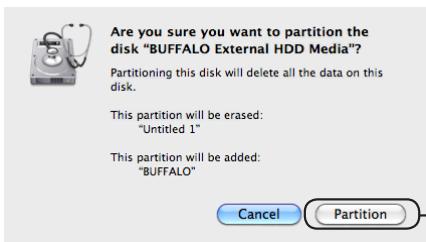
Are you sure you want to partition the disk "BUFFALO External HDD Media"? Partitioning this disk will delete all the data on this disk. This partition will be erased: "Untitled 1" This partition will be added: "BUFFALO" Cancel Partitiontext_image
BUFFALO External HDD Media First Aid Erase Partition RAD Restore Volume Scheme: Current Name: NO NAME Format: MS-DOS File System Size: 232.88 GB Locked for editing NO NAME Select the disk you want to partition and choose a volume scheme. Click each volume represented in the scheme and specify a volume name, format, and size. Click Partition. Split Delete Options Browse... Partition Disk Description: BUFFALO External HDD Media Total Capacity: 232.9 GB (250,059,350,016 Bytes) Connection Bus: USB Write Status: Read/Write Connection Type: External S.M.A.R.T. Status: Not Supported USB Serial Number: 00101007400000000 Partition Scheme: Master Best RecordHaga clic en [Options (Opciones)].
Choose a partition scheme appropriate for the way you will use this disk:
○ GUID Partition Table
To use the disk to start up an Intel-based Macintosh computer
Apple Partition Map
To use the disk to start up a PowerPC-based Macintosh computer or to use the disk as a non-startup disk with any Mac
Master Boot Record
To use the disk to start up DOS and Windows computers, or to use with devices that require a DOS-compatible or Windows-compatible partition
Default
Cancel
OK
Partitioning a disk will destroy all information on the volume of the disk.
This disk has 1 volume: "disk1s5"
Are you sure you wish to partition the disk "BUFFALO External HDD Media"?
Cancel
Partition
text_image
DiskFormatterLite Selected drive USB HDD / BUFFALO / External HDD (G) Rescan drives Current settings USB hard drive (Total Capacity: 2.72 TB, Sector size: 400K bytes) HD-LB38 (G) (Specificity: 2.72 TB, Used space: 17V MB) File system NTFS New settings File system NTFS (Computers running Windows 7, Vista, XP) NTFS (Computers running Windows 7, Vista) FAT32 (Computers running Windows 7, Vista, XP, Mac OS) Erase Selected Drive Drive name Format Exittext_image
DiskFormatterLite This will execute the format process. Formatting will erase all data on the hard drive. Are you sure you want to format the drive? Yes No Cliquez sur [Yes (Oui)].text_image
DiskFormatterLite Formatting is completed. OK Cliquez sur [OK].Formatage en Mac OS Etendu
text_image
3 Double-cliquez sur Disk Utility. 1 of 25 selected, 48.54 GB available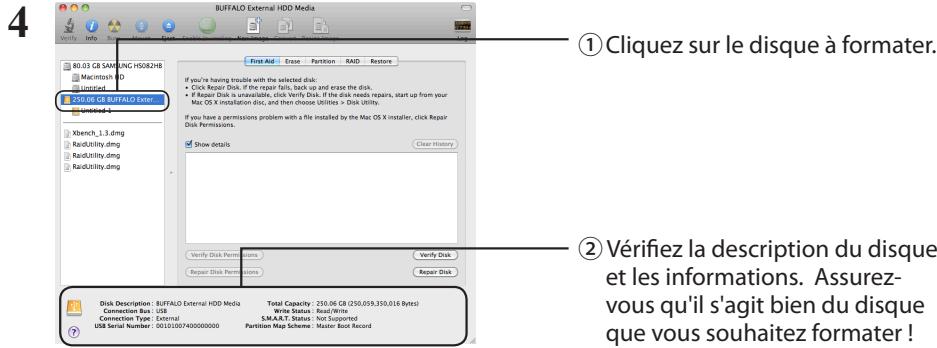
text_image
BUFFALO External HDD Media 80.03 GB SAMSUNG HS082HB Macintosh HD Untitled 250.06 GB BUFFALO Enter... Untitled Xbench_1_3.dmg Raidutility.dmg Raidutility.dmg Buffalo Volume Scheme: ↓ Partition Volume Information Name: BUFFALO Format: Mac OS Extended (journalled) Size: 250.06 GB To partition the selected disk, choose a volume scheme. Set the name, format, and size for each volume. Then click Apply. A new partition will be created. Size: 250.06 GB Options... Revert Apply Disk Description: BUFFALO External HDD Media Connection Bus: USB Connection Type: External USB Serial Number: 00101007400000000 Total Capacity: 250.06 GB (250.059,350,616 Bytes) Write Status: Read/Write S.M.A.R.T. Status: Not Supported Partition Map Scheme: Master Boot Recordtext_image
Choose a partition scheme appropriate for the way you will use this disk: ○ GUID Partition Table To use the disk to start up an Intel-based Mac, or to use the disk as a non-startup disk with any Mac with Mac OS X version 10.4 or later. ● Apple Partition Map To use the disk to start up a PowerPC-based Mac, or to use the disk as a non-startup disk with any Mac. ○ Master Boot Record To use the disk to start up DOS and Windows computers, or to use with devices that require a DOS-compatible or Windows-compatible partition. Default Cancel OKtext_image
BUFFALO External HDD Media 80.03 GB SAMSUNG HS082HB Macintosh HD Untitled 250.06 GB BUFFALO Extens... Untitled 1 Xbench_1_3.dmg RadUtility.dmg RadUtility.dmg RadUtility.dmg Volume Scheme: 1 Partition Volume Information Name: BUFFALO Format: Mac OS Extended (journalled) Size: 250.06 GB To partition the selected disk, choose a volume scheme. Set the name, format, and size for each volume. Then click Apply. A new partition will be created. Size: 250.06 GB Options... Revnt Apply Disk Description: BUFFALO External HDD Media Connection Bus: USB Total Capacity: 250.06 GB (250,059,350,016 Bytes) Write Status: Read/Write S:47.77 (Note: Updated)text_image
Are you sure you want to partition the disk "BUFFALO External HDD Media"? Partitioning this disk will delete all the data on this disk. This partition will be erased: "Untitled 1" This partition will be added: "BUFFALO" Cancel PartitionDouble-cliquez sur Disk Utility.
4
text_image
BUFFALO External HDD Media 17.3 GB ST9-0110A 名称未显示 文件类型: 232.9 GB BUFFALO Ext Disk 165 First Aid Erase Partition RAID Restore • To repair a disk or volume, select its icon in the list on the left and click Repair Disk. • To repair disk permission problems on a disk or volume that has Mac OS X installed, select its icon and click Repair Disk Permissions. • Click the Verify buttons to test the disk or permissions without changing anything. • To repair your startup disk, start up from your Mac OS X Install disc (CD or DVD), then choose Utilities > Disk Utility... Verify Disk Permissions Verify Disk Repair Disk Permissions Verify Disk Repair Disk Disk Description: BUFFALO External HDD Media Total Capacity: 232.9 GB (250,059,350,016 Bytes) Connection Bus: USB Write Status: Read/Write Connection Type: External S.M.A.R.T. Status: Not Supported USB Serial Number: 00101007400000000 Partition Scheme: Master Boot Recordtext_image
BUFFALO External HDD Media First Aid Eraak Partition 17.3 GB ST940110A 名称未设置 1 名称未设置 2 232.9 GB BUFFALO Exte... disk1s Volume Scheme: Current Volume Information Name: BUFFALO Format: Mac OS Extended (journalled) Size: 232.88 GB Locked for editing BUFFALO Select the disk you want to partition and choose a volume scheme. Click each volume represented in the scheme and specify a volume name, format, and size. Click Partition. Split Delete Options... Revert Partition Disk Description: BUFFALO External HDD Media Connection Bus: USB Connection Type: External USB Serial Number: 00101007400000000 Total Capacity: 232.9 GB (250,059,350,016 Bytes) Write Status: Read/Write S.M.A.R.T. Status: Not Supported Partition Scheme: Master Boot Recordtext_image
BUFFALO External HDD Media First Aid Erase Partition RAD Restore Volume Scheme: Current Name: NO NAME Format: MS-DOS File System Size: 232.88 GB Locked for editing NO NAME Select the disk you want to partition and choose a volume scheme. Click each volume represented in the scheme and specify a volume name, format, and size. Click Partition. Split Delete Options Browse... Partition Disk Description: BUFFALO External HDD Media Total Capacity: 232.9 GB (250,059,350,016 Bytes) Connection Bus: USB Write Status: Read/Write Connection Type: External S.M.A.R.T. Status: Not Supported USB Serial Number: 00101007400000000 Partition Scheme: Master Best RecordChoose a partition scheme appropriate for the way you will use this disk:
○ GUID Partition Table
To use the disk to start up an Intel-based Macintosh computer
Apple Partition Map
To use the disk to start up a PowerPC-based Macintosh computer or to use the disk as a non-startup disk with any Mac
Master Boot Record
To use the disk to start up DOS and Windows computers, or to use with devices that require a DOS-compatible or Windows-compatible partition
Default
Cancel
OK
Partitioning a disk will destroy all information on the volume of the disk.
This disk has 1 volume: "disk1s5"
Are you sure you wish to partition the disk "BUFFALO External HDD Media"?
Cancel
Partition
text_image
DiskFormatterLite Selected drive USB HDD : BUFFALO: External HDD (G) Rescan drives Current settings USB hard drive (Total capacity 272 TB, Sector size 40MB bytes) RD-LBUD (D) Capacity: 272 TB. Used space 178 MB File system NTFS New settings File system NTFS (Computers running Windows 7, Vista, XP) NTFS (Computers running Windows 7, Vista) FAT52 (Computers running Windows 7, Vista, XP, Mac OS) Erase Selected Drive Drive name Format Exittext_image
DiskFormatterLite This will execute the format process. Formatting will erase all data on the hard drive. Are you sure you want to format the drive? Yes No Cliccare su [Yes (Si)].text_image
DiskFormatterLite Formatting is completed. Cliccare su [OK]. OKFormattare con Mac OS Esteso
text_image
BUFFALO External HDD Media 80.03 GB SAMSUNG H50&2HB Macintosh HD Unfired 250.06 GB BUFFALO Exter... Unfired 1 Xbench_1_3.dmg Radutility.dmg Radutility.dmg Radutility.dmg Volume Scheme: ↓ Partition Volume Information Name: BUFFALO Format: Mac OS Extended (Journaled) Size: 250.06 GB To partition the selected disk, choose a volume scheme. Set the name, format, and size for each volume. Then click Apply. A new partition will be created. Size: 250.06 GB Options Revnt Apply Disk Description: BUFFALO External HDD Media Connection Bus: USB Connection Type: External USB Serial Number: 0010100740000000 Total Capacity: 250.06 GB (250.059,350,016 Bytes) Write Status: Read/Write S.M.A.R.T. Status: Not Supported Partition Map Scheme: Master Boot Recordtext_image
Choose a partition scheme appropriate for the way you will use this disk: ○ GUID Partition Table To use the disk to start up an Intel-based Mac, or to use the disk as a non-startup disk with any Mac with Mac OS X version 10.4 or later. ● Apple Partition Map To use the disk to start up a PowerPC-based Mac, or to use the disk as a non-startup disk with any Mac. ○ Master Boot Record To use the disk to start up DOS and Windows computers, or to use with devices that require a DOS-compatible or Windows-compatible partition. Default Cancel OKtext_image
BUFFALO External HDD Media 80.03 GB SAMSUNG H5082m8 Macintosh HD Unvisited 250.06 GB BUFFALO Enter... Untitled 1 Xbench_1_3.dmg RadiUtility.dmg RadiUtility.dmg RadiUtility.dmg Volume Scheme: 1 Partition Volume Information Name: BUFFALO Format: Mac OS Extended (journalled) Size: 250.06 GB To partition the selected disk, choose a volume scheme. Set the name, format, and size for each volume. Then click Apply. A new partition will be created. Size: 250.06 GB Options... Revert Apply Disk Description: BUFFALO External HDD Media Total Capacity: 250.06 GB (250.059,350.016 Bytes) Connection Bus: USB Write Status: Read/Write Connect Size: Not Enabledtext_image
Are you sure you want to partition the disk "BUFFALO External HDD Media"? Partitioning this disk will delete all the data on this disk. This partition will be erased: "Untitled 1" This partition will be added: "BUFFALO" Cancel Partitiontext_image
BUFFALO External HDD Media 17.3 GB ST9-0110A @R.RSD2016 8.8.0.0000 212.9 GB BUFFALO Ext Disk15 First Aid Erase Partition RAD Restore • To repair a disk or volume, select its icon in the list on the left and click Repair Disk. • To repair disk permission problems on a disk or volume that has Mac OS X installed, select its icon and click Repair Disk Permissions. • Click the verify buttons to test the disk or permissions without changing anything. • To repair your startup disk, start up from your Mac OS X Install disc (CD or DVD), then choose Utilities Disk Utility... Verify Disk Permissions Repair Disk Permissions Verify Disk Repair Disk Disk Description: BUFFALO External HDD Media Connection Bus: USB Connection Type: External USB Serial Number: 0010100740000000 Total Capacity: 212.9 GB (250,059,350,016 Bytes) Write Status: Read/Write S.M.A.R.T. Status: Not Supported Partition Scheme: Master Boot Recordtext_image
BUFFALO External HDD Media First Aid Eraak Partition 17.3 GB ST940110A 名称未设置 1 名称未设置 2 232.9 GB BUFFALO Exte... disk1s Volume Scheme: Current Volume Information Name: BUFFALO Format: Mac OS Extended (journalled) Size: 232.88 GB Locked for editing BUFFALO Select the disk you want to partition and choose a volume scheme. Click each volume represented in the scheme and specify a volume name, format, and size. Click Partition. Split Delete Options... Revert Partition Disk Description: BUFFALO External HDD Media Connection Bus: USB Connection Type: External USB Serial Number: 00101007400000000 Total Capacity: 232.9 GB (250,059,350,016 Bytes) Write Status: Read/Write S.M.A.R.T. Status: Not Supported Partition Scheme: Master Boot Recordtext_image
BUFFALO External HDD Media First Aid Erase Partition RAD Restore Volume Scheme: Current Name: NO NAME Format: MS-DOS File System Size: 232.88 GB Locked for editing NO NAME Select the disk you want to partition and choose a volume scheme. Click each volume represented in the scheme and specify a volume name, format, and size. Click Partition. Split Delete Options Browse... Partition Disk Description: BUFFALO External HDD Media Total Capacity: 232.9 GB (250,059,350,016 Bytes) Connection Bus: USB Write Status: Read/Write Connection Type: External S.M.A.R.T. Status: Not Supported USB Serial Number: 00101007400000000 Partition Scheme: Master Best RecordChoose a partition scheme appropriate for the way you will use this disk:
○ GUID Partition Table
To use the disk to start up an Intel-based Macintosh computer
Apple Partition Map
To use the disk to start up a PowerPC-based Macintosh computer or to use the disk as a non-startup disk with any Mac
Master Boot Record
To use the disk to start up DOS and Windows computers, or to use with devices that require a DOS-compatible or Windows-compatible partition
Default
Cancel
OK
Partitioning a disk will destroy all information on the volume of the disk.
This disk has 1 volume: "disk1s5"
Are you sure you wish to partition the disk "BUFFALO External HDD Media"?
Cancel
Partition
text_image
DiskFormatterLite Selected drive USB HDD - BUFFALD - External HDD (G) Rescan drives Current settings USB hard drive (Total capacity: 2.72 TB, Sector size: 4098 bytes) HD-LBUX (G) Capacity: 2.72 TB Used space: 178 MB File system NTFS New settings File system NTFS (Computers running Windows 7, Vista, XP) NTFS (Computers running Windows 7, Vista) FAT32 (Computers running Windows 7, Vista, XP, Mac OS) Erase Selected Drive Format Exittext_image
DiskFormatterLite This will execute the format process. Formatting will erase all data on the hard drive. Are you sure you want to format the drive? Yes No Clicar em [Yes (Sim)].text_image
DiskFormatterLite Formatting is completed. OK Clicar em [OK].text_image
80.03 GB SAMUNG HS082HB Macintosh HD usipital BASFALO External HDD Media 1 Clicar no disco a ser formatado. If you're having trouble with the selected disk: • Click Repair Disk: If the repair fails, back up and erase the disk. • if Repair Disk is unavailable, click Verify Disk. If the disk needs repairs, start up from your Mac OS X installation disc, and then choose Utilities > Disk utility. If you have a permissions problem with a file installed by the Mac OS X installer, click Repair Disk Permissions. Show details Clear History Verify Disk Permissure Verify Disk Repair Disk Permissions Repair Disk Disk Description: BUFFALO External HDD Media Total Capacity: 250.06 GB (250.059.310.016 Bytes) Connection Bus: USB Connection Type: External Write Status: Read/Write S.M.A.T. Status: Not Supported USB Serial Number: 0010100740000000 Partition Map Scheme: Master Boot Record ② Verificar a descrição e informação do disco. Certificarse de que a unidade a formatar é a correcta!text_image
BUFFALO External HDD Media Volume Scheme: ↓ Partition Volume Information Name: BUFFALO Format: Mac OS Extended (Journalised) Size: 250.06 GB To partition the selected disk, choose a volume scheme. Set the name, format, and size for each volume. Then click Apply. A new partition will be created. Size: 250.06 GB Options... Revert Apply Disk Description: BUFFALO External HDD Media Total Capacity: 250.06 GB (250,059,350,016 Bytes) Connection Bus: USB Connection Type: External USB Serial Number: 0010100740000000 Write Status: Read/Write S.M.A.R.T. Status: Not Supported Partition Map Scheme: Master Boot Recordtext_image
Choose a partition scheme appropriate for the way you will use this disk: ○ GUID Partition Table To use the disk to start up an Intel-based Mac, or to use the disk as a non-startup disk with any Mac with Mac OS X version 10.4 or later. ○ Apple Partition Map To use the disk to start up a PowerPC-based Mac, or to use the disk as a non-startup disk with any Mac. ○ Master Boot Record To use the disk to start up DOS and Windows computers, or to use with devices that require a DOS-compatible or Windows-compatible partition. Default Cancel OKtext_image
BUFFALO External HDD Media Vol: 80.03 GB SAMSUNG H5082HB Macintosh HD Untitled 250.06 GB BUFFALO Extens... Untitled 1 Xbench_1_3.dmg RaidUtility.dmg RaidUtility.dmg Buffalo Volume Scheme: 1 Partition Volume Information Name: BUFFALO Format: Mac OS Extended (journalled) Size: 250.06 GB To partition the selected disk, choose a volume scheme. Set the name, format, and size for each volume. Then click Apply. A new partition will be created. Size: 250.06 GB Options... Revert Apply Disk Description: BUFFALO External HDD Media Connection Bus: USB Total Capacity: 250.06 GB (250,059,350,016 Bytes) Write Status: Read/Write E:\M\S\T\Software\New\Generated\AUDI\Restore① Seleccionar [Mac OS Extended (Journaled)].
② Clicar em [Apply (Aplicar)].
8
text_image
Are you sure you want to partition the disk "BUFFALO External HDD Media"? Partitioning this disk will delete all the data on this disk. This partition will be erased: "Untitled 1" This partition will be added: "BUFFALO" Cancel Partitiontext_image
BUFFALO External HDD Media 17.3 GB ST9-0110A 名称未显示 文件类型: 212.9 GB BUFFALO Data Disk165 First Aid Ease Partition RAD Restore To repair a disk or volume, select its icon in the list on the left and click Repair Disk. To repair disk permission problems on a disk or volume that has Mac OS X installed, select its icon and click Repair Disk Permissions. Click the Verify buttons to test the disk or permissions without changing anything. To repair your startup disk, start up from your Mac OS X Install disc (CD or DVD), then choose Utilities > Disk Utility... Verify Disk Perme Repair Disk Perme Verify Disk Repair Disk Disk Description: BUFFALO External HDD Media Connection Bus: USB Connection Type: External USB Serial Number: 0010100740000000 Total Capacity: 212.9 GB (250,059,350,016 Bytes) Write Status: Read/Write S.M.A.R.T. Status: Not Supported Partition Scheme: Master Boot Record① Clicar no disco a ser formatado.
text_image
BUFFALO External HDD Media First Aid Eraak Partition 17.3 GB ST940110A 名称未设置 1 名称未设置 2 232.9 GB BUFFALO Exte... disk15 Volume Scheme: Current Volume Information Name: BUFFALO Format: Mac OS Extended (journalled) Size: 232.88 GB Locked for editing BUFFALO Select the disk you want to partition and choose a volume scheme. Click each volume represented in the scheme and specify a volume name, format, and size. Click Partition. Split Delete Options... Revert Partition Disk Description: BUFFALO External HDD Media Connection Bus: USB Connection Type: External USB Serial Number: 00101007400000000 Total Capacity: 232.9 GB (250,059,350,016 Bytes) Write Status: Read/Write S.M.A.R.T. Status: Not Supported Partition Scheme: Master Boot Recordtext_image
BUFFALO External HDD Media First Aid Erase Partition RAD Restore Volume Scheme: Current Name: NO NAME Format: MS-DOS File System Size: 232.88 GB Locked for editing NO NAME Select the disk you want to partition and choose a volume scheme. Click each volume represented in the scheme and specify a volume name, format, and size. Click Partition. Split Delete Options Browse... Partition Disk Description: BUFFALO External HDD Media Total Capacity: 232.9 GB (250,059,350,016 Bytes) Connection Bus: USB Write Status: Read/Write Connection Type: External S.M.A.R.T. Status: Not Supported USB Serial Number: 00101007400000000 Partition Scheme: Master Best RecordChoose a partition scheme appropriate for the way you will use this disk:
○ GUID Partition Table
To use the disk to start up an Intel-based Macintosh computer
Apple Partition Map
To use the disk to start up a PowerPC-based Macintosh computer or to use the disk as a non-startup disk with any Mac
Master Boot Record
To use the disk to start up DOS and Windows computers, or to use with devices that require a DOS-compatible or Windows-compatible partition
Default
Cancel
OK
Partitioning a disk will destroy all information on the volume of the disk.
This disk has 1 volume: "disk1s5"
Are you sure you wish to partition the disk "BUFFALO External HDD Media"?
Cancel
Partition
text_image
DiskFormatterLite Selected drive USB HDD : BUFFAUD: External HDD (0) Rescue drives Current settings USB hard drive (Total capacity: 2.72 TB, Sector size: 4988 bytes) HD-LBU (G3) Capacity: 2.72 TB Used space: 1TB MB File system NTFS New settings File system NTFS (Computers running Windows 7, Vista, XP) NTFS (Computers running Windows 7, Vista) FAT32 (Computers running Windows 7, Vista, XP, Mac OS) Erase Selected Drive Drive name Format Exittext_image
DiskFormatterLite This will execute the format process. Formatting will erase all data on the hard drive. Are you sure you want to format the drive? Yes Notext_image
DiskFormatterLite Formatting is completed. Нажмите [OK]. OKСледующая страница
text_image
BUFFALO External HDD Media 80.03 GB SAMSUNG HS082HB Macintosh HD Unlimited 250.06 GB BUFFALO Extar... Untitled 1 Xbench_1_3.dmg Radutility.dmg Radutility.dmg Powitality.dmg Volume Scheme: ↓ Partition Volume Information Name: BUFFALO Format: Mac OS Extended (Journalised) Size: 250.06 GB To partition the selected disk, choose a volume scheme. Set the name, format, and size for each volume. Then click Apply. A new partition will be created. Size: 250.06 GB Options... Revnt Apply Disk Description: BUFFALO External HDD Media Connection Bus: USB Connection Type: External USB Serial Number: 0010100740000000 Total Capacity: 250.06 GB (250.059.350.016 Bytes) Write Status: Read/Write S.M.A.R.T. Status: Not Supported Partition Map Scheme: Master Boot Record① Щелкните элемент [Partition (Раздел)].
② Выберите пункт [1 Partition (1 Раздел)].
text_image
Choose a partition scheme appropriate for the way you will use this disk: ○ GUID Partition Table To use the disk to start up an Intel-based Mac, or to use the disk as a non-startup disk with any Mac with Mac OS X version 10.4 or later. ○ Apple Partition Map To use the disk to start up a PowerPC-based Mac, or to use the disk as a non-startup disk with any Mac. ○ Master Boot Record To use the disk to start up DOS and Windows computers, or to use with devices that require a DOS-compatible or Windows-compatible partition. Default Cancel OKtext_image
BUFFALO External HDD Media 80.03 GB SAMSUNG HS082HB Macintosh HD Untitled 250.06 GB BUFFALO Exter... Untitled 1 Xbench, 1.3.dmg RadUtility.dmg RadUtility.dmg RadUtility.dmg Volume Scheme: 1 Partition Volume Information Name: BUFFALO Format: Mac OS Extended (journalled) Size: 250.06 GB To partition the selected disk, choose a volume scheme. Set the name, format, and size for each volume. Then click Apply. A new partition will be created. Size: 250.06 GB Options... Revnt Apply Disk Description: BUFFALO External HDD Media Total Capacity: 250.06 GB (250,059,350,016 Bytes) Connection Bus: USB Connection Type: External Write Status: Read/Write S.M & T. Status: Not Corrected Revert Applytext_image
Are you sure you want to partition the disk "BUFFALO External HDD Media"? Partitioning this disk will delete all the data on this disk. This partition will be erased: "Untitled 1" This partition will be added: "BUFFALO" Cancel Partitiontext_image
BUFFALO External HDD Media 17.3 GB ST9-0110A @R.B.SZ 212.9 GB BUFFALO Ext Disk16 First Aid Erase Partition RAID Restore • To repair a disk or volume, select its icon in the list on the left and click Repair Disk. • To repair disk permission problems on a disk or volume that has Mac OS X installed, select its icon and click Repair Disk Permissions. • Click the Verify buttons to test the disk or permissions without changing anything. • To repair your startup disk, start up from your Mac OS X Install disc (CD or DVD), then choose Utilities Disk Utility... Verify Disk Permissions Repair Disk Permissions Verify Disk Repair Disk Disk Description: BUFFALO External HDD Media Connection Box: USB Connection Type: External USB Serial Number: 00101007400000000 Total Capacity: 232.9 GB (250,059,350,016 Bytes) Write Status: Read/Write S.M.A.R.T. Status: Not Supported Partition Scheme: Master Boot Recordtext_image
BUFFALO External HDD Media First Aid Eraak Partition 17.3 GB ST940110A 名称未设置 1 名称未设置 2 232.9 GB BUFFALO Exte... disk1s5 Volume Scheme: Current Volume Information Name: BUFFALO Format: Mac OS Extended (journalled) Size: 232.88 GB Locked for editing BUFFALO Select the disk you want to partition and choose a volume scheme. Click each volume represented in the scheme and specify a volume name, format, and size. Click Partition. Split Delete Options... Revert Partition Disk Description: BUFFALO External HDD Media Connection Bus: USB Connection Type: External USB Serial Number: 00101007400000000 Total Capacity: 232.9 GB (250,059,350,016 Bytes) Write Status: Read/Write S.M.A.R.T. Status: Not Supported Partition Scheme: Master Boot Record① Щелкните элемент [Partition (Раздел)].
text_image
17.3 GB ST940110A 名称未设定 2 212.9 GB BUFFALO Extie Disk115 Volume Scheme: Current Volume Information Name: NO NAME Format: MS-DOS File System Size: 232.88 GB Locked for editing NO NAME Select the disk you want to partition and choose a volume scheme. Click each volume represented in the scheme and specify a volume name, format, and size. Click Partition. Split Delete Options OK Cancel Disk Description: BUFFALO External HDD Media Connection Bus: USB Connection Type: External USB Serial Number: 0010100740000000 Total Capacity: 232.9 GB (250,059,350,016 Bytes) Write Status: Read/Write S.M.A.R.T. Status: Not Supported Partition Scheme: Master Best RecordНажмите кнопку [Options (Параметры)].
Choose a partition scheme appropriate for the way you will use this disk:
○ GUID Partition Table
To use the disk to start up an Intel-based Macintosh computer
Apple Partition Map
To use the disk to start up a PowerPC-based Macintosh computer or to use the disk as a non-startup disk with any Mac
Master Boot Record
To use the disk to start up DOS and Windows computers, or to use with devices that require a DOS-compatible or Windows-compatible partition
Default
Cancel
OK
Partitioning a disk will destroy all information on the volume of the disk.
This disk has 1 volume: "disk1s5"
Are you sure you wish to partition the disk "BUFFALO External HDD Media"?
Cancel
Partition
text_image
DiskFormatterLite Selected drive USB HDD : BUFFALO External HDD: (G) Rescan drives Current settings: USB hard drive (Total capacity 3.22 TB, Service slot: 4006 bytes) HD-LBUF (G) Capacity: 272 TB Used space: 170 MB File system NTFS New settings File system NTFS (Computers running Windows 7, Vista, XP) NTFS (Computers running Windows 7, Vista) FAT32 (Computers running Windows 7, Vista, XP, Mac OS) Erase Selected Drive Drive name Format Exittext_image
DiskFormatterLite This will execute the format process. Formatting will erase all data on the hard drive. Are you sure you want to format the drive? Yes No 单击 [Yes(是)]。text_image
DEVICES Macintosh HD Unlimited dBook Remote Disc PLACES Desktop Hardware Applications Documents SEARCH FOR: Today Yesterday Past Week All Images All Movies All Documents Activities Monitor AirPort Utility AppleScript Editor Audio MIDI Setup Bluetooth File Exchange Boot Lamp Assistant ColorSync Utility Console DigitalColor Meter Disk Utility Exposé Grab Grapher Java Preferences Keychain Access Migration Assistant 1 of 25 selected, 48.54 GB available双击磁盘实用程序。
4
text_image
BUFFALO External HDD Media 80.03 GB SAMING 15082HB Macintosh HD Unused Buffalo Exchange Hardware BASFUIC BISCU FIBRUARY Osten Xbench_1_3.dmg RadUtility.dmg RadUtility.dmg RadUtility.dmg First Aid Erase Partition RAID Restore If you're having trouble with the selected disk. • Click Repair Disk. If the repair fails, back up and erase the disk. • Repair Disk is unavailable, click verify Disk. If the disk needs repairs, start up from your Mac OS X installation disc, and then choose Utilities > Disk Utility. If you have a permissions problem with a file installed by the Mac OS X installer, click Repair Disk Permissions. Clear History Show details Verify Disk Permissions Repair Disk Permissions Verify Disk Repair Disk Disk. Description: BUFFALO External HDD Media Connection Bus: USB Connection Type: External USB Serial Number: 00102007400000000 Total Capacity: 250.06 GB (250,059,350,016 Bytes) Write Status: Read/Write S.M.A.A.T. Status: Not Supported Partition Map Scheme: Master Best Recordtext_image
BUFFALO External HDD Media 80.03 GB SAMSUNG H5082HB Macintosh HD Untitled 250.06 GB BUFFALO Exter... Untitled 1 Xbench_1_3.dmg Radutility.dmg Radutility.dmg Powderity.dmg Volume Scheme: 1 Partition Volume Information Name: BUFFALO Format: Mac OS Extended (journalled) Size: 250.06 GB To partition the selected disk, choose a volume scheme. Sir the name, format, and size for each volume. Then click Apply. A new partition will be created. Size: 250.06 GB Buffalo Options... Revert Apply Disk Description: BUFFALO External HDD Media Connection Bus: USB Connection Type: External USB Serial Number: 0010100740000000 Total Capacity: 250.06 GB (250.059,350,816 Bytes) Write Status: Read/Write S.M.A.R.T. Status: Not Supported Partition Map Scheme: Master Boot Recordtext_image
Choose a partition scheme appropriate for the way you will use this disk: ○ GUID Partition Table To use the disk to start up an Intel-based Mac, or to use the disk as a non-startup disk with any Mac with Mac OS X version 10.4 or later. ● Apple Partition Map To use the disk to start up a PowerPC-based Mac, or to use the disk as a non-startup disk with any Mac. ○ Master Boot Record To use the disk to start up DOS and Windows computers, or to use with devices that require a DOS-compatible or Windows-compatible partition. Default Cancel OKtext_image
BUFFALO External HDD Media 80.03 GB SAMSUNG HS082HB Macintosh HD Untitled 250.06 GB BUFFALO Enter... Untitled 1 Xibench, 1:3.dmg RadUtility.dmg RadUtility.dmg RadUtility.dmg Volume Scheme: 1 Partition Buffalo Volume Information Name: BUFFALO Format: Mac OS Extended (pournated) Size: 250.06 GB To partition the selected disk, choose a volume scheme. Set the name, format, and size for each volume. Then click Apply. A new partition will be created. Size: 250.06 GB Options... Revert Apply Disk Description: BUFFALO External HDD Media Total Capacity: 250.06 GB (250.059,350.016 Bytes) Connection Bus: USB Write Status: Read/Write SIP: 1.747 (Not Enabled)①选择 [Mac OS Extended (Journaled) (Mac OS 扩展 (日志式))]。
②单击 [Apply(应用)]。
8

text_image
Are you sure you want to partition the disk "BUFFALO External HDD Media"? Partitioning this disk will delete all the data on this disk. This partition will be erased: "Untitled 1" This partition will be added: "BUFFALO" Cancel Partition单击 [Partition(分区)]。
text_image
BUFFALO External HDD Media 37.3 GB ST9-0110A 名称: 未命名 CPU 2.8 GB 212.9 GB BUFFALO Extel Disk16 First Aid Exase Partition RAID Restore • To repair a disk or volume, select its icon in the list on the left and click Repair Disk. • To repair disk permission problems on a disk or volume that has Mac OS X installed, select its icon and click Repair Disk Permissions. • Click the Verify buttons to test the disk or permissions without changing anything. • To repair your startup disk, start up from your Mac OS X Install disc (CD or DVD), then choose Utilities+Disk Utility... Verify Disk Permissions Repair Disk Permissions Verify Disk Repair Disk Disk Description: BUFFALO External HDD Media Connection Bus: USB Connection Type: External USB Serial Number: 00101007400000000 Total Capacity: 232.9 GB (250,059,350,016 Bytes) Write Status: Read/Write S.M.A.R.T. Status: Not Supported Partition Scheme: Master Boot Recordtext_image
BUFFALO External HDD Media First Aid Erase Partition: RAID Restore Volume Scheme: Current Volume Information Name: NO NAME Format: MS-DDR File System Size: 232.86 GB Locked for editing NO NAME Select the disk you want to partition and choose a volume scheme. Click each volume represented in the scheme and specify a volume name, format, and size. Click Partition Split Delete Options Remove Partition Disk Description: BUFFALO External HDD Media Connection Bus: USB Connection Type: External USB Serial Number: 00101007400000000 Total Capacity: 232.9 GB (250,059,350,018 Bytes) Write Status: Read/Write S.M.R.T. Status: Not Supported Partition Scheme: Master Boot Record单击 [Options(选项)]。
text_image
Choose a partition scheme appropriate for the way you will use this disk: ○ GUID Partition Table To use the disk to start up an Intel-based Macintosh computer Apple Partition Map To use the disk to start up a PowerPC-based Macintosh computer or to use the disk as a non-startup disk with any Mac ○ Master Boot Record To use the disk to start up DOS and Windows computers, or to use with devices that require a DOS-compatible or Windows-compatible partition Default Cancel OK ①选择 [Apple Partition Map (Apple 分区图)]。 ②单击 [OK(确定)]6
text_image
Partition Disk Partitioning a disk will destroy all information on the volume of the disk. This disk has 1 volume: "disk1s5" Are you sure you wish to partition the disk "BUFFALO External HDD Media?" Cancel Partition——单击 [Partition(分区)]。text_image
DiskFormatterLite Selected drive USB HDD - BUFFALO: External HDD (G) Rescan drives Current settings USB hard drive (Total capacity, 100% capacity, 100% capacity, 100% capacity) / HD-LIBU (U3) Capacity: 2.75 TB Used space 179 MB File system NTFS New settings File system NTFS (Computers running Windows Z, Vista, XP) NTFS (Computers running Windows Z, Vista) FAT22 (Computers running Windows Z, Vista, XP, Mac OS) Erase Selected Drive Drive name Format Exittext_image
DiskFormatterLite This will execute the format process. Formatting will erase all data on the hard drive. Are you sure you want to format the drive? Yes No 按一下 [Yes (是)]。text_image
DiskFormatterLite Formatting is completed. 按一下 [OK (確定)]。 OK透過 Mac OS 擴展格式進行格式化
text_image
①按一下要進行格式化的磁碟。 ②確認磁碟描述和資訊。確保您要進行格式化的硬碟為正確的硬碟! ① If you're having trouble with the selected disk: • Click Repair Disk. If the repair fails, back up and erase the disk. • if Repair Disk is unavailable, click Verify Disk. If the disk needs repairs, start up from your • Mac OS X installation disc, and then choose Utilities > Disk utility. If you have a permissions problem with a file installed by the Mac OS X installer, click Repair Disk Permissions. Show details Clear History Verify Disk Permissions Verify Disk Repair Disk Permissions Repair Disk Disk Description: BUFFALO External HDD Media Total Capacity: 250.06 GB (250.059.350.016 Bytes) Write Status: Read/Write S.M.A.A.T. Status: Not Supported Partition Map Scheme: Master Boot Record轉至下頁
5
text_image
BUFFALO External HDD Media 80.03 GB SAMSUNG H5082HB Macintosh HD Untitled 250.06 GB BUFFALO Exter... Untitled 1 Xbench_1_3.dmg Radutility.dmg Radutility.dmg Powderity.dmg Volume Scheme: 1 Partition Volume Information Name: BUFFALO Format: Mac OS Extended (journalled) Size: 250.06 GB To partition the selected disk, choose a volume scheme. Set the name, format, and size for each volume. Then click Apply. A new partition will be created. Size: 250.06 GB Buffalo Options... Revert Apply Disk Description: BUFFALO External HDD Media Connection Bus: USB Connection Type: External USB Serial Number: 0010100740000000 Total Capacity: 250.06 GB (250.059,350,816 Bytes) Write Status: Read/Write S.M.A.R.T. Status: Not Supported Partition Map Scheme: Master Boot Recordtext_image
Choose a partition scheme appropriate for the way you will use this disk: ○ GUID Partition Table To use the disk to start up an Intel-based Mac, or to use the disk as a non-startup disk with any Mac with Mac OS X version 10.4 or later. ● Apple Partition Map To use the disk to start up a PowerPC-based Mac, or to use the disk as a non-startup disk with any Mac. ○ Master Boot Record To use the disk to start up DOS and Windows computers, or to use with devices that require a DOS-compatible or Windows-compatible partition. Default Cancel OKtext_image
BUFFALO External HDD Media 80.03 GB SAMSUNG H5082m8 Macintosh HD Untitled 250.06 GB BUFFALO Enter... Untitled 1 Xbench_1_3.dmg RadiUtility.dmg RadiUtility.dmg RadiUtility.dmg Volume Scheme: 1 Partition Volume Information Name: BUFFALO Format: Mac OS Extended (journalled) Size: 250.06 GB To partition the selected disk, choose a volume scheme. Set the name, format, and size for each volume. Then click Apply. A new partition will be created. Size: 250.06 GB Options... Revert Apply Disk Description: BUFFALO External HDD Media Total Capacity: 250.06 GB (250.059,350.016 Bytes) Connection Bus: USB Write Status: Read/Write Edit Date: Not Updated①選取 [Mac OS Extended (Journaled) (Mac OS 擴展 (日誌))].
②按一下 [Apply (套用)]。
8
text_image
Are you sure you want to partition the disk "BUFFALO External HDD Media"? Partitioning this disk will delete all the data on this disk. This partition will be erased: "Untitled 1" This partition will be added: "BUFFALO" Cancel Partitiontext_image
BUFFALO External HDD Media 17.3 GB ST9-0110A 名称未安装 212.9 GB BUFFALO Data Disk 15 First Aid Erase Partition RAD Restore To repair a disk or volume, select its icon in the list on the left and click Repair Disk. To repair disk permission problems on a disk or volume that has Mac OS X installed, select its icon and click Repair Disk Permissions. Click the Verify buttons to test the disk or permissions without changing anything. To repair your startup disk, start up from your Mac OS X Install disc (CD or DVD), then choose Utilities+Disk Utility... Verify Disk Peripherals Repair Disk Peripherals Verify Disk Repair Disk Disk Description: BUFFALO External HDD Media Connection Bus: USB Connection Type: External USB Serial Number: 0010100740000000 Total Capacity : 212.9 GB (250,059,350,016 Bytes) Write Status: Read/Write S.M.A.R.T. Status: Not Supported Partition Scheme: Master Boot Record①按一下要進行格式化的磁碟。
text_image
BUFFALO External HDD Media First Aid Era: Volume Scheme: Current Volume Information Name: BUFFALO Format: Mac OS Extended (journalled) Size: 232.88 GB Locked for editing BUFFALO Select the disk you want to partition and choose a volume scheme. Click each volume represented in the scheme and specify a volume name, format, and size. Click Partition. Split Delete Options... Revert Partition Disk Description: BUFFALO External HDD Media Total Capacity: 232.9 GB (250,059,350,016 Bytes) Connection Bus: USB Write Status: Read/Write Connection Type: External S.M.A.R.T. Status: Not Supported USB Serial Number: 00101007400000000 Partition Scheme: Master Boot Recordtext_image
BUFFALO External HDD Media Volume Scheme: Current Volume Information Name: NO NAME Format: MS-005 File System Size: 232.88 GB Locked for editing NO NAME Select the disk you want to partition and choose a volume scheme. Click each volume represented in the scheme and specify a volume name, format, and size. Click Partition. Split Delete Options Master Boot Record Disk Description: BUFFALO External HDD Media Total Capacity: 212.9 GB (350,059,350,016 Bytes) Connection Bus: USB Write Status: Road/Write Connection Type: External SALL&T Status: Not Supported USB Serial Number: 00101007400000000 Partition Scheme: Master Boot Record按一下 [Options (選項)]。
2 選取 [Apple Partition Map (Apple 分割圖)]。
Choose a partition scheme appropriate for the way you will use this disk:
○ GUID Partition Table
To use the disk to start up an Intel-based Macintosh computer
Apple Partition Map
To use the disk to start up a PowerPC-based Macintosh computer or to use the disk as a non-startup disk with any Mac
Master Boot Record
To use the disk to start up DOS and Windows computers, or to use with devices that require a DOS-compatible or Windows-compatible partition
Default
Cancel
OK
①選取 [Apple Partition Map (Apple 分割圖)]。
② 按一下 [OK (確定)]。
6
![BUFFALO HD-LBU3 - 選取 [Apple Partition Map (Apple 分割圖)]。 - 1](/content/2020/04/176701/images/c57c6b78353af06c1e80e3e5de6438fd3391578b0104e0022a1045baa43240be.jpg)
Partition Disk
Partitioning a disk will destroy all information on the volume of the disk.
This disk has 1 volume: "disk1s5"
Are you sure you wish to partition the disk "BUFFALO External HDD Media"?
Cancel
Partition
text_image
DiskFormatterLite Selected drive USB HDD - BUFFALO: External HDD (G) Rescian drives Current settings USB hard drive (Total capacity 272 TB, Sector size 4988 bytes) HD-LBUD (0) Capacity 272 TB. Used space 176 MB File system NTFS New settings File system NTFS (Computers running Windows 7, Vista, XP) NTFS (Computers running Windows 7, Vista) FAT32 (Computers running Windows 7, Vista, XP, Mac OS) Erase Selected Drive Drive name Format Exittext_image
DiskFormatterLite This will execute the format process. Formatting will erase all data on the hard drive. Are you sure you want to format the drive? Yes No [Yes(예)]를 클릭합니다.text_image
Utilities DEVICES Macintosh HD United Disk Remote Disc PLACES Desktop Buffalo Applications Documents SEARCH FOR: Today Yesterday Past Week All Images All Movies All Documents Activity Monitor AirPort Utility AppleScript Editor Audio MIDI Setup Bluetooth File Exchange Boot Camp Assistant ColorSync Utility Console DigitalColor Meter Disk Utility Exprové Grab Grapher Java Preferences Keychain Access Migration Assistanttext_image
BUFFALO External HDD Media 80.03 GB SAMSUNG HOSB2H8 Macintosh HD Untitled 125.00 GB BUFFALO Excel Untitled 1 Xbench_1.3_dng RadclUtility.dng RadclUtility.dng RadclUtility.dng First Aid: Erase Partition RAID Restore If you're having trouble with the selected disk: • Click Repair Disk. If the repair fails, back up and erase the disk. • Repair Disk is unavailable, click verify Disk. If the disk needs repairs, start up from your Mac OS X installation disc, and then choose Utilities > Disk utility. If you have a permissions problem with a file installed by the Mac OS X installer, click Repair Disk Permissions. Show details Clear History Verify Disk Permissions Repair Disk Permissions Verify Disk Repair Disk Disk Description: BUFFALO External HDD Media Total Capacity: 250.06 GB (210,059,310,016 GB) Bytes) Connection Number: USB Connection Type: External USB Serial Number: 00101007400000000 SWE/KEY: 8820/9716 S.M.A.K.T. Status: Not Supported Partition Map Scheme: Master Back Record①포맷할 디스크를 클릭합니다.
text_image
BUFFALO External HDD Media 80.03 GB SAMSUNG H50&2HB Macintosh HD Unfired 250.06 GB BUFFALO Exter... Unfired 1 Xbench_1_3.dmg Radutility.dmg Radutility.dmg Radutility.dmg Volume Scheme: ↓ Partition Volume Information Name: BUFFALO Format: Mac OS Extended (Journaled) Size: 250.06 GB To partition the selected disk, choose a volume scheme. Set the name, format, and size for each volume. Then click Apply. A new partition will be created. Size: 250.06 GB Options Revnt Apply Disk Description: BUFFALO External HDD Media Connection Bus: USB Connection Type: External USB Serial Number: 0010100740000000 Total Capacity: 250.06 GB (250.059,350,016 Bytes) Write Status: Read/Write S.M.A.R.T. Status: Not Supported Partition Map Scheme: Master Boot Recordtext_image
Choose a partition scheme appropriate for the way you will use this disk: ○ GUID Partition Table To use the disk to start up an Intel-based Mac, or to use the disk as a non-startup disk with any Mac with Mac OS X version 10.4 or later. ● Apple Partition Map To use the disk to start up a PowerPC-based Mac, or to use the disk as a non-startup disk with any Mac. ○ Master Boot Record To use the disk to start up DOS and Windows computers, or to use with devices that require a DOS-compatible or Windows-compatible partition. Default Cancel OKtext_image
BUFFALO External HDD Media 80.03 GB SAMSUNG HS082HB Macintosh HD Untitled 250.06 GB BUFFALO Enter... Untitled 1 Xibench, 1:3.dmg RadUtility.dmg RadUtility.dmg RadUtility.dmg Volume Scheme: 1 Partition Buffalo Volume Information Name: BUFFALO Format: Mac OS Extended (pournated) Size: 250.06 GB To partition the selected disk, choose a volume scheme. Set the name, format, and size for each volume. Then click Apply. A new partition will be created. Size: 250.06 GB Options... Revert Apply Disk Description: BUFFALO External HDD Media Total Capacity: 250.06 GB (250.059,350.016 Bytes) Connection Bus: USB Write Status: Read/Write SIP: 1.747 (Not Enabled)text_image
Are you sure you want to partition the disk "BUFFALO External HDD Media"? Partitioning this disk will delete all the data on this disk. This partition will be erased: "Untitled 1" This partition will be added: "BUFFALO" Cancel Partitiontext_image
37.3 GB ST9-0110A 名称未显示 名称未显示 272.9 GB BUFFALO Extel Disk15 BuffALO External HDD Media First Aid Erase Partition RAID Restore • To repair a disk or volume, select its icon in the list on the left and click Repair Disk. • To repair disk permission problems on a disk or volume that has Mac OS X install, select its icon and click Repair Disk Permissions. • Click the verify buttons to test the disk or permissions without changing anything. • To repair your startup disk, start up from your Mac OS X Install disc (CD or DVD), then choose utilities+Disk Utility... Verify Disk Permissions Repair Disk Permissions Verify Disk Repair Disk Disk Description: BUFFALO External HDD Media Total Capacity: 232.9 GB (250,059,350,036 Bytes) Connection Bus: USB Write Status: Read/Write Connection Type: External S.M.A.R.T. Status: Not Supported USB Serial Number: 0010100740000000 Partition Scheme: Master Boot Record①포맷할 디스크를 클릭합니다.
text_image
BUFFALO External HDD Media Volume Scheme: Current Name: BUFFALO Format: Mac OS Extended (Quintalled) Size: 232.88 GB Locked for editing Select the disk you want to partition and choose a volume scheme. Click each volume represented in the scheme and specify a volume name, format., and size. Click Partition. Split Delete Options Revert Partition Disk Description: BUFFALO External HDD Media Total Capacity: 232.9 GB (250,059,350,016 Bytes) Connection Bus: USB Write Status: Read/Write Connection Type: External S.M.A.R.T. Status: Not Supported USB Serial Number: 00101007400000000 Partition Scheme: Master Boot Recordtext_image
BUFFALO External HDD Media Volume Scheme: Current Volume Information Name: NO NAME Format: MS-005 File System Size: 232.88 GB Locked for editing NO NAME Select the disk you want to partition and choose a volume scheme. Click each volume represented in the scheme and specify a volume name, format, and size. Click Partition. Split Delete Options Master Boot Record Disk Description: BUFFALO External HDD Media Total Capacity: 212.9 GB (350,059,350,016 Bytes) Connection Bus: USB Write Status: Road/Write Connection Type: External SALL&T Status: Not Supported USB Serial Number: 00101007400000000 Partition Scheme: Master Boot Recordtext_image
Choose a partition scheme appropriate for the way you will use this disk: ○ GUID Partition Table To use the disk to start up an Intel-based Macintosh computer Apple Partition Map To use the disk to start up a PowerPC-based Macintosh computer or to use the disk as a non-startup disk with any Mac ○ Master Boot Record To use the disk to start up DOS and Windows computers, or to use with devices that require a DOS-compatible or Windows-compatible partition Default Cancel OK ① [Apple Partition Map(파티션 맨)]을 선택합니다. ② [OK(확인)]를 클릭합니다.6
text_image
Partition Disk Partitioning a disk will destroy all information on the volume of the disk. This disk has 1 volume: "disk1s5" Are you sure you wish to partition the disk "BUFFALO External HDD Media"? Cancel Partition [Partition(파티션)]을 클릭합니다.text_image
DiskFormatterLite Selected drive USB HDD - BUFFALO External HDD (G) Current settings USB hard drive (Total capacity: 272 TB, Sector size: 498 bytes) HD-LB16 (G) Capacity: 272 TB Used space: 178 MB File system NTFS New settings File system NTFS (Computers running Windows 7, Vista, XP) NTFS (Computers running Windows 7, Vista) FAT12 (Computers running Windows 7, Vista, XP, Mac OS) Erase Selected Drive Format Exittext_image
DiskFormatterLite This will execute the format process. Formatting will erase all data on the hard drive. Are you sure you want to format the drive? Yes No คลิก [Yes (ใช่)]text_image
DiskFormatterLite Formatting is completed. OK คลิก [OK (ตกลง)]text_image
Utilities DEVICES Macintosh HD Untitled Flash Remote Disc PLACES Desktop Buffalo Applications Documents SEARCH FOR: Today Past Week All Images All Movies All Documents Activity Monitor AirPort Utility AppleScript Editor Audio MIDI Setup Bluetooth File Exchange Boot Lamp Assistant ColorSync Utility Console DigitalColor Meter Disk Utility Exposé Grapher Java Preferences Keychain Access Migration Assistanttext_image
80.03 GB SAMUNG H5082H8 Macintosh HD SendTo BIFULG: BIFULG External HDD Media Unloaded 3 Xbench_1_3.dmg RadUtility.dmg RadUtility.dmg RadUtility.dmg First Aid Exease Partition RAID Restore If you're having trouble with the selected disk. • Click Repair Disk, if the repair fails, back up and erase the disk. • Repair Disk is unavailable, click verify Disk. If the disk needs repairs, start up from your Mac OS X installation disc, and then choose Utilities > Disk Utility. If you have a permissions problem with a file installed by the Mac OS X installer, click Repair Disk Permissions. Show details Clear History Verify Disk Permissions Repair Disk Permissions Verify Disk Repair Disk Disk Description : BIFULG External HDD Media Connection Box: USB Connection Type: External USB Serial Number: 0010100740000000 Total Capacity: 250.06 GB (250,059,350,016 Bytes) Write Status: Read/Write S.M.A.R.T. Status: Not Supported Partition Map Scheme: Master Book Recordtext_image
BUFFALO External HDD Media 80.03 GB SAMSUNG H5082HB Macintosh HD Untitled 250.06 GB BUFFALO Exter... Untitled 1 Xbench_1_3.dmg Radutility.dmg Radutility.dmg Powderity.dmg Volume Scheme: 1 Partition Volume Information Name: BUFFALO Format: Mac OS Extended (journalled) Size: 250.06 GB To partition the selected disk, choose a volume scheme. Sir the name, format, and size for each volume. Then click Apply. A new partition will be created. Size: 250.06 GB Buffalo Options... Revert Apply Disk Description: BUFFALO External HDD Media Connection Bus: USB Connection Type: External USB Serial Number: 0010100740000000 Total Capacity: 250.06 GB (250.059,350,816 Bytes) Write Status: Read/Write S.M.A.R.T. Status: Not Supported Partition Map Scheme: Master Boot Recordtext_image
Choose a partition scheme appropriate for the way you will use this disk: ○ GUID Partition Table To use the disk to start up an Intel-based Mac, or to use the disk as a non-startup disk with any Mac with Mac OS X version 10.4 or later. ● Apple Partition Map To use the disk to start up a PowerPC-based Mac, or to use the disk as a non-startup disk with any Mac. ○ Master Boot Record To use the disk to start up DOS and Windows computers, or to use with devices that require a DOS-compatible or Windows-compatible partition. Default Cancel OKtext_image
BUFFALO External HDD Media 80.03 GB SAMSUNG H5082m8 Macintosh HD Untitled 250.06 GB BUFFALO Enter... Untitled 1 Xbench_1_3.dmg RadiUtility.dmg RadiUtility.dmg RadiUtility.dmg Volume Scheme: 1 Partition Volume Information Name: BUFFALO Format: Mac OS Extended (journalled) Size: 250.06 GB To partition the selected disk, choose a volume scheme. Set the name, format, and size for each volume. Then click Apply. A new partition will be created. Size: 250.06 GB Options... Revert Apply Disk Description: BUFFALO External HDD Media Total Capacity: 250.06 GB (250.059,350.016 Bytes) Connection Bus: USB Write Status: Read/Write Connect Size: Not Enabledtext_image
Are you sure you want to partition the disk "BUFFALO External HDD Media"? Partitioning this disk will delete all the data on this disk. This partition will be erased: "Untitled 1" This partition will be added: "BUFFALO" Cancel Partitiontext_image
BUFFALO External HDD Media 17.3 GB ST9-0110A 名称未显示 文件类型: 232.9 GB BUFFALO Ext Disk 165 First Aid Erase Partition RAID Restore • To repair a disk or volume, select its icon in the list on the left and click Repair Disk. • To repair disk permission problems on a disk or volume that has Mac OS X installed, select its icon and click Repair Disk Permissions. • Click the Verify buttons to test the disk or permissions without changing anything. • To repair your startup disk, start up from your Mac OS X Install disc (CD or DVD), then choose Utilities > Disk Utility... Verify Disk Permissions Verify Disk Repair Disk Permissions Verify Disk Repair Disk Disk Description: BUFFALO External HDD Media Connection Bus: USB Connection Type: External USB Serial Number: 00101007400000000 Total Capacity: 232.9 GB (250,059,350,016 Bytes) Write Status: Read/Write S.M.A.R.T. Status: Not Supported Partition Scheme: Master Boot Recordtext_image
BUFFALO External HDD Media First Aid Eraak Partition 17.3 GB ST940110A 名称未设置 1 名称未设置 2 232.9 GB BUFFALO Exte... disk1s Volume Scheme: Current Volume Information Name: BUFFALO Format: Mac OS Extended (journalled) Size: 232.88 GB Locked for editing BUFFALO Select the disk you want to partition and choose a volume scheme. Click each volume represented in the scheme and specify a volume name, format, and size. Click Partition. Split Delete Options... Revert Partition Disk Description: BUFFALO External HDD Media Connection Bus: USB Connection Type: External USB Serial Number: 00101007400000000 Total Capacity: 232.9 GB (250,059,350,016 Bytes) Write Status: Read/Write S.M.A.R.T. Status: Not Supported Partition Scheme: Master Boot Recordtext_image
BUFFALO External HDD Media First Aid Erase Partition RAID Restore 17.3 GB ST940110A 名称未设定 1 名称未设定 2 212 GB BUFFALO Extra Disk1s5 Volume Scheme: Current Volume Information Name: NO NAME Format: MS-DOS File System Size: 232.88 GB Locked for editing NO NAME Select the disk you want to partition and choose a volume scheme. Click each volume represented in the scheme and specify a volume name, format, and now. Click Partition. Split Delete Options Review Partition Disk Description: BUFFALO External HDD Media Total Capacity: 232 GB (250,059,350,016 Bytes) Connection Bus: USB Write Status: Read/Write Connection Type: External SAA.R.T. Status: Not Supported USB Serial Number: 00101007400000000 Partition Scheme: Master Boot Record คลิก [Options (ตัวเลือก)]text_image
Choose a partition scheme appropriate for the way you will use this disk: ○ GUID Partition Table To use the disk to start up an Intel-based Macintosh computer Apple Partition Map To use the disk to start up a PowerPC-based Macintosh computer or to use the disk as a non-startup disk with any Mac ○ Master Boot Record To use the disk to start up DOS and Windows computers, or to use with devices that require a DOS-compatible or Windows-compatible partition Default Cancel OK ① เลือก [Apple Partition Map (แมปพารดิชัน Apple)] ② คลิก [OK (ตกลง)]6
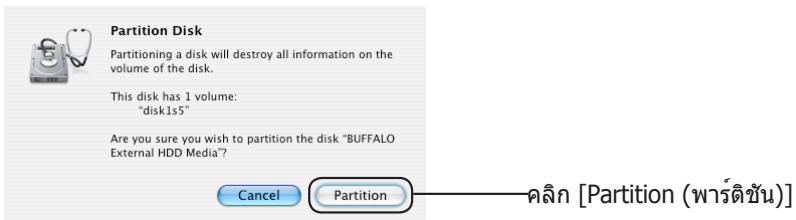
text_image
Partition Disk Partitioning a disk will destroy all information on the volume of the disk. This disk has 1 volume: "disk1s5" Are you sure you wish to partition the disk "BUFFALO External HDD Media?" Cancel Partition คลิก [Partition (พร์ดิชัน)]text_image
DiskFormatterLite Selected drive USB HDD - BUFFALO - External HDD (0) Rescan drives Current settings USB hard drive (Total capacity: 178 MB / External HDD / 178 MB) HD-LBUS (0) - Electricity: 2.7 TB Used space: 178 MB File system: NTFS New settings File system NTFS (Computers running Windows Z, Vista, XP) NTFS (Computers running Windows Z, Vista) FAT32 (Computers running Windows Z, Vista, XP, Mac OS) Erase Selected Drive Format Exit| يتBY CKI ME 7 ل### V#WVWS W####NTFS###NTFS###NTFS###NTFS###NTFS###NTFS###NTFS###NTFS###NTFS###NTFS###NTFS###NTFS###NTFS###NTFS###NTFS###NTFS###NTFS###NTFS###NTFS###NTFS###NTFS###NTFS###NTFS###NTFS###NTFS###NTFS###NTFS###NTFS###NTFS###NTFS###NTFS###NTFS###NTFS###NTFS###N##NTFS###NTFS###NTFS###NTFS###NTFS###NTFS###NTFS###NTFS###NTFS###NTFS###NTFS###NTFS###NTFS###NTFS###NTFS###NTFS###NTFS###NTFS###NTFS###NTFS###NTFS###NTFS###NTFS###NTFS###NTFS###NTFS###NTFS###NTFS###NTFS###NTFS###NTFS###NTFS###NTFS###T##NTFS###NTFS###NTFS###NTFS###NTFS###NTFS###NTFS###NTFS###NTFS###NTFS###NTFS###NTFS###NTFS###NTFS###NTFS###NTFS###NTFS###NTFS###NTFS###NTFS###NTFS###NTFS###NTFS###NTFS###NTFS###NTFS###NTFS###NTFS###NTFS###NTFS###NTFS###NTFS###NTFS##NTFS###NTFS###NTFS###NTFS###NTFS###NTFS###NTFS###NTFS###NTFS###NTFS###NTFS###NTFS###NTFS###NTFS###NTFS###NTFS###NTFS###NTFS###NTFS###NTFS###NTFS###NTFS###NTFS###NTFS###NTFS###NTFS###NTFS###NTFS###NTFS###NTFS###NTFS###NTFS###NTFS######NTFS###NTFS###NTFS###NTFS###NTFS###NTFS###NTFS###NTFS###NTFS###NTFS###NTFS###NTFS###NTFS###NTFS###NTFS###NTFS###NTFS###NTFS###NTFS###NTFS###NTFS###NTFS###NTFS###NTFS###NTFS###NTFS###NTFS###NTFS###NTFS###NTFS###NTFS###NTFS###NTFS###NETFS###NTFS###NTFS###NTFS###NTFS###NTFS###NTFS###NTFS###NTFS###NTFS###NTFS###NTFS###NTFS###NTFS###NTFS###NTFS###NTFS###NTFS###NTFS###NTFS###NTFS###NTFS###NTFS###NTFS###NTFS###NTFS###NTFS###NTFS###NTFS###NTFS###NTFS###NTFS###NTFS###NTFNS##NTFS###NTFS###NTFS###NTFS###NTFS###NTFS###NTFS###NTFS###NTFS###NTFS###NTFS###NTFS###NTFS###NTFS###NTFS###NTFS###NTFS###NTFS###NTFS###NTFS###NTFS###NTFS###NTFS###NTFS###NTFS###NTFS###NTFS###NTFS###NTFS###NTFS###NTFS###NTFS###NTFS#NTFS###NTFS###NTFS###NTFS###NTFS###NTFS###NTFS###NTFS###NTFS###NTFS###NTFS###NTFS###NTFS###NTFS###NTFS###NTFS###NTFS###NTFS###NTFS###NTFS###NTFS###NTFS###NTFS###NTFS###NTFS###NTFS###NTFS###NTFS###NTFS###NTFS###NTFS###NTFS###NTFS###HTFNS##NTFS###NTFS###NTFS###NTFS###NTFS###NTFS###NTFS###NTFS###NTFS###NTFS###NTFS###NTFS###NTFS###NTFS###NTFS###NTFS###NTFS###NTFS###NTFS###NTFS###NTFS###NTFS###NTFS###NTFS###NTFS###NTFS###NTFS###NTFS###NTFS###NTFS###NTFS###NTFS###T##NTFNS##NTFNS###NTFNS###NTFNS###NTFNS###NTFNS###NTFNS###NTFNS###NTFNS###NTFNS###NTFNS###NTFNS###NTFNS###NTFNS###NTFNS###NTFNS###NTFNS###NTFNS###NTFNS###NTFNS###NTFNS###NTFNS###NTFNS###NTFNS###NTFNS###NTFNS###NTFNS##NTFNS##NTFNS##NTFNS##NTFNS##NTFNS##NTFNS##NTFNS##NTFNS##NTFNS##NTFNS##NTFNS##NTFNS##NTFNS##NTFNS##NTFNS##NTFNS##NTFNS##NTFNS##NTFNS##NTFNS##NTFNS##NTFNS##NTFNS##NTFNS##NTFNS#NTFNS##NTFNS##NTFNS##NTFNS##NTFNS##NTFNS##NTFNS##NTFNS##NTFNS##NTFNS##NTFNS##NTFNS##NTFNS##NTFNS##NTFNS##NTFNS##NTFNS##NTFNS##NTFNS##NTFNS##NTFNS##NTFNS##NTFNS##NTFNS##NTFNS###NTFNS##NTFNS##NTFNS##NTFNS##NTFNS##NTFNS##NTFNS##NTFNS##NTFNS##NTFNS##NTFNS##NTFNS##NTFNS##NTFNS##NTFNS##NTFNS##NTFNS##NTFNS##NTFNS##NTFNS##NTFNS##NTFNS##NTFNS##NTFNS#NTFNS#NTFNS##NTFNS##NTFNS##NTFNS##NTFNS##NTFNS##NTFNS##NTFNS##NTFNS##NTFNS##NTFNS##NTFNS##NTFNS##NTFNS##NTFNS##NTFNS##NTFNS##NTFNS##NTFNS##NTFNS##NTFNS##NTFNS##NTFNS##NTFNS#NTFNS###NTFNS##NTFNS##NTFNS##NTFNS##NTFNS##NTFNS##NTFNS##NTFNS##NTFNS##NTFNS##NTFNS##NTFNS##NTFNS##NTFNS##NTFNS##NTFNS##NTFNS##NTFNS##NTFNS##NTFNS##NTFNS##NTFNS##NTFNS##NTFNS###NTFNS#NTFNS##NTFNS##NTFNS##NTFNS##NTFNS##NTFNS##NTFNS##NTFNS##NTFNS##NTFNS##NTFNS##NTFNS##NTFNS##NTFNS##NTFNS##NTFNS##NTFNS##NTFNS##NTFNS##NTFNS##NTFNS##NTFNS##NTFNS##NTFNS###NTFNS###NTFNS##NTFNS##NTFNS##NTFNS##NTFNS##NTFNS##NTFNS##NTFNS##NTFNS##NTFNS##NTFNS##NTFNS##NTFNS##NTFNS##NTFNS##NTFNS##NTFNS##NTFNS##NTFNS##NTFNS##NTFNS##NTFNS##NTFNS#NTFNS##NTFNS#NTFNS##NTFNS##NTFNS##NTFNS##NTFNS##NTFNS##NTFNS##NTFNS##NTFNS##NTFNS##NTFNS##NTFNS##NTFNS##NTFNS##NTFNS##NTFNS##NTFNS##NTFNS##NTFNS##NTFNS##NTFNS##NTFNS##NTFNS#NTFNS##NTFNS###NTFNS##NTFNS##NTFNS##NTFNS##NTFNS##NTFNS##NTFNS##NTFNS##NTFNS##NTFNS##NTFNS##NTFNS##NTFNS##NTFNS##NTFNS##NTFNS##NTFNS##NTFNS##NTFNS##NTFNS##NTFNS##NTFNS##NTFNS#NTFNS#NTFNS#NTFNS##NTFNS##NTFNS##NTFNS##NTFNS##NTFNS##NTFNS##NTFNS##NTFNS##NTFNS##NTFNS##NTFNS##NTFNS##NTFNS##NTFNS##NTFNS##NTFNS##NTFNS##NTFNS##NTFNS##NTFNS##NTFNS##NTFNS#NTFNS#NTFNS###NTFNS#NTFNS##NTFNS##NTFNS##NTFNS##NTFNS##NTFNS##NTFNS##NTFNS##NTFNS##NTFNS##NTFNS##NTFNS##NTFNS##NTFNS##NTFNS##NTFNS##NTFNS##NTFNS##NTFNS##NTFNS##NTFNS##NTFNS##NTFNS#NTFNS###NTFNS#NTFNS##NTFNS##NTFNS##NTFNS##NTFNS##NTFNS##NTFNS##NTFNS##NTFNS##NTFNS##NTFNS##NTFNS##NTFNS##NTFNS##NTFNS##NTFNS##NTFNS##NTFNS##NTFNS##NTFNS##NTFNS##NTFNS#NTFNS#NTFNS#NTFNS#NTFNS##NTFNS##NTFNS##NTFNS##NTFNS##NTFNS##NTFNS##NTFNS##NTFNS##NTFNS##NTFNS##NTFNS##NTFNS##NTFNS##NTFNS##NTFNS##NTFNS##NTFNS##NTFNS##NTFNS##NTFNS##NTFNS#NTFNS#NTFNS##NTFNS#NTFNS##NTFNS##NTFNS##NTFNS##NTFNS##NTFNS##NTFNS##NTFNS##NTFNS##NTFNS##NTFNS##NTFNS##NTFNS##NTFNS##NTFNS##NTFNS##NTFNS##NTFNS##NTFNS#NTFNS#NTFNS#NTFNS#NTFNS##NTFNS##NTFNS#NTFNS##NTFNS##NTFNS##NTFNS##NTFNS##NTFNS##NTFNS##NTFNS##NTFNS##NTFNS##NTFNS##NTFNS##NTFNS##NTFNS##NTFNS##NTFNS#NTFNS#NTFNS#NTFNS#NTFNS##NTFNS##NTFNS##NTFNS##NTFNS##NTFNS#NTFNS#NTFNS#NTFNS##NTFNS##NTFNS##NTFNS##NTFNS##NTFNS##NTFNS##NTFNS##NTFNS##NTFNS##NTFNS#NTFNS#NTFNS#NTFNS#NTFNS##NTFNS##NTFNS##NTFNS##NTFNS##NTFNS##NTFNS##NTFNS##NTFNS##NTFNS##NTFNS#NTFNS#NTFNS#NTFNS#NTFNS##NTFNS#NTFNS##NTFNS##NTFNS##NTFNS##NTFNS##NTFNS##NTFNS##NTFNS##NTFNS##NTFNS#NTFNS#NTFNS#NTFNS#NTFNS##NTFNS#NTFNS##NTFNS##NTFNS##NTFNS##NTFNS##NTFNS##NTFNS##NTFNS#NTFNS#NTFNS#NTFNS#NTFNS##NTFNS#NTFNS##NTFNS##NTFNS##NTFNS##NTFNS##NTFNS##NTFNS##NTFNS#NTFNS#NTFNS#NTFNS#NTFNS#NTFNS##NTFNS#NTFNS#NTFNS#NTFNS##NTFNS#NTFNS#NTFNS#NTFNS#NTFNS#NTFNS#NTFNS#NTFNS#NTFNS#NTFNS#NTFNS#NTFNS#NTFNS#NTFNS#NTFNS#NTFNS#NTFNS#NTFNS#NTFNS#NTFNS#NTFNS#NTFNS#NTFNS#NTFNS#NTFNS#NTFNS##NTFNS#NTFNS#NTFNS#NTFNS#NTFNS#NTFNS#NTFNS#NTFNS#NTFNS#NTFNS#NTFNS#NTFNS#NTFNS#NTFNS#NTFNS#NTFNS#NTFNS#NTFNS#NTFNS#NTFNS#NTFNS##NTFNS#NTFNS#NTFNS#NTFNS##NTFNS#NTFNS#NTFNS#NTFNS#NTFNS#NTFNS#NTFNS#NTFNS#NTFNS#NTFNS#NTFNS#NTFNS#NTFNS#NTFNS#NTFNS##NTFNS#NTFNS#NTFNS#NTFNS#NTFNS#NTFNS#NTFNS#NTFNS#NTFNS#NTFNS##NTFNS#NTFNS#NTFNS#NTFNS#NTFNS#NTFNS#NTFNS#NTFNS#NTFNS#NTFNS#NTFNS#NTFNS#NTFNS#NTFNS#NTFNS##NTFNS#NTFNS#NTFNS#NTFNS#NTFNS#NTFNS##NTFNS#NTFNS#NTFNS#NTFNS#NTFNS#NTFNS#NTFNS#NTFNS#NTFNS#NTFNS#NTFNS#NTFNS#NTFNS#NTFNS#NTFNS#NTFNS#NTFNS#NTFNS#NTFNS##NTFNS#NTFNS#NTFNS#NTFNS#NTFNS#NTFNS##NTFNS#NTFNS#NTFNS#NTFNS##NTFNS#NTFNS#NTFNS#NTFNS#NTFNS#NTFNS#NTFNS#NTFNS#NTFNS#NTFNS#NTFNS#NTFNS#NTFNS#NTFNS##NTFNS#NTFNS#NTFNS#NTFNS#NTFNS#NTFNS#NTFNS#NTFNS#NTFNS#NTFNS#NTFNS##NTFNS#NTFNS#NTFNS#NTFNS#NTFNS#NTFNS#NTFNS#NTFNS#NTFNS#NTFNS#NTFNS#NTFNS#NTFNS#NTFNS##NTFNS#NTFNS#NTFNS#NTFNS#NTFNS#NTFNS#NTFNS##NTFNS#NTFNS#NTFNS#NTFNS#NTFNS#NTFNS#NTFNS#NTFNS#NTFNS#NTFNS#NTFNS#NTFNS#NTFNS#NTFNS#NTFNS#NTFNS#NTFNS#NTFNS##NTFNS#NTFNS#NTFNS#NTFNS#NTFNS#NTFNS#NTFNS##NTFNS#NTFNS#NTFNS#NTFNS##NTFNS#NTFNS#NTFNS#NTFNS#NTFNS#NTFNS#NTFNS#NTFNS#NTFNS#NTFNS#NTFNS#NTFNS#NTFNS#NTFNS##NTFNS##NTFNS#NTFNS#NTFNS#NTFNS#NTFNS#NTFNS#NTFNS#NTFNS#NTFNS#NTFNS#NTFNS#NTFNS#NTFNS#NTFNS#NTFNS#NTFNS#NTFNS#NTFNS#NTFNS#NTFNS#NTFNS#NTFNS#NTFNS#NTFNS##NTFNS##NTFNS#NTFNS#NTFNS#NTFNS#NTFNS#NTFNS#NTFNS#NTFNS#NTFNS#NTFNS##NTFNS#NTFNS#NTFNS#NTFNS#NTFNS#NTFNS#NTFNS#NTFNS#NTFNS#NTFNS#NTFNS#NTFNS#NTFNS#NTFNS##NTFNS##NTFNS#NTFNS#NTFNS#NTFNS#NTFNS#NTFNS##NTFNS#NTFNS#NTFNS#NTFNS#NTFNS#NTFNS#NTFNS#NTFNS#NTFNS#NTFNS#NTFNS#NTFNS#NTFNS#NTFNS#NTFNS#NTFNS#NTFNS#NTFNS##NTFNS##NTFNS#NTFNS#NTFNS#NTFNS#NTFNS#NTFNS##NTFNS#NTFNS#NTFNS#NTFNS##NTFNS#NTFNS#NTFNS#NTFNS#NTFNS#NTFNS#NTFNS#NTFNS#NTFNS#NTFNS#NTFNS#NTFNS#NTFNS##NTFNS#NTFNS#NTFNS#NTFNS#NTFNS#NTFNS#NTFNS#NTFNS#NTFNS#NTFNS#NTFNS#NTFNS##NTFNS#NTFNS#NTFNS#NTFNS#NTFNS#NTFNS#NTFNS#NTFNS#NTFNS#NTFNS#NTFNS#NTFNS#NTFNS##NTFNS#NTFNS#NTFNS#NTFNS#NTFNS#NTFNS#NTFNS#NTFNS##NTFNS#NTFNS#NTFNS#NTFNS#NTFNS#NTFNS#NTFNS#NTFNS#NTFNS#NTFNS#NTFNS#NTFNS#NTFNS#NTFNS#NTFNS#NTFNS#NTFNS##NTFNS#NTFNS#NTFNS#NTFNS#NTFNS#NTFNS#NTFNS#NTFNS##NTFNS#NTFNS#NTFNS#NTFNS##NTFNS#NTFNS#NTFNS#NTFNS#NTFNS#NTFNS#NTFNS#NTFNS#NTFNS#NTFNS#NTFNS#NTFNS#NTFNS##NTFNS#NTFNS##NTFNS#NTFNS#NTFNS#NTFNS#NTFNS#NTFNS#NTFNS#NTFNS#NTFNS#NTFNS#NTFNS#NTFNS#NTFNS#NTFNS#NTFNS#NTFNS#NTFNS#NTFNS#NTFNS#NTFNS#NTFNS#NTFNS#NTFNS##NTFNS#NTFNS##NTFNS#NTFNS#NTFNS#NTFNS#NTFNS#NTFNS#NTFNS#NTFNS#NTFNS#NTFNS##NTFNS#NTFNS#NTFNS#NTFNS#NTFNS#NTFNS#NTFNS#NTFNS#NTFNS#NTFNS#NTFNS#NTFNS#NTFNS##NTFNS#NTFNS##NTFNS#NTFNS#NTFNS#NTFNS#NTFNS#NTFNS##NTFNS#NTFNS#NTFNS#NTFNS#NTFNS#NTFNS#NTFNS#NTFNS#NTFNS#NTFNS#NTFNS#NTFNS#NTFNS#NTFNS#NTFNS#NTFNS#NTFNS##NTFNS#NTFNS##NTFNS#NTFNS#NTFNS#NTFNS#NTFNS#NTFNS##NTFNS#NTFNS#NTFNS#NTFNS##NTFNS#NTFNS#NTFNS#NTFNS#NTFNS#NTFNS#NTFNS#NTFNS#NTFNS#NTFNS#NTFNS#NTFNS#NTFNS##NTFNS##NTFNS#NTFNS#NTFNS#NTFNS#NTFNS#NTFNS#NTFNS#NTFNS#NTFNS#NTFNS#NTFNS##NTFNS#NTFNS#NTFNS#NTFNS#NTFNS#NTFNS#NTFNS#NTFNS#NTFNS#NTFNS#NTFNS#NTFNS#NTFNS##NTFNS##NTFNS#NTFNS#NTFNS#NTFNS#NTFNS#NTFNS#NTFNS##NTFNS#NTFNS#NTFNS#NTFNS#NTFNS#NTFNS#NTFNS#NTFNS#NTFNS#NTFNS#NTFNS#NTFNS#NTFNS#NTFNS#NTFNS#NTFNS#NTFNS##NTFNS##NTFNS#NTFNS#NTFNS#NTFNS#NTFNS#NTFNS#NTFNS##NTFNS#NTFNS#NTFNS#NTFNS##NTFNS#NTFNS#NTFNS#NTFNS#NTFNS#NTFNS#NTFNS#NTFNS#NTFNS#NTFNS#NTFNS#NTFNS#NTFNS##NTFNS##NTFNS##NTFNS#NTFNS#NTFNS#NTFNS#NTFNS#NTFNS#NTFNS#NTFNS#NTFNS#NTFNS#NTFNS#NTFNS#NTFNS#NTFNS##NTFNS##NTFNS#NTFNS#NTFNS#NTFNS#NTFNS#NTFNS#NTFNS#NTFNS#NTFNS##NTFNS##NTFNS#NTFNS#NTFNS#NTFNS#NTFNS#NTFNS#NTFNS#NTFNS#NTFNS#NTFNS#NTFNS#NTFNS#NTFNS#NTFNS##NTFNS##NTFNS#NTFNS#NTFNS#NTFNS#NTFNS#NTFNS#NTFNS#NTFNS##NTFNS##NTFNS#NTFNS#NTFNS#NTFNS#NTFNS#NTFNS#NTFNS#NTFNS#NTFNS#NTFNS#NTFNS#NTFNS#NTFNS#NTFNS#NTFNS#NTFNS##NTFNS##NTFNS#NTFNS#NTFNS#NTFNS#NTFNS#NTFNS#NTFNS#NTFNS##NTFNS#NTFNS#NTFNS#NTFNS#NTFNS#NTFNS#NTFNS#NTFNS#NTFNS#NTFNS#NTFNS#NTFNS#NTFNS#NTFNS#NTFNS#NTFNS##NTFNS##NTFNS#NTFNS#NTFNS#NTFNS#NTFNS#NTFNS#NTFNS##NTFNS##NTFNS#NTFNS#NTFNS#NTFNS#NTFNS#NTFNS#NTFNS#NTFNS#NTFNS#NTFNS#NTFNS#NTFNS#NTFNS#NTFNS#NTFNS#NTFNS#NTFNS##NTFNS##NTFNS#NTFNS#NTFNS#NTFNS#NTFNS#NTFNS##NTFNS##NTFNS#NTFNS#NTFNS#NTFNS#NTFNS#NTFNS#NTFNS#NTFNS#NTFNS#NTFNS#NTFNS#NTFNS#NTFNS#NTFNS#NTFNS#NTFNS#NTFNS#NTFNS##NTFNS##NTFNS#NTFNS#NTFNS#NTFNS#NTFNS##NTFNS##NTFNS#NTFNS#NTFNS#NTFNS#NTFNS#NTFNS#NTFNS#NTFNS#NTFNS#NTFNS#NTFNS#NTFNS#NTFNS#NTFNS#NTFNS#NTFNS#NTFNS#ONTFLS###RTN##RTN##RTN##RTN##RTN##RTN##RTN##RTN##RTN##RTN##RTN##RTN##RTN##RTN##RTN##RTN##RTN##RTN##RTN##RTN##RTN##RTN##RTN##RTN##RTN##RTN##RTN##RTN##RTN##RTN##RTN##RTN##RTN##RTN## |
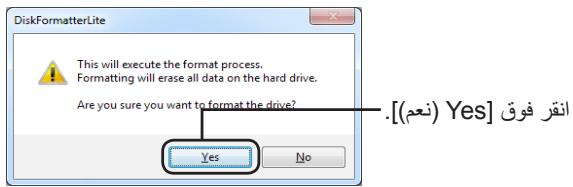
text_image
DiskFormatterLite This will execute the format process. Formatting will erase all data on the hard drive. Are you sure you want to format the drive? Yes No [(nعم) Yes] انقر فوقtext_image
DiskFormatterLite Formatting is completed. OK [(مواقق) OK]text_image
Utilities DEVICES Macintosh HD Unilead Shift Remote Disc PLACES Desktop Surface Applications Documents SEARCH FOR: Today Past Week All Images All Movies All Documents Activity Monitor AirPort Utility AppleScript Editor Audio MIDI Setup Bluetooth File Exchange Boot Lamp Assistant ColorSync Utility Console DigitalColor Meter Disk Utility Exposé Grapher Java Preferences Keychain Access Migration Assistant 1 of 25 selected, 48.54 GB availabletext_image
BUFFALO External HDD Media 80.03 GB SAMLING H5082HB Macintosh HD Unired $20.06 GB BUFFALO Enter Unired 1 Xbench_1_3.dmg RadUtility.dmg RadUtility.dmg RadUtility.dmg First Aid Erase Partition RAID Restore If you've having trouble with the selected disk: • Click Repair Disk, if the repair fails, back up and erase the disk. • If Repair Disk is unavailable, click verify Disk. If the disk needs repairs, start up from your Mac OS X installation disc, and then choose utilities > Disk Utility. If you have a permissions problem with a file installed by the Mac OS X installer, click Repair Disk Permissions. Show details Clear History Verify Disk Permissions Repair Disk Permissions Verify Disk Repair Disk Disk Description: BUFFALO External HDD Media Connection Bus: USB Connection Type: External USB Serial Number: 00101007400000000 Total Capacity: 250.06 GB (250,059,350,016 Bytes) Write Status: Read/Write S-M.A.R.T. Status: Not Supported Partition Map Scheme - Master Boot Recordtext_image
Choose a partition scheme appropriate for the way you will use this disk: ○ GUID Partition Table To use the disk to start up an Intel-based Mac, or to use the disk as a non-startup disk with any Mac with Mac OS X version 10.4 or later. ○ Apple Partition Map To use the disk to start up a PowerPC-based Mac, or to use the disk as a non-startup disk with any Mac. ○ Master Boot Record To use the disk to start up DOS and Windows computers, or to use with devices that require a DOS-compatible or Windows-compatible partition. Default Cancel OK ( Apple Partition Map ] انقر فوق .[(Apple تックスيم)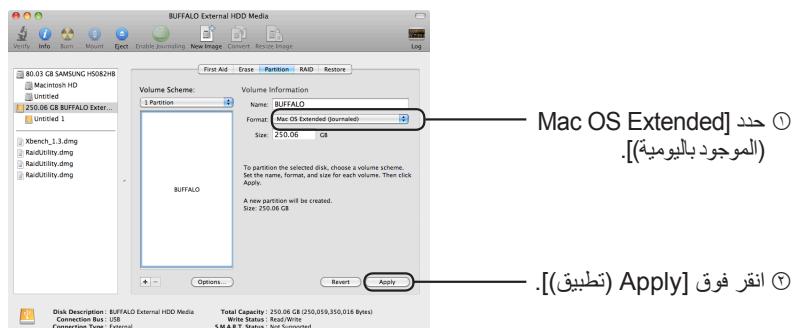
text_image
BUFFALO External HDD Media 80.03 GB SAMSUNG H50&2HB Macintosh HD United 250.06 GB BUFFALO Exter... United 1 Kbench_1,3.dmg RadUtility.dmg RadUtility.dmg Buffalo Volume Scheme: 1 Partition Volume Information Name: BUFFALO Format: Mac OS Extended (journaled) Size: 250.06 GB To partition the selected disk, choose a volume scheme. Set the name, format, and size for each volume. Then stick Apply. A new partition will be created. Size: 250.06 GB Options... Revert Apply Mac OS Extended] ① [ Mac OS Extended ] ② [ Mac OS Extended ] [ Mac OS Extended ] [ Mac OS Extended ] [ Mac OS Extended ] [ Mac OS Extended ] [ Mac OS Extended ] [ Mac OS Extended ] [ Mac OS Extended ] [ Mac OS Extended ] [ Mac OS Extended ] [ Mac OS Extended ] [ Mac OS Extended ] [ Mac OS Extended ] [ Mac OS Extended ] [ Mac OS Extended ] [ Mac OS Extended ] [ Mac OS Extended ] [ Mac OS Extended ] [ Mac OS Extended ] [ Mac OS Extended ] [ Mac OS Extended ] [ Mac OS Extended ] [ Mac OS Extended ] [ Mac OS Extended ] [ Mac OS Extended ] [ Mac OS Extended ] [ Mac OS Extended ] [ Mac OS Extended ] [ Mac OS Extended ] [ Mac OS Extended ] [ Mac OS Extended ] [ Mac OS Extended ] [ Mac OS Extended ] [ Mac OS Extended ] [ Mac OS Extended ] [ Mac OS Extended ] [ Mac OS Extended ] [ Mac OS Enhanced ] [ Mac OS Enhanced ] [ Mac OS Enhanced ] [ Mac OS Enhanced ] [ Mac OS Enhanced ] [ Mac OS Enhanced ] [ Mac OS Enhanced ] [ Mac OS Enhanced ] [ Mac OS Enhanced ] [ Mac OS Enhanced ] [ Mac OS Enhanced ] [ Mac OS Enhanced ] [ Mac OS Enhanced ] [ Mac OS Enhanced ] [ Mac OS Enhanced ] [ Mac OS Enhanced ] [ Mac OS Enhanced ] [ MACOS] [ MACOS] [ MACOS] [ MACOS] [ MACOS] [ MACOS] [ MACOS] [ MACOS] [ MACOS] [ MACOS] [ MACOS] [ MACOS] [ MACOS] [ MACOS] [ MACOS] [ MACOS] [ MACOS] [ MACOS] [ MACOS] [ MACOS] [ MACOS] [ MACOS] [ MACOS] [ MACOS] [ MACOS] [ MACOS]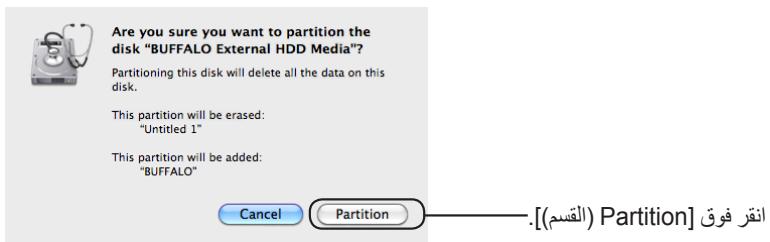
text_image
Are you sure you want to partition the disk "BUFFALO External HDD Media"? Partitioning this disk will delete all the data on this disk. This partition will be erased: "Untitled 1" This partition will be added: "BUFFALO" Cancel Partition [(القسم] Partition]text_image
BUFFALO External HDD Media 17.3 GB ST900110A 名称未显示 文件名: 272.9 GB BUFFALO Ext 272.9 GB BUFFALO Ext First Aid To repair a disk or volume, select its icon in the list on the left and click Repair Disk. To repair disk permission problems on a disk or volume that has Mac OS X installed, select its icon and click Repair Disk Permissions. Click the Verify buttons to test the disk or permissions without changing anything. To repair your startup disk, start up from your Mac OS X install disc (CD or DVD), then choose Utilities-Disk utility... Verify Disk Permissions > Repair Disk Permissions > Verify Disk Repair Disk Disk Description: BUFFALO External HDD Media Connection Box: USB Connection Type: External USB Serial Number: 0010100740000000 Total Capacity: 232.9 GB (250,059,350,016 Bytes) Write Status: Read/Write S.M.A.R.T. Status: Not Supported Partition Scheme: Master Boot Recordtext_image
BUFFALO External HDD Media Volume Scheme: Current Volume Information Name: BUFFALO Format: Mac OS Extended (Gournaled) Size: 232.88 GB Locked for editing Select the disk you want to partition and choose a volume scheme. Click each volume represented in the scheme and specify a volume name, format, and size. Click Partition. Split Delete Options Revert Partition Disk Description: BUFFALO External HDD Media Total Capacity: 232.9 GB (250,059,350,016 Bytes) Connection Bus: USB Write Status: Read/Write Connection Type: External S.M.A.R.T. Status: Not Supported USB Serial Number: D0101007400000000 Partition Scheme: Master Boot Recordtext_image
BUFFALO External HDD Media 17.3 GB ST940110A 名称未设定 1 名称未设定 2 212.9 GB BUFFALO Extre disk15 Volume Scheme: Current Volume Information Name: NO NAME Format: MS-DOS File System Size: 232.88 GB Locked for editing NO NAME Select the disk you want to partition and choose a volume scheme. CTask each volume represented in the scheme and specify a volume name, format, and size. Click Partition. Options... Reset Partition Disk Description: BUFFALO External HDD Media Connection Bus: USB Connection Type: External USB Serial Number: 00181007400000000 Total Capacity: 232.9 GB (250,059,350,016 Bytes) Write Status: Read/Write SLM.A.R.T. Status: Not Supported Partition Scheme: Master Boot Record [[() Options] anqrr fwoq] [17.3 GB ST940110A 名称未设定 1 名称未设定 2 212.9 GB BUFFALO Extre disk15.[(Apple مخطarseم) Apple Partition Map] حدد
Choose a partition scheme appropriate for the way you will use this disk:
○ GUID Partition Table
To use the disk to start up an Intel-based Macintosh computer
Apple Partition Map
To use the disk to start up a PowerPC-based Macintosh computer or to use the disk as a non-startup disk with any Mac
Master Boot Record
To use the disk to start up DOS and Windows computers, or to use with devices that require a DOS-compatible or Windows-compatible partition
Default
Cancel
OK
— Apple Partition] ∫ ∪ .(Apple مخطّت قسيم) Map
.[(مواق) OK] انقر فوق ③

Partition Disk
Partitioning a disk will destroy all information on the volume of the disk.
This disk has 1 volume: "disk1s5"
Are you sure you wish to partition the disk "BUFFALO External HDD Media"?
Cancel
Partition