
PEH 900 - Electric planer PARKSIDE - Free user manual and instructions
Find the device manual for free PEH 900 PARKSIDE in PDF.



| Brand | PARKSIDE |
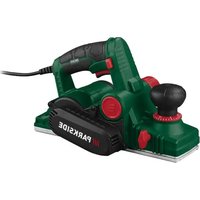
| Model | PEH 900 |
| Product type | Electric planer |
| Planing width | 82 mm |
| Adjustable chip thickness | 0 - 3.5 mm |
| Adjustable rebate depth | 0 - 24 mm |
| Weight | 3.6 kg |
| Mains voltage | 230 V (compatible 220 V) |
| Protection class | II (double insulation) |
| Sound pressure level | 87 dB (A) |
| Sound power level | 100 dB (A) |
| Vibration (hand-arm) | 2.5 m/s² |
| Blade type | Reversible HSS blades |
| Electronic system | Intelligent Power Control (IPC) with soft start and speed regulation |
| Chip ejection | Adjustable left/right orientation |
| Functions | Planing, chamfering (V-groove), rebating |
| Included accessories | Parallel guide, rebate depth guide, fork wrench |
| Safety | Trigger with anti-start safety, belt guard |
| Maintenance | Regular cleaning, no sharp objects, soft cloth |
| Warranty | 36 months |
| Certifications | EC directives (machinery, low voltage, electromagnetic compatibility) |
Frequently Asked Questions - PEH 900 PARKSIDE
User questions about PEH 900 PARKSIDE
0 question about this device. Answer the ones you know or ask your own.
Ask a new question about this device
Download the instructions for your Electric planer in PDF format for free! Find your manual PEH 900 - PARKSIDE and take your electronic device back in hand. On this page are published all the documents necessary for the use of your device. PEH 900 by PARKSIDE.
USER MANUAL PEH 900 PARKSIDE
(89/392 EEG), (91/368 EEG), (93/44 EEG), (93/68 EEG)
(89/336 EEG), (92/31 EEG), (93/68 EEG)
for planing, bevelling and rebating of wood, plastic and metall
Dear Customer, We are delighted that you have decided to purchase our high quality PEH 900 power planer.
Please make sure you familiarise yourself fully with the way the equipment works before you use it for the first time and that you understand how to handle electrical power tools correctly. Please read the operating instructions below and the accompanying safety advice
carefully. Use the equipment only as described and for the indicated purposes. By doing this you will be able to work in complete safety and produce better results. We hope you enjoy using your planer.
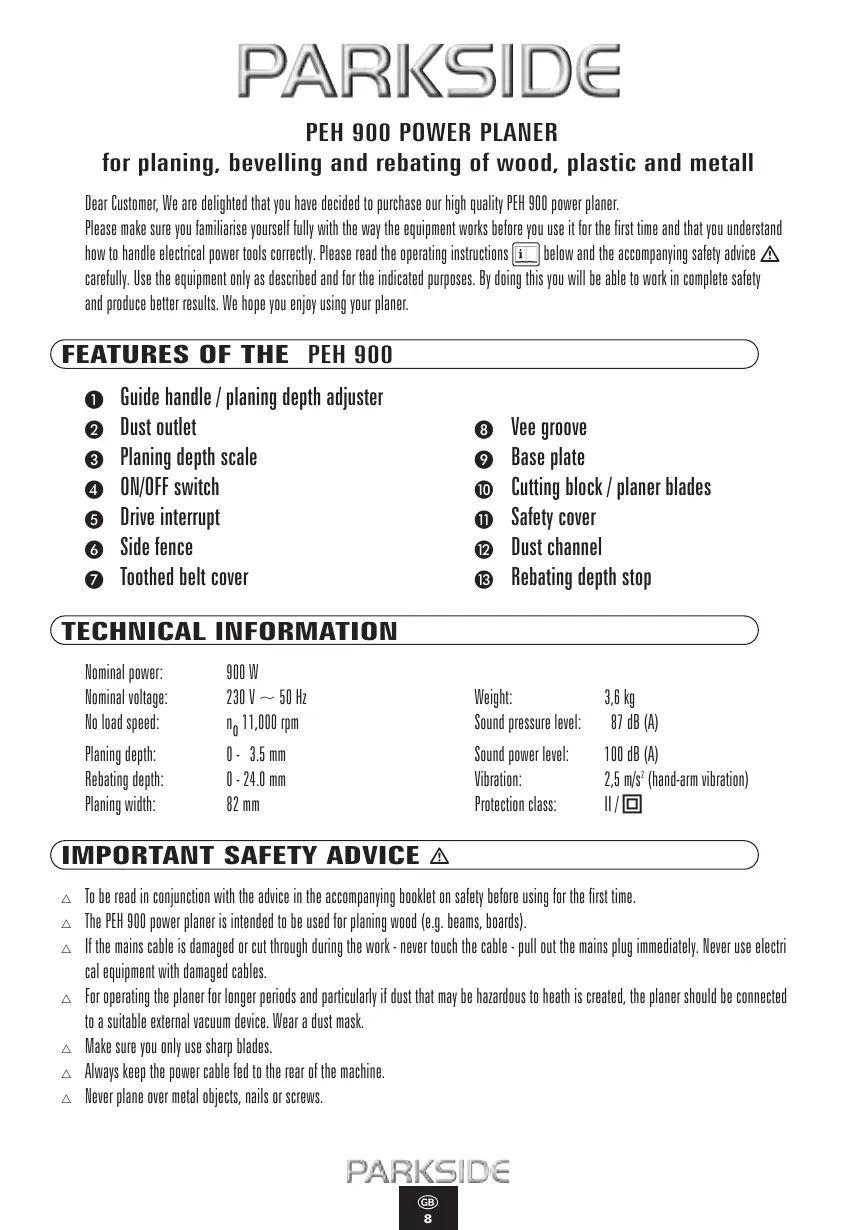
FEATURES OF THE PEH 900
Guide handle / planing depth adjuster
Dust outlet
3 Planing depth scale
ON/OFF switch
Drive interrupt
6 Side fence
Toothed belt cover
Vee groove
9 Base plate
Cutting block / planer blades
Safety cover
Dust channel
13 Rebating depth stop
TECHNICAL INFORMATION
Nominal power: 900 W
Nominal voltage: 230V 50Hz
No load speed: n 11,000 rpm
Planing depth: 0 - 3.5 mm
Rebating depth: 0 - 24.0 mm
Planing width: 82 mm
Weight: 3,6 kg
Sound pressure level: 87 dB (A)
Sound power level: 100 dB (A)
Vibration: 2.5 m/s² (hand-arm vibration)
Protection class: II/回
IMPORTANT SAFETY ADVICE
To be read in conjunction with the advice in the accompanying booklet on safety before using for the first time.
The PEH 900 power planer is intended to be used for planing wood (e.g. beams, boards).
If the mains cable is damaged or cut through during the work - never touch the cable - pull out the mains plug immediately. Never use electrical equipment with damaged cables.
For operating the planer for longer periods and particularly if dust that may be hazardous to heath is created, the planer should be connected to a suitable external vacuum device. Wear a dust mask.
△ Make sure you only use sharp blades.
Always keep the power cable fed to the rear of the machine.
△ Never plane over metal objects, nails or screws.
Only place the planer against the workpiece after switching it on.
The base plate must always lay flat on the workpiece when working.
Do not clear dust etc. from the dust outlet with your fingers. Use a piece of wood to dislodge any trapped planing debris.
OPERATION


The PEH 900 power planer has INTELLIGENT POWER CONTROL. This electronic management system monitors and controls your power planer in its various operating states;
Operating state
Feature
Switching On/Off:
The IPC electronic system start-up mode ensures that the motor starts up slowly and gently. This largely avoids heavy transient current surges, and means that electrical safety cut-out devices are not generally tripped (building sites, domestic premises).
No-load running:
After switching on, the IPC electronic management system run-up mode takes the planer speed up to the pre-set required value. After this is reached, the IPC system speed control mode keeps the grinder operating at a constant speed.
WARNING: Always remove the plug from the mains socket before working on the planer.
Take note of the mains voltage. The voltage must agree with that shown on the rating plate (equipment shown as 230V can also be used with 220V ).
ON/OFF SWITCH
On the grounds of safety the ON/OFF switch cannot be locked in the ON position for continuous operation. It must always be pressed during operation.
SETTING THE PLANING DEPTH
The planing depth can be set between 0 - 3.5 mm. Turn the guide handle/ planing depth adjuster and set the pointer to the desired mark or value.
DUST REMOVAL AND VACUUM EXTRACTION
The dust outlet can simply be switched to the right or left by fitting the cap over the appropriate opening.
OPERATING INSTRUCTIONS
Always switch on the planer before making contact with the material and then guide the planer on to the workpiece
PLANING SURFACES
Place the planer with the front of the base plate on the workpiece.
Always make sure when you are planing surfaces such as beams and boards that the base plate is in full contact with the surface to avoid the danger of blade kickback.
Always use both hands to guide the plane over the workpiece with even forward pressure.
CHAMFERING CORNERS
The vee groove in the centre of the front of the base plate allows you to chamfer the corners of your workpiece very quickly and easily. Place the planer on to the workpiece with the vee groove on the corner and then guide the planer along the corner.
Make sure you keep the angle at 45° and an even forward pressure.
REBATING
Example set up: for right hand rebates the side fence goes on the left and the rebating depth stop goes on the right into the holes on the planer (with the planer viewed from above).
Set the rebating depth up to a max. 24mm using the rebating depth stop 3. Set the side fence to give the required width. Adjust the planing depth scale to the maximum of 3.5mm . Go over the workpiece as many times as is required to obtain the desired rebate.
CHANGING OR REVERSING THE PLANER BLADES
WARNING: Before doing any work on the planer always pull out the plug from the mains.
IMPORTANT ADVICE: Do not unscrew the two hexagonal socket headed screws. They adjust the height of the cutting block. Adjustment is only required if you wish to change to another planer blade type e.g. a profiled blade.
HSS reversible blades are fitted as standard at the works. When you change blades, always change both blades to avoid any imbalance. When they become blunt, the PARKSIDE reversible blades can be changed without any height adjustment of the cutting block being necessary
1) First unscrew one cutting block only so that you can use the works-mounted second cutting block as an aid to setting up later.
2) Unscrew the three screws in the cutting block using the supplied open spanner.
3) Take the cutting block out of the planing roller.
4) Slide the planer blade sideways out of the cutting block.
NOTE: The cutting block can also be dismantled, e.g. for cleaning.
5) Re-assembly with a reversed or new blade is done in reverse order.
6) Check again for safety:
- the position of the planer blade in the cutting block
- the balanced and secure seating of the cutting block and the 3 fixing screws
- that the height adjustment is correct (2 hexagonal socket headed screws).
CHANGE TOOTHED BELT
Unscrew the screws in the cover and take off the toothed belt cover ⑦. Cut through the toothed belt with side-cutting pliers or a knife and remove the severed toothed belt. Always clean off any dirt or debris from the pulley and the drive wheel before installing the new belt.
Place the new toothed belt on to the drive wheel and push the belt over the large pulley wheel whilst turning it.
Put the toothed belt cover ② back in place and fasten with the screws.
MAINTENANCE AND CARE
Clean the planer regularly. For the best results do this straight after the work has been completed. Do not allow liquids to get inside the planer. Use a soft cloth for cleaning the housing. Do not use petrol, solvents or cleaners that might attack the plastic. Air vents must always be clear and clean.
TIPS AND TRICKS
- Do not use too much forward pressure. - Too much pressure can considerably reduce performance and increase the wear on the blades.
- Always use sharp blades and replace blunt blades promptly. - You will get better cutting performance and extended tool life.
- To obtain smooth planed surfaces we recommend that you use shallow planing depths and plane the surface a number of times.
Further practical tips for power tools can be found in the accompanying booklet on safety advice.
We reserve the right to make technical modifications in the course of further development.
STATEMENT OF CONFORMITY
We, Kompernaß Handelsgesellschaft mbH, Burgstr. 21, D-44867 Bochum, Germany, hereby declare that this product conforms with the following EC regulations:
EC machine guideline:
(89/392 EEG), (91/368 EEG), (93/44 EEG), (93/68 EEG)
EC low voltage regulations:
(73/23/EEG), (93/68 EEG)
Electromagnetic compatibility:
(89/336 EEG), (92/31 EEG), (93/68 EEG)
Applicable harmonised standards:
EN 50144-1:1998, EN 50144-2-14:1996, EN 55014-1:1993 + A1
EN 61000-3-2:1995 + A1 + A2, EN 61000-3-3:1995, EN 55014-2:1997
Manufacturer:
PARKSIDE
Model type:
PEH 900
Description:
POWER PLANER
Bochum, 01.04.2002

Hans Kompemaß
- Managing Director -
PARKSIDE
RABOT ÉLECTRIQUE PEH 900
(89/392 EEG), (91/368 EEG), (93/44 EEG), (93/68 EEG)
(89/336 EEG), (92/31 EEG), (93/68 EEG)
Normes correspondantes applicables:
EN 50144-1:1998, EN 50144-2-14:1996, EN 55014-1:1993 + A1
EN 61000-3-2:1995 + A1 + A2, EN 61000-3-3:1995, EN 55014-2:1997
Marque: PARKSIDE
Machine/type: PEH 900
(89/392 EEG), (91/368 EEG), (93/44 EEG), (93/68 EEG)
(89/336 EEG), (92/31 EEG), (93/68 EEG)
(89/392 EEG), (91/368 EEG), (93/44 EEG), (93/68 EEG)
(73/23/EEG), (93/68 EEG)
(89/336 EEG), (92/31 EEG), (93/68 EEG)
EN 50144-1:1998, EN 50144-2-14:1996, EN 55014-1:1993 + A1
EN 61000-3-2:1995 + A1 + A2, EN 61000-3-3:1995, EN 55014-2:1997
Marca: PARKSIDE
Modelo: PEH 900
(89/392 EEG), (91/368 EEG), (93/44 EEG), (93/68 EEG)
(89/336 EEG), (92/31 EEG), (93/68 EEG)
(89/392 EEG), (91/368 EEG), (93/44 EEG), (93/68 EEG)
(73/23/EEG), (93/68 EEG)
(89/336 EEG), (92/31 EEG), (93/68 EEG)
EN 50144-1:1998, EN 50144-2-14:1996, EN 55014-1:1993+A1
EN 61000-3-2:1995+A1+A2, EN 61000-3-3:1995, EN 55014-2:1997
Máρka: PARKSIDE
TúrOc μιχανίς/TúrOc:
Ovoaia epyaaleiou:
PARKSIDE
PEH 900
HAEKTPIKH ΠΑΝΗ
Bochum, 01.04.2002

Hans Kompernai
WYLOT I ODCIAG WIOROW
(89/392 EEG), (91/368 EEG), (93/44 EEG), (93/68 EEG) (73/23/EEG), (93/68 EEG)
(89/336 EEG), (92/31 EEG), (93/68 EEG)
EN 50144-1:1998, EN 50144-2-14:1996
EN 55014-1:1993+A1
EN 61000-3-2:1995+A1+A2, EN 61000-3-3:1995,
EN 55014-2:1997
Okreslenie:
STRUG ELEKTRYCZNY PEH 900
Bochum, 01.04.2002

Hans Kompernaβ, dyrektor
PARKSIDE
SAHKOHOYLPEH900
(89/392 EEG), (91/368 EEG), (93/44 EEG), (93/68 EEG)
(73/23/EEG), (93/68 EEG)
(89/336 EEG), (92/31 EEG), (93/68 EEG)
EN 50144-1:1998, EN 50144-2-14:1996, EN 55014-1:1993 + A1
EN 61000-3-2:1995 + A1 + A2, EN 61000-3-3:1995, EN 55014-2:1997
KONFORMITETSDEKLARATION
Vi, Kompernaß Handelsgesellschaft mbH, Burgstr. 21, DE-44867 Bochum, Tyskland förklarar härmed att denna produit übernssättem med foljande EU-rifiklinjer:
Maskinriklinje /EG-Lagspanningsriklinje
Elekromagnetiske tolerans:
Anvanda harmoniserade normer:
(89/392 EEG), (91/368 EEG), (93/44 EEG), (93/68 EEG)
(73/23/EEG), (93/68 EEG)
(89/336 EEG), (92/31 EEG), (93/68 EEG)
EN 50144-1:1998, EN 50144-2-14:1996, EN 55014-1:1993 + A1
EN 61000-3-2:1995 + A1 + A2, EN 61000-3-3:1995, EN 55014-2:1997
Maskintyp/Typ:
ELHYVEL PEH 900
Bochum, 2002-04-01

Hans Kompenaß
This piece of equipment is covered by a 36-month warranty as of the date of purchase. The equipment was produced with the greatest of care and underwent thorough testing before delivery. In the unlikely event of detecting a functional defect, please return the equipment in its original packaging with the proof of purchase (if available) to the closest service address.
Damage caused due to improper handling as well as regular wear of the parts are not covered by this warranty.
Beaver Electronic Services · The Lodge, Premier Business Park
Long Street, Walsall · West Midlands, WS2 9DY
Tel.: 01922/725554 Fax: 01922/725417
GARANTIE


- FOR PLANING, BEVELLING AND REBATING OF WOOD, PLASTIC AND METALL
- FEATURES OF THE PEH 900
- TECHNICAL INFORMATION
- IMPORTANT SAFETY ADVICE
- OPERATION
- OPERATING STATE
- FEATURE
- ON/OFF SWITCH
- SETTING THE PLANING DEPTH
- DUST REMOVAL AND VACUUM EXTRACTION
- OPERATING INSTRUCTIONS
- PLANING SURFACES
- CHAMFERING CORNERS
- REBATING
- CHANGING OR REVERSING THE PLANER BLADES
- CHANGE TOOTHED BELT
- MAINTENANCE AND CARE
- TIPS AND TRICKS
- STATEMENT OF CONFORMITY
- PARKSIDE
- RABOT ÉLECTRIQUE PEH 900
- WYLOT I ODCIAG WIOROW
- SAHKOHOYLPEH900
- KONFORMITETSDEKLARATION
- GARANTIE
Brand : PARKSIDE
Model : PEH 900
Category : Electric planer