Sydney - Baby monitor ANSMANN - Free user manual and instructions
Find the device manual for free Sydney ANSMANN in PDF.


User questions about Sydney ANSMANN
0 question about this device. Answer the ones you know or ask your own.
Ask a new question about this device
Download the instructions for your Baby monitor in PDF format for free! Find your manual Sydney - ANSMANN and take your electronic device back in hand. On this page are published all the documents necessary for the use of your device. Sydney by ANSMANN.
USER MANUAL Sydney ANSMANN
natural_image
Illustration of household appliances including a washing machine, battery pack, and electrical plug (no text or symbols)natural_image
Illustration of a power plug and a smart home device with a circular control panel (no text or symbols)ELTERNGERÄT
natural_image
Illustration of a portable electronic device with battery, plug, and charging plug (no text or symbols)11. aKKuS
BABY PHONE SYDNEY MANUAL
Congratulations on your purchase of this high quality ANSMANN product.
With the ANSMANN Sydney baby monitor set, babies can be monitored anywhere in the home. This set includes both the baby and parent monitor units.
The Sydney baby phone uses DECT technology to guarantee trouble free voice and sound transmission. Unlike other commercially available devices, with DECT technology, the ANSMANN Sydney baby phone will only begin transmission when the baby unit detects any sound. This HEALTH DECT mode helps to maintain a "radiation-free" nursery.
ANSMANN HEALTH DECT, for a radiation-free nursery
The HEALTH DECT mode provides a radiation-free nursery whilst your baby is asleep. When your baby is quiet, the baby phone will detect this drop in sound and stop the unit from transmitting, so preventing any unnecessary radiation. When the baby makes a noise or starts to cry, the baby phone will start transmitting again as normal.
FEATURE LIST
HEALTH DECT mode (radiation free whilst baby is quiet)
DECT, Digital Standard (trouble free, crystal clear and reliable)
Up to 300 meters range (based on open room with no obstacles)
Automatic monitoring of the link (manually in HEALTH DECT mode)
Rechargeable, cordless parent unit > Up to 40 hours operation between charges
Paging function (to help locate a misplaced parent unit) > Easily adjustable volume control
LED baby sound indicator

natural_image
Illustration of household appliances including a washing machine, battery, and charging plug (no text or symbols)CONTENTS
Baby unit with mains power supply
Parent unit with rechargeable batteries and charger / mains power supply
Lanyard
Manual
SAFETY
WARNING!
To prevent the risk of electric shock: Do not remove the protective cover from the power supplies and never try to open. Keep dry, do not submerge in water. This may cause a safety risk to the user and invalidate the guarantee.
The baby monitor is not suitable for medical monitoring.
Do not leave packaging materials (plastic bags, boxes, etc.) within the reach of children as this can be dangerous for the child or baby.
Before using the device make sure that the product is not damaged. If in doubt, do not use the unit and contact your local dealer or call the ANSMANN AG hotline.
Never try to repair the product. Follow instructions in the "Troubleshooting" section if any problems occur. If the unit needs to be repaired, please contact the ANSMANN AG customer Service team.
Place the baby and the parent unit on a stable surface and make sure that both the units and the mains power supplies are out of reach of children.
The maximum range is up to 300 meters in an open area without obstacles. In practice and in usual living situations, this range may be reduced due to walls, types of floor surfaces, furniture, metal parts, electromagnetic fields and other similar conditions. If the batteries in the units are not fully charged, this may also have a negative effect on the range.The baby / parent unit and the power supplies should not be placed near any heat sources (radiators, fireplace, stove, direct sunlight).
The baby and the parent unit must be protected from moisture and humidity. Do not submerge units in water. Please keep the devices away from bathtubs, sinks or wet surfaces. Devices that have become wet should not be used. If a unit becomes wet, please contact our customer service team.
Place the units and power supply in a well ventilated area. This will protect all components from overheating.
Do not use the units near fluorescent lighting or other electrical / optical electronic devices such as televisions, motors, computers, cordless DECT telephones etc. These devices can have a negative effect on the baby phone system.
Please only use the power supplies provided. These power supplies are intended for use in the home only.
Please make sure that the voltage of the power supply matches the socket to be used and that the socket is physically compatible (see information about the mains power supplies).
Connect the mains power supply to an easily accessible socket, out of the reach of children.
Ensure the power cord is placed so that it presents no trip hazard, does not become entangled with other objects and it can not be reached by children. Please consider when placing the cable, the potential danger to children of neck injuries or suffocation by strangulation.
When operating, the devices will get slightly warm - this is absolutely normal.
Always unplug the power supply or switch off the mains socket when not in use.
When operating the parent unit on batteries please make sure the batteries are charged and fully functional. The charging status is displayed on an active device via LED lights.
If the parent unit is being powered by mains, it will still work during power failure if the batteries still have charge left in them. It is advisable to check the batteries often to ensure they are still charged.
Batteries should be replaced only by adults. Remove the lid of the parent unit and insert the batteries with correct polarity.
If the batteries discharge very rapidly after turning the units on, they must be replaced. The average life span of battery is approximately 4 Years.
Do not try to recharge non-rechargeable batteries as they can explode.
This device is not suitable for the use of lithium batteries.
Two ANSMANN NiMH 1.2V, 800mAh AAA batteries are included. Please make sure these are inserted using the correct polarity.
Do not use two different types of battery in the baby phone units
Please ensure any tools are out of reach of children when changing the batteries
The baby and the parent unit have to be checked regularly to ensure they are still working correctly. It is also suggested that reception be checked regularly to ensure the maximum radio range has not been exceeded.
Empty batteries should be charged as soon as possible and defective batteries should be replaced immediately.
Do not touch leaking batteries with bare hands, please use protective gloves. The affected areas in and around the unit should be cleaned as soon as possible with a dry cloth. Wash your hands when finished.
Batteries can be disposed of in the local municipal waste centre. Please check your local waste disposal regulations.
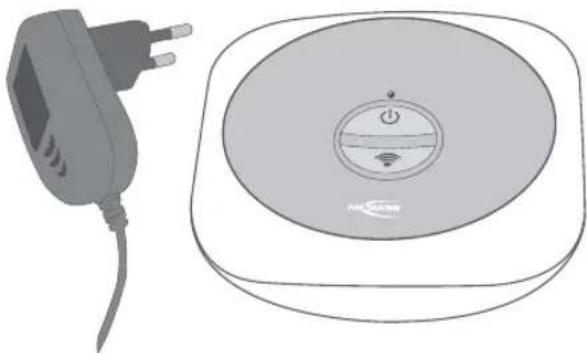
BABY UNIT
1. Power-/Connection indicator (green LED)
LED lit: Power is on and properly connected to the parent unit
LED flashes: No connection with the parent unit
LED off: Power is off
2. ON / OFF button
Press and hold for 2 seconds to turn the device on or off
3. Paging button
Press and hold button until the parent unit beeps. (Help to find a misplaced unit)
4. 6V DC power supply connection
To connect the power supply TEN PAO S003IV0600050
5. Built-in microphone
Detects baby sounds in the radio area of baby unit.
6. Power Supply (TEN PAO S003IV0600050)
100-240V \~ 50/60Hz, 6V, 500mA
natural_image
Illustration of a power plug and a smart home device with a circular control panel (no text or symbols)PARENT UNIT
1. Baby sound volume indicator (red LED 3x)
3 red LEDs indicate the sound level of the received signal from the baby unit. The louder the sound, the more LEDs turn on.
2. Volume keys
Press the + button to increase the volume one level, it emits a short beep.
Press the - button to decrease the volume of a level when the volume reaches its maximum or minimum value, it beeps three times. In total there are 9 volume levels.
3. ON / OFF - button
Press and hold the button for 2 seconds to turn power on or off.
4. Speaker
Broadcasts the sound made by your baby.
Connection warning: If the device is turned on and the connection between baby and parent units is lost, or if it can not connect when turning the units on a continuous beep will be heard. Once the connection is restored, the beeping will stop
Battery warning signal: If the batteries are running low, the units will produce short beeps until batteries are replaced.
5. Power/Connection/Battery status/HEALTH DECT (LED green / red)
LED is green: Power is on and properly connected to the baby unit
LED flashes green fast: No connection with the baby unit
LED lights up red: The battery is dead and must be recharged
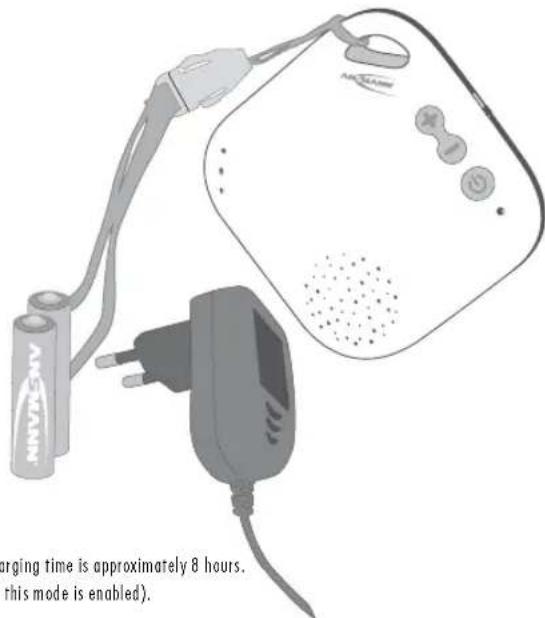
LED flashes red fast: The device is charged. The batteries will recharge when the device is connected to the mains power supply. The full charging time is approximately 8 hours.
LED flashes green slowly: HEALTH DECT activated to stop unnecessary radiation (30 seconds after starting the speaker it is turned off when this mode is enabled).
LED OFF: Unit is switched off
6. Power supply connector DC 6V
When connecting the power supply (TEN PAO S003IV0600050)
7. HEALTH DECT mode slide switch
There are 2 modes: HEALTH DECT (sound activation mode) or Continuous mode.
When the switch is set to "PERMANENT", the two devices will be in continuous transmission mode.
When the switch is set to „HEALTH DECT“, the baby unit will operate in the standard sound-activated mode. This means the baby unit activates its radio transmission only after detecting a sound. If the baby unit detects no sound, it will stop its radio transmission automatically after a few seconds.
8. Health DECT mode - Range check
When the slide switch is in HEALTH DECT mode and there is no sound, there will be no transmission between the units. This means that you should manually check the range again if you move the units further apart. To test the range manually, you can press the paging button on the baby unit or move the slide switch on the parent unit to "PERMANENT". We recommend not to charge the parent unit during the range check. Either after a few seconds, a connection is established and the connection indicator is solid green or if the baby unit is not in range, an alarm is triggered. Please move the slide switch to HEALTH DECT mode again after the range check to make sure that there will be no radio transmission between the units.
In PERMANENT mode range checking is done automatically.
9. Battery compartment cover
10. Power Supply
100-240V \~ 50/60Hz, 6V, 500mA, TEN PAO S003IV0600050
11. Batteries
2x ANSMANN NiMH type Micro AAA batteries, 1.2V, 800mAh (included). If you do not use the baby phone for some days, please take out the rechargeable batteries.
text_image
Aeris Aeris Aeris Aeris Aeris Aeris Aeris Aeris Aeris Aeris Aeris Aeris Aeris Aeris Aeris Aeris Aeris Aeris Aeris Aeris Aeris Aeris Aeris Aeris Aeris AeristeChniCal data (wireleSS teChnology)
Transmission technology: DECT with automatic radiation-stop-function HEALTH DECT
Frequency Range: 1880 - 1900MHz
Channels: 120
Channel Selection: Automatic
Maximum output power: <250mW
Average transmission power: <10mW
trouBleShooting
If problems occur, please read the following checklist. Check to see if the baby and/or the parent units are turned on. Check if the parent is plugged in to the power supply unit and if the batteries are in place.
the operating indicator led on the BaBy or parent unit iS turned off:
| CauSe Solution | |
| The baby or parent power is off. Turn on the baby or parent unit as appropriate. | |
| The batteries are discharged in the parent unit. Recharge or replace the batteries. | |
| The power supply of the affected device is unplugged or not correctly connected. Check all connections. | |
| There is no electricity available. Check that the electrical outlet delivers power. |
there iS no Sound CoMing FroM the SpeaKerS of the parent unit:
| CauSe Solution | |
| No sound is played back, the parent device is turned on and the HEALTH DECT mode is activated. | Please move for a short time the Health DECT mode slide switch to PERMANENT. A manual range check is performed. It may be that the baby unit out of range or is turned off. |
| The HEALTH DECT mode (sound activation) was selected. | Make a loud noise near the baby unit to check sound transmission. Once a louder sound is heard, the baby unit is reactivated. |
| The volume on the parent unit is set too low. Turn up the volume on the parent unit until you can hear your signal. | |
| The batteries are discharged in the parent unit. Recharge or replace the batteries. | |
| The parent unit is off. Turn the parent unit on. |
tranSMiSSion interferenCe:
| CauSe Solution | |
| In rare cases, interference due to the presence of a similar transmitting device in the immediate vicinity may occur. | Place the parents and / or baby units to a more suitable location. |
| This can include power lines or electronic equipment. |
reduced range:
| CauSe Solution | |
| Obstacles such as metal structures, reinforced concrete walls etc between the baby and the parent unit will reduce operational range. | Reduce the distance between the baby and parent unit or move the units where less obstacles are present. |
| The batteries of the parent unit are discharged. Recharge or replace the batteries. |
eleCtroStatic or eleCtroMagneticinterFerenCe:
| CauSe Solution | |
| Electrostatic or electromagnetic fields can be generated by other electrical appliances in the home. A mobile phone or a cordless phone may also cause interference of this kind. | Try to determine the source of the interference and move away from that device. |
white noiSe / whiStle CoMing FroM SpeaKerS:
| CauSe Solution | |
| Baby and parent units are too close to each other. Place the baby and parent units further apart. | |
| The volume of the parent unit is too high. Turn the volume down. |
the VoluMe of the parent unit iS too low:
| CauSe Solution | |
| The volume of the parent unit is set too low. Turn the volume up. | |
| The batteries of the parent unit are discharged. Recharge or replace the batteries. |
natural_image
Illustration of various electronic devices including a speaker, battery, and charging plug (no text or symbols)oBSah
natural_image
Illustration of a charging plug and a smart home appliance (no text or symbols)MATERŠKÁ JEDNOTKA
natural_image
Illustration of a portable electronic device with battery, plug, and charging plug (no text or symbols)11. Baterie
2x ANSMANN NiMH mikro AAA baterie, 1.2V, 800mAh (součástí)
TECHNICKÉ ÚDAJE (BEZDRÁTOVÁ TECHNOLOGIE)
natural_image
Illustration of household appliances including a washing machine, battery pack, and electrical plug (no text or symbols)TURVALISUS
HOIATUS!
natural_image
Illustration of a power plug and a smart home control device (no text or symbols)KESKSEADE
natural_image
Illustration of various electronic devices including a speaker, battery pack, and charging plug (no text or symbols)natural_image
Illustration of a power plug and a rectangular electronic device with a circular control knob (no text or symbols)natural_image
Illustration of a battery connected to a charging device with a plug and power outlet (no text or symbols)11. BateriaS
natural_image
Illustration of household electronic devices including a washing machine, battery pack, and charging plug (no text or symbols)SÉCURITÉ AVERTISSEMENT
natural_image
Illustration of a power plug and a smart home device with control panel (no text or symbols)MONITEUR PARENTS
natural_image
Illustration of a portable electronic device connected to a battery and plug (no text or symbols visible)11. Piles
2 x Accumulateurs ANSMANN NiMH AAA, 1.2V, 800mAh (inclus)
CARACTERISTIQUES TECHNIQUES (TECHNOLOGIE SANS FIL)
natural_image
Illustration of household appliances including a washing machine, battery pack, and electrical plug (no text or symbols)TURVALLISUUS
VAROITUS!
natural_image
Illustration of a power plug and a smart home device with a circular control panel (no text or symbols)VANHEMMAN YKSIKKÖ (VASTAANOTIN)
3. Vrtapainike (ON/OFF)
natural_image
Illustration of a portable air purifier with attached power plug and battery, no text or symbols present11. Akut
natural_image
Illustration of various household appliances including a washing machine, battery, and electrical plugs (no text or symbols)ПЕРИЕХОМЕНА
natural_image
Illustration of a power plug and a smart home device with a circular control panel (no text or symbols)ΜΟΝΑΔΑ ΓΟΝΕΩΝ
natural_image
Illustration of a medical device with a battery, plug, and earplifier (no text or symbols visible)TEXNIKA XAPAKTHPIΣTIKA (ΑΣΥΡΜΑΤΗ ΤΕΧΝΟΛΟΓΙΑ)
natural_image
Illustration of household electronic devices including a speaker, battery, and charging plug (no text or symbols)KOMPLEKTAS
natural_image
Illustration of a power plug and a smart home control device (no text or symbols)TĖVŲ IRENGINYS
1. Kūdikio garso stiprumo indikatorius (3 raudoni šviesos diodai)
natural_image
Illustration of a portable air purifier with attached cable and plug, no text or symbols presentnatural_image
Illustration of household appliances including a washing machine, battery pack, CD, and two electrical plugs (no text or symbols)KOMPLEKTACIJA
natural_image
Illustration of a power plug and a smart home control unit (no text or symbols)VECĀKU RĀCIJAS UZTVĒRĒJS
1. Bērna skanas skaluma indikators (sarkans LED 3x)
natural_image
Illustration of a portable electronic device with battery, plug, and charging plug (no text or symbols on main components)11. Baterijas
2x ANSMANN NiMH tipa Micro AAA baterijas, 1.2V, 800mAh (iekļautas)
TEHNISKA INFORMAÇIJA (BEZVADU TEHNOLOGIJA)
natural_image
Illustration of electronic devices including a speaker, battery pack, and charging plug (no text or symbols)AVISO DE SEGURANCA!
natural_image
Illustration of a power plug and a smart home device with control panel (no text or symbols)3. Botão - ON / OFF
natural_image
Illustration of a battery connected to an electric plug and a handheld device (no text or symbols visible)natural_image
Illustration of electronic devices including a speaker, battery pack, and charging plug (no text or symbols)ZASADY BEZPIECZEŃSTWAI
natural_image
Illustration of a power plug and a rectangular electronic device with a circular control panel (no text or symbols)MODUŁ RODZICIELSKI (ODBIORNIK)
natural_image
Illustration of a portable electronic device with battery, plug, and charging plug (no text or symbols)natural_image
Illustration of various household appliances including a washing machine, battery pack, and charging plug (no text or symbols)LIVRAREA CONTINE
natural_image
Illustration of a power plug and a smart home device with control panel (no text or symbols)APARATUL PARINTILOR
natural_image
Illustration of a white electric water heater connected to a battery and a plug, with no visible text or symbols.11. aCuMulatori
2 x accumulatori ANSMANN NiMH marimea R3 (AAA), 1.2V, 800mAh (inclusi in livrare)
date tehniCe (tehniCa eMiSiei)
Tehnica de transmisie: DECT cu functia de oprire automata a emisiei Health DECT
Domeniul de frecventa: 1880 - 1900MHz
Canale: 120
natural_image
Illustration of household appliances including a washing machine, battery pack, and electrical plug (no text or symbols)SÄKERHET/VARNING!
natural_image
Illustration of a power plug and a smart home device with control panel (no text or symbols)3. ON / OFF knapp
natural_image
Illustration of a portable electronic device with battery, plug, and charging plug (no text or symbols)FelSöKning
natural_image
Illustration of electronic devices including a speaker, battery pack, and charging plug (no text or symbols)ROZSAH DODÁVKY
natural_image
Illustration of a power plug and a smart home device with a circular control panel (no text or symbols)PRIJÍMAČ RODIČOV
- Indikácia hlasitosti zvukov diefara (3 červené LED)
natural_image
Illustration of a portable electric heater with battery, plug, and charging plug (no text or symbols)11. Akumulátory
natural_image
Illustration of various household appliances including a washing machine, battery pack, and electrical plug (no text or symbols)VARNOSTNA NAVODILA - OPOZORILA!
natural_image
Illustration of a charging plug and a smart home device with power button and wireless signal icon (no text or symbols)3. ON / OFF gumb
Pritisnite in držite gumb za 2 sekundi, tako napravo vključite.
4. Zvočnik
natural_image
Illustration of a portable electronic device with battery, plug, and charging plug (no text or symbols)odpraVljanje težaV
natural_image
Illustration of household appliances including a washing machine, battery pack, and electrical plug (no text or symbols)GÜVENLYK UYARILARI VE ÇALIPTIRMA
ÝKAZ!
natural_image
Illustration of a power plug and a smart home device with a circular control panel (no text or symbols)EBEVEYN CÝHAZI
natural_image
Illustration of a portable electric heater with battery, plug, and charging plug (no text or symbols)11. Piller
2x ANSMANN NiMH für Micro AAA piller, 1.2V, 800mAh (teslimat kapsamýnda bulunur)
TEKNÝK DEĐERLER (SÝNYAL TEKNÝDÝ)
natural_image
Illustration of household appliances including a washing machine, battery pack, and electrical plugs (no text or symbols)БЕЗПЕКА
ЗАСТЕРЕЖЕННЯ!
natural_image
Illustration of a smart speaker with battery, charging plug, and power cord (no text or symbols)DECLARATION OF CONFORMITY DÉCLARATION DE CONFORMITÉ
Wir
We Nous
ANSMANN AG
part no.: 1800-0025 and 1800-0025-UK
Model : Sydney
pri:100..240V 60/50Hz / sec:
I.V. Ulnich Dietz [Head of R&D]
anishama 10) Anschaffnote 12) 37.001 Passifund Tel.: 05296/40208-3 Fax: 05296/40208-146 © Post: http://enapenn.de Solutions: https://www.enapenn.de
Safety
EN60950-1:2006+A11:2009+A1:10
2006/15/EC (LFD)
Nordwestdurchsatz: Vollbahn, Kauhausen: 80-40, 300 51 211, 962 340 691 42 Laufwand, Kauhausen: 80-40, 300 51 211, 962 370 692 42 800 Bank: 80-40, 41138149, 96255555151 Deutsche Bank: 80-40, 41138149, 12001773301642 62576980