
WR-MG88U - Camera accessory JVC - Free user manual and instructions
Find the device manual for free WR-MG88U JVC in PDF.


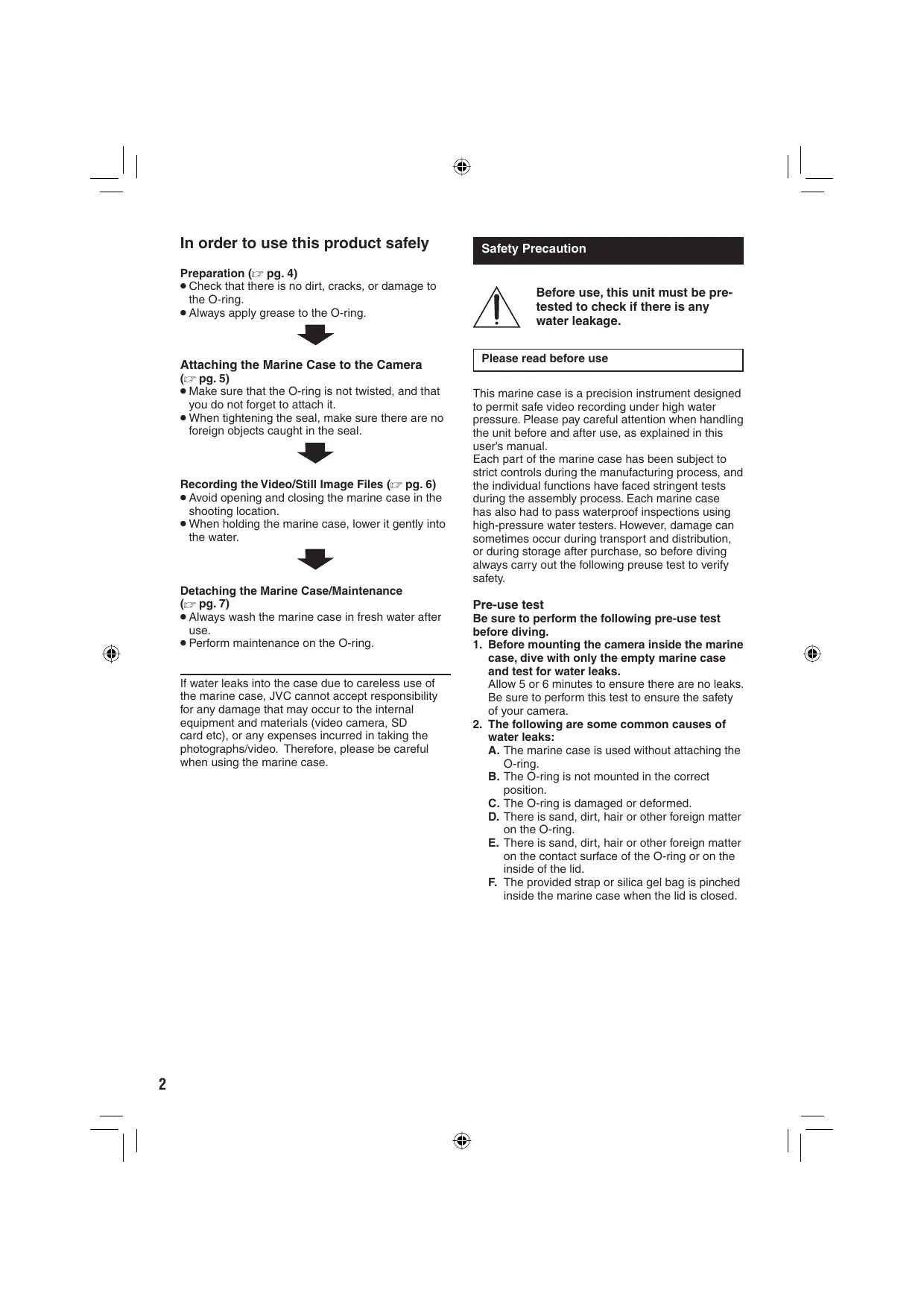


| Product type | Underwater waterproof housing for camcorder |
| Brand | JVC |
| Model | WR-MG88U |
| Maximum immersion depth | 30 meters |
| Dimensions (L x D x H) | 233 mm x 172 mm x 132 mm |
| Weight (without handle) | Approximately 800 g |
| Buoyancy (with camcorder and battery) | +400 g |
| Filter diameter | 67 mm |
| Seal material | Rubber (spare seal included) |
| Accessible controls | Power/Mode, zoom, photo shutter, video start/stop |
| Compatible models | Base A: GZ-MG130~275; Base B: GZ-MG555~575 |
| Included accessories | Handle, strap, 2 seals, silica gel, silicone grease, lens cloth, cotton swab, cleaning liquid, intermediate piece, hex keys, lens cap (depending on model) |
| Maintenance kit (sold separately) | Ref. MG8_MTKIT: seals, grease, gel, cloth |
| Post-use maintenance | Rinse with fresh water, clean seal and groove, dry away from sunlight |
| Usage precautions | Perform a leak test before each use; check the condition of the seal |
| Extended storage (>1 month) | Remove the seal, grease, place in a plastic bag |
| Seal replacement | Every year (consumable part) |
Frequently Asked Questions - WR-MG88U JVC
User questions about WR-MG88U JVC
0 question about this device. Answer the ones you know or ask your own.
Ask a new question about this device
Download the instructions for your Camera accessory in PDF format for free! Find your manual WR-MG88U - JVC and take your electronic device back in hand. On this page are published all the documents necessary for the use of your device. WR-MG88U by JVC.
USER MANUAL WR-MG88U JVC
In order to use this product safely
Preparation (pg. 4)
- Check that there is no dirt, cracks, or damage to the O-ring. Always apply grease to the O-ring.

Attaching the Marine Case to the Camera (F pg. 5)
- Make sure that the O-ring is not twisted, and that you do not forget to attach it.
- When tightening the seal, make sure there are no foreign objects caught in the seal.

Recording the Video/Still Image Files (pg. 6)
- Avoid opening and closing the marine case in the shooting location.
- When holding the marine case, lower it gently into the water.

Detaching the Marine Case/Maintenance (F pg. 7)
Always wash the marine case in fresh water after use. - Perform maintenance on the O-ring.
If water leaks into the case due to careless use of the marine case, JVC cannot accept responsibility for any damage that may occur to the internal equipment and materials (video camera, SD card etc), or any expenses incurred in taking the photographs/video. Therefore, please be careful when using the marine case.
Safety Precaution

Before use, this unit must be pretested to check if there is any water leakage.
Please read before use
This marine case is a precision instrument designed to permit safe video recording under high water pressure. Please pay careful attention when handling the unit before and after use, as explained in this user's manual.
Each part of the marine case has been subject to strict controls during the manufacturing process, and the individual functions have faced stringent tests during the assembly process. Each marine case has also had to pass waterproof inspections using high-pressure water testers. However, damage can sometimes occur during transport and distribution, or during storage after purchase, so before diving always carry out the following preuse test to verify safety.
Pre-use test
Be sure to perform the following pre-use test before diving.
- Before mounting the camera inside the marine case, dive with only the empty marine case and test for water leaks.
Allow 5 or 6 minutes to ensure there are no leaks. Be sure to perform this test to ensure the safety of your camera.
2. The following are some common causes of water leaks:
A. The marine case is used without attaching the O-ring. B. The O-ring is not mounted in the correct position. C. The O-ring is damaged or deformed. D. There is sand, dirt, hair or other foreign matter on the O-ring. E. There is sand, dirt, hair or other foreign matter on the contact surface of the O-ring or on the inside of the lid. F. The provided strap or silica gel bag is pinched inside the marine case when the lid is closed.
3. Check that there are no scratches or cracks on the marine case every time you use it.
The marine case must withstand water pressure with use. Repeated exposure to pressure eventually leads to material fatigue, which may result in damage of the marine case. Every time you use the marine case, check in advance that there are no scratches or cracks. If you frequently use the marine case, be sure to ask for maintenance at the store of purchase. (There is a charge for maintenance.)
To protect your camera and ensure optimum use, keep the examples listed above in mind when using the marine case.
JVC accepts no responsibility for water leakage or damage to anything inside the marine case (camera, SD card, etc.) due to careless usage of this product. Be sure to follow correct procedures when using the marine case.
Accessories
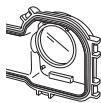
Glass cleaner (to prevent "steaming up") - Cleaning fluid (to remove dirt) Silicone grease Silicone cloth Silica gel (Preservative) - Lens tissue paper - Swab - Strap - 2 O-rings : 1 Spare
- Base (A,B)
The attachment base differs depending on the model of camera that you have.
- Grip
Commercially available lights and weights can also be attached.
Pick
- Screw tightening key
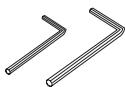
- 2 hexagonal wrenches Large: for assembling grip Small: buckle opener
- Lens hood
Only attached to certain types of cameras.



Maintenance Kit - Sold Separately (Part Number: MG8_MTKIT)
You can purchase the following set of expendable parts. Please contact your local JVC service representative.
- O-Ring x2
Silicone grease (5 g) x1 Silica Gel (preservative) (2 g) x5 - Lens tissue paper (50 sheets) x1
Index
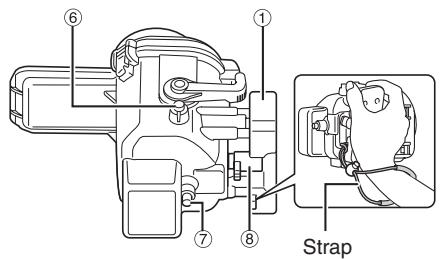
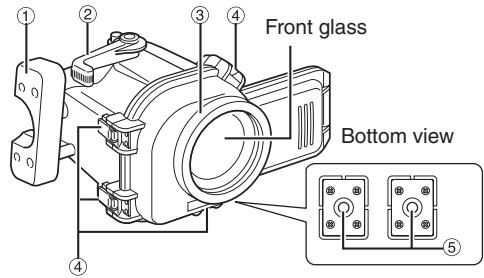
① Main casing grip:
Attach the included strap as shown in the diagram above.
② Zoom lever ③ Ring:
Commercially available filters (67mm diameter) etc. can be attached.
④ Buckles (4 places):
Seal the marine case.
⑤ Grip attachment holes: You can attach the included grip, or commercially available weights etc. ⑥ Still image shooting button ⑦ Video recording start/stop button ⑧ Power/mode switch lever:
Turns camera's power on/off, or switches video or still mode.
Preparation
Inspect the main casing for scratches and cracks etc.
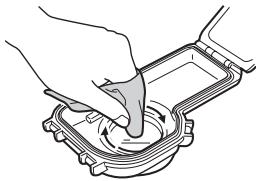
Apply 2 or 3 drops of the glass cleaner provided onto one of the lens tissues or a clean cloth, and wipe the inner side of the marine case front glass.
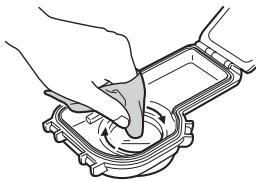
2 Check the O-ring.
Using the supplied pick, remove the O-ring from the main case.
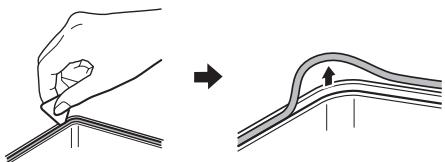
Check the O-ring, O-ring contact surface, and groove in which the O-ring fits for dirt, scratches, or damage etc. visually and by touching with your finger.
3 Apply grease to the O-ring and re-attach.
4 Close the empty marine case (no camera inside).
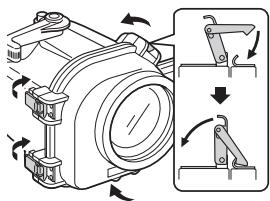
5 Place the marine case in water, and check that there are no water leaks.
Attaching the Marine Case to the Camera
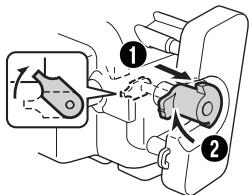
Pull the power/mode switch lever of the marine case in the direction of the arrow (0), and rotate it to lock it (2).
If the power/mode switch lever is not locked, it may touch or damage the camera when the camera is put into the case.
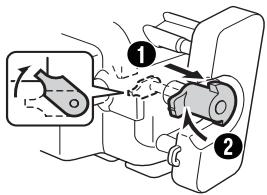
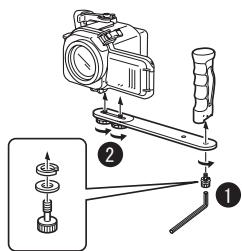
2 Attach the base in the correct way for your model of camera. (pg. 7)
- Line up the tripod screw hole on the base of your camera with the base holes of the case, and tighten the screw.
- Install the battery (and insert an SD card if needed) beforehand.
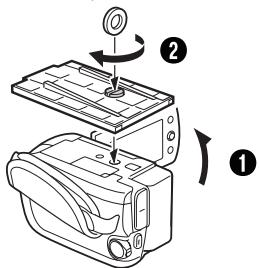
3 Setup the camera (please refer to your camera's instruction manual).
- Turn off the flash and light. (presence of a flash/ light differs according to the model.)
- Switch off the power. It is recommended to set to the auto recording mode.
- Open the lens cover.
4 Open the marine case.
If it is difficult to open buckles, use the buckle opener.
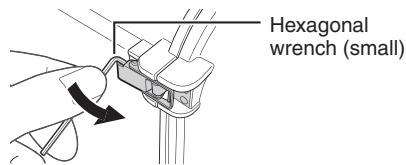
5 Insert the camera into the marine case.
Inserting the provided silica gel between the camera and marine case prevents the inside of the marine case from steaming up.
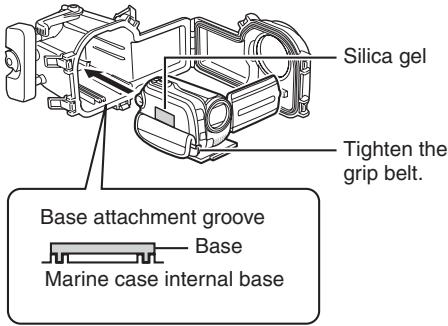
For cameras that are equipped with Base A, attach the lens hood.
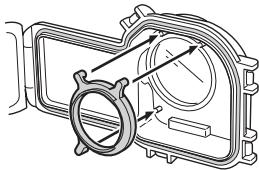
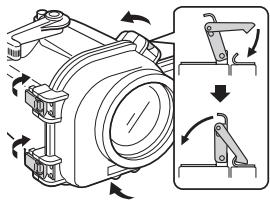
6 Seal the marine case, and attach the grips.
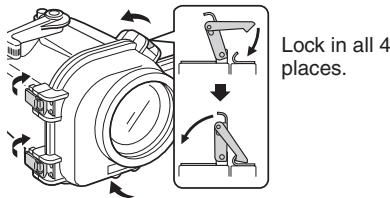
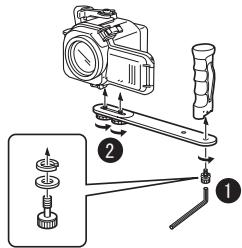
NOTE
The risk of water leakage is extremely high if the O-ring is twisted, if you forget to attach it, or if something is trapped in the seal.
Recording the Video/Still Image Files
Before recording
Submerge the marine case with the camera equipped into a bathtub or water tank full of fresh water.
Gradually increase the amount of time the marine case is submerged as shown below.
1st time: 5~10 seconds - 2nd time: 30 seconds ~ 1 minute - 3rd time: 3 minutes ~ 5 minutes (try operating the levers and buttons while the marine case is submerged).
NOTES
Always have someone hold the marine case for you when diving into, or getting out of water. - If for any reason water leakage occurs, remove the camera battery. It may cause the camera to explode.
Pull the marine case power/mode switch lever to release the lock, and switch on the camera's power.
Rotate the lever to switch on the camera's power. The camera's power lamp lights.
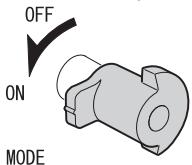
Switching between video/still modes
Switch modes by rotating the lever.
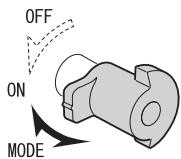
2 Press the video recording start/stop button or the still image shooting button to start recording.
Still image shooting button
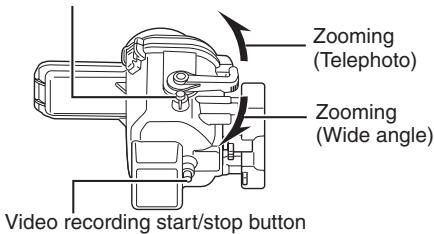
3 When you have finished recording, rotate the power/mode switch lever to turn the camera's power off.
The camera's power lamp goes out.
NOTE
Sometimes, due to sudden shaking or impact to the marine case, the camera's drop detection function operates to switch off the camera's power.
When [VIDEO MANAGEMENT FILE IS BROKEN. TO RECORD/PLAYBACK VIDEO, RECOVERY IS REQUIRED. RECOVER?] is displayed, press the REC button to recover the file.
Detaching the Marine Case/Maintenance
Always perform maintenance on the marine case after you have finished recording. Failing to perform maintenance on the marine case will allow dirt to build up on the case, causing water leaks.
1 Wash the marine case in water while it is still sealed.
- If the marine case was used in seawater, we recommend submerging the marine case in fresh water for a while to remove salt.
- Move the buttons and levers while the marine case is submerged, and rinse the salt out from any gaps or grooves etc.
2 Wipe off the water with a dry cloth, and allow the marine case to completely dry out.
3 Open the marine case, and remove the camera.
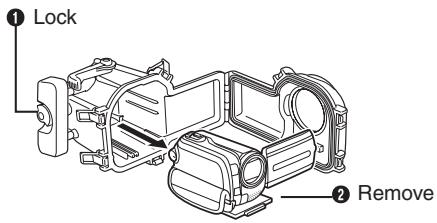
4 Remove the O-ring, and wipe off any salt, sand, and any other debris.
Also wipe the groove in which the O-ring was inserted, and the part of the marine case that was in contact with the O-ring, and allow them to dry.
5 Wipe the inside of the marine case with a dry cloth.
Drop a few drops of the cleaning fluid onto the inside of the front glass, and wipe it off using the silicone cloth etc.
NOTES
- Do not leave the marine case in direct sunlight. Doing so may cause discoloration to the case, and may cause the O-ring to deteriorate more quickly.
- When storing the marine case, unlock the power/ mode switch lever.
- If you cannot avoid opening the marine case at the diving point, make sure that drops of water from your hair or your body do not drop into the case.
Storing the O-ring
If you do not intend to use the marine case for longer than 1 month, remove the O-ring from the marine case, and spread a thin layer of the supplied silicone grease over the entire O-ring. After that, place the O-ring inside a clean plastic bag, and store it in the maintenance kit case.
The O-ring is an expendable part. Replace the O-ring with a brand new one every year.
NOTES
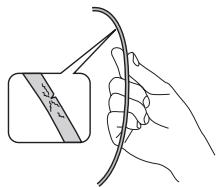
- When re-using an O-ring after storage, always check the condition of the O-ring.
- Never use an O-ring if it is deformed (crushed, distorted), cracked, or damaged in any way.
Main Specifications
| Maximum pressure | Water depth up to 30 meters |
| Operations | Power on/off Video recording start/stop Still image shooting Zoom (telephoto/wide angle) |
| Buoyancy | +400 g (with the camera inserted and the supplied battery pack attached) |
| Main unit dimensions (W x D x H) | 233 mm x 172 mm x 132 mm |
| Main unit weight | Approx. 800 g (not incl. grip) |
| Applicable model and base to be used | Base A: GZ-MG130 ~ 275 Base B: GZ-MG555 ~ 575 |
| Filter diameter | ø 67.0 mm |
For safe use of this product
2 O-ring controller.
2 Check the O-ring.
Storage of the O-ring
② Zoom button (3) Ring:
Turns the camera on/off, switches between video and still image modes.
Preparation
1 Inspect the main body for scratches, cracks, etc.
Apply 2-3 drops of lens cleaning solution to one of the supplied cloths or a soft cloth, and wipe the inside of the front glass for underwater shooting.
2 Check the O-ring.
Remove the O-ring from the main body using the supplied plate.
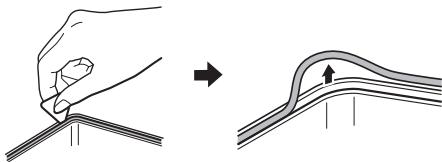
Check the O-ring, the contact surface with the O-ring, and the groove for the O-ring for any dirt, sand, damage, etc., visually and by touch.
3 Wipe the O-ring and insert it into place. 4 Close the empty case for underwater shooting (without the camera inside).
5 Submerge the case for underwater shooting in water and check for any water leaks.
MOUNTING THE CAMERA IN THE UNDERWATER CASE
Turn the power/function switch on the camera housing to the arrow (0), then turn it to the lock position (2).
An unlocked power/function switch lever may catch on the camera and damage it when installing it in the housing.
2 Secure the base in the appropriate manner according to the camera used. (See p. 91)
Align the hole in the camera base with the hole in the housing base, then insert the screw. Optionally, insert the accumulator (and SD card, if applicable).
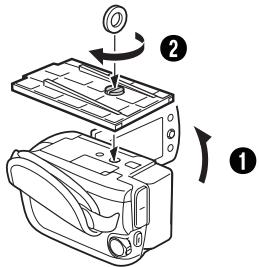
3 Set up the camera (see the camera instruction manual).
Turn off the flash and the light (the presence of flash/light depends on the model). Turn off the camera power. It is recommended to enable the automatic recording mode. Remove the lens caps.
4 Open the camera housing.
If the latches cannot be opened, use the supplied key.
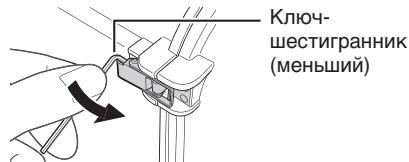
5 Insert the camera into the housing.
Place the supplied desiccant packet between the camera and the housing to prevent the housing from fogging up from the inside.
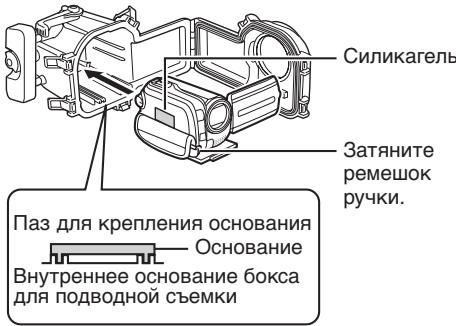
For cameras with base A, secure the lens hood.
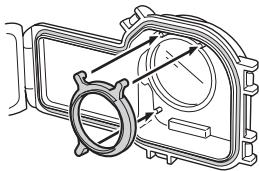
6 Close the camera housing and close the latches.
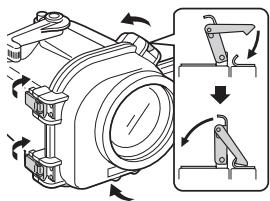
Latch all 4 places.
NOTE
If the sealing ring is twisted, if you forgot to insert it, or if something is caught in the seal, the risk of water leakage increases many times over.
Switch between video and still image shooting modes
Before recording
Immerse the housing for underwater shooting together with the inserted camera into fresh water.
Gradually increase the duration of the housing's immersion in water as indicated below.
-1st time: 5 ~ 10 seconds -2nd time: 30 seconds ~ 1 minute -3rd time: 3 minutes ~ 5 minutes (repeat the procedure until the housing for underwater shooting is in a submerged state).
NOTE
-Be sure to have someone hold the housing for underwater shooting while you dive or exit the water. - If water leakage occurs for any reason, remove the battery from the camera. Otherwise, the camera may explode.
1 Pull out the power/mode switch lever on the housing for underwater shooting, and release it to turn on the camera.
Turn the lever to turn on the camera power. The camera power indicator starts to light.
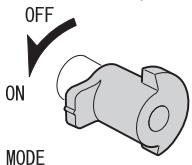
Switching between video and still image shooting modes
Switch modes by turning the lever.
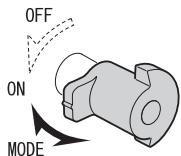
2 Start recording by pressing the video start/stop button or the still image shooting button.
Still image shooting button
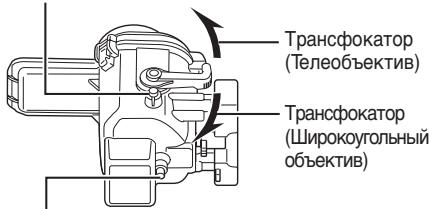
Video start/stop button
3 After finishing recording, turn off the camera power by turning the power/mode switch lever.
The underwater camera housing is ready.
NOTE
Due to sharp shocks of the housing during underwater shooting, the camera power-off function may activate, which turns off the camera power. When the message [FILE ERROR: PLAYBACK FILE DAMAGED/RECORDING NEEDS TO BE RESTORED?] is displayed, press the REC button to restore the file.
Housing care for underwater shooting / Maintenance
After completing the recording, be sure to perform maintenance on the housing for underwater shooting. Neglecting maintenance can lead to dirt accumulating on the housing, which may cause water leakage.
1. When using the housing for underwater shooting in water, keep it in a hermetically sealed position.
If the housing for underwater shooting has been used in seawater, to remove salt, it is recommended to immerse it in fresh water for some time. - While the housing for underwater shooting is in the immersed position, press the buttons and levers to dissolve salt from all gaps, grooves, etc.
2. Wipe the water off with a dry cloth, and let the housing for underwater shooting dry completely.
3. Open the housing for underwater shooting and remove the camera.
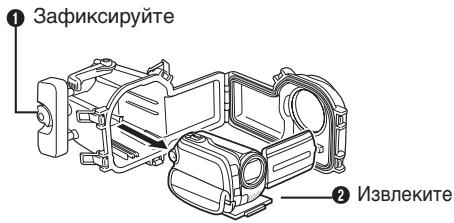
4. Remove the O-ring and clean off all traces of salt, sand, and other contaminants from it.
Also clean the groove where the O-ring is inserted and the part of the housing for underwater shooting that contacts the O-ring, and let them dry.
5. Wipe the inside of the housing for underwater shooting with a dry cloth.
Apply a few drops of silicone grease to the inner surface of the front glass, then wipe it off with a soft cloth, etc.
NOTE
Do not leave the housing for underwater shooting exposed to direct sunlight. This may cause discoloration of the housing and accelerate the aging of the O-ring.
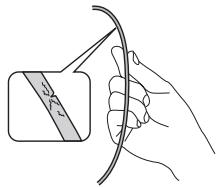
The sealing ring must be checked before each use for cracks, tears, or other damage. If the sealing ring is damaged, it must be replaced before use. To replace the sealing ring, open the cover and remove the old ring from the groove.
Storage of the sealing ring
If the sealing ring will not be used for more than 1 month, remove the sealing ring from the cover and completely coat its surface with a thin layer of silicone grease. Then place the sealing ring in a resealable plastic bag and store it in the box with the maintenance kit.
The sealing ring is a consumable item. Replace the sealing ring with a new one every year.
NOTES
- After each use, the sealing ring must be checked for condition. - Do not use the sealing ring if it is deformed (flattened, cracked), cracked, or damaged in any way.
Main technical characteristics

This warranty is valid only in Rep of KOREA
GOAL OF THE PROBLEM
- IN ORDER TO USE THIS PRODUCT SAFELY
- PREPARATION (PG. 4)
- ATTACHING THE MARINE CASE TO THE CAMERA (F PG. 5)
- RECORDING THE VIDEO/STILL IMAGE FILES (PG. 6)
- DETACHING THE MARINE CASE/MAINTENANCE (F PG. 7)
- SAFETY PRECAUTION
- PLEASE READ BEFORE USE
- PRE-USE TEST
- BE SURE TO PERFORM THE FOLLOWING PRE-USE TEST BEFORE DIVING
- THE FOLLOWING ARE SOME COMMON CAUSES OF WATER LEAKS
- CHECK THAT THERE ARE NO SCRATCHES OR CRACKS ON THE MARINE CASE EVERY TIME YOU USE IT
- ACCESSORIES
- BASE (A,B)
- GRIP
- PICK
- LENS HOOD
- MAINTENANCE KIT - SOLD SEPARATELY (PART NUMBER: MG8_MTKIT)
- O-RING X
- INDEX
- PREPARATION
- INSPECT THE MAIN CASING FOR SCRATCHES AND CRACKS ETC
- CHECK THE O-RING
- APPLY GREASE TO THE O-RING AND RE-ATTACH
- CLOSE THE EMPTY MARINE CASE (NO CAMERA INSIDE)
- PLACE THE MARINE CASE IN WATER, AND CHECK THAT THERE ARE NO WATER LEAKS
- ATTACHING THE MARINE CASE TO THE CAMERA
- PULL THE POWER/MODE SWITCH LEVER OF THE MARINE CASE IN THE DIRECTION OF THE ARROW (0), AND ROTATE IT TO LOCK IT (2)
- ATTACH THE BASE IN THE CORRECT WAY FOR YOUR MODEL OF CAMERA. (PG. 7)
- SETUP THE CAMERA (PLEASE REFER TO YOUR CAMERA'S INSTRUCTION MANUAL)
- OPEN THE MARINE CASE
- INSERT THE CAMERA INTO THE MARINE CASE
- SEAL THE MARINE CASE, AND ATTACH THE GRIPS
- NOTE
- RECORDING THE VIDEO/STILL IMAGE FILES
- BEFORE RECORDING
- NOTES
- PULL THE MARINE CASE POWER/MODE SWITCH LEVER TO RELEASE THE LOCK, AND SWITCH ON THE CAMERA'S POWER
- SWITCHING BETWEEN VIDEO/STILL MODES
- PRESS THE VIDEO RECORDING START/STOP BUTTON OR THE STILL IMAGE SHOOTING BUTTON TO START RECORDING
- WHEN YOU HAVE FINISHED RECORDING, ROTATE THE POWER/MODE SWITCH LEVER TO TURN THE CAMERA'S POWER OFF
- DETACHING THE MARINE CASE/MAINTENANCE
- WASH THE MARINE CASE IN WATER WHILE IT IS STILL SEALED
- WIPE OFF THE WATER WITH A DRY CLOTH, AND ALLOW THE MARINE CASE TO COMPLETELY DRY OUT
- OPEN THE MARINE CASE, AND REMOVE THE CAMERA
- REMOVE THE O-RING, AND WIPE OFF ANY SALT, SAND, AND ANY OTHER DEBRIS
- WIPE THE INSIDE OF THE MARINE CASE WITH A DRY CLOTH
- STORING THE O-RING
- THE O-RING IS AN EXPENDABLE PART. REPLACE THE O-RING WITH A BRAND NEW ONE EVERY YEAR
- FOR SAFE USE OF THIS PRODUCT
- O-RING CONTROLLER
- STORAGE OF THE O-RING
- MOUNTING THE CAMERA IN THE UNDERWATER CASE
- TURN THE POWER/FUNCTION SWITCH ON THE CAMERA HOUSING TO THE ARROW (0), THEN TURN IT TO THE LOCK POSITION (2)
- SECURE THE BASE IN THE APPROPRIATE MANNER ACCORDING TO THE CAMERA USED. (SEE P. 91)
- SET UP THE CAMERA (SEE THE CAMERA INSTRUCTION MANUAL)
- OPEN THE CAMERA HOUSING
- INSERT THE CAMERA INTO THE HOUSING
- CLOSE THE CAMERA HOUSING AND CLOSE THE LATCHES
- SWITCH BETWEEN VIDEO AND STILL IMAGE SHOOTING MODES
- PULL OUT THE POWER/MODE SWITCH LEVER ON THE HOUSING FOR UNDERWATER SHOOTING, AND RELEASE IT TO TURN ON THE CAMERA
- SWITCHING BETWEEN VIDEO AND STILL IMAGE SHOOTING MODES
- START RECORDING BY PRESSING THE VIDEO START/STOP BUTTON OR THE STILL IMAGE SHOOTING BUTTON
- AFTER FINISHING RECORDING, TURN OFF THE CAMERA POWER BY TURNING THE POWER/MODE SWITCH LEVER
- HOUSING CARE FOR UNDERWATER SHOOTING / MAINTENANCE
- WHEN USING THE HOUSING FOR UNDERWATER SHOOTING IN WATER, KEEP IT IN A HERMETICALLY SEALED POSITION
- WIPE THE WATER OFF WITH A DRY CLOTH, AND LET THE HOUSING FOR UNDERWATER SHOOTING DRY COMPLETELY
- OPEN THE HOUSING FOR UNDERWATER SHOOTING AND REMOVE THE CAMERA
- REMOVE THE O-RING AND CLEAN OFF ALL TRACES OF SALT, SAND, AND OTHER CONTAMINANTS FROM IT
- WIPE THE INSIDE OF THE HOUSING FOR UNDERWATER SHOOTING WITH A DRY CLOTH
- STORAGE OF THE SEALING RING
- THE SEALING RING IS A CONSUMABLE ITEM. REPLACE THE SEALING RING WITH A NEW ONE EVERY YEAR
- GOAL OF THE PROBLEM
Brand : JVC
Model : WR-MG88U
Category : Camera accessory