TRAVELMATE P643-M - Laptop ACER - Free user manual and instructions
Find the device manual for free TRAVELMATE P643-M ACER in PDF.


User questions about TRAVELMATE P643-M ACER
0 question about this device. Answer the ones you know or ask your own.
Ask a new question about this device
Download the instructions for your Laptop in PDF format for free! Find your manual TRAVELMATE P643-M - ACER and take your electronic device back in hand. On this page are published all the documents necessary for the use of your device. TRAVELMATE P643-M by ACER.
USER MANUAL TRAVELMATE P643-M ACER
Product registration
When using your product for the first time, it is recommended that you immediately register it. This will give you access to some useful benefits, such as:
- Faster service from our trained representatives.
Membership in the Acer community: receive promotions and participate in customer surveys.
The latest news from Acer.
Hurry and register, as other advantages await you!
How to register
To register your Acer product, please visit www.acer.com. Select your country, click PRODUCT REGISTRATION and follow the simple instructions.
You will also be asked to register your product during the setup process, or you can double-click the Registration icon on the desktop.
After we receive your product registration, you will be sent a confirmation email with important data that you should keep in a safe place.
Obtaining Acer accessories
We are happy to inform you that Acer's warranty extension program and Notebook accessories are available online. Come and visit our online shop and find what you need at store.acer.com.
The Acer store is being progressively rolled out, and, unfortunately may not be available in some regions. Please check back regularly to see when it will be available in your country.
Model Number :
Serial Number:
Purchase Date:
Place of Purchase:
Acer recommends...
Productivity Software
Work Great with Microsoft® Office 2010 - Express your ideas, solve problems and simplify everyday projects with Office 2010.
Photo editing - Easily edit and print your photos with Windows Live Photo Gallery. Then share them on Facebook, YouTube or Windows Live.
Search & Decide with Bing - Find and organize the answers you need using Bing™, so you can make faster, more informed decisions.
First things first
We would like to thank you for making an Acer notebook your choice for meeting your mobile computing needs.
Your guides
To help you use your Acer notebook, we have designed a set of guides: First off, the Setup Poster helps you get started with setting up your computer.
The Quick Guide introduces you to the basic features and functions of your new computer.
For more on how your computer can help you to be more productive, please refer to the User's Manual. The User's Manual contains useful information applying to your new computer. It covers basic topics such as using the keyboard and audio, etc.
This guide contains detailed information on such subjects as system utilities, data recovery, expansion options and troubleshooting. In addition it contains warranty information and the general regulations and safety notices for your notebook.
Follow these steps to access it:
1 Type "User" from Start.
2 Click on Acer User's Manual.
Your Acer notebook tour
After setting up your computer as illustrated in the setup poster, let us show you around your new Acer notebook.
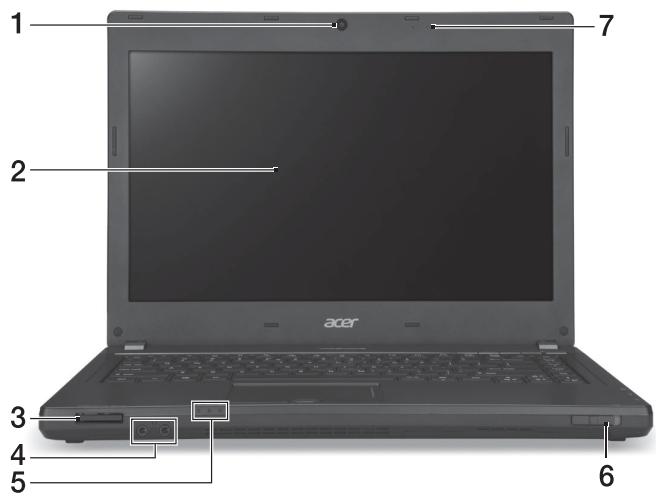
Top cover view
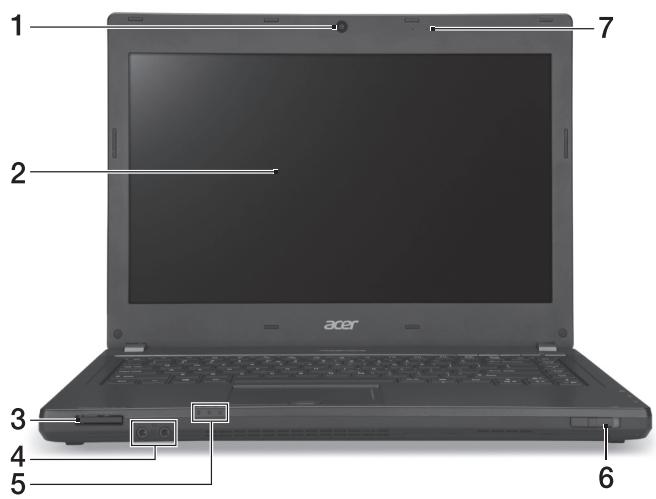
| # | Icon | Item | Description |
| 1 | Webcam | Web camera for video communication. A light next to the webcam indicates that the webcam is active (for selected models only). | |
| 2 | Display screen | Also called Liquid-Crystal Display (LCD), displays computer output. | |
| 3 | IIIIIIM MULTIPECEDCARD PRO | Multi-in-1 card reader | Accepts Secure Digital (SD), MultiMediaCard (MMC), Memory Stick PRO (MS PRO), xD-Picture Card (xD). Note: Push to remove/install the card. Only one card can operate at any given time. |
| 4 | Microphone jack | Accepts inputs from external microphones. | |
| Headphones/speaker jack | Connects to audio devices (e.g., speakers, headphones). | ||
| 5 | HDD indicator | Indicates when the hard disk drive is active. | |
| Power indicator | Indicates the computer's power status. | ||
| Battery indicator | Indicates the computer's battery status. 1. Charging: The light shows amber when the battery is charging. 2. Fully charged: The light shows blue when in AC mode. | ||
| 6 | Communication switch / indicator | Enables/disables the computer's communication devices / indicates the computer's wireless connectivity device status. | |
| 7 | Microphones | Two internal microphones for stereo sound recording. |
Keyboard view
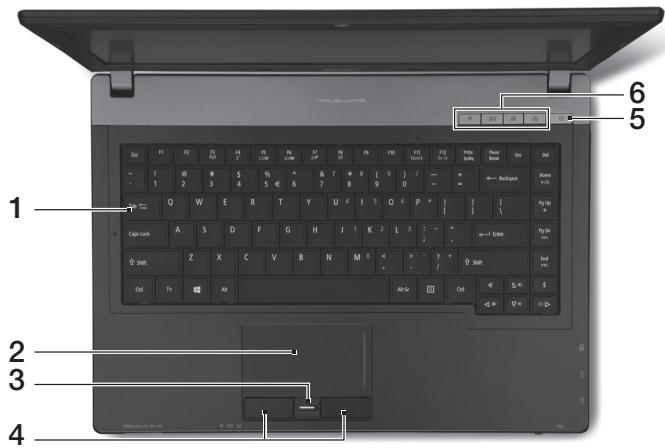
| # | Icon | Item | Description |
| 1 | Keyboard | For entering data into your computer. | |
| 2 | Touchpad | Touch-sensitive pointing device which functions like a computer mouse. | |
| 3 | Fingerprint reader | Fingerprint reader for Acer ProShield Security Suite. | |
| 4 | Click buttons (left and right) | The left and right buttons function like the left and right mouse buttons. | |
| 5 | ○ | Power button / indicator | Turns the computer on and off. Indicates the computer's power status. |
| 6 | P | P key | Programmable key. |
| × | Acer email key | Opens your default email application. | |
| ○ | Backup key | Launches Acer Backup Management for three-step data backup. | |
| ○ | Microphone mute | Mutes the microphone. |
Hotkeys
The computer employs hotkeys or key combinations to access most of the computer's controls like screen brightness and volume output.
To activate hotkeys, press and hold the
| Hotkey | Icon | Function | Description |
| +Fn> + <F3> | ( ) | Communication | Enables/disables the computer's communication devices. |
| +Fn> + <F4> | ZZ | Sleep | Puts the computer in Sleep mode. |
| +Fn> + <F5> | ☐ ☐ | Display toggle | Switches display output between the display screen, external monitor (if connected) and both. |
| +Fn> + <F6> | ☐ ☐ | Screen blank | Turns the display screen backlight off to save power. Press any key to return. |
| +Fn> + <F7> | ☐ ☐ | Touchpad toggle | Turns the internal touchpad on and off. |
| +Fn> + <F8> | ☐ ☐ | Speaker toggle | Turns the speakers on and off. |
| +Fn> + <F9> | ☐ ☐ | Brightness up | Increases the screen brightness. |
| +Fn> + <▲> | ☐ ☐ | Brightness down | Decreases the screen brightness. |
| +Fn> + <△> | ☐ ☐ | Volume up | Increases the sound volume. |
| +Fn> + <▼> | ☐ ☐ | Volume down | Decreases the sound volume. |
| +Fn> + <Home> | ☐ ☐ | Play/Pause | Play or pause a selected media file. |
| +Fn> + <Pg Up> | ☐ ☐ | Stop | Stop playing the selected media file. |
| +Fn> + <Pg Dn> | ☐ ☐ | Previous | Return to the previous media file. |
| +Fn> + <End> | ☐ ☐ | Next | Jump to the next media file. |
Left view
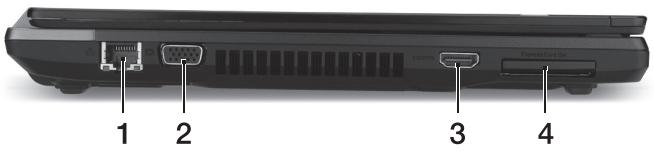
| # | Icon | Item | Description |
| 1 | ☐☐ | Ethernet (RJ-45) port | Connects to an Ethernet 10/100/1000-based network. |
| 2 | ☐ | External display(VGA) port | Connects to a display device (e.g.,external monitor, LCD projector). |
| 3 | HDMI | HDMI port | Supports high-definition digital video connections. |
| 4 | ExpressCard/34 slot | Accepts one ExpressCard/34 module.Note:Push to remove/insert the module. |
Right view
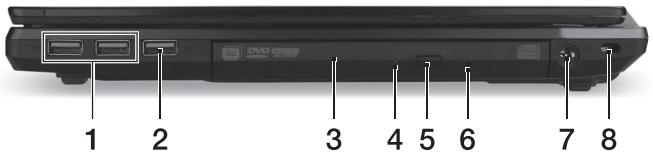
| # | Icon | Item | Description |
| 1 | USB ports | Connect to USB devices. If a port is black it is USB 2.0 compatible, if it is blue it is also USB 3.0 compatible. | |
| 2 | USB | USB port with power-off charging | |
| 3 | Optical drive | Internal optical drive; accepts CDs or DVDs. | |
| 4 | Optical disk access indicator | Lights up when the optical drive is active. | |
| 5 | Optical drive eject button | Ejects the optical disk from the drive. | |
| 6 | Emergency eject hole | Ejects the optical drive tray when the computer is turned off. Note: Insert a paper clip to the emergency eject hole to eject the optical drive tray when the computer is off. | |
| 7 | DC-in jack | Connects to an AC adapter. | |
| 8 | Kensington lock slot | Connects to a Kensington-compatible computer security lock. Note: Wrap the computer security lock cable around an immovable object such as a table or handle of a locked drawer. Insert the lock into the notch and turn the key to secure the lock. Some keyless models are also available. |
Information on USB 3.0
Compatible with USB 3.0 and earlier USB devices.
For optimal performance, use USB 3.0-certified devices.
- Defined by the USB 3.0 specification (SuperSpeed USB).
Base view
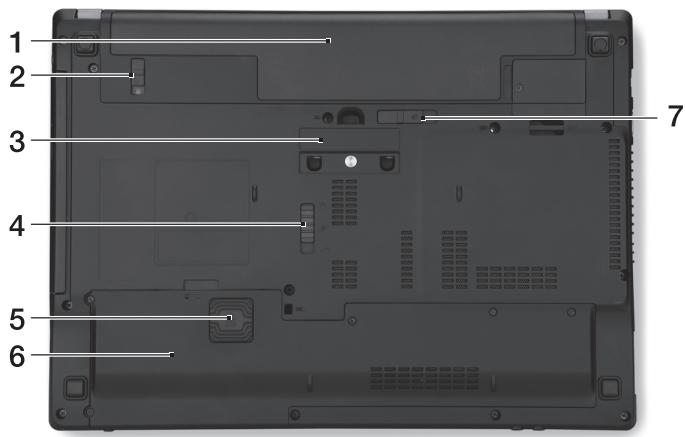
| # | Icon | Item | Description |
| 1 | Battery bay | Houses the computer's battery pack. | |
| 2 | Battery lock | Locks the battery in position. | |
| 3 | Acer ProDock connector | Connects to the optional Acer ProDock. | |
| 4 | Acer MediaBay release latch | Releases the Acer MediaBay module. | |
| 5 | Acer DASP (Disk Anti-Shock Protection) | Protects the hard disk from shocks and bumps. | |
| 6 | Hard disk bay | Houses the computer's hard disk (secured with screws). | |
| Memory compartment | Houses the computer's main memory. | ||
| 7 | Battery release latch | Releases the battery for removal. |
Environment
Temperature:
-
Operating: 5^ C to 35^ C
Non-operating: -20 °C to 65 °C -
Humidity (non-condensing):
Operating: 20% to 80%
Non-operating: 20% to 80%
Notebook TravelMate
Guide rapide
Notification Regulation Adicional
[Argentina]
Acer notebook is bundled with the approved telecom modules for your networking. Those modules' model number and specific homologation number refers to below:
[Modem]
| Modelo: RD02-D330 | CNC 54-4512 |
| Modelo: Delphi D40 (AM5) | CNC 54-5681 |
[Bluetooth]
| Modelo: BCM92046 | CNC 16-6735 |
| Modelo: BCM92070MD_REF | CNC 16-7165 |
| Modelo: T77H056 | CNC 16-7788 |
| Modelo: AR5BBU12 | CNC 16-7946 |
[Bluetooth+802.11bgn]
| Modelo: BCM943225HMB | CNC C-7497 |
[802.11AGN]
| Modelo: 512AN_MMW | CNC C-6399 |
| Modelo: 533AN_MMW | CNC C-6385 |
| Modelo: 512AN_HMW | CNC C-7612 |
| Modelo: 533AN_HMW | CNC C-7618 |
| Modelo: 622ANHMW | CNC C-7682 |
| Modelo: 633ANHMW | CNC C-7681 |
[802.11BGN]
| Modelo: AR5B95 | CNC C-7152 |
| Modelo: AR5B93 | CNC C-7151 |
| Modelo: 112BNHMW | CNC C-7470 |
| Modelo: 112BNMMW | CNC C-7471 |
| Modelo: RTL8192SE | CNC C-7495 |
| Modelo: BCM943225HM | CNC C-7395 |
| Modelo: AR5B97 | CNC C-7781 |
| Modelo: BCM94313HMG2L | CNC C-7881 |
[802.11BG]
| Modelo: BCM94312HMG | CNC 16-6180 |
[3G]
| Modelo: UNDP-1 | CNC 17-6334 |
| Modelo: Gobi2000 | CNC 17-7291 |
[Brasil] Noticia adicional de regulamento Anatel
Acer notebook is bundled with the approved telecom modules for your networking. Those modules' model number and specific homologation number refers to below:
[Modem]
| Modelo: RD02-D330 | COFETEL: TTDCORD06-536 |
| Modelo: Delphi_D40 (AM5) | COFETEL: TTDAGDE07-056 |
[Bluetooth]
| Modelo: BCM92046 | COFETEL: RCPFOBC08-0472 |
| Modelo: BCM92070MD_REF | COFETEL: RCPBRBC09-0213 |
| Modelo: T77H056 | COFETEL: RCPATT709-1049 |
| Modelo: AR5BBU12 | COFETEL: RCPATAR10-0064 |
[Bluetooth+802.11BGN]
| Modelo: BCM943225HMB | COFETEL: RCPBRBC09-0574 |
[802.11AGN]
| Modelo: 512AN_HMW | COFETEL:RCPIN5108-0260 |
| Modelo: 512AN_MMW | COFETEL:RCPIN5108-0260-A3 |
| Modelo: 533AN_HMW | COFETEL:RCPIN5108-0260-A2 |
| Modelo: 533AN_MMW | COFETEL:RCPIN5108-0260-A1 |
| Modelo: 622ANHMW | COFETEL:RCPIN6209-1009 |
| Modelo: 633ANHMW | COFETEL:RCPIN6309-1010 |
[802.11BGN]
| Modelo: AR5B95 | COFETEL:RCPATAR09-0168 |
| Modelo: AR5B93 | COFETEL: RCPATAR09-0167 |
| Modelo: 112BNHMW | COFETEL: RCPIN1109-0613-A1 |
| Modelo: 112BNMMW | COFETEL: RCPIN1109-0613 |
| Modelo: RTL8192SE | COFETEL: RCPRERT09-0751 |
| Modelo: BCM943225HM | COFETEL: RCPBRBC09-0464 |
| Modelo: AR5B97 | COFETEL: RCPATAR09-1103 |
| Modelo: BCM94313HMG2L | COFETEL: RCPBRBC09-1196 |
[802.11BG]
| Modelo: BCM94312HMG | COFETEL: RCPBRBC08-0015 |
[3G]
| Modelo: UNDP-1 | COFETEL:RTIQUUN08-0253 |
| Modelo: Gobi2000 | COFETEL:RTIQUGO09-0555 |
| Modelo: EM770W | COFETEL:RTIHUEM10-0096 |
[WiMax]
| Modelo: 622ANXHMW | COFETEL: RCPIN6210-0219 |
Portátil TravelMate
Guia=rápido
Registo do produto
BnD c OTKpbIToi KpbIuKoI
- Pa6oua: ot 20% do 80%
- Hespera: ot 20% do 80%
Notebook TravelMate
Skrócony poradnik
Prenosnik TravelMate
Hitri vodič
Registraracija izdelka
Computer portabil TravelMate
Ghid rapid
BlaJxHocT (6e3 KOHdEHaZaIy):
- Pa60THa: OT 20% Do 80%
3a cxbxpanHeHne: ot 20% do 80%
TravelMate sulearvuti
Luhijuhend
Toote registreerimine
Juhised selle avamiseks:
TravelMate piezimjdators
Atrais ceIvedis
Produkta registrăcija
| # | lakshmi | sangiraj | sngiraj |
| 1 | |||
| 2 | |||
| 3 | |||
| 4 | |||
| 5 | |||
| 6 | P | P | P |
| Acer email | |||
| Acer Backup Management | |||