
TRAVELMATE 5740ZG - Laptop ACER - Free user manual and instructions
Find the device manual for free TRAVELMATE 5740ZG ACER in PDF.



| Product type | Laptop |
| Brand | ACER |
| Model | TRAVELMATE 5740ZG |
| Processor | Intel Core i3 or i5 (estimated) |
| RAM Memory | 4 GB DDR3 (estimated) |
| Hard drive | 320 GB or 500 GB (estimated) |
| Screen size | 15.6 inches |
| Screen resolution | 1366 x 768 pixels (estimated) |
| Weight | Approximately 2.4 kg (estimated) |
| Power supply | 65 W AC adapter, Li-ion battery |
| Connectivity | Wi-Fi, Ethernet 10/100/1000, Bluetooth (depending on model), USB 2.0, VGA, HDMI |
| Optical drive | DVD±RW drive (depending on model) |
| Webcam | Acer Crystal Eye (some models) |
| Card reader | SD, MMC, MS, MS PRO, xD (multi-card) |
| Operating system | Windows 7 (estimated) |
| Operating temperature | 5°C to 35°C |
| Storage temperature | -20°C to 65°C |
| Non-condensing humidity | 20% to 80% |
Frequently Asked Questions - TRAVELMATE 5740ZG ACER
User questions about TRAVELMATE 5740ZG ACER
0 question about this device. Answer the ones you know or ask your own.
Ask a new question about this device
Download the instructions for your Laptop in PDF format for free! Find your manual TRAVELMATE 5740ZG - ACER and take your electronic device back in hand. On this page are published all the documents necessary for the use of your device. TRAVELMATE 5740ZG by ACER.
USER MANUAL TRAVELMATE 5740ZG ACER
TravelMate 5740/5740Z/5340 Series
Quick Guide
TravelMate 5740/5740Z/5340 Series Notebook PC
Model number:
Serial number:
Date of purchase:
Place of purchase:
Acer and the Acer logo are registered trademarks of Acer Incorporated. Other companies' product names or trademarks are used herein for identification purposes only and belong to their respective companies.
First things first
We would like to thank you for making an Acer notebook your choice for meeting your mobile computing needs.
Your guides
To help you use your Acer notebook, we have designed a set of guides:
First off, the setup poster helps you get started with setting up your computer.
The TravelMate Series Generic User Guide contains useful information applying to all models in the TravelMate product series. It covers basic topics such as using the keyboard and audio, etc. Please understand that due to its nature, the AcerSystem User Guide mentioned below will occasionally refer to functions or features which are only contained in certain models of the series, but not necessarily in the model you purchased. Such instances are marked in the text with language such as "only for certain models".
This Quick Guide introduces you to the basic features and functions of your new computer. For more on how your computer can help you to be more productive, please refer to the AcerSystem User Guide. This guide contains detailed information on such subjects as system utilities, data recovery, expansion options and troubleshooting. In addition it contains warranty information and the general regulations and safety notices for your notebook. It is available in Portable Document Format (PDF) and comes preloaded on your notebook. Follow these steps to access it:
1 Click on Start > All Programs > AcerSystem.
2 Click on AcerSystem User Guide.

Note: Viewing the file requires Adobe Reader. If Adobe Reader is not installed on your computer, clicking on AcerSystem User Guide will run the Adobe Reader setup program first. Follow the instructions on the screen to complete the installation. For instructions on how to use Adobe Reader, access the Help and Support menu.
Your Acer notebook tour
After setting up your computer as illustrated in the Just for Starters... poster, let us show you around your new Acer notebook.
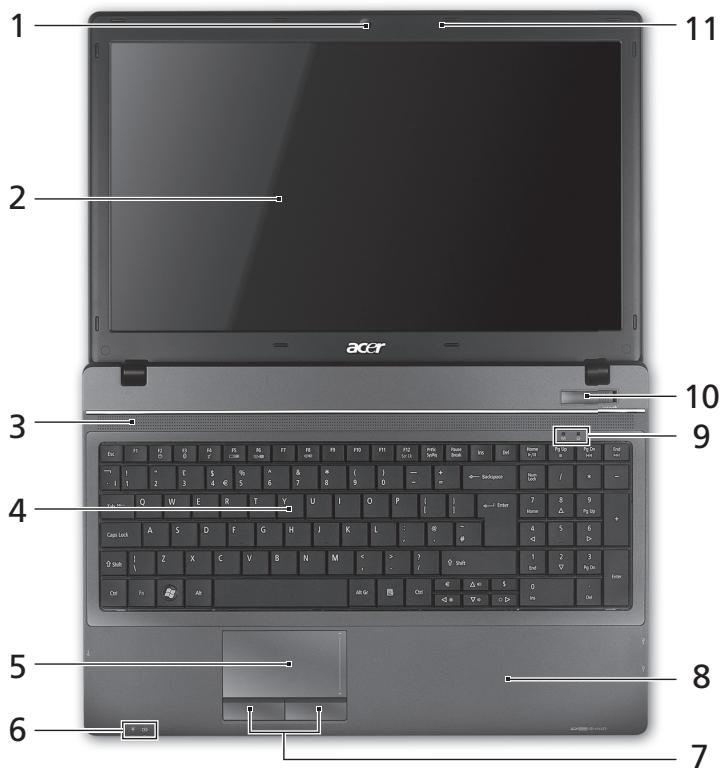
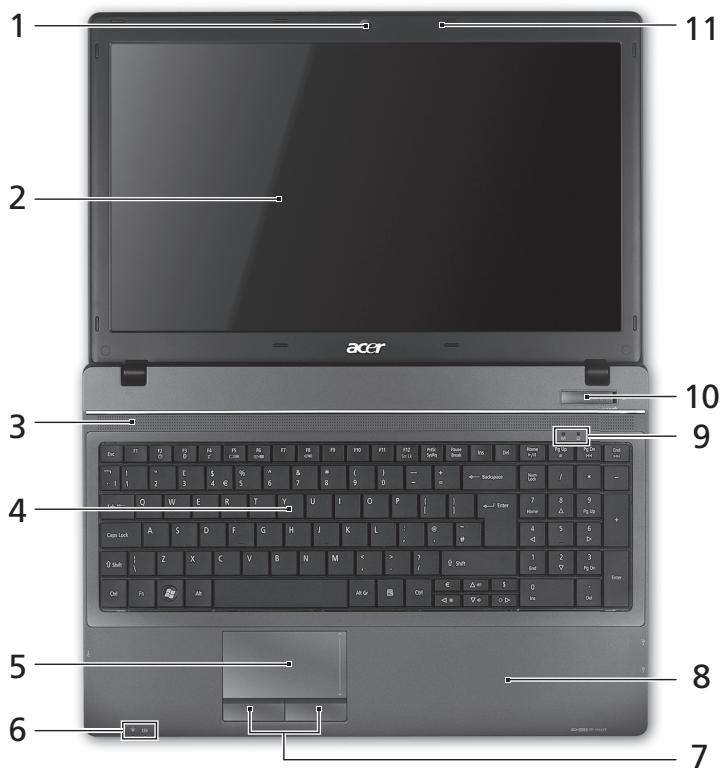
Top view
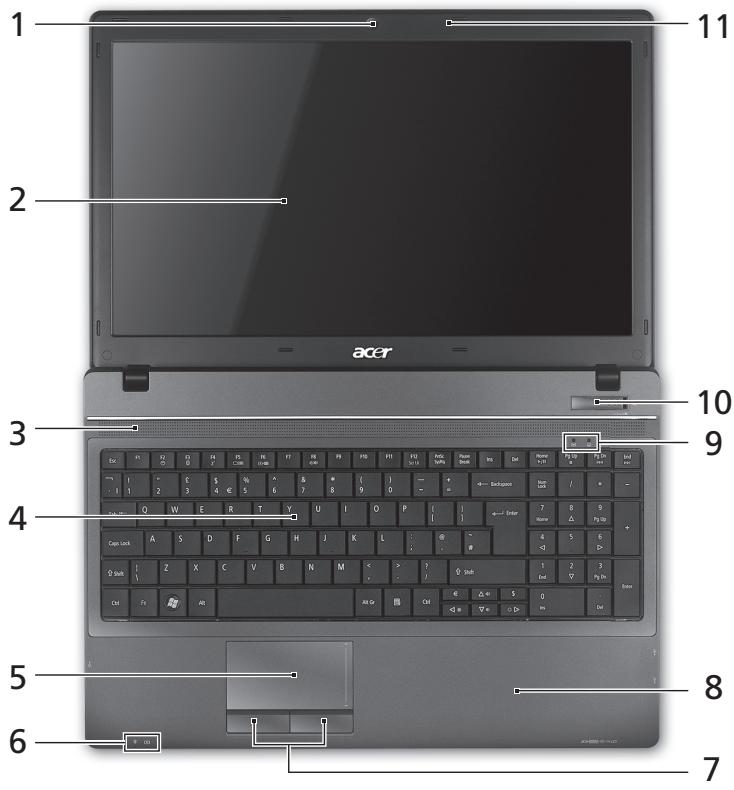
| # | Icon | Item | Description |
| 1 | Acer Crystal Eye webcam | Web camera for video communication (only for certain models). | |
| 2 | Display screen | Also called Liquid-Crystal Display (LCD), displays computer output (Configuration may vary by models). | |
| 3 | Speakers | Front left and front right speakers deliver stereo audio output. | |
| 4 | Keyboard | For entering data into your computer. | |
| 5 | Touchpad | Touch-sensitive pointing device which functions like a computer mouse. | |
| 6 | Power indicator1 | Indicates the computer's power status. | |
| Battery indicator1 | Indicates the computer's battery status. 1. Charging: The light shows amber when the battery is charging. 2. Fully charged: The light shows blue when in AC mode. | ||
| 7 | Click buttons (left and right) | The left and right buttons function like the left and right mouse buttons. | |
| 8 | Palmrest | Comfortable support area for your hands when you use the computer. | |
| 9 | HDD | Indicates when the hard disk drive is active. | |
| Communication indicator | Indicates the computer's wireless connectivity device status. | ||
| 10 | Power switch | Turns the computer on and off. | |
| 11 | Microphone | Internal microphone for sound recording. |
- The front panel indicators are visible even when the computer cover is closed.
Hotkeys
The computer employs hotkeys or key combinations to access most of the computer's controls like screen brightness and volume output.
To activate hotkeys, press and hold the <Fn> key before pressing the other key in the hotkey combination.
| Hotkey | Icon | Function | Description |
| +Fn> + <F3> | ( ) | Communication | Enables / disables the computer's communication devices. (Communication devices may vary by configuration.) |
| <Fn> + <F4> | Z | Sleep | Puts the computer in Sleep mode. |
| <Fn> + <F5> | ☐|☐ | Display toggle | Switches display output between the display screen, external monitor (if connected) and both. |
| <Fn> + <F6> | + | Display off | Turns the display screen backlight off to save power. Press any key to return. |
| <Fn> + <F7> | ∅ | Touchpad toggle | Turns the touchpad on and off. |
| <Fn> + <F8> | 鸣 | Speaker toggle | Turns the speakers on and off. |
| <Fn> + <△> | Volume up | Increases the sound volume. | |
| <Fn> + <▽> | Volume down | Decreases the sound volume. | |
| <Fn> + <▷> | Brightness up | Increases the screen brightness. | |
| <Fn> + <◁> | Brightness down | Decreases the screen brightness. |
Closed front view

| # | Icon | Item | Description |
| 1 | Power indicator1 | Indicates the computer's power status. | |
| Battery indicator1 | Indicates the computer's battery status. 1. Charging: The light shows amber when the battery is charging. 2. Fully charged: The light shows blue when in AC mode. | ||
| 2 | MULTIMEDICARD xD PRO | Multi-in-1 card reader | Accepts Secure Digital (SD), MultiMediaCard (MMC), Memory Stick (MS), Memory Stick PRO (MS PRO), xD-Picture Card (xD). Note: Push to remove/install the card. Only one card can operate at any given time. |
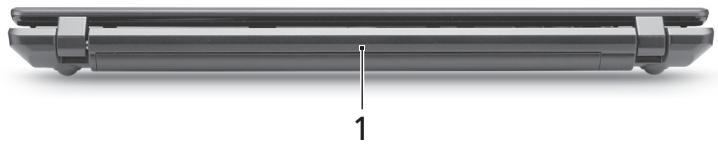
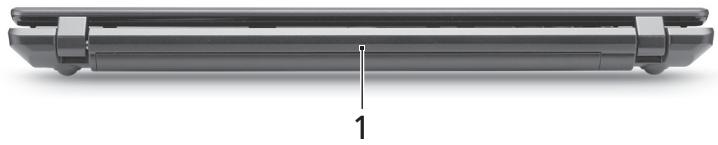
Rear view
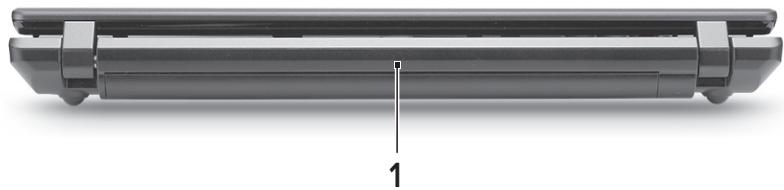
| # | Icon | Item | Description |
| 1 | Battery | Provides power for the computer to be used while unplugged. |
Left view
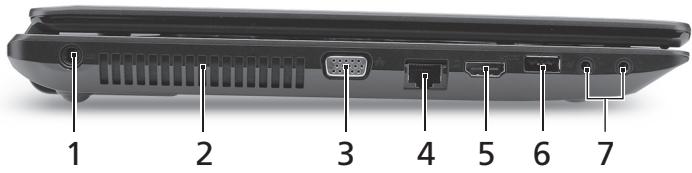
| # | Icon | Item | Description |
| 1 | DC-in jack | Connects to an AC adapter. | |
| 2 | Ventilation slots | Enable the computer to stay cool, even after prolonged use. | |
| 3 | External display (VGA) port | Connects to a display device (e.g., external monitor, LCD projector). | |
| 4 | Ethernet (RJ-45) port | Connects to an Ethernet 10/100/1000-based network. | |
| 5 | HOMI | HDMI port | Supports high-definition digital video connections. |
| 6 | USB 2.0 port | Connects to USB 2.0 devices (e.g., USB mouse, USB camera). | |
| 7 | Microphone-in jack | Accepts inputs from external microphones. | |
| Headphones/speaker/ line-out jack | Connects to audio line-out devices (e.g., speakers, headphones). |
Right view
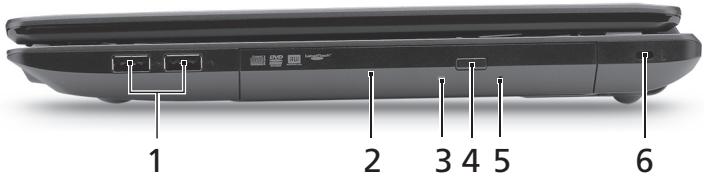
| # | Icon | Item | Description |
| 1 | + | USB 2.0 port | Connects to USB 2.0 devices (e.g., USB mouse, USB camera). |
| 2 | Optical drive | Internal optical drive; accepts CDs or DVDs. | |
| 3 | Optical disk access indicator | Lights up when the optical drive is active. | |
| 4 | Optical drive eject button | Ejects the optical disk from the drive. | |
| 5 | Emergency eject hole | Ejects the optical drive tray when the computer is turned off. Note: Insert a paper clip to the emergency eject hole to eject the optical drive tray when the computer is off. | |
| 6 | K | Kensington lock slot | Connects to a Kensington-compatible computer security lock. Note: Wrap the computer security lock cable around an immovable object such as a table or handle of a locked drawer. Insert the lock into the notch and turn the key to secure the lock. Some keyless models are also available. |
Base view
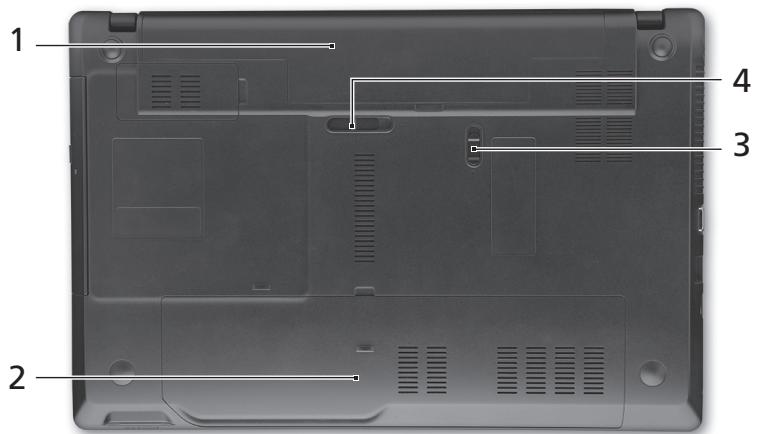
| # | Icon | Item | Description |
| 1 | Battery bay | Houses the computer's battery pack. | |
| 2 | Hard disk bay | Houses the computer's hard disk (secured with screws). | |
| Memory compartment | Houses the computer's main memory. | ||
| 3 | Battery lock | Locks the battery in position. | |
| 4 | Battery release latch | Releases the battery for removal. | |
| Environment | • Temperature: • Operating: 5 °C to 35 °C • Non-operating: -20 °C to 65 °C • Humidity (non-condensing): • Operating: 20% to 80% • Non-operating: 20% to 80% | ||
Gamage TravelMate 5740/ 5740Z/5340
Guide rapide
Ordinateur notebook de la gamme TravelMate 5740/5740Z/5340
Modèle :
No. de série :
Date d'achat:
Lieud'achat:
Pour commencer
Mby pa3pa6oTaII pI dy pyKOBoIcTB, KOToPbIe NOMOryT Bam B IcNoIb3OBAHIN HoyT6yka Acer:
Bo-nerpBbIX, yCTaHOBOUHbI nJaKaT NOMOKeT Bam BblONHITb nepBOHaJbHyo HactpoiKy KOMNbHTepa.
TInnoBoe pyKoBOcTO BoIra cepHr TraveiMaCoOpKaUIO, npImeHmMyIO KO BCeM MoJeIaM cepHr TraveiMaTe. B HeM OINcBbIAOTcO cHOBHbIe TeMbI, TaKe Ie KaK pa60Ta C KJIaBnAtypo, 3ByKOM n T.D. PoJauNyIcTa, IMeIe TB Ndu, YTO yNOMaHyToe HNKe PyKoBOcTBo noJIb3ObaTeLa AcerSystem RaJIaeTcO o6oSeHHbIM, PO3ToMg B HeM INHOgDa BydUT OINcBbATbcr CyHKuIN uIN CBOICTBa, peAIN3OBAHbIe He B KyJIpeHHoB BamN MoJeIa, a IINb B ONpeJeHHbIX MOJeIax 3ToI cepHr. B TaKx CnyIaYb X TEKCTe IMeETcR nometka "TOnbKO dIra ONpeJeHHbIX MOJeIe".
Данhoe KpatKoe pyKOBOdCTBO 3HaKOMIT BAC C OCHOBHbIMX XapaKTepnCTNkAMN I ФункцЯMn Baшero HOBOrO KOMNbIoTepa.УTO6bl y3HaTb 6OJIbSe O TOM,ΚΑК ПОВICINТь ПЮДУКТИВHOCtB Baшeй pa6ToIc NOMOцьIO KOMNbIoTepa, Bbl MOKeTe БбрNTьСя K AcerSystem User Guide.ЗTOpyKOBOdCTBO COpexNIT NOДРбHyU Информачио O cIstEmhIX ΦyHKUmaRy, BOCSTaHOBJIeHIM N DAHHbIX, BO3MOXHOCTBX PacShInpeHIM YcTpaHEnH MeHcnpaBHOCTe.КpOME TOrO, OHO COpexNIT rapaHTmHyU INΦopMaUciH, a TAKKe ObluNe PpeDncaHIN N npaBlna Бe3OanacHocTn рп pa6To E BaшIM HOYt6yKOM. pyKOBOdCTBO PpeDcTaBJIeTcB Вид e phJa PDF, ИЗнчально 3агржehног В komNbIoTeP.Дпяdoctyna K hemy ВынОннITE сеуюшee:
1 HaKMnTe KHOHnKy NcK >, 3aTeM > Bce nporpaMMbl, 3aTeM AcerSystem.
2 Μεικητε AcarSystem User Guide.

PpmeaHne. IpnpoCMOTpa 3toro foaiIa Tpe6yETc nporpaMa Adobe Reader.EcniporpaMa Adobe Acrobat Reader he ycTaHOBJIeHa Ha BaWem KOMMbIOtepe, UeNCHK MblbIO nO AcerSystem User Guide 3anyCTNT CnepBa yCTaHOBky nporpaBl Acrobat Reader.IIra 3abepeHnna YCTaHOBKn BbInONHITe OTo6paKaEMbIe Ha 3kPaHe INHCTpyKuIN. 3a INHCTpyKUIMM o TOM, KaK pOnb3oBaTbc nporpaMMo Adobe Acrobat Reader, oBaPATTEc b MeHIO CnpabKa nnoDdePKKa.
3HaKOMCTBO C HoyT6ykom Acer
Tenepb, KOrda BbI BbINHNI HAcTroKn, KaK NOKa3aHO Ha NIIaKaTe
IЯ NOJIb3OBAteNei-HOBuKOB..., DaBaIe NObInxKe N03HaKOMMcR C BaUIM HOBbIM HoYt6yKom Acer.
BnD cBepxu
BnD cpeeni C 3aKpbIToi KpbIiKoI

| # | Знayок | Злесent | Описане |
| 1 | Инд Ист IOTY | Отображает состорные рintани КOMпьютера. | |
| Инд я IOTY | Отображает состорные ak кOMпьютера. | ||
| IOTY | IOTY | ||
| PRO | IOTY | IOTY | |
| 2 | Комб YSTROJCTBO | П一步一步 Secure Digital (SD), MultiMediaCard (MMC), Memory Stick (MS), Memory Stick PRO (MS PRO) и xD-Picture Card (xD). | |
| СИТВАВHAЯКAPT пamягшни различых форматов | П一步一步 Secure Digital (SD), MultiMediaCard (MMC), Memory Stick (MS), Memory Stick PRO (MS PRO) и xD-Picture Card (xD). | ||
| ΦOPMATOB | П一步一步 Secure Digital (SD), MultiMediaCard (MMC), Memory Stick (MS), Memory Stick PRO (MS PRO) и xD-Picture Card (xD). |
BnD c3aAn
Notebook PC seri1i TravelMate 5740/5740Z/5340
Oznaczenia modelu:
Numer seryjny:
Data zakupu:
Miejsce zakupu:
Po kolei
Séria TravelMate 5740/5740Z/5340
Stručná príručka
Notebook serial TravelMate 5740/5740Z/5340
Numarul modelului:
Numarulserie:
Data achizitiei:
Locul achizitiei:
Înainte de toutes
aee aee aee aee aee aee aee aee aee aee aee aee aee aee aee aee aee aee aee aee aee aee aee aee aee aee aee aee aee aee aee aee aee aee aee aee aee aee aee aee aee aee aee aee aee aee aee aee aee aee aee
1 nni>AcerSystem
2 nanAcerSystem User Guide

nannnnn: nannnnn nn nnnnnn Adobe Reader nnnnnnnnnn Adobe Reader "nannnnnnn nnnnnn AcerSystem User Guide nnnnnnnnnn nnnnnn Adobe Reader nnnnnnnn nnnnnn nn nnnnnn nn nnnnnn nn nnnnnn nn nnnnnn nn nnnnnn nn nnnnnn nn nnnnnn nn nnnnnn nn nnnnnn nn nnnnnn nn nnnnnn nn nnnnnn nn nnnnnn nn nnnnnn nn nnnnnn nn nnnnnn nn nnnnnn nn nnnnnn nn nnnnnn nn nnnnnn nnnnnn nn nnnnnn nn nnnnnn nn nnnnnn nn nnnnnn nn nennnnn nn nnnnnn nn nnnnnn nn nnnnnn nn nnnnnn nn nnnnnn nn nnnnnn nn nannn
Acer yavn
nnaaannnnnnaanennnnnnnnnnnnnnnnnnnnnnnnnnnnnnnnnnnnnnnnnnnnnnnnnnnnnnnnnnnnnnnnnnnnnnnnnnnnnnnnnnnnnnnnnnnnnnnnnnnnnnnnnnnnnnnnnnnnnnnnnnnnnnnnnnnnnnnnnnn nn
JNJNJNJHJIH
| # | ### | ### | ### |
| 1 | ### | ### | ### |
| Acer Crystal Eye | (###) | ||
| 2 | ### | ### | ### |
| 3 | ### | ### | ### |
| 4 | ### | ### | ### |
| 5 | ### | ### | ### |
| 6 | ### | ### | ### |
| ### | ### | ### | |
| 7 | ### | ### | ### |
| 8 | ### | ### | ### |
| 9 | ### | ### | ### |
| ### | ### | ### | |
| 10 | ### | ### | ### |
| 11 | ### | ### | ### |
1.
J 1
Wauuulwurwuaaunuunuunuunuunuunuunuunuunuunuunuunuunuunuunuunuunuunuunuunuunuunuunuunuunuunuunuunuunuunuunuunuunuunu
| ### | ### | ### | ### |
| +Fn> + <F3> | ((###)) | ### | ### |
| +Fn> + <F4> | Z2 | ### | ### |
| +Fn> + <F5> | □□ | ### | ### |
| +Fn> + <F6> | 田- | ### | ### |
| +Fn> + <F7> | ### | ### | |
| +Fn> + <F8> | ### | ### | |
| +Fn> + <△> | ### | ### | |
| +Fn> + <△> | ### | ### | |
| +Fn> + <△> | ### | ### |
Jnnnnaaannnnaa

| # | laanu | laanu | laanu |
| 1 | laanu | laanu | |
| laanu | laanu | ||
| laanu | laanu | ||
| laanu | laanu | ||
| 2 | laanu | laanu | |
| laanu | laanu | ||
| laanu | laanu | ||
| laanu | laanu |
2
- TravelMate 5740/5740Z/5340 Series
- First things first
- Your guides
- Your Acer notebook tour
- Top view
- Hotkeys
- Closed front view
- Rear view
- Left view
- Right view
- Base view
- Gamage TravelMate 5740/ 5740Z/5340
- Pour commencer
- 3HaKOMCTBO C HoyT6ykom Acer
- BnD cBepxu
- BnD cpeeni C 3aKpbIToi KpbIiKoI
- BnD c3aAn
- Po kolei
- Séria TravelMate 5740/5740Z/5340
- Înainte de toutes
- J 1
Brand : ACER
Model : TRAVELMATE 5740ZG
Category : Laptop