USER MANUAL PLR 50 BOSCH
Power Tools Division
70745 Leinfelden-Echterdingen
Germany
www.bosch-pt.com
2 609 140 621 (2009.06) T / 191 WEU
PLR 50

BOSCH
Working safely with the measuring tool is possible only when the operating and safety information are read completely and the instructions contained therein are strictly followed. Never make warning labels on the measuring tool unrecognisable. SAVE THESE INSTRUCTIONS.
- Caution - The use of other operating or adjusting equipment or the application of other processing methods than those mentioned here, can lead to dangerous radiation exposure.
The measuring tool is delivered with a warning label in German language (marked with the number 13 in the representation of the measuring tool on the graphic page).

IEC 60825-1:07 <1 mW, 635 nm
Laser Radiation Do not stare into beam Class 2 laser product
Before putting into operation for the first time, attach the supplied sticker in your national language over the German text on the warning label.
- Do not direct the laser beam at persons or animals and do not stare into the laser beam yourself. This measuring tool produces laser class 2 laser radiation according to IEC 60825-1. This can lead to persons being blinded.
- Do not use the laser viewing glasses as safety goggles. The laser viewing glasses are used for improved visualisation of the laser beam, but they do not protect against laser radiation.
- Do not use the laser viewing glasses as sun glasses or in traffic. The laser viewing glasses do not afford complete UV protection and reduce colour perception.
- Have the measuring tool repaired only through qualified specialists using original spare parts. This ensures that the safety of the measuring tool is maintained.
- Do not allow children to use the laser measuring tool without supervision. They could unintentionally blind other persons or themselves.
- Do not operate the measuring tool in explosive environments, such as in the presence of flammable liquids, gases or dusts. Sparks can be created in the measuring tool which may ignite the dust or fumes.
Functional Description
Intended Use
The measuring tool is intended for measuring distances, lengths, heights, clearances, and for the calculation of areas and volumes. The measuring tool is suitable for measuring indoors and outdoors.
Product Features
The numbering of the product features shown refers to the illustration of the measuring tool on the graphic page.
1 Length measurement button
2 Memory add button "M+
3 Button for area and volume measurement
4 Memory retrieve button "M=
5 Button for indirect length measurement
6 Tracking (continuous measurement) button
7 On/Off and memory delete button
8 Memory subtraction button "M-"
9 Button for selection of the reference level
10 Display
11 Alignment aid
12 Measuring button
13 Laser warning label
14 Positioning pin
15 Latch of the positioning pin
16 Spirit level
17 Latch of battery lid
18 Battery lid
19 Laser beam outlet
20 Reception lens
21 Serial number
22 Laser viewing glasses
23 Carrying strap
24 Laser target plate
25 Protective pouch
* The accessories illustrated or described are not included as standard delivery.
24 | English
Display Elements
a Variable measuring functions
Length measurement
Continuous measurement
Area measurement
Volume measurement
Indirect length measurement
b Battery low indicator
c Temperature warning
d Measured value/result
e Unit of measure
f Measurement reference level
g Laser switched on
h Individual measured value (for length measurement: result)
i Measured values stored
English | 25
Technical Data
| Digital Laser Rangefinder | PLR 50 |
| Article number | 3 603 K16 300 |
| Measuring range | 0.05–50 mA) |
| Measuring accuracy (typically) | ±2.0 mmB) |
| Lowest indication unit | 1 mm |
| Operating temperature | -10 °C ... +50 °CC) |
| Storage temperature | -20 °C ... +70 °C |
| Relative air humidity, max. | 90 % |
| Laser class | 2 |
| Laser type | 635 nm, <1 mW |
| Laser beam diameter (at 25 °C) and at 10 m distance, approx. | 6 mm |
| Batteries | 4 x 1.5 V LR03 (AAA) |
| Rechargeable batteries | 4 x 1.2 V HR03 (AAA) |
| Battery live, approximately | |
| - Individual measurements | 30000D) |
| - Continuous measurement | 5 hD) |
| Weight according to EPTA-Procedure 01/2003 | 0.18 kg |
| Dimensions | 58 x 104 x 36 mm |
| Degree of protection (excluding battery compartment) | IP 54 (dust and splash water protected) |
A) The working range increases depending on how well the laser light is reflected from the surface of the target (scattered, not reflective) and with increased brightness of the laser point to the ambient light intensity (interior spaces, twilight). In unfavourable conditions (e.g. when measuring outdoors at intense sunlight), it may be necessary to use the target plate.
B) In unfavourable conditions (e.g. at intense sunlight or an insufficiently reflecting surface), the maximum deviation is ± 10mm per 50~m . In favourable conditions, a deviation influence of ± 0.05mm / m must be taken into account.
C) In the continuous measurement function, the maximum operating temperature is +40^ .
D) Fewer measurements are possible when using 1.2V rechargeable batteries as compared with 1.5V batteries.
Please observe the article number on the type plate of your measuring tool. The trade names of the individual measuring tools may vary.
The measuring tool can be clearly identified with the serial number 21 on the type plate.
26 | English
Assembly
Inserting/Replacing the Battery
Using alkali-manganese or rechargeable batteries is recommended for operation of the measuring tool.
Fewer measurements are possible when using 1.2V rechargeable batteries as compared with 1.5V batteries.
To open the battery lid 18, press the latch 17 in the direction of the arrow and remove the battery lid. Insert the supplied batteries/rechargeable batteries. When inserting, pay attention to the correct polarity according to the representation on the inside of the battery compartment.
When the battery symbol appears for the first time on the display, at least 100 measurements are still possible. When the battery symbol flashes, the batteries/rechargeable batteries must be replaced; measurements are no longer possible.
Replace all batteries/rechargeable batteries at the same time. Do not use different brands or types of batteries/rechargeable batteries together.
- Remove the batteries/rechargeable batteries from the measuring tool when not using it for longer periods. When storing for longer periods, the batteries/rechargeable batteries can corrode and discharge themselves.
Operation
Initial Operation
Protect the measuring tool against moisture and direct sun light.
- Do not subject the measuring tool to extreme temperatures or variations in temperature. As an example, do not leave it in vehicles for longer periods. In case of large variations in temperature, allow the measuring tool to adjust to the ambient temperature before putting it into operation. In case of extreme temperatures or variations in temperature, the accuracy of the measuring tool can be impaired.
Avoid heavy impact to or falling down of the measuring tool. After severe exterior effects to the measuring tool, it is recommended to carry out an accuracy check (see "Accuracy Check of the Measuring Tool", page 33) each time before continuing to work.
Switching On and Off
To switch on the measuring tool, briefly press the On/Off button 7 or measuring button 12. When switching on the measuring tool, the laser beam is not switched on yet.
To switch off the measuring tool, press the On/Off button 7 for a few seconds.
If none of the measuring tool buttons are pressed for approx. 5 minutes, the measuring tool switches off automatically in order to extend the service life of the battery.
When a measured value has been stored, it is retained in automatic switch-off mode. When switching on the measuring tool again, "M" is indicated in the display.
Measuring Procedure
After switching on, the measuring tool is in the length measurement mode. Other measuring modes can be switched to by pressing the respective function/mode button (see "Measuring Functions", page 28).
After switching on, the rear edge of the measuring tool is preset as the reference level for the measurement. To change the reference level, see "Selecting the Reference Level", page 28.
Upon selection of the measuring function and the reference level, all further steps are carried out by pushing the measuring button 12.
With the reference level selected, place the measuring tool against the desired measuring line (e.g. a wall).
Push the measuring button 12 to switch on the laser beam.
Do not point the laser beam at persons or animals and do not look into the laser beam yourself, not even from a large distance.
Aim the laser beam at the target surface. Push the measuring button 12 again to initiate the measurement.
In the tracking function, the measurement already starts upon first actuation of the measuring button 12.
Typically, the measured value appears after 0.5 and latest after 4 seconds. The duration of the measurement depends on the distance, the light conditions and the reflection properties of the target surface. The end of the measurement is indicated by a signal tone. The laser beam is switched off automatically upon completion of the measurement.
When no measurement has taken place approx. 20 seconds after sighting, the laser beam is switched off automatically to save the batteries.
28 | English
For measuring, you can select between three different reference levels:
- The rear measuring-tool edge (e.g. when measuring onward from a wall),
- The rear positioning-pin edge 14 (e.g. when measuring from a corner),
- The front measuring-tool edge (e.g. when measuring onward from a table edge).
To change the reference level, press button 9 until the requested reference level is indicated on the display. Each time after switching on the measuring tool, the rear end of the measuring tool is preset as the reference level.
Measuring Functions
Length Measurement
For length measurement, push button 1. The indicator for length measurement appears in the display —.
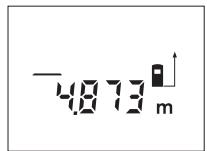
Push the measuring button 12 once for sighting and once more to take the measurement.
The measured value is indicated at the bottom in the display.
Area Measurement
For area/surface measurements, press button 3 until the indicator for area measurement appears on the display.
Afterwards, measure the length and the width, one after another, in the same manner as a length measurement. The laser beam remains switched on between both measurements.
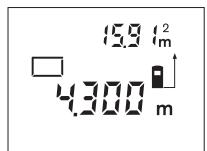
After taking the second measurement, the area/surface is automatically calculated and displayed. The last individual measured value is indicated at the bottom in the display, while the final result is shown at the top.
Volume Measurement
For volume measurements, press button 3 until the indicator for volume measurement appears on the display.
Afterwards, measure the length, width and the height, one after another, in the same manner as for a length measurement. The laser beam remains switched on between all three measurements.
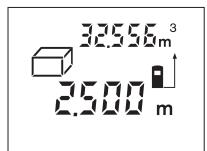
After taking the third measurement, the volume is automatically calculated and displayed. The last individual measured value is indicated at the bottom in the display, while the final result is shown at the top.
English | 29
The indirect length measurement is used to measure distances that cannot be measured directly because an obstacle would obstruct the laser beam or no target surface is available as a reflector. Correct results are achieved only when the laser beam and the sought distance form an exact right angle (Pythagorean Theorem).
In the illustrated example, the length B is to be determined. For this purpose, A and C must be measured. A and B must form a right angle.
For indirect length measurements, press button 5. The indicator for indirect length measurement appears on the display . Measure the distance A as for a length measurement. Pay attention that the line segment A and the sought distance B form a right angle. Afterwards, measure the distance C. The laser beam remains switched on between both measurements.
Pay attention that the reference point of the measurement (e.g., the rear edge of the measuring tool) is at the exact same location for both measurements.
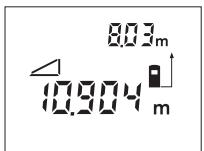
After completing the second measurement, the distance B is calculated automatically. The last individual measured value is indicated at the bottom in the display, while the final result B is indicated at the top.
For continuous measurements, the measuring tool can be moved relative to the target, whereby the measuring value is updated approx. every 0.5 seconds. In this manner, as an example, you can move a certain distance away from a wall, while the actual distance can always be read.
For continuous measurements, push button 6. The indicator for continuous measurement (tracking) appears in the display .
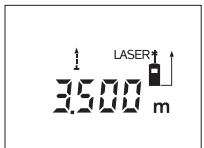
Press the measuring button 12 to initiate the measuring procedure. Move the measuring tool until the required distance value is indicated at the bottom of the display. Pushing the measuring button 12 interrupts the continuous measurement. The
current measured value is indicated in the display. Repeated pushing of the measuring button 12 starts the continuous measuring again.
Continuous measurement automatically switches off after 5 min. The last measured value remains indicated on the display. To cancel continuous measurement, you can change the measuring function by pressing button 1, 3 or 5.
30 | English
Deleting Measured Values
Briefly pressing button 7 deletes the last individual measuring value determined in all measuring functions. Briefly pressing the button repeatedly deletes the individual measured values in reverse order.
Memory Functions
When switching off the measuring tool, the value in the memory is retained.
Storing/Adding Measured Values
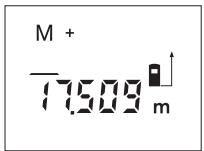
Push the memory add button 2 in order to store the current measured value - a length, area or volume value, depending on the current measuring function. As soon as a value has been stored, "M" is indicated in the display and the "+" behind it briefly flashes.
If a value is already stored in the memory, the new value is added to the memory contents, however, only when the measures of unit correspond.
As an example, when an area value is in the memory and the current measured value is a volume value, the addition cannot take place. "Error" briefly flashes in the display.
Subtracting Measured Values
Push the memory subtraction button 8 in order to subtract the current measured value from the memory value. As soon as a value has been subtracted, "M" is indicated in the display and the "-" behind it briefly flashes.
If a value is already stored in the memory, the new measured value can be subtracted only when the measures of unit correspond (see "Storing/Adding Measured Values").
Displaying the Stored Value
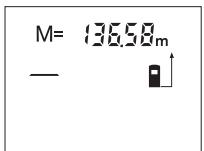
Push the memory retrieve button 4 in order to display the value stored in the memory. "M=" is indicated in the display. When the memory contents "M=" is indicated in the display, it can be doubled by pushing the memory add button 2 or set to zero by pushing the memory subtract button 8.
Deleting the Memory
To delete the memory contents, first push the memory retrieve button 4, so that “M=” is indicated in the display. Then briefly press button 7; “M” is no longer indicated in the display.
Working Advice
The reception lens 20 and the laser beam outlet 19 must not be covered when taking a measurement.
The measuring tool must not be moved while taking a measurement (with the exception of the continuous measurement function). Therefore, place the measuring tool, as far as this is possible, against or on the measuring points.
Measurement takes place at the centre of the laser beam, even when target surfaces are sighted at an incline.
Influence Effects on the Measuring Range
The measuring range depends upon the light conditions and the reflection properties of the target surface. For improved visibility of the laser beam when working outdoors and when the sunlight is intense, use the laser viewing glasses 22 (accessory) and the laser target plate 24 (accessory), or shade off the target surface.
Influence Effects on the Measuring Result
Due to physical effects, faulty measurements cannot be excluded when measuring on different surfaces. Included here are:
Transparent surfaces (e.g., glass, water),
- Reflecting surfaces (e.g., polished metal, glass),
- Porous surfaces (e.g. insulation materials),
- Structured surfaces (e.g., roughcast, natural stone).
If required, use the laser target plate 24 (accessory) on these surfaces.
Also, air layers with varying temperatures or indirectly received reflections can affect the measured value.
The positioning pin 14 is suitable for measuring out of corners (diagonal within a space) or from hard to reach areas, such as from roller-shutter rails.
Slide the latch 15 of the positioning pin sideward in order to swivel out the pin.
Set the corresponding reference level for measurements with the positioning pin by pushing button 9.
The positioning pin 14 swivels back in again by pushing it toward the housing to the stop. The pin automatically locks in place.
32 | English
Aligning with the Spirit Level
The spirit level 16 allows for simple levelling of the measuring tool. This allows for easier sighting of target surfaces, especially over longer distances.
In combination with the laser beam, the spirit level 16 is not suitable for levelling.
With the alignment aid 11, sighting over larger distances is a lot easier. For this, look alongside the aligning aid on the top side of the measuring tool. The laser beam runs parallel to this line of sight.
Troubleshooting - Causes and Corrective Measures
| Cause | Corrective Measure |
| Temperature warning indicator (c) flashing; measurement not possible |
| The measuring tool is outside the operating temperature range from -10 °C to +50 °C (in the function continuous measurement up to +40 °C). | Wait until the measuring tool has reached the operating temperature |
| Battery low indicator (b) appears |
| Battery voltage decreasing (measurement still possible) | Replace batteries/rechargeable batteries |
| Battery low indicator (b) flashing; measurement not possible |
| Battery voltage too low | Replace batteries/rechargeable batteries |
| “Error” and “----” indication in display |
| The angle between the laser beam and the target is too acute. | Enlargen the angle between the laser beam and the target |
| The target surface reflects too intensely (e.g. a mirror) or insufficiently (e.g. black fabric), or the ambient light is too bright. | Work with the laser target plate 24 (accessory) |
| The laser beam outlet 19 or the reception lens 20 are misted up (e.g. due to a rapid temperature change). | Wipe the laser beam outlet 19 and/or the reception lens 20 dry using a soft cloth |
| Calculated value is greater than 99999 m/m2/m3. | Divide calculation into intermediate steps |
English | 33
Cause
Corrective Measure
"Error" indication flashes at in display (top)
| Addition/Subtraction of
measured values with
different units of measure | Only add/subtract measured
values with the same units of
measure |
Unreliable measuring result
The target surface does not cover off the target surface reflect correctly (e.g. water, glass).
| The laser beam outlet 19 | Make sure that the laser
or the reception lens 20 are
covered. | beam outlet 19 or the recep-
tion lens 20 are unobstructed |
Measuring result not plausible
| Wrong reference level set | Select reference level that corresponds to measurement |
| Obstruction in path of laser beam | Laser point must be completely on target surface. |
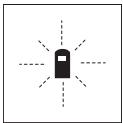
The measuring tool monitors the correct function for each measurement. When a defect is determined, only the symbol shown aside flashes in the display. In this case, or when the above mentioned corrective measures cannot correct
an error, have the measuring tool checked by an after-sales service agent for Bosch power tools.
The accuracy of the measuring tool can be checked as follows:
- Select a permanently unchangeable measuring section with a length of approx. 3 to 10 metres; its length must be precisely known (e.g. the width of a room or a door opening). The measuring distance must be indoors; the target surface for the measurement must be smooth and reflect well.
Measure the distance 10 times after another.
The deviation of the individual measurements from the mean value must not exceed ± 3 mm (max.). Log the measurements, so that you can compare their accuracy at a later point of time.
34 | English
Maintenance and Service
Maintenance and Cleaning
Store and transport the measuring tool only in the supplied protective pouch.
Keep the measuring tool clean at all times.
Do not immerse the measuring tool in water or other fluids.
Wipe off debris using a moist and soft cloth. Do not use any cleaning agents or solvents.
Maintain the reception lens 20 in particular, with the same care as required for eye glasses or the lens of a camera.
If the measuring tool should fail despite the care taken in manufacturing and testing procedures, repair should be carried out by an authorised after-sales service centre for Bosch power tools. Do not open the measuring tool yourself.
In all correspondence and spare parts orders, please always include the 10-digit article number given on the type plate of the measuring tool.
In case of repairs, send in the measuring tool packed in its protective pouch 25.
After-sales Service and Customer Assistance
Our after-sales service responds to your questions concerning maintenance and repair of your product as well as spare parts. Exploded views and information on spare parts can also be found under:
Our customer service representatives can answer your questions concerning possible applications and adjustment of products and accessories.
Great Britain
Robert Bosch Ltd. (B.S.C.)
P.O.Box 98
Broadwater Park
North Orbital Road
Denham
Uxbridge
UB95HJ
Tel. Service: +44 (0844) 736 0109
Fax: +44 (0844) 736 0146
Australia, New Zealand and Pacific Islands
Robert Bosch Australia Pty. Ltd.
Power Tools
Locked Bag 66
Clayton South VIC 3169
Customer Contact Center
Inside Australia:
Phone: +61 (01300) 307 044
Fax: +61 (01300) 307 045
Inside New Zealand:
Phone: +64 (0800) 543 353
Fax: +64 (0800) 428 570
Outside AU and NZ:
Phone: +61 (03) 9541 5555
www.bosch.com.au
Republic of South Africa
Customer service
Hotline: +27 (011) 6519600
Gauteng - BSC Service Centre
35 Roper Street, New Centre
Johannesburg
Tel.: +27 (011) 4939375
Fax: +27 (011) 4930126
E-Mail: bsctools@icon.co.za
KZN - BSC Service Centre
Unit E, Almar Centre
143 Crompton Street
Pinetown
Tel.: +27 (031) 7 01 21 20
Fax: +27 (031) 7 01 24 46
E-Mail: bsc.dur@za.bosch.com
36 | English
Western Cape - BSC Service Centre
Democracy Way, Prosperity Park
Milnerton
Tel.: +27 (021) 551 25 77
Fax: +27 (021) 5513223
E-Mail: bsc@zsd.co.za
Bosch Headquarters
Midrand, Gauteng
Tel.: +27 (011) 6519600
Fax: +27 (011) 6519880
E-Mail: rbsa-hq.pts@za.bosch.com
Disposal
Measuring tools, accessories and packaging should be sorted for environmental-friendly recycling.
Only for EC countries:

Do not dispose of measuring tools into household waste!
According the European Guideline 2002/96/EC for Waste Electrical and Electronic Equipment and its implementation into national right, measuring tools that are no longer usable must be collected separately and disposed of in an environmentally correct manner.
Battery packs/batteries:
Do not dispose of battery packs/batteries into household waste, fire or water. Battery packs/batteries should be collected, recycled or disposed of in an environmental-friendly manner.
Only for EC countries:
Defective or dead out battery packs/batteries must be recycled according the guideline 91/157/EEC.
Battery packs/batteries no longer suitable for use can be directly returned at:
Great Britain
Robert Bosch Ltd. (B.S.C.)
P.O.Box 98
Broadwater Park
North Orbital Road
Denham
Uxbridge
UB95HJ
Tel. Service: +44 (0844) 736 0109
Fax: +44 (0844) 736 0146
Subject to change without notice.
Français | 37
Robert Bosch (France) S.A.S.
Piles rechargeables/piles :
Bosch Service Center
Telegrafvej 3
2750 Ballerup
Tel. Service Center: +45 (4489) 8855
Fax: +45 (4489) 87 55
E-Mail: vaerktoej@dk.bosch.com
Bortskaffelse
Bosch Service Center
Telegrafvej 3
2750 Ballerup
Danmark
Tel.: +46 (020) 41 44 55
Fax: +46 (011) 187691
Avfallshantering
Endast for EU-lander:
Euoypaumn e to alambda
Tnpoume to 6ikaiwma aalayov.
178 | Türçç
Güvenlik Talimati

Bosch San. ve Tic. A.S.
Ahi Evran Cad. No:1 Kat:22
Polaris Plaza
80670 Maslak/Istanbul
Müsteri Danismani: +90 (0212) 335 06 66
Müsteri Servis Hatti: +90 (0212) 335 07 52
Tasfiye