
LR03P4B - Battery PHILIPS - Free user manual and instructions
Find the device manual for free LR03P4B PHILIPS in PDF.


| Product Type | Electric Shaver |
| Model | LR03P4B (shaver, not battery) |
| Brand | Philips |
| Power Source | Rechargeable battery, adapter 100-240V |
| Charging Time | Approx. 60 minutes |
| Battery Runtime | Up to 17 cordless shaves |
| Operating Temperature | 10°C to 35°C |
| Noise Level | Lc = 64 dB [A] |
| Shaving System | Rotary shaving heads (3 heads) |
| Trimmer | Pop-up trimmer for sideburns and moustache |
| Display | LED display with charge and low battery indicators (except HQ8200) |
| Water Resistance | Safe to clean under tap (IEC approved) |
| Cleaning Method | Rinse under hot water or clean with brush |
| Replacement Parts | HQ9 Philips Shaving Heads (replace every 2 years) |
| Accessories | Protection cap, cleaning brush, storage pouch, adapter |
| Standards Compliance | IEC safety regulations, EMF standards |
| Battery Type | Built-in rechargeable (NiMH) |
| Battery Removal | Removable for recycling (detailed instructions in manual) |
| Guarantee | International guarantee (shaving heads excluded) |
Frequently Asked Questions - LR03P4B PHILIPS
User questions about LR03P4B PHILIPS
0 question about this device. Answer the ones you know or ask your own.
Ask a new question about this device
Download the instructions for your Battery in PDF format for free! Find your manual LR03P4B - PHILIPS and take your electronic device back in hand. On this page are published all the documents necessary for the use of your device. LR03P4B by PHILIPS.
USER MANUAL LR03P4B PHILIPS
Congratulations on your purchase and welcome to Philips! To fully benefit from the support that Philips offers, register your product at www.philips.com/welcome.
Please read this user manual, as it contains information about the wonderful features of this shaver as well as some tips to make shaving easier and more enjoyable.
Important
Read this user manual carefully before you use the appliance. Save the user manual for future reference.
Danger
- Make sure the adapter does not get wet.
Warning
- Be careful with hot water. Always check if the water is not too hot, to prevent your hands from getting burnt.
- The adapter contains a transformer. Do not cut off the adapter to replace it with another plug, as this causes a hazardous situation.
- This appliance is not intended for use by persons (including children) with reduced physical, sensory or mental capabilities, or lack of experience and knowledge, unless they have been given supervision or instruction concerning use of the appliance by a person responsible for their safety.
- Children should be supervised to ensure that they do not play with the appliance.
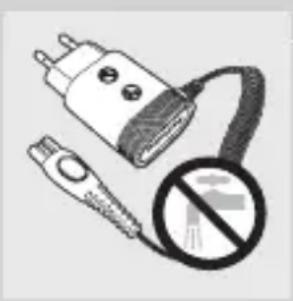
natural_image
Illustration of a plug and connector with a prohibition symbol (no text or labels)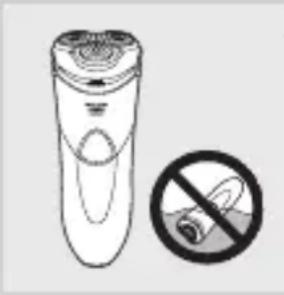
natural_image
Illustration of a remote control with a no-smoking symbol (no text or labels)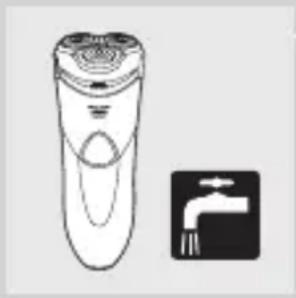
natural_image
Illustration of a hand cleaner and a faucet symbol (no text or labels)Caution
- Never immerse the shaver in water.
- Charge (all types except HQ8200), use and store the shaver at a temperature between 10°C and 35°C.
- Always put the protection cap on the shaver to protect the shaving heads when you are travelling.
- The shaver and the other accessories are not dishwasher-proof.
- Never use water hotter than 80^ C to rinse the shaver.
- Do not use the shaver in the bath or in the shower.
- Only use the adapter supplied.
- Do not use the shaver or the adapter if it is damaged.
- If the adapter is damaged, always have it replaced with one of the original type in order to avoid a hazard.
Compliance with standards
- The shaver complies with the internationally approved IEC safety regulations and can be safely cleaned under the tap.
- This Philips appliance complies with all standards regarding electromagnetic fields (EMF). If handled properly and according to the instructions in this user manual, the appliance is safe to use based on scientific evidence available today.
General
- The adapter transforms 100-240 volts to a safe low voltage of less than 24 volts.
- Noise level: Lc = 64 dB [A]
Overview (Fig. 4)
A Protection cap
B Shaving unit
C Shaving unit release button
D Shaver on/off button with power-on symbol
E Display (all types except HQ8200)
F Trimmer
G Cleaning brush
H Storage pouch (your pouch may differ from the one shown in the figure)
I Adapter
J Small plug
K Bathroom stand (HQ8251/HQ8250 only)
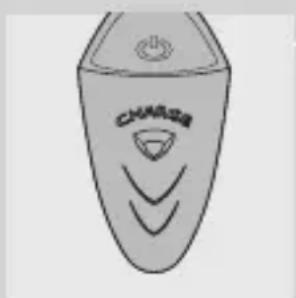
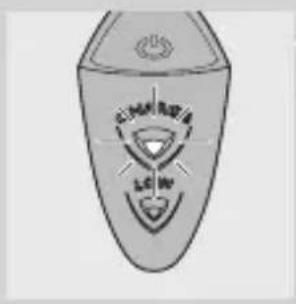
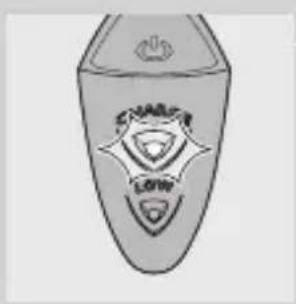
The display (all types except HQ8200)
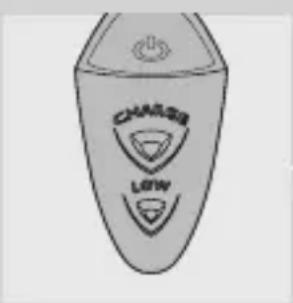
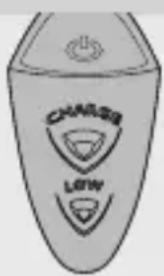
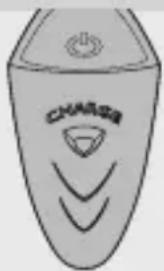
The HQ8251, HQ8250, HQ8241 and HQ8240 have different displays, which are shown in the figures below.
- HQ8251/HQ8250
natural_image
Line drawing of a stylized car with 'CHAARTA' branding and stylized design elements (no readable text or symbols)- HQ8241/HQ8240
Charging indication
Charging takes approx. 60 minutes. A fully charged shaver provides up to 17 cordless shaves.
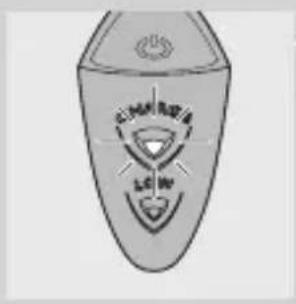
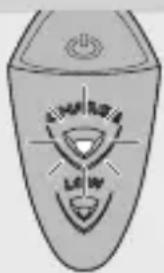
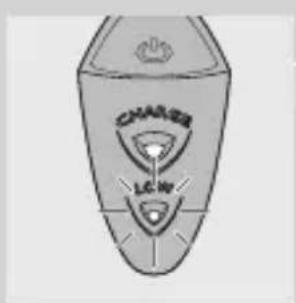
- When the shaver is charging, the CHARGE light is on continuously.
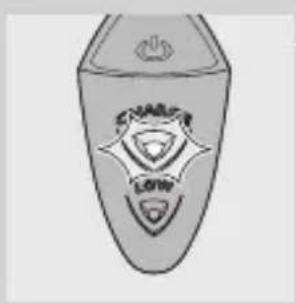
'Battery fully charged' indication
natural_image
Illustration of a shield with 'SHAKAR' and 'LOW' text, no additional symbols or text present.- When the battery is fully charged, the CHARGE light starts flashing.
Note: When you disconnect the shaver from the mains, the CHARGE light stops flashing.
'Battery low' indication (HQ8251/HQ8250 only)
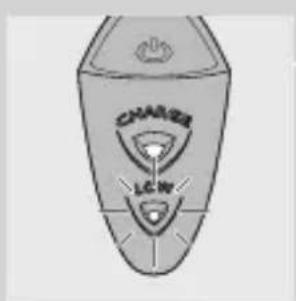
Note: If the rechargeable battery runs low during shaving, you can connect the shaver to the mains to finish the shave.
- When the battery is almost empty (when there are only 5 or fewer shaving minutes left), the LOW light goes on.
- When you switch off the shaver, the LOW light flashes a few seconds.
Charging (all types except HQ8200)
Note: The HQ8200 is not rechargeable.
HQ8251/HQ8250: Charge the shaver when the LOW light goes on.
HQ8241/HQ8240: Charge the shaver when the motor stops or starts running slower.
It takes approx. 60 minutes to fully charge the battery.
When you charge the shaver for the first time or after a long period of disuse, let it charge for 12 hours.
Tip: To optimise the battery capacity, fully charge the shaver and then use it normally until the battery is completely empty. Repeat this process three times in a row. If you optimise the battery capacity in this way, you can also charge the shaver in between shaves, even if the battery is not completely empty yet.
A fully charged shaver provides up to 17 cordless shaves.
If you have a heavy beard, the shaver may provide less than 17 cordless shaves. The shaving time may also vary over time, depending on your shaving behaviour, cleaning habits and beard type.
Charging the shaver
Do not charge the shaver in a closed pouch.
1 Put the small plug in the shaver.
2 Put the adapter in the wall socket.
The CHARGE light goes on.
Using the shaver
Note: The HQ8200 can only be used directly from the mains.
Note for all types except HQ8200: You can also use the appliance without charging. Simply connect the appliance to the mains.
Shaving
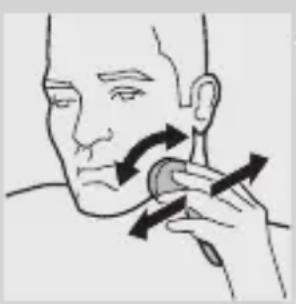
natural_image
Illustration of a person applying facial massage to the ear with directional arrows indicating motion (no text or symbols)1 HQ8200: Put the small plug in the shaver and put the adapter in the wall socket.
2 Press the on/off button once to switch on the shaver.
The power-on symbol in the on/off button lights up.
3 Move the shaving heads over your skin. Make both straight and circular movements.
- Shaving on a dry face gives the best results.
- Your skin may need 2 or 3 weeks to get accustomed to the Philips shaving system.
4 Press the on/off button once to switch off the shaver.
5 HQ8200: Remove the adapter from the wall socket and pull the small plug out of the shaver.
6 Clean the shaver (see chapter ‘Cleaning and maintenance’).
Trimming
You can use the trimmer to groom your sideburns and moustache.
1 HQ8200: Put the small plug in the shaver and put the adapter in the wall socket.
2 Press the on/off button once to switch on the shaver.
The power-on symbol in the on/off button lights up.
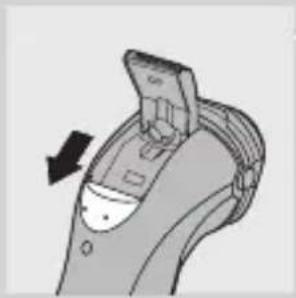
natural_image
Diagram of a device with an arrow indicating rotation or movement (no text or symbols present)3 Push the trimmer slide downwards to open the trimmer.
You can now start trimming.
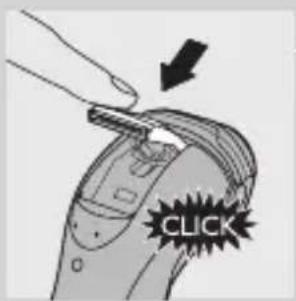
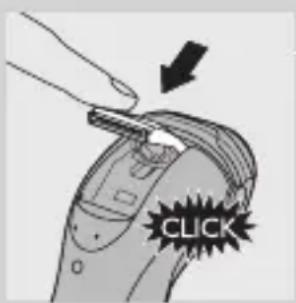
4 After trimming, close the trimmer ('click') and switch off the shaver.
5 HQ8200: Remove the adapter from the wall socket and pull the small plug out of the shaver.
Cleaning and maintenance
Never use scouring pads, abrasive cleaning agents or aggressive liquids such as petrol or acetone to clean the appliance.
- Clean the shaver after every shave for optimal shaving performance.
- Be careful with hot water. Always check if the water is not too hot, to prevent your hands from getting burnt.
- You can clean the bathroom stand (HQ8251/ HQ8250 only) and the outside of the shaver with a damp cloth.
Note: Water may leak from the socket at the bottom of the appliance when you rinse it. This is normal and not dangerous.
Cleaning the shaving unit under the tap
1 Switch off the shaver and disconnect it from the mains.
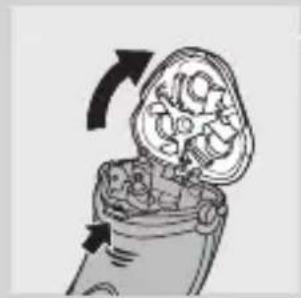
natural_image
Diagram of a mechanical component with arrows indicating rotation or movement (no text or symbols)2 Press the release button to open the shaving unit.
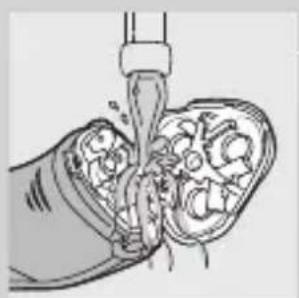
natural_image
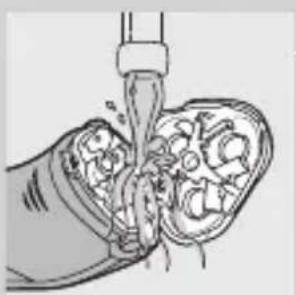
Illustration of a hand pouring liquid into a porous material (no text or symbols)3 Rinse the shaving unit and hair chamber under a hot tap for some time.
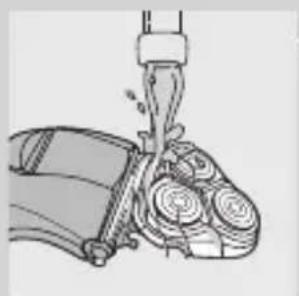
natural_image
Illustration of a mechanical device with gears and a lever (no text or symbols)- Make sure that you clean the inside as well as the outside of the shaving unit.
Be careful with hot water. Always check if the water is not too hot, to prevent your hands from getting burnt.
4 Close the shaving unit and shake off excess water.
Never dry the shaving unit and the hair chamber with a towel or tissue, as this may damage the shaving heads and the coupling spindles.
5 Open the shaving unit again and leave it open to let the shaver dry completely.
Cleaning the shaving unit with the brush supplied
1 Switch off the shaver and disconnect it from the mains.
ENGLISH14
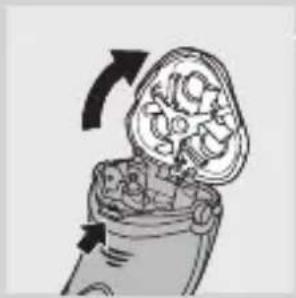
natural_image
Illustration of a mechanical component with arrows indicating rotation or movement (no text or symbols)2 Press the release button to open the shaving unit.
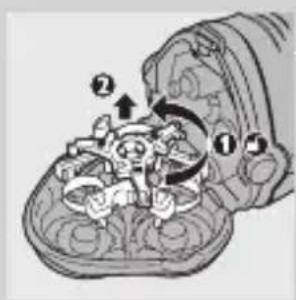
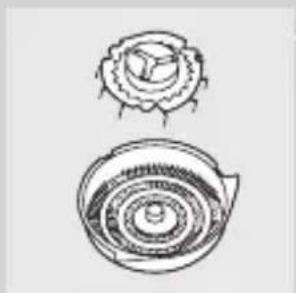
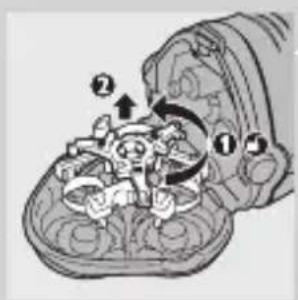
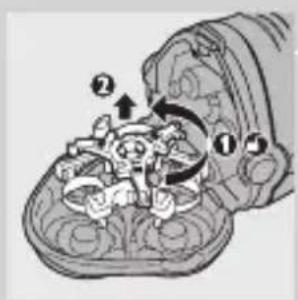
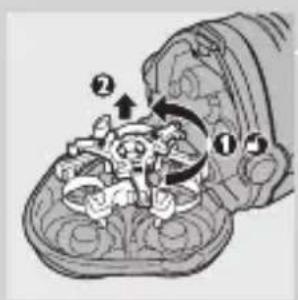
3 Turn the lock anticlockwise (1) and remove the retaining frame (2).
natural_image
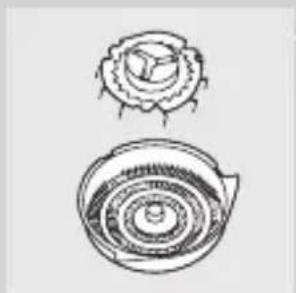
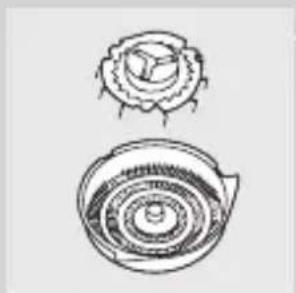
Two technical line drawings of mechanical components, one top view and one bottom view, with no visible text or symbols.4 Clean the shaving heads with the brush supplied. Each shaving head consists of a cutter and a guard.
Do not clean more than one cutter and guard at a time, since they are all matching sets. If you accidentally mix up the cutters and guards, it may take several weeks before optimal shaving performance is restored.
5 Put the shaving heads back into the shaving unit.
6 Put the retaining frame back into the shaving unit and turn the lock clockwise.
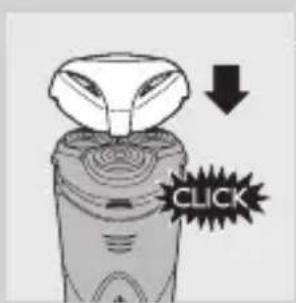
7 Close the shaving unit.
Note: If the shaving unit does not close smoothly, check if you have positioned the shaving heads properly and if the retaining frame is locked.
Cleaning the trimmer with the brush supplied
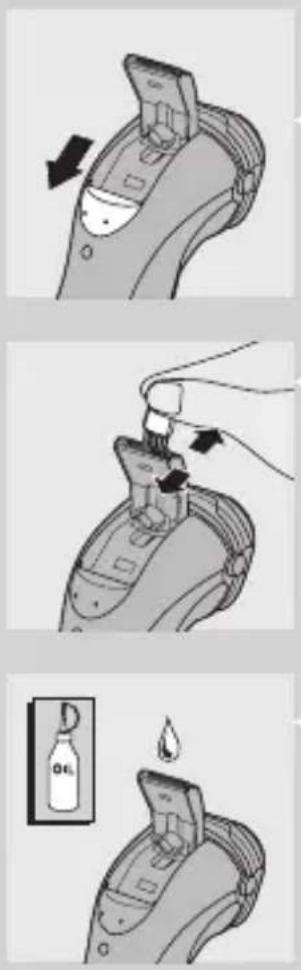
Clean the trimmer every time you have used it.
1 Switch off the shaver and disconnect it from the mains.
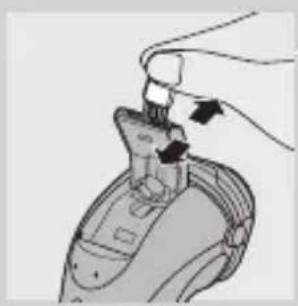
2 Push the trimmer slide downwards to open the trimmer.
3 Clean the trimmer with the short-bristled side of the cleaning brush. Brush up and down along the trimmer teeth.
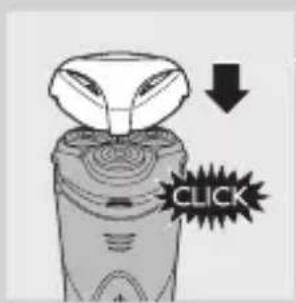
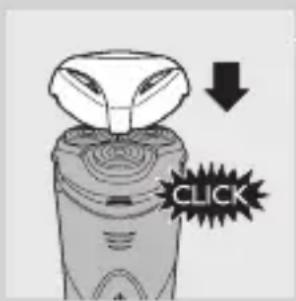
4 Close the trimmer ('click').
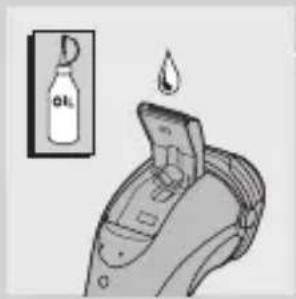
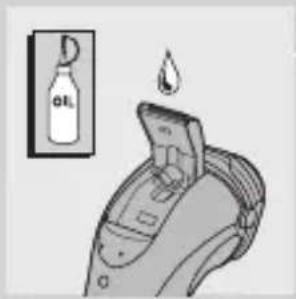
Tip: For optimal trimming performance, lubricate the trimmer teeth with a drop of sewing machine oil every six months.
Storage
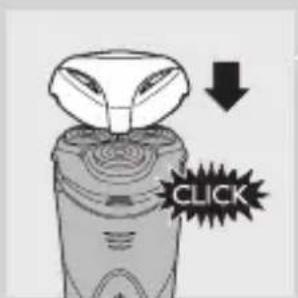
There are several ways to store the shaver or to take it with you when you travel:
- put the protection cap on the shaver to prevent damage.
- store the appliance in the pouch supplied.
- HQ8251/HQ8250: store the shaver in the bathroom stand.
Replacement
For maximum shaving performance, we advise you to replace the shaving heads every two years. Replace damaged shaving heads right away.
Only replace the shaving heads with original HQ9 Philips Shaving Heads.
natural_image
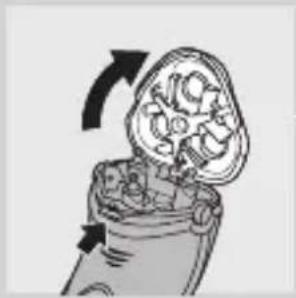
Diagram of a mechanical component with arrows indicating rotation or movement (no text or symbols)1 Switch off the shaver and disconnect it from the mains.
2 Press the release button to open the shaving unit.
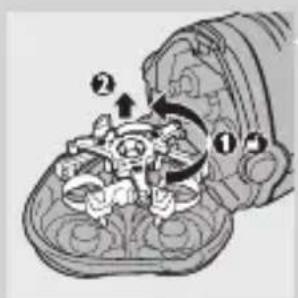
3 Turn the lock anticlockwise (1) and remove the retaining frame (2).
4 Remove the shaving heads and place new ones in the shaving unit.
Make sure that the projections of the shaving heads fit exactly into the recesses.
5 Put the retaining frame back into the shaving unit and turn the lock clockwise.
6 Close the shaving unit.
Note: If the shaving unit does not close smoothly, check if you have positioned the shaving heads properly and if the retaining frame is locked.
Accessories
The following accessories are available:
- HQ9 Philips Shaving heads
- HQ110 Philips Shaving Head Cleaning Spray (not available in some countries)
- HQ8010 car cord.
Environment
natural_image
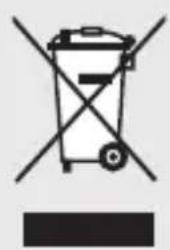
Symbol of a trash bin crossed with no text or numbers, representing waste sorting or disposal (no text present)- Do not throw away the appliance with the normal household waste at the end of its life, but hand it in at an official collection point for recycling. By doing this, you help to preserve the environment.
- All types except HQ8200: The built-in rechargeable shaver battery contains substances that may pollute the environment. Always remove the battery before you discard or hand in the shaver at an official collection point. Dispose of the battery at an official collection point for batteries. If you have trouble removing the battery, you can also take the appliance to a Philips service centre. The staff of this centre will remove the battery for you and will dispose of it in an environmentally safe way.
Removing the rechargeable shaver battery (all types except HQ8200)
natural_image
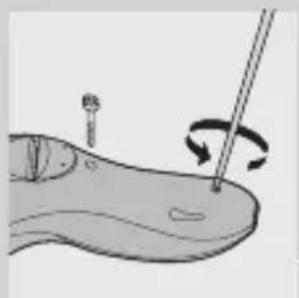
Illustration of a medical procedure showing a tool interacting with a patient's foot (no text or symbols present)Only remove the rechargeable battery when you discard the shaver. Make sure the rechargeable battery is completely empty when you remove it.
1 Disconnect the shaver from the mains.
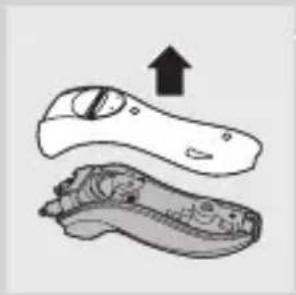
2 Let the shaver run until it stops and undo the two screws in the back of the shaver.
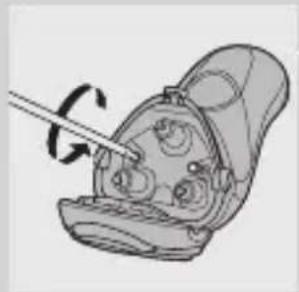
3 Undo the two screws in the hair chamber.
natural_image
Illustration of a medical device with a catheter inserted, showing internal components (no text or symbols)ENGLISH18
natural_image
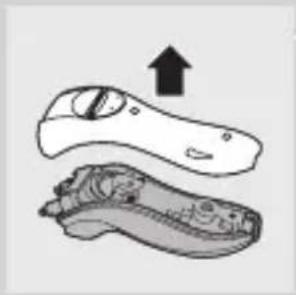
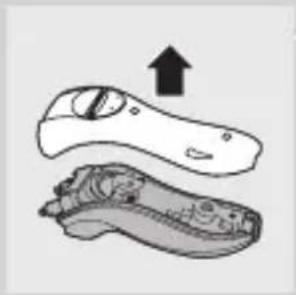
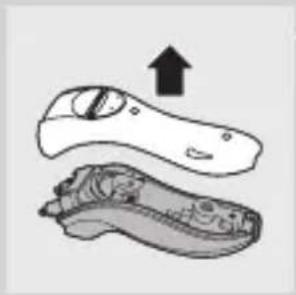
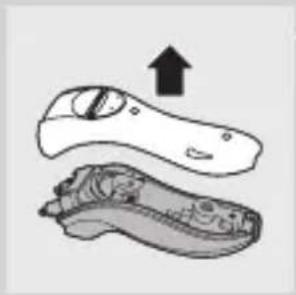
Illustration of a pair of shoes with one showing an upward arrow (no text or symbols)4 Remove the back panel.
natural_image
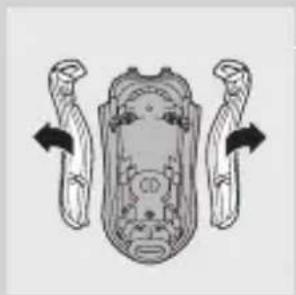
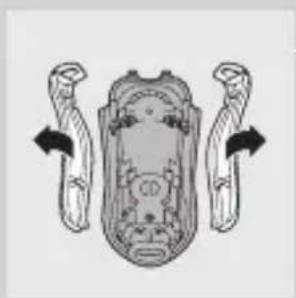
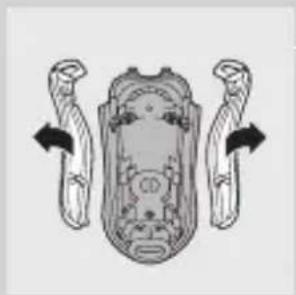
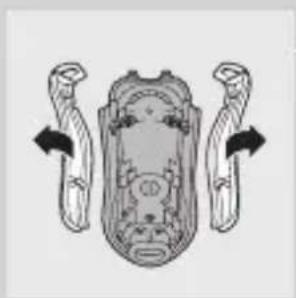
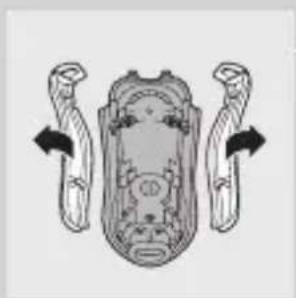
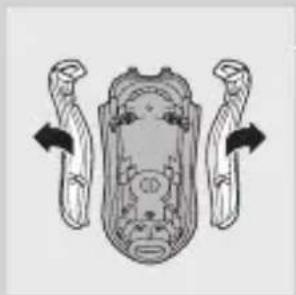
Diagram of a vehicle's front and rear components with directional arrows indicating movement (no text or labels)5 Remove the two side panels.
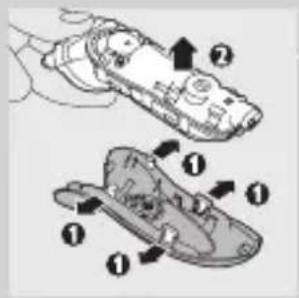
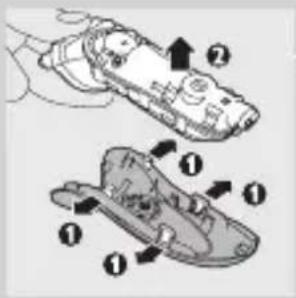
6 Bend the 4 hooks aside and take out the power unit.
Be careful, the hooks are sharp.
natural_image
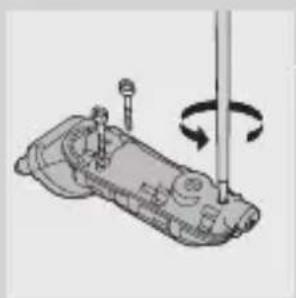
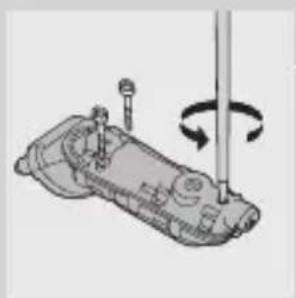
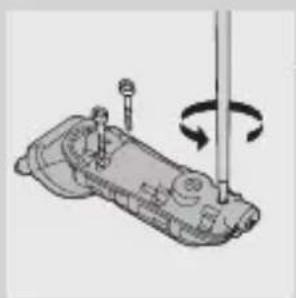
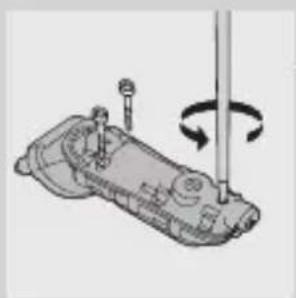
Mechanical assembly diagram showing a rotating component with a shaft and adjustment knob (no text or symbols)7 Undo the three screws in the power unit.
natural_image
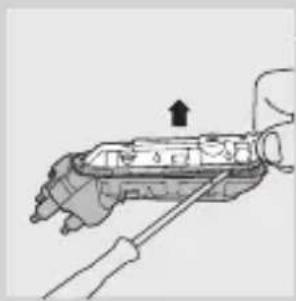
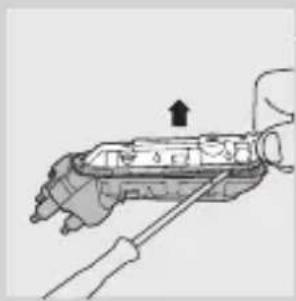
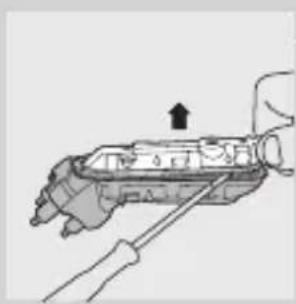
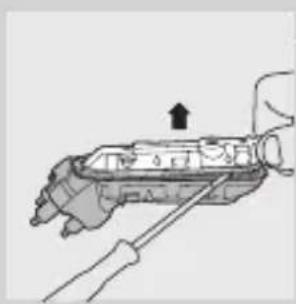
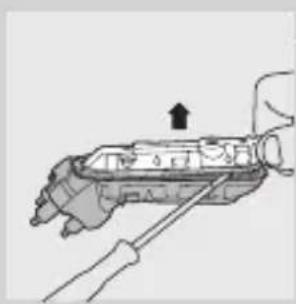
Diagram of a hand holding a mechanical device with a screwdriver inserted (no text or symbols visible)8 Remove the power unit cover with a screwdriver.
9 Remove the battery.
Be careful, the battery strips are sharp.
Do not connect the shaver to the mains again after you have removed the rechargeable battery.
Guarantee & service
If you need service or information or if you have a problem, please visit the Philips website at www.philips.com or contact the Philips Consumer Care Centre in your country (you find its phone number in the worldwide guarantee leaflet). If there is no Consumer Care Centre in your country, go to your local Philips dealer.
Guarantee restrictions
The shaving heads (cutters and guards) are not covered by the terms of the international guarantee because they are subject to wear.
Troubleshooting
1 The shaver does not shave as well as it used to.
- The shaving heads may be damaged or worn. Replace the shaving heads (see chapter 'Replacement').
- Long hairs may be obstructing the shaving heads. Clean the cutters and guards with the brush supplied (see chapter ‘Cleaning and maintenance’).
2 The shaver does not work when I press the on/off button.
- All types except HQ8200: The battery may be empty. Recharge the battery (see chapter 'Charging') or connect the shaver to the mains.
- HQ8200: The shaver is not connected to the mains. Put the small plug in the shaver, put the adapter in the wall socket and press the on/off button again.
- The temperature of the shaver may be too high. In this case, the shaver does not work. As soon as the temperature of the shaver has dropped sufficiently, you can switch on the shaver again.
Y_BOA
natural_image
Illustration of a plug and connector with a prohibition symbol (no text or labels)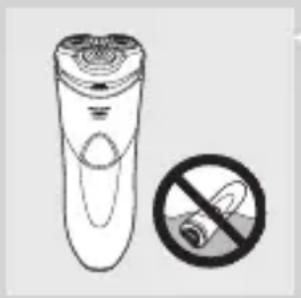
natural_image
Illustration of a remote control device with a prohibition symbol (no text or labels)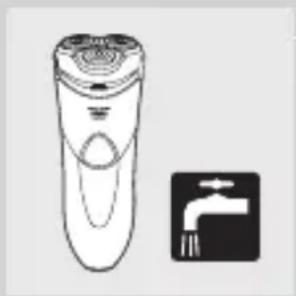
natural_image
Illustration of a handheld electric shaver and a tap wrench symbol (no text or labels)Внимание
natural_image
Illustration of a shield with a crown and emblem (no text or symbols)natural_image
Illustration of a person applying a circular massage device to their face (no text or symbols)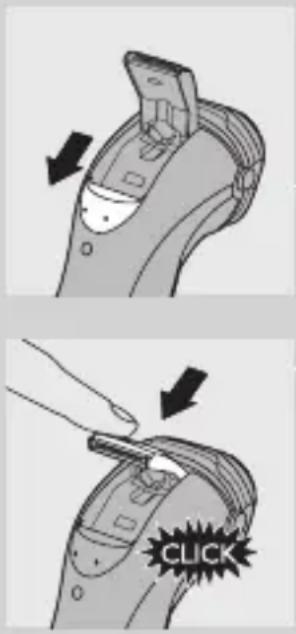
natural_image
Diagram of a mechanical component with internal gear-like structure and directional arrows (no text or symbols)natural_image
Illustration of a hand pouring liquid into a bowl with granular contents (no text or symbols)natural_image
Illustration of a mechanical device with gears and a lever (no text or symbols)natural_image
Illustration of a mechanical component with rotational arrows indicating motion (no text or symbols)natural_image
Two hand-drawn diagrams of a shell-like object with concentric rings and a flared top (no text or symbols)natural_image
Diagram of a device with an arrow indicating direction, no visible text or symbolsnatural_image
Illustration of a hand holding a device with arrows indicating motion (no text or symbols)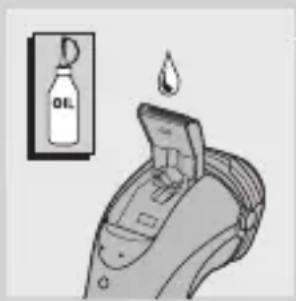
Съхранение
natural_image
Diagram of a mechanical component with rotating arrows indicating rotation (no text or symbols)natural_image
Illustration of a medical or anatomical procedure showing a tool interacting with a patient's abdomen, with no visible text or symbols.natural_image
Illustration of a medical device with a catheter inserted, showing internal components and no visible text or symbols.natural_image
Illustration of a pair of shoes with one showing an upward arrow (no text or symbols)natural_image
Diagram of a vehicle's front view showing steering wheel and dashboard components (no text or labels)natural_image
Mechanical assembly diagram showing a rotating component with a screw and shaft (no text or symbols)natural_image
Diagram of a hand holding a mechanical device with a tool, no visible text or symbolsnatural_image
Illustration of a flashlight and a plug with a no-smoking symbol (no text or labels)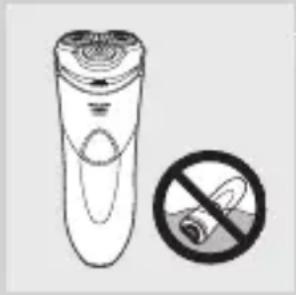
natural_image
Illustration of a hand holding a cigarette next to a cylindrical device with a circular base, accompanied by a no-smoking symbol (no text or labels present)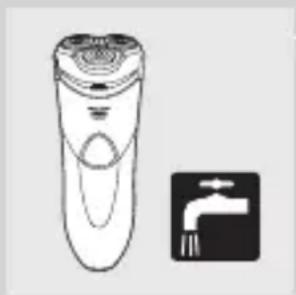
natural_image
Illustration of a hand-operated remote control with a faucet symbol (no text or labels)Upozornění
natural_image
Line drawing of a stylized electric shaver with 'CHARGE' branding and control knob (no text or symbols beyond branding)- HQ8241/HQ8240
Indikace nabíjení
natural_image
Illustration of a shield with a central emblem and a crown (no text or symbols)natural_image
Illustration of a person applying facial massage to the ear with directional arrows (no text or symbols)natural_image
Diagram of a device with an arrow indicating direction, no visible text or symbolsnatural_image
Diagram of a mechanical component with arrows indicating rotation or movement (no text or symbols)natural_image
Illustration of a hand pouring liquid into a container with internal compartments (no text or symbols)natural_image
Illustration of a mechanical device with gears and a lever (no text or symbols)natural_image
Illustration of a mechanical component with arrows indicating rotation or movement (no text or symbols)natural_image
Two technical line drawings of mechanical components, one top view and one bottom view, with no visible text or symbols.natural_image
Diagram of a device with an arrow indicating direction, no visible text or symbolsnatural_image
Illustration of a hand inserting a plug into a device component (no text or symbols visible)natural_image
Illustration of a hand holding a device with a droplet above it, next to a wall-mounted bottle (no text or symbols)natural_image
Diagram of a mechanical component with arrows indicating rotation or movement (no text or symbols)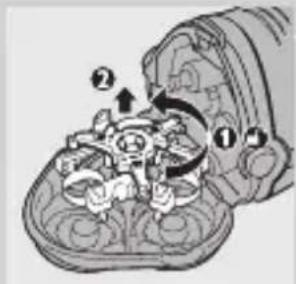
natural_image
Symbol of a trash bin crossed with no text or numbers, representing waste sorting or disposal (no text present)natural_image
Illustration of a medical procedure showing a needle inserted into a patient's abdomen with a rotation arrow indicating clockwise motion (no text or symbols present)natural_image
Illustration of a medical device with a catheter inserted, showing internal components (no text or symbols)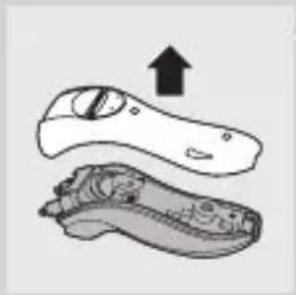
natural_image
Illustration of a pair of shoes with one showing an upward arrow (no text or symbols)natural_image
Diagram of a vehicle's front and rear assembly with directional arrows indicating movement (no text or labels)natural_image
Mechanical assembly diagram showing a rotating shaft and adjustment mechanism (no text or symbols)natural_image
Diagram of a hand holding a mechanical device with a tool, no visible text or symbolsnatural_image
Illustration of a plug, connector, and prohibition symbol (no text or labels)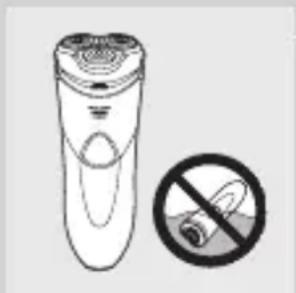
natural_image
Illustration of a hand holding an electric shaver next to a prohibition symbol (no text or labels)Ettevaatust
natural_image
Illustration of a hand-operated remote control with a tap symbol (no text or labels)natural_image
Illustration of a stylized toothbrush with 'LAW' and 'LOW' text, no additional symbols or text present.natural_image
Illustration of a person applying facial massage to the ear with directional arrows indicating motion (no text or symbols)natural_image
Diagram of a device with an arrow indicating direction, no visible text or symbols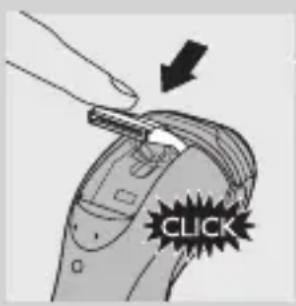
natural_image
Diagram of a mechanical component with rotating arrows indicating motion (no text or symbols)natural_image
Illustration of a hand pouring liquid into a container with internal components (no text or symbols)natural_image
Line drawing of a mechanical device with gears and a lever (no text or symbols)natural_image
Illustration of a mechanical component with arrows indicating rotation or movement (no text or symbols)2 Eemaldage pardlipea pardlist vajutades vabastusnuppu.
natural_image
Two technical line drawings of mechanical components, one top view and one bottom view, with no visible text or symbols.natural_image
Diagram of a device with a scroll and directional arrow, no visible text or symbolsnatural_image
Illustration of a hand holding a small object with arrows indicating motion or force (no text or symbols)natural_image
Illustration of a hand holding a device with a droplet above it, next to a wall-mounted bottle (no text or symbols present)natural_image
Illustration of a hand holding a device with internal components and directional arrows indicating rotation (no text or symbols)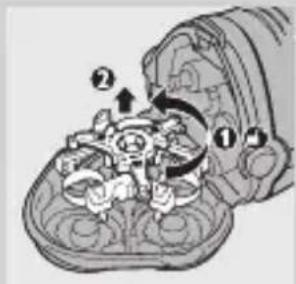
natural_image
Symbol of a trash bin crossed with a diagonal line, no text or numbers presentnatural_image
Illustration of a medical or surgical procedure showing a tool interacting with a patient's foot (no text or symbols present)natural_image
Illustration of a medical device with a needle inserted, showing internal components (no text or symbols)EESTI62
natural_image
Illustration of a pair of shoes with one showing an upward arrow (no text or symbols)4 Eemaldage tagumine paneel.
natural_image
Diagram of a vehicle's front and rear assembly with directional arrows indicating movement (no text or labels)natural_image
Mechanical assembly diagram showing a rotating component with a shaft and screw (no text or symbols)natural_image
Diagram of a hand holding a mechanical device with a tool, no visible text or symbols8 Eemaldage kruvikeerajaga toiteallika kate.
9 Eemaldage aku.
natural_image
Illustration of a plug and connector with a no-smoking symbol (no text or labels)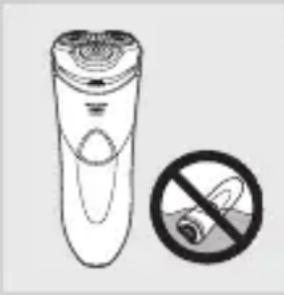
natural_image
Illustration of a remote control with a no-smoking symbol (no text or labels)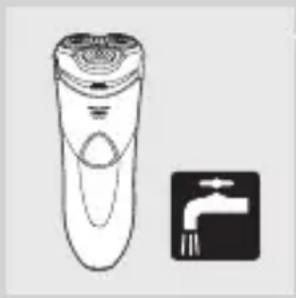
natural_image
Illustration of a hand-operated remote control with a faucet symbol (no text or labels)Oprez
- Aparat nikada ne uranjajte u vodu.
- Aparat za brijanje punite (svi modeli osim HQ8200), koristite i spremajte pri temperaturi između 10°C i 35°C.
- Prilikom putovanja na aparat za brijanje obavezno stavite zaštitni poklopac kako biste zaštitili glave za brijanje.
- Aparat za brijanje i druga dodatna oprema ne mogu se prati u stroju za pranje posuđa.
- Za ispiranje aparata za brijanje nikada ne koristite vodu temperature više od 80°C.
- Aparat nemojte koristiti u kadi ili pod tušem.
- Koristite samo adapter isporučen s aparatom.
- Aparat za brijanje ili adapter nemojte koristiti ako je oštećen.
- Ako je adapter oštećen, uvijek ga zamijenite originalnim kako biste izbjegli potencijalno opasne situacije.
Sukladnost sa standardima
- Aparat je proizveden u skladu s međunarodnim IEC sigurnosnim normama i može se sigurno čistiti pod mlazom vode.
- Ovaj proizvod tvrtke Philips sukladan je svim standardima koji se tiču elektromagnetskih polja (EMF). Ako aparatom rukujete ispravno i u skladu s ovim uputama, prema dostupnim znanstvenim dokazima on će biti siguran za korištenje.
Opće informacije
- Adapter za napajanje pretvara napon od 100
- 240 V u siguran niski napon manji od 24 V.
- Razina buke: Lc = 64 dB [A]
Pregled (Sl. 4)
A Zaštitni poklopac
B Jedinica za brijanje
C Gumb za otpuštanje jedinice za brijanje
D Gumb za uključivanje/isključivanje sa simbolom uključivanja
E Zaslon (svi modeli osim HQ8200)
F Trimer
G Četka za čišćenje
H Torbica za spremanje (vaš torbica može se razlikovati od torbice prikazane na slici)
I Adapter
J Mali utikač
K Postolje za korištenje u kupaonici (samo HQ8251/HQ8250)
Zaslon (svi modeli osim HQ8200)
HQ8251, HQ8250, HQ8241 i
HQ8240 imaju različite zaslone koji se prikazuju na slikama u nastavku.
- HQ8251/HQ8250
natural_image
Illustration of a stylized electric shaver with a logo and control knob (no text or symbols)- HQ8241/HQ8240
Oznaka punjenja
Punjenje traje približno 60 minuta.
Potpuno napunjen aparat za brijanje može se koristiti za do 17 brijanja bez priključivanja na napajanje.
- Dok se aparat punit indikator CHARGE (PUNJENJE) stalno svijetli.
Indikator potpuno napunjene baterije
natural_image
Illustration of a shield with 'SHAKAR' and 'LOW' text, no additional symbols or text present.- Kad se baterija potpuno napuni, indikator CHARGE (PUNJENJE) počinje treperiti.
natural_image
Illustration of a person applying facial massage to the ear with directional arrows indicating motion (no text or symbols)natural_image
Diagram of a device with an arrow indicating direction, no visible text or symbolsnatural_image
Illustration of a mechanical component with arrows indicating rotation or movement (no text or symbols)natural_image
Two technical line drawings of mechanical components, one top view and one bottom view, with no visible text or symbols.4 Glave za brijanje očistite četkicom koju ste dobili s aparatom. Svaka glava sastoji se od rezača i štitnika.
natural_image
Diagram of a device with a black arrow indicating rotation or movement (no text or symbols present)natural_image
Illustration of a hand holding a small object with arrows indicating motion or force (no text or symbols)3 Trimer očistite onom stranom četke na kojoj se nalaze kraće dlačice. Zupce trimera četkom prijeđite u smjeru gore-dolje.
4 Zatvorite trimer ('klik').
natural_image
Illustration of a hand holding a device with a droplet above it, next to a wall-mounted bottle (no text or symbols)natural_image
Illustration of a hand holding a device with internal components and directional arrows indicating rotation (no text or symbols)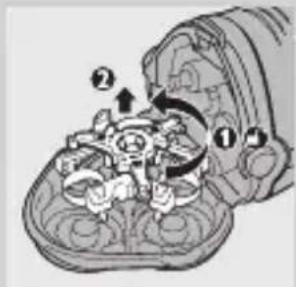
1 Isključite aparat za brijanje i iskopčajte ga iz struje.
2 Pritisnite gumb za otpuštanje kako biste otvorili jedinicu za brijanje.
natural_image
Symbol of a trash bin crossed with a diagonal line, no text or numbers presentnatural_image
Illustration of a medical or surgical procedure showing a tool interacting with a patient's foot (no text or symbols present)natural_image
Illustration of a medical device with a needle inserted, showing internal components (no text or symbols)HRVATSKI76
natural_image
Illustration of a pair of shoes with one showing an upward arrow (no text or symbols)4 Skinite stražnju ploču.
natural_image
Diagram of a vehicle's front and rear components with directional arrows indicating movement (no text or labels)6 Savijte 4 kukice u stranu i izvadite bateriju. Budite oprezni, kukice su oštre.
natural_image
Mechanical assembly diagram showing a rotating component with a shaft and adjustment knob (no text or symbols)7 Izvadite tri vijka na pogonskoj jedinici.
natural_image
Diagram of a hand holding a mechanical device with a screwdriver inserted (no text or symbols visible)8 Skinite poklopac pogonske jedinice pomoću odvijača.
9 Izvadite bateriju.
Budite oprezni, stranice baterija su vrlo oštre.
Nakon vađenja baterije s mogućnošću punjenja nemojte priključivati aparat za brijanje u zidnu utičnicu.
Jamstvo i servis
U slučaju da vam je potreban servis ili informacija ili imate neki problem, posjetite web-stranicu tvrtke Philips, www.philips.com, ili se obratite centru za korisnike tvrtke Philips u svojoj državi (broj telefona nalazi se u priloženom jamstvu). Ako u vašoj državi ne postoji centar za korisnike, obratite se lokalnom prodavaču proizvoda tvrtke Philips.
Ograničenja jamstva
natural_image
Illustration of a plug and connector with a prohibition symbol (no text or labels)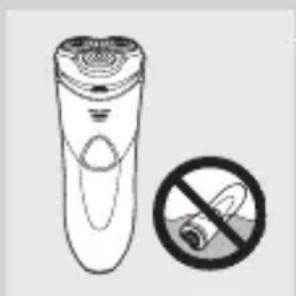
natural_image
Illustration of a handheld device with a circular top and a prohibition symbol (no text or labels)Figyelem
natural_image
Line drawing of a remote control device and a tap symbol (no text or labels)natural_image
Illustration of a shield with a crown and three stylized emblem (no text or symbols)natural_image
Illustration of a person applying facial massage to the ear with directional arrows indicating motion (no text or symbols)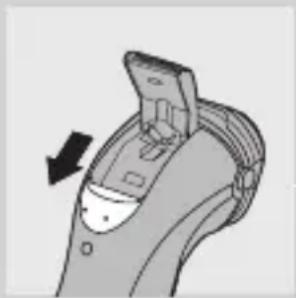
natural_image
Diagram of a device with a black arrow indicating direction, showing internal components (no text or symbols)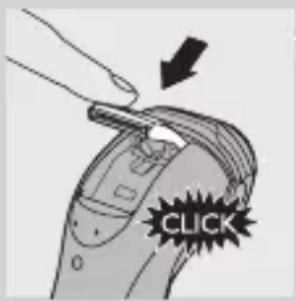
natural_image
Diagram of a mechanical component with arrows indicating rotation or movement (no text or symbols)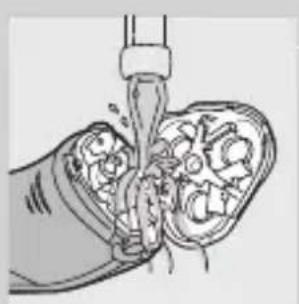
natural_image
Illustration of a hand pouring liquid into a porous medium (no text or symbols)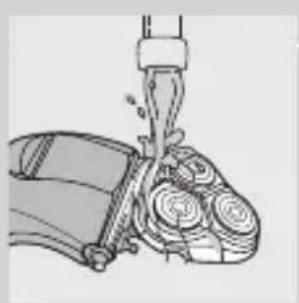
natural_image
Illustration of a mechanical device with gears and a lever (no text or symbols)natural_image
Diagram of a mechanical component with rotating arrows indicating rotation (no text or symbols)natural_image
Two technical line drawings of mechanical components, one circular and one spiral, with no visible text or symbols.natural_image
Diagram of a device with an arrow indicating rotation or movement (no text or symbols present)natural_image
Illustration of a hand holding a small object with arrows indicating motion or assembly (no text or symbols)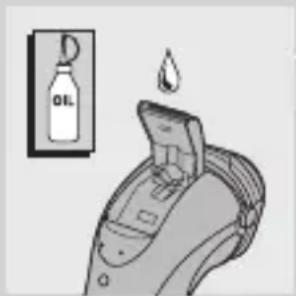
Tárolás
natural_image
Symbol of a trash bin with no text or numbers presentnatural_image
Illustration of a medical procedure on a patient's abdomen with a needle and arrow indicating rotation (no text or symbols)natural_image
Illustration of a medical device with a needle inserted, showing internal components (no text or symbols)natural_image
Illustration of a hand holding an object with an upward arrow, no text or symbols presentnatural_image
Diagram of a symmetrical mechanical or architectural component with directional arrows indicating movement or force (no text or symbols)natural_image
Mechanical assembly diagram showing a rotating shaft and adjustment components (no text or labels)natural_image
Illustration of a hand holding a mechanical device with a tool, no text or symbols presentnatural_image
Illustration of a plug and connector with a prohibition symbol (no text or labels)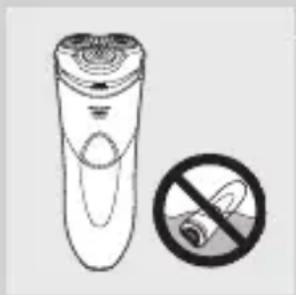
natural_image
Illustration of a hand holding a cigarette next to a cylindrical device with a circular lid (no text or symbols)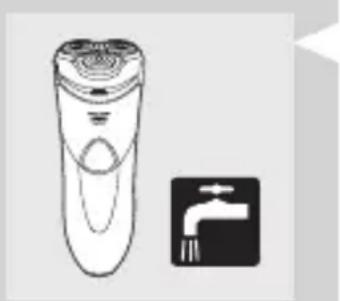
natural_image
Illustration of a remote control with a faucet symbol (no text or labels)natural_image
Illustration of a shield with a central emblem and a crown (no text or symbols)natural_image
Illustration of a person applying a circular massage device to their face (no text or symbols)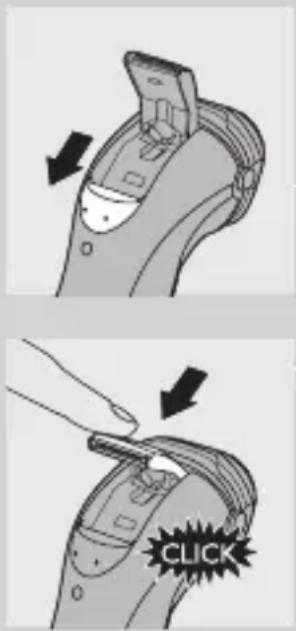
natural_image
Diagram of a mechanical component with rotating arrows indicating rotation (no text or symbols)natural_image
Illustration of a medical procedure showing fluid flow through a tubular structure (no text or symbols)natural_image
Illustration of a mechanical device with gears and a lever (no text or symbols)natural_image
Diagram of a mechanical component with internal gears and arrows indicating rotation (no text or symbols)natural_image
Illustration of a medical or anatomical procedure showing a tool interacting with a patient's abdomen, with no visible text or symbols.natural_image
Illustration of a medical device with a pen inserted, showing internal components (no text or symbols)natural_image
Illustration of a pair of shoes with one showing an upward arrow (no text or symbols)natural_image
Diagram of a vehicle's front and rear components with directional arrows indicating movement (no text or labels)natural_image
Mechanical assembly diagram showing a rotating component with a screw and shaft (no text or symbols)natural_image
Illustration of a hand using a screwdriver to adjust or install a mechanical component (no text or symbols visible)natural_image
Illustration of a plug and connector with a prohibition symbol (no text or labels)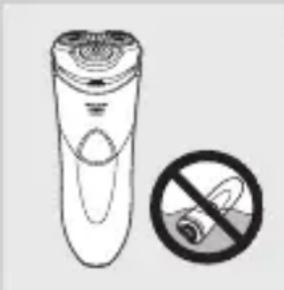
natural_image
Illustration of a hand cleaner with a no-smoking symbol (no text or labels)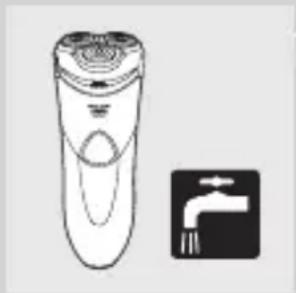
natural_image
Line drawing of a hand-operated remote control with a tap symbol (no text or labels)Atsargiai
natural_image
Illustration of a stylized car with a logo and stylized design (no readable text or symbols)- HQ8241/HQ8240
Ikrovos indikatorius
natural_image
Illustration of a shield with 'SHARAN LOW' text and a crown-like emblem on top (no additional symbols or text)natural_image
Illustration of a person applying a circular massage device to their face (no text or symbols)natural_image
Diagram of a device with an arrow indicating direction, no visible text or symbolsnatural_image
Diagram of a device with internal components and directional arrows indicating rotation (no text or symbols)natural_image
Illustration of a hand pouring liquid into a container with visible internal components (no text or symbols)natural_image
Illustration of a mechanical device with gears and a lever (no text or symbols)natural_image
Diagram of a device with internal components and directional arrows indicating rotation (no text or symbols)natural_image
Two technical line drawings of a mechanical component, one top and one bottom, with no visible text or symbols.natural_image
Diagram of a device with a black arrow indicating direction, no visible text or symbolsnatural_image
Illustration of a hand inserting a plug into a device component (no text or symbols visible)natural_image
Illustration of a person using a handheld device with a droplet above, next to a wall-mounted bottle (no text or symbols)natural_image
Diagram of a mechanical component with arrows indicating rotation or movement (no text or symbols)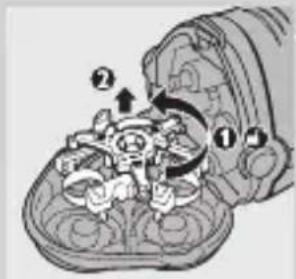
natural_image
Symbol of a trash bin crossed with a diagonal line, no text or numbers presentnatural_image
Illustration of a medical or surgical procedure showing a tool interacting with a patient's abdomen (no text or symbols present)natural_image
Illustration of a medical device with a needle inserted, showing internal components (no text or symbols)LIETUVIŠKAI120
natural_image
Illustration of a hand holding an object with an upward arrow, no text or symbols present4 Nuimkite galini skydelj.
natural_image
Diagram of a vehicle's internal components with directional arrows indicating movement (no text or labels)5 Nuimkite du šoninius skydelius.
natural_image
Mechanical assembly diagram showing a rotating shaft and adjustment mechanism (no text or symbols)7 Atsukite tris maitinimo bloko varžtelius.
natural_image
Illustration of a hand holding a mechanical device with a screwdriver inserted (no text or symbols visible)8 Maitinimo bloko dangtelj nuimkite atsuktuvu.
9 lšimkite baterija.
natural_image
Illustration of a plug and connector with a prohibition symbol (no text or labels)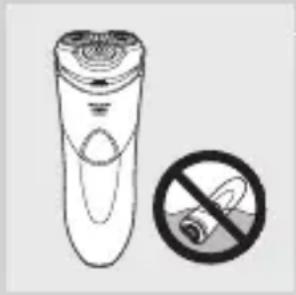
natural_image
Illustration of a hand holding a cigarette next to a cylindrical device with a circular base (no text or symbols)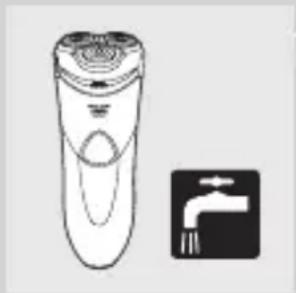
natural_image
Line drawing of a hand-operated remote control with a tap symbol (no text or labels)levērībai
natural_image
Line drawing of a stylized electric shaver with 'Chassis' label and control knob (no text or symbols beyond branding)- HQ8241/HQ8240
natural_image
Illustration of a shield with 'SHARAN LOW' text and a crown-like emblem on top (no additional symbols or text)natural_image
Illustration of a person applying a circular massage device to their face (no text or symbols)1 HQ8200: levietojiet mazo kontaktdakšu skuveklī un adapteri sienas kontaktligzdā.
natural_image
Diagram of a device with an arrow indicating direction, no visible text or symbolsnatural_image
Diagram of a device with internal components and directional arrows indicating rotation (no text or symbols)natural_image
Illustration of a hand pouring liquid into a container with food items (no text or symbols)natural_image
Illustration of a mechanical device with gears and a lever (no text or symbols)natural_image
Diagram of a device with internal components and directional arrows indicating rotation (no text or symbols)natural_image
Two technical line drawings of a mechanical component, one top and one bottom, with no visible text or symbols.natural_image
Diagram of a device component with an arrow indicating rotation or movement (no text or symbols present)natural_image
Illustration of a hand holding a small object with arrows indicating motion or force (no text or symbols)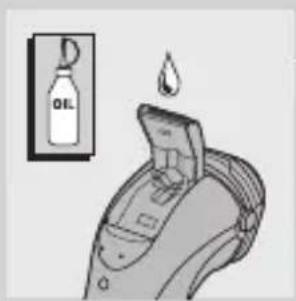
natural_image
Diagram of a mechanical component with rotating arrows indicating motion (no text or symbols)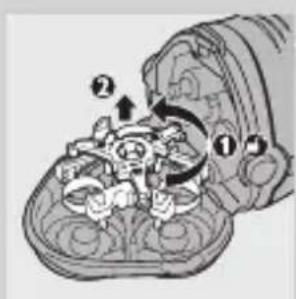
natural_image
Symbol of a trash bin crossed with a diagonal line, no text or numbers presentnatural_image
Illustration of a medical or surgical procedure showing a tool interacting with a patient's abdomen (no text or symbols present)natural_image
Illustration of a medical device with a needle inserted, showing internal components (no text or symbols)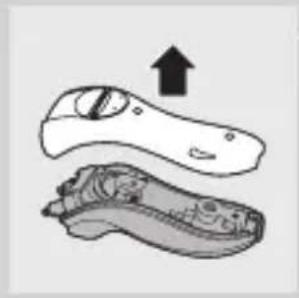
natural_image
Illustration of a hand holding an object with an upward arrow, no text or symbols presentnatural_image
Diagram of a vehicle's front and rear assembly with directional arrows indicating movement (no text or labels)natural_image
Mechanical assembly diagram showing a rotating component with a shaft and screwdriver (no text or symbols)natural_image
Diagram of a hand holding a mechanical component with a screwdriver inserted (no text or symbols)natural_image
Illustration of a flashlight and plug with a prohibition symbol (no text or labels)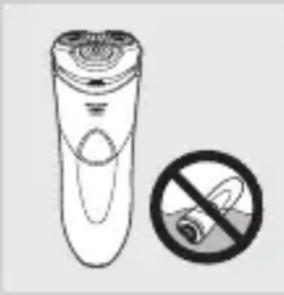
natural_image
Illustration of a remote control with a no-smoking symbol (no text or labels)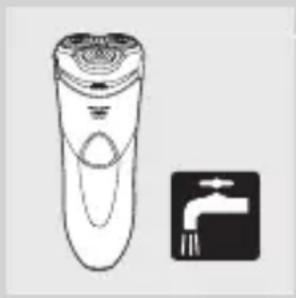
natural_image
Illustration of a hand-operated remote control with a faucet symbol (no text or labels)Uwaga
natural_image
Line drawing of a stylized electric shaver with 'Chassis' label and control knob (no text or symbols beyond branding)- HQ8241/HQ8240
Wskaźnik ładowania
natural_image
Illustration of a shield with a central emblem and decorative elements (no text or symbols)natural_image
Illustration of a person applying pressure to their ear with arrows indicating direction (no text or symbols)natural_image
Diagram of a device with an arrow indicating direction, no visible text or symbolsnatural_image
Diagram of a mechanical component with arrows indicating rotation or movement (no text or symbols)natural_image
Illustration of a hand pouring liquid into a container with visible internal components (no text or symbols)natural_image
Illustration of a mechanical device with gears and a lever (no text or symbols)natural_image
Diagram of a mechanical component with arrows indicating rotation or movement (no text or symbols)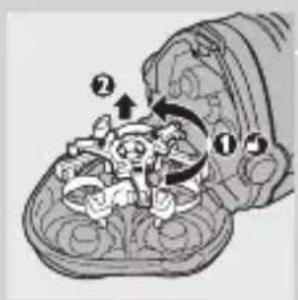
natural_image
Two technical line drawings of a mechanical component, one top and one bottom, with no visible text or symbols.natural_image
Diagram of a device with an arrow indicating direction, no visible text or symbolsnatural_image
Illustration of a hand holding a small object with arrows indicating movement or force (no text or symbols)natural_image
Diagram of a mechanical component with arrows indicating rotation or movement (no text or symbols)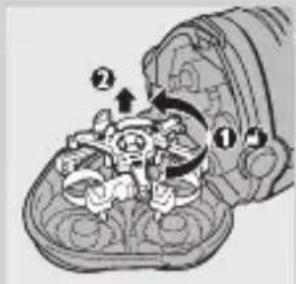
natural_image
Symbol of a trash bin with crossed lines indicating no waste or restriction (no text or numbers present)natural_image
Illustration of a medical procedure on a patient's abdomen with a needle and arrow indicating rotation (no text or symbols)natural_image
Illustration of a medical device with a needle inserted, showing internal components (no text or symbols)natural_image
Illustration of a hand holding an object with an upward arrow, no text or symbols presentnatural_image
Diagram of a symmetrical mechanical or architectural component with directional arrows indicating movement (no text or symbols)natural_image
Mechanical assembly diagram showing a rotating shaft and adjustment components (no text or symbols)natural_image
Illustration of a hand holding a mechanical device with a tool, no visible text or symbolsnatural_image
Illustration of a plug and connector with a prohibition symbol (no text or labels)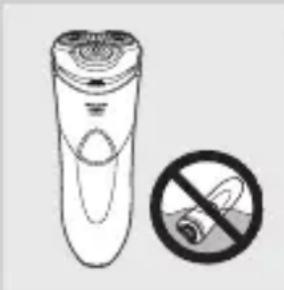
natural_image
Illustration of a pair of disposable batteries with a no-smoking symbol (no text or labels)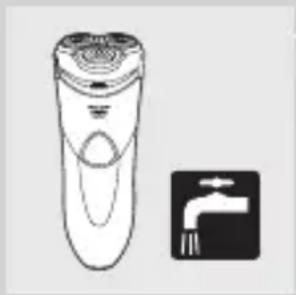
natural_image
Illustration of a hand pusher and a faucet symbol (no text or labels)Atenție
natural_image
Illustration of a shield with 'SHAKER LOW' text and a crown-like emblem on top (no additional symbols or text)natural_image
Illustration of a person applying a circular massage device to their face (no text or symbols)natural_image
Diagram of a device handle with an arrow indicating direction (no text or symbols present)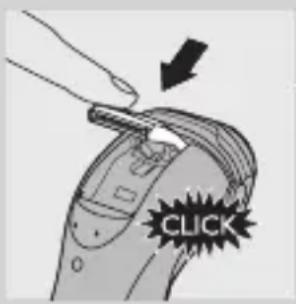
natural_image
Diagram of a mechanical component with rotating arrows indicating rotation (no text or symbols)natural_image
Illustration of a hand pouring liquid into a lung with internal organs (no text or symbols)natural_image
Mechanical assembly diagram showing a lever lifting a component (no text or symbols visible)natural_image
Diagram of a device with internal components and directional arrows indicating rotation (no text or symbols)natural_image
Two technical line drawings of mechanical components, one circular and one spiral, with no visible text or symbols.natural_image
Illustration of a mechanical device with rotating components and directional arrows (no text or symbols)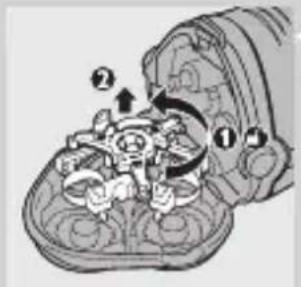
natural_image
Symbol of a trash bin crossed with no text or numbers, representing waste sorting or disposal (no text present)natural_image
Illustration of a medical or anatomical procedure showing a tool interacting with a curved arrow, no text or symbols present.natural_image
Illustration of a medical device with a needle inserted, showing internal components (no text or symbols)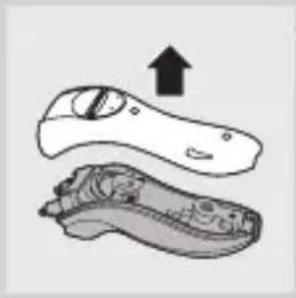
natural_image
Illustration of a hand holding an object with an upward arrow, showing internal components (no text or symbols)natural_image
Diagram of a vehicle's internal components with directional arrows indicating movement (no text or labels)natural_image
Mechanical assembly diagram showing a rotating component with a shaft and screw (no text or symbols)natural_image
Diagram of a hand holding a mechanical component with a tool, no visible text or symbolsnatural_image
Illustration of a plug and connector with a no-smoking symbol (no text or labels)Опасно
natural_image
Illustration of a handheld device with a circular button and a prohibition symbol (no text or labels)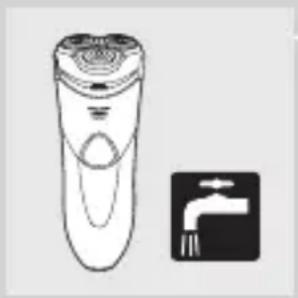
natural_image
Illustration of a remote control device and a faucet symbol (no text or labels)natural_image
Illustration of a stylized charging plug with 'Charger' branding and power button (no text or symbols beyond logo)- HQ8241/HQ8240
Индикатор зарядки
natural_image
Illustration of a shield-shaped object with a central emblem and crown (no text or symbols)natural_image
Illustration of a person applying a circular massage device to their face (no text or symbols)natural_image
Diagram of a handheld device with an arrow indicating rotation or movement (no text or symbols present)natural_image
Diagram of a mechanical component with arrows indicating rotation or movement (no text or symbols)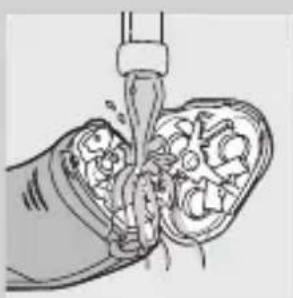
natural_image
Illustration of a hand pouring liquid into a porous medium (no text or symbols)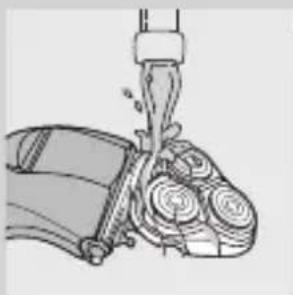
natural_image
Mechanical assembly diagram showing a lever pressing down on a motor (no text or symbols visible)natural_image
Diagram of a device with an arrow indicating direction, no visible text or symbolsnatural_image
Illustration of a hand holding a small object with arrows indicating motion or force (no text or symbols)Хранение
natural_image
Diagram of a mechanical component with rotating arrows indicating rotation (no text or symbols)natural_image
Illustration of a medical or anatomical procedure showing a tool interacting with a body part, with no visible text or symbols.natural_image
Illustration of a medical device with a tool inserted, showing internal components (no text or symbols)natural_image
Illustration of a shoe with an upward arrow indicating growth (no text or symbols)natural_image
Diagram of a vehicle's front view showing steering wheel and dashboard components (no text or labels)natural_image
Mechanical assembly diagram showing a rotating component with a shaft and screw (no text or symbols)natural_image
Diagram of a hand holding a mechanical component with a tool, no visible text or symbolsnatural_image
Illustration of a plug and connector with a prohibition symbol (no text or labels)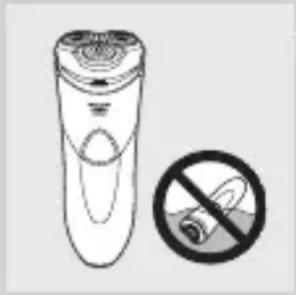
natural_image
Illustration of a hand holding a cigarette next to a cylindrical device with a circular base, accompanied by a prohibition symbol (no text or labels present)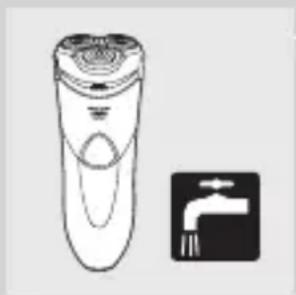
natural_image
Illustration of a hand-operated remote control with a tap symbol (no text or labels)Výstraha
natural_image
Illustration of a shield with 'SHARAN LOW' text and a crown-like emblem on top (no additional symbols or text)natural_image
Illustration of a person applying facial massage to the ear with directional arrows indicating motion (no text or symbols)natural_image
Diagram of a device with an arrow indicating direction, no visible text or symbolsnatural_image
Diagram of a device with internal components and directional arrows indicating rotation (no text or symbols)2 Stlačte uvolňovacie tlačidlo a otvorte holiacu jednotku.
natural_image
Illustration of a hand pouring liquid into a container with visible internal components (no text or symbols)natural_image
Illustration of a mechanical device with gears and a lever (no text or symbols)natural_image
Diagram of a device with internal components and directional arrows indicating rotation (no text or symbols)2 Stlačte uvolňovacie tlačidlo a otvorte holiacu jednotku.
natural_image
Two technical line drawings of a mechanical component, one top and one bottom, with no visible text or symbols.natural_image
Diagram of a device with a black arrow indicating direction, no visible text or symbolsnatural_image
Illustration of a hand holding a tool interacting with a device (no text or symbols visible)3 Zastrihávač očistite krátkymi štetinkami čistiacej kefky. Kefkou pohybujte nahor a nadol pozdíž zúbkov zastrihávača.
natural_image
Illustration of a device emitting liquid from a bottle (no text or symbols present)natural_image
Diagram of a mechanical component with arrows indicating rotation or movement (no text or symbols)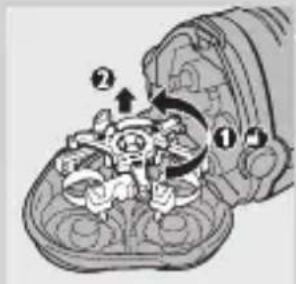
1 Vypnite holiaci strojček a odpojte ho zo siete.
2 Stlačte uvolňovacie tlačidlo a otvorte holiacu jednotku.
natural_image
Symbol of a trash bin crossed with no text or numbers, representing waste sorting or disposal (no text present)natural_image
Illustration of a medical procedure with a needle inserted and rotation arrow indicating clockwise motion (no text or symbols)natural_image
Illustration of a medical device with a tool inserted, showing internal components (no text or symbols)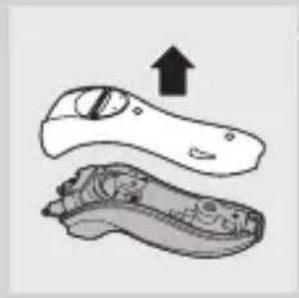
natural_image
Illustration of a hand holding an object with an upward arrow, no text or symbols presentnatural_image
Diagram of a vehicle's front and rear assembly with directional arrows indicating movement (no text or labels)natural_image
Mechanical assembly diagram showing a rotating component with a shaft and screwdriver (no text or symbols)natural_image
Diagram of a hand holding a mechanical component with a tool, no visible text or symbolsnatural_image
Illustration of a plug and connector with a prohibition symbol (no text or labels)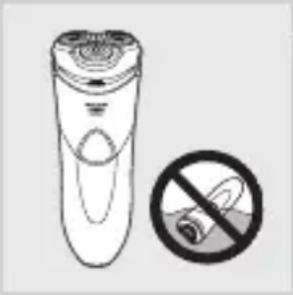
natural_image
Illustration of a handheld device with a circular button and a prohibition symbol (no text or labels)Pozor
natural_image
Line drawing of a remote control device and a faucet symbol (no text or labels)Skladnost s standardi
natural_image
Illustration of a handheld device with a triangular button and shield-like base (no text or symbols)- HQ8241/HQ8240
Prikaz polnjenja
natural_image
Illustration of a shield-shaped object with a central emblem and three triangular elements, no text or symbols present.natural_image
Illustration of a person applying a circular massage device to their face (no text or symbols)natural_image
Diagram of a device with a black arrow indicating direction, showing internal components (no text or symbols)natural_image
Diagram of a mechanical component with arrows indicating rotation or movement (no text or symbols)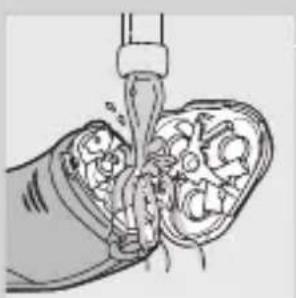
natural_image
Illustration of a hand pouring liquid into a container with internal compartments (no text or symbols)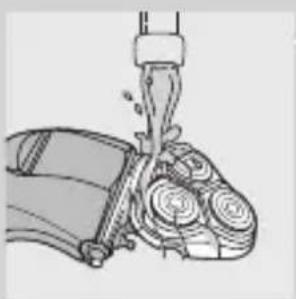
natural_image
Illustration of a mechanical device with a lever and gears (no text or symbols)natural_image
Diagram of a mechanical component with rotating arrows indicating motion (no text or symbols)3 Zavrtite zaklep proti levi (1) in odstranite nosilno ogrodje (2).
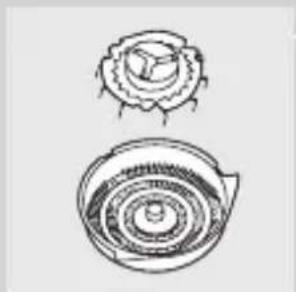
natural_image
Two hand-drawn diagrams of a shell-like object with concentric rings and a flared top (no text or symbols)natural_image
Diagram of a device with an arrow indicating direction, no visible text or symbolsnatural_image
Illustration of a hand holding a small object with arrows indicating motion or force (no text or symbols)natural_image
Illustration of a hand holding a device with liquid droplets, next to a wall-mounted bottle (no text or symbols)natural_image
Diagram of a mechanical component with arrows indicating rotation or movement (no text or symbols)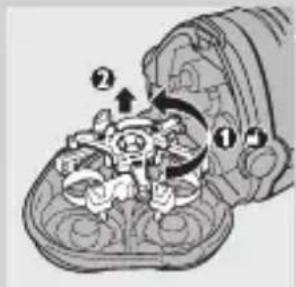
Brivne glave zamenjajte le z originalnimi brivnimi glavami Philips HQ9.
natural_image
Symbol of a trash bin crossed with no text or numbers, representing waste sorting or restriction (no text present)natural_image
Illustration of a medical procedure on a foot with a tool and arrow indicating rotation (no text or symbols)Akumulatorsko baterijo odstranite samo, če boste brivnik zavrgli. Ko akumulatorsko baterijo odstranite, mora biti popolnoma prazna.
1 Izključite brivnik iz električnega omrežja.
2 Pustite brivnik delovati, dokler se sam ne zaustavi, nato pa odvijte vijaka na njegovi hrbtni strani.
3 Odvijte vijaka v prostoru za dlačice.
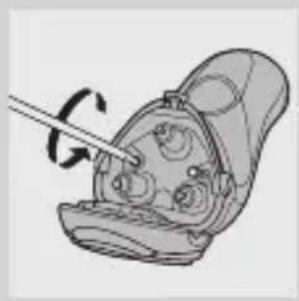
natural_image
Illustration of a medical device with a tool inserted, showing internal components (no text or symbols)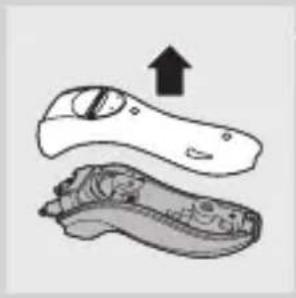
natural_image
Illustration of a hand holding an object with an upward arrow, showing internal components (no text or symbols)4 Odstranite hrbtno ploščo.
natural_image
Diagram of a vehicle's internal components with directional arrows indicating movement (no text or labels)6 Upognite 4 kaveljčke na stran in izvlecite napajalno enoto.
Previdno, kaveljčki so ostri!
natural_image
Mechanical assembly diagram showing a rotating component with a shaft and screw (no text or symbols)7 Odvijte tri vijake v motorni enoti.
natural_image
Illustration of a hand holding a mechanical device with a screwdriver inserted (no text or symbols)8 Z izvijačem odstranite pokrov motorne enote.
9 Odstranite baterijo.
Previdno, baterijski kontakti so ostri.
natural_image
Illustration of a plug and connector with a prohibition symbol (no text or labels)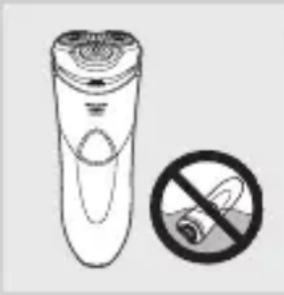
natural_image
Illustration of a remote control with a no-smoking symbol (no text or labels)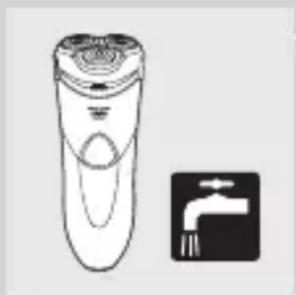
natural_image
Illustration of a hand-operated remote control with a tap symbol (no text or labels)Oprez
natural_image
Illustration of a shield with 'SHARAN LOW' text and a crown-like emblem on top (no additional symbols or text)- Kada se baterija napuni do kraja, indikator punjenja počinje da treperi.
Napomena: Kada isključite aparat sa električne mreže, indikator punjenja prestaje da treperi.
Indikator 'Baterija skoro prazna' (samo HQ8251/HQ8250)
Napomena: Ako se punjiva baterija isprazni u toku brijanja, možete priključiti aparat na izvod napajanja da biste završili brijanje.
- Kada je baterija skoro prazna (kada je ostalo samo 5 ili manje minuta za brijanje), indikator prazne baterije počinje da svetli.
- Kada isključite aparat za brijanje, indikator prazne baterije trepće nekoliko sekundi.
Punjenje (svi tipovi osim HQ8200)
natural_image
Illustration of a person applying a circular massage device to their face (no text or symbols)1 HQ8200: Uključite mali utikač u punjač i uključite adapter u zidnu utičnicu.
natural_image
Diagram of a device with an arrow indicating direction, no visible text or symbols3 Pritisnite klizni prekidač nadole da biste otvorili trimer.
DSada možete početi sa podrezivanjem.
4 Nakon podrezivanja, zatvorite trimer ('klik') i isključite aparat za brijanje.
5 HQ8200: Isključite adapter iz zidne utičnice i izvucite mali utikač iz aparata.
natural_image
Diagram of a device with internal components and directional arrows indicating rotation (no text or symbols)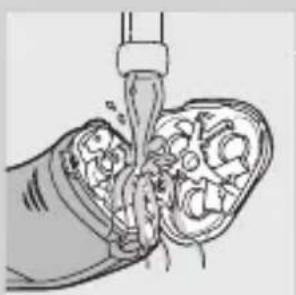
natural_image
Illustration of a hand pouring liquid into a container with visible internal components (no text or symbols)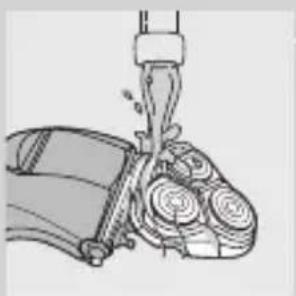
natural_image
Illustration of a mechanical device with gears and a lever (no text or symbols)2 Pritisnite dugme za oslobađanje i otvorite jedinicu za brijanje.
natural_image
Diagram of a device with internal components and directional arrows indicating rotation (no text or symbols)2 Pritisnite dugme za oslobadanje i otvorite jedinicu za brijanje.
3 Okrenite bravu u pravcu suprotnom od kazaljke na satu (1) i izvadite granični okvir (2).
natural_image
Two technical line drawings of a mechanical component, one top and one bottom, with no visible text or symbols.4 Glave za brijanje očistite četkom koja se nalazi u kompletu. Glave za čišćenje sastoje se od rezača i štitnika.
natural_image
Diagram of a handheld device with an arrow indicating rotation or movement (no text or symbols present)2 Pritisnite klizni prekidač nadole da biste otvorili trimer.
natural_image
Illustration of a hand holding a small object with arrows indicating motion or force (no text or symbols)3 Očistite trimer stranom četke sa kratkim vlaknima. Povlačite četku gore i dole niz zupce trimera.
4 Zatvorite trimer ('klik').
Savet: Za najbolje rezultate podrezivanja, podmažite zupce trimera jednom kapi ulja za šivaću mašinu na svakih 6 meseci.
Odlaganje
natural_image
Illustration of a mechanical device with rotating components and directional arrows (no text or symbols)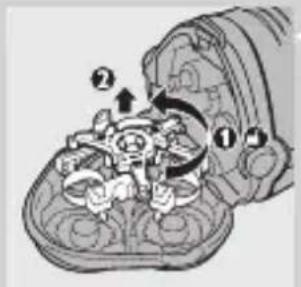
Glave za brijanje zamenite isključivo originalnim HQ9 Philips glavama za brijanje.
1 Isključite aparat i izvucite kabl za napajanje iz utičnice.
2 Pritisnite dugme za oslobađanje i otvorite jedinicu za brijanje.
3 Okrenite bravu u pravcu suprotnom od kazaljke na satu (1) i izvadite granični okvir (2).
4 Skinite glave za brijanje i u jedinicu za brijanje stavite nove glave.
natural_image
Symbol of a trash bin crossed with a diagonal line, no text or numbers presentnatural_image
Illustration of a medical procedure showing a needle inserted into a patient's foot with a rotation arrow indicating clockwise motion (no text or symbols)natural_image
Illustration of a medical device with a tool inserted, showing internal components and no visible text or symbols.SRPSKI224
natural_image
Illustration of a hand holding an object with an upward arrow, no text or symbols present4 Skinite zadnju ploču.
natural_image
Diagram of a vehicle's front and rear components with directional arrows indicating movement (no text or labels)6 Savijte 4 kuke u stranu da biste izvadili jedinicu za napajanje.
Budite oprezni, kuke su vrlo oštre.
natural_image
Mechanical assembly diagram showing a rotating shaft and adjustment mechanism (no text or symbols)7 Odvijte tri vijka na jedinici za napajanje.
natural_image
Illustration of a hand holding a mechanical device with a screwdriver inserted (no text or symbols visible)natural_image
Illustration of a flashlight and plug with a prohibition symbol (no text or labels)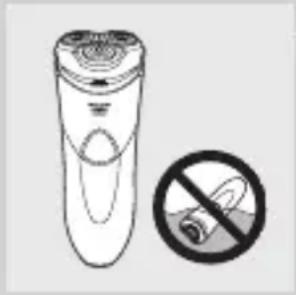
natural_image
Illustration of a hand holding a cigarette next to a cylindrical device with a circular base, accompanied by a prohibition symbol (no text or labels present)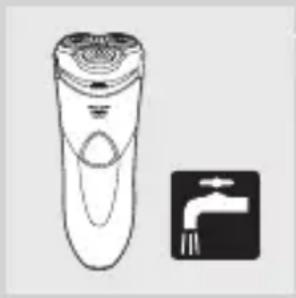
natural_image
Illustration of a hand-operated remote control with a faucet symbol (no text or labels)Увага
natural_image
Illustration of a stylized electric shaver with 'CHARGE' branding and control knob (no text or symbols beyond logo)- HQ8241/HQ8240
Індикація заряду
natural_image
Illustration of a shield with 'SHAKAR' and 'LOW' text, no additional symbols or text present.natural_image
Illustration of a person applying pressure to their ear with arrows indicating direction (no text or symbols)natural_image
Diagram of a device component with an arrow indicating rotation or movement (no text or symbols present)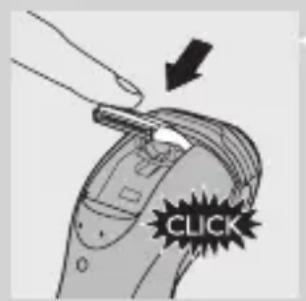
natural_image
Diagram of a mechanical component with arrows indicating rotation or movement (no text or symbols)natural_image
Illustration of a hand pouring liquid into a container with visible internal components (no text or symbols)natural_image
Illustration of a mechanical device with gears and a lever (no text or symbols)natural_image
Diagram of a device with internal components and directional arrows indicating rotation (no text or symbols)natural_image
Two technical line drawings of a mechanical component, one top and one bottom, with no visible text or symbols.natural_image
Diagram of a mechanical device with gears and a rotating arrow, no text or symbols present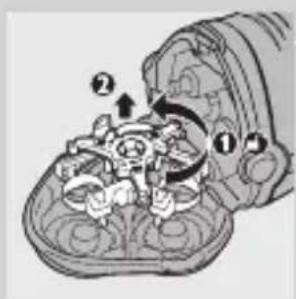
natural_image
Symbol of a trash bin crossed with no text or numbers, representing waste sorting or disposal (no text present)natural_image
Illustration of a medical procedure showing a needle inserted into a patient's abdomen with a rotation arrow indicating clockwise motion (no text or symbols)natural_image
Illustration of a medical device with a pen inserted, showing internal components (no text or symbols)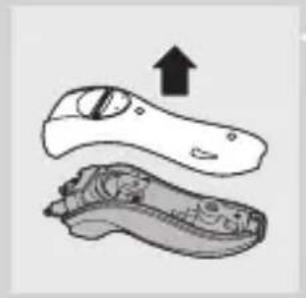
natural_image
Illustration of a pair of electronic devices with an upward arrow indicating motion (no text or symbols)natural_image
Diagram of a vehicle's front and rear assembly with directional arrows indicating movement (no text or labels)natural_image
Mechanical assembly diagram showing a rotating component with a shaft and screwdriver (no text or symbols)natural_image
Diagram of a hand holding a mechanical component with a tool, no visible text or symbols

- Important
- Danger
- Warning
- Caution
- Compliance with standards
- General
- Overview (Fig. 4)
- The display (all types except HQ8200)
- Charging indication
- 'Battery fully charged' indication
- 'Battery low' indication (HQ8251/HQ8250 only)
- Charging (all types except HQ8200)
- Charging the shaver
- Using the shaver
- Shaving
- Trimming
- Cleaning and maintenance
- Cleaning the shaving unit under the tap
- Cleaning the shaving unit with the brush supplied
- ENGLISH14
- Cleaning the trimmer with the brush supplied
- Storage
- Replacement
- Accessories
- Environment
- Removing the rechargeable shaver battery (all types except HQ8200)
- ENGLISH18
- Guarantee & service
- Guarantee restrictions
- Troubleshooting
- Y_BOA
- Внимание
- Съхранение
- Upozornění
- Indikace nabíjení
- Ettevaatust
- EESTI62
- Oprez
- Sukladnost sa standardima
- Opće informacije
- Pregled (Sl. 4)
- Zaslon (svi modeli osim HQ8200)
- Oznaka punjenja
- Indikator potpuno napunjene baterije
- HRVATSKI76
- Jamstvo i servis
- Ograničenja jamstva
- Figyelem
- Tárolás
- Atsargiai
- Ikrovos indikatorius
- LIETUVIŠKAI120
- levērībai
- Uwaga
- Wskaźnik ładowania
- Atenție
- Опасно
- Индикатор зарядки
- Хранение
- Výstraha
- Pozor
- Skladnost s standardi
- Prikaz polnjenja
- Indikator 'Baterija skoro prazna' (samo HQ8251/HQ8250)
- Punjenje (svi tipovi osim HQ8200)
- Odlaganje
- SRPSKI224
- Увага
- Індикація заряду
Brand : PHILIPS
Model : LR03P4B
Category : Battery