
M.Zuiko Digital ED 100-400mm F5.0-6.3 IS - Lens OLYMPUS - Free user manual and instructions
Find the device manual for free M.Zuiko Digital ED 100-400mm F5.0-6.3 IS OLYMPUS in PDF.

 FR
FR
 BG
BG
 CS
CS
 DA
DA
 DE
DE
 EL
EL
 EN
EN
 ES
ES
 ET
ET
 FI
FI
 HU
HU
 IT
IT
 JA
JA
 KO
KO
 LT
LT
 LV
LV
 NL
NL
 NO
NO
 PL
PL
 PT
PT
 RO
RO
 RU
RU
 SK
SK
 SL
SL
 SV
SV
 TR
TR
 UK
UK
 VI
VI
 ZH
ZH
| Product type | Telephoto zoom lens |
| Mount | Micro Four Thirds |
| Focal length | 100-400 mm (35mm equivalent: 200-800 mm) |
| Maximum aperture | f/5.0 (wide) - f/6.3 (tele) |
| Minimum aperture | f/22 |
| Angle of view | 12° - 3.1° |
| Optical construction | 15 groups, 21 elements |
| Focusing | AF/MF with switch |
| Image stabilization | Yes (IS switch) |
| Minimum focusing distance | 1.3 m |
| Filter diameter | 72 mm |
| Lens hood | Bayonet, supplied |
| Dimensions (Max. diameter x Length) | ∅86.4 x 205.5 mm |
| Weight | 1120 g (without lens hood, caps and tripod collar) |
| Focus limiter switch | Yes |
| Zoom lock | Yes (100 mm position) |
| Tripod collar | Yes, removable |
| Maintenance | Dust blower, lens cleaning paper |
| Safety | Do not look at the sun through the lens; do not leave without cap |
| Compatibility | Micro Four Thirds cameras; compatible M.ZUIKO teleconverters |
Frequently Asked Questions - M.Zuiko Digital ED 100-400mm F5.0-6.3 IS OLYMPUS
User questions about M.Zuiko Digital ED 100-400mm F5.0-6.3 IS OLYMPUS
0 question about this device. Answer the ones you know or ask your own.
Ask a new question about this device
Download the instructions for your Lens in PDF format for free! Find your manual M.Zuiko Digital ED 100-400mm F5.0-6.3 IS - OLYMPUS and take your electronic device back in hand. On this page are published all the documents necessary for the use of your device. M.Zuiko Digital ED 100-400mm F5.0-6.3 IS by OLYMPUS.
USER MANUAL M.Zuiko Digital ED 100-400mm F5.0-6.3 IS OLYMPUS
© 2020 OLYMPUS CORPORATION
date of issue 2020.01
WD681300
Printed in Japan
OLYMPUS

MICRO FOURTHIRDS
M.ZUIKO DIGITAL
ED 100-400mm f5.0-6.3 IS
Model No.:IM022
04 - JP 取扱説明書
08 - EN INSTRUCTIONS
13 - FR MODE D'EMPLOI
18 - S INSTRUCCIONES
22 - TE BEDIENUNGSANLEITUNG
27 - 3G ИНСТРУКЦИИ
31 - CS NÁVOD K POUŽITI
35 - DA BETJENINGSVEJI EDNING
39. ΣΟΛΗΓΙΕΣ
44 - 71 UHISED
48 KÄYTTÖK
48 - KAYTTOOHJEEY
52 - IR OPUTE
56 - HU HASZNÁLATI ÚTMUTATO
60 - ISTRUZIONI
64 - INSTRUKCIJA
68 - NV NORĀDĪJUMI
72 - AANWIJZINGEN
76 - 70 INSTRUKSJONE
80 - PL INSTRUKCJA
84 - INSTRUÇÕES
88 - RO INSTRUCTIUNI
92 - ИНСТРУКЦИЯ
97 - SK NÁVOD NA POUŽITIE
101- SL NAVODILA
105- SR UPUTSTVO ZA UPOTREBU
109-3V BRUKSANVISNING
113- U3 TALIMATIAR
117. UK IHC TRYKUH
424
124- إرrestات
125- 使用說明書
128- AR 취급설명서
131- ด้านการใช้งาน
134- M CÁC HƯƠNG DẢN
JP 取扱説明書
The following importer description applies to products imported
Into the EU directly by OLYMPUS EUROPA SE & Co. KG only
OLYMPUS EUROPA SE & Co. KG
Wendenstrasse 14-18, 20097 Hamburg, Germany
Manufactured by OLYMPUS CORPORATION
2951 Ishikawa-machi, Hachioji-shi, Tokyo 192-8507, Japan
撮影時の注意
Thank you for purchasing this Olympus product. To ensure your safety, please read this instruction manual before use, and keep it handy for future reference.
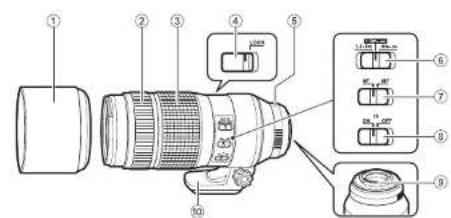
Names of parts
① Lens hood
② Focus ring
③ Zoom ring
④ Zoom lock switch
⑤ Mount index
⑥ Focus limiter switch
⑦ Focus mode switch
⑧ IS switch
⑨ Electrical contacts
⑩ Tripod mount
Focus mode switch
Switches between AF/MF.
Focus limiter switch
Sets the range of the photographing distance.
Focusing is done within the range that is set.
IS switch
ON: The stabilizing function of the lens operates.
OFF: The stabilizing function of the lens is off. The stabilizing function of the camera operates according to the setting on the camera. If you do not want to use the stabilizing function, disable the function on both the camera and the lens.
Zoom lock switch
Prevents inadvertent extension of the lens. Set the dial of the zoom ring to "100", and set the zoom lock switch to the "LOCK" position.
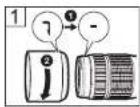
Attaching the hood (Fig. 1)
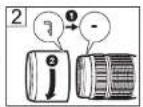
Storing the hood (Fig. 2)
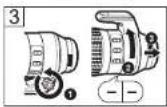
Removing the tripod mount (Fig. 3)
Turn the knob of the tripod mount to loosen it ①. Turn the tripod mount in the direction of the arrow, align it with the mark ②, and remove it from the lens body ③.
Notes on Shooting
- Please use the latest firmware for the camera. Operations will vary depending on the camera. For more information, please visit our home page. Contact the other manufacturer to mount the lens on another manufacturer's digital camera.
- Edges of pictures may be cut off if more than one filter is used or if a thick filter is used.
- When using a flash, flash light may be blocked by the lens body, lens hood, etc.
- Usage conditions may lower the number of images that can be captured.
- Do not hold only the camera body without holding the lens. The waterproofing characteristic or optical performance may not be maintained.
- Do not touch electric contacts on cameras.
Maintenance
Blow dust off the lens with a commercially available blower. For the lens, wipe gently with a lens cleaning paper. Mold may form on the lens surface if the lens is left dirty.
Main Specifications
Mount : Micro Four Thirds mount
Focal distance : 100 – 400 mm (equivalent to 200 to 800 mm on a 35 mm camera)
Max. aperture : f5.0
Image angle : 12^ - 3.1^
Lens configuration : 15 groups, 21 lenses
Iris control : f5.0 to f22
Shooting range : 1.3 m (51.2 in.) to ∞ (infinite)
Focus adjustment : AF/MF switching
Weight : 1,120 g (39 (excluding hood, cap and tripod mount)
Dimensions : Max. dia. ∅ 86.4 (3.4 length 205.5 mm (8.1 in.)
Lens hood : Bayonet
Filter mount thread diameter : ∅ 72 mm
This lens can be used with an M.ZUIKO teleconverter. For more information on compatible teleconverters and notes on combining them with the lens, please visit our home page.
* Specifications are subject to change without any notice or obligation on the part of the manufacturer.
Precautions: Be Sure to Read the Following

Warnings: Safety Precautions
- Do not view the sun through the lens. It may cause blindness or vision impairment.
- Do not leave the lens without the cap. If solar light is converged through the lens, a fire may result.
- Do not point the camera lens at the sun. Sunlight will converge in the lens and focus inside the camera, possibly causing a malfunction or fire.
Micro Four Thirds and the Micro Four Thirds logo are trademarks or registered trademarks of OLYMPUS CORPORATION.
Olympus will not be held liable for violations of local regulations arising from use of this product outside the country or region of purchase.
FCC Notice
This equipment has been tested and found to comply with the limits for a Class B digital device, pursuant to part 15 of the FCC Rules. These limits are designed to provide reasonable protection against harmful interference in a residential installation. This equipment generates, uses and can radiate radio frequency energy and, if not installed and used in accordance with the instructions, may cause harmful interference to radio communications. However, there is no guarantee that interference will not occur in a particular installation. If this equipment does cause harmful interference to radio or television reception, which can be determined by turning the equipment off and on, the user is encouraged to try to correct the interference by one or more of the following measures:
- Reorient or relocate the receiving antenna.
- Increase the separation between the equipment and receiver.
- Connect the equipment into an outlet on a circuit different from that to which the receiver is connected.
- Consult the dealer or an experienced radio/TV technician for help.
- Only the OLYMPUS-supplied USB cable should be used to connect the camera to USB enabled personal computers.
FCC Caution
Changes or modifications not expressly approved by the party responsible for compliance could void the user's authority to operate the equipment.
For customers in North America, Central America, South America and the Caribbean
Declaration of Conformity
Model Number : IM022
Trade Name : OLYMPUS
Responsible Party : OLYMPUS AMERICA INC.
Address : 3500 Corporate Parkway, P. O. Box 610, Center Valley, PA 18034-0610, USA
Telephone Number : 484-896-5000
Tested To Comply With FCC Standards
FOR HOME OR OFFICE USE
This device complies with part 15 of the FCC Rules. Operation is subject to the following two conditions:
(1) This device may not cause harmful interference, and
(2) this device must accept any interference received, including interference that may cause undesired operation.
CAN ICES-3(B)/NMB-3(B)
EN 11
• Technical Support (U.S.A. / Canada)
24/7 online automated help : http://www.olympusamerica.com/support Phone customer support : Tel.1-800-260-1625 (Toll-free) Our phone customer support is available from 9 am to 9 pm (Monday to Friday) ET E-Mail : distec@olympus.com
For customers in Europe
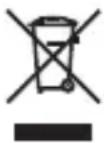
This symbol [crossed-out wheeled bin WEEE Annex IV] indicates separate collection of waste electrical and electronic equipment in the EU countries.
Please do not throw the equipment into the domestic refuse. Please use the return and collection systems available in your country for the disposal of this product.
• European Technical Customer Support
Please visit our homepage http://www.olympus-europa.com or call: Tel. 00800 - 67 10 83 00 (Toll-free) +49 40 - 237 73 899 (Charged)
The software in this lens may include third party software. Any third party software is subject to the terms and conditions, imposed by the owners or licensors of that software, under which software is provided to you.
Those terms and other third party software notices, if any, may be found in the software notice PDF file stored at http://www.olympus.co.jp/en/support/img/digicamera/download/notice/notice.cfm
This product uses T-Kernel source code under the terms of the TRON Forum (www.tron.org) T-License.
FR MODE D'EMPLOI
Ouverture maximale:f5,0
SR UPUTSTVO ZA UPOTREBU
Micro Four Thirds و Micro Four Thirds الشعarian
- OLYMPUS
- JP 取扱説明書
- 撮影時の注意
- Names of parts
- Focus mode switch
- Focus limiter switch
- IS switch
- Zoom lock switch
- Attaching the hood (Fig. 1)
- Storing the hood (Fig. 2)
- Removing the tripod mount (Fig. 3)
- Notes on Shooting
- Maintenance
- Main Specifications
- Precautions: Be Sure to Read the Following
- Warnings: Safety Precautions
- FCC Notice
- FCC Caution
- For customers in North America, Central America, South America and the Caribbean
- • Technical Support (U.S.A. / Canada)
- For customers in Europe
- • European Technical Customer Support
- FR MODE D'EMPLOI
- SR UPUTSTVO ZA UPOTREBU
Brand : OLYMPUS
Model : M.Zuiko Digital ED 100-400mm F5.0-6.3 IS
Category : Lens