
H50DW - Humidifier GORENJE - Free user manual and instructions
Find the device manual for free H50DW GORENJE in PDF.


| Product Type | Ultrasonic Humidifier |
| Brand | Gorenje |
| Model | H50DW |
| Water Tank Capacity | 5 L |
| Humidification Rate | Approx. 300 ml/h |
| Noise Level | ≤ 35 dB(A) |
| Power Supply | 220-240 V ~ 50 Hz |
| Power Consumption | 25 W |
| Dimensions (H x W x D) | 400 x 250 x 250 mm |
| Weight | 3.5 kg |
| Operating Modes | Standard, Intelligent, Sleep |
| Timer | 1-12 hours |
| Humidity Setting Range | 40-80% RH |
| Ionizer | Yes (Anion function) |
| Filters | Water softening filter (on tank lid) & Active carbon filter (bottom) |
| Filter Replacement Interval | Every 6 months |
| Safety Features | Automatic shut-off when water low; auto mist stop |
| Cleaning and Descaling | Weekly cleaning; descaling with vinegar solution |
| Mist Outlet | Rotatable cover for directional mist |
| Additional Features | Fragrance box for essential oils (not in water tank) |
Frequently Asked Questions - H50DW GORENJE
User questions about H50DW GORENJE
0 question about this device. Answer the ones you know or ask your own.
Ask a new question about this device
Download the instructions for your Humidifier in PDF format for free! Find your manual H50DW - GORENJE and take your electronic device back in hand. On this page are published all the documents necessary for the use of your device. H50DW by GORENJE.
USER MANUAL H50DW GORENJE
Important
Before using the appliance, carefully read this user manual. Keep the manual for future reference.
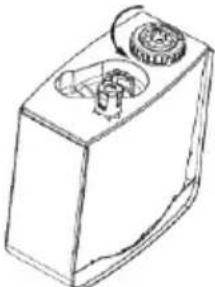
- Turn the water tank upside down. Turn the tank cap counterclockwise to remove it. Then fill the tank with approximately 5 liters of clean water.
Tip: Use cold boiled water or distilled water. The water temperature must not exceed 40°C.
Add only water to the water tank.
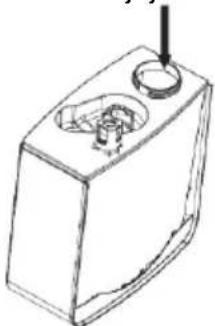
- Replace the cap on the tank, turn it clockwise, and tighten it firmly so that water does not leak from the tank.
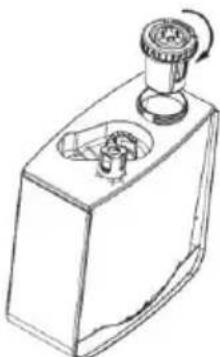
Warning: Be careful to place the tank correctly on the base.


| “ON/OFF” | |
| “TIMER/ANION” | |
| “HUMIDITY” | |
| “—......+” | |
| “MODE”: |
• "ON/OFF" button:
Twist clockwise to install a new water softener
The second filter is at the bottom of the appliance. It is the carbon filter at the air inlet of the appliance. This filter removes dust and other small particles from the air.
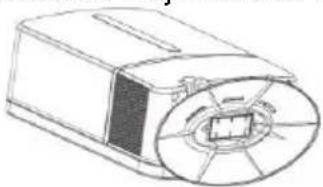
Remove the active carbon filter from the bottom
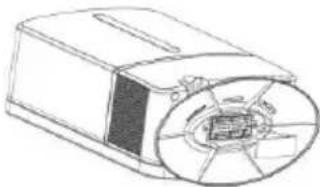
Install a new filter.
- Turn the water tank upside down. Turn the tank cap counterclockwise and remove it. Then fill the tank with approximately 5 liters of clean water.
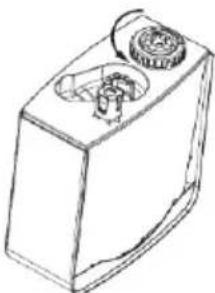
Warning: Never add any additives to the water tank, such as essential oils or inhalation agents. You can add them to the aroma compartment located on the underside of the device. Open the compartment and carefully add only a few drops of aroma.
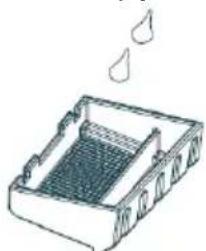
- Now place the water tank back into the housing on the base, in its original position. Water will immediately start to flow into the tub.
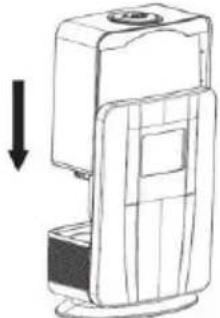
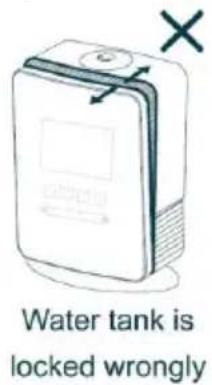
Water tank is locked wrongly
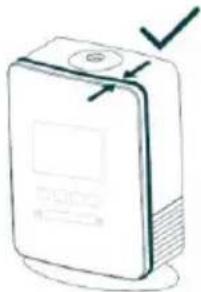
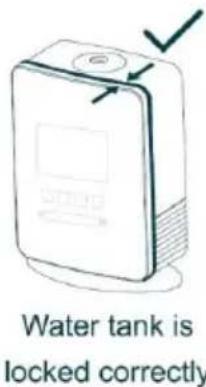
Water tank is locked correctly
| “ON/OFF” | |
| “TIMER/ANION” | |
| “HUMIDITY” | |
| “—......+” | |
| “MODE”: |
Twist clockwise to install a new water softener
The second filter is located at the bottom of the device. It is a carbon filter at the air inlet of the device. This filter removes dust and other small particles from the air.
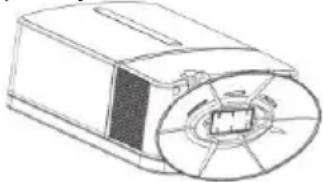
Remove the active carbon filter from the bottom
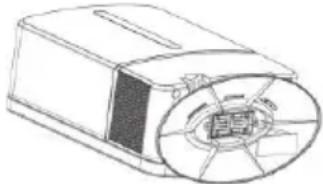
Install a new filter.
To achieve the best humidifying and ionizing conditions, we recommend replacing both filters approximately every six months. This will also extend the lifespan of your device.
Environment

Important!
Before using the appliance, carefully read this user manual. Keep the manual for future reference.
Danger
- Turn the water tank upside down. Unscrew the tank cap counterclockwise and remove it. Then pour approximately 5 liters of clean water into the tank.
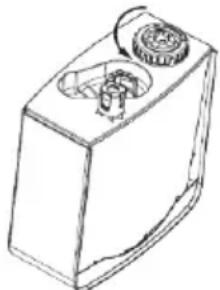
Warning: check that you have placed the tank correctly on its base.
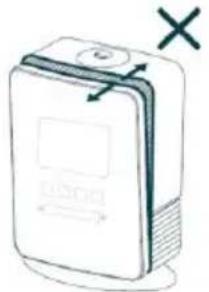
Water tank is locked wrongly
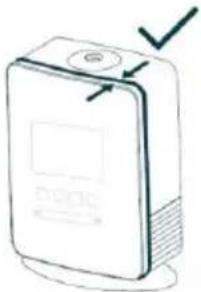
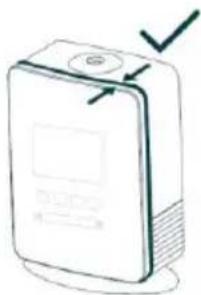
Water tank is locked correctly
- Replace the cap on the steam outlet. You can rotate this cap to direct the steam in the desired direction.
- Connect the appliance to the electrical supply. Do not use extension cords. A beep will sound, indicating that the appliance is ready for use. A red icon with the text "power" lights up on the screen, indicating that the appliance is connected to the electrical supply.
- Turn the appliance on (or off) by pressing the ON/OFF button on the control panel of the air humidifier. Once the appliance is running, select the operating mode that suits you (SLEEP, INTELLIGENT, STANDARD). A detailed explanation of the individual operating mode options is provided below.
Warning: when using the appliance for the first time, leave it at room temperature for at least half an hour.
Tip: replace the water in the tank every day. This will prevent the growth of bacteria in the tank.
- After turning off the appliance, unplug it from the outlet.
- Empty the water tank and the basin at the base of the appliance. If you do not plan to use the humidifier for the next few days, wipe it dry with a dry cloth.
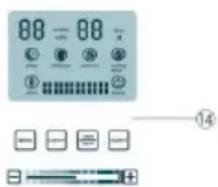
Control panel with LCD screen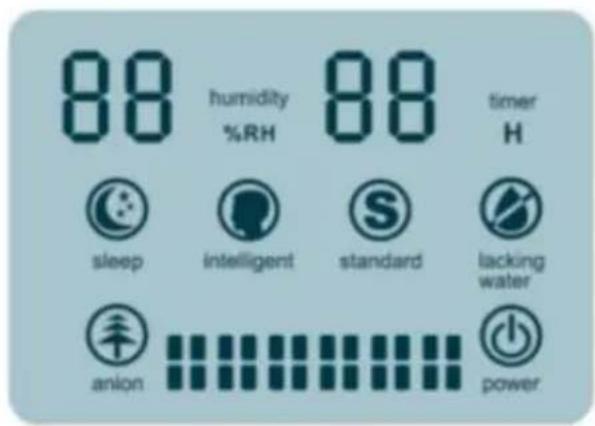
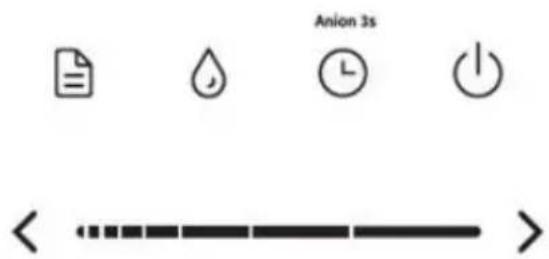
| “ON/OFF” | |
| “TIMER/ANION” | |
| “HUMIDITY” | |
| “—......+” | |
| “MODE”: |
- On/Off button "ON/OFF": When you press the on/off button, the appliance automatically starts operating (in standard operating mode, with the humidification intensity set to medium).
The blue STANDARD icon lights up on the screen. The relative humidity in the room is displayed in orange as a percentage.
The spray intensity is shown with blue bars, and as already mentioned, it is set to medium on the assigned intensity settings.
• "TIMER/ANION" button:
Twist clockwise to install a new water softener.
The second filter is located at the bottom of the appliance. It is a carbon filter on the air inlet of the appliance. This filter removes dust and other small particles from the air.
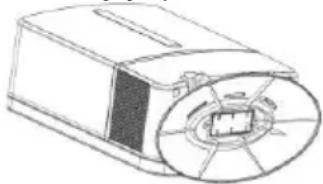
Remove the active carbon filter from the bottom.
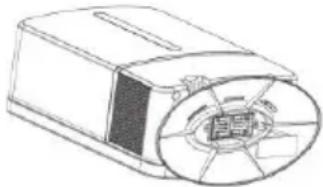
Install a new filter.
Important
 | “ON/OFF” | |
 | “TIMER/ANION” | |
 | “HUMIDITY” | |
 | “—......+” | |
 | “MODE”: |
- "ON/OFF" button:
Twist clockwise to install a new water softener.
Remove the active carbon filter from the bottom.
Install a new filter.
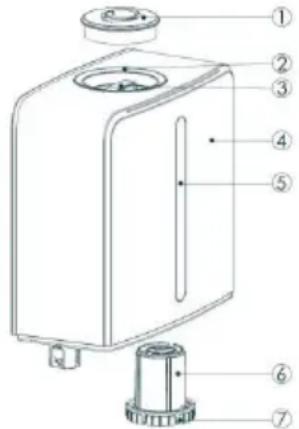
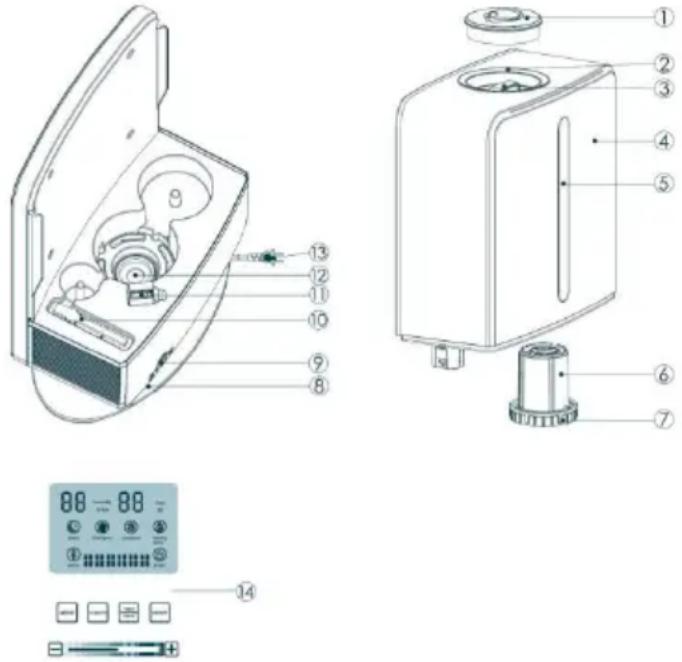
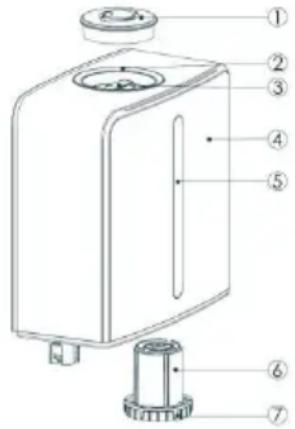
- Mist outlet cover
- Opening for spray
- Handle
- Reservoir
- Water level window
- Water softening filter
- Lid / water outlet
- Active carbon filter (bottom of housing)
- Fragrance box
- Cleaning brush for atomizer
- Air outlet
- Atomizer assembly
- Power cord
- Functional panel with LCD
Important
Read this user manual carefully before you use the appliance and save it for future reference.
This appliance is marked according to the European directive 2012/19/EU on Waste Electrical and Electronic Equipment (WEEE). This guideline is the frame of a European-wide validity of return and recycling on Waste Electrical and Electronic Equipment.
Danger
Do not immerse the base of the humidifier in water and do not let water run into the base.
To prevent electric shock, never open the base.
Warning
- Check if the voltage indicated on the type plate corresponds to the local mains voltage before you connect the appliance.
- The appliance is suitable for voltages from 220 to 240V.
- If the cord is damaged, have it replaced by Gorenje, a service centre authorised by Gorenje or similarly qualified persons in order to avoid a hazard.
- Keep the cord away from hot surfaces.
- This appliance is not intended for use by persons (including children) with reduced physical, sensory or mental capabilities, or lack of experience and knowledge, unless they have been given supervision or instruction concerning use of the appliance by a person responsible for their safety.
- This appliance can be used by children aged from 8 years and above and persons with reduced physical, sensory or mental capabilities or lack of experience and knowledge if they have been given supervision or instruction concerning use of the appliance in a safe way and understand the hazards involved. Children shall not play with the appliance. Cleaning and maintenance shall not be made by children unless they are older than 8 and supervised.
- Do not touch the steam generator when it is connected to electricity.
Caution
- Switch off the appliance and unplug it if it produces a strange smell or an abnormal noise.
- Switch off the humidifier and unplug it before you move, clean or fill it.
- Do not turn on the humidifier when there is no water in the water tank.
- Do not use any metal or hard objects to clean the steam generator.
- Do not direct the mist output at furniture or electrical appliances.
- Make sure the humidifier and the mains cord are always out of reach of the baby (at least one metre away).
- Do not use the humidifier in damp places or close to water.
- Do not use the humidifier in places where the humidity level is more than 50%.
- Do not expose the humidifier to extreme heat or cold or to direct sunlight.
- Do not use the humidifier outdoors.
- The humidifier is only intended for household use.
- Never move or empty the humidifier while it is operating. Unplug the humidifier after each use.
- Never cover the humidifier with a towel or blanket.
- Noise level: Lc < 35 dB(A)
Using the appliance
- Make sure that the humidifier is 'off' and unplugged.
- Remove the mist outlet cover.
- Use the handle of the water tank to lift it vertically from the base.
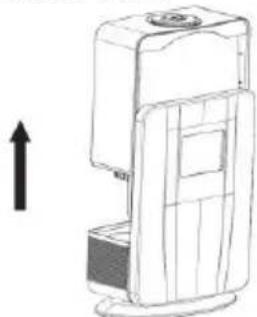
- Turn the water tank upside down. Turn the tank cap anticlockwise to remove it and fill the tank with approximately 5 litres of clean water.
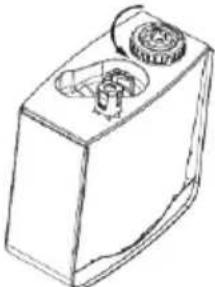
Tip: Use cold boiled water or distilled water. Make sure that the water temperature is not more than 40°C.
Put water only in the reservoir. Never put any additives, e.g. inhalants or oils, in the water tank.
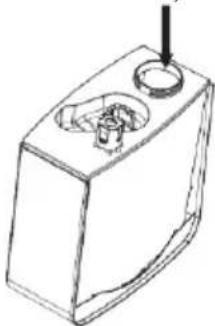
Warning: Never put any additives, e.g. inhalants or essential oils, in the reservoir. Fragrances add into fragrance box at the bottom of humidifier. Open box and carefully add a drop or few.
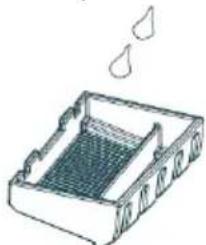
- Put the lid back on the reservoir, turn the tank cap clockwise and tighten it back. Take care that water will not drip out of the reservoir.
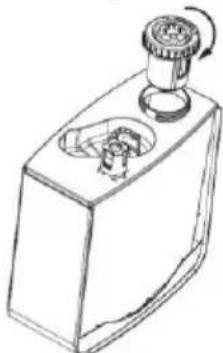
- Put the water tank back onto the base in its original position.
Water will start running into the water basin right away.
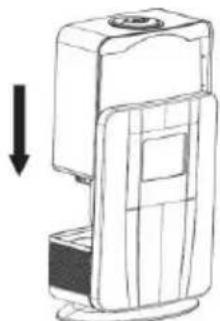
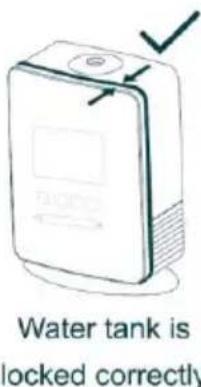
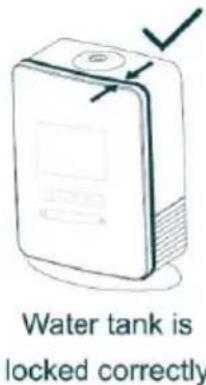
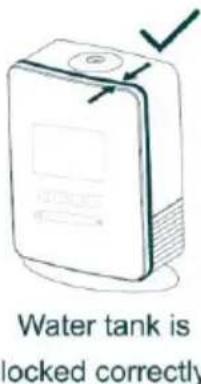
Warning: Be careful that you put the reservoir back correctly on the base.
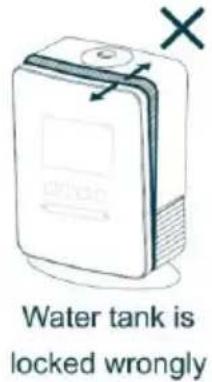
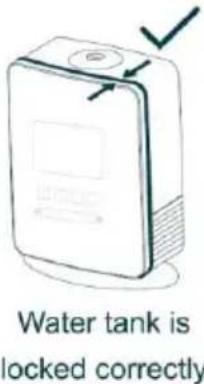
- Put the mist outlet cover back onto the unit. You can rotate the mentioned cover to place the mist outlet in the required position.
- Put the plug in the wall socket. Do not use an extension cord.
You will hear a beep which means that your appliance is ready for usage. At the same time you will see on the display a red icon with the word "power".
- For turning on and off your appliance you must push the ON/OFF button on the functional panel of the humidifier.
When your appliance is switched on you can choose among three modes of working (SLEEP, INTELLIGENT, STANDARD). A more detailed explanation is below.
Warning: When using your humidifier for the first time, place it in the room temperature for at least half an hour.
Tip: Replace water in the reservoir every day in order to prevent formation of bacteria in it.
- After switching off, remove the plug from the wall socket.
- Empty the reservoir and base. If you are not going to use the humidifier for two or more days, wipe it with a cloth.
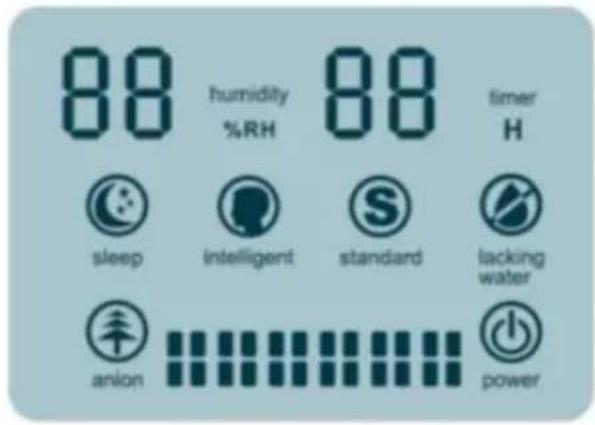
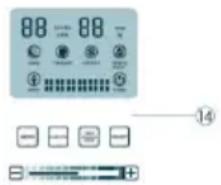
Functional panel with LCD
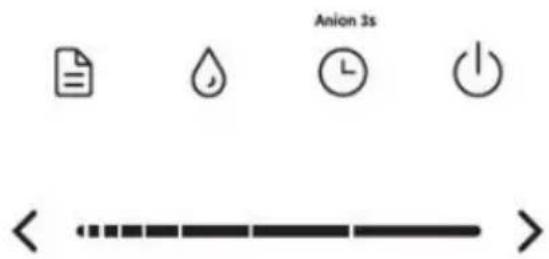
| “ON/OFF” | |
| “TIMER/ANION” | |
| “HUMIDITY” | |
| “—......+” | |
| “MODE”: |
- "ON/OFF" button:
When you press the button to switch the appliance ON/OFF, it will automatically start working (in standard mode, with medium humidifying intensity).
The display lights up with a blue icon for STANDARD (standard mode). The percentage in orange shows the relative humidity in the room. The intensity of the mist spray is shown by blue columns.
• "TIMER/ANION" button:
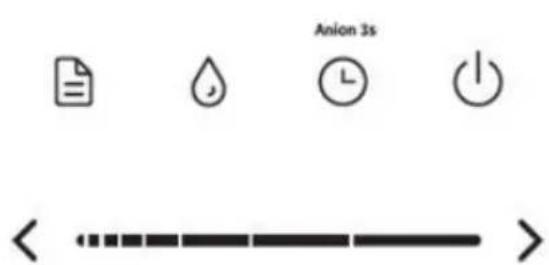
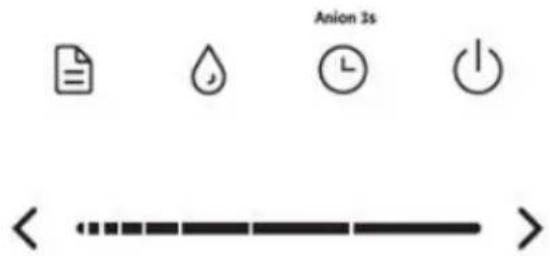
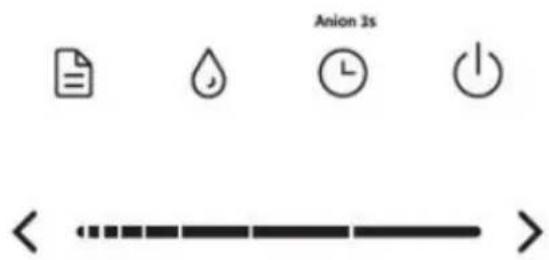
By pressing this button, you can adjust the time when the appliance will be turned off automatically.
Press this key to adjust the time:
![graph LR A["1h"] --> B["2h"] B --> C["3h"] C --> D["4h"] D --> E["5h"] E --> F["6h"] F --> G["7h"] G --> H["8h"] H --> I["cancel"] I --> J["12h"] J --> K["11h"] K --> L["10h"] L --> M["9h"]](/content/2026/05/847686/images/d63954b0e8eb2a9c2f0a4a515888b971119f38cc4a1516bb6e869d088e5aae59.jpg)
Each time you press the button, the timer will increase by 1 hour. If there is no operation for 5 seconds, the timer starts with the timer indicator on. The maximum setting time for the timer is 12 hours.
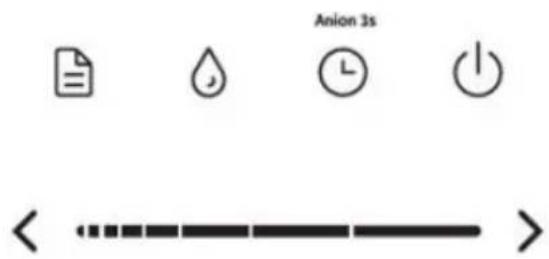
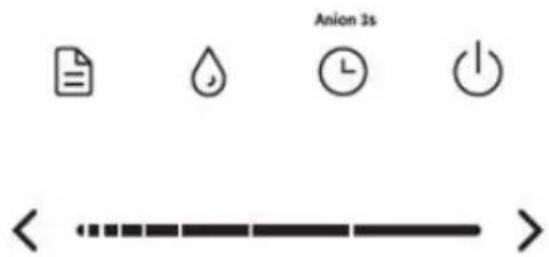
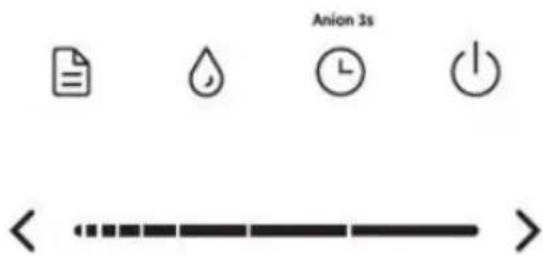
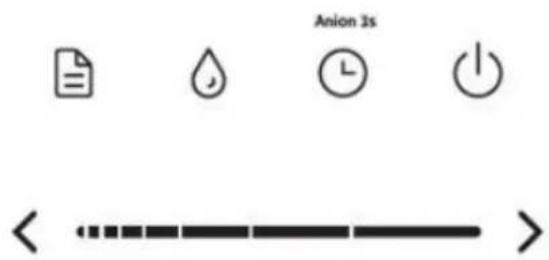
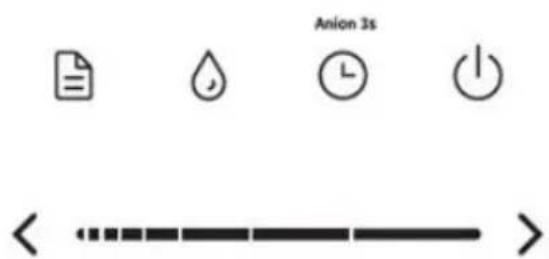
When pressing and holding this button for 2-3 seconds, you will turn the ionizer on or off. Ionization is the process of producing negative ions, which are called anions. When this function is activated, the display lights up with a blue icon labeled "anion".
- "HUMIDITY" button:
With this button, you set the required relative humidity (RH) in a room. Humidity is adjusted from 40-80%. It displays "oL" (meaning without setting) when humidity is not set. Each time you press the button, humidity increases by 10%.
If there is no operation for 5 seconds, the humidity setting will be turned off.
When your set relative humidity in the room is reached, the appliance will automatically reduce the intensity of spraying. In that case, setting the intensity is not possible. When the relative humidity in the room is lower than the set value, the appliance will start working with the intensity of humidifying that was set before.
- Button & sliding bar "—.....+":
With this button, you set the intensity of humidifying. You can choose among six levels of spraying. When pressing –, you decrease the spraying of mist; when pressing +, you increase the spraying. Instead of pressing + or –, you can slide on the control bar with a finger. Left for decreasing and right for increasing intensity.
The intensity of humidifying can be operated under all three modes.
- "MODE" button:
You can choose between three modes of working. These are STANDARD, INTELLIGENT and SLEEP. By pressing this button you cycle through all three modes.
"standard" mode;
This is the default mode. You set the intensity of spraying and also the relative humidity in the room. The same applies to the timer and ionization functions.
"intelligent" mode;
Your humidifier operates at a pre-set humidity under this mode. It is 40-60% RH. When the relative humidity in the room is at least 60%, the appliance decreases the intensity of spraying automatically. When the relative humidity is lower than 40%, the appliance increases the intensity of spraying automatically. Under this mode you can set the intensity of spraying, but you cannot set the humidity in the room. As in standard mode, you can also set the timer and ionization here.
"sleep" mode;
Your humidifier operates at a pre-set humidity under this mode. It is 40-60% RH. When the relative humidity in the room is at least 60%, the appliance decreases the intensity of spraying automatically. When the relative humidity is lower than 40%, the appliance increases the intensity of spraying automatically.
If there is no press on the buttons for at least 1 minute, all the icons except "power" will be shut off automatically. In this case, you may press any button to activate the display again.
The default working time for SLEEP mode is 8 hours. After that, the unit turns off automatically.
Under this mode you can set the intensity of spraying, but you cannot set the humidity in the room. As in standard mode, you can also set the timer and ionization here.
Note:
- Always unplug the appliance before you refill the water tank.
- Automatic mist stop protects the steam generator from overheating. In both cases, the humidifier is still on and the fan continues to operate.
- The safety switch automatically switches off the steam generator to stop the mist output when the water level is too low, or if you lift the water tank. In both cases, the red icon labeled "water lacking" starts flashing. If you add water within 15 minutes and reinstall the reservoir correctly, the humidifier will continue to operate under the set mode. Under water-lacking protection status, after 15 minutes, the unit will come into standby status automatically.
Cleaning
Do not use any extra purifiers.
Do not immerse the base, mains cord or mains plug in water or any other liquid.
Do not use any metal or hard objects to clean the steam generator.
- Unplug the humidifier from the mains and set the on/off knob to 'off'.
- Clean the water tank and the tank cover with hot water. You can use some basic washing-up liquid or a dishwasher.
- For cleaning the inside of the water tank, fill in water, firmly tighten the tank cap and repeatedly shake the water tank.
Note: Make sure that you do not leave any washing-up liquid in the water tank or tank cover.
- Clean the base with a damp cloth.
Tip: Regular cleaning reduces jam.
Descaling
Tips to avoid scale
Nevertheless, your humidifier and ionizer includes a water softening filter. We strongly recommend you to use cold boiled, filtered or distilled water. Make sure that the water temperature is lower than 40°C. Clean the tank cover, the water tank, the steam generator and the water basin every week. Use the cleaning brush which is added. Fill the water tank with fresh water every time you use the humidifier.
Clean all parts of the humidifier, empty the water tank and the water basin and dry all parts with a soft, dry cloth when you are not going to use your humidifier for a long time.
Descaling the humidifier
- Disconnect the humidifier and set the on/off knob to 'off'.
- Fill the water basin with 100 ml of vinegar (4% acetic acid) per 200 ml of water and let it soak for at least four hours. So leave the water and vinegar in the water basin for at least 4 hours (preferably overnight). Empty the water basin and wipe it also with a soft cloth.
- Empty the water basin and wipe it also with a soft cloth.
- Put some white vinegar (4% acetic acid) also on the steam generator and then wipe it away with a moist cloth.
- Wash all other parts with clean water.
Changing filters
There are two filters in your appliance.
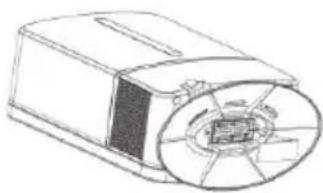
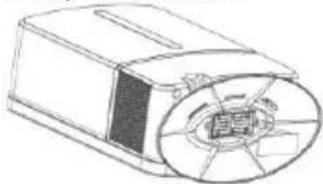
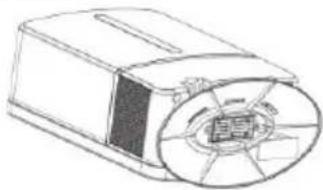
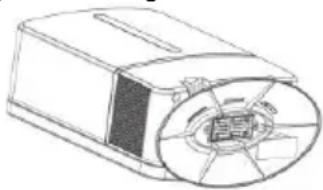
The first one is called the filter for water softening and is attached to the lid of the water tank. That filter makes water softer and minimizes the formation of water scale in the humidifier.
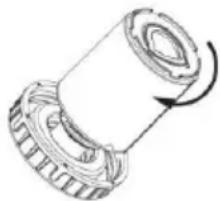
Twist clockwise to install a new water softener.
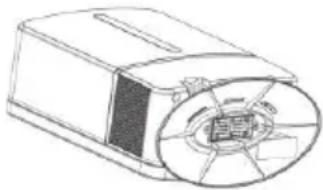
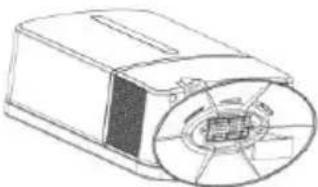
The second filter is called the active carbon filter and is located on the bottom of the appliance where air comes into the humidifier. That filter removes dust and other small particles from the air.
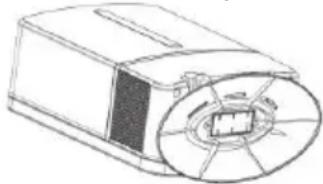
Remove the active carbon filter from the bottom.
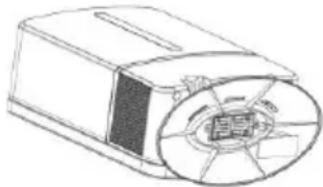
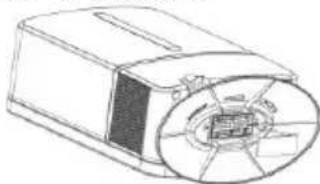
Install a new filter.
To achieve the best possible results of humidifying
and ionizing, we strongly recommend you to replace both filters every six months. That way you will also extend the life of your appliance.
Environment
Do not throw away the appliance with the normal household waste at the end of its life, but hand it in at an official collection point for recycling. By doing this, you help to preserve the environment.
Guarantee & service
If you need information or if you have a problem, please contact the Gorenje Customer Care Centre in your country (you find its phone number in the worldwide guarantee leaflet). If there is no Customer Care Centre in your country, go to your local Gorenje dealer or contact the Service department of Gorenje domestic appliances.
For personal use only!
GORENJE
WISHES YOU A LOT OF PLEASURE WHEN USING YOUR APPLIANCE
Important
Water tank is locked wrongly
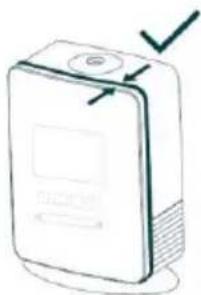
Water tank is locked correctly
| “ON/OFF” | |
| “TIMER/ANION” | |
| “HUMIDITY” | |
| “-......+” | |
| “MODE”: |
- The "ON/OFF" button:
- The button and sliding bar "—.....+":
Twist clockwise to install a new water softener
Remove the active carbon filter from the bottom
Install a new filter.
Water tank is locked wrongly
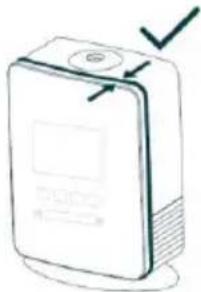
Water tank is locked correctly
| “ON/OFF” | |
| “TIMER/ANION” | |
| “HUMIDITY” | |
| “—......+” | |
| “MODE”: |
• The "ON/OFF" button:
Twist clockwise to install a new water softener.
Remove the active carbon filter from the bottom.
Install a new filter.
Important
Water tank is locked wrongly.
Water tank is locked correctly.
| “ON/OFF” | |
| “TIMER/ANION” | |
| “HUMIDITY” | |
| “—......+” | |
| “MODE”: |
Twist clockwise to install a new water softener.
Remove the active carbon filter from the bottom.
Install a new filter.
Important
| “ON/OFF” | |
| “TIMER/ANION” | |
| “HUMIDITY” | |
| “—......+” | |
| “MODE”: |
Twist clockwise to install a new water softener.
Remove the active carbon filter from the bottom.
Install a new filter.
Important
Water tank is locked wrongly
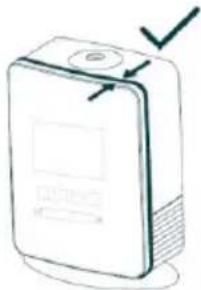
Water tank is locked correctly
| “ON/OFF” | |
| “TIMER/ANION” | |
| “HUMIDITY” | |
| “—......+” | |
| “MODE”: |
- "ON/OFF" button:
Twist clockwise to install a new water softener
Remove the active carbon filter from the bottom
Install a new filter.
 | “ON/OFF” |
 | “TIMER/ANION” |
 | “HUMIDITY” |
 | “—......+” |
 | “MODE”: |
- ON/OFF button:
Twist clockwise to install a new water softener
Remove the active carbon filter from the bottom
Install a new filter.
Water tank is locked wrongly
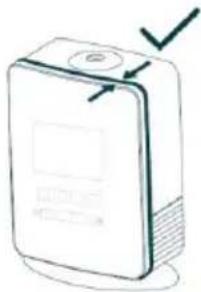
Water tank is locked correctly


 | “ON/OFF” |
 | “TIMER/ANION” |
 | “HUMIDITY” |
 | “—......+” |
 | “MODE”: |
- ON/OFF button (ON/OFF)
Twist clockwise to install a new water softener
Remove the active carbon filter from the bottom
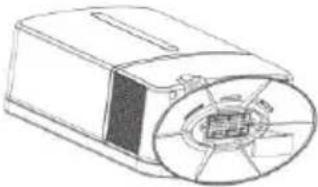
Install a new filter.


| “ON/OFF” | |
| “TIMER/ANION” | |
| “HUMIDITY” | |
| “—......+” | |
| “MODE”: |
ON/OFF button
Twist clockwise to install a new water softener
Remove the active carbon filter from the bottom
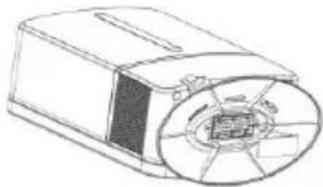
Install a new filter.
Important
Water tank is locked wrongly
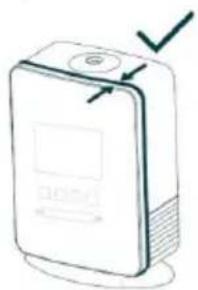
Water tank is locked correctly


Anion 3s


 | “ON/OFF” | |
 | “TIMER/ANION” | |
 | “HUMIDITY” | |
 | “—......+” | |
| < > | “MODE”: |

• "ON/OFF" button
Twist clockwise to install a new water softener
Remove the active carbon filter from the bottom
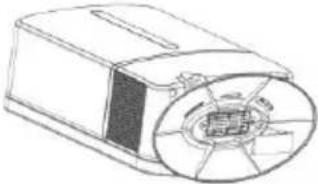
Install a new filter.


- IMPORTANT
- ON/OFF" BUTTON
- ENVIRONMENT
- DANGER
- TIMER/ANION" BUTTON
- WARNING
- CAUTION
- USING THE APPLIANCE
- FUNCTIONAL PANEL WITH LCD
- HUMIDITY" BUTTON
- BUTTON & SLIDING BAR
- MODE" BUTTON
- STANDARD" MODE
- INTELLIGENT" MODE
- SLEEP" MODE
- NOTE
- CLEANING
- DESCALING
- TIPS TO AVOID SCALE
- DESCALING THE HUMIDIFIER
- CHANGING FILTERS
- GUARANTEE & SERVICE
- GORENJE
- WISHES YOU A LOT OF PLEASURE WHEN USING YOUR APPLIANCE
- THE "ON/OFF" BUTTON
- THE BUTTON AND SLIDING BAR
- ON/OFF BUTTON
- ON/OFF BUTTON (ON/OFF)
Brand : GORENJE
Model : H50DW
Category : Humidifier