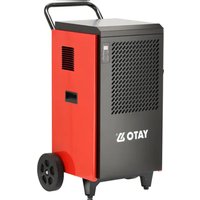
YT-996503 - Dehumidifier Yato - Free user manual and instructions
Find the device manual for free YT-996503 Yato in PDF.


| Product Type | Dehumidifier |
| Brand | Yato |
| Model | YT-996503 |
| Dimensions (L × W × H) | 545 × 460 × 870 mm |
| Net weight | 40 kg |
| Power supply | 220-240 V ~ 50 Hz |
| Max power consumption (30 °C, 80% RH) | 1300 W |
| Dehumidification capacity (30 °C, 80% RH) | 70 L/24h |
| Airflow | 400 m³/h |
| Recommended drying area | 160-250 m² |
| Refrigerant | R290 (280 g) |
| Operating temperature | +5 to +35 °C |
| Insulation class | I |
| Protection rating | IP22 |
| Water tank | None (continuous drainage via hose) |
| Control type | Control panel with buttons and display |
| Functions | On/off timer, automatic defrost, failure protection |
| Air filter | Washable (cleaning with compressed air) |
| Maintenance | Clean filter after each use; clean casing with damp cloth |
| Spare parts | Air filter, drain hose |
| Safety instructions | Indoor use only, do not cover openings, disconnect before maintenance |
Frequently Asked Questions - YT-996503 Yato
User questions about YT-996503 Yato
0 question about this device. Answer the ones you know or ask your own.
Ask a new question about this device
Download the instructions for your Dehumidifier in PDF format for free! Find your manual YT-996503 - Yato and take your electronic device back in hand. On this page are published all the documents necessary for the use of your device. YT-996503 by Yato.
USER MANUAL YT-996503 Yato
CE
PL EN DE RU UA LT LV CZ SK HU RO ES FR IT NL GR BG PT HR AR
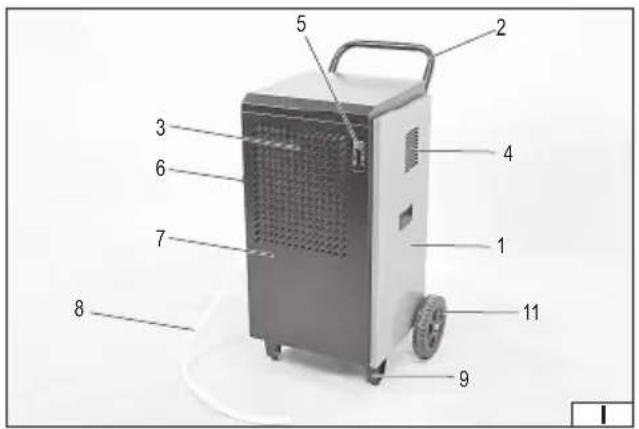

- casing
- handle
- air intake
- air outlet
- control panel
- fi lter
- air filter cover
- drain hose
- base
- transport wheel
DE
Read the operating instruction
This symbol indicates that waste electrical and electronic equipment (including batteries and storage cells) cannot be disposed of with other types of waste. Waste equipment should be collected and handed over separately to a collection point for recycling and recovery, in order to reduce the amount of waste and the use of natural resources. Uncontrolled release of hazardous components contained in electrical and electronic equipment may pose a risk to human health and have adverse effects for the environment. The household plays an important role in contributing to reuse and recovery, including recycling of waste equipment. For more information about the appropriate recycling methods, contact your local authority or retailer.
WYPOSAŻENIE PRODUKTU
PRODUCT CHARACTERISTICS
The building dehumidifier is used to effectively remove excess moisture from the air in closed rooms. The correct, reliable and safe operation of the product depends on proper use, therefore:
Before using the product, read the entire manual and keep it. If you pass on the product to someone else, pass on the manual along with it.
The supplier is not liable for any damage or injury resulting from use of the product for purposes other than its intended purpose, failure to comply with safety regulations and recommendations of this manual. Maintenance activities not described in the manual, changes in mechanical and electrical construction and other modifications result in loss of the user's rights to the guarantee, as well as under the warranty.
PRODUCT EQUIPMENT
The product is delivered complete, but assembly or appropriate adjustment is required as described later in the manual.
SAFETY INSTRUCTIONS
The device is designed for indoor use only, it should not be exposed to precipitation. The device is designed to operate only within the temperature range given in the technical data table.
The device is not intended for use in a potentially explosive atmosphere, in an environment with high dustiness, near chemicals. Using the device in rooms with high dustiness or in an atmosphere of corrosive gases may cause the humidity sensor to become dirty or corroded, and thus damage the device. The temperature at the work place should be between +5 °C and +35 °C. The device should not be used near places where water is sprayed. The product may only be placed on a hard, flat, even and non-flammable surface. The place where the product is placed must have adequate ventilation, no ventilation opening may be covered. A gap of at least 50 cm must be provided around the product and at least 100 cm from the product's air inlet. This will allow for proper ventilation of the product. Do not place any objects on the product. It is forbidden to drill any holes in the product, as well as any other modification of the product not described in the instructions. The product location should be chosen so that it is not near heat sources such as stoves, heaters or open flames. The device should not be exposed to direct sunlight. Otherwise, the product performance may be impaired and operating costs may increase. Before starting maintenance, disconnect the device from the power supply. The device should be used, transported and stored in the working position. Using, transporting and storing the device in a position other than the working position may damage the product. The product is not intended for use by children aged 8 years or older and by persons with reduced physical, mental capabilities and persons lacking experience and knowledge of the equipment. Unless they are supervised or instructed on how to use the product in a safe manner so that the associated risks are understood. Children should not play with the product. Children should not clean or maintain the equipment without supervision. The dryer's refrigeration system contains a flammable substance, which, due to the closed nature of the refrigerant circuit, does not pose a direct threat to the user, but the following warnings should be observed. WARNING: Do not cover the ventilation openings in the product housing or in the built-in structure. WARNING: Do not use
EN
mechanical means or other means to accelerate the defrosting process, other than those recommended by the manufacturer. WARNING: Protect the cooling system from damage. It is forbidden to repair, disassemble or modify the cooling system yourself.
Recommendations for connecting the device to the power supply
Before connecting the device to the power supply, make sure that the voltage, frequency and capacity of the power supply correspond to the values shown on the nameplate. The plug must fit the socket. It is forbidden to modify the plug or socket in any way to fit each other.
The appliance must be connected directly to a single mains socket. The mains circuit must be equipped with a protective conductor and 16 A fuse. If extension cords are used, a three-wire extension cord with a 16 A current load must be used.
Avoid contact of the power cable with sharp edges and hot objects and surfaces, including those belonging to the device. When the product is in operation, the power cable must always be fully unwound and its position must be determined so that it does not constitute an obstacle during operation of the product. The positioning of the power cable must not cause a tripping hazard. The power socket should be located in such a place that it is always possible to quickly disconnect the plug of the power cable from the product. When disconnecting the power cable plug, always pull on the housing of the plug, never on the cable. The power cable must not be brought near a hot device. If the power cable or plug is damaged, immediately disconnect it from the mains and contact an authorized service center of the manufacturer for replacement. The power cable must not be replaced by yourself. Do not use the product with a damaged power cable or plug. The power cable or plug cannot be repaired, in the event of damage to these elements, they must be replaced with new ones free from defects.
PRODUCT SERVICE
Preparing for work
NOTE! All actions described in this section must be performed with the product disconnected from the power supply. Make sure that the power cable plug has been removed from the power outlet.
NOTE! The product must be unpacked and assembled in the working position. If it is necessary to tilt the product, do not exceed a 45-degree angle. After completing the assembly and placing the product in its final location, wait at least two hours between placing the product in its final location and connecting it to the power supply. This time is needed for the operating fluids inside the product systems to stabilize. Failure to follow this recommendation may result in damage to the product.
The product should be unpacked, completely removing all packaging elements. It is recommended to keep the packaging, it can be helpful in later transport and storage of the product. Inspect the product for damage. If any damage is found, do not use the product until the damage is repaired or the damaged elements are replaced with new, damage-free ones.
Before first use, the bracket must be fitted. Attach the bracket (a) using the mounting screws (b) to the holes in the rear of the dehumidifi er housing, as shown in illustration (II).
Device setting
The product must be placed on a hard, flat, even and non-flammable surface. The place where the product is placed must provide adequate ventilation, no ventilation opening must be covered. A gap of at least 50 cm must be provided around the product and at least 100 cm from the product's air inlet. This will allow for proper ventilation of the product.
The product cannot be used in rooms with a floor area of less than 15 m2. The dehumidifier cannot be used in rooms with a high concentration of chemicals and cannot be located near heat sources such as cookers or radiators. Do not place the dehumidifier in a place exposed to direct sunlight.
Connecting the water drain
The product does not have a water tank, so the condensed water must be drained continuously. To do this, connect the dehumid-
EN
ifi er to an external sewage system using a drain hose.
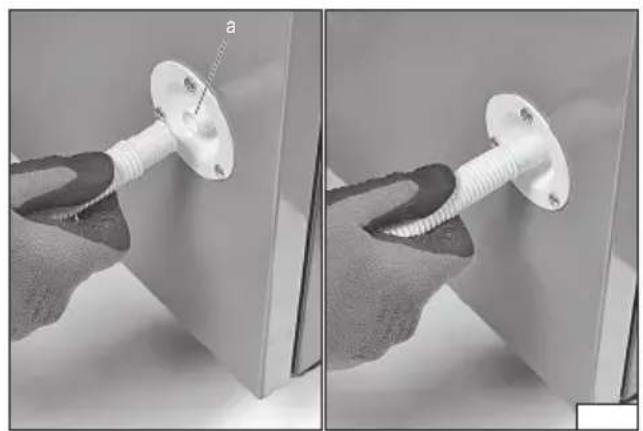
As shown in illustration (III), one end of the drain hose should be placed on the drain nozzle (a) of the dehumidifier. The other end of the drain hose should be placed in a floor drain or connected to an external sewage system. To ensure free water drainage, the drain hose must not be bent or placed above the level of the drain nozzle.
Connecting the dehumidifi er to the electrical supply
Make sure that the dehumidifier is properly assembled, set up and ready for operation and that the conditions specified in the instructions section „Recommendations for connecting the device to the power supply „ have been met. Connect the device's power cable plug to the electrical outlet.
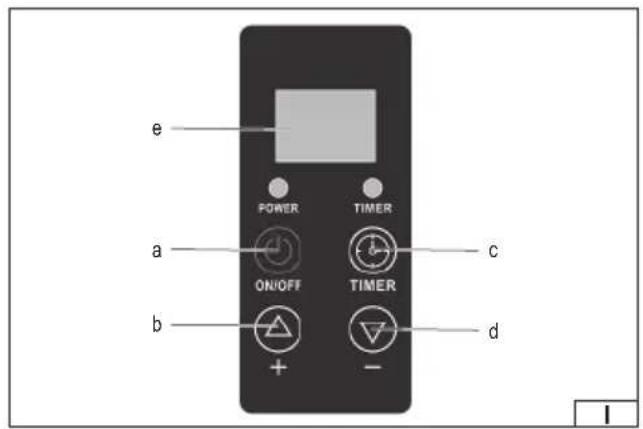
The following is a description of the control panel functions, as shown in illustration (I):
a. ON/OFF button – Toggles the device between on and off with each press.
b. “+” Button – Allows you to adjust various parameters depending on the mode: 1. Increases the set humidity value (RH 10% – 95%). 2. Increases the time value set on the timer (00 – 24 hours).
c. „-” button - Allows you to adjust various parameters depending on the mode: 1. Decreases the set humidity value (RH 10% - 95%). 2. Decreases the time value set on the timer (00 - 24 hours).
d. TIMER button – Short press of the button starts the on/off timer setting cycle and then confirms it.
e. Display – displays the parameter value.
Humidity control
Once the set humidity is reached, the compressor and fan turn off. When the humidity rises above the set value, the compressor and fan start again.
Comments:
If the humidity is set to the minimum value, the device will automatically switch to continuous dehumidification mode.
If the humidity sensor fails, the dehumidifier will switch to continuous dehumidification mode.
In the event of a heat exchanger sensor failure, the dehumidifier will enter time-controlled defrost mode (see defrosting section for details).
When you turn on the dehumidifier, the compressor starts after 3 seconds, and when you turn off the device, the fan stops after 3 seconds.
Protective functions
After the dehumidifier is switched off, the compressor requires 3 minutes to restart. Quick start is only available the first time the device is switched on.
System failure protection: If the compressor operates continuously for 10 minutes and the internal sensor temperature (Tr) is not higher than the heat exchanger temperature (Tp) by at least 3° C (i.e. Tr-Tp ≤ 3 for 10 seconds), the unit considers it as a failure (e.g. refrigerant leakage or pipe blockage) and immediately shuts down. The display shows “EE”. After the failure is removed and the unit is restarted, the display will return to normal.
Memory of settings after power failure: In the event of a sudden power failure or accidental disconnection of the plug, the system automatically saves the last operating state of the device before the failure and restores it after switching it on again.
Defrost function
Automatic defrosting (if sensor is operating normally)
If the compressor operates continuously for more than 20 minutes and the heat exchanger temperature drops below 0° C for more than 30 minutes, the unit automatically enters defrost mode.
Defrosting ends if the exchanger temperature rises above 5°C for at least 90 seconds or if the defrosting time exceeds 8 minutes.
Time-controlled defrosting (in case of heat exchanger sensor failure)
If the ambient temperature is above 25° C, defrosting will not start.
If the ambient temperature is below 25° C but above 15° C, the compressor operates continuously for 30 minutes, followed by 10 minutes of defrosting.
If the ambient temperature is below 15° C but above 4° C, the compressor operates continuously for 20 minutes followed by 12 minutes of defrosting.
Defrosting in case of temperature and humidity sensor failure
If the compressor operates continuously for more than 20 minutes and the heat exchanger temperature drops below 0° C for a long time, the unit enters defrost mode.
Defrosting ends if the exchanger temperature rises above 5°C for at least 90 seconds or if the defrosting time exceeds 25 minutes.
EN
Defrosting with simultaneous failure of the exchanger sensor and the temperature-humidity sensor If the compressor operates continuously for more than 40 minutes, a 10-minute defrost cycle occurs.
On/Off timer function
If the dehumidifier is on, you can set the timer to automatically turn off. If it is off, you can set the timer to automatically turn on. Setting the timer for both on and off activates the cyclic timer mode.
Setting the power -on timer
When the dehumidifier is off, press the "TIMER" button. The time on the display and the TIMER indicator light will flash. Press the "+" or "-" button to set the timer. A beep will sound each time the button is pressed. The time increases or decreases by one hour with each press. Holding the button for two seconds will increase or decrease the value continuously. If there is no operation for ten seconds, the dehumidifier will confirm the new timer value and the TIMER indicator light will remain on. The setting range is from 0 to 24 hours, with the default value being 0H.
Setting the shutdown timer
When the dehumidifier is on, press the TIMER button. The time on the display and the TIMER indicator light will flash. Press the „+” or „-” button to set the timer. A beep will sound each time the button is pressed. The time increases or decreases by one hour with each press. Holding the button for two seconds will increase or decrease the value continuously. If there is no operation for ten seconds, the dehumidifier will confirm the new timer value and the TIMER indicator light will remain on. The setting range is from 0 to 24 hours, with the default value being 0H.
MAINTENANCE, STORAGE, TRANSPORT
Warning! Before starting any maintenance operation, make sure that the device is switched off and disconnected from the mains socket.
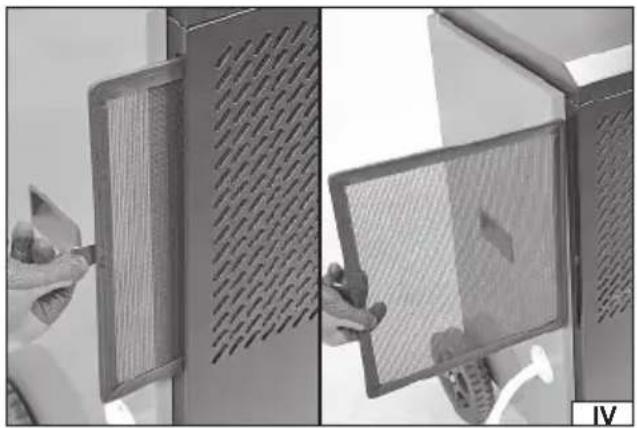
After use, clean the air filter. The filter should be cleaned after each use of the device or every 24 hours in case of continuous use. To do this, slide out the filter located in the gap between the air filter cover and the dryer housing by pulling the fabric handle (IV). Clean the filter using a compressed air jet with a pressure of no more than 0.3 MPa. Do not immerse the filter in water or any other liquid and do not clean it using a water jet or any other liquid. If the contamination cannot be removed during maintenance or the filter is damaged, it must be replaced with a new one free from defects. It is forbidden to use the dryer without a properly installed filter. Insert the filter into the gap between the air filter cover and the dryer housing.
Wipe the device housing with a slightly damp cloth and then dry. Clean the area around the air inlet and outlet using a compressed air jet with a pressure of no more than 0.3 MPa or use an industrial vacuum cleaner. Do not immerse the device in water or any other liquid and do not clean it with a water jet or any other liquid.
The storage location should protect against direct sunlight, precipitation, and also protect against access by unauthorized persons, especially children. Good ventilation should be provided in the storage location, this will prevent moisture from accumulating on the device elements, which can lead to corrosion. Before transport, to prevent damage to the power cable, it should be properly secured. It is recommended to transport the dehumidifier in the factory packaging. The product should be transported in the working position. If it is necessary to tilt the product during transport or installation, do not exceed an angle of 45 degrees. Regardless of the method of transport and installation, wait at least two hours between placing the product in its final location and connecting it to the power supply. This time is needed for the operating fluids inside the product systems to stabilize. Transport the product avoiding shocks.
Troubleshooting
Attention! In the event of a dehumidifier failure, disconnect the power supply immediately. Pull the power cable plug out of the mains socket.
While the dehumidifier is operating, it is normal to hear the sound of refrigerant circulating and for the air coming out of the unit's outlet to be warmer.
Below are typical faults, their causes and possible solutions. In case of any doubts and if the methods described below do not eliminate the problems, contact the manufacturer's authorized service. It is forbidden to disassemble the device yourself.
| Fault Cause Possible solution | ||
| The device is not working No power or damaged power | outlet Check if the power source is working properly | |
| The plug is not connected properly Connect the power cable plug to the wall outlet | ||
| Blown fuse or damaged electric board transformer For repair, contact the manufacturer's service center. | ||
| The device is on but not working The room humidity is lower than the set value Readjust humidity as needed | ||
| The device is in defrost mode Wait until the defrosting process is complete | ||
| Ineffective drying | Obstruction at air inlet or outlet | Remove the obstacle |
| Open doors or windows | Close doors and windows | |
| Room temperature too low | Do not use the dehumidifier at low temperatures | |
EN
| Fault Cause Possible solution | ||
| The device works loudly | Uneven surface | Place the dehumidifier on a stable, flat surface |
| The dehumidifier is set unstably | Reposition the dehumidifier in a stable position | |
| Water leaks | Improper tilt of the device | Place the dehumidifier on a flat surface |
| Blocked water drain Remove dirt from the nozzle and drain hose | ||
| E1 Heat exchanger sensor failure Switch to timed defrost mode and cancel the error | message | |
| E2/E3 Humidity sensor failure For repair, contact the manufacturer's service center. | ||
| EE Refrigerant leak Start the device after some time. If the "EE" message | does not disappear, contact the manufacturer's service | |
TECHNICAL DATA
| Parameter | Unit of measurement | Value |
| Catalogue number | YT-996503 | |
| Nominal voltage | [V~] | 220 – 240 |
| Nominal frequency | [Hz] | 50 |
| Rated current (27 °C; R h 60%) / (30 °C; R h 80%) [A] | 4.7 / 5.7 | |
| Max. rated power (27 °C; R h 60%) / (30 °C; R h 80%) | [W] | 950 / 1300 |
| Moisture removal capacity (27 °C; R h 60%) / (30 °C; R h 80%) | [l/24h] 40 / 70 | |
| Air flow | [m3/h] | 400 |
| Drying area | [m2] | 160 - 250 |
| Max. suction pressure | [MPa] | 1.0 |
| Max. discharge pressure | [MPa] | 2.5 |
| Coolant (type/weight) | R290 / 280g | |
| Net weight | [kg] 40 | |
| Product dimensions | [mm] | 545x460x870 |
| Operating temperature | [°C] | +5 ~ +35 |
| Insulation Class | I | |
| Degree of protection | IP22 | |
PRODUKTMERKMALE
PRODUKTA RAKSTUROJUMS
CARACTÉRISTIQUES DU PRODUIT
DEKLARACJA ZGODNOŚCI DECLARATION OF CONFORMITY DECLARATIE DE CONFORMITATE
0325/YT-996503/EC/2025
We declare and guarantee with full responsibility that the following products:
meet requirements of the following European Standards / Technical Specifications:
and fulfill requirements of the following European Directives:
2006/42/WE Machinery and safety elements
2014/30/UE Electromagnetic compatibility (EMC) Directive
Directiva privind compatibilitatea electromagnetică (EMC) (H.G. nr. 487/2016)
2011/65/UE Restriction of the Use of Certain Hazardous Substances
Serial number: concern all serials numbers of item(s) mentioned in this declaration
The person authorized to compile the technical file:
- DE
- WYPOSAŻENIE PRODUKTU
- PRODUCT CHARACTERISTICS
- PRODUCT EQUIPMENT
- SAFETY INSTRUCTIONS
- EN
- RECOMMENDATIONS FOR CONNECTING THE DEVICE TO THE POWER SUPPLY
- PRODUCT SERVICE
- PREPARING FOR WORK
- DEVICE SETTING
- CONNECTING THE WATER DRAIN
- ON/OFF TIMER FUNCTION
- SETTING THE POWER -ON TIMER
- SETTING THE SHUTDOWN TIMER
- MAINTENANCE, STORAGE, TRANSPORT
- TROUBLESHOOTING
- PRODUKTMERKMALE
- PRODUKTA RAKSTUROJUMS
- CARACTÉRISTIQUES DU PRODUIT
- DEKLARACJA ZGODNOŚCI DECLARATION OF CONFORMITY DECLARATIE DE CONFORMITATE
Brand : Yato
Model : YT-996503
Category : Dehumidifier