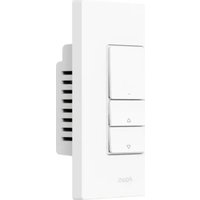
Dimmer Switch H2 - Light dimmer Aqara - Free user manual and instructions
Find the device manual for free Dimmer Switch H2 Aqara in PDF.


| Product Type | Connected dimmer switch |
| Brand | Aqara |
| Model | Dimmer Switch H2 (KD-R01E / KD-R01D) |
| Wireless protocols | Thread / Zigbee, Bluetooth |
| Power supply | 220-240 V~, 50/60 Hz |
| Rated load (incandescent/halogen) | ≤ 300 W |
| Rated load (LED/CFL) | ≤ 200 W |
| Minimum power | 4 W (via Matter in Aqara Home), 9 W (other methods) |
| Dimensions | 86 × 86 × 55,45 mm |
| Weight | Approximately 150 g |
| Operating temperature | 0 °C to 40 °C |
| Operating humidity | 0 to 95 % RH, non-condensing |
| Key features | Dimming, on/off, scheduling, remote control, power monitoring, statistics, interlinked scenes |
| Dimming modes | Leading edge and trailing edge (selectable) |
| Minimum brightness adjustment | 1 % to 100 % |
| Warm-up function | Yes, adjustable (brightness 1-100%, duration 1-10 s) |
| Compatibility | Incandescent, halogen, LED, dimmable CFL, ELV |
| Installation | With or without neutral wire |
| Maintenance and cleaning | Use a dry, soft cloth. Do not use chemical products. |
| Safety | Indoor use only. Disconnect power before installation. Do not exceed maximum load. Use only with dimmable lamps. |
| Spare parts and repairability | Contact Aqara customer service for any parts or repairs. |
| Package contents | H2 EU Dimmer × 1, user manual × 1, declaration of conformity × 1, screw kit × 1 |
Frequently Asked Questions - Dimmer Switch H2 Aqara
User questions about Dimmer Switch H2 Aqara
0 question about this device. Answer the ones you know or ask your own.
Ask a new question about this device
Download the instructions for your Light dimmer in PDF format for free! Find your manual Dimmer Switch H2 - Aqara and take your electronic device back in hand. On this page are published all the documents necessary for the use of your device. Dimmer Switch H2 by Aqara.
USER MANUAL Dimmer Switch H2 Aqara
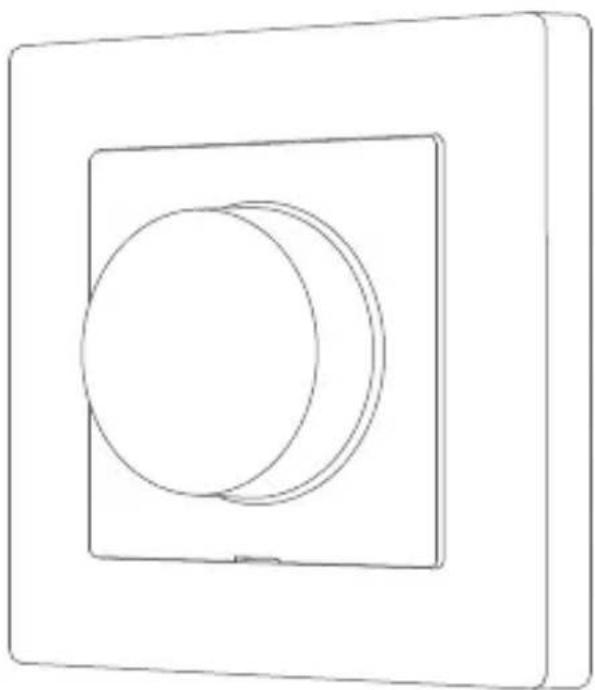
Aqara Dimmer Switch H2 EU is based on the Thread/Zigbee wireless communication protocol and can work with or without a neutral wire. It is compatible with a variety of lamps, including incandescent lamps, halogen lamps, dimmable LEDs and dimmable CFLs. Users can switch between the forward phase and reverse phase dimming mode based on load type to achieve brightness adjustment and switch control. It allows for remote control via the app, scheduling, power monitoring, power statistics, and other functions. Additionally, it can be used with other smart devices to achieve various interconnected control effects.
*To use the device with a particular Matter ecosystem, a Matter Controller of this ecosystem and a Thread Border Router are required.
Warnings
-
This product is not a toy. Please keep children away from this product.
-
This product is designed for indoor use only.
-
Do not use in humid environments or outdoors.
-
Beware of moisture. Do not spill water or other liquids onto the product.
-
Do not place this product near a heat source. Do not place it in an enclosure unless there is normal ventilation. Do not attempt to repair this product by yourself. All repairs should be performed by an authorized professional.
-
This product is suitable for improving the quality of your home life and reminding you about the device status. If a user violates the product use instructions, the manufacturer will not be liable for any risks and property losses.
-
Use the Device only with dimmable lights! Using non-dimmable ones may damage the Device or the light.
-
Do not connect the Device to appliances exceeding the given max load!
-
Connect the Device only in the way shown in these instructions. Any other method could cause damage and/or injury.
Installation Method
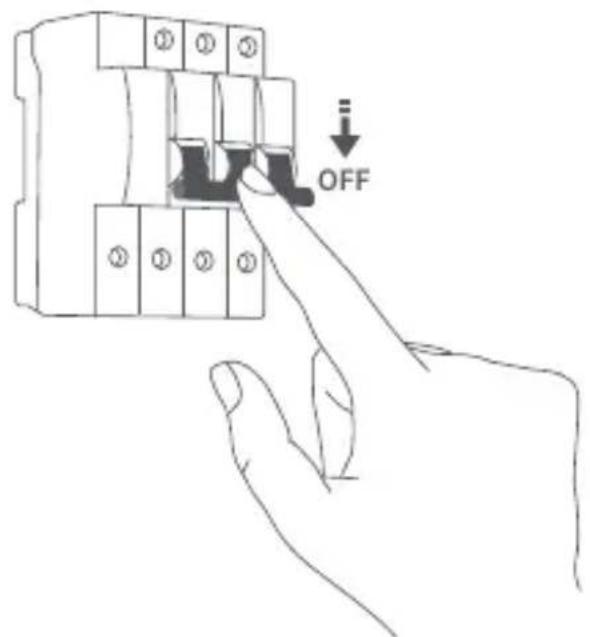
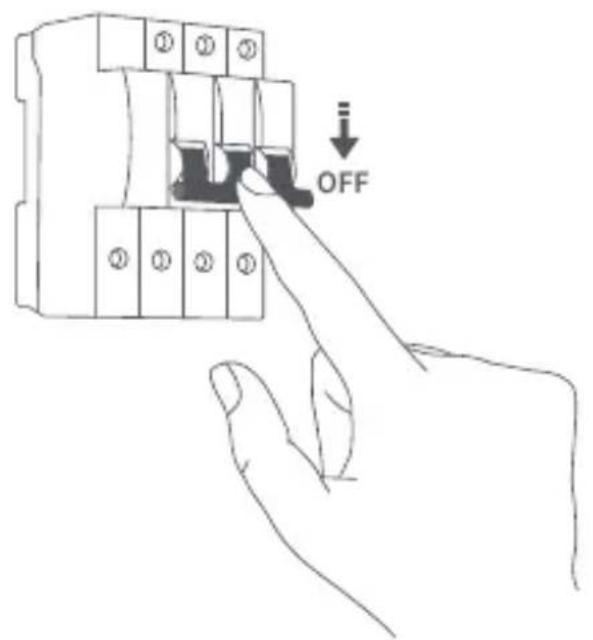
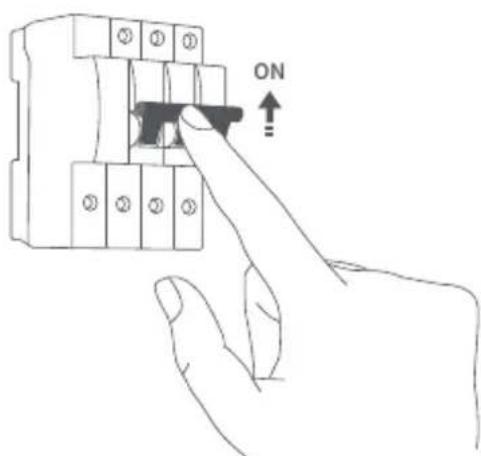
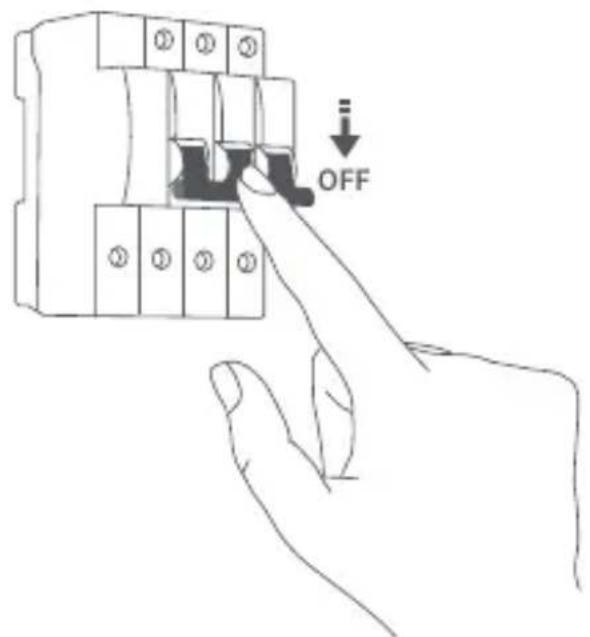
Please make sure that the power at circuit breaker or fuse box is turned off before wiring!
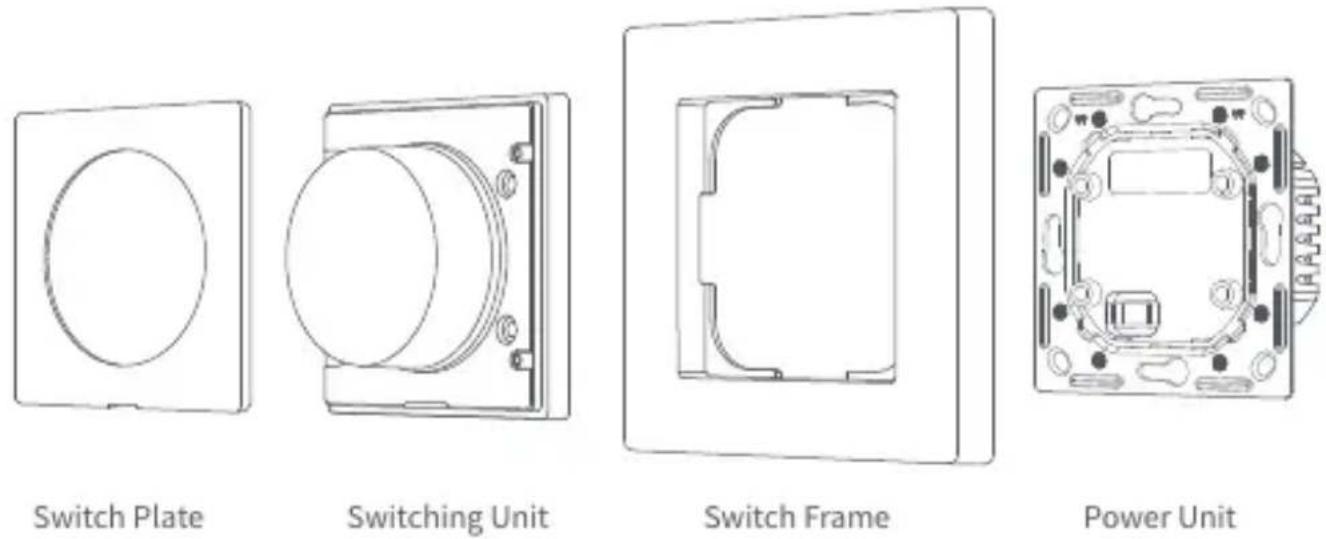
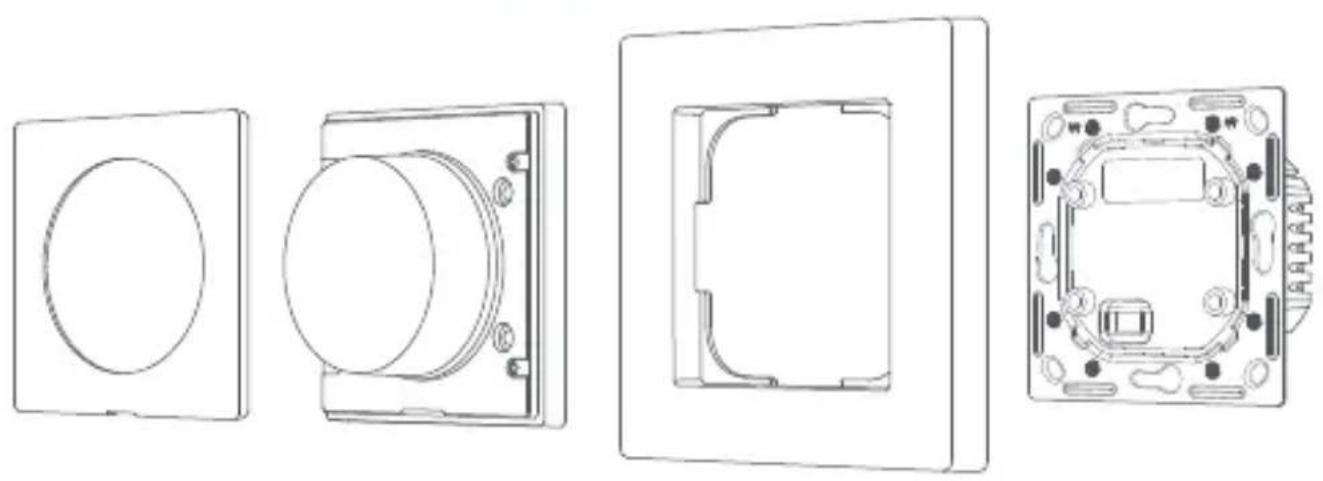
- Disassemble the switch into: switch plate, switching unit, switch frame, and power unit.
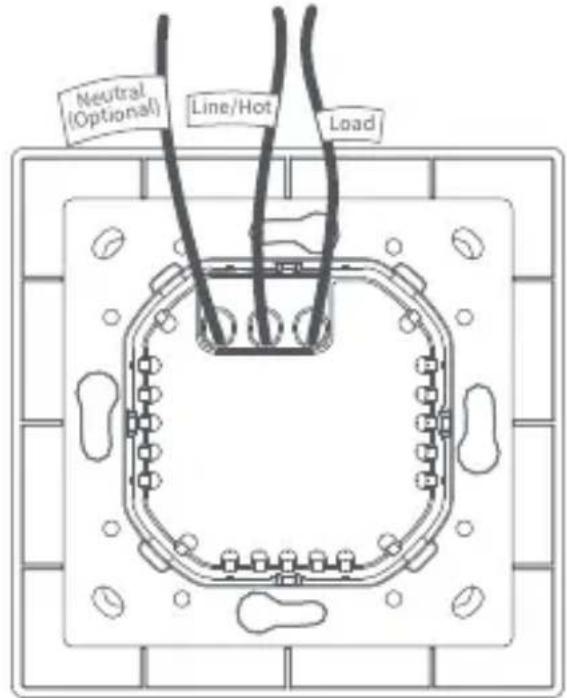
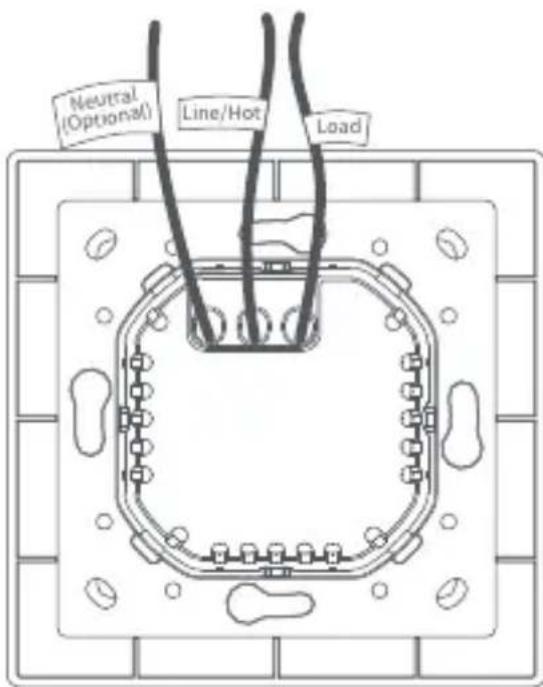
- Loosen the terminal screw on the back of the switch with the screwdriver, connect the live wire to the hole L, the neutral wire to the hole N (if necessary), and the load (light) wire to the hole L1, and tighten the terminal screws after confirming that the wiring is correct.
- Mount the power unit of the switch to the wall junction box with the attached screws and mount the switch frame.
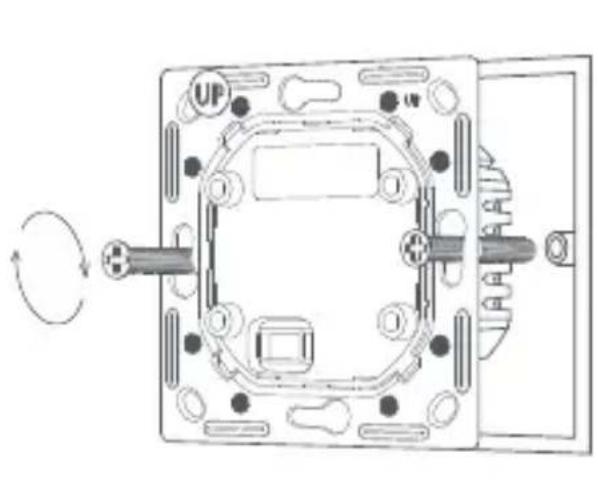
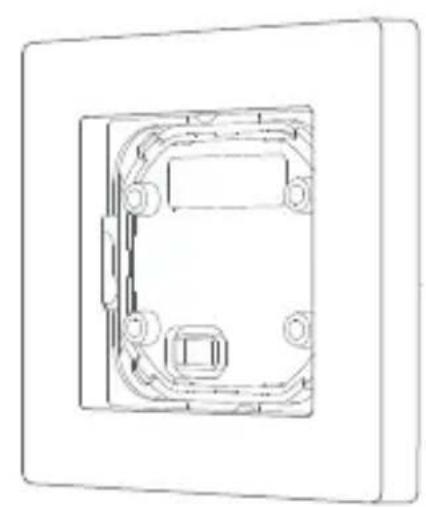
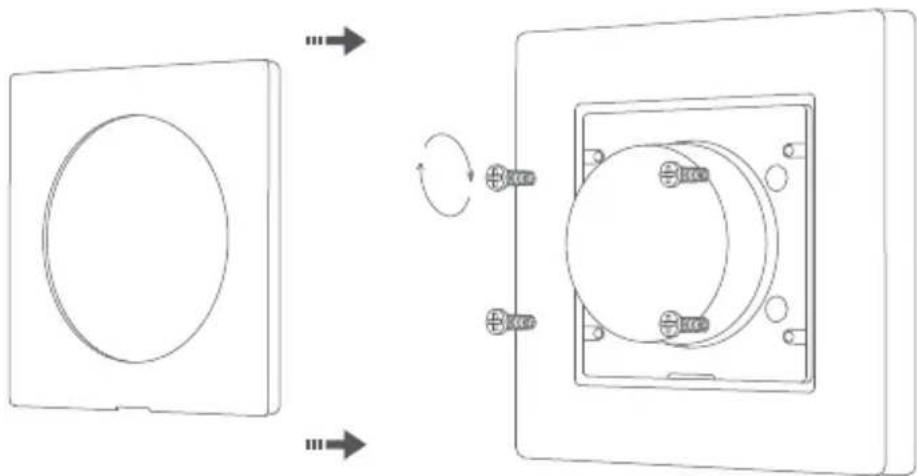
- Align the pins of the switching unit with the power unit, and snap them together, then use provided screws to to securely fasten them in place.
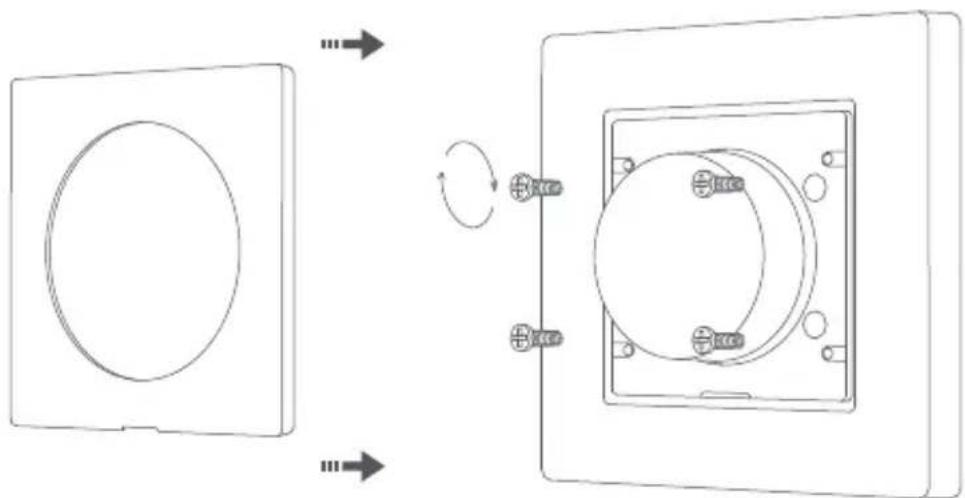
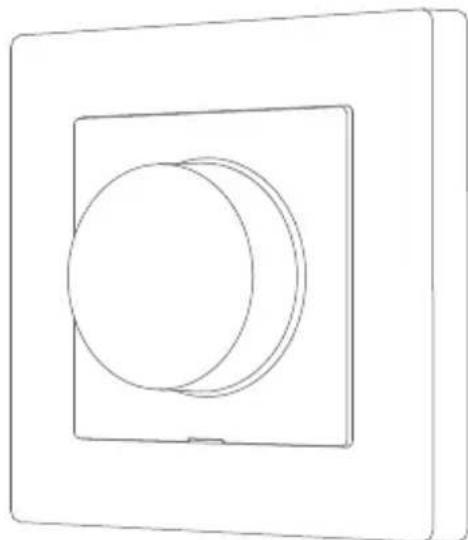
- Snap the switch plate into place.
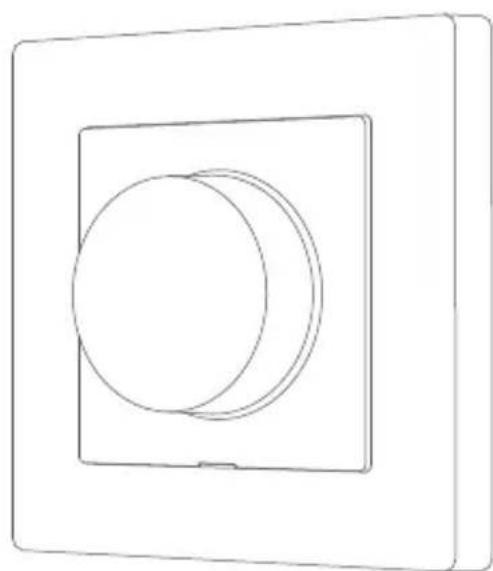
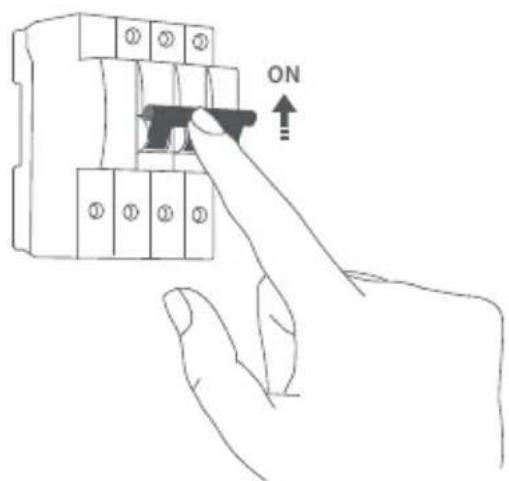
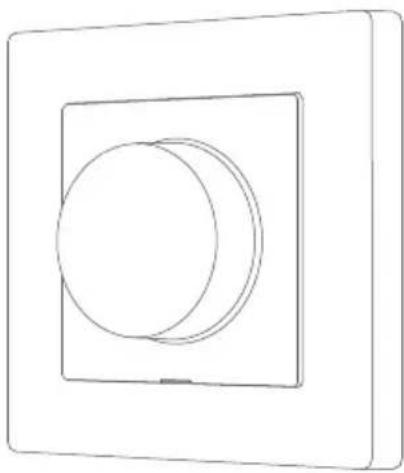
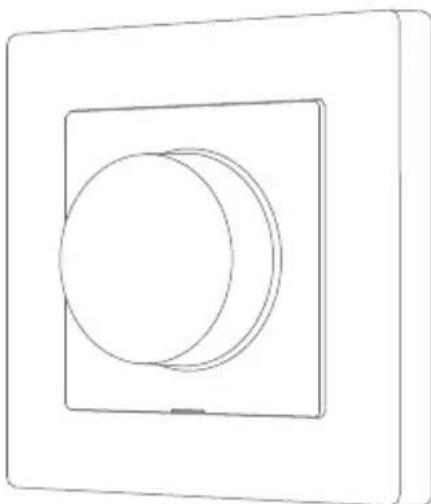
- Turn on main power at the circuit breaker, and test the switch by pressing the button. If the light can be controlled normally, the switch is working properly!
Quick Setup
- Please make sure you have installed the Matter-compatible app and have a Matter-compatible Thread border router.
- Please scan the QR code on the electronic instruction manual and follow the prompts to install the switch correctly. Once the switch is powered on, the indicator light will start blinking slowly, indicating that the device has entered the network configuration mode.
-
Open the Matter-enabled app, scan the Matter QR code on the instruction manual or product, or enter the setup code to add the device to the app.
-
The device supports Thread/Zigbee protocol connection that increases product compatibility and functionality.
When adding the device to Aqara Home app for the first time, you will be able to choose the mode according to your preferences.
At the same time, in case of connecting the device directly to the third-party ecosystem, the Thread mode will be enabled by default. hub is required for Zigbee mode
How to use
1. Minimum Brightness
This feature minimizes LED bulb flickering and strobing when the dimmer is at the minimum light level. This feature can also be used to set a personal preference. If the connected light is not working below a certain percentage, you can set the minimum percent at which Dimmer Switch H2 EU will turn on. Once set, the light cannot be dimmed below this minimum threshold. Adjustable range: 1% to 100% .
1) Double-press, and then rotate within 3 seconds of the press to enter the minimum brightness setting mode
2) Rotate the dial counterclockwise to adjust to the minimum brightness, single press to save. The indicator light will flash blue twice after the setting is successful.
2. Warm up
This function can prevent the lamp from abruptly turning on at full brightness, which can cause unnecessary light pollution or eye irritation, and can also extend the life of the lamp. Users can adjust these parameters through the dimmer setting interface according to their personal preferences and actual needs. Some lights require a certain power impulse, in order to start below 100% brightness. You can set the brightness level and time at which Dimmer Switch H2 EU will turn on. Brightness range: 1 - 100% . Time range: 1 - 10s
3. Phase Selection
Reverse Phase is the default setting.
1) Press five times to enter the phase selection mode.
2) Press to switch the phase (red: Forward Phase, blue: Reverse Phase), long press to confirm the setting
Forward/Reverse Phase Dimming
Forward Phase: Used for Incandescent, LED, CFL, and some Fluorescent controls (certain Fluorescent controls require forward phase.)
Reverse Phase: Used for LED, CFL, Electronic Low Voltage (ELV), and some LED drivers or Incandescent loads. (ELV requires reverse phase dimming.)
| Load | Usage | Rating |
| Incandescent/Halogen | Compatible with both forward and reverse phase | Incandescent/Halogen<300W |
| CFL | Compatible with both forward and reverse phase | Dimmable/CFL≤200W |
| LED | Compatible with both forward and reverse phase, but reverse phase often provides better performance. | Dimmable LED/≤200W |
| ELV (Electronic Low Voltage) | Must use reverse phase to proper function due to electronic transformer characteristics. | ELV≤200W |
| Minimum Power: 4W(Aqara Home via Matter), 9W(other methods), general purpose *When only using a 4W light bulb in Aqara Home, please set the maximum brightness to 70%-75% to prevent flickering. | ||
Note: Please always follow our load-specific recommendations for optimal Dimmer Switch H2 EU performance and safety.
Button Operations
| Button Operations | Description |
| Single press | Turn on/off |
| Press five times | Entering phase selection mode |
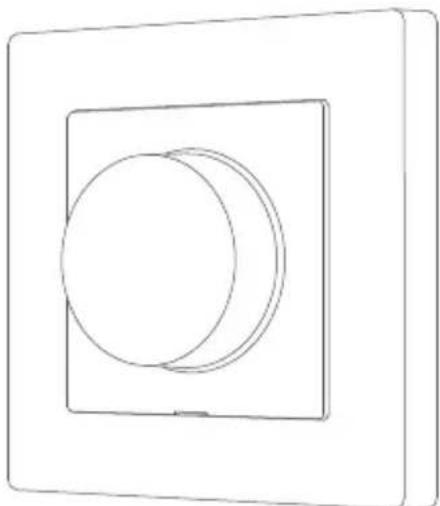
| Rotate (the dial) | Brightness up/down |
| Double press, then hold for 5 seconds within 3 seconds of the initial press | Reset the device/ enable network connectioninitial press |
| Double press, then rotate within 3 seconds, and single press to confirm set value | Set minimum brightness |
Description of Indicator Lights
| Color | Status | Description |
| Blue | Quick Flash | Device powering on/device pairing/ device finding (Thread protocol)/device deleting |
| Blue | Slow Flash | Networking |
| Blue | Ultra Slow Flash | Pairing successful/Switch to Reverse Phase |
| Red | Quick Flash | Device offline |
| Red | Solid | Overheat/Overload |
| Red | Ultra Slow Flash | Pairing Timeout/Switch to Forward Phase |
| Purple | Quick Flash | Device finding (Zigbee protocol) |
| Purple | Slow Flash | Phase Selection mode |
| *Ultra Slow Flash (0.05 seconds) will have a much shorter duration of light compared to Slow Flash: 0.5 seconds), creating a very subtle visual signal. | ||
Product Specifications
Dimmer Switch H2 EU
Model: KD-R01E/KD-R01D
Wireless Protocols: Thread/Zigbee, Bluetooth
Electrical Rating: 220-240VAC, 50/60Hz
Rated Load: Incandescent/Halogen ≤ 300W Dimmable LED/CFL ≤ 200W
Rated Type: Incandescent Halogen LED CFL,
Minimum Power: 4W (Aqara Home via Matter), 9W (other methods), general purpose
Dimensions: 86× 86× 55.45mm (3.39× 3.39× 2.18 in.)
Operating Temperature: 0^ 40^ (32°F ~ 104°F)
Operating Humidity: 0 95% RH, no condensation
What is in the Box: Dimmer Switch H2 EU × 1, User Manual × 1,
Compliance Statement × 1 ,Screw Kit × 1
Made in China
Notice
Use of the Works with Apple badge means that an accessory has been designed to work specifically with the technology identified in the badge and has been certified by the developer to meet Apple's performance standards. Apple is not responsible for the operation of this device or its compliance with safety and regulatory standards.
Manufacturer: Lumi United Technology Co., Ltd.
Address: Room 801-804, Building 1, Chongwen Park, Nanshan iPark, No. 3370, Liuxian Avenue, Fuguang Community, Taoyuan Residential District, Nanshan District, Shenzhen, China
Online Customer Service: www.aqara.com/support
Email: support@aqara.com
HΦopmaunO npodyKTe
HacteHHbI dmmep H2 EU ot Aqara ochoban Ha npotoKone 6ecnpoBODHO CB3n Thread/Zigbee n moXeT pa60taTb c IodKnIOUeHNem K nnHn HeITpAln nn 6e3 Hero. YcToiCTBO COBMeCTmO C pa3NIuHbIMn LaMnAmn, BKIOUaY lamNbHaKaJIIBaHnra, rAIOReHHbI NaMnbl, DmmNpyEmble CBeTOIDNOHBie N IOMNHecUeHTHbIe NaMnbl. POnDEpKINBaETcRdBa TnPa DmmNPOBaHnra: OTceueHne nepeDHeRo oPoNTa n 3aHero oPOnTa CInHyCONdbI HApJxKeHn. O3NaKOMbTeCb CdoKymeHTaQneH nCNoIb3yEmoro INCTOCHNk CaBtA DnBbOpa HyXHOrO pExKIma.. YcToiCTBO IO3BOJAErOCUSeCTBnATb DnCTAHCuONHoe ynpabJeHne CBeTINbHNKOM n3 PpINOxEHHa, HAcTpaNBaTb PaCnscAHn, BECTN MOHTOPnHr n XPOHOIgIO NOTpe6IeMoN MoUHOCTn N PoIdePckINBaET dpyrne yHKznn. Kpome TOrO, Dmmep MOXHO nCNOIb3OBaTb CdpYHMn UcTPOIcTBAMN yMHORo DOMa npi Co3DaHn ABTomAtn3aun.
*Дя История устюгов Стохостems� Matter Tpe6yotc KoHTponnep Matter ATON KOCNCTeMbI N MapшуTN3aTOp Thread Border Router.
MOHTAX
BHHMaHHe! MoNTaX yCTpoiCTBa - 3TO pa6OtBi C 3JIeKTPnueCTBOM, CB8aHHbIe C pNcKOM nopaxKeHnY TokOM. Y6eIITecb, yTo y Bac eCTb HABbIKn pa3peWeHnI dJaHHbIX pa6OT. B npOTNBHom clyuae, 6paTntEcB K cneuaNNCTy.
Ipeed hauanom moTajka y6eintecb, yTO nITaHne nCnoB3yeMOJ nnHn OTKIOUeHO! IcnoB3yIte COOTBeTCTByIOuI aBTOMaTNUeCKN BbIKIOUaTeJIb B 3JIeKTPnueckOM ⅡTE JJI BbIKIOUeHnA NITaHNJ nnHn
1.Отдение OTДИМмета:пл actину nepeknioateЯ,6nok nepeknioueHry,paMKy nepeknioaTeЯ n CInOBoB 6nOK.
- Ocna6bTe BnHT KJIeMMbI Ha 3aHne CTOpOHe dmmMepa C nOMoUbO OTBepTK, NOkJIIOuHTe a3H I npOBOD K OTBepCTNIO L, HeITpaIbHbI npOBOD K OTBepCTNIO N (npi DoCTyINHOCTn), a npOBOD Harpy3Kn (ocBeueHnra) K OTBepCTNIO L1 n 3aTaNHTe BnHTbI KJIeMM, y6eINBwncb B npaBnIbHOCTn NOkJIIOUeHnra.
BnMaHne! KIeMMbI yCTpoiCTBa npedctabJIOT co60B BnHTOBbIe 3aKIMbI, NOdKIIoueHne MHOrOxNJIbHOrO npoBOda dOnyCKaeTcra TOnbKO nocJe erO nponaIK Nn ONpeCCOBbIBaHna HaKOHeuHKOM!
- 3aKpEnIte 6nok nHTaHna yCTpoiCTBaHa HAcTeHHoI paCnpedeJIteIbHOJ KOpO6Ke C NOMOuIO npUlaRaEMbIX BnHTOB uYCTaHOBInTe pAMky.
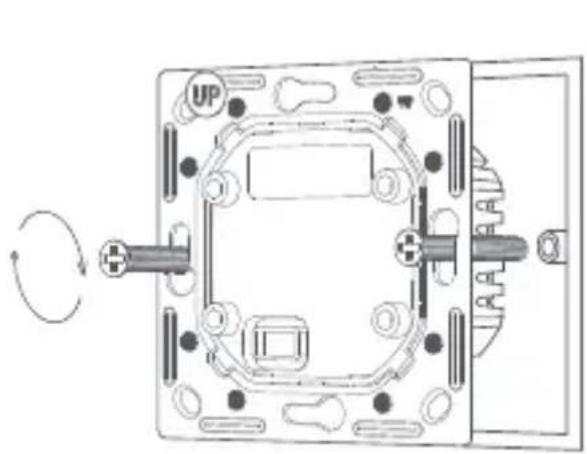
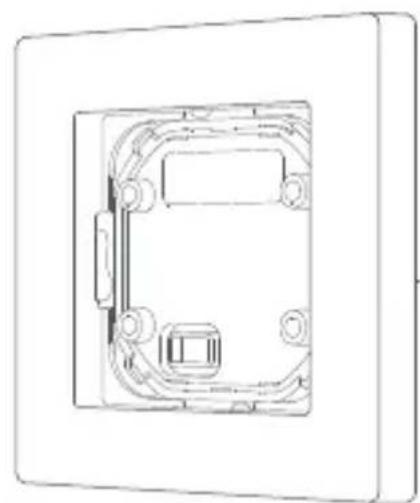
- COBmecHTte KOHTaKbOMMyTaUHOHOrO 6Ioka C cnIObbIM 6JIOKOM I COeHNHTe IN BMeCTe, 3aTeM NcNOb3yIte npnlaRaEmbIe BNHTbl, UTO6bl HaJeXHO 3aKpeNtB IN HA MeCTe.
- YctaHOBntnAteHny nepeKIOuTaTeHa MeTo Do ueNyKa.
- BkIIOUHTe OCHOBHoe NITaHHe Ha aBTOMaTnueCKOM BbIKIIOuataJe IN npOBepbTe yCTpoiCTBO, Haxabero KNONky. EcnnaHaxaTne KONKN BkIIOuaET N BbIKIIOUaET NOdKIIIOueHHbI CBETINbHNK, YCTPOICTBO pa6Otaet npabunbHo!
Быстаянстpoиka
- Y6eIntecb, yTo y Bac yCTaHOBJeHO COBMeCTnMOe c Matter npInIOxKeHne n ImeETcra COBMeCTnMbI c Mather Thread Border Router.
- Пожауньта, отскануп Te QR-кд В Злелктоном руковдгы И СледуITE ИНСТPyкцям, уTOбI пpaBиьHo yCTaHOBuTb KOMMyTaTop Mather. Поссе ВКлioченя KMMyTaTopa ИнДИКaTop HaЧNET MeДлeнно мигаТь, уKa3bIBaЯ Ha TO, UTO yCTpoIcTB O BOWIo B peЖIM KOHФИграци n ceTn.
- OTKpoIte npINOxKeHne c noDepKkoi Matter, otckaHpyiTe QR-KoI Mather Ha nHCTpyKcuN IO kCnnyaTaCuN IIN Ha n3deIIn IIN BBeIte KoI NaCTPOkN, yTO6bI Do6aBNTb yCTPOiCTBO B npINOxKeHne.
* UcpoIcTBO noDpeKnBaet coeHHeHne no npotoKony Thread/Zigbee, yTO NOBbIaET COBMeCTHMoCTb n YHKUHOHaJIbHOCTb npOdyKTa.
Pn npBOM do6abHnn yctpoiCTBa B npINOxKeHne Aqara Home Bbl cMOxTe BbI6paTb peKIM B COOTBeTCTBNN CO CBOHMn npEINoYTeHNMA.
Пи ATOM,В сlyuae nodkluoyehn yctpoiCTBa HanpMyIO K CTOpOHHeN 3Kocnsteme,pexm Thread 6ydt BkIouen no ymoJauHnIO.ДЯ pexma Zigbee Tpe6yeTcA LENTp yMHorO doma Aqara c noDepxxkoizigbee 3.0.
Kak nCnoB30BaTb
MHHMaJIbHa MaHocTb: 4 Bt (Aqara Home uepe3 Matter), 9 Bt (dpyrne
MeToDbI NOdKJIIOueHnA/3KOCnCTeMbI)
Pa3mepbl: 86× 86× 55,45 MM
Pa6oua termpepaIpya: 0^ 40^
Pa6oay BnaXHOCTb: 0 ~ 95% OTHOCHTeNbHOB BnaXHOCTN, 6e3
KOHdEHCaUN
HTo HaxoNTcB Kopo6Ke: HacteHHbI dmmep H2 EU × 1 PyKOBOCTBO
noIb3OBaTeNa × 1 3aBHeHne O COOTBeTCTBnN × 1 KOMnNeKT BnHTOB × 1
CdehaHO B Kntae
YBeDomJIeHne
IcnoJb3OBaHne 3NaUka Works with Apple O3Nauaet, yTo akceccyap 6bl pa3pa6OtaH cneuNbHO dJa pa6Otbl C TexHoIornei, yKa3aHHoB B 3NaUke, n cepTnΦnucropoBaH pa3pa6OtuNKOM Ha COOTBeTCTBHe CTaHdApTaM npOn3BOinteMbHocTn Apple. Apple He Hecet OTBETCTBeHHOCTH 3a pa6Oty 3TOrO yCTpoIcTBa IIn erO COOTBeTCTBHe CTaHdApTaM 6e3ONaCHOCTN IN HopMaTINBhIM Tpe6OBaHnA M.
Празибовпель: Lumi United Technology Co., Ltd
Ampes: Room 801-804, Building 1, Chongwen Park, Nanshan iPark, No.
3370, Liuxian Avenue, Fuguang Community, Taoyuan Residential
District, Nanshan District, Shenzhen, China
CaiT: www.aqara.com
E-mail: support@aqara.com
Produktinführung
Indirizzo: Room 801-804, Building 1, Chongwen Park, Nanshan iPark,
No. 3370, Liuxian Avenue, Fuguang Community, Taoyuan Residential
District, Nanshan District, Shenzhen, China
Email: support@aqara.com
Type nominal: Incandescent Halogene LED CFL,
Fabricant: Lumi United Technology Co., Ltd.
Adresse:Room 801-804, Building 1, Chongwen Park, Nanshan iPark, No.
3370, Liuxian Avenue, Fuguang Community, Taoyuan Residential
District, Nanshan District, Shenzhen, China
Email: support@aqara.com
No. 3370, Liuxian Avenue, Fuguang Community, Taoyuan Residential
District, Nanshan District, Shenzhen, China
Correo electrónico: support@aqara.com
Protocolli wireless: Thread/Zigbee, Bluetooth
Adresse: Room 801-804, Building 1, Chongwen Park, Nanshan iPark, No.
3370, Liuxian Avenue, Fuguang Community, Taoyuan Residential
District, Nanshan District, Shenzhen, China
Online Kundenservice:
E-Mail: support@aqara.com
Modele:KD-R01E/KD-R01D
Producent: Lumi United Technology Co., Ltd.
Adres:Room 801-804, Building 1, Chongwen Park, Nanshan iPark, No.
3370, Liuxian Avenue, Fuguang Community, Taoyuan Residential
District, Nanshan District, Shenzhen, China
Obstuga kIlenta online:
E-mail: support@aqara.com
Model: KD-R01E/KD-R01D
Adresa: Room 801-804, Building 1, Chongwen Park, Nanshan iPark, No.
3370, Liuxian Avenue, Fuguang Community, Taoyuan Residential
District, Nanshan District, Shenzhen, China
Zakaznicky servis online:
E-mail: support@aqara.com
Predstavenie produktu
Aqara Stmievací Vypinač H2 EU je založeny na protokole bezdröttovej komunikácie Thread/ Zigbee a moze fungovat's neutralným vodicom alebo bez neho. Je kompatibilné s roznymi svietidlami, vrátane ziaroviek, halogenovych ziaroviek, stmievatelnéch LED a stmievateñych CFL. Použivatelia mozu prepinat medzi režimom stmievania fázy doprodu (leading edge / forward phase) a dozadu (trailing edge / reverse phase) na záklate typu zataže, aby dosiahli optimáne nastavenie jasu a ovládanie vypinača. Umožnjuje dialkové ovládanie cz aplikáciu, planovanie, monitorovanie napajania, statistíky napajania a dalsie funkcie. Okrem toho sa da použit's inými intelligentnímyi zariadeniama na dosiahnutie roznych vyajomne prepojeněch ovládacích efektov.
*Na použivanie zariadenia s konkrétnym ekosystem Matterje potrebny ovladac. Mattertohto ekosystemu a Thread Border Router.
Varovania
-
Tento vyrobok nie je hračka. Udržujte deti mimo dosahu tohto produktu.
-
Tento vyrobok je urceny len na pouzitie v interieri.
-
Nepouživajte vo vlhkom prostredi alebo vonku.
-
Pozor na vlhkost. Na vyrobok nelejte vodu ani iné tekutiny.
-
Neumiestnujte tento vyrobok do blizkosti zdroja tepla. Neumiestnujte ho do krytu, pokial tam nie je normalne vetranie. Nepokušajte sa tento vyrobok opravovat svojpomocne. Vsetky opravy by mal vykonávat autorizovaný odbornik.
-
Tento produkt je vhodný na zlepsenie kvalty vasho domacehoŽivota a pripomenutie si stavu zariadenia. Ak použivatei'porusi námov na použitie vyrobku, vyrobca nezodpovedá za ziadne rizika a skody na majetku.
-
Zariadenie používajte iba so stmievateñymi svetlami! Používanie nestmievateñych zariadeni moze poskodit zariadenie alebo svetlo.
-
Zariadenie nepripajaje k spotrebicom prekračujucim dané maximale nažaženie!
-
Zariadenie pripojte len sposobom uvedenym v toto navode. Akykolek iny sposob moze sposobit poskodenie a/alebo zranenie.
Sposob instalacia
Pred zapojenim sa uistite, ze napajanie istica alebo poistkovej skrinky je vypnuté!
Model: KD-R01E/KD-R01D
Bezdrotové protokoly: Thread/Zigbee, Bluetooth
Elektrické menovite napatie: 220-240VAC, 50/60Hz
Menovite zatazenie: Ziarovka/Halogen ≤ 300 W, Stmievatelná LED/CFL ≤ 200 W
Hodnoteny typ: Ziarovka Halogen LED CFL,
Minimány vykon: 4W (Aqara Home cez Matter), 9W (iné metódy), všeobecné použitie
Rozmery: 86 × 86 × 55,45 ~mm (3,39 × 3,39 × 2,18 palca)
Prevadzková teplota: 0^ 40^ (32°F ~ 104°F)
Adresa: Room 801-804, Building 1, Chongwen Park, Nanshan iPark, No.
3370, Liuxian Avenue, Fuguang Community, Taoyuan Residential
District, Nanshan District, Shenzhen, China
Zakaznicky servis online:
E-mail: support@aqara.com
Termek bemutatasa
Cim: Room 801-804, Building 1, Chongwen Park, Nanshan iPark, No.
3370, Liuxian Avenue, Fuguang Community, Taoyuan Residential District, Nanshan District, Shenzhen, China
Online telepités:
E-mail: support@aqara.com
EiaaywnIpoiovtoc
BaOooynuevoctuio: npaKtwoeawc aoyovou LED CFL,
: Room 801-804, Building 1, Chongwen Park, Nanshan iPark, No. 3370, Liuxian Avenue, Fuguang Community, Taoyuan Residential District, Nanshan District, Shenzhen, China
Model: KD-R01E/KD-R01D
Draadloze protocollen: Thread/Zigbee, Bluetooth
Elektrische classificatie: 220-240VAC, 50/60Hz
Nominale belasting: Gloeilamp/halogeen ≤ 300W dimbare LED/CFL ≤ 200W
Nominal type: Gloeilamp, Halogeen, LED, CFL,
fuguang community liu xian avenue, nanshan taoyuan district, shenzhen, china
Online klantenservice: [www.aqara.com/support
(http://www.aqara.com/support]
E-mail:support@aqara.com
試焉
Aqara Dimmer Switch H2 EU是Thread/Zigbee末端通讯
Floroto胶囊的基因通过
中成,有上,。
(http://www.aqara.com/support)
iMeI:support@aqara.com
400-990-7930