USER MANUAL SDSB 2400 A1 SILVERCREST
natural_image
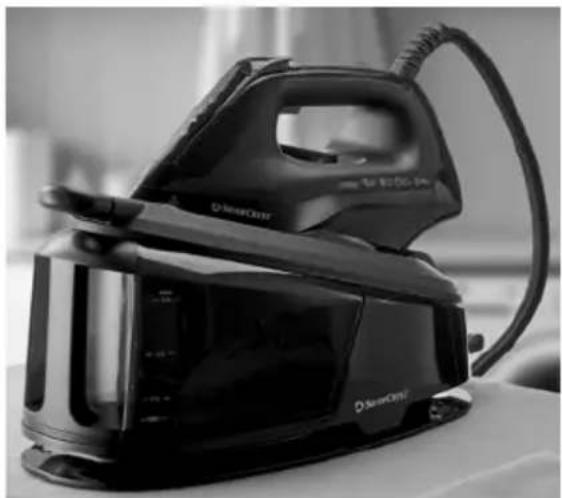
Black and white photo of a FreeBox steam iron on a table, no visible text or symbols on the device itself.
DAMPFBÜGELSTATION/STEAM GENERATOR IRON/CENTRALE VAPEUR SDSB 2400 A1
DE AT CH
DAMPFBÜGELSTATION
Bedienungsanleitung
GB IE
STEAM GENERATOR IRON
User manual
FR BE
CENTRALE VAPEUR
Mode d'emploi
NL BE
STOOMSTRIJKIJZER STATION
Gebruiksaanwijzing
PL
ŻELAZKO ZE STACJĄ PAROWA
Instrukcja obsługi
CZ
NAPAŘOVACÍ ŽEHLIČKA S PARNÍ STANICÍ
Návod na obsluhu
SK
PARNÁ ŽEHLIACA STANICA
Návod na obsluhu
ES
GB/IE User manual Page 20
List of pictograms used ...... Page 21
Introduction Page 21
Intended use ...... Page 22
Scope of delivery.... Page 22
Parts list ...... Page 22
Technical data Page 22
General safety instructions.... Page 22
First set-up of the product ...... Page 25
Unpacking the product ...... Page 25
Filling the water tank ...... Page 26
Operation Page 26
Setting the temperature.... Page 26
Unlocking the steam iron.... Page 27
Ironing (without steam).... Page 27
Steam ironing.... Page 27
Steam burst mode Page 28
Vertical steam smoothing (clothing, curtains and upholstery)...... Page 28
Refilling the water tank.... Page 28
Stop ironing.... Page 28
Auto-off function Page 29
Locking the steam iron.... Page 29
Cleaning and maintenance...... Page 29
Cleaning.... Page 30
Using the self-cleaning function.... Page 30
Replacing the anti-scale filter ...... Page 30
Storage Page 31
Disposal...... Page 31
Warranty Page 32
Warranty claim procedure.... Page 32
Service...... Page 32
| List of pictograms used |
 | DANGER! – Designating a hazard with high risk, which will result in death or severe injury if not avoided (e.g. risk of suffocation) | V~ | Voltage (alternating current) |
 | WARNING! – Designating a hazard with moderate risk, which can result in death or severe injury if not avoided (e.g. risk of electric shock) | Hz | Hertz (supply frequency) |
| W | Watt |
 | CAUTION! – Designating a hazard with low risk, which could result in minor or moderate injury if not avoided (e.g. risk of scalding) | | Use the product in dry indoor spaces only. |
 | NOTICE! – Warns of possible damage to property/the product if not avoided (e.g. risk of short circuit) | | Danger – risk of electric shock! |
 | INFO: This symbol with the “Info” signal word offers additional useful information. | | CAUTION!Hot surfaceThis symbol indicates a hot surface. |
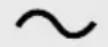 | Alternating current/voltage |
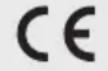 | CE mark indicates conformity with relevant EU directives applicable for this product. | | Safety informationInstructions for use |
STEAM GENERATOR IRON
Introduction
We congratulate you on the purchase of your new product. You have chosen a high quality product. The instructions for use are part of the product. They contain important information concerning safety, use and disposal.
Before using the product, please familiarise yourself with all of the safety information and instructions for use. Only use the product as described and for the specified applications. If you pass the product on to anyone else, please ensure that you also pass on all the documentation with it.
Intended use
This product is only intended for dry or steam ironing of garments, curtains/ upholstery, and fabrics [also hanging]. Do not use it for any other purpose.
This product is only intended for private household use, not for commercial purposes.
The manufacturer accepts no liability for damages caused by improper use.
- Scope of delivery
1 Steam generator iron
1 Base station
1 Replacement filter
1 Short manual
Parts list
[Fig. A]
| 1 | Temperature control |
| 2 | |
| 3 | |
| 4 | Display |
| 5 | |
| 6 | |
| 7 | |
| 8 | |
| 9 | |
| 10 | Steam burst button |
| 11 | Lock handle |
| 12 | Soleplate |
| 13 | Storage platform |
| 14 | Water tank with MIN, 0.5 L, 1.0 L and 1.5 L (MAX) markings |
| 15 | Mains cord and hose storage |
| 16 | On/off button with indicator |
| 17 | Mains cord with mains plug |
| 18 | Base station |
| 19 | Steam iron |
| 20 | Connection hose |
| 21 | Handle (steam iron) |
(Fig. B)
| 22 | Anti-scale filter |
| 23 | Handle (water tank) |
| 24 | Filling aperture |
Technical data
| Model numberwith VDE plug: HG10042with BS plug: HG10042-BS | |
| Rated voltage: 220–240 V~, | 50–60 Hz |
| Rated power consumption: | 2,000–2,400 W |
| Protection class: I | |

General safety instructions
BEFORE USING THE PRODUCT,
FAMILIARISE YOURSELF
WITH ALL OF THE SAFETY
INFORMATION AND
INSTRUCTIONS FOR USE! WHEN
PASSING THIS PRODUCT ON TO
OTHERS, ALSO INCLUDE ALL THE
DOCUMENTS!
In the case of damage resulting from non-compliance with these operating instructions the warranty claim becomes invalid! No liability is accepted for consequential damage! In the case of material damage or personal injury caused by incorrect handling or non-compliance with the safety instructions, no liability is accepted!
Children and persons with disabilities

WARNING! RISK OF LOSS OF LIFE OR ACCIDENT TO INFANTS AND CHILDREN!
Never leave children
unsupervised with the
packaging material.
The packaging material represents a danger of suffocation.
Children frequently under-
estimate the dangers.
Always keep children away from the packaging material.
This product can be used by children aged from 8 years and above and persons with reduced physical, sensory or mental capabilities or lack of experience and knowledge if they have
been given supervision or instruction concerning use of the product in a safe way and understand the hazards involved.
■ Children shall not play with the product.
- Cleaning and user maintenance shall not be made by children without supervision.
- Keep the product and its cord out of reach of children less than 8 years of age when it is energized or cooling down.
Intended use
⚠ WARNING! Misuse may lead to injury.
Use this product solely in accordance with these instructions.
Do not attempt to modify the product in any way.
Electrical safety
⚠️ DANGER! Risk of electric shock! Never attempt to repair the product yourself. In case of malfunction, repairs are to be conducted by qualified personnel only.
⚠ WARNING! Risk of electric shock! Do not immerse the product’s electrical components in water or other liquids. Never hold the product under running water.
⚠️ CAUTION! Risk of electric shock! Never use a damaged product. Disconnect the product from the power supply and contact your retailer if it is damaged.
■ Ensure the rated voltage shown on the rating label corresponds with the voltage of the power supply.
- Regularly check the power plug and the supply cord for damages.
If the supply cord is damaged, it must be replaced by the manufacturer, its service agent or similarly qualified persons in order to avoid a hazard.
Use
⚠ WARNING! Risk of injury!
Switch the product off and disconnect it from the power supply before cleaning work and when not in use.
The product must not be left unattended while it is connected to the supply mains.
The plug must be removed from the socket-outlet before the water reservoir is filled with water.
The product must be used and rested on a flat, stable surface.
- When placing the iron on its stand (base station), ensure that the surface on which the stand is placed is stable.
The product is not to be used if it has been dropped, if there are visible signs of damage or if it is leaking. Do not operate the product with a damaged power cord or plug, when the product malfunctions or has been damaged in any manner.
During operation, do not pull the water tank out of the product. Pay attention to the instructions for the safe refilling of the water tank.
■ Only use the product in dry indoor rooms.
- Do not operate the product with wet hands or while standing on a wet floor. Do not touch the power plug with wet hands.
■ Protect the product against heat. Do not place the product close to open flames or heat sources such as stoves or heating appliances.
■ Protect the power cord against damages. Do not let it hang over sharp edges, do not squeeze or bend it. Keep the power cord away from hot surfaces and open flames and ensure that nobody can pull on or trip over it unintentionally.
■ Stop using the product if the anti-kink protection on the connection hose is damaged!
- Do not pull the power plug out of the socket-outlet by the power cord. Do not wrap the power cord around the product.
■ Protect the product, its power cord and power plug against dust, direct sunlight, dripping and splashing water.
■ Store the product in a cool, dry place, protected from moisture and out of the reach of children.
Burn hazards
■ Never aim the steam jet at people or animals.
■ Never iron or steam clothing or other fabrics while held or worn by persons.
■ Only touch the heated product by the handle. Steam is very hot. Never put your hands in front of the soleplate.
■ Never touch the soleplate in operation or while heated up (e.g. to test the temperature).
● First set-up of the product
● Unpacking the product
i INFO:
The product may give off some vapours or odours during first use. These are production or transport residue that will quickly subside. There may also be quiet noises such as clicking or crackling. These will also quickly subside once the plastic parts have finally adjusted to the operating conditions.
☐ To remove any production or transport residue, iron a simple scrap of fabric (e.g. a cloth or rag) before first use.
-
Take the product out of the packaging and remove all packaging materials and plastic wrappings.
-
Check to make sure that all listed parts are included (see "Scope of delivery").
-
Check whether the product and all parts are in good condition, if any damage or defect is detected, do not use the product, but follow the procedure described in chapter "Warranty".
● Filling the water tank
i INFO:
If the tap water in your location is rated as hard, it is recommended that you mix the tap water with some distilled water. Otherwise limescale deposits can adversely affect the product's functions.
Water with any additives (such as starch, perfume, softeners or other chemicals) shall not be added to the water tank ^14 . These could damage the product as residues can form in the steam chamber. The residues could contaminate the clothing if they come out of the steam outlets.
□ Check the hardness of your household's water with your local water supplier.
□ Use only tap water or distilled water.
- Before filling the water tank 14: Press ① 16 to switch off the product. Disconnect the mains plug 17 from the mains socket.
- Use the handle 23 to pull the water tank 14 out of the base station 18.
- Usage of tap water: Mix the tap water with distilled water according to the following ratio:
| Water hardness Ratio of distilled water to tap water |
| Very soft/soft – | |
| Medium 1:1 | |
| Hard 2:1 | |
| Very hard 3:1 | |
- Fill the water tank 14 with tap water or distilled water through the filling aperture 24. Observe the MIN/MAX markings on the water tank:
| Marking Water fill level |
| MIN Minimal water fill level(approx. 260 ml) |
| MAX | Maximum water fill level(approx. 1500 ml) |
- Push the water tank 14 back into the base station 18 until it locks into place.
Operation
- Setting the temperature
NOTICE! Risk of property damage!
Before steam smoothing: Check the clothes' ironing instructions to determine if they are suitable for use with this product.
For clothes with the following ironing instructions:
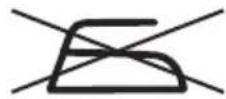
Do not iron.
- Turn the temperature control 1 from the min position to the desired temperature level.
- The temperature control 1 is divided into 4 ranges. These are rough recommendations for different types of fabrics:
| Symbol | Ironing process |
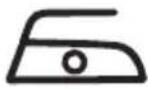 | Low temperatureFor synthetic fabrics (e.g. nylon) |
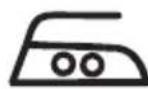 | Average temperatureFor sensitive fabrics (e.g. silk or wool) |
| Symbol Ironing process |
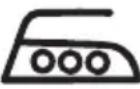 | High temperatureFor coarse fabrics (e.g. cotton or linen). |
 | Highest temperatureFor steam ironing |
- Unlocking the steam iron
- Hold the tab of the lock handle 11. Pull out the lock handle.
- The steam iron 19 can now be removed from the storage platform 13 of the base station 18.
- Release the tab of the lock handle 11.
- Ironing (without steam)
i INFO:
■ 7 flashes the first time when the desired temperature is set.
■ 7 flashes in between during the reheating process.
- Turn the temperature control 1 to the min position.
- Connect the mains plug 17 to a suitable mains socket.
- Switching on the product: Press ① 16.
① lights up continuously. The soleplate 12 heats up.
- Set the temperature control 1 to the desired temperature (see "Setting the temperature").
The soleplate 12 heats up to the set temperature. 7 flashes in the display 4 as long as the steam iron 19 did not reach the set temperature.
When the set temperature is reached, 12 is lit continuously in the display.
- Start ironing when the set temperature is reached.
- During ironing breaks, place the steam iron 19 on the storage platform 13 of the base station 18.
Steam ironing

i INFO:
■ 7 flashes while the product is heating up.
7 flashes again during a re-heating process with the same temperature setting.
■ 7 does not flash if a lower temperature is set.
- Fill the water tank 14. Push the water tank back into the base station 18 until it locks into place (see "Filling the water tank").
- Turn the temperature control 1 to the min position.
- Connect the mains plug 17 to a suitable mains socket.
- Switching on the product: Press ① 16.
① lights up continuously. The soleplate 12 heats up.
- Set the temperature control 1 to max [see "Setting the temperature"].
- Select the amount of steam: Repeatedly press 3:
| Amount of steam Indication |
| Eco | |
| Medium | |
| Power | |
- As soon as 5/6/7 is lit continuously in the display 4, you can start steam ironing.
- While you are ironing, you can now press and hold the steam burst button 10 to continuously spray steam onto the clothes to be ironed from the soleplate 12.
- Stop producing steam: Release the steam burst button[10].
- Steam burst mode
The steam burst mode ends after approx. 5 seconds.
☐ Entering the steam burst mode: Press the steam burst button 10 2 x briefly.
–Large amounts of steam are sprayed from the soleplate 12 onto the clothes to be ironed.
☐ During ironing breaks, place the steam iron 19 on the storage platform 13 of the base station 18.
Vertical steam smoothing (clothing, curtains and upholstery)
WARNING! Risk of burns!
When steam smoothing, always point the soleplate 12 towards the item to be ironed. Be careful not to steam over your hands.
Clothing:
- Never steam smooth clothes while they are being worn.
- Let clothes cool on a hanger before wearing.
⚠ NOTICE! Risk of property damage!
- Do not treat leather, velvet, impregnated furniture or materials that are sensitive to steam.
Do not touch materials that are sensitive to heat (such as synthetic materials such as polyamide or rayon) directly with the hot steam soleplate ^12 .
- Hang the item to be ironed on a heat-resistant surface (e.g. a suitable clothes hanger or railing).
Before steam smoothing: Always perform a test on an inconspicuous area of fabric.
i INFO:
☐ After washing: Hang up the items to be ironed. The clothes thus dry with fewer creases.
☐ While steam smoothing: The items absorb moisture. Let the items dry completely before using or storing them.
- Pull the item to be ironed tight.
- Start the steam ironing function [see "Steam ironing"].
- Hold the steam iron 19 in a vertical position. Press and hold the steam burst button 10. Hot steam escapes from the soleplate 12.
- Touch the fabric lightly with the soleplate 12 and steam it to remove creases.
- Stop producing steam: Release the steam burst button 10.
- During ironing breaks, place the steam iron 19 on the storage platform 13 of the base station 18.
Refilling the water tank

i INFO:
No water alarm indicator: 8: If you continuously press the steam burst button 10 after the water tank 14 is empty or the water level drops below the MIN marking, the no water alarm indicator: 8 lights up after approx. 3 minutes. Once the no water alarm indicator is activated, the product does not work.
The no water alarm indicator 8 is a visual alarm only.
☐ Press and hold 📋 3 for approx. 5 seconds to reset the product.
- Before filling the water tank 14: Press① 16 to switch off the product. Disconnect the mains plug 17 from the mains socket.
- Place the steam iron 19 on the storage platform 13 of the base station 18.
- Refill the water [see "Refilling the water tank"].
- Stop ironing
i INFO: Steam ironing – Before turning off the product, wait until the steam iron 19 stops producing steam. This prevents residual water from escaping from the soleplate 12 the next time the product is used.
- Turn the temperature control 1 to the min position.
- Switching off the product: Press ①16. All indicators go off.
- Disconnect the mains plug 17 from the mains socket.
- To prevent scale deposits, empty the water tank 14 after each use: Use the handle 23 to pull out the water tank from the base station 18. Pour the water through the filling aperture 24 into a sink.
- Place the steam iron 19 on the storage platform 13 of the base station 18.
- Let the product cool completely. Do not leave the product unattended while it is hot.
- Use a dry cloth to wipe off any remaining water from the soleplate ^12 .
Auto-off function

Auto-Shut off
i INFO:
During standby, sleep or auto-off mode, the base station 18 remains switched on.
For safety reasons, the product goes into standby, sleep or auto-off mode when the steam iron 19 is not moved.
| Idle time Auto-off function |
| after approx.30 seconds* | Standby mode is activated:■ 5 + 6 + 7 are flashing.■ The base station18is switched on.□ Move the steam iron19horizontally to reset. |
| Idle time Auto-off function |
| after approx.10 minutes** | Sleep mode is activated:■ 5 + 6 + 7 are flashing.■ The base station18is switched on.□ Move the steam iron19to reset. |
| after additional approx.20 minutes** | Auto-off mode is activated:■ 5 + 6 + 7 are off.■ The base station18is switched on.□ Press 2× 116to reset the product. |
- Locking the steam iron
- Hold the tab of the lock handle 11 . Pull out the lock handle if it is in locked position.
- Place the steam iron 19 on the storage platform 13 of the base station 18.
- Check that the steam iron 19 is correctly seated on the storage platform 13. Push back the lock handle 11. The steam iron 19 is now firmly connected to the base station 18.
● Cleaning and maintenance
DANGER! Risk of electric shock! Before cleaning or maintaining the product: Disconnect the mains plug 17 from the mains socket.
WARNING!
- Do not immerse the product's electrical components in water or other liquids. Never hold the product under running water.
- Let the product cool completely before performing cleaning tasks.
- Do not let water or other liquids enter the interior of the product.
- Do not use abrasive, aggressive cleaning agents or hard brushes.
Cleaning
- Remove residual water from the water tank 14:
Use the handle 23 to pull the water tank 14 out of the base station 18. Pour the remaining water into a sink.
Push the water tank 14 back into the base station 18 until it locks into place.
- Clean the product with a slightly moistened cloth.
- Clean the soleplate 12 with a damp cloth and a mild, non-abrasive cleanig agent.
- After cleaning: Let all parts dry.
● Using the self-cleaning function
i INFO:
The product features a self-cleaning function that removes dirt and calcification from its steam channels.
After approximately 100 operating minutes of steam ironing, 9 starts flashing.
☐ If you are using tap water: Use the self-cleaning function after each use.
- Fill the water tank 14. Push the water tank back into the base station 18 [see "Filling the water tank").
- Turn the temperature control 1 to the min position.
- Connect the mains plug 17 to a suitable mains socket.
- Set the temperature control 1 to the highest temperature [turn control clockwise all the way].
- Switching on the product: Press ① 16.
① lights up continuously. 7 flashes in the display 4 as long as the steam iron 19 did not reach the set temperature. When the set temperature is reached,① and are lit continuously.
-
Press and hold 2 for approx.
5 seconds. 9 starts flashing. The product heats up.
-
Hold the steam iron 19 horizontally above a sink with the soleplate 12 facing down. Wait until no more steam or boiling/dirty water escapes.
- The product switches back to steam mode automatically after completing the self-cleaning function.
- Switching off the product: Press ① 16. All indicators go off.
- Disconnect the mains plug 17 from the mains socket.
- Use the handle 23 to pull the water tank 14 out of the base station 18. Pour the water through the filling aperture 24 into a sink.
● Replacing the anti-scale filter
CAUTION! Handling the anti-scale filter 22:

Not suitable for consumption/ drinking!

Keep anti-scale filters 22 out of the reach of children.

Keep anti-scale filters 22 in a cool, dry location.
i INFO:
The product features an anti-scale filter ^22 . The anti-scale filter must be replaced after approx. 11 hours of operation.
If the product is used regularly, we recommend to always have a replacement anti-scale filter ^22 available. This means that you can replace the anti-scale filter immediately as soon as 9 lights up continuously.
☐ To maintain the function of the anti-scale filter ^22 , fill the water tank 14 exclusively with tap water or distilled water. Do not add any additives to the water. This could damage the anti-scale filter.
-
After approx. 11 operating hours of steam ironing, 9 is lit continuously. The anti-scale filter 22 must now be changed as soon as possible.
-
Turn the temperature control 1 to the min position.
- Switching off the product: Press ① 16
- Let the product cool completely.
- Disconnect the mains plug 17 from the mains socket.
- Use the handle 23 to pull the water tank 14 out of the base station 18 Pour the water through the filling aperture 24 into a sink.
- Pull the used anti-scale filter 2 upwards out of its slot. Insert the new anti-scale filter into the slot and press it down so that it is firmly seated.
- Push the water tank 14 back into the base station 18 until it locks into place.
- Connect the mains plug 17 to a suitable mains socket.
- Switching on the product: Press ① 16
Press and hold 🎨 3 for approx.
5 seconds. 🔍 9 goes off.
- Within a few minutes the product can produce steam again.
Replacement parts
- Compatible replacement parts can be obtained via www.optimex-shop.com.
■ Replacements for the anti-scale filte ^22 [article number IAN 478925_2410] can be reordered.
Storage
☐ Wind up the mains cord 17 onto the mains cord and hose storage 15
☐ Wind up the connection hose 20 onto the mains cord and hose storage 15 (Fig. E).
☐ Use the hook-and-loop tape on the mains cord 17 to fasten the mains plug.
□ Store the product in the original packaging when it is not in use.
□ Store the product at a dry location out of the reach of children.
□ Store the product only with the water tank 14 emptied.
● Disposal
The packaging is made entirely of recyclable materials, which you may dispose of at local recycling facilities.
Observe the marking of the
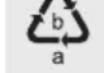
packaging materials for waste separation, which are marked with abbreviations [a] and numbers [b] with following meaning: 1–7: plastics/20–22: paper and fibreboard/80–98: composite materials.
Product:

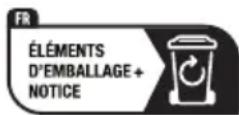

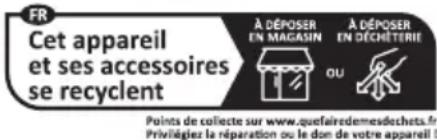
The product incl. accessories and packaging materials are recyclable and are subject to extended producer responsibility.
Dispose them separately, following the illustrated Info-tri [sorting information], for better waste treatment.
The Triman logo is valid in France only.

Contact your local refuse disposal authority for more details of how to dispose of your worn-out product.
To help
protect the environment,
please dispose of the product
properly when it has reached the
end of its useful life and not in the
household waste. Information on
collection points and their opening
hours can be obtained from your
local authority.

Warranty
The product has been manufactured to strict quality guidelines and meticulously examined before delivery. In the event of material or manufacturing defects you have legal rights against the retailer of this product. Your legal rights are not limited in any way by our warranty detailed below.
The warranty for this product is 3 years from the date of purchase. The warranty period begins on the date of purchase. Keep the original sales receipt in a safe location as this document is required as proof of purchase.
Any damage or defects already present at the time of purchase must be reported without delay after unpacking the product.
Should the product show any fault in materials or manufacture within 3 years from the date of purchase, we will repair or replace it – at our choice – free of charge to you. The warranty period is not extended as a result of a claim being granted. This also applies to replaced and repaired parts.
This warranty becomes void if the product has been damaged, or used or maintained improperly.
The warranty covers material or manufacturing defects. This warranty does not cover product parts subject to normal wear and tear, thus considered consumables (e.g. batteries, rechargeable batteries, tubes, cartridges), nor damage to fragile parts, e.g. switches or glass parts.
● Warranty claim procedure
To ensure quick processing of your claim, observe the following instructions:
Make sure to have the original sales receipt and the item number (IAN 478925_2410) available as proof of purchase.
You can find the item number on the rating plate, an engraving on the product, on the front page of the instruction manual (bottom left), or as a sticker on the rear or bottom of the product.
If functional or other defects occur, contact the service department listed below either by telephone or by e-mail.
Once the product has been recorded as defective you can return it free of charge to the service address that will be provided to you. Ensure to enclose the proof of purchase (sales receipt) and a short, written description outlining the details of the defect and when it occurred.
Service
GB Service Great Britain
Tel.: 0800 0569216
E-Mail: owim@lidl.co.uk
IE Service Ireland
Tel.: 1800 200736
E-Mail: owim@lidl.ie
CE