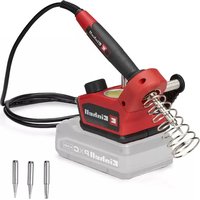
TE-SI 18/480 Li E - Welding machine EINHELL - Free user manual and instructions
Find the device manual for free TE-SI 18/480 Li E EINHELL in PDF.


| Product type | Cordless soldering station |
| Brand | Einhell |
| Model | TE-SI 18/480 Li E |
| Power supply | 18 V d.c. (lithium battery pack) |
| Power consumption | 60 W |
| Heating time | 60 seconds |
| Min. temperature | 205 °C |
| Max. temperature | 480 °C |
| Weight | 0.37 kg |
| Display | Digital display and status LED |
| Auto-off | Yes, after 30 minutes of inactivity |
| Contact protection | Yes, on the soldering iron stand |
| Included accessories | Soldering station, 2 soldering tips, 1 flat tip, solder, cleaning sponge, instruction manual, safety instructions |
| Wear parts | Battery, soldering tips, cleaning sponge |
| Consumables | Solder |
| Cleaning | Damp cloth with a little soap, avoid abrasive products |
| Storage | Dark, dry, frost-free place, temperature 5-30 °C |
| Warranty | Refer to warranty table in the instruction manual |
Frequently Asked Questions - TE-SI 18/480 Li E EINHELL
User questions about TE-SI 18/480 Li E EINHELL
0 question about this device. Answer the ones you know or ask your own.
Ask a new question about this device
Download the instructions for your Welding machine in PDF format for free! Find your manual TE-SI 18/480 Li E - EINHELL and take your electronic device back in hand. On this page are published all the documents necessary for the use of your device. TE-SI 18/480 Li E by EINHELL.
USER MANUAL TE-SI 18/480 Li E EINHELL
natural_image
Close-up of a mechanical tool with a spring and handle, showing a close-up view of the component (no text or symbols visible)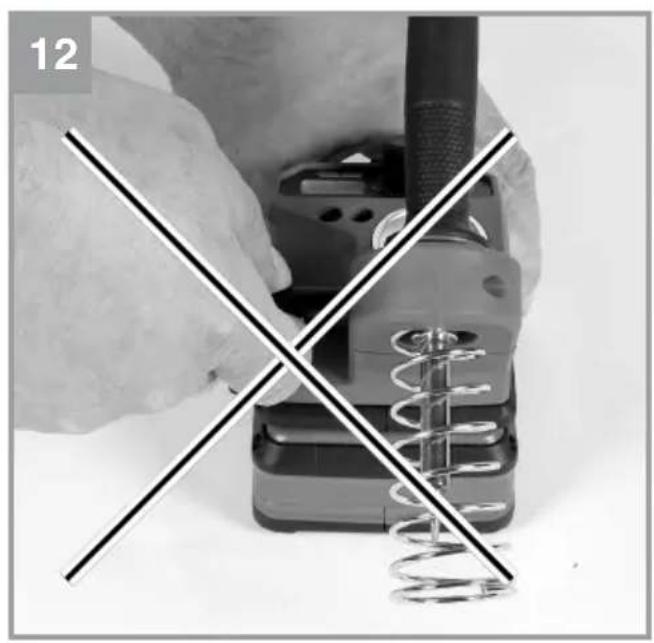
natural_image
Close-up of hands using a soldering iron and spring tool, no text or symbols visible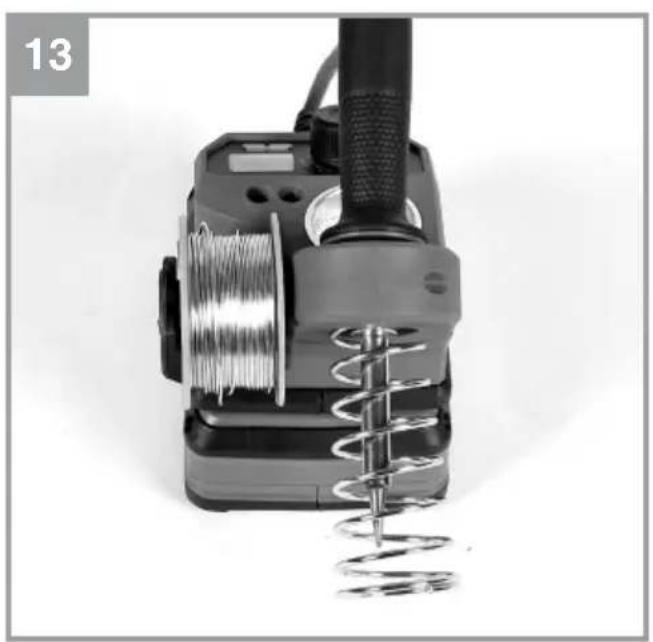
natural_image
Close-up of a mechanical power tool with coiled spring and wire coil (no text or symbols visible)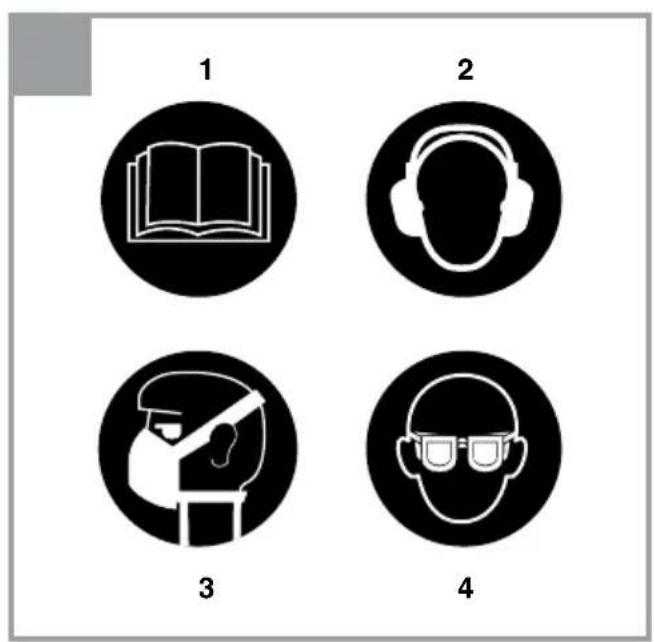
Inhaltsverzeichnis
- Safety regulations
- Layout and items supplied
- Proper use
- Technical data
- Before starting the equipment
- Operation
- Cleaning, maintenance and ordering of spare parts
- Disposal and recycling
- Storage
- Charger indicator
Danger!
When using the equipment, a few safety precautions must be observed to avoid injuries and damage. Please read the complete operating instructions and safety regulations with due care. Keep this manual in a safe place, so that the information is available at all times. If you give the equipment to any other person, hand over these operating instructions and safety regulations as well. We cannot accept any liability for damage or accidents which arise due to a failure to follow these instructions and the safety instructions.
Explanation of the symbols used (see Fig. 14)
- Danger! - Read the operating instructions to reduce the risk of injury.
- Caution! Wear ear-muffs. The impact of noise can cause damage to hearing.
- Caution! Wear a breathing mask. Dust which is injurious to health can be generated when working on wood and other materials. Never use the device to work on any materials containing asbestos!
- Caution! Wear safety goggles. Sparks generated during working or splinters, chips and dust emitted by the device can cause loss of sight.
1. Safety regulations
The corresponding safety information can be found in the enclosed booklet.
WARNING!
Read all safety warnings, instructions, illustrations and specifications provided with this power tool. Failure to follow all instructions listed below may result in electric shock, fire and/or serious injury.
Save all warnings and instructions for future reference.
2. Layout and items supplied
2.1 Layout (Fig. 1+2)
- On/Off switch
- Display
- LED indicator
- Soldering iron
- Soldering tip
- Soldering station
- Temperature scale
- Soldering iron holder
9. Tin solder holder
- Soldering tip holders
- Cleaning sponge holder
- Chisel soldering tip
- Cleaning sponge
- Tin solder
- Contact guard
2.2 Items supplied
Please check that the article is complete as specified in the scope of delivery. If parts are missing, please contact our service center or the sales outlet where you made your purchase at the latest within 5 working days after purchasing the product and upon presentation of a valid bill of purchase. Also, refer to the warranty table in the service information at the end of the operating instructions.
- Open the packaging and take out the equipment with care.
- Remove the packaging material and any packaging and/or transportation braces (if available).
- Check to see if all items are supplied.
- Inspect the equipment and accessories for transport damage.
- If possible, please keep the packaging until the end of the guarantee period.
Danger!
The equipment and packaging material are not toys. Do not let children play with plastic bags, foils or small parts. There is a danger of swallowing or suffocating!
• Cordless soldering station
• 2x soldering tips
• 1x chisel soldering tip
1x tin solder
• Original operating instructions
- Safetyinstructions
3. Proper use
The cordless soldering iron is designed for soldering electrical connections such as circuit boards, resistors and capacitors, for example, and for the production and repair of jewelry, glasswork and other handicraft items.
The equipment is to be used only for its prescribed purpose. Any other use is deemed to be a case of misuse. The user / operator and not the
manufacturer will be liable for any damage or injuries of any kind caused as a result of this.
Please note that our equipment has not been designed for use in commercial, trade or industrial applications. Our warranty will be voided if the machine is used in commercial, trade or industrial businesses or for equivalent purposes.
4. Technical data
Power supply ....18 V DC
Power rating 60 W
Heating time 60 s
Min./max. temperature 205°C/480°C
Weight 0.37 kg
Keep the noise emissions and vibrations to a minimum.
- Only use appliances which are in perfect working order.
• Service and clean the appliance regularly.
• Adapt your working style to suit the appliance.
• Do not overload the appliance. - Have the appliance serviced whenever necessary.
- Switch the appliance off when it is not in use.
Caution!
Residual risks
Even if you use this electric power tool in accordance with instructions, certain residual risks cannot be rules out. The following hazards may arise in connection with the equipment's construction and layout:
- Lung damage if no suitable protective dust mask is used.
- Damage to hearing if no suitable ear protection is used.
- Health damage caused by hand-arm vibrations if the equipment is used over a prolonged period or is not properly guided and maintained.
5. Before starting the equipment
5.1 Charging the Li battery pack (Fig. 3-4)
- Remove the battery pack (a) from the handle, pressing the pushlock button (b) downwards as you do so.
- Check that your mains voltage is the same as that marked on the rating plate. Insert the power plug of the charger (c) into the socket outlet. The green LED will begin to blink.
- Push the battery pack onto the battery charger.
In section 10 (Charger indicator) you will find a table with an explanation of the LED indicator on the charger.
If the battery pack fails to charge, check for the following:
• Is there voltage at the power socket?
- Is there good contact at the charger's charging contacts?
If the battery pack still fails to charge, please send
• the charger and charging adapter
• and the battery pack
to our customer service center.
To ensure that items are properly packaged and delivered when you send them to us, please contact our customer service or the point of sale at which the equipment was purchased.
When shipping or disposing of batteries and cordless tools, always ensure that they are packed individually in plastic bags to prevent short circuits and fires.
To ensure that the battery pack provides long service, you should take care to recharge it promptly. You must recharge the battery pack when you notice that the performance of the device drops. Never allow the battery pack to become fully discharged. This will cause it to develop a defect.
5.2 Battery capacity indicator (Fig. 5/Item e)
Press the button for the battery capacity indicator (d). The battery capacity indicator (e) shows the charge status of the battery using 3 LEDs.
All 3 LEDs are lit:
The battery is fully charged.
2 or 1 LED(s) are lit:
The battery has an adequate remaining charge.
1 LED flashes:
The battery is empty, recharge the battery.
All LEDs blink:
The battery temperature is too low. Remove the battery from the equipment, keep it at room temperature for one day. If the fault reoccurs, this means that the rechargeable battery has undergone exhaustive discharge and is defective. Remove the battery from the equipment. Never use or charge a defective battery.
5.3 Display (Fig. 6/Item 2)
The temperature of the soldering iron is shown on the display.
The current temperature is always indicated, which means that the temperature value constantly fluctuates slightly during use. This is completely normal.
5.4 LED indicator (Fig. 6/Item 3)
The LED indicator reflects the operating status of the cordless soldering iron.
Off:
The cordless soldering iron is switched off.
Flashing red:
The cordless soldering iron has been switched off and is cooling down.
The LED indicator (3) flashes red until the cordless soldering iron is completely cool and is safe to touch and to be put away.
Lit red:
The cordless soldering iron is switched on and is heating up to the set temperature.
Flashing green:
The cordless soldering iron has reached the set temperature and is ready for use.
5.5 Changing the soldering tip (Fig. 7-9/Item 5)
To change the soldering tip, remove the union nut (f) along with the tip holder (g). Pull the soldering tip (5) forward to remove it and place the new soldering tip (5) onto the heating element.
Next, put the tip holder and union nut back on and tighten them by hand.
5.6 Soldering iron holder (Fig. 10/Item 8)
When the soldering iron (4) is not in use, it can be left safely in the soldering iron holder (8).
Simply insert the soldering iron into the soldering iron holder (8) as shown in Fig. 10. The contact guard (15) prevents the hot soldering tip (5) from accidentally coming into contact with your fingers or other objects.
5.7 Tin solder holder (Fig. 11-13/Item 9)
A reel of tin solder with a width of up to 30 mm can be fitted on the tin solder holder (9).
To do this, pull the tin solder holder (9) in the direction of the arrow shown in Fig. 11.
Do not pull on the top part of the tin solder holder, as this could bend it. Instead, pull on the lower part, where the direction arrow is printed.
Fit the tin solder reel and then reassemble the tin solder holder (9) in reverse order.
5.8 Soldering tip holders (Fig. 3/Item 10)
You can store soldering tips in the holder when they are not in use.
Simply insert them into the openings provided.
Do not exert excessive pressure, or the soldering tips could become lodged in the holder, perhaps making it impossible to remove them without damaging the tip! Never place hot soldering tips in the holders!
5.9 Cleaning sponge holder (Fig. 3/Item 11)
A cleaning sponge (13) or a wire tip cleaner can be placed in the cleaning sponge holder (11).
Moisten the cleaning sponge (13) with abundant water before use.
If the cleaning sponge (13) has not been moistened, it will burn and must be replaced!
6. Operation
6.1 On/Off switch (Fig. 6/Item 1)
To switch on the cordless soldering iron, twist the On/Off switch (1) clockwise. Use the temperature scale (7) provided to adjust it.
The cordless soldering iron begins to heat up immediately after it is switched on. A continuous red light appears on the LED indicator (3) during this time.
When the set temperature is reached, the LED indicator (3) shines steadily green and the temperature is shown on the display (2). The cordless soldering iron is now ready for use.
To switch off the cordless soldering iron, twist the On/Off switch (1) to the "OFF" position. The LED indicator (3) will flash red while it is cooling down.
If no temperature is set on the cordless soldering iron for more than 30 min, it will switch off automatically. When it does so, the LED indicator (3) will flash red and the display (2) will switch off.
To reactivate the tool, set the On/Off switch (1) to the "OFF" position and then adjust it to the desired temperature again.
7. Cleaning, maintenance and ordering of spare parts
Hazard!
Always pull out the battery pack before starting any cleaning work.
7.1 Cleaning
- Keep all safety devices, air vents and the motor housing free of dirt and dust as far as possible. Wipe the equipment with a clean cloth or blow it with compressed air at low pressure.
We recommend that you clean the device immediately each time you have finished using it. - Clean the equipment regularly with a moist cloth and some soft soap. Do not use cleaning agents or solvents; these could attack the plastic parts of the equipment. Ensure that no water can seep into the device. The ingress of water into an electric tool increases the risk of an electric shock.
7.2 Maintenance
There are no parts inside the equipment which require additional maintenance.
7.3 Ordering replacement parts:
Please quote the following data when ordering replacement parts:
• Type of machine
• Article number of the machine
• Identification number of the machine
• Replacement part number of the part required
For our latest prices and information please go to www.Einhell-Service.com
8. Disposal and recycling
The equipment is supplied in packaging to prevent it from being damaged in transit. The raw materials in this packaging can be reused or recycled. The equipment and its accessories are made of various types of material, such as metal and plastic. Never place defective equipment in your household refuse. The equipment should be taken to a suitable collection center for proper disposal. If you do not know the whereabouts of such a collection point, you should ask in your local council offices.
9. Storage
Store the equipment and accessories in a dark and dry place at above freezing temperature. The ideal storage temperature is between 5 and 30 °C. Store the electric tool in its original packaging.
10. Charger indicator
| Indicator status Explanations and actions | |
| Red LED Green LED | |
| Off Flashing Ready for use | The charger is connected to the mains and is ready for use; there is no battery pack in the charger |
| On Off Charging | The charger is charging the battery pack in quick charge mode. The charging times are shown directly on the charger.Important! The actual charging times may vary slightly from the stated charging times depending on the existing battery charge. |
| Off On The battery is charged and ready for use. (READY TO GO) | The unit then changes over to gentle charging mode until the battery is fully charged.To do this, leave the rechargeable battery on the charger for approx. 15 minutes longer.Action:Take the battery pack out of the charger. Disconnect the charger from the mains supply. |
| Flashing Off Adapted charging | The charger is in gentle charging mode.For safety reasons the charging is performed less quickly and takes more time. The reasons can be:- The rechargeable battery has not been used for a very long time.- The battery temperature is outside the ideal range.Action:Wait for the charging to be completed; you can still continue to charge the battery pack. |
| Flashing Flashing Fault | Charging is no longer possible. The battery pack is defective.Action:Never charge a defective battery pack.Take the battery pack out of the charger. |
| On On Temperature fault | The battery pack is too hot (e.g. due to direct sunshine) or too cold (below 0°C).Action:Remove the battery pack and keep it at room temperature (approx. 20°C) for one day . |
Disposal
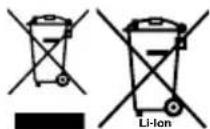
Power tools, rechargeable batteries, accessories and packaging should be sorted for environmental-friendly recycling.
Do not dispose of power tools and batteries/rechargeable batteries into household waste!
Only for EU countries:
According to the Directive 2012/19/EU on waste electrical and electronic equipment and its transposition into national law, power tools that are no longer usable, and, according to the Directive 2006/66/EC, defective or drained batteries must be collected separately and disposed of in an environmentally correct manner.
If disposed incorrectly, waste electrical and electronic equipment may have harmful effects on the environment and human health, due to the potential presence of hazardous substances.
Only for United Kingdom:
According to The Waste Electrical and Electronic Equipment Regulations 2013 (SI 2013/3113) (as amended) and the Waste Batteries and Accumulators Regulations 2009 (SI 2009/890) (as amended), products that are no longer usable must be collected separately and disposed of in an environmentally friendly manner.
The reprinting or reproduction by any other means, in whole or in part, of documentation and papers accompanying products is permitted only with the express consent of the Einhell Germany AG.
Subject to technical changes
Service information
We have competent service partners in all countries named on the guarantee certificate whose contact details can also be found on the guarantee certificate. These partners will help you with all service requests such as repairs, spare and wearing part orders or the purchase of consumables.
Please note that the following parts of this product are subject to normal or natural wear and that the following parts are therefore also required for use as consumables.
| Category Example | |
| Wear parts* Battery, soldering tips, cleaning sponge | |
| Consumables* Tin solder | |
| Missing parts |
* Not necessarily included in the scope of delivery!
In the effect of defects or faults, please register the problem on the internet at www.Einhell-Service.com. Please ensure that you provide a precise description of the problem and answer the following questions in all cases:
• Did the equipment work at all or was it defective from the beginning?
• Did you notice anything (symptom or defect) prior to the failure?
• What malfunction does the equipment have in your opinion (main symptom)?
Describe this malfunction.
Sommaire
Vreme zagrejavanja ....60s
Min/.Maks. temperatura 205°C/480°C
Težina 0,37 kg
Pingevarustus 18 V DC
Võimsus 60 W
Kuumenemisaeg 60s
Min/Max temperatuur 205 °C / 480 °C
Kaal 0,37 kg
EN Declaration of conformity: We declare conformity in accordance with the EU directive and standards for article
Noise: measured L_WA = dB(A) ; guaranteed L_WA = dB(A)
P = kW; L/∅ = cm
Notified Body:
□ 2012/46/EU_(EU)2016/1628
Emission No.:
Standard references: EN 60335-1; EN 60335-2-45; EN 55014-1; EN 55014-2
Nigel Yang/Product-Management
First CE: 2025 Archive-File/Record: NAPR030717
Art.-No.: 45.204.00 I.-No.: 21014
Subject to change without notice
Documents registrar: Christoph Egginger
Wiesenweg 22, D-94405 Landau/Isar
Declaration of conformity
We, Einhell UK Ltd
Champions Business Park, First Floor Unit 10, Arrowe Brook Rd, Upton, Wirral CH49 0AB, United Kingdom
declare the conformity to UK standards and legislation was assessed for:
Cordless Soldering Iron TE-SI 18/480 Li E (Einhell)
UK legislation
□ Simple Pressure Vessels (Safety) Regulation
□ Electrical Equipment (Safety) Regulation
□ Radio Equipment Regulation
☐ Personal Protective Equipment Regulation
☐ The Ecodesign for Energy-Related Products and Energy Information Regulation
X The Restriction of the Use of Certain Hazardous Substances in Electrical and Electronic Equipment Regulation
☐ Noise Emission in the Environment by Equipment for use Outdoors Regulation
☒ Electromagnetic Compatibility Regulation
□ Measuring Instruments Regulation
☐ Pressure Equipment (Safety) Regulation
□ Annex V
Annex VI
Noise: measured L_WA = dB(A) ; guaranteed L_WA = dB(A)
P = kW; L/∅ = cm
UK Approved Body:
□ Supply of Machinery (Safety) Regulation
□ Annex IV
UK Approved Body:
UKTE Certificate No.:
Standards: BS EN 60335-1; BS EN 60335-2-45; BS EN 55014-1; BS EN 55014-2
Wirral, 2025.05.26
Archive-File/Record: NAPR030717
Article Number: 45.204.00 I.-No.: 21014
Subject to change without notice Wiesenweg 22, 94405 Landau/Isar, Germany
Documents registrar: Christoph Egginger
- Inhaltsverzeichnis
- Danger!
- Explanation of the symbols used (see Fig. 14)
- Safety regulations
- WARNING!
- Layout and items supplied
- Layout (Fig. 1+2)
- Tin solder holder
- Items supplied
- Proper use
- Technical data
- Keep the noise emissions and vibrations to a minimum.
- Caution!
- Residual risks
- Before starting the equipment
- Charging the Li battery pack (Fig. 3-4)
- Battery capacity indicator (Fig. 5/Item e)
- All 3 LEDs are lit:
- or 1 LED(s) are lit:
- LED flashes:
- All LEDs blink:
- Display (Fig. 6/Item 2)
- LED indicator (Fig. 6/Item 3)
- Off:
- Flashing red:
- Lit red:
- Flashing green:
- Changing the soldering tip (Fig. 7-9/Item 5)
- Soldering iron holder (Fig. 10/Item 8)
- Tin solder holder (Fig. 11-13/Item 9)
- Soldering tip holders (Fig. 3/Item 10)
- Cleaning sponge holder (Fig. 3/Item 11)
- Operation
- On/Off switch (Fig. 6/Item 1)
- Cleaning, maintenance and ordering of spare parts
- Hazard!
- Cleaning
- Maintenance
- Ordering replacement parts:
- Disposal and recycling
- Storage
- Charger indicator
- Disposal
- Only for EU countries:
- Only for United Kingdom:
- Service information
- Sommaire
- Declaration of conformity
- Cordless Soldering Iron TE-SI 18/480 Li E (Einhell)
- UK legislation
Brand : EINHELL
Model : TE-SI 18/480 Li E
Category : Welding machine