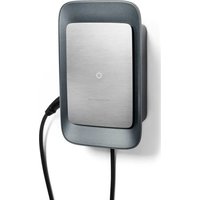
Wallbox - Car charger PORSCHE - Free user manual and instructions
Find the device manual for free Wallbox PORSCHE in PDF.


| Product type | Wallbox for electric vehicle |
| Brand | Porsche |
| Model | Wallbox (PWB22E212 / PWB22E213 / PWB221E223) |
| Dimensions (H x W x D) | 591.7 × 369.6 × 146.0 mm |
| Weight (without cable) | 6.5 kg |
| Weight (with cable) | 9.8 kg |
| Charging cable length | 7 m (Type 2) |
| Power supply | 220-240 / 380-415 V, 50/60 Hz, three-phase/single-phase |
| Nominal current | 32 A |
| Max charging power | 22 kW (Mode 3) |
| Charging connector | Type 2 (EN 62196-2, ≤ 480 V) |
| Protection rating | IP55 (weather-resistant) |
| Impact resistance | IK10 |
| Operating temperature | -25 °C to +45 °C |
| Storage temperature | -40 °C to +80 °C |
| Max altitude | 2,000 m above sea level |
| Main functions | Automatic charging, control via My Porsche app, RFID authentication, Plug & Charge, energy saving mode |
| Maintenance and cleaning | Clean with a soft dry or slightly damp cloth; no harsh detergents |
| Safety | Overvoltage protection (category III), integrated residual current protection (IΔN 6 mA DC), do not use adapters or extension cables |
| Installation | Wall mounting (indoor or outdoor sheltered from weather) by a qualified electrician |
| Periodic inspection | Daily visual check; annual inspection by a qualified electrician |
| Software update | Automatic or manual via web app or My Porsche |
| Warranty and repairability | Contact a Porsche dealer for parts and repairs; follow WEEE disposal instructions |
| General information | Integrated energy meter (MID compliant); communication LTE/Ethernet/WiFi; compliance with EU 2014/53 and 2014/35 |
Frequently Asked Questions - Wallbox PORSCHE
User questions about Wallbox PORSCHE
0 question about this device. Answer the ones you know or ask your own.
Ask a new question about this device
Download the instructions for your Car charger in PDF format for free! Find your manual Wallbox - PORSCHE and take your electronic device back in hand. On this page are published all the documents necessary for the use of your device. Wallbox by PORSCHE.
USER MANUAL Wallbox PORSCHE
WKDPW800A992506/2024
Parache, the Parache Coast, 911, POSE, FDS, FDC
PS2, PTK Equipment and other hand names are
The following table provides the information in the United States:
Reprinting, even of excerpts, or duplication
any type is only processable with the which
A. 1980, 2013; 1984, 2013
Dr. Ing. h.e. F. Pausche AB
Forshopplatz 1
70436 Stuttgart
German
www.pdx:he123m
Driver's Manual
Keep that instruct one and hand them over to the new
work in the event that you sell your charge.
Do you have any questions, suggestions or ideas
in connection with your vehicle or with these
White: 3.45
Please write to 18c
© Dr. Inc. Inc. F. Porsche AG
Customer Relations
Broschenicz 1
72435
“(1973)”
DE Porsche Wallbox
Gut zu wissen – Die Anleitung....2
Porsche Wallbox
EN Good to know – Driver's Manual.... 27
FR Wallbox Porsche
Bon à savoir – Manuel d'utilisation.... 52
Porsche Wallbox
ES Bueno es saberlo – Manual de instrucciones 80
IT Wallbox Porsche
Buono a sapersi – Istruzioni.... 106
PT Porsche Wallbox
É bom saber – Manual de instruções....132
Porsche Wallbox
DA Værd at vide – instruktionsbog til udstyret 158
NL Porsche Wallbox
Goed om te weten - Het instructieboekje 183
NB Porsche Wallbox
Bra å vite – håndboken.... 210
SV Porsche Wallbox
Bra att veta – bruksanvisning.... 235
Porsche Wallbox
Hyvä tietää – Ohjeet. 260
Porsche Wallbox
EL Χρήσιμες πληροφορίες – Εγχειρίδιο οδηγού 285
CS Porsche Wallbox
Užitečné informace – návod. 314
Porsche Wallbox
Dobro je znati – Upute za uporabu..... 339
Porsche Wallbox
Dobrze wiedzieć – Instrukcja....364
SL Poinilna postaja Porsche Wallbox Dobro je vedeti - navodila.... 392
| Local Standard | Initialpassword Heimanwen-der |
| User Password |
| Local Service | Initialpassword Kundendienst |
| User Password |
natural_image
Close-up of a black circular electrical connector with multiple pins (no visible text or symbols)DE | Einrichten
A
Typ 2 Fahrzeugkabel

https://www.porsche.com/international/reach-regulation/
Technische Daten
Elektrische Daten

Information
Calcot, Reading, Berkshire
RG31 7SE
United Kingdom
About this Driver's Manual
Driver's Manual
Read and observe the information in the present instructions before using the device for the first time. The information in the register sections of the present instructions differs due to country-specific requirements. To ensure that you read the register section that applies to your country, compare the article number of the charger specified in the section "Technical data" with the article number on the nameplate of your charger.
Additional instructions
Please refer to the installation instructions for information on the electrical installation of the Porsche charger.
Software update
The Porsche charging hardware can be updated with software updates. Updates to the instructions in the digital channels ensure that the latest description of your device is available at all times.
When the instructions have been updated, the printed content may differ from the digital content.
Equipment
Because our vehicles undergo continuous development, equipment and specifications may deviate from what is illustrated and described by Porsche in this driver's manual. Items of equipment are not always in accordance with the standard scope of delivery or country-specific vehicle equipment. For more information on retrofit equipment, please contact your Porsche partner.
Due to varying legal requirements in individual countries, the equipment may differ from the description. If your device is equipped with features not described herein, your Porsche Partner will inform you about the correct operation and care.
Warning notices and symbols
Various types of Warning notices and symbols are used in this Driver's Manual.

DANGER
Serious injury or death
Failure to observe Warning notices in the "Danger" category will result in serious injury or death.

WARNING
Possible serious injury or death
Failure to observe Warning notices in the "Warning" category can result in serious injury or death.

CAUTION
Possible moderate or minor injury
Failure to observe Warning notices in the "Caution" category can result in moderate or minor injuries.
NOTICE
Possible vehicle damage
Failure to observe warnings in the "Notice" category may result in damage to the charging equipment.

Information
Additional information is indicated by "Information".

Environmental information
√ Conditions that must be met in order to use a function.
▶ Instructions that you must follow.
-
If an instruction comprises several steps, these are numbered.
-
Instructions on the display that you must follow.
▶ Notice on where you can find further important information on a topic.
Disclaimer
QR code is a registered trademark of DENSO WAVE.
Further Information
You will find further information about your vehicle in the digital channels (country-dependent).
App


Download on the App Store

GET IT ON Google Play
Scan the QR code to download the My Porsche App in the relevant App Store. You will find the complete Driver's Manual in the My Porsche App.
After downloading the Driver's Manual, it can also be opened offline.
Web
You can also access the full Driver's Manual at the following web addresses:

Fig. 6: QR code manual.porsche.com
- manual.porsche.com
- my.porsche.com
Table of contents | EN
English
To the Driver's Manual
Key to pictograms.... 30
Data Privacy Information.... 30
Security
General safety instructions.... 30
Intended use.... 31
Scope of delivery
Access data....32
Overview
Device overview.... 33
Control panel....33
Displays and controls.... 34
Set up
Information on vehicle charging cables and
connectors....34
Initial operation and configuration....35
Charge
Notes on charging.... 39
Starting, pausing and stopping charging.....40
Open the web app....42
Log in / log out of the web app.... 42
Cleaning and maintenance.... 43
Decommissioning.... 45
Disposal....45
Technical Data
Identification plate. 48
Production information.... 50
Importers....50
Index....51
EN | Security
To the Driver's Manual Key to pictograms
Depending on the country, the charger may show different pictograms.

Do not use the Wallbox at altitudes above 6562 ft above sea level.

Dispose of the Wallbox in compliance with all applicable disposal regulations.

Risk of electric shock due to improper use.

Observe the associated operating instructions, in particular the warning notes and safety instructions.

The surface of the Wallbox can get very hot.

PROTECTIVE EARTH CONNECTION: Before connecting other devices to the Wallbox, ensure that it is properly earthed.

Indicates the type-2 plug with a voltage range of ≤ 480 VAC.
1P/3P+N+PE Conductor, neutral, earth
Data Privacy Information
To ensure that your Porsche charging equipment can communicate and is up to date, the charging equipment will transmit the following device-specific data in encrypted form to Porsche at regular intervals, where it is processed: Device ID, brand, generation, type of equipment and software version.
If you wish to use additional Porsche Connect services for the charging equipment, you must connect your charging equipment with your My Porsche account, which is offered by the respective Porsche Connect sales company in selected markets. The following personal and other device-specific data is transmitted to Porsche and processed there to enable us to provide the Porsche Connect services to you: Customer identification, statistics, charge history, status, connection status and time stamp of the last communication. For further information about our terms and conditions and our data privacy policy please go to www.porsche.com.
The regular transmission of data from your charging equipment may lead to additional charges from your Internet service provider. Your data stored by Porsche can be permanently deleted via My Porsche. Due to technical and legal restrictions, some of the Porsche Connect services on the Porsche charging equipment are not available in all countries.
Security
General safety instructions

DANGER
Electric shock, fire
Incorrect handling of the plug contacts may result in electric shock or fire.
- Do not touch the contacts on the vehicle charge port or on the Wallbox.
- Do not insert objects into the vehicle charge port or into the Wallbox.
▶ Protect electrical sockets and plug connections from humidity, water and any other liquids.
▶ Protect electrical sockets and plug connections from dirt, in particular conductive powders such as metal dust.

DANGER
Electric shock, fire
The use of a damaged or faulty Wallbox as well as improper electrical installation and use of the Wallbox or failure to observe the safety instructions may cause a short circuit, electric shock, explosion, fire or burn.
- Protect from direct weather impact or install in a weather-protected location.
- Keep the Wallbox away from liquids.
▶ Observe the ambient and storage conditions.
▶ Operate the Wallbox in a fixed location only.
▶ Do not use extension cables, cable reels, multi-socket outlets or travel adapters during operation.
▶ Do not use adapters.
▶ Do not place any objects on the Wallbox. - Do not drive over or twist the vehicle cable.
- Do not put stickers on the Wallbox or obstruct the Wallbox with objects.
NOTICE
- Read the instructions carefully and completely and observe and follow the warning notes.
- Observe all country-specific restrictions and regulations.
- Keep the driver's manual in a location that is easily accessible to the operator/user.
- Do not remove, manipulate or bypass the manufacturer's seal or lock.
Intended use
The Porsche Wallbox is a network-enabled Wallbox. It is used to charge electric vehicles that comply with the generally applicable standards and guidelines for electric vehicles.
It is suitable for use in a fixed location indoors or outdoors and in private and semi-public areas for operation within the specified electrical and ambient specifications.
The Wallbox may only be used as a combination of the power cable, the control unit and the vehicle cable.
No other use is intended.
Operation of the Wallbox other than in a fixed location is prohibited.
The following activities are not permitted:
- Any changes to the Wallbox, except as described in this manual
-Use of additional auxiliaries such as adapters, multi-socket outlets or cable drums
EN | Scope of delivery
Scope of delivery
Check the scope of delivery
- Check whether all components are present and undamaged.
- Contact a Porsche partner in case of any damaged or missing components.
The scope of delivery includes:
Porsche Wallbox, composed of:
- Housing
- Housing cover
-Design frame
-Design front
-Type-2 vehicle cable (not for Porsche Wallbox with type-2 charging socket)
Mounting plate
Drilling template
Folder, including the operating and installation instructions, the letter with your access data, an installation services flyer
Installation hardware (see installation instructions)
Access data
With your Wallbox you will receive a letter with your access data, containing all the data Web Application required for your Wallbox.
Keep the letter containing access data in a safe place.
i Information
The access data valid at the time of delivery, such as the preset PUK and the initial password, can be requested from the Porsche partner in case they are lost.
- Have the serial number of the Wallbox ready
The letter with the access data contains the following data:
Description Meaning
| Serial Number Wallbox serial number | |
| Hotspot Name (SSID) | Hotspot name of the Wallbox |
| Hotspot Password | Password for the Wallbox hotspot |
| Local Standard User Password | Initial password for home userThe password is used to log in to the Web Application.If you lose the initial password:▸ Contact your Porsche partnerIf you lose your self-assigned password:▸ Reset the Wallbox to factory settings to reactivate the initial password |
| Local Service User Password | Customer Service initial password |
Description Meaning
| Local Wallbox URL | URL to access the web app |
PUK Personal unlocking key
Overview
Device overview
Porsche Wallbox
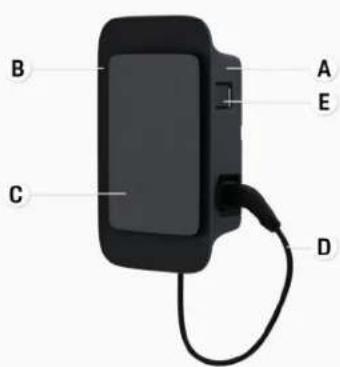
Fig. 7: Porsche Wallbox control unit
A Housing
B Design frame
C Design front
D Vehicle cable
E MID-compliant energy meter
Porsche Wallbox (calibration law)
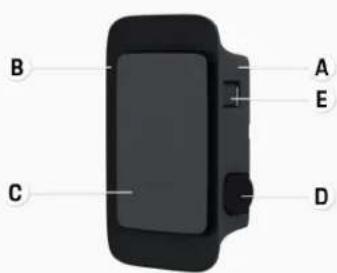
Fig. 8: Porsche Wallbox control unit [calibration law]
A Housing
B Design frame
C Design front
D Type-2 charging socket
E Energy meter
(compliant with the calibration law for Germany, Denmark, Belgium)
Control panel
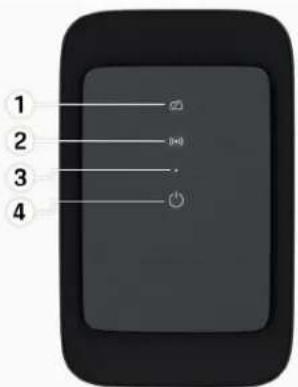
Fig. 9: Design front of the control unit
1 Backend indicator light
2 Authorising indicator light
3 Brightness sensor
4 Power switch
EN | Set up
Displays and controls
Indicator lights
| Display Meaning | |
| White | Wallbox is switched on and ready for operation |
| Flashing white | Connecting |
| Green | Charging complete |
| Flashing green | Charging vehicle |
| Flashing blue | Charging paused (ISO) |
| Orange | Restart Wallbox |
| Flashing orange | Starting Wallbox |
| Red | Charging error |
| White | Authentication required |
| Green (2 - 4 secs) | Authentication successful |
| (•) | Authentication failed |
Display Meaning
| Flashing red (2 - 4 secs) | |
| (●) Red | Module error |
| ☒ White | Back-end connection failed |
| ☒ (●) Flashing blue | Wallbox is reset to factory settings |
Set up
Information on vehicle charging cables and connectors
Vehicle charge port
For information on connecting and disconnecting the vehicle cable from the vehicle charge port and for the charging and connection status at the vehicle charge port:
Refer to the Driver's Manual.
! DANGER
Electric shock, fire
Risk of serious or fatal injury caused by fire or electric shock.
▶ Always observe the specified sequence for the charging process.
▶ Do not disconnect the vehicle cable from the vehicle charge port while charging.
▶ Complete charging before disconnecting the vehicle cable from the vehicle charge port.
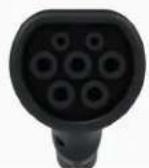
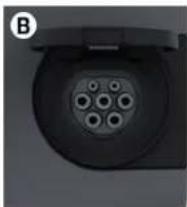
Depending on the product variant, the Porsche Wallbox is equipped either with a vehicle charging cable or with a charging socket.
A
natural_image
Close-up of a black circular electronic device with multiple circular ports (no visible text or symbols)A
Type-2 vehicle cable

B Applies to: Porsche Wallbox with charging socket
Type-2 charging socket

Type of power supply: AC
Standard: EN 62196-2
Design: Type 2
Voltage range: ≤ 480 V RMS
Initial operation and configuration Initial operation
Testing during initial operation
NOTICE
During initial operation, the correct installation and electrical safety of the Wallbox must be checked by an electrician (e.g. in accordance with DIN VDE 0100 for Germany).
See the installation instructions for further information.
Initial operation using the My Porsche App
√ AC Wallbox installed and ready for operation
√ Ethernet cable connected to the AC Wallbox
-or-
LTE network available
√ Letter with the access data is in hand
√ My Porsche App is installed and logged in with Porsche ID
- Press to switch on the Wallbox.
→ ⏻ turns white when the Wallbox is ready for operation.
- Use your mobile device to scan the QR code on the letter with your access data.
The charging equipment selection is opened in the app.
- Select Add charging equipment.
→ The QR code scanner is opened.
- Rescan QR code.
The login window Add charging equipment is opened in the app.
- Enter the serial number and the PUK from the letter with your access data.
→ The window Select country opens.
- Select the country where the Porsche Wallbox is installed.
The Porsche Wallbox is logged in and can be operated via the My Porsche App.

Information
When the Wallbox is put into operation for the first time, it is initially in a mode requiring no access authorisation (Free Charging). The access mode is set to Free.
Open the device overview in the My Porsche App
√ My Porsche App is installed and logged in with Porsche ID
√ The Wallbox is put into operation via the My Porsche App
- Tap on Account
- Tap on Charging equipment
An overview of the Wallbox with all device information is displayed.
Log in to the Wallbox
Set access mode
√ Device overview opened in My Porsche App
- Tap on Equipment settings.
- Tap on Access mode.
EN | Set up
When the Wallbox is put into operation for the first time, it is initially in a mode requiring no access authorisation (Free Charging). The access mode is set to Free.
With the access mode Free, charging begins as soon as a vehicle is connected. No authorisation is required.
With the access mode Restricted, charging must be authorised using a suitable method.
Manage Limited Access mode
Manage vehicle authorisation
√ Vehicle cable plugged in
√ Access mode Restricted selected
▶ Tap on Vehicles.
Your Porsche (fully electric) is displayed in the Vehicles overview as soon as it is connected via the vehicle charging cable, and charging can then be authorised for that vehicle.
Manage RFID cards
√ Access mode Restricted selected
▶ Tap on RFID cards.
→ RFID cards can be added to the list of authorisations in the RFID cards overview.
The authorisation can be toggled on and off for cards already listed.
i Information
If the RFID chip is not detected correctly, the LED ( ) on the design front turns red.
▶ Hold the RFID chip to the sensor again.
▶ Check whether the RFID chip is compatible with the Wallbox.
-or-
Enter the identification number and identification of the RFID chip in the My Porsche App in the RFID cards overview.
i Information
Your Wallbox can learn to recognise your Porsche Charging Service card as an RFID card.
Authorisation options
| Authorisation Description Preconditions | ||
| Free charging (authorisation-free mode) | The Wallbox charges without interacting with the user or the vehicle.Porsche Wallbox calibration law: Free charging is deactivated upon connection to the backend. Authorisation is required for each charging process. | ✓ Backend connection is activated and established for the Wallbox.✓ The option for charging without access authorisation is activated in the My Porsche App. |
| RFID chip The user holds an RFID chip to the sensor on the design front of the Wallbox. | ✓ Backend connection is activated and established for the Wallbox.✓ The option to charge with access authorisation is activated for the Wallbox.✓ RFID chip was registered with the Wallbox.✓ RFID chip is held to the sensor and detected by the Wallbox. | |
| Plug & Charge [private] Once approved, vehicles with enhanced communication in accordance with ISO 15118 can be authenticated at the Wallbox independently using a certificate, without the user having to take further action at the Wallbox. | ✓ Vehicle supports enhanced communication, and it is enabled on the vehicle.✓ Backend connection is activated and established for the Wallbox.✓ PLC vehicle connection is enabled for the Wallbox.✓ The vehicle's Plug & Charge certificate is recognised as valid by the Wallbox.✓ Vehicle was released once. | |
| My Porsche App Charging can be approved via the My Porsche App. | ✓ The My Porsche App is opened and the overview "Begin charging" is selected.✓ Backend connection is activated and established for the Wallbox.✓ Remote authentication option is enabled for the Wallbox. | |
EN | Set up
General settings
Change device name
A default device name is assigned to the Wallbox. The name can be changed in the My Porsche App. The change is automatically adopted in the My Porsche Portal
√ Device overview opened in My Porsche App
- Tap next to the device name.
- Enter the desired name in the input field.
- Select Save.
Energy save mode
When this setting is enabled, the Wallbox goes into energy save mode after a certain period of time with no user interaction, if the Wallbox has no active fault and if no charging occurs.
The energy save mode is activated after approx. 5 to 20 minutes, depending on the activity in the web app or in the MyPorsche app.
Enable/disable energy save mode
√ Logged into the web app as a service user
- Select Wallbox settings in the navigation.
- Select Energy Save.
- Enable/disable energy save mode (default setting).

Information
The connection to the backend is interrupted if energy save mode is enabled. In the My Porsche App, the Wallbox is displayed as offline.
Exiting energy save mode
▶ Plug in vehicle charging cable - or -
On the Wallbox, press briefly
Exporting the charge history
The last charging operations are shown in the device overview of the Wallbox.
√ Device overview opened in My Porsche App
- Tap on Show charge history.
→ The last charging operations are listed. - Tap Export charge history.
- Select the desired charging operation and tap Export PDF.
The PDF can be saved on the mobile terminal or emailed.
Resetting to factory settings
Deactivate Wallbox via the My Porsche App
√ Device overview opened in My Porsche App
▶ Tap Disable charging equipment.
→ The Wallbox is reset to factory settings.
The Wallbox is no longer connected to the My Porsche App and is displayed as inactive.
All charging operations will still be visible in the device overview.
No more settings can be configured.
The Wallbox can be reactivated by restarting it. All previous settings will be restored.
Delete the Wallbox via the My Porsche App
√ Device overview opened in My Porsche App
▶ Tap Delete charging equipment.
The Wallbox is reset to factory settings.
With the exception of the country code, all custom settings are reset to factory settings, e.g. vehicle authorisations.

Information
- A complete reset to factory settings must be carried out by a qualified electrician. For more information, see the installation instructions.
- After the reset, the Wallbox is restarted.
Adapt the charging current
Configuring the maximum current
NOTICE
The maximum adjustable value is automatically limited by the current carrying capacity of the vehicle and the mains connection.
▶ The maximum charging current supplied by the mains connection is configured by a qualified electrician when installing the Wallbox. See the ▶ Installation instructions
- Consult a qualified electrician for more information.
It can be helpful to specify the maximum charging current if no energy management system is available.
The charging power depends on the mains supply, the type of the domestic electricity connection and any other large-scale loads being used. The full charging power may not be available.
The charging current can only be reduced, but it cannot exceed the value specified during installation.

Information
The settings for the charging current can be changed via the web app.
√ Logged into the web app as a service user
- In the navigation, select Charge Management.
- Select Charging settings.
- In the Charging current view, set the value under Maximum charging current.
Update software

Information
An internet connection is required to obtain information about software updates and to install them on the Wallbox. There is also the option to install a software update locally on the Wallbox if necessary.
Automatic software updates

Information
Automatic software updates are the default setting of the Wallbox.
√ Vehicle cable not plugged in
√ Device overview opened in My Porsche App
▶ Tap on Equipment settings.
Automatic software updates can be toggled on and off:
- On: Checks for software updates, automatically downloads and installs them.
- Off: Checks for software updates, and displays a message if any are available. The download must be started manually.

Information
Manual software updates are started from the web app.
Manual software updates
√ Vehicle cable not plugged in
√ Logged into the web app as a standard user.
- Download the current software package for the Wallbox from porsche.com > Advice & Buy > E-Performance and save it locally.
- In the web app, select Software Update in the navigation.
- Select Software Update and confirm installation.
Charge
Notes on charging
Depending on the location, the connection of charging equipment for electric vehicles is subject to registration.
▶ Check for any reporting requirements and the applicable legal requirements for operation before connecting.
NOTICE
Damage to the Wallbox
The Wallbox may be operated within a temperature range between -13 °F and +113 °F only.
To avoid overheating during operation, the Wallbox should be installed in a weather-protected location and not exposed to direct sunlight for long periods of time. If the wallbox overheats, the charging process is stopped automatically until the temperature returns to the normal range.
▶ If the Wallbox becomes too hot or too cold, allow the Wallbox to slowly return to the operating temperature range. Do not actively attempt to cool or heat the Wallbox, e.g. using cold water or a hairdryer.
NOTICE
Charging at high ambient temperatures or in direct sunlight may cause the charging process to stop prematurely. Such interruptions can be prevented by limiting the charging power.
EN | Charge

Information
Any errors are displayed by red indicator lights on the Wallbox.
▶ Refer to chapter "Displays and controls" on page 34.
Charging times
The charging duration can vary depending on the following factors:
–Country-specific mains voltage and current
-Settings to limit the charging current
-Mains voltage fluctuations
-Ambient temperature of vehicle and Wallbox. Charging may take longer at temperatures near the permitted ambient temperature limits.
-Temperature of the high-voltage battery and the control unit
-Passenger compartment precooling/heating activated

Information
The charging power depends on the mains supply, the type of the domestic electricity connection and any other large-scale loads being used. The full charging power may not be available. Consult a qualified electrician for more information. Porsche recommends using a Porsche partner with trained workshop personnel and the necessary parts and tools.
Starting, pausing and stopping charging
Start charging
√ The Wallbox is ready for operation. Indicator light turns white
√ The desired charging current limit has been selected.
- Insert vehicle plug into the vehicle charge port
→ Connecting to vehicle...
Indicator light flashes white.
Vehicle plug is automatically locked inside the vehicle charge port
- The Wallbox approves charging and begins to charge depending on the selected authorisation. ▶ Refer to chapter "Authorisation options" on page 37.
→ Control light flashes green.
The state of charge is displayed in the overview in the My Porsche App.
- The charging process starts automatically.
Charging with an RFID chip

DANGER
Risk of injury from RFID sensor for persons with pacemakers or defibrillators:
If you wear a pacemaker, keep a distance of 24 in from the RFID sensor on the design front.
If you wear a defibrillator, keep a distance of 16 in from the RFID sensor on the design front.
√ RFID chip has been registered and added to the Wallbox's approval list. ▶ Refer to chapter "Log in to the Wallbox" on page 35.
√ The vehicle is connected to the Wallbox and charging can begin.
- Hold the RFID chip against the RFID sensor on the design front of the Wallbox.
Acoustic feedback occurs upon successful detection, the authorisation indicator light ( ) briefly turns green and charging begins.
- On the design front turns green, Refer to chapter "Displays and controls" on page 34.. The respective state of charge is displayed in the overview in the My Porsche App.
Pause charging

Information
This function is available for vehicles with enhanced communication only. Charging can be paused based on a charging plan in accordance with the ISO 15118 protocol, e.g. to optimise power consumption.
The vehicle starts charging again automatically.
The charging process can be stopped on the vehicle.
- Charging can be cancelled on the vehicle or by the Wallbox in the event of a malfunction only.
On the design front turns blue, Refer to chapter "Displays and controls" on page 34.. The respective state of charge is displayed in the overview in the My Porsche App.
End charging
Charging is stopped automatically when the battery is fully charged.
Charging can also be cancelled manually.
On the vehicle
▶ Release charging plug.
→ on the design front turns green permanently.
▶ For further information please consult your driver's manual.
Via the My Porsche App
√ Device overview opened in My Porsche App
- Tap on Vehicle.
- Select Charge.
- End charging
On the design front turns green permanently, Refer to chapter "Displays and controls" on page 34.. The respective state of charge is displayed in the overview in the My Porsche App.
After charging has been stopped:
- Disconnect the vehicle cable from the vehicle.
→ ⏻ on the design front turns white. - Stow the vehicle cable securely on the Wallbox.
- For the Porsche Wallbox with a charging socket: Disconnect vehicle cable from Wallbox socket and store in a safe location.
i Information
The plug may be locked automatically if a vehicle connection is detected.
Configure powerline communication to the vehicle
For vehicles with enhanced communication, a vehicle-to-grid connection (V2G) to the Wallbox can be enabled or disabled in the web app via PLC. When the Wallbox is put into operation for the first time, PLC is enabled by default.
▶ You can find further information on the web app in the digital manual at manual.porsche.com or in your My Porsche App.
i Information
When using a vehicle that does not support enhanced communication, and V2G is enabled, charging may be delayed or disabled. If you are using such a vehicle, the PLC connection should be disabled.
EN | Log in / log out of the web app
Open the web app
Additional configuration options and detailed information on the charging history can be accessed via the Web App.

Information
- Depending on which browser you are using, the Web App may not open immediately. Instead, a notice regarding the browser's security settings may be displayed first. Confirm the message to continue to log into the web app.
-Entering the network key when calling up the Web App depends on the device operating system.
Open the web app via WiFi
The Web App can be opened in the browser of an end device (a PC, tablet or smartphone) that is logged in to the same home network as the charger.
√ Letter with the access data is in hand
√ Wallbox is connected to local home network/Wi-Fi
▶ Enter Local Web App URL into the address bar of your browser.

Information
You can find the IP address in the overview of your router.
You can find the Local Web App URL in the letter with your access data.
Opening the web app via Ethernet
√ Wallbox is connected to the mobile device directly via an Ethernet cable (without a router)
▶ Enter the IP address 10.0.1.30 in the address bar of your browser.

Information
If the Wallbox is connected to the home network via Ethernet, the home network can be accessed via the hotspot of the Wallbox.
Opening the web application via the hot-spot of the Wallbox
The web app can be opened with an end device (a PC, tablet or smartphone) via the Wallbox's hotspot.
▶ Enter the IP address 10.0.2.1 in the address bar of your browser.
The hotspot of the Wallbox is permanently active and can be disabled via the web app.
▶ You can find further information on the web app in the digital manual at manual.porsche.com or in your My Porsche App.
Log in / log out of the web app

Information
The Porsche Wallbox can also possible be registered and configured via the My Porsche App.
For standard operation of the Local Web App, select Standard-User. Service User has additional options to adjust the settings for your own and for service purposes (e.g. for your Porsche partner).
Login
√ Access data available.
-
Select Standard User or Service User.
-
Enter the password of the respective user (see the letter with your access data).
Logout
-
Select the user icon from the title bar.
-
Select Log out.

Information
After 20 minutes of inactivity, the user is automatically logged out of the Web App.
Cleaning and maintenance
Recurring testing

WARNING
Risk of injury if personnel is not sufficiently qualified
Serious injuries and damage to property may occur as a result.
▶ Only allow trained and appropriately qualified personnel to work on the Wallbox.
NOTICE
Some of the recurring tests may be carried out by a qualified electrician only ▷ Fig. on page 43.

Information
—The operator is responsible for the recurring testing.
- Contact and commission providers of calibration tests in good time before the calibration expires.
-See the
▶ Installation instructions for detailed information on the required qualification
The following recurring tests are required by law:
| Component Type of test Test interval To be carried out by | ||
| Wallbox –Visual inspection for any defects.- Check if operational. | Daily / on every charging operation User / operator | |
| Wallbox Make repeated measurements and carry out tests in accordance with local regulations (e.g. DIN VDE 0105-100 for Germany) | Annually Skilled electrician | |
| Vehicle cable, Wallbox Make repeated measurements and carry out tests in accordance with local regulations (e.g. DIN VDE 0701/0702 for Germany). | Annually Skilled electrician | |
| Electricity meter Check in accordance with the calibration law | Every 8 years from date of manufacture | |
EN | Cleaning and maintenance
Clean Wallbox

DANGER
Danger to life due to elec- tric shock or fire
Water inside the Wallbox may cause life-threatening injuries due to electric shock and fire.
▶ Never immerse the Wallbox and the plug in water.
▶ Do not direct any water jet, e.g. from an garden hose or a high-pressure cleaner, towards the Wallbox.
- Do not place liquid containers on top of the Wall-box.
- Clean the Wallbox with a dry or slightly damp cloth only.
NOTICE
Material damage caused by aggressive cleaning agents
Aggressive cleaning agents (e.g. light petroleum, acetone, ethanol) may damage the surface of the housing.
▶ Use mild detergents (e.g. dishwashing liquid, neutral detergent).
▶ Check the Wallbox regularly for damage to housing and soiling.
▶ If necessary, clean the outside of the Wallbox with a soft, dry or slightly damp cloth.
Decommissioning
If the Wallbox is no longer used, e.g. if it is sold:
- Disconnect Porsche ID from the Wallbox.
- Reset Wallbox to factory settings.
Delete the Wallbox via the My Porsche App
√ Device overview opened in My Porsche App
▶ Tap Delete charging equipment.
→ The Wallbox is reset to factory settings
All settings will be deleted.
Disposal
Electric/electronic devices and used batteries

The Wallbox is subject to the EU Directive 2012/19/EU on Waste Electrical and Electronic Equipment.
Electrical/electronic devices and batteries can be deposited at a collection point or waste management facility.
Electric and electronic devices that are labelled with the crossed-out waste bin symbol as well as used batteries must not be thrown away with the domestic waste, but rather must be disposed of properly.
NOTICE
Before disposal, have the Wallbox disconnected from the power supply and decommissioned by a qualified electrician. Refer to the section "Decommissioning and disassembly". See the
▶ Installation instructions
At the end of its useful life, dispose of Wallbox in accordance with the national legal requirements for electrical and electronic equipment.
▶ Observe country-specific disposal regulations.
▶ Hand in old batteries and electric and electronic devices at a collection point.
▶ Dispose of packaging material in the usual local waste containers for cardboard, paper and plastics.
For further information on proper disposal:
▶ Contact your Porsche partner.
Driver's Manual

Observe disposal instructions in accordance with the marking.
Information according to the EU REACH chemicals directive
In accordance with the EU chemicals regulation REACH (Registration, Evaluation, Authorisation and Restriction of Chemicals), Porsche informs you about so-called substances of very high concern [SVHCs] that may be contained in the charger.
This information is available on the internet.
https://www.porsche.com/international/reach-regulation/
EN | Technical Data
Technical Data
Electrical data

Information
Extracted data listed here. See the
▶ installation instructions
for a complete list of technical data
| Porsche WallboxPWB22E212 | Porsche WallboxPWB22E213 | Porsche Wallbox in acc. w. the calibration lawPWB221E223 | |
| Power 22 kW 22 kW 22 kW | |||
| Rated current 32 A 32 A 32 A | |||
| Mains voltage 220-240/380-415 V 220-240/380-415 V 230/400 V | |||
| Mains frequency 50/60 Hz 50/60 Hz 50/60 Hz | |||
| Charging power mode 3 22 kW 22 kW 22 kW | |||
| Charging current mode 3 | 3 x 32 A | 3 x 32 A | 3 x 32 A |
| Mains connection | 1P/3P, N, PE | 1P/3P, N, PE | 1P/3P, N, PE |
| Overvoltage category (IEC 60664) | III | III | III |
| Integrated residual current operated device | IΔN 6 mA DC | IΔN 6 mA DC | IΔN 6 mA DC |
| Vehicle plug | Type 2 Type 2 | Type 2 | |
Mechanical data
| Porsche WallboxPWB22E212 | Porsche WallboxPWB22E213 | Porsche Wallbox in acc. w. the calibration lawPWB221E223 | |
| Dimensions (H x W x D) (without cable) | 232.97 in x 145.52 in x 57.49 in 232.97 in x 145.52 in x 57.49 in 232.97 in x 145.52 in x 57.49 in | ||
| Weight (without cable) 14 lbs 14 lbs 14 lbs | |||
| Weight (including cable) 21 lbs - - | |||
| Length of vehicle cable 23 ft- - | |||
Ambient and storage conditions
| Porsche WallboxPWB22E212 | Porsche WallboxPWB22E213 | Porsche Wallbox in acc. w. the calibration lawPWB221E223 | |
| Degree of protection IP55 IP55 IP55 | |||
| Shock resistance IK10 IK10 IK10 | |||
| Degree of contamination | 3 | 3 | 3 |
| Installation | Outdoors (protected from the weather) or indoors | Outdoors (protected from the weather) or indoors | Outdoors (protected from the weather) or indoors |
| Fixed / variable location | Fixed location | Fixed location | Fixed location |
| Use (in accordance with DIN EN 61439-7) | AEVCS | AEVCS | AEVCS |
| Exterior design | Wall mount | Wall mount | Wall mount |
EN | Technical Data
| Porsche WallboxPWB22E212 | Porsche WallboxPWB22E213 | Porsche Wallbox in acc. w. the calibration lawPWB221E223 | |
| Ambient temperature -13 °F to +113 °F -13 °F to +113 °F -13 °F to +113 °F | |||
| Storage temperature -40 °F to +176 °F -40 °F to +176 °F -40 °F to +176 °F | |||
| Humidity during operation 5% – 85% non-condensing 5% – 85% non-condensing 5% – 85% non-condensing | |||
| Maximum altitude of use | 6562 ft above sea level | 6562 ft above sea level | 6562 ft above sea level |
Identification plate
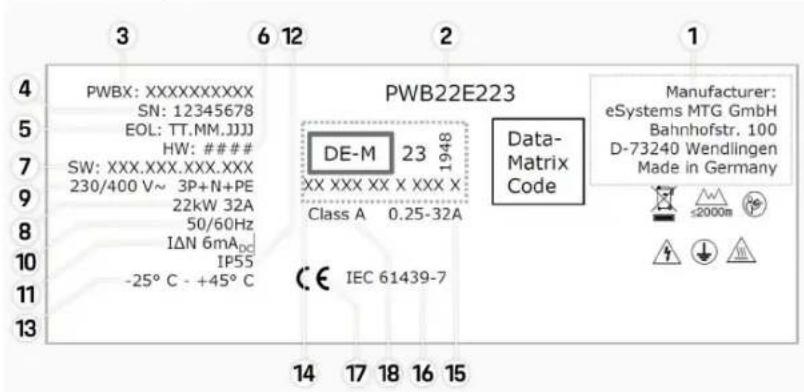
Fig. 10: Identification plate (example)
1 Manufacturer
2 Model name
3 Part number
4 Serial number
Technical Data | EN
5 Date of manufacture
6 Hardware status
7 Software release
8 Nominal power and nominal current
9 Nominal mains voltage
10 Nominal grid frequency
11 Integrated residual current device
12 Foreign body protection (IP-rating)
13 Nominal ambient temperature
14 Information in accordance with the certification under the calibration law
15 Nominal current range of the electricity meter
16 Information in accordance with EU Directive 2014/35/EU
17 Information in accordance with EU Directive 2014/53/EU
18 Calibration accuracy class
EN | Technical Data
Production information
Date of manufacture
The date of manufacture of the Wallbox can be found on the identification plate, after the abbreviation "EOL". It is shown in the following format: Day of production. Month of production. Year of production
Manufacturer of the Wallbox
eSystems MTG GmbH
Bahnhofstrasse 100
73240 Wendlingen
Germany
Electrical testing
If you have any questions about the regular electrical testing of the charging infrastructure (e.g. VDE 0702), please refer to https://www.porsche.com/international/accessoriesandservice/porscheservice/vehicleinformation/documents/ or contact a Porsche Partner.
Declaration of conformity
The Wallbox has a radio system.
The manufacturer of these radio systems declares that these radio systems comply with the specifications for their use in accordance with Directive 2014/53/EU.
The full text of the EU Declaration of Conformity is available at the following internet address:
http://www.porsche.com/international/accessoriesandservice/porscheservice/vehicleinformation/documents
Open Source Software Notice
The complete information on the Open Source Software Notice can be accessed via the web app.
√ Logged in to the web app.
-
Select System information in the navigation.
-
Select Copyright.
Importers
Great Britain
Porsche Cars Great Britain Ltd.
Bath Road
Calcot, Reading, Berkshire
RG31 7SE
United Kingdom
Index | EN
Index
A
Access data....32
Serial number 32
Web application....32
Activating/deactivating energy saving mode.....35
C
Charger Initial password.... 32
pictograms.... 30
Charger item number.... 46
Charging Charge vehicle. 40
Charging cable Cable and connector types....34
Charging operations.... 40
Charging times....40
Cleaning....43
Configuring general settings....35
Configuring the maximum current.... 38
Control panel Overview.... 33
D
Data Privacy Information.... 30
Date of manufacture....50
Declaration of conformity.... 50
Decommissioning.... 45
Design front Control unit....34 Indicator lights....34
Display Indicator lights 34
Display system settings....35
Disposal.... 45
E
End charging....40
I
Identification plate. 48
Indicator lights Design front.... 34
Intended use.... 31
L
Logging in/out User roles....35
Lost access data.... 32
M
Maintenance. 43
Manufacturer.... 50
0
Open Source Software Notice.... 50
Open the Web app....42
P
Pictograms.... 30
PLC (Powerline Communication) connection to vehicle....40
Production information.... 50
PUK Change password.... 32 lost.... 32
R
Resetting to factory settings.... 35
RFID chip.... 35
S
Safety instructions.... 30
Scope of delivery.... 32
Selling the Wallbox 45
Serial number 32,48
Setting units of measure 35
Start Charging.... 40
Symbols in this Owner's Manual.... 27
T
Technical data
Ambient and storage conditions.... 46
Electrical data....46
Mechanical data....46
To the operating instructions
Data Privacy Information....30
U
Update software....39
V
Vehicle charge port Charging time....39
Vehicle charging cable Cable and connector types....34
W
Warning notices setup. 27
Web app Hotspot....42 WiFi....42
Web application Change password.... 32 Loss of password.... 32
Web Application Initial password.... 32
natural_image
Close-up of a black cylindrical electronic component with multiple circular pins (no visible text or symbols)FR | Configurer
https://www.porsche.com/international/reach-regulation/
https://www.porsche.com/international/accessoriesandservice/porscheservice/vehicleinformation/documents/
▶ http://www.porsche.com/international/accessoriesandservice/porscheservice/vehicleinformation/documents
Open Source Software Notice
Porsche Cars Great Britain Ltd. Bath Road
Calcot, Reading, Berkshire
RG31 7SE
United Kingdom
Index alphabétique
Index alphabétique
A
natural_image
Close-up of a black circular electrical connector with multiple pins (no visible text or symbols)ES | Configurar
https://www.porsche.com/international/reach-regulation/
Datos técnicos
Calcot, Reading, Berkshire
RG31 7SE
United Kingdom

Download on the App Store


GET IT ON
Google Play
natural_image
Close-up of a black circular electrical connector with multiple pins (no visible text or symbols)IT | Configurazione
https://www.porsche.com/international/reach-regulation/
IT | Dati tecnici
Dati tecnici
Dati elettrici
i Informazioni
https://www.porsche.com/international/accessoriesandservice/porscheservice/vehicleinformation/documents/
o contattare un Partner Porsche.
Porsche Cars Great Britain Ltd. Bath Road
Calcot, Reading, Berkshire
RG31 7SE
United Kingdom
Indice analitico
IT
Indice analitico
A
https://www.porsche.com/international/reach-regulation/
Eliminação | PT
PT | Ficha técnica
Ficha técnica
Dados elétricos
i Informação
https://www.porsche.com/international/accessoriesandservice/porscheservice/vehicleinformation/documents/
Porsche Cars Great Britain Ltd. Bath Road
Calcot, Reading, Berkshire
RG31 7SE
United Kingdom
Índice | PT
Índice
A
Âmbito de fornecimento.... 137
Download on the App Store


GET IT ON Google Play
natural_image
Close-up of a black cylindrical device with multiple circular ports, labeled 'B' in the top-left corner (no other text or symbols visible)https://www.porsche.com/international/reach-regulation/
Tekniske data
Elektriske data

Information
Calcot, Reading, Berkshire
RG31 7SE
United Kingdom
DA | Stikordsoversigt
Stikordsoversigt
A
Adgangsoplysninger....163
Serienummer 163
Webapplikation.... 163
Afslut opladning.... 171
Aktivering/deaktivering af energisparetilstand... 166
B
Betjeningsenhed
Designfront....165
Oversigt. 164
Bortskaffelse.... 176
D
Designfront
Kontrollamper.... 165
H
Download on the App Store


GET IT ON Google Play
Scan de QR-code om de My Porsche app in de betreffende Store te downloaden. De volledige handleiding vindt u in de My Porsche app.
natural_image
Close-up of a black circular electrical connector with multiple pins (no visible text or symbols)https://www.porsche.com/international/reach-regulation/
Technische gegevens
Calcot, Reading, Berkshire
RG31 7SE
United Kingdom
NL | Trefwoordenregister
Trefwoordenregister
A

Download on the App Store

GET IT ON Google Play
Skann QR-koden for å laste ned My Porsche-appen fra den respektive butikken. Du finner en fullstendig veiledning i My Porsche-app.
Fig. 44: Frontpanelets design
https://www.porsche.com/international/reach-regulation/
Tekniske data
Elektriske data

Informasjon
https://www.porsche.com/international/accessoriesandservice/porscheservice/vehicleinformation/documents/
eller kontakt en Porsche Partner hvis du har spørsmål om de regelmessige elektriske kontrollene av ladeinfrastrukturen (f.eks. VDE 0702).
Samsvarserklæring
Calcot, Reading, Berkshire
RG31 7SE
United Kingdom
NB | Stikkordsliste
Stikkordsliste
A
natural_image
Close-up of a black cylindrical device with multiple circular ports, labeled 'B' in the top-left corner (no other text or symbols visible)A
Bilkabel

https://www.porsche.com/international/reach-regulation/
SV | Tekniska data
Tekniska data
Elektriska data
i Information
https://www.porsche.com/international/accessoriesandservice/porscheservice/vehicleinformation/documents/
Calcot, Reading, Berkshire
RG31 7SE
United Kingdom
Sakregister | SV
Sakregister
A
Aktivera/inaktivera energisparläge. 243
https://www.porsche.com/international/reach-regulation/
Tekniset tiedot
Sähkötiedot
i Tietoja
Calcot, Reading, Berkshire
RG31 7SE
United Kingdom
Download on the App Store


GET IT ON Google Play
natural_image
Close-up of a black electrical connector with multiple circular ports (no visible text or symbols)Ρύθμιση | EL
https://www.porsche.com/international/reach-regulation/
EL | Απόρριψη
https://www.porsche.com/international/accessoriesandservice/porscheservice/vehicleinformation/documents/
Calcot, Reading, Berkshire
RG31 7SE
United Kingdom
EL | Ευρετήριο
Ευρετήριο
A
Απόρριψη. 305
https://www.porsche.com/international/reach-regulation/
Technické údaje
Elektrické údaje

Informace
Calcot, Reading, Berkshire
RG31 7SE
United Kingdom
CS | Seznam hesel
Seznam hesel
A
Download on the App Store

Skenirajte QR kod da biste preuzeli aplikaciju My Porsche iz odgovarajuće Store trgovine. Cjelovite upute možete pronaći u aplikaciji My Porsche.
Nakon što se upute preuzmu, može im se pristupiti i offline.
Web
Cijelim uputama možete pristupiti na sljedećim web-adresama:

SI. 66: QR kod manual.porsche.com
- manual.porsche.com
- my.porsche.com
Sadržaj | HR
Hrvatski
Na Upute za uporabu
natural_image
Close-up of a black cylindrical electronic component with multiple circular pins (no visible text or symbols)
Kabel vozila tipa 2

B Vrijedi za: Porsche Wallbox s utičnicom za punjenje
https://www.porsche.com/international/reach-regulation/
HR | Tehnički podaci
Tehnički podaci
Podaci o električnom sustavu
i Informacije
Ovdje navedeni podaci su izvadak. Potpuni popis tehničkih podataka potražite u
▷ uputama za instalaciju
| Porsche WallboxPWB22E212 | Porsche WallboxPWB22E213 | Kalibracija Porsche WallboxaPWB221E223 | |
| Snaga 22 kW 22 kW 22 kW | |||
| Nazivna struja 32 A 32 A 32 A | |||
| Mrežni napon 220-240/380-415 V 220-240/380-415 V 230/400 V | |||
| Frekvencija mreže 50/60 Hz 50/60 Hz 50/60 Hz | |||
| Snaga punjenja mode 3 22 kW 22 kW 22 kW | |||
| Struja punjenja mode 3 | 3 x 32 A | 3 x 32 A | 3 x 32 A |
| Mrežni priključak | 1P/3P, N, PE | 1P/3P, N, PE | 1P/3P, N, PE |
| Kategorija prenapona (IEC 60664) | III | III | III |
| Integrirani zaštitni uređaj diferencijalne struje | IΔN 6 mA DC | IΔN 6 mA DC | IΔN 6 mA DC |
| Utikač za punjenje vozila | Tip 2 | Tip 2 | Tip 2 |
Podaci o mehaničkim dijelovima
| Porsche WallboxPWB22E212 | Porsche WallboxPWB22E213 | Kalibracija Porsche WallboxaPWB221E223 | |
| Dimenzije (V x Š x D) (bez kabela) 591,72 mm x 369,61 mm x 146,00 mm | 591,72 mm x 369,61 mm x 146,00 mm | 591,72 mm x 369,61 mm x 146,00 mm | |
| Težina (bez kabela) 6,5 kg 6,5 kg 6,5 kg | |||
| Težina (s kabelom) 9,8kg -- | |||
| Dužina kabela vozila 7 m -- | |||
https://www.porsche.com/international/accessoriesandservice/porscheservice/vehicleinformation/documents/
ili se obratite Porscheovom partneru.
Izjava o sukladnosti
Calcot, Reading, Berkshire
RG31 7SE
United Kingdom
Kazalo pojmova | HR
Kazalo pojmova
A
Zabronione działania to:
https://www.porsche.com/international/reach-regulation/
PL | Utylizacja
Dane techniczne
Dane elektryczne

Informacje
https://www.porsche.com/international/accessoriesandservice/porscheservice/vehicleinformation/documents/
Calcot, Reading, Berkshire
RG31 7SE
United Kingdom
PL | Spis haset
Spis haset
A
https://www.porsche.com/international/reach-regulation/
https://www.porsche.com/international/accessoriesandservice/porscheservice/vehicleinformation/documents/
Porsche Cars Great Britain Ltd. Bath Road
Calcot, Reading, Berkshire
RG31 7SE
United Kingdom
Stvarno kazalo
Stvarno kazalo
A
Avtomobilski polnilni priključek Časi polnjenja....405
Č
- DE | Einrichten
- Technische Daten
- Elektrische Daten
- Information
- About this Driver's Manual
- Driver's Manual
- Additional instructions
- Software update
- Equipment
- Warning notices and symbols
- NOTICE
- Disclaimer
- Further Information
- Web
- Table of contents | EN
- English
- To the Driver's Manual
- Security
- Scope of delivery
- Overview
- Set up
- Charge
- Technical Data
- EN | Security
- To the Driver's Manual Key to pictograms
- Data Privacy Information
- General safety instructions
- DANGER
- Intended use
- EN | Scope of delivery
- Check the scope of delivery
- The scope of delivery includes:
- Access data
- i Information
- Device overview
- EN | Set up
- Information on vehicle charging cables and connectors
- Vehicle charge port
- ! DANGER
- Initial operation and configuration Initial operation
- Testing during initial operation
- Initial operation using the My Porsche App
- Open the device overview in the My Porsche App
- Log in to the Wallbox
- Set access mode
- Manage Limited Access mode
- Manage vehicle authorisation
- Manage RFID cards
- General settings
- Change device name
- Energy save mode
- Enable/disable energy save mode
- Exiting energy save mode
- Exporting the charge history
- Resetting to factory settings
- Deactivate Wallbox via the My Porsche App
- Delete the Wallbox via the My Porsche App
- Adapt the charging current
- Configuring the maximum current
- Update software
- Automatic software updates
- Manual software updates
- Notes on charging
- Damage to the Wallbox
- EN | Charge
- Charging times
- Starting, pausing and stopping charging
- Start charging
- Charging with an RFID chip
- Pause charging
- End charging
- On the vehicle
- Via the My Porsche App
- After charging has been stopped:
- Configure powerline communication to the vehicle
- EN | Log in / log out of the web app
- Open the web app
- Open the web app via WiFi
- Opening the web app via Ethernet
- Opening the web application via the hot-spot of the Wallbox
- Log in / log out of the web app
- Login
- Logout
- Cleaning and maintenance
- Recurring testing
- EN | Cleaning and maintenance
- Clean Wallbox
- Decommissioning
- Disposal
- Electric/electronic devices and used batteries
- Information according to the EU REACH chemicals directive
- EN | Technical Data
- Electrical data
- Technical Data | EN
- Production information
- Date of manufacture
- Manufacturer of the Wallbox
- Electrical testing
- Declaration of conformity
- Open Source Software Notice
- Importers
- Great Britain
- Index
- A
- C
- D
- E
- I
- L
- M
- 0
- P
- R
- S
- T
- U
- V
- W
- FR | Configurer
- Index alphabétique
- ES | Configurar
- Datos técnicos
- IT | Configurazione
- IT | Dati tecnici
- Dati tecnici
- Dati elettrici
- i Informazioni
- Indice analitico
- PT | Ficha técnica
- Ficha técnica
- Dados elétricos
- i Informação
- Índice
- Tekniske data
- Elektriske data
- DA | Stikordsoversigt
- Stikordsoversigt
- B
- H
- Technische gegevens
- NL | Trefwoordenregister
- Trefwoordenregister
- Informasjon
- Samsvarserklæring
- NB | Stikkordsliste
- Stikkordsliste
- SV | Tekniska data
- Tekniska data
- Elektriska data
- Sakregister | SV
- Sakregister
- Tekniset tiedot
- Sähkötiedot
- i Tietoja
- Ρύθμιση | EL
- EL | Ευρετήριο
- Ευρετήριο
- Technické údaje
- Elektrické údaje
- Informace
- CS | Seznam hesel
- Seznam hesel
- Hrvatski
- Na Upute za uporabu
- HR | Tehnički podaci
- Tehnički podaci
- Podaci o električnom sustavu
- i Informacije
- Izjava o sukladnosti
- Kazalo pojmova | HR
- Kazalo pojmova
- Dane techniczne
- Dane elektryczne
- Informacje
- PL | Spis haset
- Spis haset
- Stvarno kazalo
- Č
Brand : PORSCHE
Model : Wallbox
Category : Car charger