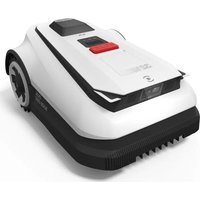
GOAT A1600 RTK - Vacuum Cleaner ECOVACS - Free user manual and instructions
Find the device manual for free GOAT A1600 RTK ECOVACS in PDF.


| Product Type | Robot mower |
| Brand | ECOVACS |
| Model | GOAT A1600 RTK |
| Dimensions (L x W x H) | 680 x 460 x 310 mm |
| Net Weight | 15.8 kg |
| Nominal Voltage | 37.8 V |
| Working Capacity | Up to 1,600 m² |
| Cutting Width | 33 cm |
| Cutting Height | 3 to 9 cm |
| Charging Time | 45 ± 5 minutes |
| Battery Type | Lithium-ion, 32.4 V, 3,000 mAh |
| Waterproof Rating | IPX6 |
| Sound Level (LWA) | 60 dB(A) |
| Connectivity | Wi-Fi 2.4 GHz, Bluetooth, RTK (GNSS + LoRa) |
| Sensors | 3D-ToF LiDAR, front AI camera, rain sensor |
| Main Functions | Scheduled mowing, auto recharge, intelligent obstacle avoidance, animal protection, rain detection |
| Security | PIN code, STOP button, auto-lock |
| Power Supply | Power adapter 100-240 V~, output 37.8 V / 3 A |
| Box Contents | Mower, charging station, RTK reference station, spare blade kit, Allen key, manual |
| Maintenance | Regular cleaning of chassis and blades; replace blades every 4 to 6 weeks |
| Winter Storage | Charge, clean and store in a cool, dry place; disconnect the station |
Frequently Asked Questions - GOAT A1600 RTK ECOVACS
User questions about GOAT A1600 RTK ECOVACS
0 question about this device. Answer the ones you know or ask your own.
Ask a new question about this device
Download the instructions for your Vacuum Cleaner in PDF format for free! Find your manual GOAT A1600 RTK - ECOVACS and take your electronic device back in hand. On this page are published all the documents necessary for the use of your device. GOAT A1600 RTK by ECOVACS.
USER MANUAL GOAT A1600 RTK ECOVACS
Read the instructions carefully. Make sure you understand the instructions and be familiar with the controls and the proper use of the appliance. Please understand that you can reduce the risk by following the instructions and warnings in this manual, but you cannot eliminate all the risks. Lawn Mowing Robot (hereinafter referred to as "ECOVACS GOAT") has many built-in safety sensors, however, safety risks still exist. All related residual risks have been described or informed in this manual.
Description of intended use: Intelligent lawn mowers are mainly used in mowing grass, especially in parks, private villa yards, and football fields. For machines used in public areas, that warning signs shall be placed around the working area of the machine.
They shall show the substance of the following text: WARNING! Automatic lawnmower! Keep away from the machine! Supervise children! DO NOT modify the mower by yourself. Modifications could interfere with mower operations, result in serious injury and/or damage, or void the Limited Warranty. Use only Ecovacs approved parts and accessories.
WARNING
Never allow children, persons with reduced physical, sensory or mental capabilities or lack of experience and knowledge or people unfamiliar with these instructions to use the machine, local regulations may restrict the age of the operator. To avoid using the machine and its peripherals in bad weather conditions especially when there is a risk of lightning.
Before each mowing session, check that all parts of the mower can function normally.
Periodically inspect the area where the machine is to be used and remove all stones, sticks, wires, bones, and other foreign objects.
NEVER allow children to touch the power supply unit, charging station, blades, the battery compartment, or any parts with gaps such as the wheels.
WARNING
Never to operate the machine and/or its peripherals with defective guards or shields, or without safety devices, or if the cord is damaged or worn.
Keep away from the rotating blades! DO NOT put hands or feet under or near the rotating blades.
Keep a safe distance from the mower when operating.
DO NOT overreach. Keep your balance at all times and always be sure of the footing on slopes. Walk, never run while operating the machine or its peripherals.
WARNING
Never allow children to be in the vicinity or play with the machine when it is operating.
WARNING
DO NOT touch moving hazardous parts before they have come to a complete stop.
WARNING
For the purposes of recharging the battery, only use the detachable supply unit provided with this appliance (CH2491/CH2491A).
This appliance contains batteries that are only replaceable by skilled persons.
Safe Usage:
Not to connect a damaged cord to the supply or touch a damaged cord before it is disconnected from the supply for the reason that damaged cords can lead to contact with live parts; keep extension cords away from moving hazardous parts to avoid damage to the cords which can lead to contact with live parts; to connect the machine and/or its peripherals only to a supply circuit protected by a residual current device (RCD) with a tripping current of not more than 30 mA.
Unplug the Power Supply from the power socket and then untangle when the power cord or the extension cable is damaged or entangled during use. During the operation, pull the body of the plug rather than the cord to avoid the hazard.
Contact Customer Service and let the skilled professional to repair or replace the cord.
Please use the extension cable manufactured by ECOVACS. If you have any problem, contact Customer Service.
If the SUPPLY CORD is damaged, it must be replaced by the manufacturer, its service agent
or similarly qualified persons in order to avoid a hazard.
Press the STOP Button at once when the mower makes the abnormal sound or raises the alarm. In case of leakage of electrolyte flush with water or neutralizing agent, ask for medical help once it gets contact with the eyes etc.
If there are abnormal vibrations, please restart the mower. If the problem persists, please Contact Customer Service.
Instructions to always wear substantial footwear and long trousers while operating the machine with a manual controller.
Additionally when using the manual controller
a) Mow only in daylight or in good artificial light.
b) Avoid operating the machine in wet grass.
c) Do not operate the machine when barefoot or wearing open sandals. Always wear substantial footwear and long trousers.
d) Always be sure of your footing on slopes.
e) Use extreme caution when reversing the machine towards you.
f) Always switch on the motor according to instructions with feet well away from the blade(s).
Device Update
Typically, some devices are updated bi-monthly, but not always so specific.
Some devices, especially those that went on sale more than three years ago, will only be updated if a critical vulnerability is found and fixed.
European Union Compliance Statement
Information on Disposal for Users of Waste Electrical & Electronic Equipment
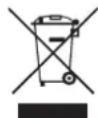
This symbol on the product or on its packaging indicates that used electrical and electronic products should not be mixed with unsorted municipal waste. For proper treatment, it is your responsibility to dispose of your waste equipment by arranging to return it to designated collection points.
Disposing of this product correctly will help save valuable resources and prevent any potential negative effects on human health and the environment, which could otherwise arise from inappropriate waste handling.
To return your used device, please use the return and collection systems or contact the retailer where the product was purchased, which is free of charge, please contact your local authority for further details of your nearest designated collection point.
Penalties may be applicable for incorrect disposal of this waste, in accordance with your national legislation.
Information on Disposal for Users of used batteries

This symbol means that batteries and accumulators, at their end-of-life, should not be mixed with unsorted municipal waste. Your participation is an important part of the effort to minimize the impact of batteries and accumulators on the environment and on human health. For proper recycling you can return this product or the batteries or accumulators it contains to your supplier or to a designated collection point, which is free of charge.
Disposing of this product correctly will help save valuable resources and prevent any potential negative effects on human health and the environment, which could otherwise arise from inappropriate waste handling.
Penalties may be applicable for incorrect disposal of this waste, in accordance with your national legislation.
there are separate collection systems for used batteries and accumulators.
Please, dispose of batteries and accumulators correctly at your local community waste collection/recycling center.
Restriction of the use of certain hazardous substances (RoHS) Directive
Ecovacs Home Service Robotics Co., Ltd. hereby declares the whole product including parts (cables, cords, and so on) meets the requirements of RoHS Directive 2011/65/EU and amendment Commission Delegated Directive (EU) 2015/863 on the restriction of the use of certain hazardous substances in electrical and electronic equipment ("RoHS recast" or "RoHS 2.0").
Radio Equipment Directive
Ecovacs Home Service Robotics Co., Ltd. hereby declares that the product listed in this section comply with the essential requirements and other relevant provisions of the Radio Equipment Directive 2014/53/EU.
Machinery Directive
Ecovacs Home Service Robotics Co., Ltd. hereby declares that the product listed in this section comply with the essential requirements and other relevant provisions of the Machinery Directive 2006/42/EC.
Europe Authorised Representative:

ECOVACS Europe GmbH Holzstrasse 2 I D-40221 Düsseldorf I Germany
Ecovacs Home Service Robotics Co., Ltd. hereby declares that the product comply with the essential requirements and other relevant provisions of the RoHS Directive 2011/65/EU and amendment Commission Delegated Directive (EU) 2015/863, the Radio Equipment Directive 2014/53/EU and the Machinery Directive 2006/42/EC.
The declaration of conformity can be viewed at the following address: https://www.ecovacs.com/global/compliance.
 | Class III appliance |
 | Direct current |
 | Alternating current |
 | This product conforms to the applicable EC Directives. |
 | Polarity of the charging port |
 | Before charging, read the instructions. |
SYMBOLS
 | WARNING—Read instruction manual before operating the machine. |
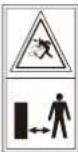 | WARNING—Keep a safe distance from the machine when operating. |
 | WARNING—Do not ride on the machine. |
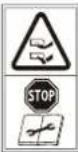 | WARNING—Operate the disabling device before working on or lifting the machine. |
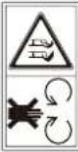 | CAUTION—Do not touch rotating blade. |
2. Packaging Contents and Component Functions
2.1 What's in The Box
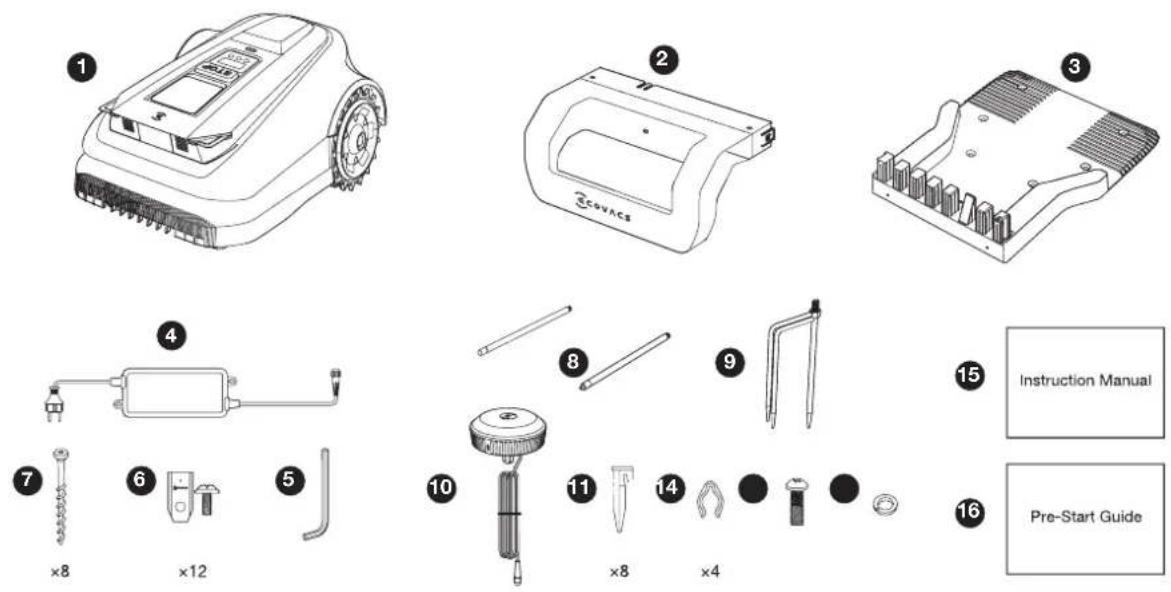
1 ECOVACS GOAT
5 Allen Key
9 Tripod Peg
13 Screw (For RTK Reference Station)
2 Pile of charging station
6 Spare Blade Kit
10 RTK Reference Station
14 Spring Washer (For Tripod Peg)
3 Base of charging station
7 Screws (For Base)
11 Plastic Garden peg
15 Instruction Manual
4 Power Supply
8 Mounting Pole
12 Cord Tie
16 Pre-Start Guide
2.2 Parts and Functions
ECOVACS GOAT (Top View)
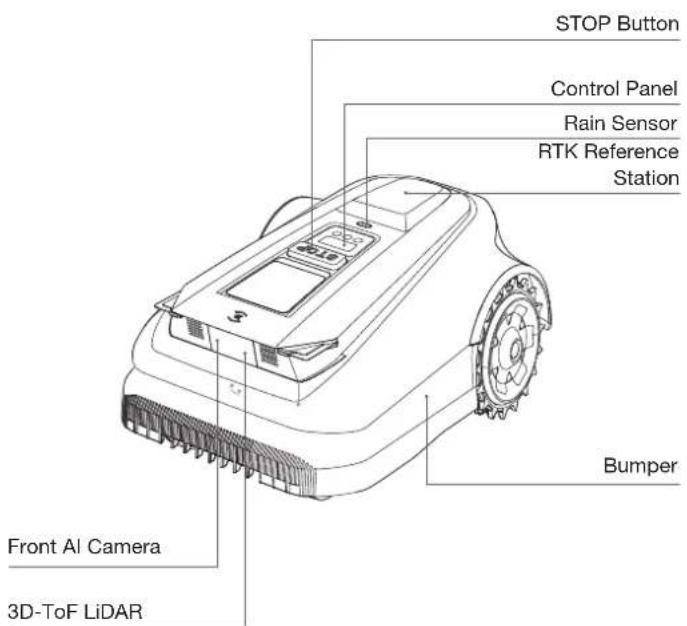
Control Panel: The buttons on the control panel can be used for the basic operations of the ECOVACS GOAT. The digital numbers on the dashboard display shows mowing progress, battery level, and ECOVACS GOAT status.
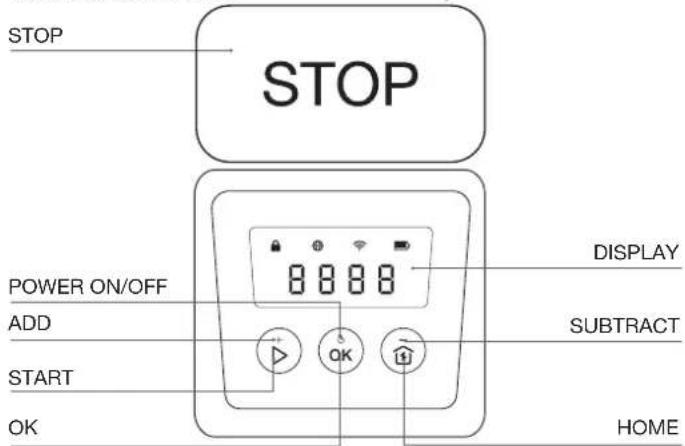
Icon:
| Battery | Battery level. White --- More than 15% charge. Red --- Less than 15% charge Flashing indicates charging; Steady indicates in use or fully charged. | |
| 4G Connection | Lights up when additional Connection Module is installed with a SIM Card. | |
| WiFi | Lights up when your ECOVACS GOAT is Successfully connected with the APP through Wifi. |
| Lock |  | ECOVACS GOAT locked. please enter PIN code to unlock, otherwise the ECOVACS GOAT won't be able to work. |
Button
| Function Buttons Description | |
| START Press 5 times | to show the battery level |
| START-->OK Start mowing/Continue task | |
| OK Press and hold for 3s to power on/off. | |
| HOME | Press and hold for 3s to enter the network connection mode. |
| HOME-->OK | Send the ECOVACS GOAT to the charging station |
| STOP Stop ECOVACS GOAT operation | |
| START+HOME Press and hold for 5s to reset | |
| ADD+ Increasing the number | |
| SUBTRACT— Decreasing the number | |
| OK Next digit/Confirm | |
Display:
| Display Description | |
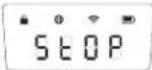 | ECOVACS GOAT stopped |
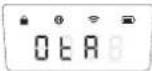 | Ongoing OTA updates |
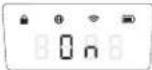 | Mowing |
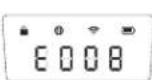 | Fault Code. For details, please visitwww.ecovacs.com.If not resolved, the device will automatically return to the station after 30 minutes. |
Set PIN Code
When the GOAT is off map or to be powered on or reset, it will automatically be locked. You can unlock it by entering the right PIN code. Set the PIN code when the display shows as below.
Press [+] or [-] to select the PIN code numbers one by one. After the first digit is decided, press [OK] to confirm, and the cursor will move to the next digit.
- If the 🔒 is flashing, please set the PIN code.
- If the 🔒 is solid, enter the previously set PIN code.
- Once unlocked, the ⏻ will disappear. If unlocking fails, the ⏻ will flash again, prompting you to reset the PIN code.
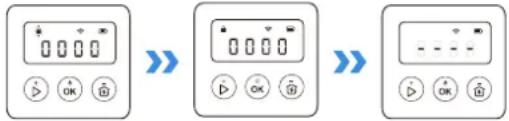
Note:
• 0000 is an invalid PIN code.
- PIN code is to be entered twice to confirm the setting.
- If you enter the wrong numbers while setting the PIN code, the setting process will start all over again.
- You may change the PIN code on the App.
SENSORS
| Name Description | |
| 3D-ToFLiDAR | Perceive obstacle information in front of the robot and help it actively avoid obstacles.Range: Detect the longitude and latitude coordinates of the robot's position.Horizontal: 90 degrees; Vertical: 70 degrees (what you see is what you get)The maximum distance is 3-4 meters. |
| Front AI Camera | Perceive the environmental information in front of the robot, identify special targets, and help the robot interact intelligently with users.Horizontal: 150 degrees; Vertical: 80 degrees (what you see is what you get). |
| Rain sensor | Detect whether it is raining in the current environment and to help the robot decide whether to continue working. |
| RTK Reference Station | Help the mobile robot obtain the relative distance between itself and the Locator Beacon, which assists the robot in building a home map.Range: With the Beacon as the center, the effective range of the signal is within a radius of 140 meters. |
Interface
| Name Description | |
| Bluetooth | Enable Bluetooth during network setup to connect the robot to the network. During regular use, enable Bluetooth mode to perform tasks like manual mapping and manual mowing. |
| Wi-Fi* | Enable Wi-Fi to transmit data between the app and the robot, allowing app-based control. |
| ECOVACS HOME APP | Download and enable the latest version of the ECOVACS HOME app to access smart features such as network setup, mapping, and mowing (features may vary by product). |
| Charging Contacts | Enable charging by connecting the robot to a power source. |
| RTK Rover | The rover continuously receives differential correction data from the satellite reference station, enabling RTK positioning calculations and achieving high-precision RTK localization. |
| Lora Base Station and Communication Device | Facilitate data transmission between RTK rover and RTK reference station. The RTK reference station transmits positioning correction data to the rover for calculations, while the rover sends requests back to the base station. Additionally, this setup supports OTA updates for RTK firmware. |
- The ECOVACS GOAT series robotic lawn mowers are designed for domestic mowing scenarios. A home Wi-Fi network is required for operation, and anti-DDOS protection can only be set up through router settings.
ECOVACS GOAT (Bottom View)
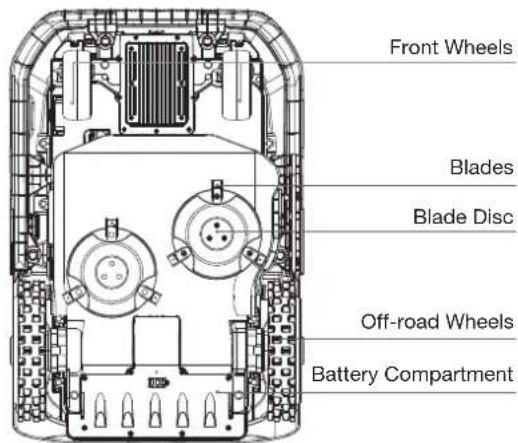
ECOVACS GOAT (Back View)
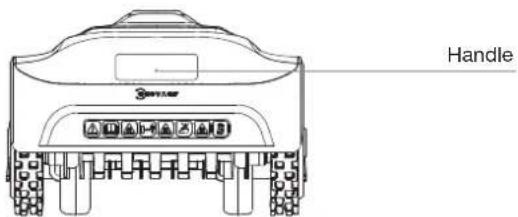
Station View
RTK Reference Station
RTK Indicator Light
Station Indicator Light
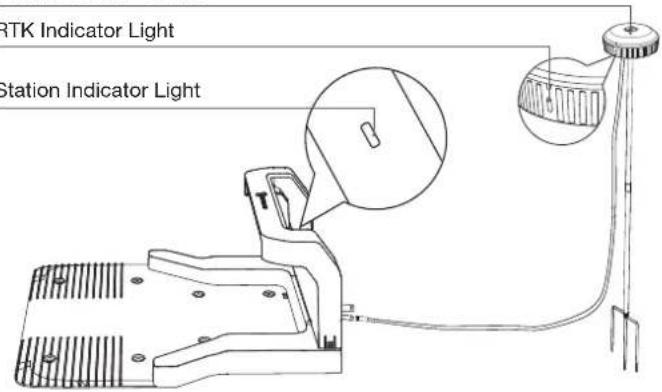
RTK Indicator Light
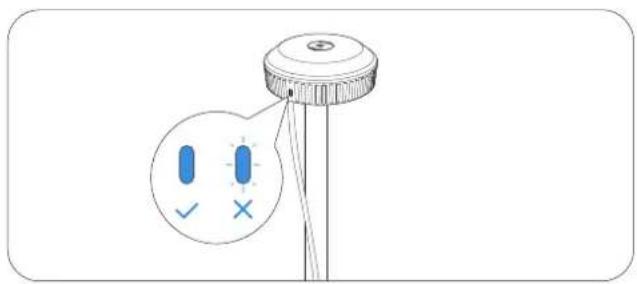
Solid blue : Charging and strong signal
Flashing blue: Poor signal. Please select a new location for installation.
3. Installation&Mapping
3.1 Installation
1 Prepare the APP
Download ECOVACS HOME App
Before you start, make sure that:
- Your mobile phone is connected to a Wi-Fi network.
- The 2.4GHz band wireless signal is enabled on your router.
Note: After installing ECOVACS HOME App, please complete the registration and login.


Connect ECOVACS GOAT to the Internet
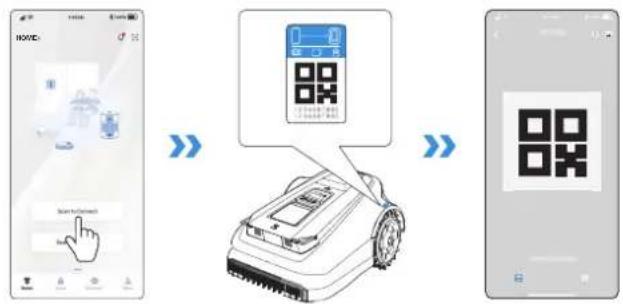
1. Bluetooth Connection
- Scan the QR Code on the ECOVACS GOAT or select ECOVACS GOAT manually via the App.
- Turn on Bluetooth on your phone to connect your ECOVACS GOAT.
• *on the display will light up after successful connection.
Note: Ensure your phone has Bluetooth function and your ECOVACS GOAT is within the connectable distance (10 m).
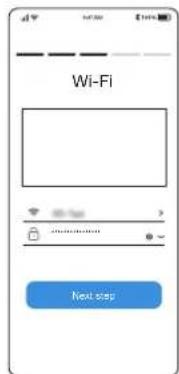
2. Wi-Fi Connection
- Make sure your ECOVACS GOAT and your phone are in the same router environment.
- Follow the instructions in the App to complete the connection.
• on the display will light up after successful connection.
Note: Please use a 2.4GHz network.
- You also can purchase the additional Connection Module so that ECOVACS GOAT can be connected even without Wi-Fi.
How to unbind your ECOVACS GOAT?
Allowing binding to one App account currently, your ECOVACS GOAT is unable to be bound to another App account before unbinding. You can unbind your ECOVACS GOAT in the App. Feel assured to take this operation which would not erase the working data such as schedules of your ECOVACS GOAT. You also can cancel the account in by clicking the small triangle next to the ECOVACS GOAT name to delete it.

Assemble the Station
- Place the Station on an open and flat lawn with no slope or rock. Ensure that there are no objects (e.g. trees, balls or houses) within 2 m on left and right, and 2 m in front of the Station.
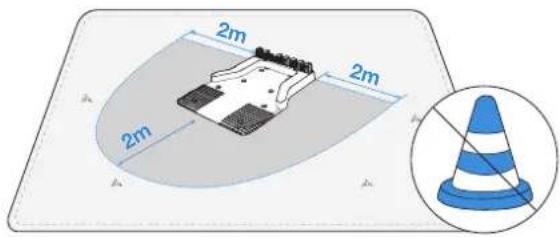
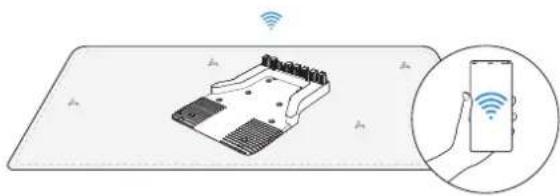
- If you want to remotely control your ECOVACS GOAT, put the Station as close as possible to a place with strong Wi-Fi signal.
natural_image
Illustration of a handheld electronic device with wireless signal icons above it, showing no text or symbols on the device itself.- Make sure that the grass around the Station is no longer than 10 cm. Overgrown grass may affect the recharging.
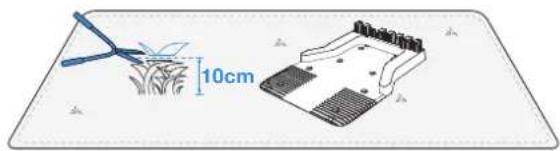
natural_image
Diagram showing a crop field with a 10cm scale indicator and a mechanical component (no text or symbols present)- Insert the Pile into the Base Until you hear a "click".
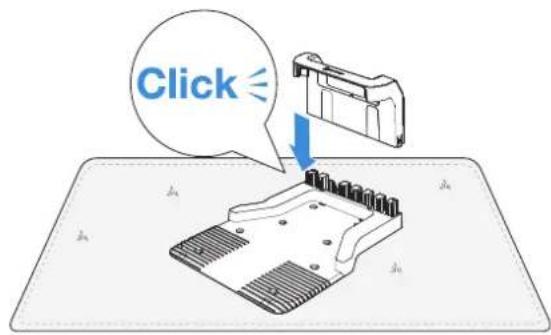
- Fix the Station to the ground in the selected area with Pegs, using the Allen key.
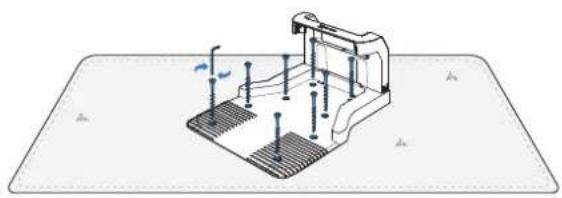
natural_image
Technical illustration of a mechanical assembly with bolts and a base plate (no text or symbols)- Connect the Station Plug to the power supply and ensure the blue light is on.
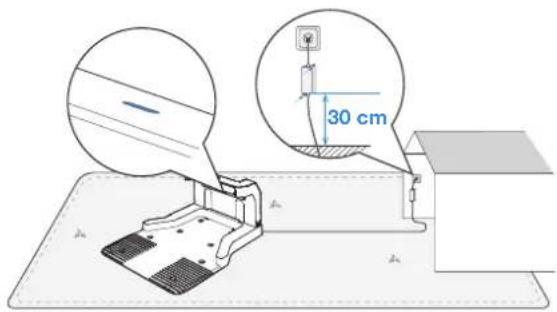
Note: Please ensure the power adapter is positioned 30 cm above the ground to prevent water and moisture damage. Please plug the device into an indoor outlet or an outdoor waterproof outlet.
③ Assemble the RTK Reference Station
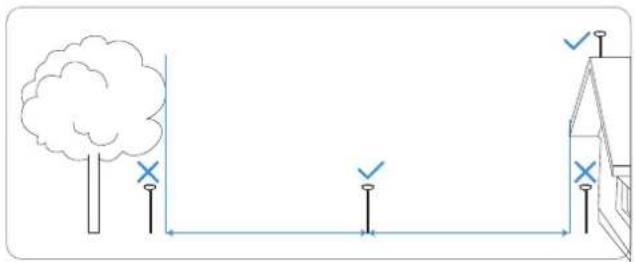
Choose an open area at least 2 meters away from buildings and trees to install the RTK base station.
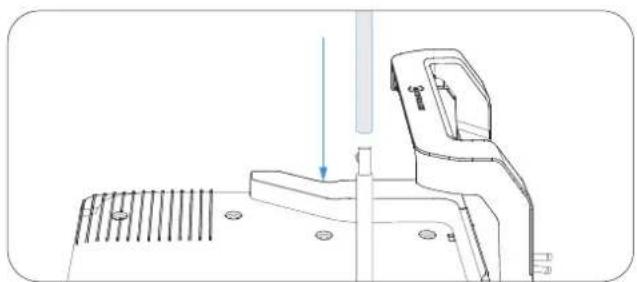
- Connect the upper and lower mounting poles, ensuring the buckle clicks securely into place.
natural_image
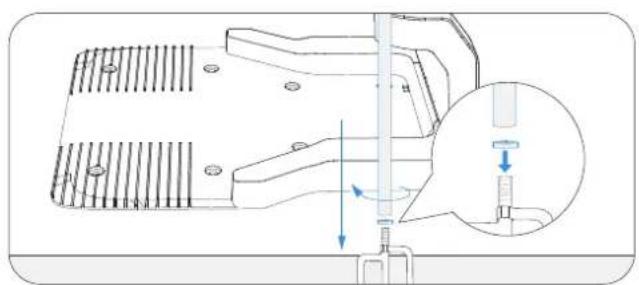
Technical line drawing of a mechanical device with a vertical shaft and mounting base (no text or symbols)- Insert the triangular peg into the mounting pole and tighten it securely.
natural_image
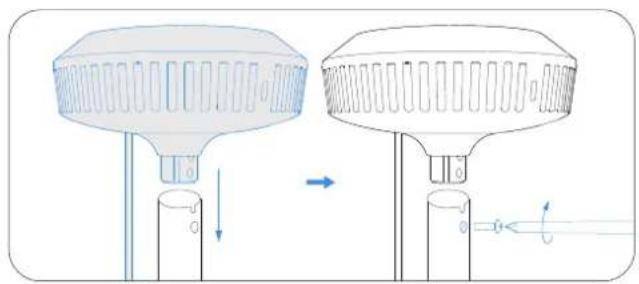
Technical diagram of a mechanical assembly with a magnified inset showing internal components (no text or symbols)- Attach the signal head by inserting its raised part into the mounting pole and tightening the screws with a tool.
natural_image
Diagram showing two identical mechanical components with directional arrows indicating motion or force (no text or symbols)- Connect the RTK power cable to the base station power cable and tighten the nut.
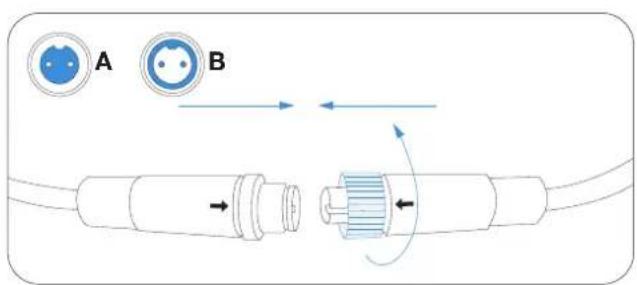
- After powering on, if the RTK base station indicator remains steady, the location is correct; if it flashes, relocate the station.
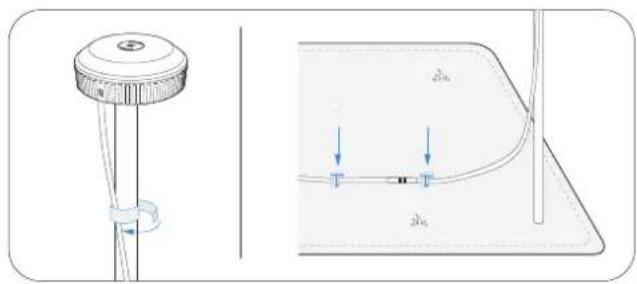
- Cable Management: Secure the RTK power cable to the mounting pole with cord ties and use plastic garden pegs to secure other cables to the ground.
natural_image
Technical diagram showing a mechanical component and its cross-sectional view with labeled dimensions (no text or symbols present)4 Charging the ECOVACS GOAT
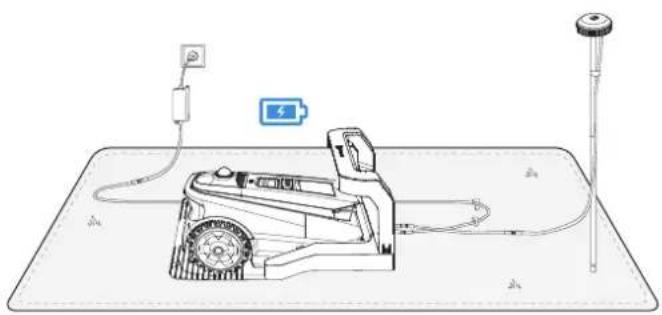
Fully charge the ECOVACS GOAT before first use. Place it in the charging station and ensure the white indicator light is steady or flashing, indicating successful charging.
natural_image
Technical line drawing of a mechanical device with wiring and a battery, no text or symbols present|18EN
3.2 Mapping
① Before mapping, the following tips need to be noted:
• Make sure the ECOVACS GOAT is powered on.
- If the ECOVACS GOAT is stopped, tap START --> OK button on the ECOVACS GOAT.
- If the ECOVACS GOAT is locked, please enter PIN code.
② Mapping
- Choose the appropriate mapping mode for your yard. For lawns with drop-offs greater than 4 cm or narrow paths less than 1 meters, it is recommended to select Manual Mapping. Otherwise, use the default Automatic Mapping.
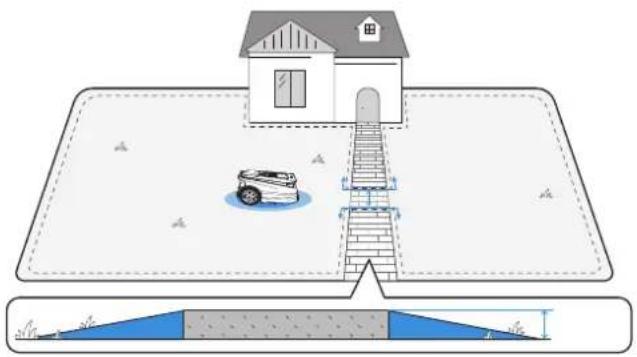
natural_image
Diagram showing a house with a car parked in the water and a ramp structure, above a sloped bridge (no text or symbols)2. Connect the ECOVACS GOAT
With Bluetooth connection, your phone will connect to the ECOVACS GOAT automatically.
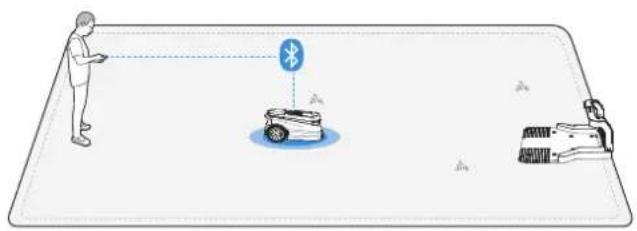
3. Find a starting point
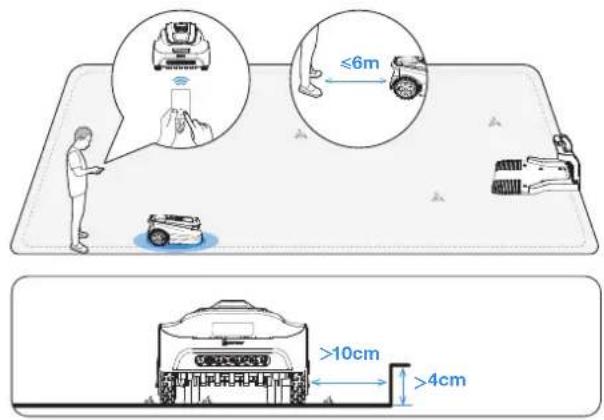
Find a proper starting point along the edge of your lawn. Keep within 6 m from the ECOVACS GOAT during the mapping process.
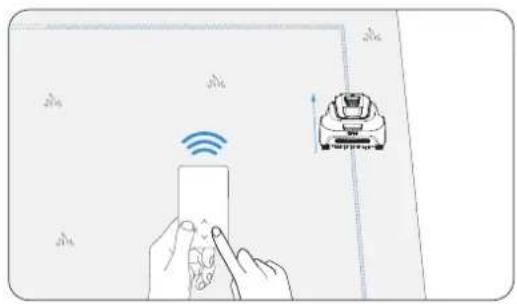
natural_image
Illustration of a hand interacting with a device and a robotic arm, both showing wireless signals (no text or symbols present)4. Start mapping
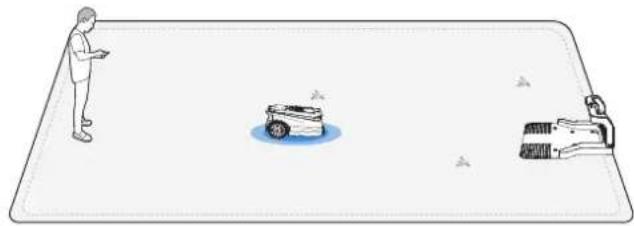
If the station is on the lawn, simply tap Start Mapping to start mapping.
natural_image
Illustration of a person standing next to a car and a person lying on the ground, with no visible text or symbols.If the base station is not on the lawn, control the ECOVACS GOAT to move to the lawn boundary, then start Mapping.
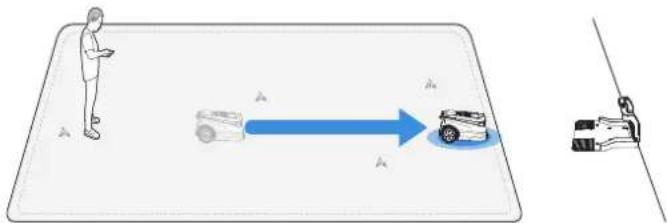
Note: To ensure successful recharging, it's recommended to keep the base station within 3 meters of the lawn, and no more than 10 meters away.
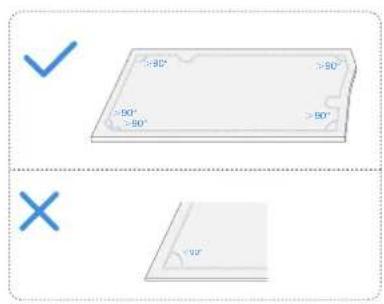
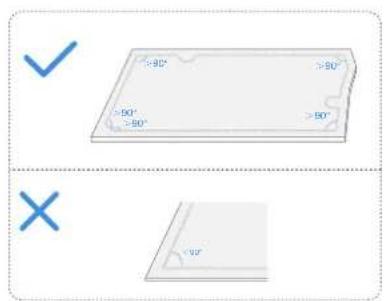
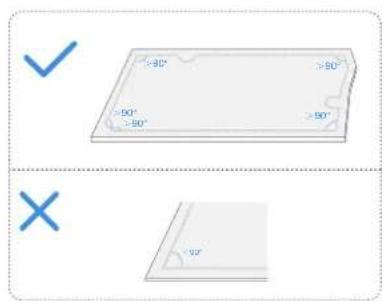
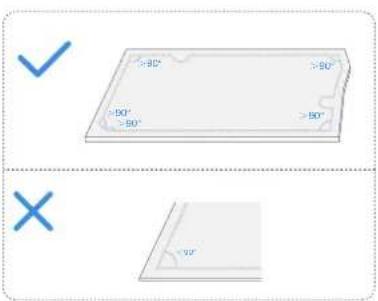
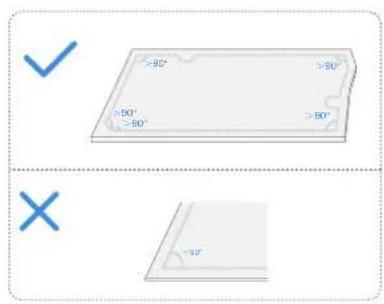
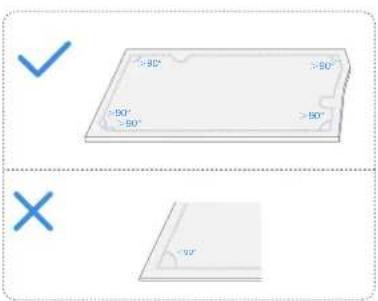
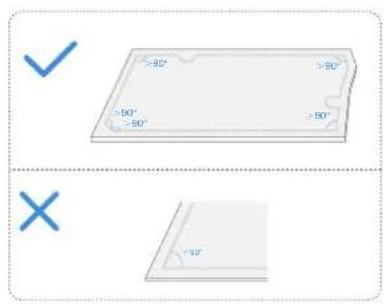
Let ECOVACS GOAT start from the Station and follow ECOVACS GOAT within 6 m. If the height difference is more than 4 cm, please keep your ECOVACS GOAT at least 10 cm from the edge of the lawn. Make sure to follow a straight line with a smooth turning angle of no smaller than 90°.
5. Switch mapping mode
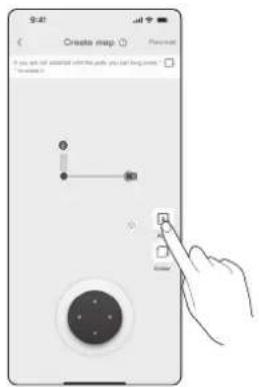
During the mapping process, you can switch between automated and manual mapping in the app interface.
6. Finish mapping
After tracing the perimeter of the lawn, close the loop at the starting point to complete the boundary.
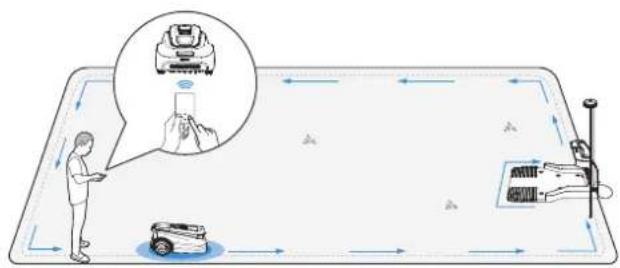
7. Set up A No-Entry Zone
To protect your ECOVACS GOAT, please set up No Entry Zones for objects you want to protect, such as a flowerbed, a trampoline and a vegetable plot.
Follow the instructions in the App. Control your ECOVACS GOAT to the starting point of the No-Entry Zone. The minimum supported single side length of the restricted area should be more than 0.5m.
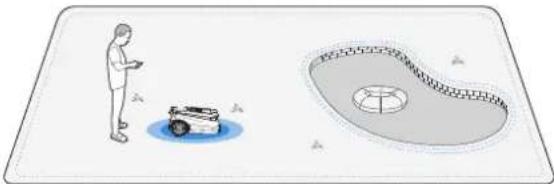
natural_image
Illustration of a person standing near a car and a circular water feature (no text or symbols)Note: It is recommended to keep ECOVACS GOAT 25 cm away from the boundaries of extremely dangerous areas such as a pond or cliff.
8. Create a New Area
- Start from the station/within the map, and remotely control the ECOVACS GOAT to the new area to be created.
- Mapping the new area based on the regional environment.
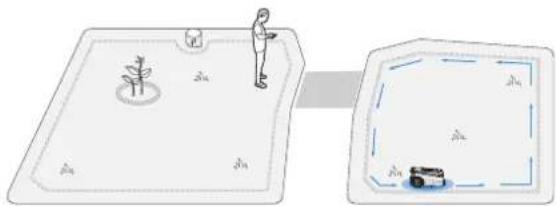
natural_image
Illustration of a person standing on a small boat with a small tree, connected to a rectangular area containing a small car and a blue dashed border (no text or symbols)9. Create a Path
- The path is intended to connect two separate areas or to connect the edge of a lawn to the charging station.
- The ECOVACS GOAT can automatically generate a path when starting from inside one path and reaching another path.
- Please ensure that the passable width of the path for the ECOVACS GOAT is greater than 1 meter.
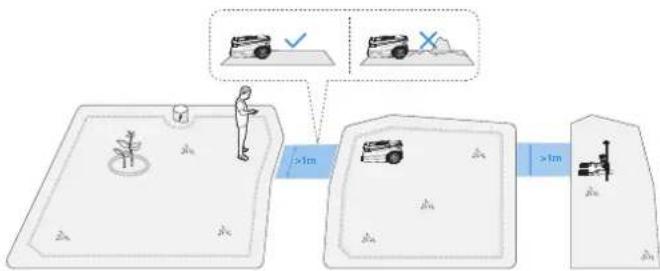
flowchart
graph LR
    A["Person standing on pool"] --> B["Bus moving on ramp"]
    B --> C["Check and Cross icons"]
    style A fill:#f9f,stroke:#333
    style B fill:#ccf,stroke:#333
    style C fill:#cfc,stroke:#333
4. Start Using Your ECOVACS GOAT
4.1 How Your ECOVACS GOAT Works
The following part will help you know how your ECOVACS GOAT works.
1 Mowing mode
You can switch modes on your ECOVACS GOAT or via the App.

natural_image
Blue icon of a car with motion lines and a grid symbol (no text or numbers)2 Schedule
You may set your mowing schedule on the ECOVACS HOME App. Supporting two schedules, ECOVACS GOAT enables you to set and switch based on different seasons.

The image contains no text. The horizontal line is a stylistic or background element and must be ignored according to the rules.
③ Cutting height
ECOVACS GOAT is a smart robot for maintaining your lawn well. Before starting, make sure that the grass is no longer than 10 cm. If longer, cut the grass roughly with a manual lawn ECOVACS GOAT. Then your ECOVACS GOAT will keep the grass nicely clipped within a height of 9 cm.

[Non-Text]
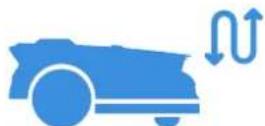
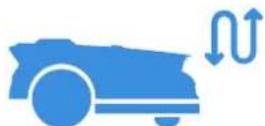
4 Programmed cutting
With programmed cutting, your ECOVACS GOAT mows along an S-shaped path to achieve maximum efficiency.
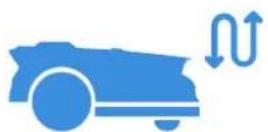
The image contains only a stylistic horizontal line, which must be ignored according to the rules. According to Rule 2, such lines must be ignored and not represented by underscores or any other character in the OCR output.
Therefore, the corrected OCR text is:
[empty string]
5 Auto recharging
When the battery is low, your ECOVACS GOAT will pause the task autonomously and go back to the Station to charge itself. When charged and ready to work, your ECOVACS GOAT will resume the unfinished mowing task of the day.

natural_image
Blue icon depicting a car and a charging plug with a lightning bolt symbol (no text or numbers)The image contains no legible text or symbols. According to the guidelines, non-text figures/diagrams are stylistic lines and must be ignored. Therefore, the correct OCR output is empty.
6 Rain sensor
With waterproof level of IPX6, your ECOVACS GOAT will be very pleased to stay outside. However, mowing under heavy rain will not bring out the best result. Your ECOVACS GOAT, equipped with the Rain Sensor, will pause mowing and return to the Station automatically when a certain amount of rainwater is detected. When the rain stops, ECOVACS GOAT will automatically resume the mowing task. It is recommended to mow in dry weather for the best mowing result. You also can inactivate it on your ECOVACS GOAT or via the App to mow on rainy days.

The image contains no legible text or symbols. According to the guidelines, non-text figures and diagrams must be ignored. Therefore, the correct OCR output is an empty string.
7 Rain delay time
The lawn may still be wet after the rain stops. For a better mowing result, your ECOVACS GOAT will resume mowing 3 hours after the Rain Sensor detects that the rain has stopped by default. You can change the rain delay time via the App.

natural_image
Blue icon of a car emitting water droplets next to a clock (no text or symbols)The image contains no text. The horizontal line is a stylistic or background element and must be ignored according to the rules.
⑧ Animal protection
With the aim to protect nocturnal animals, ECOVACS GOAT will stop mowing at night.
You also can inactivate it on your ECOVACS GOAT or via the App to mow at night.
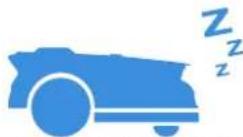
The image contains no legible text or symbols. According to Rule 4 (Edge Noise Strategy), since the ground truth is a non-textual graphic and does not contain any characters, punctuation, or symbols that can be reliably extracted from it. Therefore, the OCR result must reflect this absence of any content.
[No text detected]
9 Smart obstacle avoidance
Equipped with 3D-ToF LiDAR, your ECOVACS GOAT can detect objects and avoid them in advance. The height of obstacles to be avoided can be set in your ECOVACS HOME App. Moreover, some obstacles can precisely be avoided by AI recognition.

The image contains no legible text or symbols. According to Rule 4 (Edge Noise Strategy), since the ground truth is not clearly visible, the OCR should output nothing.
Therefore, the corrected OCR text is:
```text [No text detected]
10 No need for disposal of grass clippings
Daily mowing with your ECOVACS GOAT leaves short clippings, which will be scattered evenly on the lawn as the best fertilizer.

The image contains only a stylistic horizontal line, which must be ignored according to the rules. According to Rule 2, such lines must be ignored and not represented by underscores or any other character in the OCR output.
Therefore, the corrected OCR text is:
[empty string]
11 Safety and PIN code protection
The PIN code you set for your ECOVACS GOAT at the first startup is used to prevent being stolen and operated by children. if it locked, you can unlock it by entering PIN code.

The image contains no legible text or symbols. According to Rule 4 (Edge Noise Strategy), since the ground truth is not clearly visible, the OCR should output nothing.
Therefore, the corrected OCR text is:
```text [No text detected]
Note:
After five incorrect attempts, wait 30 minutes before retrying. You may change the PIN code on the App.
4.2 Tips Before First Mowing
- Cut the grass to a height of no more than 10 cm with your manual lawnECOVACS GOAT and clear away obstacles including debris, piles of leaves, toys, wires and stones.
- Do not let your children play on the lawn when your ECOVACS GOAT is mowing.
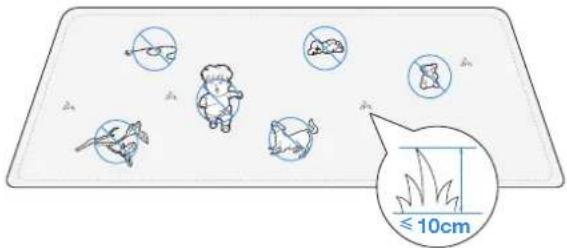
- Set the mowing direction you need.
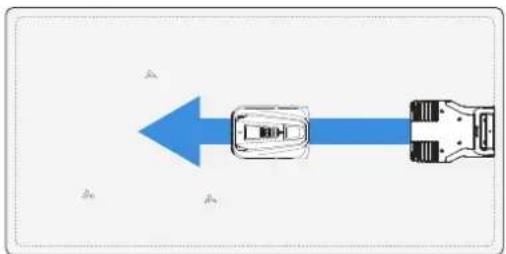
flowchart
graph TD
    A["Start"] --> B["Move Right"]
    B --> C["Move Left"]
    C --> D["End"]
Note: Your ECOVACS GOAT will adjust its direction after departing from the Station and go straight forward to mow by default.
4.3 READY FOR MOWING
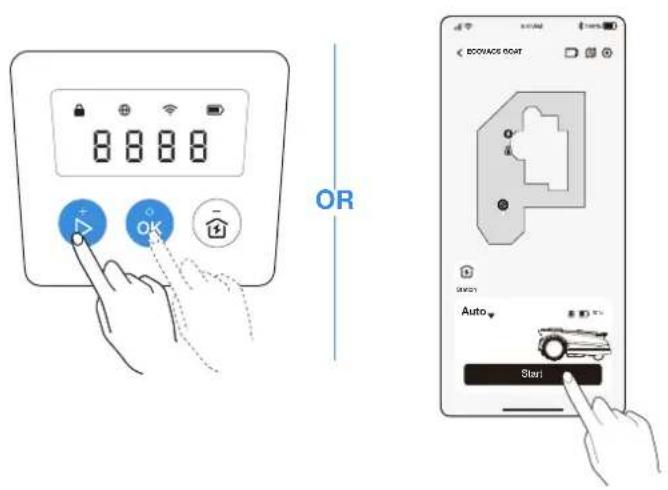
1 Start Mowing
Press ▷, then ORCOVACS GOAT will start mowing. Or you can start mowing via the App.
Note: Make sure the grass has been cut to a height of no more than 10 cm with your manual lawnECOVACS GOAT.
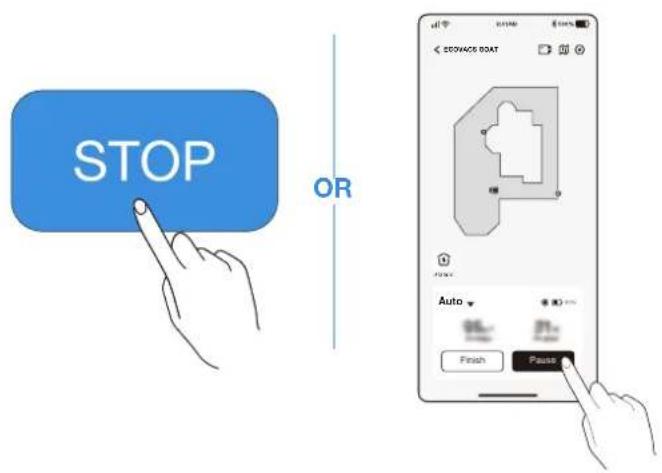
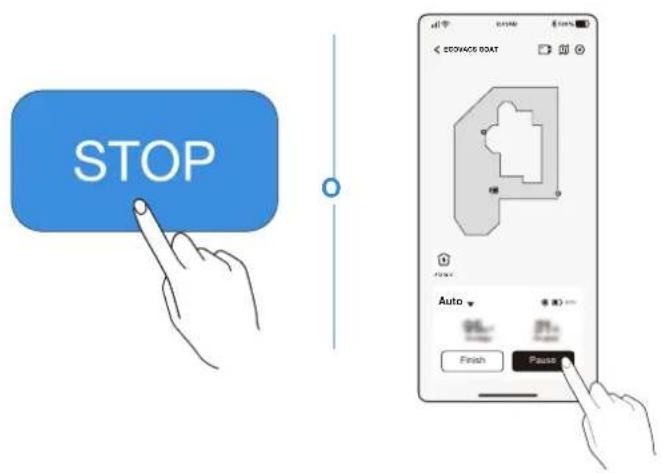
② Pause Mowing
Press 173 pause ECOVACS GOAT or pause it via the App.
- For security, your ECOVACS GOAT will be stopped and cannot be started directly via the App after 📂 pressed. Please press START then OK on the Control Panel first.
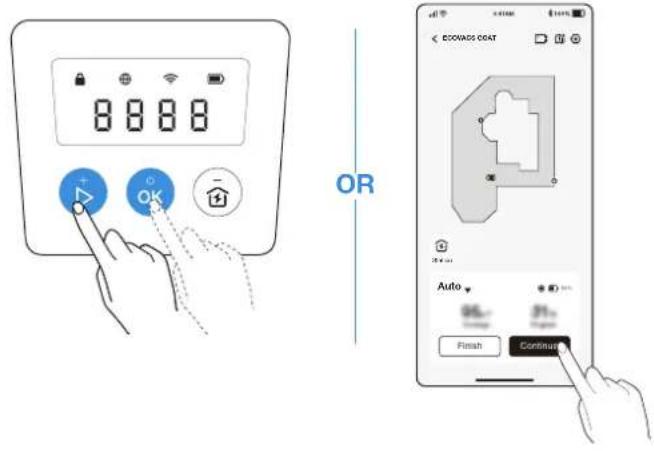
③ Resume Mowing
Press ▷ and then OR ECOVACS GOAT or tap the button in the App to resume mowing.
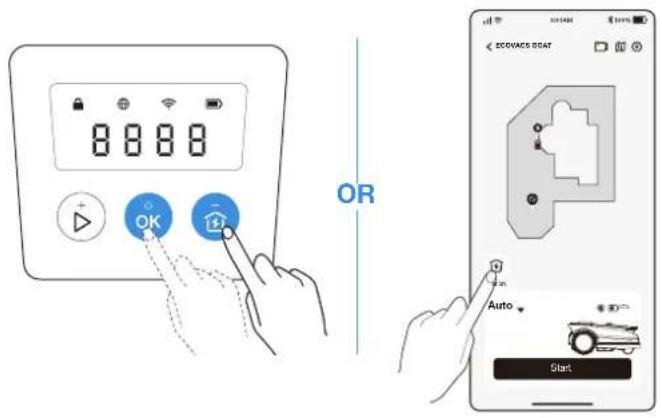
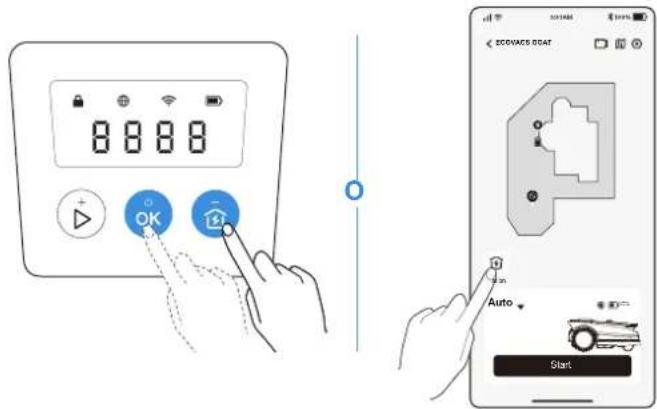
4 End of Mowing
-
After completing the mowing task, ECOVACS GOAT will return to the Station automatically.
-
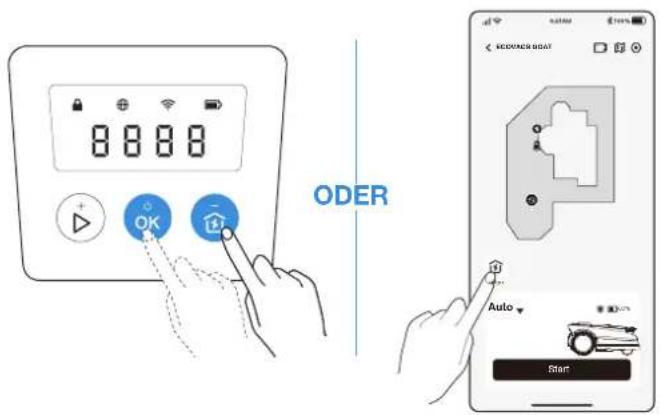
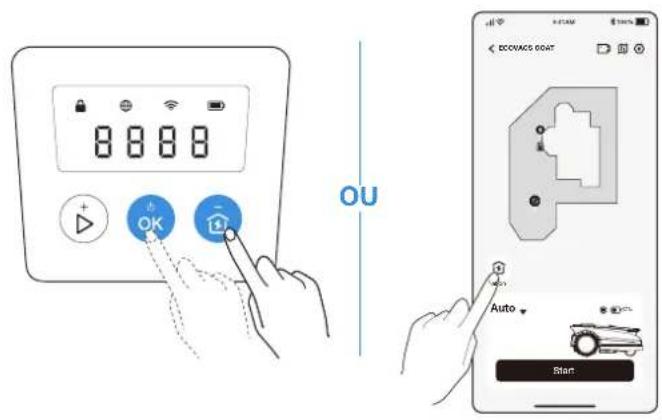
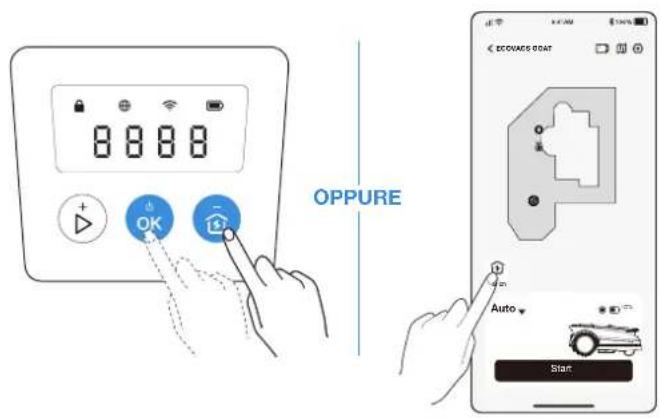
When ending the mowing process manually, you need to send ECOVACS GOAT to the Station by pressing hand then OK, or tapping on the App.
5. Touble Shooting
If you encounter any problems while using your ECOVACS GOAT, check out the FAQ articles at https://www.ecovacs.com or from the section on the ECOVACS HOME App.
6. Maintenance
For better performance and longer lifespan of your ECOVACS GOAT, please maintain it and replace any worn parts properly.

WARNING
• Always power off your ECOVACS GOAT before operation.
• Always wear protective gloves when replacing the Blades.
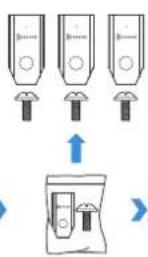
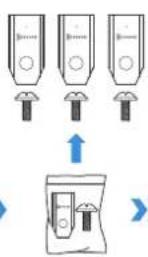
- Use only the Blades manufactured by ECOVACS and new screws when assembling the Blades.
- Wipe the unwashable components with a clean and dry cloth. Please do not use cleaning sprays or other detergents.
• Gently turn your GOAT over on a soft surface.
6.1 Frequency
| Part | Maintenance Replacement | |
| Front AI Camera 2 to 4 weeks - | ||
| Blades - 4 to 6 weeks | ||
6.2 Regular Maintenance
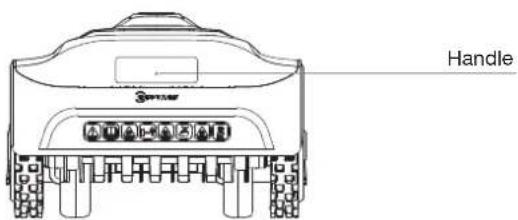
1 Blade Disc, Chassis, Off-road Wheels, and Front Wheels
WARNING
• ALWAYS wear protective gloves.
- DO NOT use a high pressure sprinkler for high pressure water can enter the sealings and damage electronic and mechanical parts.
STEPS TO CLEAN THE MAIN PARTS
Step 1: Power off ECOVACS GOAT.
Step 2: Gently turn your ECOVACS GOAT over on a soft surface.
Step 3: Clean the Blade Disc and the chassis with a brush.
Step 4: Check that the Blade Disc can rotate freely and Blades can spin freely.
Step 5: Clear the mud from the Off-road Wheels and Front Wheels with a brush.
② Other Components
Wipe the components with a clean, dry cloth. Avoid using cleaning sprays or detergents.
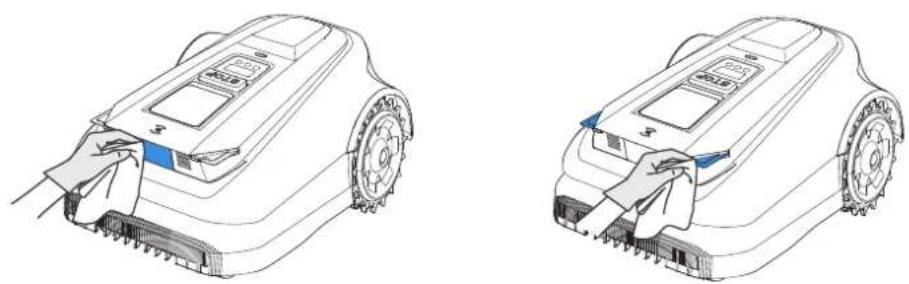
natural_image
Line drawings of two robotic car parts with cleaning handles, showing front and side views (no text or symbols)③ RTK Reference Station
If the RTK Reference Station, its mounting pole included, tilts, make sure it is set properly.
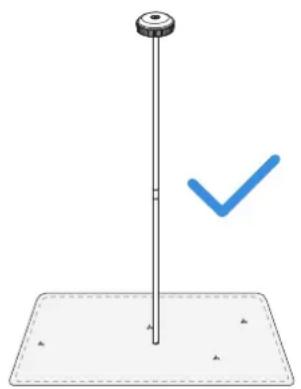
natural_image
Simple diagram of a vertical pole with a blue checkmark on a base, no text or symbols present.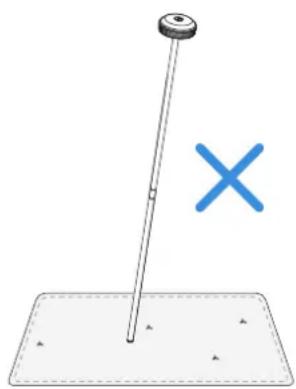
natural_image
Simple diagram showing a pole with a cross symbol, no text or labels present6.3 Seasonal Maintenance
① Storage Over the Winter
ECOVACS GOAT
- Power off your ECOVACS GOAT after it is fully charged.
- Clean it thoroughly.
- Store it with water-proof and dust-proof coverings in a cool, well-ventilated, and dry place indoors.
Station
- Unplug the Power Supply from the power socket.
- Disconnect Power Supply from the Station.
- Mark the spot where you set the Station for reference in the new working season.
- Store the Station and Power Supply in a cool, well-ventilated, and dry place away from direct sunlight.
Note: It is necessary to put the Station in the original position for working in a new season. Otherwise, it may lead to location fault and map invalidation.
② Restart in the Spring
- Remove all coverings from your ECOVACS GOAT and the Station.
- Assemble the Station, putting it back to where it was in the last working season.
- Check the cables for any damage or breaks and repair as needed. Connect the cables that are safe and qualified to use.
- Check the Blades for sharpness and replace them if necessary. Refer to the Maintenance section of this manual for detailed steps and tips.
- Power on your ECOVACS GOAT and test if it is connected to the app and works properly.
6.4 Part Replacement
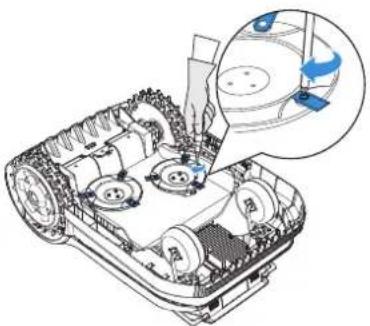
1 Replace the Blades
WARNING
• Always power off your ECOVACS GOAT before operation.
• Always wear protective gloves when replacing the Blades.
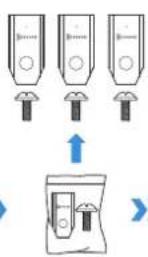
- Use only the Blades manufactured by ECOVACS and new screws when assembling the Blades.
- Wipe the unwashable components with a clean and dry cloth. Please do not use cleaning sprays or other detergents.
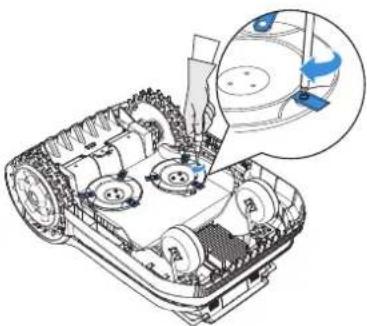
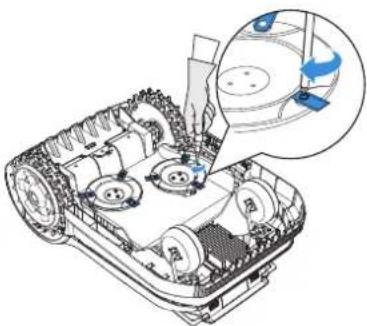
STEPS TO REPLACE THE BLADES
Step 1: Power off ECOVACS GOAT.
Step 2: Gently turn your ECOVACS GOAT over on a soft surface.
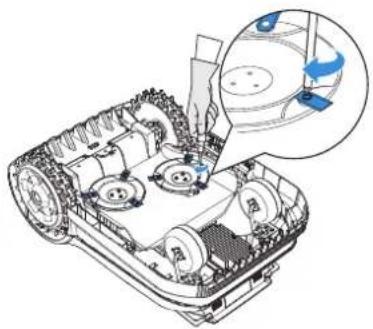
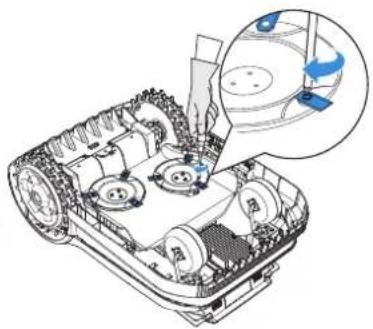
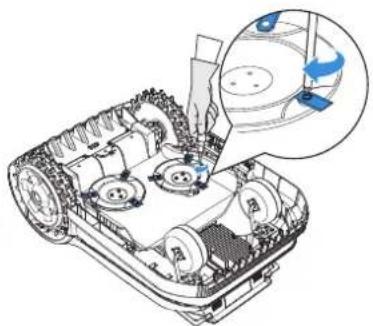
Step 3: Loosen the Screws with a screwdriver.
Step 4: Remove the Screws and the Blades.
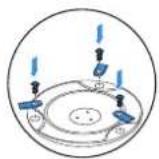
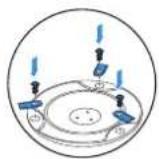
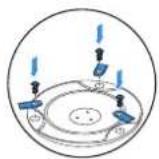
Step 5: Tighten the new Blades and the Screws.
Step 6: Make sure that the Blades can spin freely.

7. Technical Data
| Basic Information | Product Name Lawn Mowing Robot | ||
| Model GPR11 GPR12 | |||
| Brand ECOVACS | |||
| Dimensions:Length (mm) × Width (mm) × Height (mm) | 680*460*310 | ||
| Net Weight (kg) (Battery Included) 15.8 | |||
| ECOVACS GOAT Parameters | Rated Voltage 37.8V | --- | |
| Working Capacity (m2) | 1600 3000 | ||
| Cutting Width (cm) 33 | |||
| Cutting Height (cm) 3-9 | |||
| Charging Time (min.) 45±5 | |||
| Noise Emissions | Measured Sound Power Level LWA 60 dB(A) | ||
| Sound Power Uncertainties KWA 3 dB(A) | |||
| Sound Pressure Level LpA | 52 dB(A) | ||
| Sound Pressure Uncertainties KpA | 3 dB(A) | ||
| ConnectivityFrequency Range | Bluetooth® 2400MHz ~ 2483.5MHz | ||
| Wi-Fi 2400MHz ~ 2483.5MHz | |||
| Cellular Network (purchased) | WCDMA: BAND I: Uplink:1920-1980MHz,Downlink:2110-2170MHzBAND VIII: Uplink:880-915MHz,Downlink:925-960MHzLTE:E-UTRABAND 1: Uplink:1920-1980MHz,Downlink:2110-2170MHz-E-UTRABAND 3: Uplink:1710-1785MHz,Downlink:1805-1880MHz-E-UTRABAND 7: Uplink:2500-2570MHz,Downlink:2620-2690MHz-E-UTRABAND 8: Uplink:880-915MHz,Downlink:925-960MHz-E-UTRABAND 20: Uplink:832-862MHz,Downlink:791-821MHz-E-UTRABAND 28: Uplink:703-748MHz,Downlink:758-803MHz-E-UTRABAND 38: Uplink:2570-2620MHz,Downlink:2570-2620MHz-E-UTRABAND 40: Uplink:2300-2400MHz,Downlink:2300-2400MHzAvailable frequency bands for LTE Band 28 in Europe are 703-736MHz(TX),758-791MHz(RX) | ||
| RTK(GNSS) GPS, Beidou, Galileo, GLONASS | |||
| RTK(LoRa) 863-870MHz | |||
| MAX. radio-frequencypower | Bluetooth® ≤20dBm | ||
| Wi-Fi ≤20dBm | |||
| Cellular Network (purchased) | WCDMA:+24dBm+1.7/-3.7dBLTE: E-UTRA Band28:23dBm+2.7/-3.2dB other Bands:23dBm±2.7dB | ||
| Lora in RTK ≤14dbm(25mw) | |||
| Driving Motor | Rated Speed (r/min) | 34.6 | |
| Top Speed (r/min) | 60.5 | ||
| Blade Motor Speed (r/min) | 3000 | ||
| Battery (ECOVACS GOAT) | Battery Type Lithium-ion | ||
| Rated Voltage 32.4V 32.4V | --- | --- | |
| Rated Capacity 3000 mAh 5000 mAh | |||
| RTK Reference Station | Model FM24A9 | ||
| Usage Temperature -40~85°C / -40~185°F | |||
| Storage Temperature -55~95°C / -67~203°F | |||
| Input Voltage 5V | --- | ||
| Input Current 1A | |||
| Power Supply | Supply Unit Model | GM152-3780300-2DGGM152-3780300-3DGGM152-3780300-SDGBLJ125W378300P-VBLJ125W378300P-B | GM403-3780500-2DGGM403-3780500-3DGGM403-3780500-SDGBLJ240W378500P-VBLJ240W378500P-B |
| Input Voltage | 100-240 V ~ 100-240 V ~ | ||
| Output Voltage 37.8V 37.8V | --- | --- | |
| Output Current 3A 5A | |||
| Station | Model CH2491 CH2491A | ||
| Input Voltage 37.8V 37.8V | --- | --- | |
| Input Current 3A 5A | |||
| Output Voltage for ECOVACS GOAT 37.8V 37.8V | --- | --- | |
| Output Current for ECOVACS GOAT 3A | 5A | ||
| Output Voltage for RTK | 5V --- | ||
| Output Current for RTK | 1A | ||
Note: Technical and design specifications may be changed for continuous product improvement. Explore more accessories at https://www.ecovacs.com.
Hinweis:
2. Wi-Fi-Verbindung
natural_image
Illustration of a microcontroller with Wi-Fi signal icons and a hand holding a smartphone (no text or symbols present)natural_image
Diagram of a mechanical device with pins and mounting base, no visible text or symbolsnatural_image
Technical line drawing of a mechanical device with a vertical shaft and mounting base (no text or symbols)natural_image
Technical diagram of a mechanical assembly with a magnified inset showing internal components (no text or labels)natural_image
Diagram showing two identical mechanical components with directional arrows indicating motion or transformation (no text or symbols)natural_image
Technical diagram showing a mechanical component and its cross-sectional view with arrows indicating force or movement (no text or symbols present)4 Laden des Mähers
natural_image
Line drawing of a robotic device with wiring and a battery, no text or symbols present3.2 Kartierung
natural_image
Illustration of a person standing next to a car and a person lying on the ground, with no visible text or symbols.natural_image
Illustration of a person using a small car near a circular tank (no text or symbols)natural_image
Illustration showing a person standing on a circular platform next to a small plant and a small robot, with no text or symbols present.natural_image
Blue icon of a car with motion lines and a grid symbol (no text or numbers)2 Zeitplan

The image contains no text. The horizontal line is a stylistic or background element and must be ignored according to the rules.
3 Schnitthöhe
The image contains no text. The horizontal line is a stylistic or background element and must be ignored according to the rules.
natural_image
Blue icon depicting an electric car charging at a plug, with a lightning bolt symbol nearby (no text or labels)[Non-Text]
6 Regensensor

The image contains no text. The horizontal line is a stylistic or background element and must be ignored according to the rules.
natural_image
Blue icon of a car emitting exhaust smoke next to a clock (no text or symbols)The image contains no text. The horizontal line is a stylistic or background element and must be ignored according to the rules.
8 Tierschutz
The image contains no legible text or symbols. According to Rule 4 (Edge Noise Strategy), since the ground truth is a non-textual graphic and does not contain any characters, the OCR output must be empty.
Therefore, the corrected OCR text is:
```text [No text detected]
9 Intelligente Hindernisvermeidung

The image contains no legible text or symbols. According to Rule 4 (Edge Noise Strategy), since the ground truth is not clearly visible, the OCR should output nothing.
Therefore, the corrected OCR text is:
```text [No text detected]

The image contains no text or characters. It is a stylistic or background line with no actual text content.

The image contains only a stylistic horizontal line, which must be ignored according to Rule 2. No text or placeholder characters should be output.
5. Fehlerbehebung
natural_image
Line drawing of a robotic vacuum cleaner with a hand cleaning the component (no text or symbols)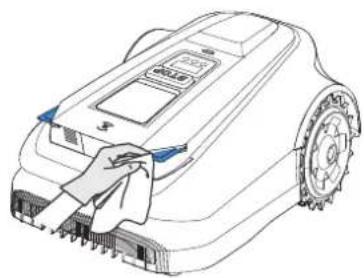
natural_image
Line drawing of a robotic car with a cloth cleaning the wheel (no text or symbols)natural_image
Simple diagram of a vertical pole with a blue checkmark and scattered triangles below (no text or symbols)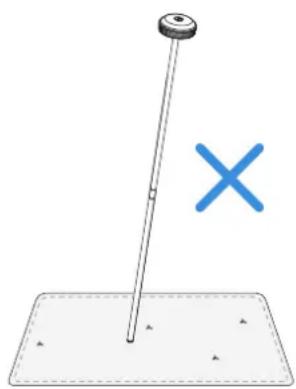
natural_image
Simple diagram showing a pole with a cross symbol, no text or labels presentnatural_image
Technical illustration of a tracked vehicle with gear and sensor components, showing a close-up of the engine (no text or symbols present)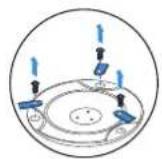
(
natural_image
Technical illustration of a tracked vehicle with mechanical components and a magnified inset showing a blue component (no text or symbols present)- Technische Daten
Directive relative aux machines
Remarque
2. Connexion Wi-Fi
natural_image
Illustration of a smart home control device with wireless signal icons and a hand holding a smartphone (no text or symbols present)natural_image
Diagram of a mechanical device with pins and a base plate, no text or symbols presentnatural_image
Technical line drawing of a mechanical device with a vertical shaft and base plate (no text or symbols)natural_image
Technical diagram of a mechanical assembly with a tool and a magnified inset showing a component (no text or symbols)natural_image
Diagram showing two identical mechanical components with directional arrows indicating motion or transformation (no text or symbols)natural_image
Technical diagram showing a mechanical component and its cross-sectional view with labeled dimensions (no text or symbols present)natural_image
Diagram of a robotic device connected to a power supply and sensor, with no visible text or symbols3.2 Cartographie
natural_image
Diagram of a rural water feature with a house, a car, and a dam structure (no text or symbols)2. Connecter la tondeuse
natural_image
Illustration of a person standing next to a car and a robot on a flat surface (no text or symbols)
6. Terminer la cartographie
7. Configurer des zones interdites
natural_image
Illustration showing a person using a small car near a circular tank with a scale, no text or symbols present.natural_image
Illustration of a person standing on a small boat with a small tree, connected to a rectangular area with a car and dashed border (no text or symbols)9. Créer un chemin
flowchart
graph LR
    A["Person standing on pool"] -->|>1m| B["Vehicle collision"]
    B -->|>1m| C["Vehicle collision"]
natural_image
Blue icon of a car with a grid symbol, no text or symbols present② Planification
natural_image
Blue icon of a car with a clipboard and horizontal line, no text or symbols present③ Hauteur de coupe
natural_image
Blue silhouette of a car on a road with a trail (no text or symbols)4 Tonte programmée
natural_image
Blue icon of a car with motion lines and a curved arrow, no text or symbols presentnatural_image
Blue icon depicting a car with a lightning bolt next to a charging plug, on a ground line (no text or symbols)6 Capteur de pluie

The image contains no legible text or symbols. According to Rule 4 (Edge Noise Strategy), since the ground truth is a non-textual graphic and does not contain any characters, punctuation, or symbols that can be reliably extracted from it. Therefore, the OCR result must reflect this absence of any content.
[No text detected]
natural_image
Blue icon of a car emitting water droplets next to an hourglass (no text or symbols)The image contains no text. The horizontal line is a stylistic or background element and must be ignored according to the rules.
The image contains no legible text or symbols. According to Rule 4 (Edge Noise Strategy), since the GT has no visible text, the OCR should not output any characters. Therefore, the corrected OCR text is:
[Empty String]

The image contains no legible text or symbols. According to Rule 4 (Edge Noise Strategy), since the ground truth is a non-textual graphic and does not contain any characters, the OCR output must be empty.
Therefore, the corrected OCR text is:
```text [No text detected]

The image contains only a stylistic horizontal line, which must be ignored according to the rules. According to Rule 2, such lines must be ignored and not represented by underscores or any other character in the OCR output.
Therefore, the corrected OCR text is:
[empty string]

The image contains no legible text or symbols. According to Rule 4 (Edge Noise Strategy), since the ground truth is not clearly visible, the OCR should output nothing.
Therefore, the corrected OCR text is:
```text [No text detected]
Remarque :
flowchart
graph TD
    A["Left Arrow"] --> B["Right Arrow"]
② Pause de la tonte
5. Dépannage
natural_image
Line drawing of a robotic arm with a hand cleaning the engine (no text or symbols)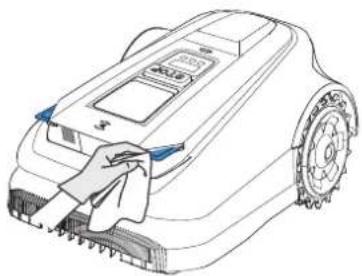
natural_image
Line drawing of a robotic lawn mower with a cloth cover, showing no text or symbolsnatural_image
Simple diagram of a vertical pole with a blue checkmark on a flat base (no text or symbols)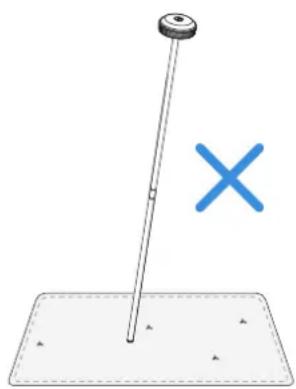
natural_image
Simple diagram showing a pole with a cross symbol, no text or labels presentnatural_image
Technical illustration of a tracked vehicle with visible wheels and a close-up inset showing mechanical components (no text or symbols)
(
natural_image
Technical line drawing of a tracked vehicle showing internal components and a close-up inset (no text or symbols)- Données techniques
Nota:
natural_image
Diagram showing a microcontroller with connected devices and a hand holding a smartphone displaying wireless signals (no text or symbols present)natural_image
Diagram of a mechanical device with pins and mounting base, no visible text or symbolsnatural_image
Technical line drawing of a mechanical device with a vertical shaft and mounting base (no text or symbols)natural_image
Technical diagram of a mechanical assembly with a magnified inset showing internal components (no text or labels)natural_image
Diagram showing two identical mechanical components with directional arrows indicating motion or rotation (no text or symbols)natural_image
Technical diagram showing a mechanical component and its cross-sectional view with labeled dimensions (no text or symbols present)4 Ricarica del tagliaerba
natural_image
Diagram of a robotic device with power supply and battery, no text or symbols present3.2 Mappatura
natural_image
Diagram of a house with a car on a ladder and a ramp, above a bridge structure (no text or symbols)natural_image
Illustration of a hand interacting with a device and a robotic arm, both showing wireless signals (no text or symbols present)4. Avvia mappatura
natural_image
Illustration of a person standing next to a car and a person lying on the ground, with no visible text or symbols.
natural_image
Illustration showing a person standing near a car and a circular water feature with a grid, no text or symbols present.natural_image
Illustration of a person standing on a circular object next to a small robot and a rectangular area with dashed lines (no text or symbols)natural_image
Blue icon of a car with motion lines and a small grid symbol (no text or numbers)② Programma
natural_image
Blue icon of a car with a clipboard and checklist, no text or symbols present③ Altezza di taglio
natural_image
Blue car icon on white background with diagonal stripes (no text or symbols)natural_image
Blue icon of a car with motion lines indicating speed or airflow (no text or symbols)5 Ricarica automatica
natural_image
Blue icon depicting a car with a lightning bolt next to a plug, on a textured ground line (no text or symbols)6 Sensore pioggia

The image contains no text. The horizontal line is a stylistic or background element and must be ignored according to the rules.
natural_image
Blue icon of a car emitting exhaust smoke next to a clock (no text or symbols)The image contains no legible text or symbols. According to Rule 4 (Edge Noise Strategy), since the GT has no visible text, the OCR should not output any characters. Therefore, the corrected OCR text is:
[No text detected]

The image contains no text. The horizontal line is a stylistic or background element and must be ignored according to the rules.

The image contains no text. The horizontal lines are stylistic or background elements and must be ignored according to the rules.
natural_image
Blue silhouette of a car spraying water on a surface (no text or symbols)
The image contains no text. The horizontal line is a stylistic or background element and must be ignored according to the rules.
natural_image
Line drawing of a robotic vacuum cleaner with a hand adjusting the component (no text or symbols)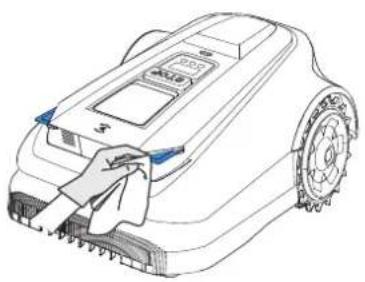
natural_image
Line drawing of a robotic lawn mower with a cloth cleaning the wheel (no text or symbols)natural_image
Simple diagram of a vertical pole with a blue checkmark on a base, no text or symbols present.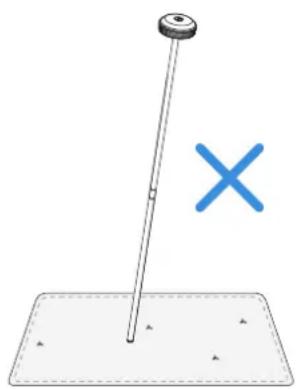
natural_image
Simple diagram showing a pole with a cross symbol, no text or labels presentnatural_image
Technical illustration of a tracked vehicle with visible wheels and a close-up inset showing mechanical components (no text or symbols)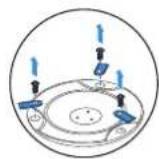
(
natural_image
Technical line drawing of a tracked vehicle with gear and wheels, showing internal components and a magnified inset (no text or symbols)7. Dati tecnici
Nota:
ECOVACS GOAT (vista trasera)
2. Conexión Wi-Fi
natural_image
Illustration of a handheld electronic device with wireless signal icons and a hand holding a smartphone (no text or symbols present)natural_image
Technical illustration of a mechanical device with pins and mounting base (no text or symbols)natural_image
Technical line drawing of a mechanical device with a vertical shaft and mounting base (no text or symbols)natural_image
Technical diagram of a mechanical assembly with a magnified inset showing internal components (no text or labels)natural_image
Diagram showing two identical mechanical components with directional arrows indicating motion or force (no text or symbols)natural_image
Technical diagram showing a mechanical component with a base and side view of a curved structure (no text or symbols)natural_image
Line drawing of a robotic device with power supply and sensor, no text or symbols present3.2 Cartografía
natural_image
Diagram showing a house with a car on a ramp and a dam structure below (no text or symbols)natural_image
Illustration of a person standing near a car and a person lying on the ground, with no visible text or symbols.
natural_image
Illustration of a person using a small car near a large circular object with a grid, no text or symbols present.natural_image
Illustration of a person standing on a square sink next to a rectangular room with a small vehicle and directional arrows (no text or symbols)flowchart
graph LR
    A["Person at pool"] -->|>1m| B["Car at >1m distance"]
    B --> C["Car moving right"]
    style A fill:#f9f,stroke:#333
    style B fill:#ccf,stroke:#333
    style C fill:#cfc,stroke:#333
4. Empiece a utilizar ECOVACS GOAT
natural_image
Blue icon of a car with motion lines and a grid symbol (no text or numbers)
Programación

The image contains no legible text or symbols. According to Rule 4 (Edge Noise Strategy), since the ground truth is not clearly visible, the OCR should output nothing.
Therefore, the corrected OCR text is:
```text [No text detected]

Altura de corte
The image contains no text. The horizontal lines are stylistic or background elements and must be ignored according to the rules.

Recarga automática
natural_image
Blue icon depicting an electric car charging at a junction with a lightning bolt (no text or symbols)The image contains no legible text or symbols. According to Rule 4 (Edge Noise Strategy), since the ground truth is not clearly visible, the OCR should output nothing.
Therefore, the corrected OCR text is:
```text [No text detected]
6 Sensor de lluvia

The image contains no legible text or symbols. According to Rule 4 (Edge Noise Strategy), since the ground truth is a non-textual graphic and does not contain any characters, punctuation, or symbols that can be reliably extracted from it. Therefore, the correct OCR output must reflect the absence of any content.
[No text detected]
natural_image
Blue icon of a car emitting water droplets next to a clock (no text or symbols)The image contains no text or characters. It is a stylistic or background line with no actual text content.
The image contains no text. The horizontal lines are stylistic or background elements and must be ignored according to the rules.

The image contains no text or characters. It is a stylistic or background line with no actual text content.
The image contains only a stylistic horizontal line, which must be ignored according to the rules. According to Rule 2, such lines must be ignored and not represented by underscores or any other character in the OCR output.
Therefore, the corrected OCR text is:
[empty string]
The image contains no legible text or symbols. According to Rule 4 (Edge Noise Strategy), since the ground truth is not clearly visible, the OCR should output nothing.
Therefore, the corrected OCR text is:
```text [No text detected]
Nota:
natural_image
Line drawings of two robotic car parts with cleaning handles, showing front and side views (no text or symbols)natural_image
Simple diagram of a vertical pole with a blue checkmark and scattered triangles below, no text or symbols present.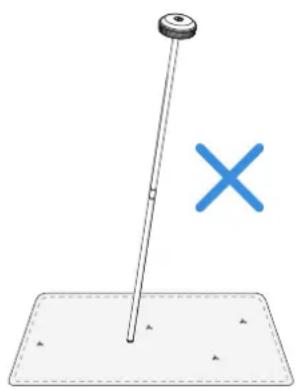
natural_image
Simple diagram showing a pole with a cross symbol, no text or labels presentnatural_image
Technical illustration of a tracked vehicle with gear and sensor components, showing a close-up of the engine (no text or symbols present)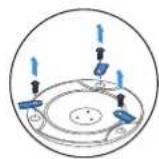
(
natural_image
Technical illustration of a tracked vehicle with mechanical components and a magnified inset showing a component detail (no text or symbols present)7. Datos técnicos
| Información básica | Nombre del producto Robot cortacésped | ||
| Modelo GPR11 GPR12 | |||
| Marca ECOVACS | |||
| Dimensiones:Largo (mm) × ancho (mm) × alto (mm) | 680*460*310 | ||
| Peso neto (kg) (batería incluida) 15.8 | |||
| Parámetros del cortacésped | Tensión nominal 37.8V | === | |
| Capacidad de trabajo ( m^2 ) | 1600 3000 | ||
| Ancho de corte (cm) 33 | |||
| Altura de corte (cm) 3-9 | |||
| Tiempo de carga (min) 45±5 | |||
| Emisiones sonoras | Nivel de potencia acústica sonora LwA 60 dB(A) | ||
| Incertidumbre de potencia sonora KwA 3 dB(A) | |||
| Nivel de presión sonora LpA 52 dB(A) | |||
| Incertidumbre de presión sonora KpA | 3 dB(A) | ||
| Rango de frecuencia de conectividad | Bluetooth® 2400MHz ~ 2483.5MHz | ||
| Wi-Fi 2400MHz ~ 2483.5MHz | |||
| Red celular (adquirida) | WCDMA: BAND I: Uplink:1920-1980MHz,Downlink:2110-2170MHzBAND VIII: Uplink:880-915MHz,Downlink:925-960MHzLTE:E-UTRABAND 1: Uplink:1920-1980MHz,Downlink:2110-2170MHz-E-UTRABAND 3: Uplink:1710-1785MHz,Downlink:1805-1880MHz-E-UTRABAND 7: Uplink:2500-2570MHz,Downlink:2620-2690MHz-E-UTRABAND 8: Uplink:880-915MHz,Downlink:925-960MHz-E-UTRABAND 20: Uplink:832-862MHz,Downlink:791-821MHz-E-UTRABAND 28: Uplink:703-748MHz,Downlink:758-803MHz-E-UTRABAND 38: Uplink:2570-2620MHz,Downlink:2570-2620MHz-E-UTRABAND 40: Uplink:2300-2400MHz,Downlink:2300-2400MHzAvailable frequency bands for LTE Band 28 in Europe are 703-736MHz(TX),758-791MHz(RX) | ||
| RTK(GNSS) GPS, Beidou, Galileo, GLONASS | |||
| RTK(LoRa) 863-870MHz | |||
| Potencia máx. de radiofrecuencia | Bluetooth® ≤20dBm | ||
| Wi-Fi ≤20dBm | |||
| Red móvil (comprada) | WCDMA:+24dBm+1.7/-3.7dBLTE: E-UTRA Band28:23dBm+2.7/-3.2dB other Bands:23dBm±2.7dB | ||
| Lora en RTK ≤14dbm(25mw) | |||
| Motor de accionamiento | Velocidad nominal (r/min) | 34.6 | |
| Velocidad máxima (r/min) | 60.5 | ||
| Motor de cuchillas Velocidad (r/min) | 3000 | ||
Merk:
• 0000 er en ugyldig PIN-kode.
- PIN-koden må tastes inn to ganger for å bekrefte innstillingen.
- Hvis du taster inn feil tall mens du angir PIN-koden, starter innstillingsprosesen på nytt.
• Du kan endre PIN-koden i appen.
SENSORER
2. Wi-Fi-tilkobling
natural_image
Illustration of a handheld electronic device with wireless signal icons and a hand holding a smartphone (no text or symbols present)natural_image
Technical illustration of a mechanical device with pins and base plate (no text or symbols)natural_image
Technical line drawing of a mechanical device with a downward arrow indicating a component (no text or symbols present)natural_image
Technical diagram of a mechanical assembly with a magnified inset showing internal components (no text or labels)natural_image
Diagram showing two identical mechanical components with directional arrows indicating motion or force (no text or symbols)natural_image
Technical diagram showing a mechanical component with a circular base and a side view of a curved structure with labeled arrows (no text or symbols present)4 Lad klipperen
natural_image
Line drawing of a robotic lawn mower with power supply and battery, mounted on a flat base (no text or symbols)3.2 Kartlegging
① Før kartlegging må følgende tips noteres:
• Fjern LiDAR-dekselet.
- Sørg for at ECOVACS GOAT er slått på
- Hvis ECOVACS GOAT er låst, lås den opp först. Trykk START --> OKknappen på ECOVACS GOAT.
② Kartlegging
- Velg riktig kartleggingsmodus for hagen din.
2. Koble til klipperen
4. Start kartlegging
natural_image
Illustration of a person standing next to two vehicles on a flat surface, with no visible text or symbols.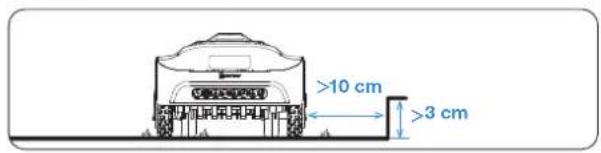
5. Bytt kartleggingsmodus
natural_image
Illustration of a person standing near a car and a circular water feature (no text or symbols)natural_image
Illustration of a person standing on a square pool next to a small boat and a rectangular area with directional arrows (no text or symbols)9. Lag en bane
flowchart
graph LR
    A["Person standing at pool"] --> B["Move toward pool"]
    B --> C["Move away from pool"]
    C --> D["Move away from pool"]
    style A fill:#f9f,stroke:#333
    style B fill:#ccf,stroke:#333
    style C fill:#cfc,stroke:#333
    style D fill:#fcc,stroke:#333
4. Ta ECOVACS GOAT i bruk
4.1 Slik fungerer ECOVACS GOAT
natural_image
Blue icon of a car with motion lines and a grid symbol (no text or symbols)② Tidsplan
Du kan angi klippeplanen din i ECOVACS HOME-appen. Med mulighet for to tidsplaner, kan du stille inn og endre ECOVACS GOAT alt etter årstid.

natural_image
Blue icon of a car with a clipboard and checklist, no text or symbols present③ Klippehøyde
ECOVACS GOAT er en smart robot som vedlikeholder plenen din godt. Før du starter, sørg for at gresset ikke er lengre enn 10 cm. Hvis lengre, klipp gresset grovt med en manuell gressklipper. Da vil ECOVACS GOAT holde gresset pent klippet innenfor en høyde på 9 cm.

natural_image
Blue car icon on white background with diagonal stripes (no text or symbols)4 Programmert klipping
Med programmert klipping klipper ECOVACS GOAT i en S-formet bane for å oppnå maksimal effektivitet.

natural_image
Blue icon of a car with motion lines indicating speed or airflow (no text or symbols)⑤ Automatisk lading
natural_image
Blue icon depicting a car with a lightning bolt next to a plug, on a textured ground line (no text or symbols)6 Regnsensor

The image contains no text. The horizontal lines are stylistic or background elements and must be ignored according to the rules.
natural_image
Blue icon of a car emitting water droplets next to a clock (no text or symbols)The image contains no text or characters. It is a stylistic or background line with no actual text content.
8 Dyrebeskyttelse
The image contains no text. The horizontal lines are stylistic or background elements and must be ignored according to the rules.

The image contains no text. The horizontal line is a stylistic or background element and must be ignored according to the rules.
The image contains only a stylistic horizontal line, which must be ignored according to the rules. According to Rule 2, such lines must be ignored and not represented by underscores or any other character in the OCR output.
Therefore, the corrected OCR text is:
[empty string]
11 Dyrebeskyttelse
The image contains no legible text or symbols. According to Rule 4 (Edge Noise Strategy), since the ground truth is not clearly visible, the OCR should output nothing.
Therefore, the corrected OCR text is:
```text [No text detected]
Merk:
flowchart
graph TD
    A["Left Arrow"] --> B["Right Arrow"]
4.3 KLAR FOR KLIPPING
1 Start klippingen
natural_image
Line drawing of a robotic arm with a hand inserting a component (no text or symbols)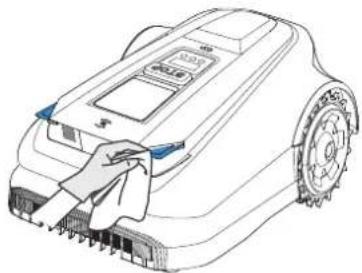
natural_image
Line drawing of a robotic vacuum cleaner with cleaning panel and control buttons (no text or symbols)natural_image
Simple diagram of a vertical pole with a blue checkmark on a flat base (no text or symbols)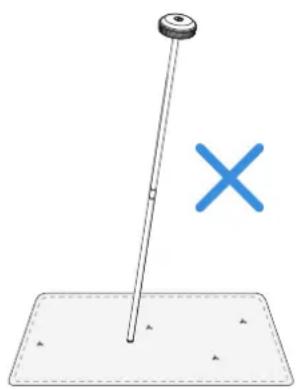
natural_image
Simple diagram showing a pole with a cross symbol, no text or labels present6.3 Sesongmessig vedlikehold
① Oppbevaring over vinteren
ECOVACS GOAT
natural_image
Technical illustration of a tracked vehicle with gear and sensor components, showing a close-up of the engine (no text or symbols present)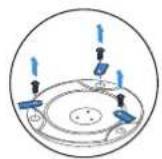
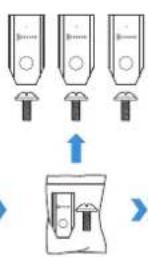
(
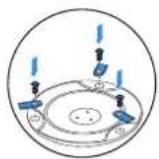
natural_image
Technical illustration of a tracked vehicle chassis with mechanical components and a magnified inset showing a blue component (no text or symbols present)8. Tekniske data
Observera:
flowchart
graph LR
    A["App Interface"] --> B["User Interface"]
    B --> C["QR Code Scan"]
    C --> D["Robot with Remote Control"]
    D --> E["QR Code Display"]
1208SE
2. Wifi-adress
natural_image
Illustration of a handheld device with wireless signal icons and a hand holding a smartphone (no text or symbols present)natural_image
Technical illustration of a mechanical assembly with bolts and a base plate (no text or symbols)natural_image
Diagram showing two types of air purifiers with directional arrows indicating flow or movement (no text or symbols present)natural_image
Diagram showing a mechanical setup with a rotating component and a 90-degree angle indicator (no text or symbols present)natural_image
Technical diagram of a mechanical assembly with a magnified inset showing internal components (no text or labels)natural_image
Technical line drawing of a mechanical device with a vertical shaft and mounting base (no text or symbols)natural_image
Technical diagram showing a mechanical component with a top and side views, no visible text or symbolsnatural_image
Diagram of a robotic device with connected wires and a battery, no text or symbols present1212SE
3.2 Kartläggning
3. Välj en startpunkt
natural_image
Illustration of a person standing on a large rectangular surface with two small objects, one near a blue circular mark (no text or symbols)
7. Skapa en spärrzon
natural_image
Illustration of a person standing near a car and a circular water feature (no text or symbols)natural_image
Illustration showing a person standing on a tree in a garden and a small robot inside a rectangular area (no text or symbols)9. Skapa en väg
natural_image
Blue icon of a car with motion lines and a grid symbol (no text or numbers)② Schema
natural_image
Blue icon of a car with a checklist and document, no text or symbols present③ Klipphöjd
natural_image
Blue car icon on white background with diagonal stripes (no text or symbols)natural_image
Blue icon of a car with motion lines and an arrow, no text or symbols presentnatural_image
Blue icon depicting a car with a lightning bolt next to a plug, on a textured ground line (no text or symbols)6 Regnsensor

The image contains no legible text or symbols. According to Rule 4 (Edge Noise Strategy), since the GT has no visible text, the OCR should not output any characters. Therefore, the corrected OCR text is:
[Empty String]
natural_image
Blue icon of a car with water droplets and clock symbol (no text or numbers)The image contains no text. The horizontal line is a stylistic or background element and must be ignored according to the rules.
8 Djurskydd
The image contains no text. The horizontal line is a stylistic or background element and must be ignored according to the rules.

The image contains no text. The horizontal line is a stylistic or background element and must be ignored according to the rules.

The image contains only stylistic horizontal lines, which are background or decorative elements and not text. According to Rule 2, such lines must be ignored by the OCR result. Therefore, the correct OCR output is empty.
(no text)

The image contains no text. The horizontal line is a stylistic or background element and must be ignored according to the rules.
Observera:
flowchart
graph TD
    A["Left Arrow"] --> B["Center Point"]
    B --> C["Right Arrow"]
4.3 KLAR FÖR KLIPPNING
1 Börja klippa
natural_image
Line drawings of two robotic car parts with blue accents, showing front and side views (no text or symbols)③ RTK-referensstation
natural_image
Simple diagram of a vertical pole with a blue checkmark on a flat base (no text or symbols)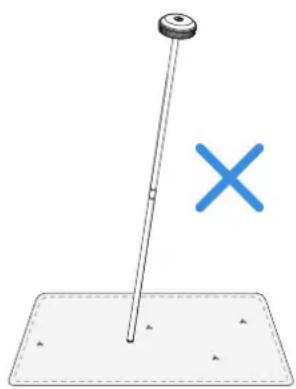
natural_image
Simple diagram showing a pole with a cross symbol, no text or labels presentflowchart
graph TD
    A["Top view: Internal tank with valve and sensor"] --> B["Arrow pointing to next panel"]
    B --> C["Arrow pointing to battery unit"]
    C --> D["Arrow pointing to next panel with switch"]
    D --> E["Arrow pointing to final tank with sensors and battery"]
7. Tekniska data
| Grundläggande information | Produktnamn Robot för gräsklippning | ||
| Modell GPR11 GPR12 | |||
| Varumärke ECOVACS | |||
| Mått:Längd (mm) × bredd (mm) × höjd (mm) | 680*460*310 | ||
| Nettovikt (kg) (inklusive batteri) 15.8 | |||
| Parametrar för gräsklippare | Nominell spänning 37.8V | --- | |
| Arbetskapacitet ( m^2 ) | 1600 3000 | ||
| Klippbredd (cm) 33 | |||
| Klipphöjd (cm) 3-9 | |||
| Laddningstid (min.) 45±5 | |||
| Ljudnivå | Uppmätt ljudeffektnivå LWA 60 dB(A) | ||
| Ovissheter för ljudeffektnivå KWA 3 dB(A) | |||
| Ljudtrycksnivå LpA 52 dB(A) | |||
| Ovissheter för ljudtryck KpA | 3 dB(A) | ||
| AnslutningFrekvensområde | Bluetooth® 2400MHz ~ 2483.5MHz | ||
| Wifi 2400MHz ~ 2483.5MHz | |||
| Mobiltelefonnät | WCDMA: BAND I: Uplink:1920-1980MHz,Downlink:2110-2170MHzBAND VIII: Uplink:880-915MHz,Downlink:925-960MHzLTE:E-UTRABAND 1: Uplink:1920-1980MHz,Downlink:2110-2170MHz-E-UTRABAND 3: Uplink:1710-1785MHz,Downlink:1805-1880MHz-E-UTRABAND 7: Uplink:2500-2570MHz,Downlink:2620-2690MHz-E-UTRABAND 8: Uplink:880-915MHz,Downlink:925-960MHz-E-UTRABAND 20: Uplink:832-862MHz,Downlink:791-821MHz-E-UTRABAND 28: Uplink:703-748MHz,Downlink:758-803MHz-E-UTRABAND 38: Uplink:2570-2620MHz,Downlink:2570-2620MHz-E-UTRABAND 40: Uplink:2300-2400MHz,Downlink:2300-2400MHzAvailable frequency bands for LTE Band 28 in Europe are 703-736MHz(TX),758-791MHz(RX) | ||
| RTK(GNSS) GPS, Beidou, Galileo, GLONASS | |||
| RTK(LoRa) 863-870MHz | |||
| MAX. radiofrekvenseffekt | Bluetooth® ≤20dBm | ||
| Wifi ≤20dBm | |||
| Mobiltelefonnät | WCDMA:+24dBm+1.7/-3.7dBLTE: E-UTRA Band28:23dBm+2.7/-3.2dB other Bands:23dBm±2.7dB | ||
| Lora in RTK ≤14dbm(25mw) | |||
| Drivande motor | Nominell hastighet (varv/min) 34.6 | ||
| Högsta hastighet (varv/min) 60.5 | |||
| Knivbladsmotor Hastighet (varv/min) 3 000 | |||
| Batteri (gräsklippare) | Batterityp Lithium-ion | ||
| Nominell spänning 32.4V 32.4V | --- | --- | |
| Nominell kapacitet 3000 mAh 5000 mAh | |||
| RTK-referensstation | Modell FM24A9 | ||
| Användningstemperatur -40~85°C / -40~185°F | |||
| Förvaringstemperatur -55~95°C / -67~203°F | |||
| Ingångsspänning 5V | --- | ||
| Ingångsström 1A | |||
| Strömförsörjning | Försörjningsenhetsmodell | GM152-3780300-2DGGM152-3780300-3DGGM152-3780300-SDGBLJ125W378300P-VBLJ125W378300P-B | GM403-3780500-2DGGM403-3780500-3DGGM403-3780500-SDGBLJ240W378500P-VBLJ240W378500P-B |
| Ingångsspänning | 100-240 V ~ 100-240 V ~ | ||
| Utgångsspänning | 37.8V 37.8V | --- | |
| Utgående ström | 3A | 5A | |
| Station | Modell CH2491 CH2491A | ||
| Ingångsspänning 37.8V 37.8V | --- | --- | |
| Ingångsström 3A | 5A | ||
| Utgångsspänning | 37.8V 37.8V | --- | |
| Utgående ström | 3A | 5A | |
| Utgångsspänning RTK | 5V --- | ||
| Utgående ström RTK | 1A | ||
Bemærk:
natural_image
Illustration of a handheld device with wireless signal icons and a hand holding a smartphone (no text or symbols present)natural_image
Diagram of a mechanical device with pins and mounting base, no visible text or symbolsnatural_image
Diagram showing two identical mechanical components with directional arrows indicating motion or transformation (no text or symbols)natural_image
Diagram showing a mechanical assembly with directional arrows and a 90-degree angle marker (no text or symbols present)natural_image
Technical diagram of a mechanical assembly with a magnified inset showing internal components (no text or symbols)natural_image
Technical line drawing of a mechanical device with a vertical shaft and mounting base (no text or symbols)natural_image
Technical diagram showing a mechanical component and its cross-sectional view with arrows indicating force or movement (no text or symbols present)natural_image
Diagram of a robotic device with wiring and a battery, no text or symbols present1244DK
3.2 Kortlægning
natural_image
Illustration of a person standing near a car and a person lying on the ground, with no visible text or symbols.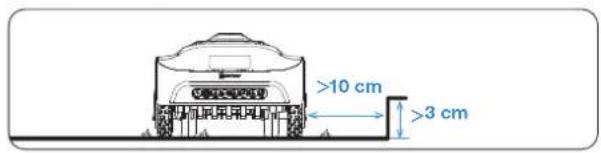
natural_image
Illustration of a person standing near a car and a circular water feature (no text or symbols)natural_image
Illustration of a person standing on a tree in a garden, connected to a small boat and a dashed box (no text or symbols)9. Opret en sti
natural_image
Blue icon of a car with a grid symbol, no text or symbols present② Tidsplan
natural_image
Blue icon of a car with a checklist and document, no text or symbols present③ Klippehøjde
natural_image
Blue car icon on white background with diagonal stripes (no text or symbols)4 Programmeret klipning
Med programmeret klipning klipper din ECOVACS GOAT langs en S-for-met bane for at opnå maksimal effektivitet.

natural_image
Blue icon of a car with motion arrows and motion lines, no text or symbols presentnatural_image
Blue icon depicting a car with a lightning bolt next to a plug, on a textured ground line (no text or symbols)6 Regnsensor

The image contains no text. The horizontal line is a stylistic or background element and must be ignored according to the rules.
7 Regnforsinkelsestid
natural_image
Blue icon of a car emitting water droplets next to a clock (no text or symbols)The image contains no text. The horizontal line is a stylistic or background element and must be ignored according to the rules.
⑧ Dyrebeskyttelse
The image contains no text. The horizontal lines are stylistic or background elements and must be ignored according to the rules.
9 Smart forhindringsundgåelse

The image contains no text. The horizontal line is a stylistic or background element and must be ignored according to the rules.

The image contains only a stylistic horizontal line, which must be ignored according to the rules. According to Rule 2, such lines must be ignored and not represented by underscores or any other character in the OCR output.
Therefore, the corrected OCR text is:
[empty string]

The image contains no text. The horizontal line is a stylistic or background element and must be ignored according to the rules.
Bemaerk:
flowchart
graph TD
    A["Left Arrow"] --> B["Center Point"]
    B --> C["Right Arrow"]
natural_image
Line drawings of two robotic car parts with visible blades and control buttons (no text or symbols)③ RTK-referencestation
natural_image
Simple diagram of a vertical pole with a blue checkmark on a flat base (no text or symbols)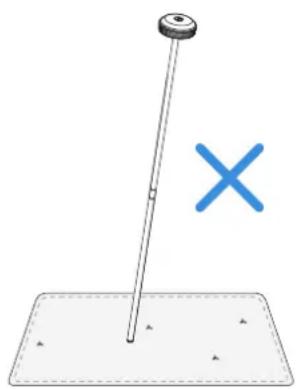
natural_image
Simple diagram showing a pole with a cross symbol, no text or labels presentnatural_image
Technical illustration of a tracked vehicle with gear and sensor components, showing a close-up of the engine (no text or symbols present)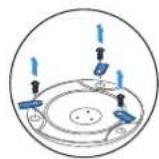
(

natural_image
Technical line drawing of a tracked vehicle with internal components and a magnified inset showing a blue component (no text or symbols)- TEKNISKE DATA
| Basisinformation | Produktnavn Robotplæneklipper | ||
| Model GPR11 GPR12 | |||
| Mærke ECOVACS | |||
| Dimensioner Længde (mm) × Bredde (mm) × Højde (mm) | 680*460*310 | ||
| Nettovægt (kg) (batteri inkluderet) 15.8 | |||
| Parametre for plæneklipperen | Nominal spænding 37.8V | --- | |
| Arbejdskapacitet (m2) | 1600 3000 | ||
| Klippebredde (cm) 33 | |||
| Klippehøjde (cm) 3-9 | |||
| Opladningstid (min.) 45±5 | |||
| Stojemissioner | Målt lydeffektniveau LWA 60 dB(A) | ||
| Usikkerheder vedrørende lydeffekt KWA | 3 dB(A) | ||
| Lydtryksniveau LPA 52 dB(A) | |||
| Usikkerheder ved lydtryk KPA 3 dB(A) | |||
| ForbindelseFrekvensområde | Bluetooth® 2400MHz ~ 2483.5MHz | ||
| Wi-Fi 2400MHz ~ 2483.5MHz | |||
| Mobilt netværk | WCDMA: BAND I: Uplink:1920-1980MHz,Downlink:2110-2170MHzBAND VIII: Uplink:880-915MHz,Downlink:925-960MHzLTE:E-UTRABAND 1: Uplink:1920-1980MHz,Downlink:2110-2170MHz-E-UTRABAND 3: Uplink:1710-1785MHz,Downlink:1805-1880MHz-E-UTRABAND 7: Uplink:2500-2570MHz,Downlink:2620-2690MHz-E-UTRABAND 8: Uplink:880-915MHz,Downlink:925-960MHz-E-UTRABAND 20: Uplink:832-862MHz,Downlink:791-821MHz-E-UTRABAND 28: Uplink:703-748MHz,Downlink:758-803MHz-E-UTRABAND 38: Uplink:2570-2620MHz,Downlink:2570-2620MHz-E-UTRABAND 40: Uplink:2300-2400MHz,Downlink:2300-2400MHzAvailable frequency bands for LTE Band 28 in Europe are 703-736MHz(TX),758-791MHz(RX) | ||
| RTK(GNSS) GPS, Beidou, Galileo, GLONASS | |||
| RTK(LoRa) 863-870MHz | |||
| MAX. radiofrekvent effekt | Bluetooth® ≤20dBm | ||
| Wi-Fi ≤20dBm | |||
| Cellular Network (purchased) | WCDMA:+24dBm+1.7/-3.7dBLTE: E-UTRA Band28:23dBm+2.7/-3.2dB other Bands:23dBm±2.7dB | ||
| Lora in RTK ≤14dbm(25mw) | |||
| Kørende motor | Nominel hastighed (r/min) Lithium-ion | ||
| Tophastighed (r/min) 32.4V 32.4V | --- | --- | |
| Knivblad-motor Hastighed (r/min) 3000 mAh 5000 mAh | |||
| Batteri (plæneklipper) | Batteritype FM24A9 | ||
| Nominel spænding -40~85°C / -40~185°F | |||
| Nominel kapacitet -55~95°C / -67~203°F | |||
| RTK-referencestation | Brugstemperatur 5V | --- | |
| Opbevaringstemperatur 1A | |||
| Strømforsyning | Model af forsyningsenhed | GM152-3780300-2DGGM152-3780300-3DGGM152-3780300-SDGBLJ125W378300P-VBLJ125W378300P-B | GM403-3780500-2DGGM403-3780500-3DGGM403-3780500-SDGBLJ240W378500P-VBLJ240W378500P-B |
| Indgangsspænding | 100-240 V ~ 100-240 V ~ | ||
| Udgangsspænding 37.8V 37.8V | --- | --- | |
| Udgangsstrøm | 3A | 5A | |
| Station | Model | CH2491 | CH2491A |
| Indgangsspænding | 37.8V 37.8V | --- | |
| Indgangsstrøm | 3A | 5A | |
| Udgangsspænding 37.8V 37.8V | --- | --- | |
| Udgangsstrøm | 3A | 5A | |
| Udgangsspænding RTK | 5V --- | ||
| Udgangsstrøm RTK 1A | |||
Opmerking:
2. Wifi-verbinding
Hoe koppelt u de ECOVACS GOAT los?
natural_image
Illustration of a handheld device with wireless signal icons and a hand holding a smartphone (no text or symbols present)natural_image
Technical illustration of a mechanical assembly with bolts and a base plate (no text or symbols)natural_image
Technical line drawing of a mechanical assembly with a vertical rod and base plate (no text or symbols)natural_image
Technical diagram of a mechanical assembly with a magnified inset showing internal components (no text or symbols)natural_image
Diagram showing two identical mechanical components with directional arrows indicating motion or force (no text or symbols)natural_image
Technical diagram showing a mechanical component and its cross-sectional view with arrows indicating force or movement (no text or symbols present)4 De maaier opladen
natural_image
Line drawing of a robotic lawn mower with power supply and sensor, no text or symbols present1276NL
3.2 In kaart brengen
natural_image
Diagram showing a house with a car on a ramp and a dam structure below (no text or symbols)2. De maaier verbinden
natural_image
Illustration of a person standing next to two vehicles on a flat surface, with no visible text or symbols.
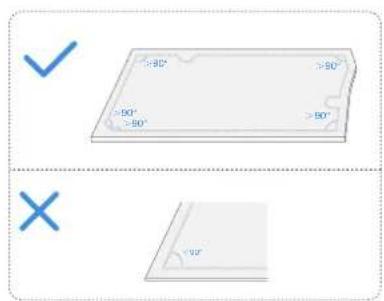
6. In kaart brengen voltooien
natural_image
Illustration of a person using a small car near a large circular object with a grid, no text or symbols presentnatural_image
Illustration of a person standing on a small boat with a small boat nearby, connected to a rectangular area with a small car and dashed blue lines (no text or symbols)9. Een pad aanmaken
natural_image
Blue icon of a car with motion lines and a grid symbol (no text or numbers)② Schema

The image contains no text. The horizontal line is a stylistic or background element and must be ignored according to the rules.
③ Maaihoogte
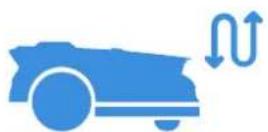
The image contains no text. The horizontal lines are stylistic or background elements and must be ignored according to the rules.
natural_image
Blue icon depicting a car charging at a junction with a lightning bolt (no text or symbols)The image contains no legible text or symbols. According to Rule 4 (Edge Noise Strategy), since the ground truth is not clearly visible, the OCR should output nothing.
Therefore, the corrected OCR text is:
```text [No text detected]
6 Regensensor

The image contains no legible text or symbols. According to Rule 4 (Edge Noise Strategy), since the ground truth is not clearly visible, the OCR should output nothing.
Therefore, the corrected OCR text is:
```text [No text detected]
natural_image
Blue icon of a car emitting water droplets next to an hourglass (no text or symbols)The image contains no text. The horizontal line is a stylistic or background element and must be ignored according to the rules.
8 Dieren beschermen
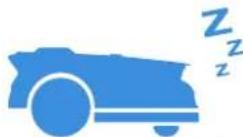
The image contains no legible text or symbols. According to Rule 4 (Edge Noise Strategy), since the ground truth is not clearly visible, the OCR should output nothing.
Therefore, the corrected OCR text is:
```text [No text detected]

The image contains no legible text or symbols. According to Rule 4 (Edge Noise Strategy), since the ground truth is not clearly visible, the OCR should output nothing.
Therefore, the corrected OCR text is:
```text [No text detected]

The image contains only a stylistic horizontal line, which must be ignored according to the rules. According to Rule 2, such lines must be ignored and not represented by underscores or any other character in the OCR output.
Therefore, the corrected OCR text is:
[empty string]

The image contains no text. The horizontal line is a stylistic or background element and must be ignored according to the rules.
Opmerking:
flowchart
graph TD
    A["Left Arrow"] --> B["Center Point"]
    B --> C["Right Arrow"]
③ Maaien hervatten
OF
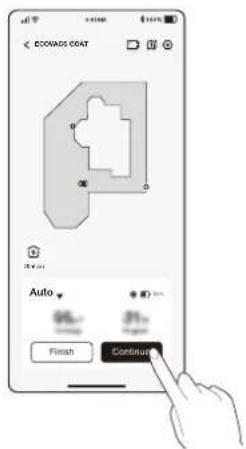
natural_image
Line drawings of two different robotic car parts with visible blades and control buttons (no text or symbols)③ RTK-referentiestation
natural_image
Simple diagram of a vertical pole with a blue checkmark and scattered triangles below (no text or symbols)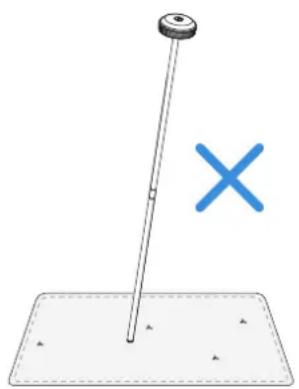
natural_image
Simple diagram showing a pole with a cross symbol, no text or labels presentnatural_image
Technical illustration of a tracked vehicle with visible wheels and a close-up inset showing mechanical components (no text or symbols)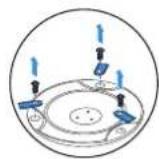
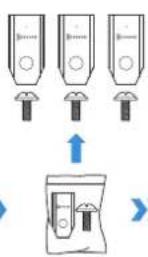
(
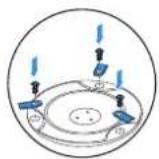
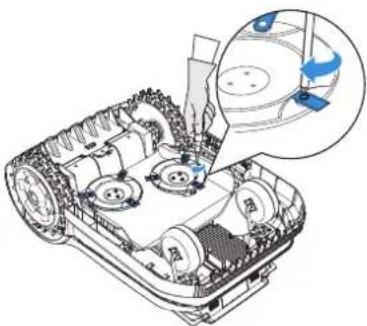
natural_image
Technical line drawing of a tracked vehicle showing internal components and a magnified inset (no text or symbols)- Technische gegevens
| Basisinformatie | Productnaam Robotmaaier | ||
| Model GPR11 GPR12 | |||
| Merk ECOVACS | |||
| Afmetingen: Lengte (mm) × breedte (mm) × hoogte (mm) | 680 × 460 × 310 | ||
| Nettogewicht (kg) (inclusief batterij) 15,8 | |||
| Maaierparameters | Nominale spanning 37,8 V | --- | |
| Maaicapaciteit ( m^2 ) | 1600 3000 | ||
| Maaibreedte (cm) 33 | |||
| Maaihoogte (cm) 3-9 | |||
| Oplaadtijd (min.) 45±5 | |||
| Geluidsemissies | Gemeten geluidsvermogensniveau L_WA | 60 dB(A) | |
| Onzekerheden in geluidsvermogen K_WA | 3 dB(A) | ||
| Geluidsdrukniveau L_PA 52 dB(A) | |||
| Onzekerheden in geluidsdrukniveau K_WA | 3 dB(A) | ||
| ConnectiviteitFrequentiebereik | Bluetooth® 2400 MHz ~ 2483,5 MHz | ||
| Wifi 2400 MHz ~ 2483,5 MHz | |||
| Cellulair netwerk (aangekocht) | WCDMA: BAND I: Uplink: 1920-1980 MHz, Downlink: 2110-2170 MHzBAND VIII: Uplink: 880-915 MHz, Downlink: 925-960 MHzLTE: E-UTRABAND 1: Uplink: 1920-1980 MHz, Downlink: 2110-1880 MHz E-UTRABAND 3: Uplink: 1710-1785 MHz, Downlink: 1805-1880 MHz E-UTRABAND 7: Uplink: 2500-2570 MHz, Downlink: 2620-2690 MHz E-UTRABAND 8: Uplink: 880-915 MHz, Downlink: 925-960 MHz E-UTRABAND 20: Uplink: 832-862 MHz, Downlink: 791-821 MHz E-UTRABAND 28: Uplink: 703-748 MHz, Downlink: 758-803 MHz E-UTRABAND 38: Uplink: 2570-2620 MHz, Downlink: 2570-2620 MHz E-UTRABAND 40: Uplink: 2300-2400 MHz, Downlink: 2300-2400 MHzBeschikbare frequentiebanden voor LTE-band 28 in Europa zijn 703-736 MHz (TX), 758-791 MHz (RX) | ||
| RTK(GNSS) GPS, Beidou, Galileo, GLONASS | |||
| RTK(LoRa) 863-870 MHz | |||
| MAX.radiofrequentievermogen | Bluetooth® ≤20 dBm | ||
| Wifi ≤20 dBm | |||
| Cellulair netwerk (aangekocht) | WCDMA:+24dBm+1.7/-3.7dBLTE: E-UTRA Band28: 23 dBm+2.7/-3.2dB andere banden: 23 dBm ±2.7 dB | ||
| LoRa in RTK ≤14 dbm(25 mw) | |||
| Aandrijfmotor | Nominale snelheid (omw./min) | 34,6 | |
| Topsnelheid (omw./min) | 60,5 | ||
| Messenmotor Snelheid (omw./min) | 3000 | ||
Huomaa:
2. Wi-Fi-yhteys
natural_image
Illustration of a handheld device with wireless signal icons and a hand holding a smartphone (no text or symbols present)natural_image
Technical illustration of a mechanical assembly with bolts and a base plate (no text or symbols)natural_image
Technical line drawing of a mechanical device with a vertical shaft and mounting base (no text or symbols)natural_image
Technical diagram of a mechanical assembly with a magnified inset showing internal components (no text or symbols)natural_image
Diagram showing two identical mechanical components with directional arrows indicating motion or force (no text or symbols)natural_image
Technical diagram showing a mechanical component and its cross-sectional view with labeled dimensions (no text or symbols present)4 Leikkurin lataus
natural_image
Line drawing of a robotic lawn mower with power supply and battery, mounted on a flat base (no text or symbols)|308FI
3.2 Kartoitus
natural_image
Illustration of a person standing next to a small car and a person lying on the ground, with no visible text or symbols.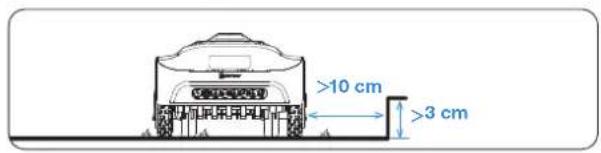
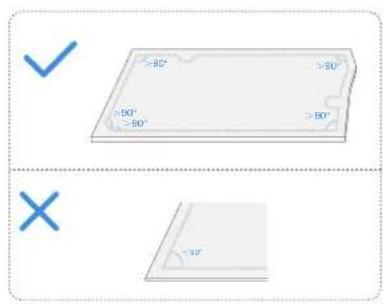
natural_image
Illustration of a person standing near a car and a circular water feature (no text or symbols)natural_image
Illustration of a person standing on a tree in a garden, connected to a small boat and a dashed box (no text or symbols)9. Luo polku
natural_image
Blue icon of a car with a grid symbol, no text or symbols present2 Aikataulu

The image contains no text. The horizontal line is a stylistic or background element and must be ignored according to the rules.
3 Leikkuukorkeus
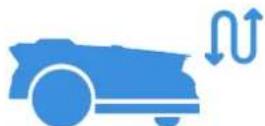
The image contains only stylistic horizontal lines, which are background or decorative elements and not text. According to Rule 2, such lines must be ignored by the OCR result. Therefore, the correct OCR output is empty.
(no text)
natural_image
Blue icon depicting an electric car charging at a plug, with a lightning bolt symbol nearby (no text or labels)[Non-Text]
6 Sadeanturi

The image contains no legible text or symbols. According to Rule 4 (Edge Noise Strategy), since the GT has no visible text, the OCR should not output any characters. Therefore, the corrected OCR text is:
[Empty String]
7 Sadeviive
natural_image
Blue icon of a car emitting water droplets next to a clock (no text or symbols)The image contains no legible text or symbols. According to the guidelines, non-text figures and diagrams must be ignored. Therefore, the correct OCR output is an empty string.
⑧ Eläinten suojelu
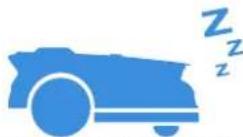
The image contains no legible text or symbols. According to the guidelines, non-text figures and diagrams must be ignored. Therefore, the correct OCR output is an empty string.

The image contains no legible text or symbols. According to Rule 4 (Edge Noise Strategy), since the ground truth is not clearly visible, the OCR should output nothing.
Therefore, the corrected OCR text is:
```text [No text detected]
The image contains only a stylistic horizontal line, which must be ignored according to Rule 2. No text or placeholder characters should be output.
The image contains no legible text or symbols. According to Rule 4 (Edge Noise Strategy), since the ground truth is a non-textual graphic and does not contain any characters, punctuation, or symbols that can be reliably extracted from it. Therefore, the correct OCR output must reflect the absence of any content.
[No text detected]
Huomaa:
flowchart
graph TD
    A["Left Arrow"] --> B["Center Point"]
    B --> C["Right Arrow"]
5. Vianmääritys
natural_image
Line drawings of two robotic car parts with blue accents, showing front and side views (no text or symbols)3 RTK-viiteasema
natural_image
Simple diagram of a vertical pole with a blue checkmark and scattered triangles below (no text or symbols)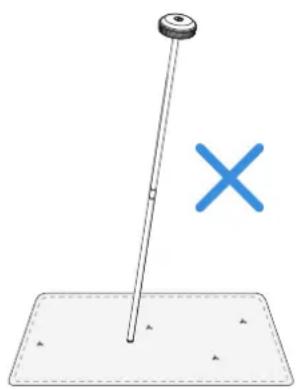
natural_image
Simple diagram showing a pole with a cross symbol, no text or labels present6.3 Kausihuolto
1 Talvisäilytys
ECOVACS GOAT
flowchart
graph TD
    A["Top view: Internal tank with valve and sensor"] --> B["Arrow pointing to next panel"]
    B --> C["Arrow pointing to battery unit"]
    C --> D["Arrow pointing to next panel with switch"]
    D --> E["Arrow pointing to final tank with sensors and battery"]
7. Tekniset tiedot
Save the trouble for return. Contact us, we are here to help!
Ecovacs Home Service Robotics Co., Ltd.
No.518 Songwei Road, Wusongjiang Industry Park, Guoxiang Street, Wuzhong District, Suzhou, Jiangsu, China.
451-2337-0706