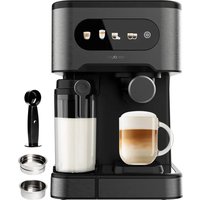
Power Espresso 20 ColdBrew - Coffee machine CECOTEC - Free user manual and instructions
Find the device manual for free Power Espresso 20 ColdBrew CECOTEC in PDF.


User questions about Power Espresso 20 ColdBrew CECOTEC
0 question about this device. Answer the ones you know or ask your own.
Ask a new question about this device
Download the instructions for your Coffee machine in PDF format for free! Find your manual Power Espresso 20 ColdBrew - CECOTEC and take your electronic device back in hand. On this page are published all the documents necessary for the use of your device. Power Espresso 20 ColdBrew by CECOTEC.
USER MANUAL Power Espresso 20 ColdBrew CECOTEC
Cafeteras express /Espresso coffee machines
natural_image
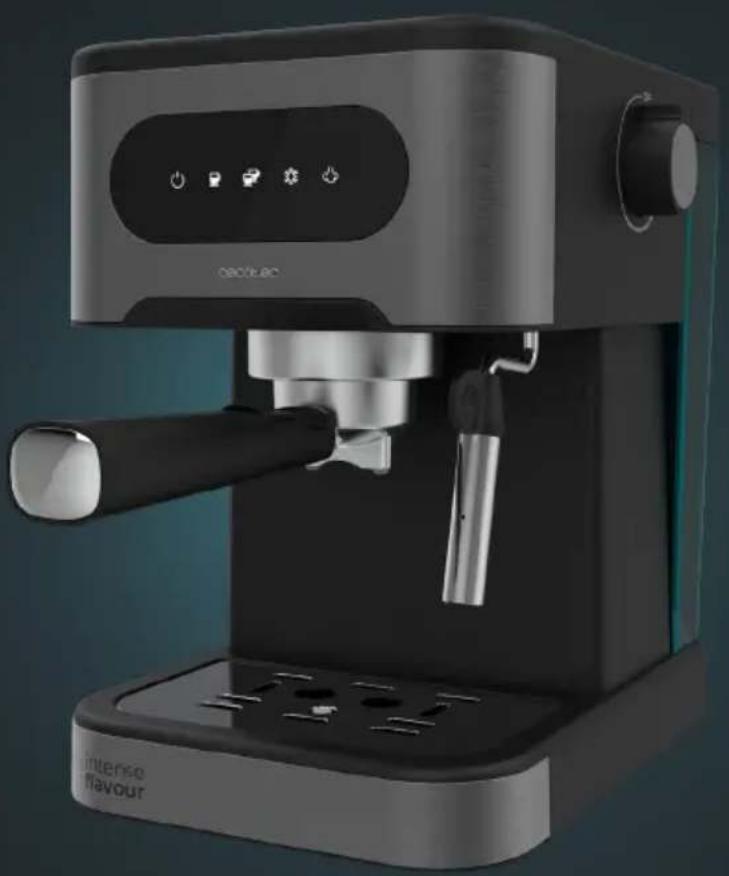
Exterior view of a modern espresso machine with control panel and buttons (no text or symbols on the device itself)Safety instructions 7
-
Parts and components 41
-
Before use 41
-
Operation 42
-
Cleaning and maintenance 44
-
Troubleshooting 46
-
Technical specifications 47
-
Disposal of old electrical
and electronic appliances 47
-
Technical support and warranty 49
-
Copyright 48
SOMMAIRE
Read these instructions thoroughly before using the appliance. Keep this instruction manual for future reference or new users.
- All safety instructions must be closely followed when using the appliance.
-
Incorrect or improper use can be dangerous for the user and damage the appliance.
-
Ensure that the mains voltage matches the voltage specified on the device rating label and that the plug is earthed.
- Place the appliance on a dry, stable, flat, heat-resistant surface.
- This appliance is designed for domestic use only and is not intended for bars, restaurants, farmhouses, hotels, motels, and offices.
- Do not immerse the cable, plug, or any other non-removable part of the device in water or any other liquid or expose electrical connections to water. Make sure your hands are dry before handling the plug or switching on the device.
- Do not use the appliance if its cable, plug, or housing are damaged, nor after it malfunctions or has been dropped or damaged in any way.
- Check the power cable regularly for visible damage. If the cable is damaged, it must be repaired by the official Cecotec Technical Support Service to avoid any type of danger.
- Do not try to repair the appliance by yourself. Contact the official Cecotec Technical Support Service for advice.
- Do not cover the appliance during operation and do not place heavy objects on it.
- Do not use the appliance under the following circumstances:
A. On or near a gas or electric hob, in heated ovens, or near open flames.
B. On soft surfaces (such as carpets) or where it may tip over during use.
C. Outdoors or in areas with high humidity levels.
- Do not use any accessory that has not been recommended or provided by Cecotec, as they might cause injuries or damage.
CAUTION: hot surface. The temperature of accessible surfaces may be high while the appliance is in use and could cause burns. Do not touch hot surfaces during operation or immediately after.
- When filling the water tank, be careful to avoid spillage, especially on the cord and electrical parts of the appliance.
- Warning: the filling opening must not be opened during operation.
- Do not insert coffee while the machine is in operation.
- Do not operate the appliance without water.
- Do not move or turn the appliance off during operation.
- Do not let the cable hang over the edge of the working surface or worktop and prevent it from touching hot surfaces.
- Switch off the appliance and unplug it from the mains when not in use or when cleaning, before changing accessories, disassembling, or assembling the product. Allow it to cool down completely before attaching or removing parts and before cleaning the appliance.
- Never leave the device unattended during use. Unplug the device after use and when you leave the room where it is installed.
- Cleaning and maintenance tasks must not be carried out by children.
- The device is not intended to be used by children. Keep this appliance and its power cable out of their reach.
- This product can be used by children and people with reduced physical, sensory, or mental capabilities or lack of experience and knowledge, as long as they have been given supervision or instruction concerning the use of the appliance in a safe way and understand the hazards involved.
- Supervise children to prevent them from playing with the appliance. Close supervision is necessary when the appliance is being used by or near children.
- The device must not be submerged.
- Warning: this product has undergone a quality control previous to its commercialisation with the aim of ensuring
its correct operation. After the quality control testing, the appliance is cleaned thoroughly, therefore, although it is unlikely to occur, there could be rests of water drops.
INSTRUCTIONS DE SÉCURITÉ
- Water tank cover
- Water tank
- Steam knob
- Control panel
- Cup/mug tray
- Steamer
- Drip tray
- Single coffee filter
- Double coffee filter
- Portafilter
- Portafilter handle
- Measuring spoon with tamper
Fig. 2
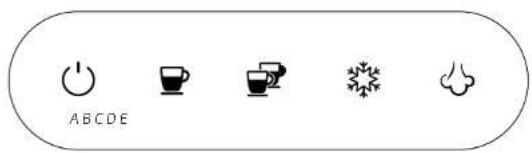
A. Power icon
B. Single coffee icon
C. Double coffee icon
D. ColdBrew Icon (cold espresso)
E. Steam icon
NOTE:
The graphics in this manual are schematic representations and may not exactly match the device.
2. BEFORE USE
- This appliance is packaged in a way as to protect it during transport. Take the appliance out of its box and remove all packaging materials. You can keep the original box and other packaging elements in a safe place. This will help you prevent damage to the appliance when transporting it in the future. In case the original packaging is disposed of, make sure all packaging materials are recycled accordingly.
- Make sure all parts and components are included and in good conditions. If there is any piece missing or in bad conditions, contact the official Cecotec Technical Support Service immediately.
ENGLISHENGLISH
Box content
- Espresso coffee machine
- Instruction manual
3. OPERATION
First use
- Fill the tank with water.
NOTE: make sure the water does not exceed the MAX, mark on water tank.
-
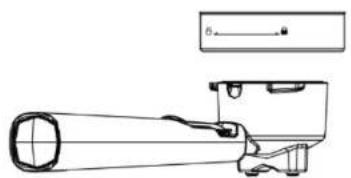
Place one of the filters inside the portafilter, without coffee powder. Next, insert the portafilter into the appliance head and turn it until it clicks into position. The portafilter handle must be aligned with the locking position (Fig. 3).
-
Plug the machine into a mains socket and press the power icon ⚙. The machine will beep once.
-
Then the coffee brewing icons and will flash three times, and the machine will start to preheat.
-
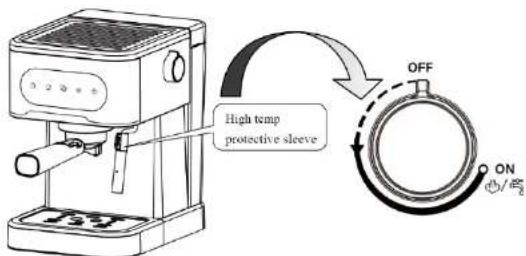
Make sure the steam knob is in the OFF position.
NOTE: If it is not, all five icons on the control panel will start flashing at the same time and the machine will not start.
-
When the coffee brewing icons remain fixed, press the single coffee icon 📋 to dispense hot water and clean the filter or the cup into which the coffee is to be poured.
-
Once the machine has finished dispensing water, throw away the remaining water and clean all containers thoroughly.
-
Now, the machine is ready to be used.
Warning: when activating the pump for the first time, the appliance may make some noises which will disappear after 20 seconds. This is because the appliance is releasing air and is completely normal, it does not affect the operation.
Preparing espresso coffee
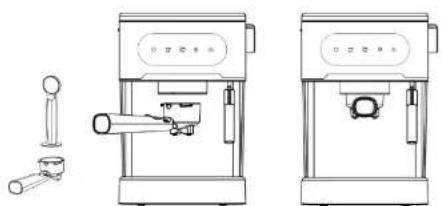
- While the appliance is preheating, fill the filter with ground coffee (neither too coarse nor too fine) using the measuring spoon, then compress it with the tamper side. Clean any coffee residue from the edge of the portalfilter with a brush or by hand. Use one of the filters depending on the amount of coffee you want to prepare. For one cup of coffee, use the single coffee filter, for two cups, use the double coffee filter.
- Insert the portafilter into the machine head and lock it securely into position. After that, place a cup under the coffee spout. Fig. 4
1. Hot espresso
- To prepare a hot single espresso, press the single coffee icon .
- The corresponding icon will start flashing, indicating that the appliance is preheating.
- When the icon is fixed, the appliance will start brewing coffee.
- If you want to prepare a double espresso, press the double coffee icon
2. Cold Brew
To prepare a cold espresso, wait until all icons on the control panel light up and press the ColdBrew Icon ✿
- Once the desired amount of espresso has been dispensed, press the icon again to stop the coffee dispensing.
- The maximum duration of the extraction process shall be 60 seconds.
NOTE: for best results, it is recommended to use cold water from the fridge and to prepare cold espresso before preparing hot espresso.
- Make sure you have positioned the cup correctly under the coffee spout.
- Wait for the coffee to be completely extracted.
Milk frothing function
- To froth milk, first press to switch on the appliance.
- Next, activate the steam function by pressing the steam icon ⚙️. ⚙️ will start flashing and will not remain steady until the preheating process has been completed.
- Fill a jug one-third full with cold whole milk. Then, insert the steamer 1 cm below the surface of the milk.
- Finally, turn the steam knob slowly until steam starts coming out of the steamer. Fig. 5
Note: the steam flow can be adjusted according to your preferences. Allow the steamer to emit a little water or steam before frothing the milk.
- Once the milk has reached a temperature of about 75°C and a layer of froth starts to form slowly turn the steam knob to the OFF position and press the steam icon stop the steam output.
Hot water function
- To activate the hot water function, first press to switch on the appliance.
- Then press and hold the steam icon 403 seconds.
- After that turn the steam knob to the ON position to dispense water through the steamer. Fig. 5
- Once the desired amount of hot water has been dispensed, turn the steam knob to the OFF position.
ENGLISHENGLISH
Memory function
- Press and hold the single coffee icon 📋 for 3 seconds to enter the setting mode for the amount of coffee dispensed.
- When the machine has preheated, the single coffee and the double coffee icons will stop flashing and remain fixed.
- After that, press and hold the single coffee icon 📁 to start brewing coffee. Once the desired amount of espresso has been dispensed, press the single coffee icon again
- The machine will beep, indicating that the dispense time and dispensed amount of coffee have been saved correctly.
- The next time you press the single coffee icon 📋 to brew coffee, the machine will operate according to the last saved setting.
NOTE
- Only a maximum dispensing time of approx. 60 seconds can be set by default.
Do not stop the coffee dispensing too soon, since if the set dispensing time is insufficient, the setting will not be saved. - Be sure to dispense a continuous amount of coffee of 40 ml.
NOTE:
- The adjustable dispensing quantity of single espresso coffee ranges from 30 ml to 60 ml.
- If you want to activate the memory function to prepare a double espresso, follow the steps above, but press the double coffee icon 📄
NOTE: the adjustable dispensing quantity of double espresso coffee ranges from 60 ml to 90 ml.
Restore factory settings
- If you want to restore factory settings, press, and hold, at the same time, the single coffee icon and the steam icon for 3 seconds.
- Both icons will light up and the appliance will beep, indicating that the factory settings have been reset correctly.
4. CLEANING AND MAINTENANCE
- Unplug the appliance and allow it to cool down completely before cleaning.
- Clean the outer housing of the machine with a damp cloth or sponge.
Do not use alcohol or cleaning solvents or immerse the machine in water for cleaning. - Remove the portafilter by turning it to the unlocked position and remove the coffee grounds from the filter.
Descaling
To ensure that the machine continues to work properly, that the internal pipes are clean, and that the coffee retains its full flavour, it is necessary to descale the machine regularly. To know exactly when to do this, the machine will display a descaling warning when it has performed 300 complete extraction cycles. During this warning signal, all icons will start flashing and the machine will beep 5 times. It will then return to its normal operating state.
NOTE: the descaling warning will be displayed every time you switch on the machine if you do not cancel it.
Procedure for removing limescale deposits
- Fill the tank with a solution of water and descaling agent up to the "MAX" mark. The optimum proportion is one part decalcifying liquid to four parts water. For further information, please refer to the manufacturer's label. Use a household descaler. You can also use citric acid instead of descaling liquid. In this case, add three parts citric acid and two parts water.
- Press the double coffee icon to dispense about 100 ml of hot water. Then, switch off the coffee machine and leave the solution to act for 5 minutes.
- Switch the machine back on and repeat step 3 twice, filling the tank with tap water up to the "MAX" mark (there is no need to wait for 5 minutes).
- Once the descaling process has been completed, cancel the warning manually. To do this press and hold upon at the same time for 3 seconds.
Cooling function
- If you wish to prepare coffee after steaming, you must first deactivate the function by pressing the steam icon
- If and flash, the temperature of the machine is too high and needs to be cooled down. To do so, turn the steam knob to the ON position so that the machine starts pumping and dispenses water through the steamer to cool down the machine. Fig. 5
- When the corresponding icon starts flashing quickly, turn the steam knob to the OFF position to stop the cooling process. When the power icon lights up, you can start brewing coffee again.
ENGLISHENGLISH
- TROUBLESHOOTING
| Problem Cause Solution | ||
| No water is coming out | 1. The water tank is empty, or it has not been installed correctly.2. No water has been pumped into the machine.3. The machine has not been preheated. | 1. Fill the water tank, connect the power cable and switch on the appliance.2. Use the hot water function to draw water into the pump and distribute it through the internal lines of the machine until it comes out of the steamer.3. The coffee machine needs to be preheated in order to prepare coffee. Wait until the icons on the control panel stop flashing and become steady. |
| The filter lets less of the coffee's natural oils through | The ground coffee is too coarse or not compact enough. | Change the type of ground coffee and use the measuring spoon to press it well. |
| No steam 1. The steam outlet is blocked.2. The steam function is not activated, or you have not let the preheating process finish. | 1. Insert a pin through the steam outlet.2. Clean the steamer with hot water after frothing the milk.3. Before using the steam function, wait for the preheating process to finish. | |
| Coffee takes a long time to brew or comes out in small quantities | There is too much or too little ground coffee in the filter. | The ground coffee should not be too coarse or too fine, it should be of standard quality and quantity (1 tablespoon of coffee for one cup and 2 tablespoons of coffee for two cups). If the ground coffee is too coarse, it will take longer to extract, and if it is too fine, it will affect the amount of coffee brewed. |
| The coffee machine does not froth milk well. | 1. You have not used whole milk.2. The steam function is activated when the machine is still cold. | 1. Use whole milk.2. You can only use the steam function when the corresponding icon stops flashing and remains steady. |
| No coffee comes out and the coffee and steam icons are flashing | The temperature is too high after using the steam function. | Use the cooling function to cool down the machine. |
| Coffee comes out cold in the preheating mode, the steam function is not deactivated. | Deactivate the steam function and turn the steam knob to the OFF position. | |
6. TECHNICAL SPECIFICATIONS
Product reference: 00268
Product: Power Espresso 20 ColdBrew
Voltage: 220 - 240 V\~
Frequency: 50 Hz
Rated power: 1350 W
Technical specifications may change without prior notification to improve product quality.
Made in China | Designed In Spain
7. DISPOSAL OF OLD ELECTRICAL AND ELECTRONIC APPLIANCES

This symbol indicates that, according to the applicable regulations, the product and/or batteries must be disposed of separately from household waste. When this product reaches the end of its shelf life, you should dispose of the cells/batteries/accumulators and take them to a collection point designated by the local authorities.
Consumers must contact their local authorities or retailer for information
concerning the correct disposal of old appliances and/or their batteries.
Compliance with the above guidelines will help protecting the environment.
ENGLISH
FRANÇAIS
8. TECHNICAL SUPPORT AND WARRANTY
Cecotec shall be liable to the end user or consumer for any lack of conformity that exists at the time of delivery of the product under the terms, conditions, and deadlines established by the applicable regulations.
It is recommended that repairs be carried out by qualified personnel.
If at any moment you detect any problem with your product or have any doubt, do not hesitate to contact the official Cecotec Technical Support Service at +34 963 210 728.
9. COPYRIGHT
The intellectual property rights over the texts in this manual belong to CECOTEC INNOVACIONES, S.L. All rights reserved. The contents of this publication may not. In whole or in part, be reproduced, stored in a retrieval system, transmitted, or distributed by any means (electronic, mechanical, photocopying, recording or similar) without the prior authorization of CECOTEC INNOVACIONES, S.L.
1. PIÈCES ET COMPOSANTS
Image 1
Product: Power Espresso 20 ColdBrew
Voltage: 220 - 240 V-
Frequentie: 50 Hz
Nominaal vermogen: 1350 W
text_image
Technical diagram of a coffee machine with numbered parts for identification and assembly reference.Fig./Img./Abb./Afb./Rys./Obr.1
text_image
ABCDEFig./Img./Abb./Afb./Rys./Obr.2
natural_image
Technical line drawing of a mechanical device with no visible text or symbolsFig./img./Abb./Afb./Rys./Obr.3
natural_image
Technical line drawings of two espresso machines with no visible text or symbolsFig./Img./Abb./Afb./Rys./Obr.4
text_image
High temp protective sleeve OFF ON +/2Fig./Img./Abb./Afb./Rys./Obr. 5
www.cecotec.es