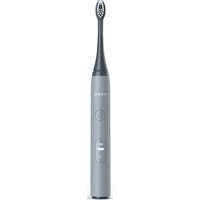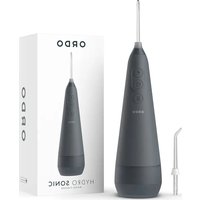
Hydro Sonic - Electric toothbrush Ordo - Free user manual and instructions
Find the device manual for free Hydro Sonic Ordo in PDF.


User questions about Hydro Sonic Ordo
0 question about this device. Answer the ones you know or ask your own.
Ask a new question about this device
Download the instructions for your Electric toothbrush in PDF format for free! Find your manual Hydro Sonic - Ordo and take your electronic device back in hand. On this page are published all the documents necessary for the use of your device. Hydro Sonic by Ordo.
USER MANUAL Hydro Sonic Ordo
At Ordo we are always looking for solutions to reduce packaging and product materials that cannot be recycled effectively. We ask every member of the Ordo family to help us by recycling responsibly.
For more information, please visit ordolife.com/recycling
Troubleshooting
| Problem Possible Cause Solution | ||
| The toothbrush isn't charging. | The charging base may be defective. | Try other sockets or USB ports and charge the toothbrush for at least 8 hours. |
| The USB connector may be defective. | ||
| The charging base is defective. | Replace the charging base within the warranty period. Contact our customer service team. | |
| The toothbrush operates with only a small amount of vibration. | The rechargeable battery is depleted. | Charge the toothbrush for at least 8 hours. |
| The toothbrush does not run for 2 minutes. | The rechargeable battery is depleted. | Charge the toothbrush for at least 8 hours and make sure that the toothbrush is properly placed on the charging base. |
Technical Data
Model number: SP2000-CG, SP2000-RG, SP2000-WS, SP2000-PV, SP2000-MG, SP2000-IB
Charging Base
Input: DC 5V, 1.5W
Protection class: III
IP code: IPX7
Dimensions (LxWxH): 6.2cm x 6.2cm x 4.3cm
Toothbrush
Rechargeable battery: 3.7V, 700mAh
Operating time: 56 cycles/full charge
Timer: 0.5 second pause after 30 seconds, deactivation after 2 minutes.
Dimensions (LxWxH): 2.6 x 2.7 x 25.4cm
Warranty
This product is covered by a 2 year warranty. The extent of the warranty on this product is limited to technical defects caused by faulty production processes. In the event you want to claim warranty, please be sure to contact our customer service team for instructions.
For more information please visit ordolife.com/warranty
60 Day Money Back Guarantee
Satisfaction guaranteed – if you don't love your brush within 60 days we'll give you a refund. For more information on our guarantee please visit ordolife.com/guarantee
Customer Service
For more information on Ordo's products and services please visit ordolife.com
If the device is damaged, defective, in need of repair or you require assistance please contact our customer service team:
Email: hello@ordolife.com
Support: help.ordolife.com
Our team are always happy to help.
WARNINGS & CAUTIONS
Safety Instructions
The toothbrush is designed exclusively for cleaning teeth. It is only intended for private use and is not suitable for commercial purposes. Only use the toothbrush as described in these operating instructions. Any other use is deemed improper and may result in damage to property or even personal injury. The toothbrush is not a child's toy. Ordoclub Ltd accepts no liability for damage caused by improper or incorrect use.
Risk of electric shock
A faulty electrical installation or excessive mains voltage may result in an electric shock.
- Only connect the charging base if the mains voltage of the socket corresponds to the specification on the nameplate.
- The main cord of the charging base cannot be replaced. In the event of damage, the charging base must be disposed of.
- Only connect the charging base to an easily accessible socket so that you can quickly disconnect it from the mains in case of a failure.
- Do not operate the toothbrush and the charging base if they exhibit visible damage or the main cord or USB connector is defective.
- Do not open the housing; instead, have a qualified professional perform any repairs. Contact a qualified workshop for this. Liability and warranty claims are waived in the event of repairs performed by the user, improper connection of the device or incorrect operation.
- Only parts that comply with the original device information may be used for repairs. Electrical and mechanical parts, which are essential for providing protection against sources of danger, are located in this toothbrush.
- The charging base must not be operated with an external timer or with a separate tele-control system.
- Do not immerse the charging base or the main cord in water or other liquids.
- Never touch the USB connector with damp hands.
- Never pull the USB connector out of the socket by the main cord.
- Never use the main cord as a carrying strap.
- Keep the charging base, toothbrush and USB connector away from open flames and hot surfaces.
- Do not kink the main cord and do not lay it over sharp edges.
- Only use the charging base in rooms located indoors.
- Never setup the charging base such that there is a risk of it falling in a bath tub or sink.
- Never attempt to grab the charging base if it has fallen into water. In such a case, immediately disconnect the USB connector.
- Only charge the toothbrush with the enclosed charging base.
- Make sure that children do not insert any objects into the charging base or the hand piece.
- Disconnect the USB connector when you are not using the
charging base, after the charging process, before you clean the toothbrush or in the event of a fault.
Risk of chemical burns
Fluid leaked from the rechargeable battery may lead to chemical burns.
- Do not allow acid from the rechargeable battery to come into contact with skin, eyes or mucous membranes.
- In the event of contact with acid from the rechargeable battery, immediately flush the affected areas with plenty of clean water and seek medical help.
Danger of explosion
Improper handling of rechargeable batteries may cause an explosion.
- Never short circuit rechargeable batteries.
- Never dismantle rechargeable batteries.
- Never throw rechargeable batteries in fire.
- Never expose rechargeable batteries to excessive heat or direct sunlight.
- Do not in any case open the rechargeable batteries.
Danger for children, persons with impaired physical, sensory or mental capacities
e.g. partially disabled persons, older persons with reduced physical and mental capacities, and those lacking experience and knowledge (e.g. older children).
- This toothbrush may be used by children aged 8 years and above, persons with impaired physical, sensory or mental capacities, and those lacking experience and knowledge if they are supervised or have been instructed in how to safely use the toothbrush and have understood the risks associated.
- Cleaning and user maintenance must not be performed by children.
- Keep children under 8 years of age away from the toothbrush.
- Do not leave children unattended while using the toothbrush.
- Do not allow children to play with the toothbrush. Children could swallow small parts and choke.
Risk of injury
Handling the toothbrush improperly may result in injury.
- Lay the main cord so that it does not pose a tripping hazard.
- Immediately replace worn or damaged brush heads to prevent injury to the mouth and tooth area.
Risk of damage
Improper handling of the toothbrush may damage it.
- Do not drop the hand piece. If this does happen, do not use the toothbrush any more. Have it checked by an authorised service provider.
- Turn the toothbrush off when you change the brush head.
- Place the charging base on an easily accessible, level and dry surface.
- Ensure that the main cord, the charging base and the toothbrush do not come into contact with hot surfaces or open flames.
- Stop using the toothbrush if its plastic parts exhibit cracks or breaks or are deformed.
First Use
Checking the toothbrush and package contents.
Risk of damage
If you are not cautious when opening the packaging with a sharp knife or other pointed object, you may damage the toothbrush and injure yourself.
- Be very careful when opening the packaging.
-
Take the toothbrush and its accessories out of the packaging.
-
Check to make sure that all the items are included.
-
Check whether the toothbrush or the individual parts are damaged. If this is the case, do not use the toothbrush. Contact Ordo using the customer service contacts provided.
Deutsch
Recycling
Modelnummer: SP2000-CG, SP2000-RG, SP2000-WS, SP2000-PV, SP2000-MG, SP2000-IB
Ladestation
Kundenservice: help.ordolife.com
Modelnummer: SP2000-CG, SP2000-RG, SP2000-WS, SP2000-PV, SP2000-MG, SP2000-IB
Oplaadbasis
Ingang: DC 5V, 1.5W
Rechargeable battery: 3.7V, 700mAh
Batteria ricaricabile: 3.7V, 700mAh
Supporto: help.ordolife.com
Model Numarası: SP2000-CG, SP2000-RG, SP2000-WS, SP2000-PV, SP2000-MG, SP2000-IB
Şarj Ünitesi
Giriş : DC 5V, 1.5W
Koruma Sinifi: III
IP kodu: IPX7
Ürün Boyutu(UxGxY): 6.2cm x 6.2cm x 4.3cm
Diş Fırçası
Modellnummer: SP2000-CG, SP2000-RG, SP2000-WS, SP2000-PV, SP2000-MG, SP2000-IB
Ladebase
Inngang: DC 5V, 1.5 W
Modellnummer: SP2000-CG, SP2000-RG, SP2000-WS, SP2000-PV, SP2000-MG, SP2000-IB
Laddningsbas
Inmatning: DC 5V, 1.5W
Skyddsklass: III
IP code: IPX7
Dimensioner (LxWxH): 6.2cm x 6.2cm x 4.3cm
Tandborste
Uppladdningsbara batteri: 3.7V, 700mAh
E-post: hello@ordolife.com Support: help.ordolife.com
Modelnummer: SP2000-CG, SP2000-RG, SP2000-WS, SP2000-PV, SP2000-MG, SP2000-IB
Opladningsbase
Indgang: DC 5V, 1,5W
Support: help.ordolife.com
Numer modelu: SP2000-CG, SP2000-RG, SP2000-WS, SP2000-PV, SP2000-MG, SP2000-IB
Stacja ładująca
Apoio: help.ordolife.com
SP2000-CG, SP2000-RG, SP2000-WS, SP2000-PV, SP2000-MG, SP2000-IB
./(قاعدة الشحن.
DC 5V, 1.5W : مدخل
111: درجه الحماية
IPX7 : رمز IP
(LxWxH): 6.2cm x 6.2cm x 4.3cm .: الأبعاد
فرشاة الأseenان.
Welcome to the Oral Care Revolution
text_image
DE Benutzerhandbuch FR Mode d'emploi NL Gebruikershandleiding ES Guía del usuario IT Guida utente TR Kullanici rehberi NO Brukerhändboken SV Användarguide DA Brugervejledning PL Podręcznik użytkownika PT Guia de usuario EL OДНГОЗ ХРНЗТН RU Гид пользователя AR دليل المستخدم ZH 用户指南ordolife.com/sp-instructions
ORDO
HYDRO SONIC
WATER FLOSSER
CONTENTS
English 3
Dansk 31
Deutsch 7
Polski 35
Français 11
Eesti keel 39
Español 15
Русский 43
Nederlands 19
47 العربة
Norsk 23
汉语
51
Svenska 27
Tiếng Việt 55
ENGLISH PRODUCT DESCRIPTION
- Floss tip
- Floss tip collar
- On-demand button
- Power button
- Mode selection button
- Main body
- Water tank body
- Water tank base
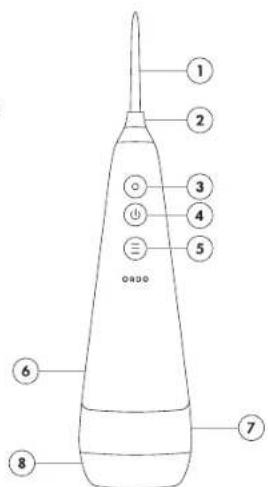
text_image
1 2 3 4 5 6 7 8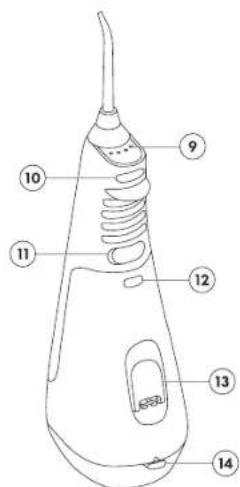
text_image
Diagram of a hairdryer with numbered parts labeled for identification- Mode indicator panel
- Floss tip release button
- USB-C charging port
- Water tank release button
- Water tank cap
- Water tank base release button
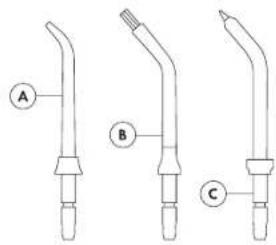
text_image
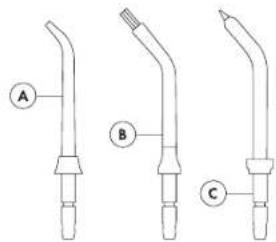
A B CA. Premium Clean – Ideal for excellent everyday cleaning. Suitable for most people.
B. Orthodontic – Tapered bristles help clean around braces, bridges, implants and other dental work.
C. Periodontal – Designed to rinse periodontal pockets, helping to protect against gum disease.
Orthodontic & Periodontal tips sold separately. Our full selection of floss tips are available at ardolife.com
SETTING UP
text_image
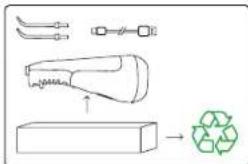
Diagram illustrating a recycling process with labeled components including a funnel, battery, and recycling symbol.(1) Remove all the contents from the box and check you have all parts specified. Make sure you recycle the inner and outer boxes after use.
text_image
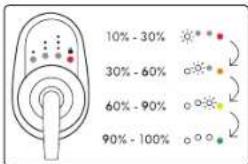
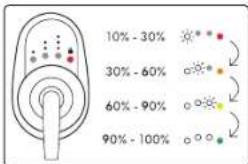
10%-30% 30%-60% 60%-90% 90%-100%(4) During the charging cycle, the lights on the mode indicator panel will follow a sequence as shown in the diagram, to indicate the water flosser's charging status. When the coloured light turns green, the water flosser is fully charged. A full charge will last 30 days when using the water flosser for 2 minutes each day.
text_image
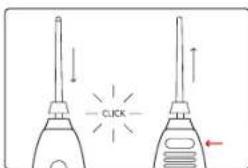
CLICK(2) Simply push the floss tip into the slot at the top of the water flosser, until it clicks into place. To eject, press the floss tip release button on the back of the water flosser, then pull the floss tip out.
natural_image
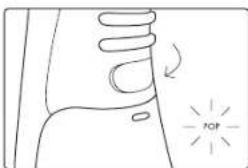
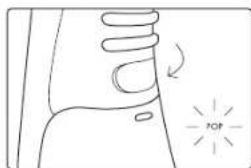
Simple line drawing of a hand with a circular arrow and 'TOP' label, no text or symbols present(5) Once you have charged the water flosser, remove the USB-C charging cable and securely close the cover. Make sure that this is closed properly to avoid water getting inside.

natural_image
Simple line drawing of a mechanical component with a USB symbol and directional arrows (no text or labels)(3) Before using your water flosser, you should charge it for 6 hours. Open the USB-C part cover, then plug in the USB-C connector of the charging cable. Connect the USB-A connector to a power source. Ensure the water flosser is not on prior to charging.

natural_image
Technical line drawing of a mechanical device with a handle and base component (no text or symbols)(6) For travel convenience, you can store your Premium Clean floss tips inside the water tank, as shown in the diagram. Simply push the water tank release button at the top of the water tank and slide off. Inside you will find two slots to securely store your Premium Clean floss tips. To reattach the tank, slide back onto the main body until it clicks into place.
USING YOUR WATER FLOSSER
natural_image
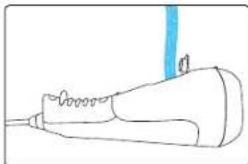
Simple line drawing of a handheld device with a blue vertical line above it (no text or symbols)(1) To fill your water flosser, flip open the cap on the back of the water tank and fill with clean, lukewarm water (under 40°C). You could also add a few drops of Ordo Mouthwash Concentrate for extra freshness. If you use mouthwash, run a full tank of fresh water through the flosser after use, to avoid residue build-up.
text_image
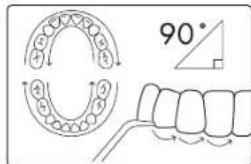
90°(4) Hold the floss tip at a 90° angle to your gum line and pause in between each tooth to ensure a thorough clean. Clean along the gum line as well as between teeth. Clean inside as well as outside surfaces. To get the most from the water tank, do not tilt the water flosser back during use. To help protect your water flosser, it will automatically turn off after running for 2 minutes.
text_image
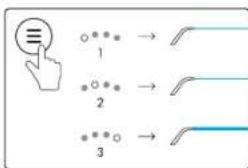
3 1 2 3(2) Short press the mode selection button to scroll through the 3 pressure settings:
1 - Sensitive Mode (low) - recommended for new users.
2 - Daily Clean Mode (medium)
3 - Power Clean Mode (high)
You can change modes whilst using your water flosser.
text_image
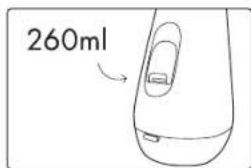
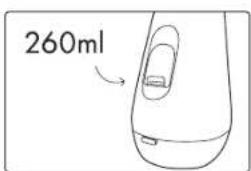
260ml(5) Your water flosser has a 260ml tank capacity, which provides 55 seconds of use. We recommend 2 full tanks per flossing session, one for the top teeth and one for the bottom. Make sure the tank is fully emptied after use and open the cap to let it air dry. Wipe down the floss tip and main body.
text_image
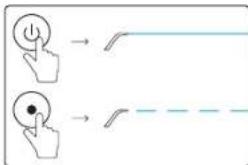
Diagram showing two hand icons with curved arrows indicating movement or transformation, possibly illustrating a UI or control logic.(3) Lean over the sink, place the floss tip in your mouth and part your lips slightly to allow water to flow out. Press the power button to begin flossing. Alternatively, press the on-demand button to control the flow of water – press and hold for a continuous flow and release to stop.
flowchart
graph LR
    A["User Button"] --> B["Password Icon"]
    C["User Button"] --> D["Lock Icon"]
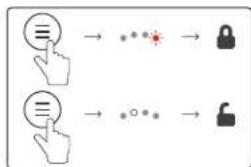
(6) To deactivate your water flosser for travel or storage, press and hold the mode selection button until the red light begins to flash, at which point the Lock Mode is activated. In Lock Mode the lock light will flash 5 times when you short press any button. Simply press and hold the mode selection button again to unlock the device – the last used mode will illuminate once your flosser is unlocked.
CHARGING & MAINTAINENCE

text_image
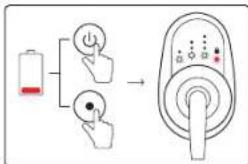
Diagram illustrating battery charging process with battery, power button, and switch mechanism(1) At 30% battery, all the lights on the mode indicator panel will flash 5 times after use. When the water flosser has no power, the lights will also flash 5 times, but the device will not turn on – you need to recharge to a sufficient level before you can continue using the water flosser.
natural_image
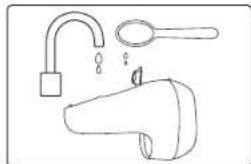
Line drawing of a showerhead with faucet and shower handle (no text or symbols)(4) To clear hard water deposits from within your water flosser, fill the tank with water and add 1 tablespoon of white vinegar. Run the water flosser until the tank is empty, then rinse thoroughly with clean, warm water. Repeat this process every 1 to 3 months, depending on the hardness of your water.
natural_image
Illustration of a hand holding a device with sparkles, no text or symbols present(2) To clean the water tank, first remove it from the main body by pressing the release button at the top of the tank and sliding off. Remove the base from the tank by pushing the release button at the bottom and pulling open. You can clean all parts of the tank with warm, soapy water or place in the dishwasher.
text_image
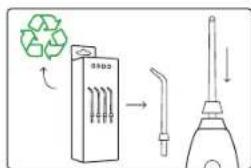
Diagram illustrating recycling and cleaning process with labeled components and directional arrows(5) It is recommended that you replace floss tips when they become worn or dirty, this is usually every 6 months. Replacement tips as well as Orthodontic and Periodontal tips are available at ordolife.com
text_image
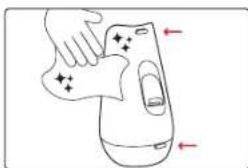
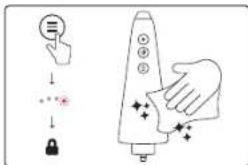
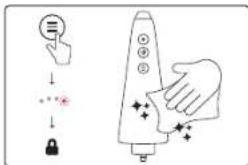
Diagram showing a hand interacting with a rocket-shaped device, with icons for touch, lock, and control buttons.(3) To clean the main body of the water flosser, ensure it is switched off and disconnected from any power source. We recommended activating the Lock Mode for cleaning. To avoid scratching, use a soft, dry or damp cloth to clean the main body.
text_image
Labeled diagram of a medical or laboratory device with numbered parts for identification.text_image
Diagram illustrating a recycling process with labeled components including a funnel, battery, and recycling symbol.natural_image
Simple line drawing of a mechanical component with a USB symbol and directional arrows (no text or labels)natural_image
Simple line drawing of a hand with a knob and a circular indicator labeled 'TOP' (no text or symbols beyond the label)natural_image
Line drawing of a mechanical device with a handle and lever, showing a left-side view of the handle (no text or symbols)natural_image
Simple line drawing of a handheld device with a blue vertical line above it (no text or symbols)text_image
Diagram showing two hand icons with curved arrows indicating movement or transformation, possibly illustrating a UI or control logic.flowchart
graph LR
    A["Button Icon"] --> B["Password Icon"]
    C["Hand Icon"] --> D["Lock Icon"]
text_image
Diagram illustrating battery charging process with battery, power button, and switch leading to next-up of a rotary switch.natural_image
Line drawing of a showerhead with faucet and showerhead (no text or symbols)natural_image
Illustration of a hand pressing down on a device with sparkles (no text or symbols)text_image
Diagram illustrating recycling and cleaning process with labeled components and directional arrowstext_image
Diagram showing a hand interacting with a rocket-shaped device, with icons for touch, lock, and control buttons.text_image
Diagram of a hairdryer with numbered parts labeled for identificationtext_image
Diagram illustrating a recycling process with labeled components including a funnel, battery, and recycling symbol.natural_image
Simple line drawing of a hand with a circular arrow and 'TOP' label, no text or symbols presentnatural_image
Simple line drawing of a mechanical component with a USB symbol and directional arrows (no text or labels)natural_image
Technical line drawing of a mechanical device with a handle and lever mechanism (no text or symbols)natural_image
Simple line drawing of a handheld device with a blue vertical line above it (no text or symbols)text_image
Diagram showing two hand icons with curved arrows indicating movement or transformation, possibly illustrating a UI or control logic.text_image
Diagram illustrating battery charging process with battery, power button, and switch mechanismnatural_image
Line drawing of a showerhead with faucet and showerhead (no text or symbols)natural_image
Illustration of a hand holding a device with sparkles, no text or symbols presenttext_image
Diagram illustrating recycling and cleaning process with labeled components and directional arrowstext_image
Diagram showing a hand interacting with a rocket-shaped device, with icons for touch, lock, and control buttons.text_image
Labeled diagram of a medical or laboratory device with numbered parts for identification.text_image
Diagram illustrating a recycling process with labeled components including a funnel, battery, and recycling symbol.natural_image
Simple line drawing of a mechanical component with a USB symbol and directional arrows (no text or labels)natural_image
Simple line drawing of a hand with a circular arrow and 'TOP' label, no text or symbols presentnatural_image
Technical line drawing of a mechanical device with a handle and base, showing a red arrow indicating direction (no text or symbols)natural_image
Simple line drawing of a handheld device with a blue vertical line above it (no text or symbols)text_image
Diagram showing two hand icons with curved arrows indicating movement or transformation, possibly illustrating a UI or control logic.flowchart
graph LR
    A["User Button"] --> B["Password Icon"]
    C["User Button"] --> D["Lock Icon"]
text_image
Diagram illustrating battery charging process with battery, power button, and switch mechanismnatural_image
Line drawing of a showerhead with faucet and shower handle (no text or symbols)natural_image
Illustration of a hand holding a device with sparkles, no text or symbols presenttext_image
Diagram illustrating recycling and cleaning process with labeled components and directional arrowstext_image
Diagram showing a hand interacting with a rocket-shaped device, with icons for touch, lock, and control buttons.text_image
Diagram of a hairdryer with numbered parts labeled for identificationtext_image
Diagram showing three labeled mechanical or fluidic device components (A, B, C) with no visible text or symbols beyond labels.text_image
Diagram illustrating a recycling process with labeled components including a funnel, battery, and recycling symbol.natural_image
Simple line drawing of a mechanical component with a USB symbol and an arrow indicating direction (no text or labels)natural_image
Simple line drawing of a hand with a knob and a circular indicator labeled 'TOP' (no text or symbols beyond the label)natural_image
Technical line drawing of a mechanical device with a handle and lever mechanism (no text or symbols)natural_image
Simple line drawing of a handheld device with a blue vertical line above it (no text or symbols)text_image
Diagram showing two hand icons with curved arrows indicating movement or transformation, possibly illustrating a UI or control logic.flowchart
graph LR
    A["User Button"] --> B["Password Icon"]
    C["User Button"] --> D["Lock Icon"]
text_image
Diagram illustrating battery charging process with battery, power button, and switch mechanismnatural_image
Line drawing of a showerhead with faucet and showerhead (no text or symbols)natural_image
Illustration of a hand holding a device with sparkles, no text or symbols presenttext_image
Diagram illustrating recycling and cleaning process with labeled components and directional arrowstext_image
Diagram showing a hand interacting with a rocket-shaped device, with icons for touch, lock, and control buttons.text_image
Diagram of a hairdryer with numbered parts labeled 9 through 14- Modusindikatorpanel
- Utløserknapp for tanntråd spiss
- USB-Cladeport
- Utløserknapp for vanntank
- Vanntanklokk
- Utløserknapp for vanntankbase
text_image
A B Ctext_image
Diagram illustrating a recycling process with labeled components including a funnel, battery, and recycling symbol.natural_image
Simple line drawing of a mechanical component with a USB symbol and an arrow indicating direction (no text or labels)(3) Du bør lade den i 6 timer før du bruker vannflosser. Åpne USB-C-portdekselet, plugg deretter inn USB-C-kontakten på ladekabelen. Koble USB-A-kontakten til en strømkilde. Sørg før at vannflosser ikke er på før lading
SJEKK USB-C-PORTEN ER T∅RR F∅R LADINGI
text_image
10%-30% 30%-60% 60%-90% 90%-100%(4) Lysene på modusindikatorpanelet vil falge en sekvens som vist i diagrammet under ladesyklusen, for å indikere ladestatusen til vannflosser. Når det fargede lyset blir grønt, er vannflosser fulladet. En full opplading varer i 30 dager när du bruker vannflosser i 2 minutter hver dag.
natural_image
Simple line drawing of a hand with a knob and a circular indicator labeled 'TOP' (no text or symbols beyond the label)natural_image
Line drawing of a mechanical device with a handle and lever, showing a left-side view of the handle (no text or symbols)natural_image
Simple line drawing of a handheld device with a blue vertical line above it (no text or symbols)text_image
Diagram showing two hand icons with curved arrows indicating movement or sequence, possibly illustrating a UI or control logic.flowchart
graph LR
    A["User Button"] --> B["Password Icon"]
    C["User Button"] --> D["Lock Icon"]
LADING OG VEDLIKEHOLD
text_image
Diagram illustrating battery charging process with battery, power button, and switch mechanismnatural_image
Line drawing of a showerhead with faucet and shower handle (no text or symbols)natural_image
Illustration of a hand holding a device with sparkles, no text or symbols presenttext_image
Diagram illustrating recycling and cleaning process with labeled components and directional arrows(5) Det anbefales at du bytter tanntråd spisser når de blir slitte eller skitne, dette er vanligvis hver 6. måned. Erstatning stips samt ortodontiske og periodontale tips er tilgjengelig på ordolife.com
text_image
Diagram showing a hand interacting with a rocket-shaped device, with icons for touch, lock, and control buttons.text_image
Labeled diagram of a medical or laboratory device with numbered parts for identification.text_image
Diagram illustrating a recycling process with labeled components including a funnel, battery, and recycling symbol.natural_image
Simple line drawing of a mechanical component with a USB symbol and an arrow indicating direction (no text or labels)natural_image
Simple line drawing of a hand with a knob and a circular indicator labeled 'TOP' (no text or symbols beyond the label)natural_image
Line drawing of a mechanical device with a handle and lever, showing a left-side view of the handle (no text or symbols)natural_image
Simple line drawing of a handheld device with a blue vertical line above it (no text or symbols)text_image
Diagram showing two hand icons with curved arrows indicating movement or transformation, possibly illustrating a UI or control logic.text_image
Diagram illustrating battery charging process with battery, power button, and switch mechanismnatural_image
Line drawing of a showerhead with faucet and shower handle (no text or symbols)natural_image
Illustration of a hand holding a device with sparkles, no text or symbols presenttext_image
Diagram illustrating recycling and cleaning process with labeled components and directional arrowstext_image
Diagram showing a hand interacting with a rocket-shaped device, with icons for touch, lock, and control buttons.text_image
Labeled diagram of a medical or laboratory device with numbered parts for identification.text_image
Diagram illustrating a recycling process with labeled components including a funnel, battery, and recycling symbol.natural_image
Simple line drawing of a mechanical component with a USB symbol and directional arrows (no text or labels)natural_image
Simple line drawing of a hand with a knob and a circular indicator labeled 'TOP' (no text or symbols beyond the label)natural_image
Line drawing of a mechanical device with a handle and lever, showing a left-side view of the handle (no text or symbols)natural_image
Simple line drawing of a medical or laboratory device with no visible text, numbers, or symbolstext_image
Diagram showing two hand positions with directional arrows and a curved line, likely illustrating a motion or state transition.flowchart
graph LR
    A["User Button"] --> B["Password Icon"]
    C["User Button"] --> D["Lock Icon"]
text_image
Diagram illustrating battery charging process with battery, power button, and switch leading to next-up of a rotary switch.natural_image
Line drawing of a showerhead with faucet and shower handle (no text or symbols)natural_image
Illustration of a hand holding a device with sparkles, no text or symbols presenttext_image
Diagram illustrating recycling and cleaning process with labeled components and directional arrowstext_image
Diagram showing a hand interacting with a rocket-shaped device, with icons for touch, lock, and control buttons.text_image
Labeled diagram of a medical or laboratory device with numbered parts for identification.text_image
Diagram illustrating a recycling process with labeled components including a funnel, battery, and recycling symbol.natural_image
Simple line drawing of a hand with a circular arrow and 'TOP' label, no text or symbols presentnatural_image
Simple line drawing of a mechanical component with a USB symbol and directional arrows (no text or labels)natural_image
Technical line drawing of a mechanical device with a handle and base component (no text or symbols)natural_image
Simple line drawing of a handheld device with a blue vertical line above it (no text or symbols)text_image
Diagram showing two hand icons with curved arrows indicating movement or transformation, possibly illustrating a UI or control logic.flowchart
graph LR
    A["Button Icon"] --> B["Password Icon"]
    C["Hand Icon"] --> D["Lock Icon"]
text_image
Diagram illustrating battery charging process with battery, power button, and switch leading to next-up of a rotary switch.natural_image
Line drawing of a showerhead with faucet and showerhead (no text or symbols)natural_image
Illustration of a hand holding a device with sparkles, no text or symbols presenttext_image
Diagram illustrating recycling and cleaning process with labeled components and directional arrowstext_image
Diagram showing a hand interacting with a rocket-shaped device, with icons for touch, lock, and control buttons.text_image
Diagram of a hairdryer with numbered parts labeled for identificationtext_image
Diagram illustrating a recycling process with labeled components including a funnel, battery, and recycling symbol.natural_image
Simple line drawing of a hand with a knob and a circular indicator labeled 'TOP' (no text or symbols beyond the label)natural_image
Simple line drawing of a mechanical component with a USB symbol and an arrow indicating direction (no text or labels)natural_image
Line drawing of a mechanical device with a handle and lever, showing a left-side view of the handle (no text or symbols)natural_image
Simple line drawing of a medical or laboratory device with no visible text, numbers, or symbolstext_image
Diagram showing two hand positions with directional arrows and a curved line, likely illustrating a motion or state transition.(3) Kummardugeülevalamu,
flowchart
graph LR
    A["User Button"] --> B["Password Icon"]
    C["User Button"] --> D["Lock Icon"]
text_image
Diagram illustrating battery charging process with battery, power button, and switch mechanismnatural_image
Illustration of a hand pressing down on a device with sparkles (no text or symbols)text_image
Diagram showing a hand interacting with a rocket-shaped device, with icons for touch, lock, and control buttons.natural_image
Line drawing of a showerhead with faucet and bucket (no text or symbols)text_image
Diagram illustrating recycling and cleaning process with labeled components and directional arrowstext_image
Diagram of a hairdryer with numbered parts labeled for identificationtext_image
Diagram illustrating the process of cleaning a plastic bag with labeled components and recycling symbolnatural_image
Diagram showing a mechanical component with a USB symbol and directional arrows, no text or labels present.natural_image
Simple line drawing of a hand with a circular arrow and 'POP' label, no text or symbols presentnatural_image
Line drawing of a mechanical device with a handle and lever, showing a left-side view of the handle (no text or symbols)natural_image
Simple line drawing of a medical or laboratory device with no visible text, numbers, or symbolstext_image
Diagram showing two hand icons with curved arrows indicating movement or transformation, possibly illustrating a UI or control logic.flowchart
graph LR
    A["User Button"] --> B["Password Icon"]
    C["User Button"] --> D["Lock Icon"]
text_image
Diagram illustrating battery charging process with battery, power button, and switch mechanismnatural_image
Line drawing of a showerhead with faucet, handle, and water droplets (no text or symbols)natural_image
Illustration of a hand pressing down on a device with sparkles (no text or symbols)text_image
Diagram illustrating recycling and oil drop process with labeled components and directional arrowstext_image
Diagram illustrating a hand interacting with a rocket, showing finger states and control buttonstext_image
Diagram illustrating a mechanical assembly with labeled components and a recycling symboltext_image
Diagram showing a hand pressing a button with a 'POP' label and directional arrow, likely illustrating a process or action.natural_image
Line drawing of a mechanical device with a handle and lever, showing a left-side view of the handle (no text or symbols)natural_image
Simple line drawing of a mechanical component with a USB symbol and directional arrow (no text or labels)natural_image
Simple line drawing of a tool or device with a blue tip, no text or symbols present(5) (يُمْتَوْ جِيهاز تُعَفَّفِ الْأَسْتَانِ الْمَالَيْ عَلَى خَرَانِ سَحْتَ 260 مِلٌ، وَالِيْ يُمْتَوْ 55 ثَائِةِ مِنْ لِاسْتَدَامِ. نُصْمِيْ بِسْتَمْضَامِ خَرَانِ مِمْتَّدِين لِكَلْ جَلَّة تُعَفَّفِ الْأَسْتَانِ، وَاحِد لَا أَسْتَانِ الطُوية وَالِيْ وَالْخَرَانِ لَا أَسْتَانِ السُّقَلَةً. تَأَكَدِ مِنْ إِقْرَاعُ خَرَانِ بالَكَالْمَلْ بِعْدِ لِاسْتَدَامِ وَاقُنْجُعْهُ لِتَزِكُ بِجْفِ يُلُ الْبُواٍدِ اَسْحُ طَرْفُ الْجُهازِ وَالْجُسْمِ الرُّ SYSI.
text_image
260mltext_image
Diagram showing two hand gestures with icons and line patterns, illustrating a state transition or action sequence.natural_image
Line drawing of a faucet with a handle and water droplets, no text or symbols presenttext_image
Diagram illustrating battery charging process with battery, power button, and switch mechanismtext_image
Diagram illustrating recycling and cleaning process with labeled components and directional arrowsnatural_image
Illustration of a hand holding a device with sparkles, no text or symbols presenttext_image
Diagram illustrating a hand pressing a button on a device with control buttons and warning symbols汉语 产品描述
text_image
Diagram of a medical or laboratory device with numbered parts labeled 9 through 14text_image
Diagram illustrating a recycling process with labeled components including a funnel, battery, and recycling symbol.natural_image
Simple line drawing of a hand with a knob and a circular indicator labeled 'TOP' (no text or symbols beyond the label)natural_image
Simple line drawing of a mechanical component with a USB symbol and an arrow indicating direction (no text or labels)natural_image
Diagram of a hand holding a small object with a red arrow indicating direction, alongside a close-up of a mechanical component (no text or symbols present)natural_image
Simple line drawing of a handheld device with a blue vertical line above it (no text or symbols)text_image
Diagram showing two hand icons with curved arrows indicating movement or transformation, possibly illustrating a UI or control logic.flowchart
graph LR
    A["User Button"] --> B["Password Icon"]
    C["User Button"] --> D["Lock Icon"]
text_image
Diagram illustrating battery charging process with battery, power button, and switch mechanismnatural_image
Line drawing of a showerhead with faucet and shower handle (no text or symbols)natural_image
Illustration of a hand pressing down on a device with sparkles (no text or symbols)text_image
Diagram illustrating recycling and cleaning process with labeled components and directional arrowstext_image
Diagram showing a hand interacting with a rocket-shaped device, with icons for touch, lock, and control buttons.text_image
Diagram of a hairdryer with numbered parts labeled for identificationtext_image
Diagram illustrating a recycling process with labeled components including a funnel, battery, and recycling symbol.natural_image
Simple line drawing of a hand with a knob and a circular indicator labeled 'TOP' (no text or symbols beyond the label)natural_image
Simple line drawing of a mechanical component with a USB symbol and an arrow indicating direction (no text or labels)natural_image
Diagram of a hand holding a small object with a red arrow indicating direction, alongside a close-up of a mechanical component (no text or symbols present)natural_image
Simple line drawing of a medical or laboratory device with no visible text, numbers, or symbolstext_image
Diagram showing two hand positions with directional arrows and a curved line, likely illustrating a motion or control system.flowchart
graph LR
    A["User Button"] --> B["Password Icon"]
    C["User Button"] --> D["Lock Icon"]